air conditioning LEXUS RX450h 2015 User Guide
[x] Cancel search | Manufacturer: LEXUS, Model Year: 2015, Model line: RX450h, Model: LEXUS RX450h 2015Pages: 878, PDF Size: 11.62 MB
Page 317 of 878

3172-5. Driving information
2
When driving ● Avoid jerky steering and sharp turns, and slow down before making a
turn.
● Note that when making a turn, the tr ailer wheels will be closer than the
vehicle wheels to the inside of th e turn. Compensate by making a
wider than normal turning radius.
● Slow down before making a turn, in cross winds, on wet or slippery sur-
faces, etc.
Increasing vehicle speed can destabilize the trailer.
● Take care when passing other vehi cles. Passing requires considerable
distance. After passing a vehicle, do not forget the length of your
trailer, and be sure you have plenty of room before changing lanes.
● To maintain engine braking efficiency and charging system perfor-
mance when using engine braking, do not put the transmission in D.
● Instability happens more frequently when descending steep or long
downhill grades. Before descending, slow down and downshift. Do not
make sudden downshifts while descending steep or long downhill
grades.
● Avoid holding the brake pedal down too long or applying the brakes
too frequently. This could cause th e brakes to overheat and result in
reduced braking efficiency.
● Due to the added load of the trailer, your vehicle’s engine may overheat
on hot days (at temperatures over 85°F [30°C]) when driving up a
long or steep grade. If the eng ine coolant temperature gauge indicates
overheating, immediately turn off th e air conditioning (if in use), pull
your vehicle off the road and stop in a safe spot. ( P. 7 8 8 )
Page 325 of 878
Interior features
3
3253-1. Lexus Display Audio
system
Lexus Display Audio
system..................................... 328
Display settings ...................... 332
Setup menu ............................. 334
Mobile Assistant .................... 340
3-2. Using the air conditioning
system and defogger
Automatic air conditioning
system (with the Lexus
Display Audio system) ....... 342
Automatic air conditioning
system (without a
navigation system or
the Lexus Display Audio
system) ................................... 350
Rear window defogger
switch ...................................... 358
Windshield wiper de-icer .... 360
Page 329 of 878
3293-1. Lexus Display Audio system
3
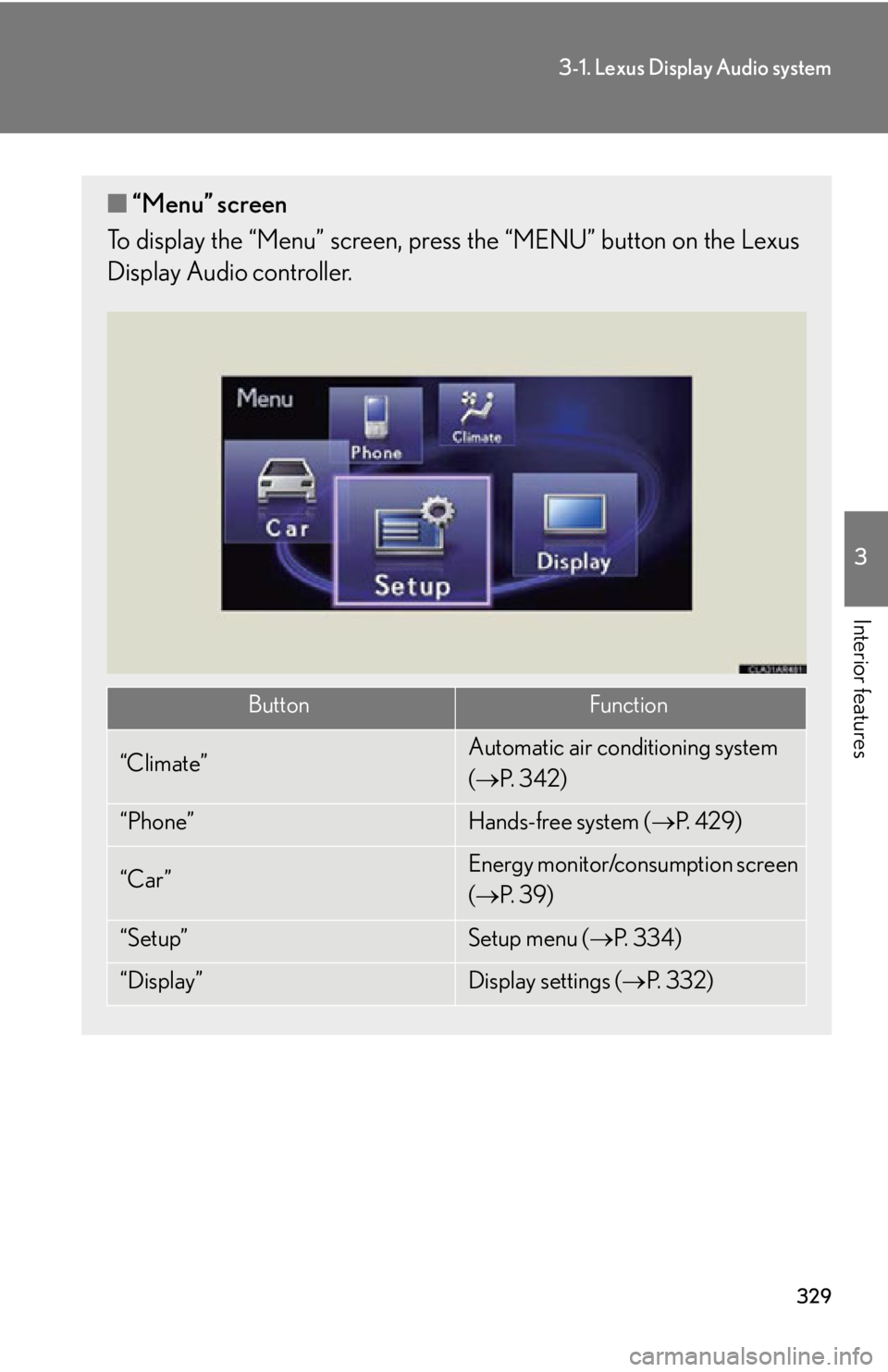
Interior features ■ “Menu” screen
To display the “Menu” screen, pres s the “MENU” button on the Lexus
Display Audio controller.
Button Function
“Climate” Automatic air conditioning system
( P. 3 4 2 )
“Phone” Hands-free system ( P. 4 2 9 )
“Car ” Energy monitor/consumption screen
( P. 3 9 )
“Setup” Setup menu ( P. 3 3 4 )
“Display” Display settings ( P. 3 3 2 )
Page 341 of 878
3413-1. Lexus Display Audio system
3
Interior features ■
Adjusting the volume
The volume of the Mobile Assistant can be adjusted using the
“ PWR·VOL
” knob or
steering wheel volume switches. The Mobile Assistant and phone call volumes are
synchronized.■
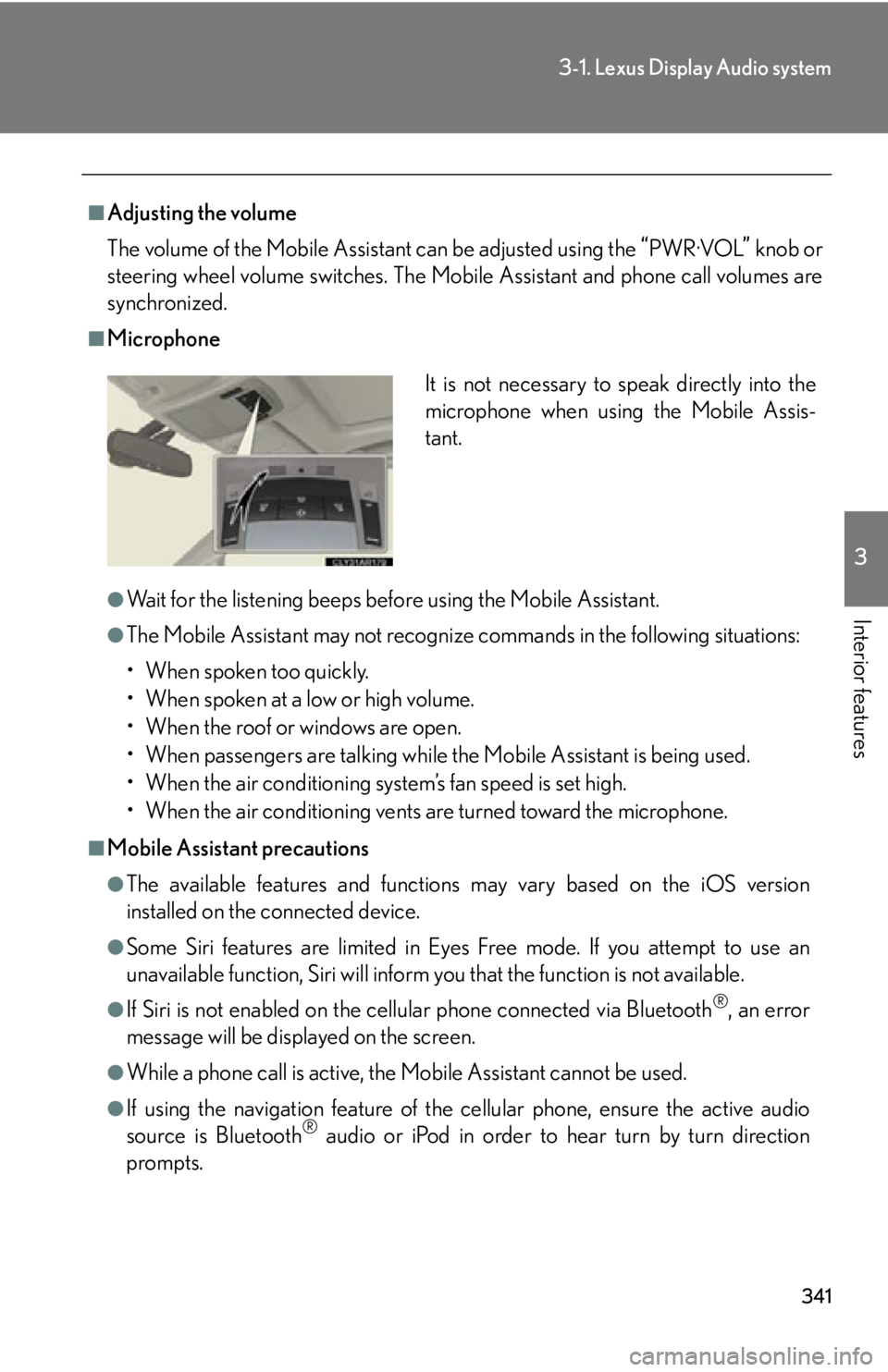
Microphone
●
Wait for the listening beeps befo re using the Mobile Assistant.●
The Mobile Assistant may not recognize commands in the following situations:
• When spoken too quickly.
• When spoken at a low or high volume.
• When the roof or windows are open.
• When passengers are talking while the Mobile Assistant is being used.
• When the air conditioning system’s fan speed is set high.
• When the air conditioning vents are turned toward the microphone.■
Mobile Assistant precautions ●
The available features and functions may vary based on the iOS version
installed on the connected device.●
Some Siri features are limited in Eyes Free mode. If you attempt to use an
unavailable function, Siri will inform you that the function is not available.●
If Siri is not enabled on the cell ular phone connected via Bluetooth ®
, an error
message will be displayed on the screen.
●
While a phone call is active, the Mo bile Assistant cannot be used.
●
If using the navigation feature of the cellular phone, ensure the active audio
source is Bluetooth ®
audio or iPod in order to hear turn by turn direction
prompts. It is not necessary to speak directly into the
microphone when using the Mobile Assis-
tant.
Page 342 of 878
3423-2. Using the air conditio ning system and defogger
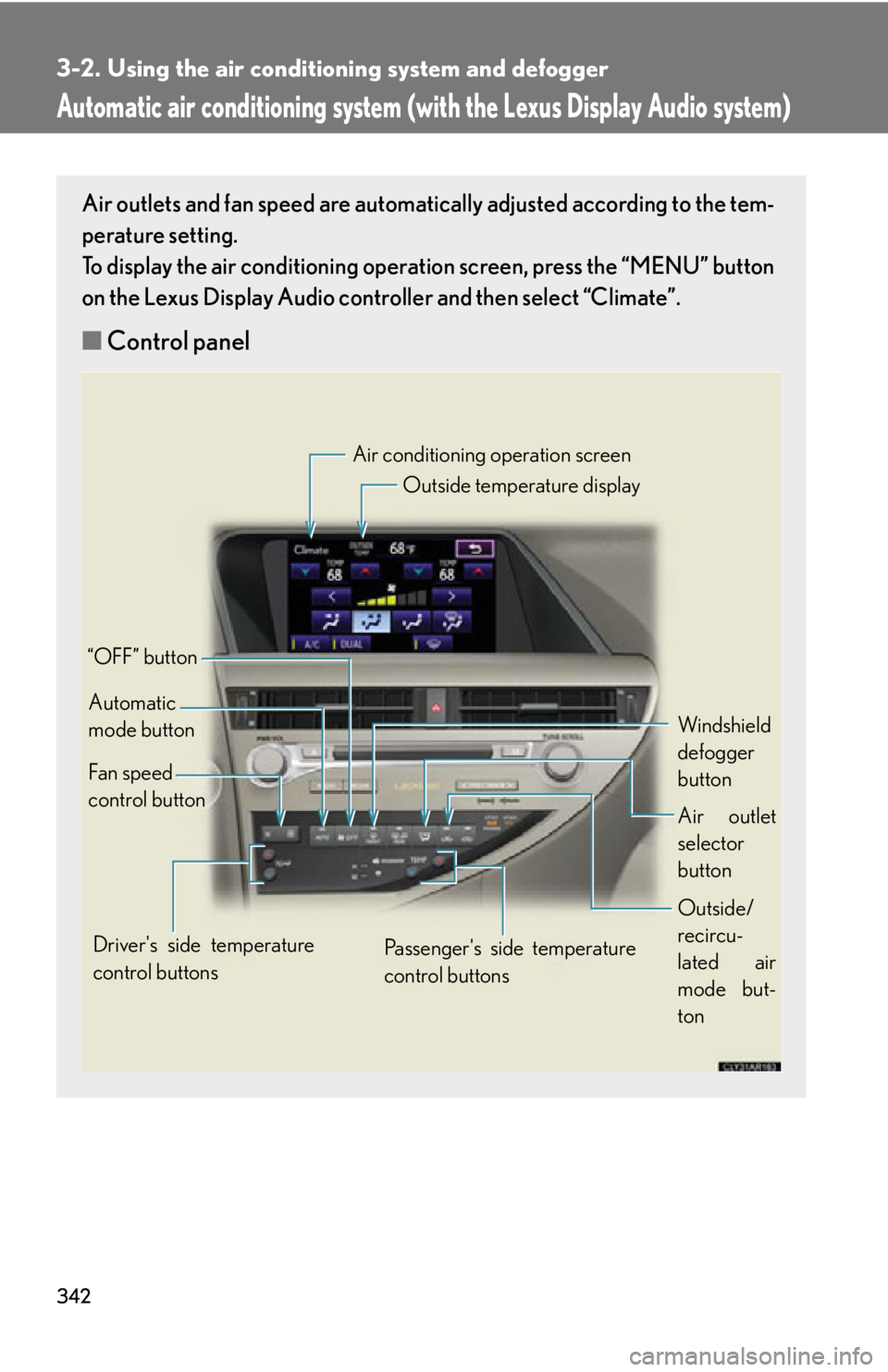
Automatic air conditioning system (with the Lexus Display Audio system) Air outlets and fan speed are automati cally adjusted according to the tem-
perature setting.
To display the air conditioning oper ation screen, press the “MENU” button
on the Lexus Display Audio controller and then select “Climate”.
■ Control panel Air conditioning operation screen
Outside temperature display
Windshield
defogger
button
Air outlet
selector
button
Outside/
recircu-
lated air
mode but-
tonPassenger's side temperature
control buttons“OFF” button
Automatic
mode button
Fan speed
control button
Driver's side temperature
control buttons
Page 343 of 878
3433-2. Using the air conditio ning system and defogger
3
Interior features
Using the automatic air conditioning system
Press .
The air conditioning system begins to operate. Air outlets and fan
speed are automatically adjusted according to the temperature
setting.
Press or select of the “TEMP” to increase the tempera-
ture and or to decrease the temperature.
When is selected (the indicator on is on) or the pas-
senger’s side temperature control bu tton is pressed, the temperature
for the driver and passenger seat s can be adjusted separately.
■ Automatic mode indicator
If fan speed setting or air flow modes are operated, the automatic
mode indicator goes off. However, automatic mode for functions other
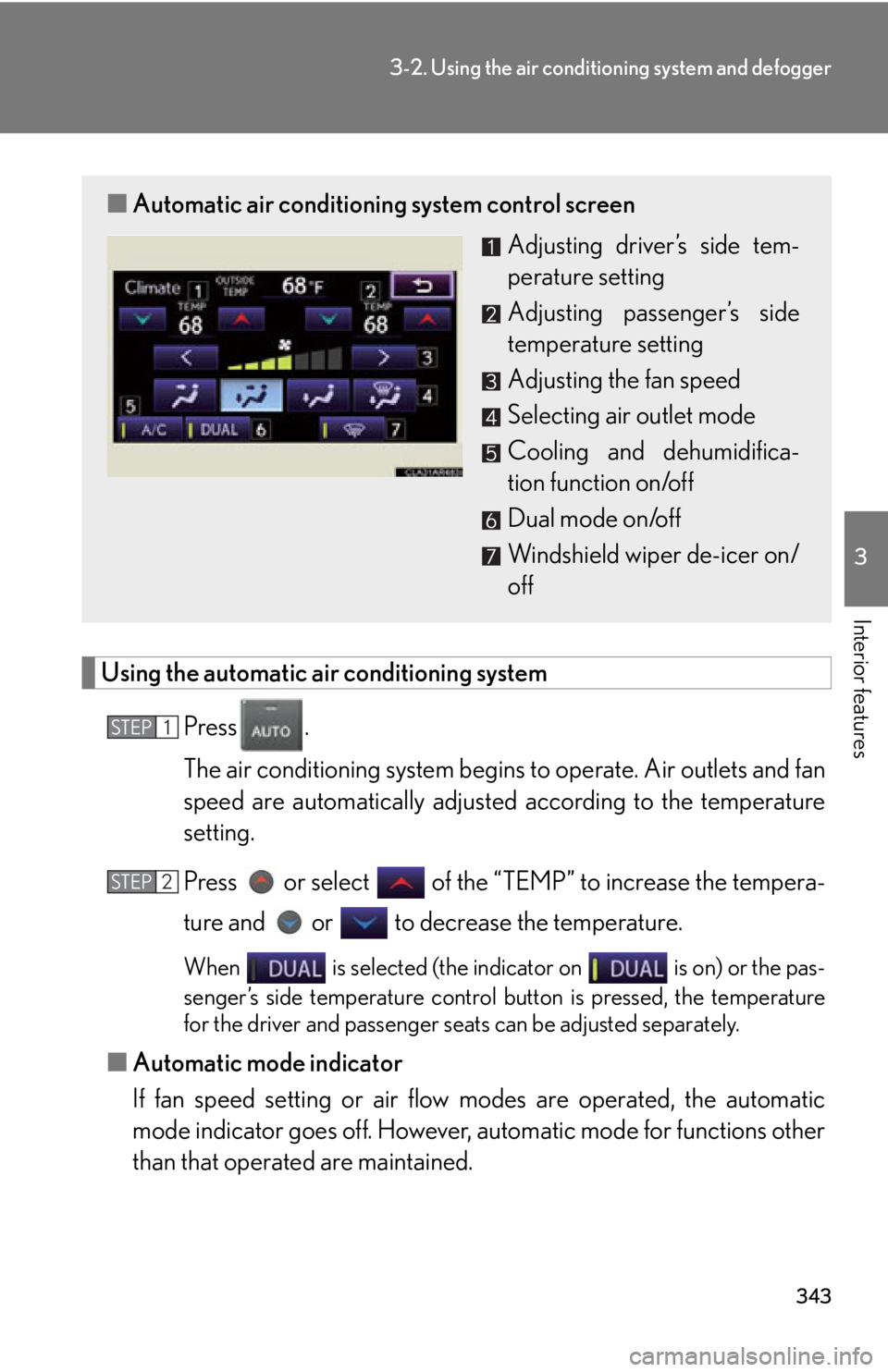
than that operated are maintained.■ Automatic air conditioning system control screen
Adjusting driver’s side tem-
perature setting
Adjusting passenger’s side
temperature setting
Adjusting the fan speed
Selecting air outlet mode
Cooling and dehumidifica-
tion function on/off
Dual mode on/off
Windshield wiper de-icer on/
offSTEP 1
STEP 2
Page 344 of 878
3443-2. Using the air conditio ning system and defogger
Adjusting the settings manually
■ Basic setting
To turn on the air conditioning system and adjust the fan speed,
press on to increase the fan speed and to
decrease the fan speed or select “ ” of to increase the
fan speed and “ ” to decrease the fan speed.Press to turn the fan off.
To adjust the temperature setting, press or select of the
“TEMP” to increase the temperature and or to
decrease the temperature. When is selected (the indicator on is on) or the pas-
senger’s side temperature control bu tton is pressed, the temperature
for the driver and passenger seat s can be adjusted separately.
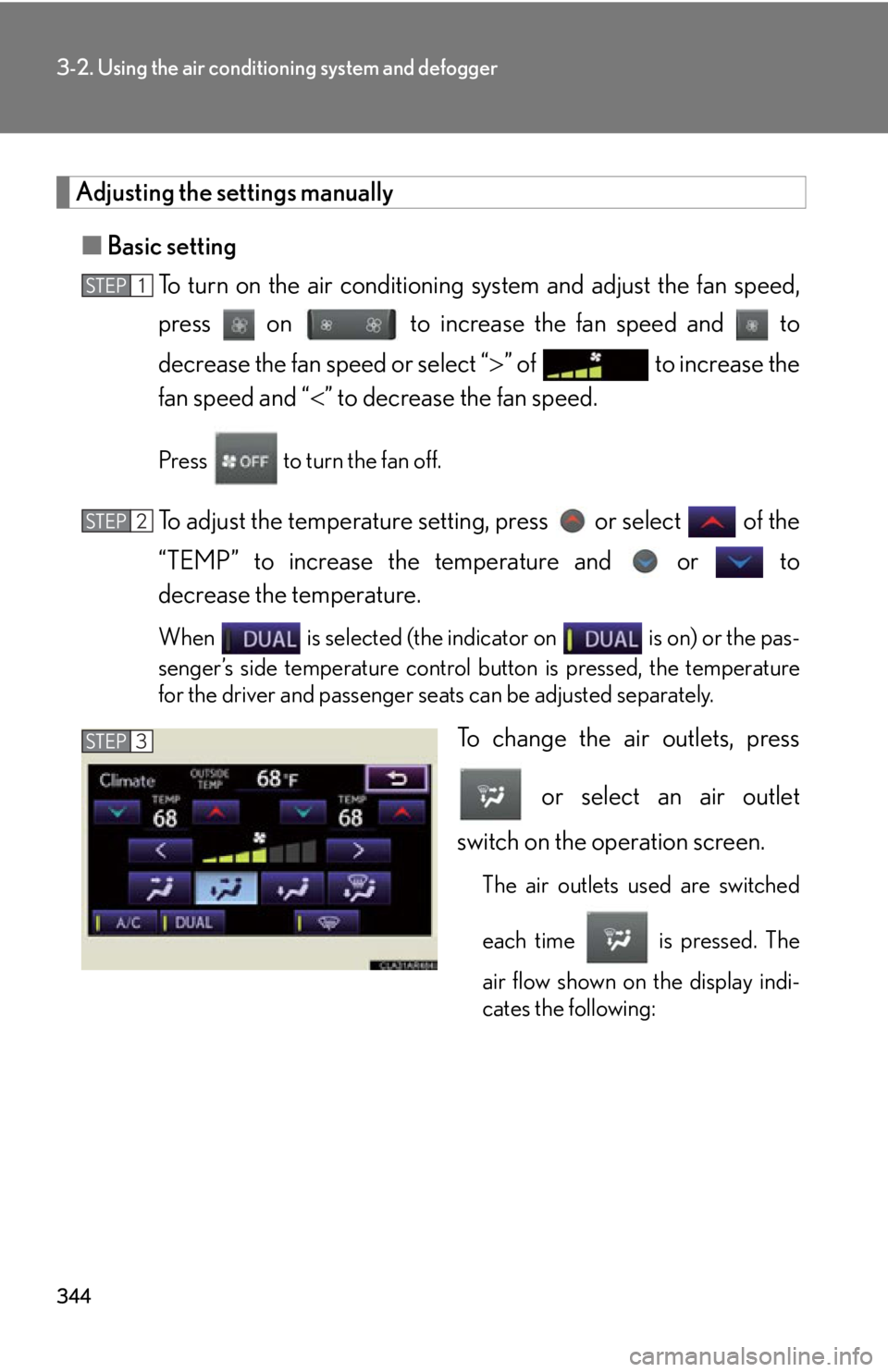
To change the air outlets, press
or select an air outlet
switch on the operation screen. The air outlets used are switched
each time is pressed. The
air flow shown on the display indi-
cates the following:STEP 1
STEP 2
STEP 3
Page 346 of 878
3463-2. Using the air conditio ning system and defogger
■ Switching between outside air and recirculated air modes
Press . The mode switches between (recirculated air mode) and
(outside air mode) modes each time the button is pressed.
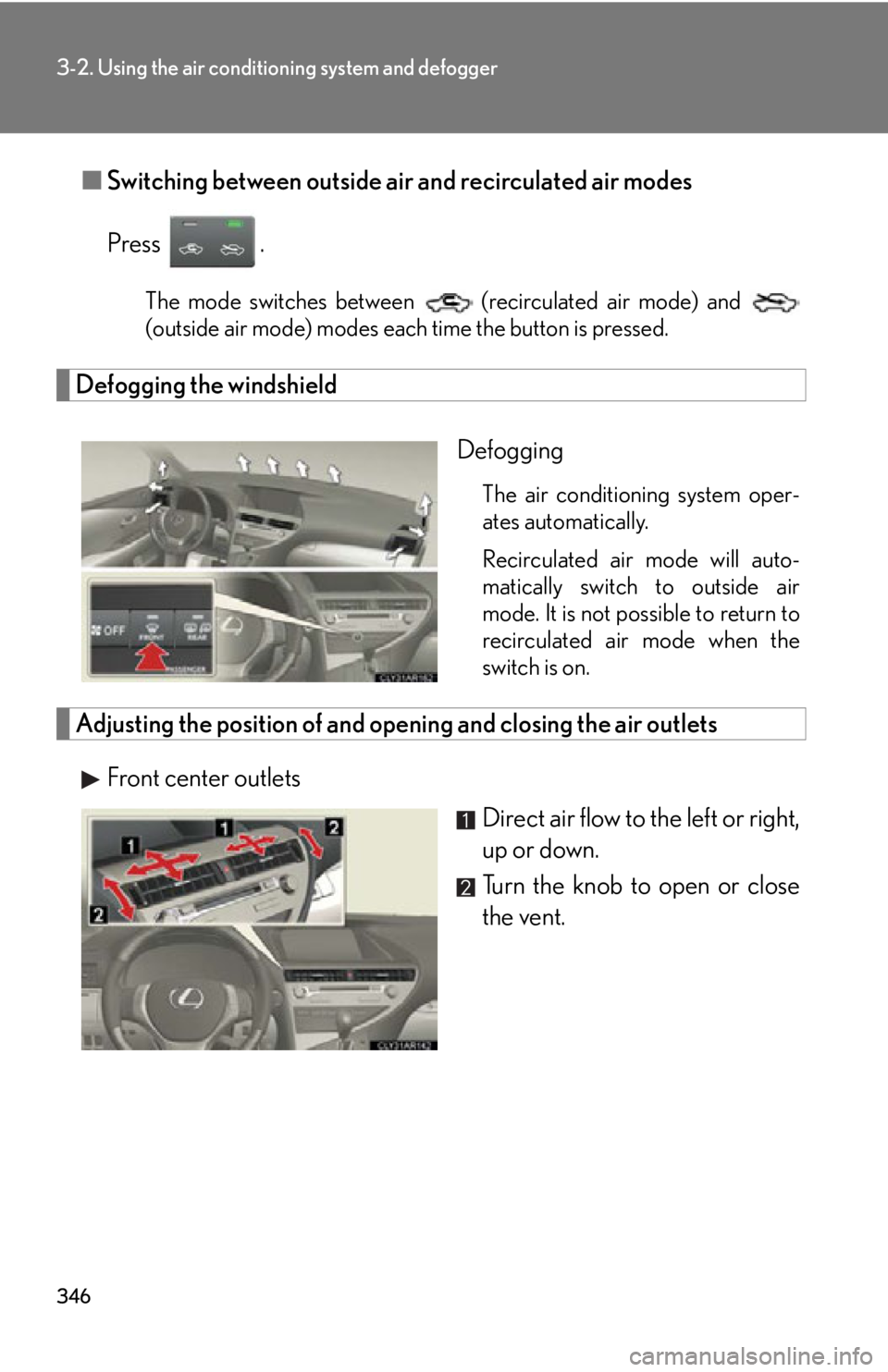
Defogging the windshield
Defogging The air conditioning system oper-
ates automatically.
Recirculated air mode will auto-
matically switch to outside air
mode. It is not possible to return to
recirculated air mode when the
switch is on.
Adjusting the position of and opening and closing the air outlets
Front center outlets
Direct air flow to the left or right,
up or down.
Turn the knob to open or close
the vent.
Page 347 of 878
3473-2. Using the air conditio ning system and defogger
3
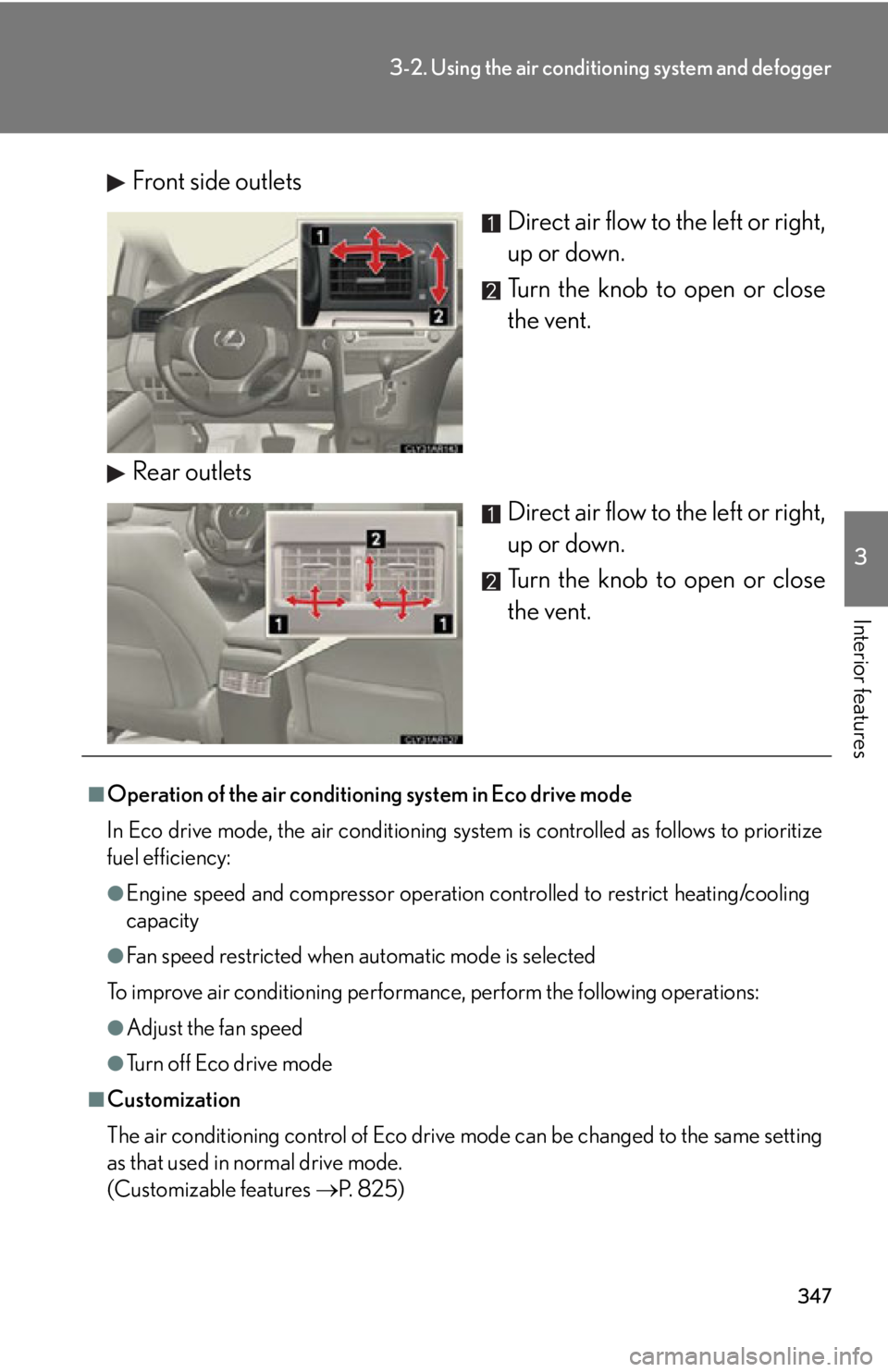
Interior features Front side outlets
Direct air flow to the left or right,
up or down.
Turn the knob to open or close
the vent.
Rear outlets
Direct air flow to the left or right,
up or down.
Turn the knob to open or close
the vent.
■
Operation of the air conditioning system in Eco drive mode
In Eco drive mode, the air conditioning syst em is controlled as follows to prioritize
fuel efficiency: ●
Engine speed and compressor operation controlled to restrict heating/cooling
capacity●
Fan speed restricted when automatic mode is selected
To improve air conditioning performanc e, perform the following operations:●
Adjust the fan speed
●
Turn off Eco drive mode
■
Customization
The air conditioning control of Eco drive mode can be changed to the same setting
as that used in normal drive mode.
(Customizable features P. 825)
Page 348 of 878

3483-2. Using the air conditio ning system and defogger
■
Air conditioning system settings ●
When the “POWER” switch is turned on , the air conditioning system settings
will be set to those that were in us e the last time the “POWER” switch was
turned off.●
Air conditioning system settings are memorized individually on each electronic
key, so the settings repr oduced will be specific to the key that is used.●
This feature is customizable at your Lexus dealer.■
Using automatic mode
Fan speed is adjusted automatically accord ing to the temperature setting and ambi-
ent conditions. As a result, the following may occur:
Immediately after the button is pressed, the fan may stop for a while until warm or
cool air is ready to flow.■
Using the system in recirculated air mode
The windows will fog up more easily if recirculated air mode is used for an extended
period.■
Switching between outside air and recirculated air modes
Recirculated air mode or outside air mode may be automatically switched in accor-
dance with the temperature setting and the inside temperature.■
When the outside temperature exceeds 75°F (24°C) and the air conditioning
system is on ●
In order to reduce the air conditioning power consumption, the air conditioning
system may switch to recirculated air mode automatically. This may also reduce
fuel consumption.●
Recirculated air mode is selected as a default mode when the “POWER” switch
is turned to ON mode.●
It is possible to switch to outside air mode at any time by pressing .
■
Window defogger feature
Recirculated air mode may automatically switch to outside air mode in situations
where the windows need to be defogged.