air conditioning LEXUS RX450h 2015 Owners Manual
[x] Cancel search | Manufacturer: LEXUS, Model Year: 2015, Model line: RX450h, Model: LEXUS RX450h 2015Pages: 878, PDF Size: 11.62 MB
Page 1 of 878

TABLE OF CONTENTS
11
Before driving Information on the hybrid syst em and adjusting and operat-
ing features such as door locks, mirrors, and steering col-
umn.
2
When driving Driving, stopping and safe-driving information.
3
Interior features Air conditioning and audio systems, as well as other interior
features for a comfortable driving experience.
4
Maintenance
and care Cleaning and protecting your vehicle, performing do-it-your-
self maintenance, and maintenance information.
5
When trouble
arises What to do if the vehicle needs to be towed, gets a flat tire,
or is involved in an accident.
6
Vehicle
specifications Detailed vehicle information.
7
For owners Reporting safety defects for U.S. owners, and seat belt, SRS
airbag and headlight aim instru ctions for Canadian owners.
Index Alphabetical listing of informat ion contained in this manual.
Page 2 of 878
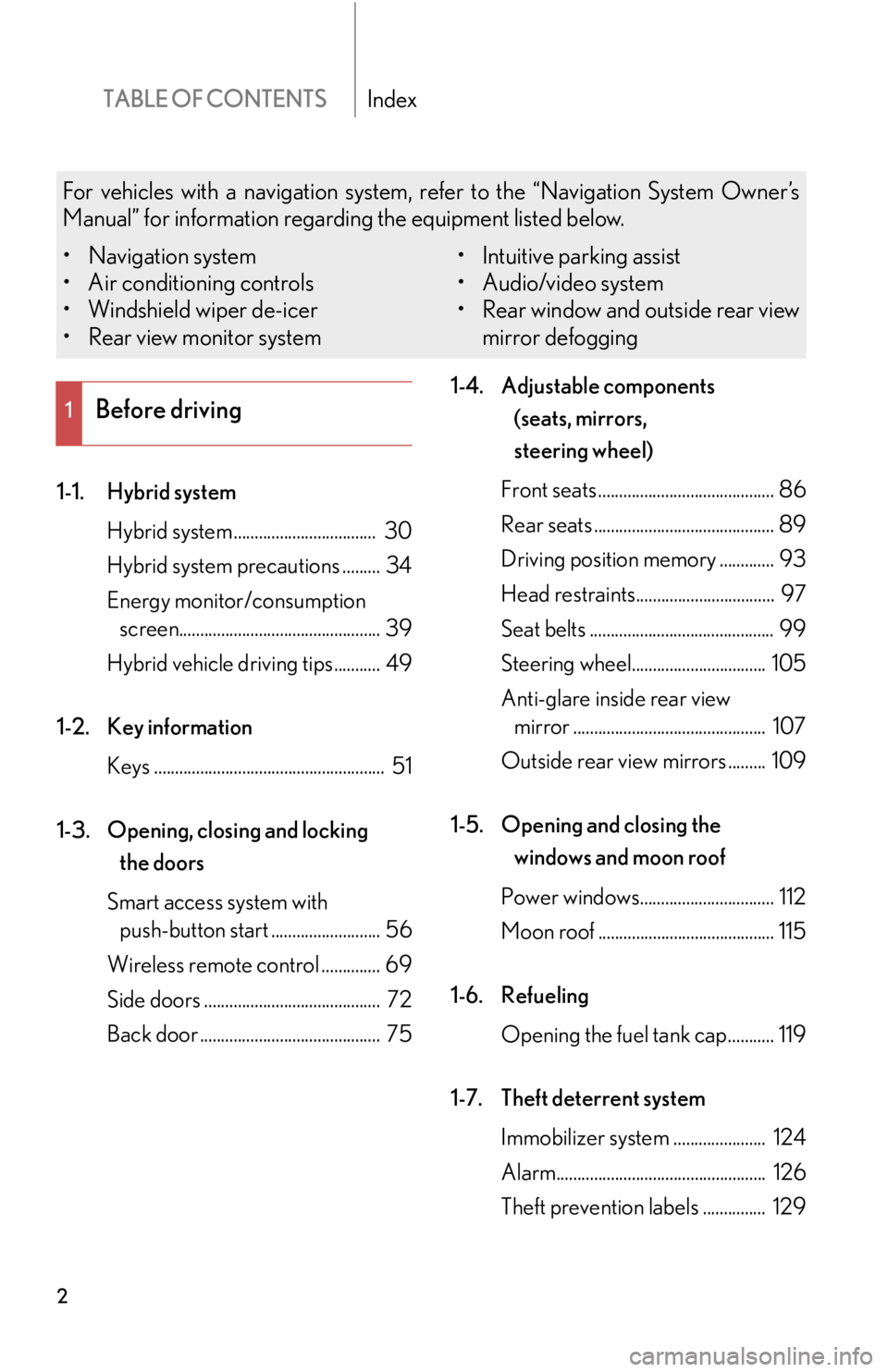
TABLE OF CONTENTS Index
21-1. Hybrid system
Hybrid system .................................. 30
Hybrid system precautions ......... 34
Energy monitor/consumption
screen................................................ 39
Hybrid vehicle driving tips........... 49
1-2. Key information
Keys ....................................................... 51
1-3. Opening, closing and locking
the doors
Smart access system with
push-button start .......................... 56
Wireless remote control .............. 69
Side doors .......................................... 72
Back door ........................................... 75 1-4. Adjustable components
(seats, mirrors,
steering wheel)
Front seats .......................................... 86
Rear seats ........................................... 89
Driving position memory ............. 93
Head restraints................................. 97
Seat belts ............................................ 99
Steering wheel................................ 105
Anti-glare inside rear view
mirror .............................................. 107
Outside rear view mirrors ......... 109
1-5. Opening and closing the
windows and moon roof
Power windows................................ 112
Moon roof .......................................... 115
1-6. Refueling
Opening the fuel tank cap........... 119
1-7. Theft deterrent system
Immobilizer system ...................... 124
Alarm.................................................. 126
Theft prevention labels ............... 1291
Before drivingFor vehicles with a navigation system, refer to the “Navigation System Owner’s
Manual” for information regarding the equipment listed below.
• Navigation system
• Air conditioning controls
• Windshield wiper de-icer
• Rear view monitor system • Intuitive parking assist
• Audio/video system
• Rear window and outside rear view
mirror defogging
Page 4 of 878

TABLE OF CONTENTS Index
43-1. Lexus Display Audio system
Lexus Display Audio
system ........................................... 328
Display settings ............................. 332
Setup menu..................................... 334
Mobile Assistant .......................... 340
3-2. Using the air conditioning
system and defogger
Automatic air conditioning
system (with the Lexus
Display Audio system) ............ 342
Automatic air conditioning
system (without a navigation
system or the Lexus Display
Audio system)............................ 350
Rear window defogger
switch............................................. 358
Windshield wiper de-icer ........ 360
3-3. Using the Lexus Display
Audio system
Audio system (with the Lexus
Display Audio system) ............ 362
Using the radio ............................. 365
Using the CD player .................. 380
Playing an audio CD and
MP3/WMA discs ...................... 381
Listening to an iPod ...................... 391
Listening to a USB
memory ........................................ 399 Using the AUX port .................. 408
Listening to Bluetooth ®
audio ................................................ 410
Optimal use of the audio
system ............................................ 424
Using the steering wheel
audio switches ............................ 426
Hands-free system
(for mobile phone) .................... 429
Using the Bluetooth ®
phone ............................................. 437
Setting the hands-free
system ............................................ 454
Bluetooth ®
settings .................... 466
3-4. Using the audio system
Audio system
(without a navigation
system or the Lexus Display
Audio system)............................. 474
Using the radio .............................. 477
Using the CD player .................. 485
Playing MP3 and WMA
discs ................................................ 493
Operating an iPod ........................ 501
Operating a USB memory........ 510
Bluetooth ®
audio system .......... 519
Using the Bluetooth ®
audio
system ............................................ 523
Operating a Bluetooth ®
enabled portable player ........ 528
Setting up a Bluetooth ®
enabled portable player .......... 531
Bluetooth ®
audio system
setup .............................................. 5383
Interior features
Page 6 of 878

TABLE OF CONTENTS Index
64-1. Maintenance and care
Cleaning and protecting
the vehicle exterior................... 634
Cleaning and protecting
the vehicle interior .................... 637
4-2. Maintenance
Maintenance requirements .... 640
General maintenance ................ 643
Emission inspection and
maintenance (I/M)
programs ...................................... 647
4-3. Do-it-yourself maintenance
Do-it-yourself service
precautions ................................. 648
Hood................................................... 651
Positioning a floor jack............... 652
Engine compartment.................. 654
12-volt battery................................ 664
Tires ................................................... 670
Tire inflation pressure ................. 679
Wheels............................................. 683
Air conditioning filter ................. 685
Electronic key battery ................ 687
Checking and replacing
fuses ............................................... 689
Headlight aim................................. 705
Light bulbs ...................................... 708 5-1. Essential information
Emergency flashers..................... 724
If your vehicle needs to be
towed.............................................. 725
If you think something is
wrong ............................................. 732
5-2. Steps to take in an emergency
If a warning light turns on
or a warning buzzer
sounds... ........................................ 733
If a warning message is
displayed ....................................... 743
If you have a flat tire..................... 764
If the hybrid system will not
start ................................................. 777
If the shift lever cannot be
shifted from P .............................. 779
If you lose your keys ................... 780
If the electronic key does
not operate properly ................ 781
If the vehicle 12-volt battery
is discharged ............................... 784
If your vehicle overheats .......... 788
If the vehicle becomes
stuck................................................ 793
If your vehicle has to be
stopped in an em ergency ...... 7954
Maintenance and care 5
When trouble arises
Page 15 of 878
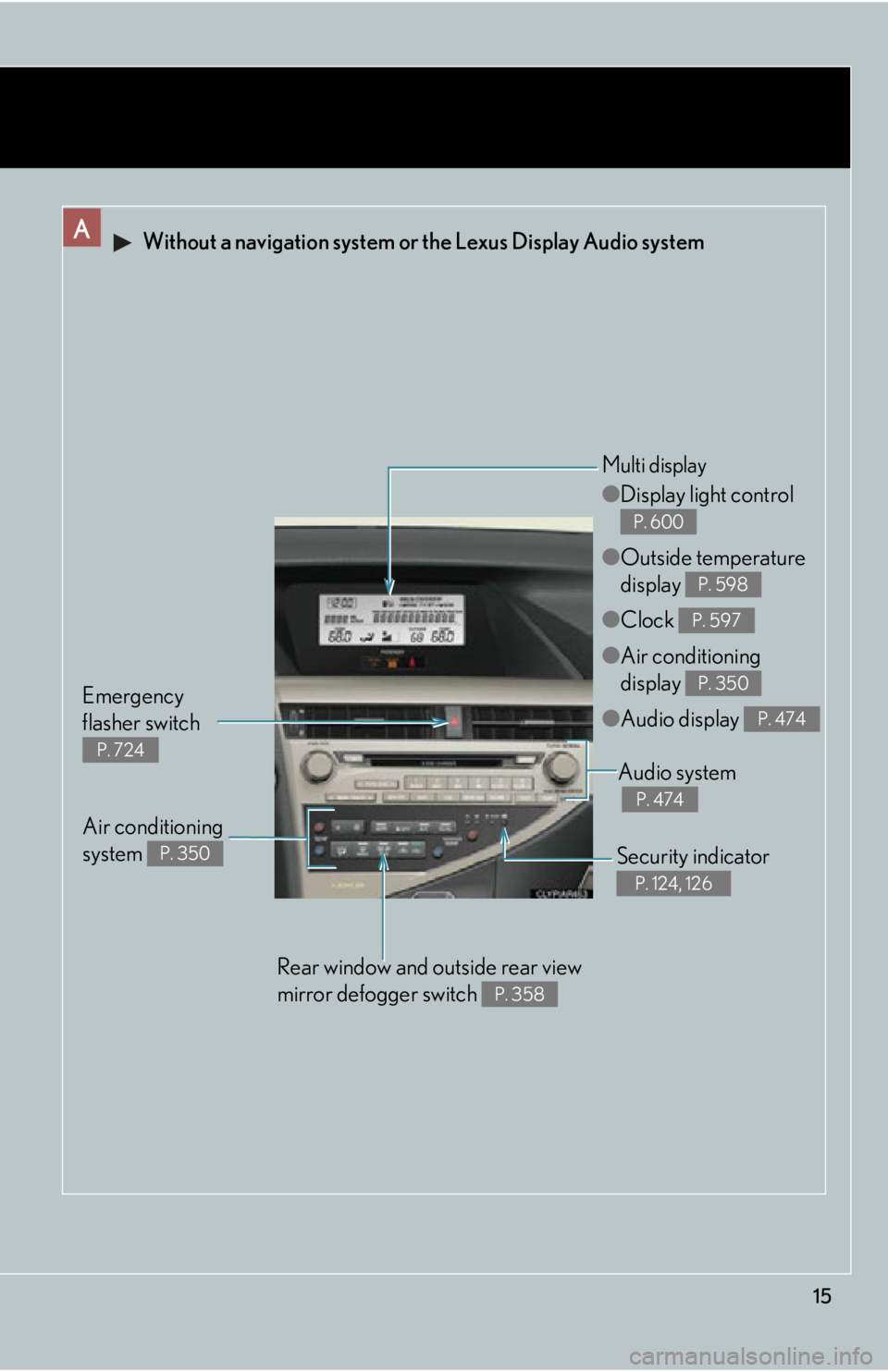
15A Without a navigation system or the Lexus Display Audio system
Security indicator P. 124, 126
Audio system
P. 474
Emergency
flasher switch P. 724 ● Display light control
● Outside temperature
display
● Clock
● Air conditioning
display
● Audio display P. 600
P. 598
P. 597
P. 350
P. 474Multi display
Air conditioning
system P. 350
Rear window and outside rear view
mirror defogger switch P. 358
Page 16 of 878
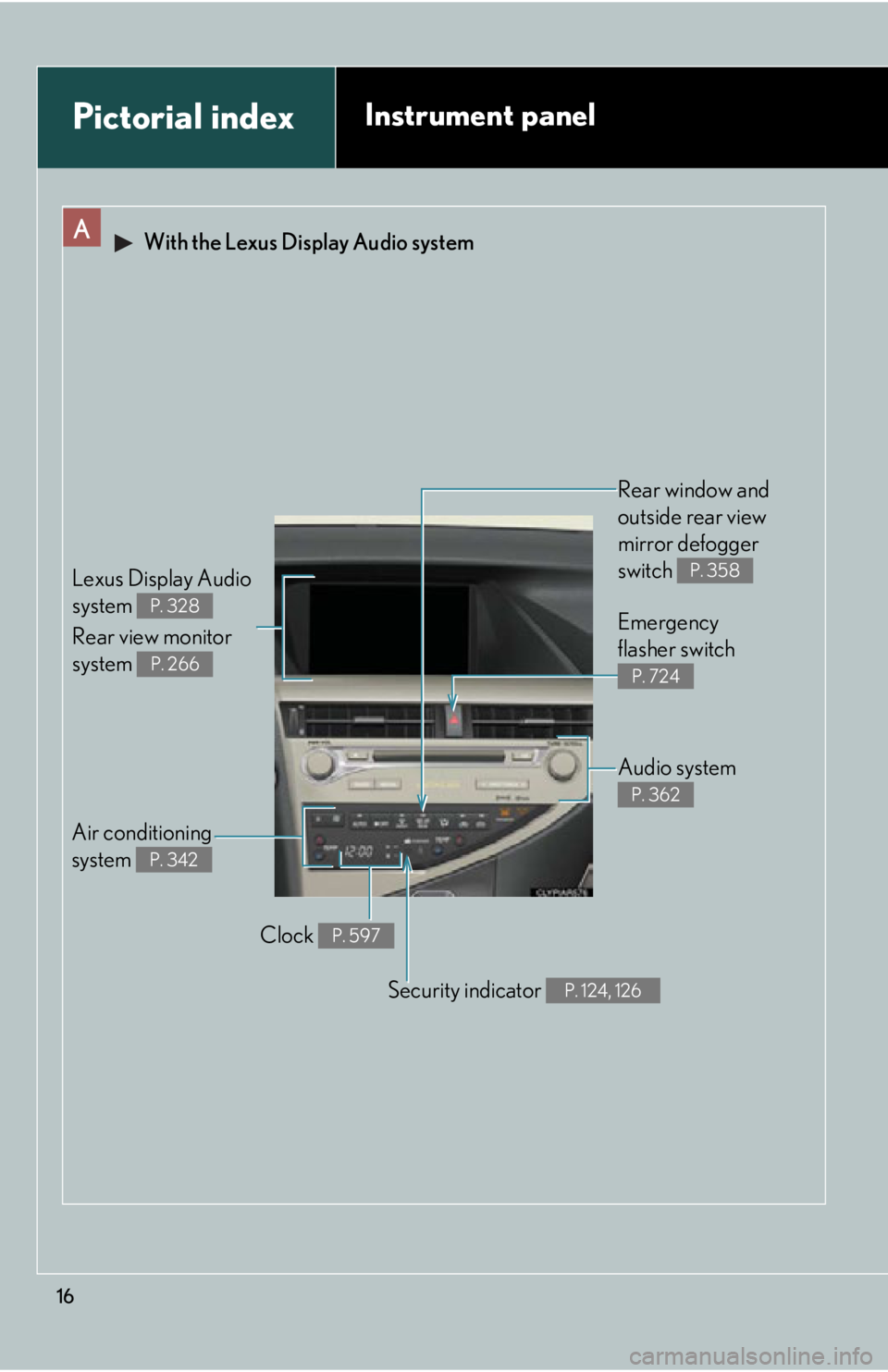
16A With the Lexus Display Audio system
Air conditioning
system P. 342 Rear window and
outside rear view
mirror defogger
switch P. 358
Audio system P. 362Emergency
flasher switch P. 724
Security indicator P. 124, 126Pictorial index Instrument panel
Clock P. 597Lexus Display Audio
system
Rear view monitor
system P. 328
P. 266
Page 17 of 878
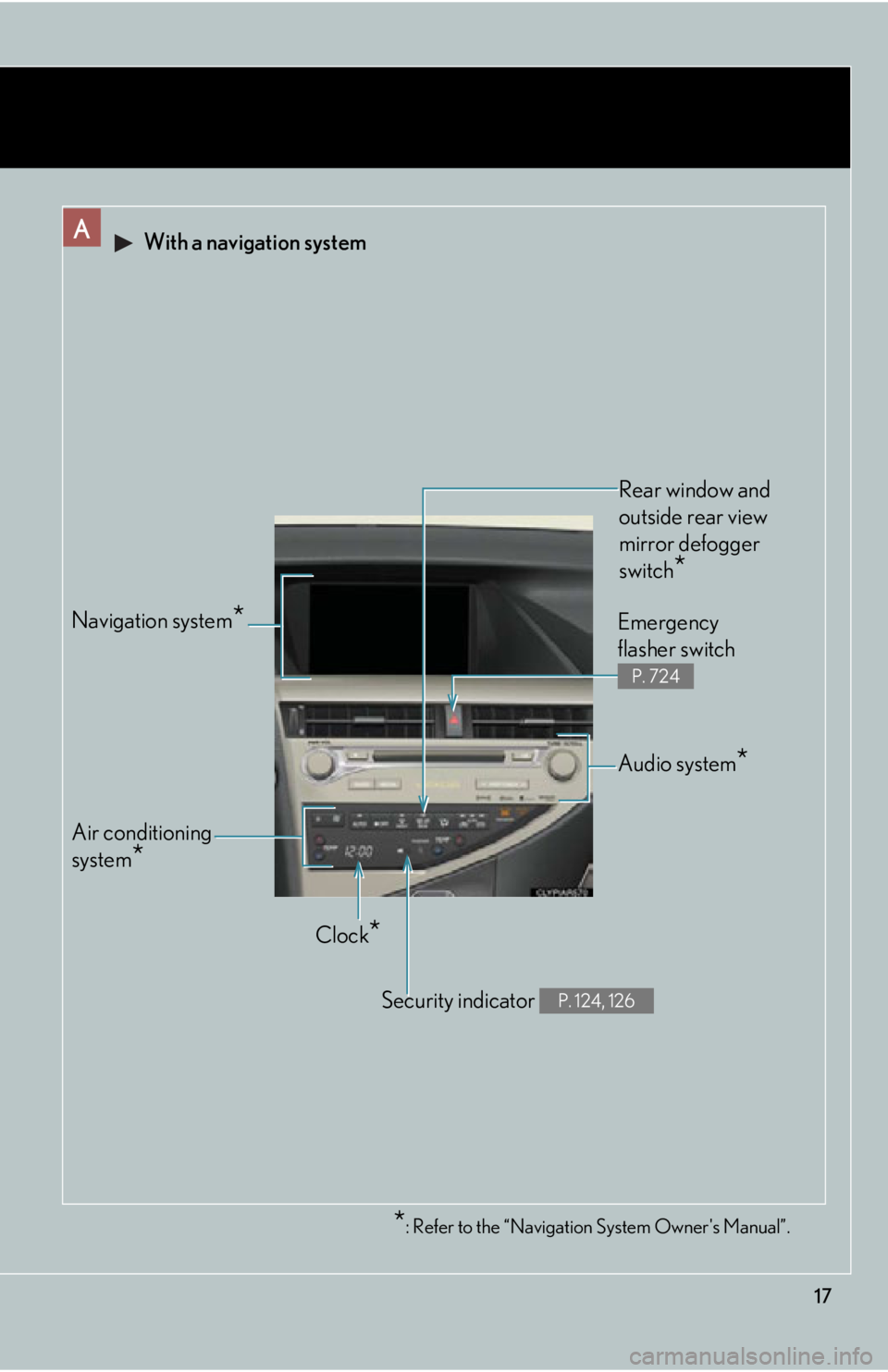
17* : Refer to the “Navigation System Owner's Manual”.A With a navigation system
Air conditioning
system
*Navigation system
* Rear window and
outside rear view
mirror defogger
switch
* Audio system
* Emergency
flasher switch P. 724
Security indicator P. 124, 126
Clock
*
Page 34 of 878
341-1. Hybrid system
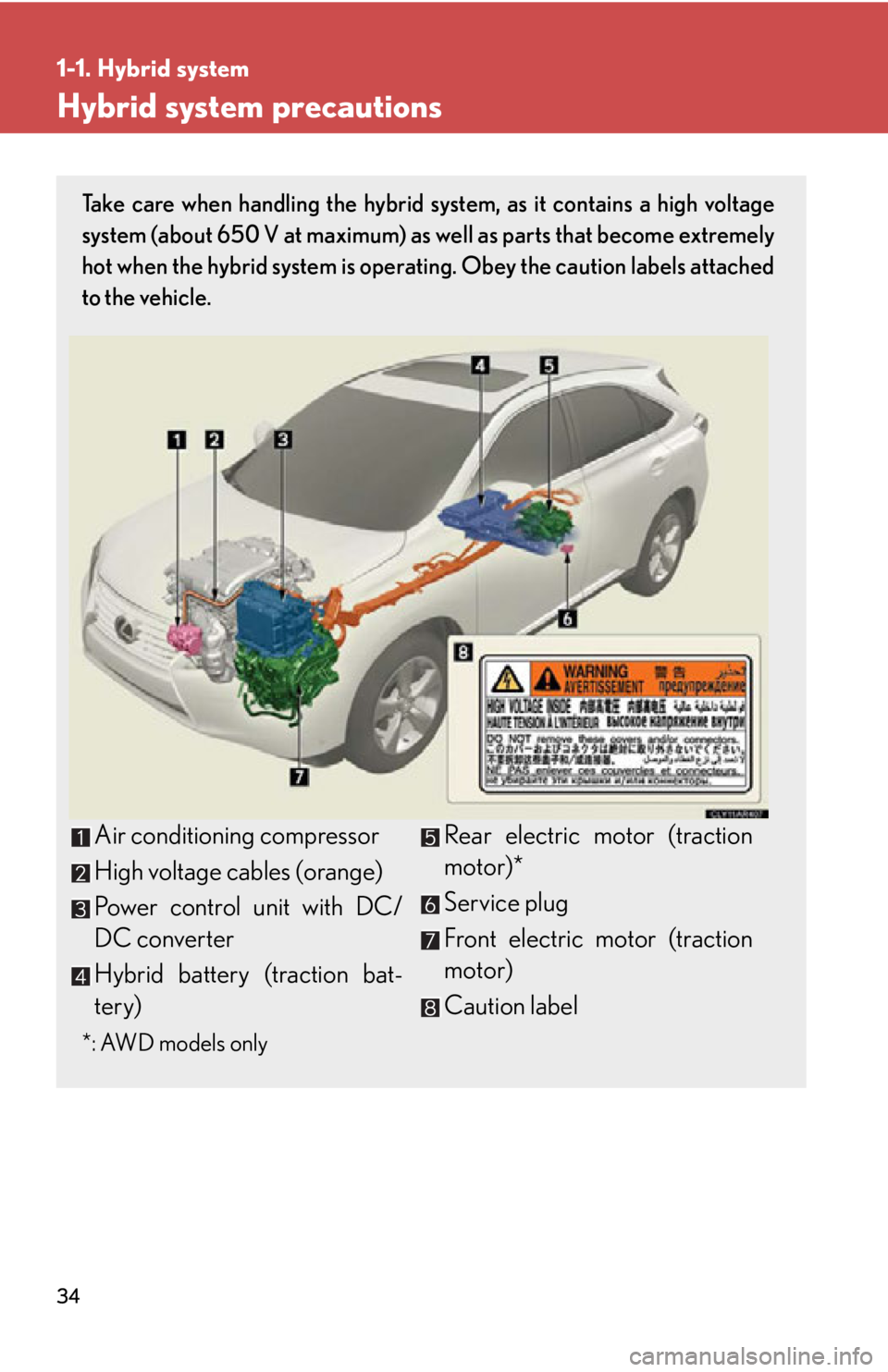
Hybrid system precautions Take care when handling the hybrid sy stem, as it contains a high voltage
system (about 650 V at maximum) as well as parts that become extremely
hot when the hybrid system is operat ing. Obey the caution labels attached
to the vehicle.
*: AWD models only Air conditioning compressor
High voltage cables (orange)
Power control unit with DC/
DC converter
Hybrid battery (traction bat-
tery) Rear electric motor (traction
motor)*
Service plug
Front electric motor (traction
motor)
Caution label
Page 49 of 878
4911-1. Hybrid system
Before driving Hybrid vehicle driving tips For economical and ecological driving, pay attention to the following
points:
■ Use of Hybrid System Indicator More Eco-friendly driving is possib le by keeping the indicate of Hybrid
System Indicator within Eco area.
■ When braking the vehicle Make sure to operate the brakes ge ntly and in good time. A greater
amount of electrical energy can be retained when slowing down.
■ Delays Repeated acceleration and deceleration, as well as long waits at traffic
lights, will lead to bad fu el consumption. Check traffic reports before leav-
ing and avoid delays as much as possible. When encountering a delay,
gently release the brake pedal to allow the vehicle to move forward slightly
while avoiding overuse of the accelerato r pedal. Doing so can help control
excessive gasoline consumption.
■ Highway driving Control your speed and keep at a constant speed. Also, before stopping at
a toll booth or similar, allow plenty of time to release the accelerator and
gently apply the brakes. A greater amount of electrical energy can be
retained when slowing down.
■ Air conditioning Use the air conditioning only when necessary. Doing so can help control
excessive gasoline consumption.
In summer: In high temperatures, use the recirculated air mode. Doing so
will help to reduce the burden on the air conditioning and reduce fuel con-
sumption as well.
In winter: Because the gasoline engine will not automatically cut out until
the gasoline engine and the interior of the vehicle are warm, it will con-
sume fuel. Also, fuel consumption can be improved by avoiding overuse of
the heater.
Page 190 of 878
1902-1. Driving procedures
Changing shift ranges in S mode
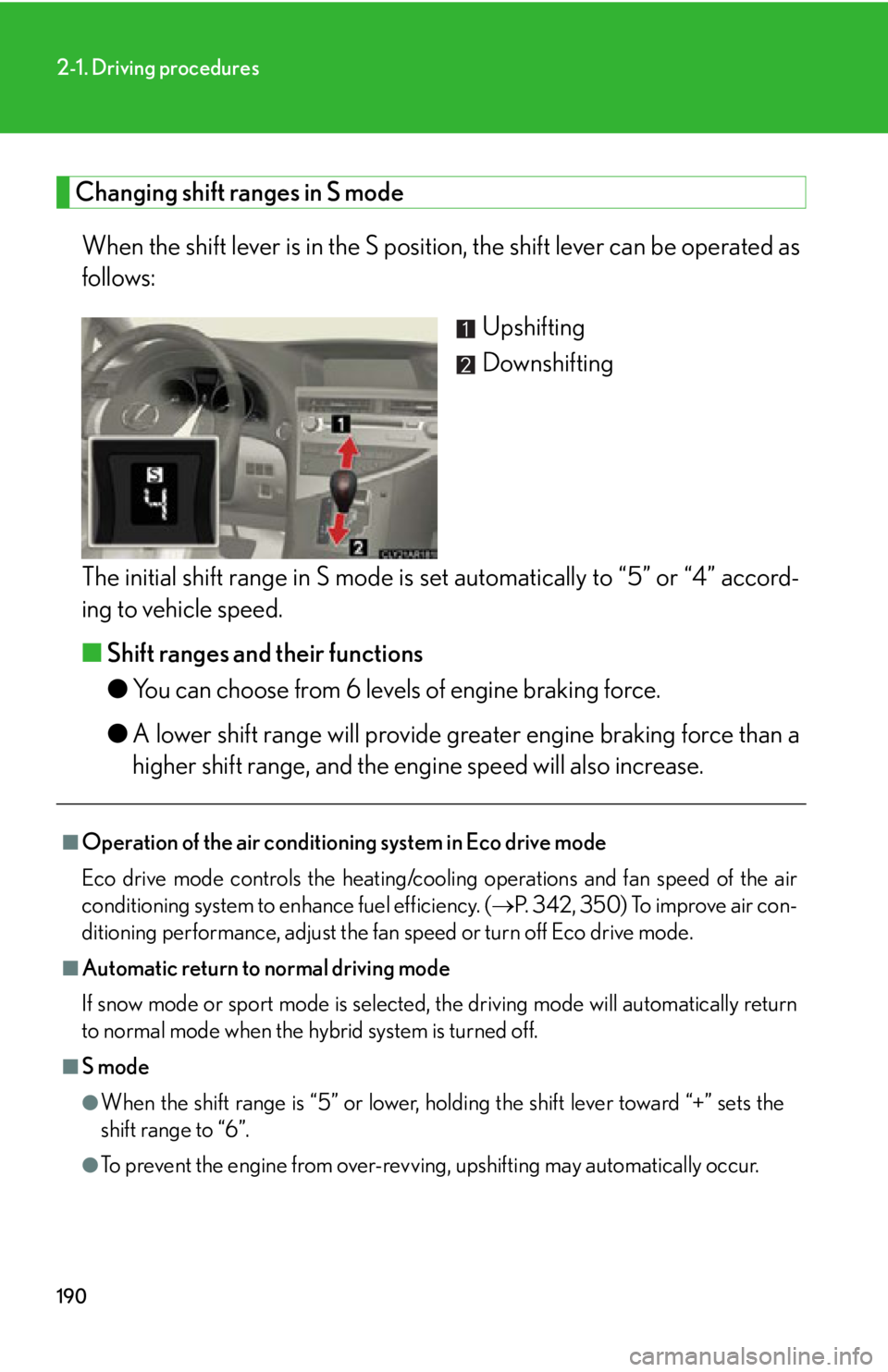
When the shift lever is in the S position, the shift lever can be operated as
follows:
Upshifting
Downshifting
The initial shift range in S mode is set automatically to “5” or “4” accord-
ing to vehicle speed.
■ Shift ranges and their functions
● You can choose from 6 levels of engine braking force.
● A lower shift range will provide gr eater engine braking force than a
higher shift range, and the engi ne speed will also increase.■
Operation of the air conditioning system in Eco drive mode
Eco drive mode controls the heating/cooling operations and fan speed of the air
conditioning system to enhance fuel efficiency. ( P. 342, 350) To improve air con-
ditioning performance, adjust the fa n speed or turn off Eco drive mode. ■
Automatic return to normal driving mode
If snow mode or sport mode is selected , the driving mode will automatically return
to normal mode when the hybrid system is turned off.
■
S mode
●
When the shift range is “5” or lower, holding the shift lever toward “+” sets the
shift range to “6”.
●
To prevent the engine from over-revving, upshifting may automatically occur.