change time LEXUS RX450h 2015 User Guide
[x] Cancel search | Manufacturer: LEXUS, Model Year: 2015, Model line: RX450h, Model: LEXUS RX450h 2015Pages: 878, PDF Size: 11.62 MB
Page 233 of 878
2332-4. Using other driving systems
2
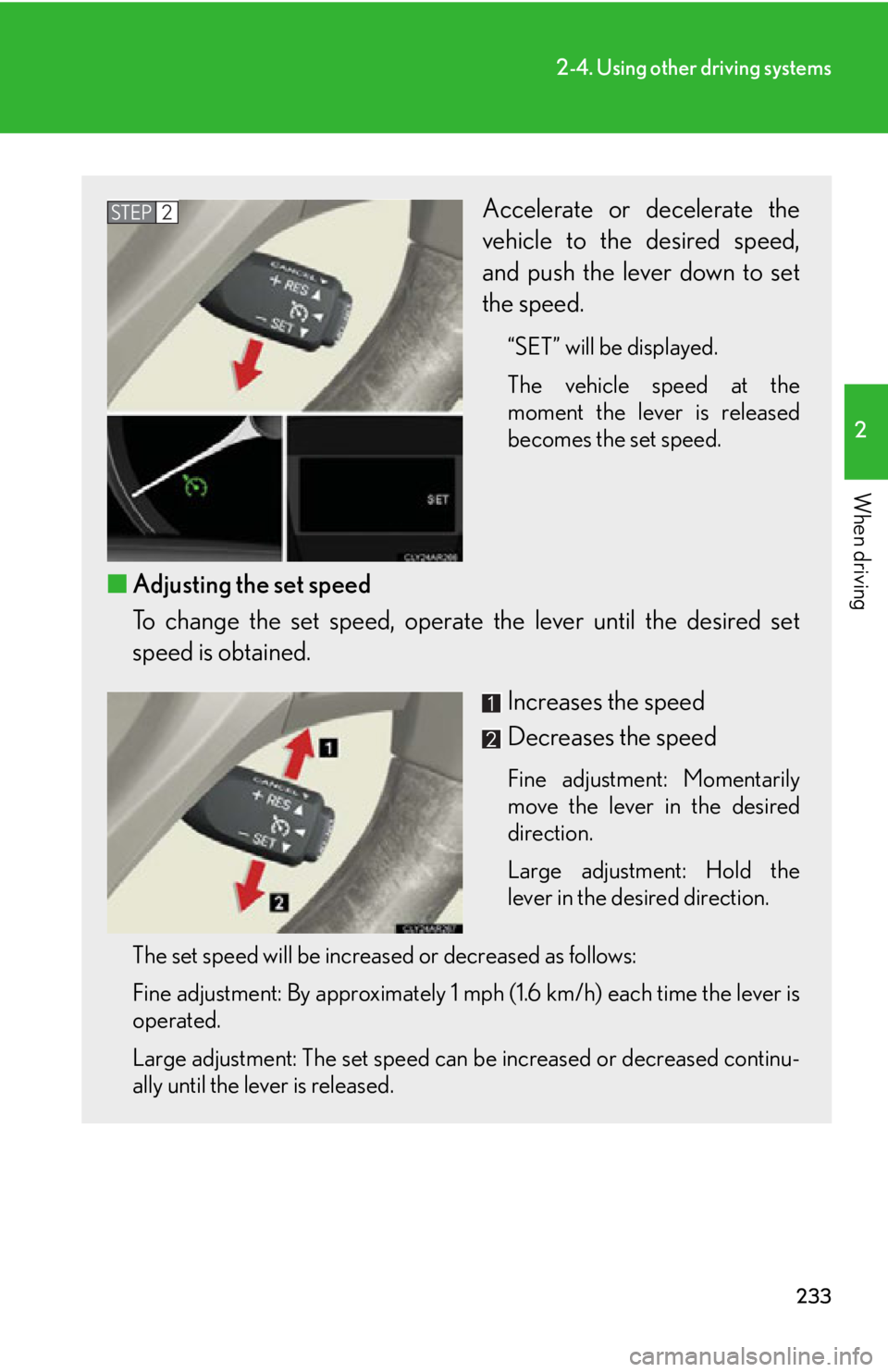
When driving Accelerate or decelerate the
vehicle to the desired speed,
and push the lever down to set
the speed. “SET” will be displayed.
The vehicle speed at the
moment the lever is released
becomes the set speed.
■ Adjusting the set speed
To change the set speed, operate the lever until the desired set
speed is obtained.
Increases the speed
Decreases the speed Fine adjustment: Momentarily
move the lever in the desired
direction.
Large adjustment: Hold the
lever in the desired direction.
The set speed will be increased or decreased as follows:
Fine adjustment: By approximately 1 mph (1.6 km/h) each time the lever is
operated.
Large adjustment: The set speed can be increased or decreased continu-
ally until the lever is released. STEP 2
Page 237 of 878
2372-4. Using other driving systems
2
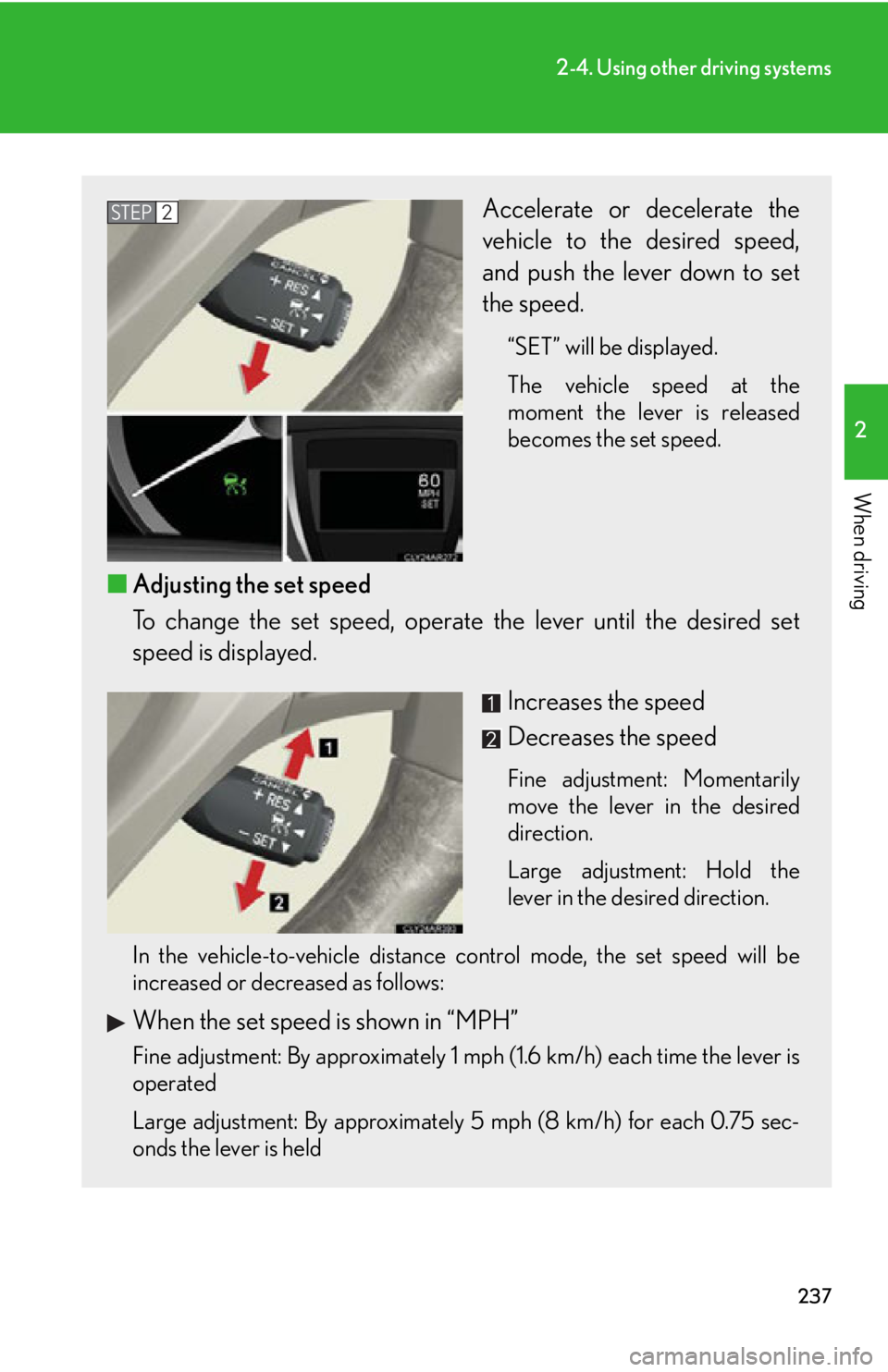
When driving Accelerate or decelerate the
vehicle to the desired speed,
and push the lever down to set
the speed. “SET” will be displayed.
The vehicle speed at the
moment the lever is released
becomes the set speed.
■ Adjusting the set speed
To change the set speed, operate the lever until the desired set
speed is displayed.
Increases the speed
Decreases the speed Fine adjustment: Momentarily
move the lever in the desired
direction.
Large adjustment: Hold the
lever in the desired direction.
In the vehicle-to-vehicle distance control mode, the set speed will be
increased or decreased as follows:
When the set speed is shown in “MPH”
Fine adjustment: By approximately 1 mph (1.6 km/h) each time the lever is
operated
Large adjustment: By approximately 5 mph (8 km/h) for each 0.75 sec-
onds the lever is held STEP 2
Page 238 of 878
2382-4. Using other driving systems
When the set speed is shown in “km/h” Fine adjustment: By approximately 0.6 mph (1 km/h) each time the lever is
operated
Large adjustment: By approximately 3.1 mph (5 km/h) for each 0.75 sec-
onds the lever is held
In the constant speed control mode ( P. 242), the set speed will be
increased or decreased as follows:
Fine adjustment: By approximately 1 mph (1.6 km/h) each time the lever is
operated
Large adjustment: The set speed can be increased or decreased continu-
ally until the lever is released.
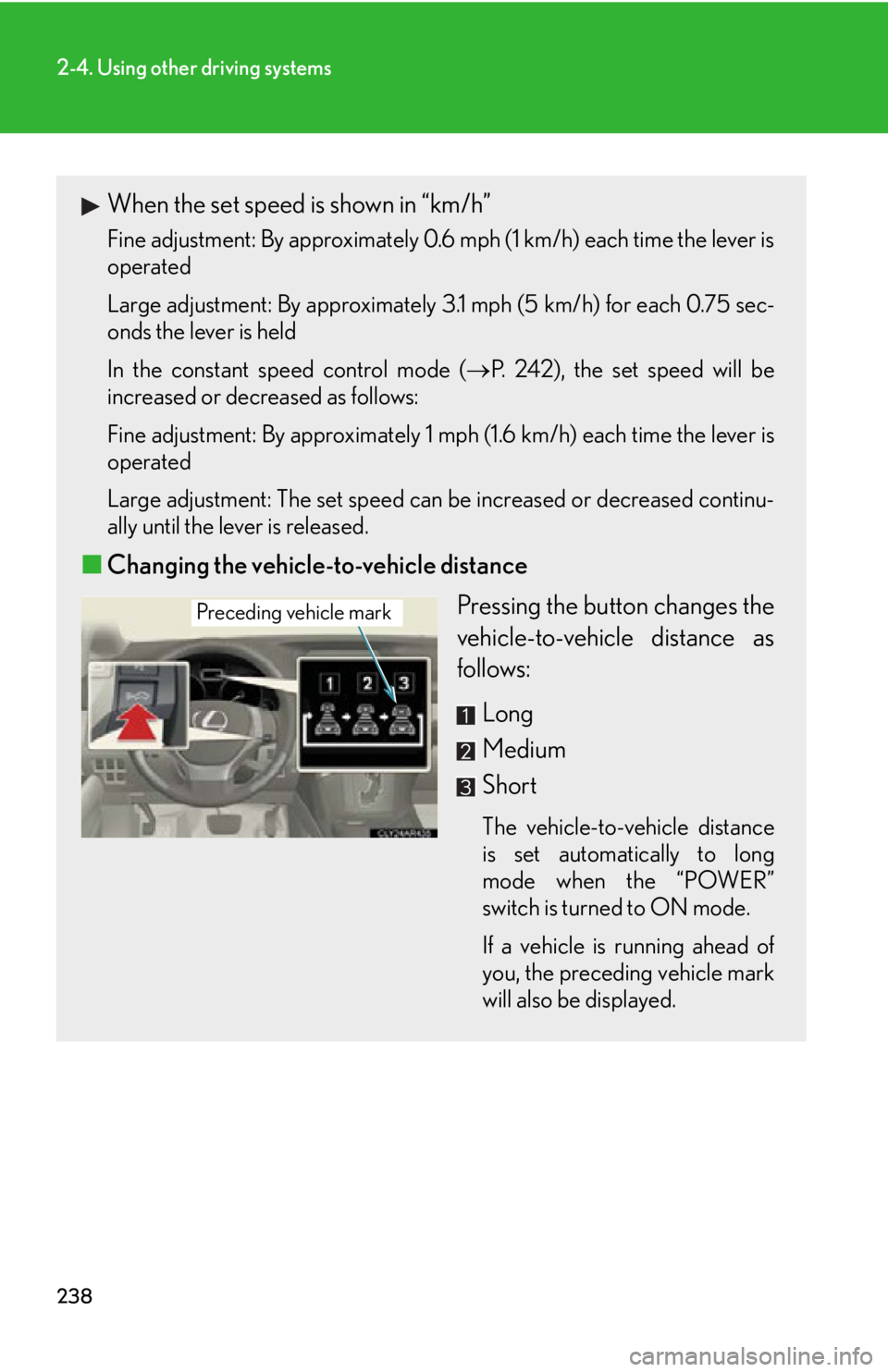
■ Changing the vehicle-to-vehicle distance
Pressing the button changes the
vehicle-to-vehicle distance as
follows:
Long
Medium
Short The vehicle-to-vehicle distance
is set automatically to long
mode when the “POWER”
switch is turned to ON mode.
If a vehicle is running ahead of
you, the preceding vehicle mark
will also be displayed.Preceding vehicle mark
Page 259 of 878
2592-4. Using other driving systems
2
When driving ■
Changing display modes
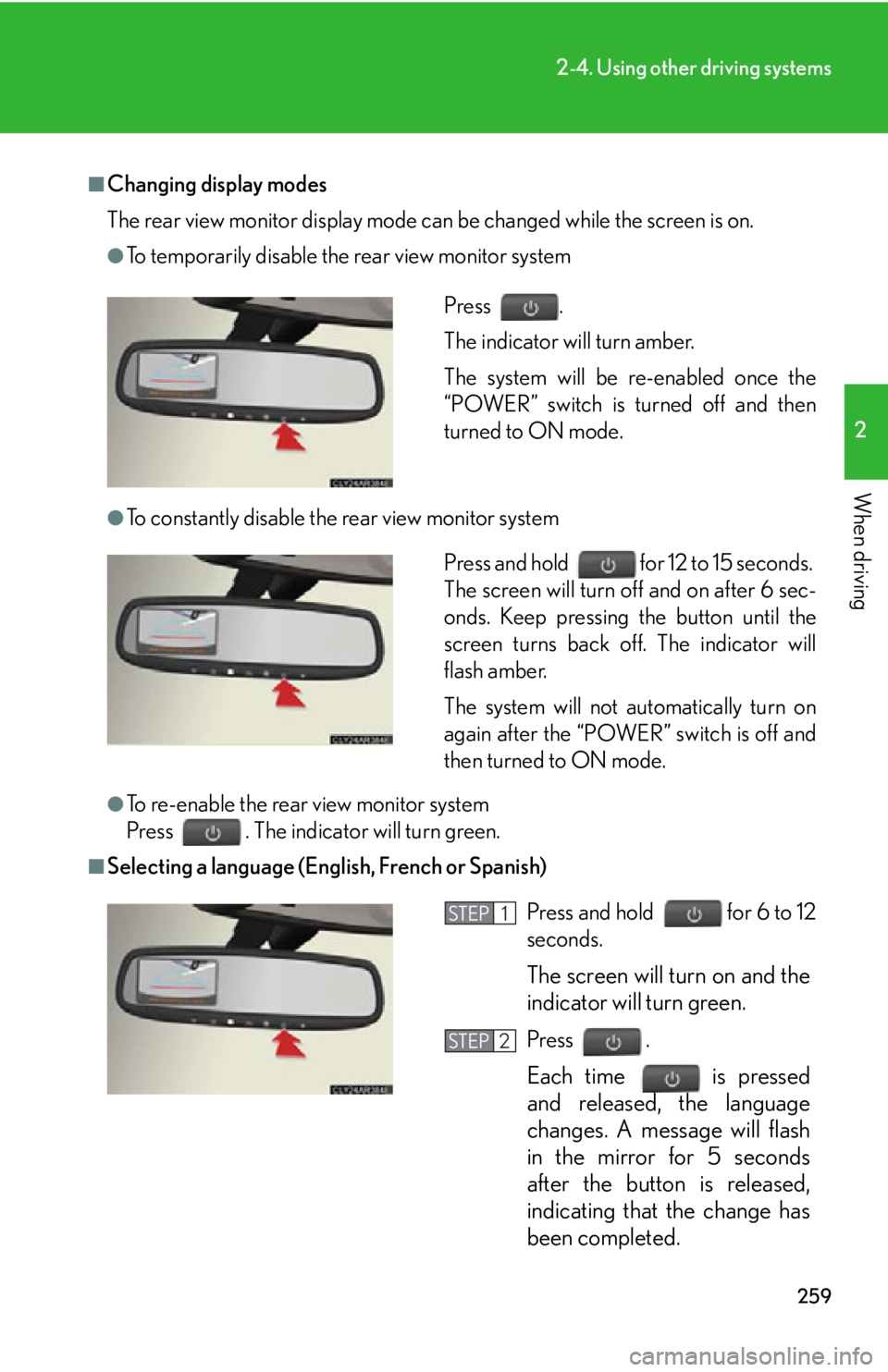
The rear view monitor display mode ca n be changed while the screen is on.●
To temporarily disable the rear view monitor system
●
To constantly disable the rear view monitor system
●
To re-enable the rear view monitor system
Press . The indicator will turn green.■
Selecting a language (English, French or Spanish) Press .
The indicator will turn amber.
The system will be re-enabled once the
“POWER” switch is turned off and then
turned to ON mode.
Press and hold for 12 to 15 seconds.
The screen will turn off and on after 6 sec-
onds. Keep pressing the button until the
screen turns back off. The indicator will
flash amber.
The system will not automatically turn on
again after the “POWER” switch is off and
then turned to ON mode.
Press and hold for 6 to 12
seconds.
The screen will turn on and the
indicator will turn green.
Press .
Each time
is pressed
and released, the language
changes. A message will flash
in the mirror for 5 seconds
after the button is released,
indicating that the change has
been completed. STEP 1
STEP 2
Page 344 of 878
3443-2. Using the air conditio ning system and defogger
Adjusting the settings manually
■ Basic setting
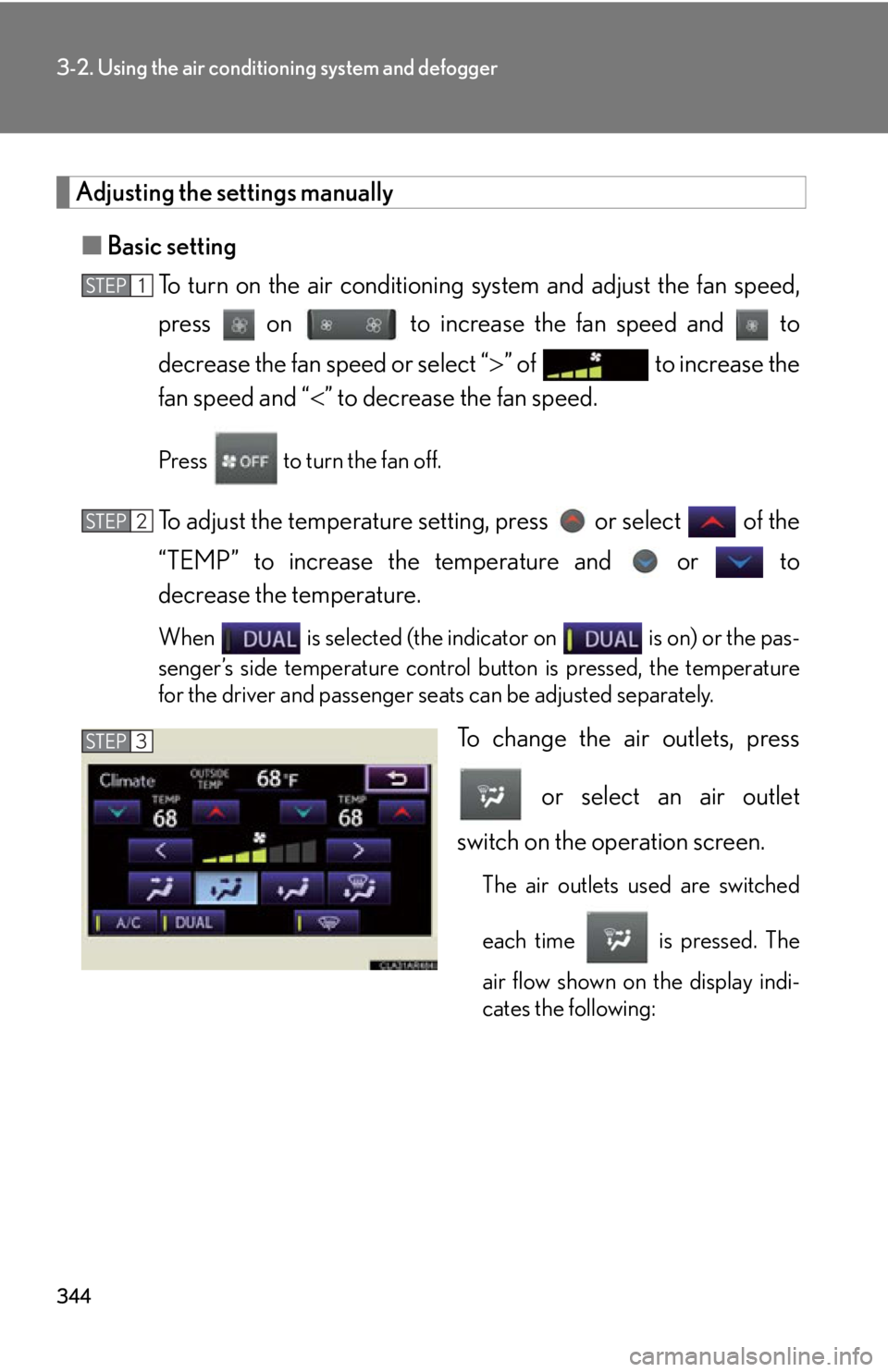
To turn on the air conditioning system and adjust the fan speed,
press on to increase the fan speed and to
decrease the fan speed or select “ ” of to increase the
fan speed and “ ” to decrease the fan speed.Press to turn the fan off.
To adjust the temperature setting, press or select of the
“TEMP” to increase the temperature and or to
decrease the temperature. When is selected (the indicator on is on) or the pas-
senger’s side temperature control bu tton is pressed, the temperature
for the driver and passenger seat s can be adjusted separately.
To change the air outlets, press
or select an air outlet
switch on the operation screen. The air outlets used are switched
each time is pressed. The
air flow shown on the display indi-
cates the following:STEP 1
STEP 2
STEP 3
Page 352 of 878
3523-2. Using the air conditio ning system and defogger
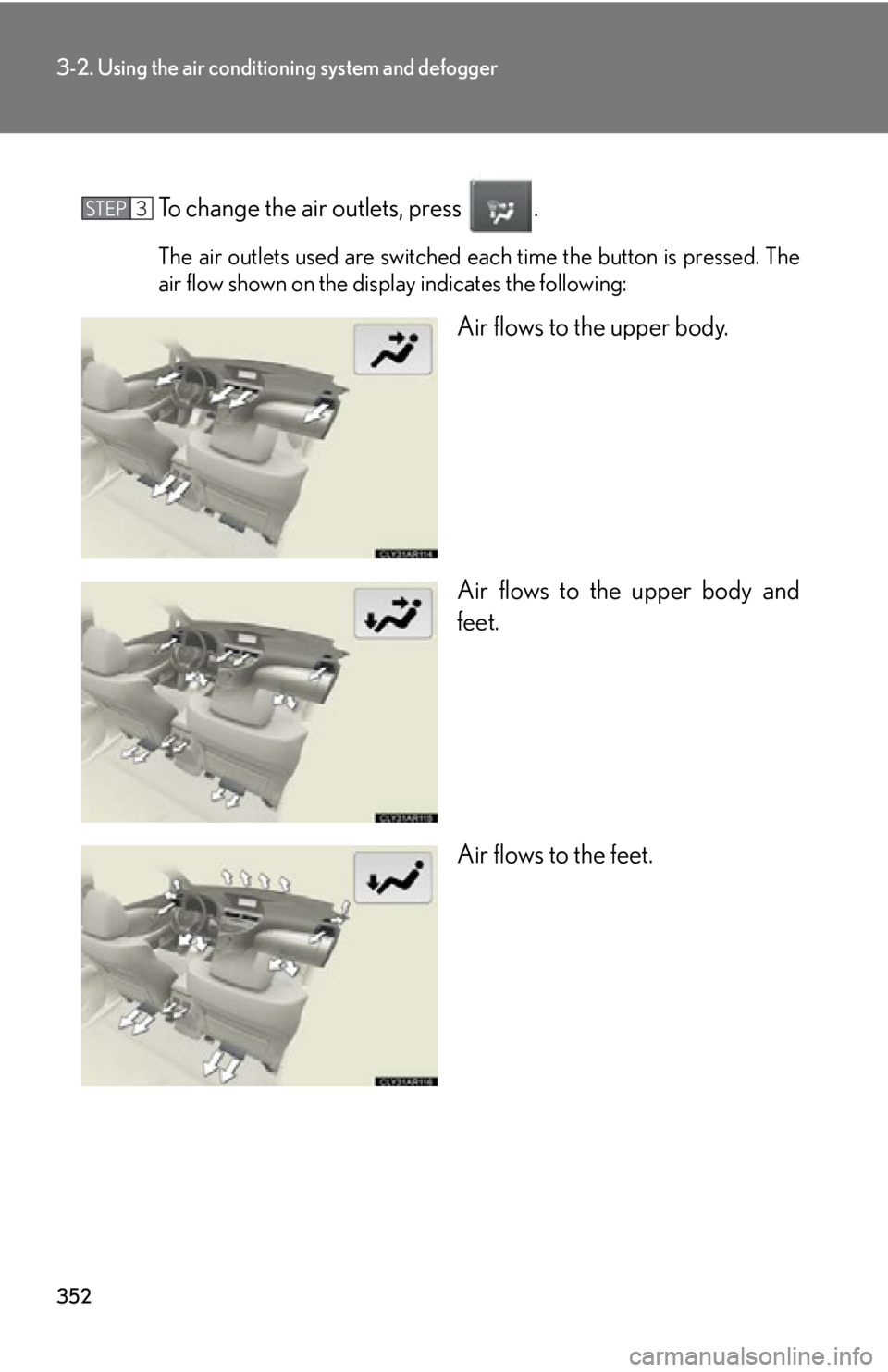
To change the air outlets, press . The air outlets used are switched each time the button is pressed. The
air flow shown on the display indicates the following:
Air flows to the upper body.
Air flows to the upper body and
feet.
Air flows to the feet.STEP 3
Page 355 of 878
3553-2. Using the air conditio ning system and defogger
3
Interior features ■
Operation of the air conditioning system in Eco drive mode
In Eco drive mode, the air conditioning syst em is controlled as follows to prioritize
fuel efficiency: ●
Engine speed and compressor operation controlled to restrict heating/cooling
capacity●
Fan speed restricted when automatic mode is selected
To improve air conditioning performanc e, perform the following operations:●
Adjust the fan speed●
Turn off Eco drive mode■
Customization
The air conditioning control of Eco drive mode can be changed to the same setting
as that used in normal drive mode.
(Customizable features P. 825)■
Air conditioning system settings ●
When the “POWER” switch is turned on, the air conditioning system settings
will be set to those that were in use the last time the “POWER” switch was
turned off.●
Air conditioning system settings are memorized individually on each electronic
key, so the settings repr oduced will be specific to the key that is used.●
This feature is customizable at your Lexus dealer.■
Using automatic mode
Fan speed is adjusted automatically accord ing to the temperature setting and ambi-
ent conditions. As a result, the following may occur:
Immediately after the button is pressed, the fan may stop for a while until warm or
cool air is ready to flow.■
Using the system in recirculated air mode
The windows will fog up more easily if recirculated air mode is used for an extended
period.
■
Switching between outside air and recirculated air modes
Recirculated air mode or outside air mode may be automatically switched in accor-
dance with the temperature setting and the inside temperature.
Page 358 of 878
3583-2. Using the air conditio ning system and defogger
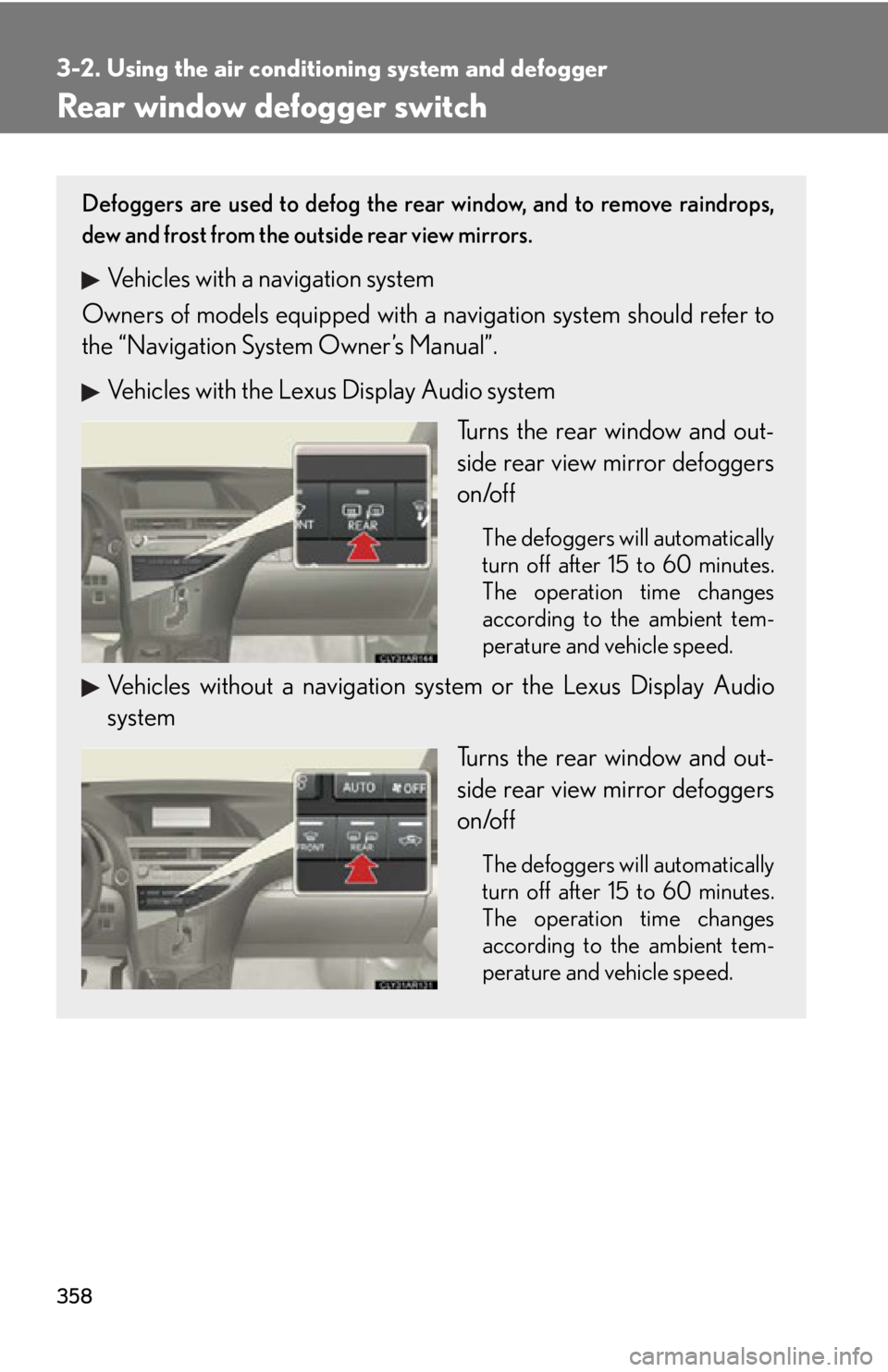
Rear window defogger switch Defoggers are used to defog the rear window, and to remove raindrops,
dew and frost from the outside rear view mirrors.
Vehicles with a navigation system
Owners of models equi pped with a navigation system should refer to
the “Navigation System Owner’s Manual”.
Vehicles with the Lexus Display Audio system
Turns the rear window and out-
side rear view mirror defoggers
on/off The defoggers will automatically
turn off after 15 to 60 minutes.
The operation time changes
according to the ambient tem-
perature and vehicle speed.
Vehicles without a navigation sy stem or the Lexus Display Audio
system
Turns the rear window and out-
side rear view mirror defoggers
on/off The defoggers will automatically
turn off after 15 to 60 minutes.
The operation time changes
according to the ambient tem-
perature and vehicle speed.
Page 363 of 878
3633-3. Using the Lexus Display Audio system
3
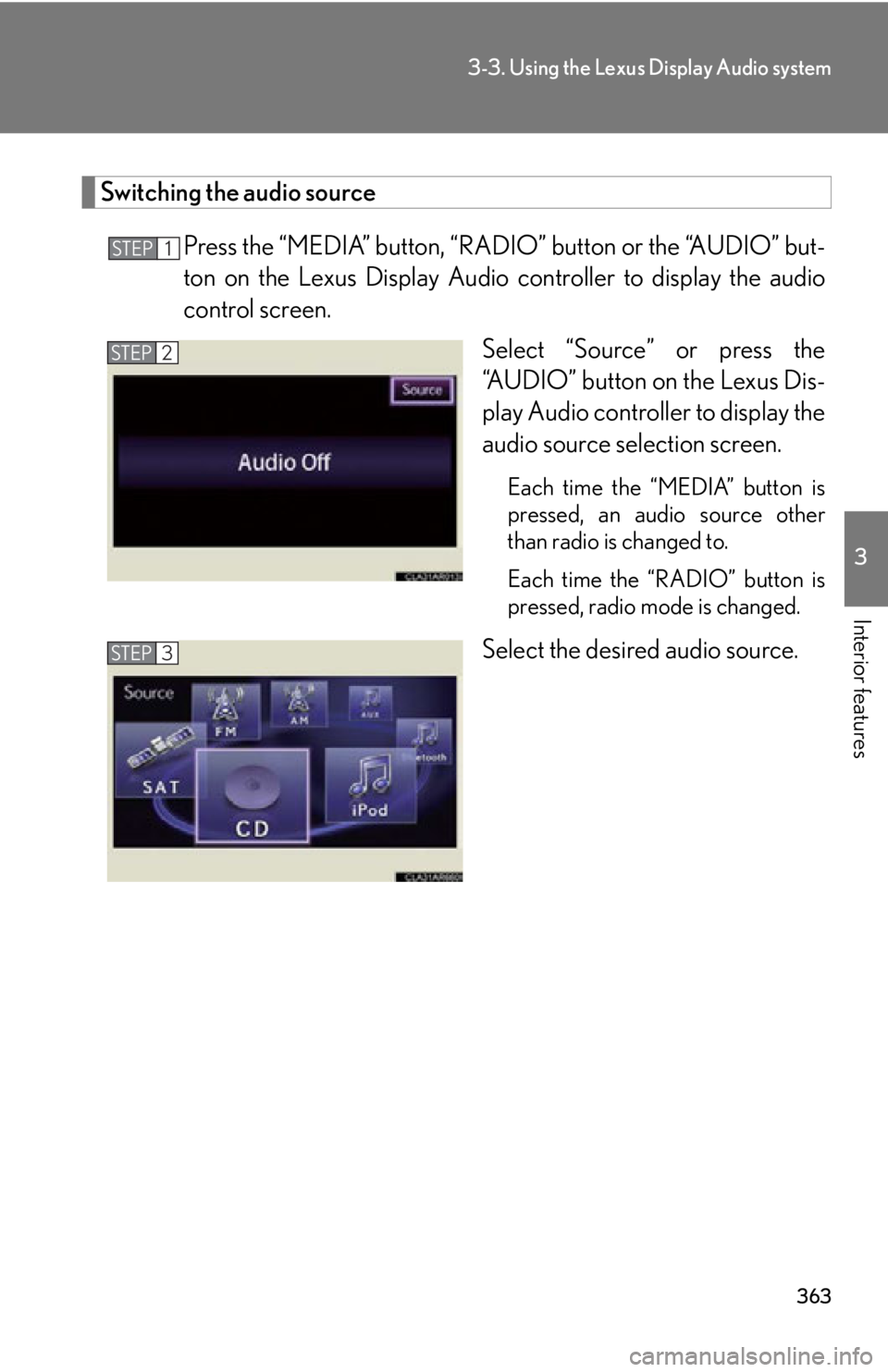
Interior features Switching the audio source
Press the “MEDIA” button, “RAD IO” button or the “AUDIO” but-
ton on the Lexus Display Audio controller to display the audio
control screen.
Select “Source” or press the
“AUDIO” button on the Lexus Dis-
play Audio controller to display the
audio source selection screen. Each time the “MEDIA” button is
pressed, an audio source other
than radio is changed to.
Each time the “RADIO” button is
pressed, radio mode is changed.
Select the desired audio source.STEP 1
STEP 2
STEP 3
Page 369 of 878
3693-3. Using the Lexus Display Audio system
3
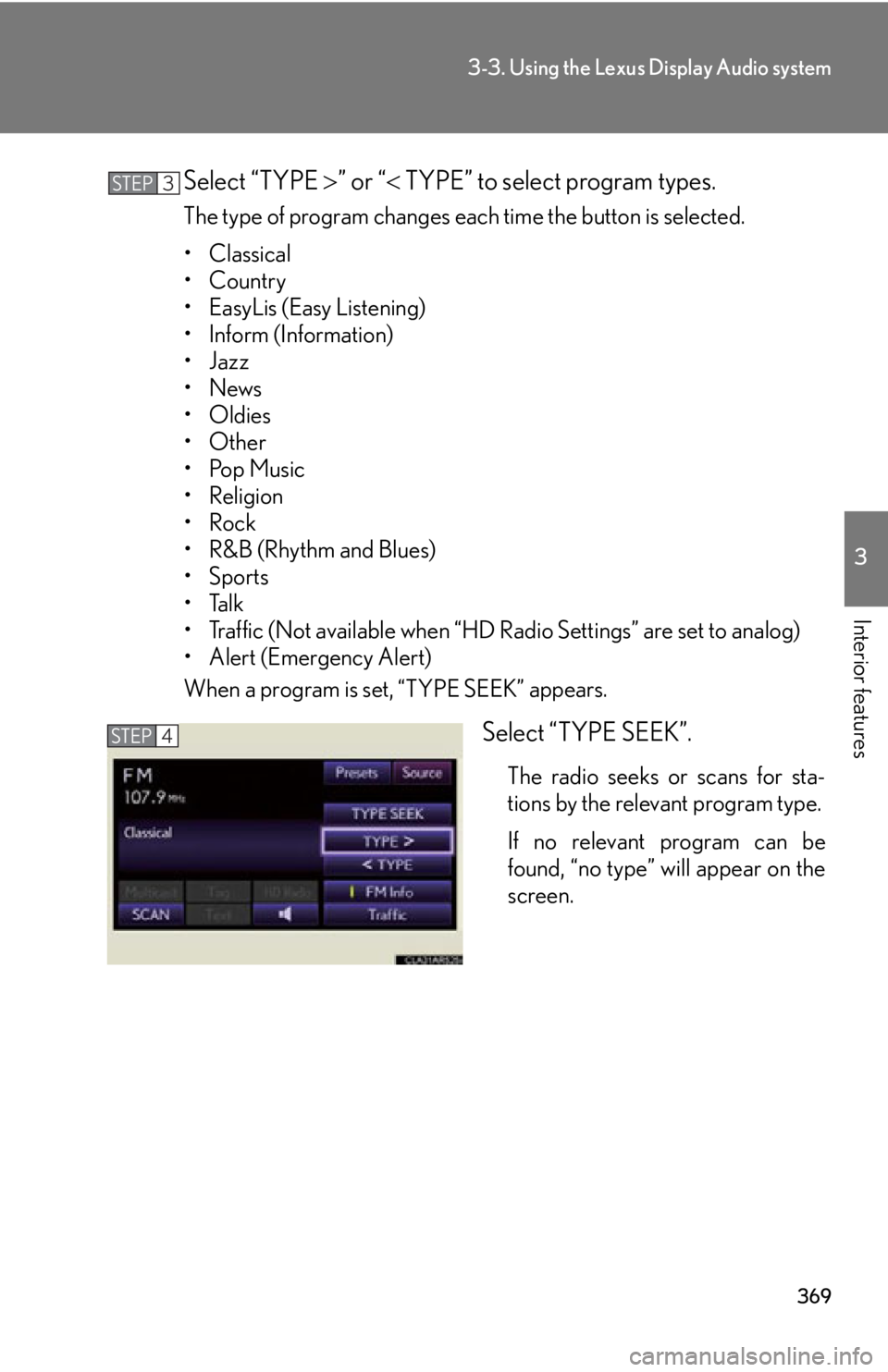
Interior features Select “TYPE ” or “ TYPE” to select program types.The type of program changes each time the button is selected.
• Classical
•Country
• EasyLis (Easy Listening)
• Inform (Information)
•Jazz
•News
• Oldies
•Other
•Pop Music
• Religion
•Rock
•R&B (Rhythm and Blues)
•Sports
•Talk
• Traffic (Not available when “HD Radio Settings” are set to analog)
• Alert (Emergency Alert)
When a program is set, “TYPE SEEK” appears.
Select “TYPE SEEK”. The radio seeks or scans for sta-
tions by the relevant program type.
If no relevant program can be
found, “no type” will appear on the
screen.STEP 3
STEP 4