instrument cluster LEXUS RX450h 2015 User Guide
[x] Cancel search | Manufacturer: LEXUS, Model Year: 2015, Model line: RX450h, Model: LEXUS RX450h 2015Pages: 878, PDF Size: 11.62 MB
Page 204 of 878

2042-2. Instrument cluster
* 1
: These lights turn on when the “POWER” switch is turned to ON mode to
indicate that a system check is being performed. They will turn off after
the hybrid system is on, or after a few seconds. There may be a malfunc-
tion in a system if a light does not co me on, or if the lig hts do not turn off.
Have the vehicle inspected by your Lexus dealer.
* 2
: The light flashes to indicate that the system is operating.
* 3
: The light comes on when the system is turned off. The light flashes faster
than usual to indicate that the system is operating.
* 4
: In order to confirm operation, the BSM outside rear view mirror indica-
tors illuminate in the following situations:
• When the “POWER” switch is turned to ON mode while the BSM
main switch is set to ON.
• When the BSM main switch is set to ON while the “POWER” switch is
in ON mode.
If the system is functioning correctly, the BSM outside rear view mirror
indicators will turn off after a few seconds.
If the BSM outside rear view mirror indicators do not illuminate or do not
turn off, there may be a malfunction with the system.
If this occurs, have the vehicle inspected by your Lexus dealer. (if equipped)
SRS airbag on-off indica-
tor ( P. 1 4 5 ) (if equipped)
SRS airbag on-off indica-
tor ( P. 1 4 5 )
* 1
* 1
Page 205 of 878
2052-2. Instrument cluster
2
When driving
CAUTION■
If a safety system warning light does not come on
Should a safety system light such as the ABS and SRS warning light not come on
when you start the hybrid system, this could mean that these systems are not avail-
able to help protect you in an accident, wh ich could result in death or serious injury.
Have the vehicle inspected by your Lexus dealer immediately if this occurs.■ Warning lights
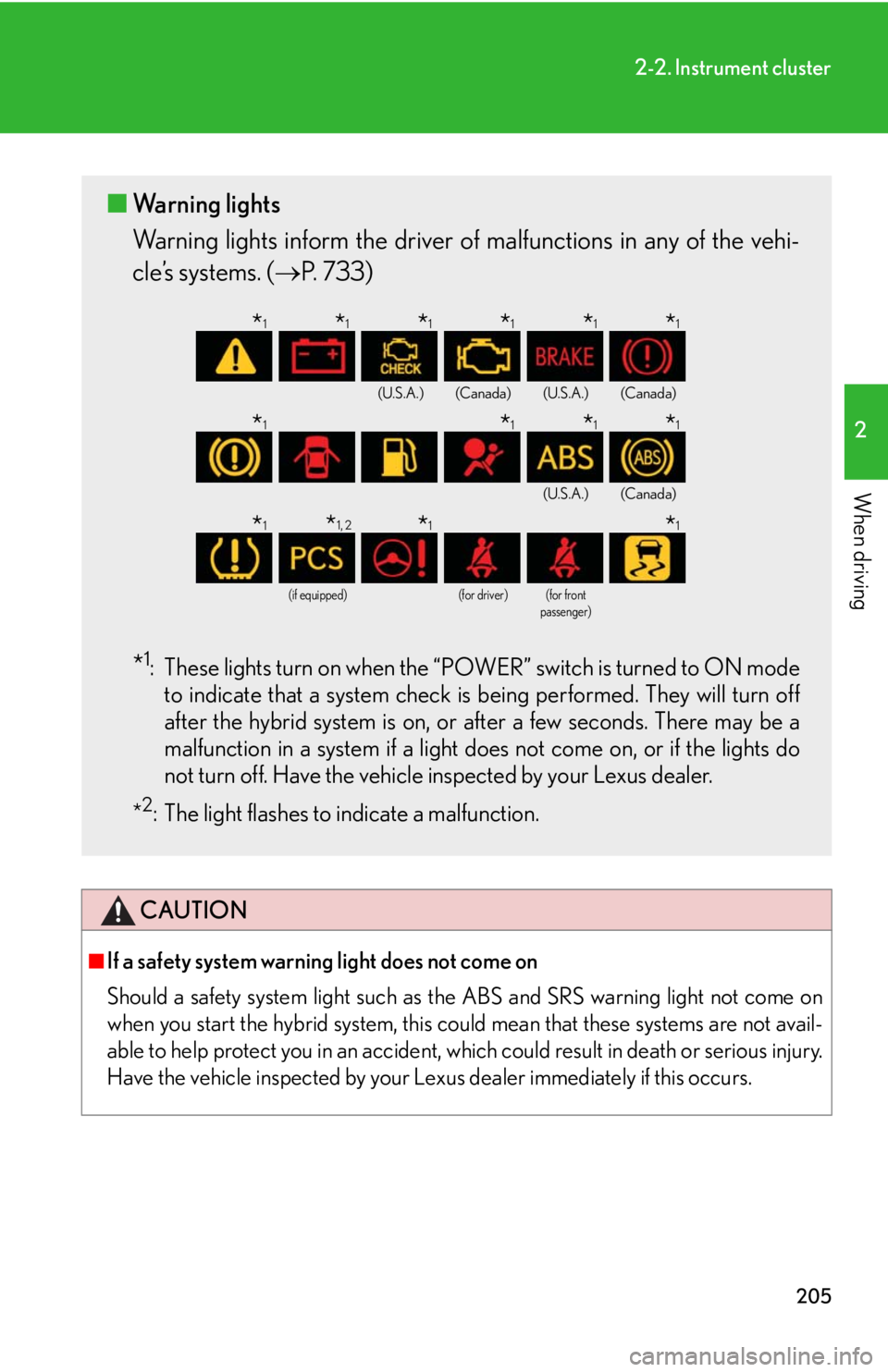
Warning lights inform the driver of malfunctions in any of the vehi-
cle’s systems. ( P. 733)
* 1
: These lights turn on when the “POWER” switch is turned to ON mode
to indicate that a system check is being performed. They will turn off
after the hybrid system is on, or after a few seconds. There may be a
malfunction in a system if a light do es not come on, or if the lights do
not turn off. Have the vehicle inspected by your Lexus dealer.
* 2
: The light flashes to indicate a malfunction. (U.S.A.) (Canada) (U.S.A.) (Canada)
(U.S.A.) (Canada)
(if equipped) (for driver) (for front
passenger)
* 1
* 1
* 1
* 1
* 1
* 1
* 1
* 1
* 1
* 1
* 1
* 1, 2
* 1
* 1
Page 206 of 878

2062-2. Instrument cluster
Multi-information display The multi-information display presents the driver with a variety of driving-
related data including the current outside air temperature.
■ Multi-information switches
“ ” “ ” switchChanges items.
“ENTER” switch Turns on/off electronic features
controls and changes customi-
zation settings.
Menu switch Changes mode from normal
display to electronic features,
customization or back to normal
display.
Page 207 of 878
2072-2. Instrument cluster
2
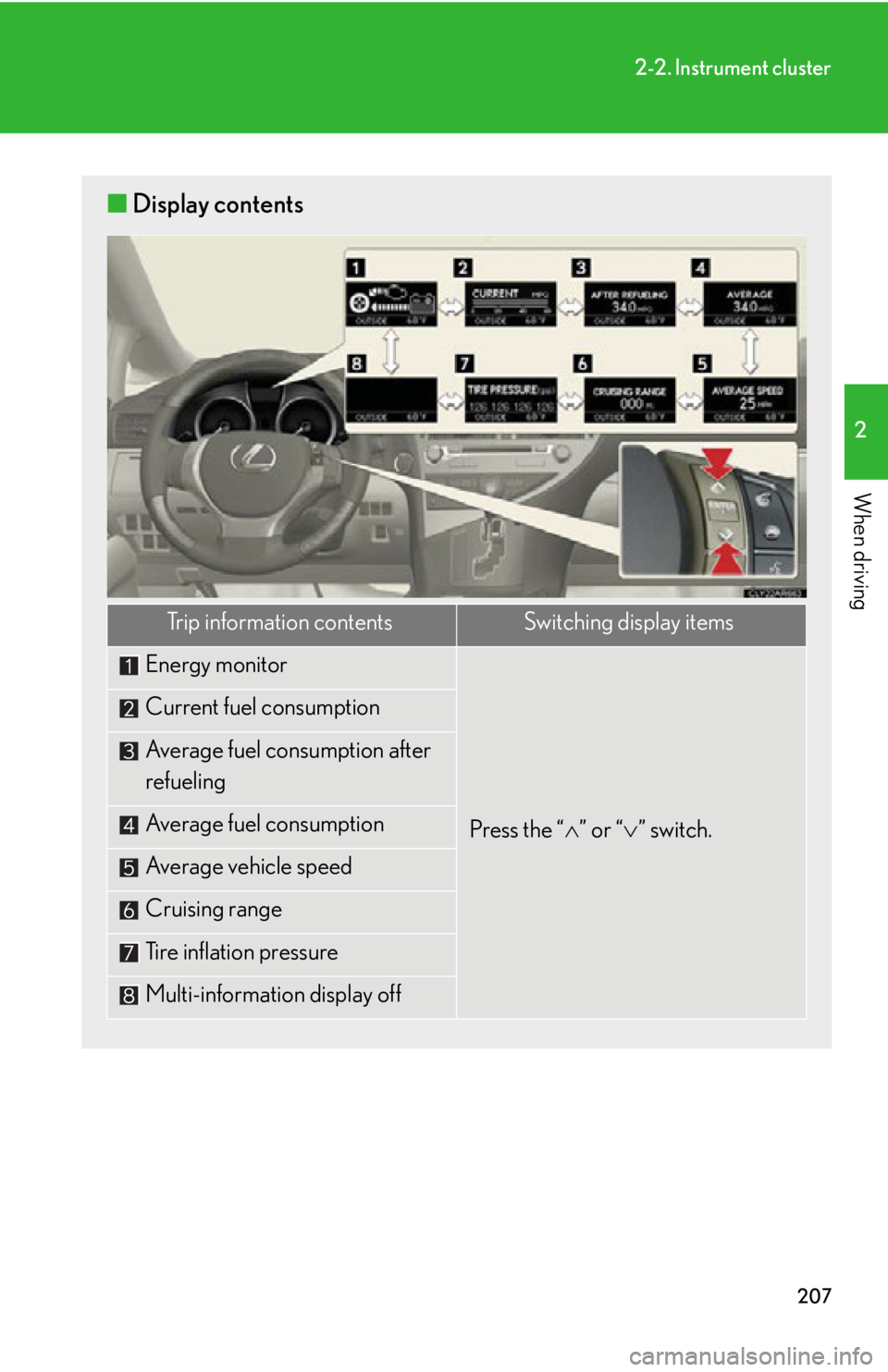
When driving ■ Display contents
Trip information contents Switching display items
Energy monitor
Press the “ ” or “ ” switch.Current fuel consumption
Average fuel consumption after
refueling
Average fuel consumption
Average vehicle speed
Cruising range
Tire inflation pressure
Multi-information display off
Page 208 of 878
2082-2. Instrument cluster
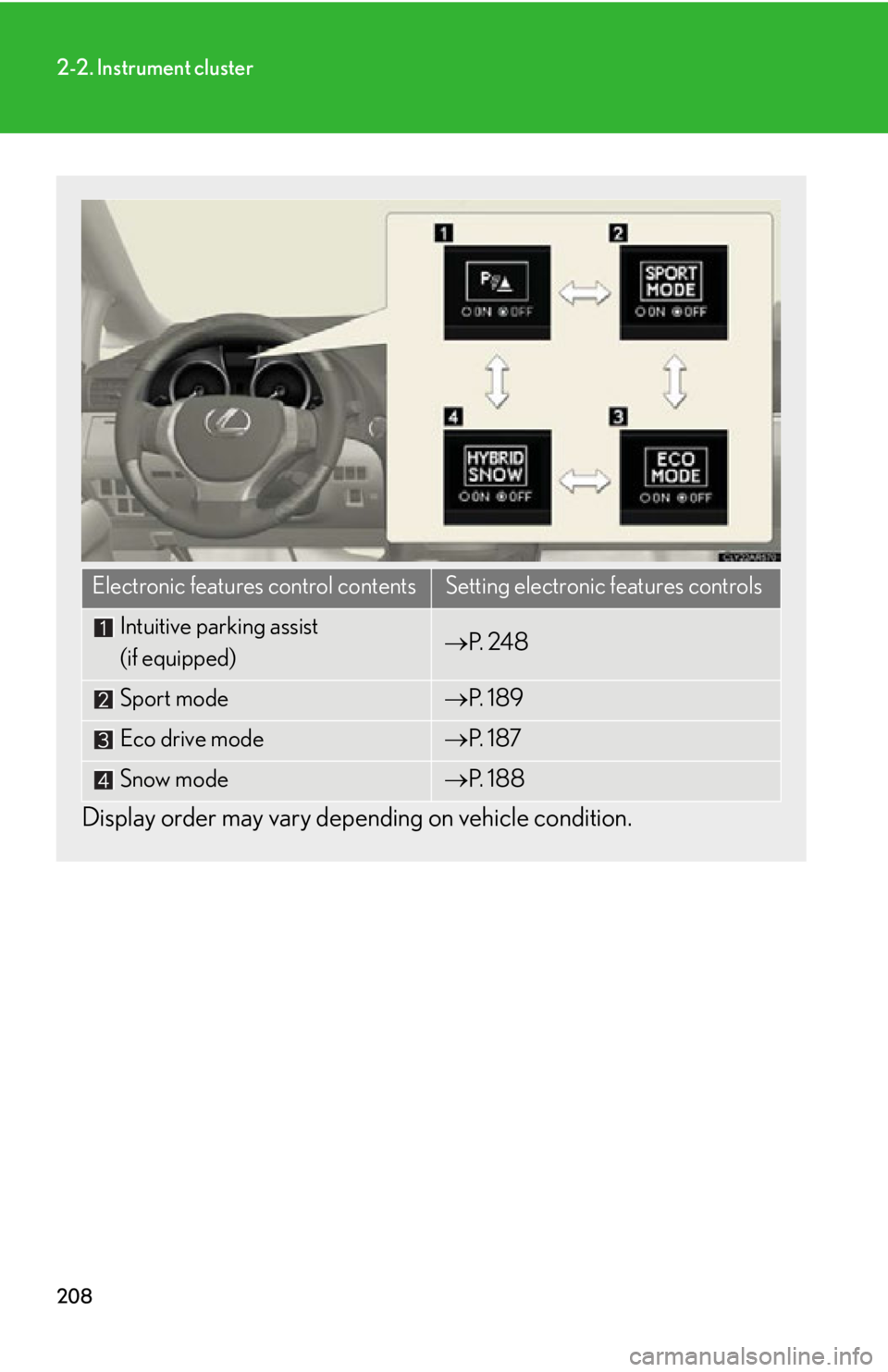
Display order may vary depe nding on vehicle condition.Electronic features control contents Setting electronic features controls
Intuitive parking assist
(if equipped) P. 2 4 8
Sport mode P. 1 8 9
Eco drive mode P. 1 8 7
Snow mode P. 1 8 8
Page 209 of 878
2092-2. Instrument cluster
2
When driving
Trip information
■ Energy monitor
Displays the status of the hybrid system ( P. 4 0 )
■ Current fuel consumption
Displays the current ra te of fuel consumption
■ Average fuel consumption after refueling
Displays the average fuel consumptio n since the vehicle was last refu-
eled
Use the displayed average fuel consumption as a reference.
■ Average fuel consumption
Displays the average fuel consumpti on since the function was reset
• The function can be reset by pushing the “ENTER” switch for longer
than one second when the average fuel consumption is displayed.
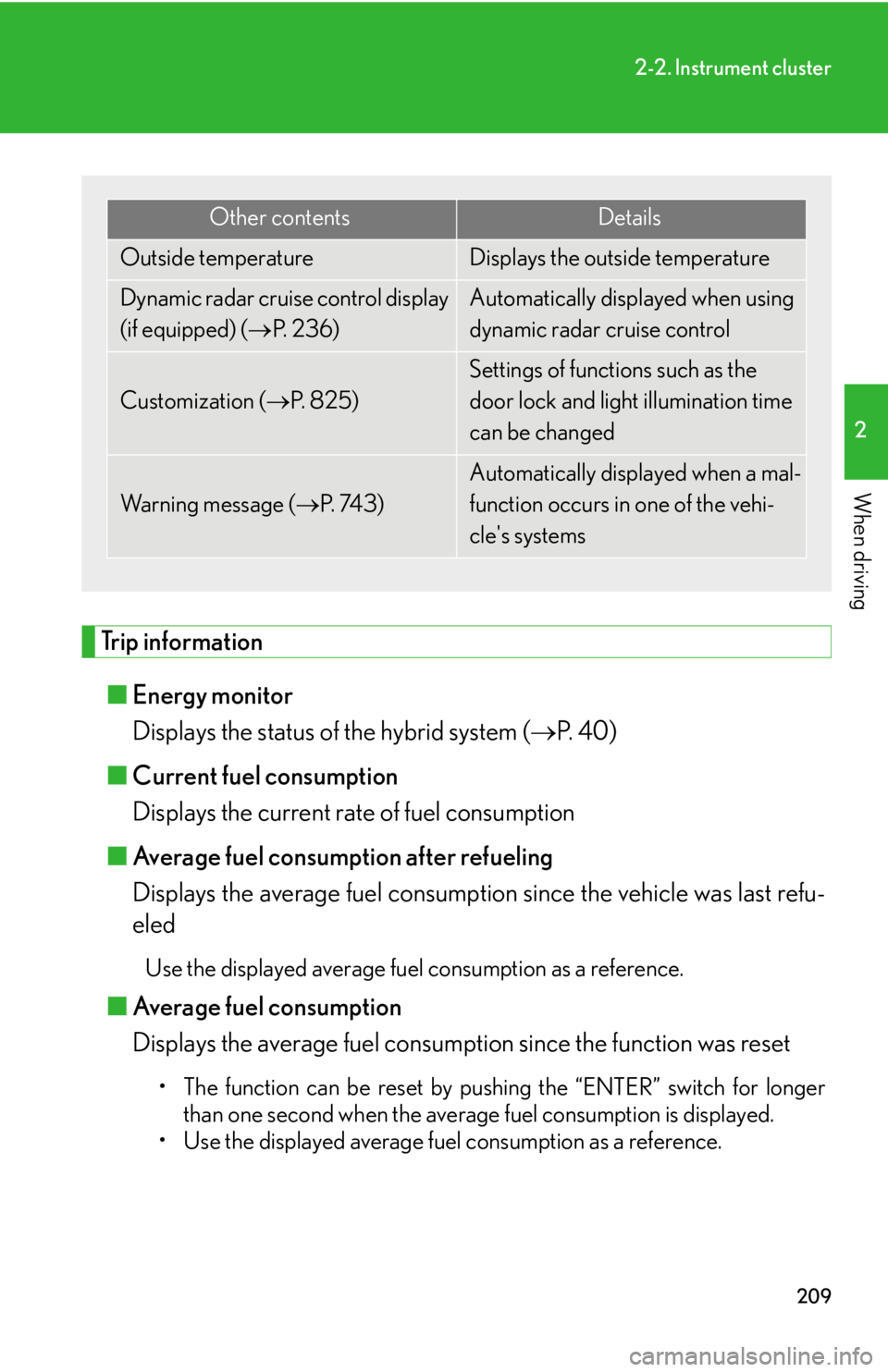
• Use the displayed average fuel consumption as a reference. Other contents Details
Outside temperature Displays the outside temperature
Dynamic radar cruise control display
(if equipped) ( P. 2 3 6 ) Automatically displayed when using
dynamic radar cruise control
Customization ( P. 8 2 5 ) Settings of functions such as the
door lock and light illumination time
can be changed
Wa r n i n g m e s s a g e ( P. 74 3 ) Automatically displayed when a mal-
function occurs in one of the vehi-
cle's systems
Page 210 of 878

2102-2. Instrument cluster
■ Average vehicle speed
Displays the average vehicle speed since the function was reset The function can be reset by pushing the “ENTER” switch for longer than
one second when the average vehicle speed is displayed.
■ Cruising range
Displays the estimated maximum distan ce that can be driven with the
quantity of fuel remaining • This distance is computed based on your average fuel consumption. As
a result, the actual distance that can be driven may differ from that dis-
played.
• When only a small amount of fuel is added to the tank, the display may
not be updated.
When refueling, turn the “POWER” switch off. If the vehicle is refueled
without turning the “POWER” switch off, the display may not be
updated.
■ Tire inflation pressure
Displays inflation pressure of each tire. There is no correlation between
the order of the displayed values and the tire positions. If the inflation pressure of any tire drops a certain amount below the tire infla-
tion pressure value currently memorized in the system, the displayed values
will be highlighted.
It may take a few minutes to display the tire inflation pressure after the
“POWER” switch is turned to ON mode. It may also take a few minutes to
display the tire inflation pressure after inflation pressure has been adjusted.
If the tire pressure warning light is on or flashing, a message describing the
situation will be displayed.
Page 211 of 878
2112-2. Instrument cluster
2
When driving ■
Electronic features control can be turned on/off when
The “POWER” switch is in ON mode.■
Conditions for ending electronic features control
In the following situations, the electronic features control will end: ●
The menu switch is pressed.●
The dynamic radar cruise control is operated (if equipped).●
Intuitive parking assist starts operating (if equipped).●
No action is performed for some time after the electronic features control
screen is displayed.●
A warning message appears after the electronic features control screen is dis-
played.■
Outside temperature display
In the following situations, the correct outside temperature may not be displayed, or
the display may take longer than normal to change. ●
When stopped, or driving at low speeds (less than 16 mph [25 km/h])●
When the outside temperature has changed suddenly (at the entrance/exit of a
garage, tunnel, etc.)■
The multi-information display at low temperatures
Allow the interior of the vehicle to warm up before using the liquid crystal informa-
tion display. At extremely low temperatures, the information display monitor may
respond slowly, and display changes may be delayed. ■
Customization
Settings (e.g. available la nguages) can be changed.
(Customizable features P. 825)
CAUTION
■
Caution while driving
When operating the electronic features control while driving, take extra notice of
the vehicle's surrounding area.
Page 212 of 878
2122-2. Instrument cluster
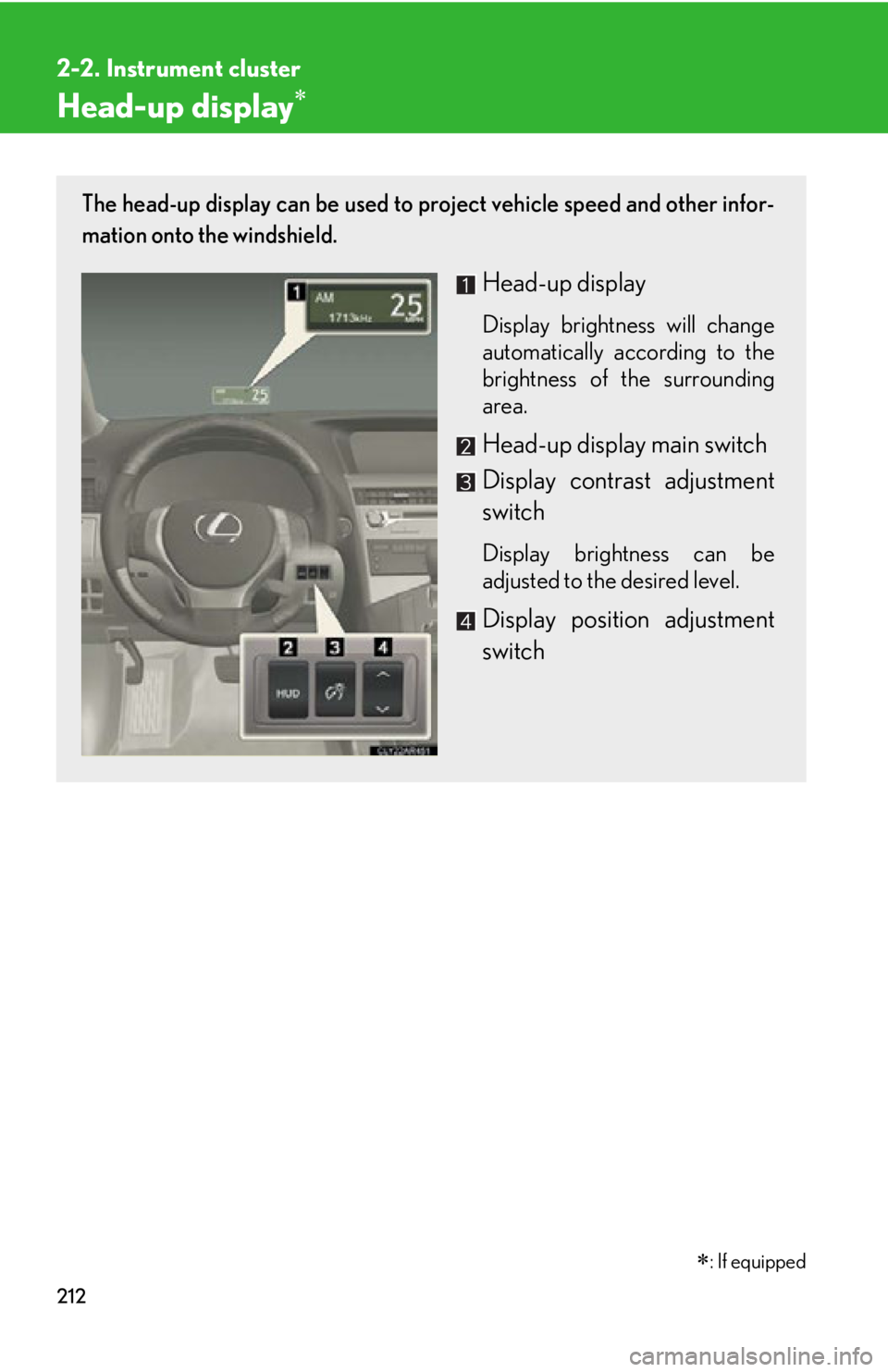
Head-up display The head-up display can be used to project vehicle speed and other infor-
mation onto the windshield.
Head-up display Display brightness will change
automatically according to the
brightness of the surrounding
area.
Head-up display main switch
Display contrast adjustment
switch Display brightness can be
adjusted to the desired level.
Display position adjustment
switch
: If equipped
Page 213 of 878
2132-2. Instrument cluster
2
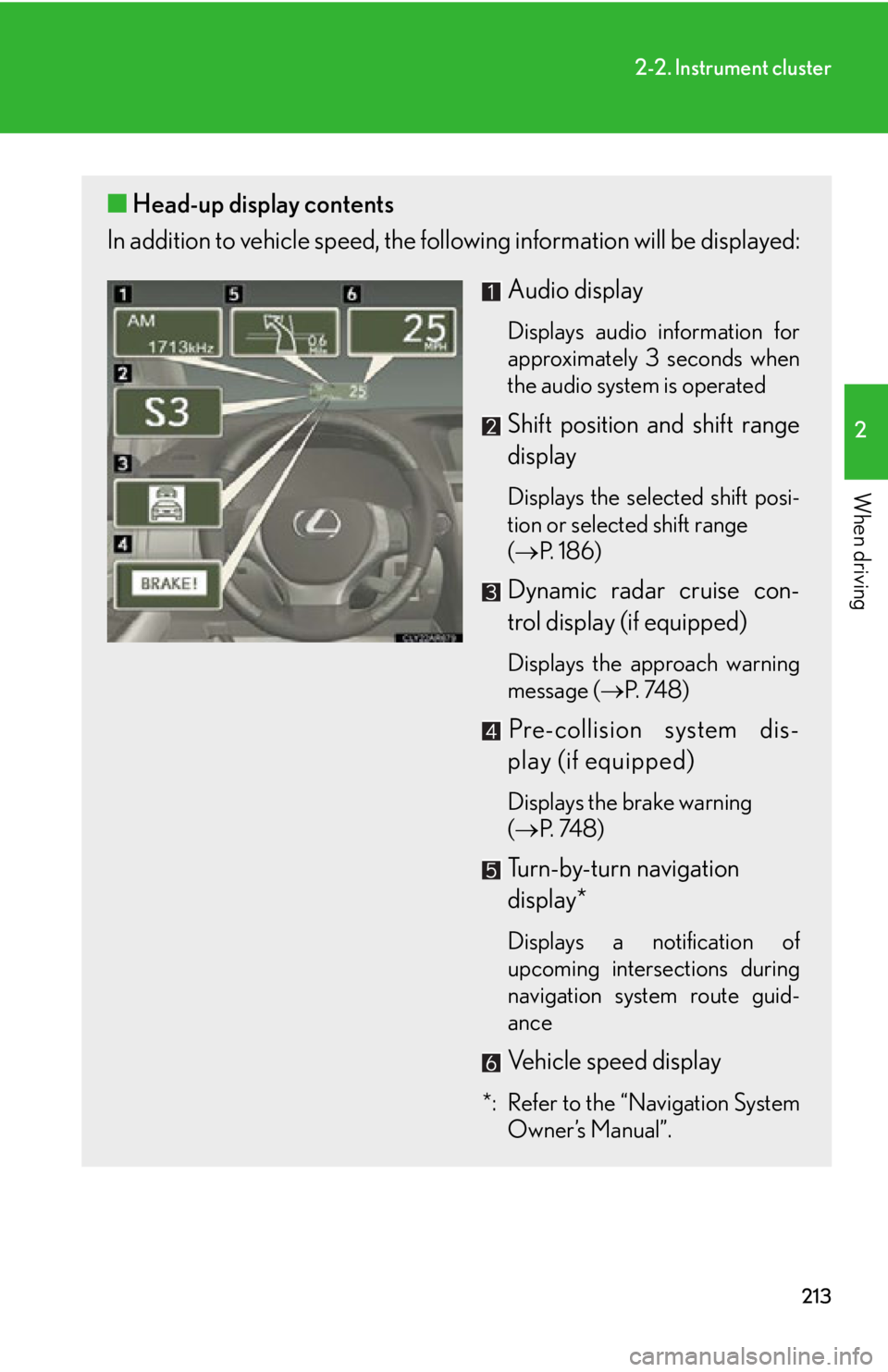
When driving ■ Head-up display contents
In addition to vehicle sp eed, the following informa tion will be displayed:
Audio display Displays audio information for
approximately 3 seconds when
the audio system is operated
Shift position and shift range
display Displays the selected shift posi-
tion or selected shift range
( P. 1 8 6 )
Dynamic radar cruise con-
trol display (if equipped) Displays the approach warning
message ( P. 74 8 )
Pre-collision system dis-
play (if equipped) Displays the brake warning
( P. 74 8 )
Turn-by-turn navigation
display*
Displays a notification of
upcoming intersections during
navigation system route guid-
ance
Vehicle speed display
*: Refer to the “Navigation System
Owner’s Manual”.