LEXUS RX450h 2015 User Guide
RX450h 2015
LEXUS
LEXUS
https://www.carmanualsonline.info/img/36/58963/w960_58963-0.png
LEXUS RX450h 2015 User Guide
Page 42 of 878
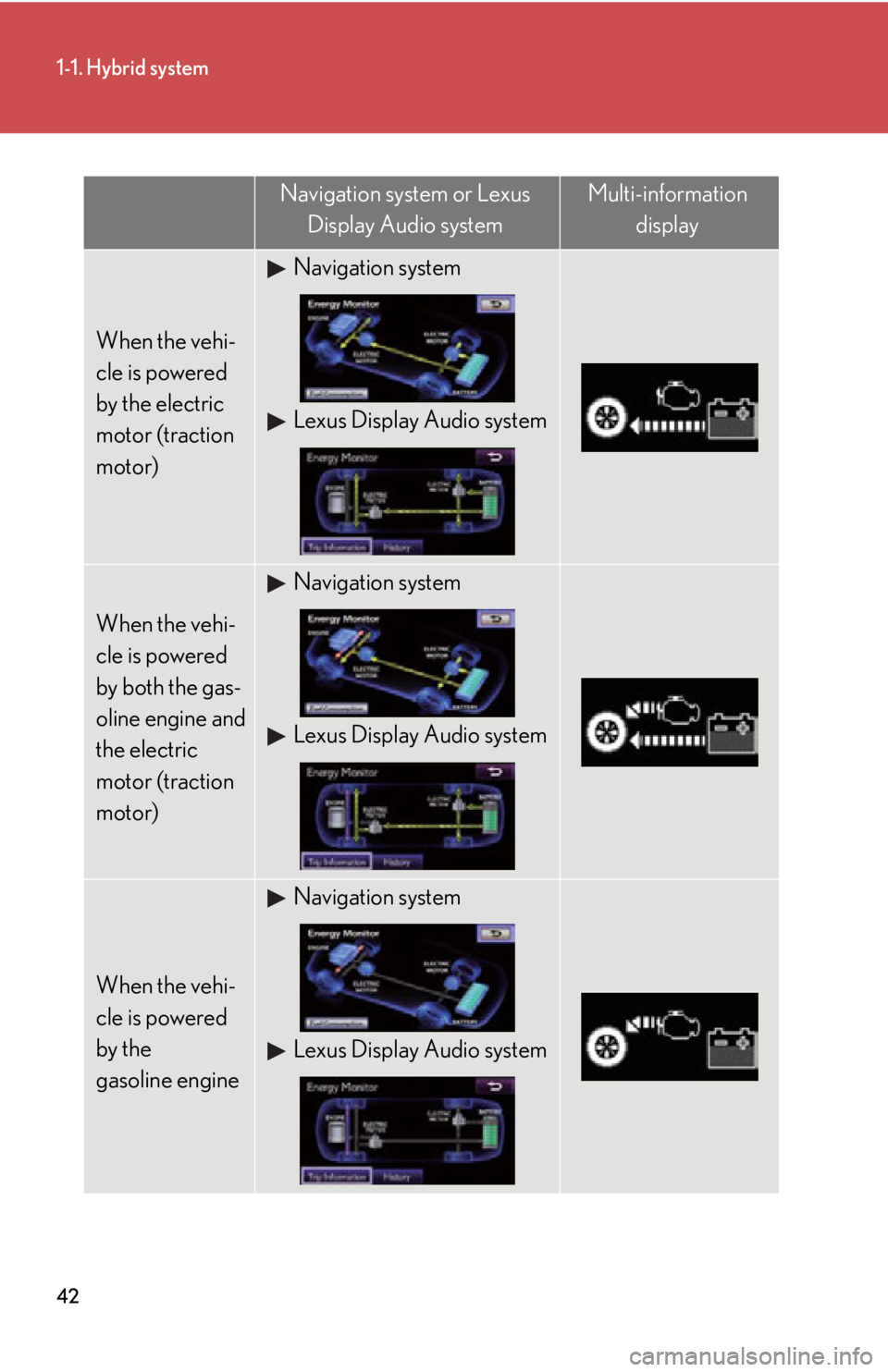
421-1. Hybrid system
Navigation system or Lexus
Display Audio system Multi-information
display
When the vehi-
cle is powered
by the electric
motor (traction
motor) Navigation system
Lexus Display Audio system
When the vehi-
cle is powered
by both the gas-
oline engine and
the electric
motor (traction
motor) Navigation system
Lexus Display Audio system
When the vehi-
cle is powered
by the
gasoline engine Navigation system
Lexus Display Audio system
Page 43 of 878
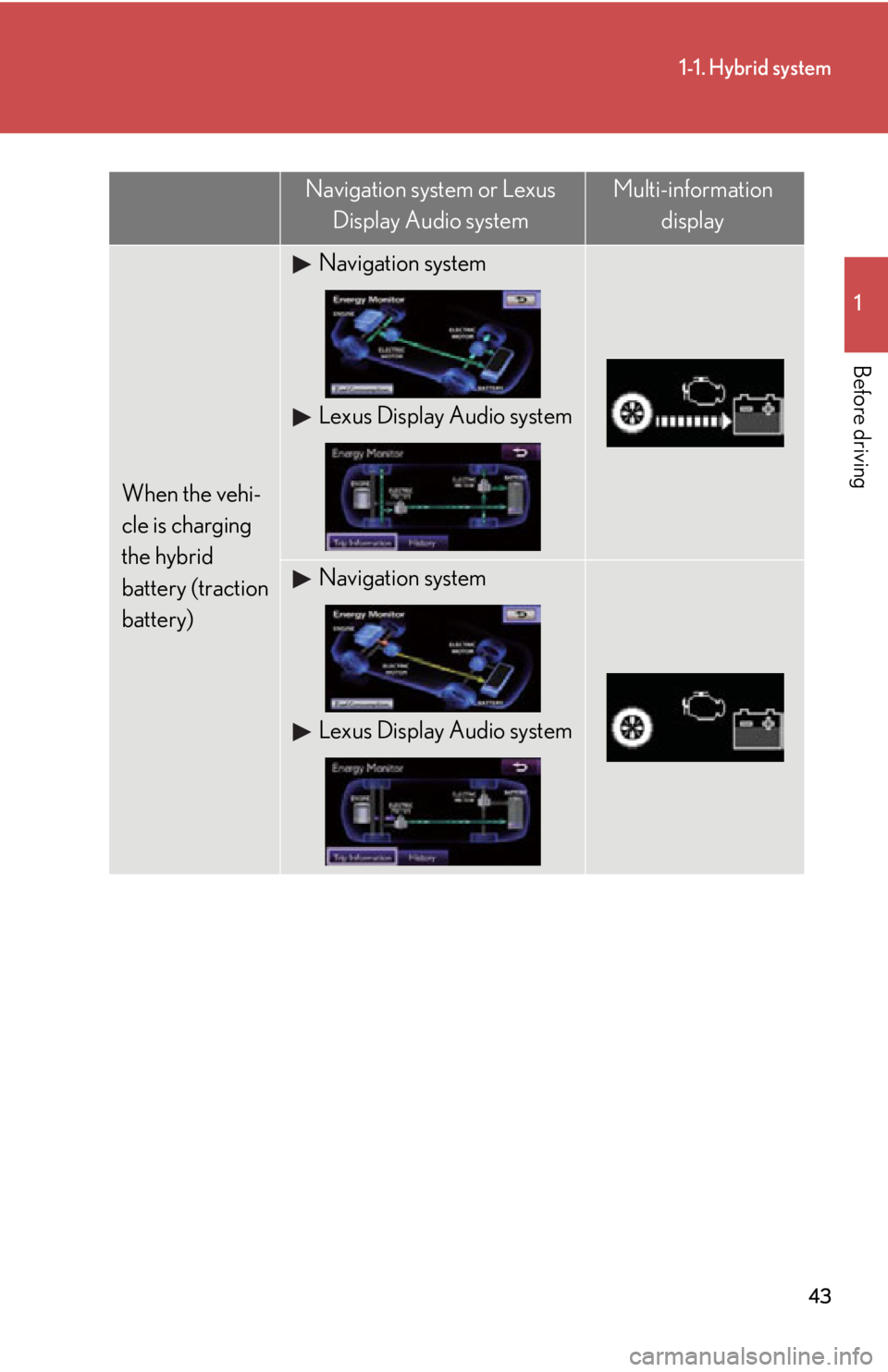
431-1. Hybrid system
1
Before driving
When the vehi-
cle is charging
the hybrid
battery (traction
battery) Navigation system
Lexus Display Audio system
Navigation system
Lexus Display Audio systemNavigation system or Lexus
Display Audio system Multi-information
display
Page 44 of 878
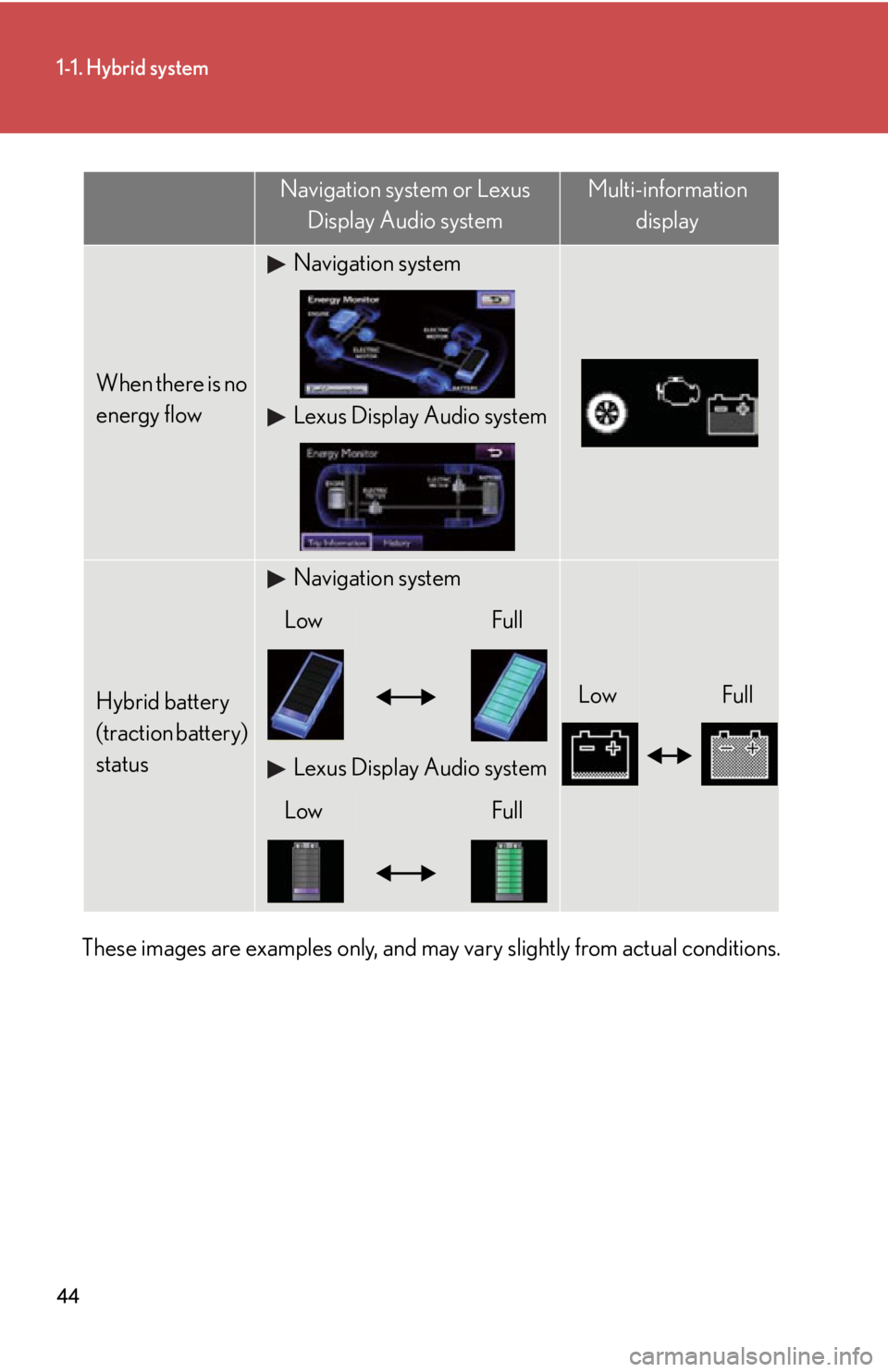
441-1. Hybrid system
These images are examples only, and may vary slightly from actual conditions. When there is no
energy flow Navigation system
Lexus Display Audio system
Hybrid battery
(traction battery)
status Navigation system
Low FullLow Full
Lexus Display Audio system
Low FullNavigation system or Lexus
Display Audio system Multi-information
display
Page 45 of 878
451-1. Hybrid system
1
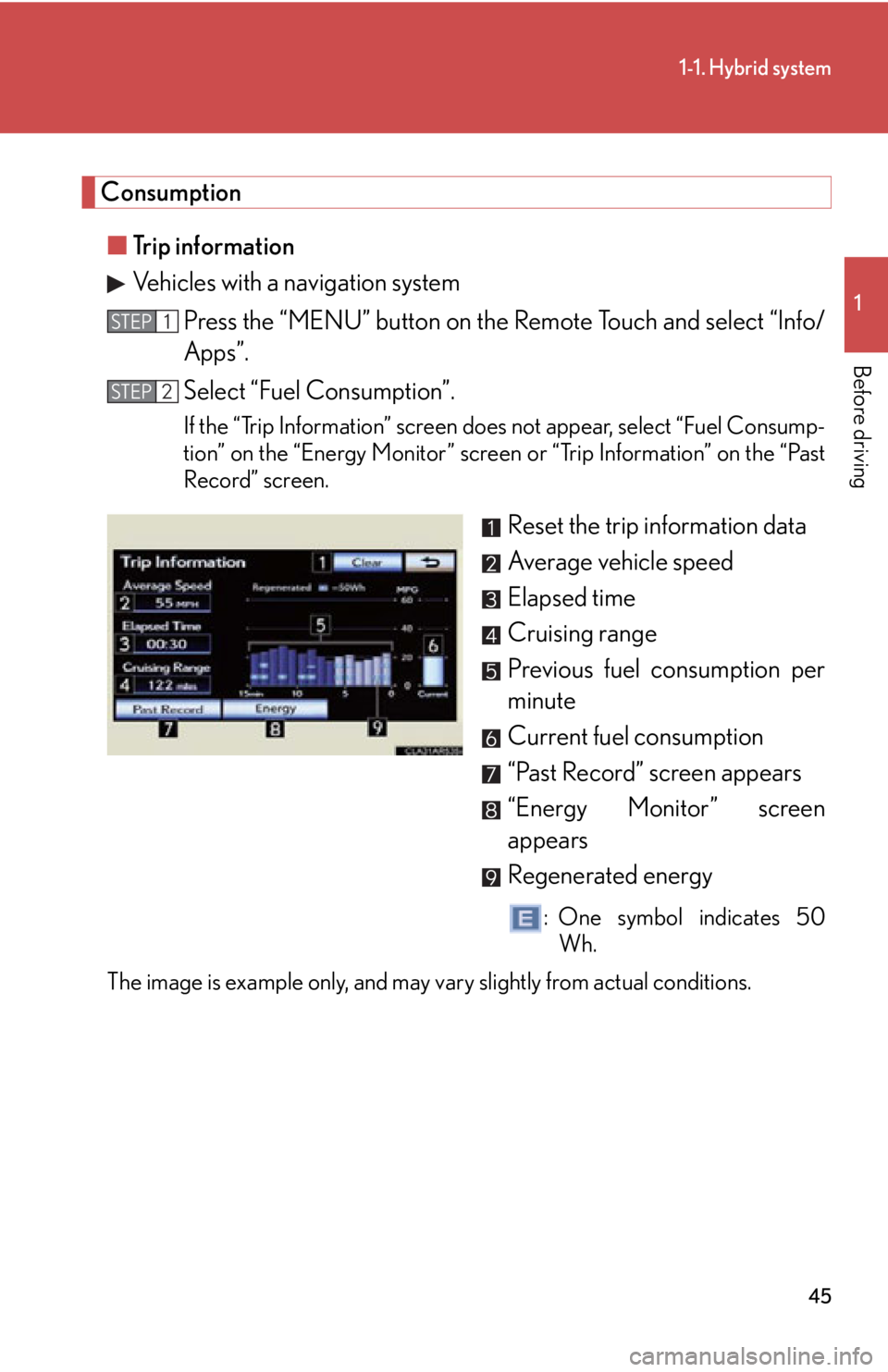
Before driving Consumption
■ Trip information
Vehicles with a navigation system
Press the “MENU” button on the Remote Touch and select “Info/
Apps”.
Select “Fuel Consumption”. If the “Trip Information” screen does not appear, select “Fuel Consump-
tion” on the “Energy Monitor” screen or “Trip Information” on the “Past
Record” screen.
Reset the trip information data
Average vehicle speed
Elapsed time
Cruising range
Previous fuel consumption per
minute
Current fuel consumption
“Past Record” screen appears
“Energy Monitor” screen
appears
Regenerated energy : One symbol indicates 50
Wh.
The image is example only, and may vary slightly from actual conditions. STEP 1
STEP 2
Page 47 of 878
471-1. Hybrid system
1
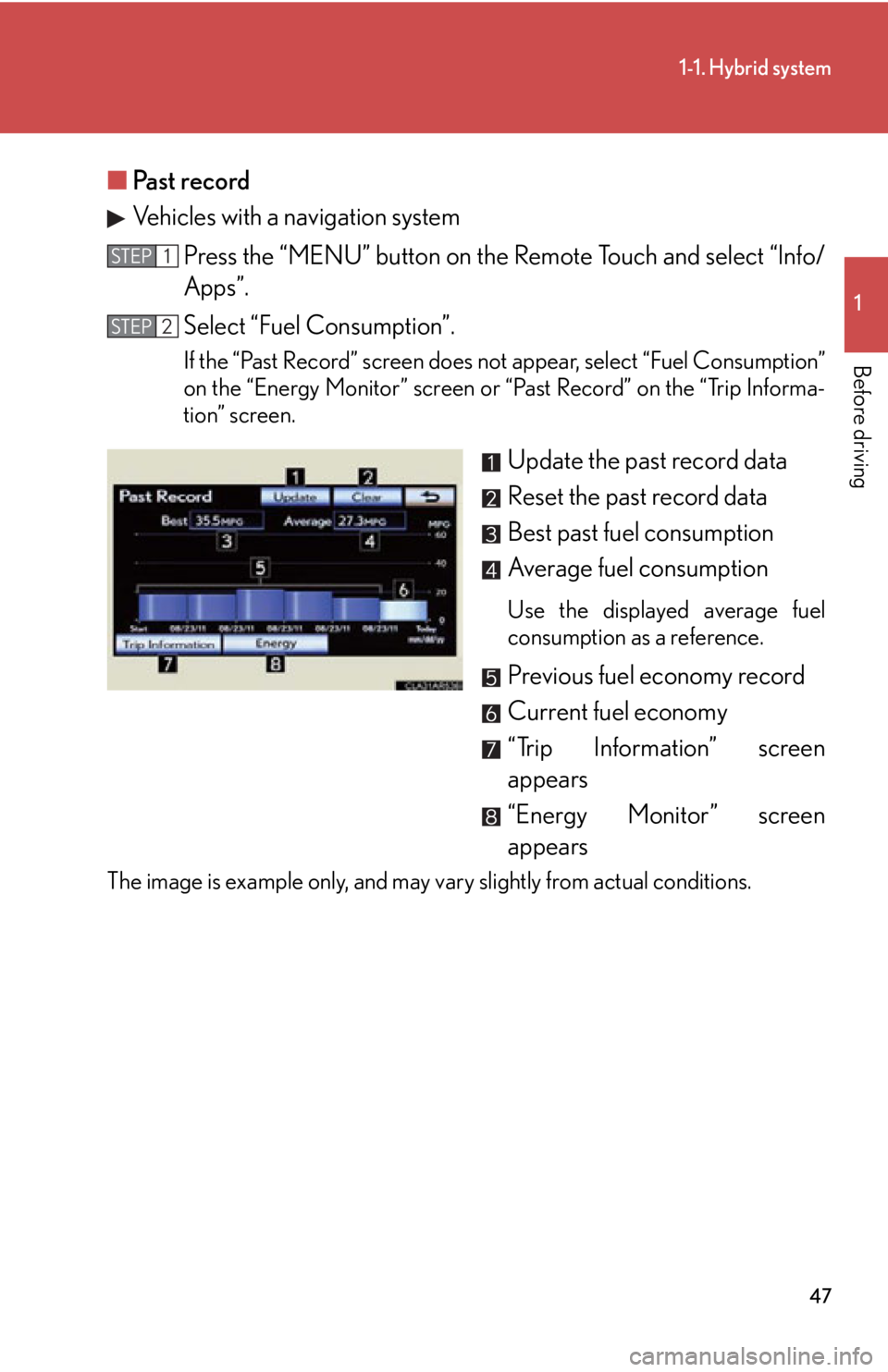
Before driving ■ Past record
Vehicles with a navigation system
Press the “MENU” button on the Remote Touch and select “Info/
Apps”.
Select “Fuel Consumption”. If the “Past Record” screen does not appear, select “Fuel Consumption”
on the “Energy Monitor” screen or “Past Record” on the “Trip Informa-
tion” screen.
Update the past record data
Reset the past record data
Best past fuel consumption
Average fuel consumption Use the displayed average fuel
consumption as a reference.
Previous fuel economy record
Current fuel economy
“Trip Information” screen
appears
“Energy Monitor” screen
appearsThe image is example only, and may vary slightly from actual conditions. STEP 1
STEP 2
Page 124 of 878
1241-7. Theft deterrent system
Immobilizer system The vehicle's keys have built-in tran sponder chips that prevent the hybrid
system from starting if the key has not been previously registered in the
vehicle's on-board computer.
Never leave the keys inside the vehicle when you leave the vehicle.
This system is designed to help prev ent vehicle theft but does not guaran-
tee absolute security ag ainst all vehicle thefts.
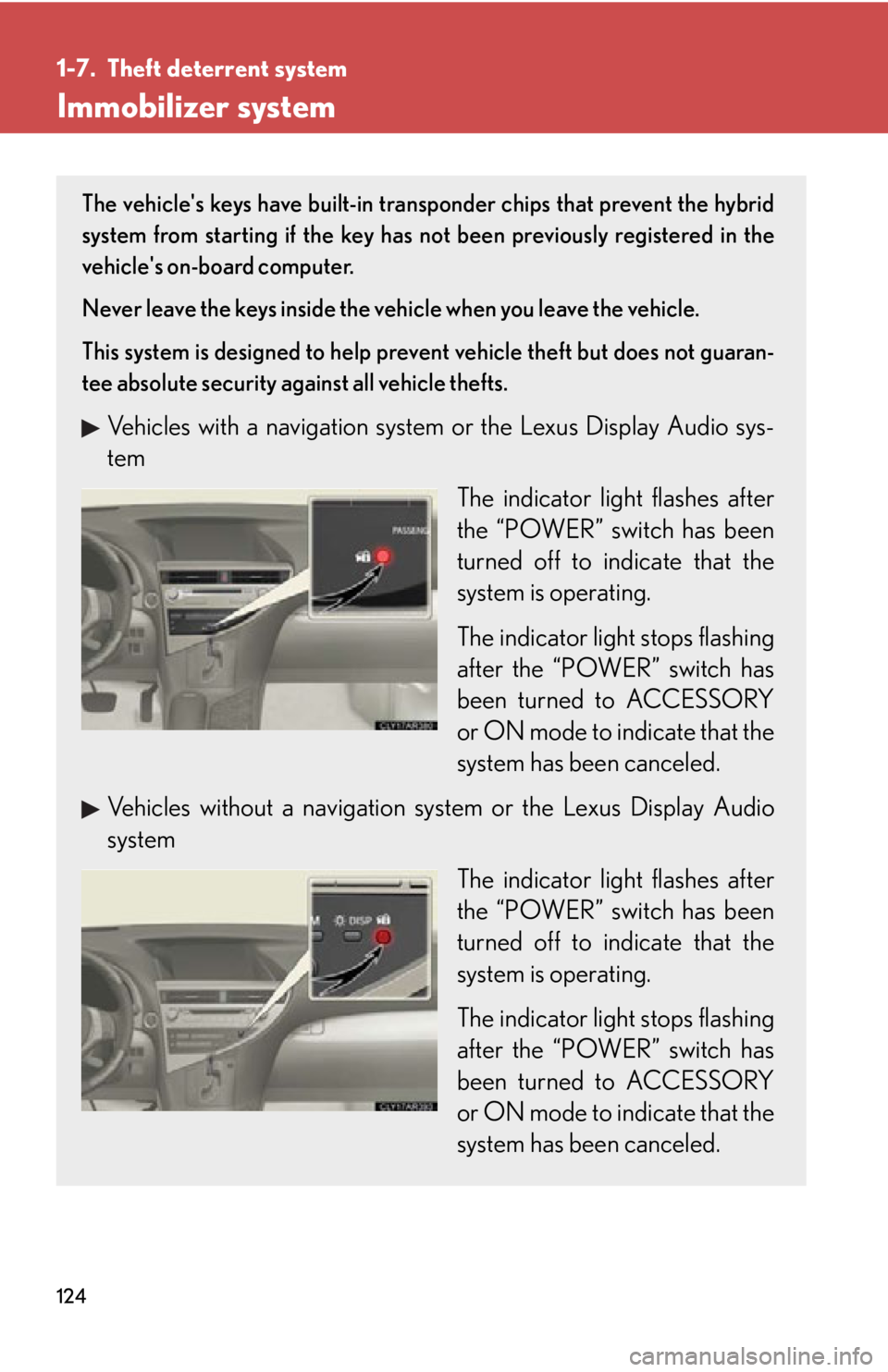
Vehicles with a navigation system or the Lexus Display Audio sys-
tem
The indicator light flashes after
the “POWER” switch has been
turned off to indicate that the
system is operating.
The indicator light stops flashing
after the “POWER” switch has
been turned to ACCESSORY
or ON mode to indicate that the
system has been canceled.
Vehicles without a navigation sy stem or the Lexus Display Audio
system
The indicator light flashes after
the “POWER” switch has been
turned off to indicate that the
system is operating.
The indicator light stops flashing
after the “POWER” switch has
been turned to ACCESSORY
or ON mode to indicate that the
system has been canceled.
Page 126 of 878
1261-7. Theft deterrent system
Alarm The system sounds the alarm and flashe s the lights when forcible entry is
detected.
■ Triggering of the alarm
The alarm is triggered in the follow ing situations when the alarm is
set:
● A locked door is unlocked or open ed in any way other than using
the entry function, wireless r emote control or mechanical key.
(The doors will lock again automatically.)
● The hood is opened.
■ Setting the alarm system
Vehicles with a navigation system or the Lexus Display Audio sys-
tem Close the doors and hood, and
lock all the doors.
The system will be set automati-
cally after 30 seconds.
The indicator light changes from
being on to flashing when the
system is set.
Vehicles without a navigation sy stem or the Lexus Display Audio
system
Close the doors and hood, and
lock all the doors.
The system will be set automati-
cally after 30 seconds.
The indicator light changes from
being on to flashing when the
system is set.
Page 145 of 878
14511-8. Safety information
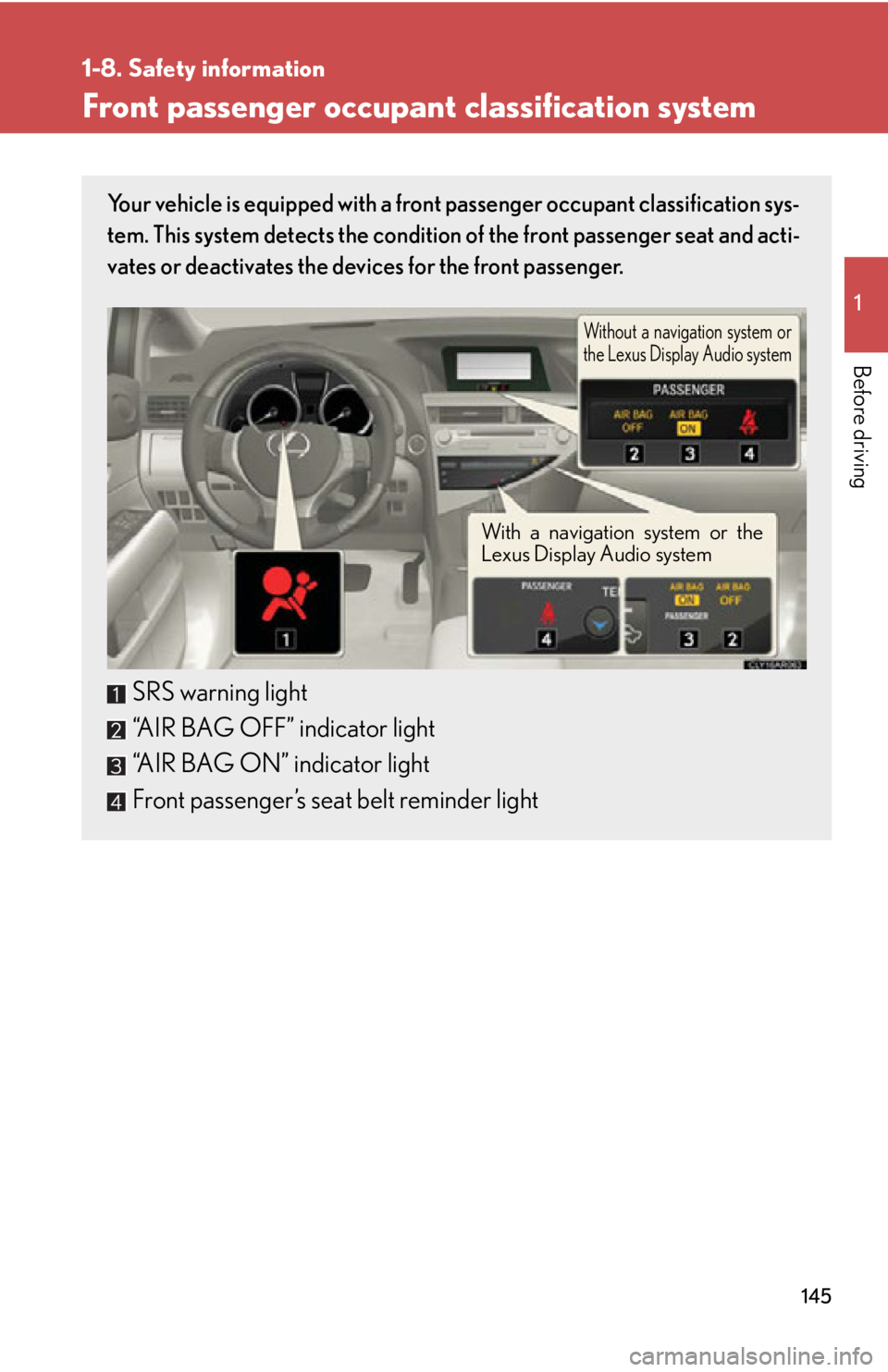
Before driving Front passenger occupant classification system Your vehicle is equipped with a front passenger occupant classification sys-
tem. This system detects the condition of the front passenger seat and acti-
vates or deactivates the devices for the front passenger.
SRS warning light
“AIR BAG OFF” indicator light
“AIR BAG ON” indicator light
Front passenger’s seat belt reminder light Without a navigation system or
the Lexus Display Audio system
With a navigation system or the
Lexus Display Audio system
Page 201 of 878
2012-2. Instrument cluster
2
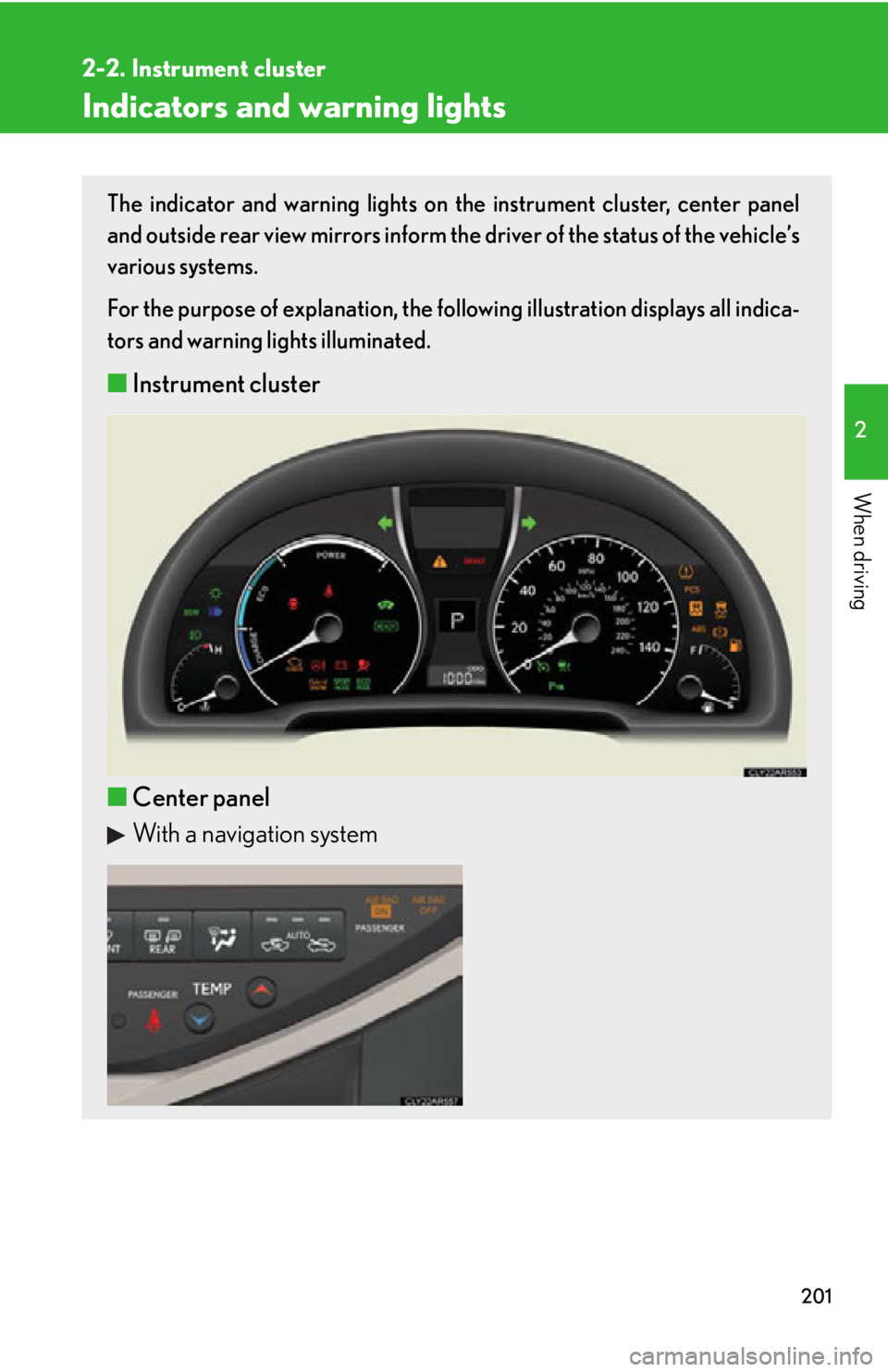
When driving Indicators and warning lights The indicator and warning lights on th e instrument cluster, center panel
and outside rear view mirrors inform the driver of the status of the vehicle’s
various systems.
For the purpose of explanation, the following illustration displays all indica-
tors and warning lights illuminated.
■ Instrument cluster
■ Center panel
With a navigation system
Page 202 of 878
2022-2. Instrument cluster
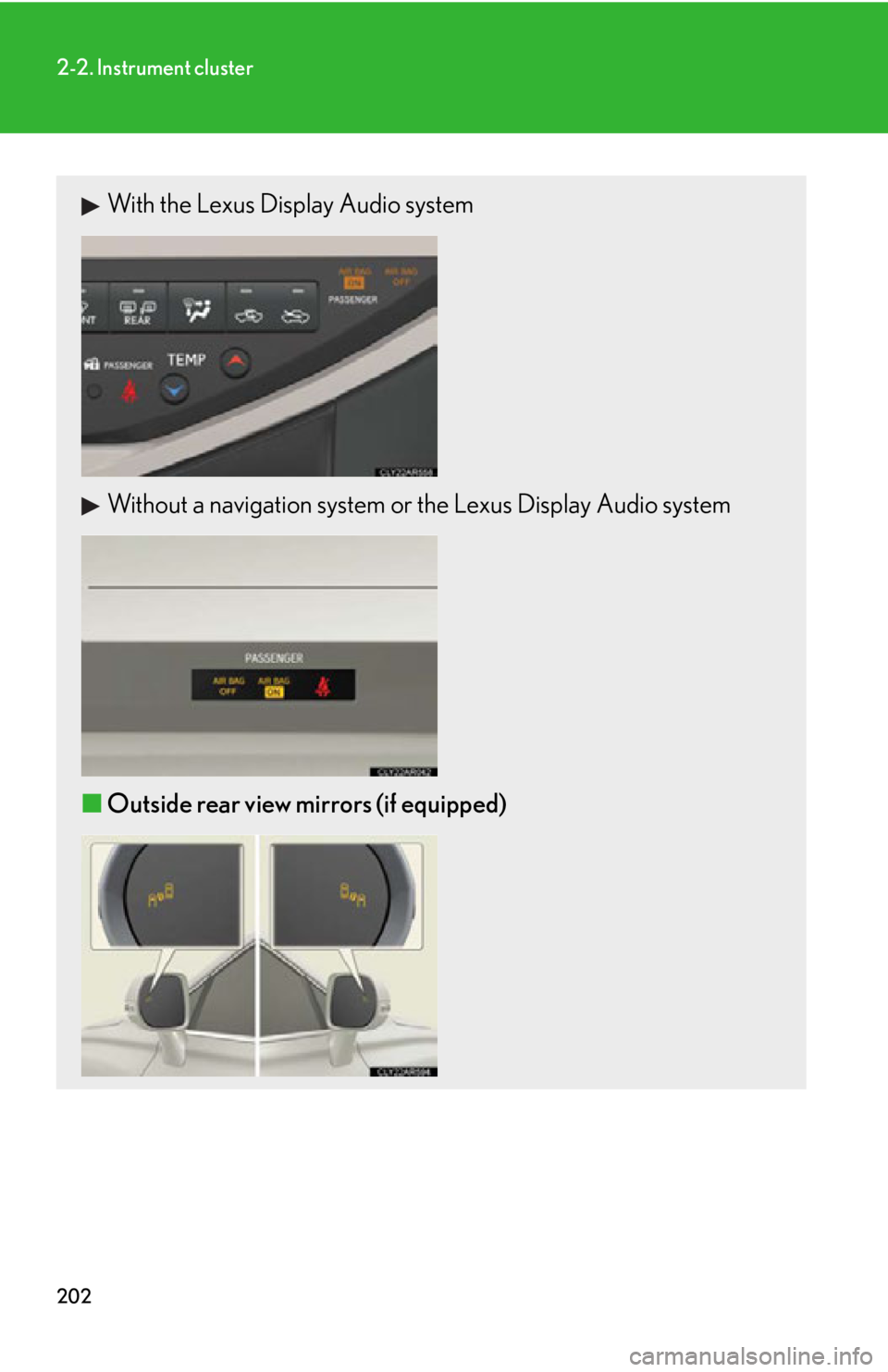
With the Lexus Display Audio system
Without a navigation system or the Lexus Display Audio system
■ Outside rear view mirrors (if equipped)