service LEXUS RX450h 2015 User Guide
[x] Cancel search | Manufacturer: LEXUS, Model Year: 2015, Model line: RX450h, Model: LEXUS RX450h 2015Pages: 878, PDF Size: 11.62 MB
Page 302 of 878
3022-5. Driving information
Winter driving tips Carry out the necessary preparations and inspections before driving the
vehicle in winter. Always drive the ve hicle in a manner appropriate to the
prevailing weather conditions.
■ Pre-winter preparations
● Use fluids that are appropria te to the prevailing outside tempera-
tures.
• Engine oil
• Engine coolant
• Power control unit coolant
• Washer fluid
● Have a service technician inspect the condition of the 12-volt bat-
tery.
● Have the vehicle fitted with four snow tires or purchase a set of
tire chains for the front tires. Ensure that all tires are the same size and brand, and that chains match
the size of the tires.
■ Before driving the vehicle
Perform the following accord ing to the driving conditions:
● Do not try to forcibly open a w indow or move a wiper that is fro-
zen. Pour warm water over the frozen area to melt the ice. Wipe
away the water immediately to prevent it from freezing.
● To ensure proper operation of the climate control system fan,
remove any snow that has accumu lated on the air inlet vents in
front of the windshield.
● Check for and remove any exce ss ice or snow that may have
accumulated on the exterior lights, vehicle's roof, chassis, around
the tires or on the brakes.
● Remove any snow or mud from the bottom of your shoes before
getting in the vehicle.
Page 308 of 878
3082-5. Driving information
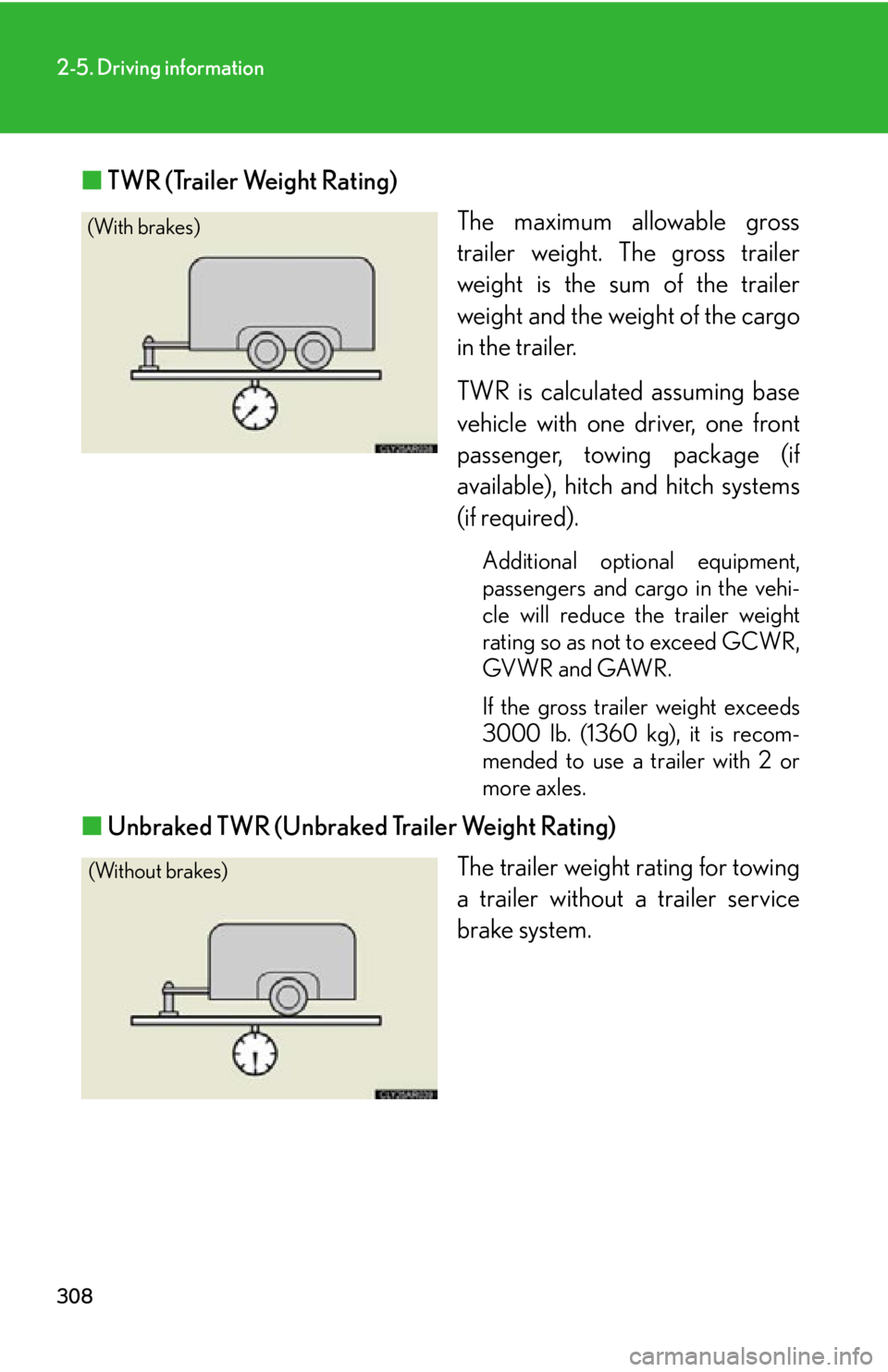
■ TWR (Trailer Weight Rating)
The maximum allowable gross
trailer weight. The gross trailer
weight is the sum of the trailer
weight and the weight of the cargo
in the trailer.
TWR is calculated assuming base
vehicle with one driver, one front
passenger, towing package (if
available), hitch and hitch systems
(if required). Additional optional equipment,
passengers and cargo in the vehi-
cle will reduce the trailer weight
rating so as not to exceed GCWR,
GVWR and GAWR.
If the gross trailer weight exceeds
3000 lb. (1360 kg), it is recom-
mended to use a trailer with 2 or
more axles.
■ Unbraked TWR (Unbraked Trailer Weight Rating)
The trailer weight rating for towing
a trailer without a trailer service
brake system.(With brakes)
(Without brakes)
Page 309 of 878
3092-5. Driving information
2
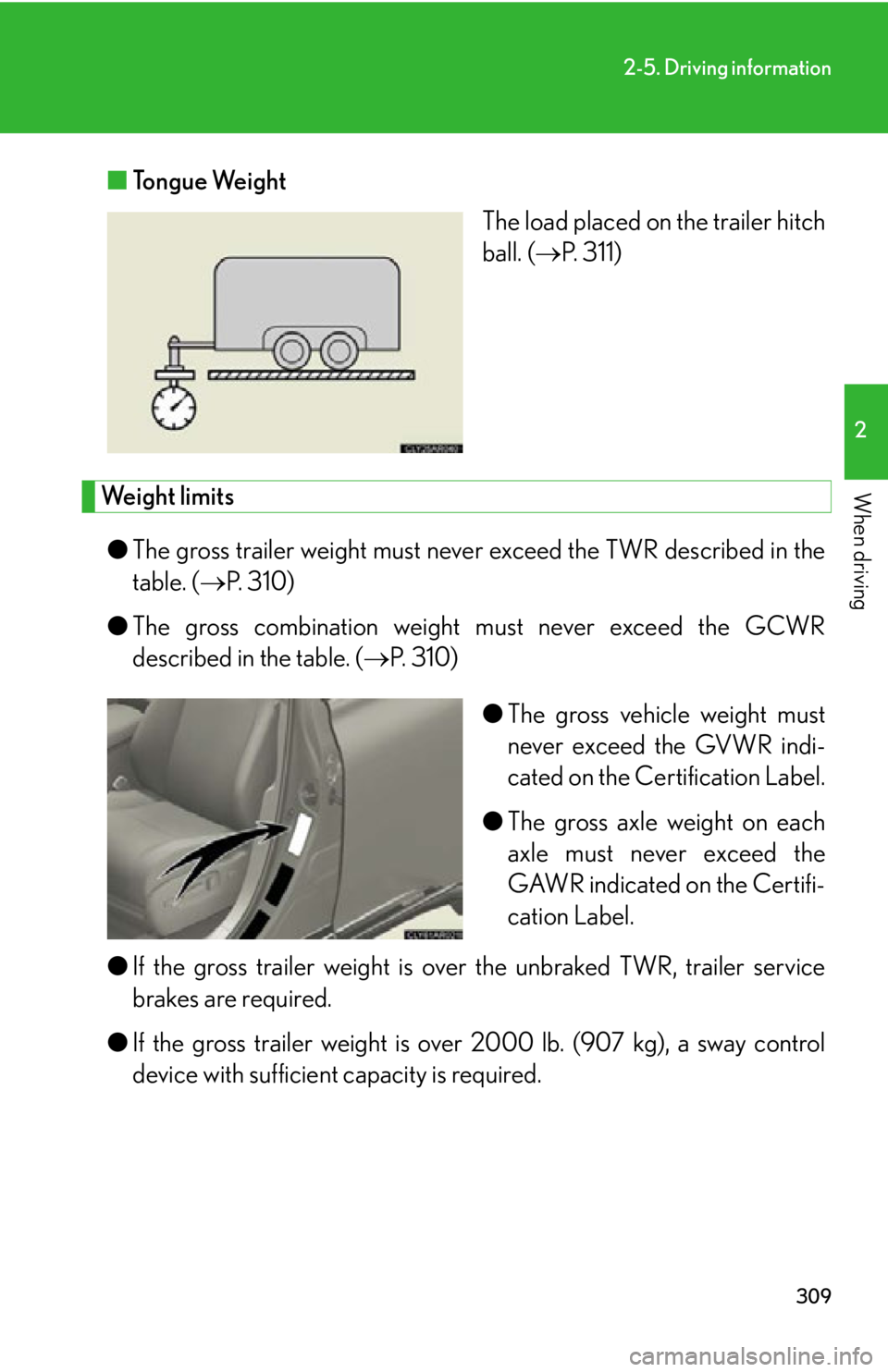
When driving ■ Tongue Weight
The load placed on the trailer hitch
ball. ( P. 311)
Weight limits
● The gross trailer weight must neve r exceed the TWR described in the
table. ( P. 310)
● The gross combination weight must never exceed the GCWR
described in the table. ( P. 310)
● The gross vehicle weight must
never exceed the GVWR indi-
cated on the Certification Label.
● The gross axle weight on each
axle must never exceed the
GAWR indicated on the Certifi-
cation Label.
● If the gross trailer weight is over the unbraked TWR, trailer service
brakes are required.
● If the gross trailer weight is over 2000 lb. (907 kg), a sway control
device with sufficient capacity is required.
Page 320 of 878

3202-5. Driving information
■
Break-in schedule
If your vehicle is new or equipped with any new power train components (such as
an engine, transmission, differential or wheel bearing), Lexus recommends that you
do not tow a trailer until the vehicle has been driven for over 500 miles (800 km).
After the vehicle has been driven for over 500 miles (800 km), you can start tow-
ing. However, for the next 500 miles (800 km), drive the vehicle at a speed of less
than 50 mph (80 km/h) when towing a trailer, and avoid full throttle acceleration.■
Maintenance ●
If you tow a trailer, your vehicle will require more frequent maintenance due to
the additional load. (See “Warranty and Services Guide”, “Owner's Manual
Supplement” or “Scheduled Maintenance”.)●
Retighten the fixing bolts of the towing ball and bracket after approximately
600 miles (1000 km) of trailer towing.■
If trailer sway occurs
One or more factors (crosswinds, passing vehicles, rough roads, etc.) can adversely
affect handling of your vehicle and trailer, causing instability. ●
If trailer swaying occurs:
• Firmly grip the steering wheel. Steer straight ahead.
Do not try to control trailer sway ing by turning the steering wheel.
• Begin releasing the accelerator peda l immediately but very gradually to
reduce speed.
Do not increase speed. Do not apply vehicle brakes.
If you make no extreme correction with the steering or brakes, your vehicle and
trailer should stabilize. ●
After the trailer swaying has stopped:
• Stop in a safe place. Get all occupants out of the vehicle.
• Check the tires of the vehicle and the trailer.
• Check the load in the trailer.
Make sure the load has not shifted.
Make sure the tongue weight is appropriate, if possible.
• Check the load in the vehicle.
Make sure the vehicle is not ov erloaded after occupants get in.
If you cannot find any problems, the speed at which trailer swaying occurred is
beyond the limit of your particular vehicle-trailer combination.
Drive at a lower speed to prevent instability. Remember that swaying of the towing
vehicle-trailer increases as speed increases.
Page 374 of 878
3743-3. Using the Lexus Display Audio system
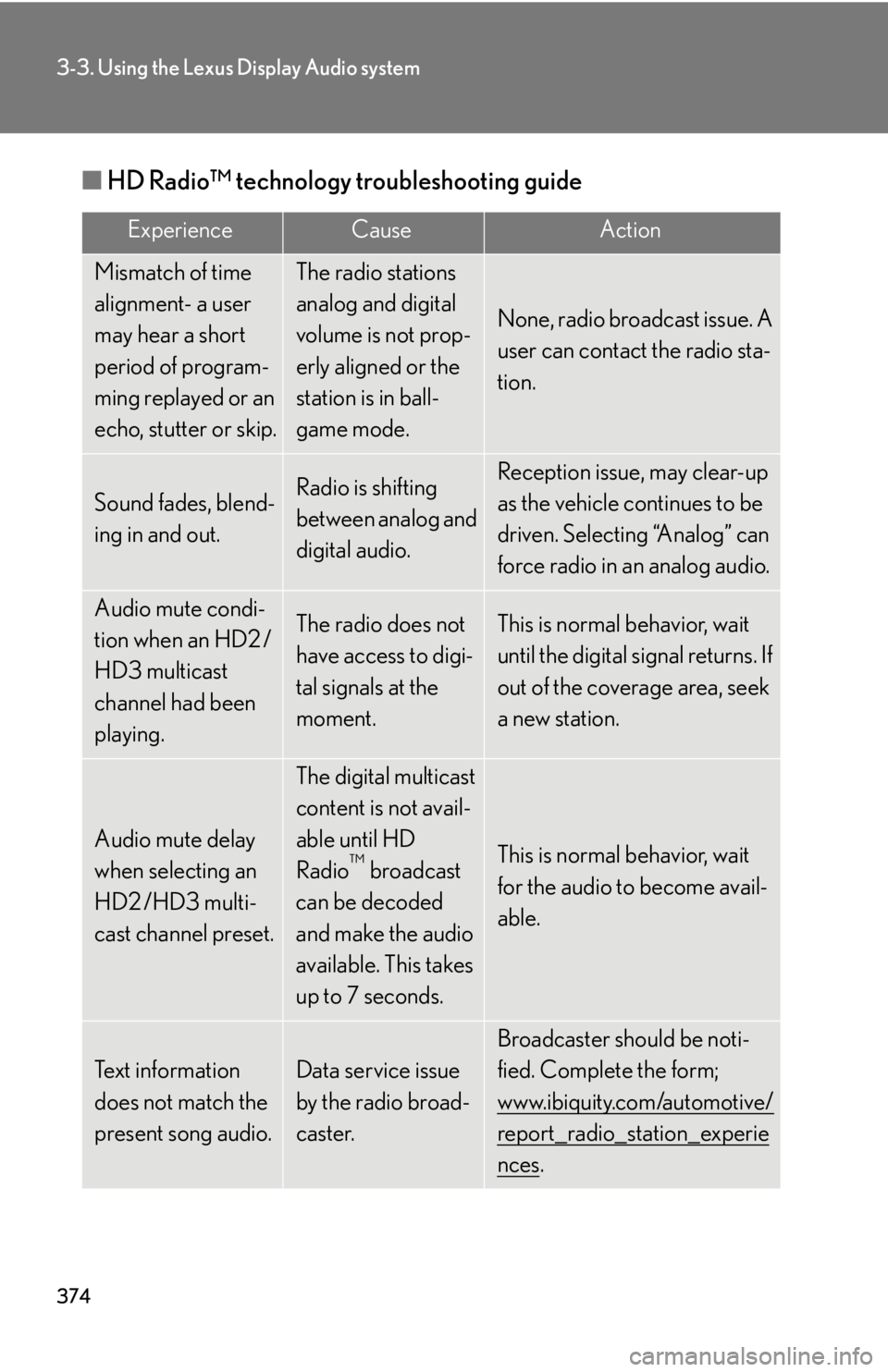
■ HD Radio™ technology troubleshooting guide Experience Cause Action
Mismatch of time
alignment- a user
may hear a short
period of program-
ming replayed or an
echo, stutter or skip. The radio stations
analog and digital
volume is not prop-
erly aligned or the
station is in ball-
game mode. None, radio broadcast issue. A
user can contact the radio sta-
tion.
Sound fades, blend-
ing in and out. Radio is shifting
between analog and
digital audio. Reception issue, may clear-up
as the vehicle continues to be
driven. Selecting “Analog” can
force radio in an analog audio.
Audio mute condi-
tion when an HD2 /
HD3 multicast
channel had been
playing. The radio does not
have access to digi-
tal signals at the
moment. This is normal behavior, wait
until the digital signal returns. If
out of the coverage area, seek
a new station.
Audio mute delay
when selecting an
HD2 /HD3 multi-
cast channel preset. The digital multicast
content is not avail-
able until HD
Radio ™
broadcast
can be decoded
and make the audio
available. This takes
up to 7 seconds. This is normal behavior, wait
for the audio to become avail-
able.
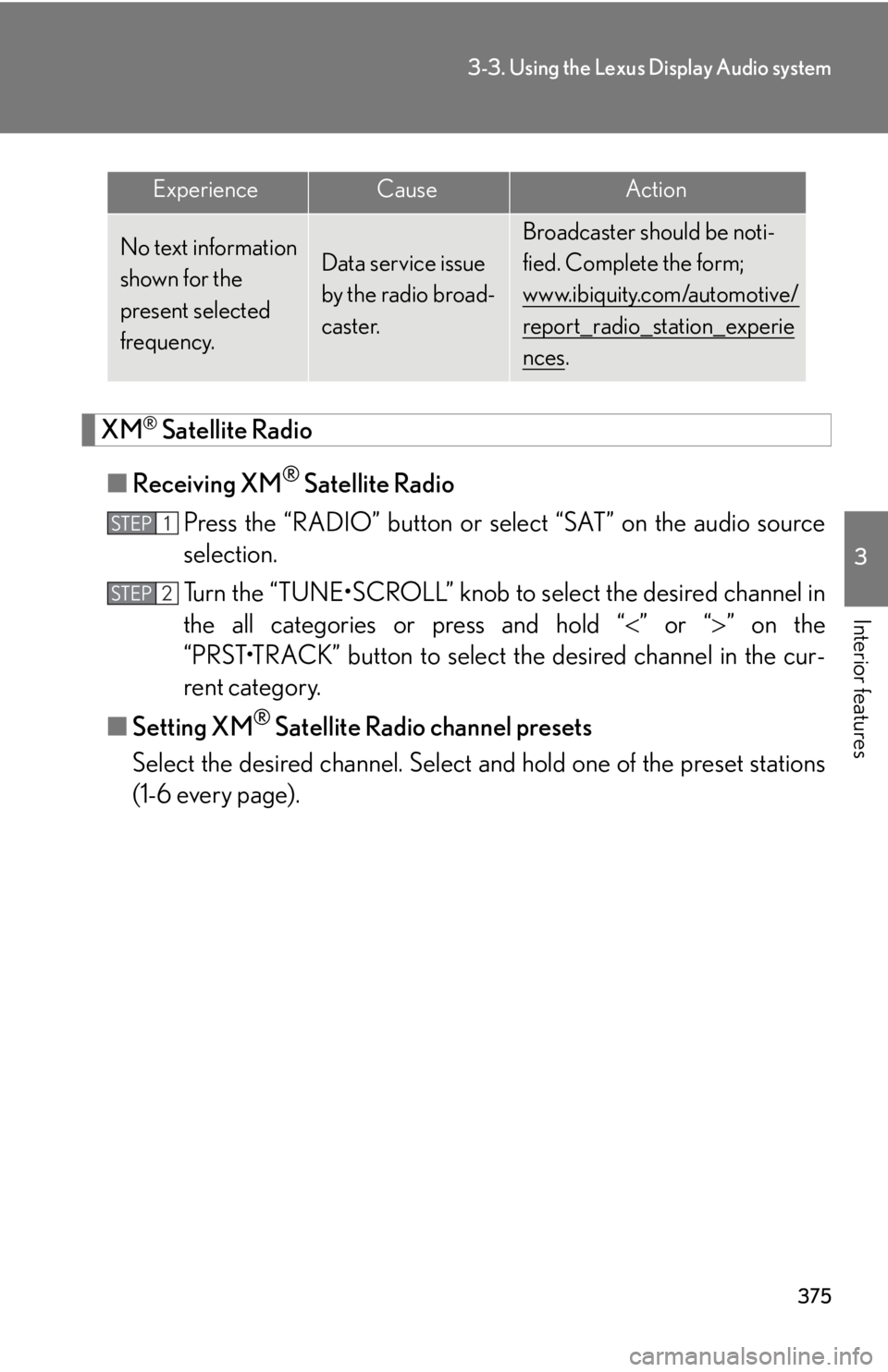
Text information
does not match the
present song audio. Data service issue
by the radio broad-
caster. Broadcaster should be noti-
fied. Complete the form;
www.ibiquity.com/automotive/
report_radio_station_experie
nces .
Page 375 of 878
3753-3. Using the Lexus Display Audio system
3
Interior features
XM ®
Satellite Radio
■ Receiving XM ®
Satellite Radio
Press the “RADIO” button or select “SAT” on the audio source
selection.
Turn the “TUNE•SCROLL” knob to select the desired channel in
the all categories or press and hold “ ” or “ ” on the
“PRST•TRACK” button to select the desired channel in the cur-
rent category.
■ Setting XM ®
Satellite Radio channel presets
Select the desired channel. Select and hold one of the preset stations
(1-6 every page).No text information
shown for the
present selected
frequency. Data service issue
by the radio broad-
caster. Broadcaster should be noti-
fied. Complete the form;
www.ibiquity.com/automotive/
report_radio_station_experie
nces .Experience Cause Action
STEP 1
STEP 2
Page 377 of 878
3773-3. Using the Lexus Display Audio system
3
Interior features ■
When the 12-volt battery is disconnected
All preset stations are erased.■
Reception sensitivity ●
Cargo loaded on the roof luggage carrier, especially metal objects, may
adversely affect the reception of XM ®
Satellite Radio.●
It is difficult to maintain perfect radio re ception at all times due to the continually
changing position of the an tenna, differences in signal strength and surrounding
objects, such as trains and transmitters.●
The radio antenna is mounted inside th e rear spoiler and the rear window. To
maintain clear radio reception, do not attach metallic window tinting or other
metallic objects to the antenna wire mounted inside the rear window.■
XM ®
Satellite Radio
An XM ®
Satellite Radio is a tuner designed exclusively to receive broadcasts pro-
vided under a separate subscription. Availa bility is limited to the 48 contiguous
states and 10 Canadian provinces. ●
XM ®
subscriptions
For detailed information about XM ®
Satellite Radio or to subscribe:
U.S.A.
Visit on the web at www.siriusxm.com or call 1-877-515-3987.
Canada
Visit on the web at www.xmradio.ca or call 1-877-438-9677.●
Radio ID
You will need the radio ID when activating XM ®
service or reporting a prob-
lem. Select “CH000” using the “TUNE• SCROLL” knob, and the receiver's 8-
character ID number will appear.●
Satellite tuner
The tuner supports only Audio Services (Music and Talk) and the accompany-
ing Text Information of XM ®
Satellite Radio.
Page 432 of 878

4323-3. Using the Lexus Display Audio system
●
In the following circumstances, it may be difficult to hear the other party:
• When driving on unpaved roads
• When driving at high speeds
• If a window is open
• If the air conditioning is blowing directly on the microphone
• There is an effect from the network of the mobile phone■
Conditions under which the system will not operate ●
If using a mobile phone that does not support Bluetooth ®
●
If the mobile phone is turned off●
If you are outside service range●
If the mobile phon e is not connected●
If the mobile phone’s battery is low●
When outgoing is controlled, due to heavy traffic on telephone lines, etc.●
When the mobile phone itself cannot be used●
When transferring the phonebook data from the mobile phone■
Bluetooth ®
antenna
The antenna is built into the display. If the mobile phone is behind the seat or in the
console box, or touching or covered by metal objects, connection status may dete-
riorate.■
Battery charge/Signal status ●
This display may not correspond exactly with the mobile phone itself.●
This system does not have a charging function.●
The Bluetooth ®
phone battery will burn quickly when it is connected to
Bluetooth ®
.●
When the mobile phone is not connected, “No Connect” is displayed.●
When you are out of service area or in a place inaccessible by radio waves, “No
service” is displayed.
■
When using Bluetooth ®
audio and hands-free system at the same time
The following problems may occur.
●
The Bluetooth ®
connection may be cut.
●
Noise may be heard on the Bluetooth ®
audio playback.
Page 433 of 878
4333-3. Using the Lexus Display Audio system
3
Interior features ■
About the phonebook in this system
The following data is stored for every registered phone. When another phone is
connecting, you cannot read the registered data. ●
Phonebook data●
Call history date●
Speed dial
When you delete the phone, the above-mentioned data is also deleted.■
When you release your car
Be sure to initialize your data. ( P. 3 3 6 )■
About Bluetooth ®
■
Compatible models
This system supports the following service. ●
Bluetooth ®
Specification:
Ver. 1.1 or higher (Recommended: Ver. 2.1+EDR or higher)●
Profiles:
• HFP (Hands Free Profile) Ver. 1.0 or higher (Recommended: Ver. 1.5 or
higher)
This is a profile to allow hands-free phone calls using the mobile phone or
head sets. It has an outgoing and incoming call function.
• OPP (Object Push Profile) Ver. 1.1 or higher
This is a profile to exchange phonebook data. When the Bluetooth ®
phone
has PBAP and OPP, OPP cannot be used.
• PBAP (Phone Book Access Profile) Ver. 1.0 or higher
This is a profile to transfer phonebook data.
If your mobile phone does not support HFP, you cannot enter the Bluetooth ®
phone. You need to take OPP or PBAP service individually. Bluetooth is a registered trademark of
Bluetooth SIG. Inc.
Page 444 of 878
4443-3. Using the Lexus Display Audio system
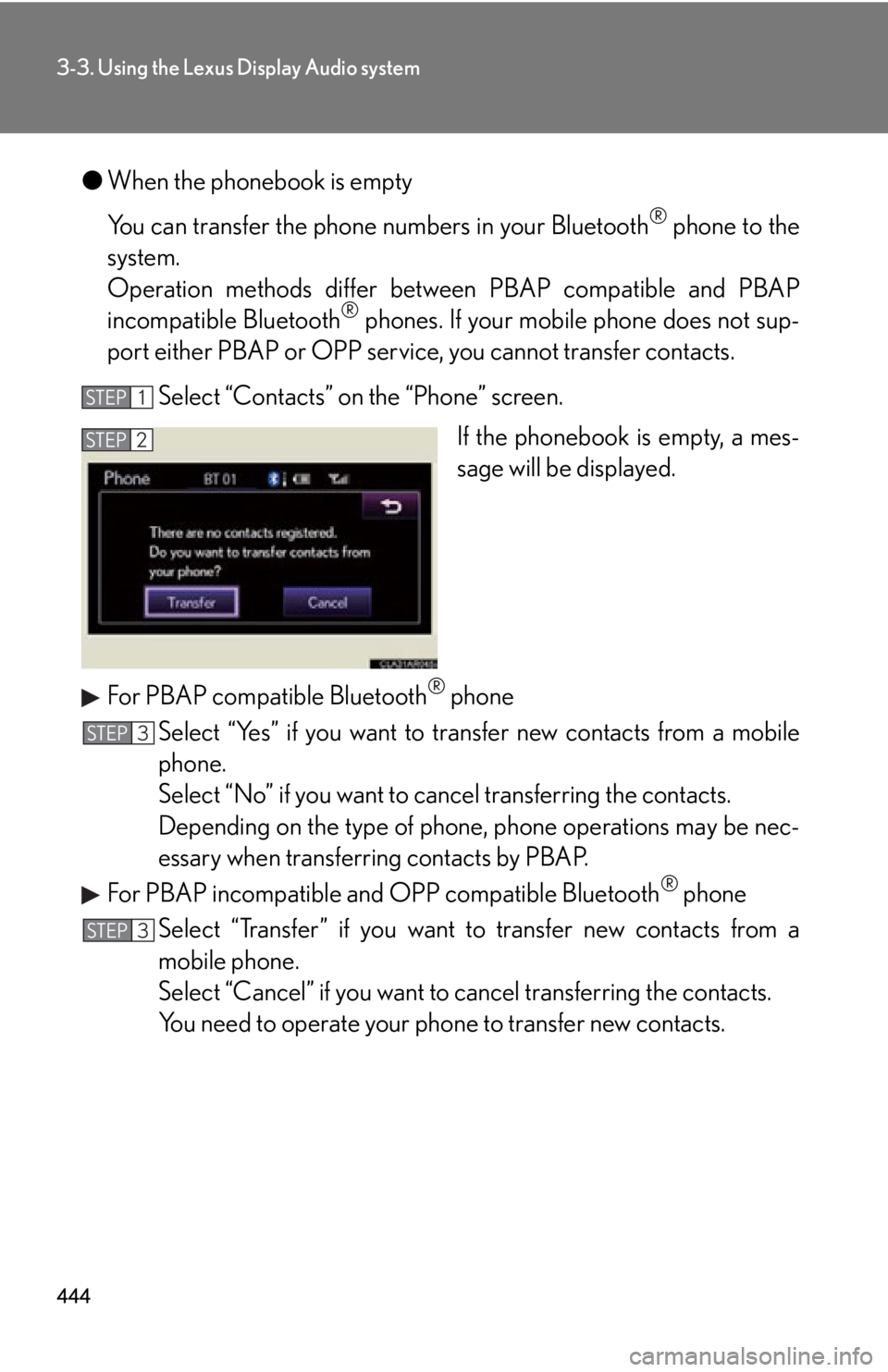
● When the phonebook is empty
You can transfer the phone numbers in your Bluetooth ®
phone to the
system.
Operation methods differ between PBAP compatible and PBAP
incompatible Bluetooth ®
phones. If your mobile phone does not sup-
port either PBAP or OPP service, you cannot transfer contacts.
Select “Contacts” on the “Phone” screen.
If the phonebook is empty, a mes-
sage will be displayed.
For PBAP compatible Bluetooth ®
phone
Select “Yes” if you want to tr ansfer new contacts from a mobile
phone.
Select “No” if you want to can cel transferring the contacts.
Depending on the type of phone, phone operations may be nec-
essary when transferring contacts by PBAP.
For PBAP incompatible and OPP compatible Bluetooth ®
phone
Select “Transfer” if you want to transfer new contacts from a
mobile phone.
Select “Cancel” if you want to cancel transferring the contacts.
You need to operate your pho ne to transfer new contacts.STEP 1
STEP 2
STEP 3
STEP 3