rear camera LEXUS RX450h 2015 Owners Manual
[x] Cancel search | Manufacturer: LEXUS, Model Year: 2015, Model line: RX450h, Model: LEXUS RX450h 2015Pages: 878, PDF Size: 11.62 MB
Page 263 of 878
2632-4. Using other driving systems
2
When driving ■
Rear view monitor system camera
■
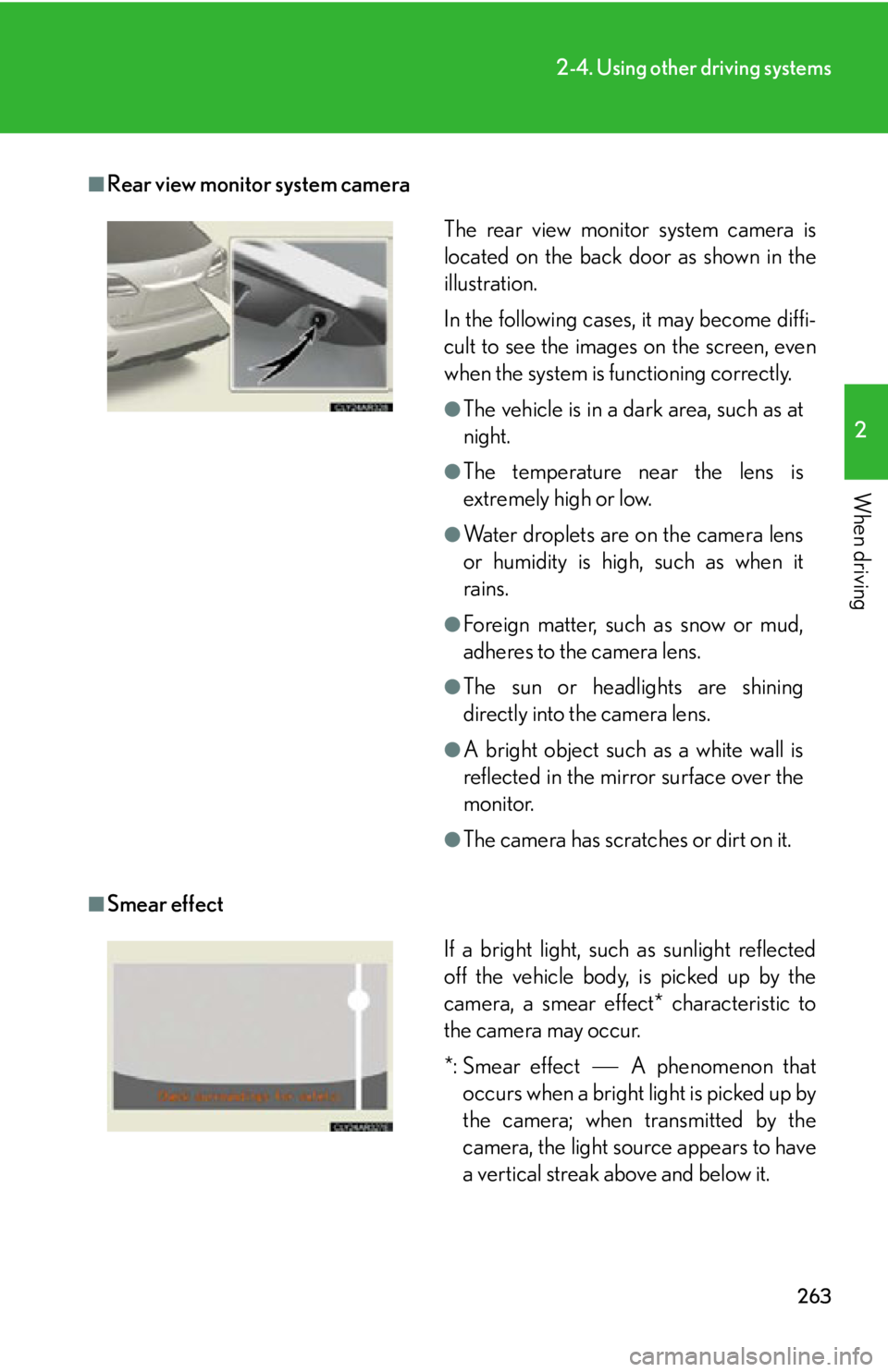
Smear effect The rear view monitor system camera is
located on the back door as shown in the
illustration.
In the following cases, it may become diffi-
cult to see the images on the screen, even
when the system is functioning correctly. ●
The vehicle is in a dark area, such as at
night. ●
The temperature near the lens is
extremely high or low. ●
Water droplets are on the camera lens
or humidity is high, such as when it
rains. ●
Foreign matter, such as snow or mud,
adheres to the camera lens. ●
The sun or headlights are shining
directly into the camera lens. ●
A bright object such as a white wall is
reflected in the mirror surface over the
monitor. ●
The camera has scratches or dirt on it.
If a bright light, such as sunlight reflected
off the vehicle body, is picked up by the
camera, a smear effect* characteristic to
the camera may occur.
*: Smear effect A phenomenon that
occurs when a bright light is picked up by
the camera; when transmitted by the
camera, the light source appears to have
a vertical streak above and below it.
Page 264 of 878
2642-4. Using other driving systems
■
Flicker effect
When the camera is used under fluorescent light, sodium lights, or mercury lights
etc., the lights and the illuminated areas may appear to flicker.
CAUTION■
When using the rear view monitor system, observe the following precautions to
avoid an accident that could result in death or serious injuries: ●
Never depend solely on the monitor system when reversing.●
Always check visually and with the mirrors to confirm your intended path is clear.●
Use your own eyes to confirm the vehicle’s surroundings, as the displayed image
may become faint or dark, and moving imag es will be distorted, or not entirely
visible when the outside temperature is low. When backing up, be sure to check
behind and all around the vehicle visually and with the mirrors before proceeding.●
Always check the vehicle surrounding area, because the guide lines are ancillary
lines.●
The guide lines are ancillary lines and do not change even if the steering wheel is
turned.●
Depicted distances between objects and flat surfaces differ from actual dis-
tances.●
Do not use the system if the back door is open.
Page 265 of 878
2652-4. Using other driving systems
2
When driving NOTICE■
Conditions which may affect the rear view monitor system ●
If the back of the vehicle has been hit, the camera’s position and mounting angle
may have changed. Have the vehicle inspected by your Lexus dealer.●
Rapid temperature changes, such as when hot water is poured on the vehicle in
cold weather, may cause the system to function abnormally.●
If the camera lens is dirty, it cannot transmit a clear image. Rinse with water and
wipe with a soft cloth. If extremely dirty, wash with a mild cleanser and rinse.●
The displayed image may be darker and mo ving images may be slightly distorted
when the system is cold.■
Camera precautions ●
As the camera has a water proof constr uction, do not detach, disassemble or
modify it. This may cause incorrect operation.●
Do not subject the camera to a strong impact.●
If the camera lens becomes dirty, it cannot transmit a clear image. If water drop-
lets, snow, or mud adhere to the lens, rinse with water and wipe wi th a soft cloth. If
the lens is extremely dirty, wash it with a mild cleanser and rinse. Do not rub hard.●
Do not allow organic solvent, car wax, window cleaner or glass coat to adhere to
the camera. If this happens, wipe it off as soon as possible.●
Do not strongly rub the camera lens. If the camera lens is scratched, it cannot
transmit a clear image.●
When washing the vehicle, do not apply intensive bursts of water to the camera
or camera area. Doing so may result in the camera malfunctioning.●
When replacing tires, please consult your Lexus dealer. If you replace the tires,
the area displayed on the screen may change.
Page 268 of 878
2682-4. Using other driving systems
■
Rear view monitor system camera
■
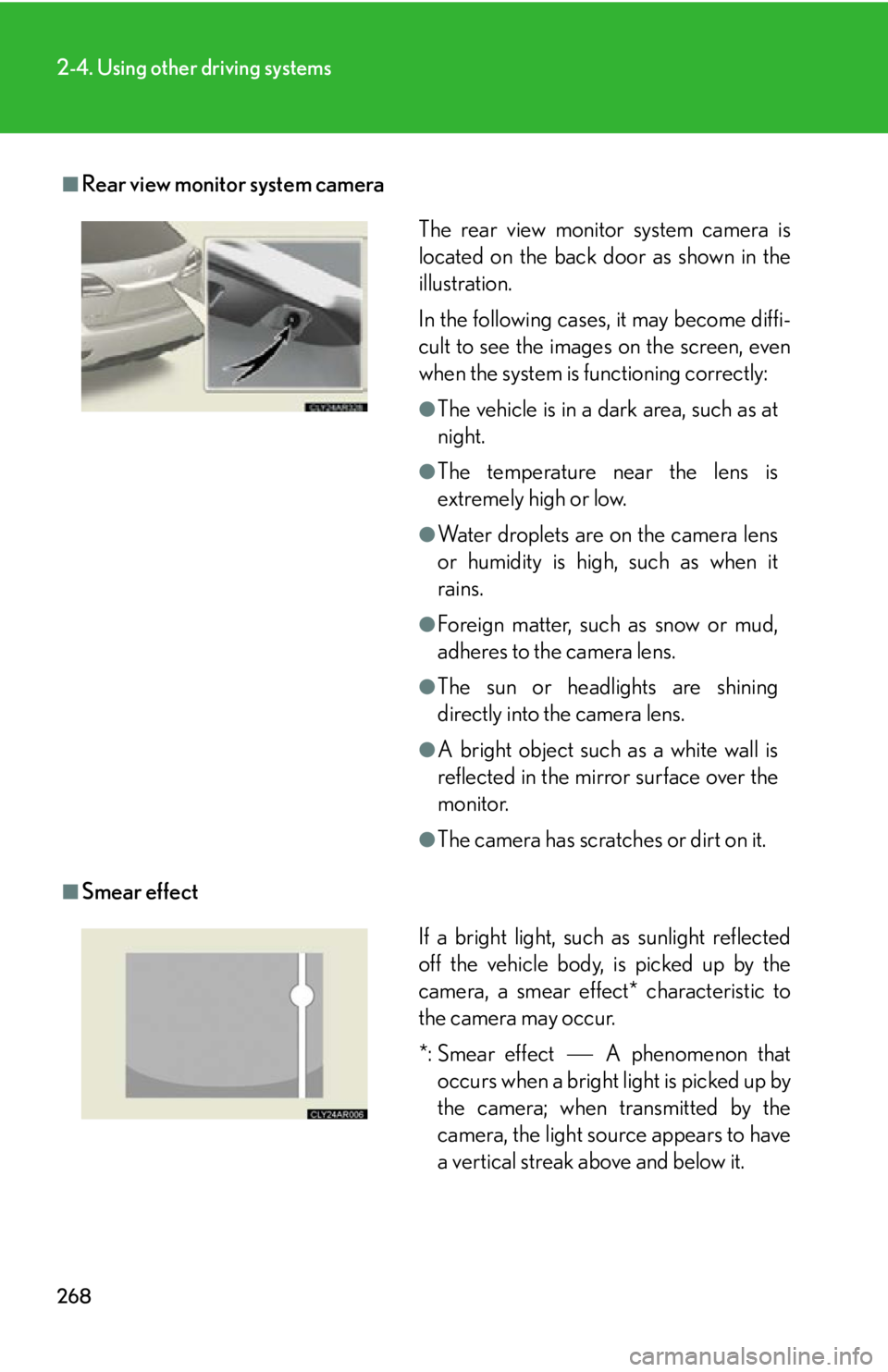
Smear effect The rear view monitor system camera is
located on the back door as shown in the
illustration.
In the following cases, it may become diffi-
cult to see the images on the screen, even
when the system is functioning correctly: ●
The vehicle is in a dark area, such as at
night. ●
The temperature near the lens is
extremely high or low. ●
Water droplets are on the camera lens
or humidity is high, such as when it
rains. ●
Foreign matter, such as snow or mud,
adheres to the camera lens. ●
The sun or headlights are shining
directly into the camera lens. ●
A bright object such as a white wall is
reflected in the mirror surface over the
monitor. ●
The camera has scratches or dirt on it.
If a bright light, such as sunlight reflected
off the vehicle body, is picked up by the
camera, a smear effect* characteristic to
the camera may occur.
*: Smear effect A phenomenon that
occurs when a bright light is picked up by
the camera; when transmitted by the
camera, the light source appears to have
a vertical streak above and below it.
Page 269 of 878
2692-4. Using other driving systems
2
When driving ■
Flicker effect
When the camera is used under fluoresc ent lights, sodium lights, mercury lights
etc., the lights and the illuminated areas may appear to flicker.
CAUTION■
When using the rear view monitor system, observe the following precautions to
avoid an accident that could resu lt in death or serious injuries:●
Never depend solely on the monitor system when reversing.●
Always check visually and with the mirrors to confirm your intended path is clear.●
Use your own eyes to confirm the vehicle’s surroundings, as the displayed image
may become faint or dark, and moving imag es will be distorted, or not entirely
visible when the outside temperature is low. When backing up, be sure to check
behind and all around the vehicle visually and with the mirrors before proceeding.●
Depicted distances between objects and flat surfaces differ from actual dis-
tances.●
Do not use the system if the back door is open.
Page 270 of 878
2702-4. Using other driving systems
NOTICE■
Conditions which may affect the rear view monitor system ●
If the back of the vehicle has been hit, the camera’s position and mounting angle
may have changed. Have the vehicle inspected by your Lexus dealer.●
Rapid temperature changes, such as when hot water is poured on the vehicle in
cold weather, may cause the system to function abnormally.●
If the camera lens is dirty, it cannot transmit a clear image. Rinse with water and
wipe with a soft cloth. If extremely dirty, wash with a mild cleanser and rinse.●
The displayed image may be darker and mo ving images may be slightly distorted
when the system is cold.■
Camera precautions ●
As the camera has a water proof constr uction, do not detach, disassemble or
modify it. This may cause incorrect operation.●
Do not subject the camera to a strong impact.●
If the camera lens becomes dirty, it cannot transmit a clear image. If water drop-
lets, snow, or mud adhere to the lens, rinse with water and wipe wi th a soft cloth. If
the lens is extremely dirty, wash it with a mild cleanser and rinse. Do not rub hard.●
Do not allow organic solvent, car wax, window cleaner or glass coat to adhere to
the camera. If this happens, wipe it off as soon as possible.●
Do not strongly rub the camera lens. If the camera lens is scratched, it cannot
transmit a clear image.●
When washing the vehicle, do not apply intensive bursts of water to the camera
or camera area. Doing so may result in the camera malfunctioning.●
When replacing tires, please consult your Lexus dealer. If you replace the tires,
the area displayed on the screen may change.
Page 332 of 878
3323-1. Lexus Display Audio system
Display settings
Changing between day mode and night mode
When the headlights are turned on, the screen dims.
However, the screen can be switch ed to day mode by selecting “Day
Mode”.
If the screen is set in day mode with th e headlight switch turned on, this condi-
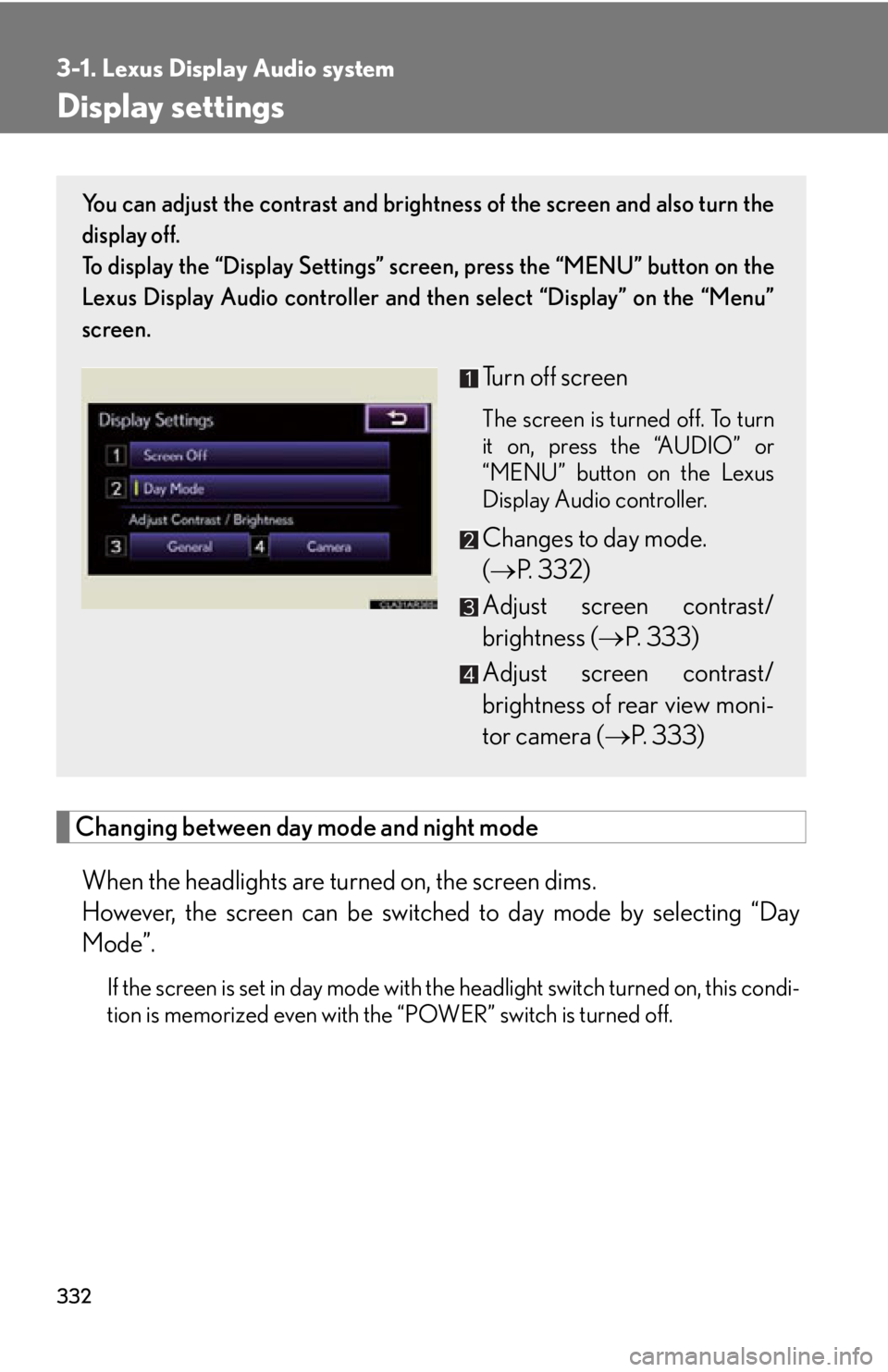
tion is memorized even with the “POWER” switch is turned off. You can adjust the contrast and brightness of the screen and also turn the
display off.
To display the “Display Settings” sc reen, press the “MENU” button on the
Lexus Display Audio controller and then select “Display” on the “Menu”
screen.
Turn off screen The screen is turned off. To turn
it on, press the “AUDIO” or
“MENU” button on the Lexus
Display Audio controller.
Changes to day mode.
( P. 3 3 2 )
Adjust screen contrast/
brightness ( P. 333)
Adjust screen contrast/
brightness of rear view moni-
tor camera ( P. 333)