change time LEXUS RX450h 2016 Owner's Manual
[x] Cancel search | Manufacturer: LEXUS, Model Year: 2016, Model line: RX450H, Model: LEXUS RX450H 2016Pages: 660, PDF Size: 10.15 MB
Page 314 of 660
314 4-5. Using the driving support systems
RX450h_U_OM0E013U This mode employs a radar sensor to detect the presence of vehicles up to
approximately 400 ft. (120 m) ahead, determines the current vehicle-to-vehicle
following distance, and operates to main tain a suitable following distance from
the vehicle ahead. Note that vehicle-to-vehicle distance will close in when traveling on long downhill
slopes.
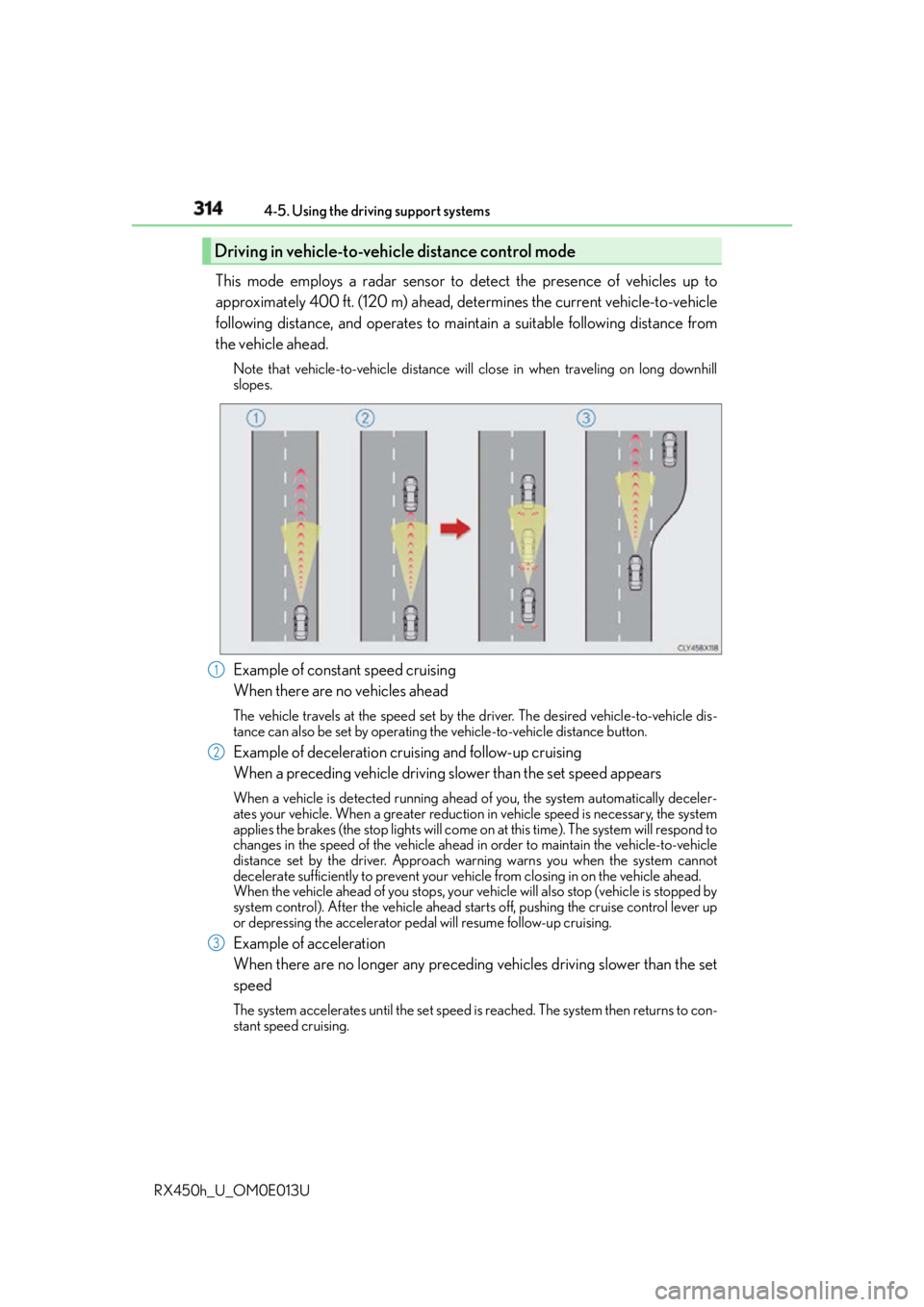
Example of constant speed cruising
When there are no vehicles ahead The vehicle travels at the speed set by the driver. The desired vehicle-to-vehicle dis-
tance can also be set by operating th e vehicle-to-vehicle distance button.
Example of deceleration cruising and follow-up cruising
When a preceding vehicle driving slower than the set speed appears When a vehicle is detected running ahead of you, the system automatically deceler-
ates your vehicle. When a greater reduction in vehicle speed is necessary, the system
applies the brakes (the stop lights will come on at this time). The system will respond to
changes in the speed of the vehicle ahead in order to maintain the vehicle-to-vehicle
distance set by the driver. Approach wa rning warns you when the system cannot
decelerate sufficiently to prevent your ve hicle from closing in on the vehicle ahead.
When the vehicle ahead of you stops, your ve hicle will also stop (vehicle is stopped by
system control). After the vehicle ahead starts off, pushing the cruise control lever up
or depressing the accelerator peda l will resume follow-up cruising.
Example of acceleration
When there are no longer any preceding vehicles driving slower than the set
speed The system accelerates until the set speed is reached. The system then returns to con-
stant speed cruising.Driving in vehicle-to-vehicle distance control mode
1
2
3
Page 316 of 660
316 4-5. Using the driving support systems
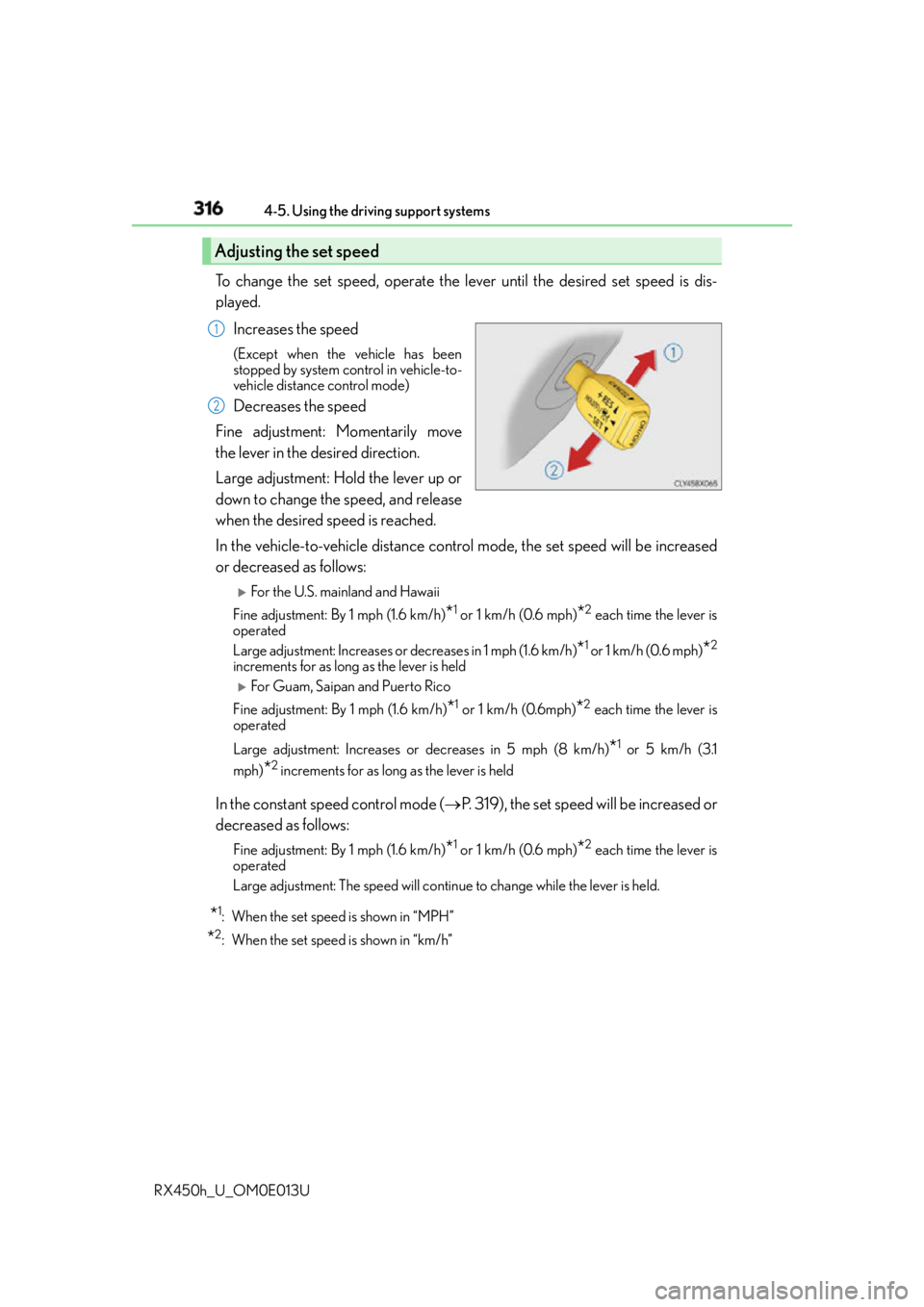
RX450h_U_OM0E013U To change the set speed, operate the lever until the desired set speed is dis-
played.
Increases the speed (Except when the vehicle has been
stopped by system control in vehicle-to-
vehicle distance control mode)
Decreases the speed
Fine adjustment: Momentarily move
the lever in the desired direction.
Large adjustment: Hold the lever up or
down to change the speed, and release
when the desired speed is reached.
In the vehicle-to-vehicle distance control mode, the set speed will be increased
or decreased as follows:
For the U.S. main land and Hawaii
Fine adjustment: By 1 mph (1.6 km/h)
* 1
or 1 km/h (0.6 mph)
* 2
each time the lever is
operated
Large adjustment: Increases or decreases in 1 mph (1.6 km/h)
* 1
or 1 km/h (0.6 mph)
* 2
increments for as long as the lever is held
For Guam, Saipan and Puerto Rico
Fine adjustment: By 1 mph (1.6 km/h)
* 1
or 1 km/h (0.6mph)
* 2
each time the lever is
operated
Large adjustment: Increases or decreases in 5 mph (8 km/h)
* 1
or 5 km/h (3.1
mph)
* 2
increments for as long as the lever is held
In the constant speed control mode ( P. 319), the set speed will be increased or
decreased as follows: Fine adjustment: By 1 mph (1.6 km/h)
* 1
or 1 km/h (0.6 mph)
* 2
each time the lever is
operated
Large adjustment: The speed will continue to change while the lever is held.
* 1
: When the set speed is shown in “MPH”
* 2
: When the set speed is shown in “km/h”Adjusting the set speed 1
2
Page 326 of 660
326 4-5. Using the driving support systems
RX450h_U_OM0E013U This mode employs a radar sensor to detect the presence of vehicles up to
approximately 400 ft. (120 m) ahead, determines the current vehicle-to-vehicle
following distance, and operates to main tain a suitable following distance from
the vehicle ahead. Note that vehicle-to-vehicle distance will close in when traveling on long downhill
slopes.
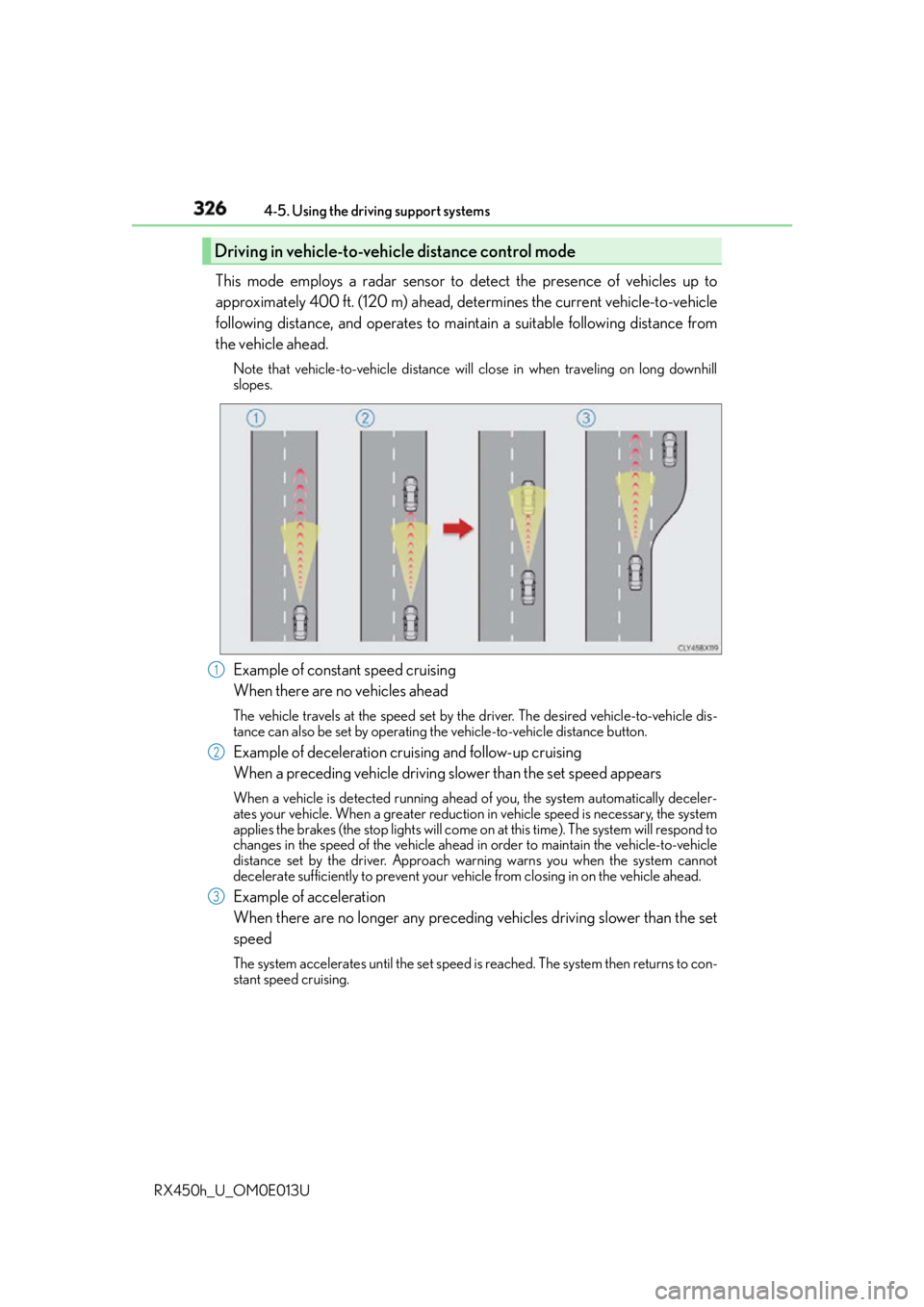
Example of constant speed cruising
When there are no vehicles ahead The vehicle travels at the speed set by the driver. The desired vehicle-to-vehicle dis-
tance can also be set by operating th e vehicle-to-vehicle distance button.
Example of deceleration cruising and follow-up cruising
When a preceding vehicle driving slower than the set speed appears When a vehicle is detected running ahead of you, the system automatically deceler-
ates your vehicle. When a greater reduction in vehicle speed is necessary, the system
applies the brakes (the stop lights will come on at this time). The system will respond to
changes in the speed of the vehicle ahead in order to maintain the vehicle-to-vehicle
distance set by the driver. Approach wa rning warns you when the system cannot
decelerate sufficiently to prevent your ve hicle from closing in on the vehicle ahead.
Example of acceleration
When there are no longer any preceding vehicles driving slower than the set
speed The system accelerates until the set speed is reached. The system then returns to con-
stant speed cruising.Driving in vehicle-to-vehicle distance control mode
1
2
3
Page 328 of 660
328 4-5. Using the driving support systems
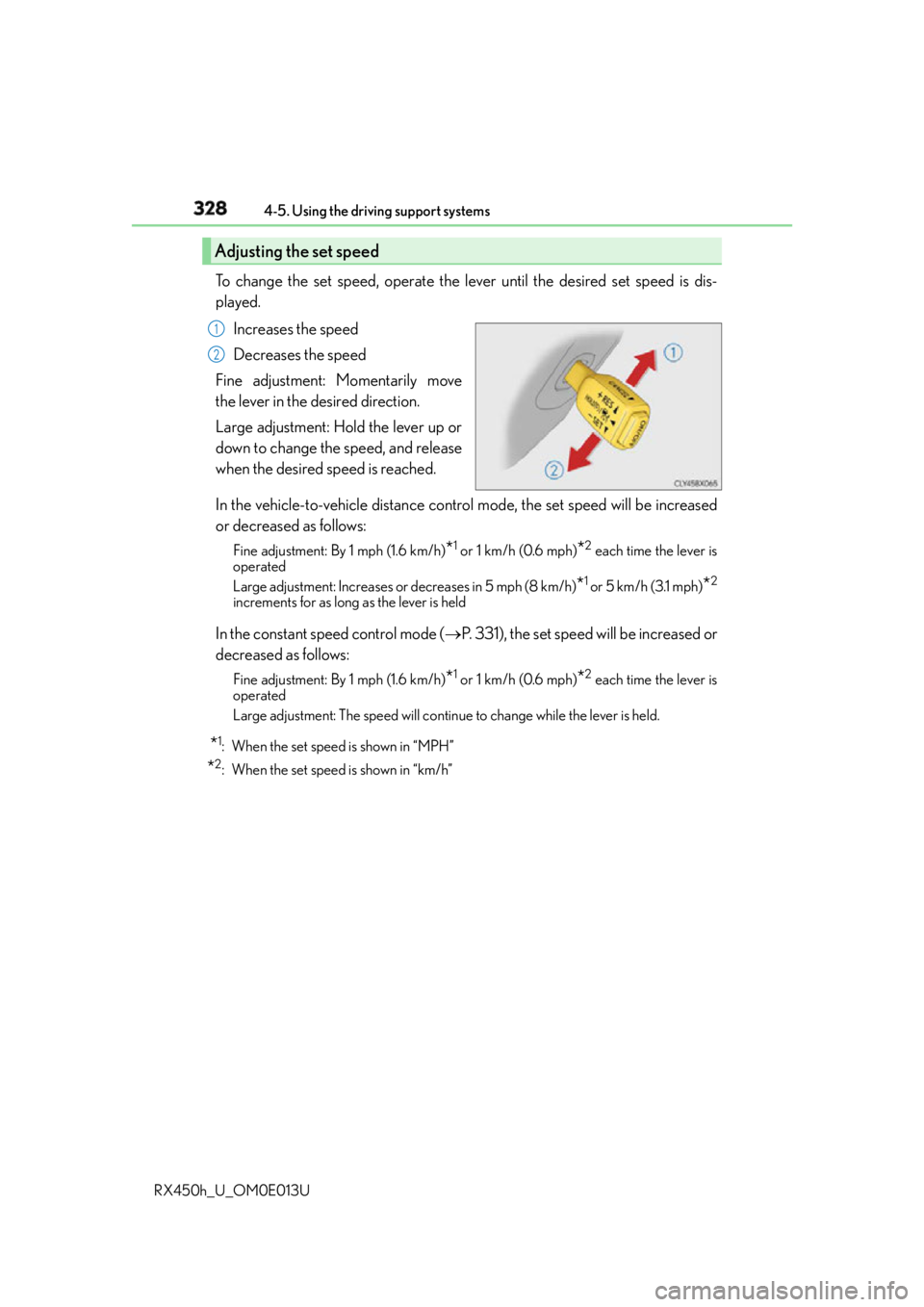
RX450h_U_OM0E013U To change the set speed, operate the lever until the desired set speed is dis-
played.
Increases the speed
Decreases the speed
Fine adjustment: Momentarily move
the lever in the desired direction.
Large adjustment: Hold the lever up or
down to change the speed, and release
when the desired speed is reached.
In the vehicle-to-vehicle distance control mode, the set speed will be increased
or decreased as follows: Fine adjustment: By 1 mph (1.6 km/h)
* 1
or 1 km/h (0.6 mph)
* 2
each time the lever is
operated
Large adjustment: Increases or decreases in 5 mph (8 km/h)
* 1
or 5 km/h (3.1 mph)
* 2
increments for as long as the lever is held
In the constant speed control mode ( P. 331), the set speed will be increased or
decreased as follows: Fine adjustment: By 1 mph (1.6 km/h)
* 1
or 1 km/h (0.6 mph)
* 2
each time the lever is
operated
Large adjustment: The speed will continue to change while the lever is held.
* 1
: When the set speed is shown in “MPH”
* 2
: When the set speed is shown in “km/h”Adjusting the set speed 1
2
Page 336 of 660
336 4-5. Using the driving support systems
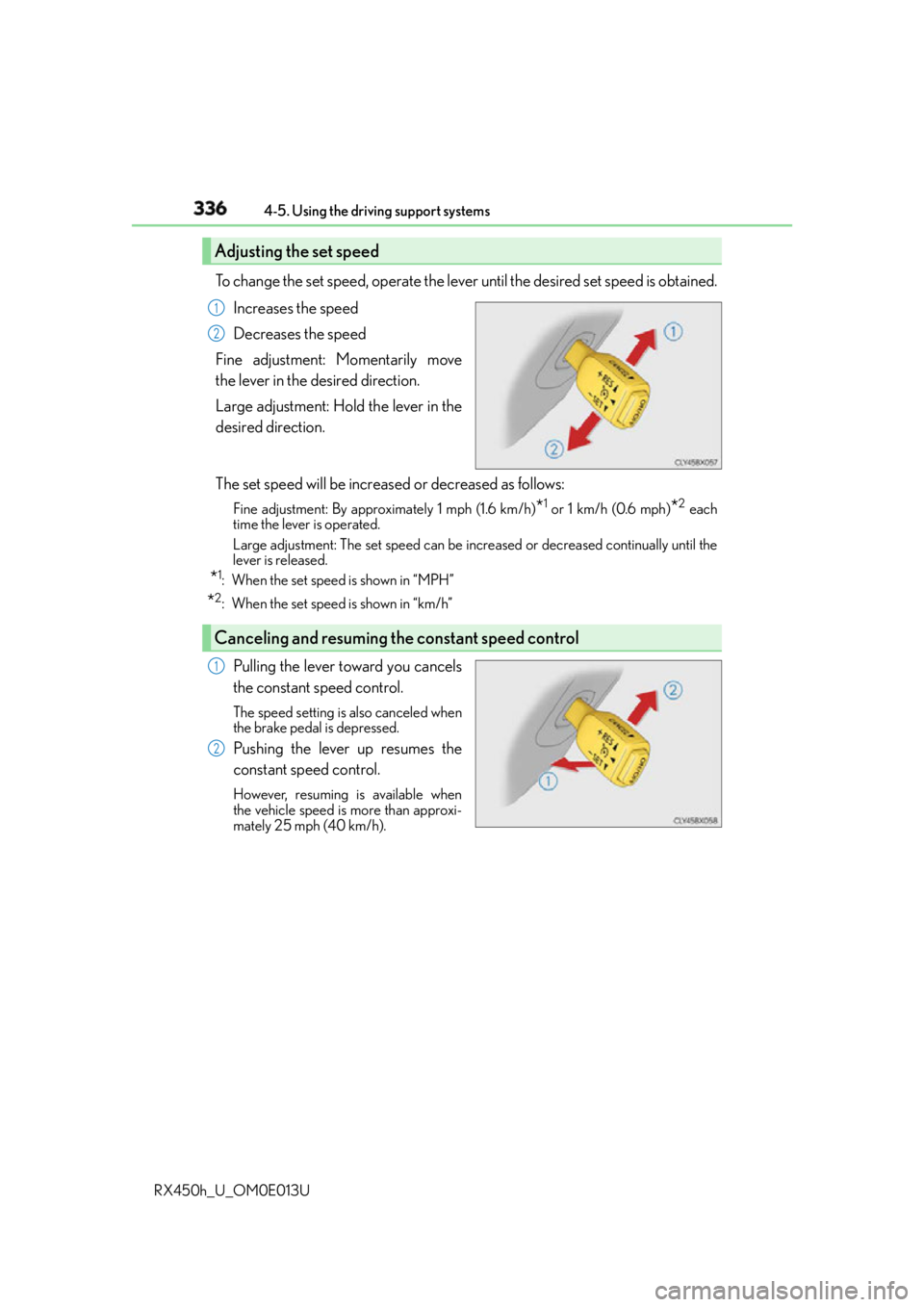
RX450h_U_OM0E013U To change the set speed, operate the lever until the desired set speed is obtained.
Increases the speed
Decreases the speed
Fine adjustment: Momentarily move
the lever in the desired direction.
Large adjustment: Hold the lever in the
desired direction.
The set speed will be increase d or decreased as follows:Fine adjustment: By approximately 1 mph (1.6 km/h)
* 1
or 1 km/h (0.6 mph)
* 2
each
time the lever is operated.
Large adjustment: The set speed can be incr eased or decreased co ntinually until the
lever is released.
* 1
: When the set speed is shown in “MPH”
* 2
: When the set speed is shown in “km/h”
Pulling the lever toward you cancels
the constant speed control. The speed setting is also canceled when
the brake pedal is depressed.
Pushing the lever up resumes the
constant speed control. However, resuming is available when
the vehicle speed is more than approxi-
mately 25 mph (40 km/h).Adjusting the set speed 1
2
Canceling and resuming the constant speed control 1
2
Page 378 of 660
378 4-5. Using the driving support systems
RX450h_U_OM0E013U
Vehicles with Adaptive Variable Suspension System
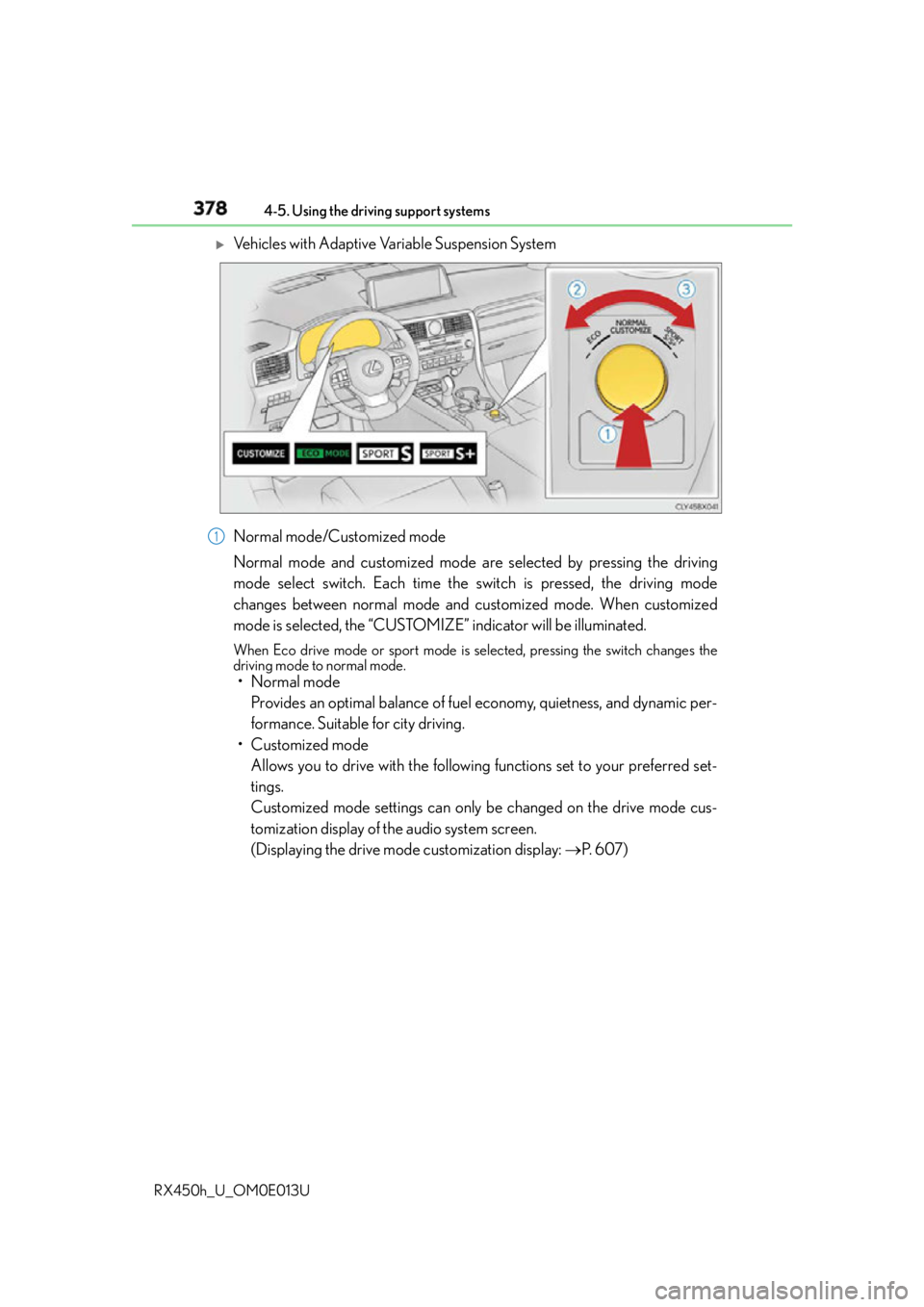
Normal mode/Customized mode
Normal mode and customized mode are selected by pressing the driving
mode select switch. Each time the switch is pressed, the driving mode
changes between normal mode and customized mode. When customized
mode is selected, the “CUSTOMIZE” indicator will be illuminated. When Eco drive mode or sport mode is se lected, pressing the switch changes the
driving mode to normal mode.
• Normal mode
Provides an optimal balance of fuel economy, quietness, and dynamic per-
formance. Suitable for city driving.
• Customized mode
Allows you to drive with the following functions set to your preferred set-
tings.
Customized mode settings can only be changed on the drive mode cus-
tomization display of the audio system screen.
(Displaying the drive mode customization display: P. 6 0 7 )1
Page 406 of 660
406 5-2. Using the air conditio ning system and defogger
RX450h_U_OM0E013U ■
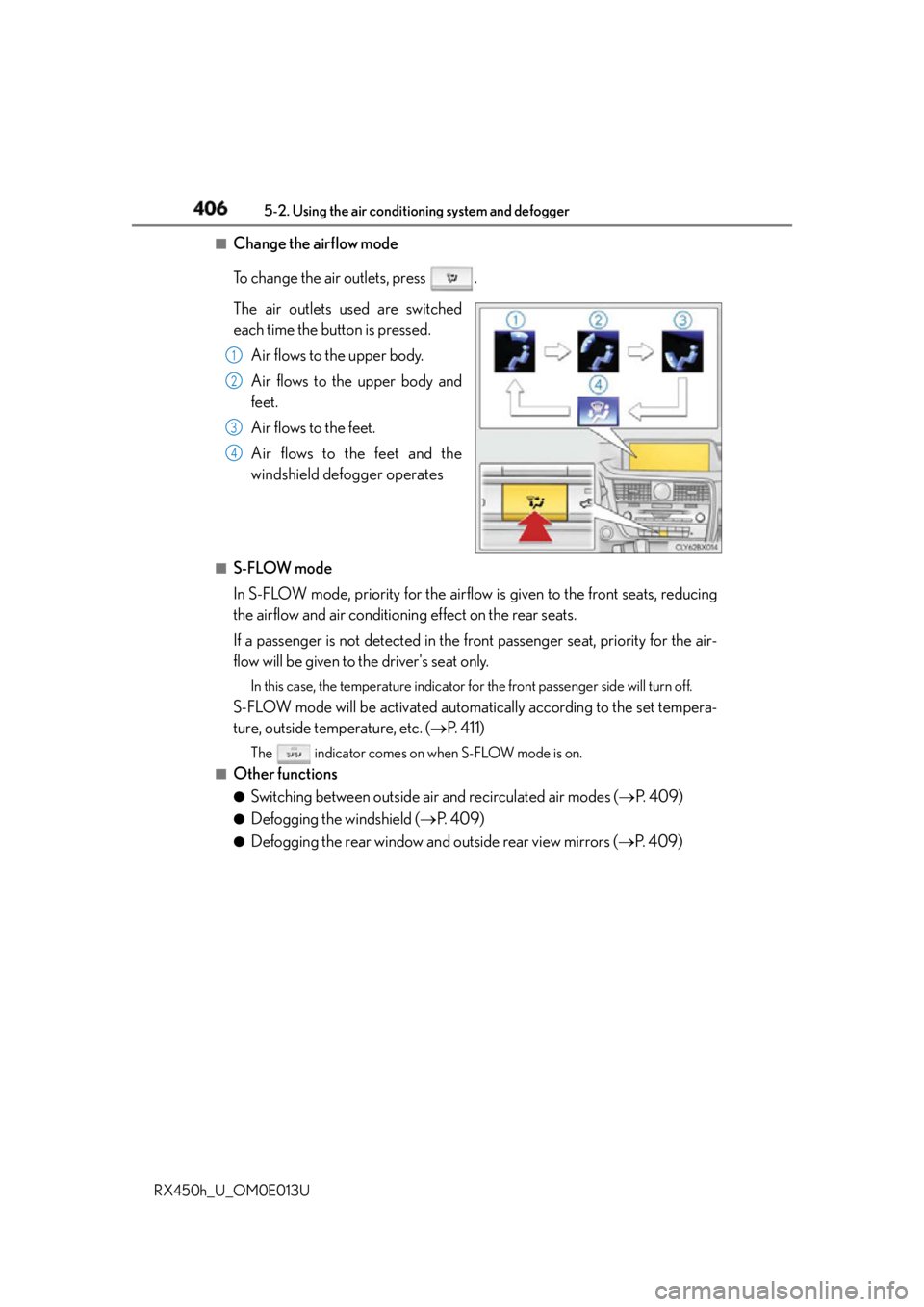
Change the airflow mode
To change the air outlets, press .
The air outlets used are switched
each time the button is pressed.
Air flows to the upper body.
Air flows to the upper body and
feet.
Air flows to the feet.
Air flows to the feet and the
windshield defogger operates■
S-FLOW mode
In S-FLOW mode, priority for the airflow is given to the front seats, reducing
the airflow and air conditioning effect on the rear seats.
If a passenger is not detected in the front passenger seat, priority for the air-
flow will be given to the driver's seat only. In this case, the temperature indicator fo r the front passenger side will turn off.
S-FLOW mode will be activated automatically according to the set tempera-
ture, outside temperature, etc. ( P. 411)The indicator comes on when S-FLOW mode is on.■
Other functions ●
Switching between outside air and recirculated air modes ( P. 4 0 9 )●
Defogging the windshield ( P. 4 0 9 )●
Defogging the rear window and outside rear view mirrors ( P. 4 0 9 )1
2
3
4
Page 411 of 660
4115-2. Using the air conditio ning system and defogger
5
Interior features
RX450h_U_OM0E013U ■
Registering air conditioning settings to electronic keys ●
Unlocking the vehicle using an electronic key and turning the power switch to ON
mode will recall that key’s registered air conditioning settings. ●
When the power switch is turned off, the curr ent air conditioning settings will automati-
cally be registered to the electronic key that was used to unlock the vehicle. ●
The system may not operate correctly if more th an one electronic key is in the vicinity or
if the smart access system with push-button start is used to unlock a passenger door. ●
The doors that can recall the air conditioni ng setting when unlocked using the smart
access system with push-b utton start can be changed.
* For details, contact your Lexus
dealer.
* : The doors that can recall the driving positi on memory are changed at the same time.■
Using automatic mode
Fan speed is adjusted automatically accordin g to the temperature setting and the ambi-
ent conditions.
Therefore, the fan may stop for a while until warm or cool air is ready to flow immediately
after the “AUTO” button is pr essed or “AUTO” is selected.■
Operation of S-FLOW mode
In automatic mode, S-FLOW mode will be turned off if a rear door has been opened and
closed. To activate S-FLOW mode again, press . ■
Using the voice command system
Air conditioning system can be operated usin g voice commands. For details, refer to the
“NAVIGATION SYSTEM OWNER’S MANUAL”. ■
When the outside temperature exceeds 75 F (24 C) and the air conditioning system
is on ●
In order to reduce the air conditioning po wer consumption, the ai r conditioning system
may switch to recirculated air mode automatically.
This may also reduce fuel consumption. ●
Recirculated air mode is selected as a default mode when the power switch is turned to
ON mode. ●
It is possible to switch to outside air mode at any time by pressing the outside/recircu-
lated air mode button. ■
Automatic mode for air intake control
In automatic mode, the system detects exhaust gas and other pollutants and automati-
cally switches between outside air and recirculated air modes.
When the dehumidification function is off, and the fan is operating, turning automatic
mode on will activate the dehumidification function.■
Fogging up of the windows ●
The windows will easily fog up when the humidi ty in the vehicle is high. Selecting “A/C”
will dehumidify the air from the outlet s and defog the windshield effectively. ●
If you turn “A/C” off, the windows may fog up more easily. ●
The windows may fog up if the recirculated air mode is used.
Page 415 of 660
4155-2. Using the air conditio ning system and defogger
5
Interior features
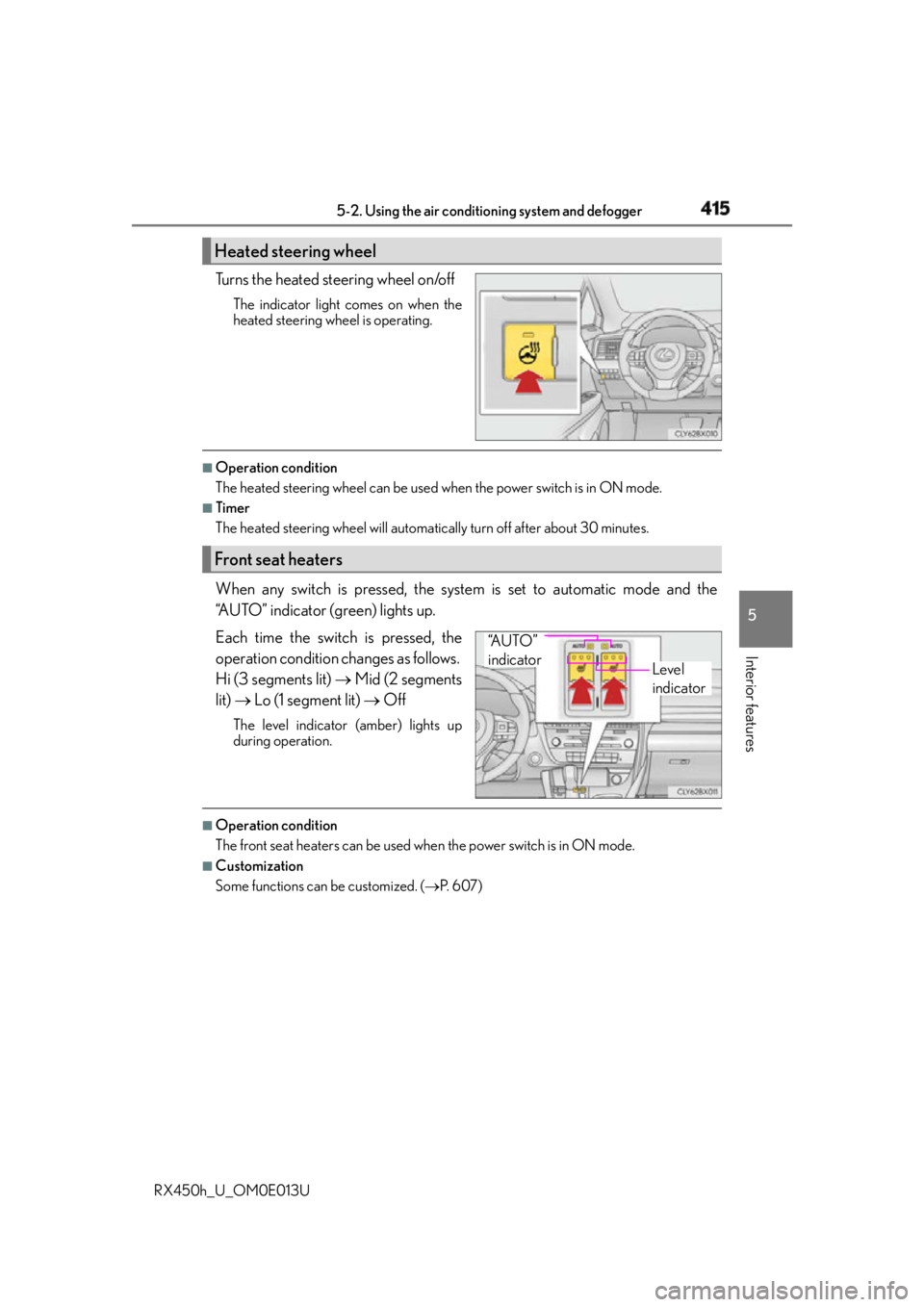
RX450h_U_OM0E013U Turns the heated steering wheel on/off The indicator light comes on when the
heated steering wheel is operating. ■
Operation condition
The heated steering wheel can be used when the power switch is in ON mode.■
Timer
The heated steering wheel will automati cally turn off after about 30 minutes.
When any switch is pressed, the system is set to automatic mode and the
“AUTO” indicator (green) lights up.
Each time the switch is pressed, the
operation condition changes as follows.
Hi (3 segments lit) Mid (2 segments
lit) Lo (1 segment lit) OffThe level indicator (amber) lights up
during operation.
■
Operation condition
The front seat heaters can be used when the power switch is in ON mode. ■
Customization
Some functions can be customized. ( P. 6 0 7 )Heated steering wheel
Front seat heaters
Level
indicator“A U T O ”
indicator
Page 416 of 660
416 5-2. Using the air conditio ning system and defogger
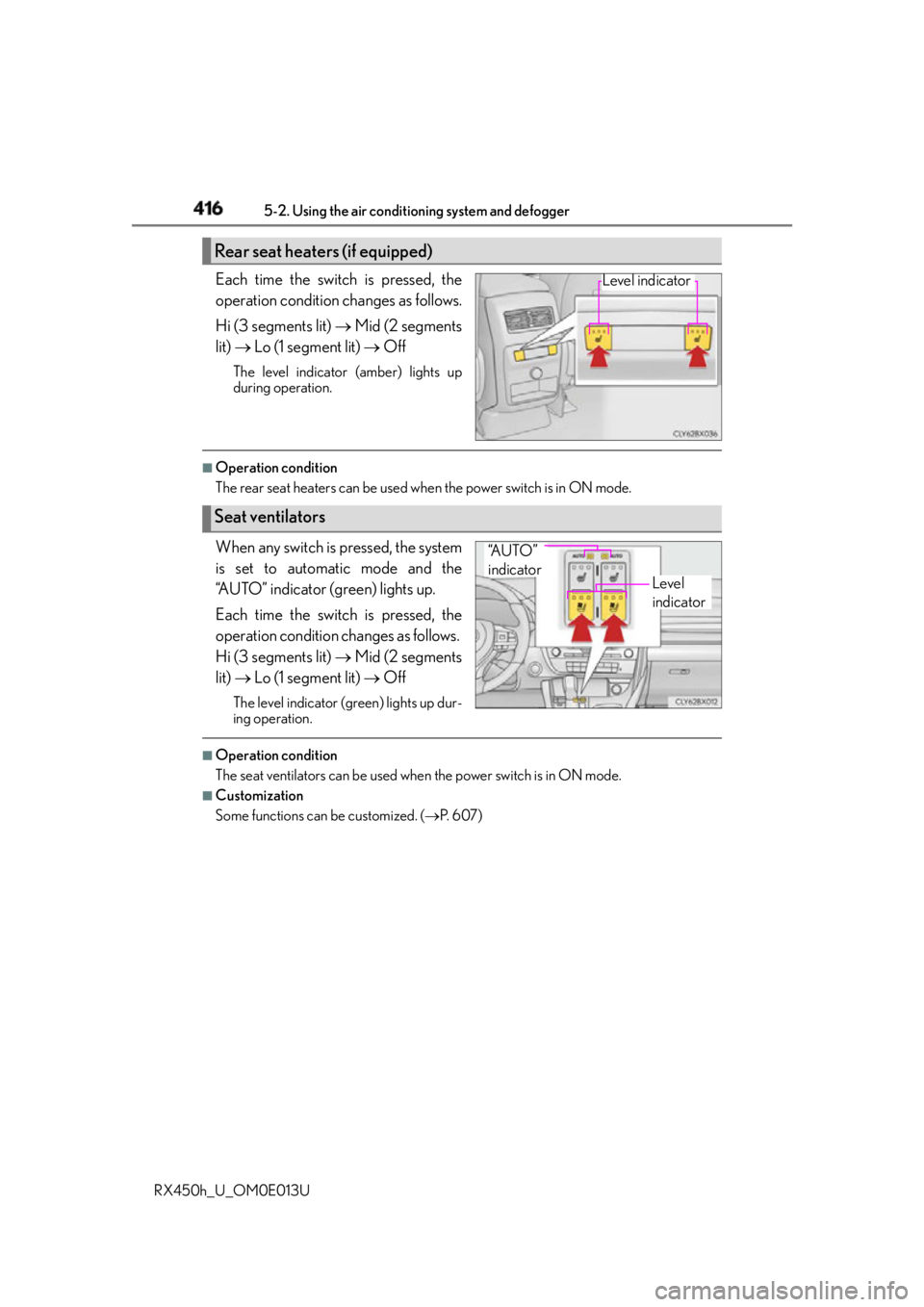
RX450h_U_OM0E013U Each time the switch is pressed, the
operation condition changes as follows.
Hi (3 segments lit) Mid (2 segments
lit) Lo (1 segment lit) OffThe level indicator (amber) lights up
during operation. ■
Operation condition
The rear seat heaters can be used wh en the power switch is in ON mode.
When any switch is pressed, the system
is set to automatic mode and the
“AUTO” indicator (green) lights up.
Each time the switch is pressed, the
operation condition changes as follows.
Hi (3 segments lit) Mid (2 segments
lit) Lo (1 segment lit) OffThe level indicator (g reen) lights up dur-
ing operation. ■
Operation condition
The seat ventilators can be used when the power switch is in ON mode.■
Customization
Some functions can be customized. ( P. 6 0 7 )Rear seat heaters (if equipped) Level indicator
Seat ventilators Level
indicator“A U T O ”
indicator