change time LEXUS RX450h 2016 User Guide
[x] Cancel search | Manufacturer: LEXUS, Model Year: 2016, Model line: RX450H, Model: LEXUS RX450H 2016Pages: 660, PDF Size: 10.15 MB
Page 161 of 660

1613-2. Opening, closing and locking the doors
3
Operation of each component
RX450h_U_OM0E013U ■
Note for the entry function ●
Even when the electronic key is within the effective range (detection areas), the system
may not operate properly in the following cases:
• The electronic key is too close to the window or outside door handle, near the
ground, or in a high place when the doors are locked or unlocked.
• The electronic key is near the ground or in a high place, or too close to the rear
bumper center when the back door is opened.
• The electronic key is on the instrument pa nel, luggage compartment, floor, or in the
door pockets or glove box when the hybrid system is started or power switch modes
are changed. ●
Do not leave the electronic key on top of th e instrument panel or near the door pockets
when exiting the vehicle. Depending on the radio wave reception conditions, it may be
detected by the antenna outs ide the cabin and the door will become lockable from the
outside, possibly trapping the el ectronic key inside the vehicle.●
As long as the electronic key is within the effective range, the doors may be locked or
unlocked by anyone. ●
Even if the electronic key is not inside the ve hicle, it may be possible to start the hybrid
system if the electronic key is near the window. ●
The doors may unlock if a large amount of wa ter splashes on the door handle, such as in
the rain or in a car wash when the electronic key is within the effective range. (The door
will automatically be locked after approximately 60 seconds if the doors are not
opened and closed.) ●
If the wireless remote control is used to lo ck the doors when the electronic key is near
the vehicle, there is a possibility that the door may not be unlocked by the entry func-
tion. (Use the wireless remote control to unlock the doors.) ●
Touching the door lock sensor while wearin g gloves may delay or prevent lock opera-
tion. Remove the gloves and touch the lock sensor again. ●
When the lock operation is performed using the lock sensor, recognition signals will be
shown up to two consecutive times. After this, no recognition signals will be given.
*●
If the door handle becomes wet while the el ectronic key is within the effective range,
the door may lock and unlock repeatedly. In that case, follow the following correction
procedures to wash the vehicle:
• Place the electronic key in a location 6 ft. (2 m) or more away from the vehicle. (Take
care to ensure that the key is not stolen.)
• Set the electronic key to battery-saving mode to disable the smart access system
with push-button start. ( P. 1 6 0 )●
If the electronic key is insi de the vehicle and a door handle becomes wet during a car
wash, a message may be shown on the mult i-information display and a buzzer will
sound outside the vehicle. To turn off the alarm, lock all the doors. ●
The lock sensor may not work properly if it comes into contact with ice, snow, mud, etc.
Clean the lock sensor and attempt to operate it again. ●
A sudden approach to the effective range or door handle may prevent the doors from
being unlocked. In this case, return the door handle to the original position and check
that the doors unlock before pulling the door handle again.●
If there is another electronic key in the detection area, it may take slightly longer to
unlock the doors after the door handle is gripped.
Page 180 of 660
180 3-3. Adjusting the seats
RX450h_U_OM0E013U ■
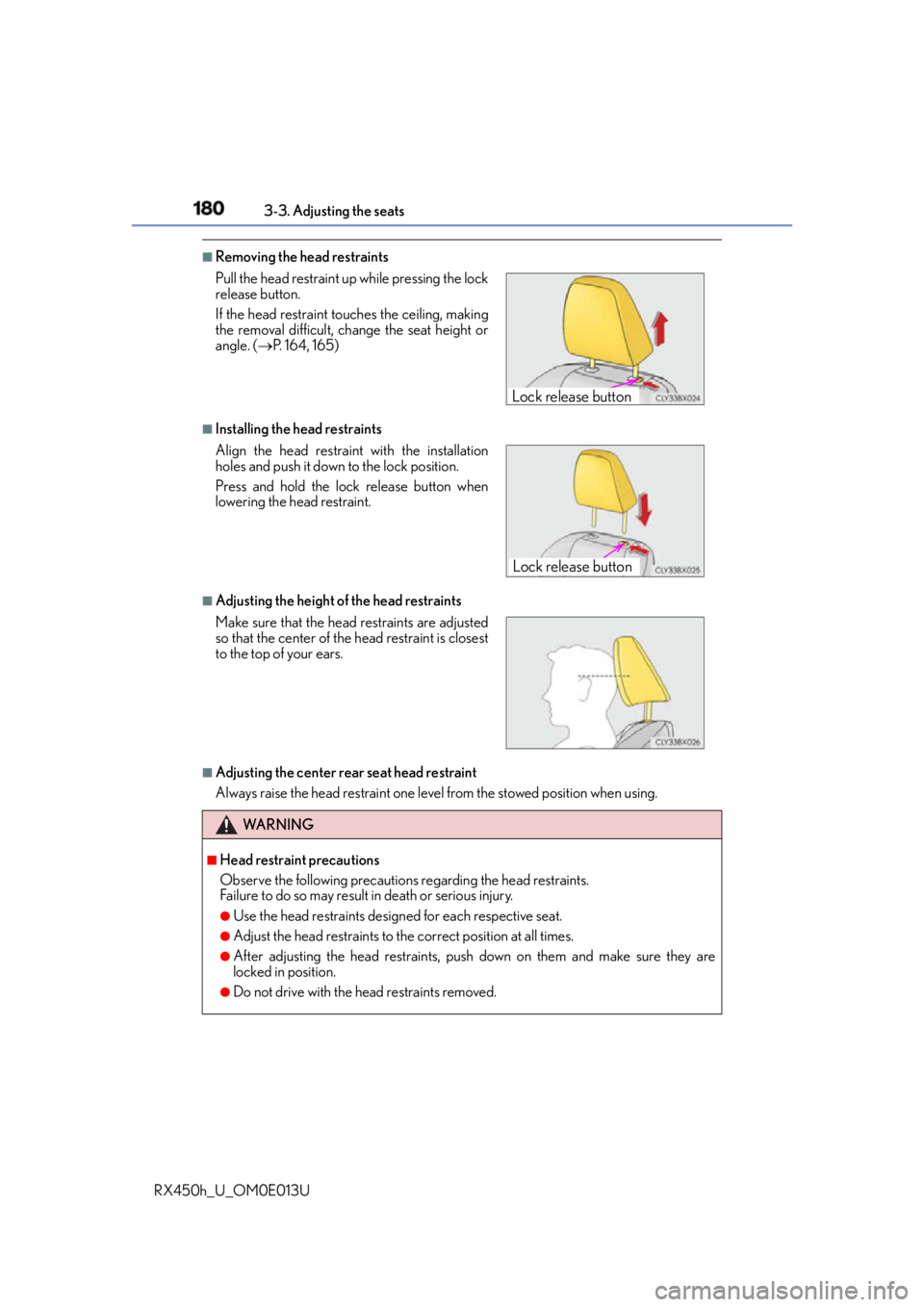
Removing the head restraints
■
Installing the head restraints
■
Adjusting the height of the head restraints
■
Adjusting the center rear seat head restraint
Always raise the head restraint one level from the stowed position when using.Pull the head restraint up while pressing the lock
release button.
If the head restraint to uches the ceiling, making
the removal difficult, change the seat height or
angle. ( P. 1 6 4 , 1 6 5 )
Align the head restrain t with the installation
holes and push it down to the lock position.
Press and hold the lock release button when
lowering the head restraint.
Make sure that the head restraints are adjusted
so that the center of the head restraint is closest
to the top of your ears.
WA R N I N G ■
Head restraint precautions
Observe the following precautions regarding the head restraints.
Failure to do so may result in death or serious injury.●
Use the head restraints design ed for each respective seat.●
Adjust the head restraints to the correct position at all times. ●
After adjusting the head restraints, push down on them and make sure they are
locked in position. ●
Do not drive with the head restraints removed. Lock release button
Lock release button
Page 187 of 660

1873-4. Adjusting the steering wheel and mirrors
3
Operation of each component
RX450h_U_OM0E013U When the mirror select switch is in the “L” or “R” position, the outside rear view
mirrors will automatically angle downwards when the vehicle is reversing in
order to give a better view of the ground.
To disable this function, select neither “L” nor “R” of the mirror select switch. ■
Adjusting the mirror angle when the vehicle is reversing
With the shift lever in R, adjust the mirror angle at a desired position.
The adjusted angle will be memorized and the mirror will automatically tilt to
the memorized angle whenever the shift lever is shifted to R from next time. The memorized downward tilt position of the mirror is linked to the normal position
(angle adjusted with the shif t lever in other than R). Therefore, if the normal posi-
tion is changed after adjustment, th e tilt position will also change.
When the normal position is chang ed, readjust the angle in reversing.■
Mirror angle can be adjusted when
The power switch is in ACCESSORY or ON mode. ■
When disconnecting and reconnec ting 12-volt battery terminals
The automatic folding/extending mirror function will return to off as default. To turn the
function on, press the switch again to select on. ■
When the mirrors are fogged up
The outside rear view mirrors can be cleare d using the mirror defoggers. Turn on the
rear window defogger to turn on the outside rear view mirror defoggers. ( P. 4 0 9 )■
Automatic adjustment of the mirror angle
A desired mirror face angle can be entered to memory and recalled automatically by the
driving position memory. ( P. 1 74 )■
Auto anti-glare function
When the anti-glare inside rear view mirror is set to automatic mode, the outside rear
view mirrors will activate in conjunction with the anti-glare inside rear view mirror to
reduce reflected light. ( P. 1 8 3 )■
Using automatic mode in cold weather
When automatic mode is used in cold weather, the door mirror could freeze up and
automatic stowing and return may not be possible. In this case, remove any ice and snow
from the door mirror, then either operate th e mirror using manual mode or move the mir-
ror by hand. ■
Customization
Some functions can be customized. ( P. 6 0 7 )Linked mirror function when reversing
Page 211 of 660
2114-1. Before driving
4
Driving
RX450h_U_OM0E013U NOTICE ■
When driving the vehicle ●
Do not depress the accelerator and brake peda ls at the same time during driving, as
this may restrain driving torque. ●
Do not use the accelerator pedal or depress the accelerator and brake pedals at the
same time to hold the vehicle on a hill. ■
When parking the vehicle
Always shift the shift lever to P, set the parking brake. Failure to do so may cause the
vehicle to move or the vehicle may accelerate suddenly if the acce lerator pedal is acci-
dentally depressed. ■
Avoiding damage to vehicle parts ●
Do not turn the steering wheel fully in either direction and hold it there for an
extended period of time.
Doing so may damage the power steering motor. ●
When driving over bumps in the road, drive as slowly as possible to avoid damaging
the wheels, underside of the vehicle, etc. ■
If you get a flat tire while driving
A flat or damaged tire may cause the follo wing situations. Hold the steering wheel
firmly and gradually depress the brak e pedal to slow down the vehicle.●
It may be difficult to control your vehicle. ●
The vehicle will make abnormal sounds or vibrations. ●
The vehicle will lean abnormally.
Information on what to do in case of a flat tire ( P. 5 4 9 )■
When encountering flooded roads
Do not drive on a road that has flooded after heavy rain, etc. Doing so may cause the
following serious damage to the vehicle: ●
Engine stalling ●
Short in electrical components ●
Engine damage caused by water immersion
In the event that you drive on a flooded road and the vehicle is flooded, be sure to have
your Lexus dealer check the following: ●
Brake function ●
Changes in quantity and quality of oil and fluid used for the engine, hybrid transmis-
sion, rear differential (AWD models), etc. ●
Lubricant condition for the bearings and susp ension joints (where possible), and the
function of all joints, bearings, etc.
Page 233 of 660
2334-2. Driving procedures
4
Driving
RX450h_U_OM0E013U Stop the vehicle completely.
Shift the shift lever to P.
Set the parking brake. ( P. 2 4 5 )If the parking brake is in automatic mode, the parking brake is set automatically when
shifting the shift lever to P. (
P. 2 4 5 )
Press the power switch.
Release the brake pedal and check that the display on the meters is off.
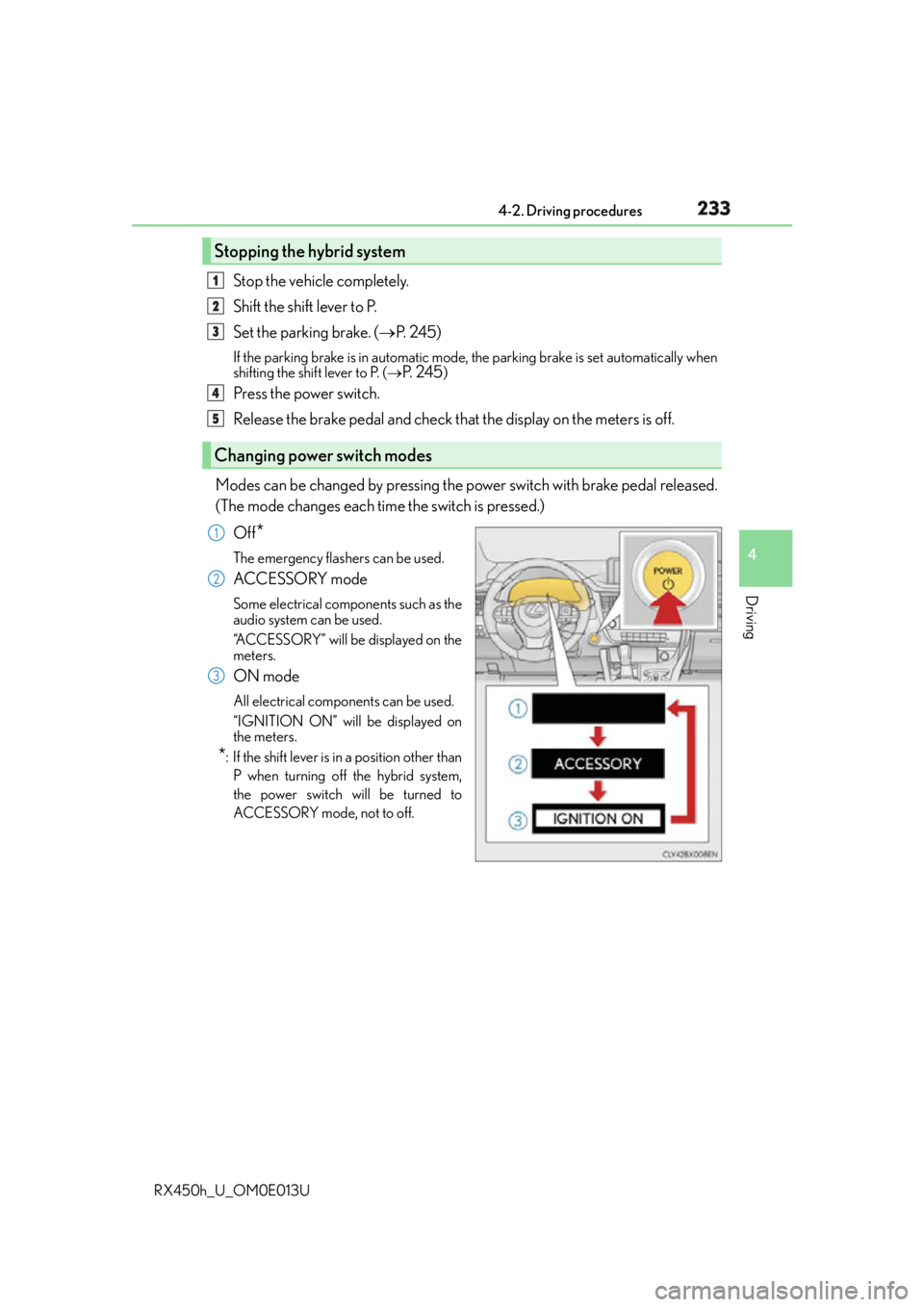
Modes can be changed by pressing the po wer switch with brake pedal released.
(The mode changes each time the switch is pressed.)
Off
* The emergency flashers can be used.
ACCESSORY mode Some electrical components such as the
audio system can be used.
“ACCESSORY” will be displayed on the
meters.
ON mode All electrical components can be used.
“IGNITION ON” will be displayed on
the meters.
* : If the shift lever is in a position other than
P when turning off the hybrid system,
the power switch will be turned to
ACCESSORY mode, not to of f.Stopping the hybrid system
Changing power switch modes 1
2
3
4
5
1
2
3
Page 235 of 660
2354-2. Driving procedures
4
Driving
RX450h_U_OM0E013U ■
Steering lock
After turning the power switch off and opening and closing the doors, the steering wheel
will be locked due to the stee ring lock function. Operating the power switch again auto-
matically cancels the steering lock. ■
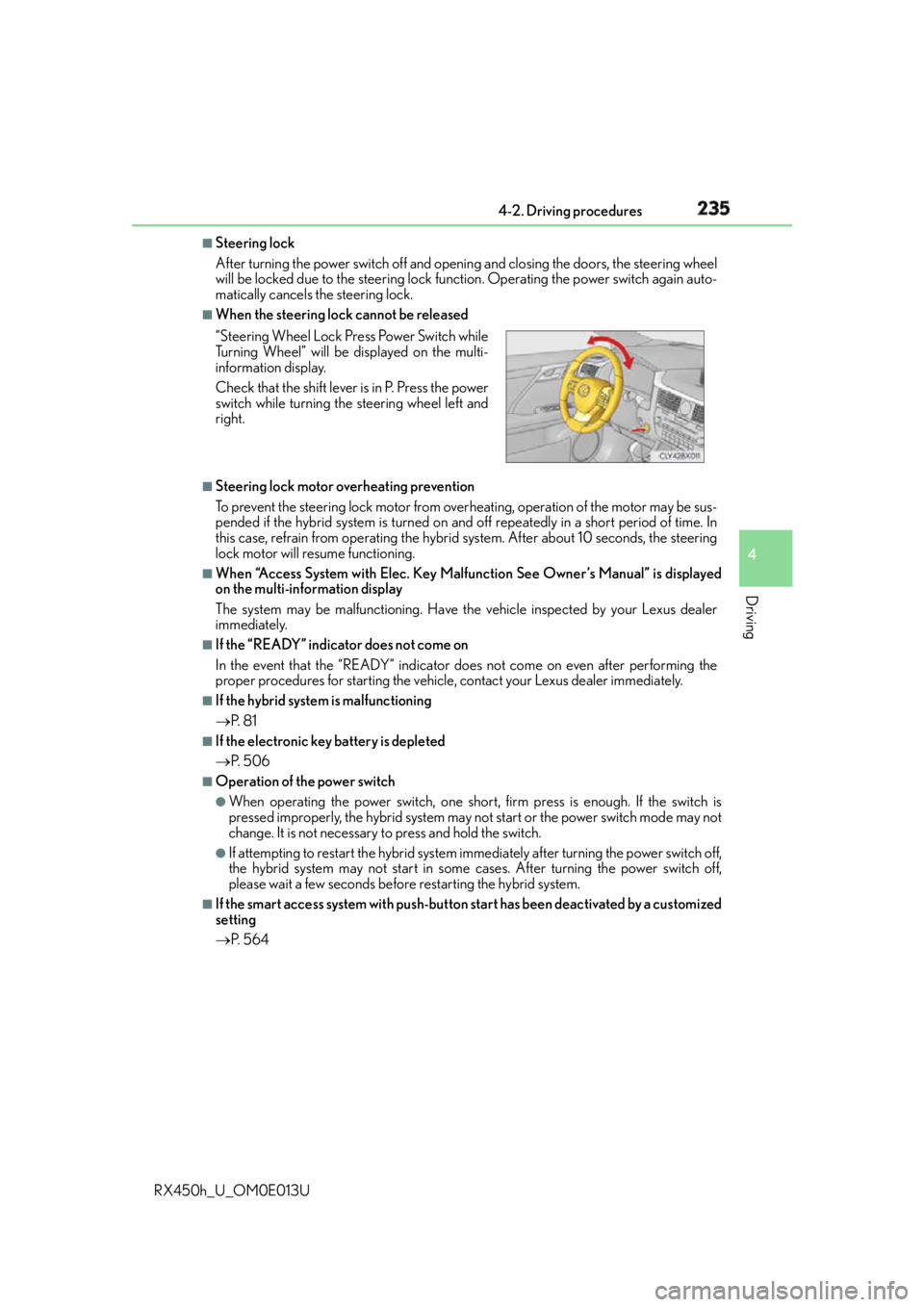
When the steering lock cannot be released
■
Steering lock motor overheating prevention
To prevent the steering lock motor from over heating, operation of the motor may be sus-
pended if the hybrid system is turned on and off repeatedly in a short period of time. In
this case, refrain from operating the hybrid system. After about 10 seconds, the steering
lock motor will resume functioning. ■
When “Access System with Elec. Key Malfunction See Owner’s Manual” is displayed
on the multi-information display
The system may be malfunctioning. Have the vehicle inspected by your Lexus dealer
immediately. ■
If the “READY” indicator does not come on
In the event that the “READY” indicator does not come on even after performing the
proper procedures for starting the vehicle, contact your Lexus dealer immediately. ■
If the hybrid system is malfunctioning
P. 8 1 ■
If the electronic key battery is depleted
P. 5 0 6 ■
Operation of the power switch ●
When operating the power switch, one short, firm press is enough. If the switch is
pressed improperly, the hybrid system may no t start or the power switch mode may not
change. It is not necessary to press and hold the switch. ●
If attempting to restart the hybrid system immediately after turning the power switch off,
the hybrid system may not start in some cases. After turning the power switch off,
please wait a few seconds before restarting the hybrid system.■
If the smart access system with push-butto n start has been deactivated by a customized
setting
P. 5 6 4“Steering Wheel Lock Press Power Switch while
Turning Wheel” will be displayed on the multi-
information display.
Check that the shift lever is in P. Press the power
switch while turning the steering wheel left and
right.
Page 244 of 660
244 4-2. Driving procedures
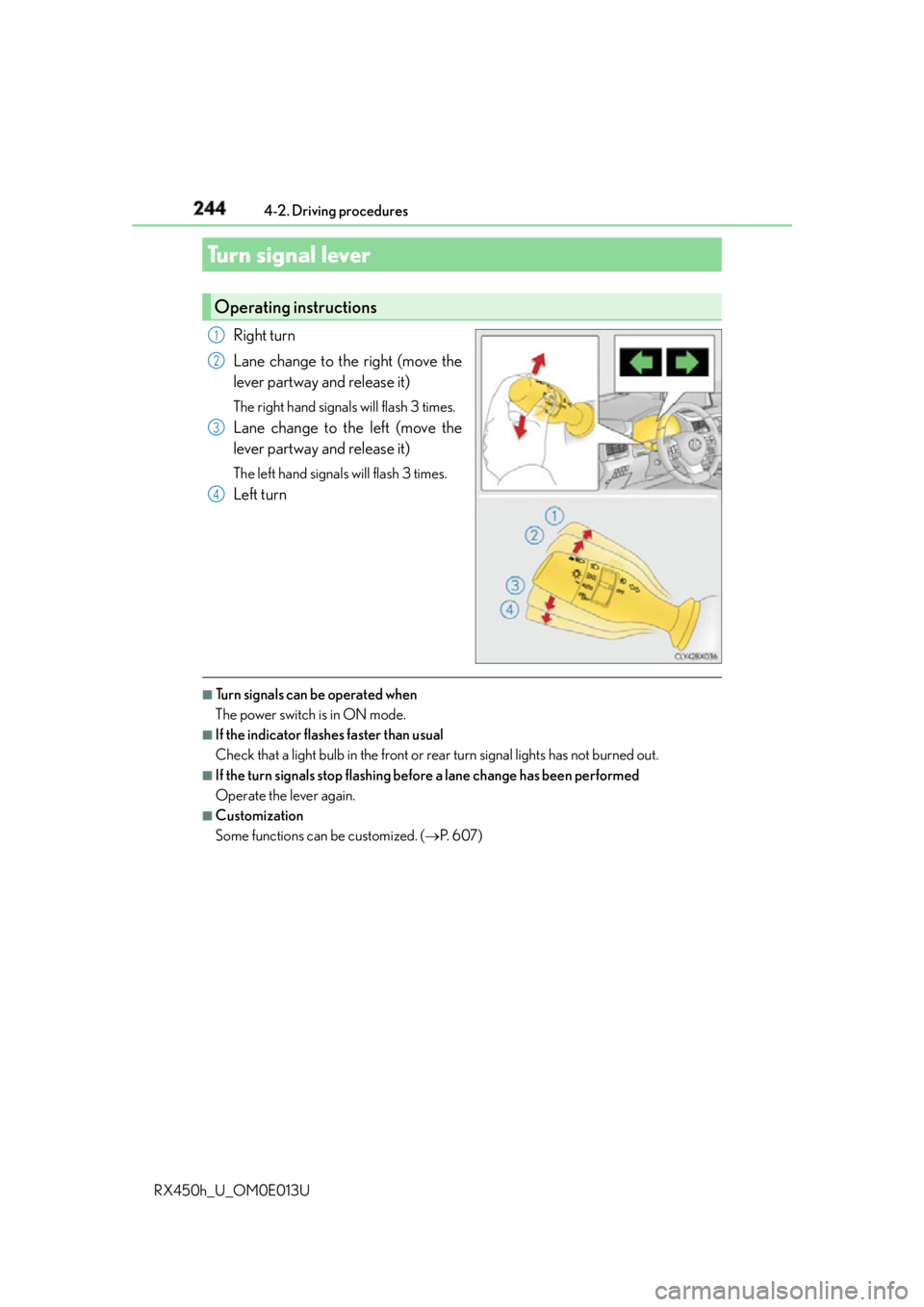
RX450h_U_OM0E013U Right turn
Lane change to the right (move the
lever partway and release it) The right hand signals will flash 3 times.
Lane change to the left (move the
lever partway and release it) The left hand signals will flash 3 times.
Left turn
■
Turn signals can be operated when
The power switch is in ON mode. ■
If the indicator flashes faster than usual
Check that a light bulb in the front or rear turn signal lights has not burned out. ■
If the turn signals stop flashing befo re a lane change has been performed
Operate the lever again. ■
Customization
Some functions can be customized. ( P. 6 0 7 )Turn signal lever Operating instructions 1
2
3
4
Page 257 of 660

2574-3. Operating the lights and wipers
4
Driving
RX450h_U_OM0E013U ■
Conditions to turn the high beams on/off automatically ●
When all of the following conditions are met, the high beams will be turned on automat-
ically (after approximately 1 second):
• The vehicle speed is approximately 21 mph (34 km/h) or more.
• The area ahead of the vehicle is dark.
• There are no vehicles ahead with headlights or tail lights turned on.
• There are few streetlights on the road ahead. ●
If any of the following conditions is met, the high beams will turn off automatically:
• The vehicle speed is below approximately 17 mph (27 km/h).
• The area ahead of the vehicle is not dark.
• Vehicles ahead have their headli ghts or tail lights turned on.
• There are many streetlights on the road ahead. ■
Camera sensor dete ction information●
The high beams may not be automatically turned off in the fo llowing situations:
• When a vehicle suddenly appears from around a curve
• When the vehicle is cut in front of by another vehicle
• When vehicles ahead cannot be detected du e to repeated curves, road dividers or
roadside trees
• When vehicles ahead appear in a faraway lane on a wide road
• When the lights of vehicles ahead are not on ●
The high beams may be turned off if a vehicl e ahead that is using fog lights without its
headlights turned on is detected. ●
House lights, street lights, traffic signals, and illuminated billboards or signs and other
reflective objects may cause the high beams to change to the low beams, or the low
beams to remain on. ●
The following factors may affect the amount of time taken for the high beams to turn on
or off:
• The brightness of the headlights, fog li ghts, and tail lights of vehicles ahead
• The movement and direction of vehicles ahead
• When a vehicle ahead only has operational lights on one side
• When a vehicle ahead is a two-wheeled vehicle
• The condition of the road (gradient, curve, condition of the road surface, etc.)
• The number of passengers and amount of luggage in the vehicle ●
The high beams may turn on or off unexpectedly.●
Bicycles or similar vehicles may not be detected.
Page 258 of 660

258 4-3. Operating the lights and wipers
RX450h_U_OM0E013U ●
In the following situations the system may not be able to correctly detect the surround-
ing brightness level. This may cause the lo w beams to remain on or the high beams to
flash or dazzle pedestrians or vehicles ahead. In such a case, it is necessary to manually
switch between the high and low beams.
• When driving in inclement weather (hea vy rain, snow, fog, sandstorms, etc.)
• When the windshield is obscured by fog, mist, ice, dirt, etc.
• When the windshield is cracked or damaged
• When the camera sensor is deformed or dirty
• When the temperature of the camera sensor is extremely high
• When the surrounding brightness level is equa l to that of headlights, tail lights or fog
lights
• When headlights or tail lights of vehicles ah ead are turned off, dirty, changing color,
or not aimed properly
• When the vehicle is hit by water, snow, dust, etc. from a preceding vehicle
• When driving through an area of intermit tently changing brightness and darkness
• When frequently and repeatedly driving ascending/descending roads, or roads with
rough, bumpy or uneven surfaces (such as stone-paved roads, gravel roads, etc.)
•When frequently and repe atedly taking curves or driving on a winding road
• When there is a highly reflective object ahead of the vehicle, such as a sign or mirror
• When the back of a preceding vehicle is hi ghly reflective, such as a container on a
truck
• When the vehicle’s headlights are damaged or dirty, or are not aimed properly
• When the vehicle is listing or titling due to a flat tire, a trailer being towed, etc.
• When the headlights are changed between the high beams and low beams repeat-
edly in an abnormal manner
• When the driver believes that the high beams may be flashing or dazzling pedestri-
ans or other drivers■
Temporarily lowering sensor sensitivity
The sensitivity of the sensor can be temporarily lowered.
Turn the power switch off while the following conditions are met.
• The headlight switch is in or .
• The headlight switch lever is in high beam position.
• Automatic High Beam switch is on.
Turn the power switch to ON mode.
Within 30 seconds after , re peat pulling the headlight sw itch lever to the original
position then pushing it to the high beam po sition quickly 10 times, then leave the lever
in high beam position.
If the sensitivity is changed, the Automatic High Beam indicator is turn on and off 3
times.
Automatic High Beam (headlights) may turn on even the vehicle is stopped.1
2
3 2
4
Page 283 of 660
2834-5. Using the driving support systems
4
Driving
RX450h_U_OM0E013U ■
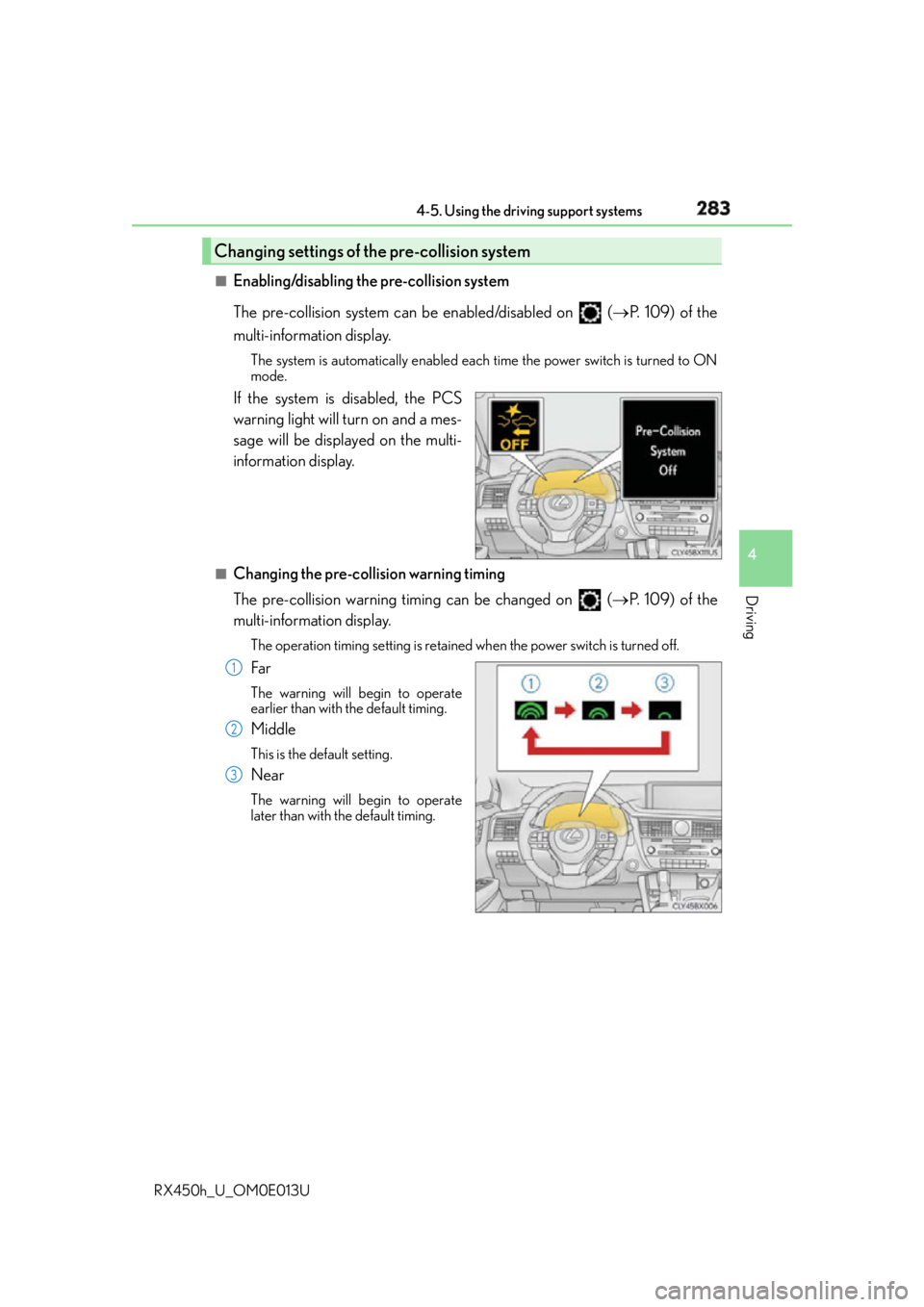
Enabling/disabling the pre-collision system
The pre-collision system can be enabled/disabled on ( P. 1 0 9 ) o f t h e
multi-information display. The system is automatically enabled each time the power switch is turned to ON
mode.
If the system is disabled, the PCS
warning light will turn on and a mes-
sage will be displayed on the multi-
information display. ■
Changing the pre-col lision warning timing
The pre-collision warning timing can be changed on ( P. 1 0 9 ) o f t h e
multi-information display. The operation timing setting is retained when the power switch is turned off.
Far The warning will begin to operate
earlier than with the default timing.
Middle This is the default setting.
Near The warning will begin to operate
later than with the default timing.Changing settings of the pre-collision system
1
2
3