navigation LEXUS RX450h 2016 Owners Manual
[x] Cancel search | Manufacturer: LEXUS, Model Year: 2016, Model line: RX450H, Model: LEXUS RX450H 2016Pages: 660, PDF Size: 10.15 MB
Page 6 of 660
TABLE OF CONTENTS
6
RX450h_U_OM0E013U 8-1. Specifications
Maintenance data
(fuel, oil level, etc.) .................. 582
Fuel information........................... 591
Tire information........................... 594
8-2. Customization
Customizable features ............ 607
8-3. Initialization
Items to initialize ........................... 619
Reporting safety defects
for U.S. owners......................................622
Seat belt instructions
for Canadian owners
(in French) .............................................. 623
SRS airbag instructions
for Canadian owners
(in French) ...............................................624
Headlight aim instructions
for Canadian owners
(in French) .............................................. 632 What to do if...
(Troubleshooting) ............................... 636
Alphabetical index ................................ 6408
Vehicle specifications
9
For owners Index
Refer to the “NAVIGATION SYSTEM OWNER’S MANUAL” for information
regarding the equipment listed below.
• Navigation system
• Audio/visual system
• Rear seat entertainment system • Panoramic view monitor
• Lexus Enform
Page 19 of 660
19Pictorial index
RX450h_U_OM0E013U Multi-information display . . . . . . . . . . . . . . . . . . . . . . . . . . . . . . . . . . . . . . . . . . . P. 102 Display . . . . . . . . . . . . . . . . . . . . . . . . . . . . . . . . . . . . . . . . . . . . . . . . . . . . . . . . . . . . . . . . . P. 102
Energy monitor . . . . . . . . . . . . . . . . . . . . . . . . . . . . . . . . . . . . . . . . . . . . . . . . . . . . . . . . . P. 1 2 4
When the warning messages are displayed . . . . . . . . . . . . . . . . . . . . . . . . . . . . P. 543
Parking brake switch . . . . . . . . . . . . . . . . . . . . . . . . . . . . . . . . . . . . . . . . . . . . . . . . P. 245 Applying/releasing. . . . . . . . . . . . . . . . . . . . . . . . . . . . . . . . . . . . . . . . . . . . . . . . P. 245, 246
Precautions against winter season . . . . . . . . . . . . . . . . . . . . . . . . . . . . . . . . . . . . . . P. 391
Warning buzzer/message . . . . . . . . . . . . . . . . . . . . . . . . . . . . . . . . . . . . . . . . . P. 247, 543
Turn signal lever. . . . . . . . . . . . . . . . . . . . . . . . . . . . . . . . . . . . . . . . . . . . . . . . . . . . . . P. 244Headlight switch . . . . . . . . . . . . . . . . . . . . . . . . . . . . . . . . . . . . . . . . . . . . . . . . . . . . . . . . . P. 251
Headlights/side marker light s/parking lights/tail lights/
license plate lights/daytime running li ghts . . . . . . . . . . . . . . . . . . . . . . . . . . . . . . . P. 251
Fog lights . . . . . . . . . . . . . . . . . . . . . . . . . . . . . . . . . . . . . . . . . . . . . . . . . . . . . . . . . . . . . . .P. 259
Windshield wiper and washer switch. . . . . . . . . . . . . . . . . . . . . . . . . . P. 260, 265 Usage . . . . . . . . . . . . . . . . . . . . . . . . . . . . . . . . . . . . . . . . . . . . . . . . . . . . . . . . . . . . P. 260, 265
Adding washer fluid . . . . . . . . . . . . . . . . . . . . . . . . . . . . . . . . . . . . . . . . . . . . . . . . . . . .P. 4 82
Emergency flasher switch . . . . . . . . . . . . . . . . . . . . . . . . . . . . . . . . . . . . . . . . . . . P. 528
Hood lock release lever . . . . . . . . . . . . . . . . . . . . . . . . . . . . . . . . . . . . . . . . . . . . . P. 473
Tilt and telescopic steering contro l switch . . . . . . . . . . . . . . . . . . . . . . . . . . . P. 181Adjustment . . . . . . . . . . . . . . . . . . . . . . . . . . . . . . . . . . . . . . . . . . . . . . . . . . . . . . . . . . . . . . P. 181
Driving position memory . . . . . . . . . . . . . . . . . . . . . . . . . . . . . . . . . . . . . . . . . . . . . . . . P. 174
Air conditioning system . . . . . . . . . . . . . . . . . . . . . . . . . . . . . . . . . . . . . . . . . . . . . P. 405 Usage . . . . . . . . . . . . . . . . . . . . . . . . . . . . . . . . . . . . . . . . . . . . . . . . . . . . . . . . . . . . . . . . . P. 405
Rear window defogger . . . . . . . . . . . . . . . . . . . . . . . . . . . . . . . . . . . . . . . . . . . . . . . . P. 409
Audio system
*Audio system
*Hands-free system
*
* : Refer to “NAVIGATION SYSTEM OWNER’S MANUAL”.4
5
6
7
8
9
10
11
12
Page 21 of 660
21Pictorial index
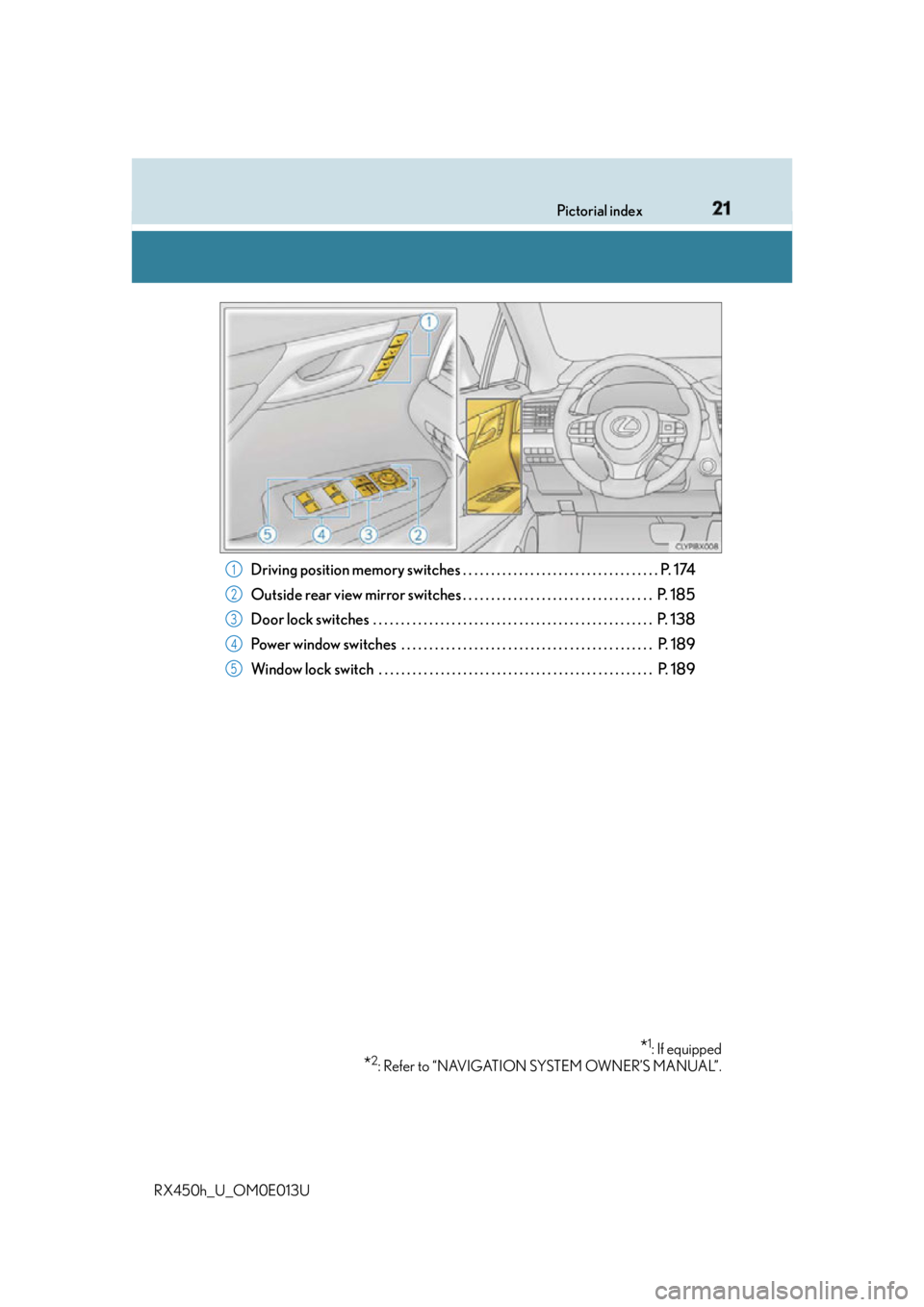
RX450h_U_OM0E013U Driving position memory switches . . . . . . . . . . . . . . . . . . . . . . . . . . . . . . . . . . . P. 174
Outside rear view mirror switches . . . . . . . . . . . . . . . . . . . . . . . . . . . . . . . . . . P. 185
Door lock switches . . . . . . . . . . . . . . . . . . . . . . . . . . . . . . . . . . . . . . . . . . . . . . . . . . P. 138
Power window switches . . . . . . . . . . . . . . . . . . . . . . . . . . . . . . . . . . . . . . . . . . . . . P. 189
Window lock switch . . . . . . . . . . . . . . . . . . . . . . . . . . . . . . . . . . . . . . . . . . . . . . . . . P. 189
* 1
: If equipped
* 2
: Refer to “NAVIGATION SYSTEM OWNER’S MANUAL”.1
2
3
4
5
Page 23 of 660
23Pictorial index
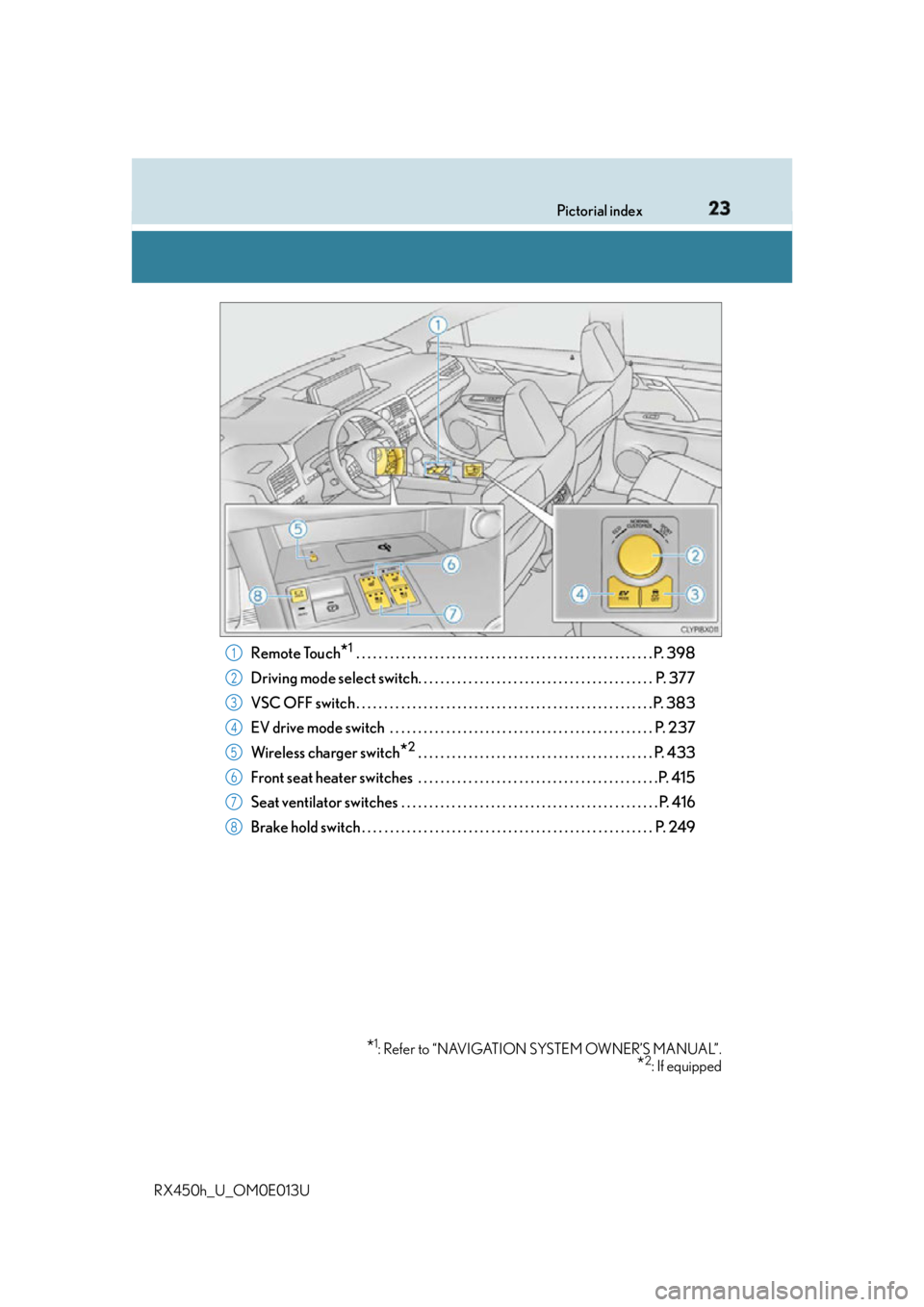
RX450h_U_OM0E013U Remote Touch
* 1
. . . . . . . . . . . . . . . . . . . . . . . . . . . . . . . . . . . . . . . . . . . . . . . . . . . . . P. 398
Driving mode select switch. . . . . . . . . . . . . . . . . . . . . . . . . . . . . . . . . . . . . . . . . . P. 377
VSC OFF switch . . . . . . . . . . . . . . . . . . . . . . . . . . . . . . . . . . . . . . . . . . . . . . . . . . . . . P. 383
EV drive mode switch . . . . . . . . . . . . . . . . . . . . . . . . . . . . . . . . . . . . . . . . . . . . . . . P. 237
Wireless charger switch
* 2
. . . . . . . . . . . . . . . . . . . . . . . . . . . . . . . . . . . . . . . . . . P. 433
Front seat heater switches . . . . . . . . . . . . . . . . . . . . . . . . . . . . . . . . . . . . . . . . . . .P. 415
Seat ventilator switches . . . . . . . . . . . . . . . . . . . . . . . . . . . . . . . . . . . . . . . . . . . . . . P. 416
Brake hold switch . . . . . . . . . . . . . . . . . . . . . . . . . . . . . . . . . . . . . . . . . . . . . . . . . . . . P. 249
* 1
: Refer to “NAVIGATION SYSTEM OWNER’S MANUAL”.
* 2
: If equipped1
2
3
4
5
6
7
8
Page 25 of 660
25Pictorial index
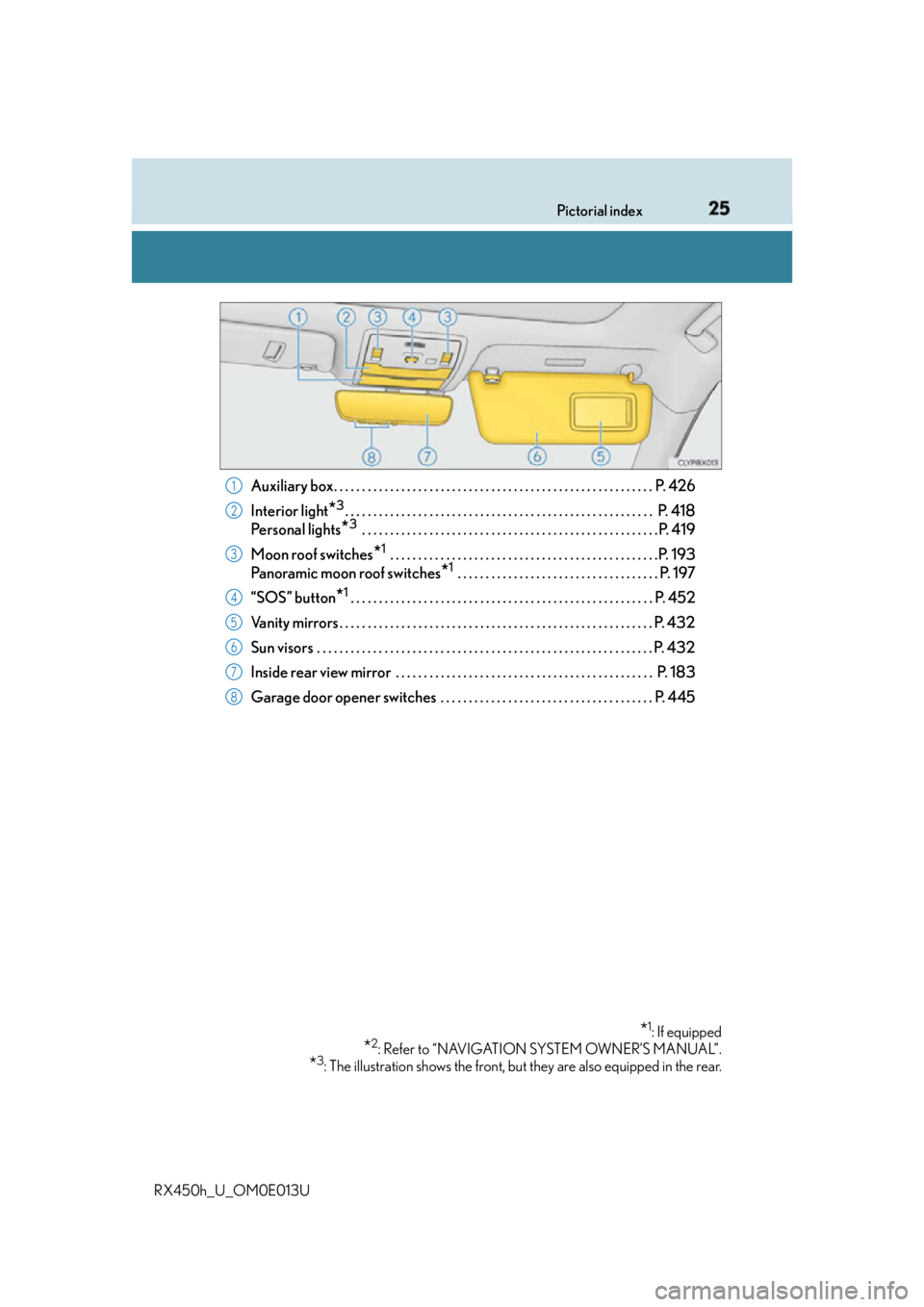
RX450h_U_OM0E013U Auxiliary box. . . . . . . . . . . . . . . . . . . . . . . . . . . . . . . . . . . . . . . . . . . . . . . . . . . . . . . . . P. 4 2 6
Interior light
* 3
. . . . . . . . . . . . . . . . . . . . . . . . . . . . . . . . . . . . . . . . . . . . . . . . . . . . . . . P. 418
Pe r s o n a l l i g h t s
* 3
. . . . . . . . . . . . . . . . . . . . . . . . . . . . . . . . . . . . . . . . . . . . . . . . . . . . .P. 419
Moon roof switches
* 1
. . . . . . . . . . . . . . . . . . . . . . . . . . . . . . . . . . . . . . . . . . . . . . . .P. 193
Panoramic moon roof switches
* 1
. . . . . . . . . . . . . . . . . . . . . . . . . . . . . . . . . . . . P. 197
“SOS” button
* 1
. . . . . . . . . . . . . . . . . . . . . . . . . . . . . . . . . . . . . . . . . . . . . . . . . . . . . . P. 452
Vanity mirrors . . . . . . . . . . . . . . . . . . . . . . . . . . . . . . . . . . . . . . . . . . . . . . . . . . . . . . . . P. 432
Sun visors . . . . . . . . . . . . . . . . . . . . . . . . . . . . . . . . . . . . . . . . . . . . . . . . . . . . . . . . . . . . P. 432
Inside rear view mirror . . . . . . . . . . . . . . . . . . . . . . . . . . . . . . . . . . . . . . . . . . . . . . P. 183
Garage door opener switches . . . . . . . . . . . . . . . . . . . . . . . . . . . . . . . . . . . . . . P. 445
* 1
: If equipped
* 2
: Refer to “NAVIGATION SYSTEM OWNER’S MANUAL”.
* 3
: The illustration shows the front, but they are also equipped in the rear.1
2
3
4
5
6
7
8
Page 105 of 660
1052. Instrument cluster
2
Instrument cluster
RX450h_U_OM0E013U ◆ Using the odometer/trip meter display area
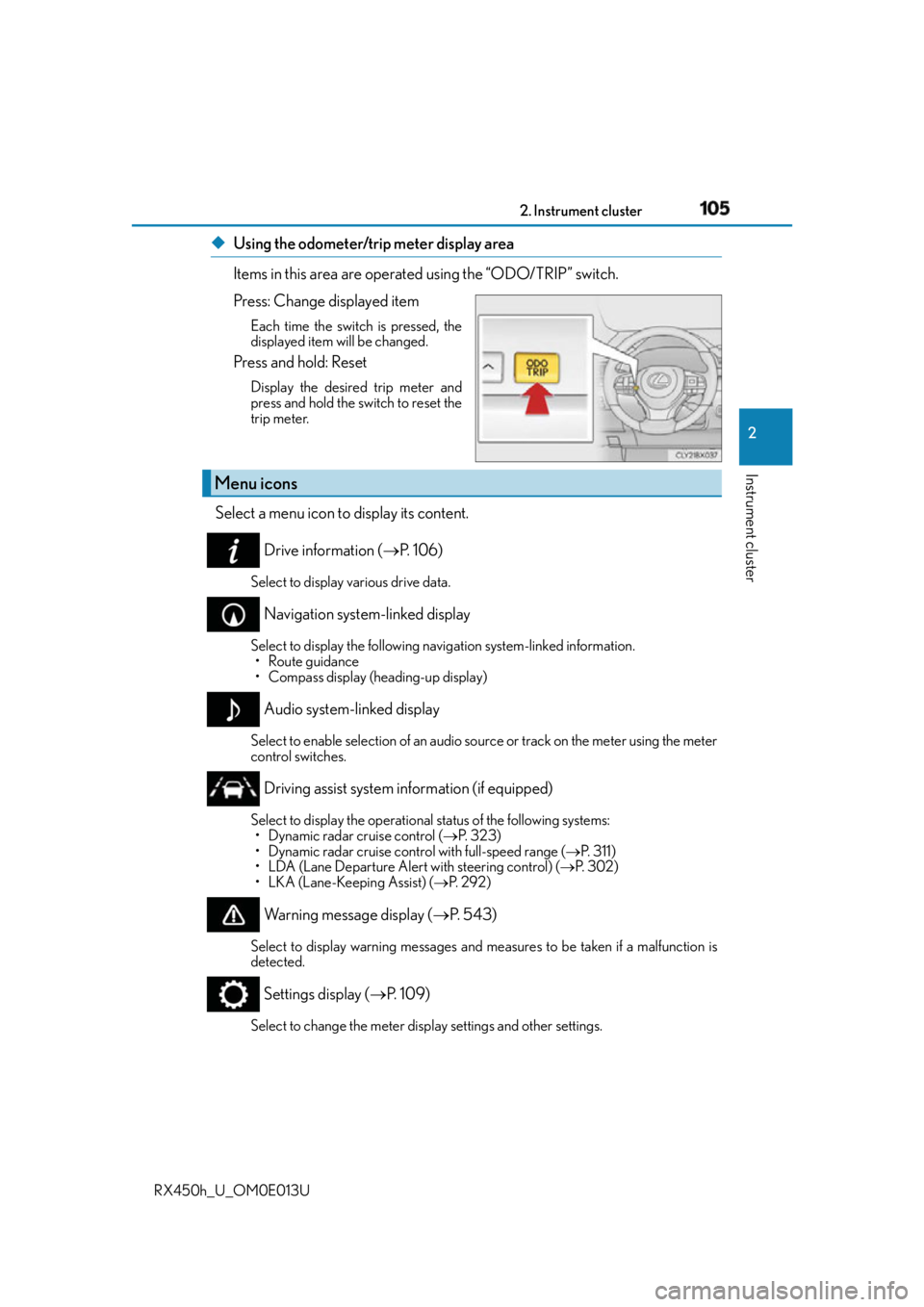
Items in this area are operated using the “ODO/TRIP” switch.
Press: Change displayed item Each time the switch is pressed, the
displayed item will be changed.
Press and hold: Reset Display the desired trip meter and
press and hold the switch to reset the
trip meter.
Select a menu icon to display its content.
Drive information ( P. 1 0 6 )Select to display various drive data.
Navigation system-linked display Select to display the following na vigation system-linked information.
• Route guidance
• Compass display (heading-up display)
Audio system-linked display Select to enable selection of an audio so urce or track on the meter using the meter
control switches.
Driving assist system information (if equipped) Select to display the operational status of the following systems:
• Dynamic radar cruise control ( P. 323)
• Dynamic radar cruise control with full-speed range ( P. 3 1 1 )
• LDA (Lane Departure Alert with steering control) ( P. 3 0 2 )
• LKA (Lane-Keeping Assist) ( P. 2 9 2 )
Warning message display ( P. 5 4 3 )Select to display warning me ssages and measures to be taken if a malfunction is
detected.
Settings display ( P. 1 0 9 )
Select to change the meter display settings and other settings.Menu icons
Page 111 of 660
1112. Instrument cluster
2
Instrument cluster
RX450h_U_OM0E013U ■
HUD (Head-up display) (if equipped) ( P. 118)
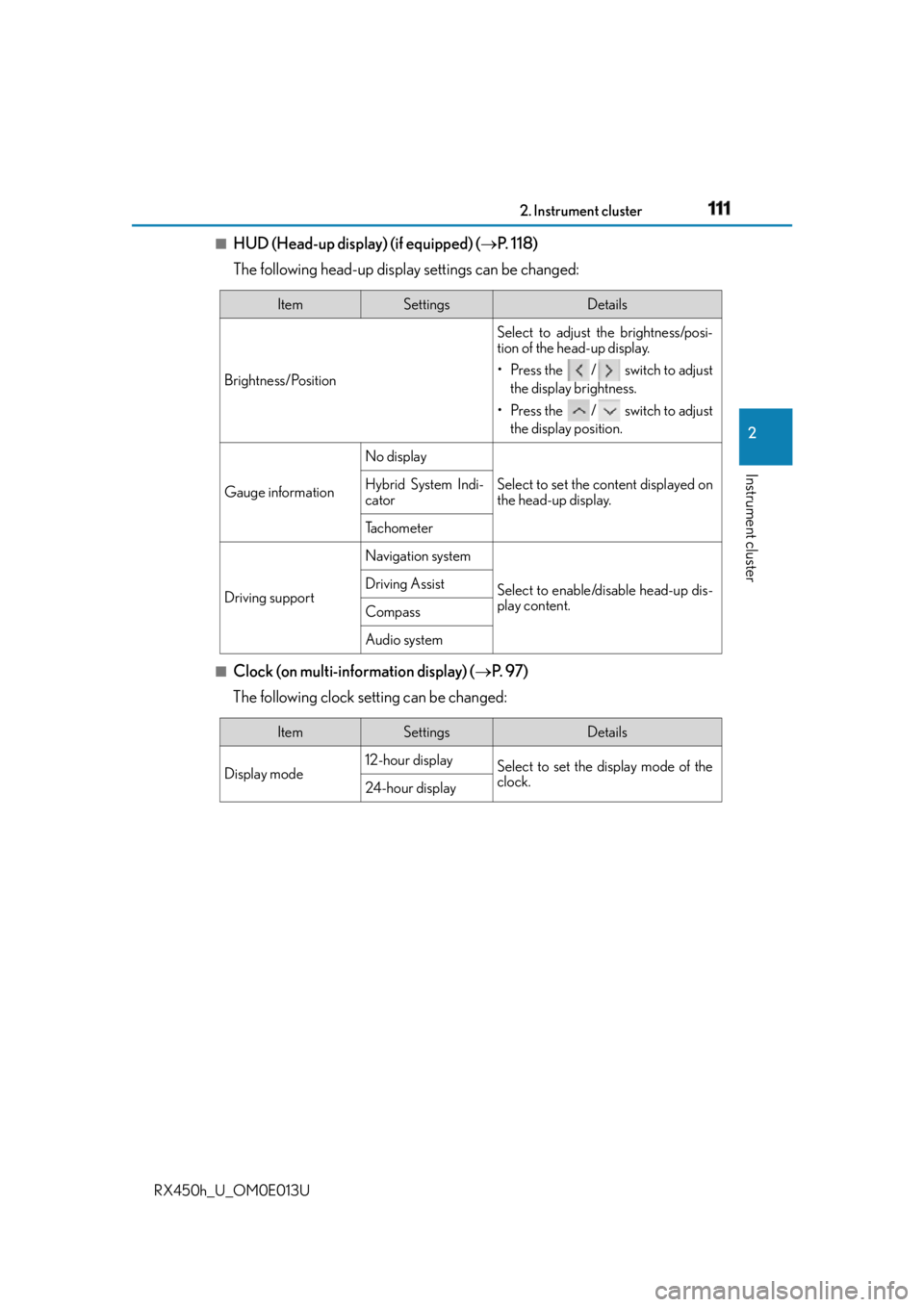
The following head-up display settings can be changed:
■
Clock (on multi-information display) ( P. 9 7 )
The following clock setting can be changed: Item Settings Details
Brightness/Position Select to adjust the brightness/posi-
tion of the head-up display.
• Press the / switch to adjust
the display brightness.
• Press the / switch to adjust
the display position.
Gauge information No display
Select to set the content displayed on
the head-up display.Hybrid System Indi-
cator
Tachometer
Driving support Navigation system
Select to enable/disable head-up dis-
play content.Driving Assist
Compass
Audio system
Item Settings Details
Display mode 12-hour display
Select to set the display mode of the
clock.
24-hour display
Page 118 of 660
118 2. Instrument cluster
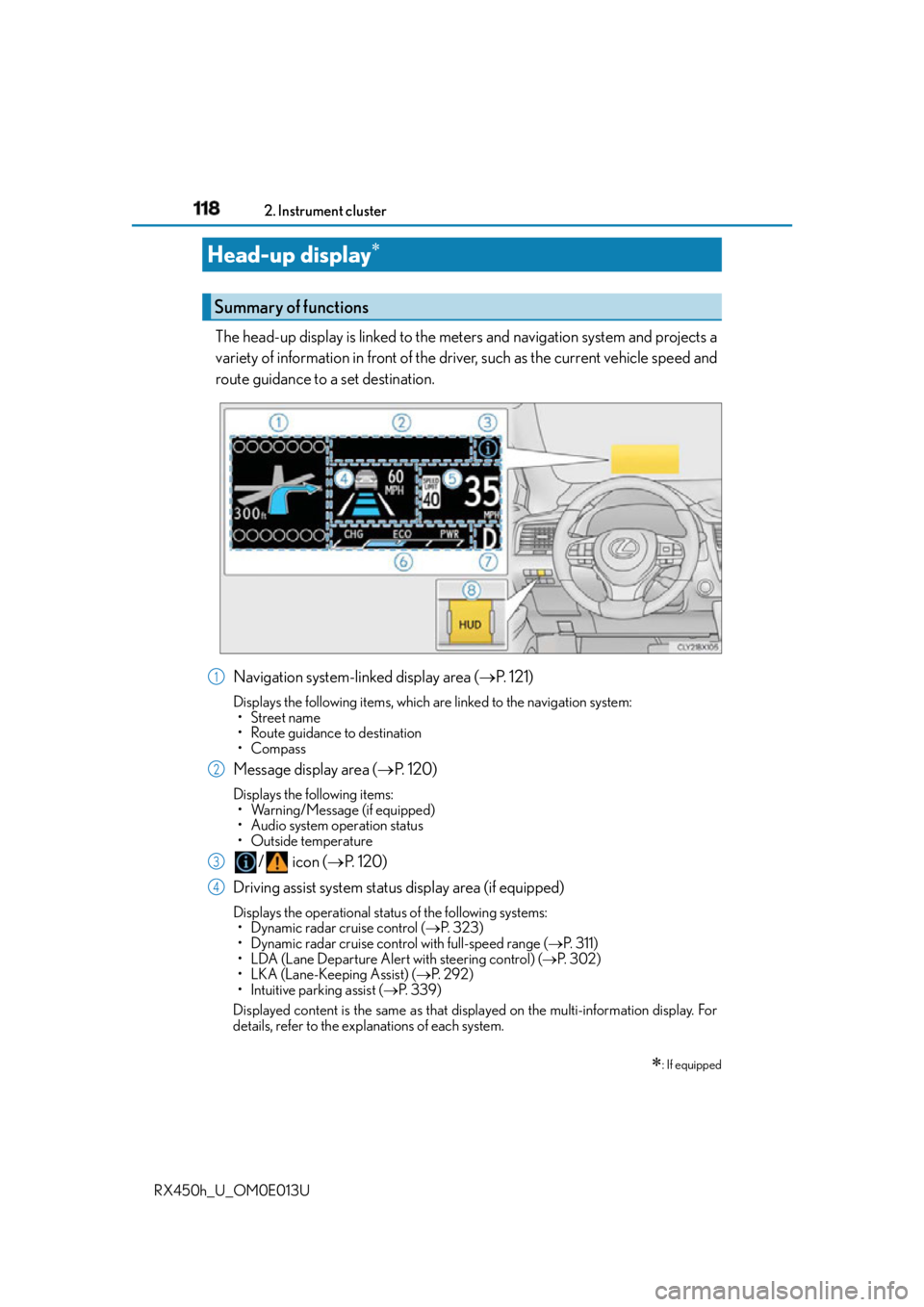
RX450h_U_OM0E013U The head-up display is linked to the meters and navigation system and projects a
variety of information in front of the driver, such as the current vehicle speed and
route guidance to a set destination.
Navigation system-linked display area ( P. 121)Displays the following items, which ar e linked to the navigation system:
• Street name
• Route guidance to destination
•Compass
Message display area ( P. 1 2 0 )Displays the following items:
• Warning/Message (if equipped)
• Audio system operation status
•Outside temperature
/ icon ( P. 1 2 0 )
Driving assist system status display area (if equipped) Displays the operational status of the following systems:
• Dynamic radar cruise control ( P. 323)
• Dynamic radar cruise control with full-speed range ( P. 3 1 1 )
• LDA (Lane Departure Alert with steering control) ( P. 3 0 2 )
• LKA (Lane-Keeping Assist) ( P. 2 9 2 )
• Intuitive parking assist ( P. 3 3 9 )
Displayed content is the same as that disp layed on the multi-information display. For
details, refer to the explanations of each system.Head-up display
: If equippedSummary of functions
1
2
3
4
Page 121 of 660
1212. Instrument cluster
2
Instrument cluster
RX450h_U_OM0E013U Displays the following items which are linked to the navigation system: ■
Street name
The name of the street that the vehicle is currently driving on is displayed on
the bottom of the display area.
When the navigation system is performing route guidance, the name of the
next street will be displayed on the top of the display area. ■
Route guidance to destination
Displayed when the navigation system is performing route guidance. When
approaching an intersection, an arrow will be displayed to indicate the sug-
gested direction of travel. ■
Compass
Displays the direction of travel. ■
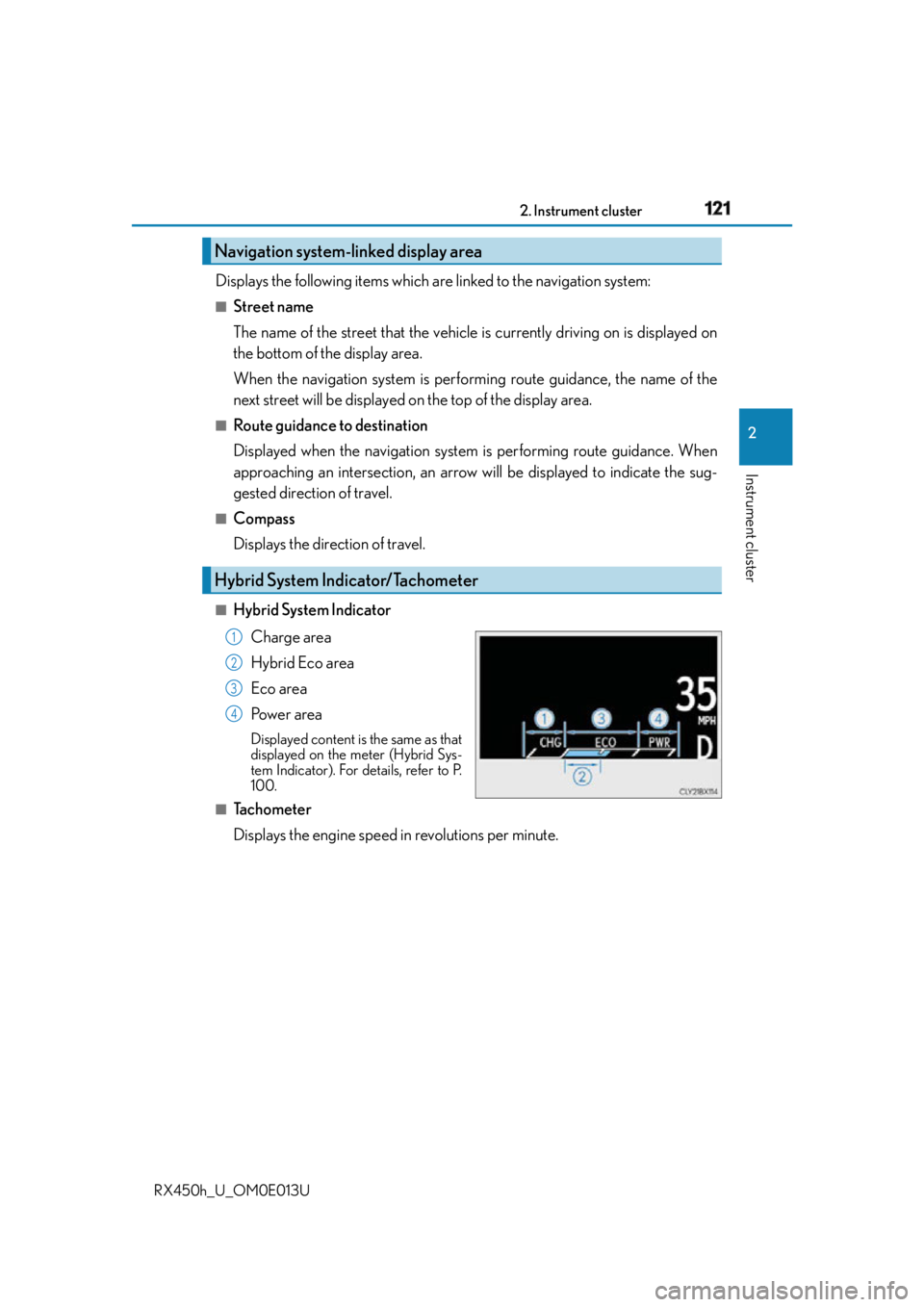
Hybrid System Indicator
Charge area
Hybrid Eco area
Eco area
Po w e r a r e a Displayed content is the same as that
displayed on the meter (Hybrid Sys-
tem Indicator). For details, refer to P.
100.■
Tachometer
Displays the engine speed in revolutions per minute.Navigation system-linked display area
Hybrid System Indicator/Tachometer 1
2
3
4
Page 122 of 660
122 2. Instrument cluster
RX450h_U_OM0E013U ■
Head-up display
The head-up display may seem dark or hard to see when viewed through sunglasses,
especially polarized sunglasses.
Adjust the brightness of the head-up display or remove your sunglasses.■
When the 12-volt battery is disconnected
The customize settings of the head-up display will be reset.■
Display brightness
The brightness of the head-up display can be adjusted on of the multi-information
display. Also, it is automa tically adjusted according to the ambient brightness.■
Enabling/disabling of the head-up display
If the head-up display is disabled, it will rema in disabled when the power switch is turned
off then back to ON mode. ■
Street name display (vehicles with a navigation system)
Only street names which are included in the map data will be displayed.
WA R N I N G ■
Before using the head-up display ●
Check that the position and brightness of the head-up display image does not inter-
fere with safe driving. Incorrect adjustment of the image’s position or brightness may
obstruct the driver’s view and lead to an accident, resulting in death or serious injury. ●
Do not continuously look at the head-up di splay while driving as you may fail to see
pedestrians, objects on the road, etc. ahead of the vehicle. ■
Caution for changing settings of the head-up display
As the hybrid system needs to be operating while changing the settings of the head-up
display, ensure that the vehicle is parked in a place with adequate ventilation. In a
closed area such as a garage, exhaust gases including harmful carbon monoxide (CO)
may collect and enter the vehicle. This may lead to death or a serious health hazard.