power LEXUS RX450H 2016 Owners Manual
[x] Cancel search | Manufacturer: LEXUS, Model Year: 2016, Model line: RX450H, Model: LEXUS RX450H 2016Pages: 660, PDF Size: 14.85 MB
Page 235 of 660
2354-2. Driving procedures
4
Driving
RX450h_U_OM0E013U
■Steering lock
After turning the power switch off and opening and closing the doors, the steering wheel
will be locked due to the steering lock func tion. Operating the power switch again auto-
matically cancels the steering lock.
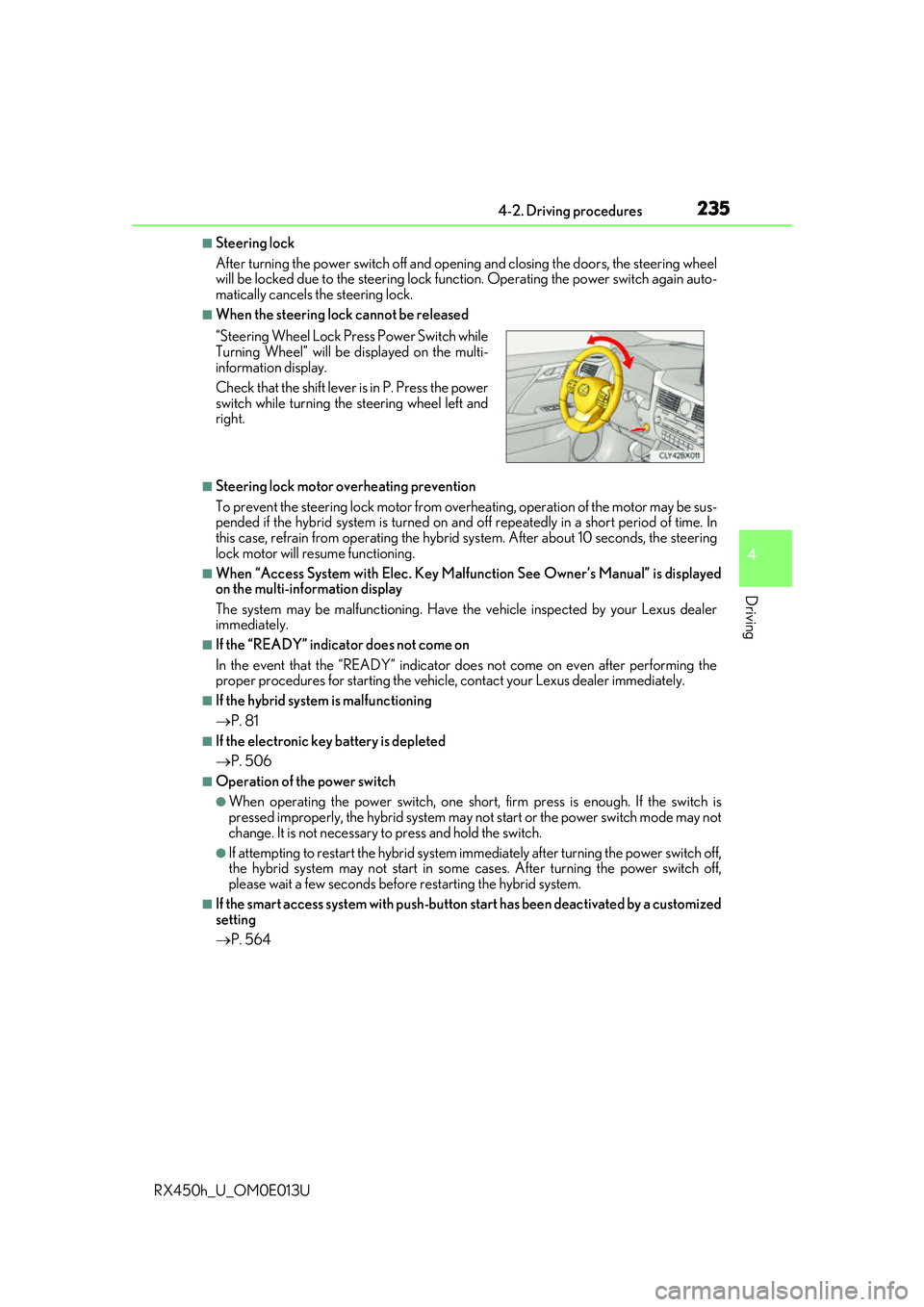
■When the steering lock cannot be released
■Steering lock motor overheating prevention
To prevent the steering lock motor from overheating, operation of the motor may be sus-
pended if the hybrid system is turned on an d off repeatedly in a short period of time. In
this case, refrain from operating the hybrid system. Afte r about 10 seconds, the steering
lock motor will resume functioning.
■When “Access System with Elec. Key Malf unction See Owner’s Manual” is displayed
on the multi-information display
The system may be malfunctio ning. Have the vehicle inspected by your Lexus dealer
immediately.
■If the “READY” indicator does not come on
In the event that the “READY” indicator does not come on even after performing the
proper procedures for starting the vehicl e, contact your Lexus dealer immediately.
■If the hybrid system is malfunctioning
P. 81
■If the electronic key battery is depleted
P. 506
■Operation of the power switch
●When operating the power switch, one short, firm press is enough. If the switch is
pressed improperly, the hybrid system may no t start or the power switch mode may not
change. It is not necessary to press and hold the switch.
●If attempting to restart the hybrid system immediately after turning the power switch off,
the hybrid system may not start in some cases. After turning the power switch off,
please wait a few seco nds before restarting the hybrid system.
■If the smart access system wi th push-button start has been deactivated by a customized
setting
P. 564
“Steering Wheel Lock Pr
ess Power Switch while
Turning Wheel” will be displayed on the multi-
information display.
Check that the shift lever is in P. Press the power
switch while turning the steering wheel left and
right.
Page 236 of 660
2364-2. Driving procedures
RX450h_U_OM0E013U
WARNING
■When starting the hybrid system
Always start the hybrid system while sittin g in the driver’s seat. Do not depress the
accelerator pedal while starting the hybrid system under any circumstances.
Doing so may cause an accident resulting in death or serious injury.
■Caution while driving
If hybrid system failure occurs while the ve hicle is moving, do not lock or open the
doors until the vehicle reaches a safe and complete stop. Activation of the steering lock
in this circumstance may lead to an accident, resulting in death or serious injury.
■Stopping the hybrid system in an emergency
If you want to stop the hybrid system in an emergency while driving the vehicle, press
and hold the power switch for more than 2 se conds, or press it briefly 3 times or more
in succession. ( P. 529)
However, do not touch the power switch while driving except in an emergency. Turning
the hybrid system off while driving will not cause loss of steering or braking control,
however, power assist to the steering will be lost. This will make it more difficult to steer
smoothly, so you should pull over and stop the vehicle as soon as it is safe to do so.
NOTICE
■To prevent 12-volt battery discharge
●Do not leave the power swit ch in ACCESSORY or ON mode for long periods of
time without the hybrid system on.
●If “ACCESSORY” or “IGNITION ON” is di splayed on the meters while the hybrid
system is not operating, the power switch is not off. Exit the vehicle after turning the
power switch off.
●Do not stop the hybrid system when the shift lever is in a position other than P. If the
hybrid system is stopped in another shift lever position , the power switch will not be
turned off but instead be turned to ACCESSORY mode. If the vehicle is left in
ACCESSORY mode, 12-volt ba ttery discharge may occur.
■When starting the hybrid system
If the hybrid system becomes difficult to start, have your vehicle checked by your Lexus
dealer immediately.
■Symptoms indicating a malfunction with the power switch
If the power switch seems to be operating somewhat differen tly than usual, such as the
switch sticking slightly, there may be a malfunction. Contact your Lexus dealer immedi-
ately.
Page 237 of 660
2374-2. Driving procedures
4
Driving
RX450h_U_OM0E013U
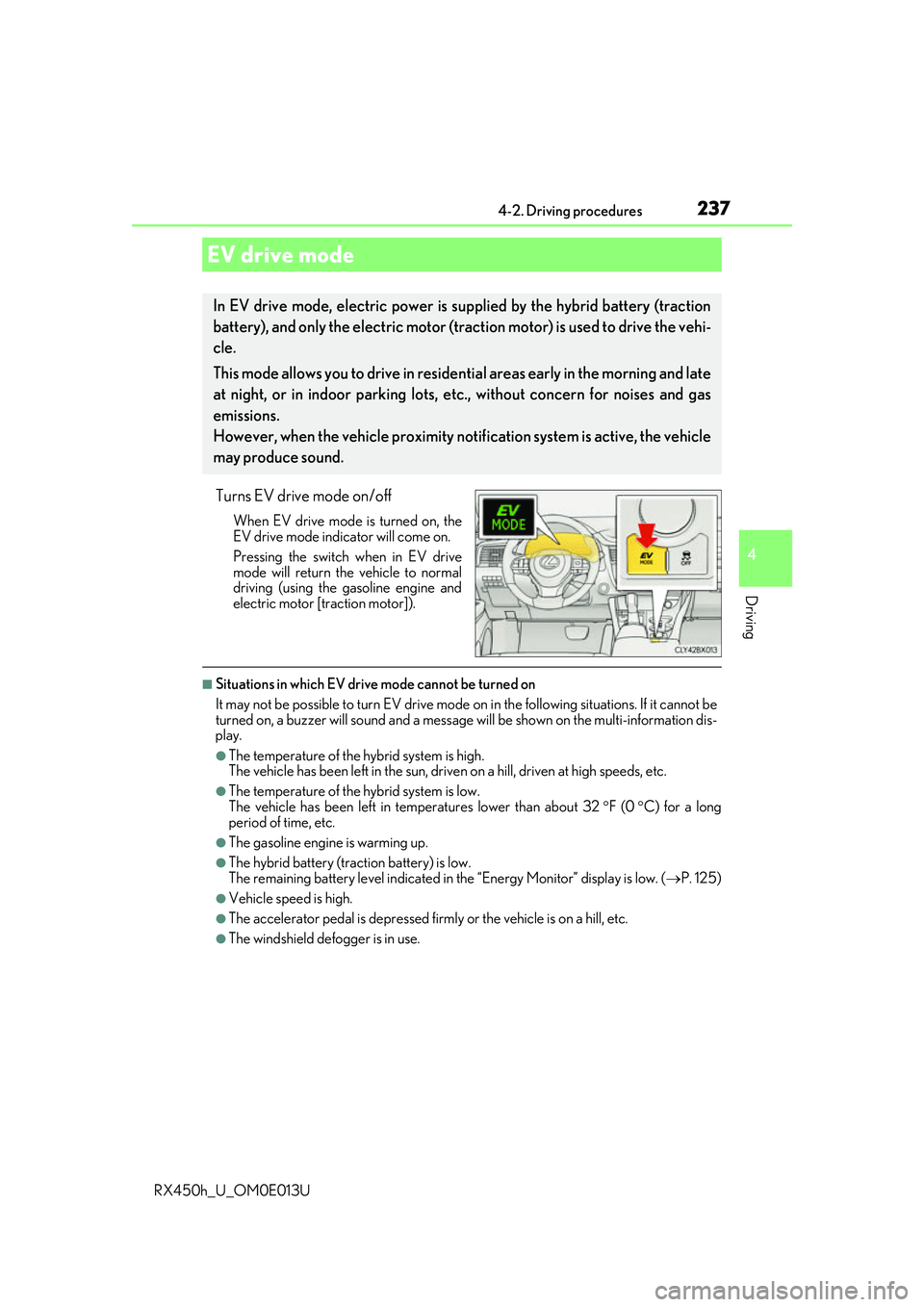
Turns EV drive mode on/off
When EV drive mode is turned on, the
EV drive mode indicator will come on.
Pressing the switch when in EV drive
mode will return the vehicle to normal
driving (using the gasoline engine and
electric motor [traction motor]).
■Situations in which EV drive mode cannot be turned on
It may not be possible to turn EV drive mode on in the following situations. If it cannot be
turned on, a buzzer will sound and a message will be shown on the multi-information dis-
play.
●The temperature of the hybrid system is high.
The vehicle has been left in the sun, driv en on a hill, driven at high speeds, etc.
●The temperature of the hybrid system is low.
The vehicle has been left in temperatures lower than about 32 F (0 C) for a long
period of time, etc.
●The gasoline engine is warming up.
●The hybrid battery (tra ction battery) is low.
The remaining battery level indicated in the “Energy Monitor” display is low. (P. 125)
●Vehicle speed is high.
●The accelerator pedal is depressed firmly or the vehicle is on a hill, etc.
●The windshield defogger is in use.
EV drive mode
In EV drive mode, electric power is su pplied by the hybrid battery (traction
battery), and only the electric motor (traction motor) is used to drive the vehi-
cle.
This mode allows you to drive in reside ntial areas early in the morning and late
at night, or in indoor parking lots, etc., without concern for noises and gas
emissions.
However, when the vehicle proximity noti fication system is active, the vehicle
may produce sound.
Page 239 of 660
2394-2. Driving procedures
4
Driving
RX450h_U_OM0E013U
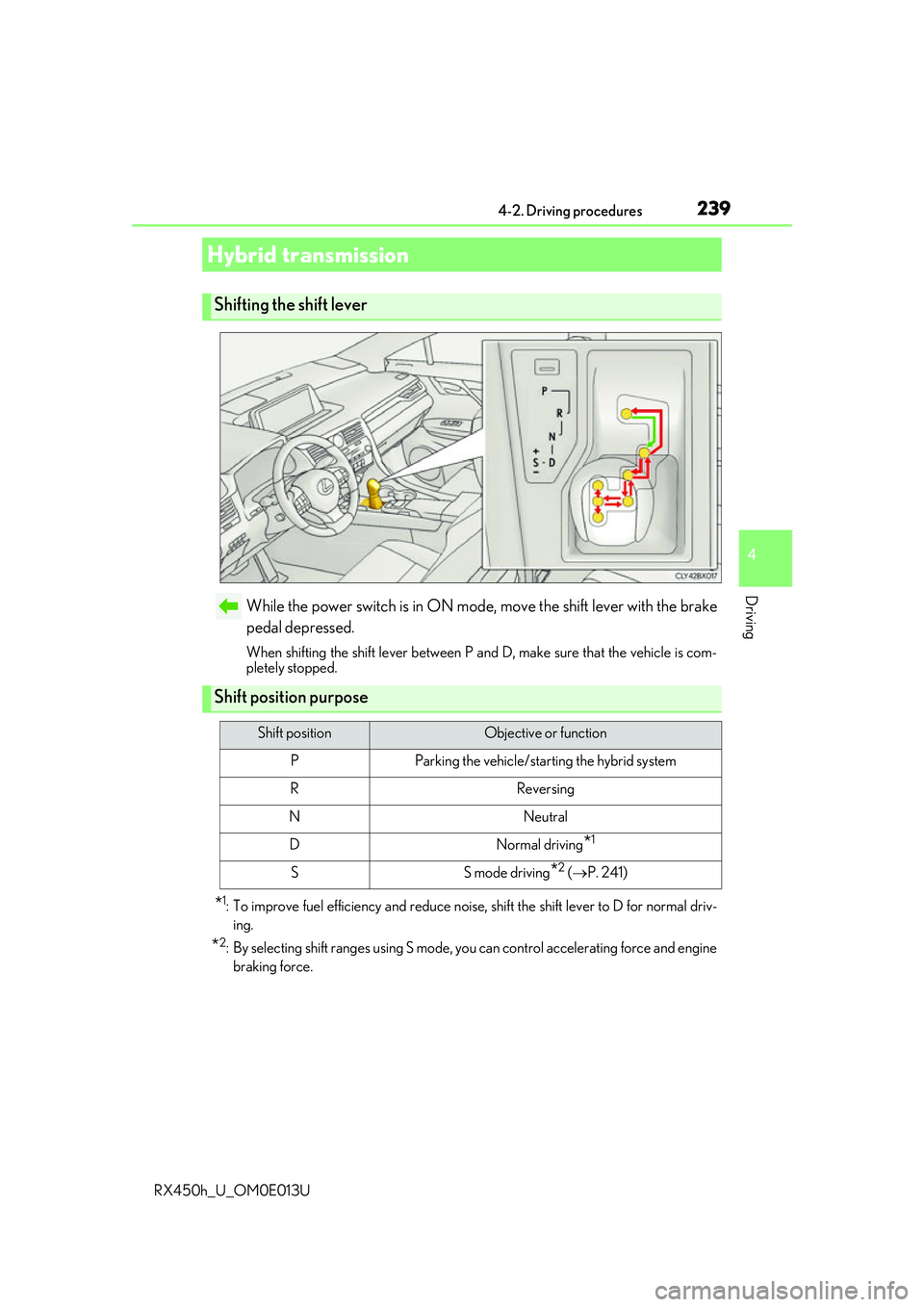
While the power switch is in ON mode, move the shift lever with the brake
pedal depressed.
When shifting the shift lever between P and D, make sure that the vehicle is com-
pletely stopped.
*1: To improve fuel efficiency and reduce noise, shift the shift lever to D for normal driv-
ing.
*2: By selecting shift ra nges using S mode, you can control accelerating force and engine
braking force.
Hybrid transmission
Shifting the shift lever
Shift position purpose
Shift positionObjective or function
PParking the vehicle/starting the hybrid system
RReversing
NNeutral
DNormal driving*1
SS mode driving*2 ( P. 241)
Page 244 of 660
2444-2. Driving procedures
RX450h_U_OM0E013U
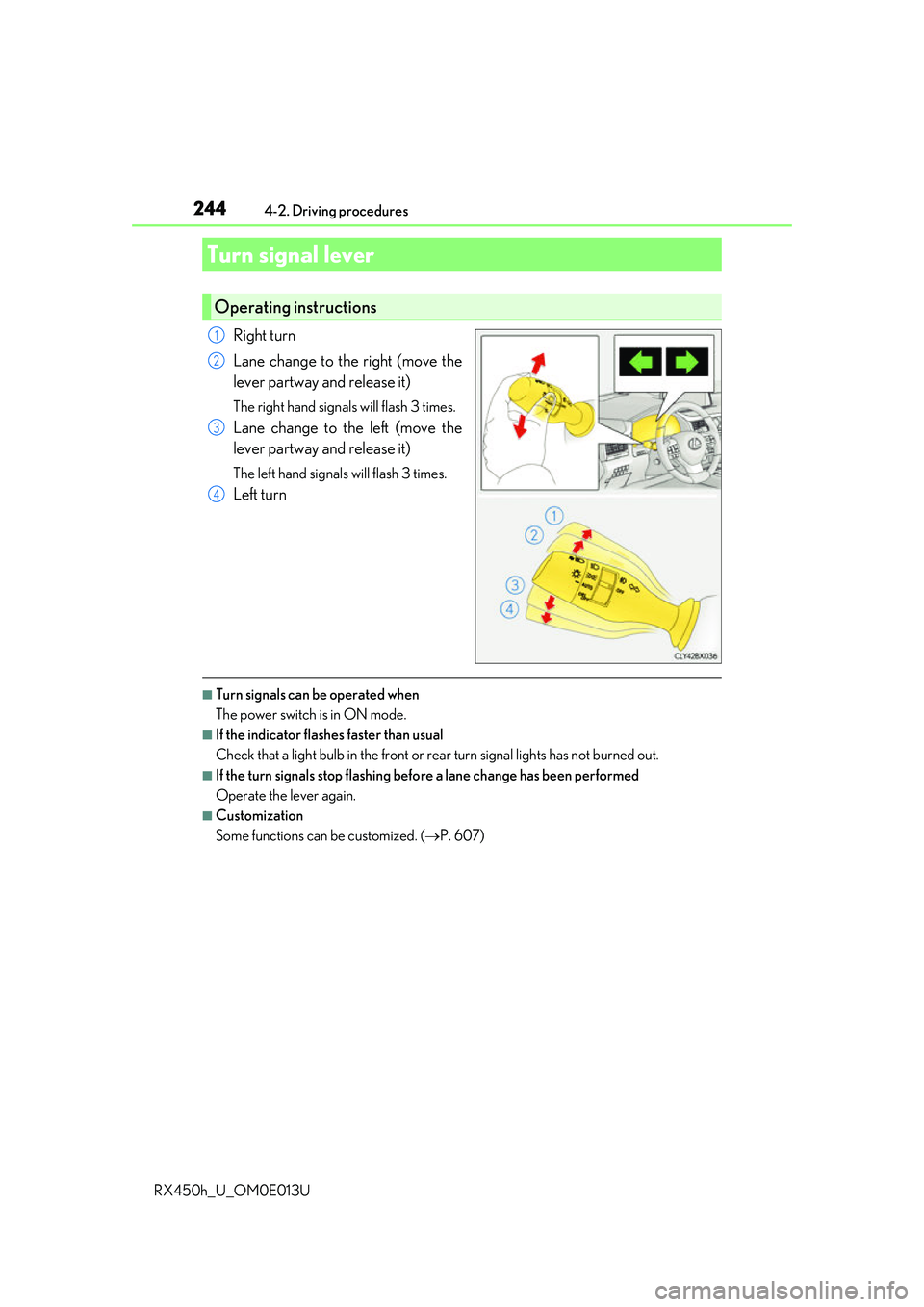
Right turn
Lane change to the right (move the
lever partway and release it)
The right hand signals will flash 3 times.
Lane change to the left (move the
lever partway and release it)
The left hand signals will flash 3 times.
Left turn
■Turn signals can be operated when
The power switch is in ON mode.
■If the indicator flashes faster than usual
Check that a light bulb in the front or rear turn signal lights has not burned out.
■If the turn signals stop flashing befo re a lane change has been performed
Operate the lever again.
■Customization
Some functions can be customized. ( P. 607)
Turn signal lever
Operating instructions
1
2
3
4
Page 246 of 660
2464-2. Driving procedures
RX450h_U_OM0E013U
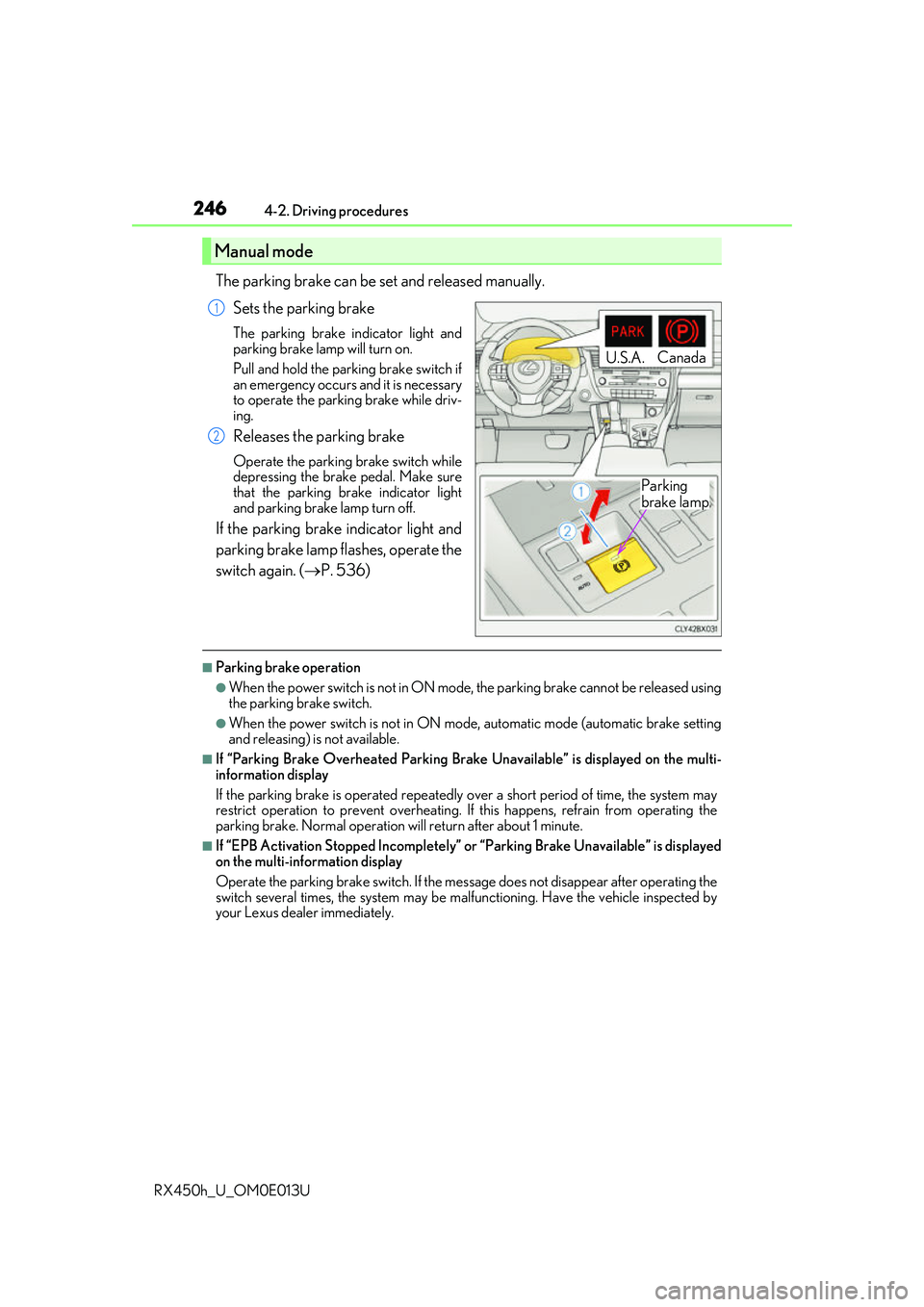
The parking brake can be set and released manually. Sets the parking brake
The parking brake indicator light and
parking brake lamp will turn on.
Pull and hold the parking brake switch if
an emergency occurs and it is necessary
to operate the parking brake while driv-
ing.
Releases the parking brake
Operate the parking brake switch while
depressing the brake pedal. Make sure
that the parking brake indicator light
and parking brake lamp turn off.
If the parking brake indicator light and
parking brake lamp flashes, operate the
switch again. ( P. 536)
■Parking brake operation
●When the power switch is not in ON mode, the parking brake cannot be released using
the parking brake switch.
●When the power switch is not in ON mode , automatic mode (automatic brake setting
and releasing) is not available.
■If “Parking Brake Overheated Parking Brak e Unavailable” is displayed on the multi-
information display
If the parking brake is operated repeatedly over a short period of time, the system may
restrict operation to prevent overheating. If this happens, refrain from operating the
parking brake. Normal operation wi ll return after about 1 minute.
■If “EPB Activation Stopped Incompletely” or “Parking Brake Unavailable” is displayed
on the multi-information display
Operate the parking brake switch. If the message does not disappear after operating the
switch several times, the system may be ma lfunctioning. Have the vehicle inspected by
your Lexus dealer immediately.
Manual mode
U.S.A. Canada
Parking
brake lamp
1
2
Page 247 of 660
2474-2. Driving procedures
4
Driving
RX450h_U_OM0E013U
■Parking brake operation sound
When the parking brake operates, a motor sound (whirring sound) may be heard. This
does not indicate a malfunction.
■Parking brake indicator light and parking brake lamp
●Depending on the power switch mode, the parking brake indicator light and parking
brake lamp will turn on and stay on as described below:
ON mode: Comes on until the parking brake is released.
Not in ON mode: Stays on fo r approximately 15 seconds.
●When the power switch is turned off with th e parking brake set, the parking brake indi-
cator light and parking brake la mp will stay on for about 15 seconds. This does not indi-
cate a malfunction.
■Changing the mode
When changing the automatic mode on/off , the message will be shown on the multi-
information display and the buzzer sounds.
■Parking brake engaged warning buzzer
A buzzer will sound if the vehicle is driv en with the parking brake engaged. “Release
Parking Brake” is displayed on the multi-information display.
■Warning messages and buzzers
Warning messages and buzzers are used to indicate a system malfunction or to inform
the driver of the need for caution. If a warn ing message is shown on the multi-information
display, read the message and follow the instructions.
■If the brake system warning light comes on
P. 536
■Usage in winter time
P. 391
Page 250 of 660
2504-2. Driving procedures
RX450h_U_OM0E013U
■When the parking brake is set automatically while the system is holding the brakes
The parking brake will not be released auto matically. With the brake pedal depressed,
release the parking brake by operating the pa rking brake switch, making sure that the
parking brake indicator light goes off. ( P. 245)
■If “Brake Hold Fault Depress Brake to Deacti vate Visit Your Dealer” is displayed on the
multi-information display
The system may be malfunctio ning. Have the vehicle inspected by your Lexus dealer
immediately.
■Warning messages and buzzers
Warning messages and buzzers are used to indicate a system malfunction or to inform
the driver of the need for caution. If a warn ing message is shown on the multi-information
display, read the message and follow the instructions.
■If the brake hold operated indicator flashes
P. 536
WARNING
■When the vehicle is on a steep incline
When using the brake hold system on a steep incline exercise caution. The brake hold
function may not hold the vehicle in such a situation.
■When stopped on a slippery road
The system cannot stop the vehicle when the gripping ability of the tires has been
exceeded. Do not use the system when stopped on a slippery road.
NOTICE
■When parking the vehicle
The brake hold system is not designed for use when parking the vehicle for a long
period of time. Turning the power switch off while the system is holding the brake may
release the brake, which would cause the vehicle to move. When operating the power
switch, depress the brake pedal, shift the shift lever to P and set the parking brake.
Page 251 of 660
251
4
Driving
RX450h_U_OM0E013U4-3. Operating the lights and wipers
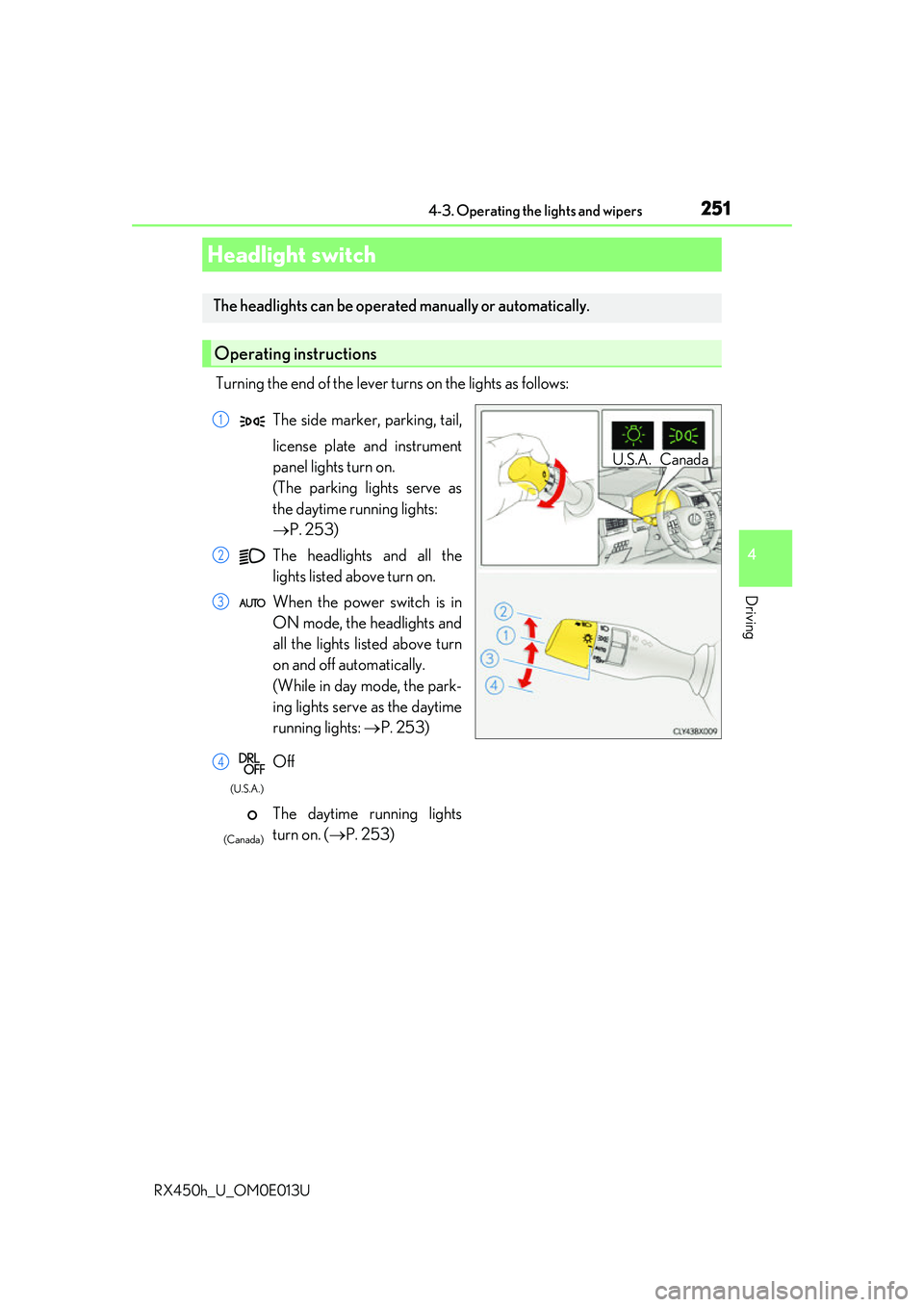
Turning the end of the lever turns on the lights as follows:
Headlight switch
The headlights can be operated
manually or automatically.
Operating instructions
U.S.A. Canada
The side marker, parking, tail,
license plate and instrument
panel lights turn on.
(The parking lights serve as
the daytime running lights:
P. 253)
The headlights and all the
lights listed above turn on.
When the power switch is in
ON mode, the headlights and
all the lights listed above turn
on and off automatically.
(While in day mode, the park-
ing lights serve as the daytime
running lights: P. 253)
Off
The daytime running lights
turn on. ( P. 253)1
2
3
4
(U.S.A.)
(Canada)
Page 253 of 660
2534-3. Operating the lights and wipers
4
Driving
RX450h_U_OM0E013U
■Daytime running light system
●To make your vehicle more visible to other drivers during daytime driving, the daytime
running lights turn on automatically whenever the hybrid system is started and the park-
ing brake is released with the headlight switch in (Canada only) or posi-
tion. (Illuminate brighter than the park ing lights.) Daytime running lights are not
designed for use at night.
For the U.S.A.: Daytime running lights can be turned off by operating the headlight
switch to position.
●Compared to turning on the headlights, the daytime running light system offers greater
durability and consumes less electricity, so it can help improve fuel economy.
■Cornering lights (if equipped)
When the cornering lights are on for more than 30 minutes, they will turn off automati-
cally.
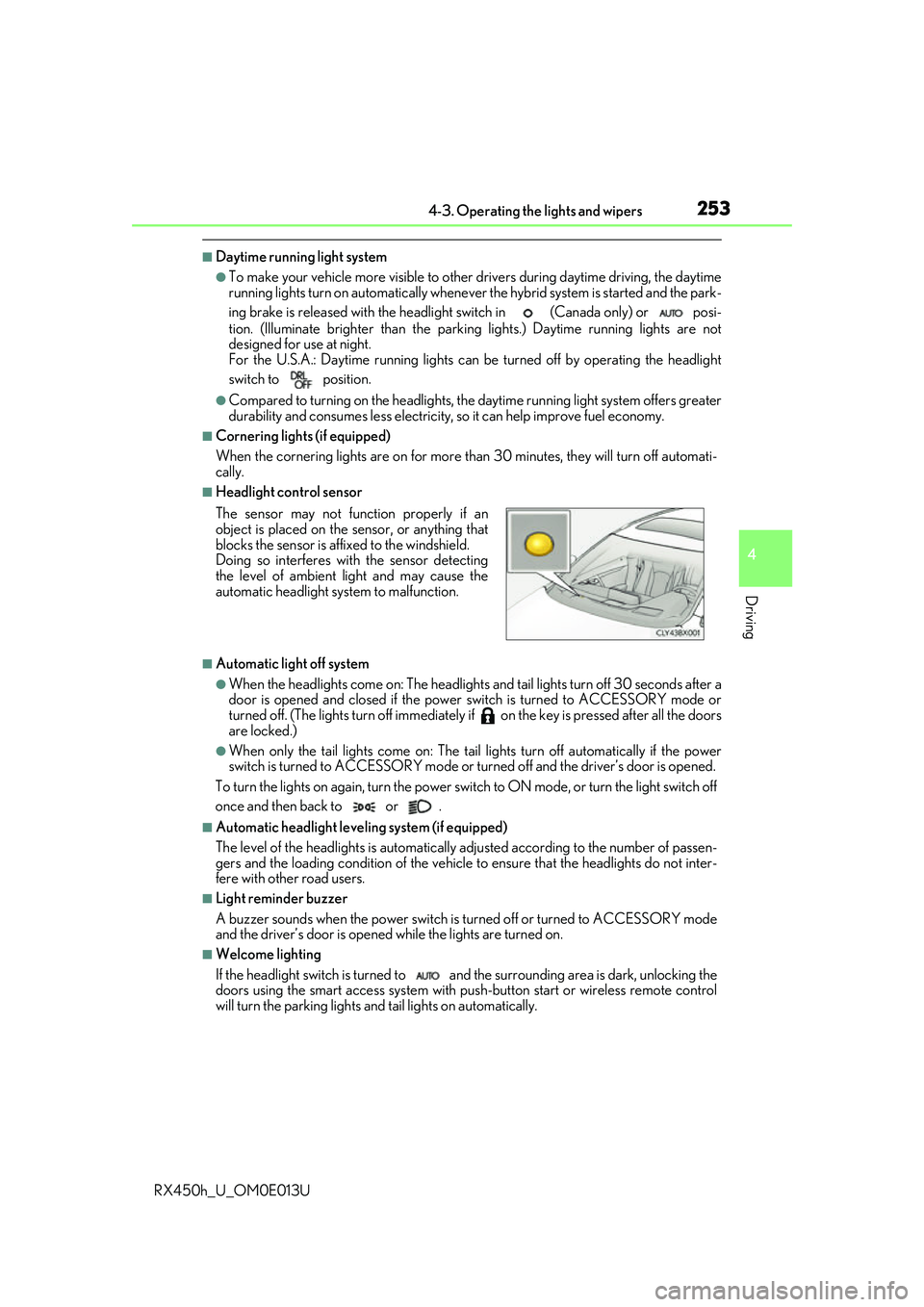
■Headlight control sensor
■Automatic light off system
●When the headlights come on: The headlights and tail lights turn off 30 seconds after a
door is opened and closed if the power switch is turned to ACCESSORY mode or
turned off. (The lights turn off immediately if on the key is pre ssed after all the doors
are locked.)
●When only the tail lights come on: The tail lights turn off automatically if the power
switch is turned to ACCESSORY mode or tu rned off and the driver’s door is opened.
To turn the lights on again, turn the power switch to ON mode, or turn the light switch off
once and then back to or .
■Automatic headlight leve ling system (if equipped)
The level of the headlights is automatically adjusted accordi ng to the number of passen-
gers and the loading condition of the vehicle to ensure that the headlights do not inter-
fere with other road users.
■Light reminder buzzer
A buzzer sounds when the power switch is turned off or turned to ACCESSORY mode
and the driver’s door is opened while the lights are turned on.
■Welcome lighting
If the headlight switch is turned to and the surrounding area is dark, unlocking the
doors using the smart access system with pu sh-button start or wireless remote control
will turn the parking lights and tail lights on automatically. The sensor may not function properly if an
object is placed on the sensor, or anything that
blocks the sensor is affixed to the windshield.
Doing so interferes with the sensor detecting
the level of ambient light and may cause the
automatic headlight system to malfunction.