power LEXUS RX450H 2016 Owners Manual
[x] Cancel search | Manufacturer: LEXUS, Model Year: 2016, Model line: RX450H, Model: LEXUS RX450H 2016Pages: 660, PDF Size: 14.85 MB
Page 254 of 660
2544-3. Operating the lights and wipers
RX450h_U_OM0E013U
■Windshield wiper linked headlight illumination
When driving during daytime with the headlight switch turned to , if the windshield
wipers are used, the headlights will turn on automatically after several seconds to help
enhance the visibility of your vehicle.
■12-volt battery-saving function
In order to prevent the 12-volt battery of the vehicle from discharging, if the headlights
and/or tail lights are on when the power switch is turned off the 12-volt battery saving
function will operate and automatically turn off all the lights after approximately 20 min-
utes. When the power switch is turned to ON mode, the 12-volt battery-saving function
will be disabled.
When any of the following are performed, the 12-volt battery-saving function is canceled
once and then reactivated. A ll the lights will turn off automatically 20 minutes after the
12-volt battery-saving function has been reactivated:
●When the headlight switch is operated
●When a door is opened or closed
■Customization
Some functions can be customized. ( P. 607)
NOTICE
■To prevent 12-volt battery discharge
Do not leave the lights on longer than necessary when the hybrid system is off.
Page 258 of 660
2584-3. Operating the lights and wipers
RX450h_U_OM0E013U
●In the following situations the system may not be able to correctly detect the surround-
ing brightness level. This may cause the lo w beams to remain on or the high beams to
flash or dazzle pedestrians or vehicles ahead. In such a case, it is necessary to manually
switch between the high and low beams.
• When driving in inclement weather (heavy rain, snow, fog, sandstorms, etc.)
• When the windshield is obscured by fog, mist, ice, dirt, etc.
• When the windshield is cracked or damaged
• When the camera sensor is deformed or dirty
• When the temperature of the camera sensor is extremely high
• When the surrounding brightness level is equal to that of headlights, tail lights or fog
lights
• When headlights or tail lights of vehicles ahead are turned off, dirty, changing color,
or not aimed properly
• When the vehicle is hit by water, snow, dust, etc. from a preceding vehicle
• When driving through an area of intermittently changing brightness and darkness
• When frequently and repeated ly driving ascending/descending roads, or roads with
rough, bumpy or uneven surfaces (such as stone-paved roads, gravel roads, etc.)
• When frequently and repeatedly taking curves or driving on a winding road
• When there is a highly reflective object ahea d of the vehicle, such as a sign or mirror
• When the back of a preceding vehicle is highly reflective, such as a container on a truck
• When the vehicle’s headlights are damaged or dirty, or are not aimed properly
• When the vehicle is listing or titling due to a flat tire, a trailer being towed, etc.
• When the headlights are changed between the high beams and low beams repeat-
edly in an abnormal manner
• When the driver believes that the high beams may be flashing or dazzling pedestri- ans or other drivers
■Temporarily lowering sensor sensitivity
The sensitivity of the sensor can be temporarily lowered.
Turn the power switch off while the following conditions are met.
• The headlight switch is in or .
• The headlight switch lever is in high beam position.
• Automatic High Beam switch is on.
Turn the power switch to ON mode.
Within 30 seconds after , repeat pulling th e headlight switch lever to the original
position then pushing it to the high beam position quickly 10 times, then leave the lever
in high beam position.
If the sensitivity is changed, the Automatic High Beam indicator is turn on and off 3
times.
Automatic High Beam (head lights) may turn on even the vehicle is stopped.
1
2
32
4
Page 261 of 660
2614-3. Operating the lights and wipers
4
Driving
RX450h_U_OM0E013U
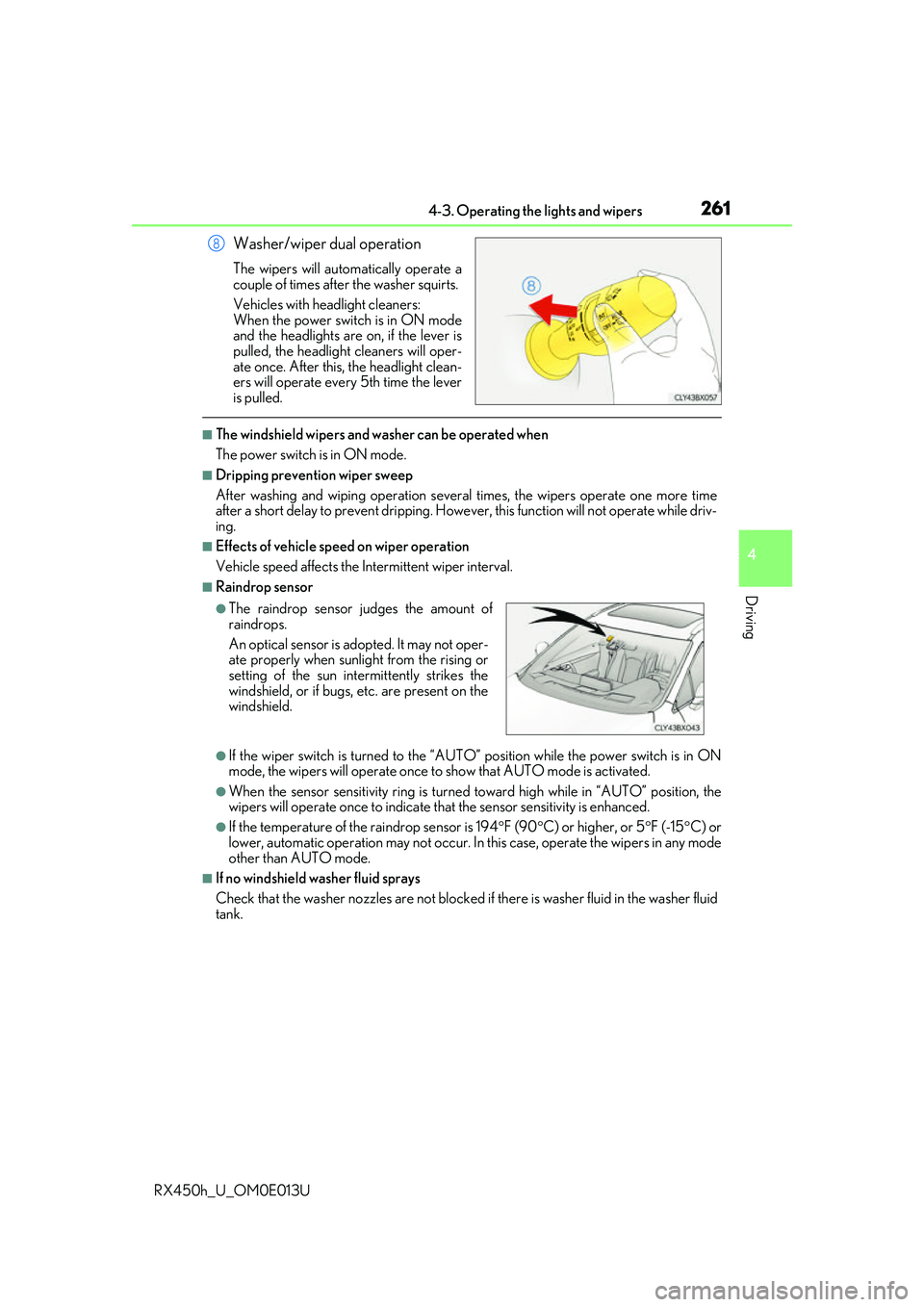
Washer/wiper dual operation
The wipers will automatically operate a
couple of times after the washer squirts.
Vehicles with headlight cleaners:
When the power switch is in ON mode
and the headlights are on, if the lever is
pulled, the headlight cleaners will oper-
ate once. After this, the headlight clean-
ers will operate every 5th time the lever
is pulled.
■The windshield wipers and washer can be operated when
The power switch is in ON mode.
■Dripping prevention wiper sweep
After washing and wiping operation several times, the wipers operate one more time
after a short delay to prevent dripping. However, this function will not operate while driv-
ing.
■Effects of vehicle speed on wiper operation
Vehicle speed affects the Intermittent wiper interval.
■Raindrop sensor
●If the wiper switch is turned to the “AUTO” position while the power switch is in ON
mode, the wipers will operate once to show that AUTO mode is activated.
●When the sensor sensitivity ring is turned toward high while in “AUTO” position, the
wipers will operate once to indicate that the sensor sensitivity is enhanced.
●If the temperature of the raindrop sensor is 194 F (90 C) or higher, or 5 F (-15 C) or
lower, automatic operation may not occur. In this case, operate the wipers in any mode
other than AUTO mode.
■If no windshield washer fluid sprays
Check that the washer nozzles ar e not blocked if there is washer fluid in the washer fluid
tank.
8
●The raindrop sensor judges the amount of
raindrops.
An optical sensor is ad opted. It may not oper-
ate properly when sunlight from the rising or
setting of the sun inte rmittently strikes the
windshield, or if bugs, etc. are present on the
windshield.
Page 263 of 660
2634-3. Operating the lights and wipers
4
Driving
RX450h_U_OM0E013U
When the windshield wipers are not being used, they retract to below the hood.
To enable the windshield wi pers to be lifted when parking in cold conditions or
when replacing a windshield wiper insert, change the rest position of the wind-
shield wipers to the service position using the wiper lever.
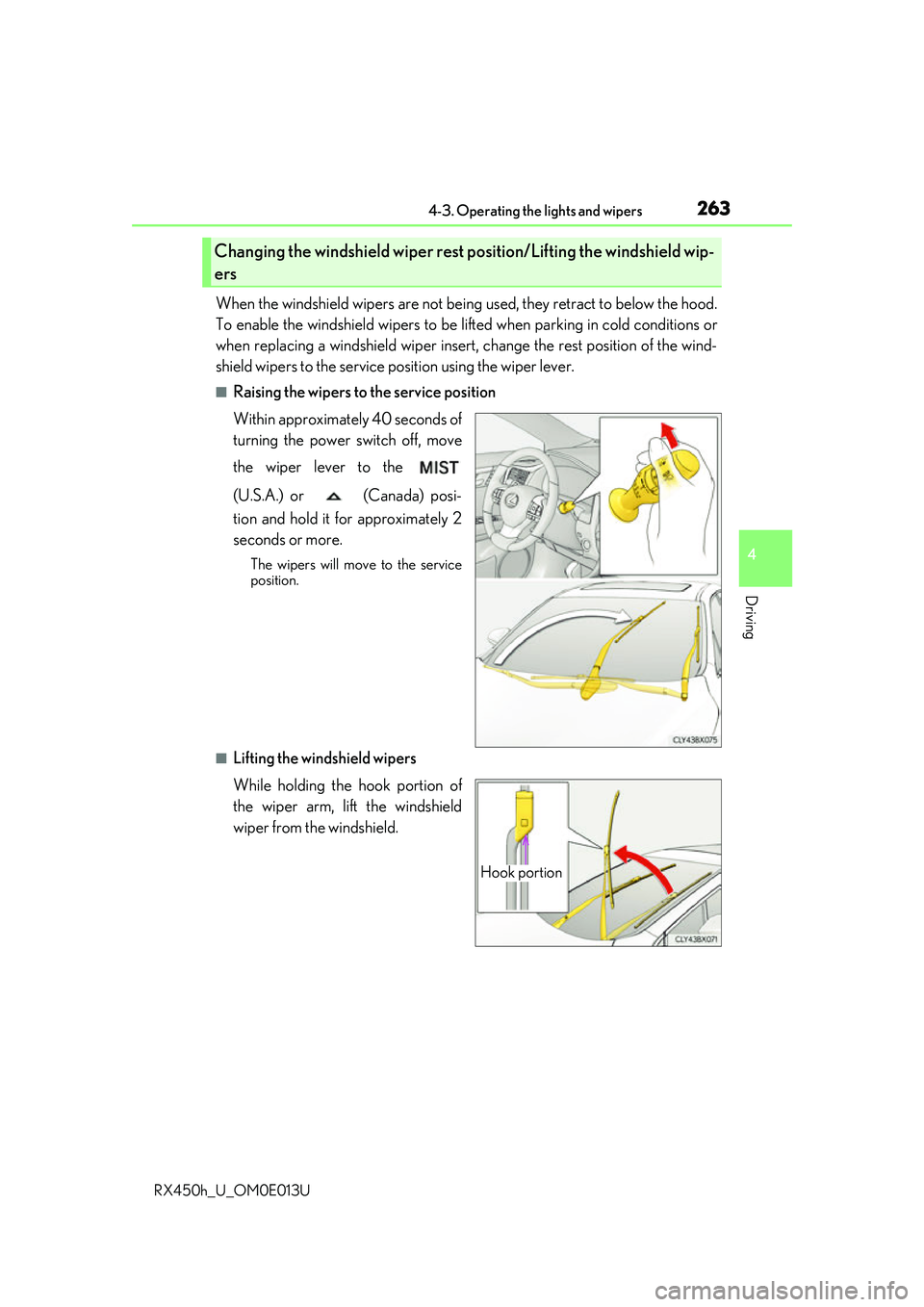
■Raising the wipers to the service position
Within approximately 40 seconds of
turning the power switch off, move
the wiper lever to the
(U.S.A.) or (Canada) posi-
tion and hold it for approximately 2
seconds or more.
The wipers will move to the service
position.
■Lifting the windshield wipers
While holding the hook portion of
the wiper arm, lift the windshield
wiper from the windshield.
Changing the windshield wiper rest position/Lifting the windshield wip-
ers
Hook portion
Page 264 of 660
2644-3. Operating the lights and wipers
RX450h_U_OM0E013U
■Lowering the windshield wipers to the retracted position
With the windshield wipers placed on the wi ndshield, turn the power switch to ON mode
and then move the wiper lever to an operatin g position. When the wiper switch is turned
off, the windshield wipers will stop at the retracted position.
NOTICE
■When lifting the windshield wipers
●Do not lift the windshield wipers when they are in the retracted position below the
hood. Otherwise, they may contact the hood, possibly resulting in damage to a wind-
shield wiper and/or the hood.
●Do not operate the wiper lever when the windshield wipers are lifted. Otherwise, the
windshield wipers may contact the hood, possibly resulting in damage to the wind- shield wipers and/or hood.
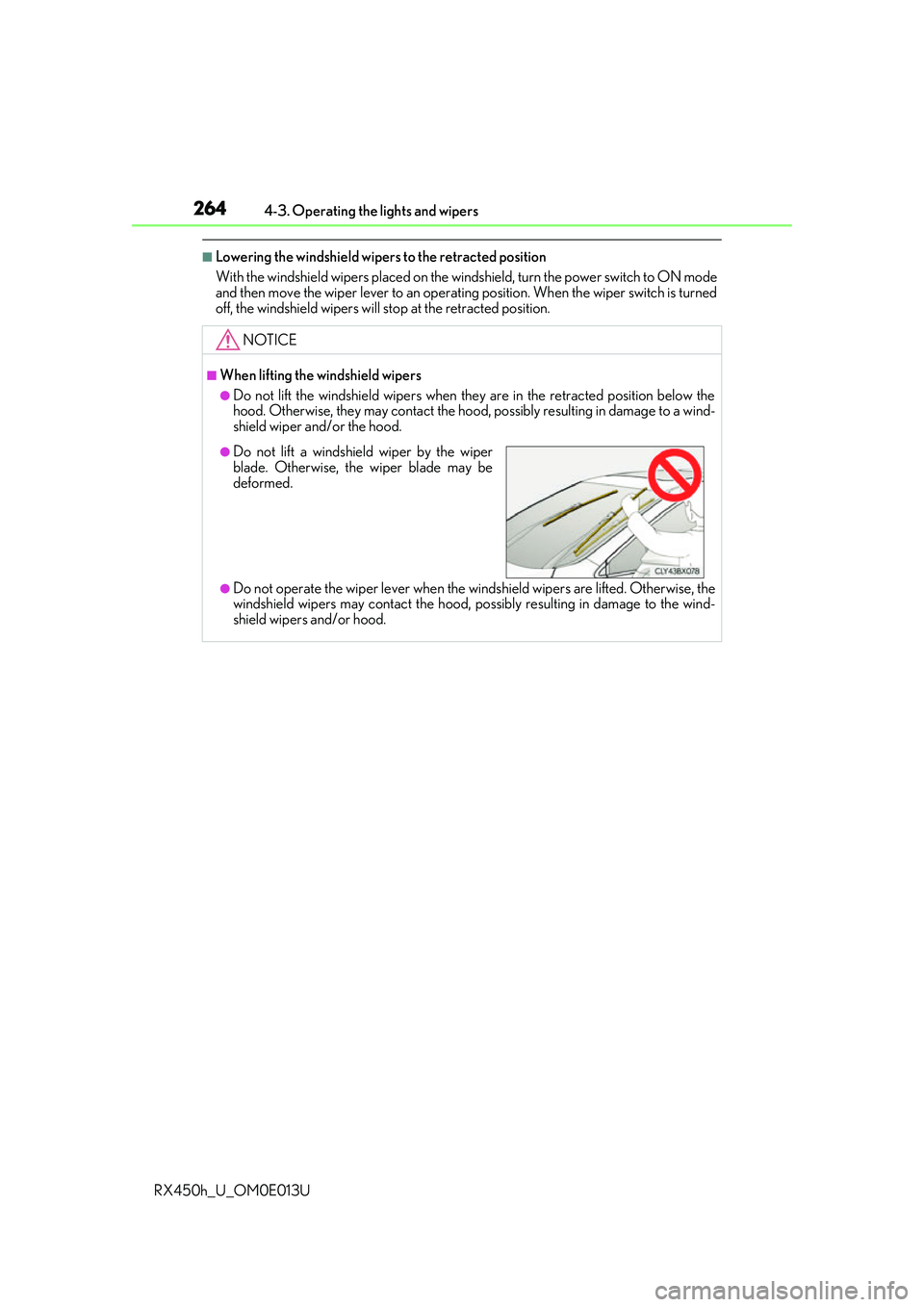
●Do not lift a windshield wiper by the wiper
blade. Otherwise, the wiper blade may be
deformed.
Page 266 of 660
2664-3. Operating the lights and wipers
RX450h_U_OM0E013U
■The rear window wiper and washer can be operated when
The power switch is in ON mode.
■If no washer fluid sprays
Check that the washer nozzle is not blocked if there is washer fluid in the washer fluid
tank.
NOTICE
■When the rear window is dry
Do not use the wiper, as it may damage the rear window.
■When the washer fluid tank is empty
Do not operate the switch continually as the washer fluid pump may overheat.
■When a nozzle becomes blocked
In this case, contact your Lexus dealer.
Do not try to clear it with a pin or other object. The nozz le will be damaged.
Page 267 of 660
267
4
Driving
RX450h_U_OM0E013U4-4. Refueling
●Close all the doors and windows,
and turn the power switch off.
●Confirm the type of fuel.
■Fuel types
P. 591
■Fuel tank opening for unleaded gasoline
To help prevent incorrect fueling, your vehi cle has a fuel tank opening that only accom-
modates the specia l nozzle on unleaded fuel pumps.
Opening the fuel tank cap
The fuel tank of your vehicle has a special structure, which requires a reduc-
tion in fuel tank pressure before refu eling. After the opener switch has been
pressed, it will take several seconds un til the vehicle is ready for refueling.
Before refueling the vehicle
Page 283 of 660
2834-5. Using the driving support systems
4
Driving
RX450h_U_OM0E013U
■Enabling/disabling the pre-collision system
The pre-collision system can be enabled/disabled on (P. 109) of the
multi-information display.
The system is automatically enabled each time the power switch is turned to ON
mode.
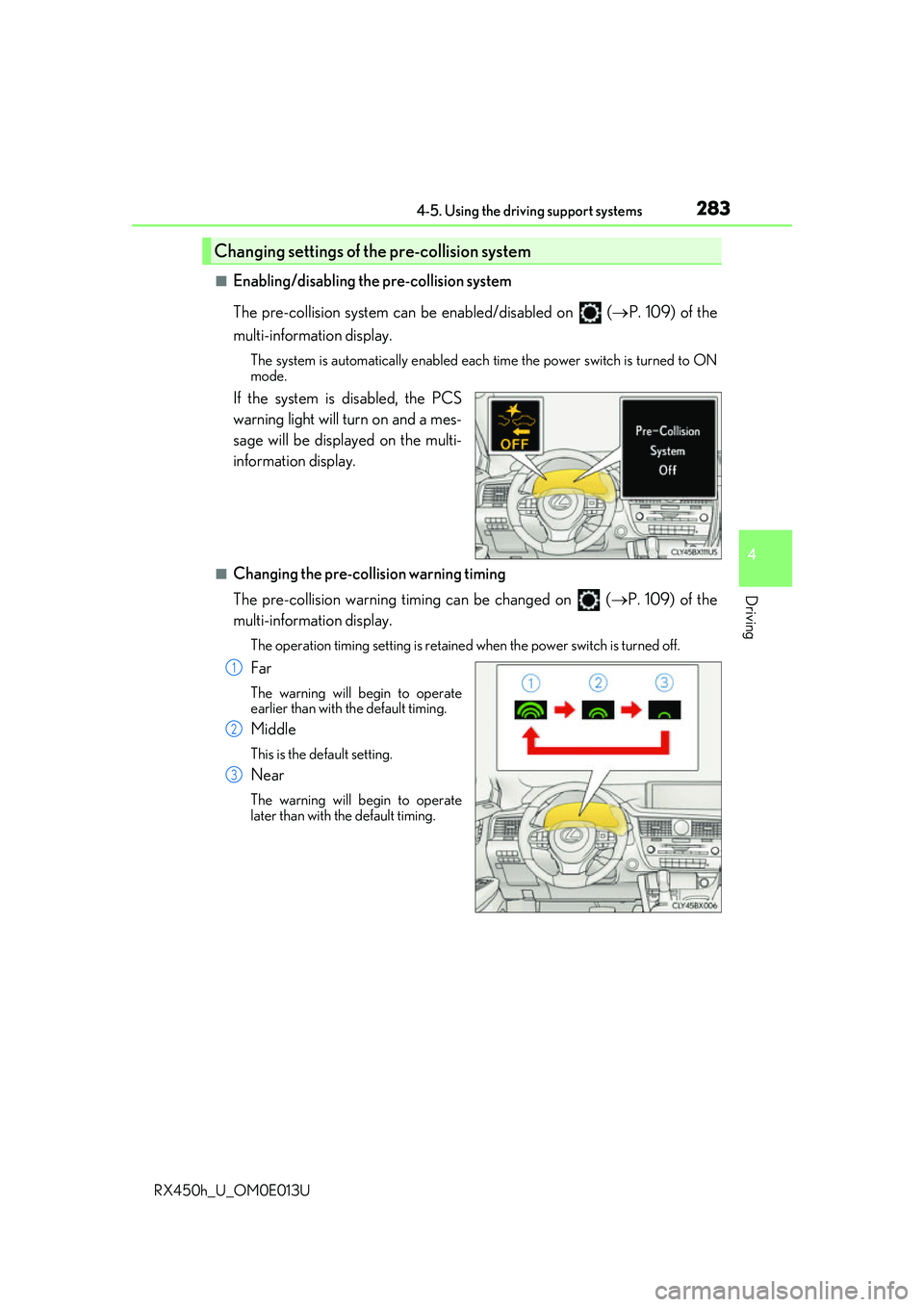
If the system is disabled, the PCS
warning light will turn on and a mes-
sage will be displayed on the multi-
information display.
■Changing the pre-collision warning timing
The pre-collision warning timing can be changed on ( P. 109) of the
multi-information display.
The operation timing settin g is retained when the power switch is turned off.
Far
The warning will begin to operate
earlier than with the default timing.
Middle
This is the default setting.
Near
The warning will begin to operate
later than with the default timing.
Changing settings of the pre-collision system
1
2
3
Page 288 of 660
2884-5. Using the driving support systems
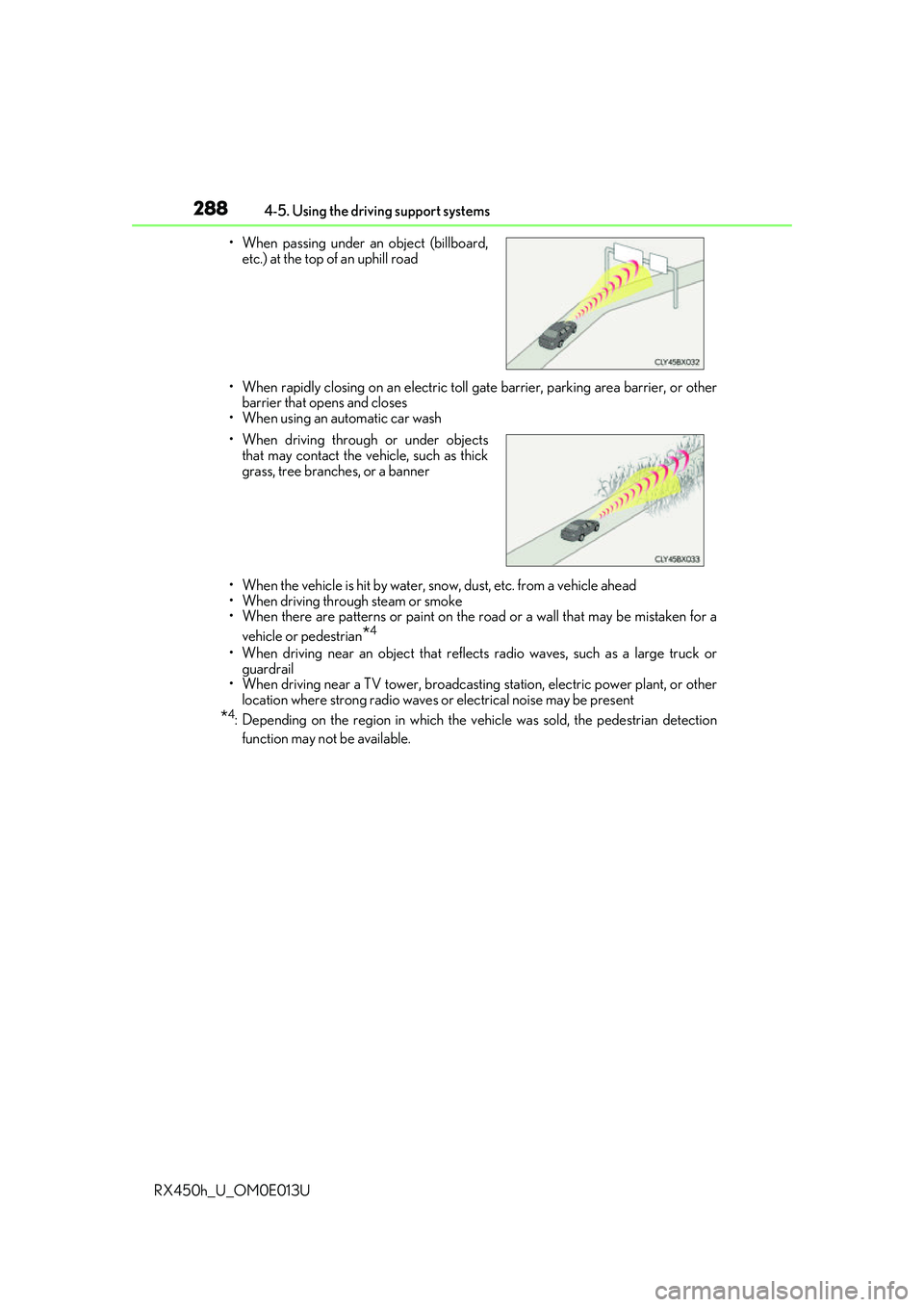
RX450h_U_OM0E013U • When rapidly closing on an electric toll ga
te barrier, parking area barrier, or other
barrier that opens and closes
• When using an automatic car wash
• When the vehicle is hit by water, sn ow, dust, etc. from a vehicle ahead
• When driving through steam or smoke
• When there are patterns or paint on the road or a wall that may be mistaken for a
vehicle or pedestrian
*4
• When driving near an object that reflects radio waves, such as a large truck or
guardrail
• When driving near a TV tower, broadcasting station, electric power plant, or other location where strong radio waves or electrical noise may be present
*4: Depending on the region in which the ve hicle was sold, the pedestrian detection
function may not be available.
• When passing under an object (billboard,
etc.) at the top of an uphill road
• When driving through or under objects that may contact the vehicle, such as thick
grass, tree branches, or a banner
Page 317 of 660
3174-5. Using the driving support systems
4
Driving
RX450h_U_OM0E013U
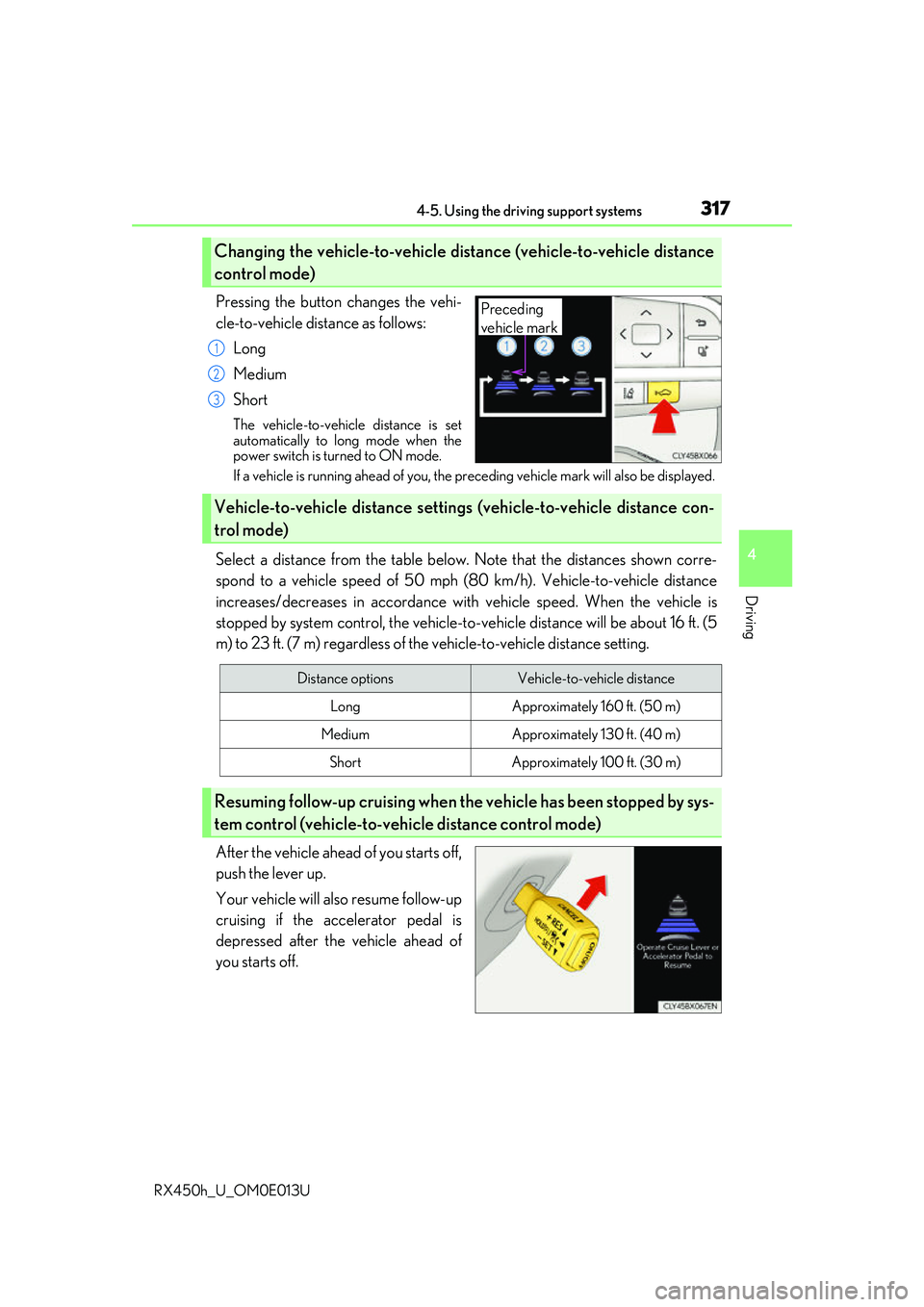
Pressing the button changes the vehi-
cle-to-vehicle distance as follows:Long
Medium
Short
The vehicle-to-vehicle distance is set
automatically to long mode when the
power switch is turned to ON mode.
If a vehicle is running ahead of you, the pr eceding vehicle mark will also be displayed.
Select a distance from the table below. Note that the distances shown corre-
spond to a vehicle speed of 50 mph (80 km/h). Vehicle-to-vehicle distance
increases/decreases in accordance with vehicle speed. When the vehicle is
stopped by system control, the vehicle-to -vehicle distance will be about 16 ft. (5
m) to 23 ft. (7 m) regardless of the vehicle-to-vehicle distance setting.
After the vehicle ahead of you starts off,
push the lever up.
Your vehicle will also resume follow-up
cruising if the accelerator pedal is
depressed after the vehicle ahead of
you starts off.
Changing the vehicle-to-vehicle distance (vehicle-to-vehicle distance
control mode)
Preceding
vehicle mark
1
2
3
Vehicle-to-vehicle distance settings (vehicle-to-vehicle distance con-
trol mode)
Distance optionsVehicle-to-vehicle distance
LongApproximately 160 ft. (50 m)
MediumApproximately 130 ft. (40 m)
ShortApproximately 100 ft. (30 m)
Resuming follow-up cruising when the vehicle has been stopped by sys-
tem control (vehicle-to-vehicle distance control mode)