charging LEXUS RX450H 2016 User Guide
[x] Cancel search | Manufacturer: LEXUS, Model Year: 2016, Model line: RX450H, Model: LEXUS RX450H 2016Pages: 660, PDF Size: 14.85 MB
Page 434 of 660
4345-5. Using the other interior features
RX450h_U_OM0E013U
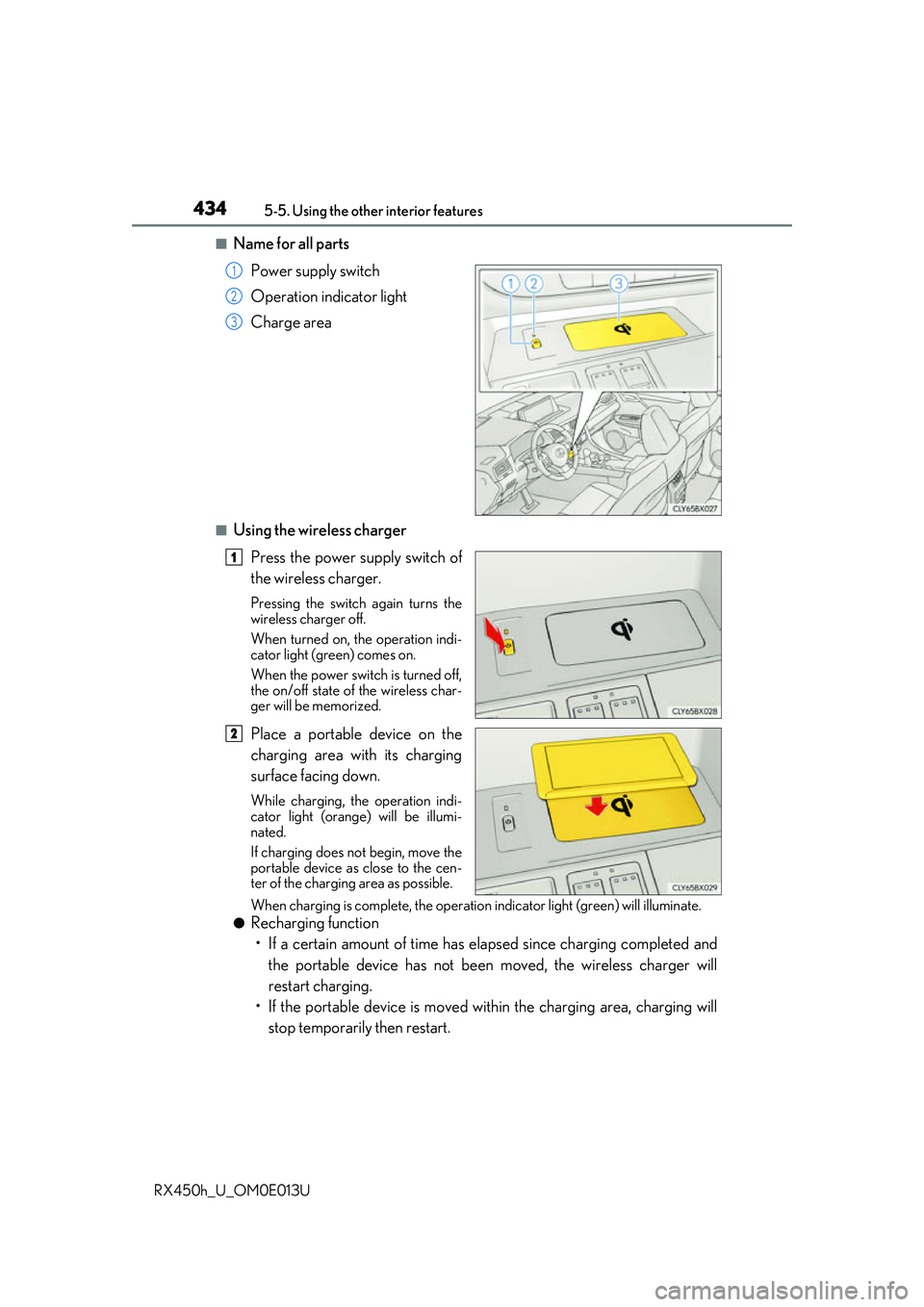
■Name for all parts Power supply switch
Operation indicator light
Charge area
■Using the wireless chargerPress the power supply switch of
the wireless charger.
Pressing the switch again turns the
wireless charger off.
When turned on, the operation indi-
cator light (green) comes on.
When the power switch is turned off,
the on/off state of the wireless char-
ger will be memorized.
Place a portable device on the
charging area with its charging
surface facing down.
While charging, the operation indi-
cator light (orange) will be illumi-
nated.
If charging does not begin, move the
portable device as close to the cen-
ter of the charging area as possible.
When charging is complete, the operatio n indicator light (green) will illuminate.
●Recharging function
• If a certain amount of time has elapsed since charging completed and the portable device has not been moved, the wireless charger will
restart charging.
• If the portable device is moved with in the charging area, charging will
stop temporarily then restart.
1
2
3
1
2
Page 435 of 660
4355-5. Using the other interior features
5
Interior features
RX450h_U_OM0E013U
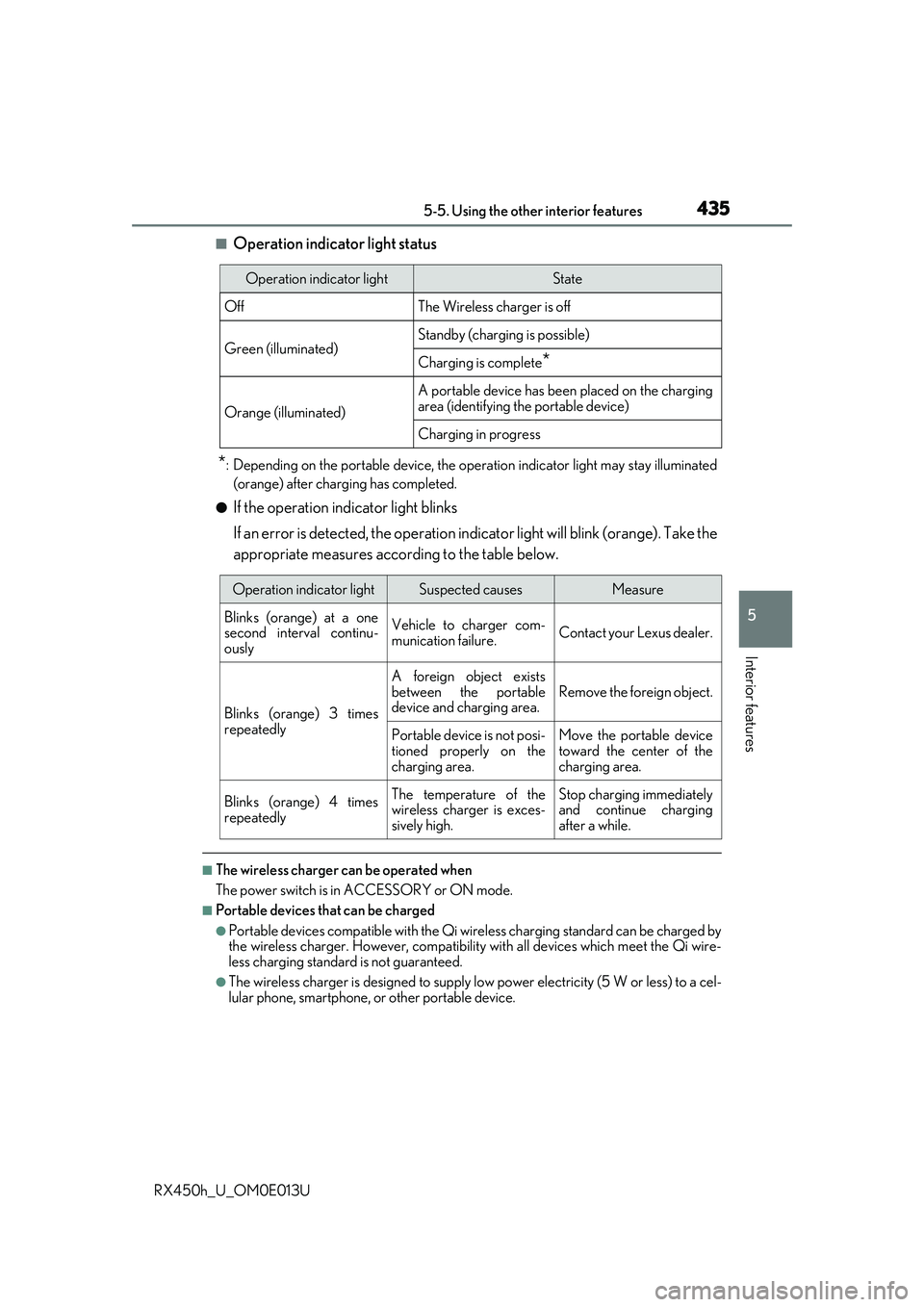
■Operation indicator light status
*: Depending on the portable device, the operation indicator light may stay illuminated
(orange) after charging has completed.
●If the operation indicator light blinks
If an error is detected, the operation in dicator light will blink (orange). Take the
appropriate measures according to the table below.
■The wireless charger can be operated when
The power switch is in ACCESSORY or ON mode.
■Portable devices t hat can be charged
●Portable devices compatible with the Qi wireless charging standard can be charged by
the wireless charger. However, compatibility with all devices which meet the Qi wire-
less charging standard is not guaranteed.
●The wireless charger is designed to supply low power electricity (5 W or less) to a cel-
lular phone, smartphone, or other portable device.
Operation indicator lightState
OffThe Wireless charger is off
Green (illuminated)Standby (charging is possible)
Charging is complete*
Orange (illuminated)
A portable device has been placed on the charging
area (identifying the portable device)
Charging in progress
Operation indicator lightSuspected causesMeasure
Blinks (orange) at a one
second interval continu-
ously Vehicle to charger com-
munication failure.
Contact your Lexus dealer.
Blinks (orange) 3 times
repeatedly A foreign object exists
between the portable
device and charging area.
Remove the foreign object.
Portable device is not posi-
tioned properly on the
charging area. Move the portable device
toward the center of the
charging area.
Blinks (orange) 4 times
repeatedly The temperature of the
wireless charger is exces-
sively high.Stop charging immediately
and continue charging
after a while.
Page 436 of 660
4365-5. Using the other interior features
RX450h_U_OM0E013U
■If a cover or accessory is attached to the portable device
Do not charge a portable device if a cover or accessory which is not Qi compatible is
attached. Depending on the type of cover an d/or accessory attached, it may not be pos-
sible to charge the portable device. If the po rtable device is placed on the charging area
and does not charge, remove the cover and/or accessories.
■If interference is heard in AM radio broadcasts while charging
Turn off the wireless charger and check if the noise is reduced. If noise is reduced, press
and hold the power supply switch of the wireless charger for 2 seconds. The frequency of
the wireless charger is changed and noise may be reduced. When the frequency is
changed, the operation indicator lig ht will blink (orange) 2 times.
■Charging precautions
●If the electronic key cannot be detected in the cabin, charging cannot be performed.
When a door is opened and closed, ch arging may be temporarily suspended.
●While charging, the wireless charger and the po rtable device will become warm. This is
not a malfunction.
If a portable device become s warm while charging and ch arging stops due to the pro-
tection function of the portable device, wait until the portable device cools down and
charge it again.
■Sound generated during operation
When the power supply switch is turned on or while a portable device is being identified,
operation sounds may be heard. This is not a malfunction.
■Cleaning the wireless charger
P. 463
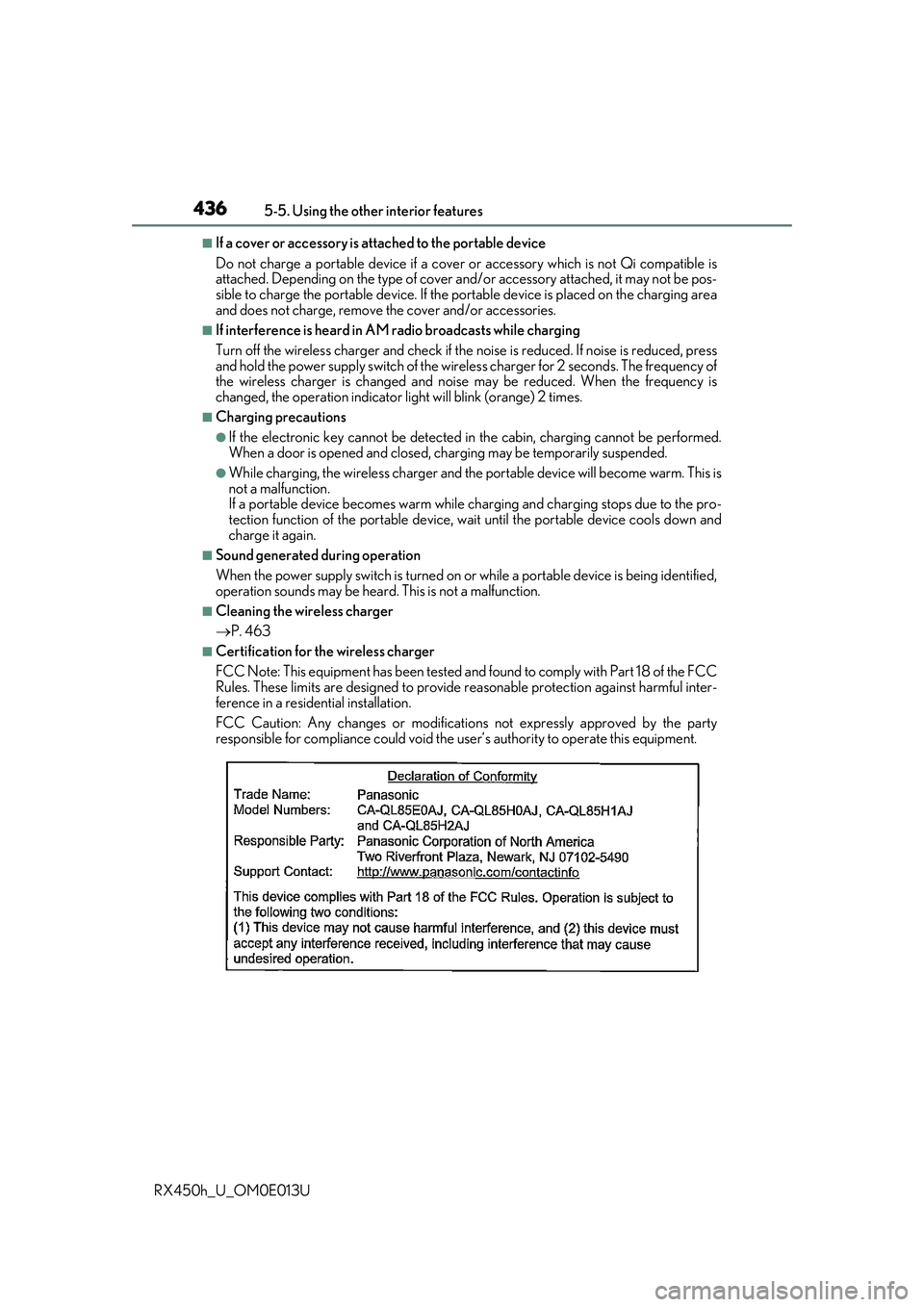
■Certification for the wireless charger
FCC Note: This equipment has been tested and found to comply with Part 18 of the FCC
Rules. These limits are designed to provide re asonable protection against harmful inter-
ference in a reside ntial installation.
FCC Caution: Any changes or modification s not expressly approved by the party
responsible for compliance could void the user’s authority to operate this equipment.
Page 438 of 660
4385-5. Using the other interior features
RX450h_U_OM0E013U
WARNING
■Caution while driving
When charging a portable device while driv ing, for safety reasons, the driver should
not operate the portable device.
■Caution regarding interference with electronic devices
People with implantable card iac pacemakers, cardiac resynchronization therapy pace-
makers or implantable cardioverter defibrilla tors, as well as any other electrical medi-
cal device, should consult their physician about the usage of the wireless charger.
Operations of the wireless charger may have an affect on medical devices.
■To prevent damage or burns
Observe the following precautions.
Failure to do so may result in the possibi lity of fire, equipment failure or damage, or
burns due to heat.
●Do not put any metallic objects between th e charging area and the portable device
while charging.
●Do not attach metallic objects, such as aluminum stickers, to the charging area.
●Do not cover the wireless charger with a cloth or other object while charging.
●Do not attempt to charge portable devi ces which are not compatible with the Qi
wireless charging standard.
●Do not disassemble, modify or remove the wireless charger.
●Do not apply force or impact to the wireless charger.
Page 439 of 660
4395-5. Using the other interior features
5
Interior features
RX450h_U_OM0E013U
NOTICE
■Conditions in which the wireless charger may not operate correctly
In the following situations, the wireless charger may not operate correctly:
●When a portable device is fully charged
●When there is a foreign object between the charging area and portable device
●When a portable device becomes hot while charging
●When a portable device is placed on the wireless area with its charging surface fac-
ing up
●When a portable device is not centered on the charging area
●When the vehicle is near a TV tower, electric power plant, gas station, radio station,
large display, airport or other facility that generates strong radio waves or electrical
noise
●When the portable device is in contact with, or is covered by any of the following
metallic objects
• Cards to which aluminum foil is attached
• Cigarette boxes that have aluminum foil inside
• Metallic wallets or bags
• Coins
• Metal hand warmers
• Media such as CDs and DVDs
●When wireless keys (that emit radio waves) other than those of your vehicle are being
used nearby.
If in situations other than above the wirele ss charger does not operate properly or the
operation indicator light is blinking, the wireless charger may be malfunctioning. Con-
tact your Lexus dealer.
■To prevent failure or damage to data
●Do not bring magnetic cards, such as a cr edit card, or magnetic recording media,
close to the wireless charger while charging. Otherwise, data may be erased due to
the influence of magnetism.
Additionally, do not bring pr ecision instruments such as wrist watches, close to the
wireless charger, as such objects may malfunction.
●Do not leave portable devices in the cab in. The temperature inside the cabin may
become high when parked in the sun, and cause damage to the device.
■To prevent 12-volt battery discharge
Do not use the wireless charger for a long pe riod of time with the hybrid system is
stopped.
Page 484 of 660
4846-3. Do-it-yourself maintenance
RX450h_U_OM0E013U
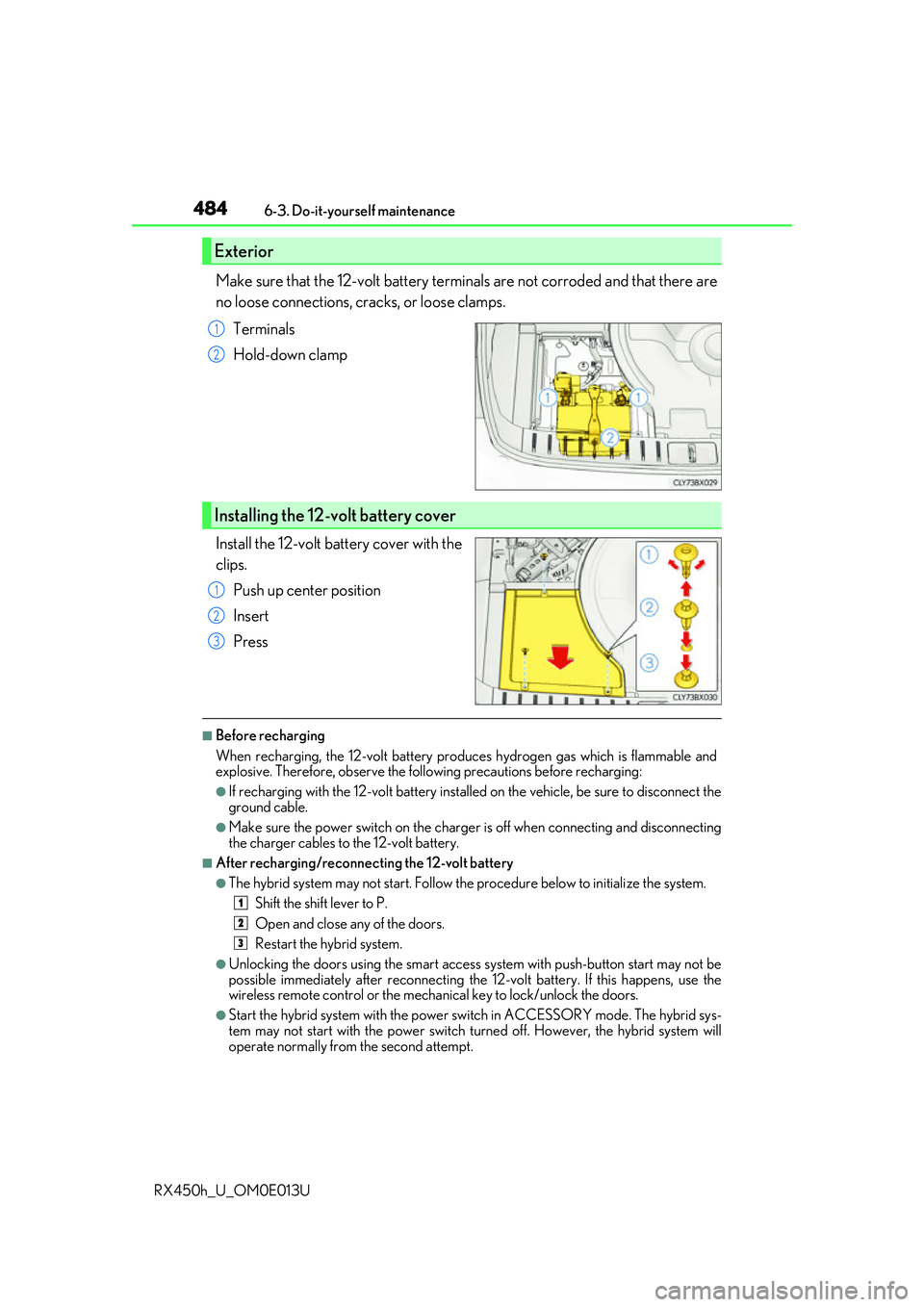
Make sure that the 12-volt battery terminals are not corroded and that there are
no loose connections, cracks, or loose clamps. Terminals
Hold-down clamp
Install the 12-volt battery cover with the
clips. Push up center position
Insert
Press
■Before recharging
When recharging, the 12-volt battery produces hydrogen gas which is flammable and
explosive. Therefore, observe the following precautions before recharging:
●If recharging with the 12-volt battery installed on the vehicle, be sure to disconnect the
ground cable.
●Make sure the power switch on the charge r is off when connecting and disconnecting
the charger cables to the 12-volt battery.
■After recharging/reconnecting the 12-volt battery
●The hybrid system may not start. Follow the procedure below to initialize the system.
Shift the shift lever to P.
Open and close any of the doors.
Restart the hybrid system.
●Unlocking the doors using the smart access system with push-button start may not be
possible immediately after reconnecting the 12-volt battery. If this happens, use the
wireless remote control or the mechan ical key to lock/unlock the doors.
●Start the hybrid system with the power sw itch in ACCESSORY mode. The hybrid sys-
tem may not start with the power switch turned off. However, the hybrid system will
operate normally from the second attempt.
Exterior
1
2
Installing the 12-volt battery cover
1
2
3
1
2
3
Page 486 of 660
4866-3. Do-it-yourself maintenance
RX450h_U_OM0E013U
WARNING
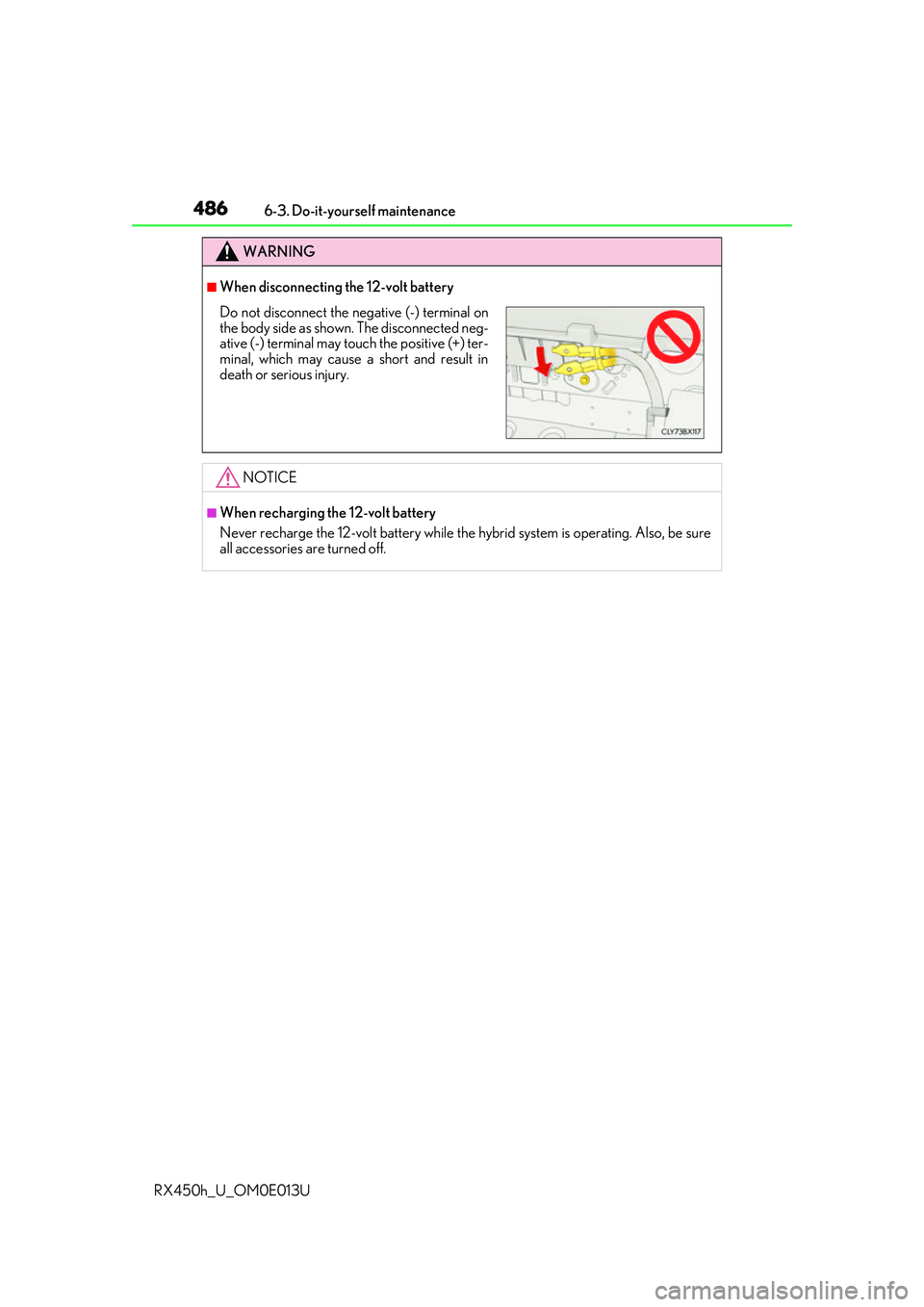
■When disconnecting the 12-volt battery
NOTICE
■When recharging the 12-volt battery
Never recharge the 12-volt battery while the hybrid system is operating. Also, be sure
all accessories are turned off.
Do not disconnect the negative (-) terminal on
the body side as shown. The disconnected neg-
ative (-) terminal may touch the positive (+) ter-
minal, which may cause a short and result in
death or serious injury.
Page 536 of 660
5367-2. Steps to take in an emergency
RX450h_U_OM0E013U
If a warning light turns on or a warning buzzer
sounds
Calmly perform the following actions if any of the warning lights comes on or
flashes. If a light comes on or flashes, but then goes off, this does not necessar-
ily indicate a malfunction in the system. However, if this continues to occur,
have the vehicle inspecte d by your Lexus dealer.
Warning light and warning buzzer list
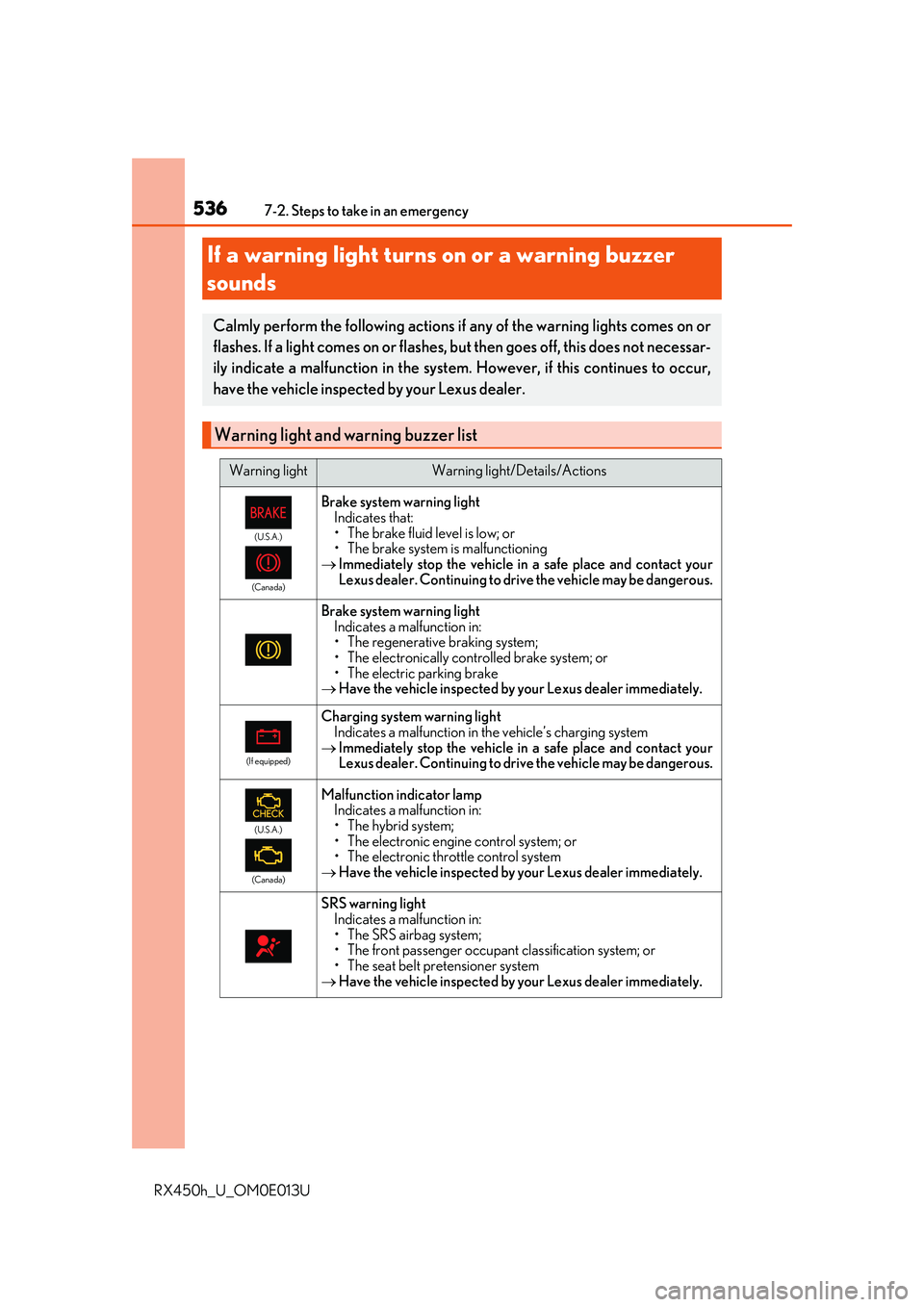
Warning lightWarning light/Details/Actions
(U.S.A.)
(Canada)
Brake system warning light Indicates that:
• The brake fluid level is low; or
• The brake system is malfunctioning
Immediately stop the vehicle in a safe place and contact your
Lexus dealer. Continuing to drive the vehicle may be dangerous.
Brake system warning light
Indicates a malfunction in:
• The regenerative braking system;
• The electronically controlled brake system; or
• The electric parking brake
Have the vehicle inspected by your Lexus dealer immediately.
(If equipped)
Charging system warning light
Indicates a malfunction in the vehicle’s charging system
Immediately stop the vehicle in a safe place and contact your
Lexus dealer. Continuing to drive the vehicle may be dangerous.
(U.S.A.)
(Canada)
Malfunction indicator lamp Indicates a malfunction in:
• The hybrid system;
• The electronic engine control system; or
• The electronic throttle control system
Have the vehicle inspected by your Lexus dealer immediately.
SRS warning light
Indicates a malfunction in:
• The SRS airbag system;
• The front passenger occupant classification system; or
• The seat belt pretensioner system
Have the vehicle inspected by your Lexus dealer immediately.
Page 544 of 660
5447-2. Steps to take in an emergency
RX450h_U_OM0E013U
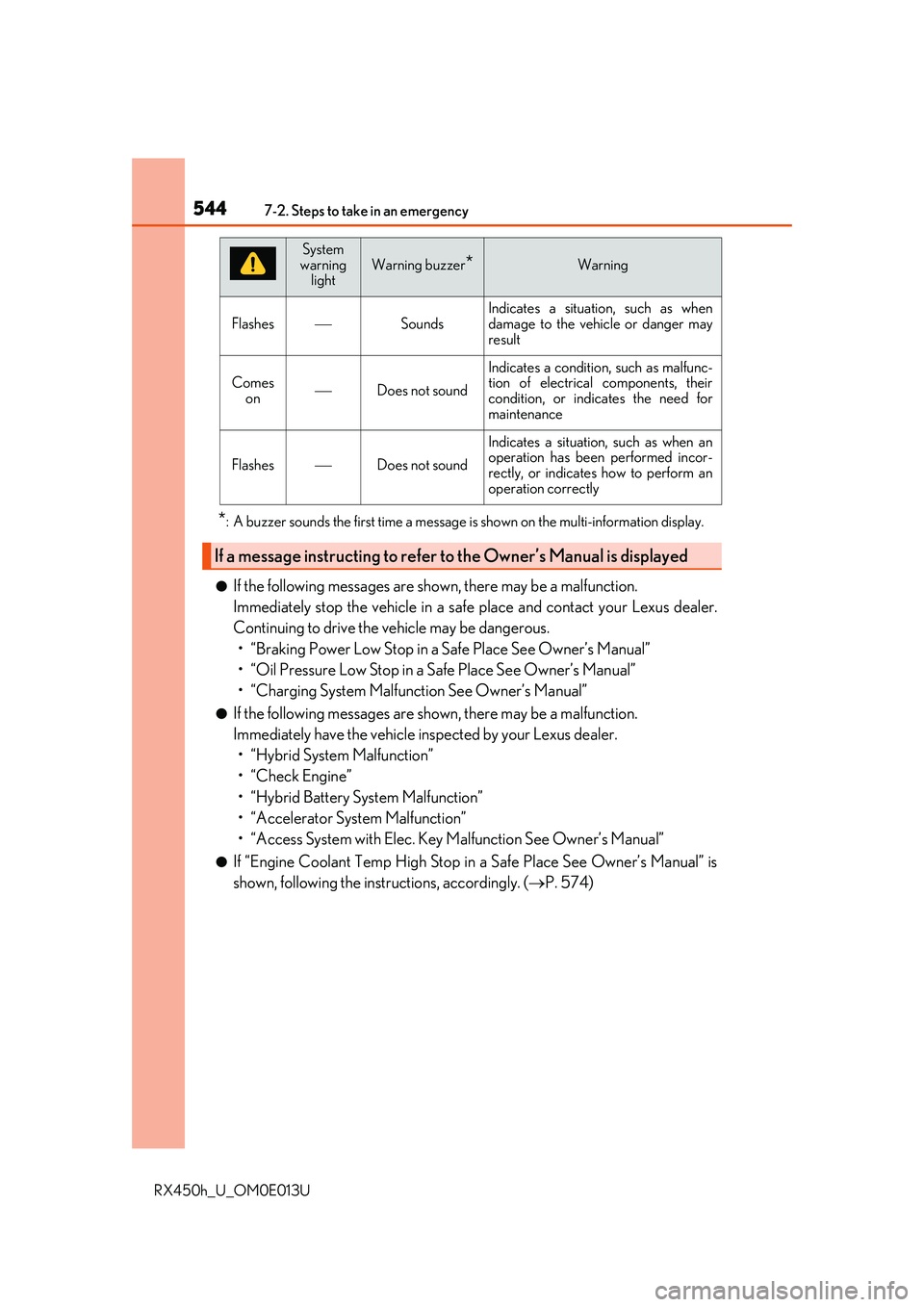
*: A buzzer sounds the first time a message is shown on the multi-information display.
●If the following messages are shown, there may be a malfunction.
Immediately stop the vehicle in a safe place and contact your Lexus dealer.
Continuing to drive the vehicle may be dangerous. • “Braking Power Low Stop in a Safe Place See Owner’s Manual”
• “Oil Pressure Low Stop in a Safe Place See Owner’s Manual”
• “Charging System Malfunction See Owner’s Manual”
●If the following messages are shown, there may be a malfunction.
Immediately have the vehicle inspected by your Lexus dealer.• “Hybrid System Malfunction”
•“Check Engine”
• “Hybrid Battery System Malfunction”
• “Accelerator System Malfunction”
• “Access System with Elec. Key Malfunction See Owner’s Manual”
●If “Engine Coolant Temp High Stop in a Safe Place See Owner’s Manual” is
shown, following the instructions, accordingly. ( P. 574)
FlashesSounds
Indicates a situation, such as when
damage to the vehicle or danger may
result
Comes
onDoes not sound
Indicates a condition, such as malfunc-
tion of electrical components, their
condition, or indicates the need for
maintenance
FlashesDoes not sound
Indicates a situation, such as when an
operation has been performed incor-
rectly, or indicates how to perform an
operation correctly
If a message instructing to refer to the Owner’s Manual is displayed
System
warning
lightWarning buzzer*Warning
Page 548 of 660
5487-2. Steps to take in an emergency
RX450h_U_OM0E013U
■If “Maintenance Required Visit Your Dealer” is displayed (U.S.A. only)
Indicates that all maintenance is required to correspond to the driven distance
on the maintenance schedule
*.
Comes on approximately 5000 miles (8000 km) after the message has
been reset.
(The indicator will not work properly unless the message has been reset.)
Perform the necessary maintenance. Please reset the message after the main-
tenance is performed. ( P. 466)
*: Refer to the separate “Scheduled Maintenance” or “Owner’s Manual Supplement”
for the maintenance interval applicable to your vehicle.
■System warning lights
The master warning light does not come on or flash in the following cases. Instead, a sep-
arate system warning light will come on along with a message shown on the multi-infor-
mation display.
●“Braking Power Low Visit Your Dealer”:
The brake system warning light (yellow) come on. ( P. 536)
●“Antilock Brake System Malfunction Visit Your Dealer”:
The ABS warning light comes on. ( P. 537)
●“Charging System Malfunction See Ow ner's Manual” (F SPORT models):
The charging system warning light comes on. ( P. 536)
■Warning buzzer
P. 540
NOTICE
■“High Power Consumption Partial Limit On AC/Heater Operation” is frequently
shown
There is a possible malfunction relating to the charging system or the 12-volt battery
may be deteriorating. Have the vehicle inspected by your Lexus dealer.