driver LEXUS RX450H 2016 User Guide
[x] Cancel search | Manufacturer: LEXUS, Model Year: 2016, Model line: RX450H, Model: LEXUS RX450H 2016Pages: 660, PDF Size: 14.85 MB
Page 92 of 660
92
RX450h_U_OM0E013U2. Instrument cluster
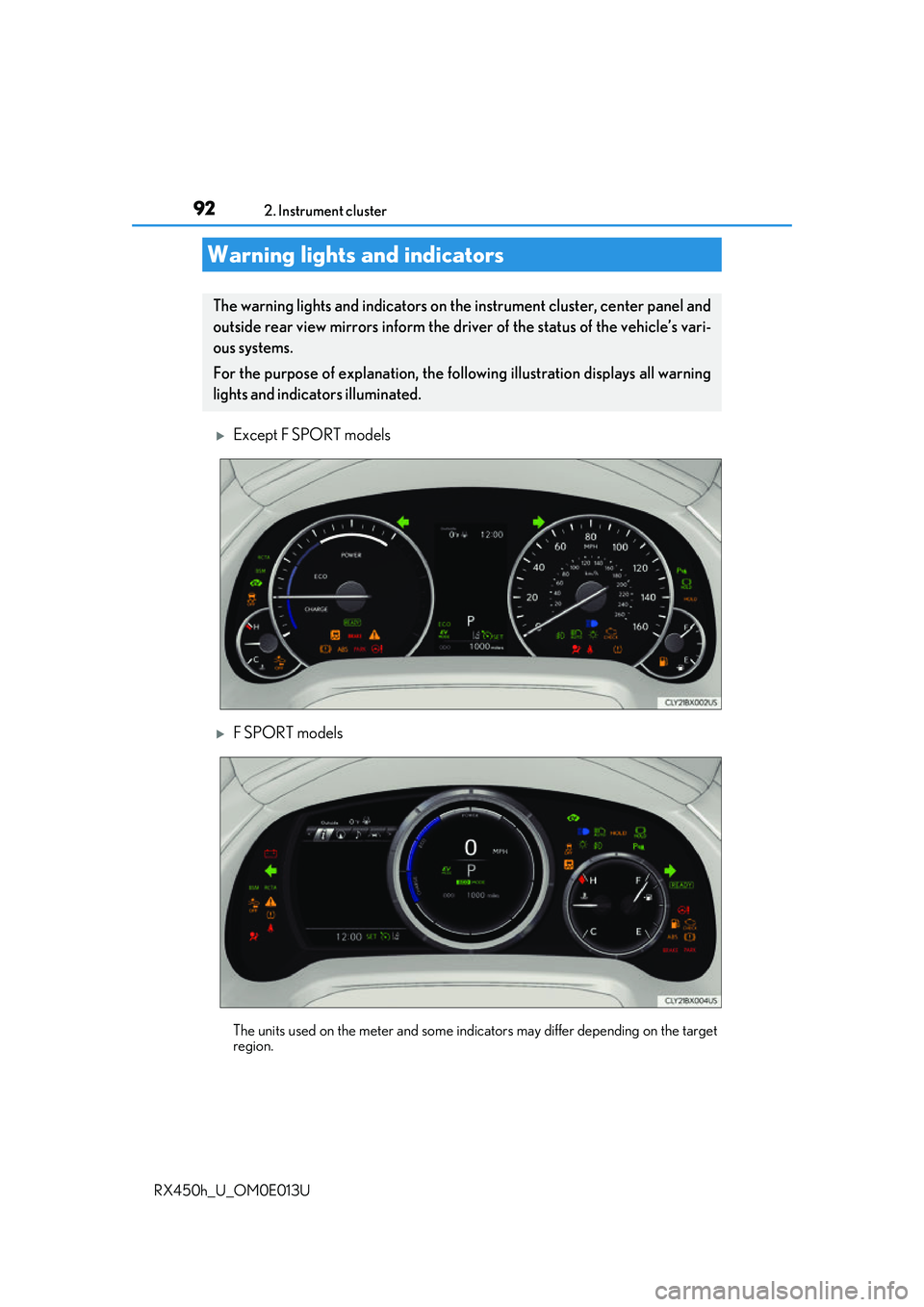
Except F SPORT models
F SPORT models
The units used on the meter and some indicators may differ depending on the target
region.
Warning lights and indicators
The warning lights and indicators on the instrument cluster, center panel and
outside rear view mirrors inform the driver of the status of the vehicle’s vari-
ous systems.
For the purpose of explanation, the following illustration displays all warning
lights and indicators illuminated.
Page 93 of 660
932. Instrument cluster
2
Instrument cluster
RX450h_U_OM0E013U
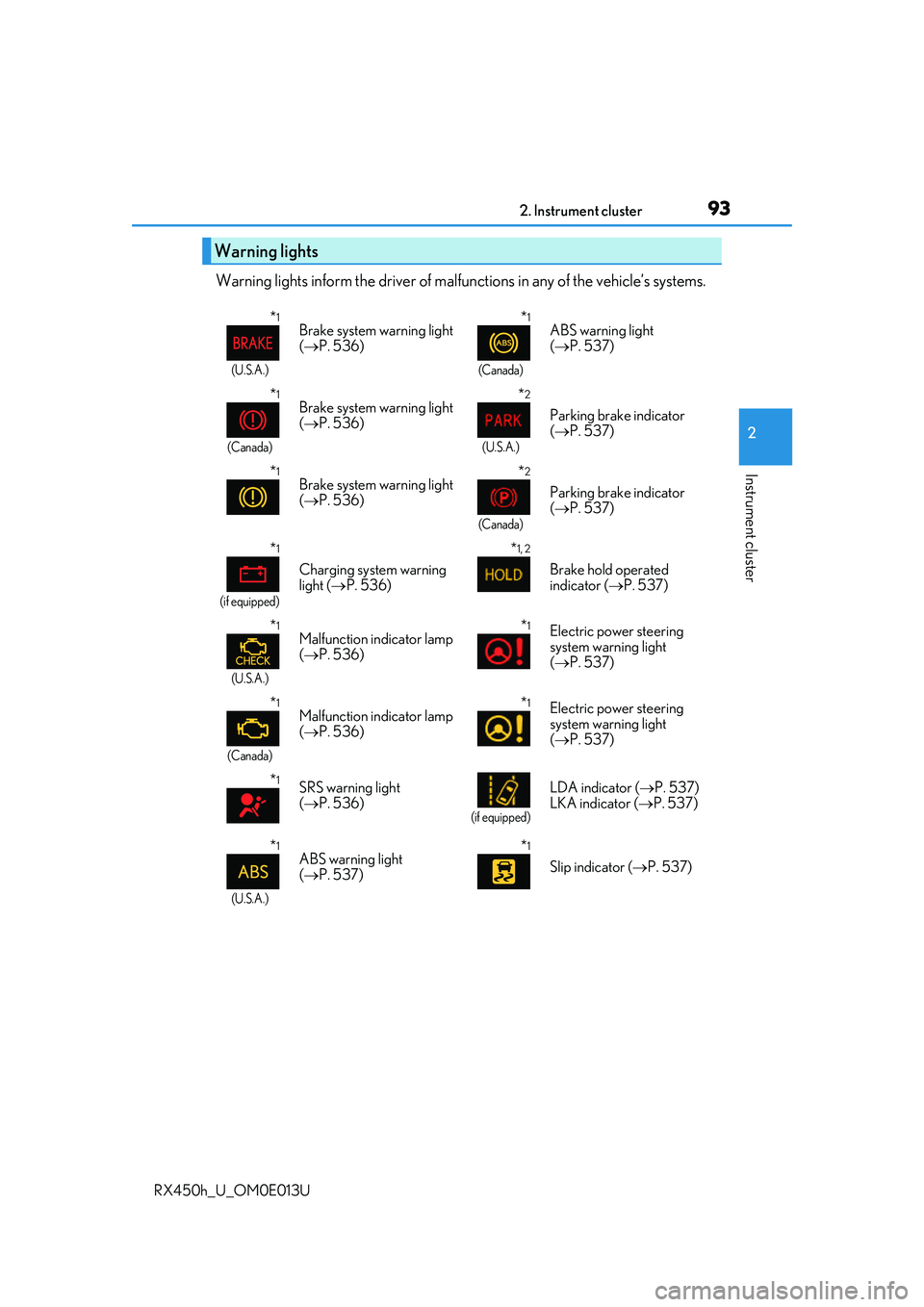
Warning lights inform the driver of malfunctions in any of the vehicle’s systems.
Warning lights
*1
(U.S.A.)
Brake system warning light
( P. 536)*1
(Canada)
ABS warning light
( P. 537)
*1
(Canada)
Brake system warning light
( P. 536)*2
(U.S.A.)
Parking brake indicator
( P. 537)
*1Brake system warning light
( P. 536)*2
(Canada)
Parking brake indicator
( P. 537)
*1
(if equipped)
Charging system warning
light ( P. 536)
*1, 2
Brake hold operated
indicator ( P. 537)
*1
(U.S.A.)
Malfunction indicator lamp
( P. 536)*1Electric power steering
system warning light
( P. 537)
*1
(Canada)
Malfunction indicator lamp
( P. 536)*1Electric power steering
system warning light
( P. 537)
*1SRS warning light
( P. 536)
(if equipped)
LDA indicator ( P. 537)
LKA indicator ( P. 537)
*1
(U.S.A.)
ABS warning light
( P. 537)*1
Slip indicator ( P. 537)
Page 94 of 660
942. Instrument cluster
RX450h_U_OM0E013U
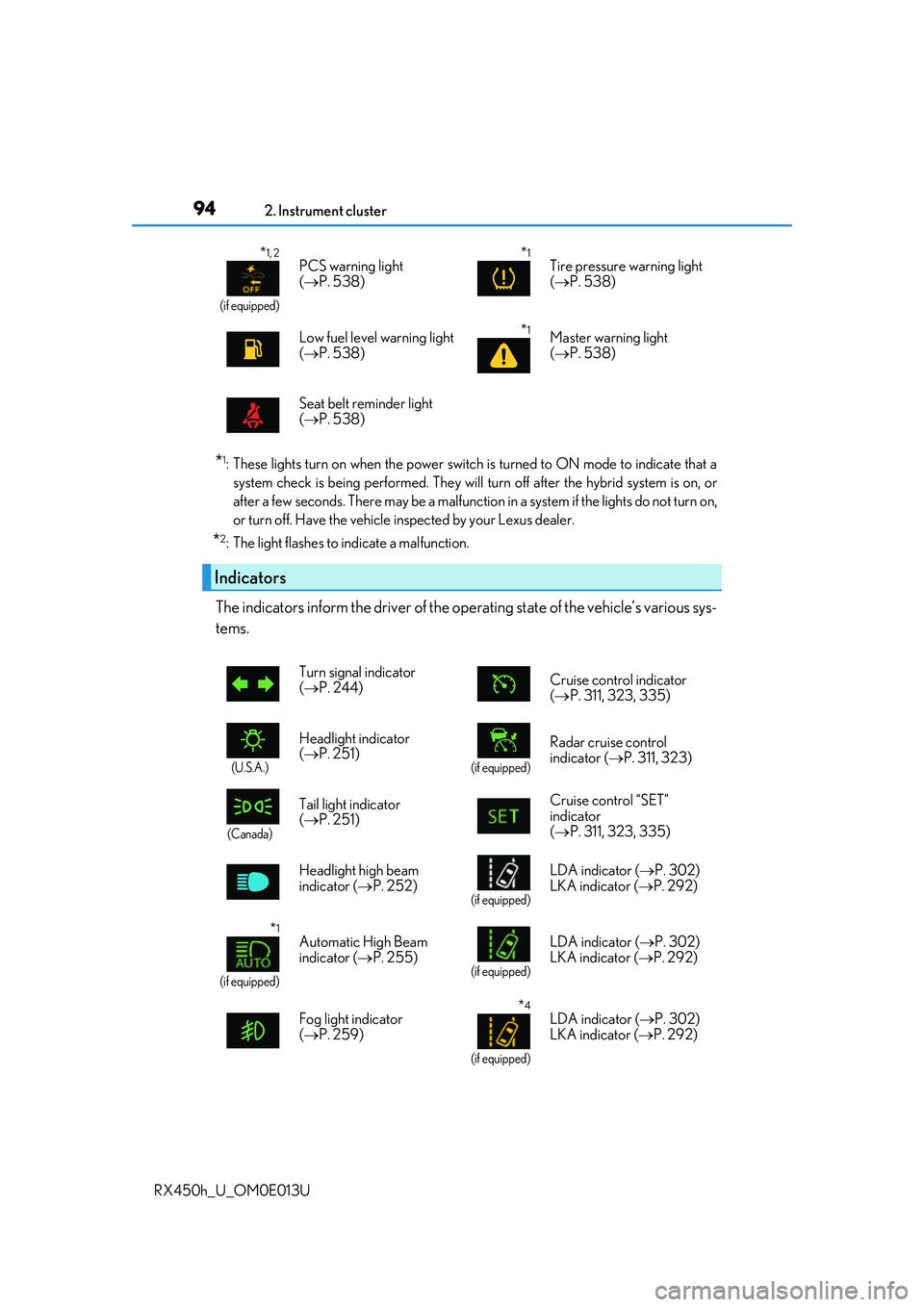
*1: These lights turn on when the power switch is turned to ON mode to indicate that a system check is being performe d. They will turn off after the hybrid system is on, or
after a few seconds. There may be a malfunctio n in a system if the lights do not turn on,
or turn off. Have the vehicle inspected by your Lexus dealer.
*2: The light flashes to indicate a malfunction.
The indicators inform the driver of the op erating state of the vehicle’s various sys-
tems.
*1, 2
(if equipped)
PCS warning light
( P. 538)*1Tire pressure warning light
( P. 538)
Low fuel level warning light
( P. 538)
*1Master warning light
( P. 538)
Seat belt reminder light
( P. 538)
Indicators
Turn signal indicator
( P. 244) Cruise control indicator
(
P. 311, 323, 335)
(U.S.A.)
Headlight indicator
( P. 251)
(if equipped)
Radar cruise control
indicator ( P. 311, 323)
(Canada)
Tail light indicator
( P. 251) Cruise control “SET”
indicator
(
P. 311, 323, 335)
Headlight high beam
indicator ( P. 252)
(if equipped)
LDA indicator ( P. 302)
LKA indicator ( P. 292)
*1
(if equipped)
Automatic High Beam
indicator (P. 255)
(if equipped)
LDA indicator ( P. 302)
LKA indicator ( P. 292)
Fog light indicator
( P. 259)
*4
(if equipped)
LDA indicator ( P. 302)
LKA indicator ( P. 292)
Page 98 of 660
982. Instrument cluster
RX450h_U_OM0E013U
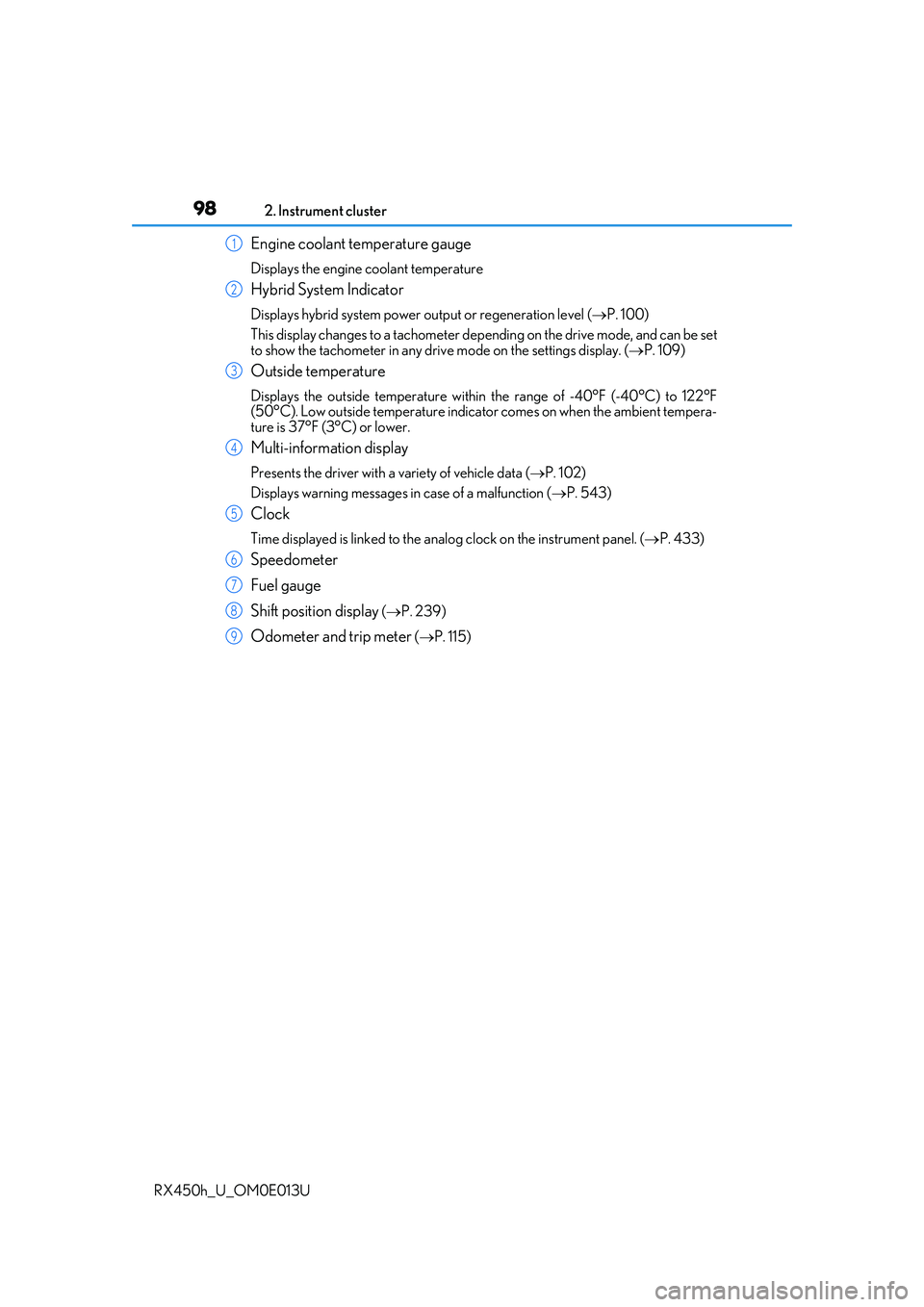
Engine coolant temperature gauge
Displays the engine coolant temperature
Hybrid System Indicator
Displays hybrid system power ou tput or regeneration level (P. 100)
This display changes to a tachometer depending on the drive mode, and can be set
to show the tachometer in any driv e mode on the settings display. (P. 109)
Outside temperature
Displays the outside temperature within the range of -40°F (-40°C) to 122°F
(50°C). Low outside temperature indicator comes on when the ambient tempera-
ture is 37°F (3°C) or lower.
Multi-information display
Presents the driver with a variety of vehicle data ( P. 102)
Displays warning messages in case of a malfunction ( P. 543)
Clock
Time displayed is linked to the analog clock on the instrument panel. ( P. 433)
Speedometer
Fuel gauge
Shift position display
( P. 239)
Odometer and trip meter ( P. 115)
1
2
3
4
5
6
7
8
9
Page 102 of 660
1022. Instrument cluster
RX450h_U_OM0E013U
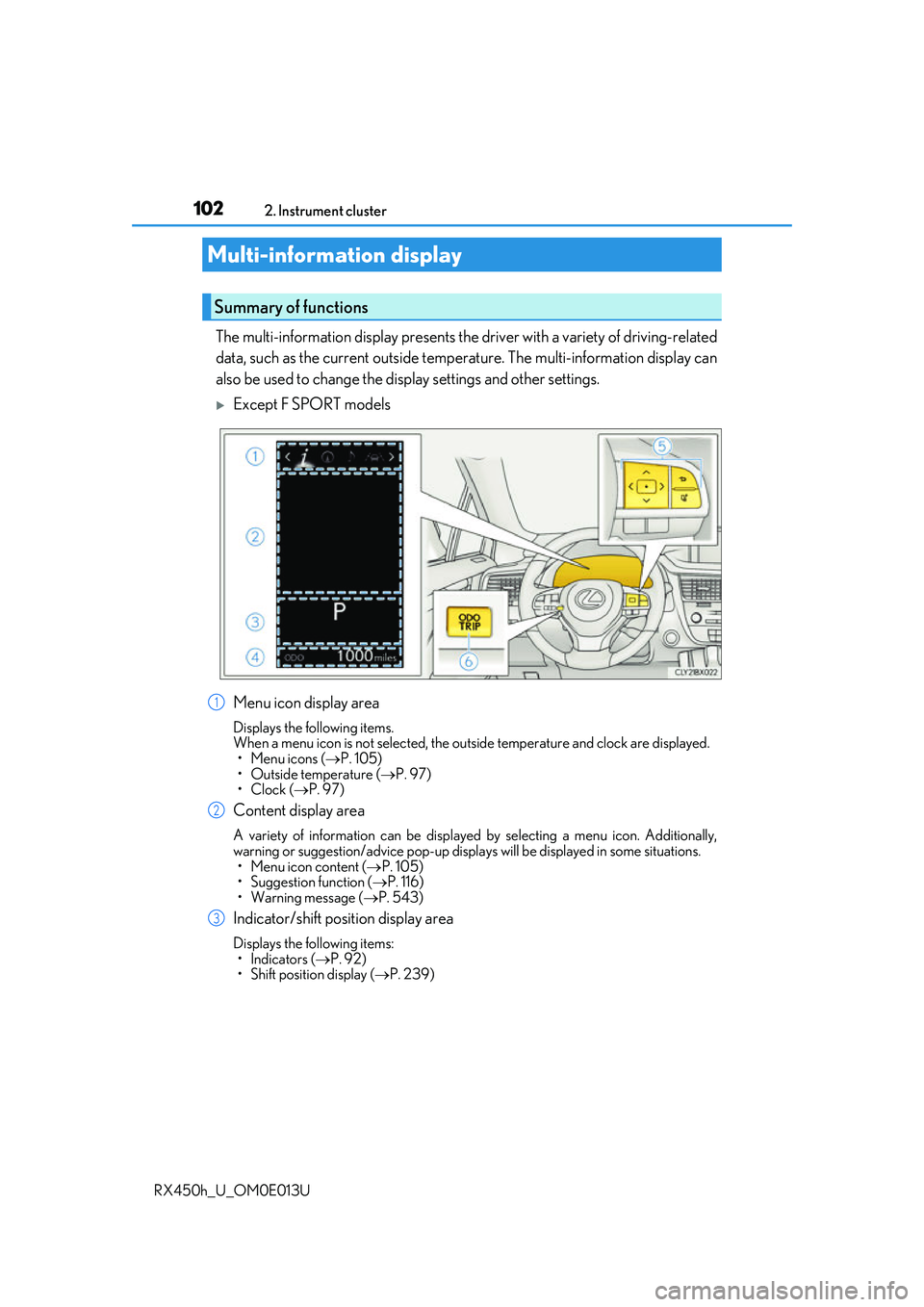
The multi-information display presents the driver with a variety of driving-related
data, such as the current outside temperature. The multi-information display can
also be used to change the display settings and other settings.
Except F SPORT models
Menu icon display area
Displays the following items.
When a menu icon is not selected, the outside temperature and clock are displayed. •Menu icons ( P. 105)
• Outside temperature ( P. 97)
•Clock ( P. 97)
Content display area
A variety of information can be displayed by selecting a menu icon. Additionally,
warning or suggestion/advice pop-up displa ys will be displayed in some situations.
• Menu icon content ( P. 105)
• Suggestion function ( P. 116)
• Warning message ( P. 543)
Indicator/shift position display area
Displays the following items:
•Indicators ( P. 92)
• Shift position display ( P. 239)
Multi-information display
Summary of functions
1
2
3
Page 107 of 660
1072. Instrument cluster
2
Instrument cluster
RX450h_U_OM0E013U
*1:Resetting: P. 104
*2: Use the displayed fuel consumption as a reference.
*3: When only a small amount of fuel is added to the tank, the display may not be
updated.
When refueling, turn the power switch off. If the vehicle is refueled without turning the
power switch off, the display may not be updated.
*4: This distance is computed based on your average fuel consumption. As a result, the
actual distance that can be driven may differ from that displayed.
■Energy monitor
P. 124
■Sway warning (if equipped)
Detects the sway of the vehicle within a lane, which is often associated with a
decrease in the driver’s at tention level, and displays the decrease in attention
using a bar display.
The shorter the bar length, the more the driver may need to rest.
This display is a part of the LDA (Lane Departure Alert with steering control)/LKA
(Lane-Keeping Assist) system. The display is enabled when the operating condi-
tions of the vehicle sway warning are met. ( P. 292, 302)
■ AWD Control (if equipped)
Displays the driving force applie d to each wheel using segments.
The greater the number of segments di splayed, the greater the driving force
applied.
Page 109 of 660
1092. Instrument cluster
2
Instrument cluster
RX450h_U_OM0E013U
◆Changing settings
Use the meter control switches on the steering wheel to change settings.
Press or to select .
Operate the switches to select a desired item.
Change the setting by referring to the message displayed on the screen.
◆Setting items
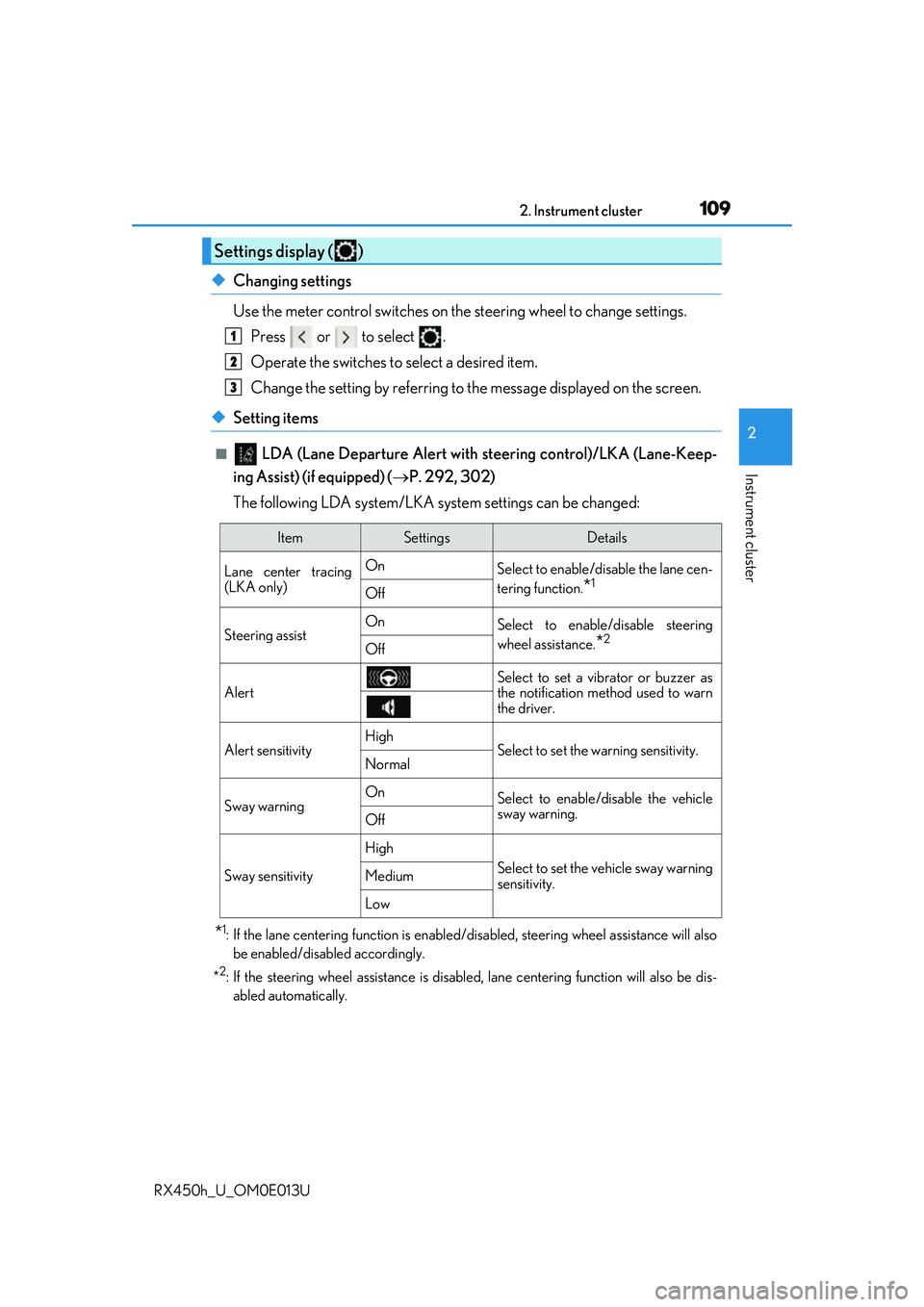
■ LDA (Lane Departure Alert with steering control)/LKA (Lane-Keep-
ing Assist) (if equipped) ( P. 292, 302)
The following LDA system/LKA system settings can be changed:
*1: If the lane centering function is enabled/ disabled, steering wheel assistance will also
be enabled/disabled accordingly.
*
2: If the steering wheel assistance is disabled, lane cent ering function will also be dis-
abled automatically.
Settings display ( )
1
2
3
ItemSettingsDetails
Lane center tracing
(LKA only) On
Select to enable/disable the lane cen-
tering function.
*1Off
Steering assistOnSelect to enable/disable steering
wheel assistance.
*2Off
Alert
Select to set a vibrator or buzzer as
the notification method used to warn
the driver.
Alert sensitivityHighSelect to set the warning sensitivity.Normal
Sway warningOnSelect to enable/disable the vehicle
sway warning.
Off
Sway sensitivity
High
Select to set the vehicle sway warning
sensitivity.Medium
Low
Page 116 of 660
1162. Instrument cluster
RX450h_U_OM0E013U
Displays suggestions to the driver in the following situations. To select a response
to a displayed suggestion, use the meter control switches.
The suggestion function can be turned on/off. (Customizable features: P. 607)
■Suggestion to enable the power back door
If the power back door system is disabled (setting on set to off) and the
power back door switch on the instru ment panel is operated, a suggestion
message will be displayed asking if yo u wish to enable the power back door
system. To enable the power back door system, select “Yes”.
After enabling the power back door syst em, press the power back door switch
again to open or close the power back door.
■Suggestion to turn off the headlights
If the headlights are left on for a certai n amount of time after the power switch
has been turned off, a su ggestion message will be displayed asking if you wish
to turn the headlights off. To turn the headlights off, select “Yes”.
If a front door is opened after the power switch is turned off, this suggestion mes-
sage will not be displayed.
■Background color of the indicator/shift posi tion display area (except F SPORT models)
The background color of the indicator/shift position display area is changed according to
the driving mode as follows ( P. 377):
●Eco drive mode: Blue
●Sport mode: Red
■G-force display (if equipped)
●The G-force values may not be zero even when the vehicle is parked, such as when it is
parked on an incline.
●Depending on the vehicle usage conditions, the brake fluid pressure display may not
reach its maximum reading even though the brake pedal is fully depressed.
●If a 12-volt battery terminal is disconnect ed and reconnected, the steering amount dis-
play may be disabled temporarily. After driv ing the vehicle for a while, the display will
be enabled.
■Suspension of the settings display
●Some settings cannot be changed while driv ing. When changing settings, park the
vehicle in a safe place.
●If a warning message is displa yed, operation of the settings display will be suspended.
Suggestion function
Page 117 of 660
1172. Instrument cluster
2
Instrument cluster
RX450h_U_OM0E013U
■Tire pressure
●It may take a few minutes to display the tire inflation pressure after the power switch is
turned to ON mode. It may also take a few minutes to display the tire inflation pressure
after inflation pressure has been adjusted.
●“---” may be displayed if the tire position information cannot be determined due to
unfavorable radio wave conditions.
●Tire inflation pressure changes with temperat ure. The displayed values may also be dif-
ferent from the values measured using a tire pressure gauge.
■Liquid crystal display
Small spots or light spots may appear on the display. This phenomenon is characteristic
of liquid crystal displays, and there is no problem continuing to use the display.
■Customization
Some functions can be customized. ( P. 109, 607)
WARNING
■Caution for use while driving
●When operating the multi-information display while driving, pay extra attention to the
safety of the area around the vehicle.
●Do not look continuously at the multi-info rmation display while driving as you may fail
to see pedestrians, objects on the road, etc. ahead of the vehicle.
■The information display at low temperatures
Allow the interior of the vehicle to warm up before using the liquid crystal information
display. At extremely low temperatures, the information display monitor may respond
slowly, and display changes may be delayed.
For example, there is a lag between the dr iver’s shifting and the new gear number
appearing on the display. This lag could ca use the driver to downshift again, causing
rapid and excessive engine braking and possibly an accident resulting in death or
injury.
■Cautions during setting up the display
As the hybrid system needs to be operating during setting up the display, ensure that
the vehicle is parked in a place with adequa te ventilation. In a closed area such as a
garage, exhaust gases including harmful carbon monoxide (CO) may collect and enter
the vehicle. This may lead to death or a serious health hazard.
NOTICE
■While setting up the display
To prevent 12-volt battery discharge, ensure that the hybrid system is operating while
setting up the display features.
Page 122 of 660
1222. Instrument cluster
RX450h_U_OM0E013U
■Head-up display
The head-up display may seem dark or hard to see when viewed through sunglasses,
especially pola rized sunglasses.
Adjust the brightness of the head-up display or remove your sunglasses.
■When the 12-volt battery is disconnected
The customize settings of the head-up display will be reset.
■Display brightness
The brightness of the head-up display can be adjusted on of the multi-information
display. Also, it is automatically adju sted according to the ambient brightness.
■Enabling/disabling of the head-up display
If the head-up display is disabled, it will remain disabled when the power switch is turned
off then back to ON mode.
■Street name display (vehicle s with a navigation system)
Only street names which are included in the map data will be displayed.
WARNING
■Before using the head-up display
●Check that the position and brightness of the head-up display image does not inter-
fere with safe driving. Incorrect adjustment of the image’s position or brightness may
obstruct the driver’s view and lead to an acc ident, resulting in death or serious injury.
●Do not continuously look at the head-up display while driving as you may fail to see
pedestrians, objects on the road, etc. ahead of the vehicle.
■Caution for changing settings of the head-up display
As the hybrid system needs to be operating while changing the settings of the head-up
display, ensure that the vehicle is parked in a place with adequate ventilation. In a
closed area such as a garage, exhaust gases including harmful carbon monoxide (CO)
may collect and enter the vehicle. This may lead to death or a serious health hazard.