ECO mode LEXUS RX450H 2016 Owner's Manual
[x] Cancel search | Manufacturer: LEXUS, Model Year: 2016, Model line: RX450H, Model: LEXUS RX450H 2016Pages: 660, PDF Size: 14.85 MB
Page 177 of 660
1773-3. Adjusting the seats
3
Operation of each component
RX450h_U_OM0E013U
Each electronic key can be registered to recall your preferred driving position.
■Registering procedure
Record your driving position to button “1”, “2” or “3” before performing the
following:
Carry only the key you want to regist er, and then close the driver’s door.
If 2 or more keys are in the vehicle, the driving position cannot be recorded
properly.
Check that the shift lever is in P.
Turn the power switch to ON mode.
Recall the driving position that you want to record.
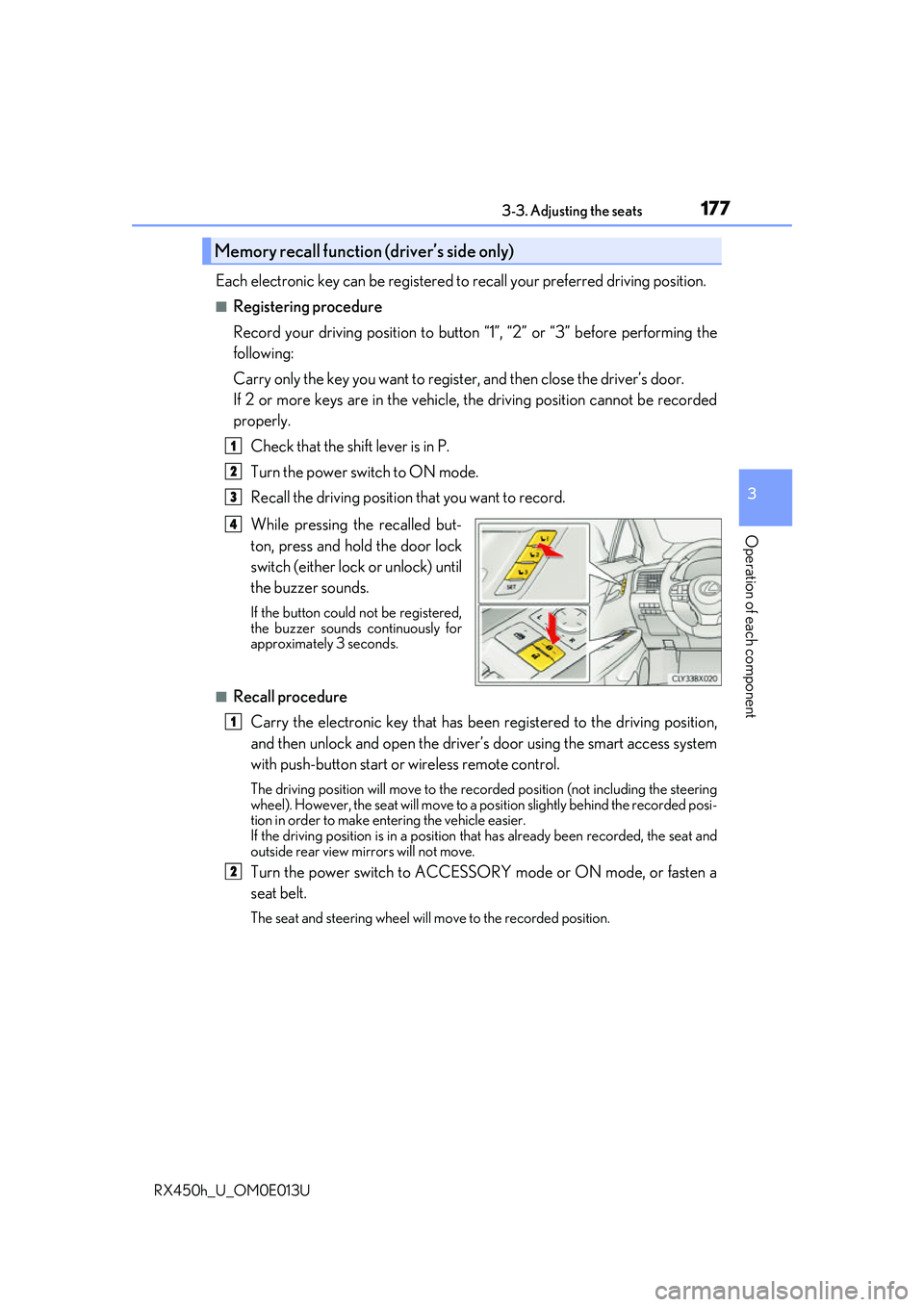
While pressing the recalled but-
ton, press and hold the door lock
switch (either lock or unlock) until
the buzzer sounds.
If the button could not be registered,
the buzzer sounds continuously for
approximately 3 seconds.
■Recall procedureCarry the electronic key that has been registered to the driving position,
and then unlock and open the driver’s door using the smart access system
with push-button start or wireless remote control.
The driving position will move to the recorded position (not including the steering
wheel). However, the seat will move to a position slightly behind the recorded posi-
tion in order to make entering the vehicle easier.
If the driving position is in a position th at has already been recorded, the seat and
outside rear view mirrors will not move.
Turn the power switch to ACCESSORY mode or ON mode, or fasten a
seat belt.
The seat and steering wheel will move to the recorded position.
Memory recall function (driver’s side only)
1
2
3
4
1
2
Page 178 of 660
1783-3. Adjusting the seats
RX450h_U_OM0E013U
■Cancelation procedure
Carry only the key you want to cance l and then close the driver’s door.
If 2 or more keys are in the vehicle, the driving position cannot be canceled
properly.
Turn the power switch to ON mode.
While pressing the “SET” button, press and hold the door lock switch
(either lock or unlock) un til the buzzer sounds twice.
If it button could not be canceled, the buzzer sounds continuously for approxi-
mately 3 seconds.
■Recalling the driving position using the memory recall function
●Different driving positions can be registered for each electronic key. Therefore, the
driving position that is recalled may be di fferent depending on the key being carried.
●If a door other than the driver’s door is unlocked with the smart access system with
push-button start, the driving position cannot be recalled. In this case, press the driving
position button which has been set.
■Customization
Some functions can be customized. ( P. 607)
WARNING
■Seat adjustment caution
Take care during seat adjustment so that the seat does not strike the rear passenger or
squeeze your body against the steering wheel.
1
2
Page 187 of 660
1873-4. Adjusting the steering wheel and mirrors
3
Operation of each component
RX450h_U_OM0E013U
When the mirror select switch is in the “L” or “R” position, the outside rear view
mirrors will automatically angle downwa rds when the vehicle is reversing in
order to give a better view of the ground.
To disable this function, select neither “L” nor “R” of the mirror select switch.
■Adjusting the mirror angle when the vehicle is reversing
With the shift lever in R, adjust the mirror angle at a desired position.
The adjusted angle will be memorized and the mirror will automatically tilt to
the memorized angle whenever the shift lever is shifted to R from next t\
ime.
The memorized downward tilt position of th e mirror is linked to the normal position
(angle adjusted with the shif t lever in other than R). Ther efore, if the normal posi-
tion is changed after adjustment, the tilt position will also change.
When the normal position is chang ed, readjust the angle in reversing.
■Mirror angle can be adjusted when
The power switch is in ACCESSORY or ON mode.
■When disconnecting and reconnect ing 12-volt battery terminals
The automatic folding/extending mirror function will return to off as default. To turn the
function on, press the switch again to select on.
■When the mirrors are fogged up
The outside rear view mirrors can be cleare d using the mirror defoggers. Turn on the
rear window defogger to turn on the outside rear view mirror defoggers. ( P. 409)
■Automatic adjustment of the mirror angle
A desired mirror face angle can be entered to memory and recalled automatically by the
driving position memory. ( P. 174)
■Auto anti-glare function
When the anti-glare inside re ar view mirror is set to automatic mode, the outside rear
view mirrors will activate in conjunction with the anti-glare inside rear view mirror to
reduce reflected light. ( P. 183)
■Using automatic mode in cold weather
When automatic mode is used in cold weather, the door mirror could freeze up and
automatic stowing and return may not be possible. In this case, remove any ice and snow
from the door mirror, then either operate th e mirror using manual mode or move the mir-
ror by hand.
■Customization
Some functions can be customized. ( P. 607)
Linked mirror function when reversing
Page 190 of 660
1903-5. Opening, closing the windows and moon roof
RX450h_U_OM0E013U
■The power windows can be operated when
The power switch is in ON mode.
■Operating the power windows after turning the hybrid system off
The power windows can be operated for ap proximately 45 seconds even after the
power switch is turned to ACCESSORY mode or turned off. They cannot, however, be
operated once either front door is opened.
■Jam protection function
If an object becomes caught between the wi ndow and the window frame, window travel
is stopped and the window is opened slightly.
■Pinch protection function
While the window is opening, if an object is caught between the door and window, win-
dow travel is stopped.
■If the power window does not close or open normally
If the jam protection function or pinch protection function is malfunctioning and a win-
dow cannot be closed or open ed completely, perform the following operations using the
power window switch of the relevant door:
●When not closing normally
With the vehicle stopped and the power switch in ON mode, within 4 seconds of the
jam protection function operating, pull and hold the power window switch in the one-
touch closing position. When the window is closed completely, release the switch.
●When not opening normally
With the vehicle stopped and the power switch in ON mode, within 4 seconds of the
pinch protection function operating, press and hold the power window switch in the
one-touch opening position. When the wind ow is opened completely, release the
switch.
If the window still cannot be closed or opened completely even though the above opera-
tions have been carried out, perform the following initialization procedure.
Turn the power switch to ON mode.
Pull and hold the power window switch in the one-touch closing position.
When the window is closed completely, release the power window switch. Pull and
hold the switch in the one-touch closing position again for approximately 4 seconds.
Press and hold the power window switch in the one-touch opening position. Continue
pressing the switch for 1 second after the window has opened completely.
Pull and hold the power window switch in the one-touch closing position. Continue
pulling the switch for 1 second after the window has closed.
If you release the switch while the window is moving, perform the procedure again from
the beginning.
If, after performing the abov e procedure correctly, the window continues to close but
then re-open slightly or open but then clos e again slightly, have the vehicle inspected by
your Lexus dealer.
1
2
3
4
5
Page 194 of 660
1943-5. Opening, closing the windows and moon roof
RX450h_U_OM0E013U
■The moon roof can be operated when
The power switch is in ON mode.
■Operating the moon roof after turning the hybrid system off
The moon roof can be operated for approximately 45 seconds after the power switch is
turned to ACCESSORY mode or turned off. It cannot, however, be operated once the
driver’s door is opened.
■Jam protection function
If an object is detected between the moon r oof and the frame while the moon roof is clos-
ing or tilting down, travel is stopped and the moon roof opens slightly.
■Sunshade
The sunshade can be opened and closed manually. However, the sunshade will open
automatically when the moon roof is opened.
■Door lock linked moon roof operation
●The moon roof can be opened and closed using the mechanical key.* ( P. 565)
●The moon roof can be opened us ing the wireless remote control.* ( P. 136)
*: These settings must be customized at your Lexus dealer.
Page 198 of 660
1983-5. Opening, closing the windows and moon roof
RX450h_U_OM0E013U
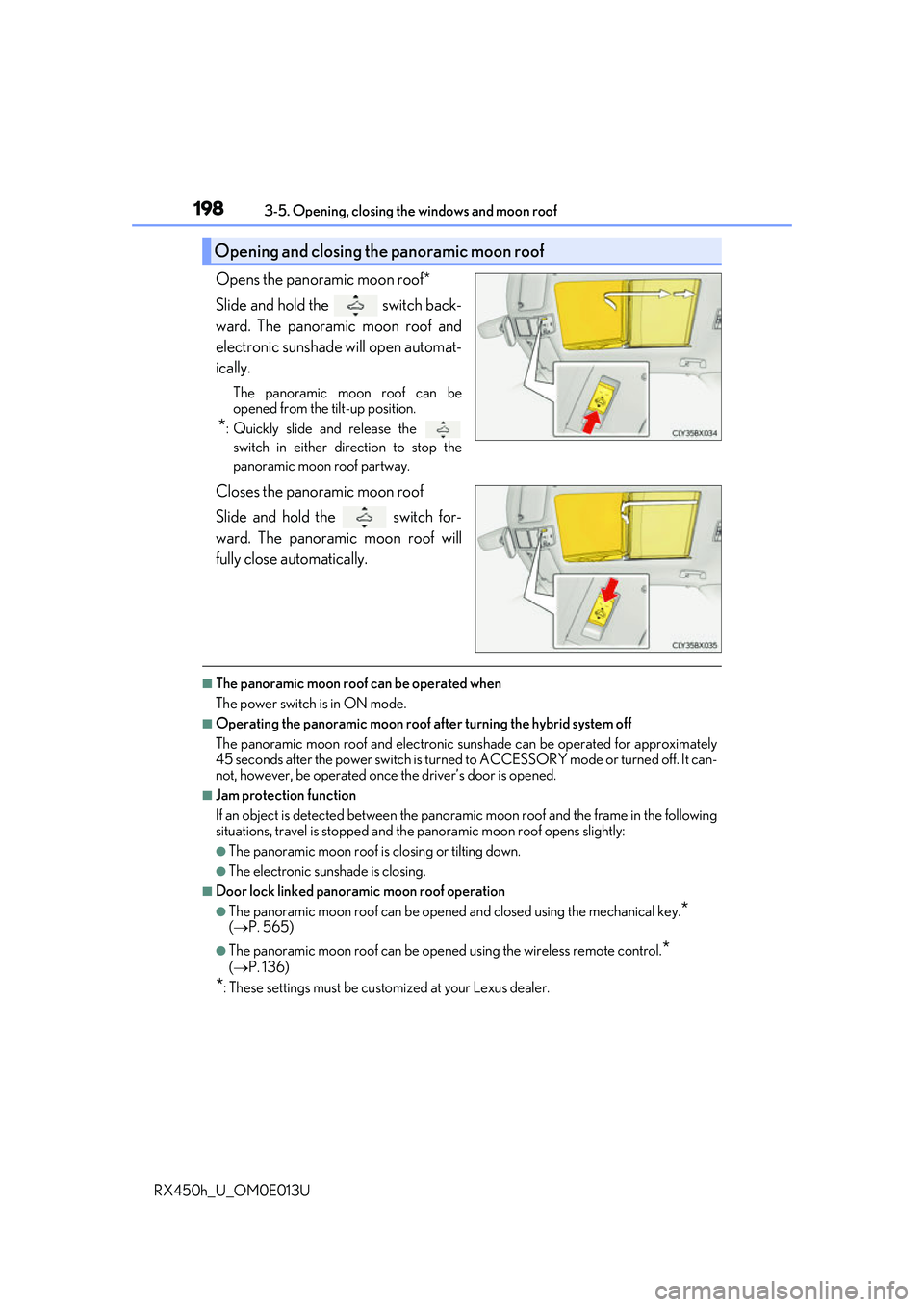
Opens the panoramic moon roof*
Slide and hold the switch back-
ward. The panoramic moon roof and
electronic sunshade will open automat-
ically.
The panoramic moon roof can be
opened from the tilt-up position.
*: Quickly slide and release the switch in either direction to stop the
panoramic moon roof partway.
Closes the panoramic moon roof
Slide and hold the switch for-
ward. The panoramic moon roof will
fully close automatically.
■The panoramic moon roof can be operated when
The power switch is in ON mode.
■Operating the panoramic moon roof af ter turning the hybrid system off
The panoramic moon roof and electronic su nshade can be operated for approximately
45 seconds after the power switch is turned to ACCESSORY mode or turned off. It can-
not, however, be operated once the driver’s door is opened.
■Jam protection function
If an object is detected be tween the panoramic moon roof and the frame in the following
situations, travel is stopped and the panoramic moon roof opens slightly:
●The panoramic moon roof is closing or tilting down.
●The electronic sunshade is closing.
■Door lock linked panoramic moon roof operation
●The panoramic moon roof can be opened and closed using the mechanical key.*
( P. 565)
●The panoramic moon roof can be open ed using the wireless remote control.*
( P. 136)
*: These settings must be customized at your Lexus dealer.
Opening and closing the panoramic moon roof
Page 199 of 660
1993-5. Opening, closing the windows and moon roof
3
Operation of each component
RX450h_U_OM0E013U
■Closing both the panoramic moon roof and electronic sunshade
Slide the
switch forward.
The electronic sunshade will close to the half-open position and pause. The panoramic
moon roof will then fully close. Then the electronic sunshade will fully close.
■When the panoramic moon roof or electronic sunshade does not close normally
Perform the following procedure:
Stop the vehicle.
Turn the power switch to ON mode.
Slide and hold the switch or switch forward. Continue pressing the
switch for approximately 10 seconds afte r the panoramic moon roof or electronic
sunshade closes and reopens. The panora mic moon roof and electronic sunshade
will start to close.
*
Check that the panoramic moon roof and electronic sunshade are fully closed and
release the switch.
*: If the switch is released at the incorrect time, the pr ocedure will have to be per-
formed again from the beginning.
If the panoramic moon roof or electronic sunshade does not fully close even after per-
forming the above procedure correctly, have the vehicle inspected by your Lexus dealer.
■Alarm
The alarm may be triggered if the alarm is set and the panoramic moon roof is closed
using the door lock linked panorami c moon roof operation function. (P. 88)
■Panoramic moon roof open warning buzzer
The buzzer sounds and a message is shown on the multi-information display in the instru-
ment cluster when the power switch is turned off and the driver’s door is opened with the
panoramic moon roof open.
■Customization
Some functions can be customized. ( P. 607)
1
2
3
4
Page 207 of 660
2074-1. Before driving
4
Driving
RX450h_U_OM0E013U
WARNING
Observe the following precautions.
Failure to do so may result in death or serious injury.
■When driving the vehicle
●During normal driving, do not turn off the hybrid system. Turning the hybrid system off
while driving will not cause loss of steering or braking control, however, power assist
to the steering will be lost. This will make it more difficult to steer smoothly, so you
should pull over and stop the vehicle as soon as it is safe to do so.
In the event of an emergency, such as if it becomes impossible to stop the vehicle in
the normal way: P. 529
●Use engine braking (downshift) to maintain a safe speed when driving down a steep
hill.
Using the brakes continuously may cause th e brakes to overheat and lose effective-
ness. ( P. 239)
●Do not adjust the positions of the steering wheel, the seat, or the inside or outside rear
view mirrors while driving.
Doing so may result in a loss of vehicle control.
●Always check that all passengers’ arms, he ads or other parts of their body are not
outside the vehicle.
●AWD models: Do not drive the vehicle off-road.
This is not an AWD vehicle designed for of f-road driving. Proceed with all due cau-
tion if it becomes unavoidable to drive off-road.
●Do not drive across a river or through other bodies of water.
This may cause electric/electronic componen ts to short circuit, damage the hybrid
system or cause other serious damage to the vehicle.
●Do not drive in excess of the speed limit. Even if the legal speed limit permits it, do not
drive over 85 mph (140 km/h) unless your vehicle has high-speed capability tires.
Driving over 85 mph (140 km/h ) may result in tire failure, loss of control and possible
injury. Be sure to consult a tire dealer to determine whether the tires on your vehicle
are high-speed capability tires or no t before driving at such speeds.
Page 210 of 660
2104-1. Before driving
RX450h_U_OM0E013U
WARNING
Observe the following precautions.
Failure to do so may result in death or serious injury.
■When taking a nap in the vehicle
Always turn the hybrid system off. Otherwise, if you accidentally move the shift lever or
depress the accelerator pedal, this could cause an accident or fire due to hybrid system
overheating. Additionally, if the vehicle is parked in a poorly ve ntilated area, exhaust
gases may collect and enter the vehicle, lead ing to death or a serious health hazard.
■When braking
●When the brakes are wet, drive more cautiously.
Braking distance increases when the brakes are wet, and this may cause one side of
the vehicle to brake differently than the other side. Also, the parking brake may not
securely hold the vehicle.
●If the electronically controlled brake function does not operate, do not follow other
vehicles closely and avoid hills or sharp turns that require braking.
In this case, braking is still possible, bu t the brake pedal should be depressed more
firmly than usual. Also, the braking distan ce will increase. Have your brakes fixed
immediately.
●The brake system consists of 2 or more indi vidual hydraulic systems; if one of the sys-
tems fails, the other(s) will still operate. In this case, the brake pedal should be
depressed more firmly than usual and the braking distance will increase. Have your
brakes fixed immediately.
■If the vehicle becomes stuck (AWD models)
Do not spin the wheels excessive ly when any of the tires is up in the air, or the vehicle is
stuck in sand, mud, etc. This may damage the driveline components or propel the vehi-
cle forward or backward, causing an accident.
Page 227 of 660
2274-1. Before driving
4
Driving
RX450h_U_OM0E013U
■Break-in schedule
If your vehicle is new or equipped with any new power train components (such as an
engine, hybrid transmission, rear differential (AWD models) or wheel bearing), Lexus
recommends that you do not tow a trailer unt il the vehicle has been driven for over 500
miles (800 km).
After the vehicle has been driven for over 500 miles (800 km), you can start towing.
However, for the next 500 miles (800 km), drive the vehicle at a speed of less than
50 mph (80 km/h) when towing a trailer, and avoid full throttle acceleration.
■Maintenance
●If you tow a trailer, your vehicle will require more frequent maintenance due to the addi-
tional load. (See “Warranty and Services Guide”, “Owner’s Manual Supplement” or
“Scheduled Maintenance”.)
●Retighten the fixing bolts of the towing ba ll and bracket after approximately 600 miles
(1000 km) of trailer towing.
■If trailer sway occurs
One or more factors (crosswinds, passing ve hicles, rough roads, etc.) can adversely
affect handling of your vehicle and trailer, causing instability.
●If trailer swaying occurs:
• Firmly grip the steering wh eel. Steer straight ahead.
Do not try to control trailer sway ing by turning the steering wheel.
• Begin releasing the accelerator pedal im mediately but very gradually to reduce
speed.
Do not increase speed. Do not apply vehicle brakes.
If you make no extreme correction with the st eering or brakes, your vehicle and trailer
should stabilize. (if enabled, Trailer Sway Control can also he lp to stabilize the vehicle and
trailer.)
●After the trailer sw aying has stopped:
• Stop in a safe place. Get all occupants out of the vehicle.
• Check the tires of the vehicle and the trailer.
• Check the load in the trailer. Make sure the load has not shifted.
Make sure the tongue weight is appropriate, if possible.
• Check the load in the vehicle.
Make sure the vehicle is not ov erloaded after occupants get in.
If you cannot find any problems, the speed at which trailer swaying occurred is beyond
the limit of your particular vehicle-trailer combination.
Drive at a lower speed to prevent instability. Remember that swaying of the towing vehi-
cle-trailer increases as speed increases.