ECO mode LEXUS RX450H 2016 Workshop Manual
[x] Cancel search | Manufacturer: LEXUS, Model Year: 2016, Model line: RX450H, Model: LEXUS RX450H 2016Pages: 660, PDF Size: 14.85 MB
Page 387 of 660
387
4
Driving
RX450h_U_OM0E013U4-6. Driving tips
◆Using Eco drive mode
When using Eco drive mode, the torque corresponding to the accelerator
pedal depression amount can be generate
d more smoothly than it is in normal
conditions. In addition, the operation of the air conditioning system (heat-
ing/cooling) will be minimized, improving the fuel economy. (P. 377)
◆Use of Hybrid System Indicator
The Eco-friendly driving is possible by keeping the indicator needle (except F
SPORT models) or bar display (F SPOR T models) of Hybrid System Indicator
within Eco area. ( P. 100)
◆Shift lever operation
Shift the shift lever to D when stopped at a traffic light, or driving in heavy traf-
fic, etc. Shift the shift lever to P when parking. When using the N, there is no
positive effect on fuel consumption. In the N, the gasoline engine operates but
electricity cannot be generated. Also, wh en using the air conditioning system,
etc., the hybrid battery (tractio n battery) power is consumed.
◆Accelerator pedal/brake pedal operation
●Drive your vehicle smoothly. Avoid ab rupt acceleration and deceleration.
Gradual acceleration and deceleration will make more effective use of the
electric motor (traction motor) without having to use gasoline engine
power.
●Avoid repeated acceleration. Repeated acceleration consumes hybrid bat-
tery (traction battery) power, resulting in poor fuel consumption. Battery
power can be restored by driving with the accelerator pedal slightly
released.
◆When braking
Make sure to operate the brakes gently and in a timely manner. A greater
amount of electrical energy can be regenerated when slowing down.
Hybrid vehicle driving tips
For economical and ecological driving, pay attention to the following points:
Page 388 of 660
3884-6. Driving tips
RX450h_U_OM0E013U
◆Delays
Repeated acceleration and deceleration, as well as long waits at traffic lights,
will lead to bad fuel economy. Check traffic reports before leaving and avoid
delays as much as possible. When drivin g in a traffic jam, gently release the
brake pedal to allow the vehicle to move forward slightly while avoiding over-
use of the accelerator pedal. Doing so can help control excessive gasoline
consumption.
◆Highway driving
Control and maintain the vehicle at a co nstant speed. Before stopping at a toll
booth or similar, allow plenty of ti me to release the accelerator and gently
apply the brakes. A greater amount of electrical energy can be regenerated
when slowing down.
◆Air conditioning
Use the air conditioning only when necessary. Doing so can help reduce
excessive gasoline consumption.
In summer: When the ambient temperature is high, use the recirculated air
mode. Doing so will help to reduce the burden on the air conditioning system
and reduce fuel consumption as well.
In winter: Because the gasoline engine will not automatically cut out until it
and the interior of the vehicle are warm , it will consume fuel. Also, fuel con-
sumption can be improved by av oiding overuse of the heater.
◆Checking tire inflation pressure
Make sure to check the tire inflation pr essure frequently. Improper tire infla-
tion pressure can cause poor fuel economy.
Also, as snow tires can cause large amou nts of friction, their use on dry roads
can lead to poor fuel economy. Use tires that are appropriate for the season.
Page 400 of 660
4005-1. Basic operation of the Remote Touch screen
RX450h_U_OM0E013U
■Screen display during low temperatures
When the ambient temperature is extremely low, screen response may be delayed even
if the Remote Touch is operated.
WARNING
■When using the Remote Touch
●Do not allow fingers, fingernails or hair to become caught in the Remote Touch as this
may cause an injury.
●Be careful when selecting the Remote Touch in extreme temperatures as it may
become very hot or cold due to the temperature inside the vehicle.
NOTICE
■To prevent damage to the Remote Touch
●Do not allow the Remote Touch to come into contact with food, liquid, stickers or lit
cigarettes as doing so may cause it to change color, emit a strange odor or stop func-
tioning.
●Do not subject the Remote Touch to excessive pressure or strong impact as the knob
may bend or break off.
●Do not allow coins, contact lenses or ot her such items to become caught in the
Remote Touch as this may cause it to stop functioning.
●Items of clothing may rip if they become caught on the Remote Touch knob.
●If your hand or any object is on the Remo te Touch knob when the power switch is in
ACCESSORY mode, the Remote Touch knob may not operate properly.
Page 407 of 660
4075-2. Using the air conditioning system and defogger
5
Interior features
RX450h_U_OM0E013U
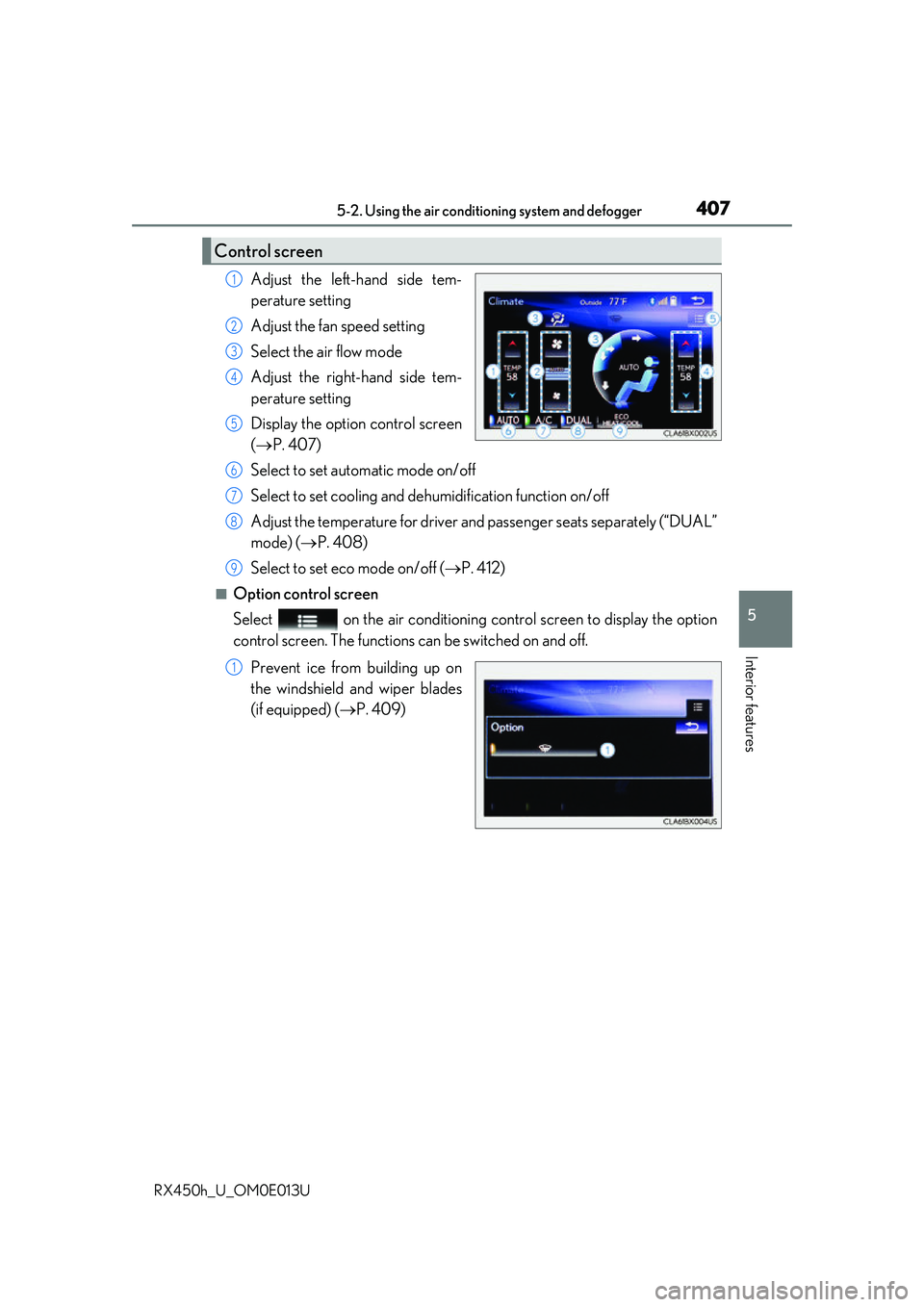
Adjust the left-hand side tem-
perature setting
Adjust the fan speed setting
Select the air flow mode
Adjust the right-hand side tem-
perature setting
Display the option control screen
(P. 407)
Select to set automatic mode on/off
Select to set cooling and dehumidification function on/off
Adjust the temperature for driver an d passenger seats separately (“DUAL”
mode) ( P. 408)
Select to set eco mode on/off ( P. 412)
■Option control screen
Select on the air conditioning control screen to display the option
control screen. The functions can be switched on and off.
Prevent ice from building up on
the windshield and wiper blades
(if equipped) ( P. 409)
Control screen
1
2
3
4
5
6
7
8
9
1
Page 412 of 660
4125-2. Using the air conditioning system and defogger
RX450h_U_OM0E013U
■Windshield fog detection function
When automatic mode is set, the humidity sensor ( P. 413) detects fog on the wind-
shield and controls the air cond itioning system to prevent fog.
■Outside/recirculated air mode
●When driving on dusty roads such as tunnels or in heavy traffic, set the outside/recircu-
lated air mode button to the recirculated air mode. This is effective in preventing out-
side air from enteri ng the vehicle interior. During cooling operation, setting the
recirculated air mode will also cool the vehicle interior effectively.
●Outside/recirculated air mode may automa tically switch depending on the tempera-
ture setting or the inside temperature.
■When the outside temperature is low
The dehumidification function may not operate even when “A/C” is selected.
■Operation of the air conditioning system in Eco drive mode
●In the Eco drive mode, the air conditioning sy stem is controlled as follows to prioritize
fuel efficiency
• Engine speed and compressor operation controlled to restrict heating/cooling
capacity
• Fan speed restricted when automatic mode is selected
●To improve air conditioning performa nce, perform the following operations
• Adjust the fan speed
• Turn off Eco drive mode
■Ventilation and air conditioning odors
●To let fresh air in, set the air conditioning system to the outside air mode.
●During use, various odors from inside and outside the vehicle may enter into and accu-
mulate in the air conditioning system. This may then cause odor to be emitted from the
vents.
●To reduce potential odors from occurring:
• It is recommended that the air conditioning system be set to outside air mode prior
to turning the vehicle off.
• The start timing of the blower may be dela yed for a short period of time immediately
after the air conditioning system is started in automatic mode.
■Air conditioning filter
P. 501
■Customization
Some functions can be customized ( P. 607)
Page 435 of 660
4355-5. Using the other interior features
5
Interior features
RX450h_U_OM0E013U
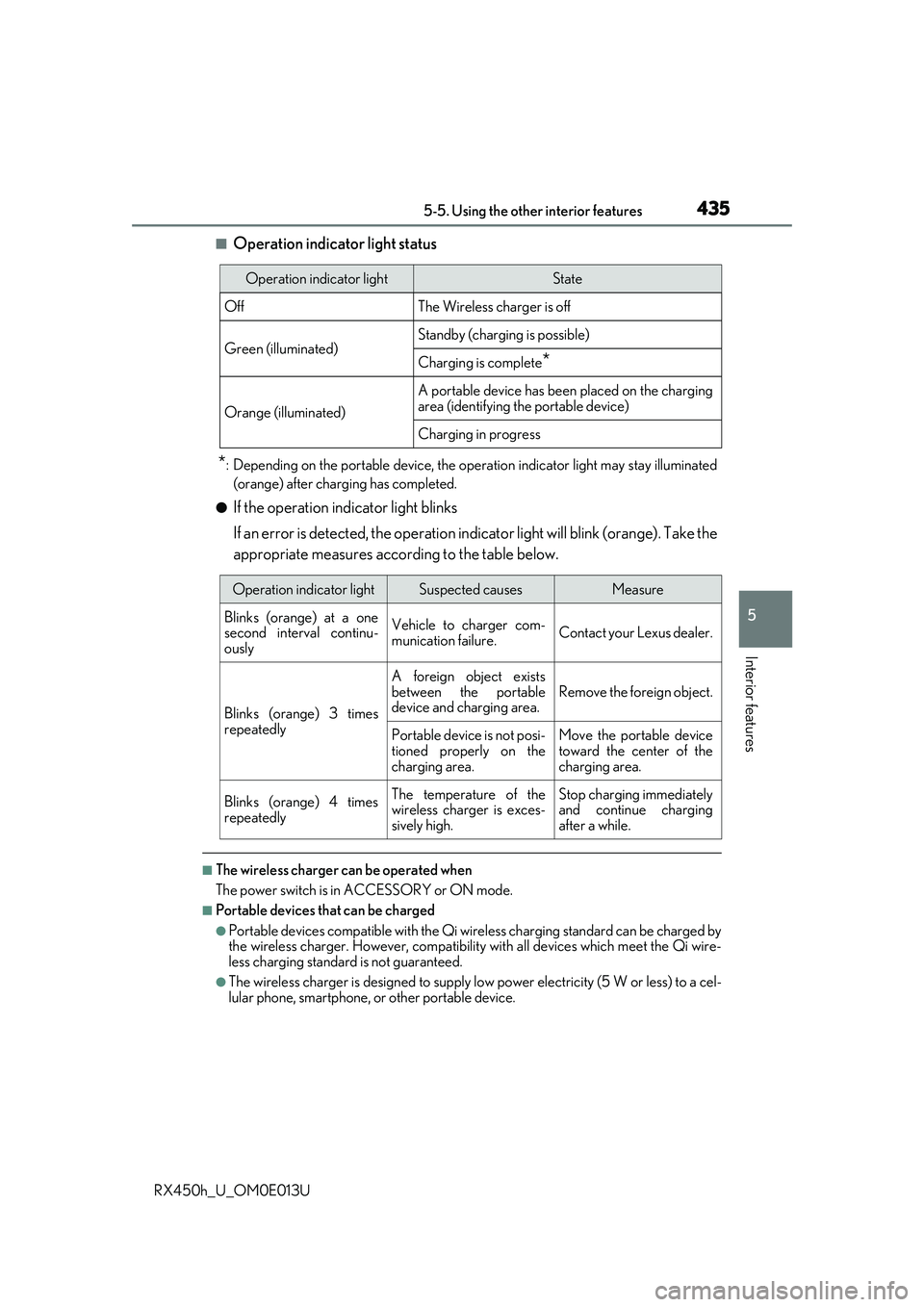
■Operation indicator light status
*: Depending on the portable device, the operation indicator light may stay illuminated
(orange) after charging has completed.
●If the operation indicator light blinks
If an error is detected, the operation in dicator light will blink (orange). Take the
appropriate measures according to the table below.
■The wireless charger can be operated when
The power switch is in ACCESSORY or ON mode.
■Portable devices t hat can be charged
●Portable devices compatible with the Qi wireless charging standard can be charged by
the wireless charger. However, compatibility with all devices which meet the Qi wire-
less charging standard is not guaranteed.
●The wireless charger is designed to supply low power electricity (5 W or less) to a cel-
lular phone, smartphone, or other portable device.
Operation indicator lightState
OffThe Wireless charger is off
Green (illuminated)Standby (charging is possible)
Charging is complete*
Orange (illuminated)
A portable device has been placed on the charging
area (identifying the portable device)
Charging in progress
Operation indicator lightSuspected causesMeasure
Blinks (orange) at a one
second interval continu-
ously Vehicle to charger com-
munication failure.
Contact your Lexus dealer.
Blinks (orange) 3 times
repeatedly A foreign object exists
between the portable
device and charging area.
Remove the foreign object.
Portable device is not posi-
tioned properly on the
charging area. Move the portable device
toward the center of the
charging area.
Blinks (orange) 4 times
repeatedly The temperature of the
wireless charger is exces-
sively high.Stop charging immediately
and continue charging
after a while.
Page 454 of 660
4545-5. Using the other interior features
RX450h_U_OM0E013U
■Safety Connect Serv ices Information
●Phone calls using the vehicles Bluetooth® technology will not be possible during Safety
Connect.
●Safety Connect is available beginning Fall 2009 on select Lexus models. Contact with
the Safety Connect response center is dependent upon the telematics device being in
operative condition, cellular connection availability, and GP S satellite signal reception,
which can limit the ability to reach the response center or receive emergency service
support. Enrollment and Telematics Subscr iption Service Agreement required. A vari-
ety of subscription terms is available; charges vary by subscription term selected.
●Automatic Collision Notification, Emergenc y Assistance and Stolen Vehicle Location
will function in the United States, including Hawaii and Alaska, and in Canada, and
Enhanced Roadside Assistance will function in the United States (except Hawaii) and in
Canada. No Safety Connect services will function outside of the United States in coun-
tries other than Canada.
●Safety Connect services are not subject to section 255 of the Telecommunications Act
and the device is not TTY compatible.
■Languages
The Safety Connect response ce nter will offer support in multiple languages. The Safety
Connect system will offer voice prompts in En glish and Spanish. Please indicate your lan-
guage of choice when enrolling.
■When contacting the response center
You may be unable to contact the resp onse center if the network is busy.
When the power switch is turned to ON mode, the red indicator light comes on
for 2 seconds then turns off. Afterward, the green indicator light comes on, indi-
cating that the service is active.
The following indicator light patterns indicate specific system usage conditions:
●Green indicator light on = Active service
●Green indicator light flashing = Safety Connect call in process
●Red indicator light (except at vehicle start-up) = System malfunction (contact
your Lexus dealer)
●No indicator light (off) = Safety Connect service not active
Safety Connect LED light Indicators
Page 459 of 660
4596-1. Maintenance and care
6
Maintenance and care
RX450h_U_OM0E013U
■Note for a smart access system with push-button start
●If the door handle becomes wet while the electronic key is within the effective range,
the door may lock and unlock repeatedly. Place the key in a position 6 ft. (2 m) or more
separate from the vehicle while the vehicle is being washed. (Take care to ensure that
the key is not stolen.)
●If the electronic key is inside the vehicle and a door handle becomes wet during a car
wash, a buzzer will sound outside the vehicle. To turn off the alarm, lock all the doors.
●Set the electronic key to battery-saving mode to disable the sm art access system with
push-button start. ( P. 159)
■Aluminum wheels
●Remove any dirt immediately by using a neut ral detergent. Do not use hard brushes or
abrasive cleaners. Do not use stro ng or harsh chemical cleaners.
Use the same mild detergent as used on the paint.
●Do not use detergent on the wheels when they are hot, for example after driving for
long distance in the hot weather.
●Wash detergent from the wheels immediately after use.
■Bumpers
Do not scrub with abrasive cleaners.
■Front side windows water-repellent coating
●The following precautions can extend the effectiveness of the water-repellent coating.
• Remove any dirt, etc. from the front side windows regularly.
• Do not allow dirt and dust to accumulate on the windows for a long period. Clean the windows with a soft, damp cloth as soon as possible.
• Do not use wax or glass cleaners that co ntain abrasives when cleaning the windows.
• Do not use any metallic objects to remove condensation build up.
●When the water-repellent performance has become insufficient, the coating can be
repaired. Contact your Lexus dealer.
Page 472 of 660
4726-3. Do-it-yourself maintenance
RX450h_U_OM0E013U
*: Vehicles with single-beam headlights
Washer fluid
( P. 482)• Water or washer fluid containing antifreeze (for winter use)
• Funnel (used only for adding water or washer fluid)
WARNING
The engine compartment contains many mechan isms and fluids that may move suddenly,
become hot, or become electrically energize d. To avoid death or serious injury, observe
the following precautions.
■When working on the engine compartment
●Make sure that the indicator on the po wer switch and the “READY” indicator are
both off.
●Keep hands, clothing and tools away from the moving fan and engine drive belt.
●Be careful not to touch the engine, power co ntrol unit, radiator, exhaust manifold, etc.
right after driving as they may be hot. Oil and other fluids may also be hot.
●Do not leave anything that may burn easily, such as paper and rags, in the engine
compartment.
●Do not smoke, cause sparks or expose an open flame to fuel. Fuel fumes are flamma-
ble.
■When working near the electric cooling fans or radiator grille
Be sure the power switch is off.
With the power switch in ON mode, the electric cooling fans may automatically start to
run if the air conditioning is on and/or the coolant temperature is high. ( P. 480)
■Safety glasses
Wear safety glasses to prevent flying or falling material, fluid spray, etc. from getting in
your eyes.
NOTICE
■If you remove the air cleaner filter
Driving with the air cleaner f ilter removed may cause excessive engine wear due to dirt
in the air.
ItemsParts and tools
Page 484 of 660
4846-3. Do-it-yourself maintenance
RX450h_U_OM0E013U
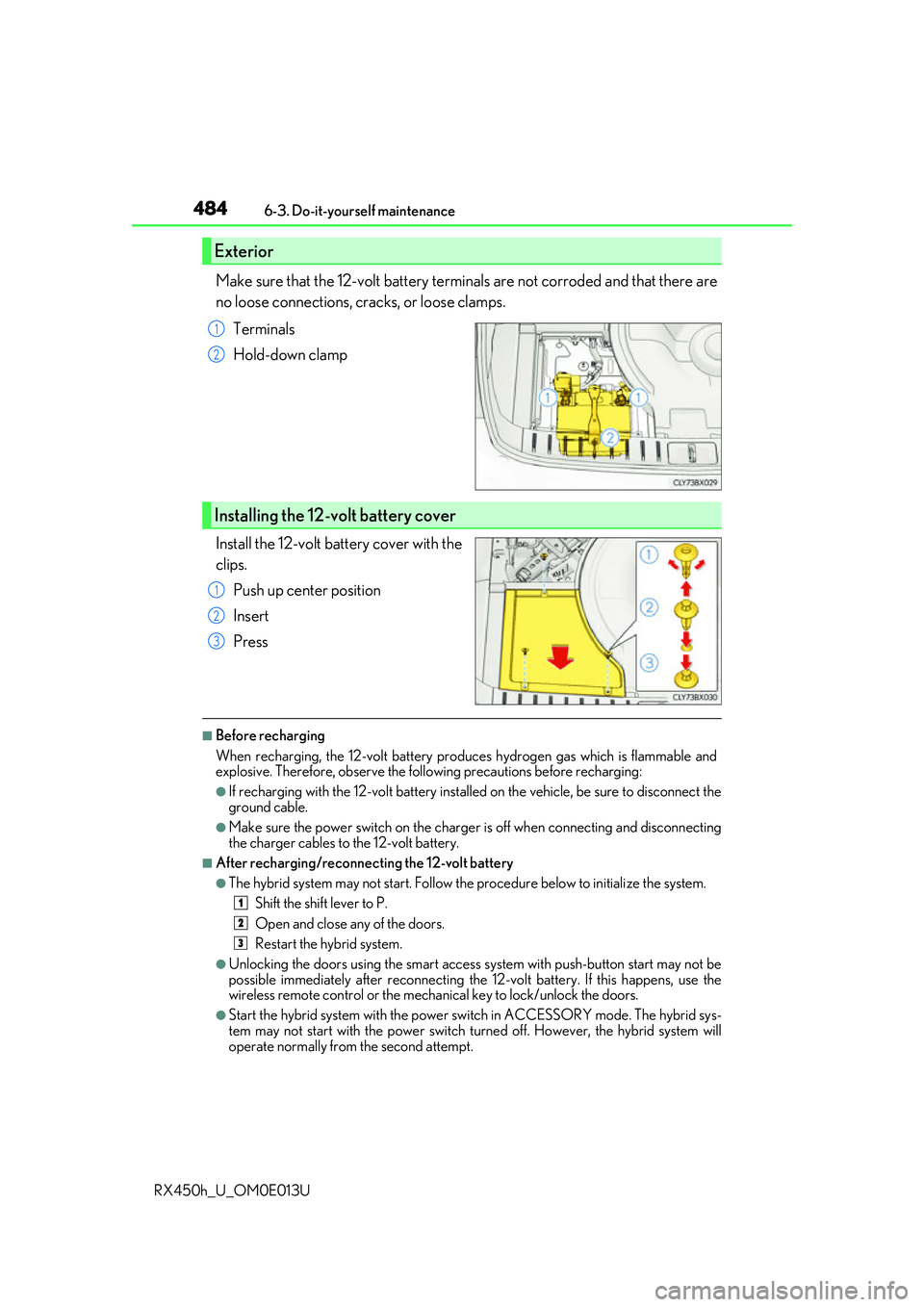
Make sure that the 12-volt battery terminals are not corroded and that there are
no loose connections, cracks, or loose clamps. Terminals
Hold-down clamp
Install the 12-volt battery cover with the
clips. Push up center position
Insert
Press
■Before recharging
When recharging, the 12-volt battery produces hydrogen gas which is flammable and
explosive. Therefore, observe the following precautions before recharging:
●If recharging with the 12-volt battery installed on the vehicle, be sure to disconnect the
ground cable.
●Make sure the power switch on the charge r is off when connecting and disconnecting
the charger cables to the 12-volt battery.
■After recharging/reconnecting the 12-volt battery
●The hybrid system may not start. Follow the procedure below to initialize the system.
Shift the shift lever to P.
Open and close any of the doors.
Restart the hybrid system.
●Unlocking the doors using the smart access system with push-button start may not be
possible immediately after reconnecting the 12-volt battery. If this happens, use the
wireless remote control or the mechan ical key to lock/unlock the doors.
●Start the hybrid system with the power sw itch in ACCESSORY mode. The hybrid sys-
tem may not start with the power switch turned off. However, the hybrid system will
operate normally from the second attempt.
Exterior
1
2
Installing the 12-volt battery cover
1
2
3
1
2
3