brake light LEXUS RX450H 2016 Owner's Manual
[x] Cancel search | Manufacturer: LEXUS, Model Year: 2016, Model line: RX450H, Model: LEXUS RX450H 2016Pages: 660, PDF Size: 14.85 MB
Page 284 of 660
2844-5. Using the driving support systems
RX450h_U_OM0E013U
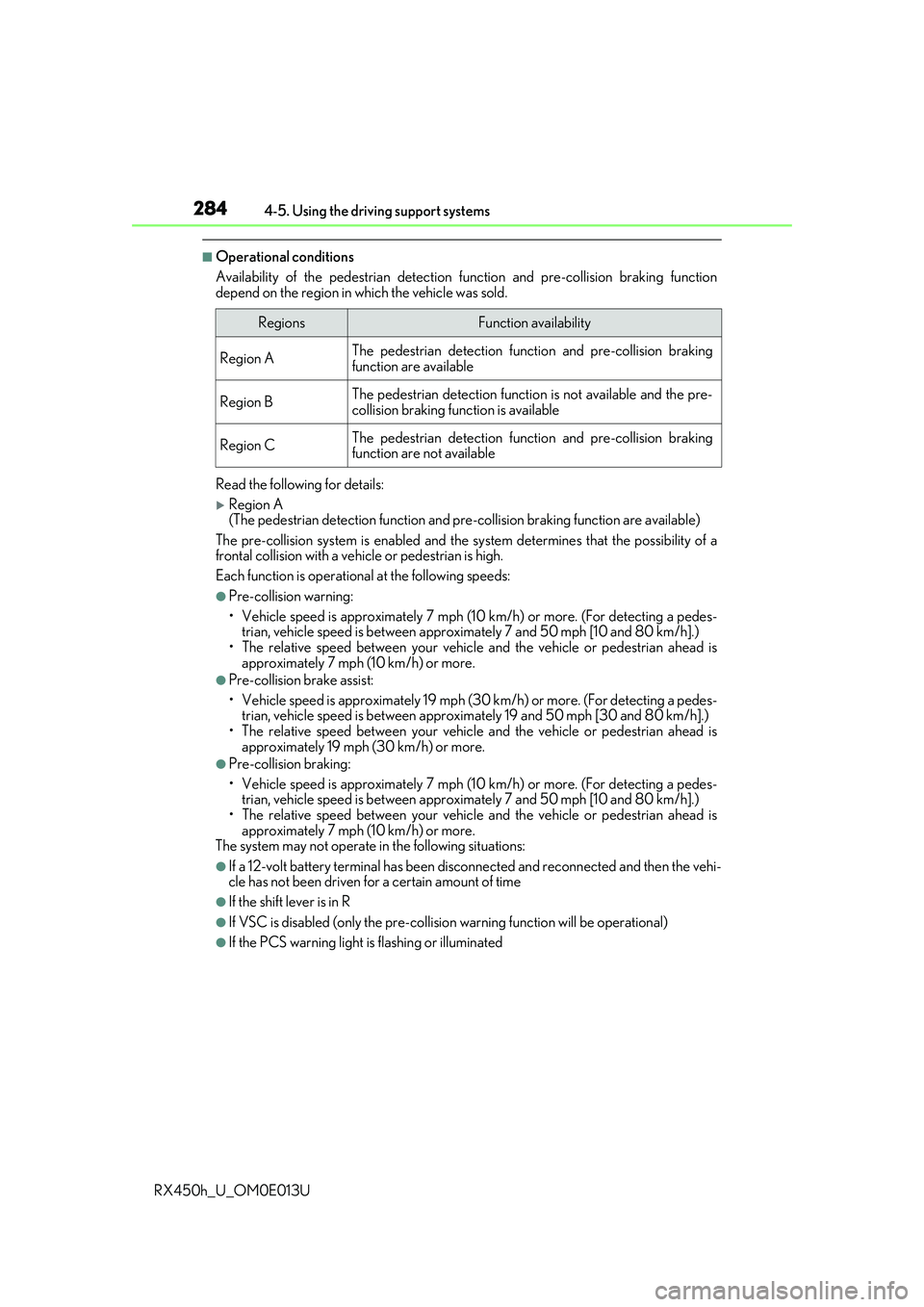
■Operational conditions
Availability of the pedestrian detection function and pre-collision braking function
depend on the region in which the vehicle was sold.
Read the following for details:
Region A
(The pedestrian detection function and pre-collision braking function are available)
The pre-collision system is enabled and the sy stem determines that the possibility of a
frontal collision with a vehicle or pedestrian is high.
Each function is operationa l at the following speeds:
●Pre-collision warning:
• Vehicle speed is approximately 7 mph (10 km/h) or more. (For detecting a pedes-
trian, vehicle speed is between approximately 7 and 50 mph [10 and 80 km/h].)
• The relative speed between your vehicle and the vehicle or pedestrian ahead is approximately 7 mph (10 km/h) or more.
●Pre-collision brake assist:
• Vehicle speed is approximately 19 mph (3 0 km/h) or more. (For detecting a pedes-
trian, vehicle speed is between approxim ately 19 and 50 mph [30 and 80 km/h].)
• The relative speed between your vehicle and the vehicle or pedestrian ahead is approximately 19 mph (30 km/h) or more.
●Pre-collision braking:
• Vehicle speed is approximately 7 mph (10 km/h) or more. (For detecting a pedes-
trian, vehicle speed is between approximately 7 and 50 mph [10 and 80 km/h].)
• The relative speed between your vehicle and the vehicle or pedestrian ahead is approximately 7 mph (10 km/h) or more.
The system may not operate in the following situations:
●If a 12-volt battery terminal has been disconnected and reconnected and then the vehi-
cle has not been driven for a certain amount of time
●If the shift lever is in R
●If VSC is disabled (only the pre-collis ion warning function will be operational)
●If the PCS warning light is flashing or illuminated
RegionsFunction availability
Region AThe pedestrian detection func tion and pre-collision braking
function are available
Region BThe pedestrian detection function is not available and the pre-
collision braking function is available
Region CThe pedestrian detection func tion and pre-collision braking
function are not available
Page 285 of 660
2854-5. Using the driving support systems
4
Driving
RX450h_U_OM0E013U
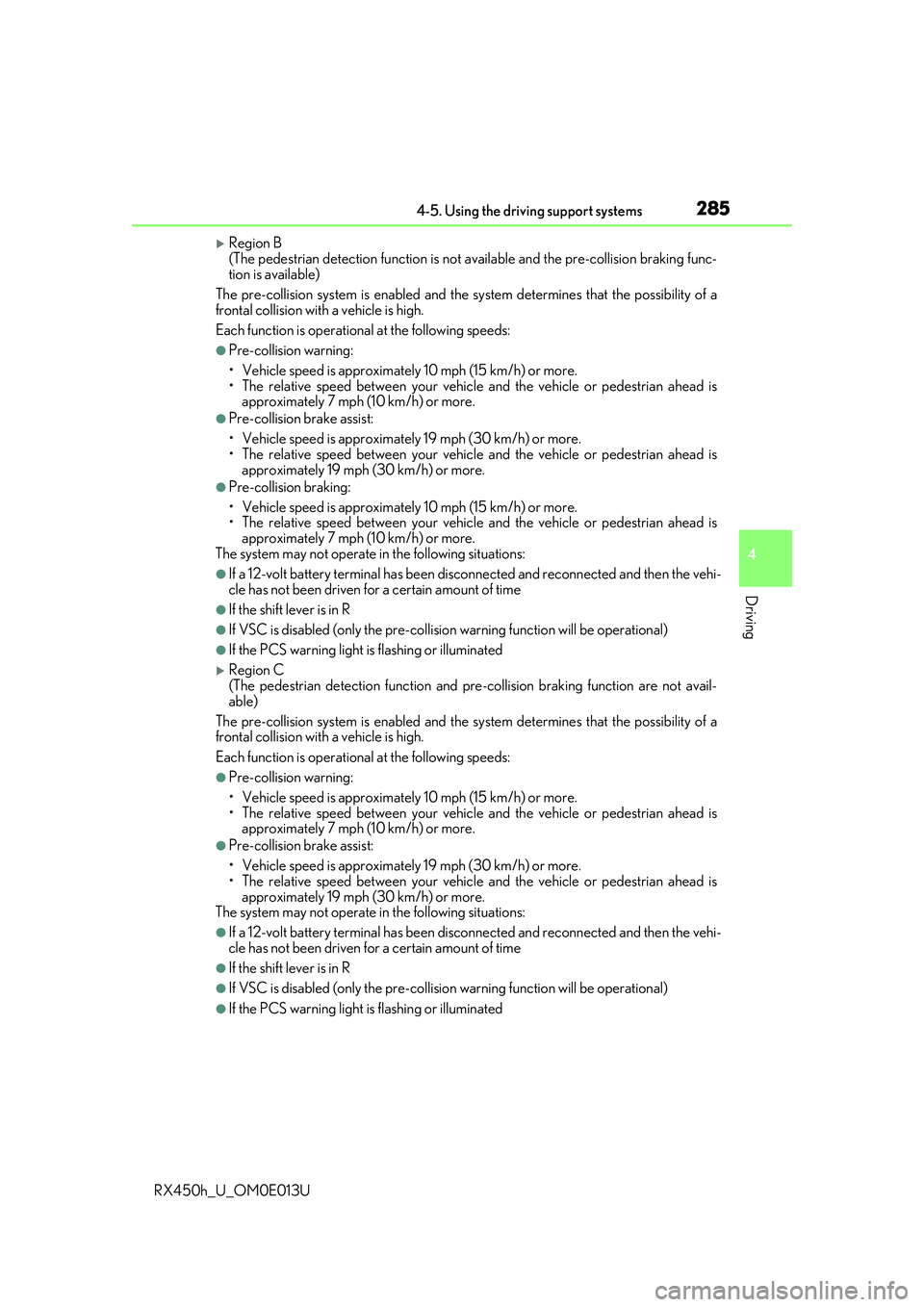
Region B
(The pedestrian detection function is not available and the pre-collision braking func-
tion is available)
The pre-collision system is enabled and the sy stem determines that the possibility of a
frontal collision with a vehicle is high.
Each function is operationa l at the following speeds:
●Pre-collision warning:
• Vehicle speed is approximatel y 10 mph (15 km/h) or more.
• The relative speed between your vehicle and the vehicle or pedestrian ahead is
approximately 7 mph (10 km/h) or more.
●Pre-collision brake assist:
• Vehicle speed is approximatel y 19 mph (30 km/h) or more.
• The relative speed between your vehicle and the vehicle or pedestrian ahead is approximately 19 mph (30 km/h) or more.
●Pre-collision braking:
• Vehicle speed is approximatel y 10 mph (15 km/h) or more.
• The relative speed between your vehicle and the vehicle or pedestrian ahead is approximately 7 mph (10 km/h) or more.
The system may not operate in the following situations:
●If a 12-volt battery terminal has been disconnected and reconnected and then the vehi-
cle has not been driven for a certain amount of time
●If the shift lever is in R
●If VSC is disabled (only the pre-collis ion warning function will be operational)
●If the PCS warning light is flashing or illuminated
Region C
(The pedestrian detection function and pre-collision braking function are not avail-
able)
The pre-collision system is enabled and the sy stem determines that the possibility of a
frontal collision with a vehicle is high.
Each function is operationa l at the following speeds:
●Pre-collision warning:
• Vehicle speed is approximatel y 10 mph (15 km/h) or more.
• The relative speed between your vehicle and the vehicle or pedestrian ahead is approximately 7 mph (10 km/h) or more.
●Pre-collision brake assist:
• Vehicle speed is approximatel y 19 mph (30 km/h) or more.
• The relative speed between your vehicle and the vehicle or pedestrian ahead is approximately 19 mph (30 km/h) or more.
The system may not operate in the following situations:
●If a 12-volt battery terminal has been disconnected and reconnected and then the vehi-
cle has not been driven for a certain amount of time
●If the shift lever is in R
●If VSC is disabled (only the pre-collis ion warning function will be operational)
●If the PCS warning light is flashing or illuminated
Page 291 of 660
2914-5. Using the driving support systems
4
Driving
RX450h_U_OM0E013U
■If the PCS warning light flashes and a warning message is displayed on the multi-infor-
mation display
The pre-collision system may be temporarily unavailable or there may be a malfunction
in the system.
●In the following situations, the warning light will turn off, the message will disappear and
the system will become operational when normal operating conditions return:
• When the radar sensor or ca mera sensor or the area around either sensor is hot,
such as in the sun
• When the radar sensor or camera sensor or the area around either sensor is cold,
such as in an extremely cold environment
• When the radar sensor or front grille embl em is dirty or covered with snow, etc.
• If the camera sensor is obstructed, such as when the hood is open or a sticker is
attached to the windshield near the camera sensor
●If the PCS warning light continues to flash or the warning message does not disappear,
the system may be malfunctioning. Have the vehicle inspected by your Lexus dealer
immediately.
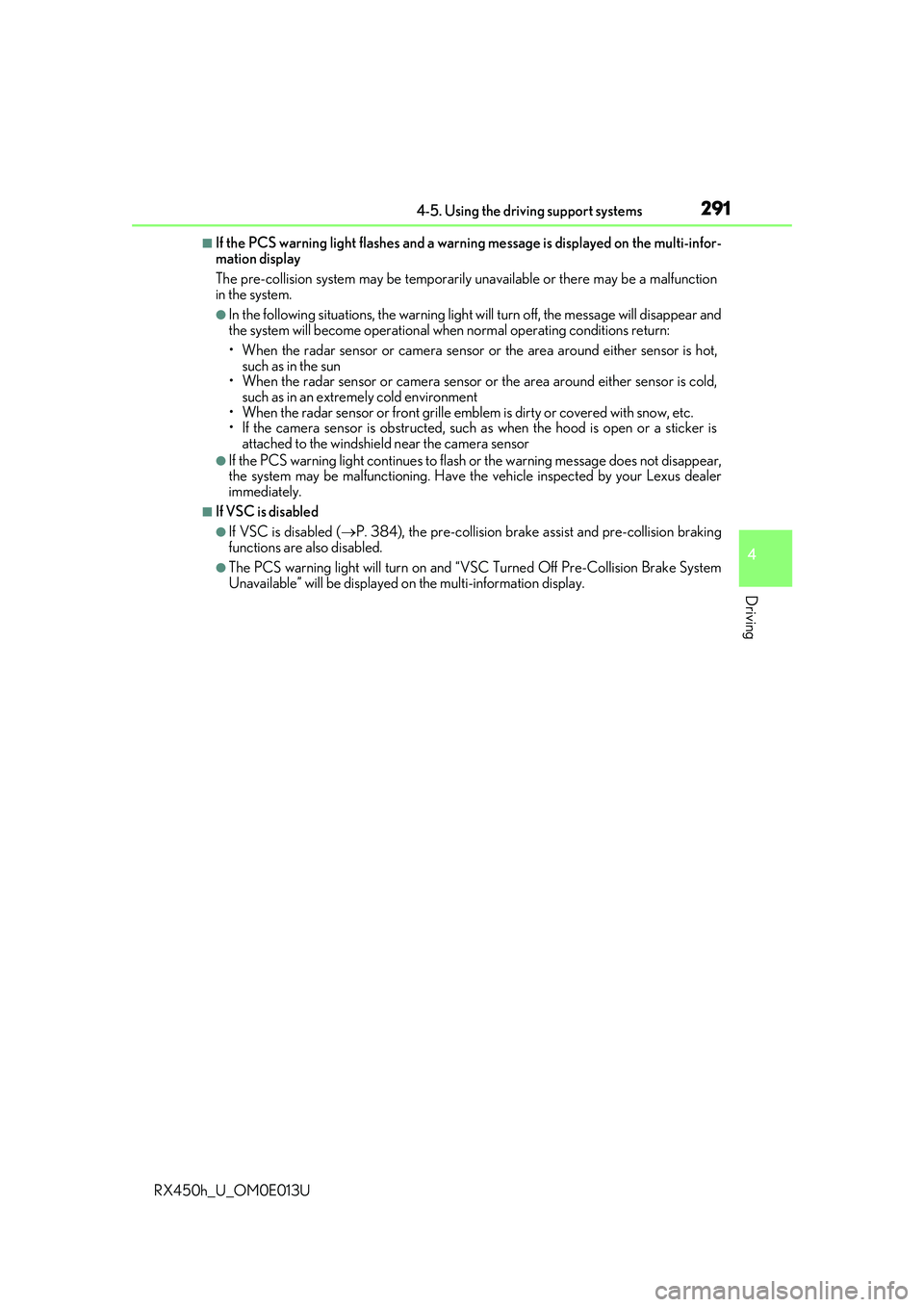
■If VSC is disabled
●If VSC is disabled ( P. 384), the pre-collision brake assist and pre-collision braking
functions are also disabled.
●The PCS warning light will turn on and “V SC Turned Off Pre-Collision Brake System
Unavailable” will be displayed on the multi-information display.
Page 314 of 660
3144-5. Using the driving support systems
RX450h_U_OM0E013U
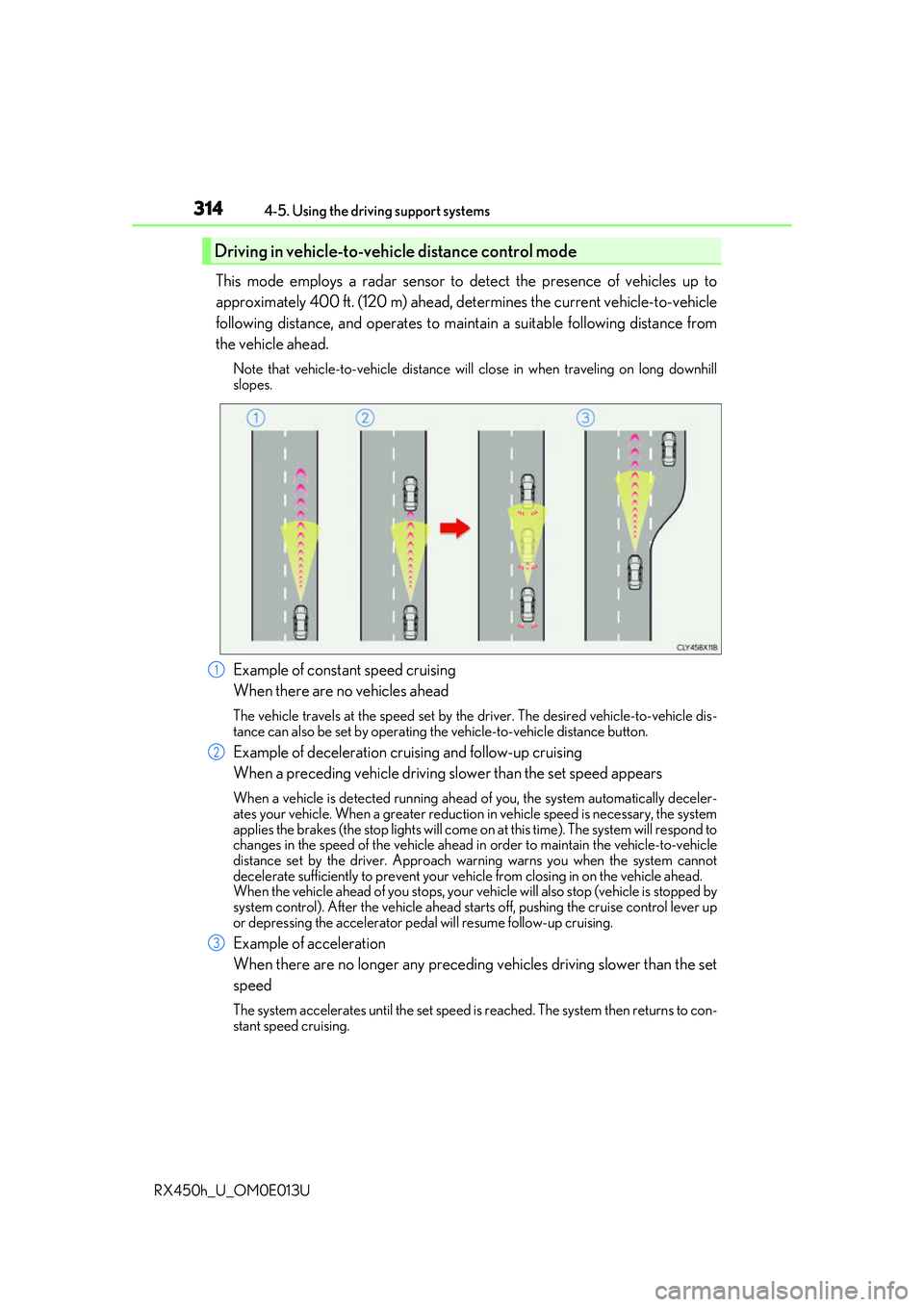
This mode employs a radar sensor to detect the presence of vehicles up to
approximately 400 ft. (120 m) ahead, de termines the current vehicle-to-vehicle
following distance, and operates to main tain a suitable following distance from
the vehicle ahead.
Note that vehicle-to-vehicle distance will close in when traveling on long downhill
slopes.
Example of constant speed cruising
When there are no vehicles ahead
The vehicle travels at the speed set by the driver. The desired vehicle-to-vehicle dis-
tance can also be set by operating the vehicle-to-vehicle distance button.
Example of deceleration cruising and follow-up cruising
When a preceding vehicle driving slower than the set speed appears
When a vehicle is detected running ahead of you, the system automatically deceler-
ates your vehicle. When a greater reduction in vehicle speed is necessary, the system
applies the brakes (the stop lights will come on at this time). The system will respond to
changes in the speed of the vehicle ahead in order to maintain the vehicle-to-vehicle
distance set by the driver. Approach warning warns you when the system cannot
decelerate sufficie ntly to prevent your vehicle from closing in on the vehicle ahead.
When the vehicle ahead of you stops, your vehicle will also stop (vehicle is stopped by
system control). After the vehicle ahead starts off, pushing the cruise control lever up
or depressing the accelerator pedal will resume follow-up cruising.
Example of acceleration
When there are no longer any preceding vehicles driving slower than the set
speed
The system accelerates until the set speed is reached. The system then returns to con-
stant speed cruising.
Driving in vehicle-to-vehicle distance control mode
1
2
3
Page 326 of 660
3264-5. Using the driving support systems
RX450h_U_OM0E013U
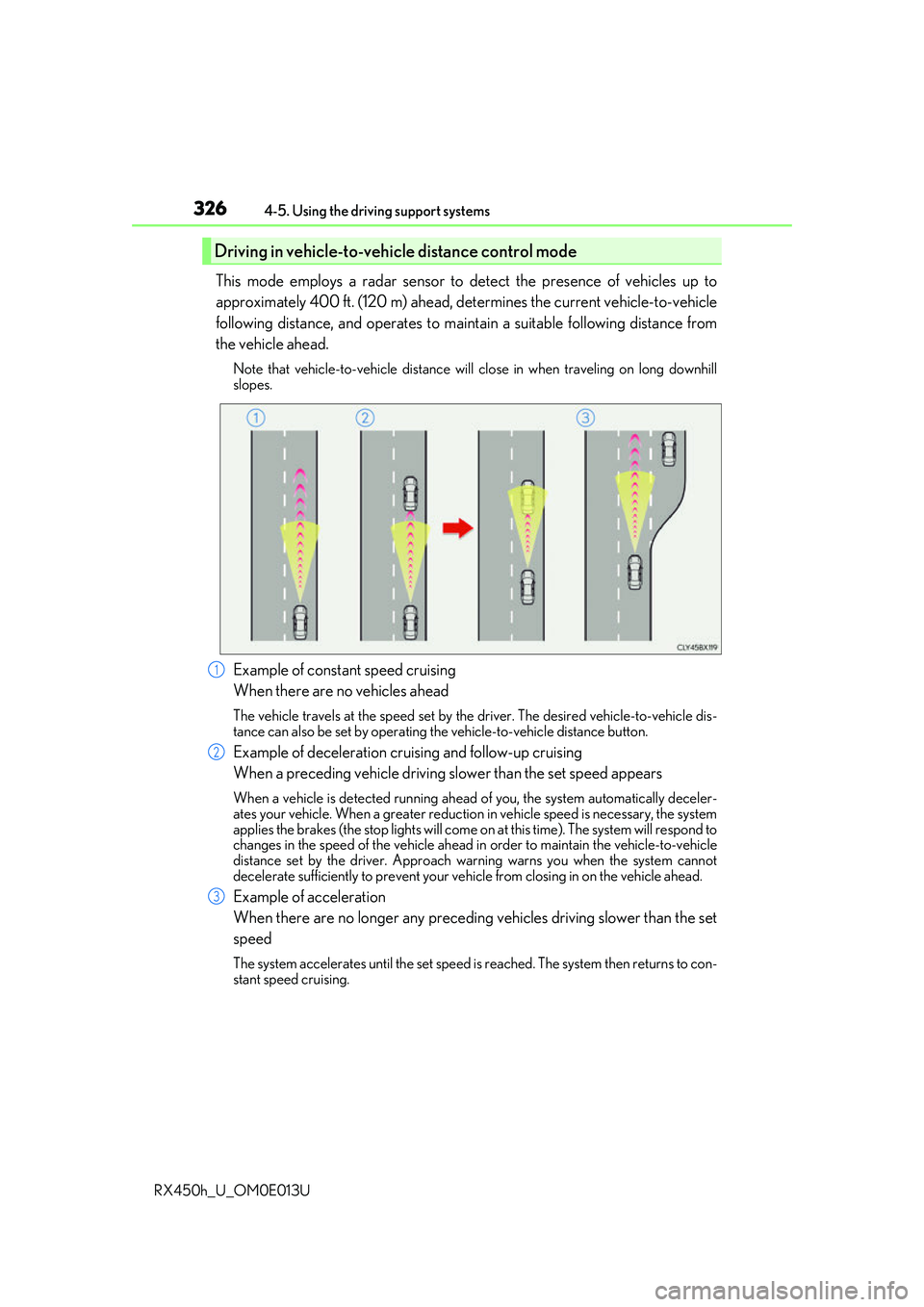
This mode employs a radar sensor to detect the presence of vehicles up to
approximately 400 ft. (120 m) ahead, de termines the current vehicle-to-vehicle
following distance, and operates to main tain a suitable following distance from
the vehicle ahead.
Note that vehicle-to-vehicle distance will close in when traveling on long downhill
slopes.
Example of constant speed cruising
When there are no vehicles ahead
The vehicle travels at the speed set by the driver. The desired vehicle-to-vehicle dis-
tance can also be set by operating the vehicle-to-vehicle distance button.
Example of deceleration cruising and follow-up cruising
When a preceding vehicle driving slower than the set speed appears
When a vehicle is detected running ahead of you, the system automatically deceler-
ates your vehicle. When a greater reduction in vehicle speed is necessary, the system
applies the brakes (the stop lights will come on at this time). The system will respond to
changes in the speed of the vehicle ahead in order to maintain the vehicle-to-vehicle
distance set by the driver. Approach warning warns you when the system cannot
decelerate sufficie ntly to prevent your vehicle from closing in on the vehicle ahead.
Example of acceleration
When there are no longer any preceding vehicles driving slower than the set
speed
The system accelerates until the set speed is reached. The system then returns to con-
stant speed cruising.
Driving in vehicle-to-vehicle distance control mode
1
2
3
Page 345 of 660
3454-5. Using the driving support systems
4
Driving
RX450h_U_OM0E013U
■Sensor detection information
●The sensor’s detection areas are limited to the areas around the vehicle’s bumper.
●Certain vehicle conditions and the surrounding environment may affect the ability of a
sensor to correctly detect an obstacle. Pa rticular instances where this may occur are
listed below.
• There is dirt, snow or ice on the sensor . (Wiping the sensors will resolve this prob-
lem.)
• The sensor is frozen. (Thawing the area will resolve this problem.) In especially cold weather, if a sensor is frozen the screen may show an abnormal
display, or obstacles may not be detected.
• The sensor is covered in any way.
• The vehicle is leaning considerably to one side.
• On an extremely bumpy road, on an incline, on gravel, or on grass.
• The vicinity of the vehicle is noisy due to vehicle horns, motorcycle engines, air brakes of large vehicles, or other loud noises producing ultrasonic waves.
• There is another vehicle equipped with parking assist sensors in the vicinity.
• The sensor is coated with a sheet of spray or heavy rain.
• The vehicle is equipped with a fender pole or wireless antenna.
• Towing eyelets are installed.
• The bumper or sensor re ceives a strong impact.
• The vehicle is approaching a tall or curved curb.
• In harsh sunlight or intense cold weather.
• The area directly under the bumpers is not detected.
• If obstacles draw too close to the sensor.
• A non-genuine Lexus suspension (low ered suspension etc.) is installed.
• People may not be detected if they are wearing certain types of clothing.
In addition to the examples above, there ar e instances in which, because of their shape,
signs and other objects may be judged by a sensor to be closer than they are.
●The shape of the obstacle may prevent a sensor from detecting it. Pay particular atten-
tion to the following obstacles:
• Wires, fences, ropes, etc.
• Cotton, snow and other materi als that absorb sound waves
• Sharply-angled objects
• Low obstacles
• Tall obstacles with upper sections projecting outwards in the direction of your vehi-
cle
●The following situations may occur during use.
• Depending on the shape of the obstacle and other factors, the detection distance
may shorten, or detect ion may be impossible.
• Obstacles may not be detected if they are too close to the sensor.
• There will be a short delay between obstacle detection and display. Even at slow speeds, there is a possibility th at the obstacle will come within the sensor’s detection
areas before the display is shown and the buzzer sounds.
• Thin posts or objects lower than the sens or may not be detected when approached,
even if they have been detected once.
• It might be difficult to hear beeps due to th e volume of audio system or air flow noise
of the air conditioning system.
Page 384 of 660
3844-5. Using the driving support systems
RX450h_U_OM0E013U
■Turning off TRAC, VSC and Tr ailer Sway Control systems
To turn the TRAC, VSC and Trailer Sway Co ntrol systems off, press and hold for
more than 3 seconds whil e the vehicle is stopped.
The VSC OFF indicator light will come on an d the “Traction Control Turned Off” will be
shown on the multi-information display.
*
Press again to turn the systems back on.
*: On vehicles with PCS (Pre-Collision Sy stem), pre-collision brake assist and pre-
collision braking will also be disabled. ( P. 291)
■When the message is displayed on the mu lti-information display showing that TRAC
has been disabled even if has not been pressed
TRAC and hill-start assist control cannot be operated. Contact your Lexus dealer.
■Sounds and vibrations caused by the ABS, brake assist, TRAC, VSC, Trailer Sway Con-
trol and hill-start assist control systems
Any of the following conditions may occur when the above systems are operating. None
of these indicates that a malfunction has occurred.
●Vibrations may be felt through the vehicle body and steering.
●A motor sound may be heard after the vehicle comes to a stop.
■ECB operating sound
ECB operating sound may be heard in the followi ng cases, but it does not indicate that a
malfunction has occurred.
●Operating sound heard from the engine compartment when the brake pedal is oper-
ated.
●Motor sound of the brake system heard from the front part of the vehicle when the
driver’s door is opened.
●Operating sound heard from the engine compartment when 1 or 2 minutes passed
after the stop of the hybrid system.
■EPS operation sound
When the steering wheel is operated, a motor sound (whirring sound) may be heard.
This does not indicate a malfunction.
■Automatic reactivation of TRAC, VS C and Trailer Sway Control systems
After turning the TRAC, VSC and Trailer Sway Control systems off, the systems will be
automatically re-enabled in the following situations:
●When the power switch is turned off
●If only the TRAC system is turned off, the TRAC will turn on when vehicle speed
increases
If the TRAC, VSC and Trailer Sway Control systems are turned off, automatic re-
enabling will not occur when vehicle speed increases.
Page 386 of 660
3864-5. Using the driving support systems
RX450h_U_OM0E013U
WARNING
■Hill-start assist control does not operate effectively when
●Do not overly rely on the hill-start assist control. The hill-start assist control may not
operate effectively on steep inclines and roads covered with ice.
●Unlike the parking brake, hill-start assist control is not intended to hold the vehicle
stationary for an exte nded period of time. Do not atte mpt to use hill-start assist con-
trol to hold the vehicle on an incline, as doing so may lead to an accident.
■When the VSC/Trailer Sway Control is activated
The slip indicator light flashes. Always drive carefully. Reckless driving may cause an
accident. Exercise particular care when the indicator light flashes.
■When the TRAC/VSC/Trailer Sway Control systems are turned off
Be especially careful and drive at a speed appropriate to the road conditions. As these
are the systems to help ensure vehicle stability and driving force, do not turn the
TRAC/VSC/Trailer Sway Control systems off unless necessary.
■Replacing tires
Make sure that all tires are of the specified size, brand, tread pattern and total load
capacity. In addition, make sure that the tire s are inflated to the recommended tire infla-
tion pressure level.
The ABS, TRAC, VSC and Trailer Sway Contro l systems will not function correctly if
different tires are installed on the vehicle.
Contact your Lexus dealer for further information when replacing tires or wheels.
■Handling of tires and the suspension
Using tires with any kind of problem or modi fying the suspension will affect the driving
assist systems, and may cause a system to malfunction.
■Trailer Sway Control precaution
The Trailer Sway Control system is not able to reduce trailer sway in all situations.
Depending on many factors such as the condit ions of the vehicle, trailer, road surface,
and driving environment, the Trailer Sway Control system may not be effective. Refer to
your trailer owner’s manual for information on how to tow your trailer properly.
■If trailer sway occurs
Observe the following precautions.
Failing to do so may cause death or serious injury.
●Firmly grip the steering wh eel. Steer straight ahead.
Do not try to control trailer sway ing by turning the steering wheel.
●Begin releasing the accelerator pedal immediately but very gradually to reduce
speed.
Do not increase speed. Do not apply vehicle brakes.
If you make no extreme correction with the steering or brakes, your vehicle and trailer
should stabilize. ( P. 227)
Page 387 of 660
387
4
Driving
RX450h_U_OM0E013U4-6. Driving tips
◆Using Eco drive mode
When using Eco drive mode, the torque corresponding to the accelerator
pedal depression amount can be generate
d more smoothly than it is in normal
conditions. In addition, the operation of the air conditioning system (heat-
ing/cooling) will be minimized, improving the fuel economy. (P. 377)
◆Use of Hybrid System Indicator
The Eco-friendly driving is possible by keeping the indicator needle (except F
SPORT models) or bar display (F SPOR T models) of Hybrid System Indicator
within Eco area. ( P. 100)
◆Shift lever operation
Shift the shift lever to D when stopped at a traffic light, or driving in heavy traf-
fic, etc. Shift the shift lever to P when parking. When using the N, there is no
positive effect on fuel consumption. In the N, the gasoline engine operates but
electricity cannot be generated. Also, wh en using the air conditioning system,
etc., the hybrid battery (tractio n battery) power is consumed.
◆Accelerator pedal/brake pedal operation
●Drive your vehicle smoothly. Avoid ab rupt acceleration and deceleration.
Gradual acceleration and deceleration will make more effective use of the
electric motor (traction motor) without having to use gasoline engine
power.
●Avoid repeated acceleration. Repeated acceleration consumes hybrid bat-
tery (traction battery) power, resulting in poor fuel consumption. Battery
power can be restored by driving with the accelerator pedal slightly
released.
◆When braking
Make sure to operate the brakes gently and in a timely manner. A greater
amount of electrical energy can be regenerated when slowing down.
Hybrid vehicle driving tips
For economical and ecological driving, pay attention to the following points:
Page 388 of 660
3884-6. Driving tips
RX450h_U_OM0E013U
◆Delays
Repeated acceleration and deceleration, as well as long waits at traffic lights,
will lead to bad fuel economy. Check traffic reports before leaving and avoid
delays as much as possible. When drivin g in a traffic jam, gently release the
brake pedal to allow the vehicle to move forward slightly while avoiding over-
use of the accelerator pedal. Doing so can help control excessive gasoline
consumption.
◆Highway driving
Control and maintain the vehicle at a co nstant speed. Before stopping at a toll
booth or similar, allow plenty of ti me to release the accelerator and gently
apply the brakes. A greater amount of electrical energy can be regenerated
when slowing down.
◆Air conditioning
Use the air conditioning only when necessary. Doing so can help reduce
excessive gasoline consumption.
In summer: When the ambient temperature is high, use the recirculated air
mode. Doing so will help to reduce the burden on the air conditioning system
and reduce fuel consumption as well.
In winter: Because the gasoline engine will not automatically cut out until it
and the interior of the vehicle are warm , it will consume fuel. Also, fuel con-
sumption can be improved by av oiding overuse of the heater.
◆Checking tire inflation pressure
Make sure to check the tire inflation pr essure frequently. Improper tire infla-
tion pressure can cause poor fuel economy.
Also, as snow tires can cause large amou nts of friction, their use on dry roads
can lead to poor fuel economy. Use tires that are appropriate for the season.