brake light LEXUS RX450H 2016 User Guide
[x] Cancel search | Manufacturer: LEXUS, Model Year: 2016, Model line: RX450H, Model: LEXUS RX450H 2016Pages: 660, PDF Size: 14.85 MB
Page 209 of 660
2094-1. Before driving
4
Driving
RX450h_U_OM0E013U
WARNING
Observe the following precautions.
Failure to do so may result in death or serious injury.
■If you hear a squealing or scraping noise (brake pad wear limit indicators)
Have the brake pads checked and replaced by your Lexus dealer as soon as possible.
Rotor damage may result if the pads are not replaced when needed.
It is dangerous to drive the vehicle when the wear limits of the brake pads and/or those
of the brake discs are exceeded.
■When the vehicle is stopped
●Do not depress the accelerator pedal unnecessarily.
If the shift lever is in any position other than P or N, the vehicle may accelerate sud-
denly and unexpectedly, causing an accident.
●In order to prevent accidents due to the ve hicle rolling away, always keep depressing
the brake pedal while stopped with the “REA DY” indicator is illuminated, and apply
the parking brake as necessary.
●If the vehicle is stopped on an incline, in order to prevent accidents caused by the
vehicle rolling forward or backward, alwa ys depress the brake pedal and securely
apply the parking brake as needed.
●Avoid revving or racing the engine.
Running the engine at high speed while the vehicle is stopped may cause the exhaust
system to overheat, which could result in a fire if combustible material is nearby.
■When the vehicle is parked
●Do not leave glasses, cigarette lighters, sp ray cans, or soft drink cans in the vehicle
when it is in the sun.
Doing so may result in the following:
• Gas may leak from a cigarette lighter or spray can, and may lead to a fire.
• The temperature inside the vehicle may cau se the plastic lenses and plastic mate-
rial of glasses to deform or crack.
• Soft drink cans may fracture, causing the contents to spray over the interior of the vehicle, and may also cause a short circui t in the vehicle’s electrical components.
●Do not leave cigarette lighters in the vehicle. If a cigarette lighter is in a place such as
the glove box or on the floor, it may be lit accidentally when luggage is loaded or the
seat is adjusted, causing a fire.
●Do not attach adhesive discs to the windsh ield or windows. Do not place containers
such as air fresheners on th e instrument panel or dashboard. Adhesive discs or con-
tainers may act as lenses, ca using a fire in the vehicle.
●Do not leave a door or window open if the curved glass is coated with a metallized
film such as a silver-colored one. Reflecte d sunlight may cause the glass to act as a
lens, causing a fire.
●Always shift the shift lever to P, apply the parking brake, stop th e hybrid system and
lock the vehicle.
Do not leave the vehicle unattended whil e the “READY” indicator is illuminated.
●Do not touch the exhaust pipes while the “R EADY” indicator is illuminated or imme-
diately after turning the hybrid system off.
Doing so may cause burns.
Page 223 of 660
2234-1. Before driving
4
Driving
RX450h_U_OM0E013U
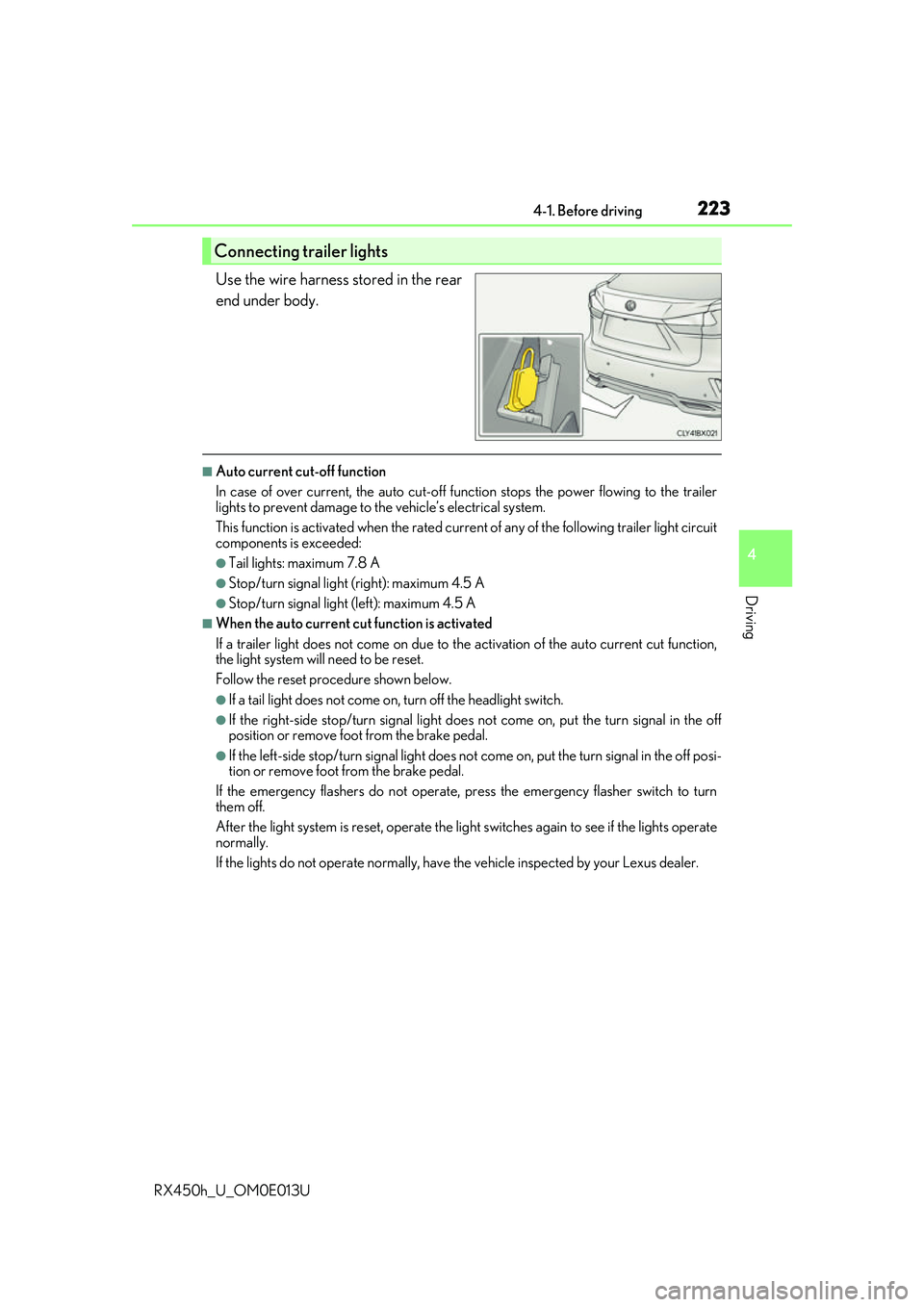
Use the wire harness stored in the rear
end under body.
■Auto current cut-off function
In case of over current, the auto cut-off function stops the power flowing to the trailer
lights to prevent damage to the vehicle’s electrical system.
This function is activated when the rated current of any of the following trailer light circuit
components is exceeded:
●Tail lights: maximum 7.8 A
●Stop/turn signal light (right): maximum 4.5 A
●Stop/turn signal light (left): maximum 4.5 A
■When the auto current cu t function is activated
If a trailer light does not come on due to th e activation of the auto current cut function,
the light system will need to be reset.
Follow the reset procedure shown below.
●If a tail light does not come on, turn off the headlight switch.
●If the right-side stop/turn signal light does not come on, put the turn signal in the off
position or remove foot from the brake pedal.
●If the left-side stop/turn signal light does not come on, put the turn signal in the off posi-
tion or remove foot from the brake pedal.
If the emergency flashers do not operate, press the emergency flasher switch to turn
them off.
After the light system is reset, operate the lig ht switches again to see if the lights operate
normally.
If the lights do not operate normally, have the vehicle inspected by your Lexus dealer.
Connecting trailer lights
Page 229 of 660
2294-1. Before driving
4
Driving
RX450h_U_OM0E013U
WARNING
■Hitch
Trailer hitch assemblies have different weight capacities established by the hitch manu-
facturer. Even though the vehicle may be physically capable of towing a higher weight,
the operator must determine the maximum weight rating of the particular hitch assem-
bly and never exceed the maximum weight rating specified for the trailer-hitch.
Exceeding the maximum weight rating set by the trailer-hitch manufacturer can cause
an accident resulting in death or serious personal injuries.
■When towing a trailer
Lexus recommends trailers with brakes that conform to any applicable federal and
state/provincial regulations.
●If the gross trailer weight exceeds unbraked TWR, trailer brakes are required. Lexus
recommends trailers with brakes that conform to all applicable federal and state/pro-
vincial regulations.
●Never tap into your vehicle’s hydraulic system, as this will lower the vehicle’s braking
effectiveness.
●Never tow a trailer without using a safety chain securely attached to both the trailer
and the vehicle. If damage occurs to the co upling unit or hitch ball, there is danger of
the trailer wandering into another lane.
NOTICE
■When installing a trailer hitch
Use only the position recommended by your Lexus dealer. Do not install the trailer
hitch on the bumper; this may cause body damage.
■Do not directly splice trailer lights
Do not directly splice trailer lights. Directly splicing trailer lights may damage your
vehicle’s electrical system and cause a malfunction.
Page 245 of 660
2454-2. Driving procedures
4
Driving
RX450h_U_OM0E013U
The parking brake is set or released automatically according to shift lever opera-
tion.
Even when in automatic mode, the parkin g brake can be set and released manu-
ally. ( P. 246)
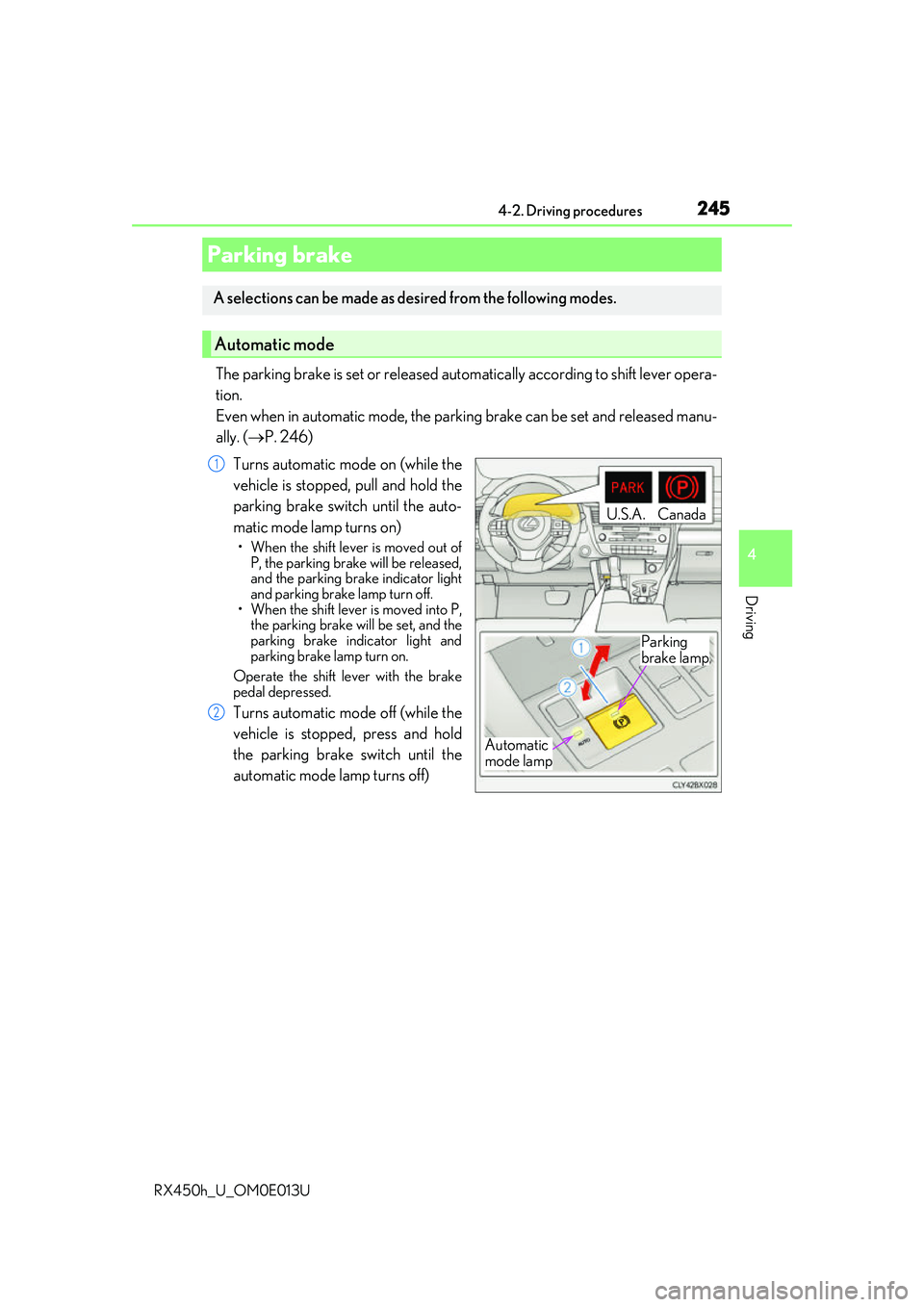
Turns automatic mode on (while the
vehicle is stopped, pull and hold the
parking brake switch until the auto-
matic mode lamp turns on)
• When the shift lever is moved out of P, the parking brake will be released,
and the parking brake indicator light
and parking brake lamp turn off.
• When the shift lever is moved into P,
the parking brake will be set, and the
parking brake indicator light and
parking brake lamp turn on.
Operate the shift lever with the brake
pedal depressed.
Turns automatic mode off (while the
vehicle is stopped, press and hold
the parking brake switch until the
automatic mode lamp turns off)
Parking brake
A selections can be made as desired from the following modes.
Automatic mode
Automatic
mode lamp
U.S.A.Canada
Parking
brake lamp
1
2
Page 246 of 660
2464-2. Driving procedures
RX450h_U_OM0E013U
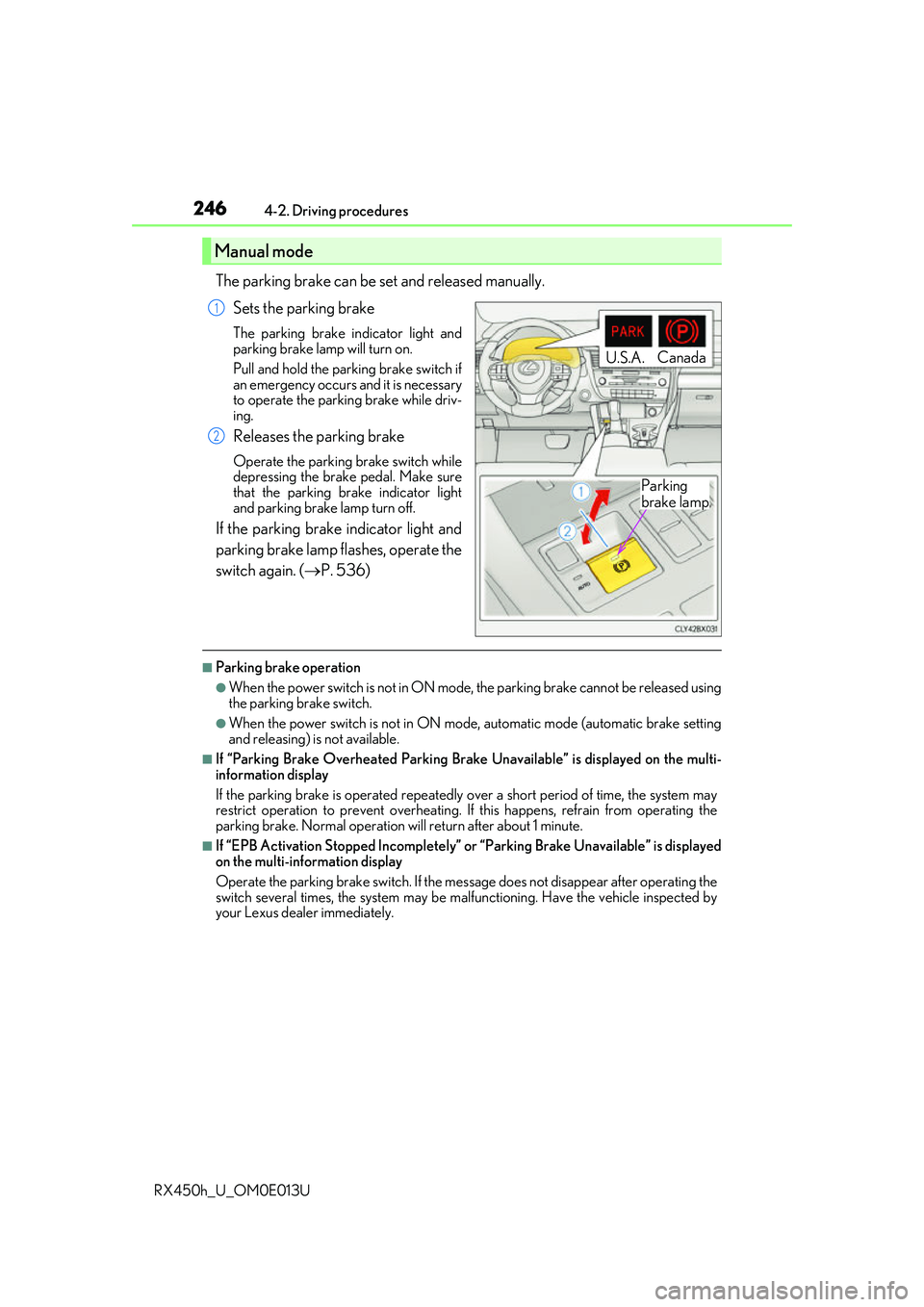
The parking brake can be set and released manually. Sets the parking brake
The parking brake indicator light and
parking brake lamp will turn on.
Pull and hold the parking brake switch if
an emergency occurs and it is necessary
to operate the parking brake while driv-
ing.
Releases the parking brake
Operate the parking brake switch while
depressing the brake pedal. Make sure
that the parking brake indicator light
and parking brake lamp turn off.
If the parking brake indicator light and
parking brake lamp flashes, operate the
switch again. ( P. 536)
■Parking brake operation
●When the power switch is not in ON mode, the parking brake cannot be released using
the parking brake switch.
●When the power switch is not in ON mode , automatic mode (automatic brake setting
and releasing) is not available.
■If “Parking Brake Overheated Parking Brak e Unavailable” is displayed on the multi-
information display
If the parking brake is operated repeatedly over a short period of time, the system may
restrict operation to prevent overheating. If this happens, refrain from operating the
parking brake. Normal operation wi ll return after about 1 minute.
■If “EPB Activation Stopped Incompletely” or “Parking Brake Unavailable” is displayed
on the multi-information display
Operate the parking brake switch. If the message does not disappear after operating the
switch several times, the system may be ma lfunctioning. Have the vehicle inspected by
your Lexus dealer immediately.
Manual mode
U.S.A. Canada
Parking
brake lamp
1
2
Page 247 of 660
2474-2. Driving procedures
4
Driving
RX450h_U_OM0E013U
■Parking brake operation sound
When the parking brake operates, a motor sound (whirring sound) may be heard. This
does not indicate a malfunction.
■Parking brake indicator light and parking brake lamp
●Depending on the power switch mode, the parking brake indicator light and parking
brake lamp will turn on and stay on as described below:
ON mode: Comes on until the parking brake is released.
Not in ON mode: Stays on fo r approximately 15 seconds.
●When the power switch is turned off with th e parking brake set, the parking brake indi-
cator light and parking brake la mp will stay on for about 15 seconds. This does not indi-
cate a malfunction.
■Changing the mode
When changing the automatic mode on/off , the message will be shown on the multi-
information display and the buzzer sounds.
■Parking brake engaged warning buzzer
A buzzer will sound if the vehicle is driv en with the parking brake engaged. “Release
Parking Brake” is displayed on the multi-information display.
■Warning messages and buzzers
Warning messages and buzzers are used to indicate a system malfunction or to inform
the driver of the need for caution. If a warn ing message is shown on the multi-information
display, read the message and follow the instructions.
■If the brake system warning light comes on
P. 536
■Usage in winter time
P. 391
Page 249 of 660
2494-2. Driving procedures
4
Driving
RX450h_U_OM0E013U
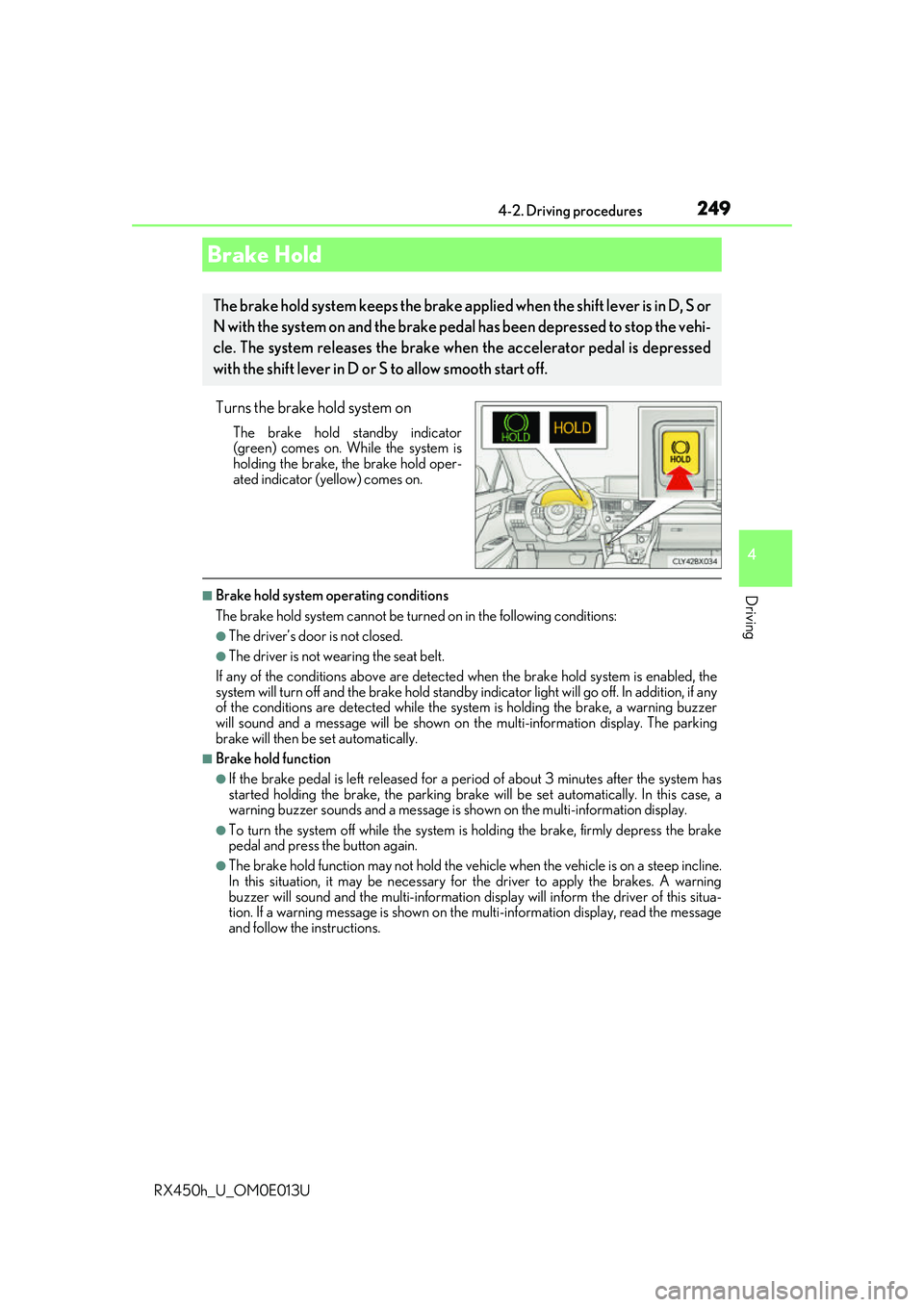
Turns the brake hold system on
The brake hold standby indicator
(green) comes on. While the system is
holding the brake, the brake hold oper-
ated indicator (yellow) comes on.
■Brake hold system operating conditions
The brake hold system cannot be turn ed on in the following conditions:
●The driver’s door is not closed.
●The driver is not wearing the seat belt.
If any of the conditions above are detected when the brake hold system is enabled, the
system will turn off and the brake hold standby in dicator light will go off. In addition, if any
of the conditions are detected while the sy stem is holding the brake, a warning buzzer
will sound and a message will be shown on th e multi-information display. The parking
brake will then be set automatically.
■Brake hold function
●If the brake pedal is left released for a pe riod of about 3 minutes after the system has
started holding the brake, the parking brake will be set automatically. In this case, a
warning buzzer sounds and a message is shown on the multi-information display.
●To turn the system off while the system is holding the brake, firmly depress the brake
pedal and press the button again.
●The brake hold function may not hold the vehicle when the vehicle is on a steep incline.
In this situation, it may be necessary for the driver to apply the brakes. A warning
buzzer will sound and the mult i-information display will inform the driver of this situa-
tion. If a warning message is shown on the multi-information display, read the message
and follow the instructions.
Brake Hold
The brake hold system keeps the brake appl ied when the shift lever is in D, S or
N with the system on and the brake peda l has been depressed to stop the vehi-
cle. The system releases the brake wh en the accelerator pedal is depressed
with the shift lever in D or S to allow smooth start off.
Page 250 of 660
2504-2. Driving procedures
RX450h_U_OM0E013U
■When the parking brake is set automatically while the system is holding the brakes
The parking brake will not be released auto matically. With the brake pedal depressed,
release the parking brake by operating the pa rking brake switch, making sure that the
parking brake indicator light goes off. ( P. 245)
■If “Brake Hold Fault Depress Brake to Deacti vate Visit Your Dealer” is displayed on the
multi-information display
The system may be malfunctio ning. Have the vehicle inspected by your Lexus dealer
immediately.
■Warning messages and buzzers
Warning messages and buzzers are used to indicate a system malfunction or to inform
the driver of the need for caution. If a warn ing message is shown on the multi-information
display, read the message and follow the instructions.
■If the brake hold operated indicator flashes
P. 536
WARNING
■When the vehicle is on a steep incline
When using the brake hold system on a steep incline exercise caution. The brake hold
function may not hold the vehicle in such a situation.
■When stopped on a slippery road
The system cannot stop the vehicle when the gripping ability of the tires has been
exceeded. Do not use the system when stopped on a slippery road.
NOTICE
■When parking the vehicle
The brake hold system is not designed for use when parking the vehicle for a long
period of time. Turning the power switch off while the system is holding the brake may
release the brake, which would cause the vehicle to move. When operating the power
switch, depress the brake pedal, shift the shift lever to P and set the parking brake.
Page 253 of 660
2534-3. Operating the lights and wipers
4
Driving
RX450h_U_OM0E013U
■Daytime running light system
●To make your vehicle more visible to other drivers during daytime driving, the daytime
running lights turn on automatically whenever the hybrid system is started and the park-
ing brake is released with the headlight switch in (Canada only) or posi-
tion. (Illuminate brighter than the park ing lights.) Daytime running lights are not
designed for use at night.
For the U.S.A.: Daytime running lights can be turned off by operating the headlight
switch to position.
●Compared to turning on the headlights, the daytime running light system offers greater
durability and consumes less electricity, so it can help improve fuel economy.
■Cornering lights (if equipped)
When the cornering lights are on for more than 30 minutes, they will turn off automati-
cally.
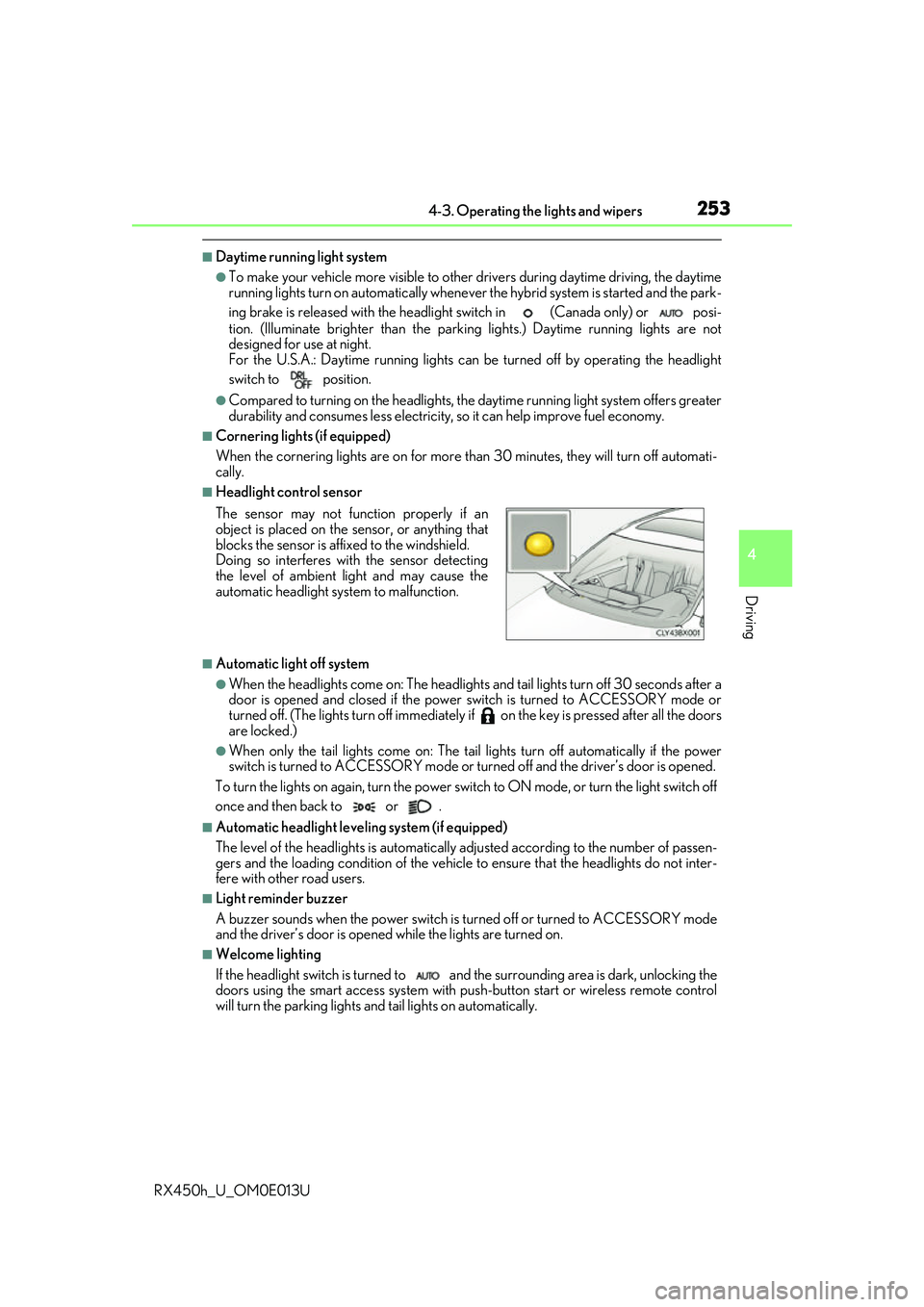
■Headlight control sensor
■Automatic light off system
●When the headlights come on: The headlights and tail lights turn off 30 seconds after a
door is opened and closed if the power switch is turned to ACCESSORY mode or
turned off. (The lights turn off immediately if on the key is pre ssed after all the doors
are locked.)
●When only the tail lights come on: The tail lights turn off automatically if the power
switch is turned to ACCESSORY mode or tu rned off and the driver’s door is opened.
To turn the lights on again, turn the power switch to ON mode, or turn the light switch off
once and then back to or .
■Automatic headlight leve ling system (if equipped)
The level of the headlights is automatically adjusted accordi ng to the number of passen-
gers and the loading condition of the vehicle to ensure that the headlights do not inter-
fere with other road users.
■Light reminder buzzer
A buzzer sounds when the power switch is turned off or turned to ACCESSORY mode
and the driver’s door is opened while the lights are turned on.
■Welcome lighting
If the headlight switch is turned to and the surrounding area is dark, unlocking the
doors using the smart access system with pu sh-button start or wireless remote control
will turn the parking lights and tail lights on automatically. The sensor may not function properly if an
object is placed on the sensor, or anything that
blocks the sensor is affixed to the windshield.
Doing so interferes with the sensor detecting
the level of ambient light and may cause the
automatic headlight system to malfunction.
Page 262 of 660
2624-3. Operating the lights and wipers
RX450h_U_OM0E013U
■Front door opening linked windshield wiper stop function
When “AUTO” is selected and the windshield wipers are operating, if a front door is
opened, the operation of the windshield wipers will be stopped to prevent anyone near
the vehicle from being sprayed by water from the wipers, provided the vehicle is stopped
with the parking brake applied or the shift lever in P. When the front door is closed, wiper
operation will resume.
■Customization
Some functions can be customized. ( P. 607)
WARNING
■Caution regarding the use of windshield wipers in AUTO mode
The windshield wipers may operate unexpectedly if the sensor is touched or the wind-
shield is subject to vibration in AUTO mode. Take care that your fingers, etc. do not
become caught in the windshield wipers.
■Caution regarding the use of washer fluid
When it is cold, do not use the washer fl uid until the windshield becomes warm. The
fluid may freeze on the windshield and cause low visibility. This may lead to an accident,
resulting in death or serious injury.
NOTICE
■When the windshield is dry
Do not use the wipers, as they may damage the windshield.
■When the washer fluid tank is empty
Do not operate the switch continually as the washer fluid pump may overheat.
■When a nozzle becomes blocked
In this case, contact your Lexus dealer.
Do not try to clear it with a pin or other object. The nozz le will be damaged.