air condition LEXUS RX450h 2018 User Guide
[x] Cancel search | Manufacturer: LEXUS, Model Year: 2018, Model line: RX450h, Model: LEXUS RX450h 2018Pages: 792, PDF Size: 12.5 MB
Page 232 of 792

232 4-1. Before driving
RX450h_RX450hL _U_OM48F85U●
To maintain engine braking efficien cy and charging system performance
when using engine braking, do no t put the transmission in D. ( → P. 246)●
Instability happens more fr equently when descending steep or long downhill
grades. Before descending, slow down and downshift. Do not make sudden
downshifts while descending st eep or long downhill grades.●
Avoid holding the brake pedal down too long or applying the brakes too fre-
quently. This could cause the brakes to overheat and result in reduced braking
efficiency. ●
Due to the added load of the trailer, yo ur vehicle’s engine may overheat on hot
days (at temperatures over 85 ° F [30 ° C]) when driving up a long or steep
grade. If the engine coolant temperat ure gauge indicates overheating, imme-
diately turn off the air conditioning (if in use), pull your vehicle off the road and
stop in a safe spot. ( → P. 702)●
Always place wheel blocks under both the vehicle’s and the trailer’s wheels
when parking. Put the transmission in P and apply the parking brake. Avoid
parking on a slope, but if unavoidable, do so only after performing the follow-
ing:
Apply the brakes and keep them applied.
Have someone place wheel blocks under both the vehicle’s and trailer’s
wheels.
When the wheel blocks are in place, release the brakes slowly until the
blocks absorb the load.
Shift into P and apply the parking brake.
Turn off the hybrid system.●
When restarting afte r parking on a slope:
With the transmission in P, start the hybrid system. Be sure to keep the
brake pedal depressed.
Shift into a forward gear. If reversing, shift into R.
If the parking brake is in manual mode, release the parking brake.
( → P. 254)
Release the brake pedal, and slowly pull or back away from the wheel
blocks. Stop and apply the brakes.
Have someone retrieve the blocks. 1
2
3
4
5
1
2
3
4
5
Page 300 of 792
300 4-5. Using the driving support systems
RX450h_RX450hL _U_OM48F85UWARNING ■
Before using LKA system
Do not rely solely upon the LKA system. LKA is not a system which automatically
drives the vehicle or reduces the amount of attention that must be paid to the area in
front of the vehicle. The driver must always assume full responsibility for driving safely
by always paying careful attention to the surrounding conditions and operate the steer-
ing wheel to correct the path of the vehicle. Also, make sure to take adequate breaks
when fatigued, such as from driv ing for a long period of time.
Failure to perform appropriate driving operat ions and pay careful attention may lead to
an accident, resulting in death or serious injury. ■
To avoid operating LKA by mistake
When not using the LKA system, use the LKA switch to turn the system off. ■
Situations unsuitable for LKA
Do not use the LKA system in the following situations.
The system may not operate properly and lead to an accident, resulting in death or
serious injury. ●
A spare tire, tire chains, etc., are equipped. ●
When the tires have been excessively worn, or when the tire inflation pressure is low. ●
Tires which differ by structure, manufacturer, brand or tread pattern are used. ●
Objects or patterns that could be mistaken for white (yellow) lines are present on the
side of the road (guardrails, cu rbs, reflective poles, etc.).●
Vehicle is driven on a snow-covered road. ●
White (yellow) lines are difficult to see due to rain, snow, fog, dust, etc.●
Asphalt repair marks, white (y ellow) line marks, etc., are present due to road repair.●
Vehicle is driven in a temporary lane or restricted lane due to construction work.●
Vehicle is driven on a road surface which is slippery due to rainy weather, fallen snow,
freezing, etc. ●
Vehicle is driven in traffic lanes ot her than on highways and freeways.●
Vehicle is driven in a construction zone. ●
When your vehicle is towing a trailer or during emergency towing ■
Preventing LKA system malfunctions and operations perf ormed by mistake●
Do not modify the headlights or place stickers, etc., on the surface of the lights.●
Do not modify the suspension etc. If the suspension etc. needs to be replaced, con-
tact your Lexus dealer. ●
Do not install or place anything on the hood or grille. Also, do not install a grille guard
(bull bars, kangaroo bar, etc.). ●
If your windshield needs repair s, contact your Lexus dealer.
Page 339 of 792

3394-5. Using the driving support systems
4
Driving
RX450h_RX450hL _U_OM48F85U●
Vehicles with a navigation system (12.3-inch display): If the intuit ive parking assist dis-
play is set to on, detected objects will also be displayed on the panoramic view monitor.
For details, refer to “NAVIGATION SYSTEM OWNER’S MANUAL”. ■
Sensor detectio n information●
The sensor’s detection areas are limited to the areas around the vehicle’s bumper. ●
Certain vehicle conditions and the surrounding environment may affect the ability of a
sensor to correctly detect an object. Particular instances where this may occur are
listed below.
• There is dirt, snow or ice on the sensor . (Wiping the sensors will resolve this prob-
lem.)
• The sensor is frozen. (Thawing th e area will resolve this problem.)
In especially cold weather, if a sensor is frozen the screen may show an abnormal
display, or obstacles may not be detected.
• The sensor is covered in any way.
• The vehicle is leaning considerably to one side.
• When a sensor or the area around a sensor is extremely hot or cold.
• On an extremely bumpy road, on an incline, on gravel, or on grass.
• The vicinity of the vehicle is noisy due to vehicle horns, motorcycle engines, air
brakes of large vehicles, or other loud noises producing ultrasonic waves.
• There is another vehicle equipped with parking assist sensors in the vicinity.
• The sensor is coated with a sheet of spray or heavy rain.
• The bumper or sensor re ceives a strong impact.
• If the vehicle is significantly tilted.
• The vehicle is approaching a tall or curved curb.
• In harsh sunlight or intense cold weather.
• The area directly under the bumpers is not detected.
• If objects draw too close to the sensor.
• People may not be detected if they are wearing certain types of clothing.
In addition to the examples above, there ar e instances in which, because of their shape,
signs and other objects may be judged by a sensor to be closer than they are. ●
The shape of the object may prevent a sensor from detecting it. Pay particular attention
to the following objects:
• Wires, fences, ropes, etc.
• Cotton, snow and other materi als that absorb sound waves
• Sharply-angled objects
• Low obstacles
• Tall obstacles with upper sections projecting outwards in the direction of your vehi-
cle ●
The following situations may occur during use.
• Depending on the shape of the object and other factors, the detection distance may
shorten, or detectio n may be impossible.
• Objects may not be detected if they are too close to the sensor.
• There will be a short dela y between object detection and display. Even at slow
speeds, there is a possibility that the obje ct will come within the sensor’s detection
areas before the display is shown and the buzzer sounds.
• Thin posts or objects lower than the sens or may not be detected when approached,
even if they have been detected once.
• It might be difficult to hear beeps due to th e volume of audio system or air flow noise
of the air conditioning system.
Page 379 of 792
3794-5. Using the driving support systems
4
Driving
RX450h_RX450hL _U_OM48F85U
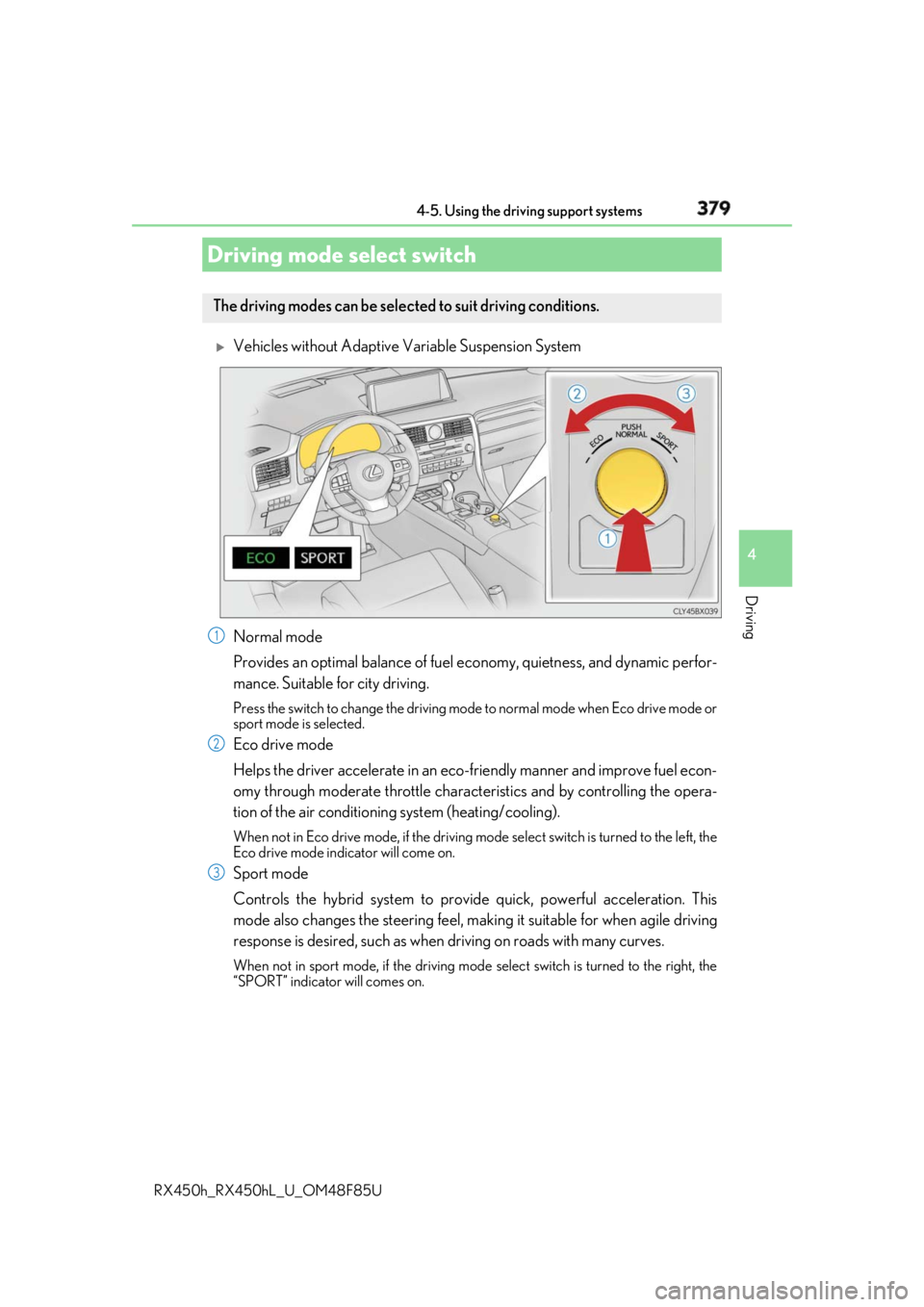
Vehicles without Adaptive Variable Suspension System
Normal mode
Provides an optimal balance of fuel ec onomy, quietness, and dynamic perfor-
mance. Suitable for city driving. Press the switch to change the driving mode to normal mode when Eco drive mode or
sport mode is selected.
Eco drive mode
Helps the driver accelerate in an eco-fr iendly manner and improve fuel econ-
omy through moderate throttle charact eristics and by controlling the opera-
tion of the air conditioning system (heating/cooling). When not in Eco drive mode, if the driving mode select switch is tu rned to the left, the
Eco drive mode indicator will come on.
Sport mode
Controls the hybrid system to prov ide quick, powerful acceleration. This
mode also changes the steering feel, maki ng it suitable for when agile driving
response is desired, such as when driving on roads with many curves. When not in sport mode, if the driving mode select switch is turned to the right, the
“SPORT” indicator will comes on.Driving mode select switch The driving modes can be selected to suit driving conditions.
1
2
3
Page 381 of 792
3814-5. Using the driving support systems
4
Driving
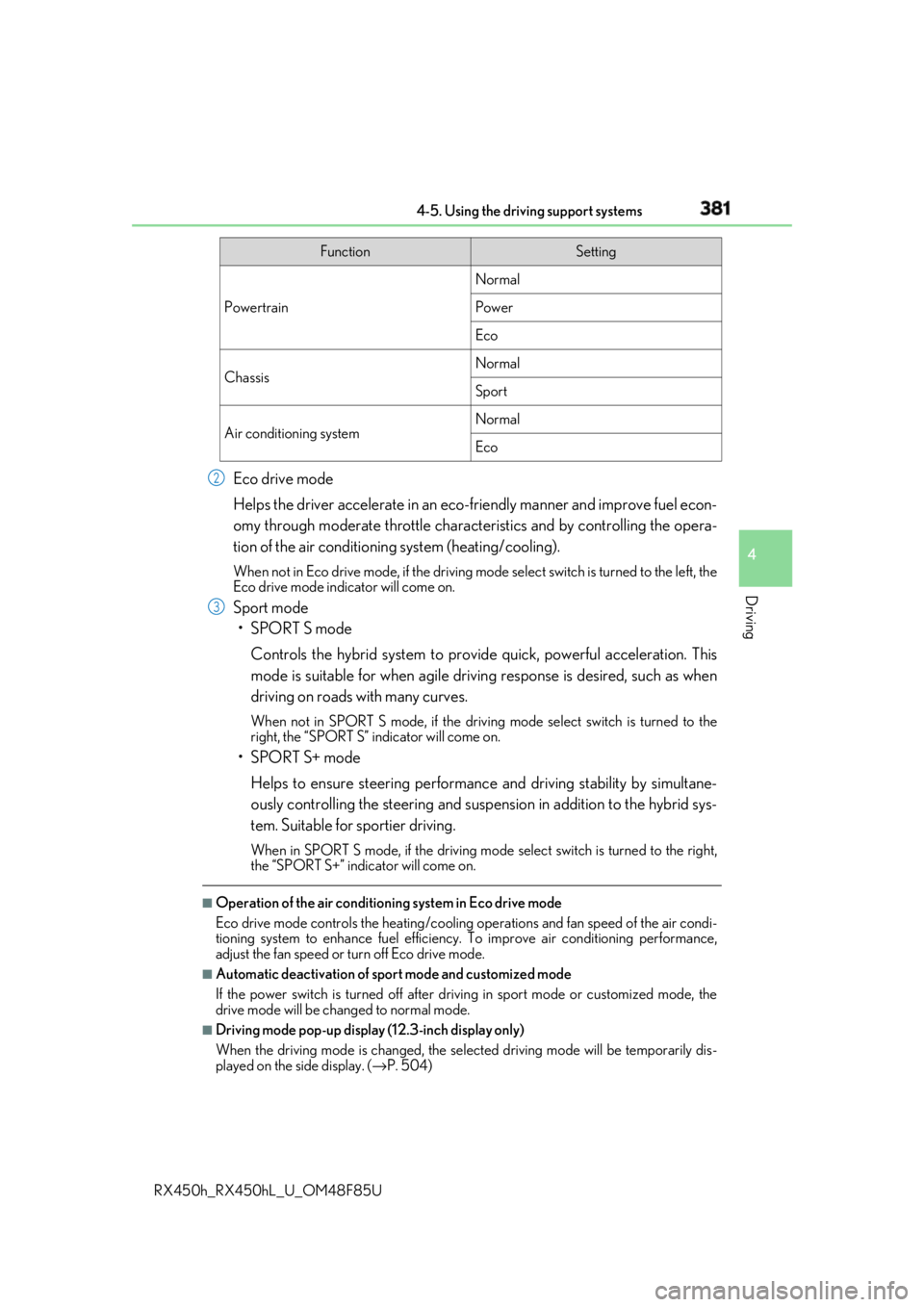
RX450h_RX450hL _U_OM48F85UEco drive mode
Helps the driver accelerate in an eco-fr iendly manner and improve fuel econ-
omy through moderate throttle charact eristics and by controlling the opera-
tion of the air conditioning system (heating/cooling). When not in Eco drive mode, if the driving mode select switch is tu rned to the left, the
Eco drive mode indicator will come on.
Sport mode
•SPORT S mode
Controls the hybrid system to prov ide quick, powerful acceleration. This
mode is suitable for when agile drivin g response is desired, such as when
driving on roads with many curves. When not in SPORT S mode, if the driving mode select switch is turned to the
right, the “SPORT S” indicator will come on.
•SPORT S+ mode
Helps to ensure steering performanc e and driving stability by simultane-
ously controlling the steering and suspension in addition to the hybrid sys-
tem. Suitable for sportier driving. When in SPORT S mode, if the driving mode select switch is turned to the right,
the “SPORT S+” indicator will come on.■
Operation of the air conditioning system in Eco drive mode
Eco drive mode controls the heating/cooling operations and fan speed of the air condi-
tioning system to enhance fuel efficiency. To improve air conditioning performance,
adjust the fan speed or turn off Eco drive mode. ■
Automatic deactivation of sport mode and customized mode
If the power switch is turned off after driv ing in sport mode or customized mode, the
drive mode will be changed to normal mode. ■
Driving mode pop-up display (12.3-inch display only)
When the driving mode is changed, the sele cted driving mode will be temporarily dis-
played on the side display. ( → P. 504)Function Setting
Powertrain Normal
Power
Eco
Chassis Normal
Sport
Air conditioning system Normal
Eco2
3
Page 388 of 792

388
RX450h_RX450hL _U_OM48F85U4-6. Driving tips
◆ Using Eco drive mode
When using Eco drive mode, the torque corresponding to the accelerator
pedal depression amount can be generate d more smoothly than it is in normal
conditions. In addition, the operation of the air conditioning system (heat-
ing/cooling) will be minimized, improving the fuel economy. ( → P. 379)
◆ Use of Hybrid System Indicator
The Eco-friendly driving is possible by keeping the indicator needle (except F
SPORT models) or bar display (F SPOR T models) of Hybrid System Indicator
within Eco area. ( → P. 99)
◆ Shift lever operation
Shift the shift lever to D when stopped at a traffic light, or driving in heavy traf-
fic, etc. Shift the shift lever to P when parking. When using the N, there is no
positive effect on fuel consumption. In the N, the gasoline engine operates but
electricity cannot be generated. Also, wh en using the air conditioning system,
etc., the hybrid battery (tractio n battery) power is consumed.
◆ Accelerator pedal/brake pedal operation ●
Drive your vehicle smoothly. Avoid ab rupt acceleration and deceleration.
Gradual acceleration and deceleration will make more effective use of the
electric motor (traction motor) without having to use gasoline engine
power. ●
Avoid repeated acceleration. Repeated acceleration consumes hybrid bat-
tery (traction battery) power, resulting in poor fuel consumption. Battery
power can be restored by driving with the accelerator pedal slightly
released.
◆ When braking
Make sure to operate the brakes gently and in a timely manner. A greater
amount of electrical energy can be regenerated when slowing down.Hybrid vehicle driving tips For economical and ecological driving, pay attention to the following points:
Page 389 of 792

3894-6. Driving tips
4
Driving
RX450h_RX450hL _U_OM48F85U◆ Delays
Repeated acceleration and deceleration, as well as long waits at traffic lights,
will lead to bad fuel economy. Check traffic reports before leaving and avoid
delays as much as possible. When drivin g in a traffic jam, gently release the
brake pedal to allow the vehicle to move forward slightly while avoiding over-
use of the accelerator pedal. Doing so can help control excessive gasoline
consumption.
◆ Highway driving
Control and maintain the vehicle at a co nstant speed. Before stopping at a toll
booth or similar, allow plenty of ti me to release the accelerator and gently
apply the brakes. A greater amount of electrical energy can be regenerated
when slowing down.
◆ Air conditioning
Use the air conditioning only when necessary. Doing so can help reduce
excessive gasoline consumption.
In summer: When the ambient temperature is high, use the recirculated air
mode. Doing so will help to reduce the burden on the air conditioning system
and reduce fuel consumption as well.
In winter: Because the gasoline engine will not automatically cut out until it
and the interior of the vehicle are warm , it will consume fuel. Also, fuel con-
sumption can be improved by av oiding overuse of the heater.
◆ Checking tire inflation pressure
Make sure to check the tire inflation pr essure frequently. Improper tire infla-
tion pressure can cause poor fuel economy.
Also, as snow tires can cause large amou nts of friction, their use on dry roads
can lead to poor fuel economy. Use ti res that are appropriate for the season.
◆ Luggage
Carrying heavy luggage will lead to poor fuel economy. Avoid carrying
unnecessary luggage. Installing a large roof rack will also cause poor fuel
economy.
◆ Warming up before driving
Since the gasoline engine starts up an d cuts out automatically when cold,
warming up the engine is unnecessary. Moreover, frequently driving short dis-
tances will cause the engine to repeated ly warm up, which can lead to excess
fuel consumption.
Page 390 of 792
390 4-6. Driving tips
RX450h_RX450hL _U_OM48F85U●
Use fluids that are appropriate to the prevailing outside temperatures.
•Engine oil
• Engine/power cont rol unit coolant
• Washer fluid ●
Have a service technician inspect the condition of the 12-volt battery. ●
Have the vehicle fitted with four snow tires or purchase a set of tire chains for
the front tires. Ensure that all tires are of the specified size and the same brand, and that chains
match the size of the tires.
Perform the following according to the driving conditions: ●
Do not try to forcibly open a window or move a wiper that is frozen. Pour
warm water over the frozen area to me lt the ice. Wipe away the water imme-
diately to prevent it from freezing. ●
To ensure proper operation of the c limate control system fan, remove any
snow that has accumulated on the air inlet vents in front of the windshield. ●
Check for and remove any excess ice or snow that may have accumulated on
the exterior lights, vehicle’s roof, chassi s, around the tires or on the brakes.●
Remove any snow or mud from the bottom of your shoes before getting in the
vehicle.Winter driving tips Carry out the necessary preparations an d inspections before driving the vehi-
cle in winter. Always drive the vehicle in a manner appropriate to the prevail-
ing weather conditions.
Pre-winter preparations
Before driving the vehicle
Page 392 of 792
392 4-6. Driving tips
RX450h_RX450hL _U_OM48F85UTo enable the windshield wi pers to be lifted when he avy snow or icy conditions
are expected, change the rest position of the windshield wipers from the
retracted position below the hood to th e service position using the wiper lever.
( →
P. 270) ■
Tire chain installation
Observe the following precautions when installing and removing chains: ●
Install and remove tire chains in a safe location. ●
Install tire chains on the front tires only. Do not install tire chains on the rear tires. ●
Install tire chains on front tires as tightly as possible. Retighten chains after driving
1/4 - 1/2 mile (0.5 - 1.0 km). ●
Install tire chains following the instru ctions provided with the tire chains. Windshield wipers
WARNING ■
Driving with snow tires
Observe the following precautions to reduce the risk of accidents.
Failure to do so may result in a loss of vehi cle control and cause death or serious injury.●
Use tires of the specified size. ●
Maintain the recommended level of air pressure.●
Do not drive in excess of 75 mph (120 km/h ), regardless of the type of snow tires
being used. ●
Use snow tires on all, not just some wheels. ■
Driving with tire chains
Observe the following precautions to reduce the risk of accidents.
Failure to do so may result in the vehicle being unable to be dr iven safely, and may
cause death or serious injury. ●
Do not drive in excess of the speed limit specified for the tire chains being used, or
30 mph (50 km/h), whichever is lower. ●
Avoid driving on bumpy road surfaces or over potholes.●
Avoid sudden acceleration, abrupt steering, sudden braking and shifting operations
that cause sudden engine braking. ●
Slow down sufficiently before entering a cu rve to ensure that vehicle control is main-
tained. ●
Do not use the LKA (Lane-Keeping Assist) system.
Page 401 of 792
4015-1. Basic Operations
5
Lexus Display Audio system
RX450h_RX450hL _U_OM48F85U■
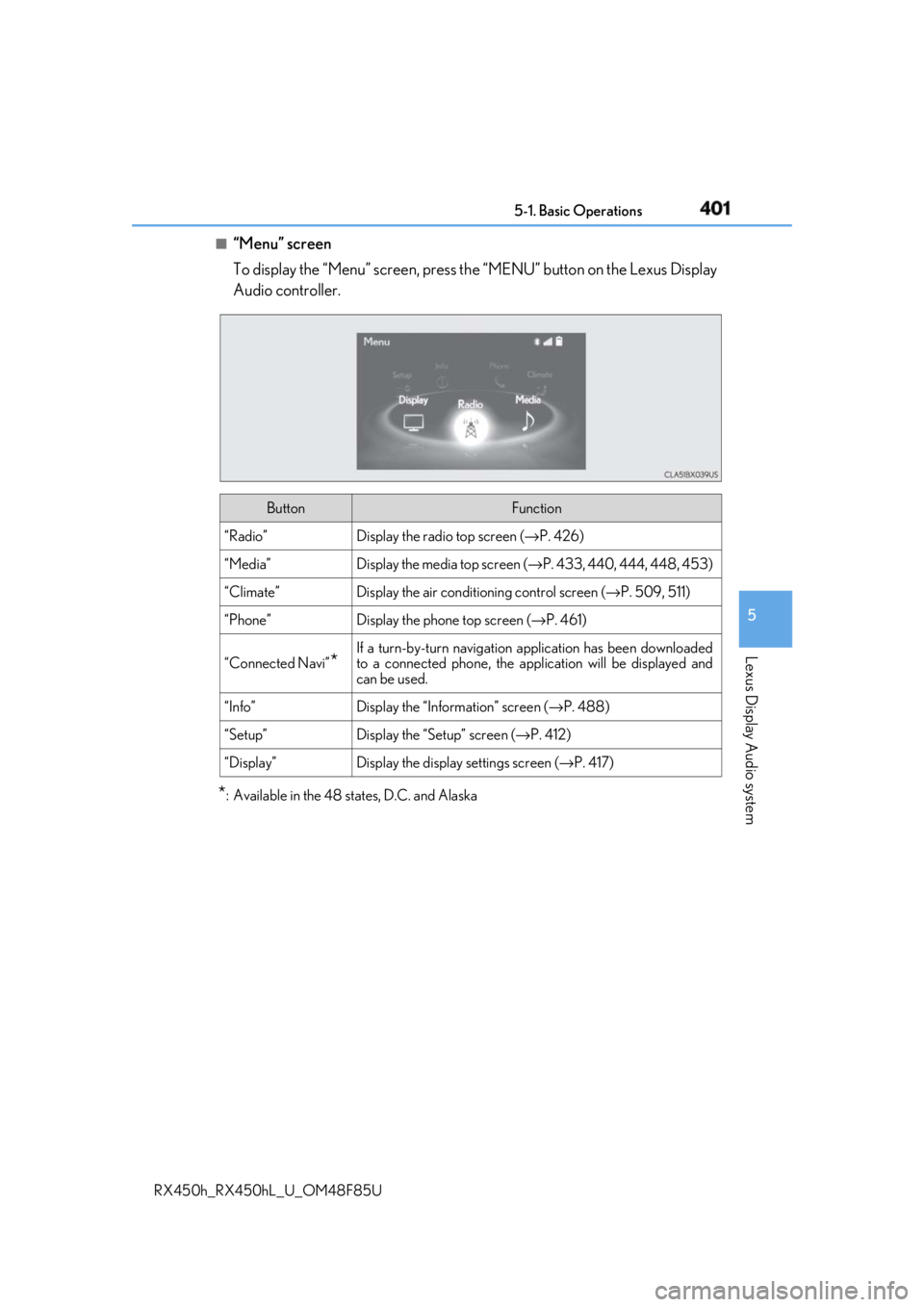
“Menu” screen
To display the “Menu” screen, press th e “MENU” button on the Lexus Display
Audio controller.
* : Available in the 48 states, D.C. and Alaska Button Function
“Radio” Display the radio top screen ( → P. 426)
“Media” Display the media top screen ( → P. 433, 440, 444, 448, 453)
“Climate” Display the air conditioning control screen ( → P. 509, 511)
“Phone” Display the phone top screen ( → P. 461)
“Connected Navi”
* If a turn-by-turn navigation application has been downloaded
to a connected phone, the appl ication will be displayed and
can be used.
“Info” Display the “Information” screen ( → P. 488)
“Setup” Display the “Setup” screen ( → P. 412)
“Display” Display the display settings screen ( → P. 417)