fog light LEXUS RX450h 2018 User Guide
[x] Cancel search | Manufacturer: LEXUS, Model Year: 2018, Model line: RX450h, Model: LEXUS RX450h 2018Pages: 792, PDF Size: 12.5 MB
Page 266 of 792
266 4-3. Operating the lights and wipers
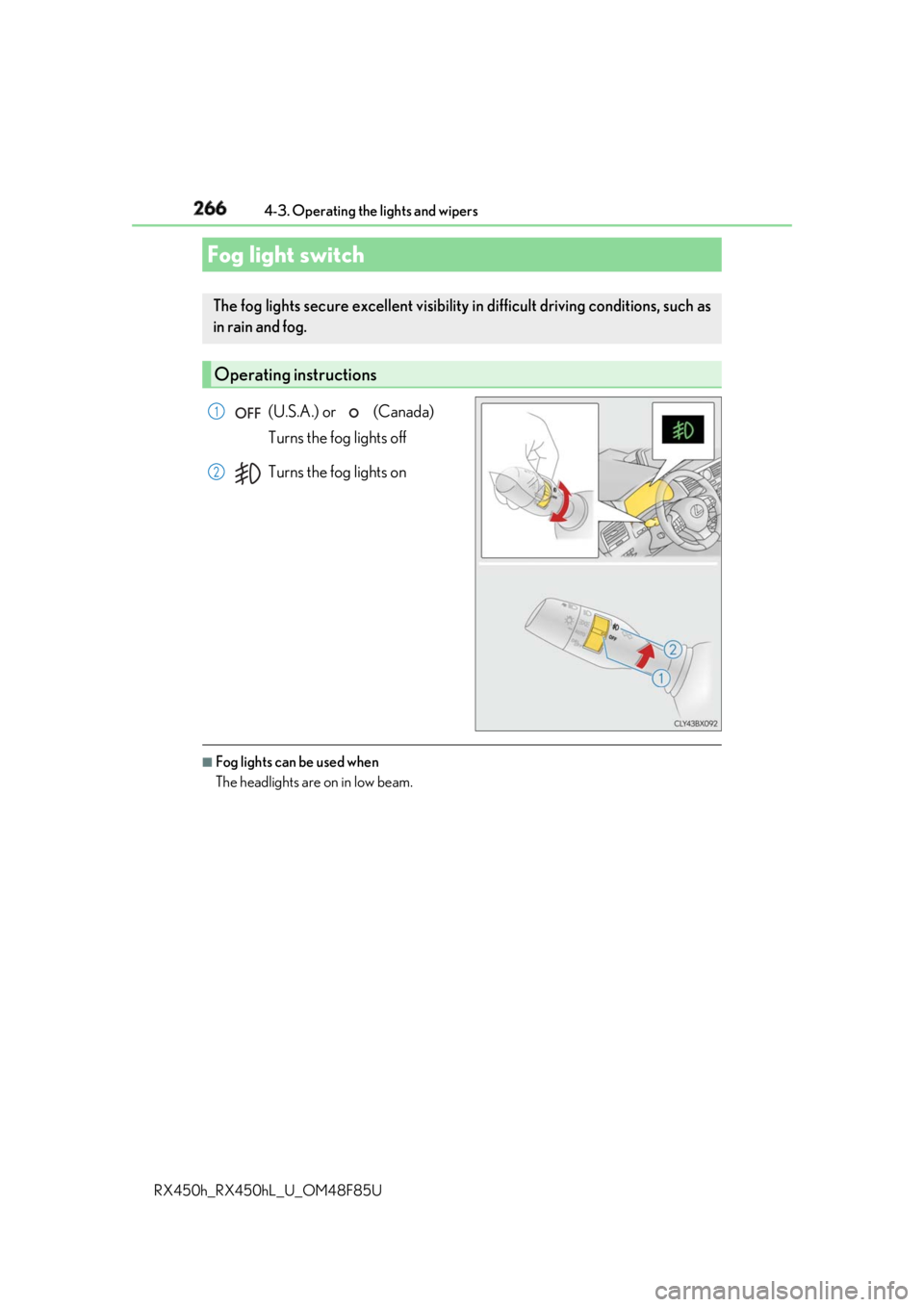
RX450h_RX450hL _U_OM48F85U(U.S.A.) or (Canada)
Turns the fog lights off
Turns the fog lights on
■
Fog lights can be used when
The headlights are on in low beam.Fog light switch The fog lights secure excellent visibility in difficult driving conditions, such as
in rain and fog.
Operating instructions 1
2
Page 282 of 792
282 4-5. Using the driving support systems
RX450h_RX450hL _U_OM48F85UWARNING ■
To avoid malfunction of the camera sensor
Observe the following precautions.
Otherwise, the camera sensor may not oper ate properly, possibly leading to an acci-
dent resulting in deat h or serious injury.●
Keep the windshield clean at all times.
• If the windshield is dirty or covered with an oily film, water droplets, snow, etc.,
clear the windshield.
• If a glass coating agent is applied to the wi ndshield, it will still be necessary to use
the windshield wipers to remove water droplets, etc. from the area of the wind-
shield in front of the camera sensor.
• If the inner side of the windshield where th e camera sensor is installed is dirty, con-
tact your Lexus dealer.
●
If the part of the windshield in front of the camera sensor is fogged up or covered with
condensation or ice, use the windshield de fogger to remove the fog, condensation or
ice. ( → P. 516)●
If water droplets cannot be properly removed from the area of the windshield in front
of the camera sensor by th e windshield wipers, replace the wiper insert or wiper
blade.
• To replace the wiper insert: → P. 628
• If the wiper blades need to be re placed, contact your Lexus dealer.●
Do not attach window tinting to the windshield. ●
Replace the windshield if it is damaged or cracked.
If the windshield needs to be re placed, contact your Lexus dealer.●
Do not get the camera sensor wet. ●
Do not allow bright lights to shine into the camera sensor.●
Do not dirty or damage the camera sensor.
When cleaning the inside of the windshield , do not allow glass cleaner to contact the
lens. Also, do not touch the lens.
If the lens is dirty or damaged, contact your Lexus dealer. ●
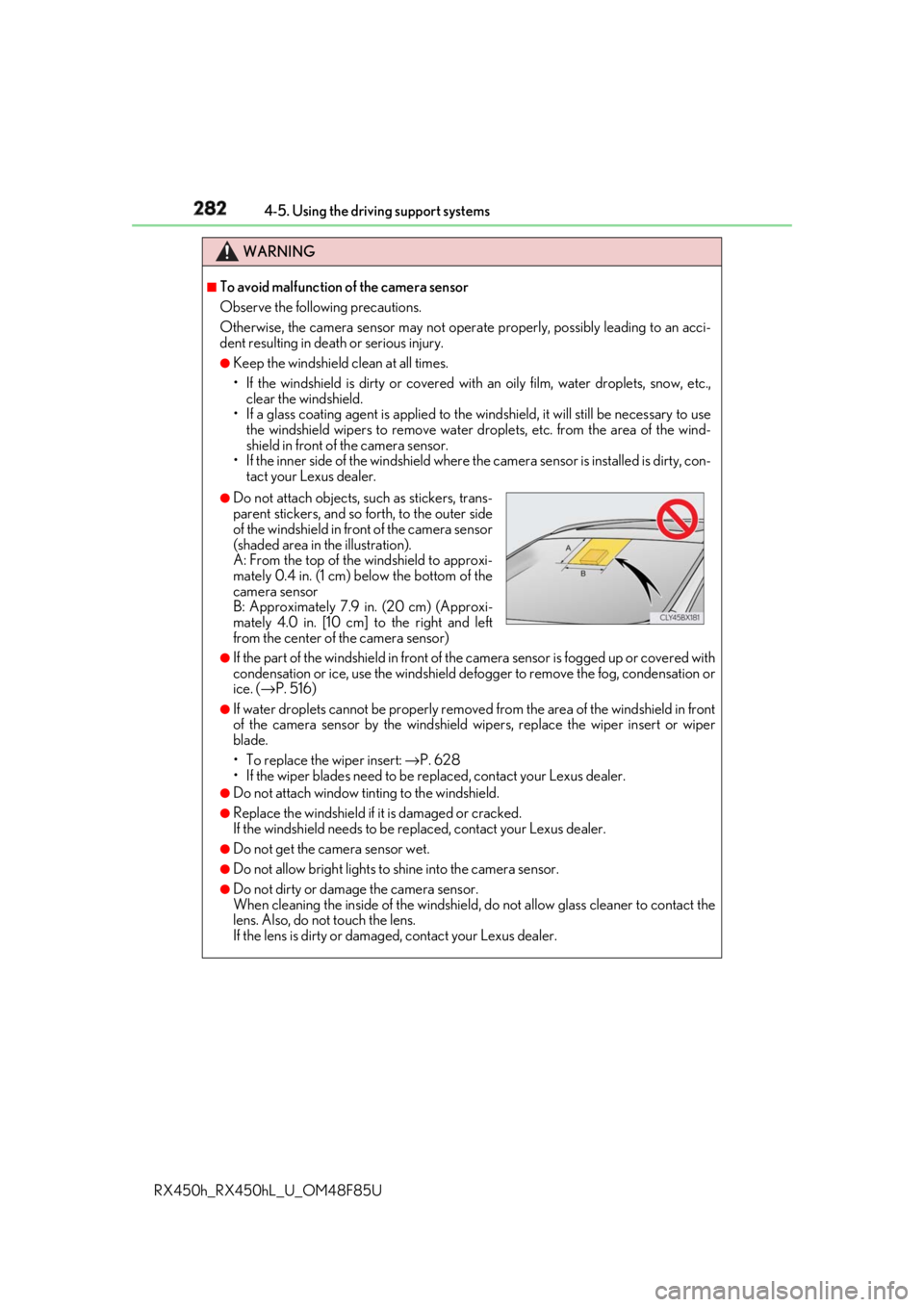
Do not attach objects, such as stickers, trans-
parent stickers, and so forth, to the outer side
of the windshield in front of the camera sensor
(shaded area in the illustration).
A: From the top of the windshield to approxi-
mately 0.4 in. (1 cm) below the bottom of the
camera sensor
B: Approximately 7.9 in. (20 cm) (Approxi-
mately 4.0 in. [10 cm] to the right and left
from the center of the camera sensor)
Page 294 of 792
294 4-5. Using the driving support systems
RX450h_RX450hL _U_OM48F85U■
Situations in which the system may not operate properly ●
In some situations such as the following, a vehicle may not be detected by the radar
sensor and camera sensor, preventing the system from operating properly:
• If an oncoming vehicle is approaching your vehicle
• If a vehicle ahead is a motorcycle or bicycle
• When approaching the side or front of a vehicle
• If a preceding vehicle has a small rear end, such as an unloaded truck
• If a vehicle ahead is carrying a load which protrudes past its rear bumper
• If a vehicle ahead is irregularly shap ed, such as a tractor or side car
• If the sun or other light is shin ing directly on a vehicle ahead
• If a vehicle cuts in front of your ve hicle or emerges from beside a vehicle
• If a vehicle ahead makes an abrupt maneuver (such as sudden swerving, accelera-
tion or deceleration)
• When suddenly cutting behind a preceding vehicle
• When driving in inclement we ather such as heavy rain, fog, snow or a sandstorm
• When the vehicle is hit by water, sn ow, dust, etc. from a vehicle ahead
• When driving through steam or smoke
• When driving in a place where the surrounding brightness changes suddenly, such
as at the entrance or exit of a tunnel
• When a very bright light, such as the sun or the headlights of on coming traffic, shines
directly into the camera sensor
• When the surrounding area is dim, such as at dawn or dusk, or while at night or in a
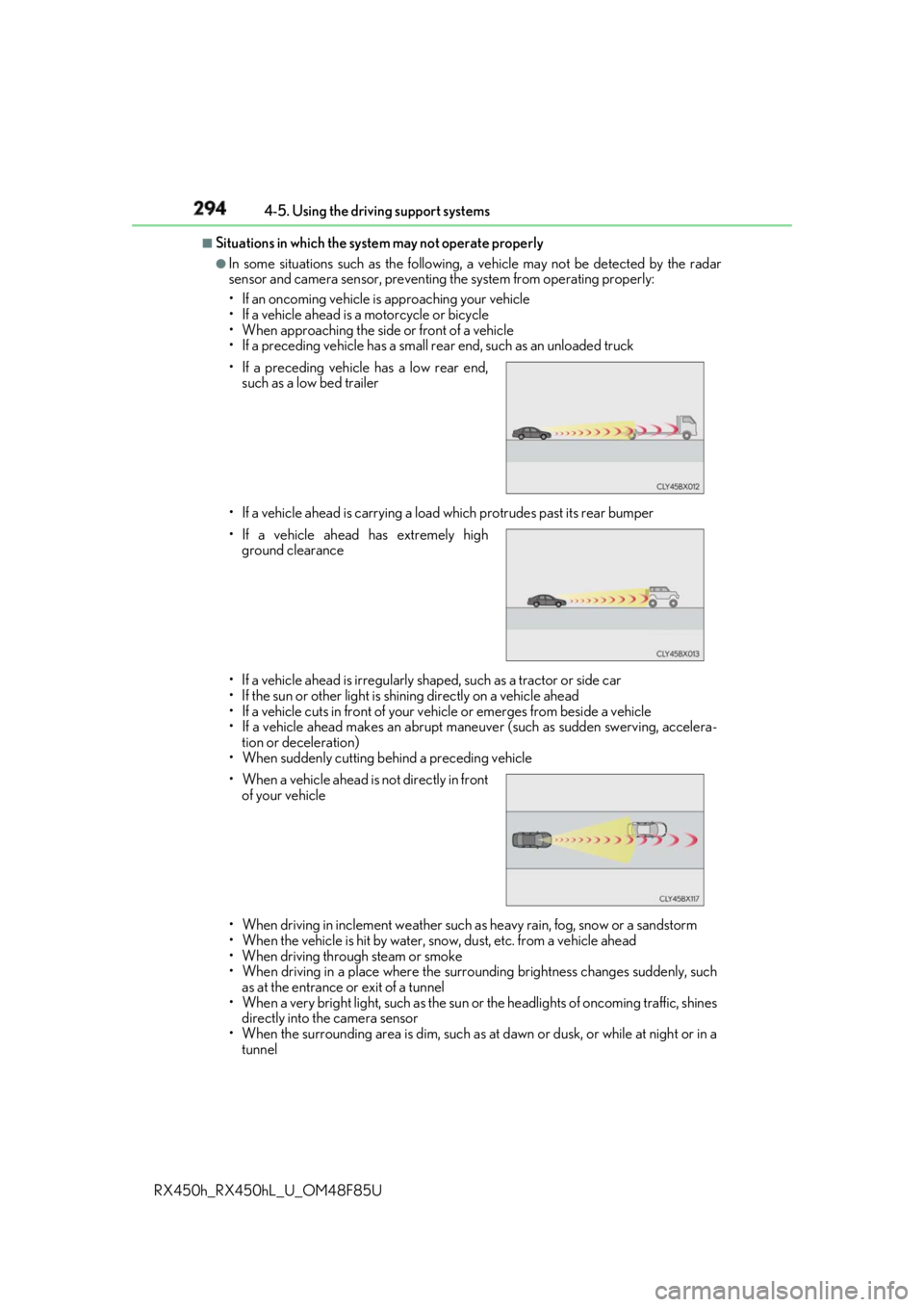
tunnel• If a preceding vehicle has a low rear end,
such as a low bed trailer
• If a vehicle ahead has extremely high
ground clearance
• When a vehicle ahead is not directly in front
of your vehicle
Page 296 of 792

296 4-5. Using the driving support systems
RX450h_RX450hL _U_OM48F85U■
If the PCS warning light flas hes or illuminates and a warning message is displayed on
the multi-inform ation display
The pre-collision system may be temporarily unavailable or there may be a malfunction
in the system. ●
In the following situations, the warning light will turn off, the message will disappear and
the system will become operational when normal operating conditions return:
• When the radar sensor or ca mera sensor or the area around either sensor is hot,
such as in the sun
• When the radar sensor or camera sensor or the area around either sensor is cold,
such as in an extremely cold environment
• When a front sensor is dirt y or covered with snow, etc.
• When the part of the windshield in front of the camera sensor is fogged up or cov-
ered with condensation or ice (Defogging the windshield: → P. 516)
• If the camera sensor is obstructed, such as when the hood is open or a sticker is
attached to the windshield near the camera sensor ●
If the PCS warning light continues to flash or remains illuminated or the warning mes-
sage does not disappear even though the vehicle has returned to normal, the system
may be malfunctioning. Have the vehicle in spected by your Lexus dealer immediately.■
If VSC is disabled ●
If VSC is disabled ( → P. 385), the pre-collision brake assist and pre-collision braking
functions are also disabled. ●
The PCS warning light will turn on and “V SC Turned Off Pre-Collision Brake System
Unavailable” will be displayed on the multi-information display.
Page 300 of 792
300 4-5. Using the driving support systems
RX450h_RX450hL _U_OM48F85UWARNING ■
Before using LKA system
Do not rely solely upon the LKA system. LKA is not a system which automatically
drives the vehicle or reduces the amount of attention that must be paid to the area in
front of the vehicle. The driver must always assume full responsibility for driving safely
by always paying careful attention to the surrounding conditions and operate the steer-
ing wheel to correct the path of the vehicle. Also, make sure to take adequate breaks
when fatigued, such as from driv ing for a long period of time.
Failure to perform appropriate driving operat ions and pay careful attention may lead to
an accident, resulting in death or serious injury. ■
To avoid operating LKA by mistake
When not using the LKA system, use the LKA switch to turn the system off. ■
Situations unsuitable for LKA
Do not use the LKA system in the following situations.
The system may not operate properly and lead to an accident, resulting in death or
serious injury. ●
A spare tire, tire chains, etc., are equipped. ●
When the tires have been excessively worn, or when the tire inflation pressure is low. ●
Tires which differ by structure, manufacturer, brand or tread pattern are used. ●
Objects or patterns that could be mistaken for white (yellow) lines are present on the
side of the road (guardrails, cu rbs, reflective poles, etc.).●
Vehicle is driven on a snow-covered road. ●
White (yellow) lines are difficult to see due to rain, snow, fog, dust, etc.●
Asphalt repair marks, white (y ellow) line marks, etc., are present due to road repair.●
Vehicle is driven in a temporary lane or restricted lane due to construction work.●
Vehicle is driven on a road surface which is slippery due to rainy weather, fallen snow,
freezing, etc. ●
Vehicle is driven in traffic lanes ot her than on highways and freeways.●
Vehicle is driven in a construction zone. ●
When your vehicle is towing a trailer or during emergency towing ■
Preventing LKA system malfunctions and operations perf ormed by mistake●
Do not modify the headlights or place stickers, etc., on the surface of the lights.●
Do not modify the suspension etc. If the suspension etc. needs to be replaced, con-
tact your Lexus dealer. ●
Do not install or place anything on the hood or grille. Also, do not install a grille guard
(bull bars, kangaroo bar, etc.). ●
If your windshield needs repair s, contact your Lexus dealer.
Page 351 of 792
3514-5. Using the driving support systems
4
Driving
RX450h_RX450hL _U_OM48F85U■
Situations in which the Intelligent Clearance Sonar function may operate even if there
is no possibility of a collision
In some situations such as the following, the Intelligent Clearanc e Sonar function may
operate even though there is no possibility of a collision. ●
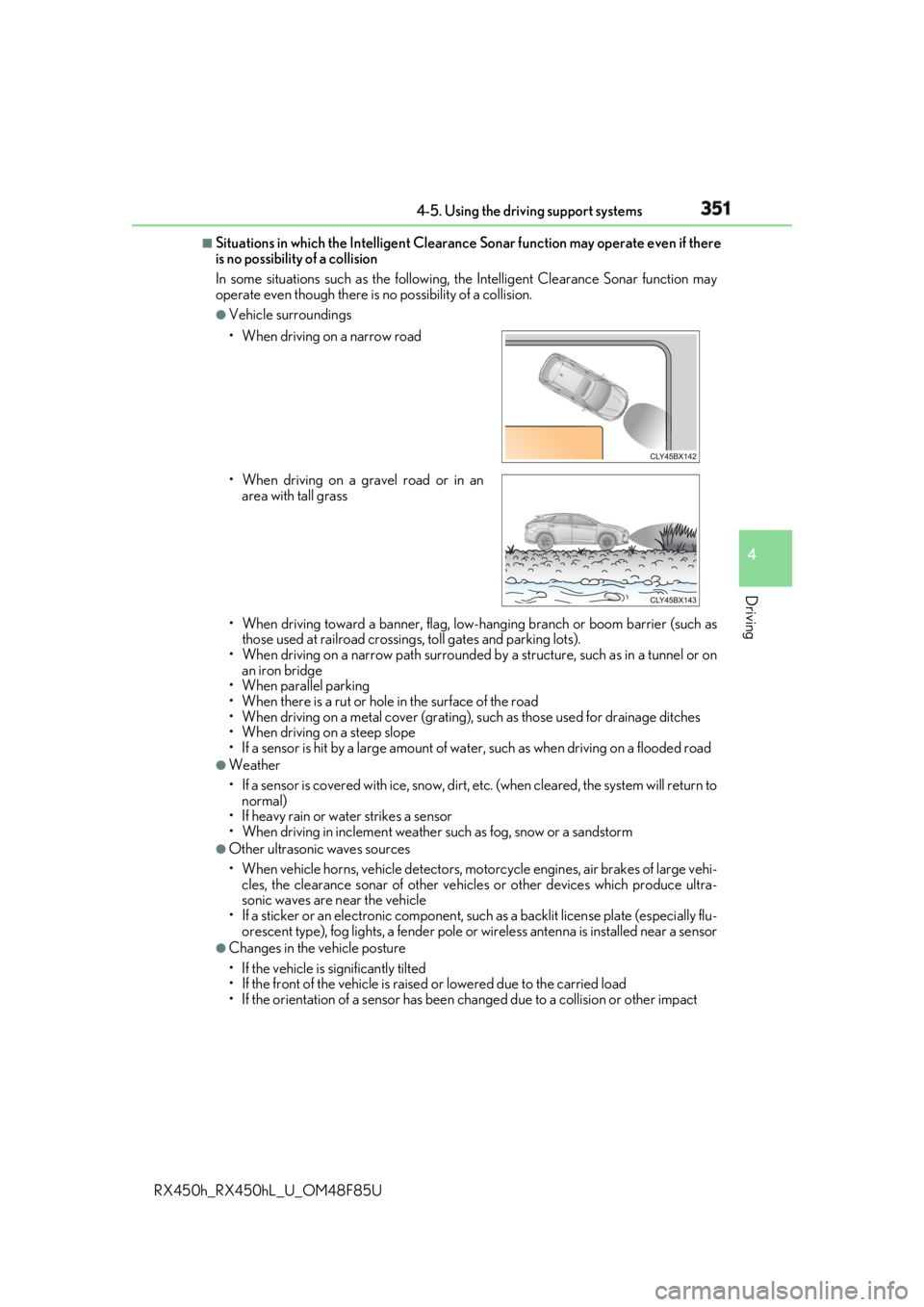
Vehicle surroundings
• When driving toward a banner, flag, low- hanging branch or boom barrier (such as
those used at railroad crossing s, toll gates and parking lots).
• When driving on a narrow path surrounded by a structure, such as in a tunnel or on
an iron bridge
• When parallel parking
• When there is a rut or hole in the surface of the road
• When driving on a metal cover (grating), such as those used for drainage ditches
• When driving on a steep slope
• If a sensor is hit by a large amount of wa ter, such as when driving on a flooded road●
Weather
• If a sensor is covered with ice, snow, dirt, etc. (when cleared, the system will return to
normal)
• If heavy rain or water strikes a sensor
• When driving in inclemen t weather such as fog, snow or a sandstorm●
Other ultrasonic waves sources
• When vehicle horns, vehicle detectors, motorcycle engines, air brakes of large vehi-
cles, the clearance sonar of other vehicles or other devices which produce ultra-
sonic waves are near the vehicle
• If a sticker or an electronic component, su ch as a backlit license plate (especially flu-
orescent type), fog lights, a fender pole or wireless antenna is installed near a sensor●
Changes in the vehicle posture
• If the vehicle is significantly tilted
• If the front of the vehicle is raised or lowered due to the carried load
• If the orientation of a sens or has been changed due to a collision or other impact• When driving on a narrow road
• When driving on a gravel road or in an
area with tall grass
Page 352 of 792
352 4-5. Using the driving support systems
RX450h_RX450hL _U_OM48F85U■
If the Intelligent Clearance Sonar function operates unnecessarily such as at a railroad
crossing
Even in the event that the Intelligent Cleara nce Sonar function operates unnecessarily,
such as at a railroad crossing, brake cont rol will be canceled afte r approximately 2 sec-
onds, allowing you to proceed forward and leave the area, Brake control can also be
canceled by depressing the brake pedal. Depressing the accelerator pedal again will
allow you to proceed forward and leave the area. ■
Situations in which the Intelligent Cleara nce Sonar Brake function may not operate
properly
In some situations such as the following , this function may not operate properly.●
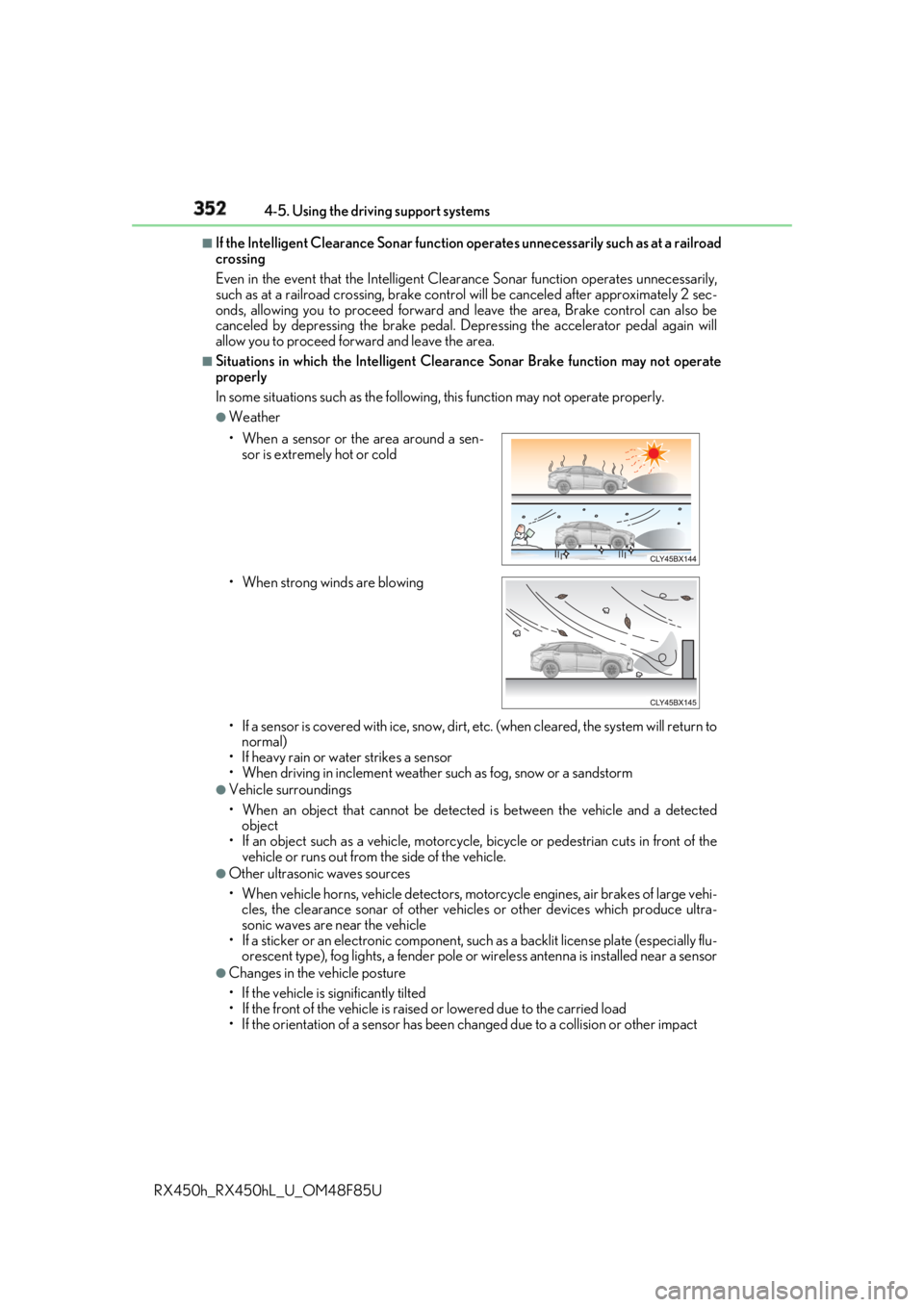
Weather
• If a sensor is covered with ice, snow, dirt, etc. (when cleared, the system will return to
normal)
• If heavy rain or water strikes a sensor
• When driving in inclemen t weather such as fog, snow or a sandstorm●
Vehicle surroundings
• When an object that cannot be detected is between the vehicle and a detected
object
• If an object such as a vehicle, motorcycle, bicycle or pedestrian cuts in front of the
vehicle or runs out from the side of the vehicle. ●
Other ultrasonic waves sources
• When vehicle horns, vehicle detectors, motorcycle engines, air brakes of large vehi-
cles, the clearance sonar of other vehicles or other devices which produce ultra-
sonic waves are near the vehicle
• If a sticker or an electronic component, su ch as a backlit license plate (especially flu-
orescent type), fog lights, a fender pole or wireless antenna is installed near a sensor●
Changes in the vehicle posture
• If the vehicle is significantly tilted
• If the front of the vehicle is raised or lowered due to the carried load
• If the orientation of a sens or has been changed due to a collision or other impact• When a sensor or the area around a sen-
sor is extremely hot or cold
• When strong winds are blowing
Page 361 of 792
3614-5. Using the driving support systems
4
Driving
RX450h_RX450hL _U_OM48F85U■
Situations in which the Rear Cross Traffic Auto Brake function may not operate prop-
erly
In some situations such as the following , this function may not operate properly.●
Objects and vehicles which the radar sensors are not designed to detect
• Stationary objects
• Vehicles which are moving away from your vehicle
• Pedestrians, motorcycles, bicycles, etc.*
• Objects which are extremely close to a radar sensor
• Vehicles which are approaching from the right or left at the rear of the vehicle at a
traveling speed of less than approximately 5 mph (8 km/h)
• Vehicles which are approaching from the right or left at the rear of the vehicle at a
traveling speed of more than approximately 15 mph (24 km/h)
* : Depending on conditions, detection of a vehicle and/or object may occur.●
Situations in which the radar sensors may not be able to detect an object
• When a sensor or the area around a sensor is extremely hot or cold
• If the rear bumper is covere d with ice, snow, dirt, etc.
• If heavy rain or water strikes the vehicle
• When the detection area of a radar sensor is obstructed by an adjacent vehicle
• If the vehicle is significantly tilted
• If towing eyelets are installed
• If the suspension has been modified or tires of a size othe r than specified are
installed
• If the front of the vehicle is raised or lowered due to the carried load
• If a sticker or an electronic component, su ch as a backlit license plate (especially flu-
orescent type), fog lights, a fender pole or wireless antenna is installed near a radar
sensor
• If the orientation of a rada r sensor has been changed due to a collision or other
impact or removal and installation
• When multiple vehicles are approaching wi th only a small gap between each vehicle
• When a vehicle is approaching at high speed ●
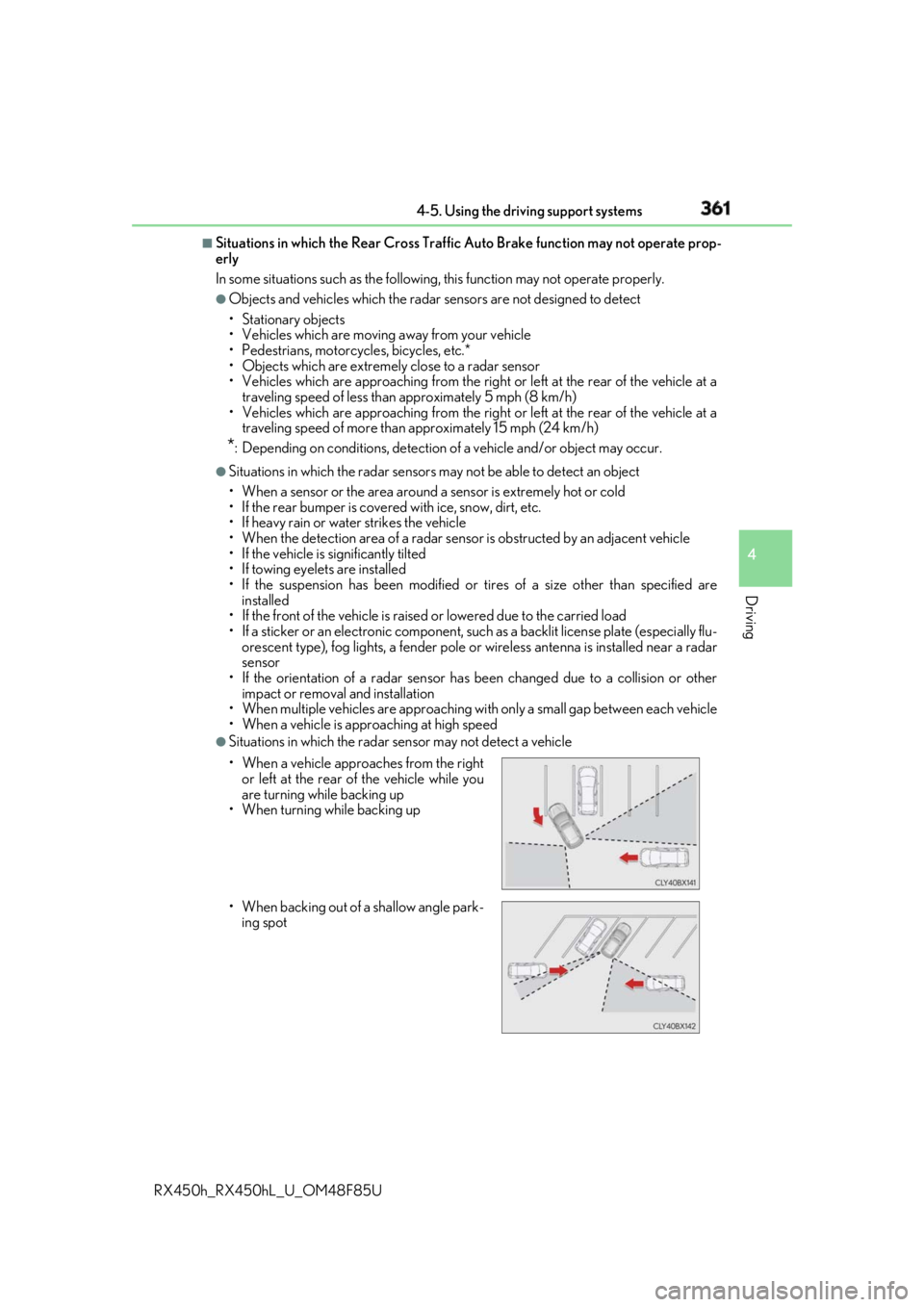
Situations in which the radar sensor may not detect a vehicle
• When a vehicle approaches from the right
or left at the rear of the vehicle while you
are turning while backing up
• When turning while backing up
• When backing out of a shallow angle park-
ing spot
Page 499 of 792
499
6Interior features
RX450h_RX450hL _U_OM48F85U6-1. Basic operation of the
Remote Touch screen
Remote Touch ............................ 500
12.3-inch display........................ 504
6-2. Using the air conditioning
system and defogger
Lexus Climate
Concierge ................................. 506
Front automatic air
conditioning system ...............507
Rear automatic air
conditioning system ...............522
Heated steering wheel/
seat heaters/
seat ventilators .........................525
6-3. Using the interior lights
Interior lights list......................... 528
• Interior lights ..........................529
• Personal lights ...................... 530
6-4. Using the storage features
List of storage features.............532
• Glove box ...............................534
• Console box ...........................534
• Cup holders........................... 535
• Door pockets .........................537 • Bottle holders ........................ 537
• Coin box ..................................538
• Auxiliary boxes .....................539
Luggage compartment
features .......................................540
6-5. Using the other interior
features
Other interior features ............ 547
• Sun visors ................................ 547
• Vanity mirrors ....................... 547
• Clock ........................................548
• Wireless charger .................548
• Power outlets.........................555
• Front passenger
footwell hooks ....................... 557
• Rear door sunshades ......... 557
• Armrest ................................... 558
• Assist grips..............................559
• Coat hooks .............................559
Garage door opener ...............560
Compass ....................................... 567
LEXUS Enform Safety
Connect ........................................571
LEXUS Enform Remote ......... 576
LEXUS Enform Service
Connect ...................................... 577
Page 526 of 792
526 6-2. Using the air conditio ning system and defogger
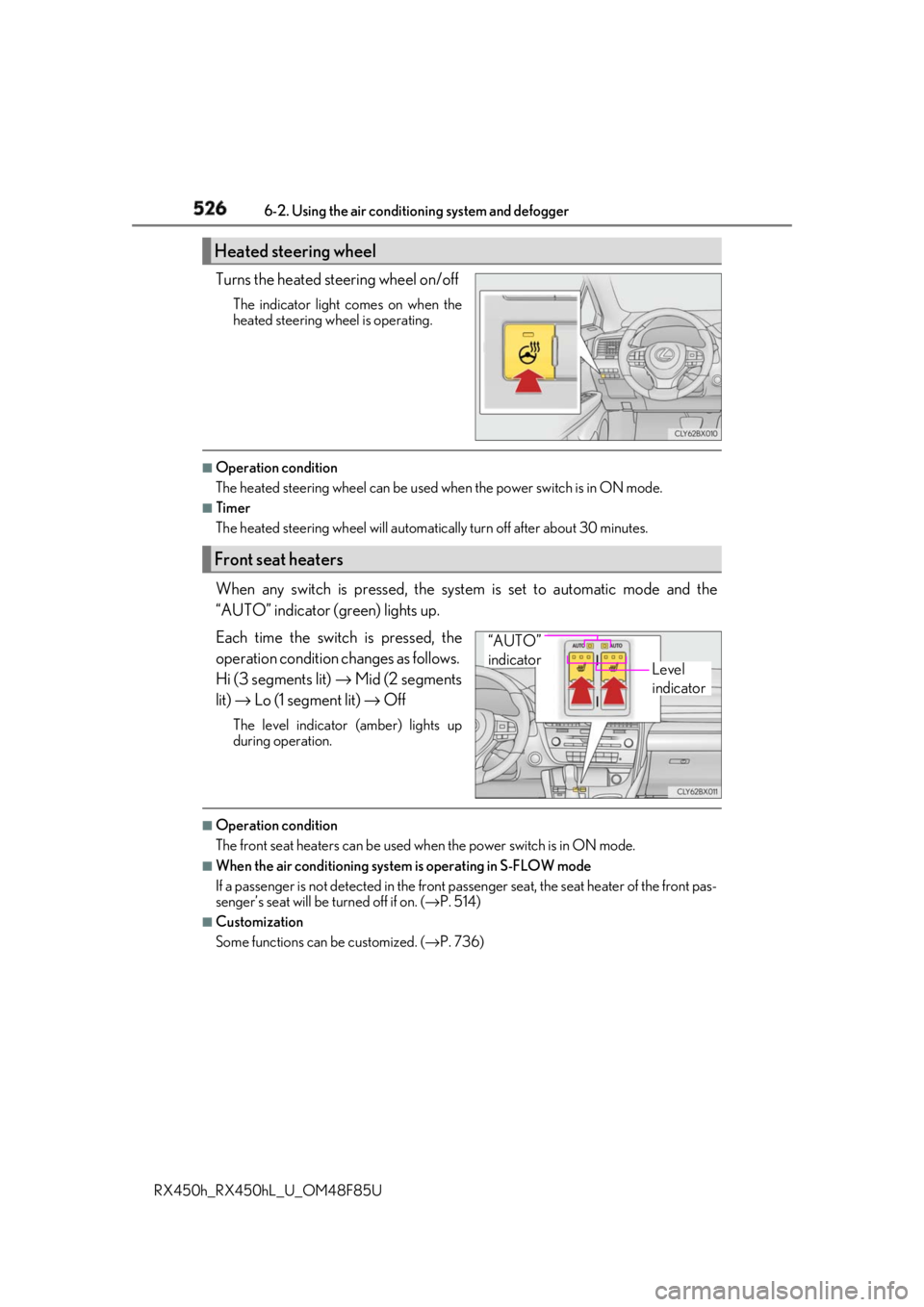
RX450h_RX450hL _U_OM48F85UTurns the heated steering wheel on/off The indicator light comes on when the
heated steering wheel is operating. ■
Operation condition
The heated steering wheel can be used when the power switch is in ON mode.■
Timer
The heated steering wheel will automati cally turn off after about 30 minutes.
When any switch is pressed, the system is set to automatic mode and the
“AUTO” indicator (green) lights up.
Each time the switch is pressed, the
operation cond ition changes as follows.
Hi (3 segments lit) → Mid (2 segments
lit) → Lo (1 segment lit) → OffThe level indicator (amber) lights up
during operation.
■
Operation condition
The front seat heaters can be used when the power switch is in ON mode. ■
When the air conditioning system is operating in S-FLOW mode
If a passenger is not detected in the front pa ssenger seat, the seat he ater of the front pas-
senger’s seat will be turned off if on. ( → P. 514)■
Customization
Some functions can be customized. ( → P. 736)Heated steering wheel
Front seat heaters
Level
indicator“AUTO”
indicator