radio LEXUS RX450h 2018 Owners Manual
[x] Cancel search | Manufacturer: LEXUS, Model Year: 2018, Model line: RX450h, Model: LEXUS RX450h 2018Pages: 792, PDF Size: 12.5 MB
Page 4 of 792

TABLE OF CONTENTS
4
RX450h_RX450hL _U_OM48F85U5-1. Basic Operations
Lexus Display Audio
system..........................................400
Steering wheel audio
switches ...................................... 406
Mobile Assistant ........................ 407
USB/AUX ports ........................ 409
5-2. Setup
Setup menu ....................................412
General settings...........................413
Voice settings................................416
Display settings ............................. 417
5-3. Using the audio system
Selecting the audio
source ........................................... 418
Optimal use of the audio
system............................................419
Audio settings ............................. 420
Audio menu screen
operation .................................... 423
5-4. Using the radio
Radio operation.......................... 426
5-5. Playing an audio CD and
MP3/WMA/AAC discs
CD player operation ................ 433
5-6. Using an external device
Listening to an iPod .................. 440
Using USB memory
device .......................................... 444
Using the AUX port ................. 448 5-7. Connecting Bluetooth ®
Steps for using Bluetooth ®
devices ........................................ 449
Registering a Bluetooth ®
device ............................................451
Selecting a Bluetooth ®
device .......................................... 452
Connecting a Bluetooth ®
audio player .............................. 453
Connecting a Bluetooth ®
phone ........................................... 454
Displaying a Bluetooth ®
device details ............................ 455
Detailed Bluetooth ®
settings ........................................ 456
5-8. Bluetooth ®
Audio
Listening to Bluetooth ®
Audio ........................................... 459
5-9. Bluetooth ®
Phone
Using a Bluetooth ®
Phone.............................................461
Making a call................................ 463
Receiving a call ........................... 466
Speaking on the phone ........... 467
Using a Bluetooth ®
phone
message...................................... 469
Using the steering wheel
switches ........................................ 471
Bluetooth ®
phone
settings .........................................472
5-10. Phonebook
Contact settings ..........................474
Messaging settin g ......................4775
Lexus Display Audio system
Page 9 of 792

9
RX450h_RX450hL _U_OM48F85UThe installation of a mobile two-way radio system in your vehicle could affect electronic
systems such as: ●
Hybrid system ●
Multiport fuel injection system/seque ntial multiport fuel injection system●
Lexus Safety System+ ●
Anti-lock brake system ●
Vehicle dynamics integrated management ●
SRS airbag system ●
Seat belt pretensioner system
Be sure to check with your Lexus dealer for precautionary measures or special instruc-
tions regarding installation of a mobile two-way radio system.
High voltage parts and cables on the hybrid vehicles emit approximately the same
amount of electromagnetic waves as the co nventional gasoline powered vehicles or
home electronic appliances despite of their electromagnetic shielding.
Unwanted noise may occur in the rece ption of the mobile two-way radio.Installation of a mobile two-way radio system
Page 42 of 792

42 1-1. For safe use
RX450h_RX450hL _U_OM48F85U■
If the SRS airbags deploy (inflate) ●
Slight abrasions, burns, brui sing etc., may be sustained from SRS airbags, due to the
extremely high speed deployment (inflation) by hot gases. ●
A loud noise and white powder will be emitted. ●
Parts of the airbag module (steering wheel hub, airbag cover and inflator) as well as the
front seats, parts of the front and rear pillars, and roof side rails, may be hot for several
minutes. The airbag itself may also be hot. ●
The windshield may crack. ●
For Lexus Enform Safety Connect subscribers, if any of the following situations occur,
the system is designed to send an emerge ncy call to the response center, notifying
them of the vehicle’s location (without needing to push the “SOS” button) and an agent
will attempt to speak with the occupants to ascertain the level of emergency and assis-
tance required. If the occupants are unable to communicate, the agent automatically
treats the call as an emergency and helps to dispatch the necessary emergency ser-
vices. ( → P. 571)
• An SRS airbag is deployed.
• A seat belt pretensioner is activated.
• The vehicle is involved in a severe rear-end collision.WARNING ■
Modification and disposal of SRS airbag system components
Do not dispose of your vehicle or perform any of the following modifications without
consulting your Lexus dealer. The SRS airb ags may malfunction or deploy (inflate)
accidentally, causing death or serious injury. ●
Installation, removal, disassembly and repair of the SRS airbags ●
Repairs, modifications, removal or replacement of the steering wheel, instrument
panel, dashboard, seats or seat upholstery, front, side and rear pillars, roof side rails,
front door panels, front door trims, or front door speakers ●
Modifications to the front door panel (such as making a hole in it) ●
Repairs or modifications of the front fend er, front bumper, or side of the occupant
compartment ●
Installation of a grille guard (bull bars, ka ngaroo bar, etc.), snow plows, winches or
roof luggage carrier ●
Modifications to the vehicle’s suspension system ●
Installation of electronic devices such as mobile two-way radios and CD players●
Modifications to your vehicle for a person with a physical disability
Page 80 of 792
80 1-3. Hybrid system
RX450h_RX450hL _U_OM48F85U■
If a warning light comes on, a warning message is displayed, or the 12-volt battery is dis-
connected
The hybrid system may not start. In this case, try to start the system again. If the “READY”
indicator does not come on, contact your Lexus dealer. ■
Running out of fuel
When the vehicle has run out of fuel and the hybrid system cannot be started, refuel the
vehicle with at least enough gasoline to make the low fuel level warning light ( → P. 662)
go off. If there is only a small amount of fu el, the hybrid system may not be able to start.
(The standard amount of fuel is about 2.9 gal. [11.0 L, 2.4 Imp.gal.], when the vehicle is on
a level surface. This value may vary when the vehicle is on a slope. Add extra fuel when
the vehicle is inclined.) ■
Electromagnetic waves ●
High voltage parts and cables on hybrid ve hicles incorporate electromagnetic shield-
ing, and therefore emit approximately the same amount of electromagnetic waves as
conventional gasoline powered vehicles or home electronic appliances. ●
Your vehicle may cause sound interference in some third party-produced radio parts.■
Hybrid battery (traction battery)
The hybrid battery (traction battery) has a li mited service life. The lifespan of the hybrid
battery (traction battery) can change in acco rdance with driving style and driving condi-
tions.
WARNING ■
High voltage precautions
This vehicle has high voltage DC and AC sy stems as well as a 12-volt system. DC and
AC high voltage is very dangerous and can cause severe burns and electric shock that
may result in death or serious injury. ●
Never touch, disassemble, remove or replace the high voltage parts, cables or their
connectors. ●
The hybrid system will become hot after starting as the system uses high voltage. Be
careful of both the high voltage and the high temperature, and always obey the warn-
ing labels attached to the vehicle.●
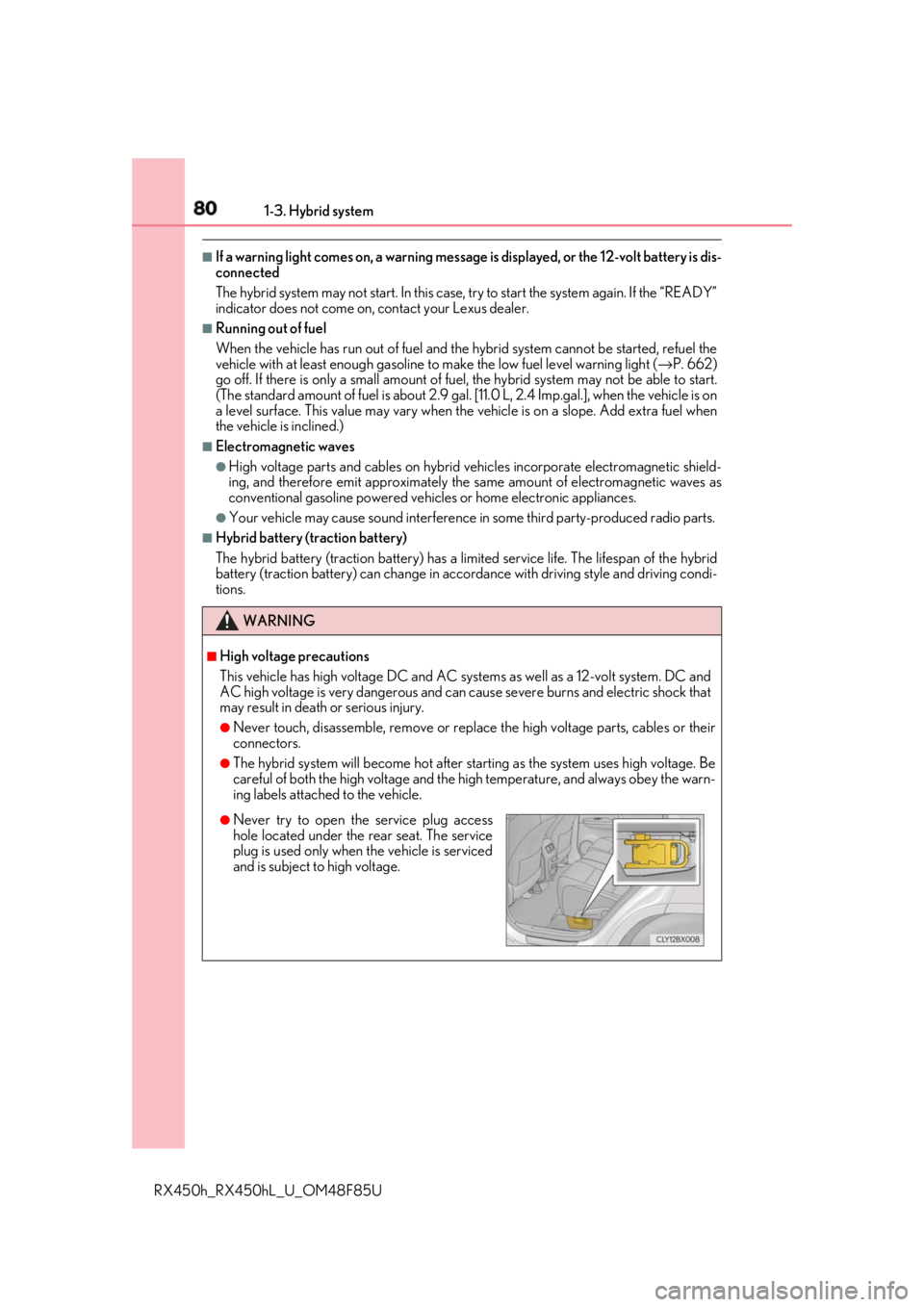
Never try to open the service plug access
hole located under the rear seat. The service
plug is used only when the vehicle is serviced
and is subject to high voltage.
Page 117 of 792
1172. Instrument cluster
2
Instrument cluster
RX450h_RX450hL _U_OM48F85U■
Tire pressure ●
It may take a few minutes to display the tire inflation pressure after the power switch is
turned to ON mode. It may also take a few minutes to display the tire inflation pressure
after inflation pressure has been adjusted.●
“---” may be displayed if the tire position information cannot be determined due to
unfavorable radio wave conditions. ●
Tire inflation pressure changes with temperat ure. The displayed values may also be dif-
ferent from the values measured using a tire pressure gauge. ■
Liquid crystal display
Small spots or light spots may appear on the display. This phenomenon is characteristic
of liquid crystal displays, and there is no problem continuing to use the display.■
Customization
Some functions can be customized. ( → P. 108, 736)
WARNING ■
Caution for use while driving ●
When operating the multi-information display while driving, pay extra attention to the
safety of the area around the vehicle. ●
Do not look continuously at the multi-info rmation display while dr iving as you may fail
to see pedestrians, objects on the road, etc. ahead of the vehicle. ■
The information display at low temperatures
Allow the interior of the vehicle to warm up before using the liquid crystal information
display. At extremely low temperatures, th e information display monitor may respond
slowly, and display changes may be delayed.
For example, there is a lag between the dr iver’s shifting and the new gear number
appearing on the display. This lag could ca use the driver to downshift again, causing
rapid and excessive engine braking and possibly an accident resulting in death or
injury. ■
Cautions during setting up the display
As the hybrid system needs to be operating during setting up the display, ensure that
the vehicle is parked in a place with adequa te ventilation. In a closed area such as a
garage, exhaust gases including harmful carbon monoxide (CO) may collect and enter
the vehicle. This may lead to dea th or a serious health hazard.
NOTICE ■
While setting up the display
To prevent 12-volt battery discharge, ensure that the hybrid syst em is operating while
setting up the display features.
Page 133 of 792
1333-1. Key information
3
Operation of each component
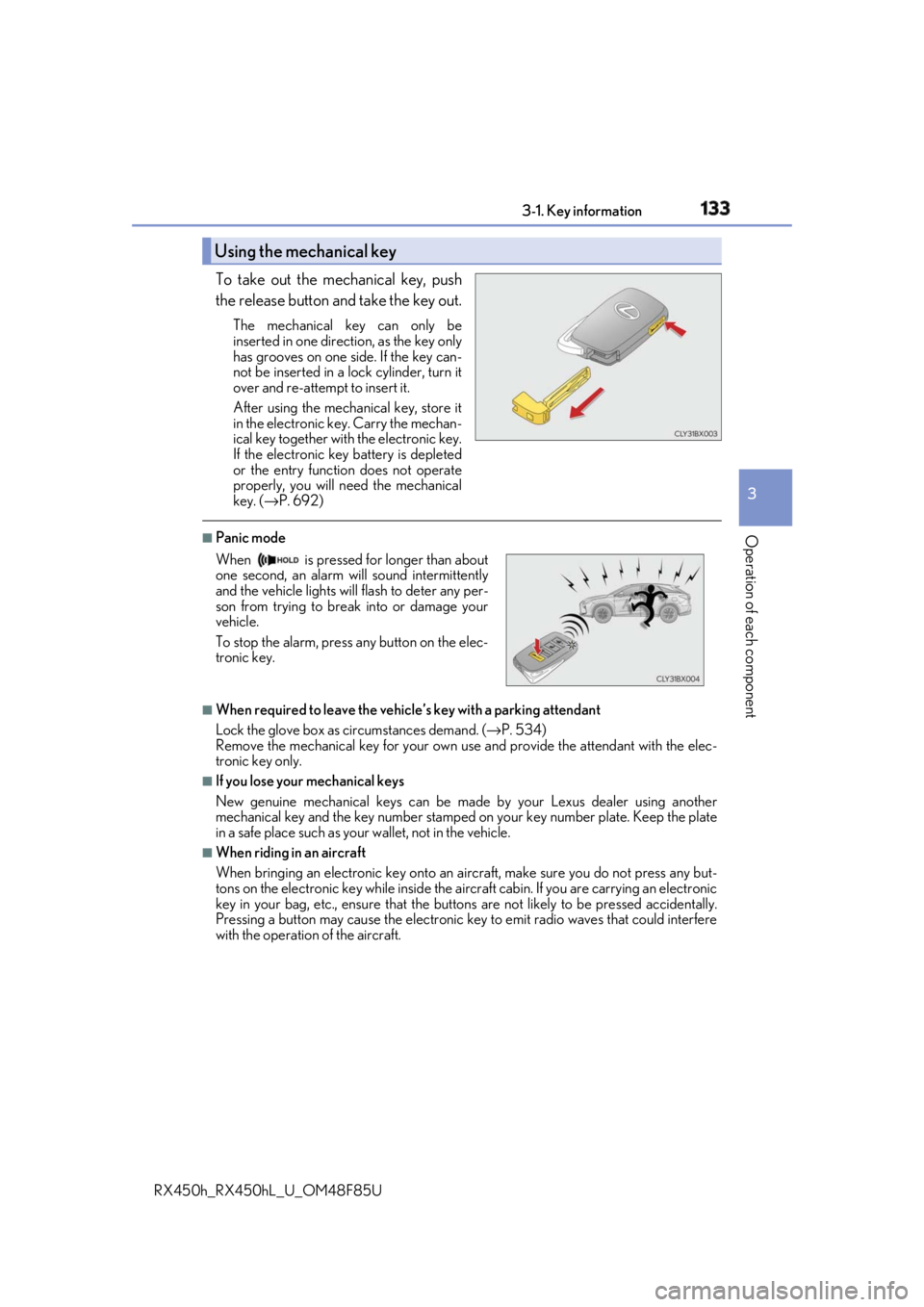
RX450h_RX450hL _U_OM48F85UTo take out the mechanical key, push
the release button and take the key out. The mechanical key can only be
inserted in one direction, as the key only
has grooves on one side. If the key can-
not be inserted in a lock cylinder, turn it
over and re-attempt to insert it.
After using the mechanical key, store it
in the electronic ke y. Carry the mechan-
ical key together with the electronic key.
If the electronic key battery is depleted
or the entry function does not operate
properly, you will need the mechanical
key. ( → P. 692)■
Panic mode
■
When required to leave the vehicle’s key with a parking attendant
Lock the glove box as circumstances demand. ( → P. 534)
Remove the mechanical key for your own use and provide the attendant with the elec-
tronic key only. ■
If you lose your mechanical keys
New genuine mechanical keys can be made by your Lexus dealer using another
mechanical key and the key number stamped on your key number plate. Keep the plate
in a safe place such as your wallet, not in the vehicle.■
When riding in an aircraft
When bringing an electronic key onto an aircraft, make sure you do not press any but-
tons on the electronic key while inside the airc raft cabin. If you are carrying an electronic
key in your bag, etc., ensure that the butt ons are not likely to be pressed accidentally.
Pressing a button may cause the electronic key to emit radio waves that could interfere
with the operation of the aircraft.Using the mechanical key
When is pressed for longer than about
one second, an alarm will sound intermittently
and the vehicle lights will flash to deter any per-
son from trying to break into or damage your
vehicle.
To stop the alarm, press any button on the elec-
tronic key.
Page 135 of 792

1353-1. Key information
3
Operation of each component
RX450h_RX450hL _U_OM48F85UNOTICE ■
To prevent key damage ●
Do not drop the keys, subject them to strong shocks or bend them.●
Do not expose the keys to high temp eratures for long periods of time.●
Do not get the keys wet or wash th em in an ultrasonic washer, etc.●
Do not attach metallic or magnetic materials to the keys or place the keys close to
such materials. ●
Do not disassemble the keys. ●
Do not attach a sticker or anything else to the surface of the electronic key. ●
Do not place the keys near objects that pr oduce magnetic fields, such as TVs, audio
systems and induction cookers, or medical electrical equipment, such as low-fre-
quency therapy equipment. ■
Carrying the electronic key on your person
Carry the electronic key 3.9 in. (10 cm) or mo re away from electric appliances that are
turned on. Radio waves emitted from electric appliances within 3.9 in. (10 cm) of the
electronic key may interfere with the key, causing the key to not function properly.■
In case of a smart access system with pu sh-button start malfunction or other key-
related problems
Take your vehicle with all the electronic keys provided with your vehicle to your Lexus
dealer. ■
When an electronic key is lost
If the electronic key re mains lost, the risk of vehicle th eft increases significantly. Visit
your Lexus dealer immediately with all rema ining electronic keys that were provided
with your vehicle.
Page 151 of 792

1513-2. Opening, closing and locking the doors
3
Operation of each component
RX450h_RX450hL _U_OM48F85U■
Situations in which the close & lock function may not operate properly
In the following situations, the close & lock function may not operate properly:●
If the switch on the lower part of the power back door ( → P. 145) is pressed by a
hand which is holding an electronic key ●
If the switch on the lower pa rt of the power back door ( → P. 145) is pressed
when the electronic key is in a bag, etc. that is placed on the ground●
If the switch on the lower pa rt of the power back door ( → P. 145) is pressed with
the electronic key not near the vehicle. ■
Situations in which the touchless sensor may malfunction (vehicles with a touchless
power back door)
In the following situations, the touchless sensor may operate unintentionally.
To prevent unintentional operat ion, keep the electronic key out of the operational range
or disable the touchless sensor operation. ( → P. 112)●
When a large amount of water is applied to the rear emblem, such as in heavy rain●
When the vehicle is being washed and water is applied to the rear emblem ●
When dirt is wiped off the rear emblem ●
If someone leans toward or against the rear emblem ●
When a metal object is brought near the rear emblem ●
When a vehicle cover is installed or removed near the rear emblem ■
Situations in which the touchless sensor may not operate properly (vehicles with a
touchless power back door)
If the touchless sensor does not operate in the following situations, use the back door
opener switch to open the power back door. ( → P. 145)●
In the following situations, the sensitivity of the touchless sensor may be temporarily
reduced and the touchless sensor may not operate:
• When a large amount of water is applied to the rear emblem, such as in heavy rain
• When the vehicle is being washed and water is applied to the rear emblem
• For several seconds after dirt is wiped off the rear emblem
• When the rear emblem is covered with mud, snow, ice, etc.
• When the vehicle has been parked for a wh ile near obje cts that may move and con-
tact the rear emblem, such as tall grass or trees
• When an external radio wave source is near the touchless sensor ●
The touchless sensor may not operate in the following situations:
• When an electronic ke y is not being carried
• When an electronic key is not within the operational range
• When an external radio wave source in terferes with the communication between
the vehicle and electronic key ( → P. 160)
• When the power back door is not fully closed
• When a hand is held pa rallel to the rear emblem
*
* : The detection settings can be changed by your Lexus dealer. ( → P. 739)■
Customization
Some functions can be customized. ( → P. 108, 736)
Page 160 of 792
160 3-2. Opening, closing and locking the doors
RX450h_RX450hL _U_OM48F85U■
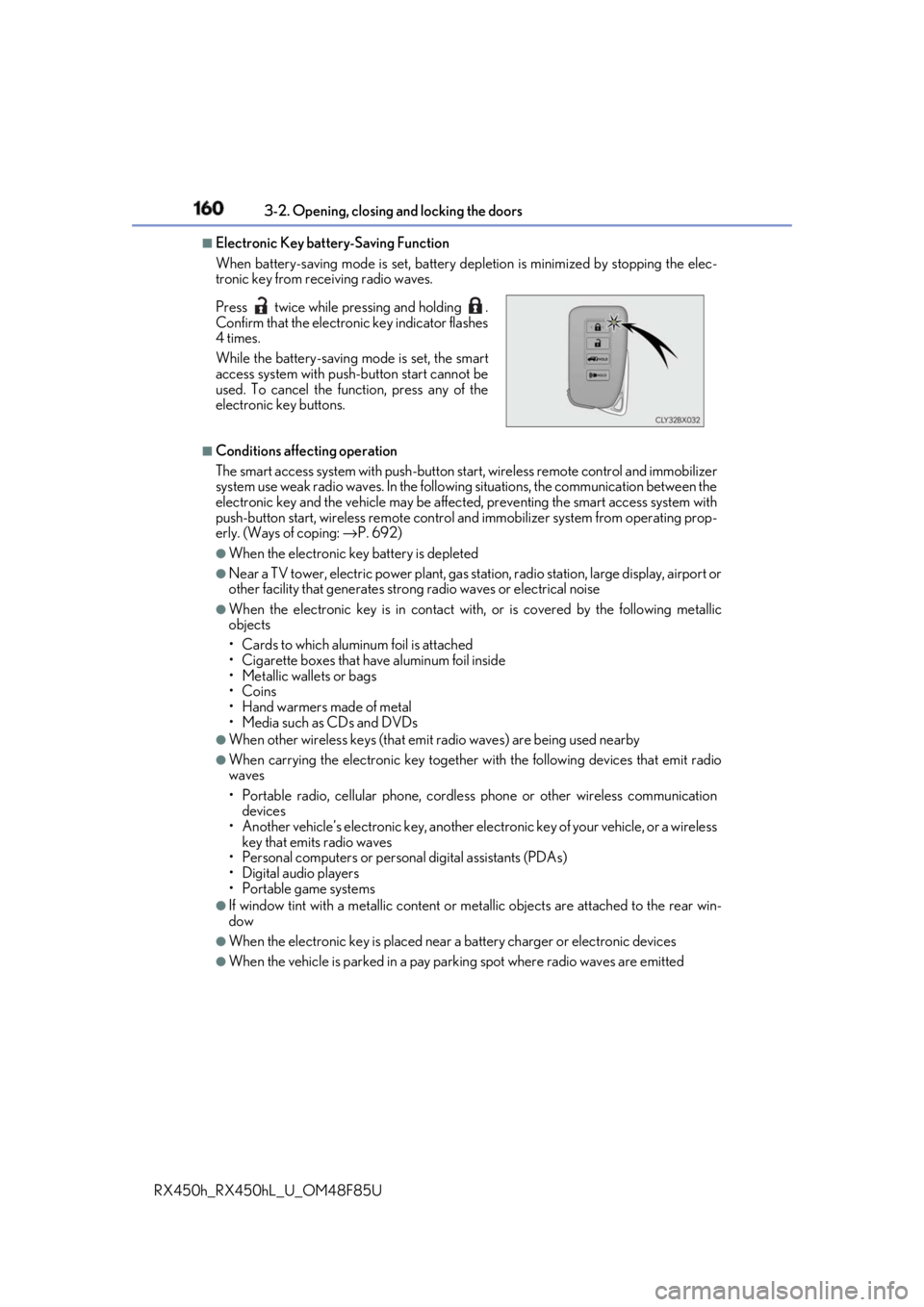
Electronic Key battery-Saving Function
When battery-saving mode is set, battery depletion is minimized by stopping the elec-
tronic key from re ceiving radio waves.
■
Conditions affe cting operation
The smart access system with push-button st art, wireless remote control and immobilizer
system use weak radio waves. In the following situations, the communication between the
electronic key and the vehicle may be affect ed, preventing the smart access system with
push-button start, wireless remote control an d immobilizer system from operating prop-
erly. (Ways of coping: → P. 692)●
When the electronic key battery is depleted ●
Near a TV tower, electric power plant, gas st ation, radio station, la rge display, airport or
other facility that generates strong radio wave s or electrical noise●
When the electronic key is in contact wi th, or is covered by the following metallic
objects
• Cards to which aluminum foil is attached
• Cigarette boxes that have aluminum foil inside
• Metallic wallets or bags
•Coins
• Hand warmers made of metal
• Media such as CDs and DVDs ●
When other wireless keys (that emit radio waves) are being used nearby ●
When carrying the electronic key together with the following devices that emit radio
waves
• Portable radio, cellular phone, cordle ss phone or other wireless communication
devices
• Another vehicle’s electronic key, another electronic key of your vehicle, or a wireless
key that emits radio waves
• Personal computers or person al digital assistants (PDAs)
• Digital audio players
• Portable game systems ●
If window tint with a metallic content or me tallic objects are atta ched to the rear win-
dow ●
When the electronic key is placed near a battery charger or electronic devices ●
When the vehicle is parked in a pay parking spot where radio waves are emittedPress twice while pressing and holding .
Confirm that the electronic key indicator flashes
4 times.
While the battery-saving mode is set, the smart
access system with push -button start cannot be
used. To cancel the function, press any of the
electronic key buttons.
Page 161 of 792

1613-2. Opening, closing and locking the doors
3
Operation of each component
RX450h_RX450hL _U_OM48F85U■
Note for the entry function ●
Even when the electronic key is within the effective range (detection areas), the system
may not operate properly in the following cases:
• The electronic key is too close to the window or outside door handle, near the
ground, or in a high place when the doors are locked or unlocked.
• The electronic key is near the ground or in a high place, or too close to the rear
bumper center when the back door is opened.
• The electronic key is on th e instrument panel, luggage co mpartment, floor, or in the
door pockets or glove box when the hybrid system is started or power switch modes
are changed. ●
Do not leave the electronic key on top of th e instrument panel or near the door pockets
when exiting the vehicle. Depending on the radio wave reception conditions, it may be
detected by the antenna outs ide the cabin and th e door will become lockable from the
outside, possibly trapping the electronic key inside the vehicle. ●
As long as the electronic key is within th e effective range, the doors may be locked or
unlocked by anyone. ●
Even if the electronic key is not inside the vehicle, it may be possible to start the hybrid
system if the electronic key is near the window. ●
The doors may unlock if a large amount of wa ter splashes on the d oor handle, such as in
the rain or in a car wash when the electronic key is within the effective range. (The door
will automatically be locked after approx imately 60 seconds if the doors are not
opened and closed.) ●
If the wireless remote control is used to lo ck the doors when the electronic key is near
the vehicle, there is a possibility that the d oor may not be unlocked by the entry func-
tion. (Use the wireless remote control to unlock the doors.) ●
Touching the door lock sensor while wearin g gloves may delay or prevent lock opera-
tion. Remove the gloves and touch the lock sensor again. ●
When the lock operation is performed using the lock sensor, recognition signals will be
shown up to two consecutive times. After this, no recognition signals will be given.
*●
If the door handle becomes wet while the el ectronic key is within the effective range,
the door may lock and unlock repeatedly. In that case, follow the following correction
procedures to wash the vehicle:
• Place the electronic key in a location 6 ft. (2 m) or more away from the vehicle. (Take
care to ensure that the key is not stolen.)
• Set the electronic key to battery-saving mode to disable the smart access system
with push-button start. ( → P. 160)●
If the electronic key is inside the vehicle and a door handle becomes wet during a car
wash, a message may be shown on the mult i-information display and a buzzer will
sound outside the vehicle. To turn off the alarm, lock all the doors. ●
The lock sensor may not work properly if it comes into contact with ice, snow, mud, etc.
Clean the lock sensor and attempt to operate it again. ●
A sudden approach to the effective range or door handle may prevent the doors from
being unlocked. In this case, return the door handle to the original position and check
that the doors unlock before pulling the door handle again.●
If there is another electronic key in the de tection area, it may take slightly longer to
unlock the doors after the door handle is gripped.