brake sensor LEXUS RX450h 2018 Owner's Manual
[x] Cancel search | Manufacturer: LEXUS, Model Year: 2018, Model line: RX450h, Model: LEXUS RX450h 2018Pages: 792, PDF Size: 12.5 MB
Page 359 of 792
3594-5. Using the driving support systems
4
Driving
RX450h_RX450hL _U_OM48F85U■
Re-enabling the Rear Cross Traffic Auto Brake function
To re-enable the Rear Cross Traffic Auto Brake function when it is disabled during opera-
tion of the Rear Cross Traffic Auto Brake function, either enable the system again ( → P.
345), or turn the power switch off and then back to ON mode.
Additionally, if there is no longer a vehicle ap proaching from the right or left at the rear of
the vehicle, or if the traveling direction of the vehicle changes (such as changing from
moving forward to backing up or from backin g up to moving forward), the system will be
re-enabled automatically. ■
Conditions under which the Rear Cross Traffic Auto Brake function will not detect a
vehicle
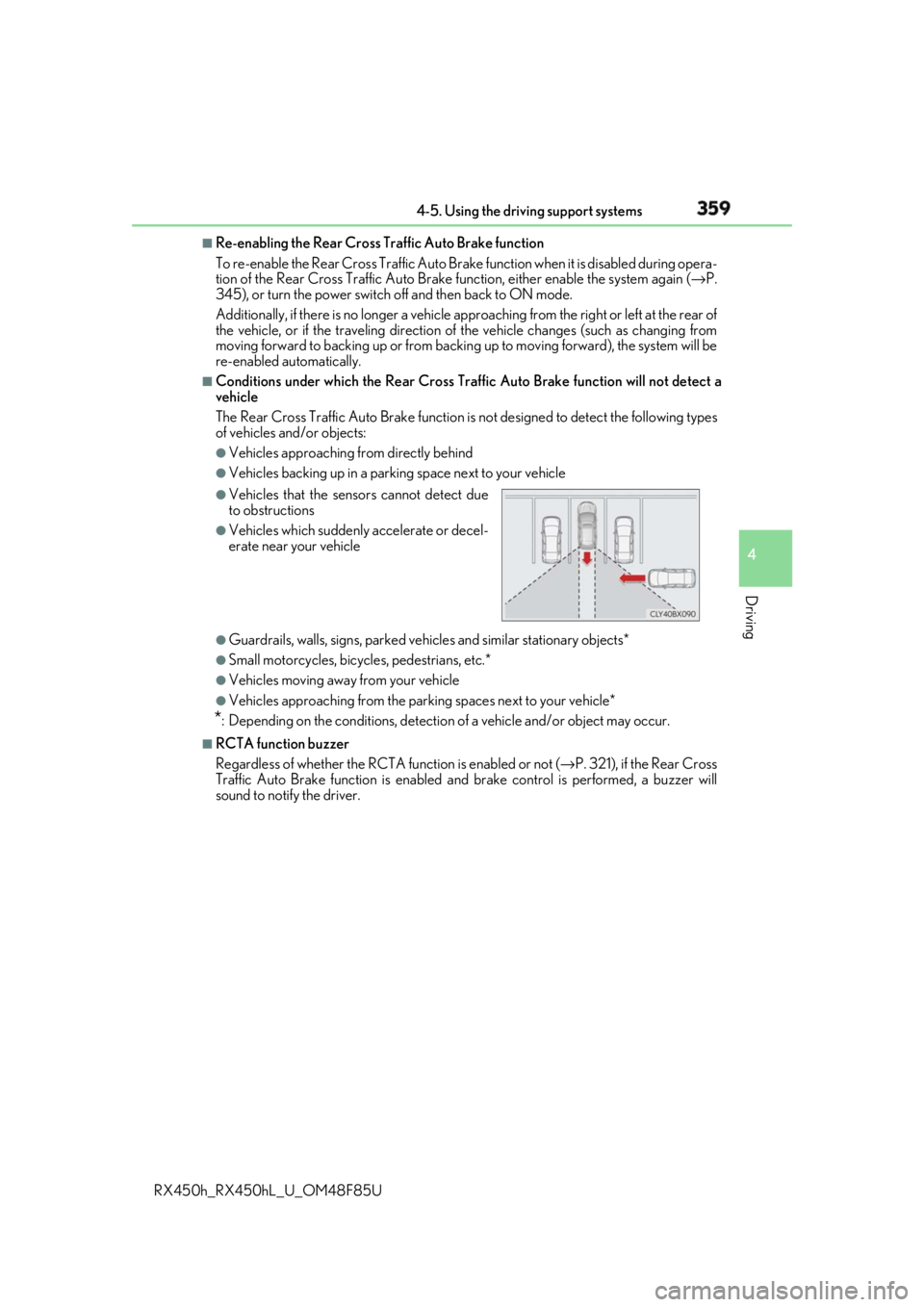
The Rear Cross Traffic Auto Brake function is not designed to detect the following types
of vehicles and/or objects: ●
Vehicles approaching from directly behind ●
Vehicles backing up in a parkin g space next to your vehicle
●
Guardrails, walls, signs, parked vehi cles and similar stationary objects*●
Small motorcycles, bicycles, pedestrians, etc.* ●
Vehicles moving away from your vehicle ●
Vehicles approaching from the parking spaces next to your vehicle*
* : Depending on the conditions, detection of a vehicle and/or object may occur.■
RCTA function buzzer
Regardless of whether the RCTA function is enabled or not ( → P. 321), if the Rear Cross
Traffic Auto Brake function is enabled and brake control is performed, a buzzer will
sound to notify the driver. ●
Vehicles that the sensors cannot detect due
to obstructions ●
Vehicles which suddenly accelerate or decel-
erate near your vehicle
Page 361 of 792
3614-5. Using the driving support systems
4
Driving
RX450h_RX450hL _U_OM48F85U■
Situations in which the Rear Cross Traffic Auto Brake function may not operate prop-
erly
In some situations such as the following , this function may not operate properly.●
Objects and vehicles which the radar sensors are not designed to detect
• Stationary objects
• Vehicles which are moving away from your vehicle
• Pedestrians, motorcycles, bicycles, etc.*
• Objects which are extremely close to a radar sensor
• Vehicles which are approaching from the right or left at the rear of the vehicle at a
traveling speed of less than approximately 5 mph (8 km/h)
• Vehicles which are approaching from the right or left at the rear of the vehicle at a
traveling speed of more than approximately 15 mph (24 km/h)
* : Depending on conditions, detection of a vehicle and/or object may occur.●
Situations in which the radar sensors may not be able to detect an object
• When a sensor or the area around a sensor is extremely hot or cold
• If the rear bumper is covere d with ice, snow, dirt, etc.
• If heavy rain or water strikes the vehicle
• When the detection area of a radar sensor is obstructed by an adjacent vehicle
• If the vehicle is significantly tilted
• If towing eyelets are installed
• If the suspension has been modified or tires of a size othe r than specified are
installed
• If the front of the vehicle is raised or lowered due to the carried load
• If a sticker or an electronic component, su ch as a backlit license plate (especially flu-
orescent type), fog lights, a fender pole or wireless antenna is installed near a radar
sensor
• If the orientation of a rada r sensor has been changed due to a collision or other
impact or removal and installation
• When multiple vehicles are approaching wi th only a small gap between each vehicle
• When a vehicle is approaching at high speed ●
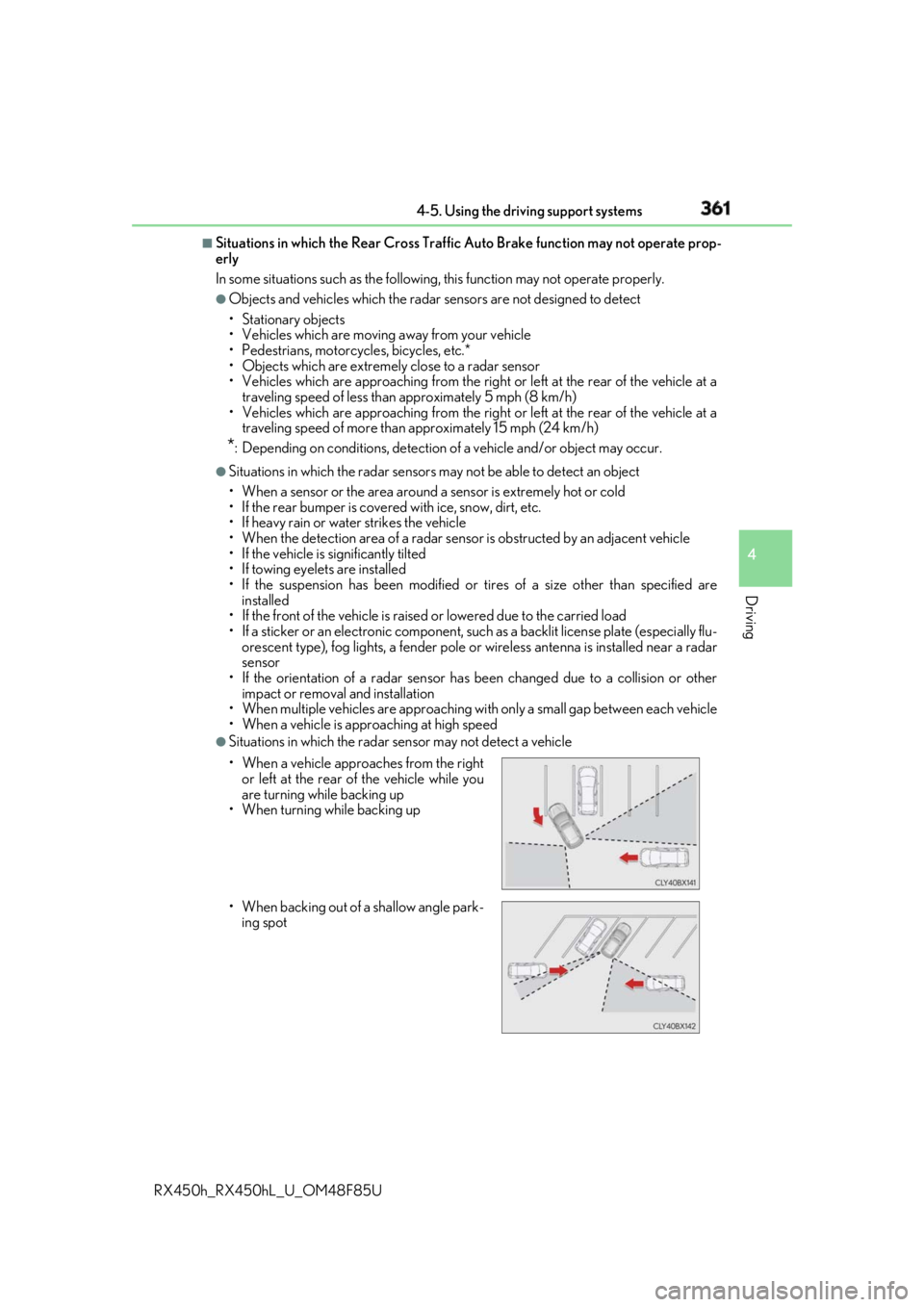
Situations in which the radar sensor may not detect a vehicle
• When a vehicle approaches from the right
or left at the rear of the vehicle while you
are turning while backing up
• When turning while backing up
• When backing out of a shallow angle park-
ing spot
Page 768 of 792
768 What to do if... (Troubleshooting)
RX450h_RX450hL _U_OM48F85U●
The seat belt reminder light is flashing
Are the driver and the passengers wearing the seat belts?
( → P. 662, 662)●
The parking brake indicator is on
Is the parking brake released? ( → P. 253)
Depending on the situation, other type s of warning buzzer may also sound.
( → P. 660, 667) ●
Did anyone inside the vehicle open a door during setting the alarm?
The sensor detects it and the alarm sounds. ( → P. 86)
Do one of the following to stop the alarms: • Unlock the doors.
• Turn the power switch to ACCESSORY or ON mode, or start the hybrid system.
●
Is the message displayed on the multi-information display?
Check the message on the multi-information display. ( → P. 667)
●
When a warning light turns on or a wa rning message is displayed, refer to
P. 660, 667. A warning buzzer sounds during driving
An alarm is activated and the horn sounds
A warning buzzer sounds when leaving the vehicle
A warning light turns on or a warning message is displayed