ECO mode LEXUS RX450h 2018 Owners Manual
[x] Cancel search | Manufacturer: LEXUS, Model Year: 2018, Model line: RX450h, Model: LEXUS RX450h 2018Pages: 792, PDF Size: 12.5 MB
Page 29 of 792
291-1. For safe use
1
For safety and security
RX450h_RX450hL _U_OM48F85UWARNING
Observe the following precautions.
Failure to do so may cause the driver’s floor mat to slip, possibly interfering with the ped-
als while driving. An unexpectedly high spee d may result or it may become difficult to
stop the vehicle. This could lead to an ac cident, resulting in death or serious injury.■
When installing the driver’s floor mat ●
Do not use floor mats designed for other models or different model year vehicles,
even if they are Lexus Genuine floor mats. ●
Only use floor mats designed for the driver’s seat. ●
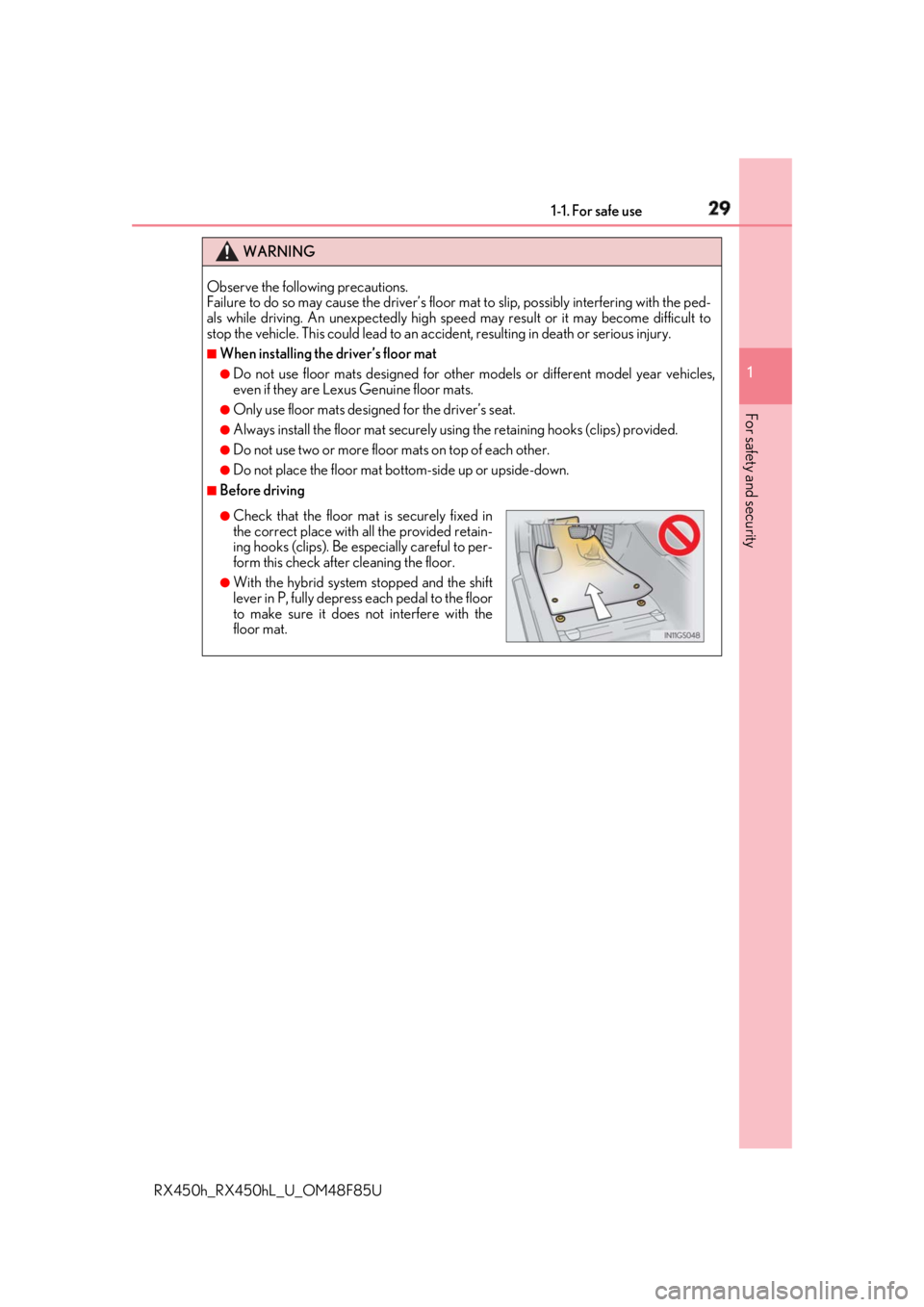
Always install the floor mat securely using the retain ing hooks (clips) provided.●
Do not use two or more floor mats on top of each other. ●
Do not place the floor mat bottom-side up or upside-down. ■
Before driving ●
Check that the floor mat is securely fixed in
the correct place with all the provided retain-
ing hooks (clips). Be especially careful to per-
form this check after cleaning the floor. ●
With the hybrid system stopped and the shift
lever in P, fully depress each pedal to the floor
to make sure it does not interfere with the
floor mat.
Page 66 of 792
66 1-2. Child safety
RX450h_RX450hL _U_OM48F85UWARNING ■
When installing a child restraint system
Observe the following precautions.
Failure to do so may result in death or serious injury.●
Do not allow children to play with the seat belt. If the seat belt becomes twisted
around a child’s neck, it may lead to chokin g or other serious injuries that could result
in death.
If this occurs and the buckle cannot be unfastened, scissors should be used to cut the
belt. ●
Ensure that the belt and plate are securely locked and the seat belt is not twisted.●
Shake the child restraint syst em left and right, and forward and backward to ensure
that it has been securely installed. ●
After securing a child restraint system, ne ver adjust the seat.●
When a booster seat is installed, always en sure that the shoulder belt is positioned
across the center of the child’s shoulder. The belt should be kept away from the child’s
neck, but not so that it coul d fall off the child’s shoulder.●
Follow all installation instructions provided by the child restraint system manufacturer.●
When securing some types of child restraint systems in rear seats, it may not be possi-
ble to properly use the seat belts in positions next to the child restraint without inter-
fering with it or affecting seat belt effectiveness. Be sure your seat belt fits snugly
across your shoulder and low on your hips. If it does not, or if it interferes with the child
restraint, move to a different position. Failure to do so ma y result in death or serious
injury. ●
When installing a child restraint system in th e rear center seat, adjust both seat cush-
ions to the same position an d align both seatbacks at th e same angle. The seatbacks
must be adjusted to the same angle. Othe rwise, the child restra int system cannot be
securely restrained and this may cause death or serious injuries in the event of sudden
braking, sudden swerving or an accident. ■
When installing a booster seat
To prevent the belt from going into ALR lock mode, do not fully extend the shoulder
belt. ALR mode causes the belt to tighten on ly. This could cause injury or discomfort to
the child. ( → P. 33)■
Do not use a seat belt extender
If a seat belt extender is used when insta lling a child restraint system, the seat belt will
not securely hold the child restraint system , which could cause death or serious injury
to the child or other passengers in the event of sudden braking, sudden swerving or an
accident.
Page 86 of 792
86 1-4. Theft deterrent system
RX450h_RX450hL _U_OM48F85UThe alarm uses light and sound to give an alert when an intrusion is detected.
The alarm is triggered in the following situations when the alarm is set:●
A locked door is unlocked or opened in any way other than using the entry
function, wireless remote control or mech anical key. (The doors will lock again
automatically.) ●
The hood is opened.
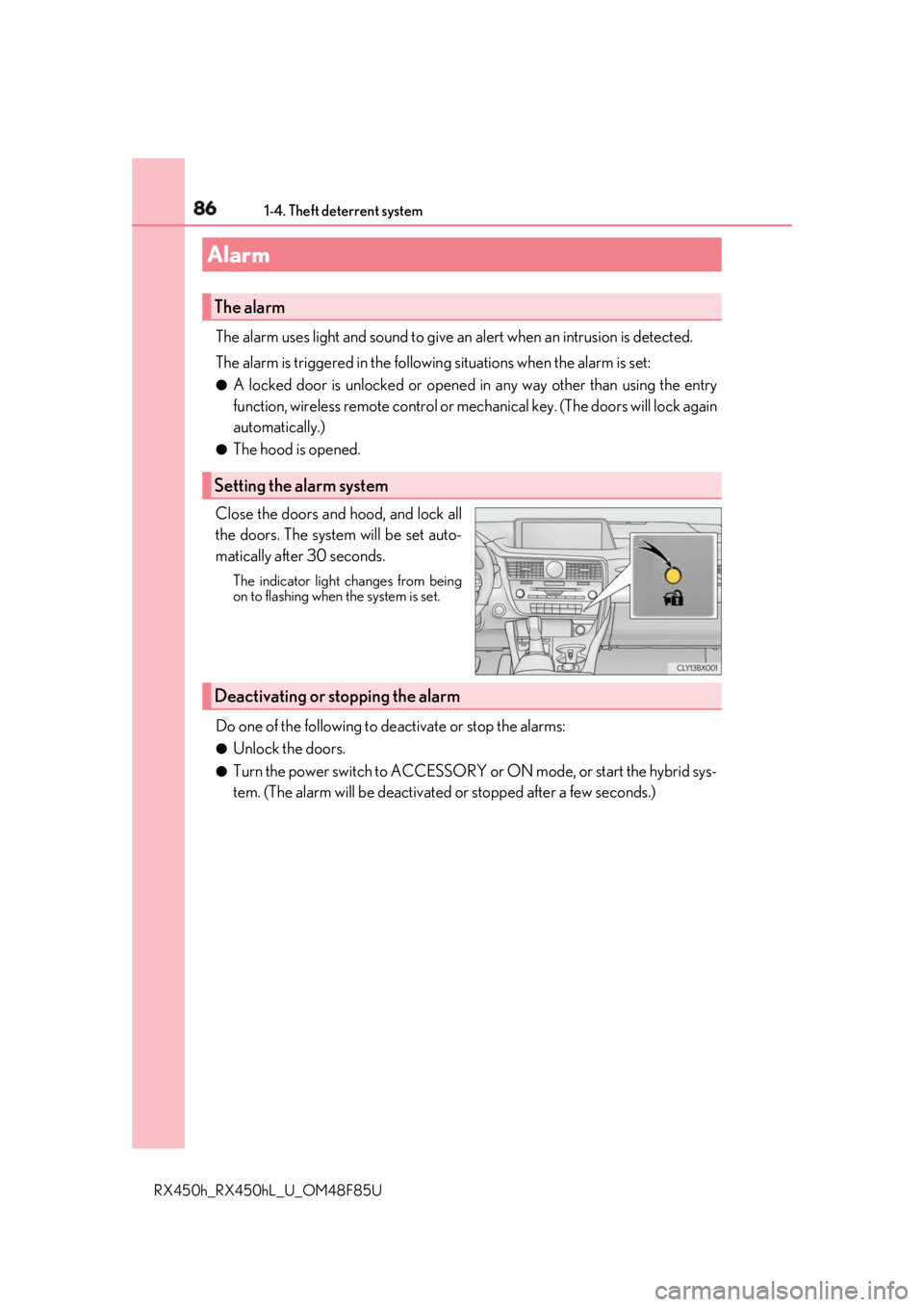
Close the doors and hood, and lock all
the doors. The system will be set auto-
matically after 30 seconds. The indicator light changes from being
on to flashing when the system is set.
Do one of the following to de activate or stop the alarms:●
Unlock the doors. ●
Turn the power switch to ACCESSORY or ON mode, or start the hybrid sys-
tem. (The alarm will be deactivated or stopped after a few seconds.)Alarm The alarm
Setting the alarm system
Deactivating or stopping the alarm
Page 92 of 792
92 2. Instrument cluster
RX450h_RX450hL _U_OM48F85U* 1
: These lights turn on when the power switch is turned to ON mode to indicate that a
system check is being performe d. They will turn off after the hybrid system is on, or
after a few seconds. There ma y be a malfunction in a system if a light does not come
on, or turn off. Have the vehicl e inspected by your Lexus dealer.
* 2
: This light flashes to indicate a malfunction.
* 3
: This light flashes or illumina tes to indicate a malfunction.
* 4
: This light illuminates on the center panel.
* 5
:RX450h
* 6
:RX450hL
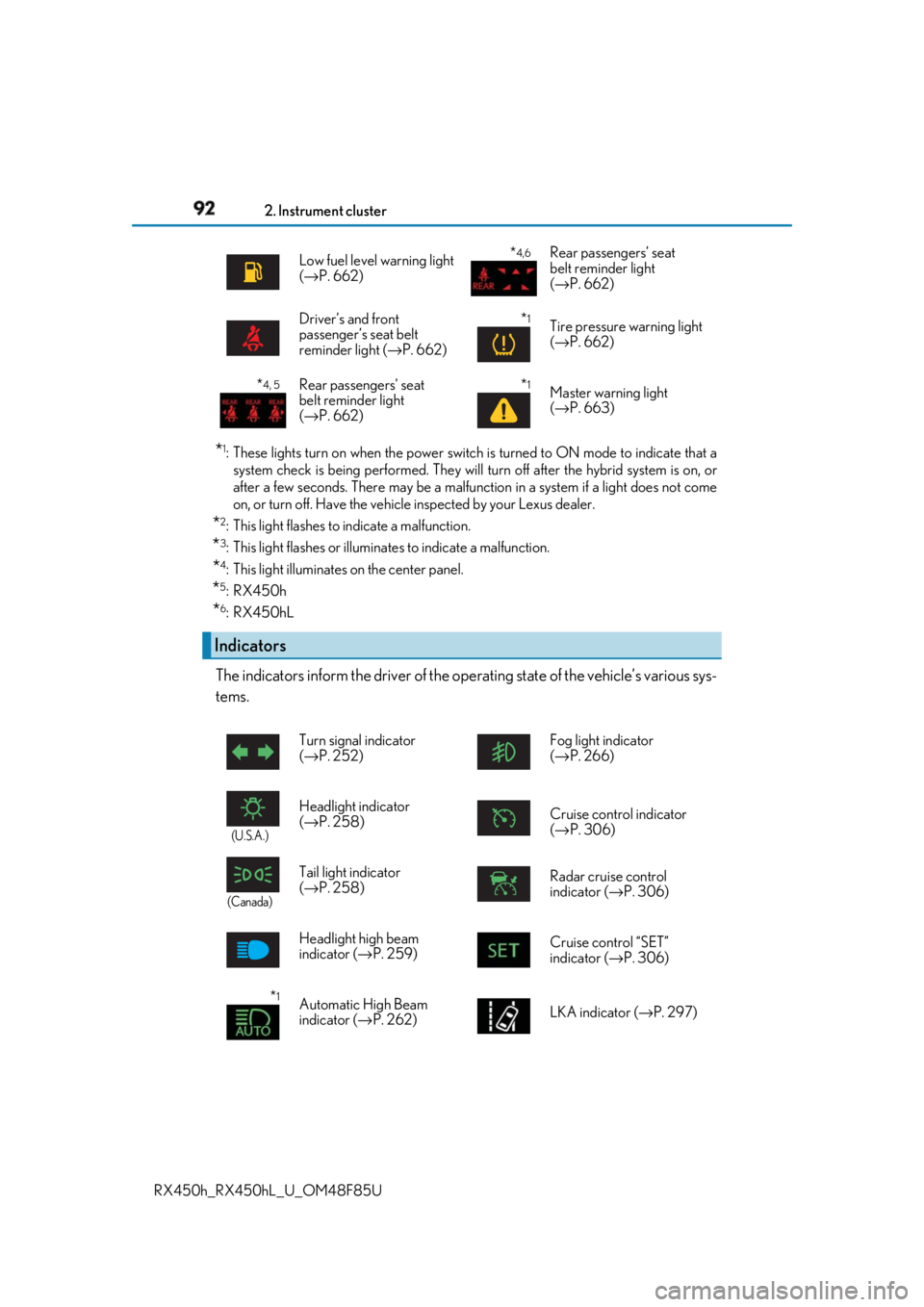
The indicators inform the driver of the op erating state of the vehicle’s various sys-
tems. Low fuel level warning light
( → P. 662)
* 4,6
Rear passengers’ seat
belt reminder light
( → P. 662)
Driver’s and front
passenger’s seat belt
reminder light ( → P. 662)
* 1
Tire pressure warning light
( → P. 662)
* 4, 5
Rear passengers’ seat
belt reminder light
( → P. 662)
* 1
Master warning light
( → P. 663)
Indicators Turn signal indicator
( → P. 252) Fog light indicator
( → P. 266)
(U.S.A.)
Headlight indicator
( → P. 258) Cruise control indicator
( → P. 306)
(Canada)
Tail light indicator
( → P. 258) Radar cruise control
indicator ( → P. 306)
Headlight high beam
indicator ( → P. 259) Cruise control “SET”
indicator ( → P. 306)
* 1
Automatic High Beam
indicator ( → P. 262) LKA indicator ( → P. 297)
Page 94 of 792
94 2. Instrument cluster
RX450h_RX450hL _U_OM48F85U●
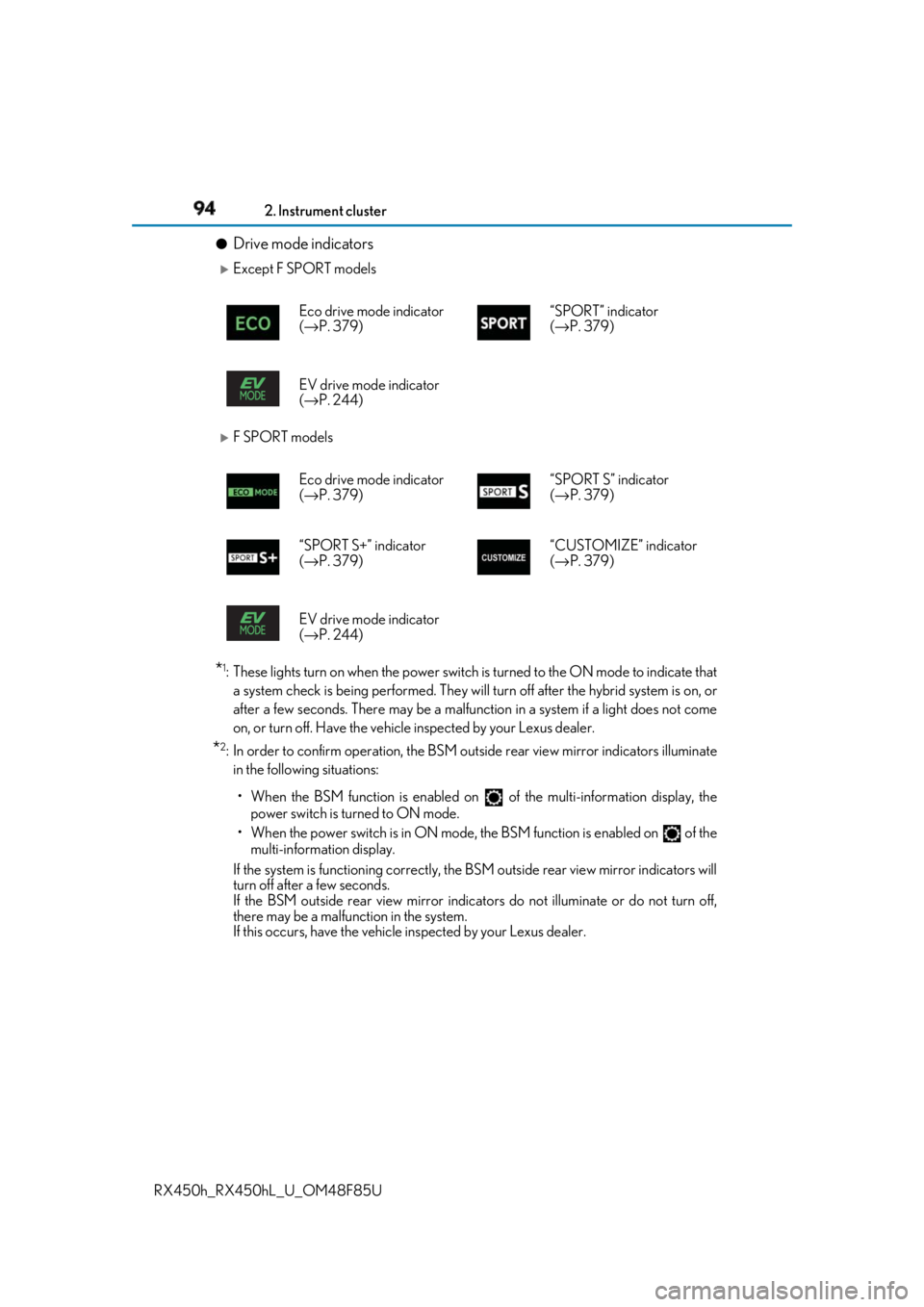
Drive mode indicators
Except F SPORT models
F SPORT models
* 1
: These lights turn on when the power switch is turned to the ON mode to indicate that
a system check is being performed. They will turn off after the hybrid system is on, or
after a few seconds. There ma y be a malfunction in a system if a light does not come
on, or turn off. Have the vehicle inspected by your Lexus dealer.
* 2
: In order to confirm operation, the BSM ou tside rear view mirror indicators illuminate
in the following situations:
• When the BSM function is enabled on of the multi-information display, the
power switch is turned to ON mode.
• When the power switch is in ON mode, the BSM function is enabled on of the
multi-information display.
If the system is functioning correctly, the BSM outside rear view mirror indicators will
turn off after a few seconds.
If the BSM outside rear view mirror indicators do not illuminate or do not turn off,
there may be a malfunction in the system.
If this occurs, have the vehicle inspected by your Lexus dealer. Eco drive mode indicator
( → P. 379) “SPORT” indicator
( → P. 379)
EV drive mode indicator
( → P. 244)
Eco drive mode indicator
( → P. 379) “SPORT S” indicator
( → P. 379)
“SPORT S+” indicator
( → P. 379) “CUSTOMIZE” indicator
( → P. 379)
EV drive mode indicator
( → P. 244)
Page 98 of 792
98 2. Instrument cluster
RX450h_RX450hL _U_OM48F85U■
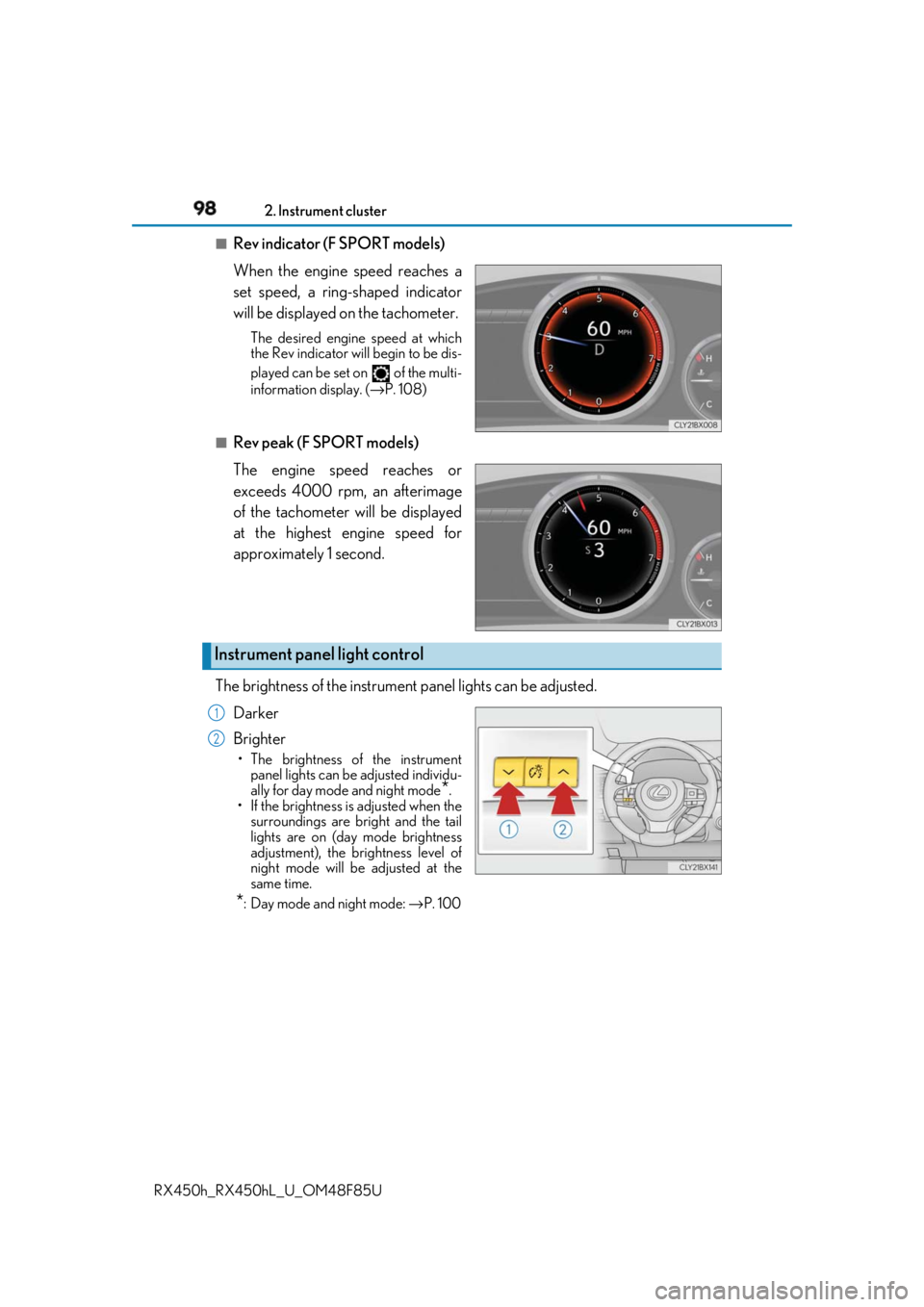
Rev indicator (F SPORT models)
When the engine speed reaches a
set speed, a ring-shaped indicator
will be displayed on the tachometer. The desired engine speed at which
the Rev indicator will begin to be dis-
played can be set on of the multi-
information display. ( → P. 108)
■
Rev peak (F SPORT models)
The engine speed reaches or
exceeds 4000 rpm, an afterimage
of the tachometer will be displayed
at the highest engine speed for
approximately 1 second.
The brightness of the instrument panel lights can be adjusted.
Darker
Brighter • The brightness of the instrument
panel lights can be adjusted individu-
ally for day mode and night mode
* .
• If the brightness is adjusted when the
surroundings are bright and the tail
lights are on (day mode brightness
adjustment), the brightness level of
night mode will be adjusted at the
same time.
* : Day mode and night mode: → P. 100Instrument panel light control 1
2
Page 99 of 792
992. Instrument cluster
2
Instrument cluster
RX450h_RX450hL _U_OM48F85U■
The meters and display illuminate when
The power switch is in ON mode. ■
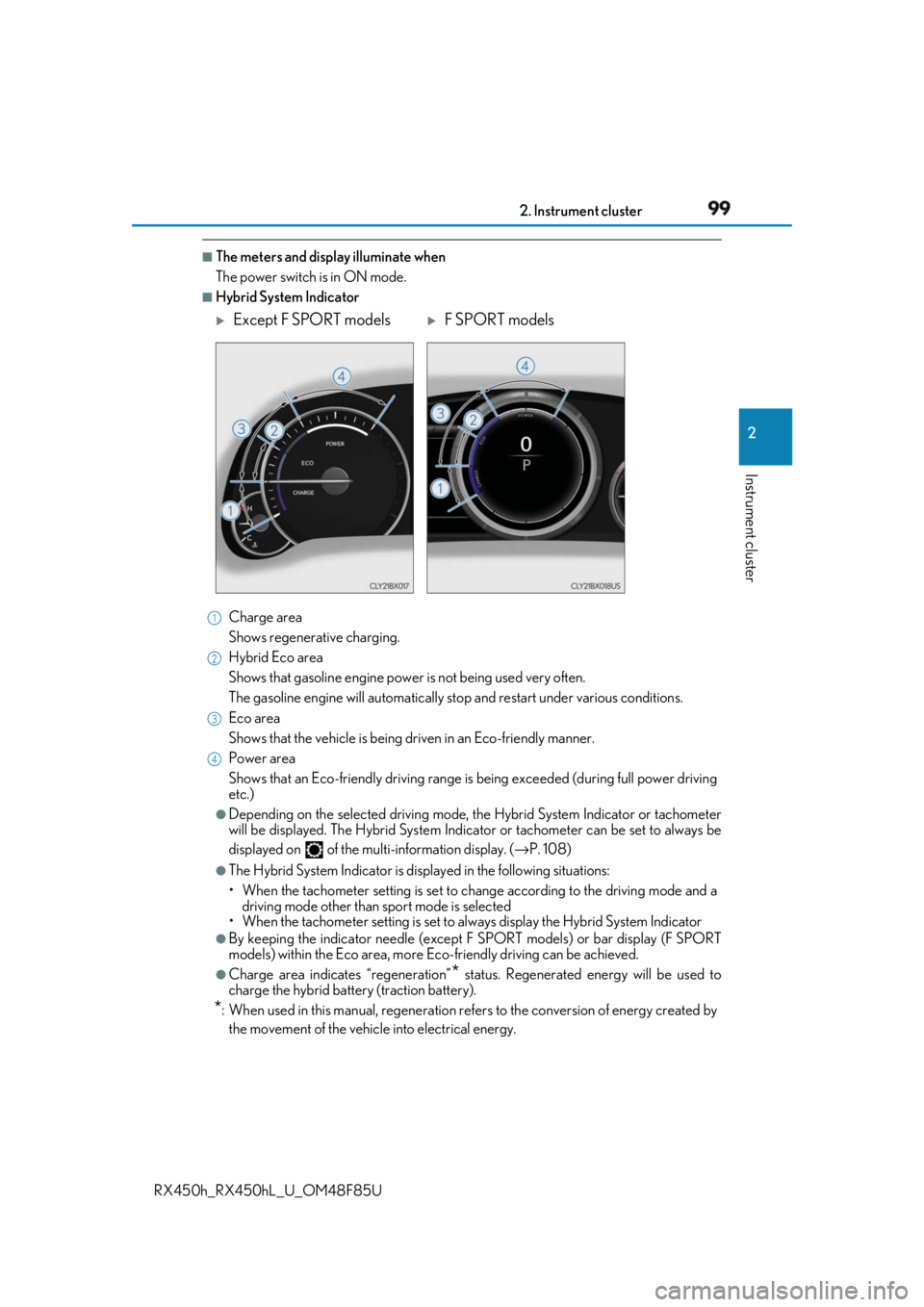
Hybrid System Indicator
Charge area
Shows regenerative charging.
Hybrid Eco area
Shows that gasoline en gine power is not being used very often.
The gasoline engine will automatically st op and restart under various conditions.
Eco area
Shows that the vehicle is being dr iven in an Eco-friendly manner.
Power area
Shows that an Eco-friendly driving range is being exceeded (dur ing full power driving
etc.) ●
Depending on the selected driving mode, th e Hybrid System Indicator or tachometer
will be displayed. The Hybrid System Indica tor or tachometer can be set to always be
displayed on of the mult i-information display. ( → P. 108)●
The Hybrid System Indicator is disp layed in the following situations:
• When the tachometer setting is set to ch ange according to the driving mode and a
driving mode other than sport mode is selected
• When the tachometer setting is set to al ways display the Hybrid System Indicator●
By keeping the indica tor needle (except F SPORT models) or bar display (F SPORT
models) within the Eco area, more Eco-friendly driving can be achieved.●
Charge area indicates “regeneration”
* status. Regene rated energy will be used to
charge the hybrid battery (traction battery).
* : When used in this manual, re generation refers to the conv ersion of energy created by
the movement of the vehicle into electrical energy.
Except F SPORT models
F SPORT models1
2
3
4
Page 115 of 792
1152. Instrument cluster
2
Instrument cluster
RX450h_RX450hL _U_OM48F85U◆ Display items ■
Odometer
Displays the total distance the vehicle has been driven. ■
Trip meter A/trip meter B
Displays the distance the vehicle has been driven since the meter was last
reset. Trip meters A and B can be used to record and display different dis-
tances independently. To reset, display the desired trip meter and press and hold the “ODO/TRIP”
switch.■
Distance until next engine oil change
Displays the distance the vehicle can be driven until an oil change is neces-
sary.
◆ Pop-up display
In some situations the following will be temporarily displayed:■
Distance until next engine oil change
Displays the distance until the next engi ne oil change. This display will be dis-
played in the following situations: • When the power switch is turned to ON mode.
• When a warning message indicating that oil maintenance shou ld be performed
soon or is required is displayed.Odometer/trip meter display area
Page 116 of 792
116 2. Instrument cluster
RX450h_RX450hL _U_OM48F85UDisplays suggestions to the driver in the following situations. To select a response
to a displayed suggestion, use the meter control switches. The suggestion function can be turned on/off. (Customizable features: → P. 737)■
Suggestion to enable the power back door
If the power back door system is disabled (setting on set to off) and the
power back door switch on the instru ment panel is operated, a suggestion
message will be displayed asking if yo u wish to enable the power back door
system. To enable the power back door system, select “Yes”. After enabling the power back door syst em, press the power back door switch
again to open or close the power back door.■
Suggestion to turn off the headlights
If the headlights are left on for a certai n amount of time af ter the power switch
has been turned off, a su ggestion message will be displayed asking if you wish
to turn the headlights off. To turn the headlights off, select “Yes”.If a front door is opened after the power switch is turned off, this suggestion mes-
sage will not be displayed.■
Background color of the indicator/shift posi tion display area (except F SPORT models)
The background color of the indicator/shift po sition display area is changed according to
the driving mode as follows ( → P. 379):●
Eco drive mode: Blue ●
Sport mode: Red ■
G-force display (if equipped) ●
The G-force values may not be zero even when the vehicle is parked, such as when it is
parked on an incline. ●
Depending on the vehicle usage conditions, the brake fluid pressure display may not
reach its maximum reading even though the brake pedal is fully depressed. ●
If a 12-volt battery terminal is disconnect ed and reconnected, the steering amount dis-
play may be disabled temporarily. After driv ing the vehicle for a while, the display will
be enabled. ■
Suspension of the settings display ●
Some settings cannot be changed while driv ing. When changing settings, park the
vehicle in a safe place. ●
If a warning message is displa yed, operation of the settin gs display will be suspended.Suggestion function
Page 128 of 792
128 2. Instrument cluster
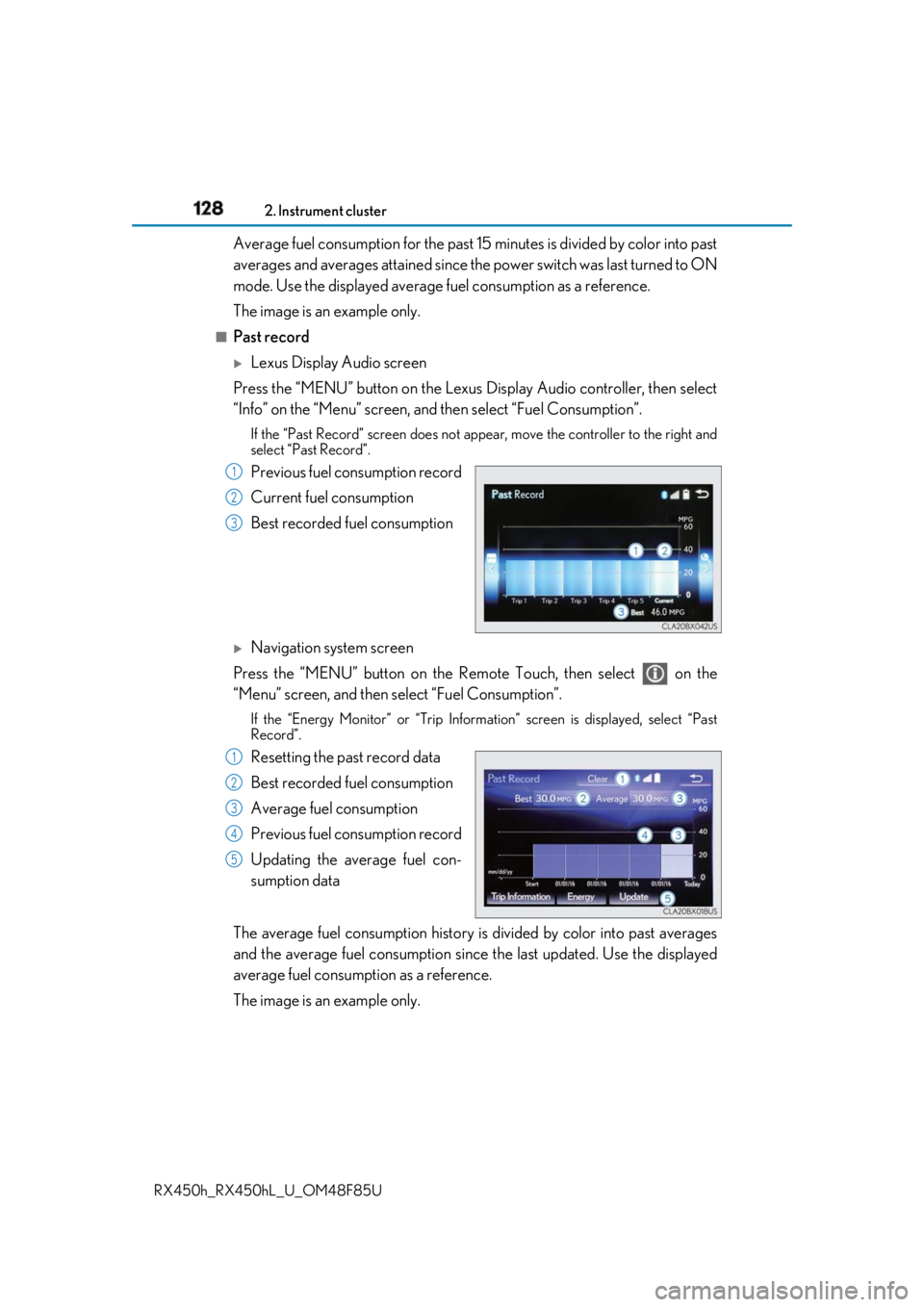
RX450h_RX450hL _U_OM48F85UAverage fuel consumption for the past 15 minutes is divided by color into past
averages and averages atta ined since the power switch was last turned to ON
mode. Use the displayed average fuel consumption as a reference.
The image is an example only. ■
Past record
Lexus Display Audio screen
Press the “MENU” button on the Lexus Display Audio controller, then select
“Info” on the “Menu” screen, and then select “Fuel Consumption”.If the “Past Record” screen does not appear, move the controller to the right and
select “Past Record”.
Previous fuel consumption record
Current fuel consumption
Best recorded fuel consumption
Navigation system screen
Press the “MENU” button on the Remo te Touch, then select on the
“Menu” screen, and then se lect “Fuel Consumption”.If the “Energy Monitor” or “Trip Informat ion” screen is disp layed, select “Past
Record”.
Resetting the past record data
Best recorded fuel consumption
Average fuel consumption
Previous fuel consumption record
Updating the average fuel con-
sumption data
The average fuel consumption history is divided by color into past averages
and the average fuel consumption since the last updated. Use the displayed
average fuel consumption as a reference.
The image is an example only. 1
2
3
1
2
3
4
5