key LEXUS RX450h 2018 Workshop Manual
[x] Cancel search | Manufacturer: LEXUS, Model Year: 2018, Model line: RX450h, Model: LEXUS RX450h 2018Pages: 792, PDF Size: 12.5 MB
Page 630 of 792
630 7-3. Do-it-yourself maintenance
RX450h_RX450hL _U_OM48F85U●
Flathead screwdriver ●
Lithium battery CR2032
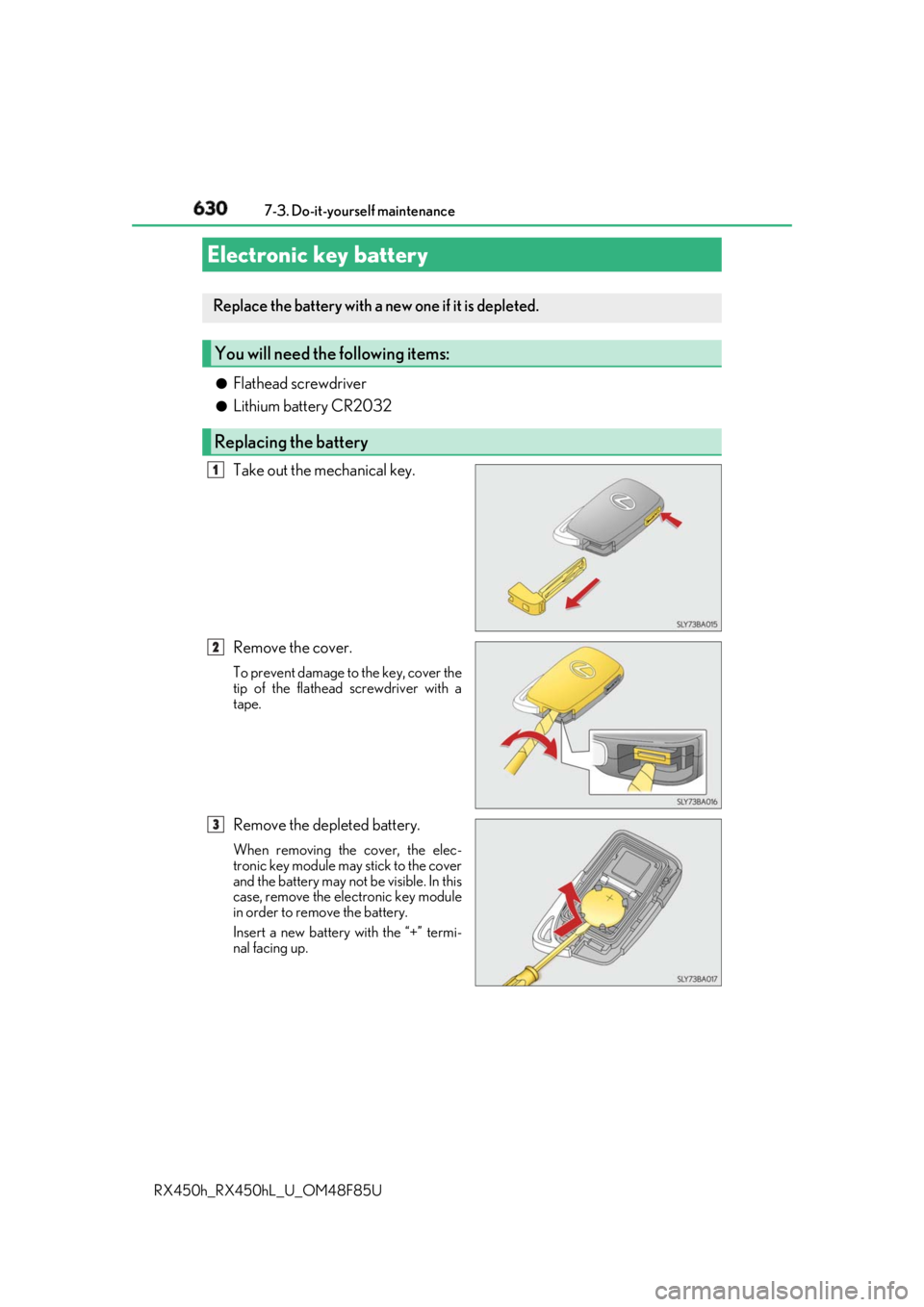
Take out the mechanical key.
Remove the cover. To prevent damage to the key, cover the
tip of the flathead screwdriver with a
tape.
Remove the depleted battery. When removing the cover, the elec-
tronic key module may stick to the cover
and the battery may not be visible. In this
case, remove the el ectronic key module
in order to remove the battery.
Insert a new battery with the “+” termi-
nal facing up.Electronic key battery Replace the battery with a new one if it is depleted.
You will need the following items:
Replacing the battery 1
2
3
Page 631 of 792
6317-3. Do-it-yourself maintenance
7
Maintenance and care
RX450h_RX450hL _U_OM48F85U■
Use a CR2032 lithium battery ●
Batteries can be purc hased at your Lexus dealer, loca l electrical appliance shops or
camera stores. ●
Replace only with the same or equivalent type recommended by the manufacturer. ●
Dispose of used batteries according to the local laws. ■
If the electronic key battery is depleted
The following symptoms may occur: ●
The smart access system with push-button start and wireless remote control will not
function properly. ●
The operational rang e will be reduced.
WARNING ■
Removed battery and other parts
These parts are small and if swallowed by a child, they can cause choking. Keep away
from children. Failure to do so coul d result in death or serious injury.
NOTICE ■
For normal operation after replacing the battery
Observe the following precautions to prevent accidents: ●
Always work with dry hands.
Moisture may cause the battery to rust. ●
Do not touch or move any other co mponent inside the remote control.●
Do not bend either of the battery terminals.
Page 651 of 792

651
8When trouble arises
RX450h_RX450hL _U_OM48F85U 8-1. Essential information
Emergency flashers .................. 652
If your vehicle has
to be stopped in
an emergency .......................... 653
8-2. Steps to take in
an emergency
If your vehicle needs
to be towed................................ 654
If you think something is
wrong ........................................... 659
If a warning light turns on
or a warning buzzer
sounds..........................................660
If a warning message is
displayed..................................... 667
If you have a flat tire .................. 673
If the hybrid system will
not start .......................................690
If the electronic key does
not operate properly ............. 692
If the 12-volt battery is
discharged ................................. 695
If your vehicle overheats ......... 702
If the vehicle becomes
stuck ............................................. 706
Page 668 of 792
668 8-2. Steps to take in an emergency
RX450h_RX450hL _U_OM48F85U* : A buzzer sounds the first time a message is shown on the multi-information display.
●
If the following messages are shown, there may be a malfunction.
Immediately stop the vehicle in a safe place and contact your Lexus dealer.
Continuing to drive the vehicle may be dangerous.
• “Braking Power Low Stop in a Safe Place See Owner’s Manual”
• “Oil Pressure Low Stop in a Safe Place See Owner’s Manual”
• “Charging System Malfunction See Owner’s Manual” ●
If the following messages are shown, there may be a malfunction.
Immediately have the vehicle inspected by your Lexus dealer.
• “Hybrid System Malfunction”
•“Check Engine”
• “Hybrid Battery System Malfunction”
• “Accelerator System Malfunction”
• “Access System with Elec. Key Malfunction See Owner’s Manual” ●
If “Engine Coolant Temp High Stop in a Safe Place See Owner’s Manual” is
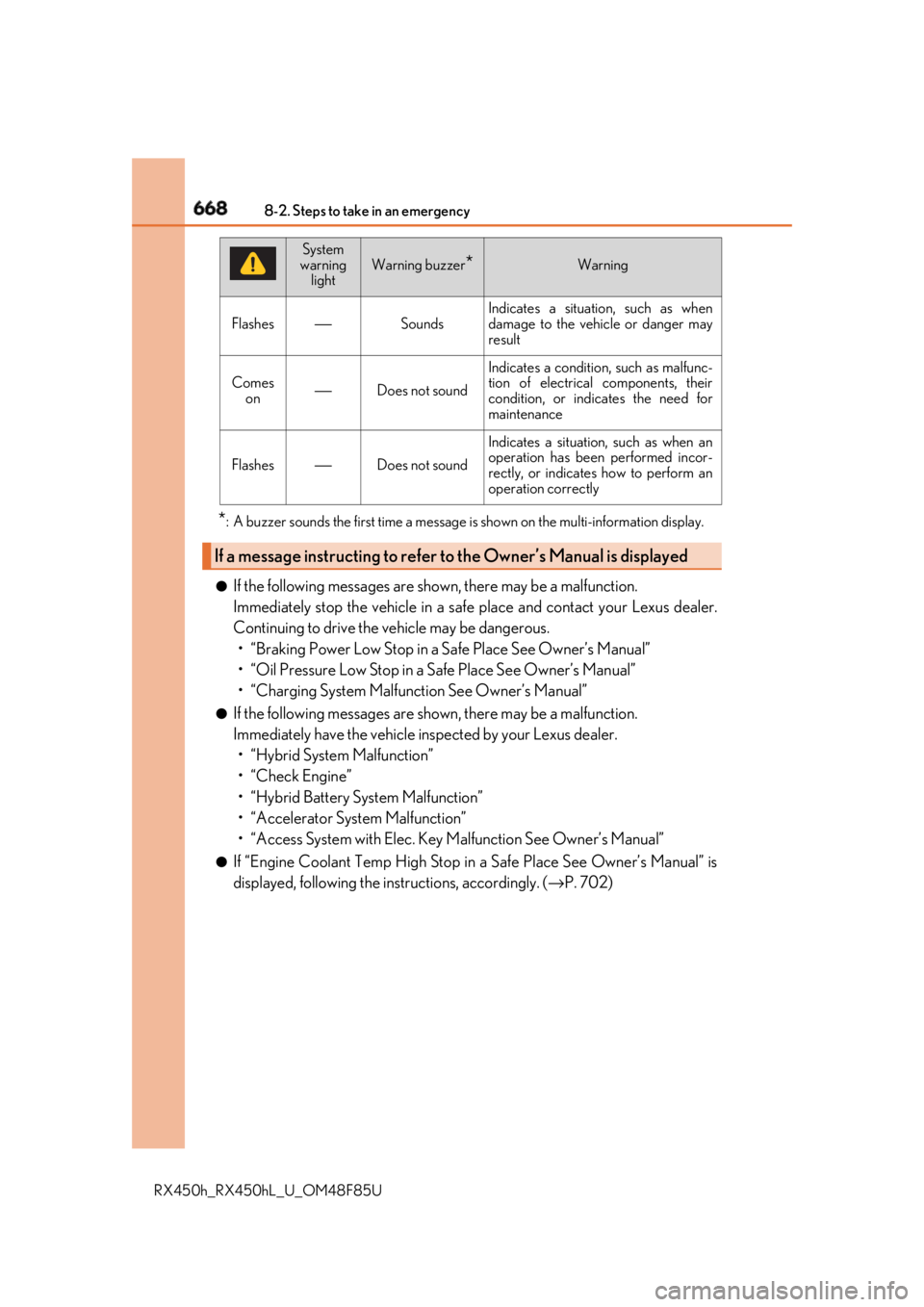
displayed, following the instructions, accordingly. ( → P. 702)Flashes ⎯ Sounds Indicates a situation, such as when
damage to the vehicle or danger may
result
Comes
on ⎯ Does not sound Indicates a condition, such as malfunc-
tion of electrical components, their
condition, or indicates the need for
maintenance
Flashes ⎯ Does not sound Indicates a situation, such as when an
operation has been performed incor-
rectly, or indicates how to perform an
operation correctly
If a message instructing to refer to the Owner’s Manual is displayed System
warning
light Warning buzzer
* Warning
Page 670 of 792

670 8-2. Steps to take in an emergency
RX450h_RX450hL _U_OM48F85U■
If “Shift Is in N Release Accele rator Before Shifting” is shown
Message is displayed when the accele rator pedal has been depressed and
the shift lever is in N. Release the accelerator pedal and shift the shift lever to
D or R. ■
If “Depress Brake when Vehicle Is Stopped Hybrid System May Overheat”
is shown
Message is displayed when the accelerato r pedal is depressed to maintain the
vehicle position when stopped on a upward slope, etc.
If this continues, the hybrid system may overheat.
Release the accelerator pedal and depress the brake pedal. ■
If “Power Turned Off to Save Battery” is displayed
This message is displayed when the power was cut off due to the automatic
power off function.
The next time the hybrid system is star ted, increase the engine speed slightly
and maintain it at that speed for appr oximately 5 minutes to recharge the 12-
volt battery. ■
If “A New Key has been Registered Contact Your Dealer for Details” is dis-
played
This message will be displayed each time the driver's door is opened when the
doors are unlocked from the outside fo r approximately one week after a new
electronic key has been registered.
If this message is displayed but you ha ve not had a new electronic key regis-
tered, ask your Lexus dealer to check if an unknown electronic key (other than
those in your possession) has been registered. ■
When “Headlight System Malfunctio n Visit Your Dealer” is displayed
The following systems may be malfunct ioning. Have the vehicle inspected by
your Lexus dealer immediately. ●
The LED headlight system ●
The automatic headlight leveling system ●
Automatic High Beam ●
AFS (Adaptive Front-lighting System) (if equipped)
Page 674 of 792
674 8-2. Steps to take in an emergency
RX450h_RX450hL _U_OM48F85U
RX450h
* : Documentation relating to the wheel lock key, such as the registration and I.D. card, is
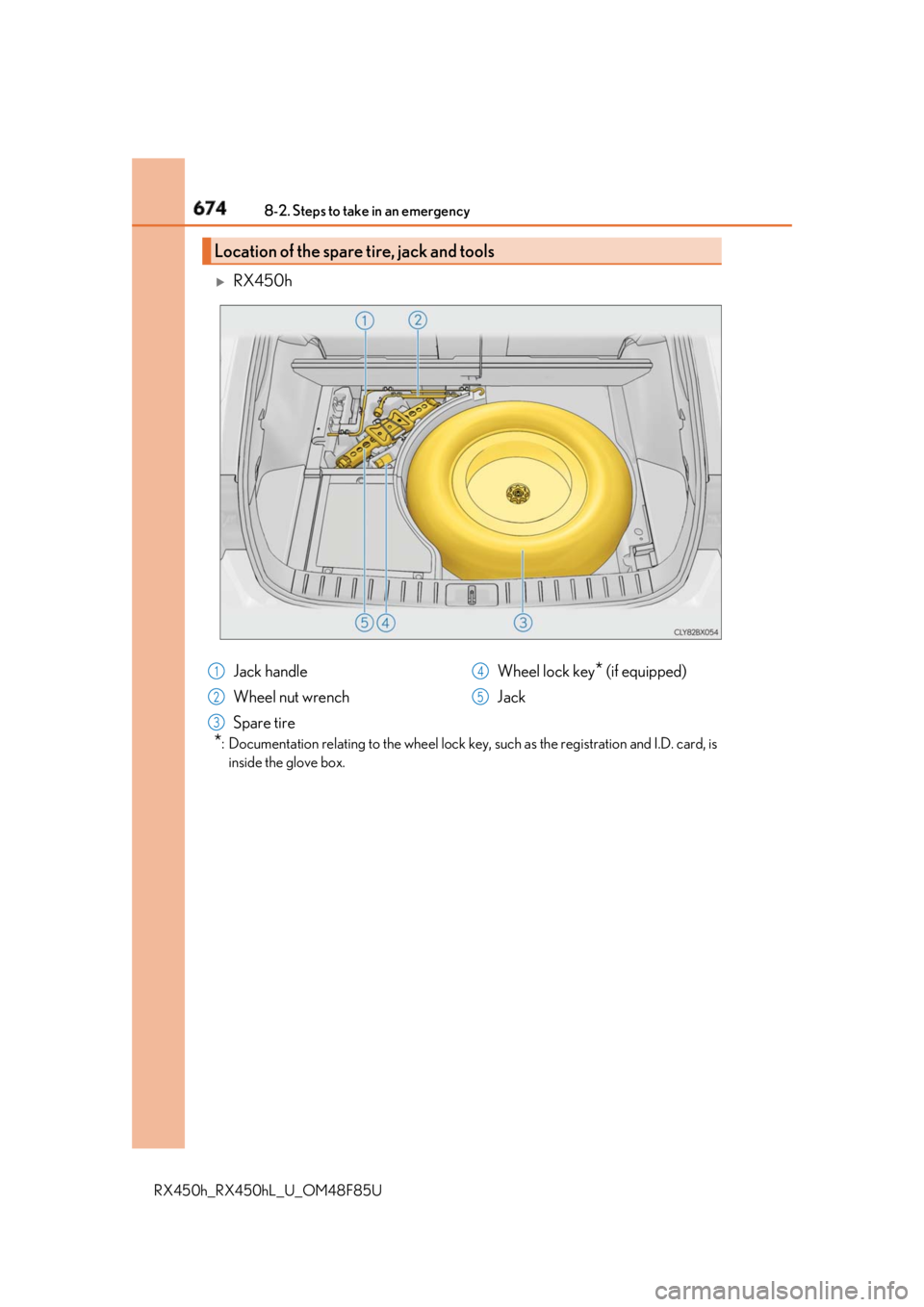
inside the glove box.Location of the spare tire, jack and tools
Jack handle
Wheel nut wrench
Spare tire Wheel lock key
* (if equipped)
Jack1
2
3 4
5
Page 677 of 792
6778-2. Steps to take in an emergency
8
When trouble arises
RX450h_RX450hL _U_OM48F85UWhen replacing tires on a vehicle with wheel lock nuts, use the following proce-
dures to remove and install the wheel lock nuts. The wheel lock key is stored in
the tray inside the luggage compartment. Always return the wheel lock key to its
original position after use, so that it does not get lost.■
Removal
For ease of removal, the wheel lock nut should always be the first one loos-
ened.
Place the wheel lock key on top of th e wheel lock nut, turning until the
wheel lock key and wheel lock nut patterns engage.
Place the wheel nut wrench on the wheel lock key, and while applying pres-
sure on the wheel lock key, loosen the wheel lock nut.■
Installation
For ease of installation, the wheel lock nut should always be the last one tight-
ened.
By hand, install a wheel lock nut on each wheel.
Place the wheel lock key on top of th e wheel lock nut, turning until the
wheel lock key and wheel lock nut patterns engage.
Place the wheel nut wrench on the wheel lock key, and while applying pres-
sure on the wheel lock key, tighten the wheel lock nut to the recommended
torque.Wheel lock nut (if equipped)
NOTICE
Do not use an impact wrench. Using an impact wrench may cause permanent damage
to wheel lock nut and wheel lock key. If in doubt about wheel lock application, contact
your Lexus dealer. 1
2
1
2
3
Page 690 of 792
690 8-2. Steps to take in an emergency
RX450h_RX450hL _U_OM48F85UOne of the following may be the cause of the problem: ●
The electronic key may not be functioning properly.
( → P. 692)●
There may not be sufficient fuel in the vehicle’s tank.
Refuel the vehicle. ●
There may be a malfunction in the immobilizer system. ( → P. 83)●
There may be a malfunction in the steering lock system. ●
The hybrid system may be malfunctioni ng due to an electrical problem such
as electronic key battery depletion or a blown fuse. However, depending on
the type of malfunction, an interim meas ure is available to start the hybrid sys-
tem. ( → P. 691)
One of the following may be the cause of the problem: ●
The 12-volt battery may be discharged. ( → P. 695)●
The 12-volt battery terminal connections may be loose or corroded.
( → P. 691)If the hybrid system will not start Reasons for the hybrid system not star ting vary depending on the situation.
Check the following and perform the appropriate procedure:
The hybrid system will no t start even though the correct starting proce-
dure is being followed. ( → P. 239)
The interior lights and headlights are d im, or the horn does not sound or
sounds at a low volume.
Page 692 of 792
692 8-2. Steps to take in an emergency
RX450h_RX450hL _U_OM48F85U■
Unlocking the door
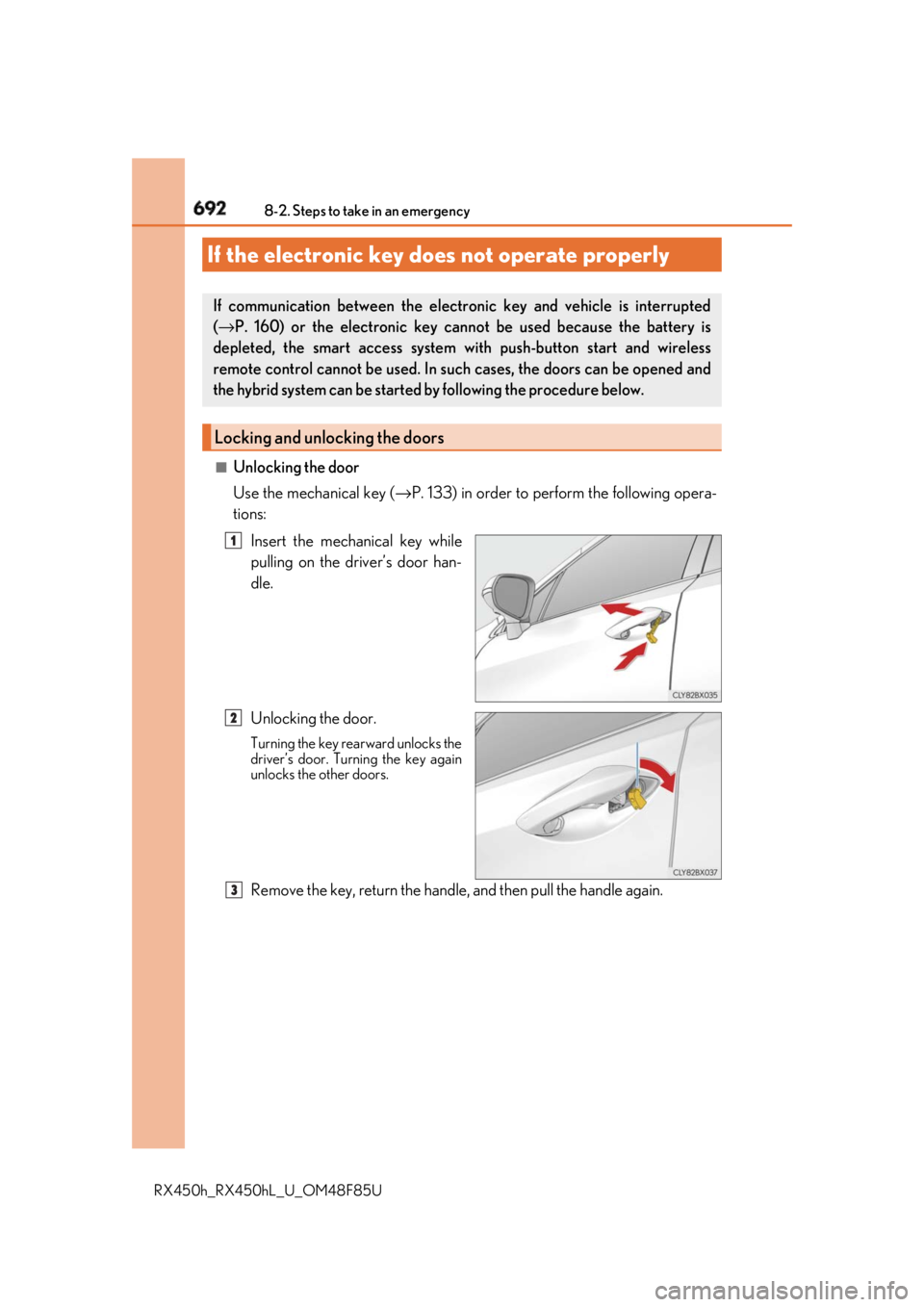
Use the mechanical key ( → P. 133) in order to perform the following opera-
tions:
Insert the mechanical key while
pulling on the driver’s door han-
dle.
Unlocking the door. Turning the key rearward unlocks the
driver’s door. Turning the key again
unlocks the other doors.
Remove the key, return the handle, and then pull the handle again.If the electronic key does not operate properly If communication between the electronic key and vehicle is interrupted
( → P. 160) or the electronic key ca nnot be used because the battery is
depleted, the smart access system wi th push-button start and wireless
remote control cannot be used. In such cases, the doors can be opened and
the hybrid system can be started by following the procedure below.
Locking and unlocking the doors 1
2
3
Page 693 of 792
6938-2. Steps to take in an emergency
8
When trouble arises
RX450h_RX450hL _U_OM48F85U■
Locking the door
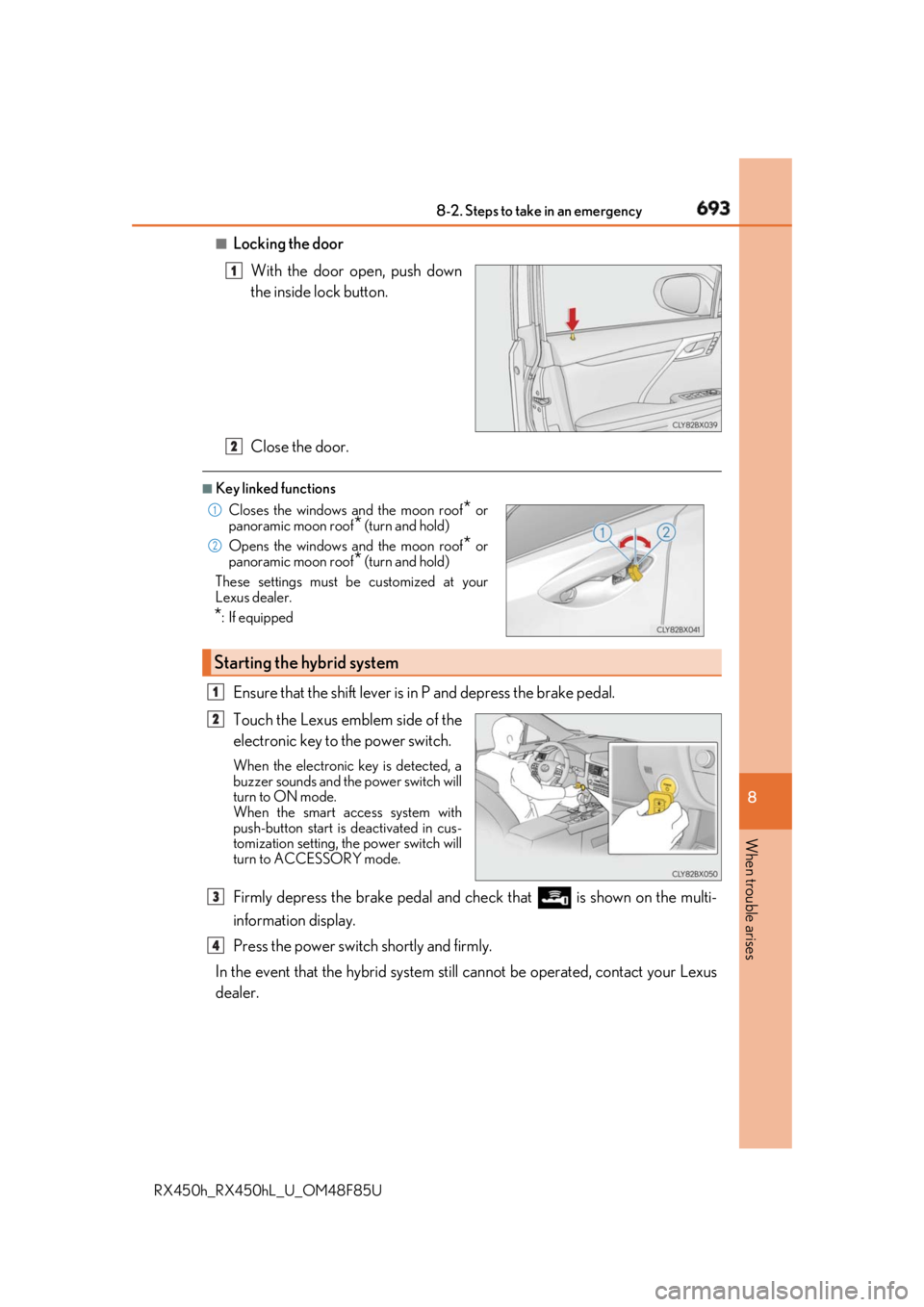
With the door open, push down
the inside lock button.
Close the door. ■
Key linked functions
Ensure that the shift lever is in P and depress the brake pedal.
Touch the Lexus emblem side of the
electronic key to the power switch. When the electronic key is detected, a
buzzer sounds and the power switch will
turn to ON mode.
When the smart access system with
push-button start is deactivated in cus-
tomization setting, the power switch will
turn to ACCESSORY mode.
Firmly depress the brake pedal and check that is shown on the multi-
information display.
Press the power switch shortly and firmly.
In the event that the hybrid system still cannot be operated, contact your Lexus
dealer. 1
Closes the windows and the moon roof
* or
panoramic moon roof
* (turn and hold)
Opens the windows and the moon roof
* or
panoramic moon roof
* (turn and hold)
These settings must be customized at your
Lexus dealer.
* : If equipped
Starting the hybrid system 2 1
2
1
2
3
4