key LEXUS RX450h 2018 User Guide
[x] Cancel search | Manufacturer: LEXUS, Model Year: 2018, Model line: RX450h, Model: LEXUS RX450h 2018Pages: 792, PDF Size: 12.5 MB
Page 134 of 792

134 3-1. Key information
RX450h_RX450hL _U_OM48F85U■
Electronic key battery depletion ●
The standard battery life is 1 to 2 years.●
If the battery becomes low, an alarm will so und in the cabin when the hybrid system is
stopped. ( → P. 630)●
As the electronic key always receives ra dio waves, the battery will become depleted
even if the electronic key is not used. The following symptoms indi cate that the elec-
tronic key battery may be depleted. Replace the battery when necessary. ( → P. 630)
• The smart access system with push-button start or the wireless remote control does
not operate.
• The detection area becomes smaller.
• The LED indicator on the key surface does not turn on. ●
To reduce key battery depletion when the electr onic key is to not be used for long peri-
ods of time, set the electronic key to the battery-saving mode. ( → P. 160)●
To avoid serious deterioration, do not leave the electronic key within 3 ft. (1 m) of the
following electrical appliances that produce a magnetic field:
•TVs
• Personal computers
• Cellular phones, cordless phones and battery chargers
• Recharging cellular phones or cordless phones
• Induction cookers
•Table lamps ■
Replacing the battery
→ P. 630 ■
Confirmation of the registered key number
The number of keys already registered to the vehicle can be confirmed. Ask your Lexus
dealer for details. ■
If a wrong key is used
The key cylinder rotates freely, isol ated from the internal mechanism.
Page 135 of 792
1353-1. Key information
3
Operation of each component
RX450h_RX450hL _U_OM48F85UNOTICE ■
To prevent key damage ●
Do not drop the keys, subject them to strong shocks or bend them.●
Do not expose the keys to high temp eratures for long periods of time.●
Do not get the keys wet or wash th em in an ultrasonic washer, etc.●
Do not attach metallic or magnetic materials to the keys or place the keys close to
such materials. ●
Do not disassemble the keys. ●
Do not attach a sticker or anything else to the surface of the electronic key. ●
Do not place the keys near objects that pr oduce magnetic fields, such as TVs, audio
systems and induction cookers, or medical electrical equipment, such as low-fre-
quency therapy equipment. ■
Carrying the electronic key on your person
Carry the electronic key 3.9 in. (10 cm) or mo re away from electric appliances that are
turned on. Radio waves emitted from electric appliances within 3.9 in. (10 cm) of the
electronic key may interfere with the key, causing the key to not function properly.■
In case of a smart access system with pu sh-button start malfunction or other key-
related problems
Take your vehicle with all the electronic keys provided with your vehicle to your Lexus
dealer. ■
When an electronic key is lost
If the electronic key re mains lost, the risk of vehicle th eft increases significantly. Visit
your Lexus dealer immediately with all rema ining electronic keys that were provided
with your vehicle.
Page 136 of 792
136
RX450h_RX450hL _U_OM48F85U3-2. Opening, closing and locking the doors
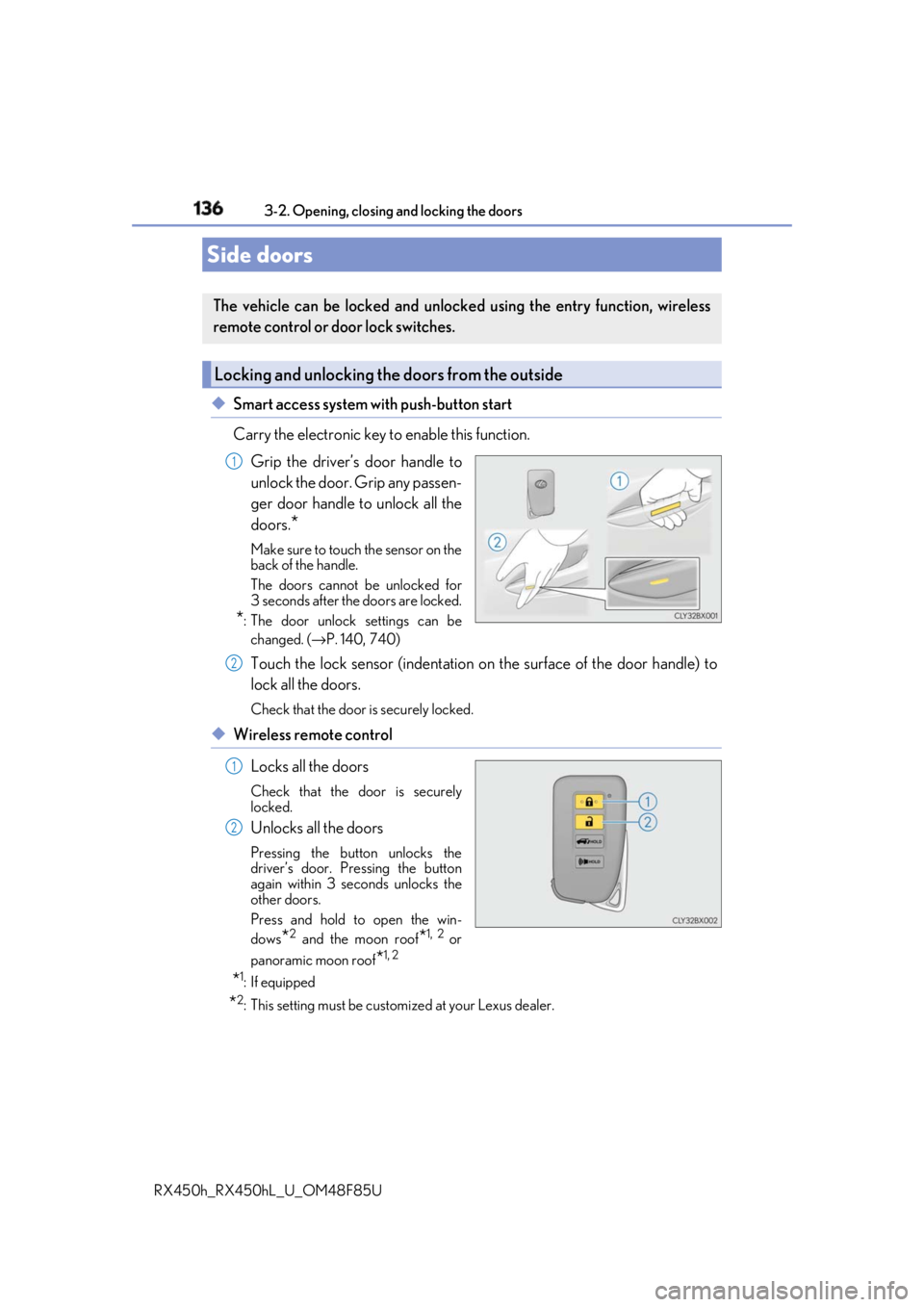
◆ Smart access system with push-button start
Carry the electronic key to enable this function.
Grip the driver’s door handle to
unlock the door. Grip any passen-
ger door handle to unlock all the
doors.
* Make sure to touch the sensor on the
back of the handle.
The doors cannot be unlocked for
3 seconds after the doors are locked.
* : The door unlock settings can be
changed. ( → P. 140, 740)
Touch the lock sensor (indentation on the surface of the door handle) to
lock all the doors. Check that the door is securely locked.
◆ Wireless remote control
Locks all the doors Check that the door is securely
locked.
Unlocks all the doors Pressing the button unlocks the
driver’s door. Pressing the button
again within 3 seconds unlocks the
other doors.
Press and hold to open the win-
dows
* 2
and the moon roof
* 1, 2
or
panoramic moon roof
* 1, 2
* 1
: If equipped
* 2
: This setting must be custom ized at your Lexus dealer.Side doors The vehicle can be locked and unlock ed using the entry function, wireless
remote control or door lock switches.
Locking and unlocking the doors from the outside 1
2
1
2
Page 137 of 792

1373-2. Opening, closing and locking the doors
3
Operation of each component
RX450h_RX450hL _U_OM48F85U■
Operation signals
Doors:
A buzzer sounds and the emergency flashers flash to indicate that the doors have been
locked/unlocked. (Locked: Once; Unlocked: Twice)
Windows and moon roof or panoramic moon roof:
A buzzer sounds. ■
Security feature
If a door is not opened within approximately 60 seconds after the vehicle is unlocked, the
security feature automatically locks the vehicle again. ■
When the door cannot be locked by the lock sensor on the surface of the door handle
■
Door lock buzzer
If an attempt to lock the doors is made when a door is not fully closed, a buzzer sounds
continuously for 5 seconds. Fully close the d oor to stop the buzzer, and lock the vehicle
once more. ■
Setting the alarm
Locking the doors will set the alarm system. ( → P. 86)■
If the smart access system with push-button start or the wireless remote control does
not operate properly ●
Use the mechanical key to lock and unlock the doors. ( → P. 692)●
Replace the key battery with a new one if it is depleted. ( → P. 630)When the door cannot be locked even if the
lock sensor on the surface of the door handle is
touched by a finger, touch the lock sensor with
the palm.
When gloves are being worn, remove the
gloves.
Page 139 of 792
1393-2. Opening, closing and locking the doors
3
Operation of each component
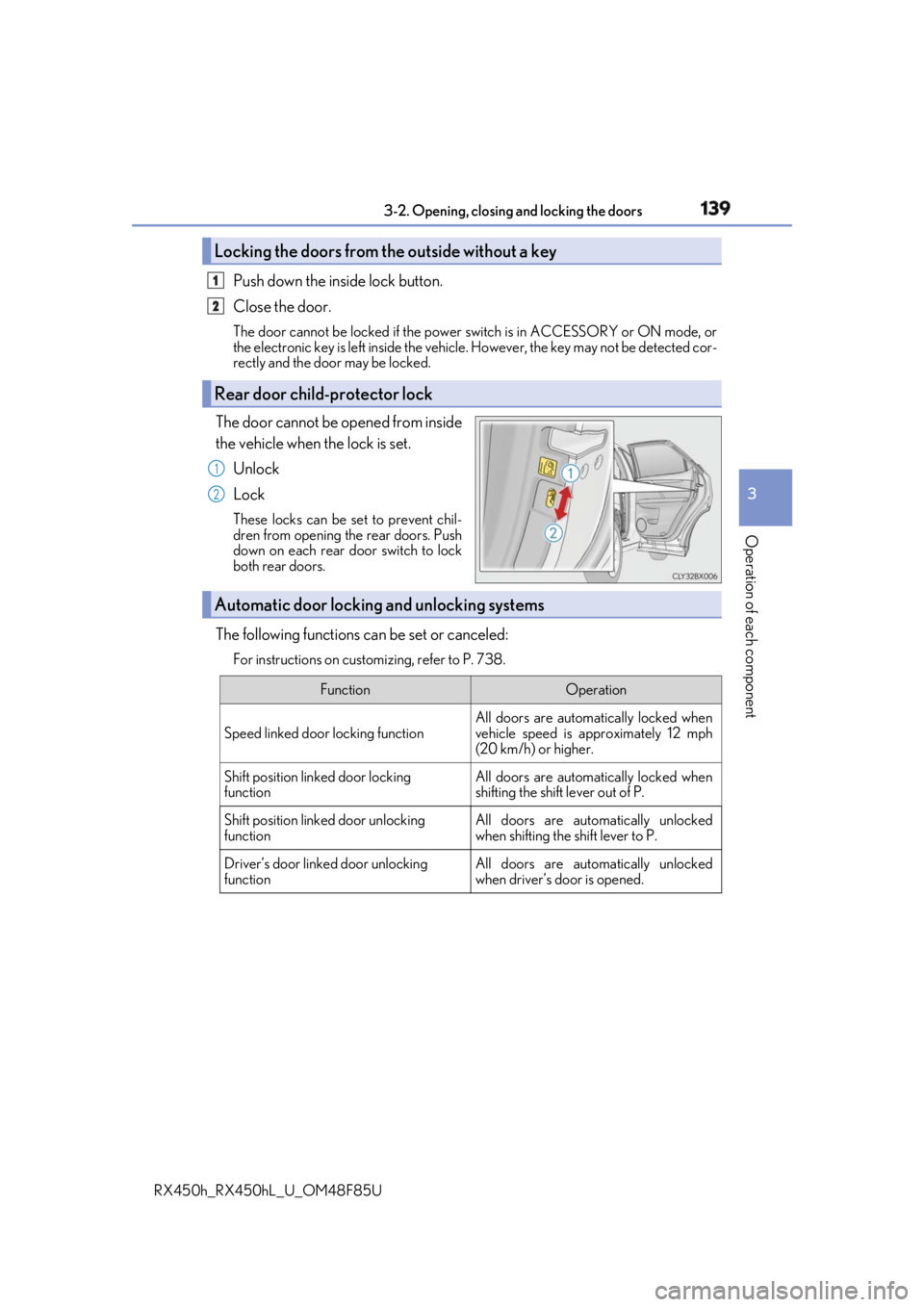
RX450h_RX450hL _U_OM48F85UPush down the in side lock button.
Close the door. The door cannot be locked if the power switch is in ACCESSORY or ON mode, or
the electronic key is left inside the vehicle. However, the key may not be detected cor-
rectly and the door may be locked.
The door cannot be opened from inside
the vehicle when the lock is set.
Unlock
Lock These locks can be set to prevent chil-
dren from opening the rear doors. Push
down on each rear door switch to lock
both rear doors.
The following functions can be set or canceled: For instructions on customizing, refer to P. 738.Locking the doors from the outside without a key
Rear door child-protector lock 1
2
1
2
Automatic door locking and unlocking systems Function Operation
Speed linked door locking function All doors are automatically locked when
vehicle speed is approximately 12 mph
(20 km/h) or higher.
Shift position linked door locking
function All doors are automatically locked when
shifting the shift lever out of P.
Shift position linked door unlocking
function All doors are automatically unlocked
when shifting the shift lever to P.
Driver’s door linked door unlocking
function All doors are automatically unlocked
when driver’s door is opened.
Page 140 of 792
140 3-2. Opening, closing and locking the doors
RX450h_RX450hL _U_OM48F85U■
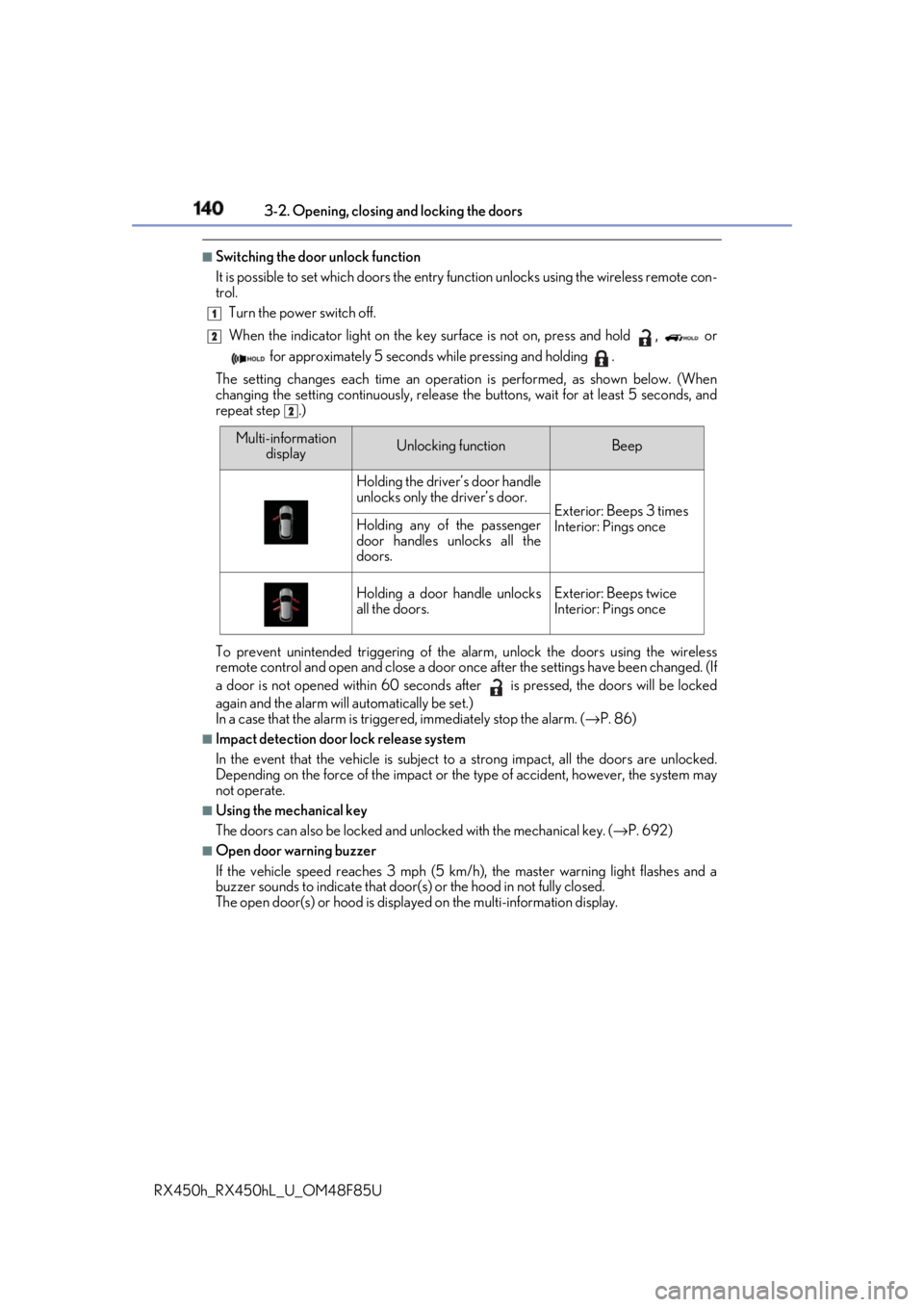
Switching the door unlock function
It is possible to set which doors the entry function unlock s using the wireless remote con-
trol.
Turn the power switch off.
When the indicator light on the key su rface is not on, press and hold , or
for approximately 5 seconds while pressing and holding .
The setting changes each time an operation is performed, as shown below. (When
changing the setting continuously, release the buttons, wait for at least 5 seconds, and
repeat step .)
To prevent unintended triggering of the alarm, unlock the doors using the wireless
remote control and open and close a door once after the settings have been changed. (If
a door is not opened within 60 seconds af ter is pressed, the doors will be locked
again and the alarm will automatically be set.)
In a case that the alarm is triggered, immediately stop the alarm. ( → P. 86)■
Impact detection door lock release system
In the event that the vehicle is subject to a strong impact, all the doors are unlocked.
Depending on the force of the impact or the type of accident, however, the system may
not operate. ■
Using the mechanical key
The doors can also be locked and unlocked with the mechanical key. ( → P. 692)■
Open door warning buzzer
If the vehicle speed reaches 3 mph (5 km/h), the master warning light flashes and a
buzzer sounds to indicate that door (s) or the hood in not fully closed.
The open door(s) or hood is displa yed on the multi-information display.1
2
2
Multi-information
display Unlocking function Beep
Holding the driver’s door handle
unlocks only the driver’s door.
Exterior: Beeps 3 times
Interior: Pings onceHolding any of the passenger
door handles unlocks all the
doors.
Holding a door handle unlocks
all the doors. Exterior: Beeps twice
Interior: Pings once
Page 142 of 792

142 3-2. Opening, closing and locking the doors
RX450h_RX450hL _U_OM48F85U◆ Smart access system with push-button start
Carry the electronic key to enable
this function.
Locks all the doors Check that the door is securely
locked.
Unlocks all the doors The doors cannot be unlocked for 3
seconds after the doors are locked.
◆ Wireless remote control
→ P. 136
◆ Door lock switch
→ P. 138
Press and hold the switch for approxi-
mately 1 second. The power back door can be operated
whether it is locked
* or unlocked.
Pressing the switch while the power
back door is opening/closing will stop
the operation.
Pressing and holding the switch again
for approximately 1 second will operate
the power back door in the opposite
direction.
* : Opening of the power back door when it is locked can be disabled by a customized
setting. ( → P. 741)Power back door The power back door can be locked/unlocked and opened/closed by the fol-
lowing procedures.
Locking and unlocking the power back door from the outside 1
2
Locking and unlocking the power back door from the inside
Opening/closing the power back d oor using the wireless remote con-
trol
Page 143 of 792
1433-2. Opening, closing and locking the doors
3
Operation of each component
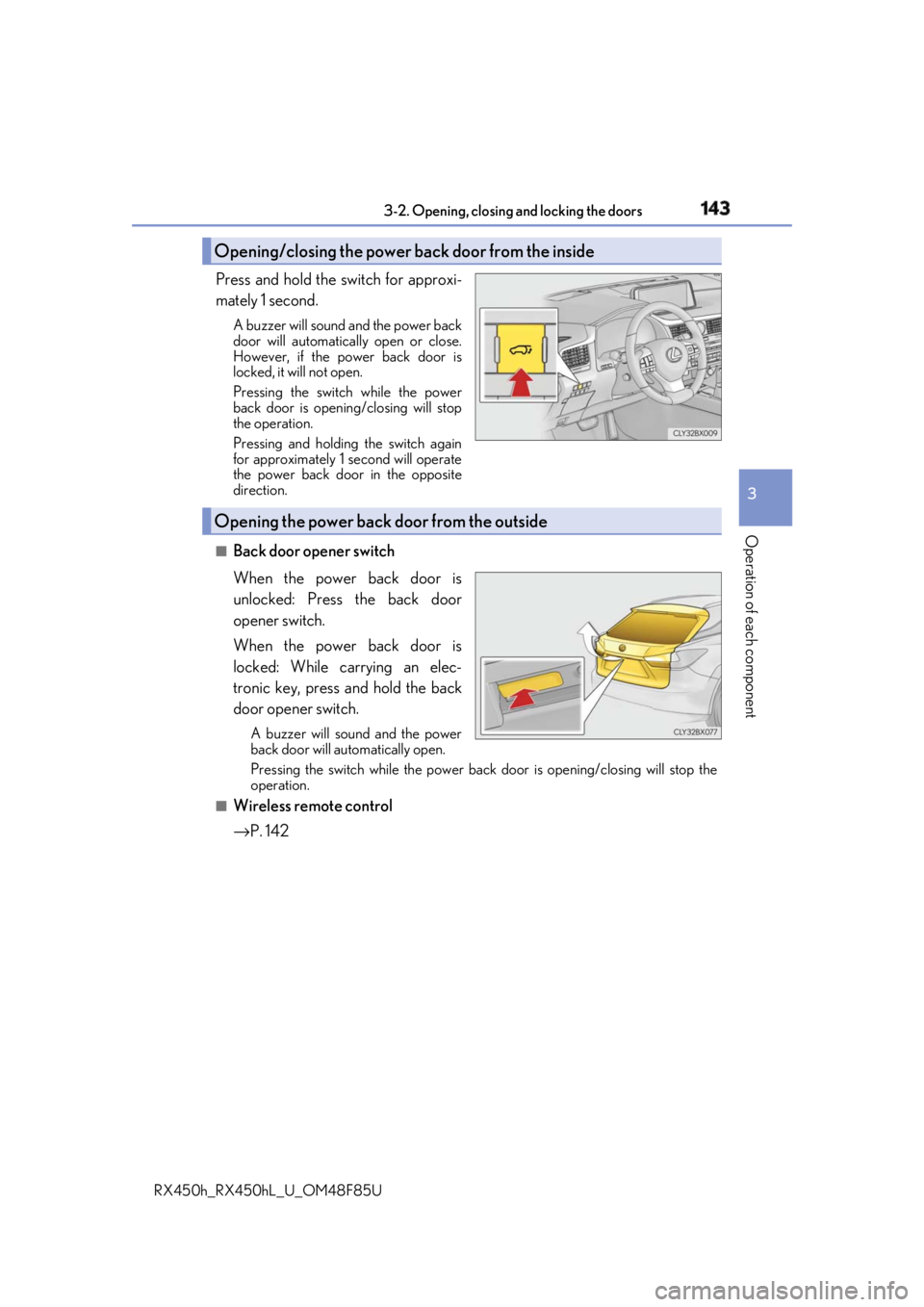
RX450h_RX450hL _U_OM48F85UPress and hold the switch for approxi-
mately 1 second. A buzzer will sound and the power back
door will automatically open or close.
However, if the power back door is
locked, it will not open.
Pressing the switch while the power
back door is opening/closing will stop
the operation.
Pressing and holding the switch again
for approximately 1 second will operate
the power back door in the opposite
direction.
■
Back door opener switch
When the power back door is
unlocked: Press the back door
opener switch.
When the power back door is
locked: While carrying an elec-
tronic key, press and hold the back
door opener switch. A buzzer will sound and the power
back door will automatically open.
Pressing the switch while the power back door is opening/closing will stop the
operation.■
Wireless remote control
→ P. 142Opening/closing the power back door from the inside
Opening the power back door from the outside
Page 144 of 792
144 3-2. Opening, closing and locking the doors
RX450h_RX450hL _U_OM48F85U■
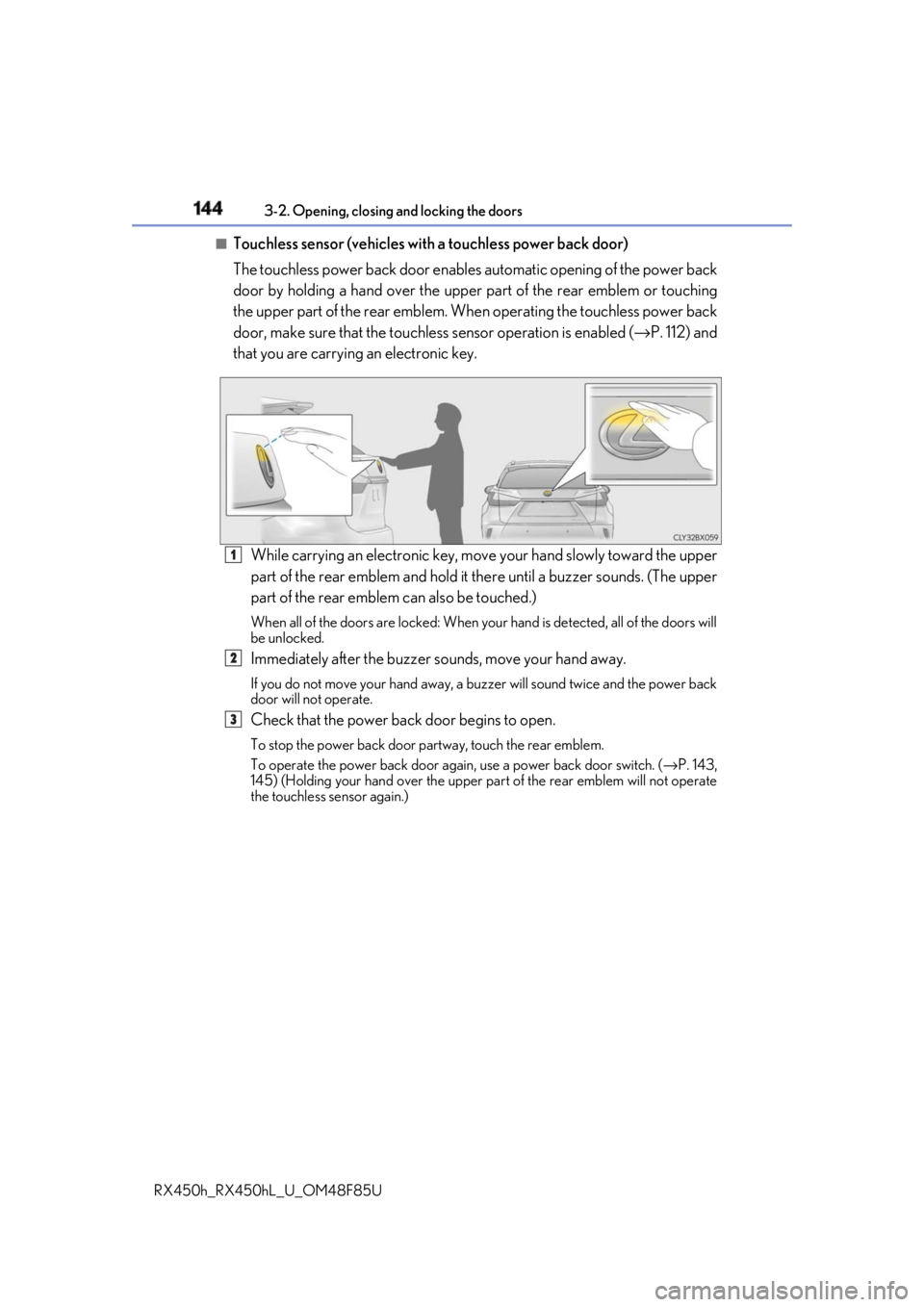
Touchless sensor (vehicles with a touchless power back door)
The touchless power back door enable s automatic opening of the power back
door by holding a hand over the upper part of the rear emblem or touching
the upper part of the rear emblem. When operating the touchless power back
door, make sure that the touchle ss sensor operation is enabled ( → P. 112) and
that you are carrying an electronic key.
While carrying an electronic key, move your hand slowly toward the upper
part of the rear emblem and hold it there until a buzzer sounds. (The upper
part of the rear emblem can also be touched.) When all of the doors are locked: When your hand is detected, all of the doors will
be unlocked.
Immediately after the buzzer so unds, move your hand away.If you do not move your hand away, a buzzer will sound twice and the power back
door will not operate.
Check that the power back door begins to open. To stop the power back door partway, touch the rear emblem.
To operate the power back door again, use a power back door switch. ( → P. 143,
145) (Holding your hand over the upper part of the rear emblem will not operate
the touchless sensor again.) 1
2
3
Page 147 of 792
1473-2. Opening, closing and locking the doors
3
Operation of each component
RX450h_RX450hL _U_OM48F85U■
Power back door op erating conditions
If the following conditions are met with the power back door operation enabled ( → P. 112),
the power back door can be opened and closed automatically. ●
When an electronic key is being carried an d the back door opener switch is pressed
*●
When the wireless remote control is used
*●
When the power switch is in ON mode, the vehicle speed must be lower than 2 mph (3
km/h) and one of the following conditions mu st be met in addition to the above condi-
tions:
• The parking brake is engaged.
• The brake pedal is depressed.
• The shift lever is in P.
* : When the operation of the power back door when it is locked has been disabled by a
customized setting, operate the power back door after it has been unlocked.
( → P. 741)
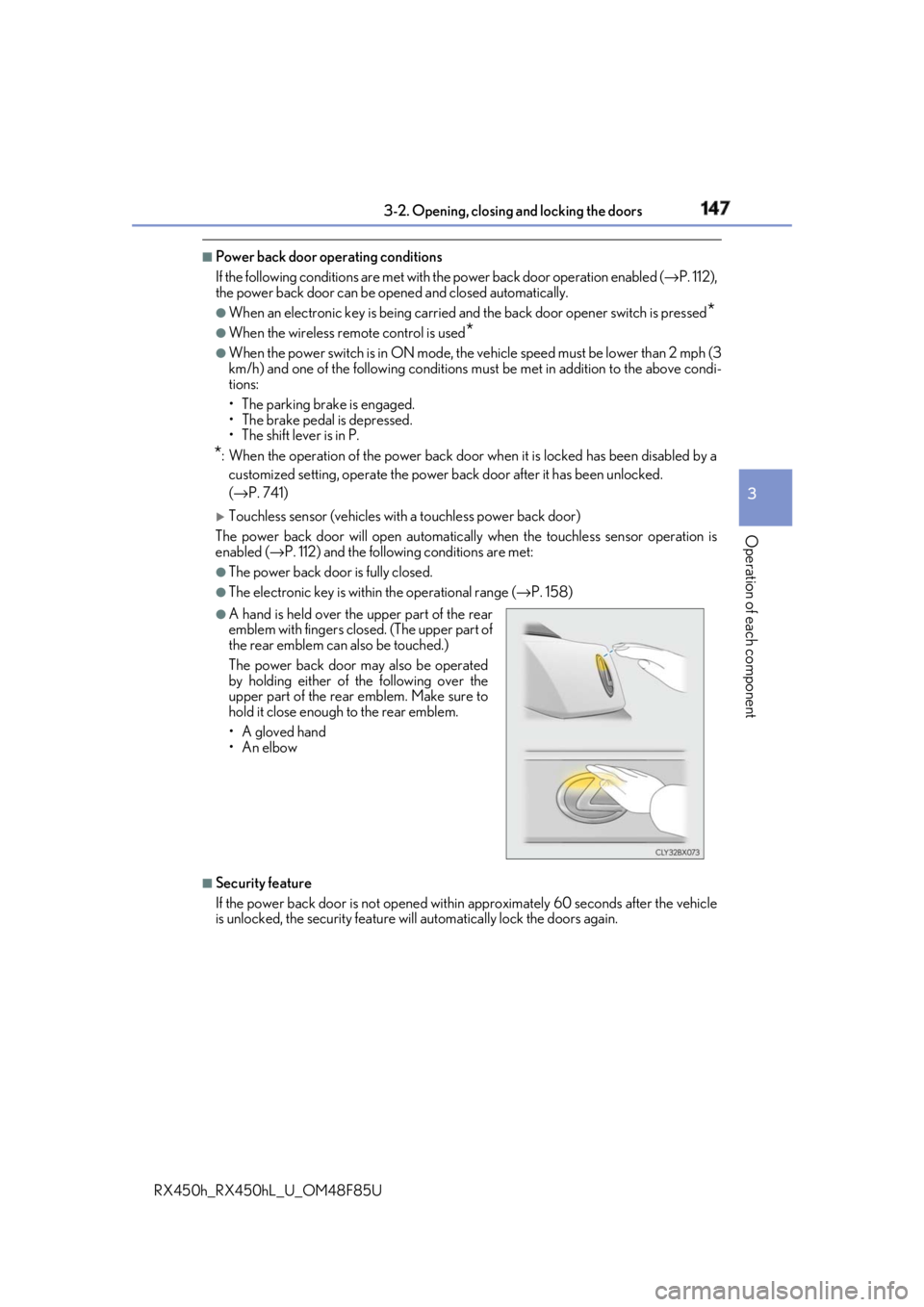
Touchless sensor (vehicles with a touchless power back door)
The power back door will open automatically when the touchless sensor operation is
enabled ( → P. 112) and the following conditions are met:●
The power back door is fully closed. ●
The electronic key is with in the operational range ( → P. 158)
■
Security feature
If the power back door is not opened within approximately 60 seconds after the vehicle
is unlocked, the security feature will automatically lock the doors again. ●
A hand is held over the upper part of the rear
emblem with fingers closed. (The upper part of
the rear emblem can also be touched.)
The power back door may also be operated
by holding either of the following over the
upper part of the rear emblem. Make sure to
hold it close enough to the rear emblem.
•A gloved hand
•An elbow