seats LEXUS RX450h 2018 Workshop Manual
[x] Cancel search | Manufacturer: LEXUS, Model Year: 2018, Model line: RX450h, Model: LEXUS RX450h 2018Pages: 792, PDF Size: 12.5 MB
Page 512 of 792
512 6-2. Using the air conditio ning system and defogger
RX450h_RX450hL _U_OM48F85U■
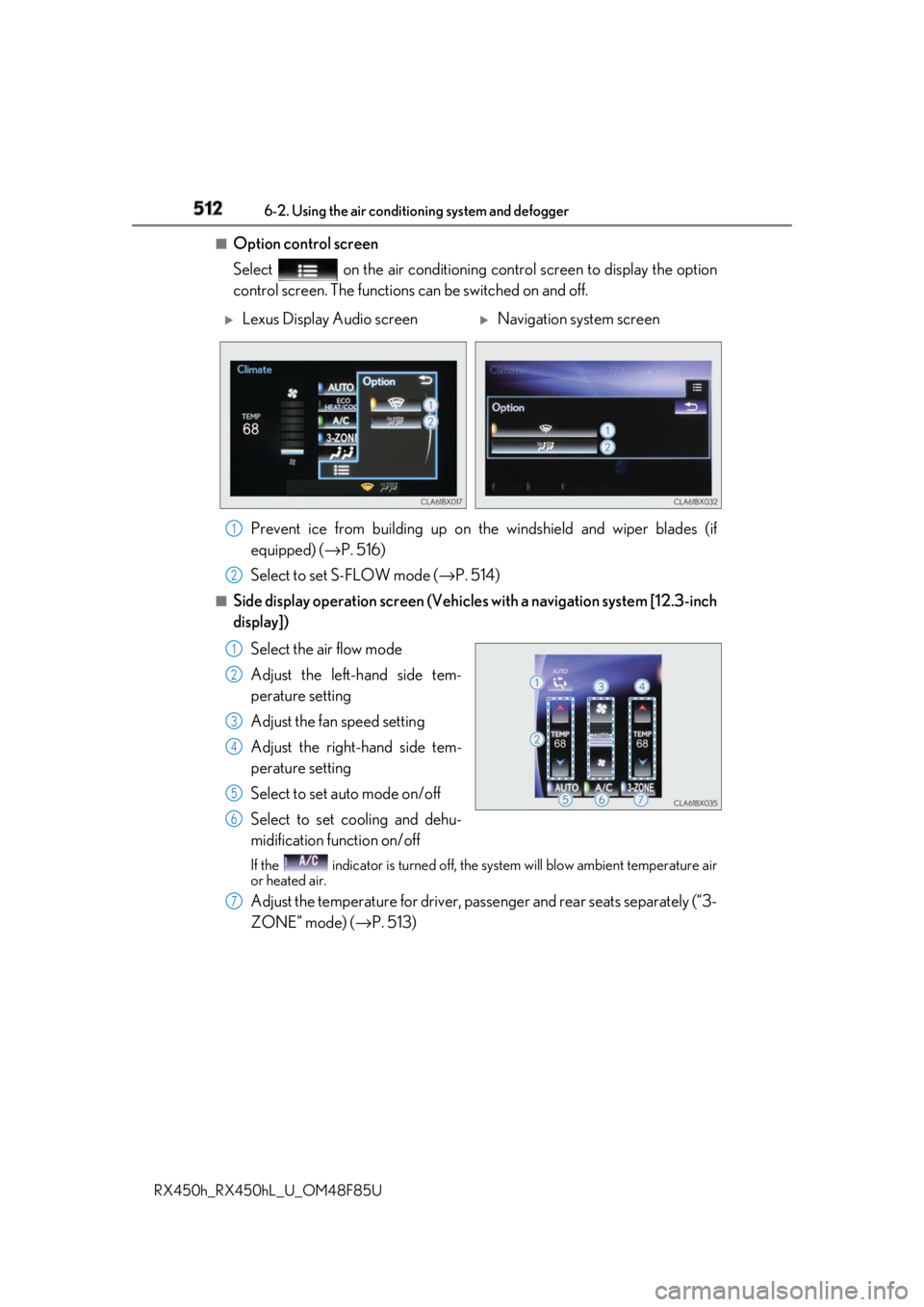
Option control screen
Select on the air conditioning control screen to display the option
control screen. The functions can be switched on and off.
Prevent ice from building up on the windshield and wiper blades (if
equipped) ( → P. 516)
Select to set S-FLOW mode ( → P. 514)■
Side display operation screen (Vehicle s with a navigation system [12.3-inch
display])
Select the air flow mode
Adjust the left-hand side tem-
perature setting
Adjust the fan speed setting
Adjust the right-hand side tem-
perature setting
Select to set auto mode on/off
Select to set cooling and dehu-
midification function on/off If the indicator is turned off, the system will blow ambient temperature air
or heated air.
Adjust the temperature for driver, passenger and rear seats separately (“3-
ZONE” mode) ( → P. 513)
Lexus Display Audio screen
Navigation system screen
1
2
1
2
3
4
5
6
7
Page 513 of 792
5136-2. Using the air conditioning system and defogger
RX450h_RX450hL _U_OM48F85U 6
Interior features ■
Using the automatic mode
Press the “AUTO” button or select “A UTO” on the air conditioning control
screen.
Press to switch to automatic air intake mode. (if equipped)
The air conditioning system automati cally switches between outside air
and recirculated air modes.
Adjust the temperature setting.
To stop the operation, press the “OFF” button.■
Automatic mode indicator
If the fan speed setting or air flow modes are operated, the automatic mode
indicator goes off. However, automati c mode for functions other than that
operated is maintained. ■
Adjusting the temperature for driv er and passenger seats separately
(“DUAL” mode) (RX450h)
To turn on the “DUAL” mode, perfor m any of the following procedures:●
Press “DUAL” button. ●
Adjust the temperature setting of th e passenger side with the passenger
side temperature adjustment button. The indicator comes on when the “DUAL” mode is on.■
Adjusting the temperature for driver, passenger and rear seats separately
(“3-ZONE” mode) (RX450hL)
To turn on the “3-ZONE” mode, perf orm any of the following procedures:●
Select “3-ZONE” on the air conditioning control screen.●
Select “3-ZONE” on the side displa y operation screen. (Vehicles with a
navigation system [12.3-inch display]) ●
Adjust the temperature setting of th e passenger side with the passenger
side temperature adjustment button. The indicator comes on when the “3-ZONE” mode is on.Air conditioning controls 1
2
3
4
Page 514 of 792
514 6-2. Using the air conditio ning system and defogger
RX450h_RX450hL _U_OM48F85U■
S-FLOW mode
In S-FLOW mode, priority for the airflo w is given to the front seats, reducing
the airflow and air conditioning effect on the rear seats. When in S-FLOW
mode, airflow from the rear air condit ioning system is stopped. (RX450hL)
Operation in S-FLOW mode differs acco rding to the following conditions:
• Priority is given to the driver’s se at only when: Manual S-FLOW mode:
When no passenger is judged to be in the front passenger seat.
Automatic S-FLOW mode: When no passeng ers are judged to be in the front
passenger seat or rear seats.
• Priority is given to the front seats when: Manual S-FLOW mode is selected
or no passengers are judged to be in the rear seats when in automatic S-
FLOW mode.
• S-FLOW mode will be disa bled when: A passenger is judged to be in a rear
seat when in automatic S-FLOW mode.
Depending on the set temperature, operation in S-FLOW mode may not
change as described above.
When certain conditions are met and priori ty is given to the driver’s seat only,
the temperature indicator for the fr ont passenger side will turn off.
How the system judges if a passenger is in the vehicle: → P. 518
The following S-FLOW modes are available:
Automatic S-FLOW mode
In this mode, when a passenger is judg ed to be in a rear seat, S-FLOW mode
will be automatically disabled. The indicator will illuminate wh en S-FLOW mode is enabled.
To enable/disable S-FLOW mode and enter manual S-FLOW mode, select
on the option control screen.
How the system judges if a passenger is in the vehicle: → P. 518
Manual S-FLOW mode
When is selected, S-FLOW mode will be manually enabled/disabled.The indicator will illuminate wh en S-FLOW mode is enabled.
In manual S-FLOW mode, as the system does not judge if a passenger is in a rear
seat, S-FLOW mode will not be disabled automatically.
To disable S-FLOW mode automatically by opening and closing a rear door or
operating the rear air conditioning syst em (RX450hL), change to automatic S-
FLOW mode. ( → P. 518)
Page 518 of 792

518 6-2. Using the air conditio ning system and defogger
RX450h_RX450hL _U_OM48F85U■
Registering air conditioning settings to electronic keys●
Unlocking the vehicle using an electronic key and turning the power switch to ON
mode will recall that ke y’s registered air co nditioning settings.●
When the power switch is turned off, the cu rrent air conditioning settings will automati-
cally be registered to the electronic key that was used to unlock the vehicle. ●
The system may not operate correctly if more th an one electronic key is in the vicinity or
if the smart access system with push-button start is used to unlock a passenger door.●
The doors that can recall the air conditioni ng setting when unlocked using the smart
access system with push-b utton start can be changed.
* For details, contact your Lexus
dealer.
* : The doors that can recall the driving positi on memory are changed at the same time.■
Using automatic mode
Fan speed is adjusted automatically according to the temperature setting and the ambi-
ent conditions.
Therefore, the fan may stop for a while until wa rm or cool air is ready to flow immediately
after the “AUTO” button is pressed or “AUTO” is selected. ■
How the system judges if a passenger is in the vehicle when in S-FLOW mode
In S-FLOW mode, the system judges if a passenger is in the vehicle as follows:
• Front passenger seat: A passeng er is judged to be in the front passenger seat when the
system detects an object on the front passe nger seat, fastening of the front passenger
seat belt, changing of the set temperature for the front passenger seat or the opening
and closing of the front passenger door. (However, when only opening and closing of
the front passenger door is detected, the sy stem will judge that a passenger is not in
the front passenger seat after the vehicl e speed reaches approximately 12 mph (20
km/h) or more.)
• Rear seats (automatic S-FLOW mode only): A passenger is judged to be in a rear seat
when the system detects the opening and closin g of a rear door or the operation of the
rear air conditioning system (RX450hL).
If a passenger is judged to be in the vehicl e, the system will retain the judgement for a
certain amount of time after th e power switch is turned off.■
Operation of automatic S-FLOW mode
When the system is operating in automati c S-FLOW mode, if the system detects the
opening and closing of a rear door or the op eration of the rear air conditioning system
(RX450hL), S-FLOW mode will be disabled. To enable S-FLOW mode, select
on the option control screen. (In this case , the system will operate in manual S-FLOW
mode.) ■
Changing from manual S-FLOW mode to automatic S-FLOW mode
Select on the option control screen to disable S-FLOW mode.
Turn the power switch off.
Wait for 60 minutes or more and change the power switch to ON mode. ■
Using the voice command system
Air conditioning system can be operated using voic e commands. For details, refer to the
“NAVIGATION SYSTEM OWNER’S MANUAL”. 1
2
3
Page 525 of 792
5256-2. Using the air conditioning system and defogger
RX450h_RX450hL _U_OM48F85U 6
Interior features
Heated steering wheel ∗
/seat heaters ∗
/seat ventila-
tors ∗
∗ : If equippedHeated steering wheel and seat heaters heat the side grips of the steering
wheel and seats, respectively. Seat ventilators maintain good airflow by blow-
ing air from the seats. WARNING ●
Care should be taken to prevent injury if anyone in the following categories comes in
contact with the steering wheel and seats when the heater is on:
• Babies, small children, the elderly, the sick and the ph ysically challenged
• Persons with sensitive skin
• Persons who are fatigued
• Persons who have taken alcohol or drugs that induce sleep (sleeping drugs, cold
remedies, etc.) ●
Observe the following precautions to prevent minor burns or overheating:
• Do not cover the seat with a blanket or cushion when using the seat heater.
• Do not use seat heater more than necessary.
NOTICE ●
Do not put heavy objects that have an unev en surface on the seat and do not stick
sharp objects (needles, nails, etc.) into the seat. ●
To prevent 12-volt battery discharge, do not use the functions when the hybrid system
is off.
Page 535 of 792
5356-4. Using the storage features
6
Interior features
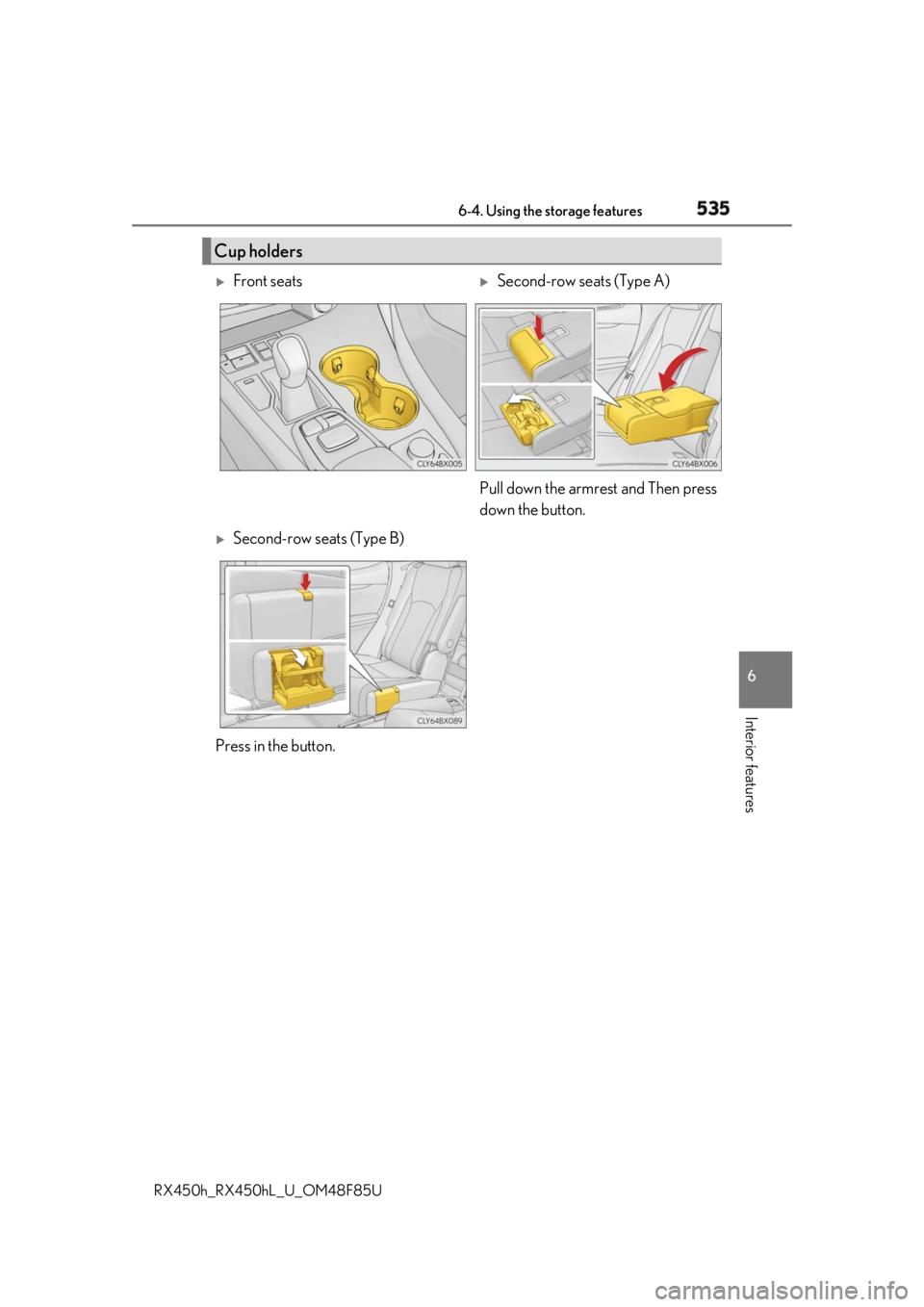
RX450h_RX450hL _U_OM48F85UCup holders
Front seats
Second-row seats (Type A)
Pull down the armrest and Then press
down the button.
Second-row seats (Type B)
Press in the button.
Page 542 of 792
542 6-4. Using the storage features
RX450h_RX450hL _U_OM48F85U■
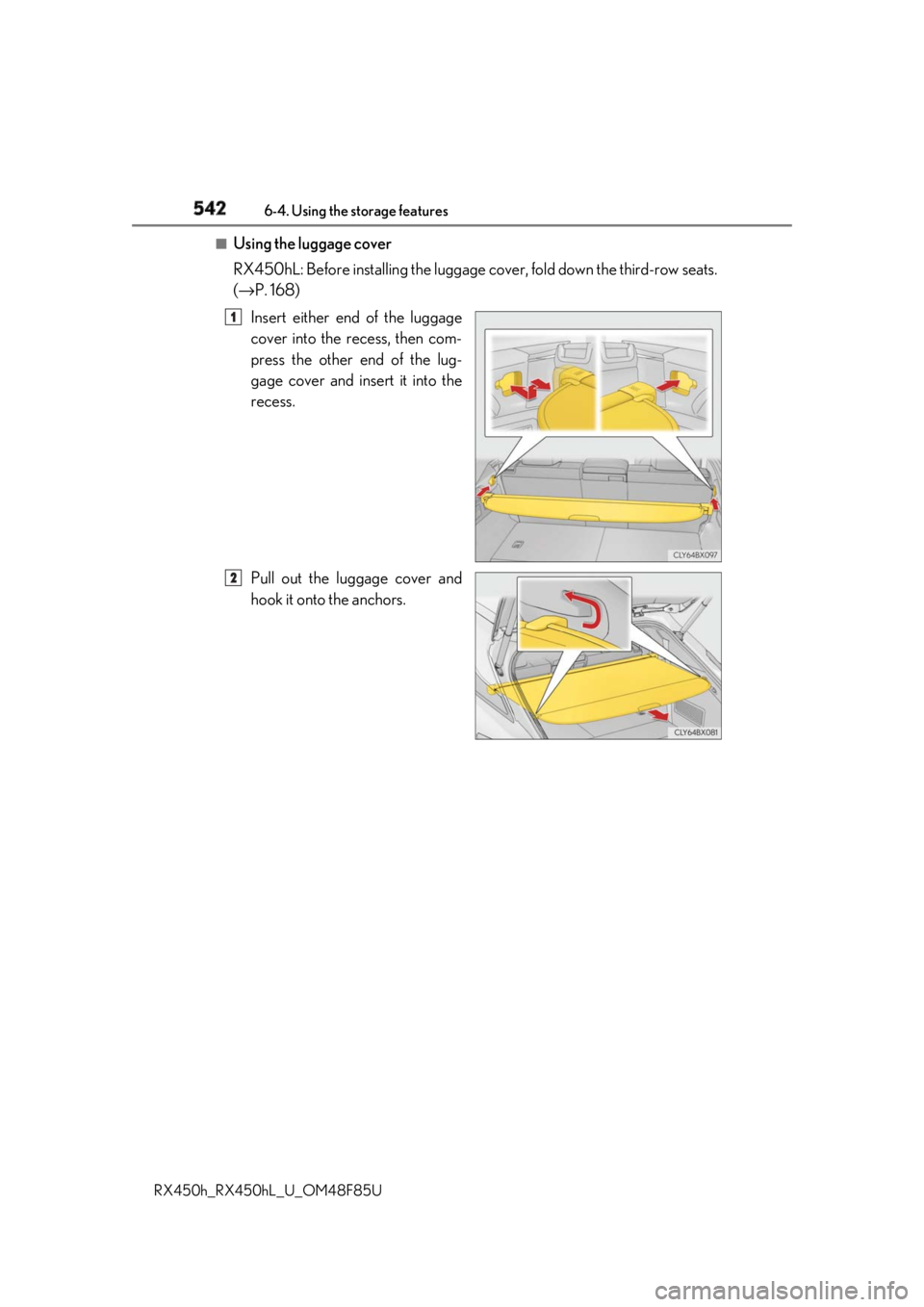
Using the luggage cover
RX450hL: Before installing the luggage cover, fold down the third-row seats.
( → P. 168)
Insert either end of the luggage
cover into the recess, then com-
press the other end of the lug-
gage cover and insert it into the
recess.
Pull out the luggage cover and
hook it onto the anchors. 1
2
Page 586 of 792
586 7-1. Maintenance and care
RX450h_RX450hL _U_OM48F85UNOTICE ■
Cleaning detergents ●
Do not use the following types of detergent, as they may discolor the vehicle interior
or cause streaks or damage to painted surfaces:
• Non-seat portions: Organic substances su ch as benzene or gasoline, alkaline or
acidic solutions, dye, and bleach
• Seats: Alkaline or ac idic solutions, such as thinner, benzene, and alcohol●
Do not use polish wax or polis h cleaner. The instrument pane l’s or other interior part’s
painted surface may be damaged. ■
Preventing damage to leather surfaces
Observe the following precautions to avoid damage to and deterioration of leather
surfaces: ●
Remove any dust or dirt from leather surfaces immediately.●
Do not expose the vehicle to direct sunlight for extended periods of time. Park the
vehicle in the shade, especially during summer. ●
Do not place items made of vinyl, plastic, or containing wax on the upholstery, as they
may stick to the leather su rface if the vehicle interior heats up significantly.■
Water on the floor
Do not wash the vehicle floor with water.
Vehicle systems such as the audio system ma y be damaged if wate r comes into contact
with electrical components such as the au dio system above or un der the floor of the
vehicle. Water may also cause the body to rust. ■
When cleaning the inside of the windshield
Do not allow glass cleaner to contact the lens. Also, do not touch the lens.
( → P. 281) ■
Cleaning the inside of the rear window ●
Do not use glass cleaner to clean the rear window, as this may cause damage to the
rear window defogger heater wires or antenna. Use a cloth dampened with luke-
warm water to gently wipe the window clean. Wipe th e window in strokes running
parallel to the heater wires or antenna. ●
Be careful not to scratch or damage the heater wires or antenna.
Page 590 of 792
590 7-2. Maintenance
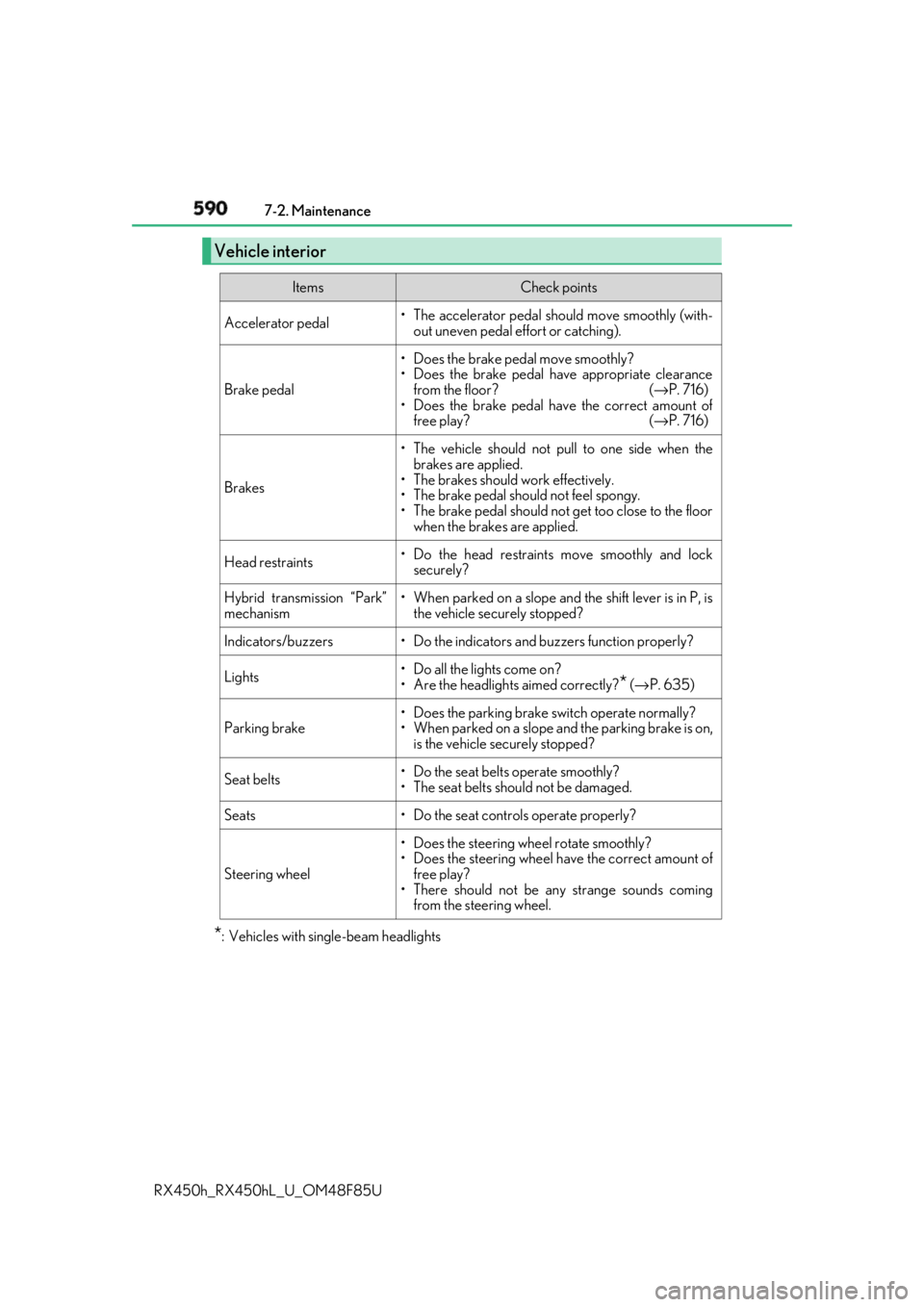
RX450h_RX450hL _U_OM48F85U* : Vehicles with sing le-beam headlightsVehicle interior Items Check points
Accelerator pedal • The accelerator pedal sh ould move smoothly (with-
out uneven pedal effort or catching).
Brake pedal • Does the brake pedal move smoothly?
• Does the brake pedal have appropriate clearance
from the floor? ( → P. 716)
• Does the brake pedal have the correct amount of
free play? ( → P. 716)
Brakes • The vehicle should not pull to one side when the
brakes are applied.
• The brakes should work effectively.
• The brake pedal should not feel spongy.
• The brake pedal should no t get too close to the floor
when the brakes are applied.
Head restraints • Do the head restraints move smoothly and lock
securely?
Hybrid transmission “Park”
mechanism • When parked on a slope and the shift lever is in P, is
the vehicle securely stopped?
Indicators/buzzers • Do the indicators and buzzers function properly?
Lights • Do all the lights come on?
• Are the headlights aimed correctly?
* ( → P. 635)
Parking brake • Does the parking brake switch operate normally?
• When parked on a slope and the parking brake is on,
is the vehicle securely stopped?
Seat belts • Do the seat belts operate smoothly?
• The seat belts should not be damaged.
Seats • Do the seat controls operate properly?
Steering wheel • Does the steering wheel rotate smoothly?
• Does the steering wheel have the correct amount of
free play?
• There should not be any strange sounds coming
from the steering wheel.
Page 730 of 792
730 9-1. Specifications
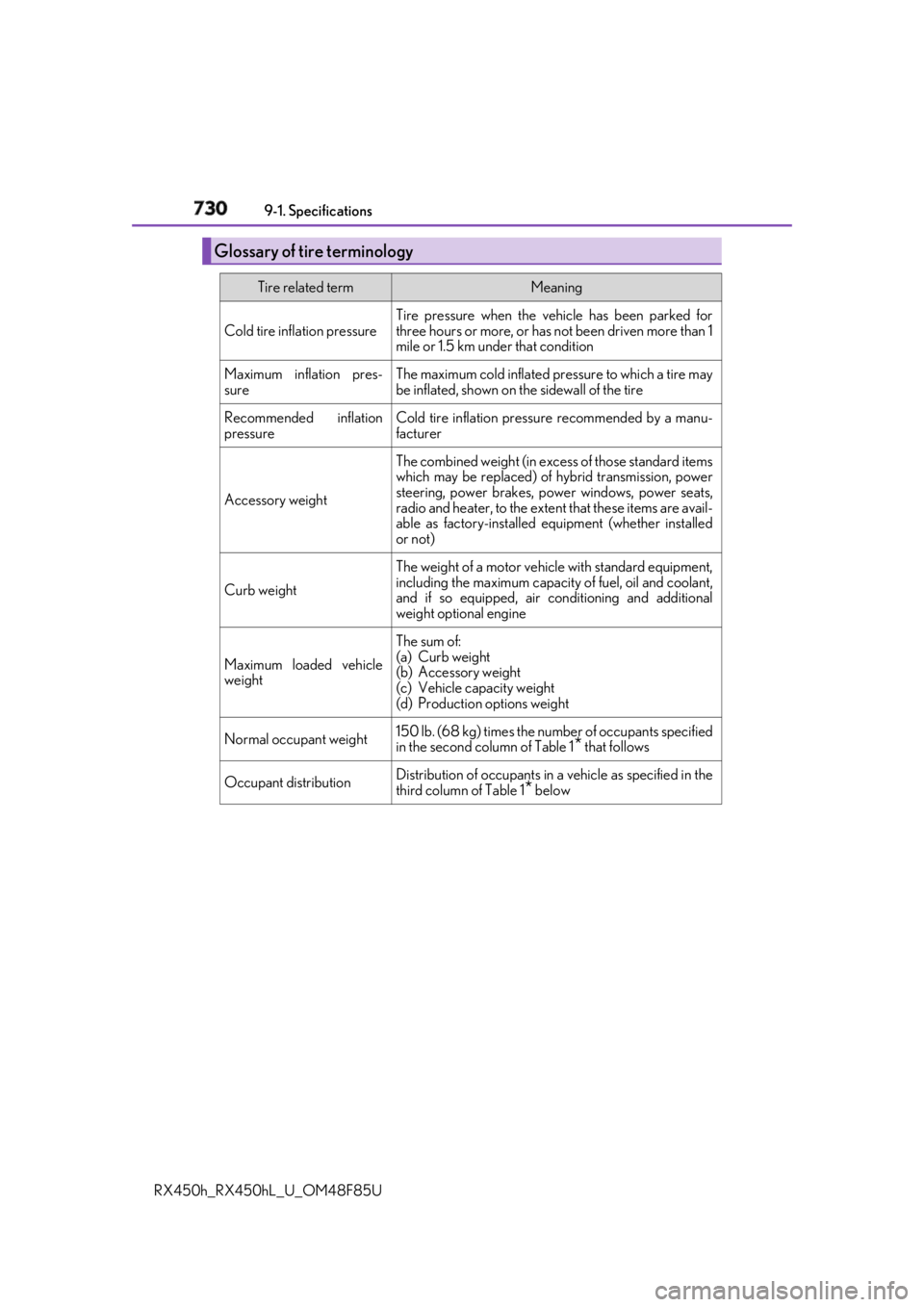
RX450h_RX450hL _U_OM48F85UGlossary of tire terminology Tire related term Meaning
Cold tire inflation pressure Tire pressure when the vehicle has been parked for
three hours or more, or has no t been driven more than 1
mile or 1.5 km un der that condition
Maximum inflation pres-
sure The maximum cold inflated pr essure to which a tire may
be inflated, shown on the sidewall of the tire
Recommended inflation
pressure Cold tire inflation pressure recommended by a manu-
facturer
Accessory weight The combined weight (in exce ss of those standard items
which may be replaced) of hybrid transmission, power
steering, power brakes, power windows, power seats,
radio and heater, to the extent that these items are avail-
able as factory-installed eq uipment (whether installed
or not)
Curb weight The weight of a motor vehicle with standard equipment,
including the maximum capacity of fuel, oil and coolant,
and if so equipped, air co nditioning and additional
weight optional engine
Maximum loaded vehicle
weight The sum of:
(a) Curb weight
(b) Accessory weight
(c) Vehicle capacity weight
(d) Production options weight
Normal occupant weight 150 lb. (68 kg) times the numb er of occupants specified
in the second column of Table 1
* that follows
Occupant distribution Distribution of occupants in a vehicle as specified in the
third column of Table 1
* below