lights LEXUS RX450h 2018 Repair Manual
[x] Cancel search | Manufacturer: LEXUS, Model Year: 2018, Model line: RX450h, Model: LEXUS RX450h 2018Pages: 792, PDF Size: 12.5 MB
Page 417 of 792
4175-2. Setup
5
Lexus Display Audio system
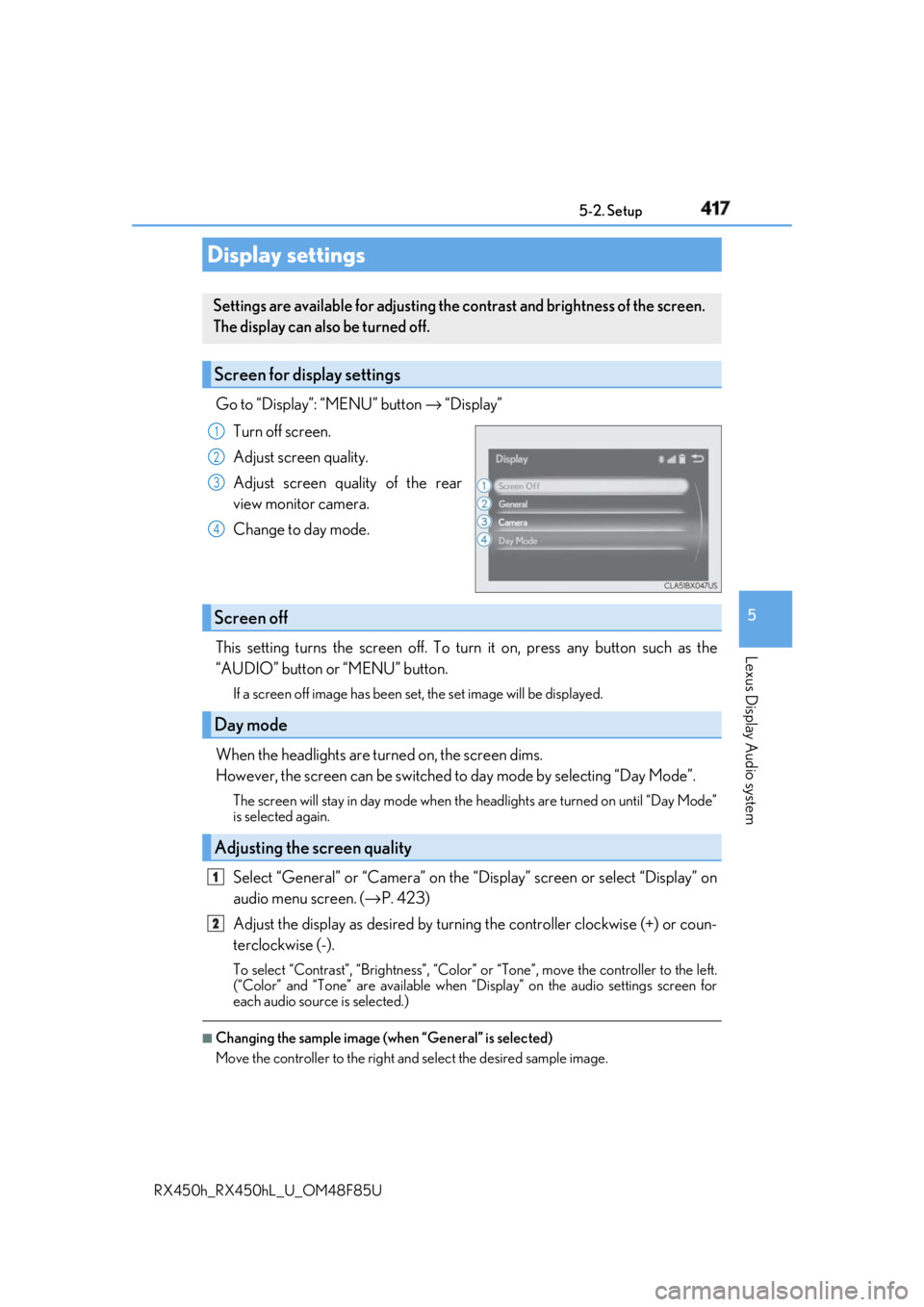
RX450h_RX450hL _U_OM48F85UGo to “Display”: “MENU” button → “Display”
Turn off screen.
Adjust screen quality.
Adjust screen quality of the rear
view monitor camera.
Change to day mode.
This setting turns the screen off. To tu rn it on, press any button such as the
“AUDIO” button or “MENU” button. If a screen off image has been se t, the set image will be displayed.
When the headlights are turned on, the screen dims.
However, the screen can be switched to day mode by selecting “Day Mode”.The screen will stay in day mode when the headlights are turned on until “Day Mode”
is selected again.
Select “General” or “Camera” on the “D isplay” screen or select “Display” on
audio menu screen. ( → P. 423)
Adjust the display as desired by turning the controller clockwise (+) or coun-
terclockwise (-). To select “Contrast”, “Brightness”, “Color” or “Tone”, move the controller to the left.
(“Color” and “Tone” are available when “Display” on the audio settings screen for
each audio source is selected.) ■
Changing the sample image (when “General” is selected)
Move the controller to the right and select the desired sample image.Display settings Settings are available for adjusting the contrast and brightness of the screen.
The display can also be turned off.
Screen for display settings 1
2
3
4
Screen off
Day mode
Adjusting the screen quality 1
2
Page 499 of 792
499
6Interior features
RX450h_RX450hL _U_OM48F85U6-1. Basic operation of the
Remote Touch screen
Remote Touch ............................ 500
12.3-inch display........................ 504
6-2. Using the air conditioning
system and defogger
Lexus Climate
Concierge ................................. 506
Front automatic air
conditioning system ...............507
Rear automatic air
conditioning system ...............522
Heated steering wheel/
seat heaters/
seat ventilators .........................525
6-3. Using the interior lights
Interior lights list......................... 528
• Interior lights ..........................529
• Personal lights ...................... 530
6-4. Using the storage features
List of storage features.............532
• Glove box ...............................534
• Console box ...........................534
• Cup holders........................... 535
• Door pockets .........................537 • Bottle holders ........................ 537
• Coin box ..................................538
• Auxiliary boxes .....................539
Luggage compartment
features .......................................540
6-5. Using the other interior
features
Other interior features ............ 547
• Sun visors ................................ 547
• Vanity mirrors ....................... 547
• Clock ........................................548
• Wireless charger .................548
• Power outlets.........................555
• Front passenger
footwell hooks ....................... 557
• Rear door sunshades ......... 557
• Armrest ................................... 558
• Assist grips..............................559
• Coat hooks .............................559
Garage door opener ...............560
Compass ....................................... 567
LEXUS Enform Safety
Connect ........................................571
LEXUS Enform Remote ......... 576
LEXUS Enform Service
Connect ...................................... 577
Page 526 of 792
526 6-2. Using the air conditio ning system and defogger
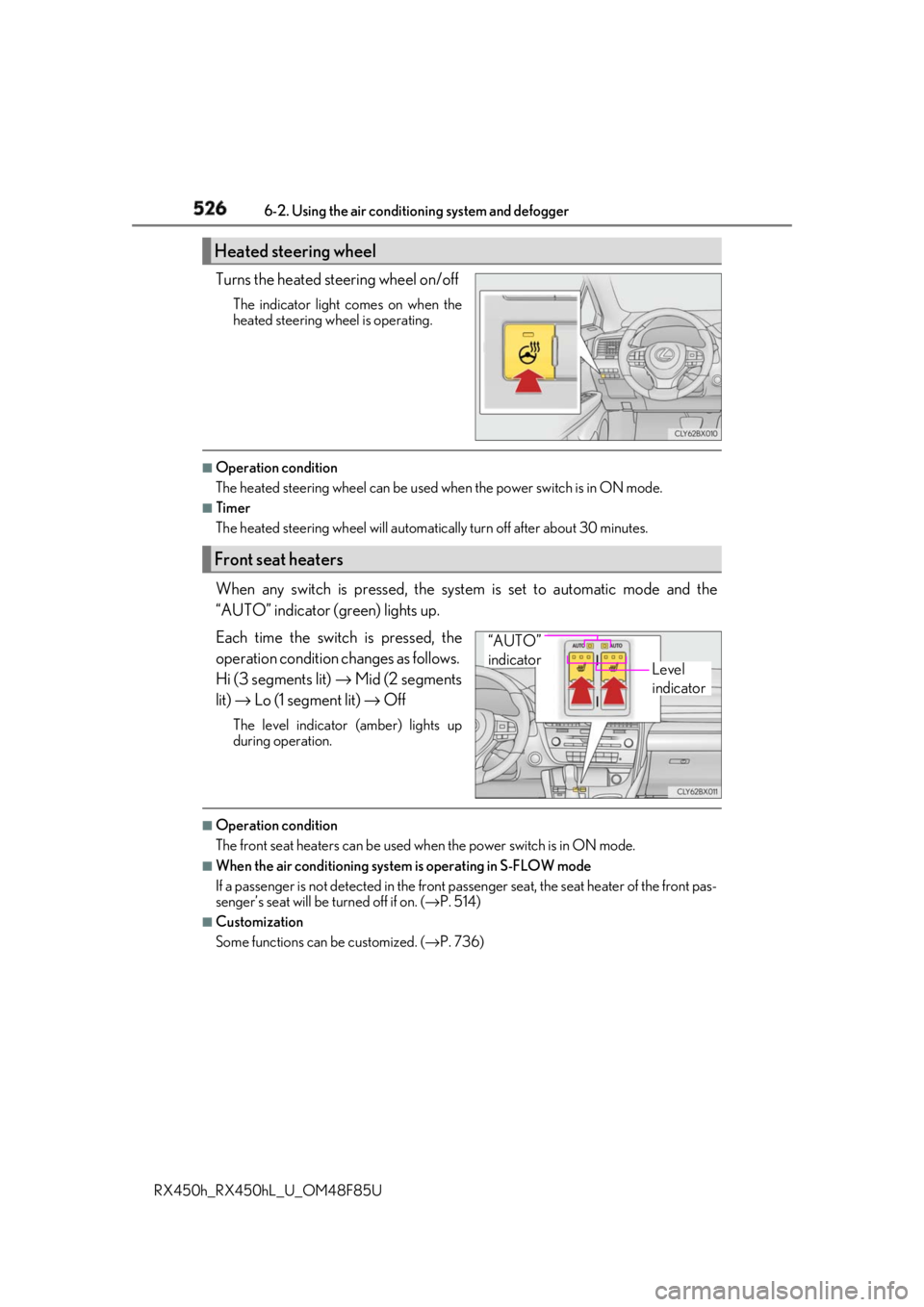
RX450h_RX450hL _U_OM48F85UTurns the heated steering wheel on/off The indicator light comes on when the
heated steering wheel is operating. ■
Operation condition
The heated steering wheel can be used when the power switch is in ON mode.■
Timer
The heated steering wheel will automati cally turn off after about 30 minutes.
When any switch is pressed, the system is set to automatic mode and the
“AUTO” indicator (green) lights up.
Each time the switch is pressed, the
operation cond ition changes as follows.
Hi (3 segments lit) → Mid (2 segments
lit) → Lo (1 segment lit) → OffThe level indicator (amber) lights up
during operation.
■
Operation condition
The front seat heaters can be used when the power switch is in ON mode. ■
When the air conditioning system is operating in S-FLOW mode
If a passenger is not detected in the front pa ssenger seat, the seat he ater of the front pas-
senger’s seat will be turned off if on. ( → P. 514)■
Customization
Some functions can be customized. ( → P. 736)Heated steering wheel
Front seat heaters
Level
indicator“AUTO”
indicator
Page 527 of 792
5276-2. Using the air conditioning system and defogger
RX450h_RX450hL _U_OM48F85U 6
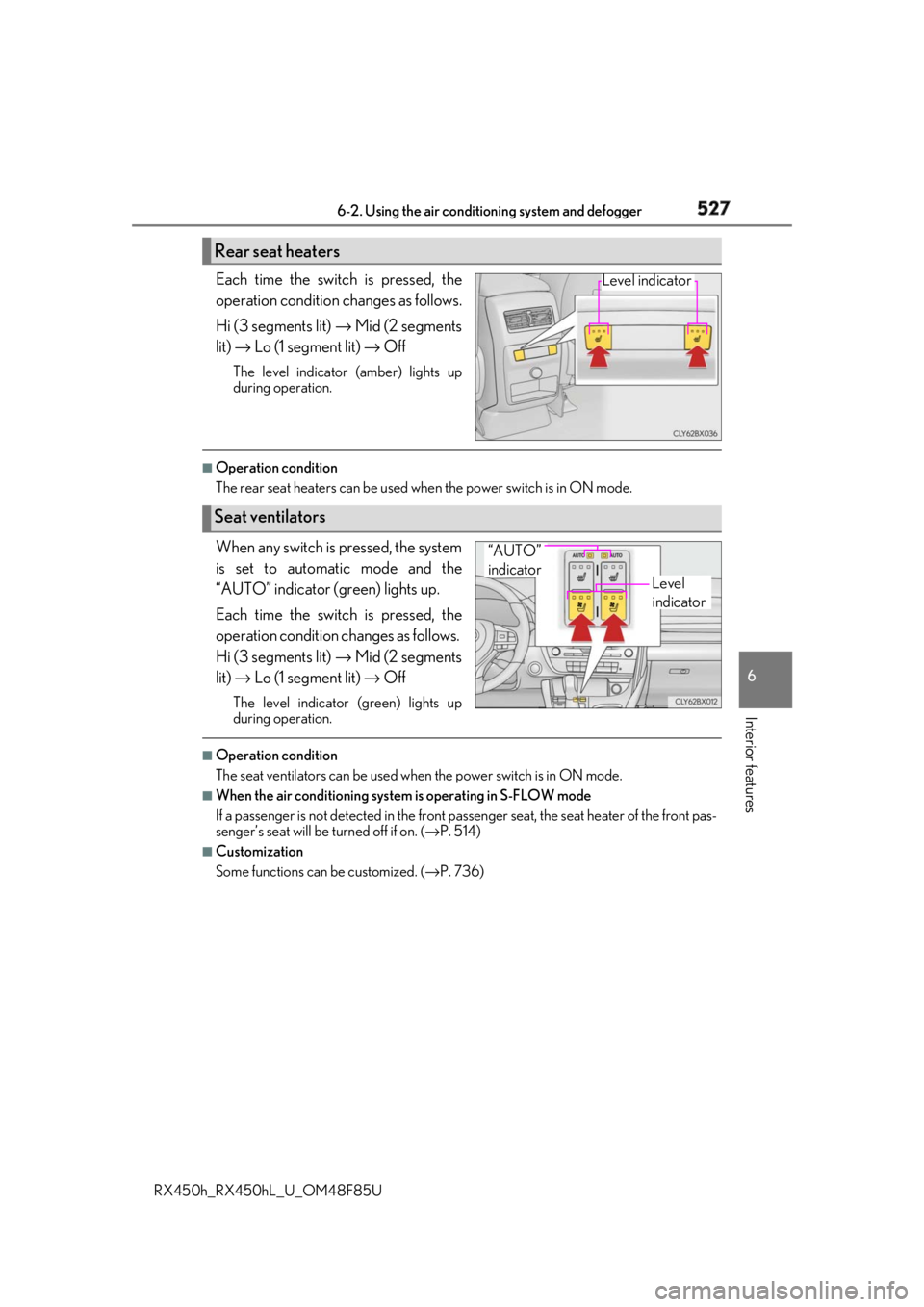
Interior features Each time the switch is pressed, the
operation condition changes as follows.
Hi (3 segments lit) → Mid (2 segments
lit) → Lo (1 segment lit) → OffThe level indicator (amber) lights up
during operation. ■
Operation condition
The rear seat heaters can be used wh en the power switch is in ON mode.
When any switch is pressed, the system
is set to automatic mode and the
“AUTO” indicator (green) lights up.
Each time the switch is pressed, the
operation cond ition changes as follows.
Hi (3 segments lit) → Mid (2 segments
lit) → Lo (1 segment lit) → OffThe level indicator (green) lights up
during operation. ■
Operation condition
The seat ventilators can be used when the power switch is in ON mode.■
When the air conditioning system is operating in S-FLOW mode
If a passenger is not detected in the front pa ssenger seat, the seat he ater of the front pas-
senger’s seat will be turned off if on. ( → P. 514)■
Customization
Some functions can be customized. ( → P. 736)Rear seat heaters Level indicator
Seat ventilators Level
indicator“AUTO”
indicator
Page 528 of 792
528
RX450h_RX450hL _U_OM48F85U6-3. Using the interior lights
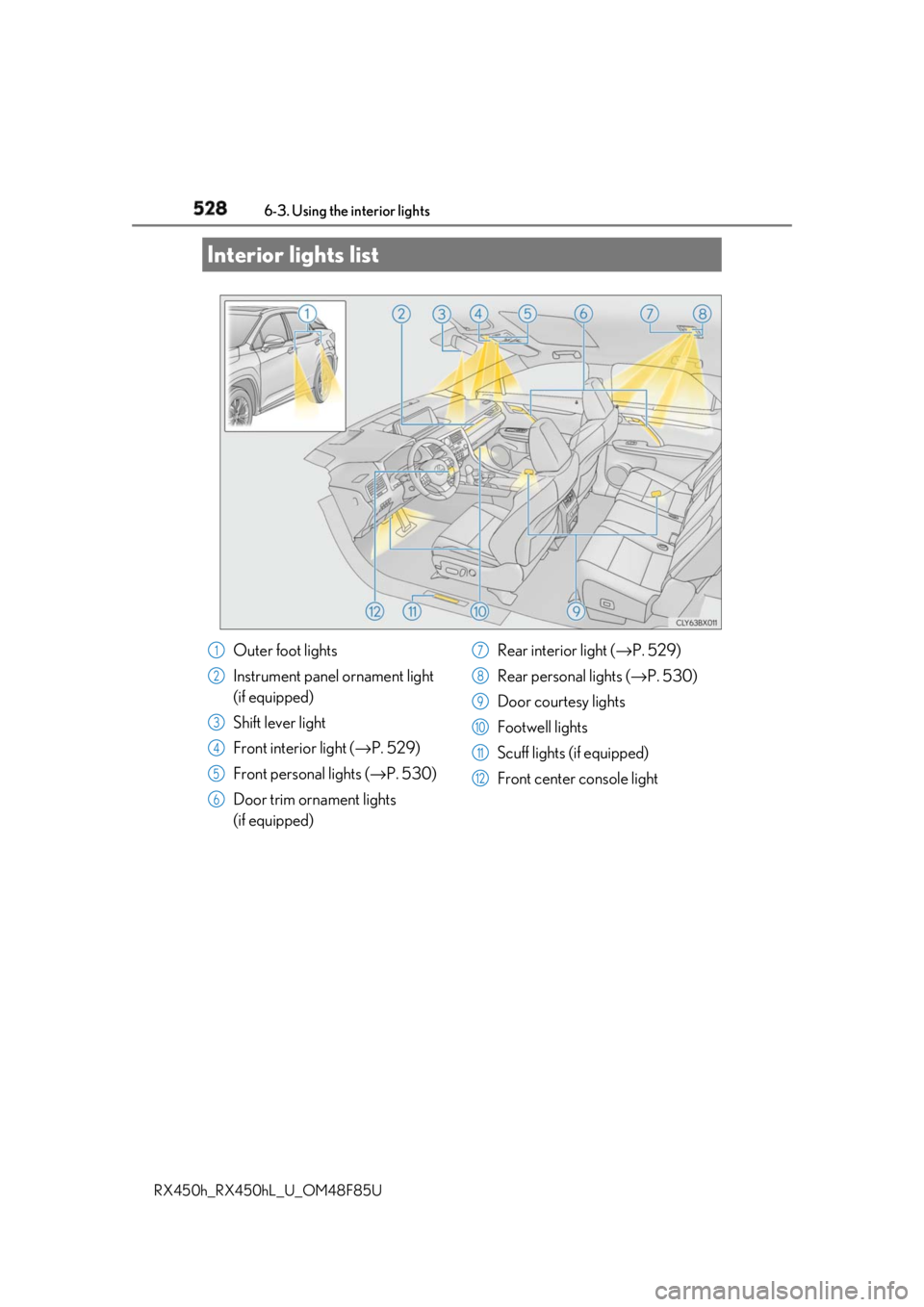
Interior lights list
Outer foot lights
Instrument panel ornament light
(if equipped)
Shift lever light
Front interior light ( → P. 529)
Front personal lights ( → P. 530)
Door trim ornament lights
(if equipped) Rear interior light ( → P. 529)
Rear personal lights ( → P. 530)
Door courtesy lights
Footwell lights
Scuff lights (if equipped)
Front center console light1
2
3
4
5
6 7
8
9
10
11
12
Page 529 of 792
5296-3. Using the interior lights
6
Interior features
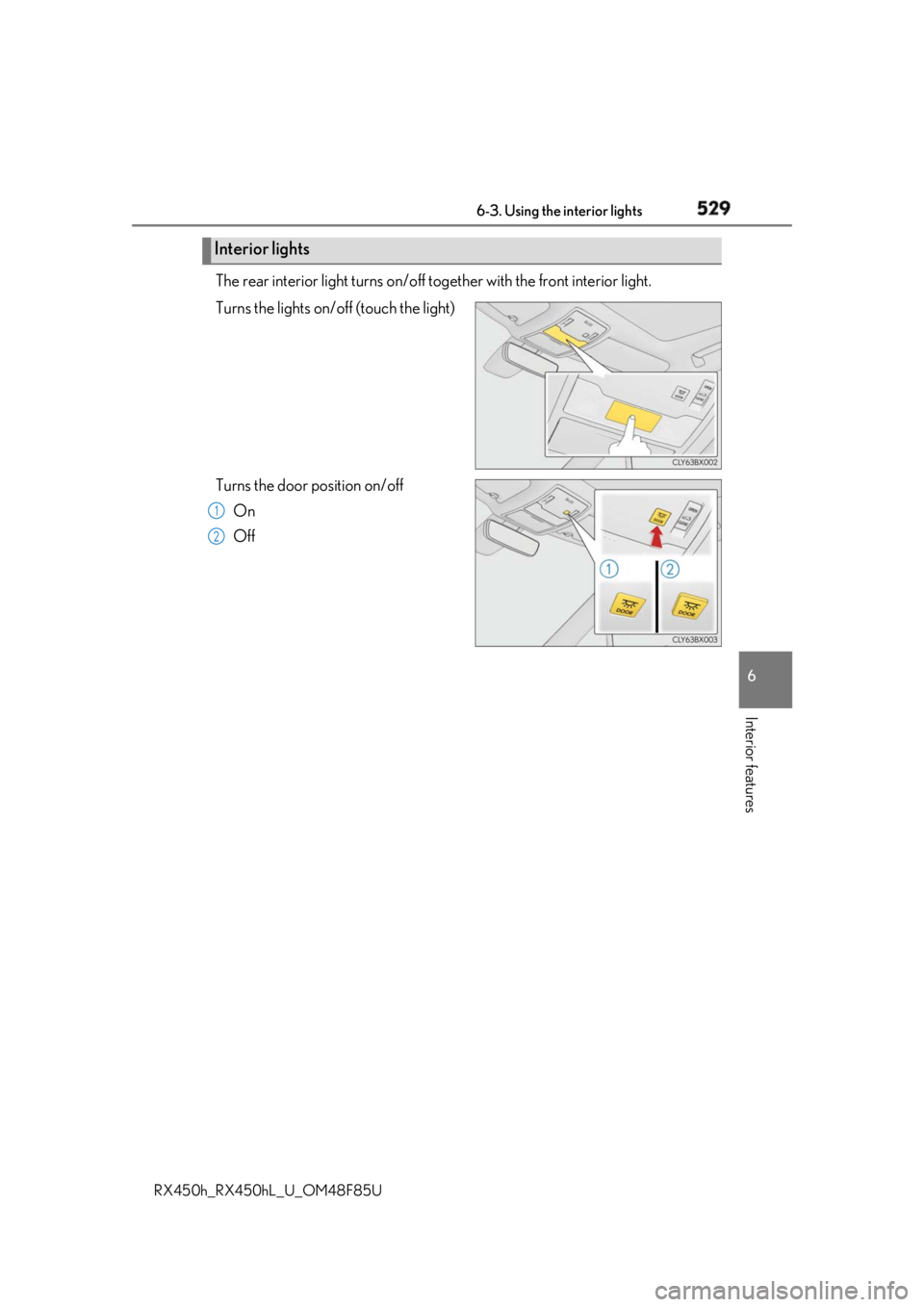
RX450h_RX450hL _U_OM48F85UThe rear interior light turns on/off to gether with the front interior light.
Turns the lights on/off (touch the light)
Turns the door position on/off
On
OffInterior lights 1
2
Page 530 of 792
530 6-3. Using the interior lights
RX450h_RX450hL _U_OM48F85U
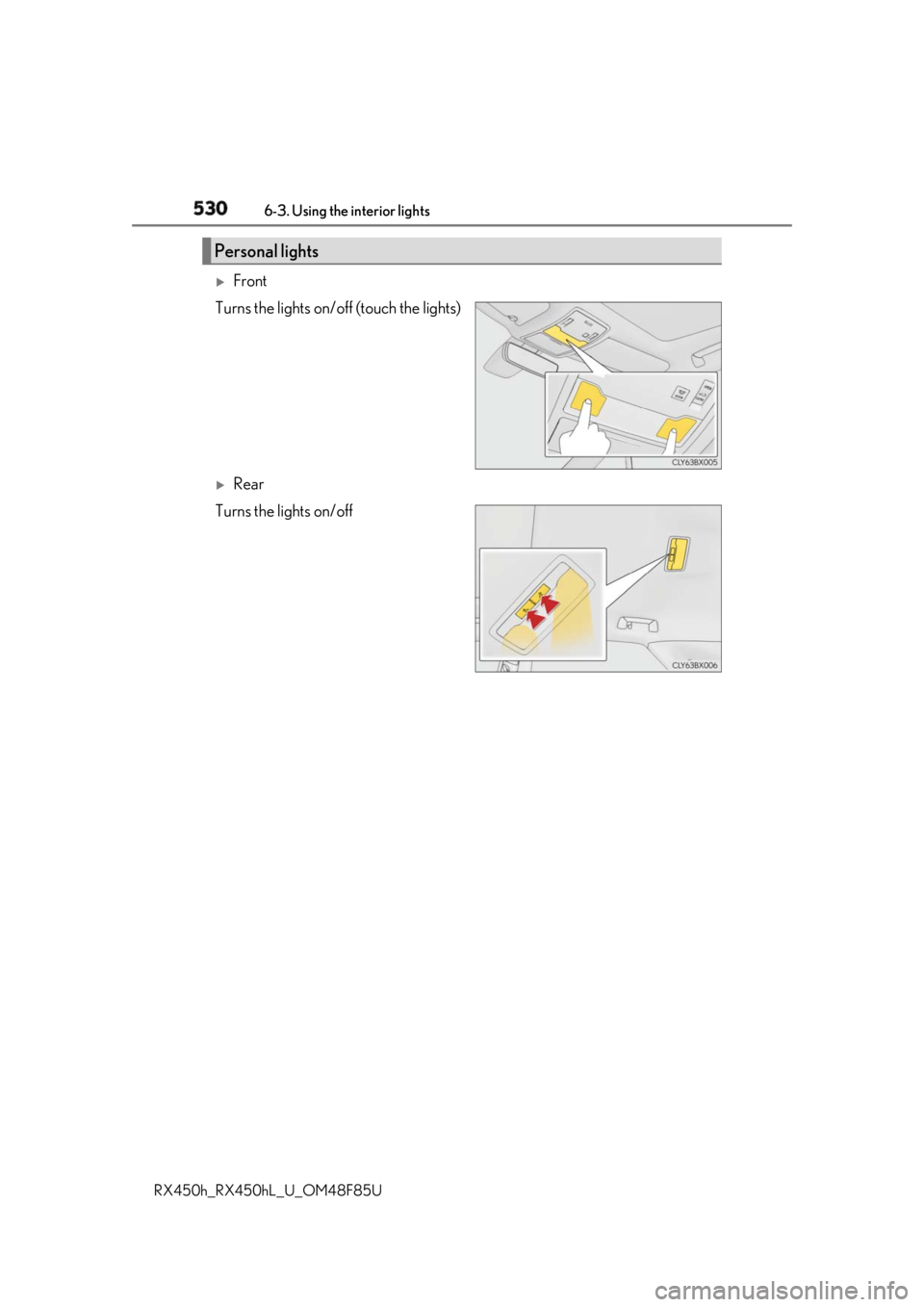
Front
Turns the lights on/off (touch the lights)
Rear
Turns the lights on/offPersonal lights
Page 531 of 792
5316-3. Using the interior lights
6
Interior features
RX450h_RX450hL _U_OM48F85U●
Illuminated entry system: The lights automatically turn on/off according to power switch
mode, the presence of the electronic key, whether the doors are locked/unlocked, and
whether the doors are opened/closed. ●
If the interior lights remain on when the power switch is turned off, the lights will go off
automatically after 20 minutes. ●
In the following cases, the interior lights and front personal lights may not respond as
normal.
• When water, dirt, etc., have adhered to the lens surface
• When operated with a wet hand
• When wearing gloves, etc. ●
Some functions can be customized ( → P. 736)
NOTICE ●
Never remove the lens for the front interior light and fron t personal lights. Otherwise,
the lights will be damaged. If the lens need to remove, contact your Lexus dealer.●
To prevent 12-volt battery discharge, do not leave the lights on longer than necessary
when the hybrid system is off.
Page 534 of 792
534 6-4. Using the storage features
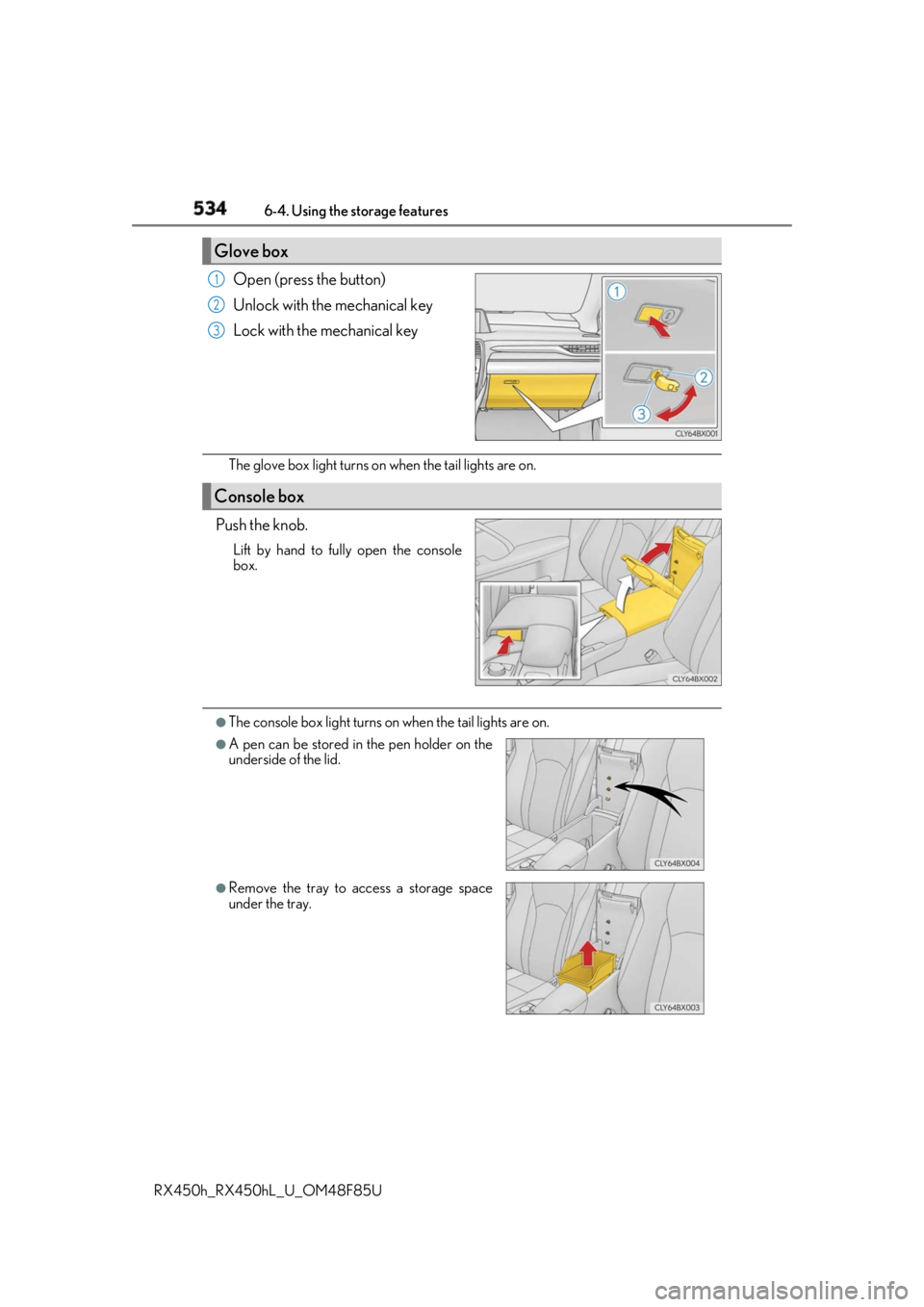
RX450h_RX450hL _U_OM48F85UOpen (press the button)
Unlock with the mechanical key
Lock with the mechanical key
The glove box light turns on when the tail lights are on.
Push the knob. Lift by hand to fully open the console
box.
●
The console box light turns on when the tail lights are on.Glove box 1
2
3
Console box
●
A pen can be stored in the pen holder on the
underside of the lid.
●
Remove the tray to access a storage space
under the tray.
Page 547 of 792
547
RX450h_RX450hL _U_OM48F85U 6
Interior features 6-5. Using the other interior features
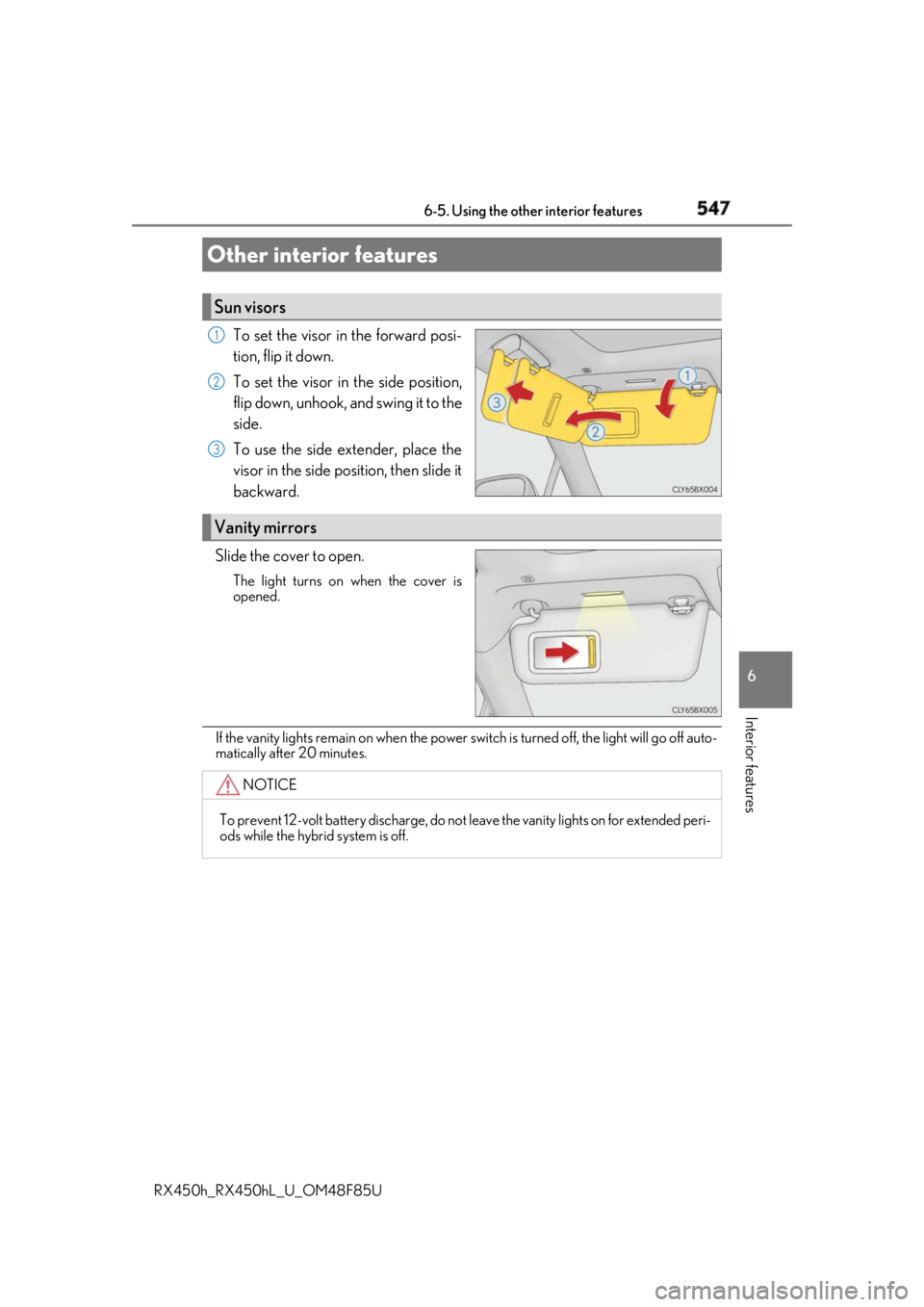
To set the visor in the forward posi-
tion, flip it down.
To set the visor in the side position,
flip down, unhook, and swing it to the
side.
To use the side extender, place the
visor in the side position, then slide it
backward.
Slide the cover to open. The light turns on when the cover is
opened.
If the vanity lights remain on when the power sw itch is turned off, the light will go off auto-
matically after 20 minutes.Other interior features Sun visors 1
2
3
Vanity mirrors
NOTICE
To prevent 12-volt battery discharge, do not leave the vanity lights on for extended peri-
ods while the hybrid system is off.