USB port LEXUS RX450h 2018 Owners Manual
[x] Cancel search | Manufacturer: LEXUS, Model Year: 2018, Model line: RX450h, Model: LEXUS RX450h 2018Pages: 792, PDF Size: 12.5 MB
Page 4 of 792

TABLE OF CONTENTS
4
RX450h_RX450hL _U_OM48F85U5-1. Basic Operations
Lexus Display Audio
system..........................................400
Steering wheel audio
switches ...................................... 406
Mobile Assistant ........................ 407
USB/AUX ports ........................ 409
5-2. Setup
Setup menu ....................................412
General settings...........................413
Voice settings................................416
Display settings ............................. 417
5-3. Using the audio system
Selecting the audio
source ........................................... 418
Optimal use of the audio
system............................................419
Audio settings ............................. 420
Audio menu screen
operation .................................... 423
5-4. Using the radio
Radio operation.......................... 426
5-5. Playing an audio CD and
MP3/WMA/AAC discs
CD player operation ................ 433
5-6. Using an external device
Listening to an iPod .................. 440
Using USB memory
device .......................................... 444
Using the AUX port ................. 448 5-7. Connecting Bluetooth ®
Steps for using Bluetooth ®
devices ........................................ 449
Registering a Bluetooth ®
device ............................................451
Selecting a Bluetooth ®
device .......................................... 452
Connecting a Bluetooth ®
audio player .............................. 453
Connecting a Bluetooth ®
phone ........................................... 454
Displaying a Bluetooth ®
device details ............................ 455
Detailed Bluetooth ®
settings ........................................ 456
5-8. Bluetooth ®
Audio
Listening to Bluetooth ®
Audio ........................................... 459
5-9. Bluetooth ®
Phone
Using a Bluetooth ®
Phone.............................................461
Making a call................................ 463
Receiving a call ........................... 466
Speaking on the phone ........... 467
Using a Bluetooth ®
phone
message...................................... 469
Using the steering wheel
switches ........................................ 471
Bluetooth ®
phone
settings .........................................472
5-10. Phonebook
Contact settings ..........................474
Messaging settin g ......................4775
Lexus Display Audio system
Page 398 of 792

398
RX450h_RX450hL _U_OM48F85U 5-1. Basic Operations
Lexus Display Audio
system ......................................... 400
Steering wheel audio
switches.......................................406
Mobile Assistant......................... 407
USB/AUX ports ........................409
5-2. Setup
Setup menu ....................................412
General settings .......................... 413
Voice settings ............................... 416
Display settings .............................417
5-3. Using the audio system
Selecting the audio
source ........................................... 418
Optimal use of the audio
system ........................................... 419
Audio settings ............................. 420
Audio menu screen
operation .................................... 423
5-4. Using the radio
Radio operation.......................... 426
5-5. Playing an audio CD and
MP3/WMA/AAC discs
CD player operation ................ 4335 Lexus Display
Audio system
Page 399 of 792
399
5 Lexus Display
Audio system
RX450h_RX450hL _U_OM48F85U5-6. Using an external device
Listening to an iPod .................. 440
Using USB memory
device...........................................444
Using the AUX port ................ 448
5-7. Connecting Bluetooth ®
Steps for using Bluetooth ®
devices .........................................449
Registering a Bluetooth ®
device............................................ 451
Selecting a Bluetooth ®
device ...........................................452
Connecting a Bluetooth ®
audio player ...............................453
Connecting a Bluetooth ®
phone ...........................................454
Displaying a Bluetooth ®
device details ........................... 455
Detailed Bluetooth ®
settings.........................................456
5-8. Bluetooth ®
Audio
Listening to Bluetooth ®
Audio............................................459 5-9. Bluetooth ®
Phone
Using a Bluetooth ®
Phone ............................................ 461
Making a call ................................ 463
Receiving a call ........................... 466
Speaking on the phone............ 467
Using a Bluetooth ®
phone
message ...................................... 469
Using the steering wheel
switches.........................................471
Bluetooth ®
phone
settings ........................................ 472
5-10. Phonebook
Contact settings ......................... 474
Messaging setting...................... 477
5-11. Bluetooth ®
What to do if...
(Troubleshooting)................... 478
Bluetooth ®
................................... 482
5-12. Other function
“Information” screen................ 488
USB photo ....................................490
Weather information................ 492
Voice command system ......... 493
Page 409 of 792
4095-1. Basic Operations
5
Lexus Display Audio system
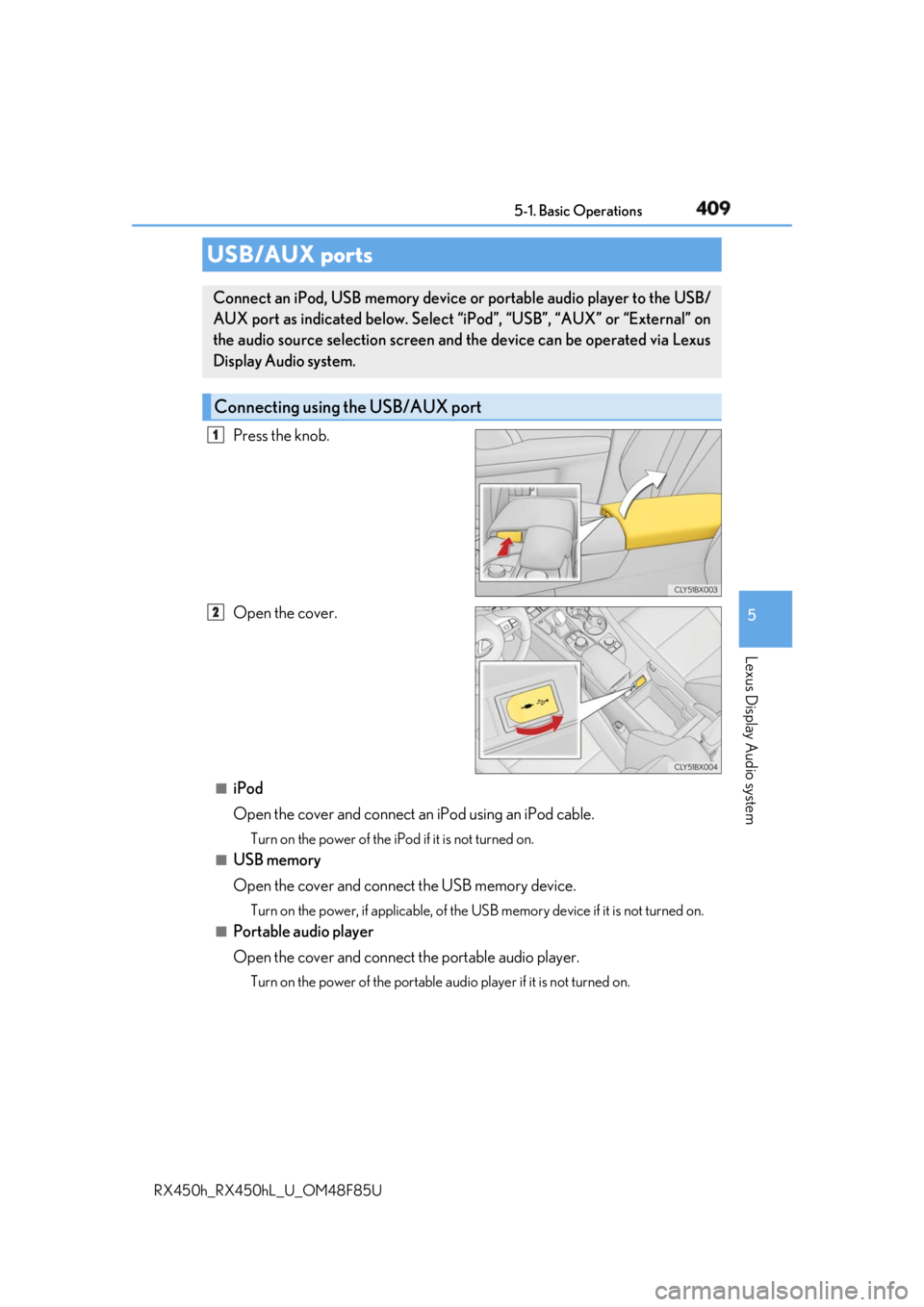
RX450h_RX450hL _U_OM48F85UPress the knob.
Open the cover.
■
iPod
Open the cover and connect an iPod using an iPod cable.Turn on the power of the iPod if it is not turned on.■
USB memory
Open the cover and connect the USB memory device. Turn on the power, if applicable, of the US B memory device if it is not turned on.
■
Portable audio player
Open the cover and connect the portable audio player. Turn on the power of the portable au dio player if it is not turned on.USB/AUX ports Connect an iPod, USB memory device or portable audio player to the USB/
AUX port as indicated below. Select “iPod”, “USB”, “AUX” or “External” on
the audio source selection screen and the device can be operated via Lexus
Display Audio system.
Connecting using the USB/AUX port 1
2
Page 410 of 792
410 5-1. Basic Operations
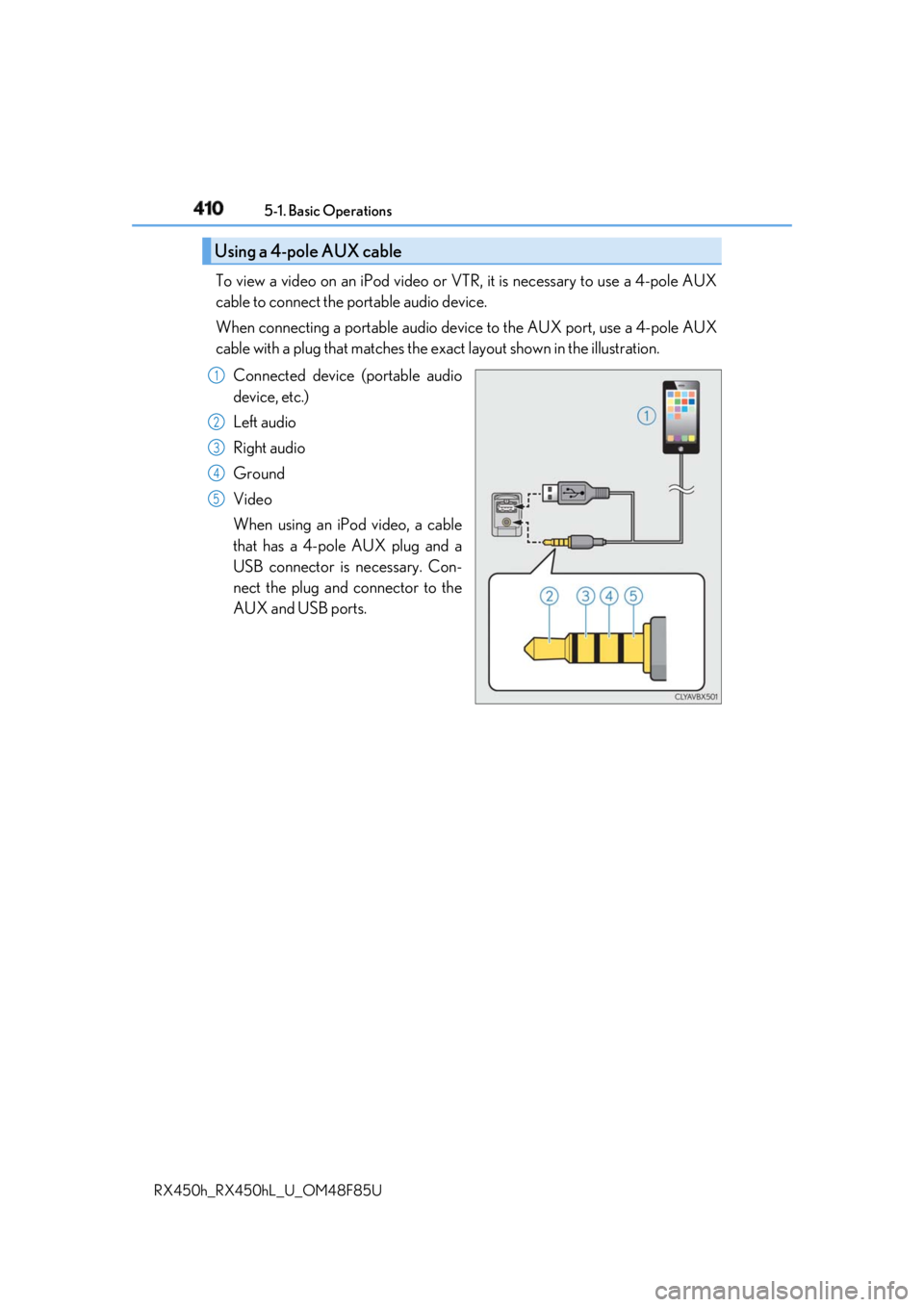
RX450h_RX450hL _U_OM48F85UTo view a video on an iPod video or VTR, it is necessary to use a 4-pole AUX
cable to connect the portable audio device.
When connecting a portable audio devi ce to the AUX port, use a 4-pole AUX
cable with a plug that matches the ex act layout shown in the illustration.
Connected device (portable audio
device, etc.)
Left audio
Right audio
Ground
Video
When using an iPod video, a cable
that has a 4-pole AUX plug and a
USB connector is necessary. Con-
nect the plug and connector to the
AUX and USB ports.Using a 4-pole AUX cable 1
2
3
4
5
Page 411 of 792
4115-1. Basic Operations
5
Lexus Display Audio system
RX450h_RX450hL _U_OM48F85U■
When using a 4-pole AUX cable
If a 4-pole AUX cable with a different layout is used, audio and/or video may not be out-
put properly. ■
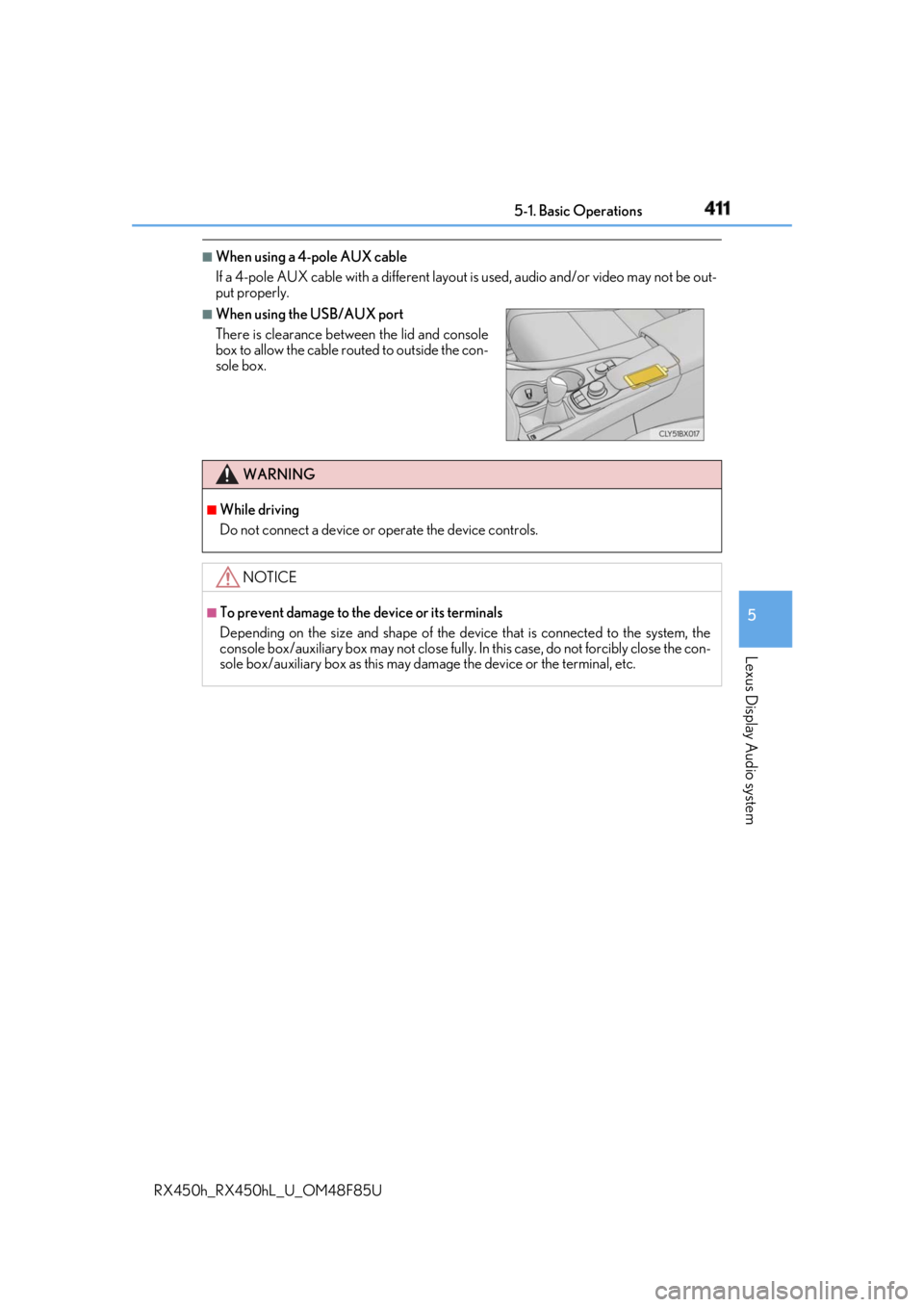
When using the USB/AUX port
There is clearance between the lid and console
box to allow the cable ro uted to outside the con-
sole box.
WARNING ■
While driving
Do not connect a device or operate the device controls.
NOTICE ■
To prevent damage to the device or its terminals
Depending on the size and shape of the device that is connected to the system, the
console box/auxiliary box may not close fully. In this case, do not forcibly close the con-
sole box/auxiliary box as this may da mage the device or the terminal, etc.
Page 447 of 792
4475-6. Using an external device
5
Lexus Display Audio system
RX450h_RX450hL _U_OM48F85U●
ID3, WMA and AAC tags
ID3 tags can be added to MP3 files, making it possible to record the track title, artist
name, etc.
The system is compatible with ID3 Ver. 1.0, 1.1, and Ver. 2.2, 2.3 ID3 tags. (The number
of characters is based on ID3 Ver. 1.0 and 1.1.)
WMA tags can be added to WMA files, making it possible to record the track title and
artist name in the same way as with ID3 tags.
AAC tags can be added to AAC files, making it possible to record the track title and
artist name in the same way as with ID3 tags. ●
MP3, WMA and AAC playback
• When a device containing MP3, WMA or AA C files is connected, all files in the
USB memory device are checked. Once th e file check is finished, the first MP3,
WMA or AAC file is played. To make the file check finish more quickly, we recom-
mend that you do not include any files other than MP3, WMA or AAC files or cre-
ate any unnecessary folders.
• When a USB memory device is connected and the audio source is changed to USB
memory mode, the USB memory device will st art playing the first file in the first
folder. If the same device is removed an d reconnected (and the contents have not
been changed), the USB memory device w ill resume play from the same point in
which it was last used. ●
Extensions
If the file extensions .mp3, .wma and .m4a are used for files other than MP3, WMA
and AAC files, they will be skipped (not played). ●
Playback
• To play MP3 files with steady sound quality, we recommend a fixed bit rate of at least
128 kbps and a sampling frequency of 44.1 kHz.
• There is a wide variety of freeware an d other encoding software for MP3, WMA
and AAC files on the market, and depending on the status of the encoding and the
file format, poor sound quality or noise at the start of playback may result. In some
cases, playback may not be possible at all.
• Microsoft, Windows, and Windows Media ar e the registered trademarks of Micro-
soft Corporation in the U.S.A. and other countries.
NOTICE ■
To prevent damage to the USB me mory device or its terminals●
Depending on the size and shape of the USB memory that is connected to the sys-
tem, the console box may not close fully. In th is case, do not forcibly close the console
box as this may damage the USB memory or the terminal, etc. ●
Do not leave the USB memory device in the vehicle. The temperature inside the vehi-
cle may become high. ●
Do not push down on or apply unnecessary pressure to the USB memory device
while it is connected. ●
Do not insert foreign objects into the port.
Page 488 of 792
488
RX450h_RX450hL _U_OM48F85U5-12. Other function
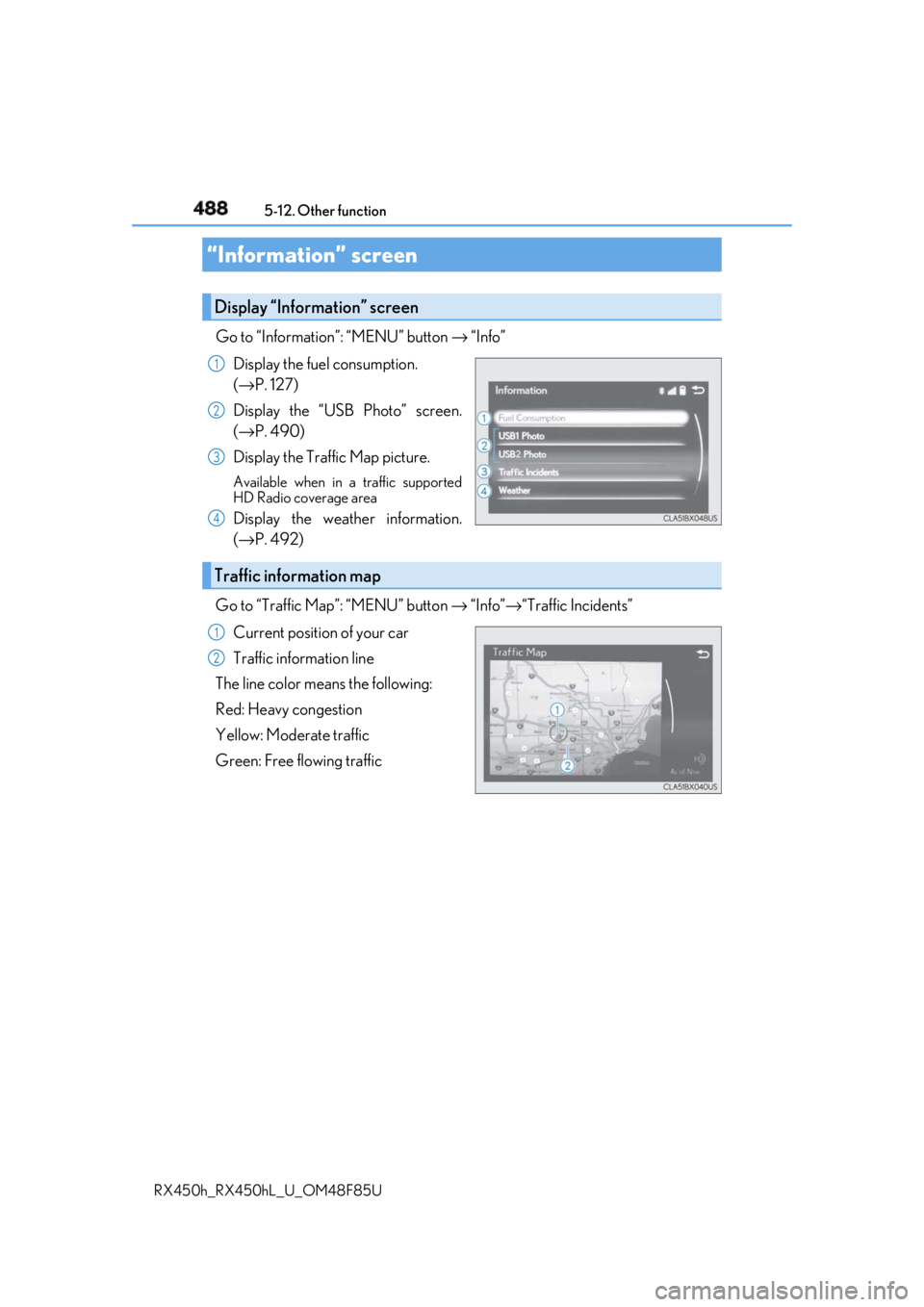
Go to “Information”: “MENU” button → “Info”
Display the fuel consumption.
( → P. 127)
Display the “USB Photo” screen.
( → P. 490)
Display the Traffic Map picture. Available when in a traffic supported
HD Radio coverage area
Display the weather information.
( → P. 492)
Go to “Traffic Map”: “MENU” button → “Info” → “Traffic Incidents”
Current position of your car
Traffic information line
The line color means the following:
Red: Heavy congestion
Yellow: Moderate traffic
Green: Free flowing traffic“Information” screen Display “Information” screen 1
2
3
4
Traffic information map 1
2
Page 771 of 792

771Alphabetical index
RX450h_RX450hL _U_OM48F85UAlarm ............................................................ 86
Anchor brackets ...................................... 57
Antenna
Radio ........................................................429
Smart access system
with push-button start ................... 158
Anti-lock Brake System (ABS)....... 382
Warning light ........................................ 661
Approach warning.................................314
Armrest ....................................................558
Assist grips .............................................. 559
Audio system (with Lexus
Display Audio System) ...................400
Antenna ..................................................429
Audio input........................................... 409
AUX port.............................................. 409
Bluetooth ®
audio ............................. 459
CD player ..............................................433
iPod .......................................................... 440
MP3/WMA disc ...............................433
Optimal use ........................................... 419
Portable music player ..................... 448
Radio ........................................................426
Setup menu .............................................412
Steering wheel audio
switches .............................................. 406
USB memory ....................................... 444 Audio system
(with navigation system)
* Automatic air conditioning
system ......................................... 507, 522
Air conditioning filter ....................... 625
Rear automatic air conditioning
system .................................................. 522
S-FLOW mode....................................514
Automatic headlight leveling
system .................................................... 260
Automatic High Beam ........................262
Automatic light control system ...... 258
AUX port ................................................ 409
Auxiliary boxes .......................... 539, 544
* : Refer to the “NAVIGATION SYSTEM OWNER’S MANUAL”.
Page 789 of 792
789Alphabetical index
RX450h_RX450hL _U_OM48F85UTRAC (Traction Control) ................. 382
Traction Control (TRAC) ................. 382
Trailer Sway Control........................... 382
Trailer towing .............................. 224, 237
Transmission
Driving mode select switch ..........379
Hybrid transmission..........................246
If the shift lever cannot be
shifted from P .................................. 250
Paddle shift switches ............ 247, 248
S mode ....................................................248
Trip meters ................................................. 115
Turn signal lights
Replacing light bulbs ........................637
Turn signal lever ................................. 252
Wattage ....................................................719
USB memory.......................................... 444
USB port .................................................. 409 Vanity lights .............................................547
Wattage ................................................... 719
Vanity mirrors.........................................547
Vanity lights .......................................... 547
VDIM (Vehicle Dynamics
Integrated Management).............. 383
Vehicle data recordings......................... 10
Vehicle Dynamics Integrated
Management (VDIM)..................... 383
Vehicle identification number ............711
Vehicle proximity notification
system ........................................................ 75
Vehicle Stability Control (VSC) .... 382
Voice command system.................... 493
VSC (Vehicle Stability Control) .... 382
U V