tire pressure LEXUS RX450h 2018 Owners Manual
[x] Cancel search | Manufacturer: LEXUS, Model Year: 2018, Model line: RX450h, Model: LEXUS RX450h 2018Pages: 792, PDF Size: 12.5 MB
Page 6 of 792

TABLE OF CONTENTS
6
RX450h_RX450hL _U_OM48F85U7-1. Maintenance and care
Cleaning and protecting
the vehicle exterior ................580
Cleaning and protecting
the vehicle interior.................. 584
7-2. Maintenance
Maintenance
requirements ............................ 587
General mainte nance..............589
Emission inspection and
maintenance (I/M)
programs.................................... 592
7-3. Do-it-yourself
maintenance
Do-it-yourself service
precautions................................ 593
Hood ............................................... 595
Positioning a floor jack ............ 596
Engine compartment ............... 597
12-volt battery ............................. 605
Tires .................................................... 611
Tire inflation pressure .............. 620
Wheels ........................................... 623
Air conditioning filter ............... 625
Windshield wiper inserts ........ 628
Electronic key battery.............. 630
Checking and replacing
fuses.............................................. 632
Headlight aim .............................. 635
Light bulbs .................................... 637 8-1. Essential information
Emergency flashers .................. 652
If your vehicle has
to be stopped in
an emergency .......................... 653
8-2. Steps to take in
an emergency
If your vehicle needs to be
towed ........................................... 654
If you think something is
wrong........................................... 659
If a warning light turns
on or a warning buzzer
sounds ......................................... 660
If a warning message is
displayed .................................... 667
If you have a flat tire .................. 673
If the hybrid system will
not start ....................................... 690
If the electronic key does
not operate properly ............. 692
If the 12-volt battery is
discharged................................. 695
If your vehicle overheats......... 702
If the vehicle becomes stuck .........7067
Maintenance and care 8
When trouble arises
Page 17 of 792
17Pictorial index
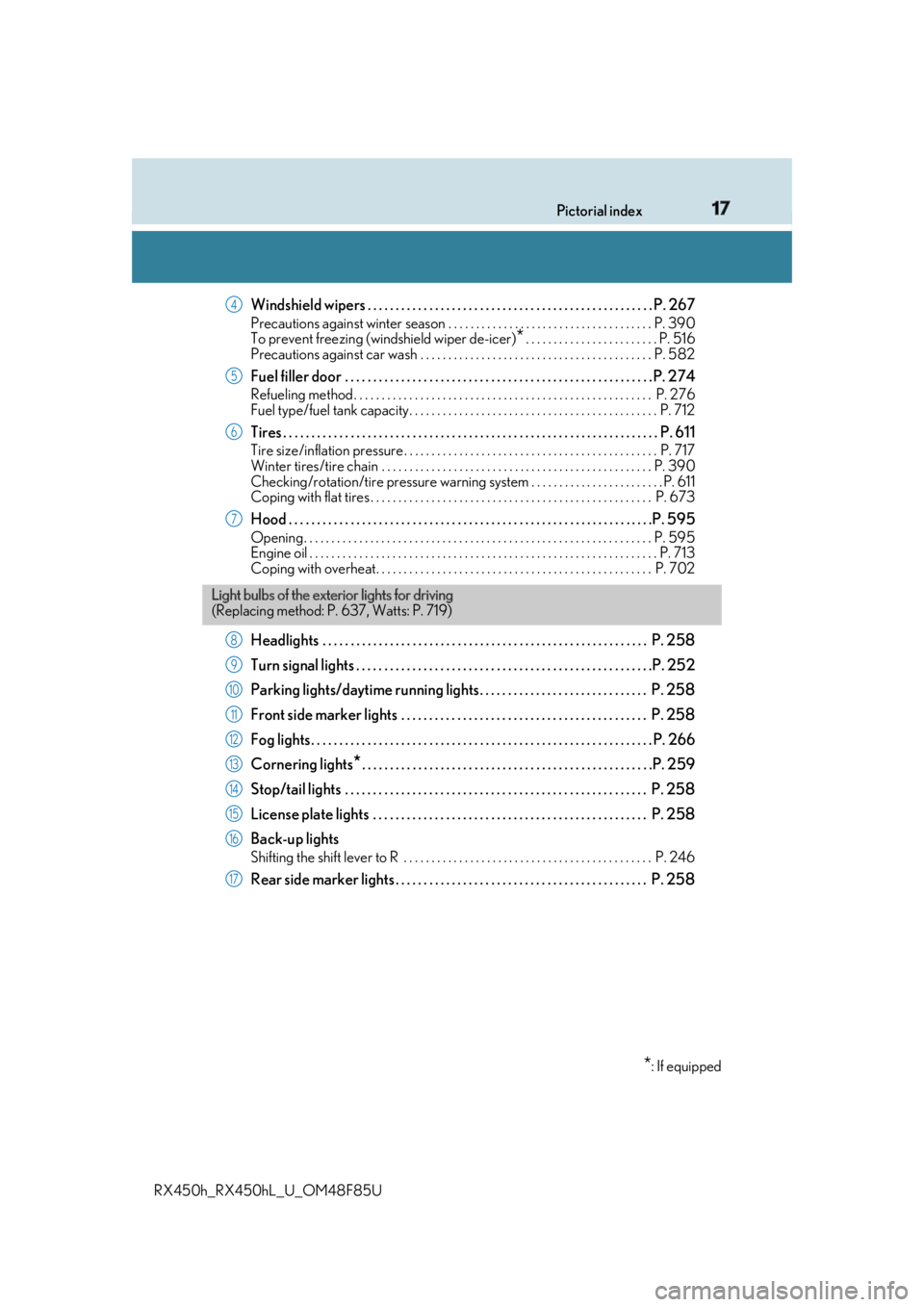
RX450h_RX450hL _U_OM48F85UWindshield wipers . . . . . . . . . . . . . . . . . . . . . . . . . . . . . . . . . . . . . . . . . . . . . . . . . . . P. 267 Precautions against winter season . . . . . . . . . . . . . . . . . . . . . . . . . . . . . . . . . . . . . P. 390
To prevent freezing (windshield wiper de-icer)
* . . . . . . . . . . . . . . . . . . . . . . . . P. 516
Precautions against car wash . . . . . . . . . . . . . . . . . . . . . . . . . . . . . . . . . . . . . . . . . . P. 582
Fuel filler door . . . . . . . . . . . . . . . . . . . . . . . . . . . . . . . . . . . . . . . . . . . . . . . . . . . . . . . P . 274Refueling method . . . . . . . . . . . . . . . . . . . . . . . . . . . . . . . . . . . . . . . . . . . . . . . . . . . . . . P. 276
Fuel type/fuel tank capacity . . . . . . . . . . . . . . . . . . . . . . . . . . . . . . . . . . . . . . . . . . . . . P. 712
Tires . . . . . . . . . . . . . . . . . . . . . . . . . . . . . . . . . . . . . . . . . . . . . . . . . . . . . . . . . . . . . . . . . . . P. 611Tire size/inflation pressure . . . . . . . . . . . . . . . . . . . . . . . . . . . . . . . . . . . . . . . . . . . . . . P. 717
Winter tires/tire chain . . . . . . . . . . . . . . . . . . . . . . . . . . . . . . . . . . . . . . . . . . . . . . . . . P. 39 0
Checking/rotation/tire pressure warning system . . . . . . . . . . . . . . . . . . . . . . . . P. 611
Coping with flat tires . . . . . . . . . . . . . . . . . . . . . . . . . . . . . . . . . . . . . . . . . . . . . . . . . . . P. 673
Hood . . . . . . . . . . . . . . . . . . . . . . . . . . . . . . . . . . . . . . . . . . . . . . . . . . . . . . . . . . . . . . . . .P. 595Opening. . . . . . . . . . . . . . . . . . . . . . . . . . . . . . . . . . . . . . . . . . . . . . . . . . . . . . . . . . . . . . . P. 595
Engine oil . . . . . . . . . . . . . . . . . . . . . . . . . . . . . . . . . . . . . . . . . . . . . . . . . . . . . . . . . . . . . . . P. 713
Coping with overheat. . . . . . . . . . . . . . . . . . . . . . . . . . . . . . . . . . . . . . . . . . . . . . . . . . P. 702
Headlights . . . . . . . . . . . . . . . . . . . . . . . . . . . . . . . . . . . . . . . . . . . . . . . . . . . . . . . . . . P. 258
Turn signal lights . . . . . . . . . . . . . . . . . . . . . . . . . . . . . . . . . . . . . . . . . . . . . . . . . . . . .P. 2 52
Parking lights/daytime running lights. . . . . . . . . . . . . . . . . . . . . . . . . . . . . . P. 258
Front side marker lights . . . . . . . . . . . . . . . . . . . . . . . . . . . . . . . . . . . . . . . . . . . . P. 258
Fog lights. . . . . . . . . . . . . . . . . . . . . . . . . . . . . . . . . . . . . . . . . . . . . . . . . . . . . . . . . . . . . P. 266
Cornering lights
* . . . . . . . . . . . . . . . . . . . . . . . . . . . . . . . . . . . . . . . . . . . . . . . . . . . .P. 259
Stop/tail lights . . . . . . . . . . . . . . . . . . . . . . . . . . . . . . . . . . . . . . . . . . . . . . . . . . . . . . P. 258
License plate lights . . . . . . . . . . . . . . . . . . . . . . . . . . . . . . . . . . . . . . . . . . . . . . . . . P. 258
Back-up lights Shifting the shift lever to R . . . . . . . . . . . . . . . . . . . . . . . . . . . . . . . . . . . . . . . . . . . . . P. 246
Rear side marker lights . . . . . . . . . . . . . . . . . . . . . . . . . . . . . . . . . . . . . . . . . . . . . P. 258 4
5
6
7
Light bulbs of the exte rior lights for driving
(Replacing method: P. 637, Watts: P. 719)
* : If equipped8
9
10
11
12
13
14
15
16
17
Page 92 of 792
92 2. Instrument cluster
RX450h_RX450hL _U_OM48F85U* 1
: These lights turn on when the power switch is turned to ON mode to indicate that a
system check is being performe d. They will turn off after the hybrid system is on, or
after a few seconds. There ma y be a malfunction in a system if a light does not come
on, or turn off. Have the vehicl e inspected by your Lexus dealer.
* 2
: This light flashes to indicate a malfunction.
* 3
: This light flashes or illumina tes to indicate a malfunction.
* 4
: This light illuminates on the center panel.
* 5
:RX450h
* 6
:RX450hL
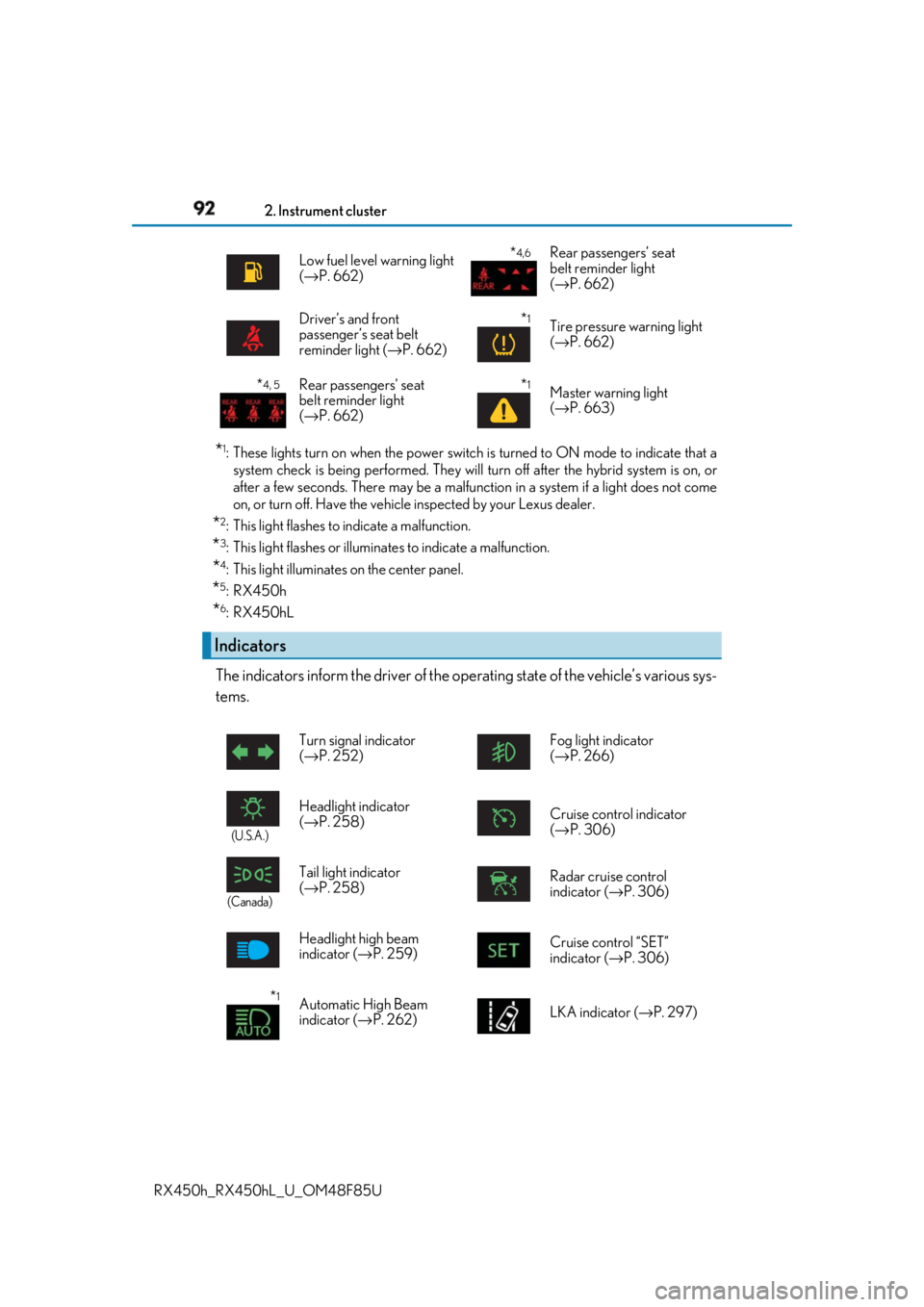
The indicators inform the driver of the op erating state of the vehicle’s various sys-
tems. Low fuel level warning light
( → P. 662)
* 4,6
Rear passengers’ seat
belt reminder light
( → P. 662)
Driver’s and front
passenger’s seat belt
reminder light ( → P. 662)
* 1
Tire pressure warning light
( → P. 662)
* 4, 5
Rear passengers’ seat
belt reminder light
( → P. 662)
* 1
Master warning light
( → P. 663)
Indicators Turn signal indicator
( → P. 252) Fog light indicator
( → P. 266)
(U.S.A.)
Headlight indicator
( → P. 258) Cruise control indicator
( → P. 306)
(Canada)
Tail light indicator
( → P. 258) Radar cruise control
indicator ( → P. 306)
Headlight high beam
indicator ( → P. 259) Cruise control “SET”
indicator ( → P. 306)
* 1
Automatic High Beam
indicator ( → P. 262) LKA indicator ( → P. 297)
Page 107 of 792
1072. Instrument cluster
2
Instrument cluster
RX450h_RX450hL _U_OM48F85U■
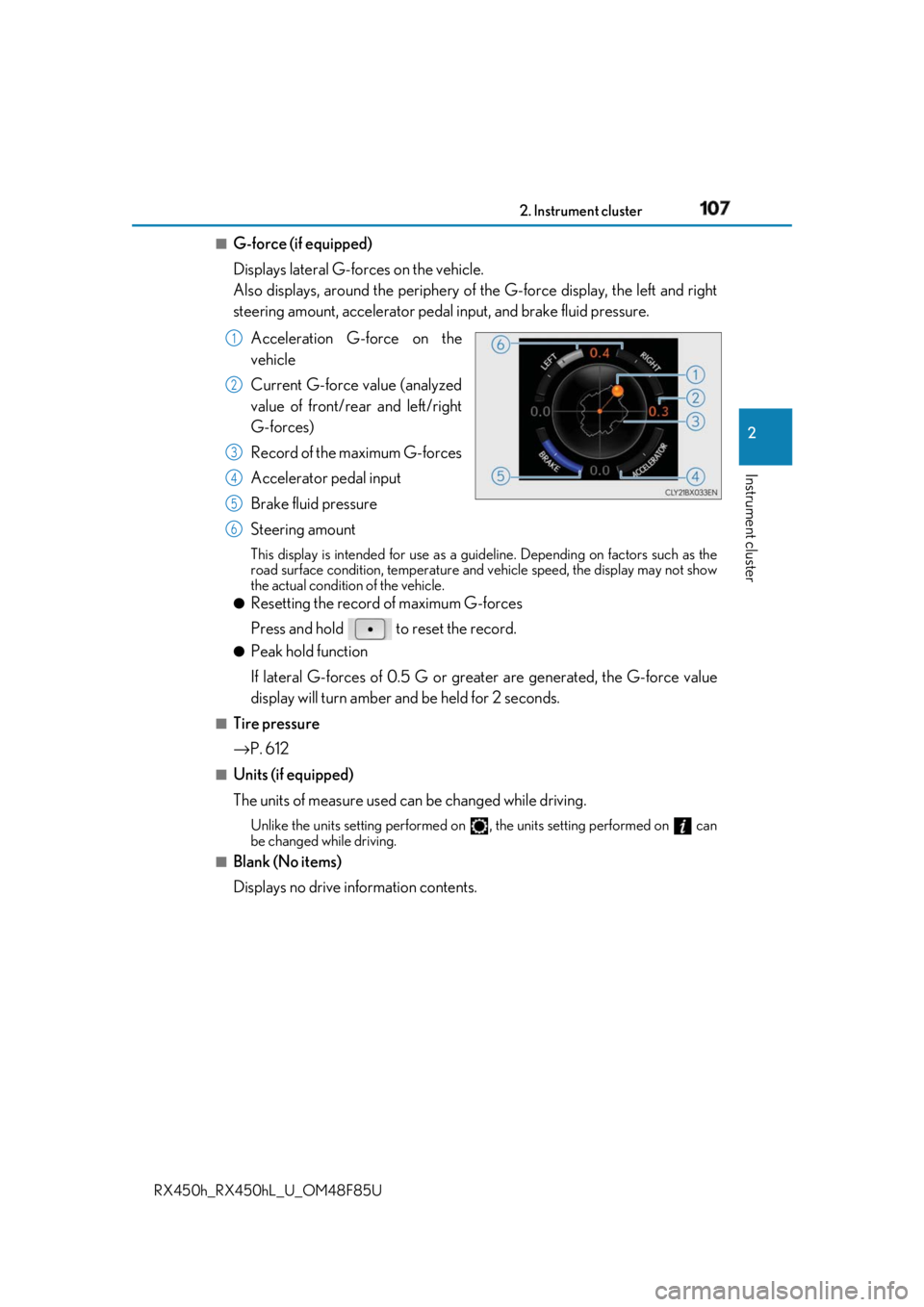
G-force (if equipped)
Displays lateral G-forces on the vehicle.
Also displays, around the periphery of the G-force display, the left and right
steering amount, accelerator pedal input, and brake fluid pressure.
Acceleration G-force on the
vehicle
Current G-force value (analyzed
value of front/rear and left/right
G-forces)
Record of the maximum G-forces
Accelerator pedal input
Brake fluid pressure
Steering amount This display is intended for use as a guideline. Depending on factors such as the
road surface condition, temperature and vehicle speed, the display may not show
the actual condition of the vehicle. ●
Resetting the record of maximum G-forces
Press and hold to reset the record. ●
Peak hold function
If lateral G-forces of 0.5 G or grea ter are generated, the G-force value
display will turn amber and be held for 2 seconds.■
Tire pressure
→ P. 612■
Units (if equipped)
The units of measure used can be changed while driving. Unlike the units setting performed on , the units setting performed on can
be changed while driving.■
Blank (No items)
Displays no drive information contents. 1
2
3
4
5
6
Page 112 of 792
112 2. Instrument cluster
RX450h_RX450hL _U_OM48F85U■
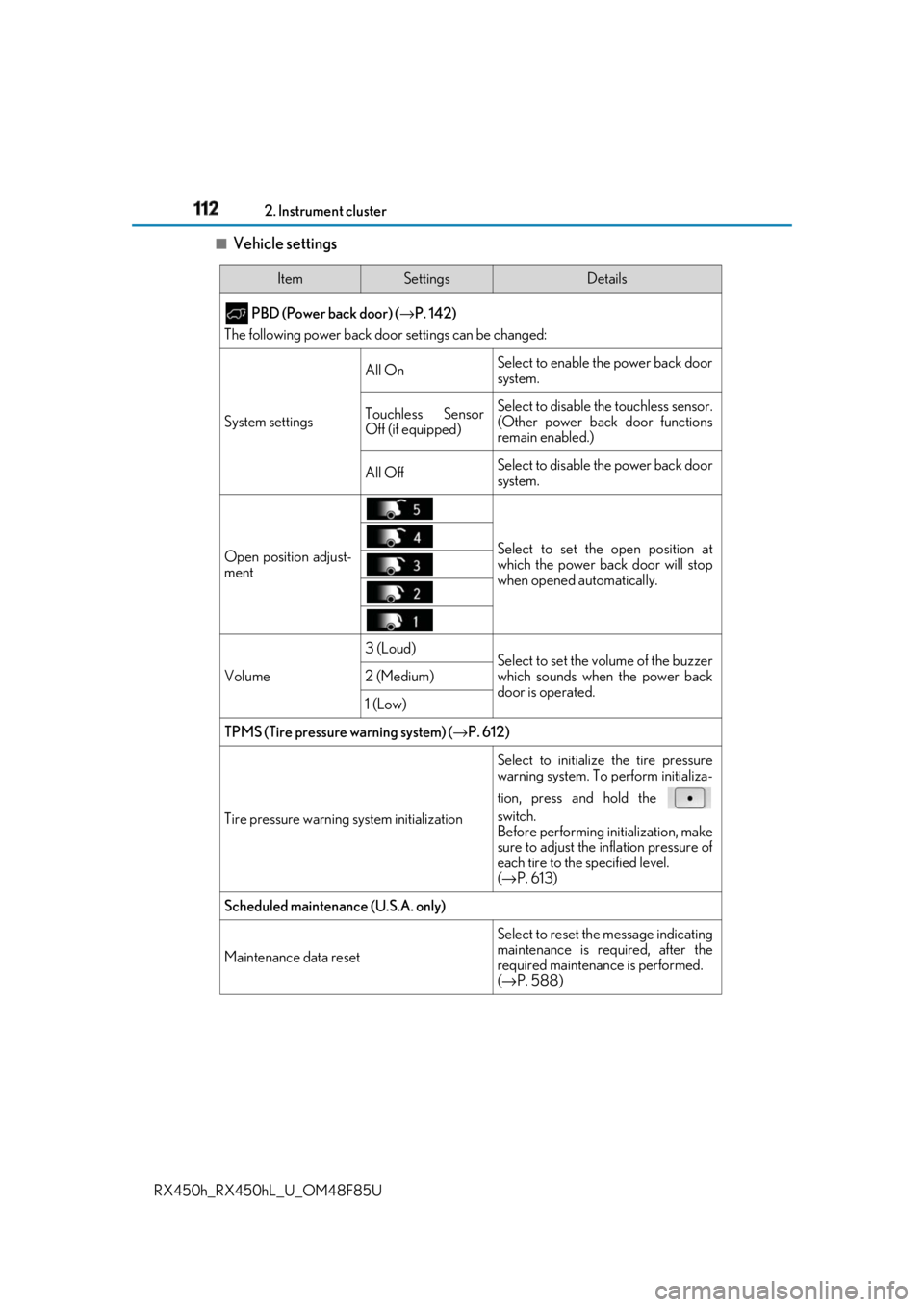
Vehicle settings Item Settings Details
PBD (Power back door) ( → P. 142)
The following power back door settings can be changed:
System settings All On Select to enable the power back door
system.
Touchless Sensor
Off (if equipped) Select to disable the touchless sensor.
(Other power back door functions
remain enabled.)
All Off Select to disable the power back door
system.
Open position adjust-
ment Select to set the open position at
which the power back door will stop
when opened automatically.
Volume 3 (Loud)
Select to set the volume of the buzzer
which sounds when the power back
door is operated.2 (Medium)
1 (Low)
TPMS (Tire pressure warning system) ( → P. 612)
Tire pressure warning system initialization Select to initializ e the tire pressure
warning system. To perform initializa-
tion, press and hold the
switch.
Before performing initialization, make
sure to adjust the inflation pressure of
each tire to the specified level.
( → P. 613)
Scheduled maintenance (U.S.A. only)
Maintenance data reset Select to reset the message indicating
maintenance is re quired, after the
required maintenanc e is performed.
( → P. 588)
Page 117 of 792
1172. Instrument cluster
2
Instrument cluster
RX450h_RX450hL _U_OM48F85U■
Tire pressure ●
It may take a few minutes to display the tire inflation pressure after the power switch is
turned to ON mode. It may also take a few minutes to display the tire inflation pressure
after inflation pressure has been adjusted.●
“---” may be displayed if the tire position information cannot be determined due to
unfavorable radio wave conditions. ●
Tire inflation pressure changes with temperat ure. The displayed values may also be dif-
ferent from the values measured using a tire pressure gauge. ■
Liquid crystal display
Small spots or light spots may appear on the display. This phenomenon is characteristic
of liquid crystal displays, and there is no problem continuing to use the display.■
Customization
Some functions can be customized. ( → P. 108, 736)
WARNING ■
Caution for use while driving ●
When operating the multi-information display while driving, pay extra attention to the
safety of the area around the vehicle. ●
Do not look continuously at the multi-info rmation display while dr iving as you may fail
to see pedestrians, objects on the road, etc. ahead of the vehicle. ■
The information display at low temperatures
Allow the interior of the vehicle to warm up before using the liquid crystal information
display. At extremely low temperatures, th e information display monitor may respond
slowly, and display changes may be delayed.
For example, there is a lag between the dr iver’s shifting and the new gear number
appearing on the display. This lag could ca use the driver to downshift again, causing
rapid and excessive engine braking and possibly an accident resulting in death or
injury. ■
Cautions during setting up the display
As the hybrid system needs to be operating during setting up the display, ensure that
the vehicle is parked in a place with adequa te ventilation. In a closed area such as a
garage, exhaust gases including harmful carbon monoxide (CO) may collect and enter
the vehicle. This may lead to dea th or a serious health hazard.
NOTICE ■
While setting up the display
To prevent 12-volt battery discharge, ensure that the hybrid syst em is operating while
setting up the display features.
Page 295 of 792
2954-5. Using the driving support systems
4
Driving
RX450h_RX450hL _U_OM48F85U• After the hybrid system has started the vehicle has not been driven for a certain
amount of time
• While making a left/right turn and for a few seconds after making a left/right turn
• While driving on a curve and for a few seconds after driving on a curve
• If your vehicle is skidding
• If the wheels are misaligned
• If a wiper blade is blocking the camera sensor
• The vehicle is wobbling.
• The vehicle is being driven at extremely high speeds.
• When driving on a hill
• If the radar sensor or ca mera sensor is misaligned●
In some situations such as the following, sufficient braking forc e may not be obtained,
preventing the system from performing properly:
• If the braking functions cannot operate to their full extent, such as when the brake
parts are extremely cold, extremely hot, or wet
• If the vehicle is not properly maintained (brakes or tires are excessively worn,
improper tire inflation pressure, etc.)
• When the vehicle is being driven on a gravel road or other slippery surface●
Some pedestrians such as the following may not be detected by the radar sensor and
camera sensor, preventing the system from operating properly:
• Pedestrians shorter than approximately 3.2 ft. (1 m) or taller than approximately 6.5
ft. (2 m)
• Pedestrians wearing oversized clothing (a ra in coat, long skirt, etc.), making their sil-
houette obscure
• Pedestrians who are carrying large baggage, holding an umbrella, etc., hiding part
of their body
• Pedestrians who are bending forward or squatting
• Pedestrians who are pushing a stroller , wheelchair, bicycle or other vehicle
• Groups of pedestrians which are close together
• Pedestrians who are wearing white and look extremely bright
• Pedestrians in the dark, such as at night or while in a tunnel
• Pedestrians whose clothing appears to be nearly the same color or brightness as
their surroundings
• Pedestrians near walls, fences , guardrails, or large objects
• Pedestrians who are on a metal object (manhole cover, steel plate, etc.) on the road
• Pedestrians who are walking fast
• Pedestrians who are changing speed abruptly
• Pedestrians running out from be hind a vehicle or a large object
• Pedestrians who are extremely close to the side of the vehicle (outside rear view
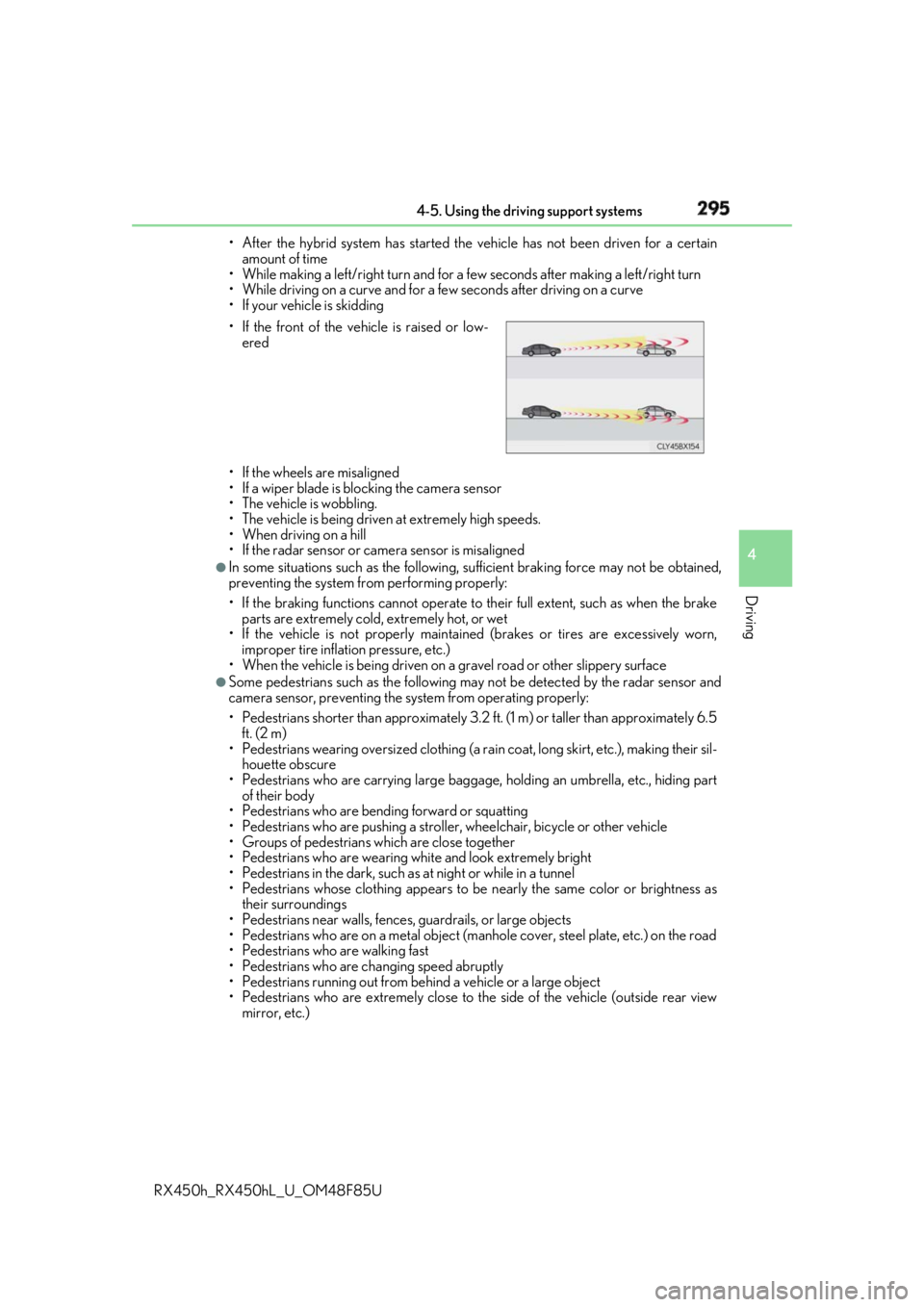
mirror, etc.)• If the front of the vehicle is raised or low-
ered
Page 300 of 792
300 4-5. Using the driving support systems
RX450h_RX450hL _U_OM48F85UWARNING ■
Before using LKA system
Do not rely solely upon the LKA system. LKA is not a system which automatically
drives the vehicle or reduces the amount of attention that must be paid to the area in
front of the vehicle. The driver must always assume full responsibility for driving safely
by always paying careful attention to the surrounding conditions and operate the steer-
ing wheel to correct the path of the vehicle. Also, make sure to take adequate breaks
when fatigued, such as from driv ing for a long period of time.
Failure to perform appropriate driving operat ions and pay careful attention may lead to
an accident, resulting in death or serious injury. ■
To avoid operating LKA by mistake
When not using the LKA system, use the LKA switch to turn the system off. ■
Situations unsuitable for LKA
Do not use the LKA system in the following situations.
The system may not operate properly and lead to an accident, resulting in death or
serious injury. ●
A spare tire, tire chains, etc., are equipped. ●
When the tires have been excessively worn, or when the tire inflation pressure is low. ●
Tires which differ by structure, manufacturer, brand or tread pattern are used. ●
Objects or patterns that could be mistaken for white (yellow) lines are present on the
side of the road (guardrails, cu rbs, reflective poles, etc.).●
Vehicle is driven on a snow-covered road. ●
White (yellow) lines are difficult to see due to rain, snow, fog, dust, etc.●
Asphalt repair marks, white (y ellow) line marks, etc., are present due to road repair.●
Vehicle is driven in a temporary lane or restricted lane due to construction work.●
Vehicle is driven on a road surface which is slippery due to rainy weather, fallen snow,
freezing, etc. ●
Vehicle is driven in traffic lanes ot her than on highways and freeways.●
Vehicle is driven in a construction zone. ●
When your vehicle is towing a trailer or during emergency towing ■
Preventing LKA system malfunctions and operations perf ormed by mistake●
Do not modify the headlights or place stickers, etc., on the surface of the lights.●
Do not modify the suspension etc. If the suspension etc. needs to be replaced, con-
tact your Lexus dealer. ●
Do not install or place anything on the hood or grille. Also, do not install a grille guard
(bull bars, kangaroo bar, etc.). ●
If your windshield needs repair s, contact your Lexus dealer.
Page 305 of 792

3054-5. Using the driving support systems
4
Driving
RX450h_RX450hL _U_OM48F85U■
Conditions in which functions may not operate properly
In the following situations, the camera sensor may not detect white (yellow) lines and var-
ious functions may not operate normally. ●
There are shadows on the road that run parallel with, or cover, the white (yellow) lines. ●
The vehicle is driven in an ar ea without white (yellow) lines, such as in front of a tollgate
or checkpoint, or at an intersection, etc.●
The white (yellow) lines are cracked, “Botts ’ dots”, “Raised pavement marker” or stones
are present. ●
The white (yellow) lines cannot be seen or are difficult to see due to sand, etc. ●
The vehicle is driven on a road surface that is wet due to rain, puddles, etc. ●
The traffic lines are yellow (which may be more difficult to recognize than lines that are
white). ●
The white (yellow) lines cross over a curb, etc. ●
The vehicle is driven on a bright surface, such as concrete. ●
The vehicle is driven on a surface that is bright due to reflected light, etc. ●
The vehicle is driven in an area where the brightness changes suddenly, such as at the
entrances and exits of tunnels, etc.●
Light from the headlights of an oncoming vehicle, the sun, etc., enters the camera.●
The vehicle is driven where the road diverges, merges, etc. ●
The vehicle is driven on a slope. ●
The vehicle is driven on a road which t ilts left or right, or a winding road.●
The vehicle is driven on an unpaved or rough road. ●
The vehicle is driven around a sharp curve. ●
The traffic lane is excessively narrow or wide. ●
The vehicle is extremely tilted due to carry ing heavy luggage or having improper tire
pressure. ●
The distance to the preceding vehicle is extremely short. ●
The vehicle is moving up and down a large am ount due to road conditions during driv-
ing (poor roads or road seams). ●
The headlight lenses are dirty and emit a faint amount of light at night, or the beam axis
has deviated. ●
The vehicle is struck by a crosswind. ●
The vehicle has just changed lane s or crossed an intersection.●
Snow tires, etc., are equipped. ■
If the LKA indicator is illuminated in ambe r and a warning message is displayed on the
multi-information display
→ P. 660 ■
Customization
Some functions can be customized. ( → P. 108)
Page 355 of 792

3554-5. Using the driving support systems
4
Driving
RX450h_RX450hL _U_OM48F85UNOTICE ■
To prevent the system from malfunctioning ●
If the area around a sensor is subjected to an impact, the system may not operate
properly due to the sensor being misaligned. Have the vehicle inspected by your
Lexus dealer. ●
When using a high pressure washer to wa sh the vehicle, do not spray the sensors
directly, as doing so may cause a sensor to malfunction. ●
When using steam to clean the vehicle, do not direct steam too close to the sensors
as doing so may cause a sensor to malfunction. ■
To prevent a radar sensor from malfunctioning ●
If the area around a radar sensor is subjected to an impact, the system may not oper-
ate properly due to a sensor malfunction. Have the vehicle inspected by your Lexus
dealer. ●
Observe the radar sensor handling precautions. ( → P. 322)■
To prevent unnecessary operation of the Intelligent Clearance Sonar system
In the following situations, disable the Inte lligent Clearance Sonar system as the system
may operate even though there is no possibility of a collision.●
When inspecting the vehicle using a chassi s roller, chassis dynamo or free roller●
When loading the vehicle onto a boat, truck or other transport vessel ●
If the suspension has been modified or tires of a size other than specified are installed●
If the front of the vehicle is raised or lowered due to the carried load ●
If towing eyelets are installed