keys LEXUS RX450h 2018 Owners Manual
[x] Cancel search | Manufacturer: LEXUS, Model Year: 2018, Model line: RX450h, Model: LEXUS RX450h 2018Pages: 792, PDF Size: 12.5 MB
Page 2 of 792
TABLE OF CONTENTS
2
RX450h_RX450hL _U_OM48F85UFor your information................................... 8
Reading this manual................................... 14
How to search ..............................................15
Pictorial index............................................... 16
1-1. For safe use
Before driving ................................ 28
For safe driving .............................. 30
Seat belts .......................................... 32
SRS airbags ..................................... 36
Front passenger occupant
classification system ..................47
Exhaust gas precautions............ 53
1-2. Child safety
Riding with children ..................... 54
Child restraint systems ............... 55
1-3. Hybrid system
Hybrid system features ...............74
Hybrid system precautions....... 78
1-4. Theft deterrent system
Immobilizer system ...................... 83
Alarm ................................................. 86
2. Instrument cluster
Warning lights and
indicators....................................... 90
Gauges and meters ..................... 96
Multi-information display .......... 101
Head-up display ............................ 118
Energy monitor/
consumption screen ................124 3-1. Key information
Keys ...................................................132
3-2. Opening, closing and
locking the doors
Side doors.......................................136
Power back door ......................... 142
Smart access system with
push-button start...................... 158
3-3. Adjusting the seats
Front seats ...................................... 167
Rear seats ...................................... 168
Driving position memory........... 181
Head restraints ............................ 186
3-4. Adjusting the steering
wheel and mirrors
Steering wheel ............................. 189
Inside rear view mirror ............... 191
Outside rear view mirrors .......193
3-5. Opening, closing the
windows and moon roof
Power windows ............................196
Moon roof..................................... 200
Panoramic moon roof.............. 2041
For safety and security
2
Instrument cluster 3
Operation of each
component
Page 83 of 792
83 1
For safety and security
RX450h_RX450hL _U_OM48F85U 1-4. Theft deterrent system
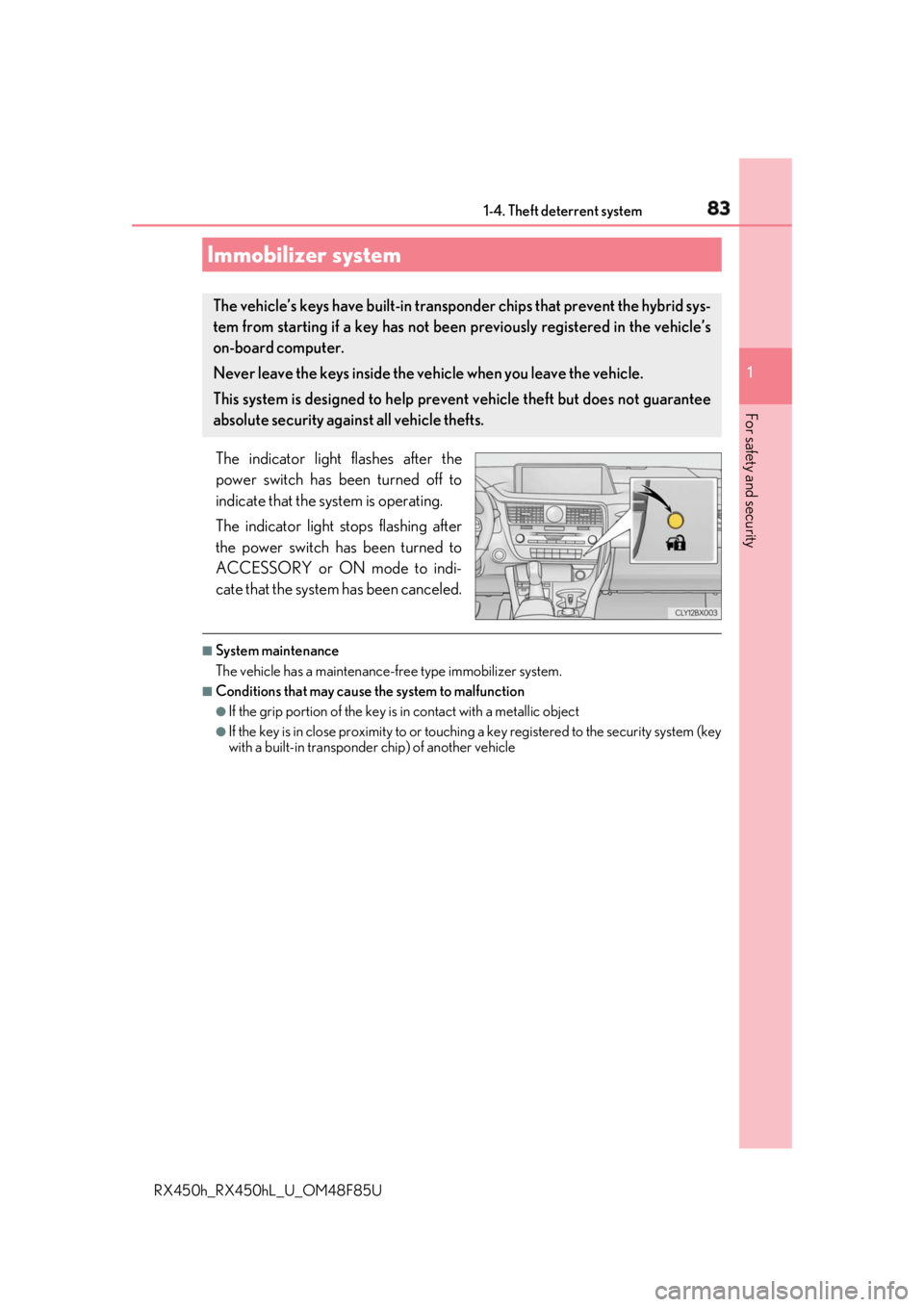
The indicator light flashes after the
power switch has been turned off to
indicate that the system is operating.
The indicator light stops flashing after
the power switch has been turned to
ACCESSORY or ON mode to indi-
cate that the system has been canceled. ■
System maintenance
The vehicle has a maintenance-fr ee type immobilizer system.■
Conditions that may cause the system to malfunction ●
If the grip portion of the key is in contact with a metallic object●
If the key is in close proximity to or touching a key registered to the security system (key
with a built-in transponder chip) of another vehicleImmobilizer system The vehicle’s keys have built-in transp onder chips that prevent the hybrid sys-
tem from starting if a key has not been previously registered in the vehicle’s
on-board computer.
Never leave the keys inside the vehicle when you leave the vehicle.
This system is designed to help preven t vehicle theft but does not guarantee
absolute security agai nst all vehicle thefts.
Page 131 of 792
131
3 Operation of
each component
RX450h_RX450hL _U_OM48F85U 3-1. Key information
Keys .................................................. 132
3-2. Opening, closing and
locking the doors
Side doors ...................................... 136
Power back door .........................142
Smart access system with
push-button start ...................... 158
3-3. Adjusting the seats
Front seats.......................................167
Rear seats....................................... 168
Driving position memory ...........181
Head restraints ............................ 186
3-4. Adjusting the steering
wheel and mirrors
Steering wheel ............................. 189
Inside rear view mirror ............... 191
Outside rear view mirrors....... 193
3-5. Opening, closing the
windows and moon roof
Power windows ........................... 196
Moon roof .....................................200
Panoramic moon roof .............. 204
Page 132 of 792
132
RX450h_RX450hL _U_OM48F85U3-1. Key information
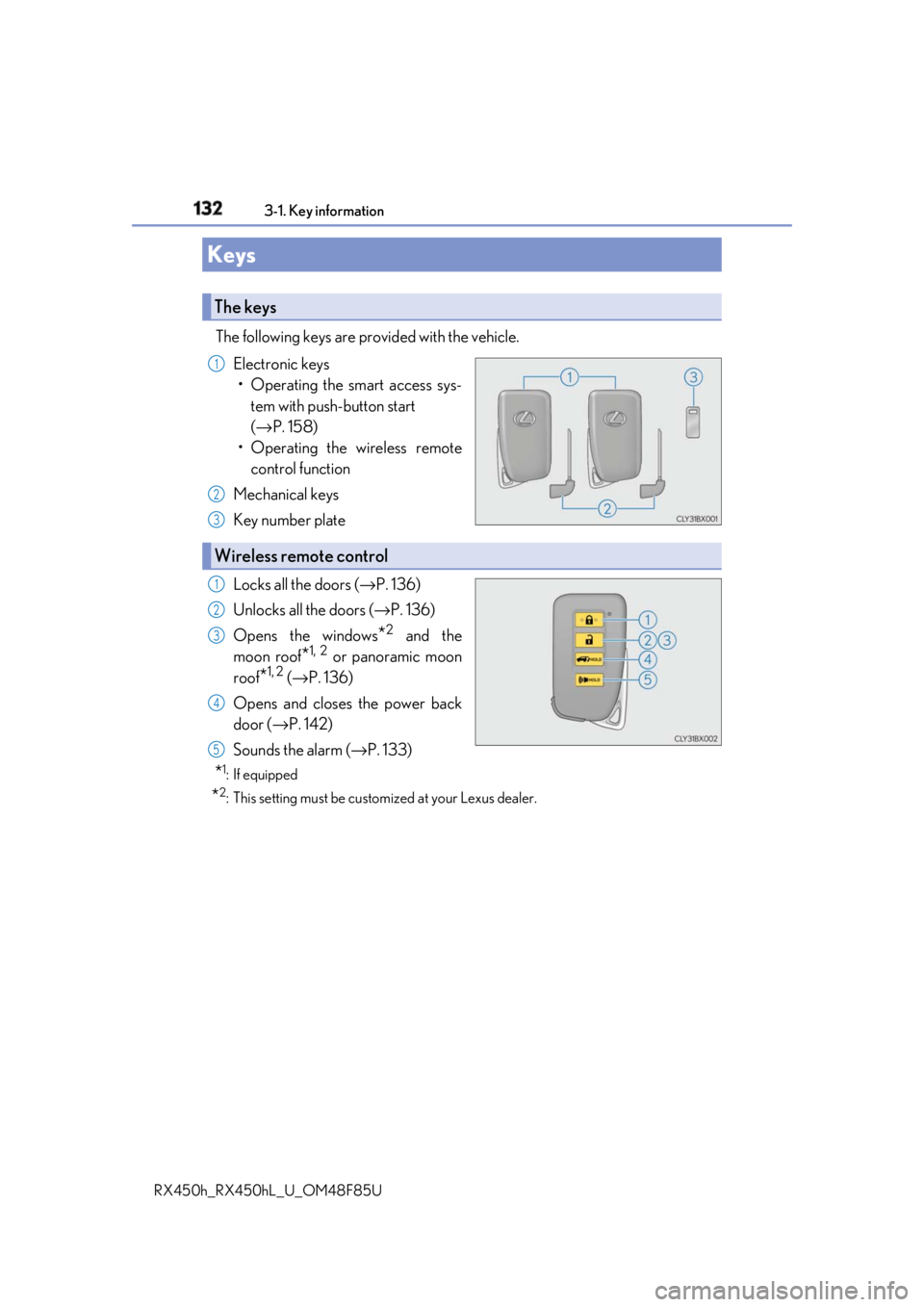
The following keys are provided with the vehicle.
Electronic keys
• Operating the smart access sys-
tem with push-button start
( → P. 158)
• Operating the wireless remote
control function
Mechanical keys
Key number plate
Locks all the doors ( → P. 136)
Unlocks all the doors ( → P. 136)
Opens the windows
* 2
and the
moon roof
* 1, 2
or panoramic moon
roof
* 1, 2
( → P. 136)
Opens and closes the power back
door ( → P. 142)
Sounds the alarm ( → P. 133)
* 1
: If equipped
* 2
: This setting must be custom ized at your Lexus dealer.Keys The keys 1
2
3
Wireless remote control 1
2
3
4
5
Page 133 of 792
1333-1. Key information
3
Operation of each component
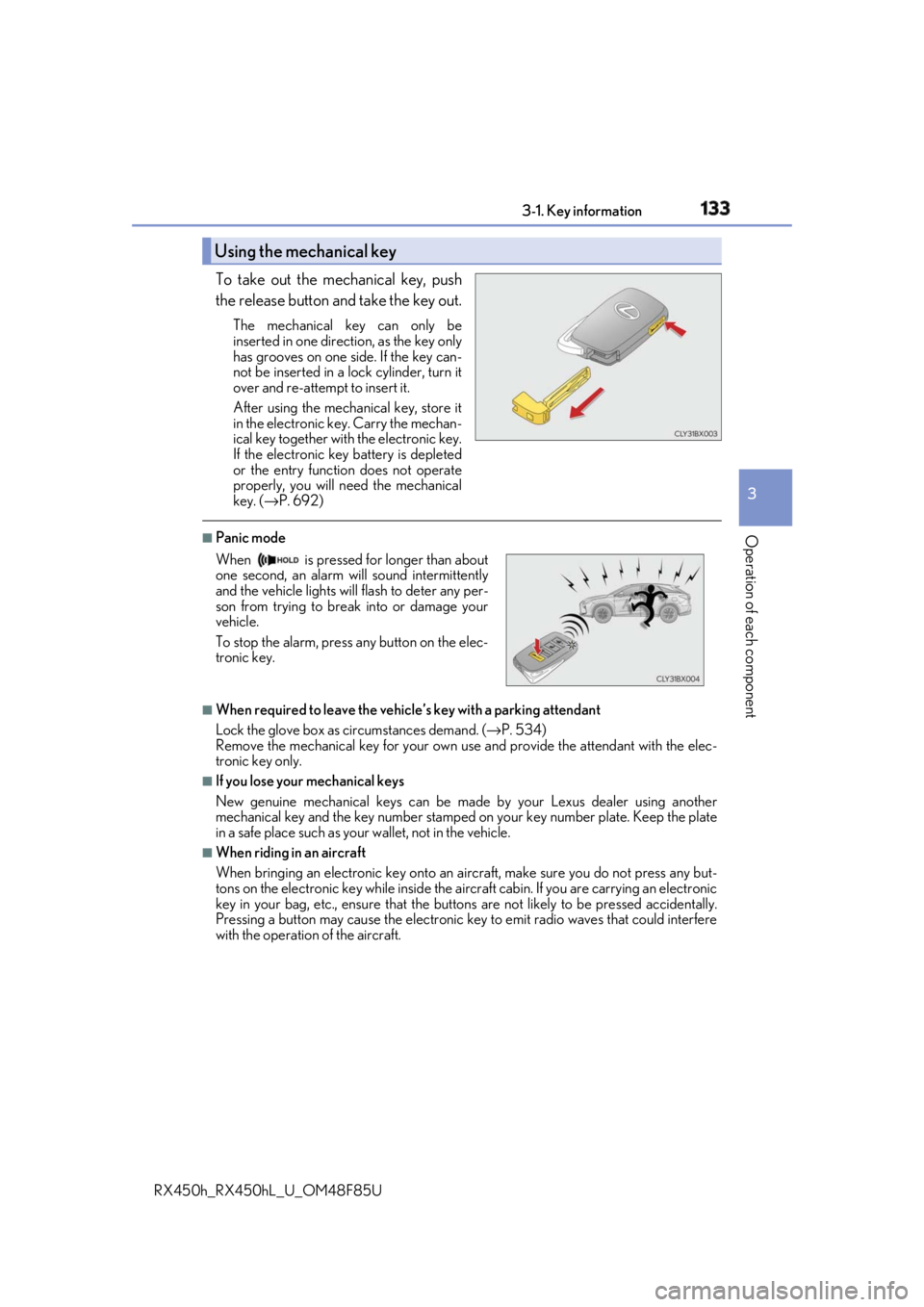
RX450h_RX450hL _U_OM48F85UTo take out the mechanical key, push
the release button and take the key out. The mechanical key can only be
inserted in one direction, as the key only
has grooves on one side. If the key can-
not be inserted in a lock cylinder, turn it
over and re-attempt to insert it.
After using the mechanical key, store it
in the electronic ke y. Carry the mechan-
ical key together with the electronic key.
If the electronic key battery is depleted
or the entry function does not operate
properly, you will need the mechanical
key. ( → P. 692)■
Panic mode
■
When required to leave the vehicle’s key with a parking attendant
Lock the glove box as circumstances demand. ( → P. 534)
Remove the mechanical key for your own use and provide the attendant with the elec-
tronic key only. ■
If you lose your mechanical keys
New genuine mechanical keys can be made by your Lexus dealer using another
mechanical key and the key number stamped on your key number plate. Keep the plate
in a safe place such as your wallet, not in the vehicle.■
When riding in an aircraft
When bringing an electronic key onto an aircraft, make sure you do not press any but-
tons on the electronic key while inside the airc raft cabin. If you are carrying an electronic
key in your bag, etc., ensure that the butt ons are not likely to be pressed accidentally.
Pressing a button may cause the electronic key to emit radio waves that could interfere
with the operation of the aircraft.Using the mechanical key
When is pressed for longer than about
one second, an alarm will sound intermittently
and the vehicle lights will flash to deter any per-
son from trying to break into or damage your
vehicle.
To stop the alarm, press any button on the elec-
tronic key.
Page 134 of 792

134 3-1. Key information
RX450h_RX450hL _U_OM48F85U■
Electronic key battery depletion ●
The standard battery life is 1 to 2 years.●
If the battery becomes low, an alarm will so und in the cabin when the hybrid system is
stopped. ( → P. 630)●
As the electronic key always receives ra dio waves, the battery will become depleted
even if the electronic key is not used. The following symptoms indi cate that the elec-
tronic key battery may be depleted. Replace the battery when necessary. ( → P. 630)
• The smart access system with push-button start or the wireless remote control does
not operate.
• The detection area becomes smaller.
• The LED indicator on the key surface does not turn on. ●
To reduce key battery depletion when the electr onic key is to not be used for long peri-
ods of time, set the electronic key to the battery-saving mode. ( → P. 160)●
To avoid serious deterioration, do not leave the electronic key within 3 ft. (1 m) of the
following electrical appliances that produce a magnetic field:
•TVs
• Personal computers
• Cellular phones, cordless phones and battery chargers
• Recharging cellular phones or cordless phones
• Induction cookers
•Table lamps ■
Replacing the battery
→ P. 630 ■
Confirmation of the registered key number
The number of keys already registered to the vehicle can be confirmed. Ask your Lexus
dealer for details. ■
If a wrong key is used
The key cylinder rotates freely, isol ated from the internal mechanism.
Page 135 of 792
1353-1. Key information
3
Operation of each component
RX450h_RX450hL _U_OM48F85UNOTICE ■
To prevent key damage ●
Do not drop the keys, subject them to strong shocks or bend them.●
Do not expose the keys to high temp eratures for long periods of time.●
Do not get the keys wet or wash th em in an ultrasonic washer, etc.●
Do not attach metallic or magnetic materials to the keys or place the keys close to
such materials. ●
Do not disassemble the keys. ●
Do not attach a sticker or anything else to the surface of the electronic key. ●
Do not place the keys near objects that pr oduce magnetic fields, such as TVs, audio
systems and induction cookers, or medical electrical equipment, such as low-fre-
quency therapy equipment. ■
Carrying the electronic key on your person
Carry the electronic key 3.9 in. (10 cm) or mo re away from electric appliances that are
turned on. Radio waves emitted from electric appliances within 3.9 in. (10 cm) of the
electronic key may interfere with the key, causing the key to not function properly.■
In case of a smart access system with pu sh-button start malfunction or other key-
related problems
Take your vehicle with all the electronic keys provided with your vehicle to your Lexus
dealer. ■
When an electronic key is lost
If the electronic key re mains lost, the risk of vehicle th eft increases significantly. Visit
your Lexus dealer immediately with all rema ining electronic keys that were provided
with your vehicle.
Page 150 of 792
150 3-2. Opening, closing and locking the doors
RX450h_RX450hL _U_OM48F85U■
Close & lock function
When the power back door is open, this fu nction closes the power back door and then
locks all of the doors simultaneously.
Performing the following procedure will lock all of the doors when the power back door
is completely closed.
Close all of the doors except the power back door.
While carrying an electronic key, press the
switch on the lower part of the
power back door ( → P. 145) twice.
A different buzzer than the normal one will sound and then the power back door will
begin closing automatically. When the power back door is closed, all of the doors will
lock simultaneously and operation signals w ill indicate that all of the doors have been
locked.
To enable this function, the fo llowing conditions must be met:●
The most recent power back door operation was an automatic opening operation and
the power back door is stopped. ●
No electronic keys for your vehicle are in the vehicle. ■
When reconnecting the 12-volt battery
To enable the power back door to operate pr operly, close the power back door manually.■
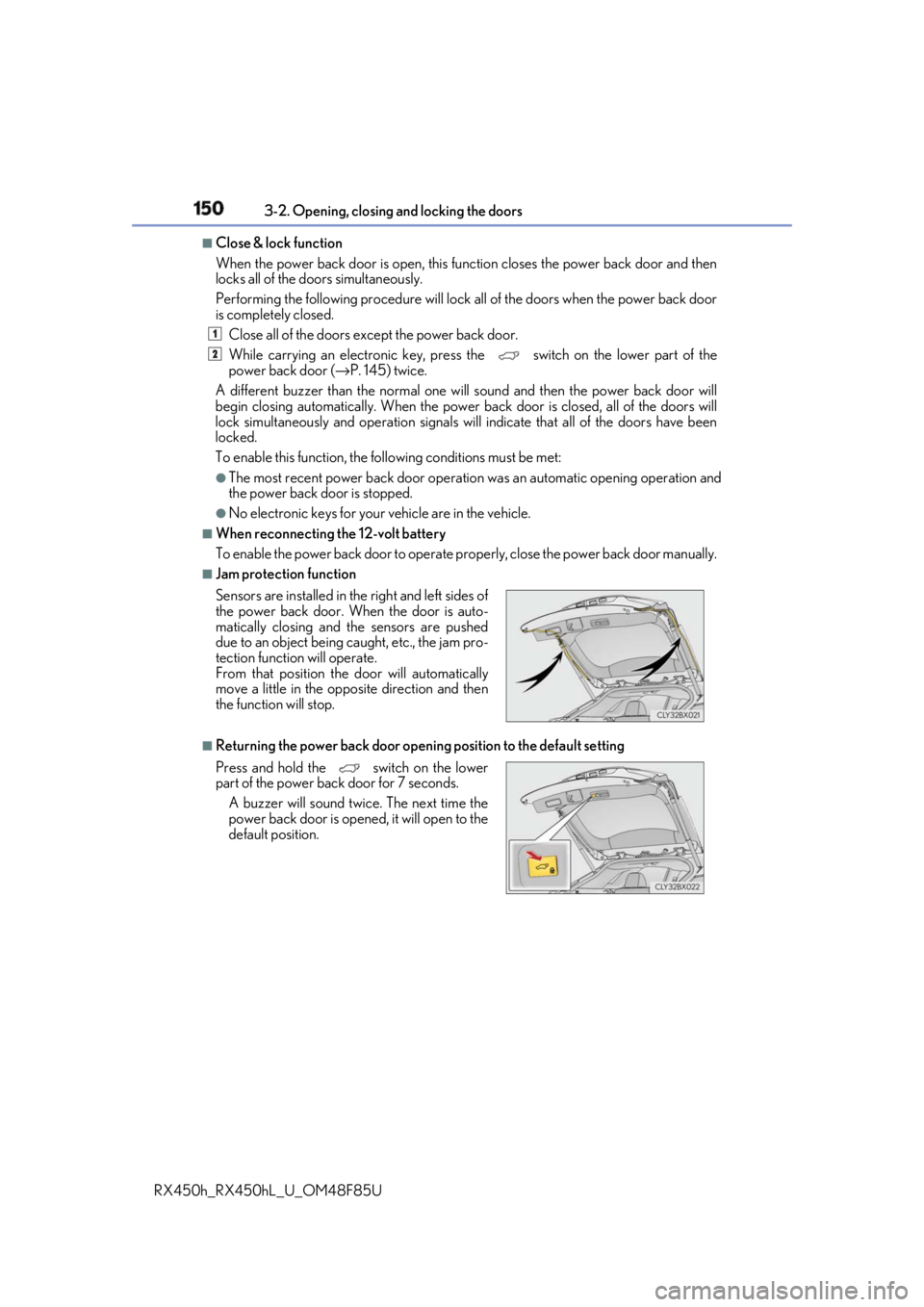
Jam protection function
■
Returning the power back door open ing position to the default settingSensors are installed in the right and left sides of
the power back door. When the door is auto-
matically closing and the sensors are pushed
due to an object being caught, etc., the jam pro-
tection function will operate.
From that position the door will automatically
move a little in the opposite direction and then
the function will stop.
Press and hold the switch on the lower
part of the power back door for 7 seconds.
A buzzer will sound twice. The next time the
power back door is opened, it will open to the
default position. 1
2
Page 160 of 792
160 3-2. Opening, closing and locking the doors
RX450h_RX450hL _U_OM48F85U■
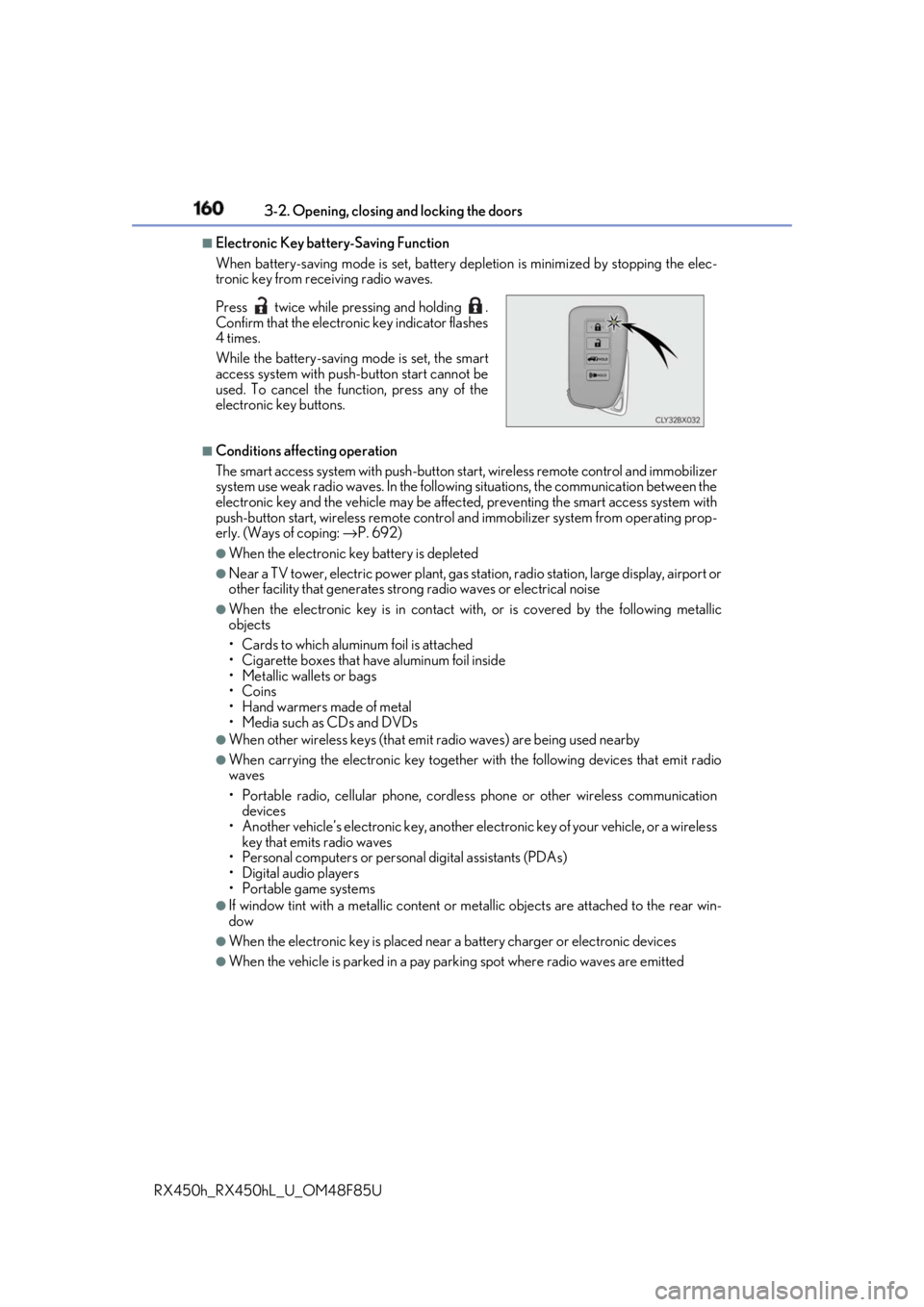
Electronic Key battery-Saving Function
When battery-saving mode is set, battery depletion is minimized by stopping the elec-
tronic key from re ceiving radio waves.
■
Conditions affe cting operation
The smart access system with push-button st art, wireless remote control and immobilizer
system use weak radio waves. In the following situations, the communication between the
electronic key and the vehicle may be affect ed, preventing the smart access system with
push-button start, wireless remote control an d immobilizer system from operating prop-
erly. (Ways of coping: → P. 692)●
When the electronic key battery is depleted ●
Near a TV tower, electric power plant, gas st ation, radio station, la rge display, airport or
other facility that generates strong radio wave s or electrical noise●
When the electronic key is in contact wi th, or is covered by the following metallic
objects
• Cards to which aluminum foil is attached
• Cigarette boxes that have aluminum foil inside
• Metallic wallets or bags
•Coins
• Hand warmers made of metal
• Media such as CDs and DVDs ●
When other wireless keys (that emit radio waves) are being used nearby ●
When carrying the electronic key together with the following devices that emit radio
waves
• Portable radio, cellular phone, cordle ss phone or other wireless communication
devices
• Another vehicle’s electronic key, another electronic key of your vehicle, or a wireless
key that emits radio waves
• Personal computers or person al digital assistants (PDAs)
• Digital audio players
• Portable game systems ●
If window tint with a metallic content or me tallic objects are atta ched to the rear win-
dow ●
When the electronic key is placed near a battery charger or electronic devices ●
When the vehicle is parked in a pay parking spot where radio waves are emittedPress twice while pressing and holding .
Confirm that the electronic key indicator flashes
4 times.
While the battery-saving mode is set, the smart
access system with push -button start cannot be
used. To cancel the function, press any of the
electronic key buttons.
Page 184 of 792
184 3-3. Adjusting the seats
RX450h_RX450hL _U_OM48F85UEach electronic key can be registered to recall your preferred driving position.■
Registering procedure
Record your driving position to button “1”, “2” or “3” before performing the
following:
Carry only the key you want to regist er, and then close the driver’s door.
If 2 or more keys are in the vehicle, the driving position cannot be recorded
properly.
Check that the shift lever is in P.
Turn the power switch to ON mode.
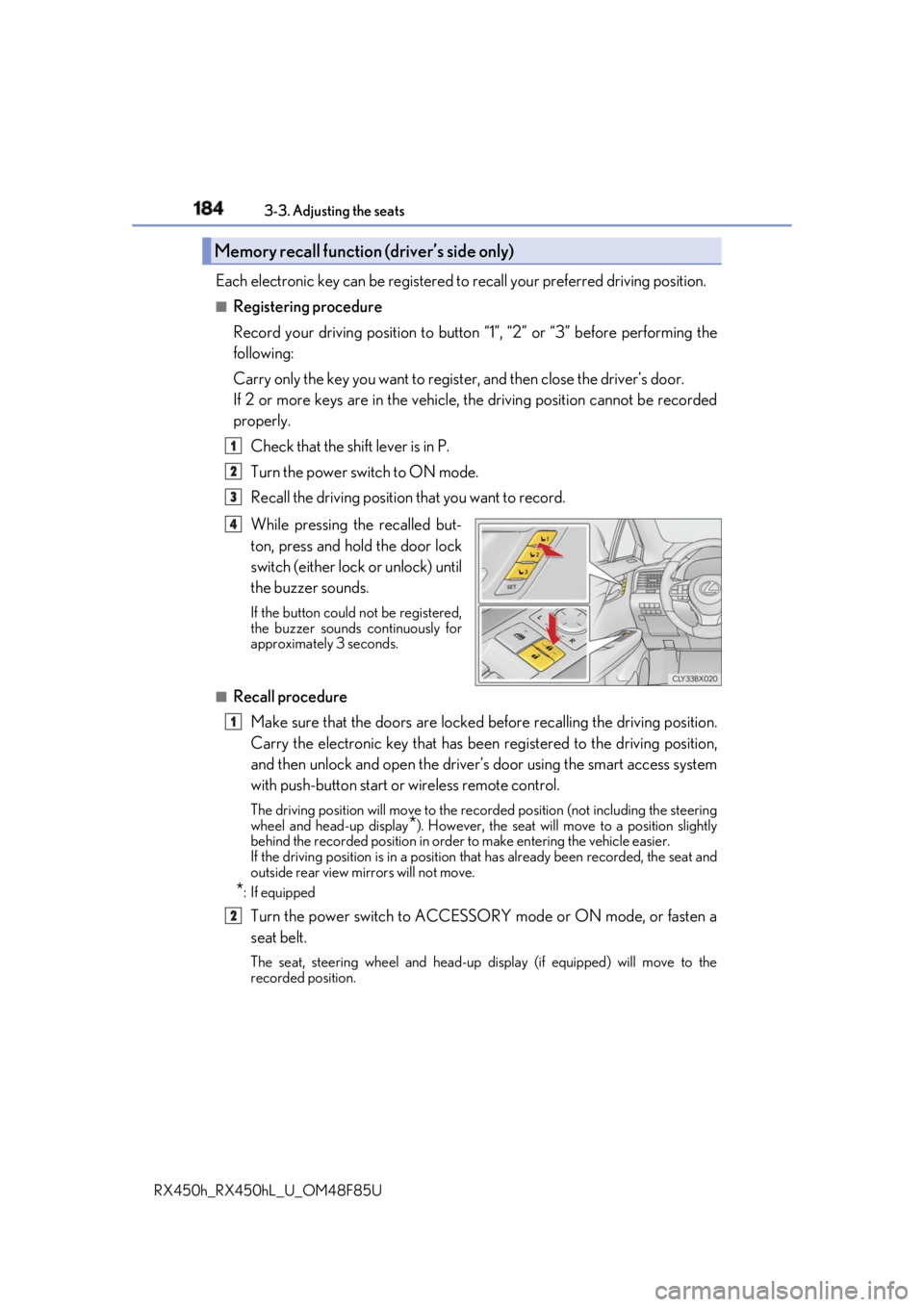
Recall the driving position that you want to record.
While pressing the recalled but-
ton, press and hold the door lock
switch (either lock or unlock) until
the buzzer sounds. If the button could not be registered,
the buzzer sounds continuously for
approximately 3 seconds.
■
Recall procedure
Make sure that the doors are locked before recalling the driving position.
Carry the electronic key that has been registered to the driving position,
and then unlock and open the driver’s door using the smart access system
with push-button start or wireless remote control. The driving position will move to the recorded position (not including the steering
wheel and head-up display
* ). However, the seat will move to a position slightly
behind the recorded position in order to make entering the vehicle easier.
If the driving position is in a position th at has already been recorded, the seat and
outside rear view mirrors will not move.
* : If equipped
Turn the power switch to ACCESSORY mode or ON mode, or fasten a
seat belt. The seat, steering wheel and head-up display (if equipped) will move to the
recorded position.Memory recall function (driver’s side only) 1
2
3
4
1
2