automatic LEXUS RX450H 2019 Owners Manual
[x] Cancel search | Manufacturer: LEXUS, Model Year: 2019, Model line: RX450H, Model: LEXUS RX450H 2019Pages: 792, PDF Size: 13.48 MB
Page 454 of 792
4545-7. Connecting Bluetooth®
RX450h_RX450hL_U
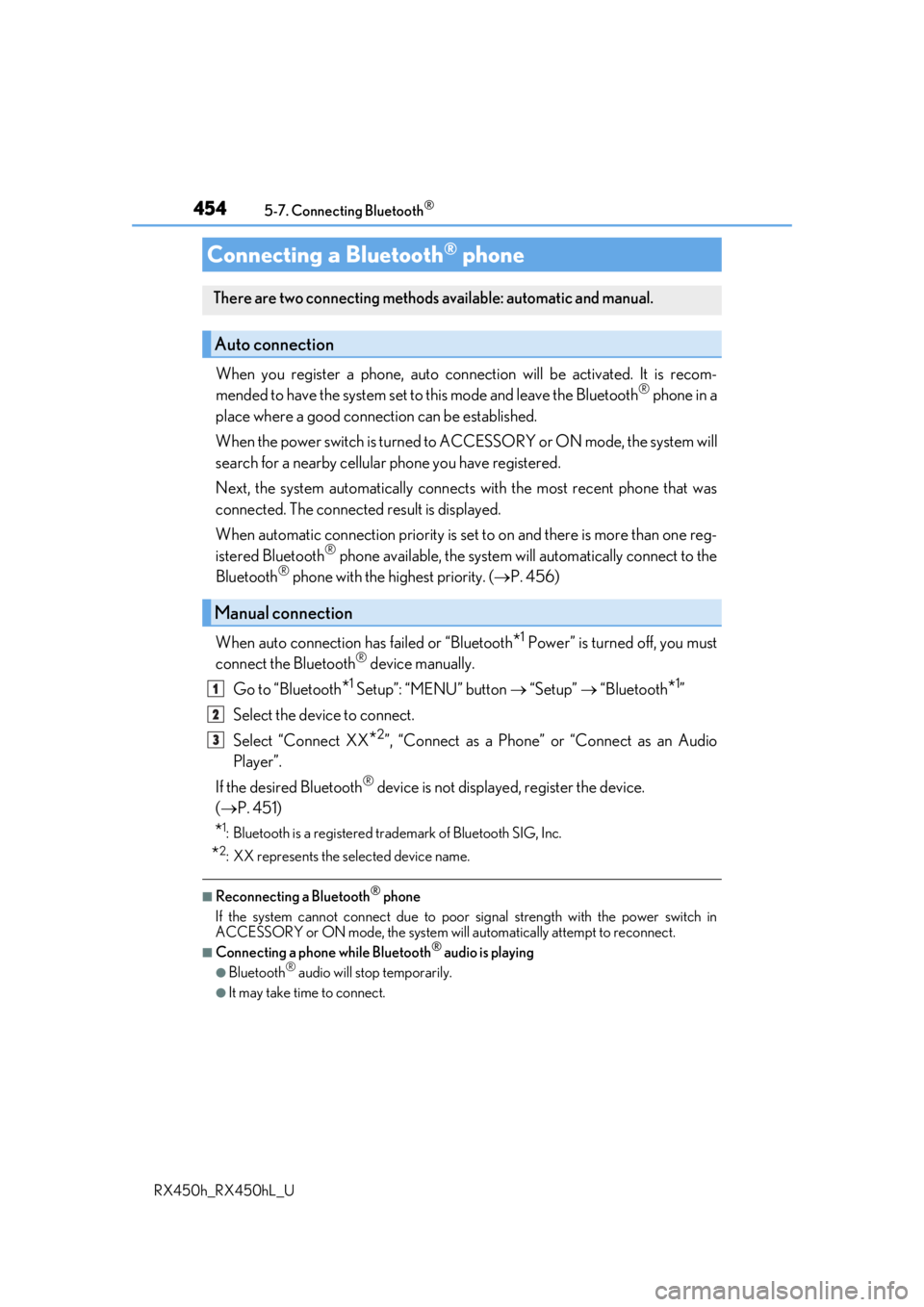
When you register a phone, auto connection will be activated. It is recom-
mended to have the system set to this mode and leave the Bluetooth® phone in a
place where a good connection can be established.
When the power switch is turned to ACCESSORY or ON mode, the system will
search for a nearby cellular phone you have registered.
Next, the system automatically connects with the most recent phone that was
connected. The connected result is displayed.
When automatic connection priority is set to on and there is more than one reg-
istered Bluetooth
® phone available, the system will automatically connect to the
Bluetooth® phone with the highest priority. ( P. 456)
When auto connection has failed or “Bluetooth
*1 Power” is turned off, you must
connect the Bluetooth® device manually.
Go to “Bluetooth
*1 Setup”: “MENU” button “Setup” “Bluetooth*1”
Select the device to connect.
Select “Connect XX
*2”, “Connect as a Phone” or “Connect as an Audio
Player”.
If the desired Bluetooth
® device is not displayed, register the device.
( P. 451)
*1: Bluetooth is a registered trademark of Bluetooth SIG, Inc.
*2: XX represents the selected device name.
■Reconnecting a Bluetooth® phone
If the system cannot connect due to poor signal strength with the power switch in
ACCESSORY or ON mode, the system will automatically attempt to reconnect.
■Connecting a phone while Bluetooth® audio is playing
●Bluetooth® audio will stop temporarily.
●It may take time to connect.
Connecting a Bluetooth® phone
There are two connecting methods available: automatic and manual.
Auto connection
Manual connection
1
2
3
Page 456 of 792
4565-7. Connecting Bluetooth®
RX450h_RX450hL_U
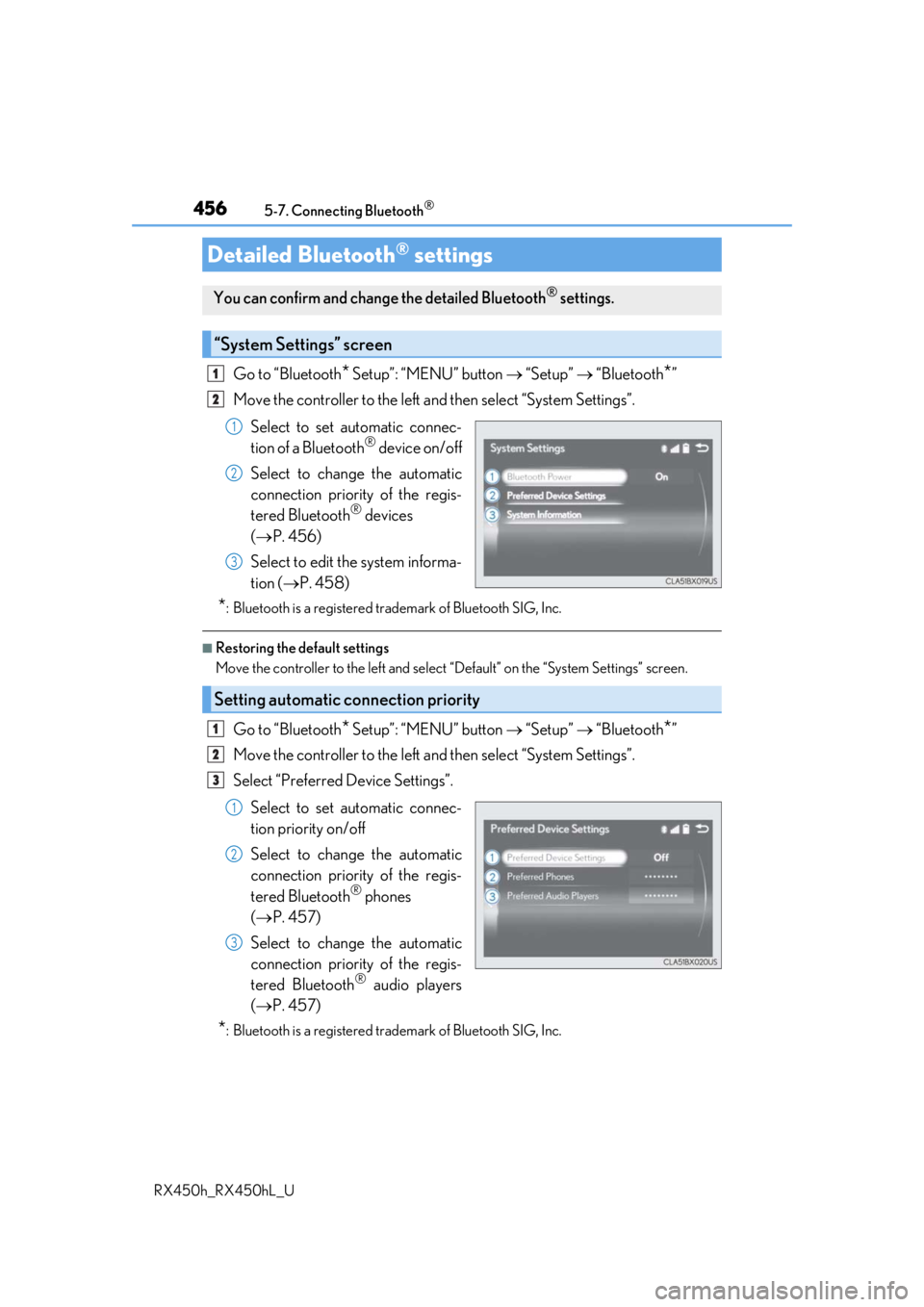
Go to “Bluetooth* Setup”: “MENU” button “Setup” “Bluetooth*”
Move the controller to the left an d then select “System Settings”.
Select to set automatic connec-
tion of a Bluetooth
® device on/off
Select to change the automatic
connection priority of the regis-
tered Bluetooth
® devices
( P. 456)
Select to edit the system informa-
tion ( P. 458)
*: Bluetooth is a registered trademark of Bluetooth SIG, Inc.
■Restoring the default settings
Move the controller to the left and select “Default” on the “System Settings” screen.
Go to “Bluetooth* Setup”: “MENU” button “Setup” “Bluetooth*”
Move the controller to the left an d then select “System Settings”.
Select “Preferred Device Settings”.
Select to set automatic connec-
tion priority on/off
Select to change the automatic
connection priority of the regis-
tered Bluetooth
® phones
( P. 457)
Select to change the automatic
connection priority of the regis-
tered Bluetooth
® audio players
( P. 457)
*: Bluetooth is a registered trademark of Bluetooth SIG, Inc.
Detailed Bluetooth® settings
You can confirm and change the detailed Bluetooth® settings.
“System Settings” screen
1
2
1
2
3
Setting automatic connection priority
1
2
3
1
2
3
Page 457 of 792
4575-7. Connecting Bluetooth®
5
Lexus Display Audio system
RX450h_RX450hL_U
■Restoring the default settings
Move the controller to the left and select “Default” on the “Preferred Device Settings”
screen.
Go to “Bluetooth* Setup”: “MENU” button “Setup” “Bluetooth*”
Move the controller to the left an d then select “System Settings”.
Select “Preferred Device Settings”.
If “Preferred Device Settings” is set to off, set it to on.
To change the automatic connection pr iority of the registered Bluetooth
®
phones, select “Preferred Phones”. To change the automatic connection pri-
ority of the registered Bluetooth® audio players, select “Preferred Audio
Players”.
Select the desired Bluetooth
® device.
Move the controller to the left and then select “Up” or “Down” to change the
preferred order.
A newly registered Bluetooth
® device will automatically be given the highest
automatic connection priority.
*: Bluetooth is a registered trademark of Bluetooth SIG, Inc.
Changing Bluetooth® device automatic connection priority
1
2
3
4
5
6
7
Page 464 of 792

4645-9. Bluetooth® Phone
RX450h_RX450hL_U
You can transfer the phone numbers in a Bluetooth® phone to the system.
Operation methods differ between PBAP (Phone Book Access Profile) compat-
ible and PBAP incompatible Bluetooth
® phones. If the cellular phone does not
support either PBAP or OPP (Object Pu sh Profile) service, you cannot transfer
contacts.
Press the off-hook switch on the steering wheel.
If the phonebook is empty, a message will be displayed.
For a PBAP compatible Bluetooth® phone and “Automatic Transfer” is off
To enable automatic transfer of new contacts from a cellular phone every time
it is connected, select “Always”. ( P. 474)
Select “Once” if you want to transf er new contacts from a cellular phone.
For a PBAP incompatible and OPP compatible Bluetooth® phone
Select “Transfer” and operate your ce llular phone to transfer new contacts
from a cellular phone.
Select “Add” if you want to add a new contact manually.
When the phonebook is empty
1
2
2
Page 467 of 792
4675-9. Bluetooth® Phone
5
Lexus Display Audio system
RX450h_RX450hL_U
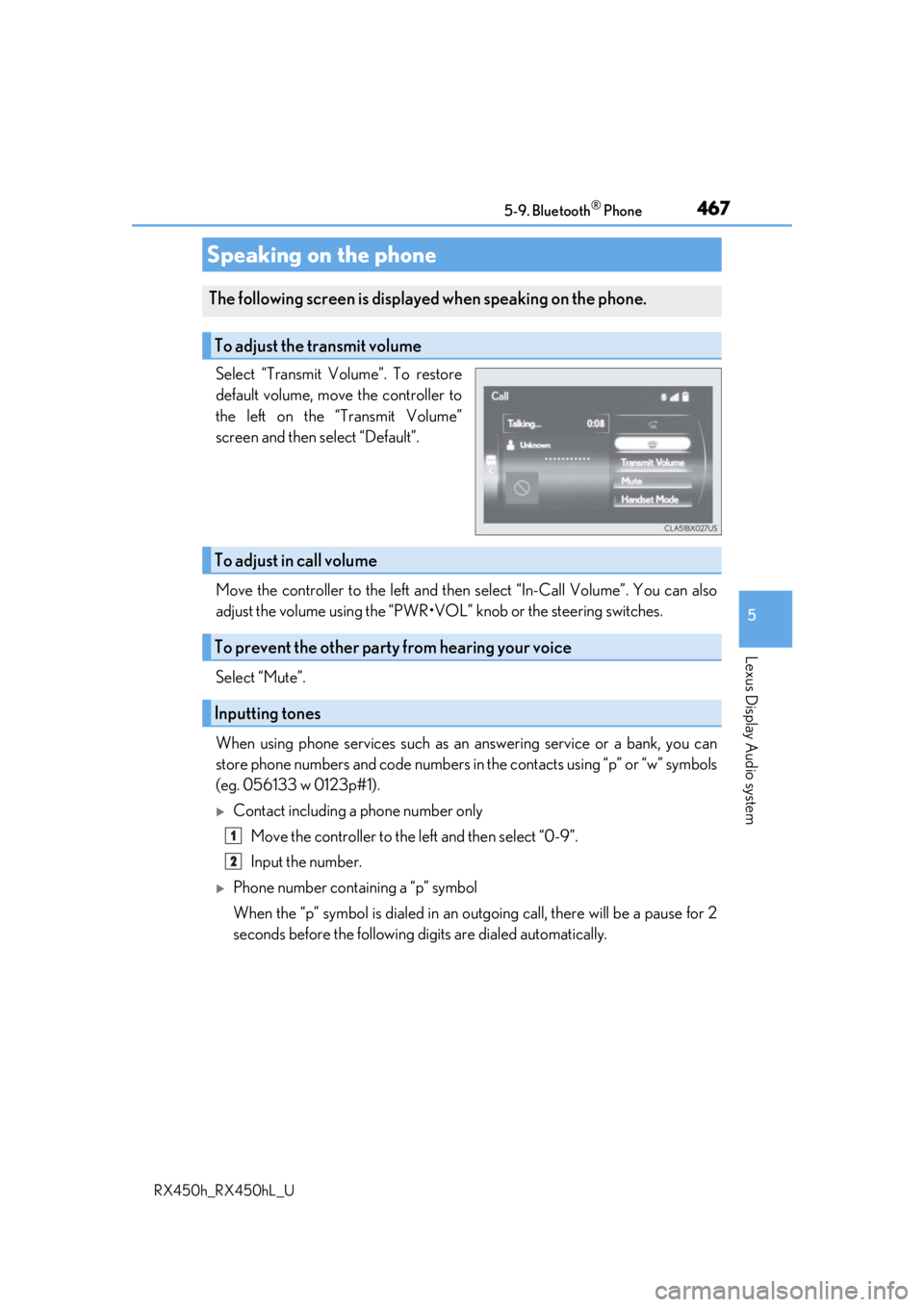
Select “Transmit Volume”. To restore
default volume, move the controller to
the left on the “Transmit Volume”
screen and then select “Default”.
Move the controller to the left and then select “In-Call Volume”. You can also
adjust the volume using the “PWR•VOL ” knob or the steering switches.
Select “Mute”.
When using phone services such as an answering service or a bank, you can
store phone numbers and code numbers in the contacts using “p” or “w” symbols
(eg. 056133 w 0123p#1).
Contact including a phone number only
Move the controller to the left and then select “0-9”.
Input the number.
Phone number containing a “p” symbol
When the “p” symbol is dialed in an ou tgoing call, there will be a pause for 2
seconds before the following di gits are dialed automatically.
Speaking on the phone
The following screen is displayed when speaking on the phone.
To adjust the transmit volume
To adjust in call volume
To prevent the other party from hearing your voice
Inputting tones
1
2
Page 474 of 792
474
RX450h_RX450hL_U5-10. Phonebook
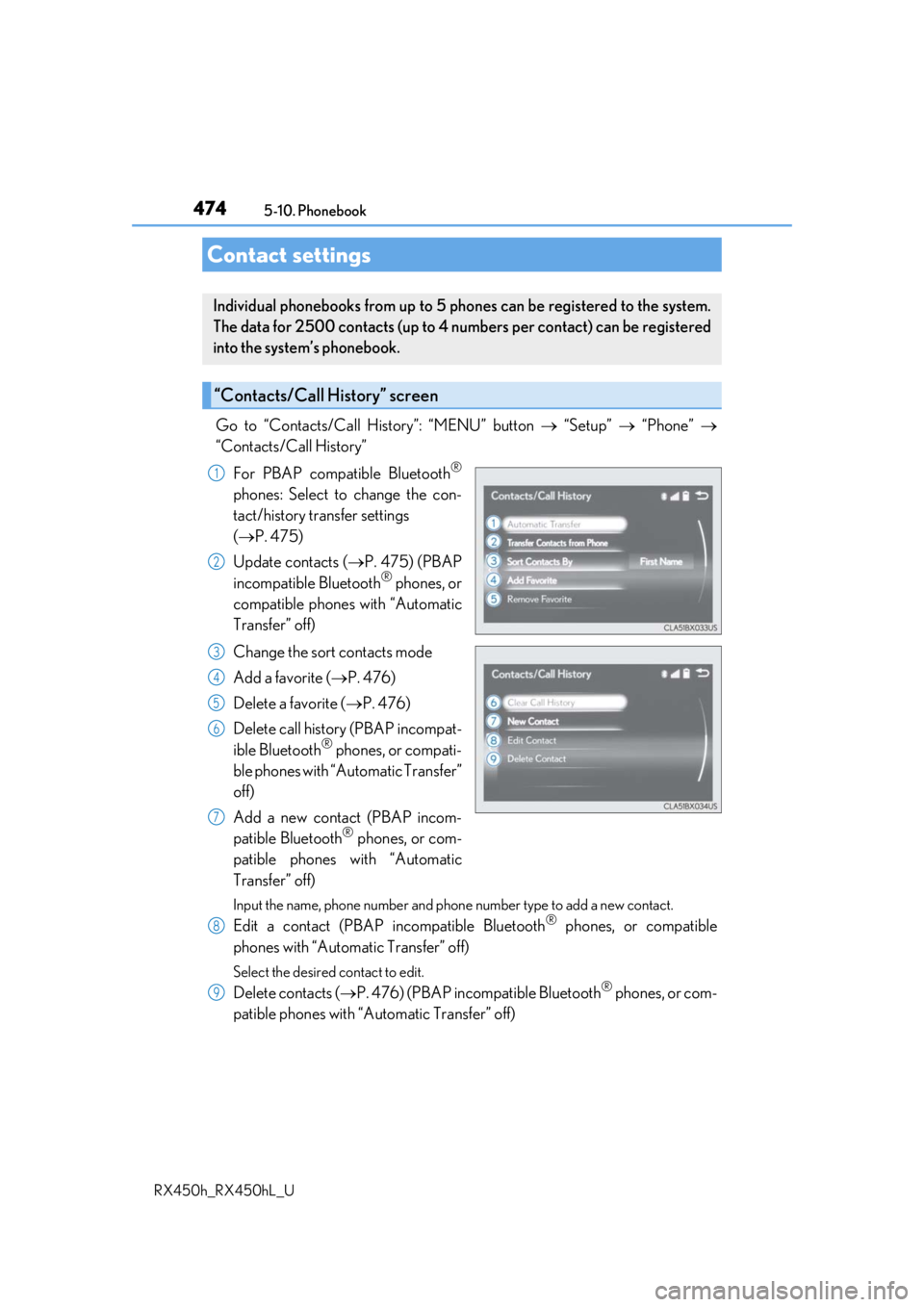
Go to “Contacts/Call History”: “MENU” button
“Setup” “Phone”
“Contacts/Call History”
For PBAP compatible Bluetooth
®
phones: Select to change the con-
tact/history transfer settings
( P. 475)
Update contacts ( P. 475) (PBAP
incompatible Bluetooth
® phones, or
compatible phones with “Automatic
Transfer” off)
Change the sort contacts mode
Add a favorite ( P. 476)
Delete a favorite ( P. 476)
Delete call history (PBAP incompat-
ible Bluetooth
® phones, or compati-
ble phones with “Automatic Transfer”
off)
Add a new contact (PBAP incom-
patible Bluetooth
® phones, or com-
patible phones with “Automatic
Transfer” off)
Input the name, phone number and phone number type to add a new contact.
Edit a contact (PBAP in compatible Bluetooth® phones, or compatible
phones with “Automatic Transfer” off)
Select the desired contact to edit.
Delete contacts ( P. 476) (PBAP incompatible Bluetooth® phones, or com-
patible phones with “Automatic Transfer” off)
Contact settings
Individual phonebooks from up to 5 ph ones can be registered to the system.
The data for 2500 contacts (up to 4 numbers per contact) can be registered
into the system’s phonebook.
“Contacts/Call History” screen
1
2
3
4
5
6
7
8
9
Page 475 of 792
4755-10. Phonebook
5
Lexus Display Audio system
RX450h_RX450hL_U
■Return to the default settings
Move the controller to the left and select “Default”.
You can transfer the phone numbers in your Bluetooth® phone to the system.
Operation methods differ between PBAP compatible and PBAP incompatible
Bluetooth
® phones. If your cellular phone does not support either PBAP or
OPP services, you canno t transfer contacts.
For PBAP compatible Bluetooth® phones
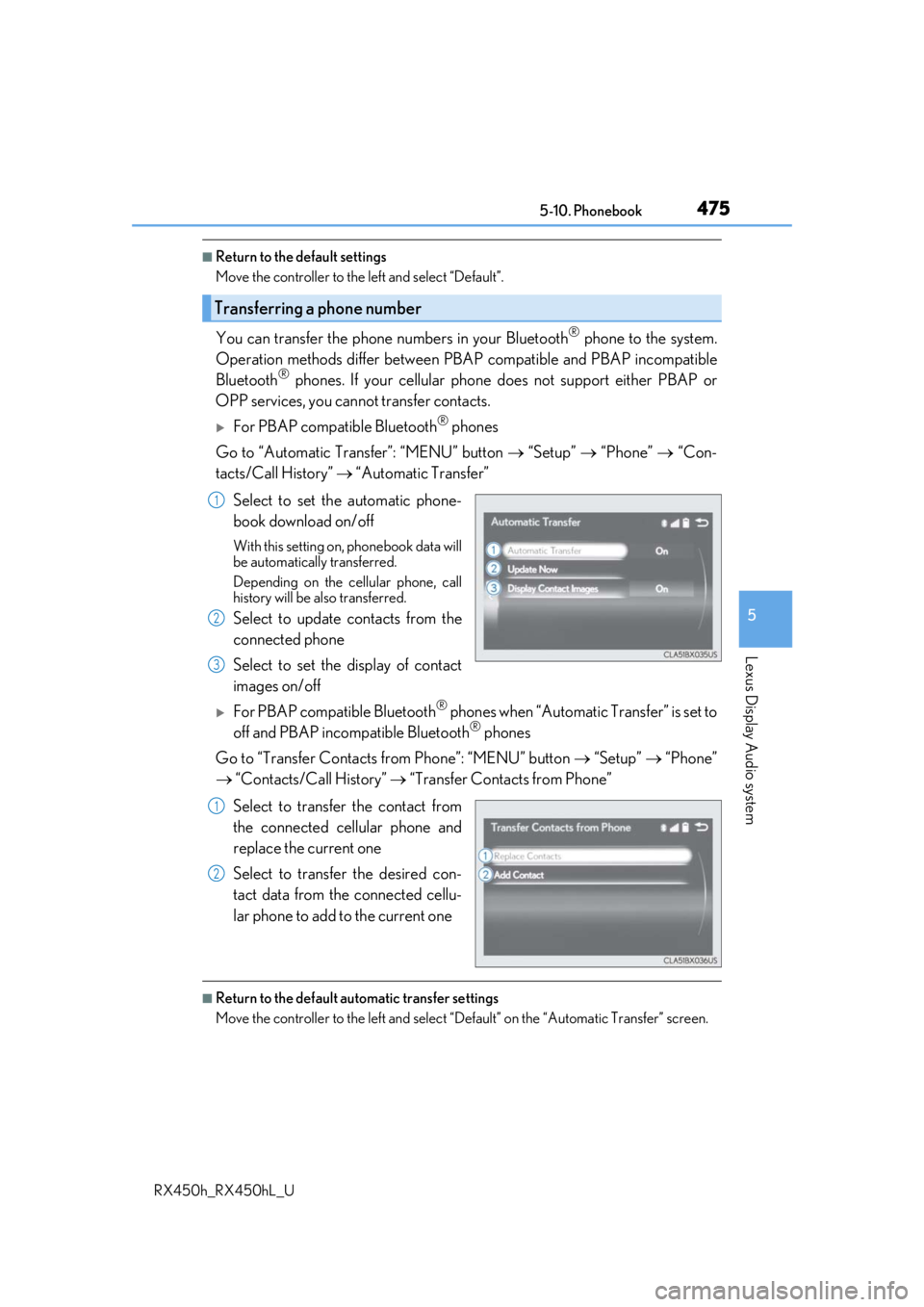
Go to “Automatic Transfer”: “MENU” button “Setup” “Phone” “Con-
tacts/Call History” “Automatic Transfer”
Select to set the automatic phone-
book download on/off
With this setting on, phonebook data will
be automatically transferred.
Depending on the cellular phone, call
history will be also transferred.
Select to update contacts from the
connected phone
Select to set the display of contact
images on/off
For PBAP compatible Bluetooth® phones when “Automatic Transfer” is set to
off and PBAP incompatible Bluetooth® phones
Go to “Transfer Contacts from Phone”: “MENU” button “Setup” “Phone”
“Contacts/Call History” “Transfer Contacts from Phone”
Select to transfer the contact from
the connected cellular phone and
replace the current one
Select to transfer the desired con-
tact data from the connected cellu-
lar phone to add to the current one
■Return to the default automatic transfer settings
Move the controller to the left and select “D efault” on the “Automatic Transfer” screen.
Transferring a phone number
1
2
3
1
2
Page 476 of 792
4765-10. Phonebook
RX450h_RX450hL_U
You can register the desired contact from the phonebook. Up to 15 contacts per
phone can be registered.
Go to “Add Favorite”: “MENU” button “Setup” “Phone” “Contacts/
Call History” “Add Favorite”
Choose the contact to register.
Go to “Remove Favorite”: “MENU” button “Setup” “Phone” “Con-
tacts/Call History” “Remove Favorite”
Select the desired contacts.
You can select all contacts by selecting “Select All”.
Move the controller to the left and select “Remove”.
Go to “Delete Contact ”: “MENU” button “Setup” “Phone” “Con-
tacts/Call History” “Delete Contact”
Select the desired contacts.
You can select all contacts by selecting “Select All”.
Move the controller to the left and select “Delete”.
■Phonebook data
Phonebook data is managed separately for every registered phone. When one phone is
connected, you cannot read the registered data of the other phones.
■When transferring contacts
Transfer contacts while the engine is running.
If the cellular phone is OPP or PBAP compatible, you may need to input “1234” on the
cellular phone for OBEX certification.
■When you have selected “Replace Contacts” or “Add Contact” to transfer contacts
If the cellular phone does not support OPP service, you cannot use these functions. You
can transfer the phonebook data only by operating your phone.
■Transferring contacts while Bluetooth® audio is playing
Bluetooth® audio will disconnect. It will reconnect automatically when data transfer fin-
ishes. It may not reconnect dependin g on the phone which is connected.
Registering favorites
1
2
Removing favorites
Deleting the contacts data
1
2
3
1
2
3
Page 477 of 792
4775-10. Phonebook
5
Lexus Display Audio system
RX450h_RX450hL_U
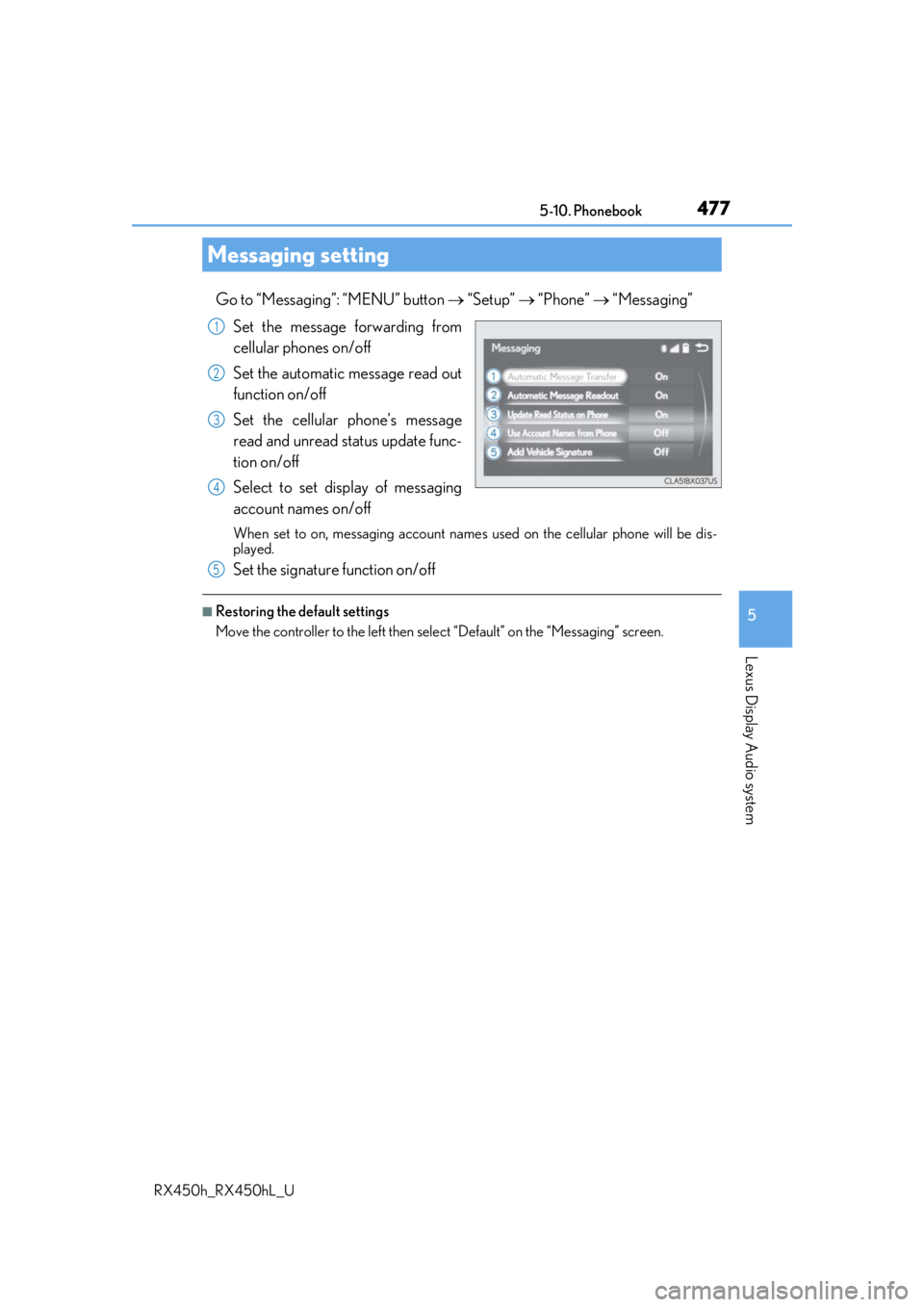
Go to “Messaging”: “MENU” button “Setup” “Phone” “Messaging”
Set the message forwarding from
cellular phones on/off
Set the automatic message read out
function on/off
Set the cellular phone’s message
read and unread status update func-
tion on/off
Select to set display of messaging
account names on/off
When set to on, messaging account names used on the cellular phone will be dis-
played.
Set the signature function on/off
■Restoring the default settings
Move the controller to the left then select “Default” on the “Messaging” screen.
Messaging setting
1
2
3
4
5
Page 480 of 792
4805-11. Bluetooth®
RX450h_RX450hL_U
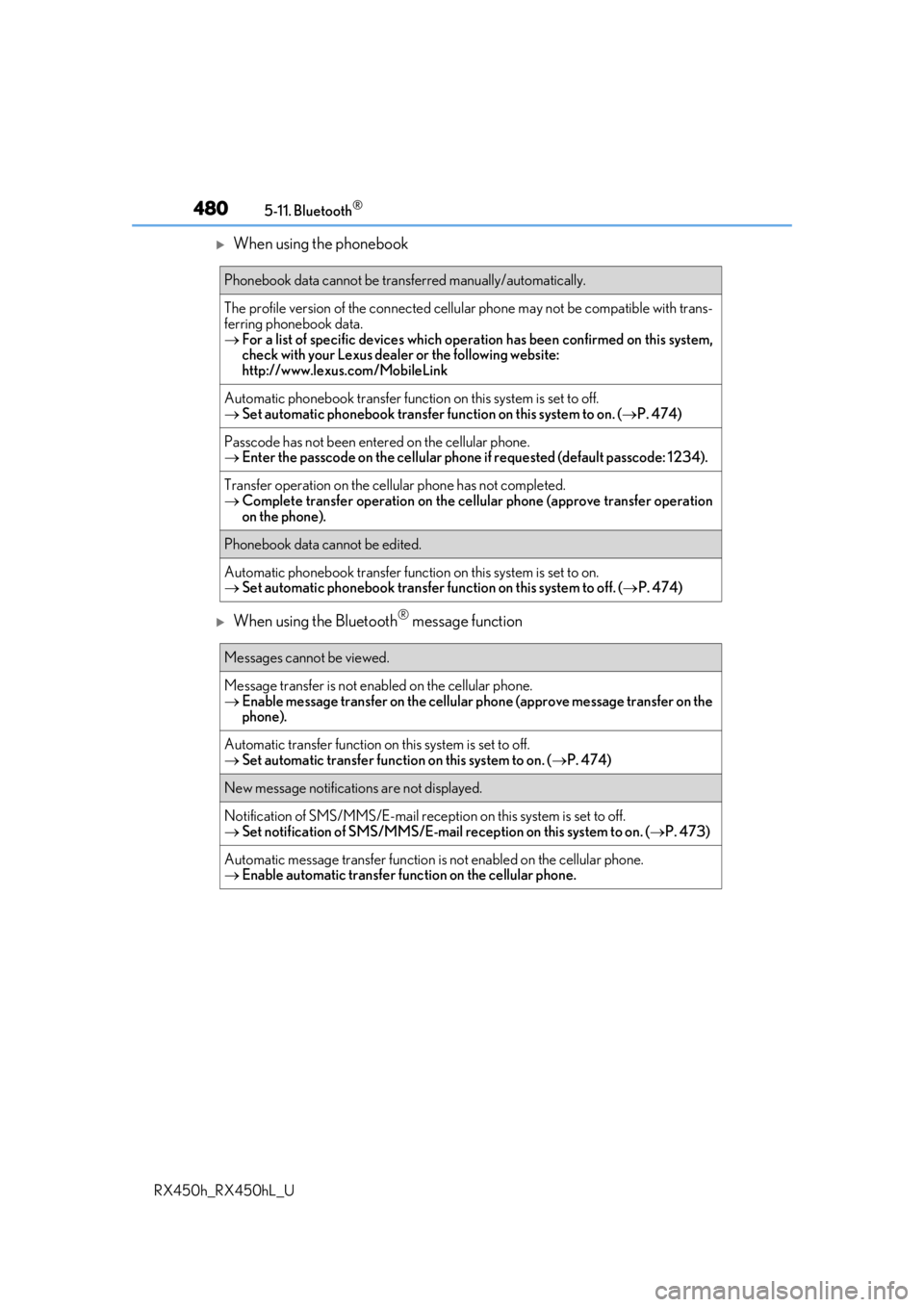
When using the phonebook
When using the Bluetooth® message function
Phonebook data cannot be transferred manually/automatically.
The profile version of the connected cellular phone may not be compatible with trans-
ferring phonebook data.
For a list of specific devices which operat ion has been confirmed on this system,
check with your Lexus dealer or the following website:
http://www.lexus. com/MobileLink
Automatic phonebook transfer function on this system is set to off.
Set automatic phonebook transfer function on this system to on. ( P. 474)
Passcode has not been entered on the cellular phone.
Enter the passcode on the cellular phone if requested (default passcode: 1234).
Transfer operation on the ce llular phone has not completed.
Complete transfer operation on the ce llular phone (approve transfer operation
on the phone).
Phonebook data cannot be edited.
Automatic phonebook transfer function on this system is set to on.
Set automatic phonebook transfer function on this system to off. ( P. 474)
Messages cannot be viewed.
Message transfer is not en abled on the cellular phone.
Enable message transfer on the cellular phone (approve message transfer on the
phone).
Automatic transfer function on this system is set to off.
Set automatic transfer function on this system to on. ( P. 474)
New message notifications are not displayed.
Notification of SMS/MMS/E-mail recept ion on this system is set to off.
Set notification of SMS/MMS/E-mail re ception on this system to on. (P. 473)
Automatic message transfer function is not enabled on the cellular phone.
Enable automatic transfer func tion on the cellular phone.