automatic LEXUS RX450H 2019 Owners Manual
[x] Cancel search | Manufacturer: LEXUS, Model Year: 2019, Model line: RX450H, Model: LEXUS RX450H 2019Pages: 792, PDF Size: 13.48 MB
Page 484 of 792

4845-11. Bluetooth®
RX450h_RX450hL_U
■Compatible models
The Bluetooth® audio system supports portable audio players with the following specifi-
cations
●Bluetooth® specifications:
Ver. 2.0 or higher (Recommend ed: Ver. 3.0 +EDR or higher)
●Profiles:
• A2DP (Advanced Audio Distribution Profile) Ver. 1.0, or higher
(Recommended: Ver. 1.3 or higher)
This is a profile to transmit stereo audio or high quality sound to the audio system.
• AVRCP (Audio/Video Remote Control Profile) Ver. 1.0 or higher (Recommended: Ver. 1.5 or higher)
This is a profile to allow re mote control the A/V equipment.
However, please note that some functions may be limited depending on the type of por-
table audio player connected.
The hands-free system supports cellular ph ones with the following specifications.
●Bluetooth® specification:
Ver. 2.0 or higher (Recommend ed: Ver. 3.0 +EDR or higher)
●Profiles:
• HFP (Hands Free Profile) Ver. 1.0 or higher (Recommended: Ver. 1.6 or higher)
This is a profile to allow hands-free phone calls using a cellular phone or head set. It
has outgoing and incoming call functions.
• OPP (Object Push Profile) Ver. 1.1 or higher (Recommended: Ver. 1.2) This is a profile to transfer phonebook data. When a Bluetooth
® compatible cellular
phone has both PBAP and OPP, OPP cannot be used.
• PBAP (Phone Book Access Profile) Ver. 1.0 or higher (Recommended: Ver. 1.1) This is a profile to transfer phonebook data.
• MAP (Message Access Pr ofile) Ver.1.0 or higher
This is a profile to using phone message.
If the cellular phone does not support HFP, yo u cannot register it with the hands-free sys-
tem. OPP, PBAP or MAP services must be selected individually.
■Reconnecting the portable audio player
If the portable audio player is disconnected due to poor reception when the power
switch is in ACCESSORY or ON mode, the system automatically reconnects the porta-
ble audio player.
If you have switched off the portable audio player yourself, follow the instructions below
to reconnect:
●Select the portable audio player again
●Enter the portable audio player
■When you sell your car
Be sure to delete your personal data. ( P. 415)
Page 499 of 792
499
6Interior features
RX450h_RX450hL_U
6-1. Basic operation of the Remote Touch screen
Remote Touch ............................ 500
12.3-inch display........................ 504
6-2. Using the air conditioning system and defogger
Lexus Climate Concierge ................................. 506
Front automatic air conditioning system ...............507
Rear automatic air conditioning system ...............522
Heated steering wheel/ seat heaters/
seat ventilators .........................525
6-3. Using the interior lights Interior lights list......................... 528
• Interior lights ..........................529
• Personal lights ...................... 530
6-4. Using the storage features List of storage features.............532
• Glove box ...............................534
• Console box ...........................534
• Cup holders........................... 535
• Door pockets .........................537 • Bottle holders ........................ 537
• Coin box ..................................538
• Auxiliary boxes .....................539
Luggage compartment features .......................................540
6-5. Using the other interior features
Other interior features ............ 547 • Sun visors ................................ 547
• Vanity mirrors ....................... 547
• Clock ........................................548
• Wireless charger .................548
• Power outlets.........................555
• Front passenger footwell hooks ....................... 557
• Rear door sunshades ......... 557
• Armrest ................................... 558
• Assist grips..............................559
• Coat hooks .............................559
Garage door opener ...............560
Compass ....................................... 567
LEXUS Enform Safety Connect ........................................571
LEXUS Enform Remote ......... 576
LEXUS Enform Service Connect ...................................... 577
Page 505 of 792
5056-1. Basic operation of the Remote Touch screen
6
Interior features
RX450h_RX450hL_U
■Selecting the operation screen
When selecting the main display, move the Remote Touch knob to the left.
When selecting the side display, move the Remote Touch knob to the right.
■Main display
For details about the functions and operation of the main display, refer to the
respective section and “NAVIGATION SYSTEM OWNER’S MANUAL”.
■Side display
Basic screens
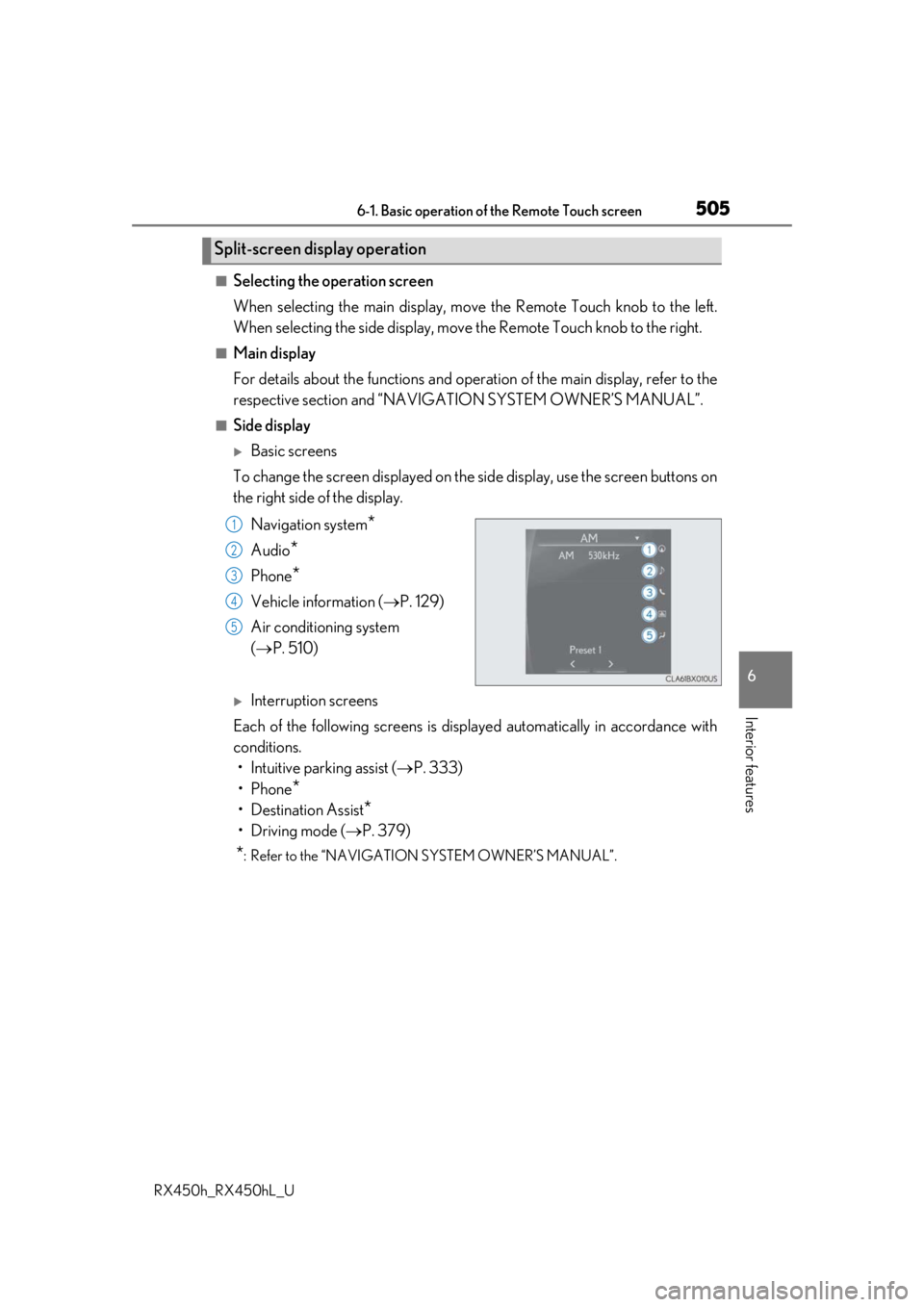
To change the screen displayed on the side display, use the screen buttons on
the right side of the display.
Navigation system
*
Audio*
Phone*
Vehicle information ( P. 129)
Air conditioning system
( P. 510)
Interruption screens
Each of the following screens is displayed automatically in accordance with
conditions. • Intuitive parking assist ( P. 333)
•Phone
*
• Destination Assist*
•Driving mode ( P. 379)
*: Refer to the “NAVIGATION SYSTEM OWNER’S MANUAL”.
Split-screen display operation
1
2
3
4
5
Page 506 of 792
506
RX450h_RX450hL_U6-2. Using the air conditio
ning system and defogger
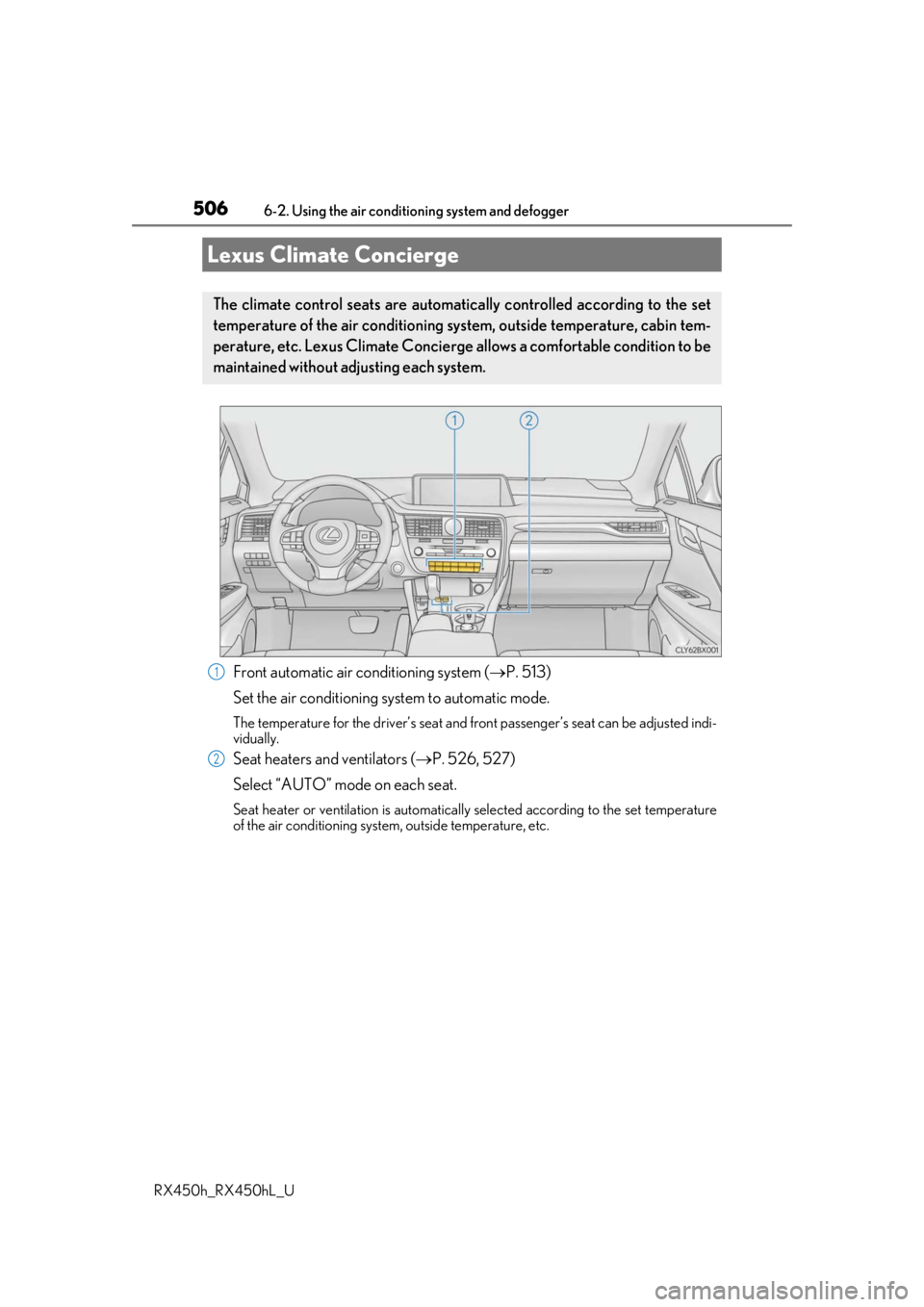
Front automatic air conditioning system ( P. 513)
Set the air conditioning system to automatic mode.
The temperature for the driver’s seat and front passenger’s seat can be adjusted indi-
vidually.
Seat heaters and ventilators ( P. 526, 527)
Select “AUTO” mode on each seat.
Seat heater or ventilation is automatically selected according to the set temperature
of the air conditioning system, outside temperature, etc.
Lexus Climate Concierge
The climate control seats are automatica lly controlled according to the set
temperature of the air conditioning sy stem, outside temperature, cabin tem-
perature, etc. Lexus Climate Concierge allows a comfortable condition to be
maintained without adjusting each system.
1
2
Page 507 of 792
5076-2. Using the air conditioning system and defogger
RX450h_RX450hL_U
6
Interior features
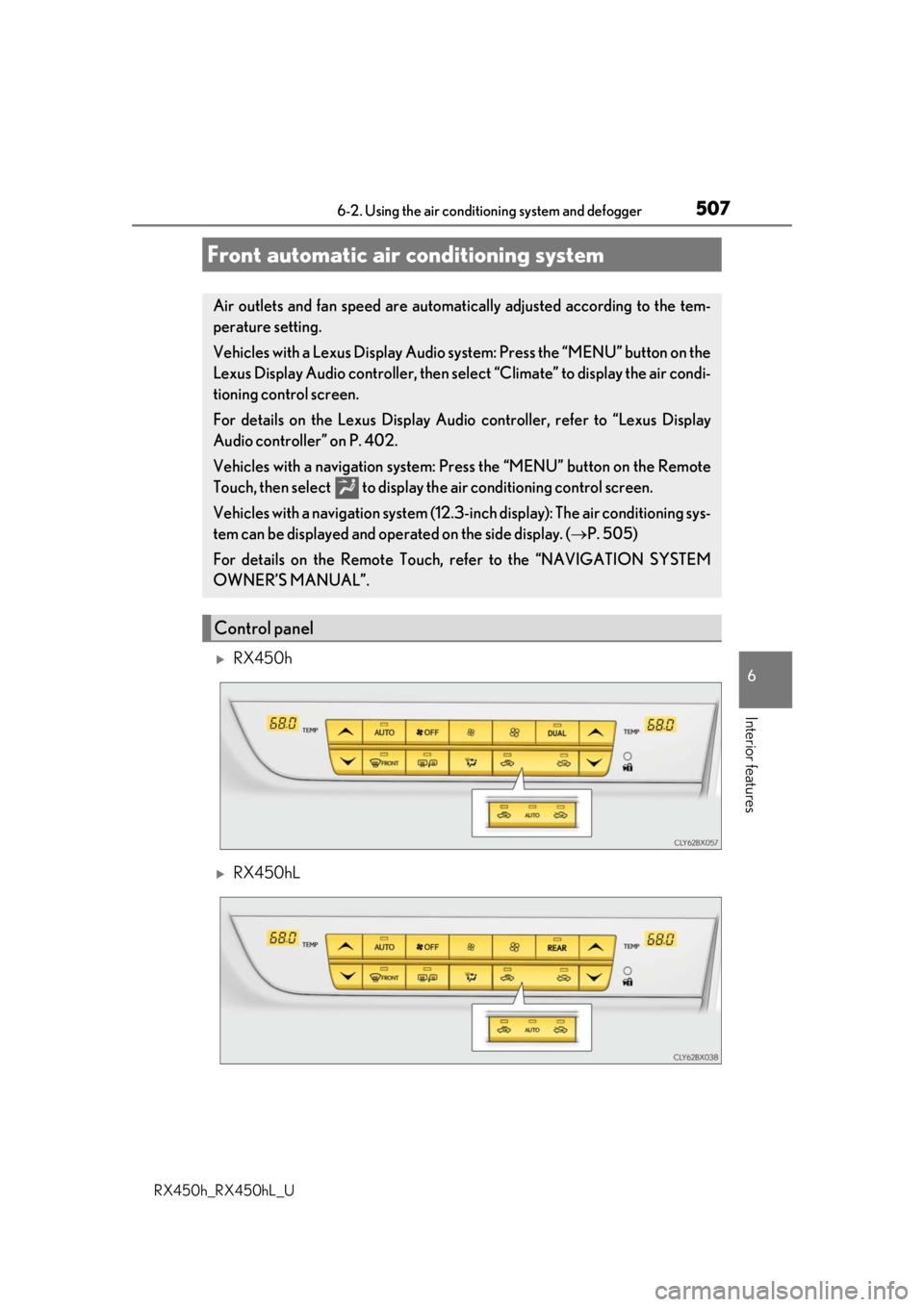
RX450h
RX450hL
Front automatic air conditioning system
Air outlets and fan speed are automati cally adjusted according to the tem-
perature setting.
Vehicles with a Lexus Display Audio sy stem: Press the “MENU” button on the
Lexus Display Audio controller, then sele ct “Climate” to display the air condi-
tioning control screen.
For details on the Lexus Display Audio controller, refer to “Lexus Display
Audio controller” on P. 402.
Vehicles with a navigation system: Press the “MENU” button on the Remote
Touch, then select to display th e air conditioning control screen.
Vehicles with a navigation system (12.3 -inch display): The air conditioning sys-
tem can be displayed and operat ed on the side display. (P. 505)
For details on the Remote Touch, refer to the “NAVIGATION SYSTEM
OWNER’S MANUAL”.
Control panel
Page 509 of 792
5096-2. Using the air conditioning system and defogger
RX450h_RX450hL_U
6
Interior features
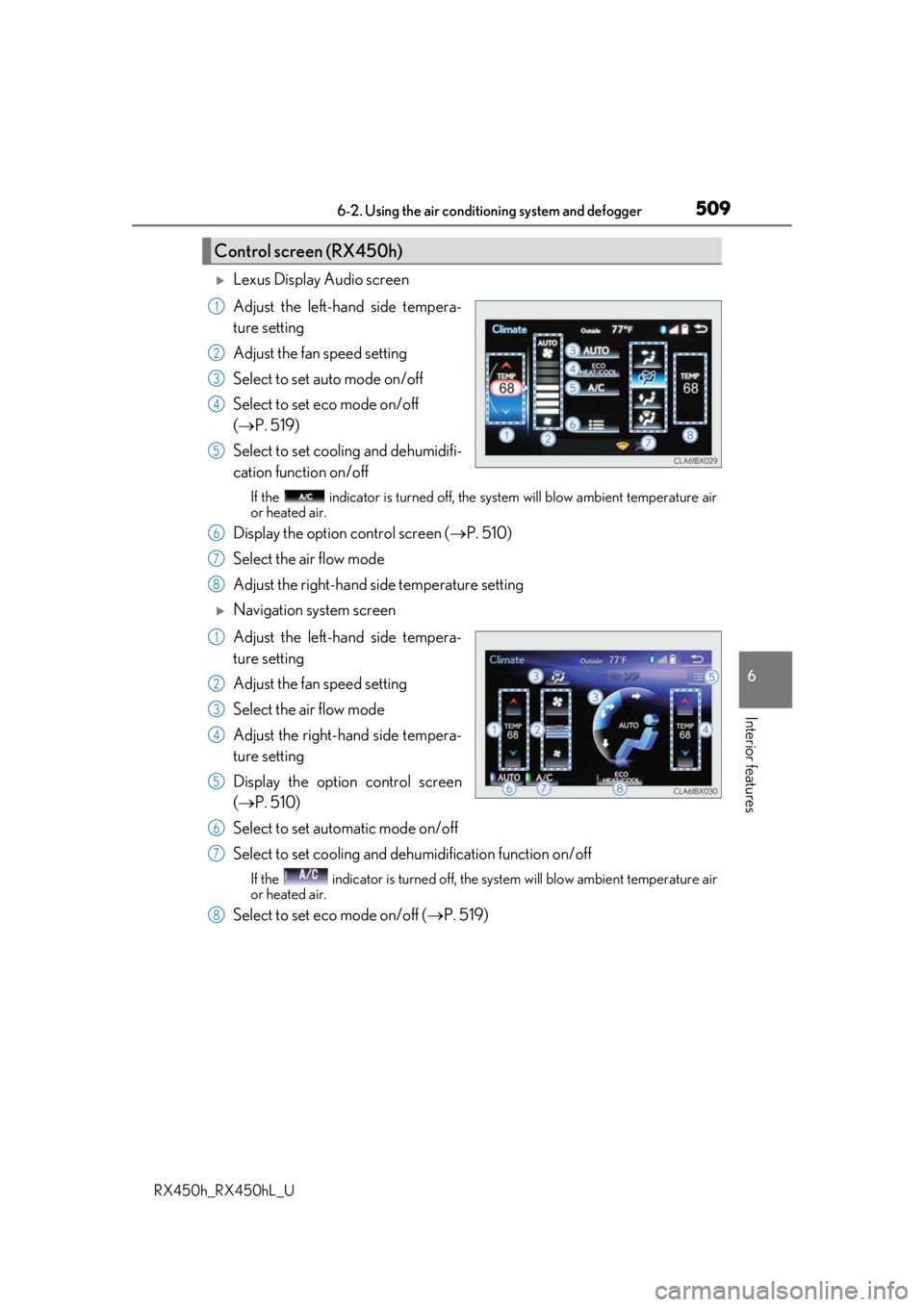
Lexus Display Audio screen
Adjust the left-hand side tempera-
ture setting
Adjust the fan speed setting
Select to set auto mode on/off
Select to set eco mode on/off
( P. 519)
Select to set cooling and dehumidifi-
cation function on/off
If the indicator is turned off, the system will blow ambient temperature air
or heated air.
Display the option control screen ( P. 510)
Select the air flow mode
Adjust the right-hand side temperature setting
Navigation system screen
Adjust the left-hand side tempera-
ture setting
Adjust the fan speed setting
Select the air flow mode
Adjust the right-hand side tempera-
ture setting
Display the option control screen
( P. 510)
Select to set automatic mode on/off
Select to set cooling and dehumidification function on/off
If the indicator is turned off, the system will blow ambient temperature air
or heated air.
Select to set eco mode on/off ( P. 519)
Control screen (RX450h)
1
2
3
4
5
6
7
8
1
2
3
4
5
6
7
8
Page 511 of 792
5116-2. Using the air conditioning system and defogger
RX450h_RX450hL_U
6
Interior features
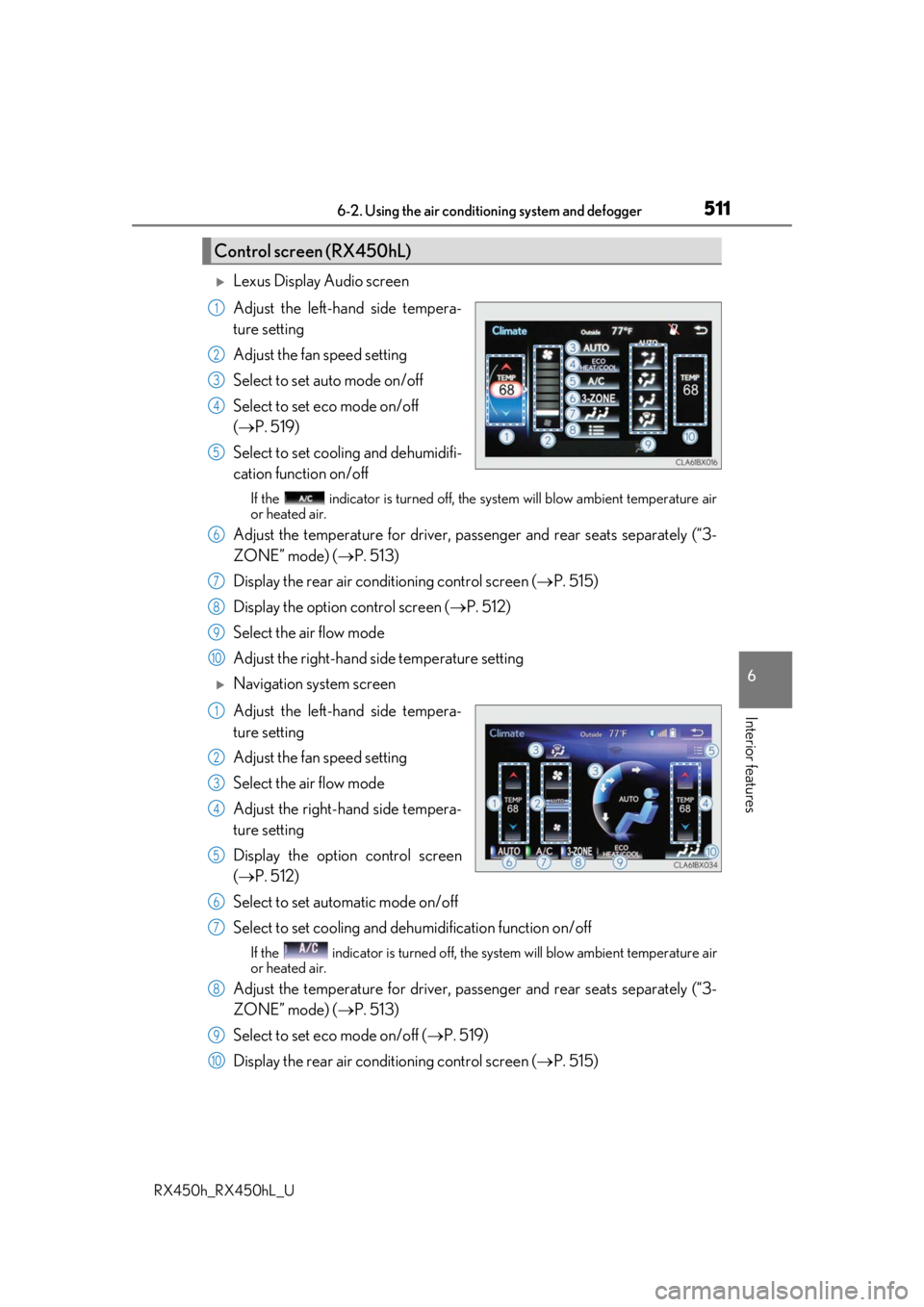
Lexus Display Audio screen
Adjust the left-hand side tempera-
ture setting
Adjust the fan speed setting
Select to set auto mode on/off
Select to set eco mode on/off
( P. 519)
Select to set cooling and dehumidifi-
cation function on/off
If the indicator is turned off, the system will blow ambient temperature air
or heated air.
Adjust the temperature for driver, passe nger and rear seats separately (“3-
ZONE” mode) ( P. 513)
Display the rear air condit ioning control screen (P. 515)
Display the option control screen ( P. 512)
Select the air flow mode
Adjust the right-hand side temperature setting
Navigation system screen
Adjust the left-hand side tempera-
ture setting
Adjust the fan speed setting
Select the air flow mode
Adjust the right-hand side tempera-
ture setting
Display the option control screen
( P. 512)
Select to set automatic mode on/off
Select to set cooling and dehumidification function on/off
If the indicator is turned off, the system will blow ambient temperature air
or heated air.
Adjust the temperature for driver, passe nger and rear seats separately (“3-
ZONE” mode) ( P. 513)
Select to set eco mode on/off ( P. 519)
Display the rear air condit ioning control screen (P. 515)
Control screen (RX450hL)
1
2
3
4
5
6
7
8
9
10
1
2
3
4
5
6
7
8
9
10
Page 513 of 792
5136-2. Using the air conditioning system and defogger
RX450h_RX450hL_U
6
Interior features
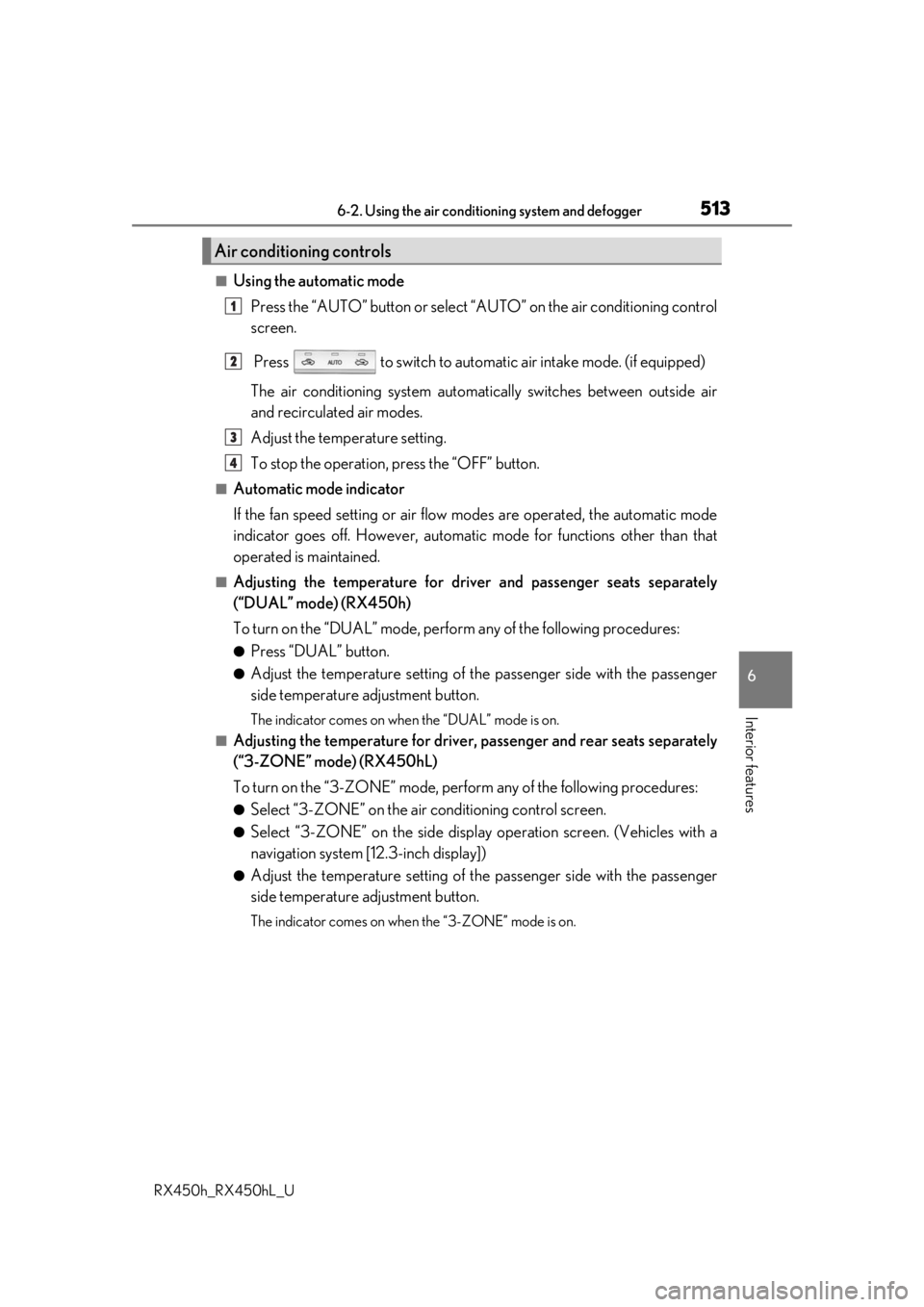
■Using the automatic mode Press the “AUTO” button or select “A UTO” on the air conditioning control
screen.
Press to switch to automatic air intake mode. (if equipped)
The air conditioning system automati cally switches between outside air
and recirculated air modes.
Adjust the temperature setting.
To stop the operation, press the “OFF” button.
■Automatic mode indicator
If the fan speed setting or air flow modes are operated, the automatic mode
indicator goes off. However, automati c mode for functions other than that
operated is maintained.
■Adjusting the temperature for driv er and passenger seats separately
(“DUAL” mode) (RX450h)
To turn on the “DUAL” mode, perfor m any of the following procedures:
●Press “DUAL” button.
●Adjust the temperature setting of th e passenger side with the passenger
side temperature adjustment button.
The indicator comes on when the “DUAL” mode is on.
■Adjusting the temperature for driver, passenger and rear seats separately
(“3-ZONE” mode) (RX450hL)
To turn on the “3-ZONE” mode, perf orm any of the following procedures:
●Select “3-ZONE” on the air conditioning control screen.
●Select “3-ZONE” on the side displa y operation screen. (Vehicles with a
navigation system [12.3-inch display])
●Adjust the temperature setting of th e passenger side with the passenger
side temperature adjustment button.
The indicator comes on when the “3-ZONE” mode is on.
Air conditioning controls
1
2
3
4
Page 514 of 792
5146-2. Using the air conditioning system and defogger
RX450h_RX450hL_U
■S-FLOW mode
In S-FLOW mode, priority for the airflo w is given to the front seats, reducing
the airflow and air conditioning effect on the rear seats. When in S-FLOW
mode, airflow from the rear air condit ioning system is stopped. (RX450hL)
Operation in S-FLOW mode differs according to the following conditions: • Priority is given to the driver’s se at only when: Manual S-FLOW mode:
When no passenger is judged to be in the front passenger seat.
Automatic S-FLOW mode: When no passeng ers are judged to be in the front
passenger seat or rear seats. • Priority is given to the front seats when: Manual S-FLOW mode is selected
or no passengers are judged to be in the rear seats when in automatic S-
FLOW mode.
• S-FLOW mode will be disa bled when: A passenger is judged to be in a rear
seat when in automatic S-FLOW mode.
Depending on the set temperature, operation in S-FLOW mode may not
change as described above.
When certain conditions are met and priori ty is given to the driver’s seat only,
the temperature indicator for the fr ont passenger side will turn off.
How the system judges if a passenger is in the vehicle: P. 518
The following S-FLOW modes are available:
Automatic S-FLOW mode
In this mode, when a passenger is judg ed to be in a rear seat, S-FLOW mode
will be automatically disabled.
The indicator will illuminate wh en S-FLOW mode is enabled.
To enable/disable S-FLOW mode and enter manual S-FLOW mode, select
on the option control screen.
How the system judges if a passenger is in the vehicle: P. 518
Manual S-FLOW mode
When is selected, S-FLOW mode will be manually enabled/disabled.
The indicator will illuminate when S-FLOW mode is enabled.
In manual S-FLOW mode, as the system does not judge if a passenger is in a rear
seat, S-FLOW mode will not be disabled automatically.
To disable S-FLOW mode automatically by opening and closing a rear door or
operating the rear air conditioning syst em (RX450hL), change to automatic S-
FLOW mode. ( P. 518)
Page 515 of 792
5156-2. Using the air conditioning system and defogger
RX450h_RX450hL_U
6
Interior features
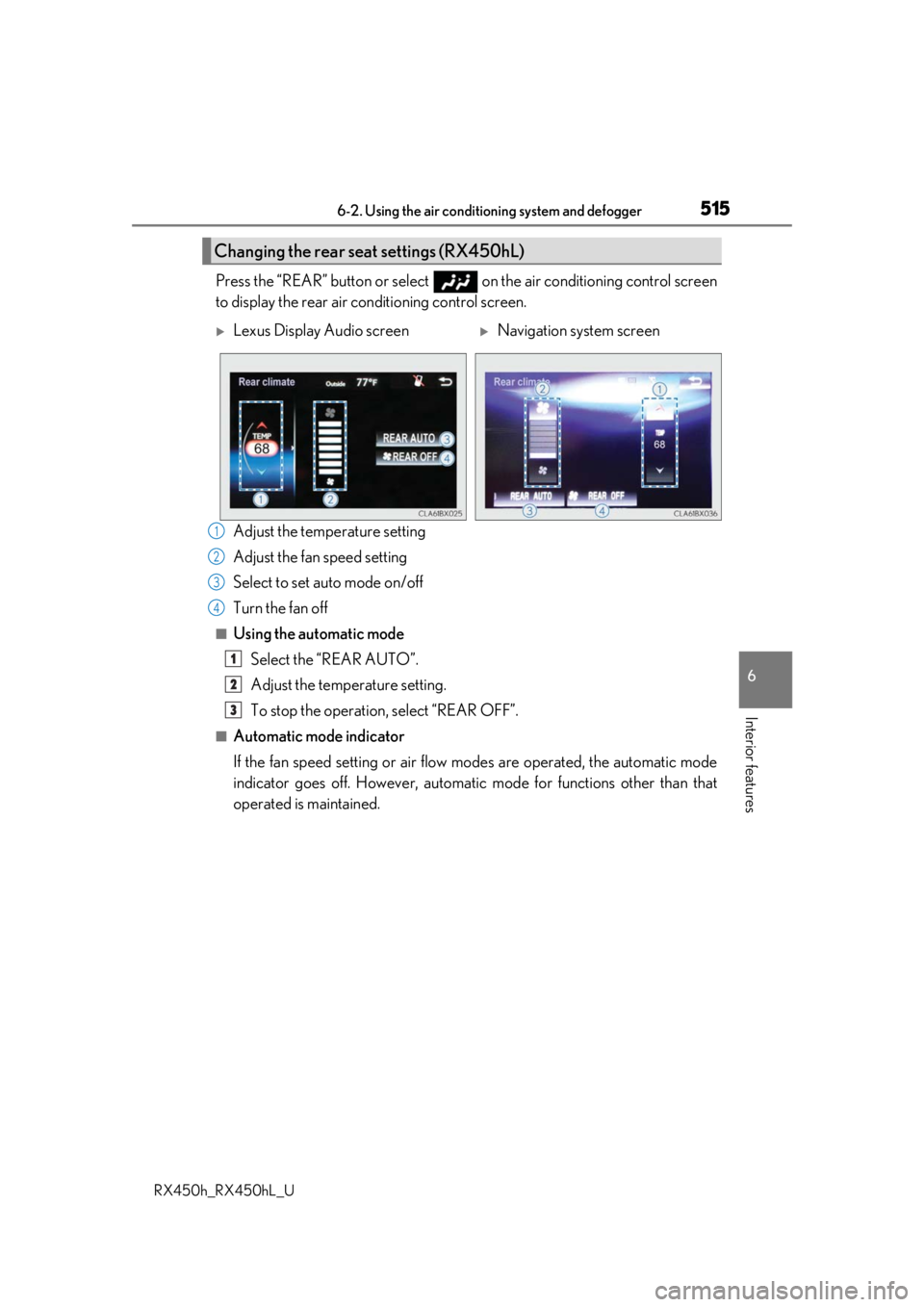
Press the “REAR” button or select on the air conditioning control screen
to display the rear air conditioning control screen.
Adjust the temperature setting
Adjust the fan speed setting
Select to set auto mode on/off
Turn the fan off
■Using the automatic modeSelect the “REAR AUTO”.
Adjust the temperature setting.
To stop the operation, select “REAR OFF”.
■Automatic mode indicator
If the fan speed setting or air flow modes are operated, the automatic mode
indicator goes off. However, automati c mode for functions other than that
operated is maintained.
Changing the rear seat settings (RX450hL)
Lexus Display Audio screenNavigation system screen
1
2
3
4
1
2
3