change LEXUS RX450H 2019 Owners Manual
[x] Cancel search | Manufacturer: LEXUS, Model Year: 2019, Model line: RX450H, Model: LEXUS RX450H 2019Pages: 792, PDF Size: 13.48 MB
Page 441 of 792
4415-6. Using an external device
5
Lexus Display Audio system
RX450h_RX450hL_U
■iPod cover art
●Depending on the iPod and songs in the iPod, iPod cover art may be displayed.
●This function can be changed to on/off. (P. 422)
●It may take time to display iPod cover art, and the iPod may not be operated while the
cover art display is in process.
■iPod functions
●When an iPod is connected and the audio sour ce is changed to iPod mode, the iPod will
resume play from the same poin t in which it was last used.
●Depending on the iPod that is connected to the system, certain functions may not be
available. If a function is unavailable due to a malfunction (as opposed to a system spec-
ification), disconnecting th e device and reconnecting it may resolve the problem.
●Depending on the iPod, while connected to the system, the iPod cannot be operated
with its own controls. It is necessary to us e the controls of the vehicle’s audio system
instead.
●When the battery level of an iP od is very low, the iPod may not operate. If so, charge the
iPod before use.
●Compatible models ( P. 443)
■iPod problems
To resolve most problems encountered when using your iPod, disconnect your iPod from
the vehicle iPod connection and reset it. For instructions on how to reset your iPod, refer
to your iPod Owner’s Manual.
Page 447 of 792
4475-6. Using an external device
5
Lexus Display Audio system
RX450h_RX450hL_U
●ID3, WMA and AAC tags
ID3 tags can be added to MP3 files, making it possible to record the track title, artist
name, etc.
The system is compatible with ID3 Ver. 1.0, 1.1, and Ver. 2.2, 2.3 ID3 tags. (The number
of characters is based on ID3 Ver. 1.0 and 1.1.)
WMA tags can be added to WMA files, making it possible to record the track title and
artist name in the same way as with ID3 tags.
AAC tags can be added to AAC files, making it possible to record the track title and
artist name in the same way as with ID3 tags.
●MP3, WMA and AAC playback
• When a device containing MP3, WMA or AA C files is connected, all files in the
USB memory device are checked. Once th e file check is finished, the first MP3,
WMA or AAC file is played. To make the file check finish more quickly, we recom-
mend that you do not include any files other than MP3, WMA or AAC files or cre-
ate any unnecessary folders.
• When a USB memory device is connected and the audio source is changed to USB memory mode, the USB memory device will st art playing the first file in the first
folder. If the same device is removed an d reconnected (and the contents have not
been changed), the USB memory device w ill resume play from the same point in
which it was last used.
●Extensions
If the file extensions .mp3, .wma and .m4a are used for files other than MP3, WMA
and AAC files, they will be skipped (not played).
●Playback
• To play MP3 files with steady sound quality, we recommend a fixed bit rate of at least 128 kbps and a sampling frequency of 44.1 kHz.
• There is a wide variety of freeware an d other encoding software for MP3, WMA
and AAC files on the market, and depending on the status of the encoding and the
file format, poor sound quality or noise at the start of playback may result. In some
cases, playback may not be possible at all.
• Microsoft, Windows, and Windows Media ar e the registered trademarks of Micro-
soft Corporation in the U.S.A. and other countries.
NOTICE
■To prevent damage to the USB me mory device or its terminals
●Depending on the size and shape of the USB memory that is connected to the sys-
tem, the console box may not close fully. In th is case, do not forcibly close the console
box as this may damage the USB memory or the terminal, etc.
●Do not leave the USB memory device in the vehicle. The temperature inside the vehi-
cle may become high.
●Do not push down on or apply unnecessary pressure to the USB memory device
while it is connected.
●Do not insert foreign objects into the port.
Page 455 of 792
4555-7. Connecting Bluetooth®
5
Lexus Display Audio system
RX450h_RX450hL_U
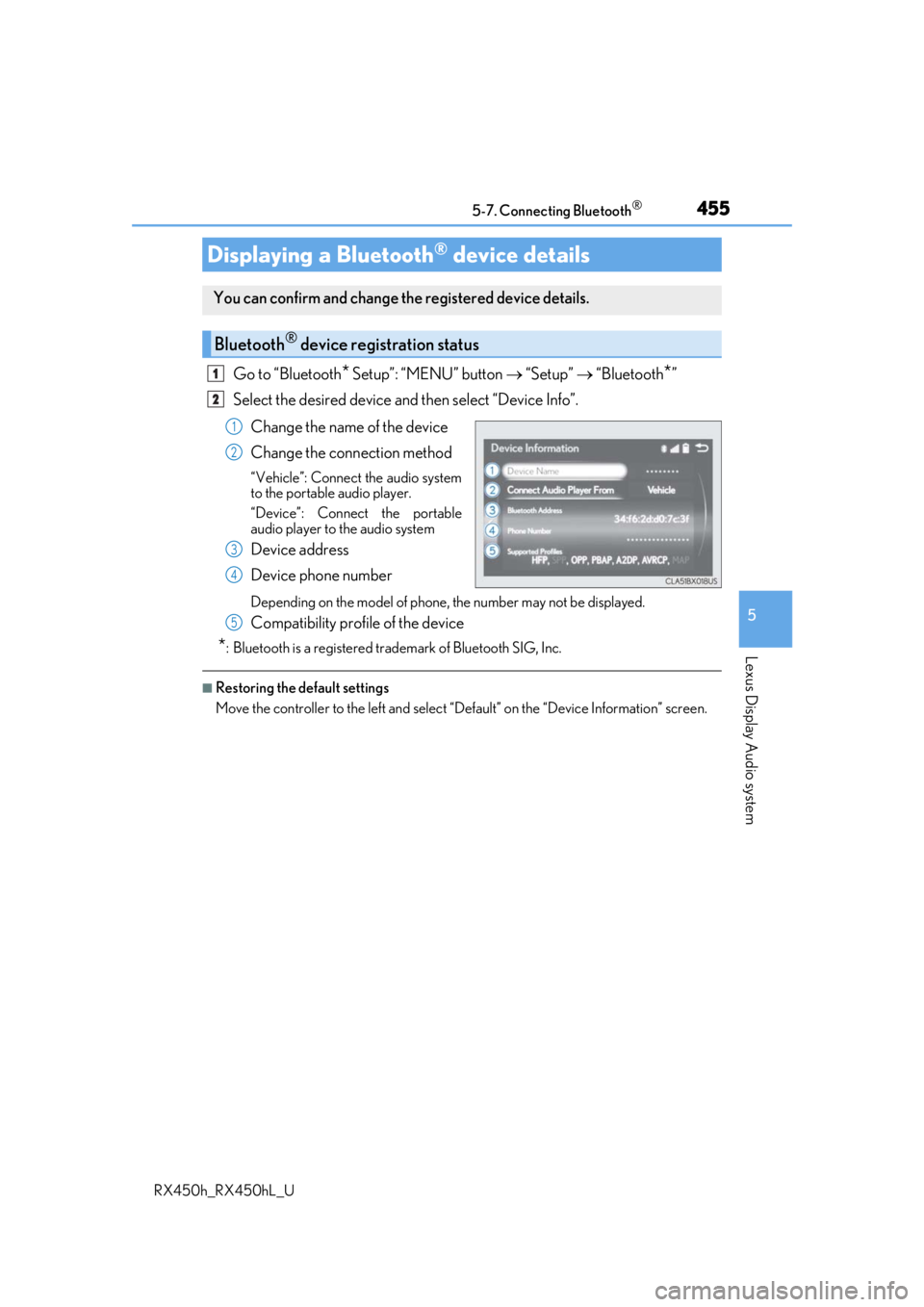
Go to “Bluetooth* Setup”: “MENU” button “Setup” “Bluetooth*”
Select the desired device and then select “Device Info”.
Change the name of the device
Change the connection method
“Vehicle”: Connect the audio system
to the portable audio player.
“Device”: Connect the portable
audio player to the audio system
Device address
Device phone number
Depending on the model of phone, the number may not be displayed.
Compatibility profile of the device
*: Bluetooth is a registered trademark of Bluetooth SIG, Inc.
■Restoring the default settings
Move the controller to the left and select “D efault” on the “Device Information” screen.
Displaying a Bluetooth® device details
You can confirm and change the registered device details.
Bluetooth® device registration status
1
2
1
2
3
4
5
Page 456 of 792
4565-7. Connecting Bluetooth®
RX450h_RX450hL_U
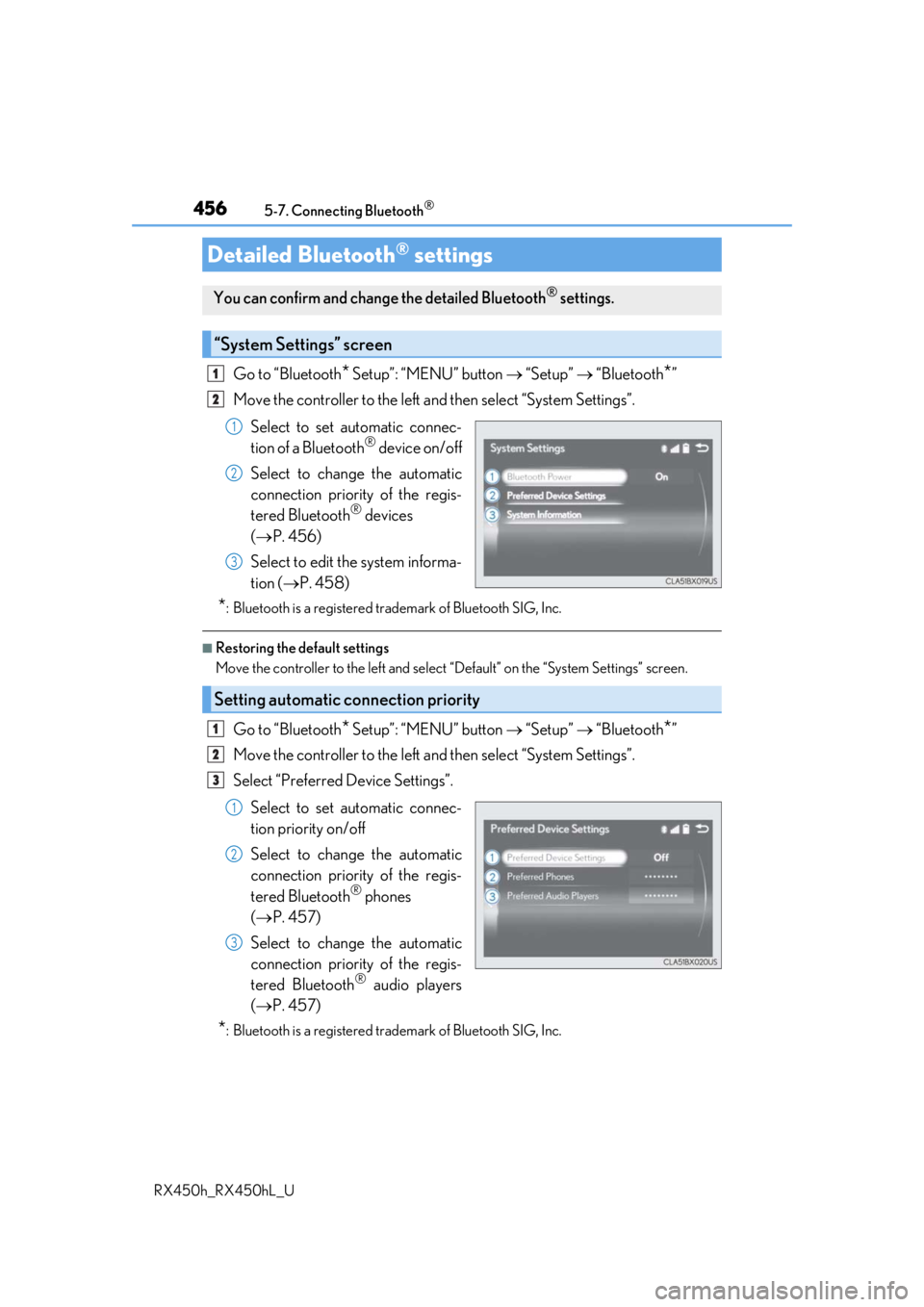
Go to “Bluetooth* Setup”: “MENU” button “Setup” “Bluetooth*”
Move the controller to the left an d then select “System Settings”.
Select to set automatic connec-
tion of a Bluetooth
® device on/off
Select to change the automatic
connection priority of the regis-
tered Bluetooth
® devices
( P. 456)
Select to edit the system informa-
tion ( P. 458)
*: Bluetooth is a registered trademark of Bluetooth SIG, Inc.
■Restoring the default settings
Move the controller to the left and select “Default” on the “System Settings” screen.
Go to “Bluetooth* Setup”: “MENU” button “Setup” “Bluetooth*”
Move the controller to the left an d then select “System Settings”.
Select “Preferred Device Settings”.
Select to set automatic connec-
tion priority on/off
Select to change the automatic
connection priority of the regis-
tered Bluetooth
® phones
( P. 457)
Select to change the automatic
connection priority of the regis-
tered Bluetooth
® audio players
( P. 457)
*: Bluetooth is a registered trademark of Bluetooth SIG, Inc.
Detailed Bluetooth® settings
You can confirm and change the detailed Bluetooth® settings.
“System Settings” screen
1
2
1
2
3
Setting automatic connection priority
1
2
3
1
2
3
Page 457 of 792
4575-7. Connecting Bluetooth®
5
Lexus Display Audio system
RX450h_RX450hL_U
■Restoring the default settings
Move the controller to the left and select “Default” on the “Preferred Device Settings”
screen.
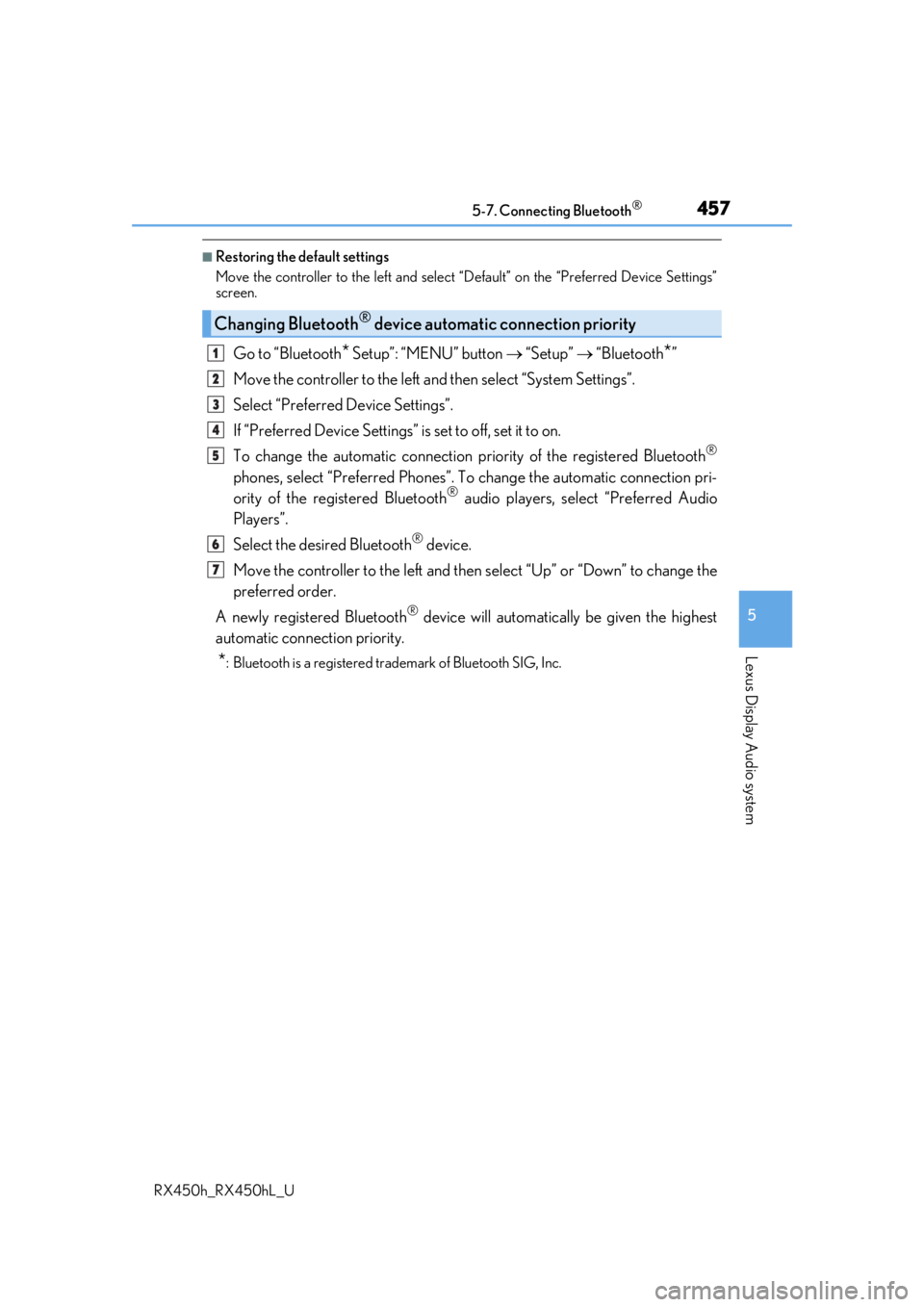
Go to “Bluetooth* Setup”: “MENU” button “Setup” “Bluetooth*”
Move the controller to the left an d then select “System Settings”.
Select “Preferred Device Settings”.
If “Preferred Device Settings” is set to off, set it to on.
To change the automatic connection pr iority of the registered Bluetooth
®
phones, select “Preferred Phones”. To change the automatic connection pri-
ority of the registered Bluetooth® audio players, select “Preferred Audio
Players”.
Select the desired Bluetooth
® device.
Move the controller to the left and then select “Up” or “Down” to change the
preferred order.
A newly registered Bluetooth
® device will automatically be given the highest
automatic connection priority.
*: Bluetooth is a registered trademark of Bluetooth SIG, Inc.
Changing Bluetooth® device automatic connection priority
1
2
3
4
5
6
7
Page 458 of 792
4585-7. Connecting Bluetooth®
RX450h_RX450hL_U
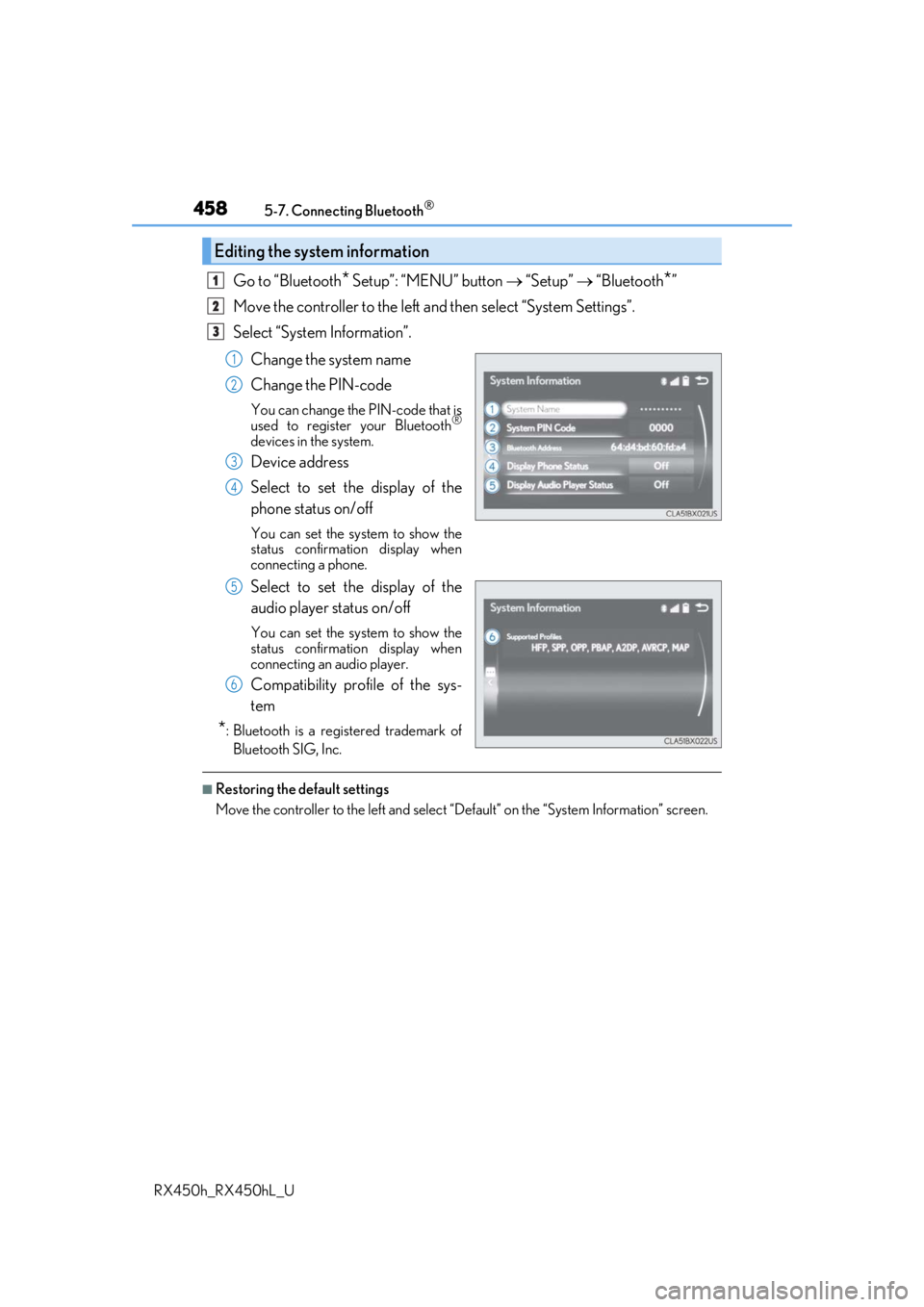
Go to “Bluetooth* Setup”: “MENU” button “Setup” “Bluetooth*”
Move the controller to the left an d then select “System Settings”.
Select “System Information”.
Change the system name
Change the PIN-code
You can change the PIN-code that is
used to register your Bluetooth®
devices in the system.
Device address
Select to set the display of the
phone status on/off
You can set the system to show the
status confirmation display when
connecting a phone.
Select to set the display of the
audio player status on/off
You can set the system to show the
status confirmation display when
connecting an audio player.
Compatibility profile of the sys-
tem
*: Bluetooth is a registered trademark ofBluetooth SIG, Inc.
■Restoring the default settings
Move the controller to the left and select “D efault” on the “System Information” screen.
Editing the system information
1
2
3
1
2
3
4
5
6
Page 468 of 792
4685-9. Bluetooth® Phone
RX450h_RX450hL_U
Phone number containing a “w” symbol
When the “w” symbol is dialed in an outgoing call, you need to go to the
“Release Tones” screen to dial the following digits. Move the controller to the
left and then select “Release Tones”.
Select “Handset Mode” to change from a hands-free call to a cellular phone call
or vice versa.
Press the on-hook switch on the steering wheel or select .
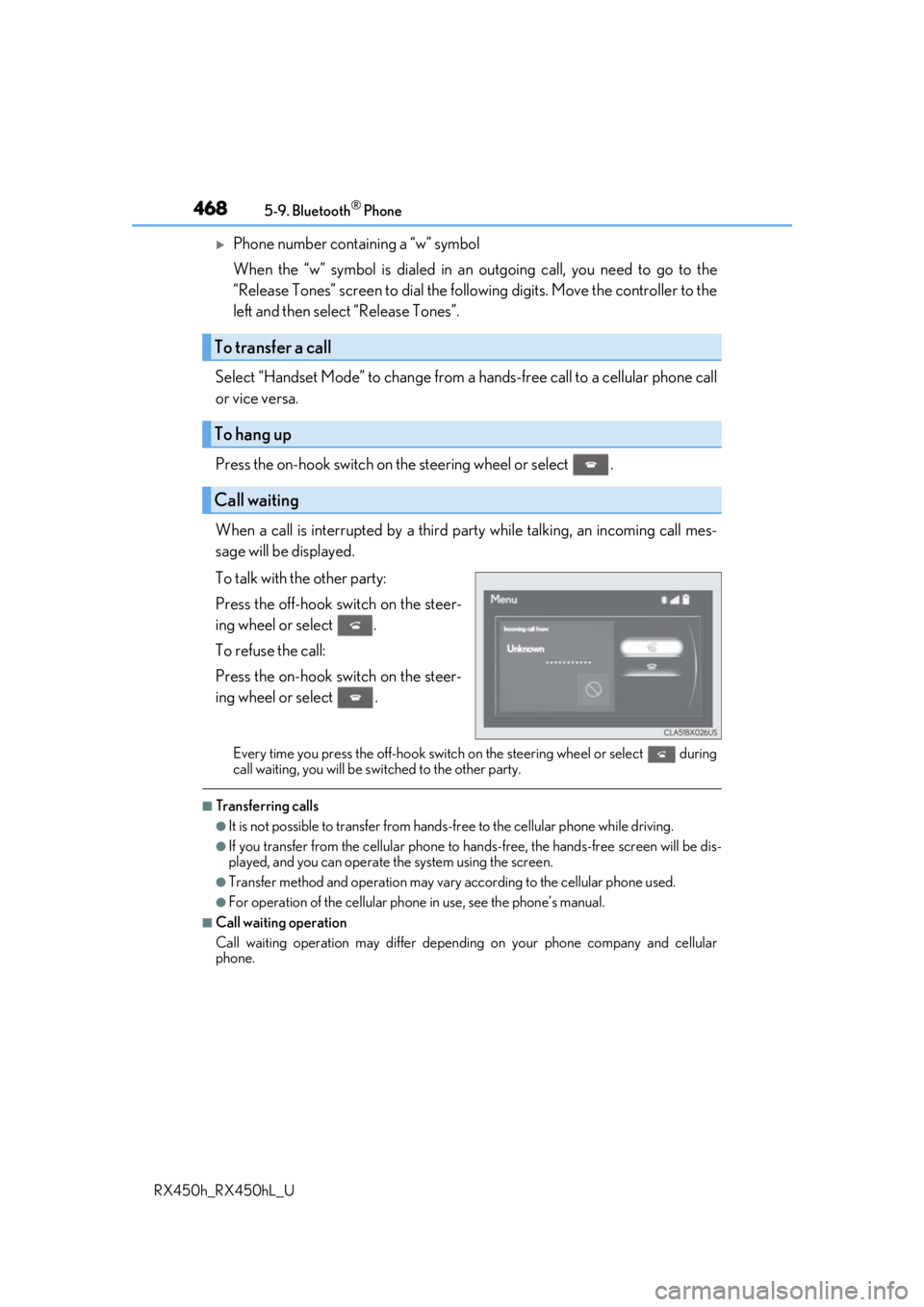
When a call is interrupted by a third pa rty while talking, an incoming call mes-
sage will be displayed.
To talk with the other party:
Press the off-hook sw itch on the steer-
ing wheel or select .
To refuse the call:
Press the on-hook switch on the steer-
ing wheel or select .
Every time you press the off-hook switch on the steering wheel or select during
call waiting, you will be sw itched to the other party.
■Transferring calls
●It is not possible to transfer from hand s-free to the cellular phone while driving.
●If you transfer from the cellular phone to ha nds-free, the hands-free screen will be dis-
played, and you can operate the system using the screen.
●Transfer method and operation may vary according to the cellular phone used.
●For operation of the cellular phone in use, see the phone’s manual.
■Call waiting operation
Call waiting operation may differ depending on your phone company and cellular
phone.
To transfer a call
To hang up
Call waiting
Page 472 of 792
4725-9. Bluetooth® Phone
RX450h_RX450hL_U
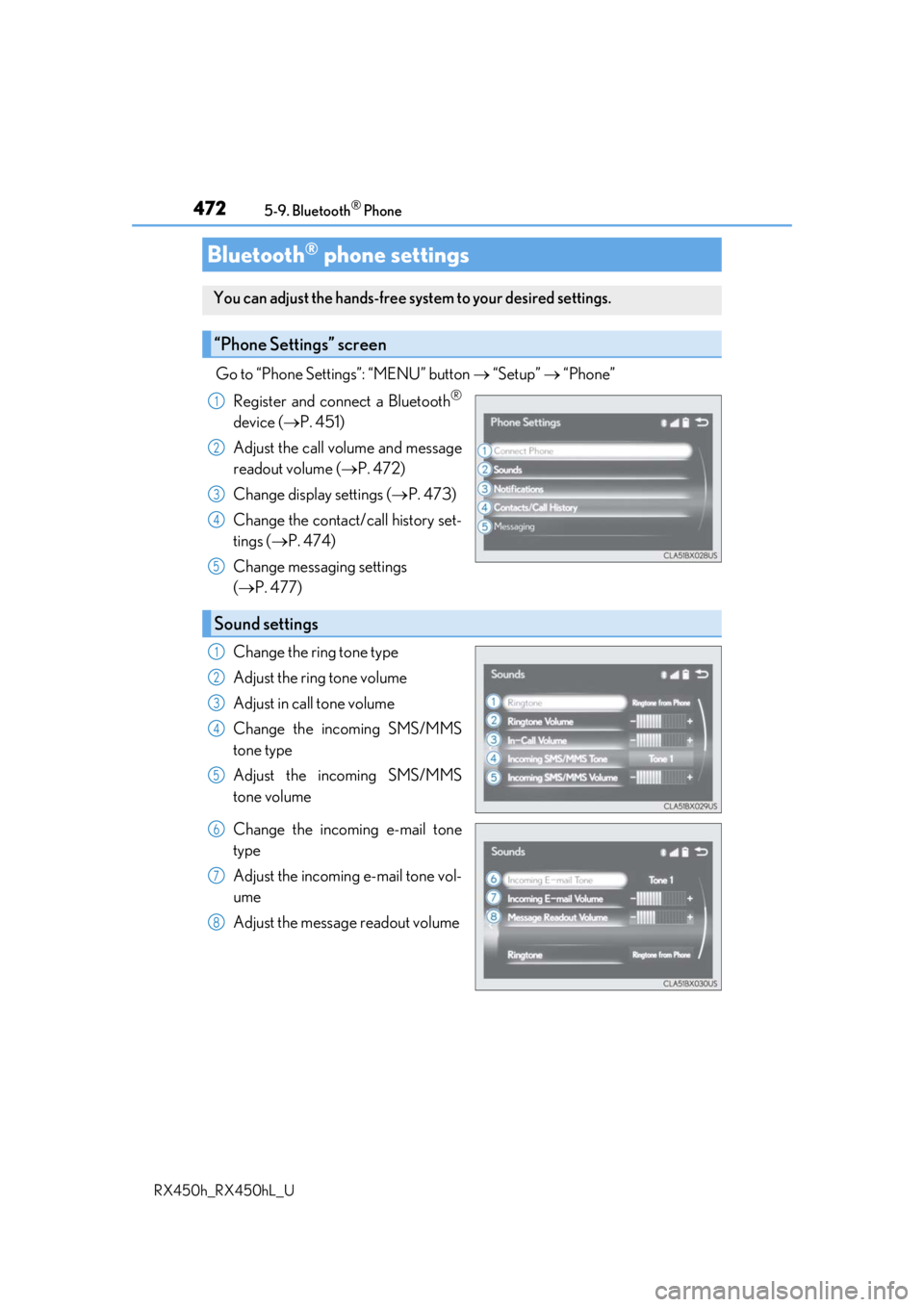
Go to “Phone Settings”: “MENU” button “Setup” “Phone”
Register and connect a Bluetooth
®
device ( P. 451)
Adjust the call volume and message
readout volume ( P. 472)
Change display settings ( P. 473)
Change the contact/call history set-
tings ( P. 474)
Change messaging settings
( P. 477)
Change the ring tone type
Adjust the ring tone volume
Adjust in call tone volume
Change the incoming SMS/MMS
tone type
Adjust the incoming SMS/MMS
tone volume
Change the incoming e-mail tone
type
Adjust the incoming e-mail tone vol-
ume
Adjust the message readout volume
Bluetooth® phone settings
You can adjust the hands-free sy stem to your desired settings.
“Phone Settings” screen
1
2
3
4
5
Sound settings
1
2
3
4
5
6
7
8
Page 473 of 792
4735-9. Bluetooth® Phone
5
Lexus Display Audio system
RX450h_RX450hL_U
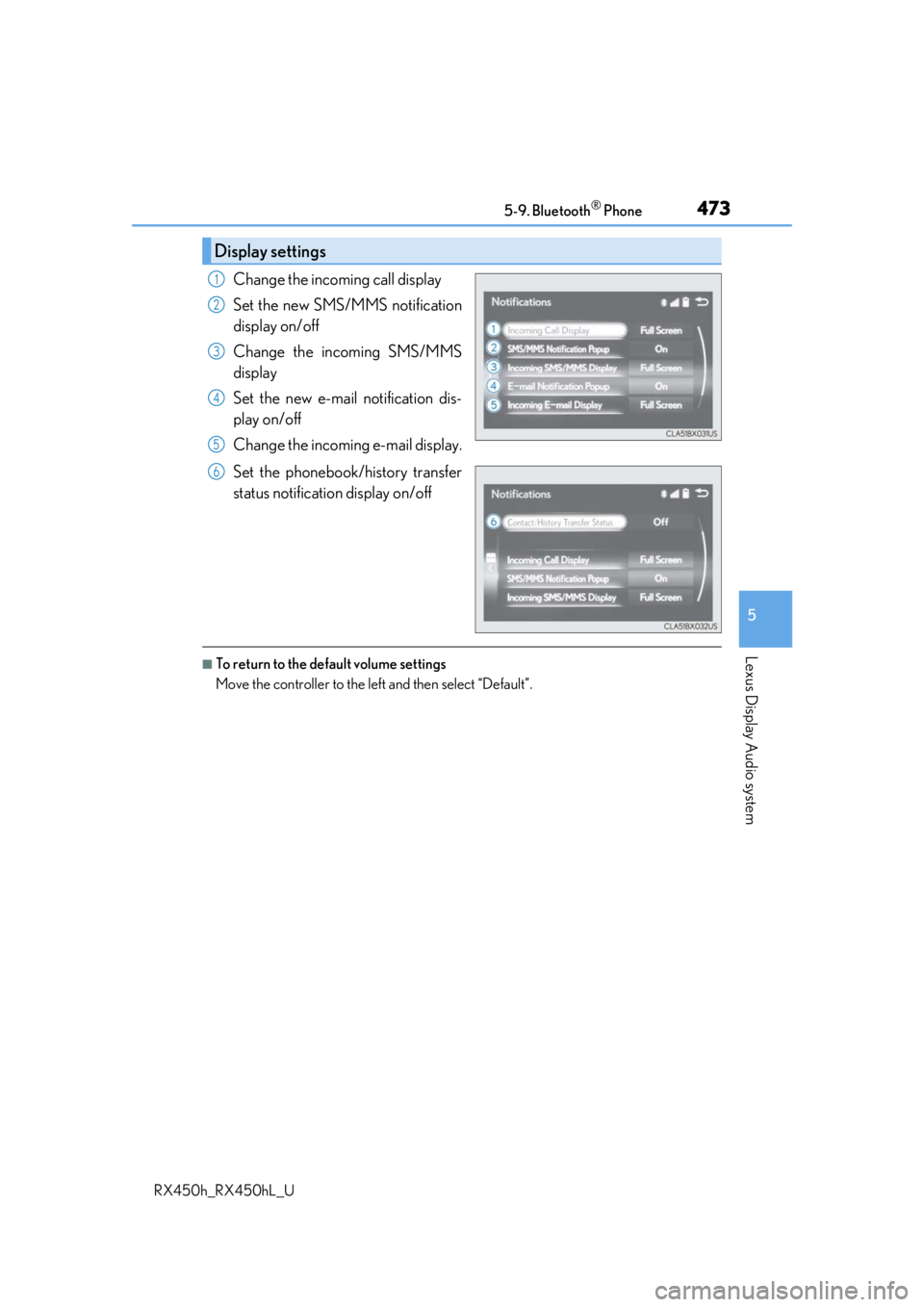
Change the incoming call display
Set the new SMS/MMS notification
display on/off
Change the incoming SMS/MMS
display
Set the new e-mail notification dis-
play on/off
Change the incoming e-mail display.
Set the phonebook/history transfer
status notification display on/off
■To return to the default volume settings
Move the controller to the left and then select “Default”.
Display settings
1
2
3
4
5
6
Page 474 of 792
474
RX450h_RX450hL_U5-10. Phonebook
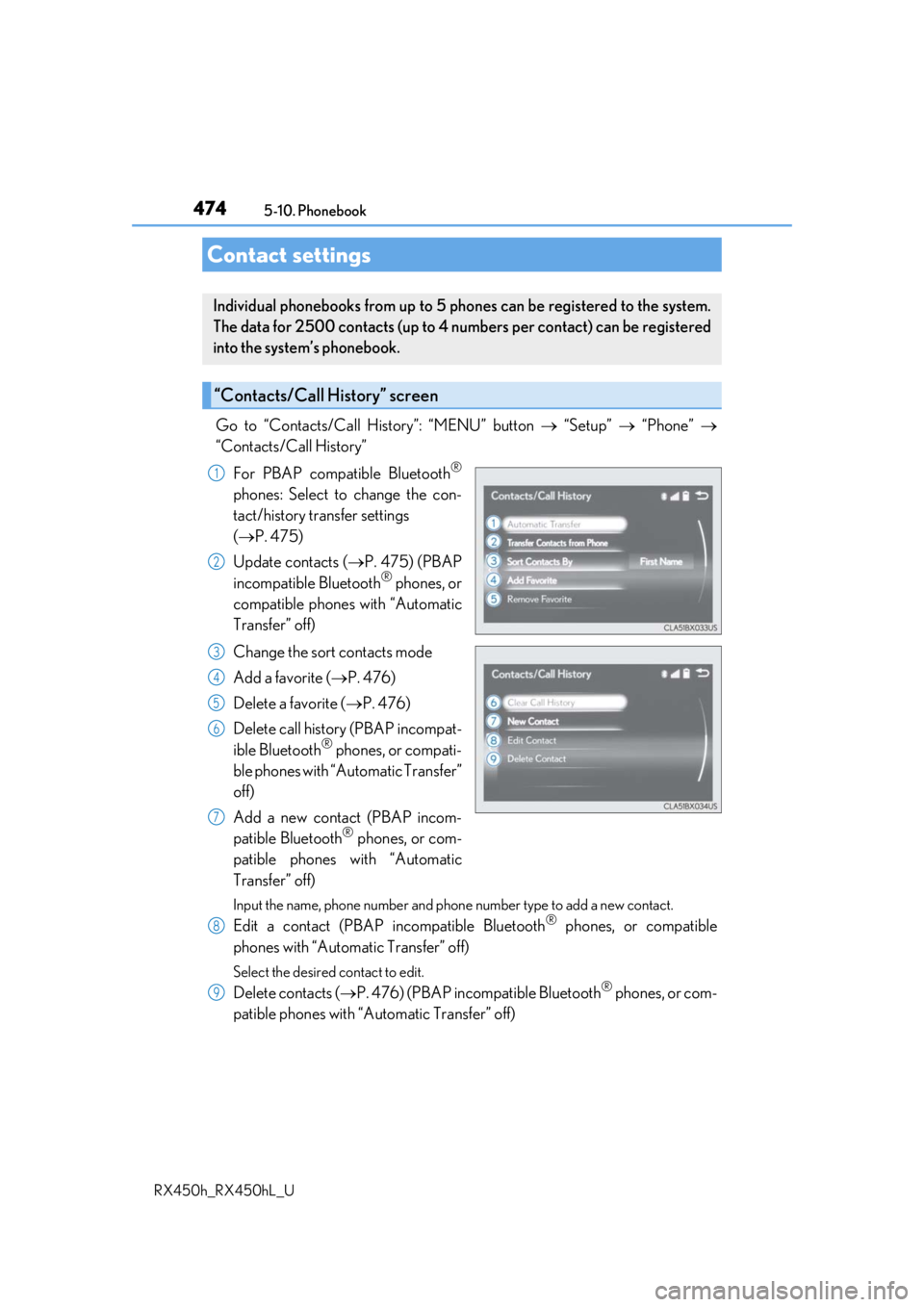
Go to “Contacts/Call History”: “MENU” button
“Setup” “Phone”
“Contacts/Call History”
For PBAP compatible Bluetooth
®
phones: Select to change the con-
tact/history transfer settings
( P. 475)
Update contacts ( P. 475) (PBAP
incompatible Bluetooth
® phones, or
compatible phones with “Automatic
Transfer” off)
Change the sort contacts mode
Add a favorite ( P. 476)
Delete a favorite ( P. 476)
Delete call history (PBAP incompat-
ible Bluetooth
® phones, or compati-
ble phones with “Automatic Transfer”
off)
Add a new contact (PBAP incom-
patible Bluetooth
® phones, or com-
patible phones with “Automatic
Transfer” off)
Input the name, phone number and phone number type to add a new contact.
Edit a contact (PBAP in compatible Bluetooth® phones, or compatible
phones with “Automatic Transfer” off)
Select the desired contact to edit.
Delete contacts ( P. 476) (PBAP incompatible Bluetooth® phones, or com-
patible phones with “Automatic Transfer” off)
Contact settings
Individual phonebooks from up to 5 ph ones can be registered to the system.
The data for 2500 contacts (up to 4 numbers per contact) can be registered
into the system’s phonebook.
“Contacts/Call History” screen
1
2
3
4
5
6
7
8
9