change LEXUS RX450H 2019 Manual Online
[x] Cancel search | Manufacturer: LEXUS, Model Year: 2019, Model line: RX450H, Model: LEXUS RX450H 2019Pages: 792, PDF Size: 13.48 MB
Page 418 of 792
418
RX450h_RX450hL_U5-3. Using the audio system
Press the “AUDIO” button to
display the “Source” screen.
If the “Source” screen is not displayed, press the button again.
Select the desired audio source.
The audio source can be selected by pressing the “RADIO” or “MEDIA” button.
Press the “MODE” switch when the audio system is turned on. The audio source
changes each time the “MODE” switch is pressed.
■Rearranging the list
The listing order of the sour ce list can be rearranged.
Move the controller to the left while on the “Source” screen.
Select “Audio Source Select”.
Select an item you wish to move and th en select where to move the item to.
Selecting the audio source
Switching between audio sources, such as the radio and CD, is explained in
this section.
Changing audio source
Using the steering wheel switches to change audio sources
1
2
1
2
3
Page 419 of 792
4195-3. Using the audio system
5
Lexus Display Audio system
RX450h_RX450hL_U
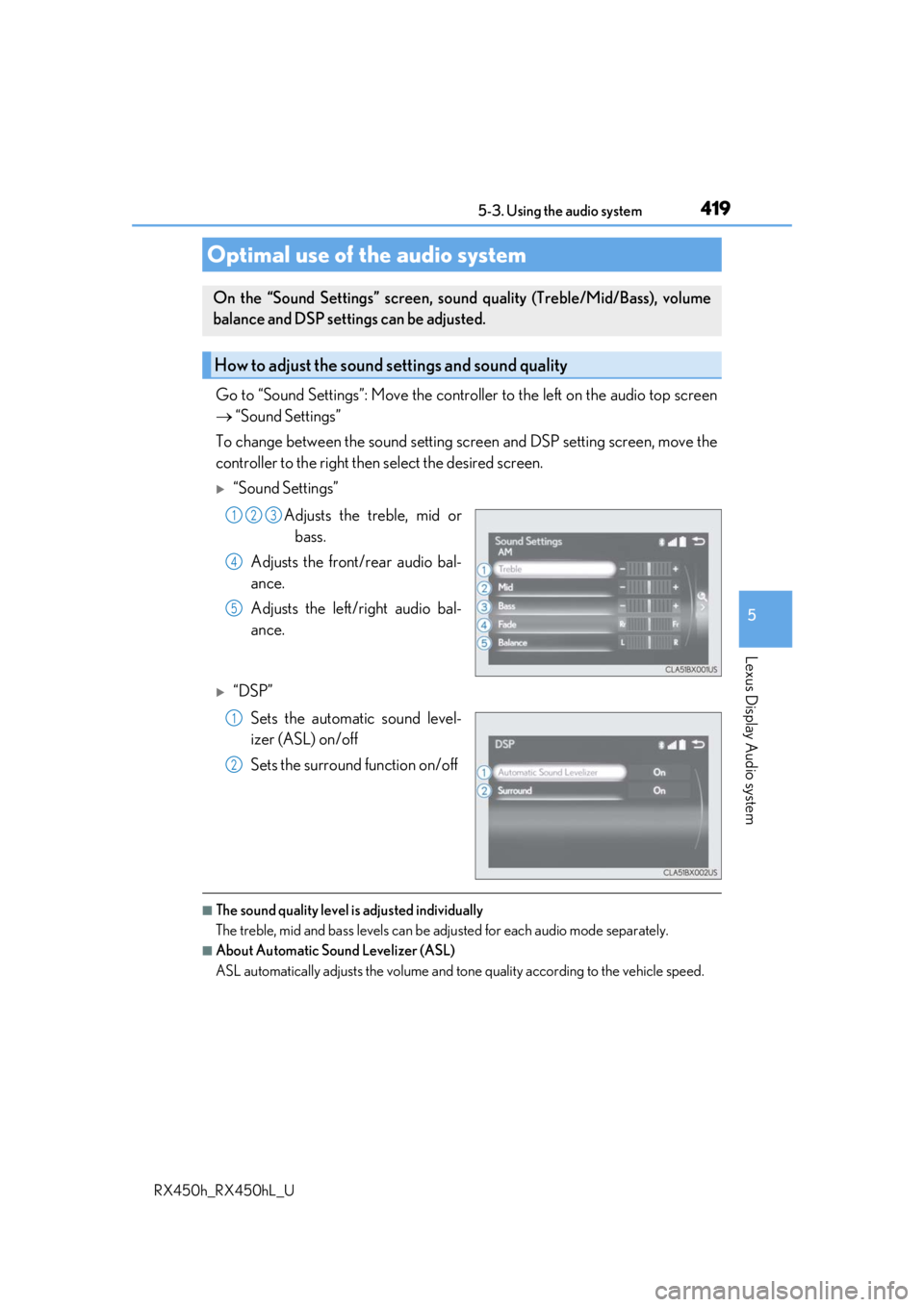
Go to “Sound Settings”: Move the controller to the left on the audio top screen
“Sound Settings”
To change between the sound setting screen and DSP setting screen, move the
controller to the right then select the desired screen.
“Sound Settings”
Adjusts the treble, mid orbass.
Adjusts the front/rear audio bal-
ance.
Adjusts the left/right audio bal-
ance.
“DSP”
Sets the automatic sound level-
izer (ASL) on/off
Sets the surround function on/off
■The sound quality level is adjusted individually
The treble, mid and bass levels can be adjusted for each audio mode separately.
■About Automatic Sound Levelizer (ASL)
ASL automatically adjusts the volume and to ne quality according to the vehicle speed.
Optimal use of the audio system
On the “Sound Settings” screen, sound quality (Treble/Mid/Bass), volume
balance and DSP settings can be adjusted.
How to adjust the sound settings and sound quality
123
4
5
1
2
Page 420 of 792
4205-3. Using the audio system
RX450h_RX450hL_U
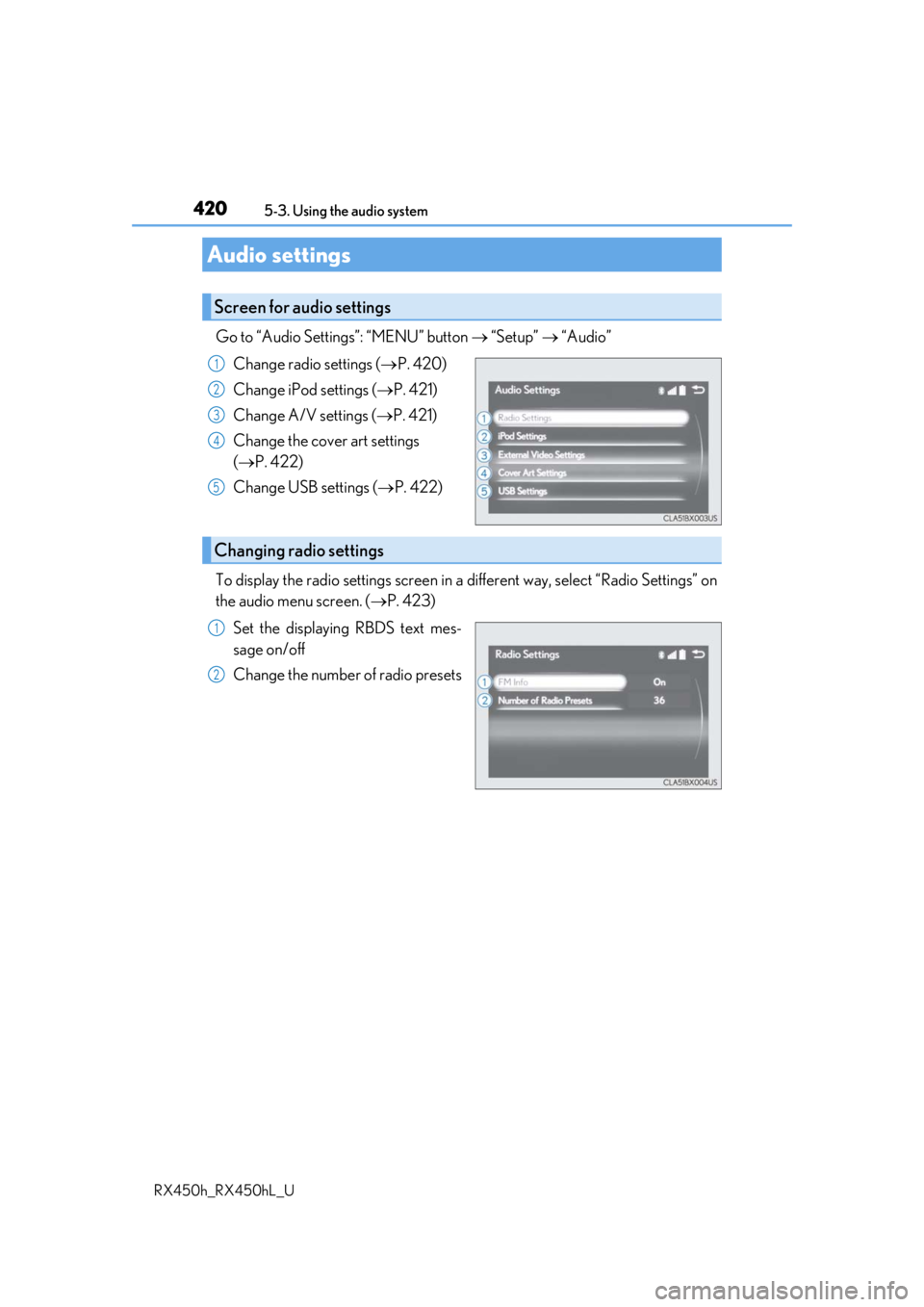
Go to “Audio Settings”: “MENU” button “Setup” “Audio”
Change radio settings ( P. 420)
Change iPod settings ( P. 421)
Change A/V settings ( P. 421)
Change the cover art settings
( P. 422)
Change USB settings ( P. 422)
To display the radio settings screen in a different way, select “Radio Settings” on
the audio menu screen. ( P. 423)
Set the displaying RBDS text mes-
sage on/off
Change the number of radio presets
Audio settings
Screen for audio settings
1
2
3
4
5
Changing radio settings
1
2
Page 421 of 792
4215-3. Using the audio system
5
Lexus Display Audio system
RX450h_RX450hL_U
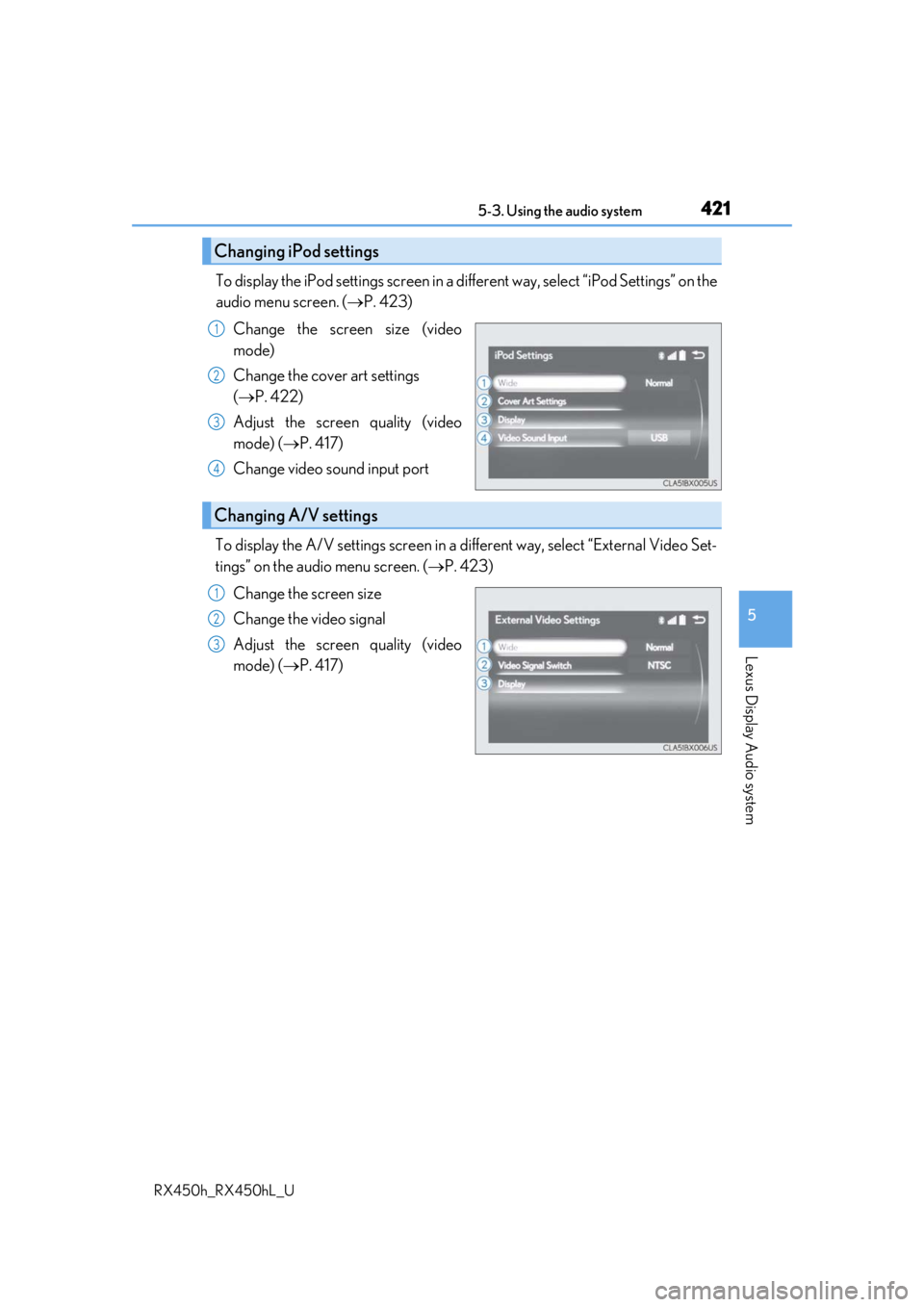
To display the iPod settings screen in a different way, select “iPod Settings” on the
audio menu screen. ( P. 423)
Change the screen size (video
mode)
Change the cover art settings
( P. 422)
Adjust the screen quality (video
mode) ( P. 417)
Change video sound input port
To display the A/V settings screen in a different way, select “External Video Set-
tings” on the audio menu screen. ( P. 423)
Change the screen size
Change the video signal
Adjust the screen quality (video
mode) ( P. 417)
Changing iPod settings
1
2
3
4
Changing A/V settings
1
2
3
Page 422 of 792
4225-3. Using the audio system
RX450h_RX450hL_U
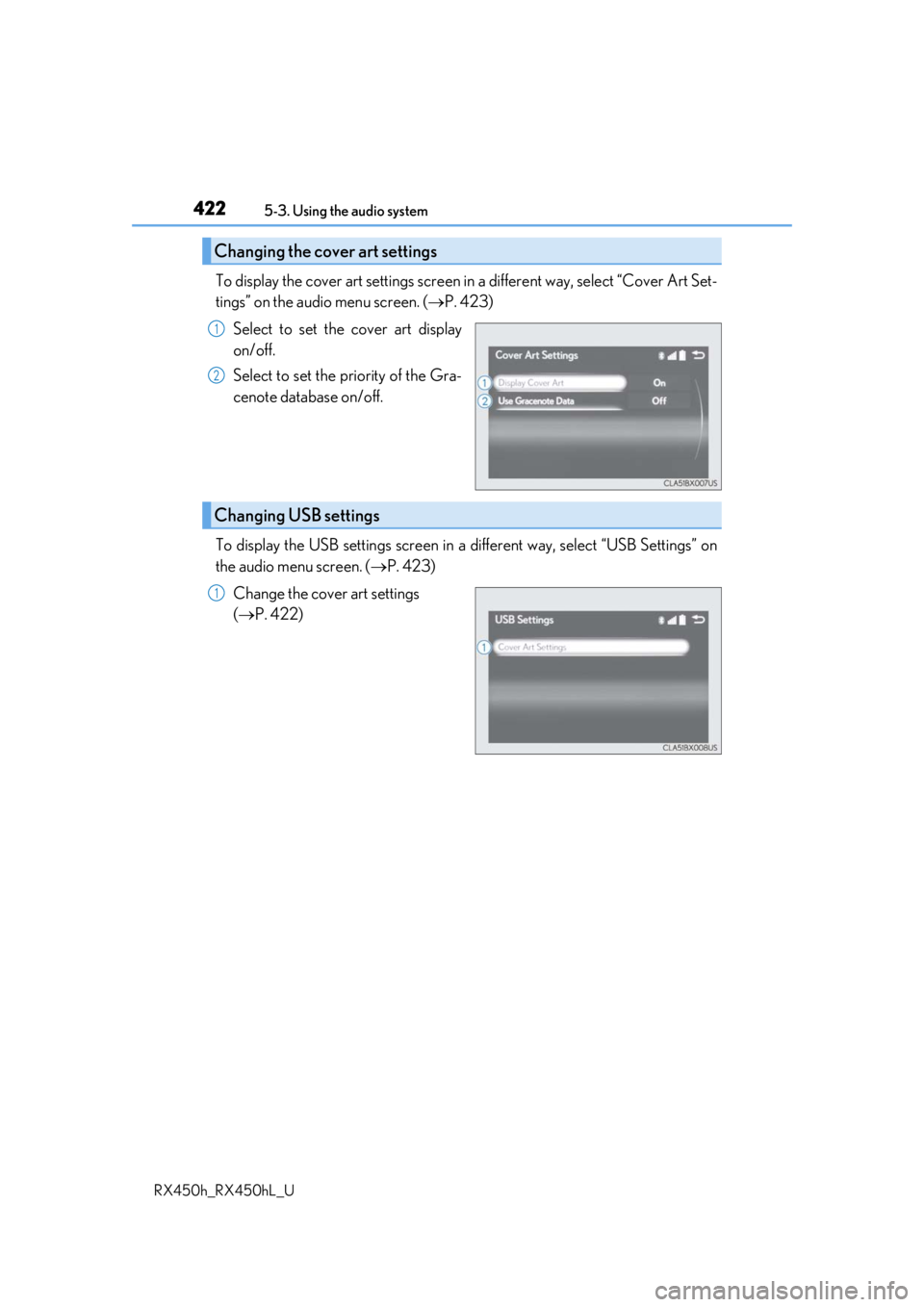
To display the cover art settings screen in a different way, select “Cover Art Set-
tings” on the audio menu screen. ( P. 423)
Select to set the cover art display
on/off.
Select to set the priority of the Gra-
cenote database on/off.
To display the USB settings screen in a different way, select “USB Settings” on
the audio menu screen. ( P. 423)
Change the cover art settings
( P. 422)
Changing the cover art settings
1
2
Changing USB settings
1
Page 423 of 792
4235-3. Using the audio system
5
Lexus Display Audio system
RX450h_RX450hL_U
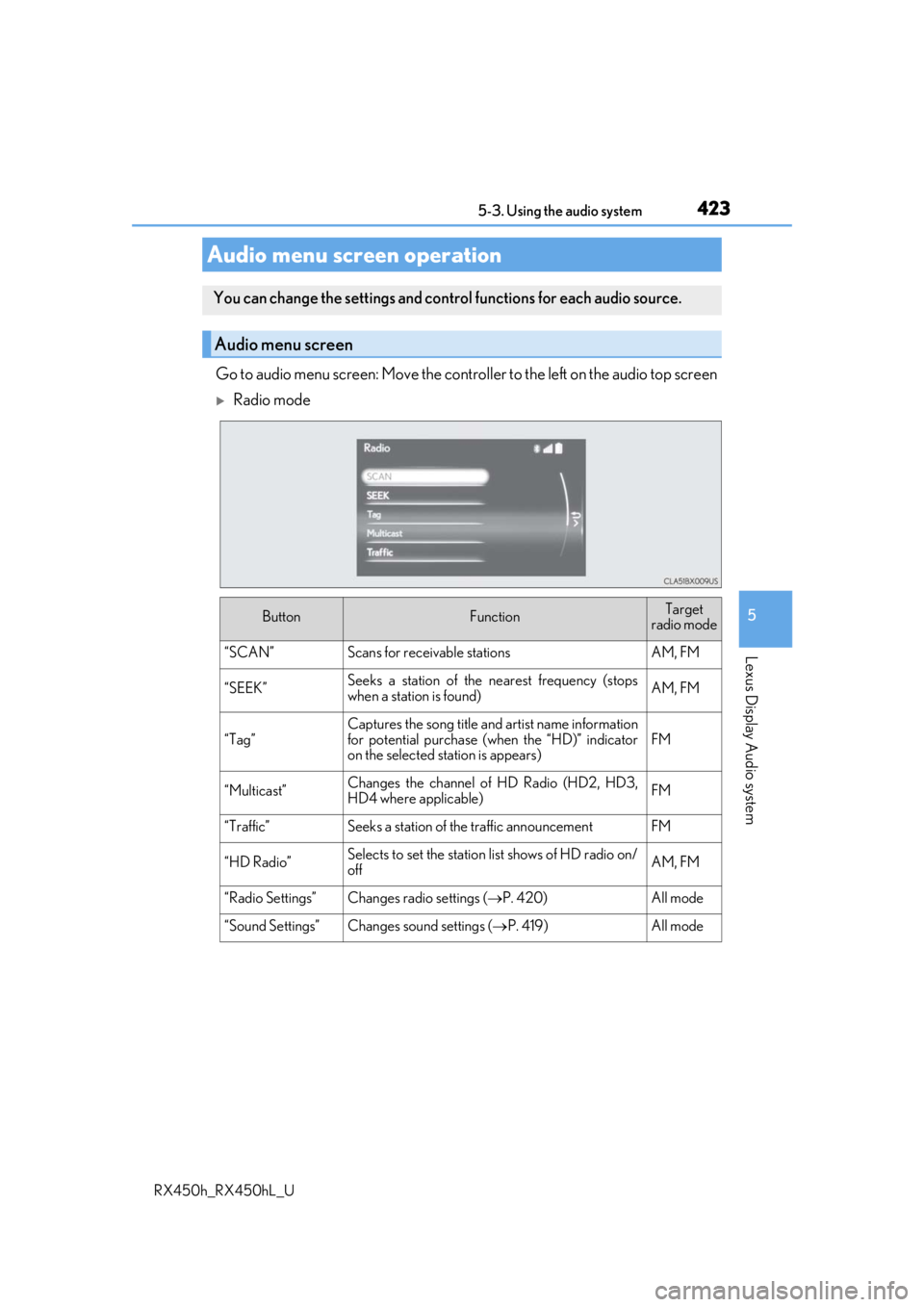
Go to audio menu screen: Move the controller to the left on the audio top screen
Radio mode
Audio menu screen operation
You can change the settings and control functions for each audio source.
Audio menu screen
ButtonFunctionTarget
radio mode
“SCAN”Scans for receivable stationsAM, FM
“SEEK”Seeks a station of the nearest frequency (stops
when a station is found)AM, FM
“Tag”
Captures the song title and artist name information
for potential purchase (when the “HD)” indicator
on the selected st ation is appears)
FM
“Multicast”Changes the channel of HD Radio (HD2, HD3,
HD4 where applicable)FM
“Traffic”Seeks a station of th e traffic announcementFM
“HD Radio”Selects to set the station list shows of HD radio on/
offAM, FM
“Radio Settings”Changes radio settings ( P. 420)All mode
“Sound Settings”Changes sound settings (P. 419)All mode
Page 424 of 792
4245-3. Using the audio system
RX450h_RX450hL_U
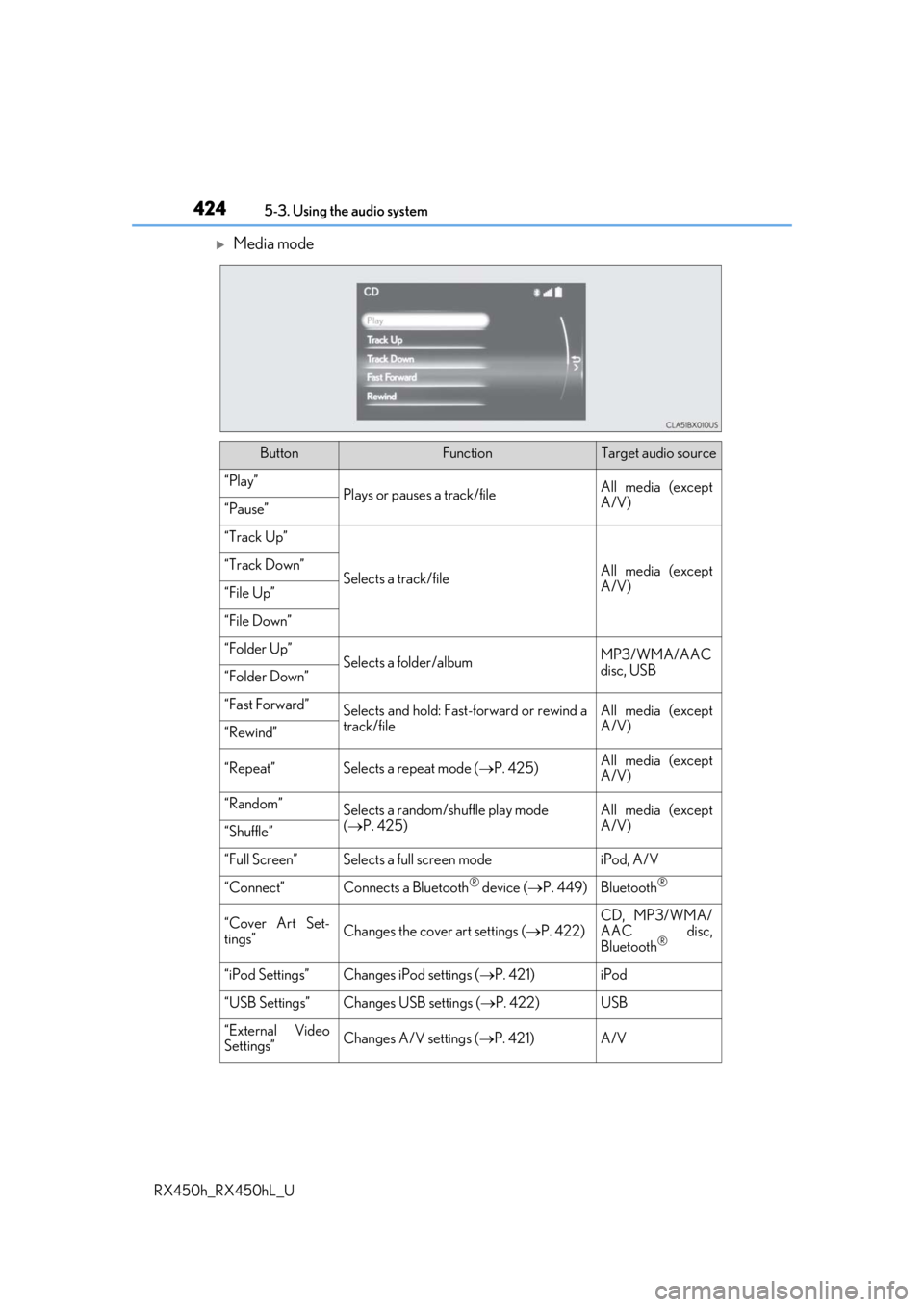
Media mode
ButtonFunctionTarget audio source
“Play”Plays or pauses a track/fileAll media (except
A/V)
“Pause”
“Track Up”
Selects a track/fileAll media (except
A/V)“Track Down”
“File Up”
“File Down”
“Folder Up”Selects a folder/albumMP3/WMA/AAC
disc, USB
“Folder Down”
“Fast Forward”Selects and hold: Fast-f orward or rewind a
track/fileAll media (except
A/V)
“Rewind”
“Repeat”Selects a repeat mode ( P. 425)All media (except
A/V)
“Random”Selects a random/shuffle play mode
( P. 425)All media (except
A/V)
“Shuffle”
“Full Screen”Selects a full screen modeiPod, A/V
“Connect”Connects a Bluetooth® device ( P. 449)Bluetooth®
“Cover Art Set-
tings”Changes the cover art settings ( P. 422)
CD, MP3/WMA/
AAC disc,
Bluetooth
®
“iPod Settings”Changes iPod settings ( P. 421)iPod
“USB Settings”Changes USB settings ( P. 422)USB
“External Video
Settings”Changes A/V settings (P. 421)A/V
Page 425 of 792
4255-3. Using the audio system
5
Lexus Display Audio system
RX450h_RX450hL_U
“Sound Settings”Changes sound settings (P. 419)All media
Repeat play
ModeAction
“Track Repeat”
File/track repeat“Repeat”
“RPT”
“On”
“Folder Repeat”Folder/album repeat“Album Repeat”
Random/shuffle playback
ModeAction
“1 DISC”
Random/shuffle play of the disc/folder/album“Random”
“Shuffle”
“Folder Random”
Random/shuffle play of all folders/albums“ALBUM RAND”
“Album Shuffle”
ButtonFunctionTarget audio source
Page 426 of 792
426
RX450h_RX450hL_U5-4. Using the radio
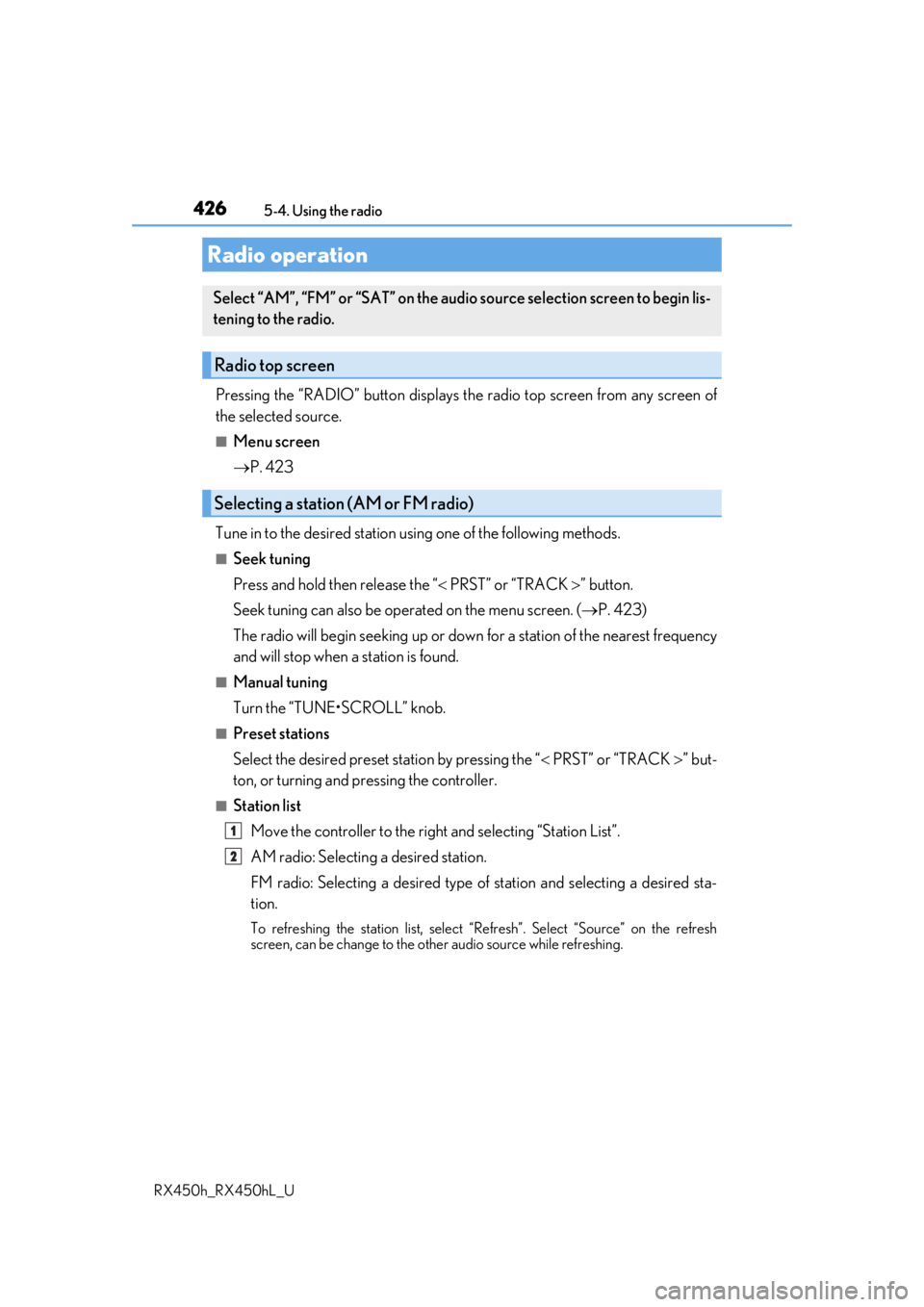
Pressing the “RADIO” button displays the radio top screen from any screen of
the selected source.
■Menu screen
P. 423
Tune in to the desired station using one of the following methods.
■Seek tuning
Press and hold then release the “ PRST” or “TRACK ” button.
Seek tuning can also be operated on the menu screen. ( P. 423)
The radio will begin seeking up or down for a station of the nearest frequency
and will stop when a station is found.
■Manual tuning
Turn the “TUNE•SCROLL” knob.
■Preset stations
Select the desired preset station by pressing the “ PRST” or “TRACK ” but-
ton, or turning and pressing the controller.
■Station list
Move the controller to the right and selecting “Station List”.
AM radio: Selectin g a desired station.
FM radio: Selecting a desired type of station and selecting a desired st\
a-
tion.
To refreshing the station list, select “Refresh”. Select “Source” on the refresh
screen, can be change to the othe r audio source while refreshing.
Radio operation
Select “AM”, “FM” or “SAT” on the audi o source selection screen to begin lis-
tening to the radio.
Radio top screen
Selecting a station (AM or FM radio)
1
2
Page 432 of 792
4325-4. Using the radio
RX450h_RX450hL_U
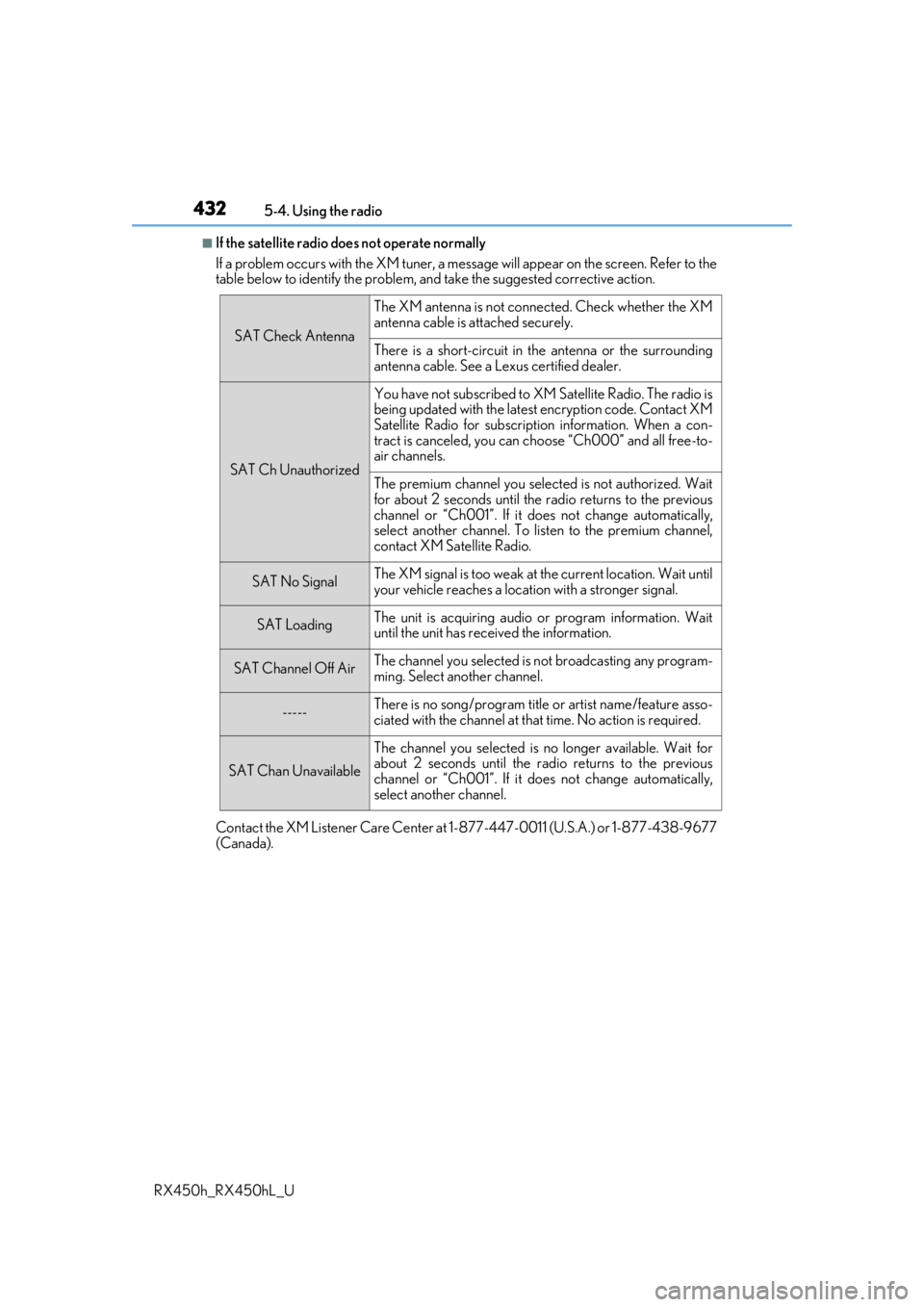
■If the satellite radio does not operate normally
If a problem occurs with the XM tuner, a message will appear on the screen. Refer to the
table below to identify the problem, an d take the suggested corrective action.
Contact the XM Listener Care Center at 1-877-447-0011 (U.S.A.) or 1-877-438-9677
(Canada).
SAT Check Antenna
The XM antenna is not connected. Check whether the XM
antenna cable is attached securely.
There is a short-circuit in the antenna or the surrounding
antenna cable. See a Lexus certified dealer.
SAT Ch Unauthorized
You have not subscribed to XM Satellite Radio. The radio is
being updated with the latest encryption code. Contact XM
Satellite Radio for subscripti on information. When a con-
tract is canceled, you can choose “Ch000” and all free-to-
air channels.
The premium channel you selected is not authorized. Wait
for about 2 seconds until the radio returns to the previous
channel or “Ch001”. If it does not change automatically,
select another channel. To listen to the premium channel,
contact XM Satellite Radio.
SAT No SignalThe XM signal is too weak at the current location. Wait until
your vehicle reaches a location with a stronger signal.
SAT LoadingThe unit is acquiring audio or program information. Wait
until the unit has rece ived the information.
SAT Channel Off AirThe channel you selected is not broadcasting any program-
ming. Select another channel.
-----There is no song/program title or artist name/feature asso-
ciated with the channel at that time. No action is required.
SAT Chan Unavailable
The channel you selected is no longer available. Wait for
about 2 seconds until the radio returns to the previous
channel or “Ch001”. If it does not change automatically,
select another channel.