display LEXUS RX450H 2019 Owners Manual
[x] Cancel search | Manufacturer: LEXUS, Model Year: 2019, Model line: RX450H, Model: LEXUS RX450H 2019Pages: 792, PDF Size: 13.48 MB
Page 320 of 792

3204-5. Using the driving support systems
RX450h_RX450hL_U
Multi-information display
Turning the BSM function/RCTA function on/off. ( P. 321)
The RCTA function is available when the BSM function is on.
Outside rear view mirror indicators
BSM function:
When a vehicle is detected in a blind spot of the outside rear view mirrors or
approaching rapidly from behind into a blin d spot, the outside rear view mirror indi-
cator on the detected side will illuminate. If the turn signal lever is operated toward
the detected side, the outside rear view mirror indicator flashes.
RCTA function:
When a vehicle approaching from the right or left at the rear of the vehicle is
detected, both outsid e rear view mirror indicators will flash.
“BSM” indicator/“RCTA” indicator
When the BSM function/RCTA function is turned on, the indicator illuminates.
Monitor screen display (RCTA function only)
If a vehicle approaching from the right or left at the rear of the vehicle is detected, the
RCTA icon ( P. 328) for the detected side will be displayed on the monitor screen.
This illustration shows an example of a vehi cle approaching from the left at the rear of
the vehicle.
RCTA buzzer (RCTA function only)
If a vehicle approaching from the right or left at the rear of the vehicle is detected, a
buzzer will sound. The buzzer also sounds for approximately 1 second immediately
after the BSM function is operated to turn the system on.
1
2
3
4
5
Page 321 of 792
3214-5. Using the driving support systems
4
Driving
RX450h_RX450hL_U
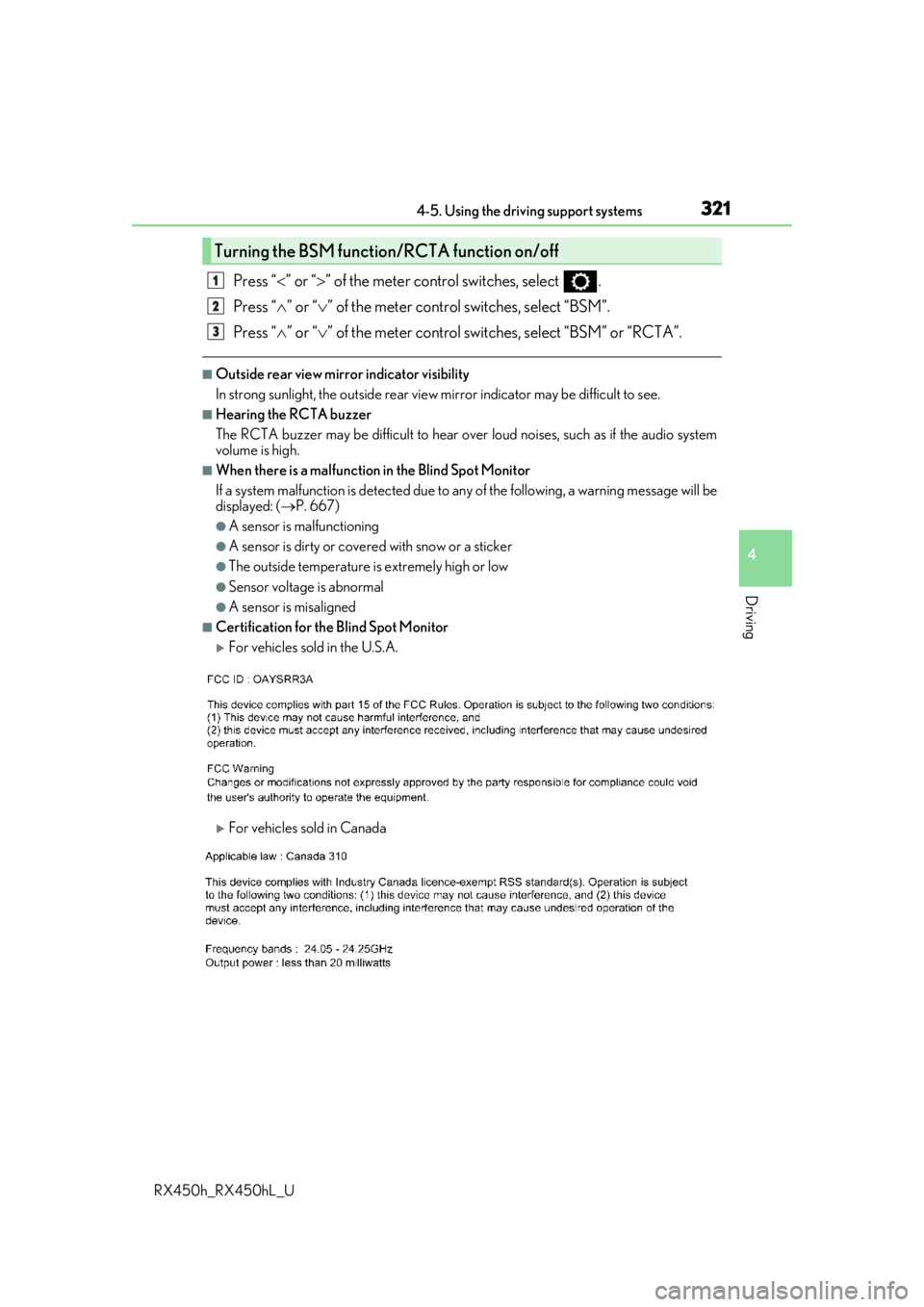
Press “” or “ ” of the meter control switches, select .
Press “ ” or “ ” of the meter control switches, select “BSM”.
Press “ ” or “ ” of the meter control switch es, select “BSM” or “RCTA”.
■Outside rear view mirror indicator visibility
In strong sunlight, the outside rear view mirror indicator may be difficult to see.
■Hearing the RCTA buzzer
The RCTA buzzer may be difficult to hear over loud noises, such as if the audio system
volume is high.
■When there is a malfunction in the Blind Spot Monitor
If a system malfunction is detected due to any of the following, a warning message will be
displayed: ( P. 667)
●A sensor is malfunctioning
●A sensor is dirty or covere d with snow or a sticker
●The outside temperature is extremely high or low
●Sensor voltage is abnormal
●A sensor is misaligned
■Certification for the Blind Spot Monitor
For vehicles sold in the U.S.A.
For vehicles sold in Canada
Turning the BSM function/RCTA function on/off
1
2
3
Page 328 of 792
3284-5. Using the driving support systems
RX450h_RX450hL_U
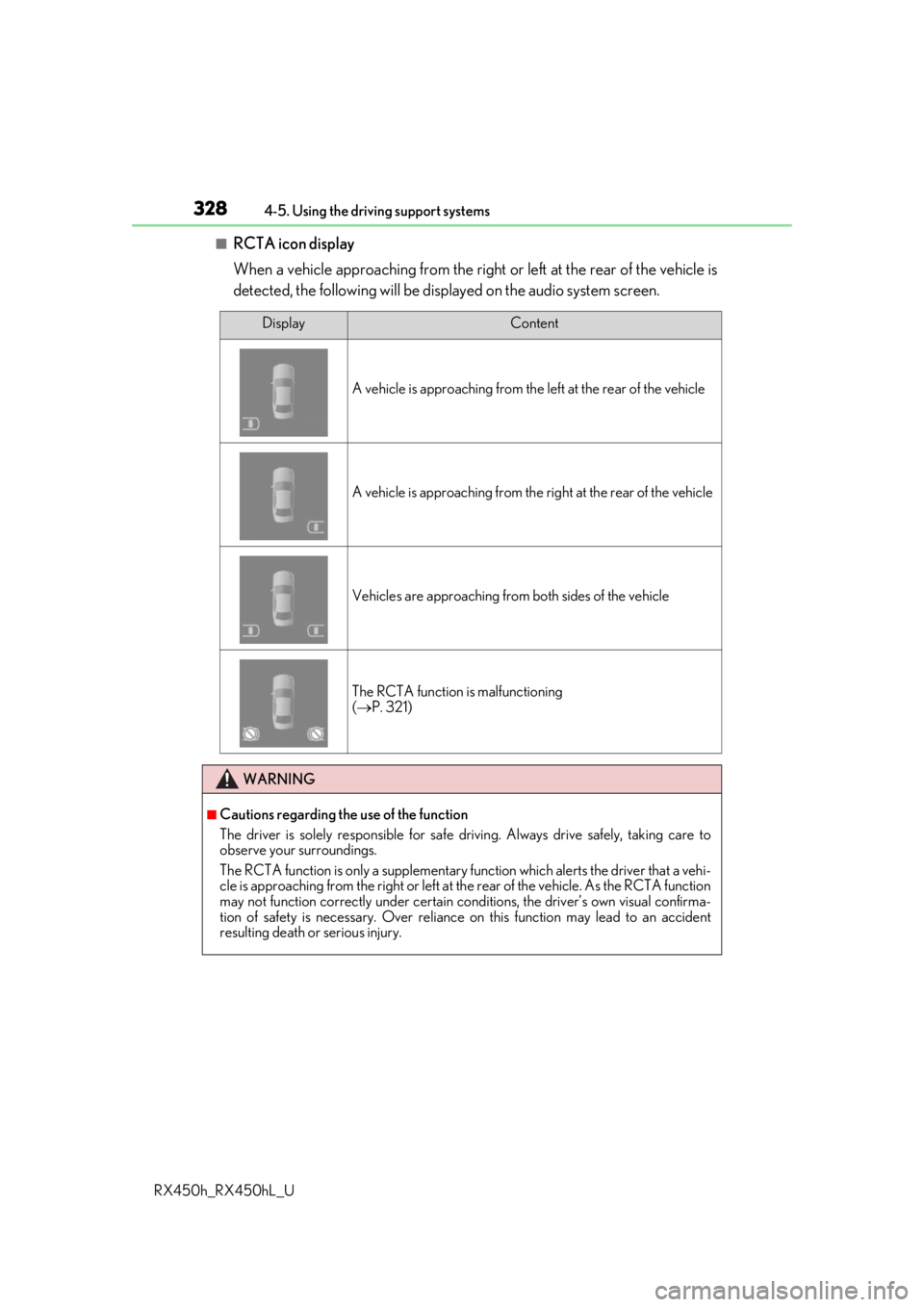
■RCTA icon display
When a vehicle approaching from the right or left at the rear of the vehicle is
detected, the following will be displayed on the audio system screen.
DisplayContent
A vehicle is approaching from the left at the rear of the vehicle
A vehicle is approaching from the right at the rear of the vehicle
Vehicles are approaching from both sides of the vehicle
The RCTA function is malfunctioning
( P. 321)
WARNING
■Cautions regarding the use of the function
The driver is solely responsible for safe driving. Always drive safely, taking care to
observe your surroundings.
The RCTA function is only a supplementary function which alerts the driver that a vehi-
cle is approaching from the right or left at the rear of the vehicle. As the RCTA function
may not function correctly under certain cond itions, the driver’s own visual confirma-
tion of safety is necessary. Over reliance on this function may lead to an accident
resulting death or serious injury.
Page 332 of 792
3324-5. Using the driving support systems
RX450h_RX450hL_U
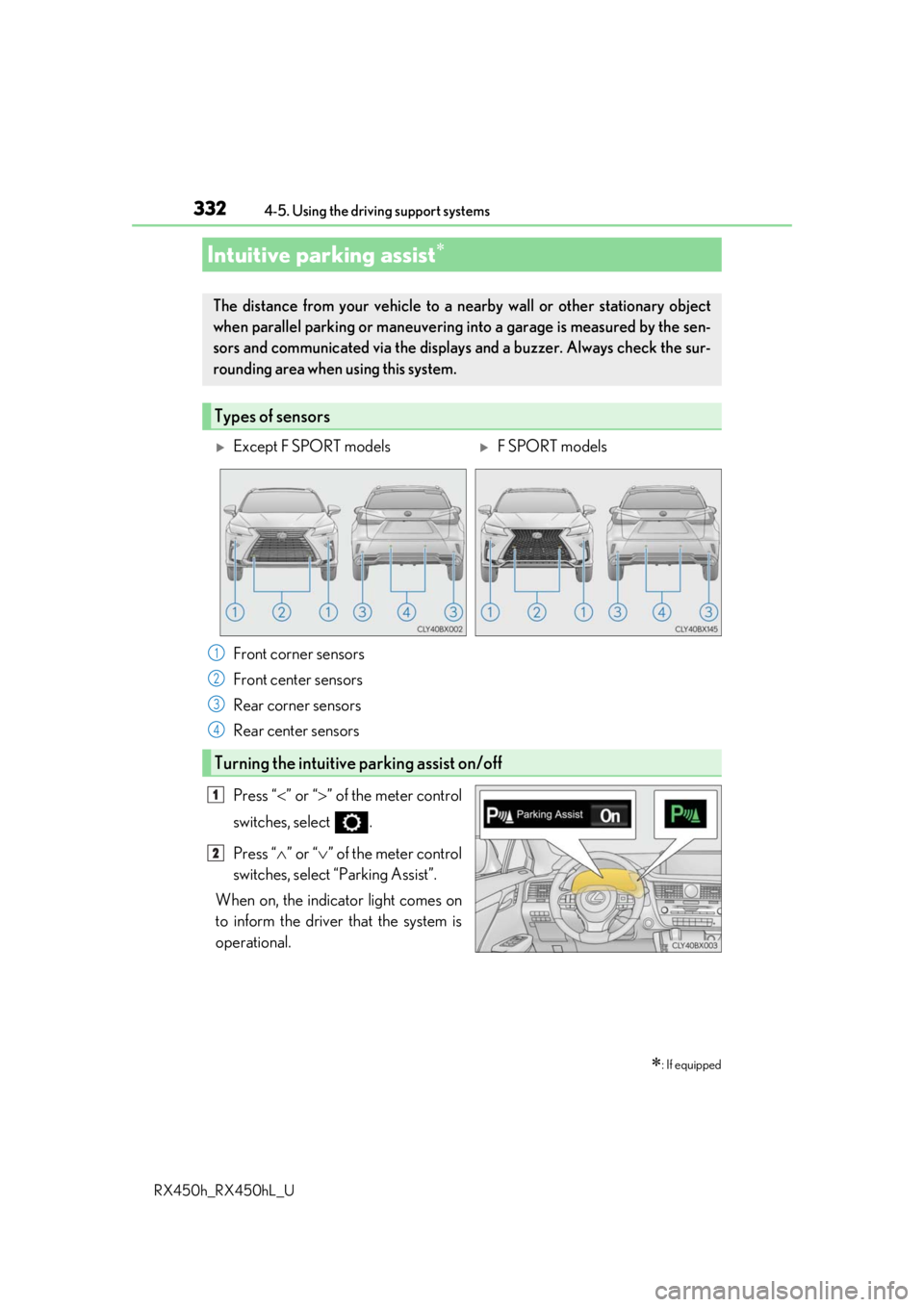
Press “ ” or “ ” of the meter control
switches, select .
Press “ ” or “ ” of the meter control
switches, select “Parking Assist”.
When on, the indicator light comes on
to inform the driver that the system is
operational.
Intuitive parking assist
: If equipped
The distance from your vehicle to a ne arby wall or other stationary object
when parallel parking or maneuvering into a garage is measured by the sen-
sors and communicated via the displays and a buzzer. Always check the sur-
rounding area when using this system.
Types of sensors
Except F SPORT modelsF SPORT models
Front corner sensors
Front center sensors
Rear corner sensors
Rear center sensors
Turning the intuitive parking assist on/off
1
2
3
4
1
2
Page 333 of 792
3334-5. Using the driving support systems
4
Driving
RX450h_RX450hL_U
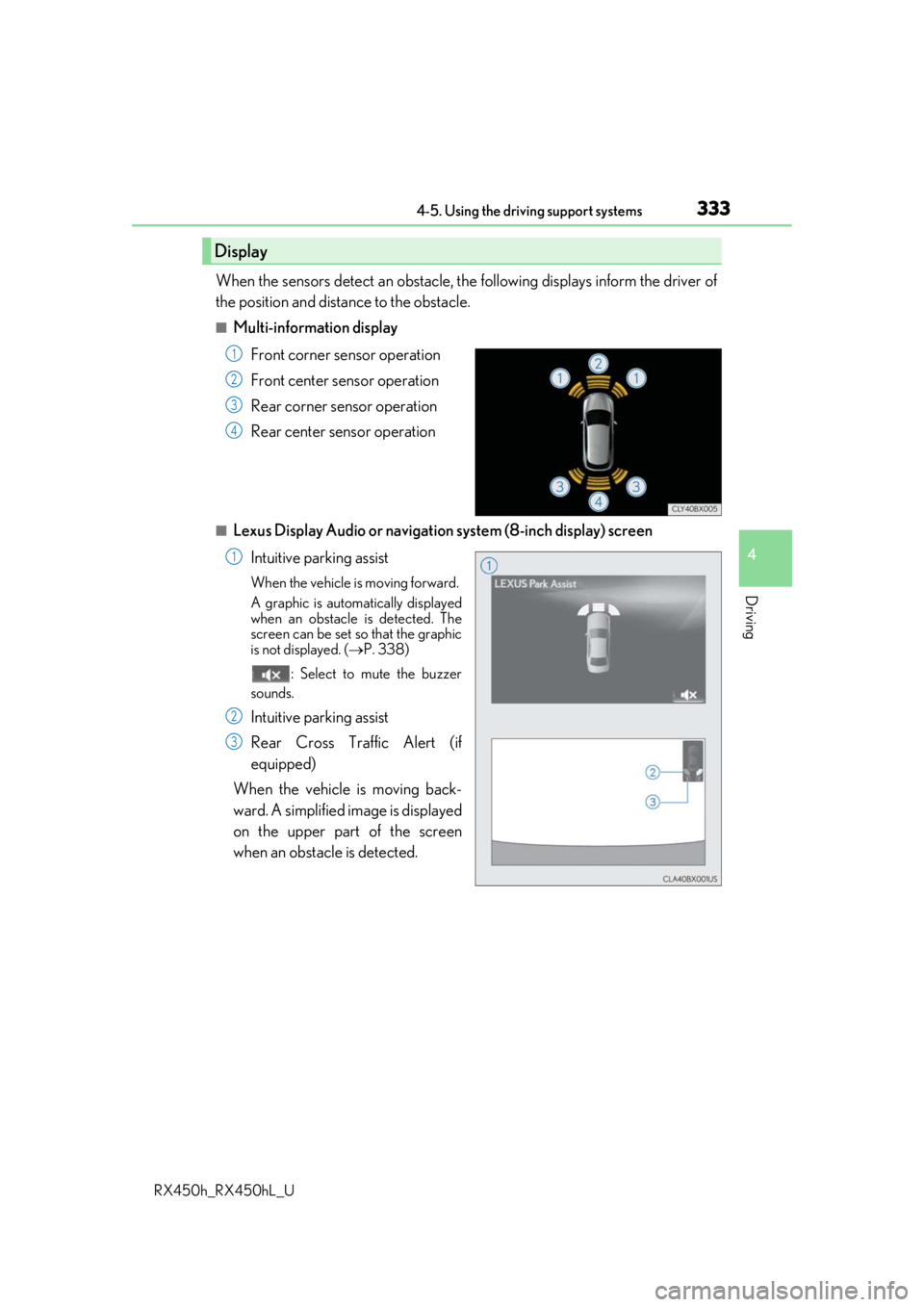
When the sensors detect an obstacle, the following displays inform the driver of
the position and distance to the obstacle.
■Multi-information display
Front corner sensor operation
Front center sensor operation
Rear corner sensor operation
Rear center sensor operation
■Lexus Display Audio or navigation system (8-inch display) screen
Intuitive parking assist
When the vehicle is moving forward.
A graphic is automatically displayed
when an obstacle is detected. The
screen can be set so that the graphic
is not displayed. ( P. 338)
: Select to mute the buzzer
sounds.
Intuitive parking assist
Rear Cross Traffic Alert (if
equipped)
When the vehicle is moving back-
ward. A simplified image is displayed
on the upper part of the screen
when an obstacle is detected.
Display
1
2
3
4
1
2
3
Page 334 of 792
3344-5. Using the driving support systems
RX450h_RX450hL_U
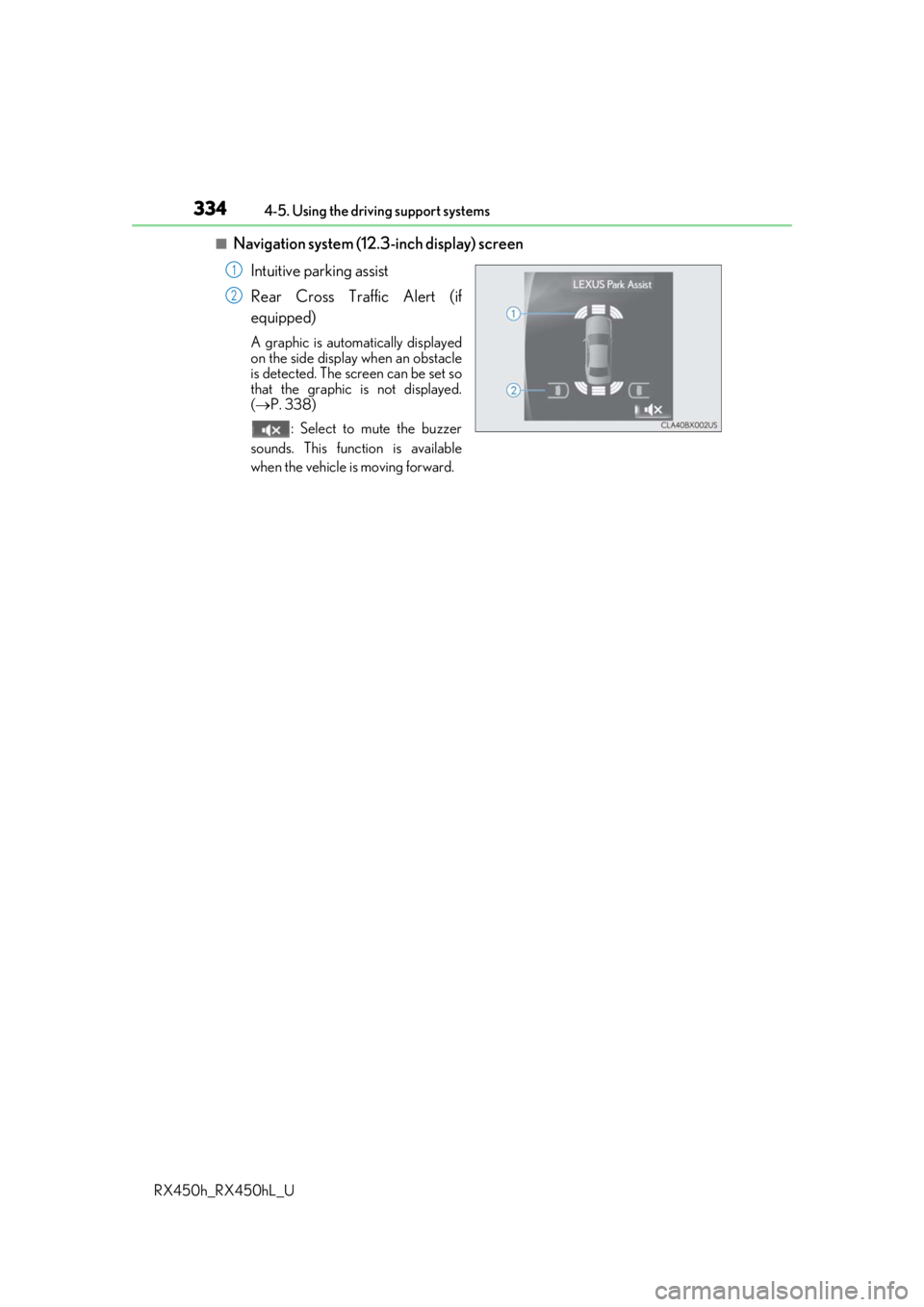
■Navigation system (12.3 -inch display) screen
Intuitive parking assist
Rear Cross Traffic Alert (if
equipped)
A graphic is automatically displayed
on the side display when an obstacle
is detected. The screen can be set so
that the graphic is not displayed.
( P. 338)
: Select to mute the buzzer
sounds. This function is available
when the vehicle is moving forward.
1
2
Page 335 of 792
3354-5. Using the driving support systems
4
Driving
RX450h_RX450hL_U
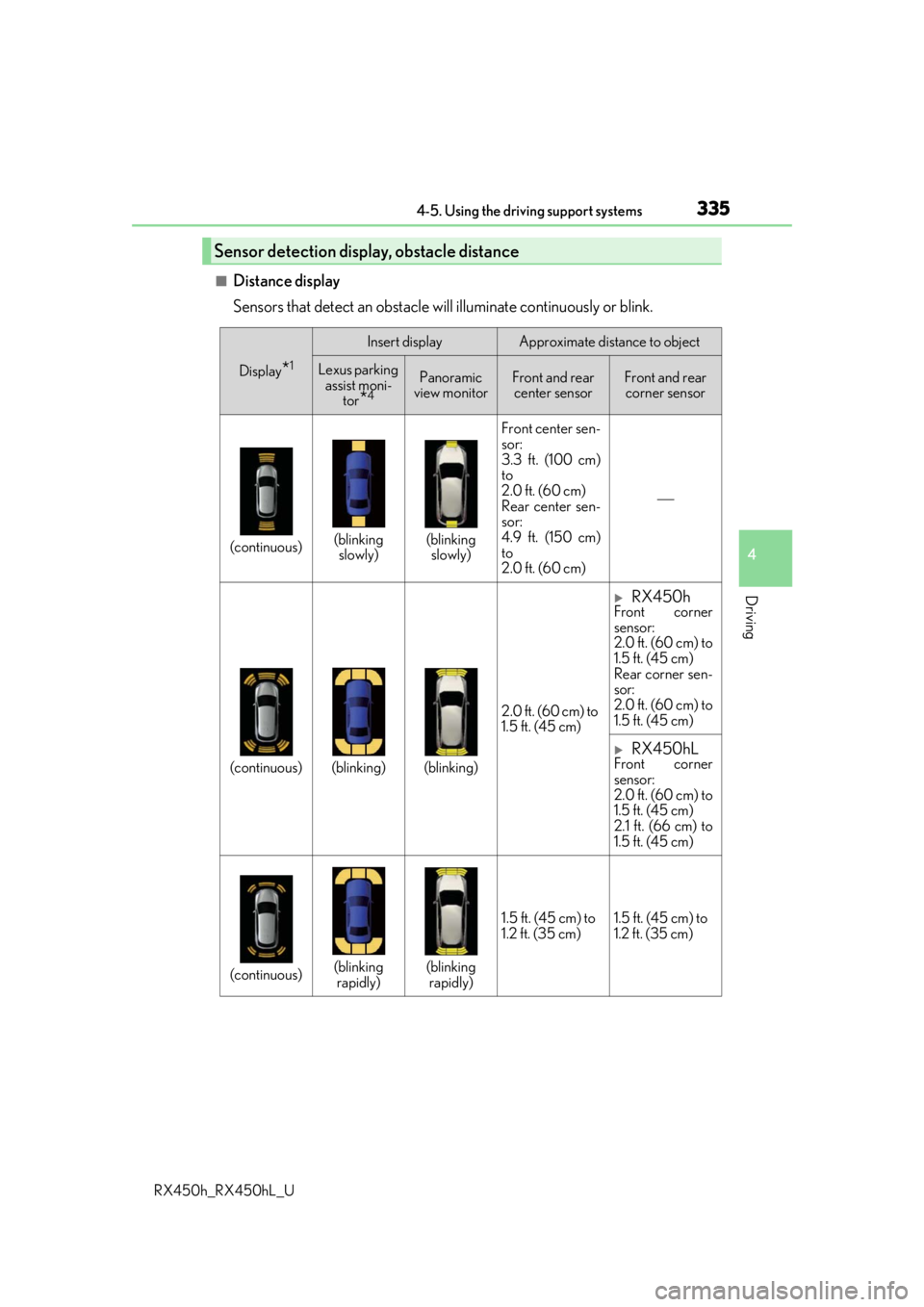
■Distance display
Sensors that detect an obstacle will illuminate continuously or blink.
Sensor detection display, obstacle distance
Display*1
Insert displayApproximate distance to object
Lexus parking assist moni- tor
*4
Panoramic
view monitorFront and rear center sensorFront and rear corner sensor
(continuous)(blinking slowly)(blinking slowly) Front center sen-
sor:
3.3 ft. (100 cm)
to
2.0 ft. (60 cm)
Rear center sen-
sor:
4.9 ft. (150 cm)
to
2.0 ft. (60 cm)
(continuous)(blinking)(blinking)
2.0 ft. (60 cm) to
1.5 ft. (45 cm)
RX450hFront corner
sensor:
2.0 ft. (60 cm) to
1.5 ft. (45 cm)
Rear corner sen-
sor:
2.0 ft. (60 cm) to
1.5 ft. (45 cm)
RX450hLFront corner
sensor:
2.0 ft. (60 cm) to
1.5 ft. (45 cm)
2.1 ft. (66 cm) to
1.5 ft. (45 cm)
(continuous)(blinking
rapidly)(blinking rapidly) 1.5 ft. (45 cm) to
1.2 ft. (35 cm)
1.5 ft. (45 cm) to
1.2 ft. (35 cm)
Page 336 of 792
3364-5. Using the driving support systems
RX450h_RX450hL_U
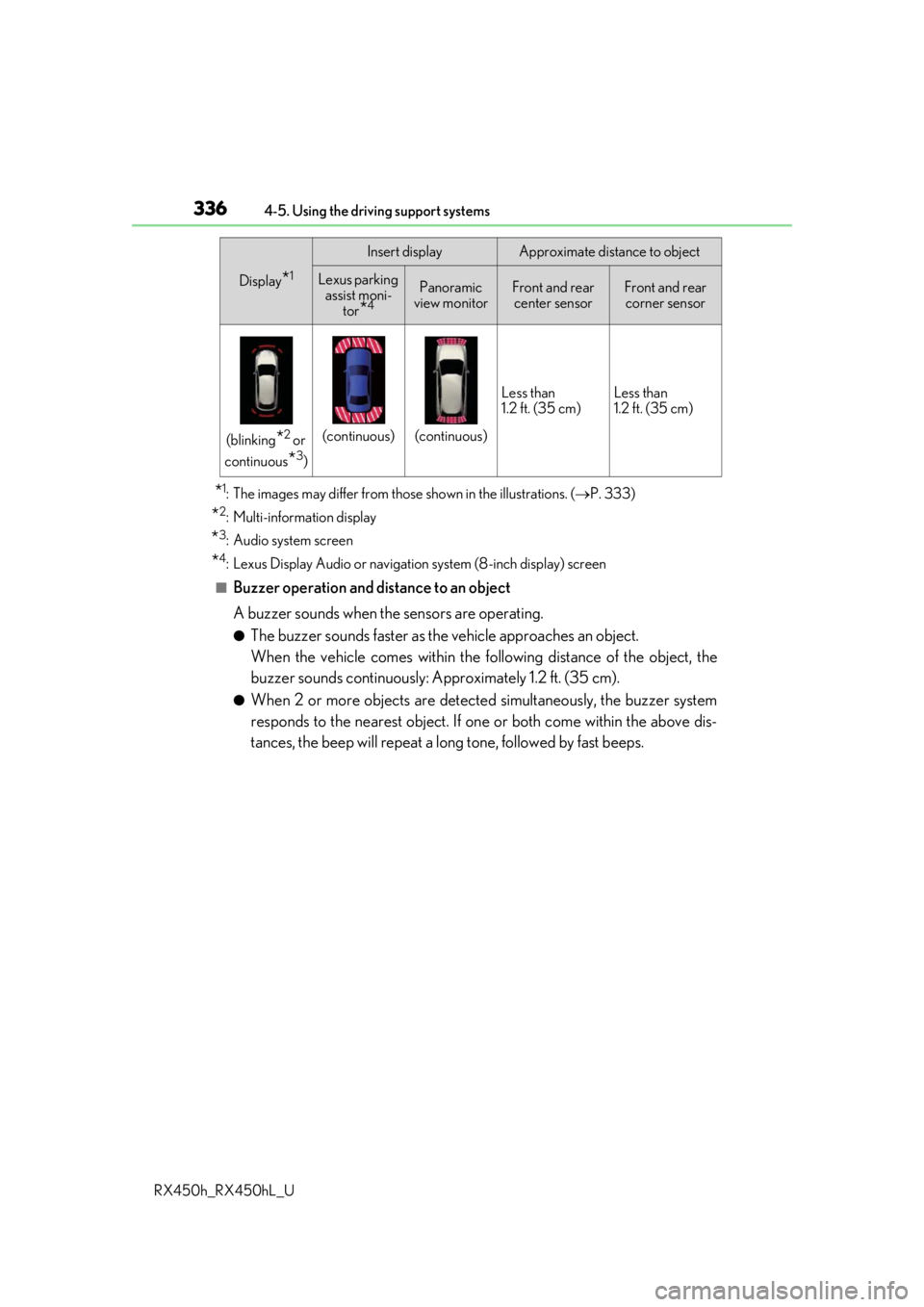
*1: The images may differ from th ose shown in the illustrations. (P. 333)
*2: Multi-information display
*3: Audio system screen
*4: Lexus Display Audio or navigation system (8-inch display) screen
■Buzzer operation and distance to an object
A buzzer sounds when the sensors are operating.
●The buzzer sounds faster as the vehicle approaches an object.
When the vehicle comes within the following distance of the object, the
buzzer sounds continuously: Approximately 1.2 ft. (35 cm).
●When 2 or more objects are detected simultaneously, the buzzer system
responds to the nearest object. If on e or both come within the above dis-
tances, the beep will repeat a lo ng tone, followed by fast beeps.
(blinking*2 or
continuous
*3)
(continuous)(continuous) Less than
1.2 ft. (35 cm)
Less than
1.2 ft. (35 cm)
Display*1
Insert displayApproximate distance to object
Lexus parking
assist moni-
tor
*4
Panoramic
view monitorFront and rear center sensorFront and rear corner sensor
Page 338 of 792
3384-5. Using the driving support systems
RX450h_RX450hL_U
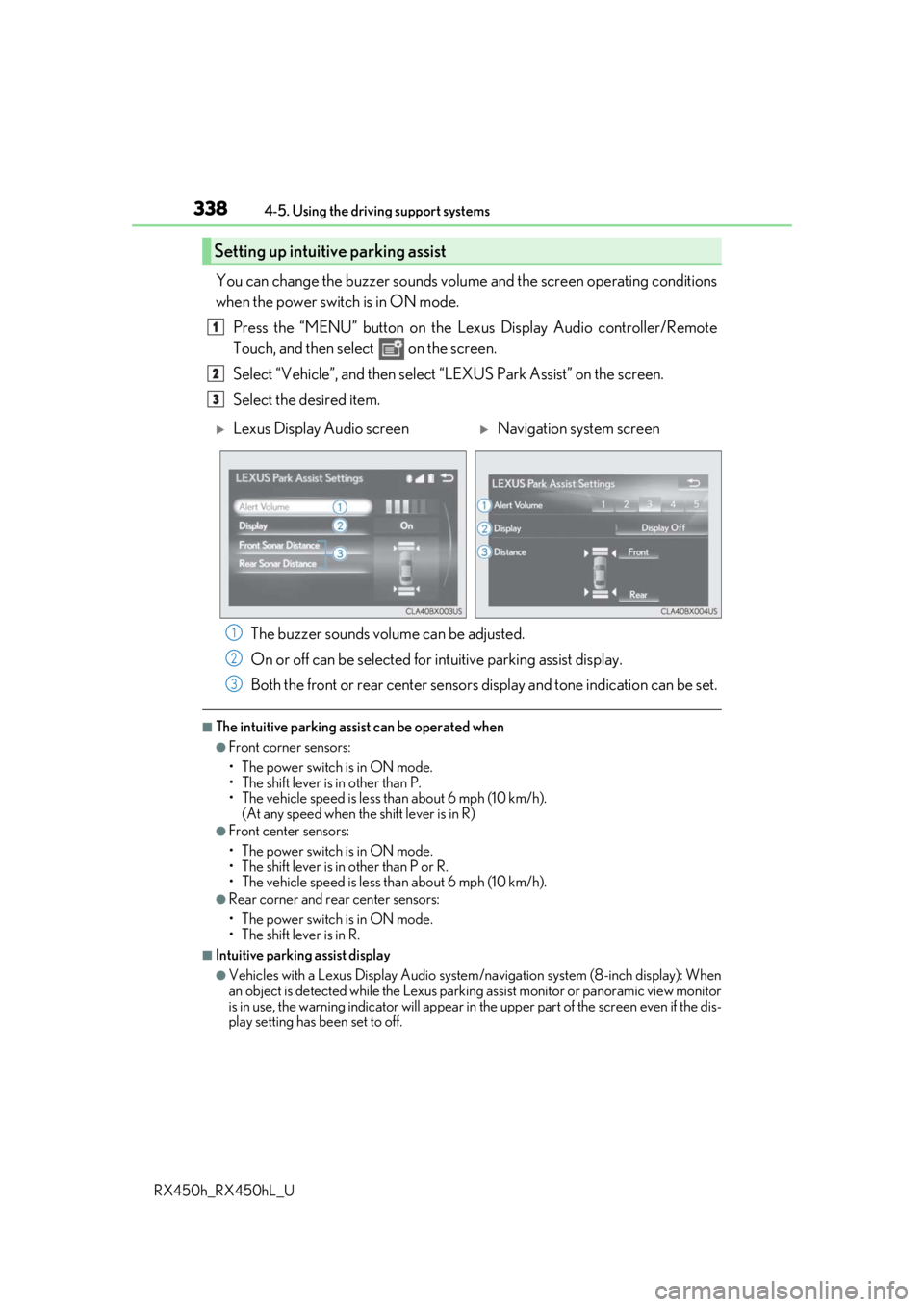
You can change the buzzer sounds volu me and the screen operating conditions
when the power switch is in ON mode.
Press the “MENU” button on the Le xus Display Audio controller/Remote
Touch, and then select on the screen.
Select “Vehicle”, and then select “LEXUS Park Assist” on the screen.
Select the desired item.
The buzzer sounds volume can be adjusted.
On or off can be selected for intuitive parking assist display.
Both the front or rear center sensors display and tone indication can be set.
■The intuitive parking assist can be operated when
●Front corner sensors:
• The power switch is in ON mode.
• The shift lever is in other than P.
• The vehicle speed is less than about 6 mph (10 km/h).
(At any speed when the shift lever is in R)
●Front center sensors:
• The power switch is in ON mode.
• The shift lever is in other than P or R.
• The vehicle speed is less than about 6 mph (10 km/h).
●Rear corner and rear center sensors:
• The power switch is in ON mode.
• The shift lever is in R.
■Intuitive parking assist display
●Vehicles with a Lexus Display Audio system/navigation system (8-inch display): When
an object is detected while the Lexus parking assist monito r or panoramic view monitor
is in use, the warning indicator will appear in the upper part of the screen even if the dis-
play setting has been set to off.
Setting up intuitive parking assist
1
2
3
Lexus Display Audio screenNavigation system screen
1
2
3
Page 339 of 792
3394-5. Using the driving support systems
4
Driving
RX450h_RX450hL_U
●Vehicles with a navigation system (12.3-inch display): If the intuitive parking assist dis-
play is set to on, detected objects will also be displayed on the panoramic view monitor.
For details, refer to “NAVIGATION SYSTEM OWNER’S MANUAL”.
■Sensor detectio n information
●The sensor’s detection areas are limited to the areas around the vehicle’s bumper.
●Certain vehicle conditions and the surrounding environment may affect the ability of a
sensor to correctly detect an object. Particular instances where this may occur are
listed below.
• There is dirt, snow or ice on the sensor . (Wiping the sensors will resolve this prob-
lem.)
• The sensor is frozen. (Thawing the area will resolve this problem.) In especially cold weather, if a sensor is frozen the screen may show an abnormal
display, or obstacles may not be detected.
• The sensor is covered in any way.
• The vehicle is leaning considerably to one side.
• When a sensor or the area around a sensor is extremely hot or cold.
• On an extremely bumpy road, on an incline, on gravel, or on grass.
• The vicinity of the vehicle is noisy due to vehicle horns, motorcycle engines, air
brakes of large vehicles, or other loud noises producing ultrasonic waves.
• There is another vehicle equipped with parking assist sensors in the vicinity.
• The sensor is coated with a sheet of spray or heavy rain.
• The bumper or sensor re ceives a strong impact.
• If the vehicle is significantly tilted.
• The vehicle is approaching a tall or curved curb.
• In harsh sunlight or intense cold weather.
• The area directly under the bumpers is not detected.
• If objects draw too close to the sensor.
• People may not be detected if they are wearing certain types of clothing.
In addition to the examples above, there ar e instances in which, because of their shape,
signs and other objects may be judged by a sensor to be closer than they are.
●The shape of the object may prevent a sensor from detecting it. Pay particular attention
to the following objects:
• Wires, fences, ropes, etc.
• Cotton, snow and other materi als that absorb sound waves
• Sharply-angled objects
• Low obstacles
• Tall obstacles with upper sections projecting outwards in the direction of your vehi-
cle
●The following situations may occur during use.
• Depending on the shape of the object and other factors, the detection distance may
shorten, or detection may be impossible.
• Objects may not be detected if they are too close to the sensor.
• There will be a short dela y between object detection and display. Even at slow
speeds, there is a possibility that the obje ct will come within the sensor’s detection
areas before the display is shown and the buzzer sounds.
• Thin posts or objects lower than the sens or may not be detected when approached,
even if they have been detected once.
• It might be difficult to hear beeps due to th e volume of audio system or air flow noise
of the air conditioning system.