lane LEXUS RX450H 2019 Owners Manual
[x] Cancel search | Manufacturer: LEXUS, Model Year: 2019, Model line: RX450H, Model: LEXUS RX450H 2019Pages: 792, PDF Size: 13.48 MB
Page 3 of 792

3
1
9 8
7 4 3
2
10
RX450h_RX450hL_U
6
5
4-1. Before driving Driving the vehicle ......................212
Cargo and luggage .................. 220
Vehicle load limits ..................... 223
Trailer towing (vehicles with towing package)............ 224
Trailer towing (vehicles without towing
package)..................................... 237
Dinghy towing ............................. 238
4-2. Driving procedures Power (ignition) switch............ 239
EV drive mode ............................ 244
Hybrid transmission.................. 246
Turn signal lever ......................... 252
Parking brake .............................. 253
Brake Hold ................................... 256
4-3. Operating the lights and wipers
Headlight switch ........................ 258
Automatic High Beam............. 262
Fog light switch ........................... 266
Windshield wipers and washer ......................................... 267
Rear window wiper and washer ..........................................272 4-4. Refueling
Opening the fuel tank cap ......274
4-5. Using the driving support systems
Lexus Safety System+ .............. 279
PCS (Pre-Collision System) ......... 286
LKA (Lane-Keeping Assist).......... 297
Dynamic radar cruise control with full-speed
range ............................................ 306
BSM (Blind Spot Monitor).......319 • BSM function......................... 323
• RCTA function...................... 327
Intuitive parking assist.............. 332
Intelligent Clearance Sonar (ICS)............................................. 342
Lexus parking assist monitor........................................ 363
Driving mode select switch ........................................... 379
Driving assist systems .............. 382
4-6. Driving tips Hybrid vehicle driving tips .....388
Winter driving tips..................... 390
Utility vehicle precautions ..... 394
4Driving
Page 22 of 792
22Pictorial index
RX450h_RX450hL_U
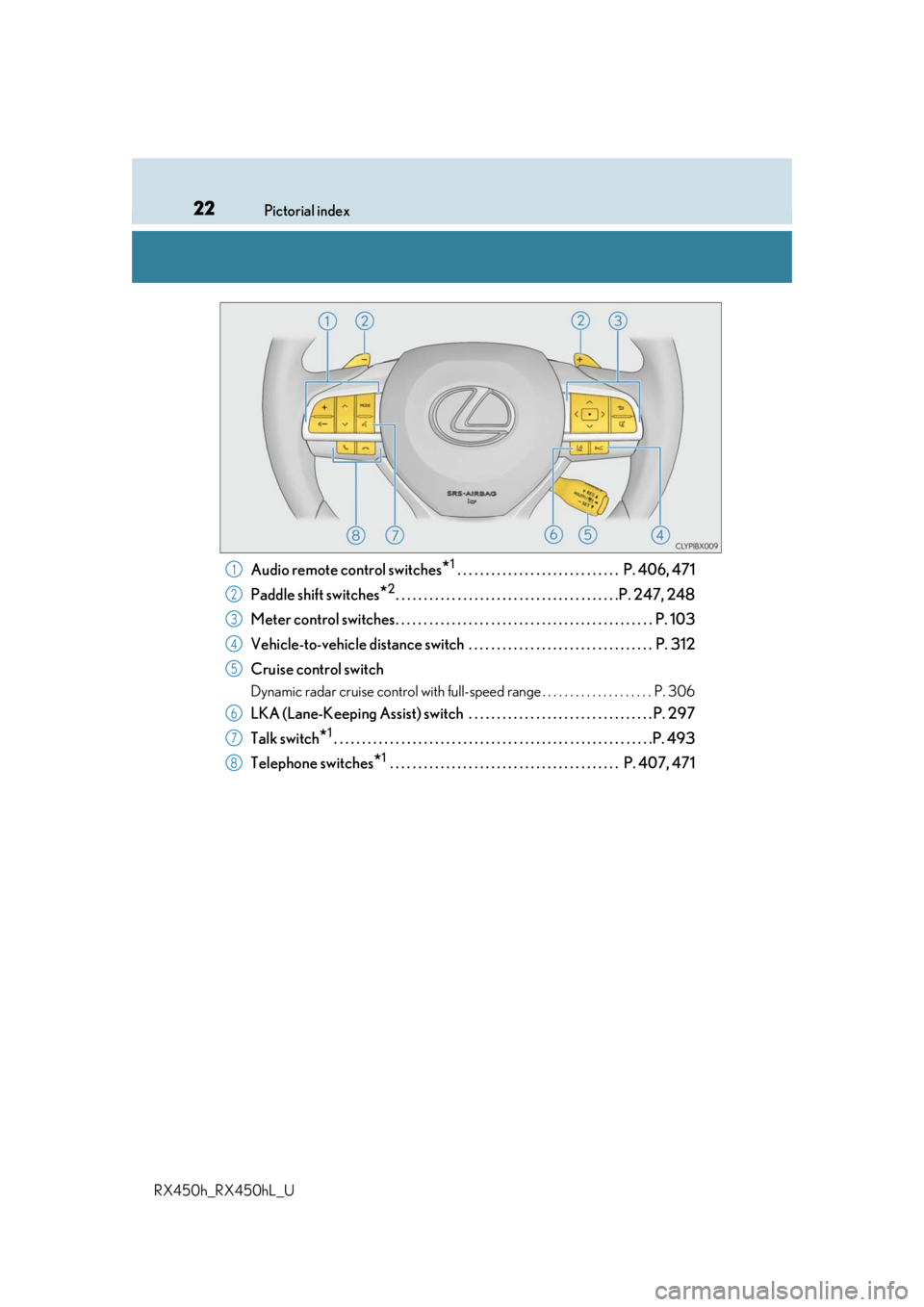
Audio remote control switches*1 . . . . . . . . . . . . . . . . . . . . . . . . . . . . . P. 406, 471
Paddle shift switches
*2. . . . . . . . . . . . . . . . . . . . . . . . . . . . . . . . . . . . . . . .P. 247, 248
Meter control switches. . . . . . . . . . . . . . . . . . . . . . . . . . . . . . . . . . . . . . . . . . . . . . P. 103
Vehicle-to-vehicle distance switch . . . . . . . . . . . . . . . . . . . . . . . . . . . . . . . . . P. 312
Cruise control switch
Dynamic radar cruise control with full-speed range . . . . . . . . . . . . . . . . . . . . P. 306
LKA (Lane-Keeping Assist) switch . . . . . . . . . . . . . . . . . . . . . . . . . . . . . . . . . P. 297
Talk switch
*1. . . . . . . . . . . . . . . . . . . . . . . . . . . . . . . . . . . . . . . . . . . . . . . . . . . . . . . . .P. 493
Telephone switches
*1 . . . . . . . . . . . . . . . . . . . . . . . . . . . . . . . . . . . . . . . . . P. 407, 471
1
2
3
4
5
6
7
8
Page 104 of 792
1042. Instrument cluster
RX450h_RX450hL_U
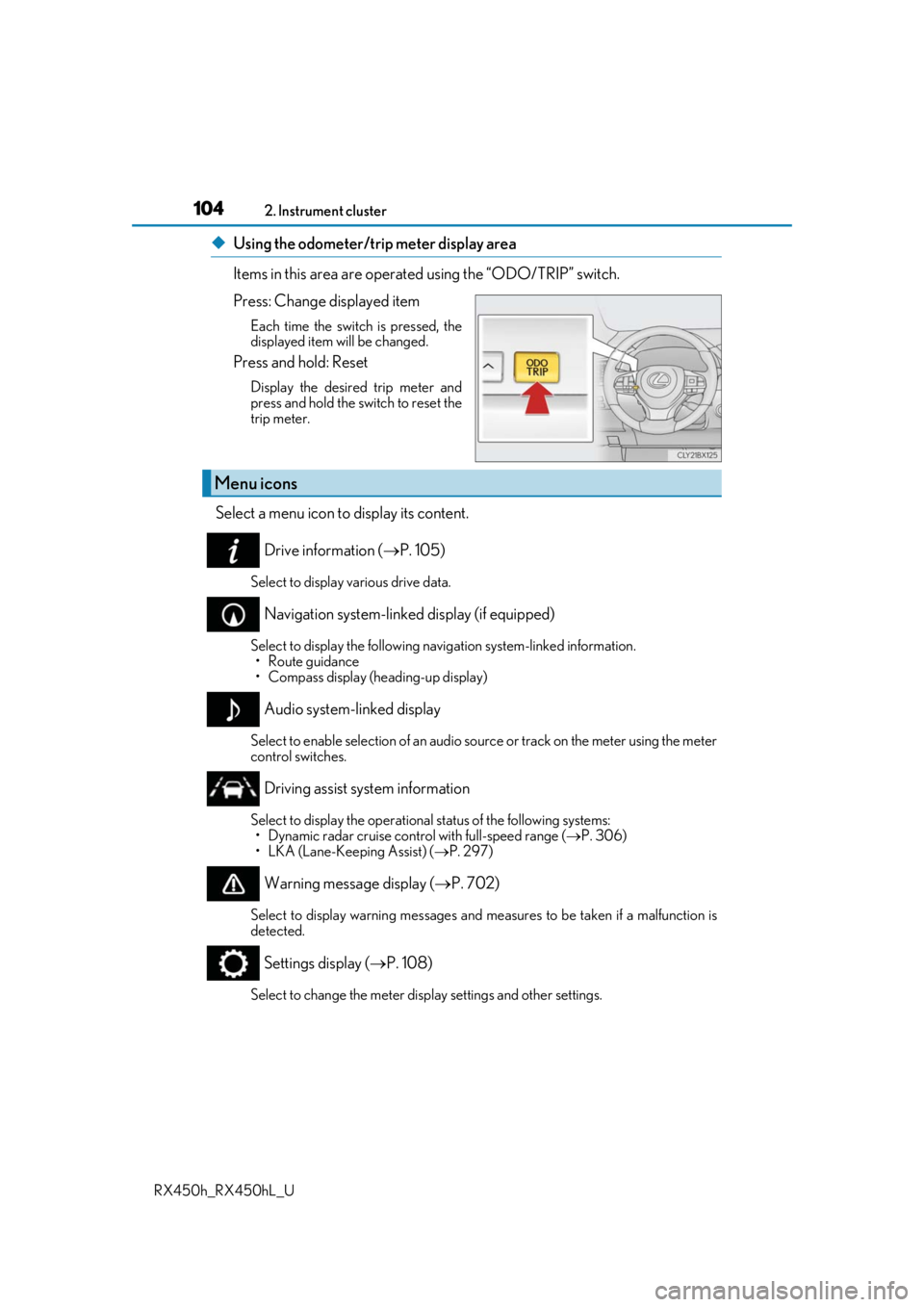
◆Using the odometer/trip meter display area
Items in this area are operated using the “ODO/TRIP” switch.
Press: Change displayed item
Each time the switch is pressed, the
displayed item will be changed.
Press and hold: Reset
Display the desired trip meter and
press and hold the switch to reset the
trip meter.
Select a menu icon to display its content.
Drive information ( P. 105)
Select to display various drive data.
Navigation system-linked display (if equipped)
Select to display the following na vigation system-linked information.
•Route guidance
• Compass display (heading-up display)
Audio system-linked display
Select to enable selection of an audio source or track on the meter using the meter
control switches.
Driving assist system information
Select to display the operational status of the following systems: • Dynamic radar cruise control with full-speed range ( P. 306)
• LKA (Lane-Keeping Assist) ( P. 297)
Warning message display ( P. 702)
Select to display warning messages and me asures to be taken if a malfunction is
detected.
Settings display ( P. 108)
Select to change the meter display settings and other settings.
Menu icons
Page 106 of 792

1062. Instrument cluster
RX450h_RX450hL_U
*1:Resetting: P. 103
*2: Use the displayed fuel consumption as a reference.
*3: When only a small amount of fuel is added to the tank, the display may not be
updated.
When refueling, turn the power switch off. If the vehicle is refueled without turning the
power switch off, the display may not be updated.
*4: This distance is computed based on your average fuel consumption. As a result, the
actual distance that can be driven may differ from that displayed.
■Energy monitor
P. 124
■Sway warning
Detects the sway of the vehicle within a lane, which is often associated with a
decrease in the driver’s at tention level, and displays the decrease in attention
using a bar display.
The shorter the bar length, the more the driver may need to rest.
This display is a part of the LKA (Lan e-Keeping Assist) system. The display is
enabled when the operating conditions of the vehicle sway warning are met.
( P. 297)
■ AWD Control
Displays the driving force applie d to each wheel using segments.
The greater the number of segments di splayed, the greater the driving force
applied.
Page 108 of 792
1082. Instrument cluster
RX450h_RX450hL_U
◆Changing settings
Use the meter control switches on th e steering wheel to change settings.
Press or to select .
Operate the switches to select a desired item.
Change the setting by referring to the message displayed on the screen.
◆Setting items
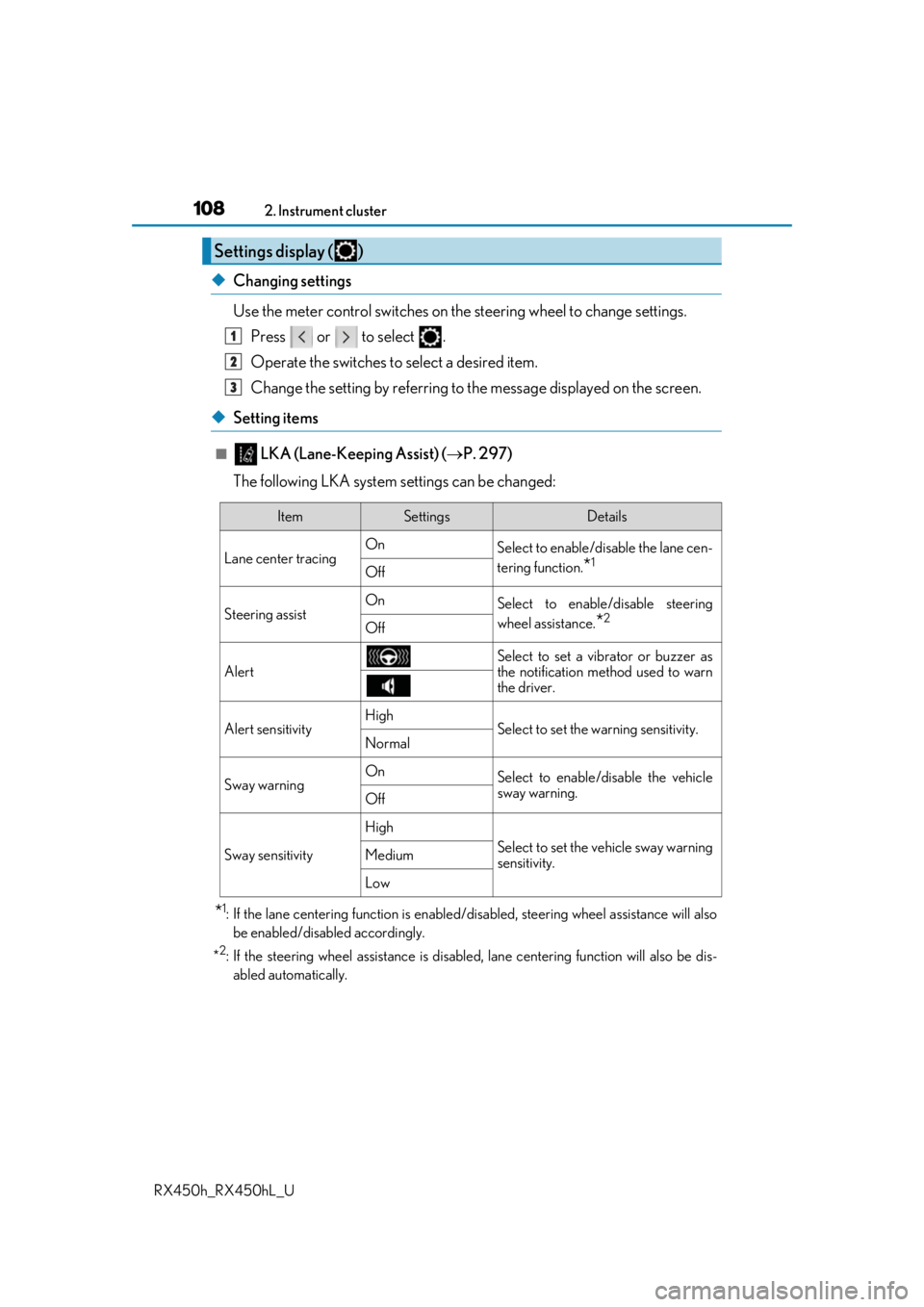
■ LKA (Lane-Keeping Assist) ( P. 297)
The following LKA system settings can be changed:
*1: If the lane centering function is enabled/ disabled, steering wheel assistance will also
be enabled/disabled accordingly.
*
2: If the steering wheel assistance is disabled, lane cent ering function will also be dis-
abled automatically.
Settings display ( )
1
2
3
ItemSettingsDetails
Lane center tracing On
Select to enable/disable the lane cen-
tering function.
*1Off
Steering assistOnSelect to enable/disable steering
wheel assistance.
*2Off
Alert
Select to set a vibrator or buzzer as
the notification method used to warn
the driver.
Alert sensitivityHighSelect to set the warning sensitivity.Normal
Sway warningOnSelect to enable/disable the vehicle
sway warning.
Off
Sway sensitivity
High
Select to set the vehicle sway warning
sensitivity.Medium
Low
Page 118 of 792
1182. Instrument cluster
RX450h_RX450hL_U
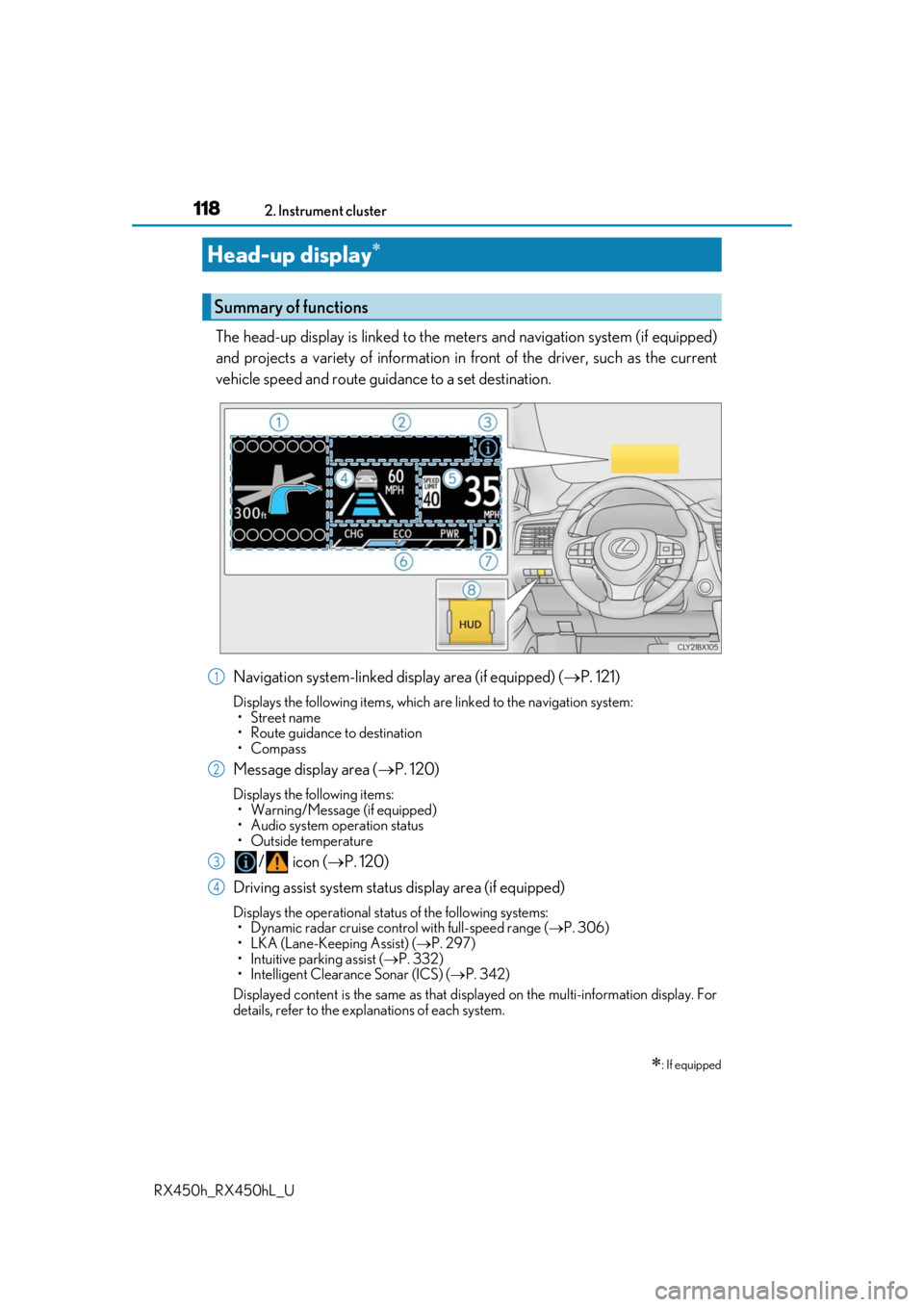
The head-up display is linked to the meters and navigation system (if equipped)
and projects a variety of information in front of the driver, such as the current
vehicle speed and route guid ance to a set destination.
Navigation system-linked display area (if equipped) ( P. 121)
Displays the following items, which are linked to the navigation system:
•Street name
• Route guidance to destination
•Compass
Message display area ( P. 120)
Displays the following items:
• Warning/Message (if equipped)
• Audio system operation status
• Outside temperature
/ icon ( P. 120)
Driving assist system status display area (if equipped)
Displays the operational stat us of the following systems:
• Dynamic radar cruise control with full-speed range ( P. 306)
• LKA (Lane-Keeping Assist) ( P. 297)
• Intuitive parking assist ( P. 332)
• Intelligent Clearance Sonar (ICS) ( P. 342)
Displayed content is the same as that disp layed on the multi-information display. For
details, refer to the explanations of each system.
Head-up display
: If equipped
Summary of functions
1
2
3
4
Page 211 of 792

211
4Driving
RX450h_RX450hL_U
4-3. Operating the lights and wipers
Headlight switch ........................ 258
Automatic High Beam ............. 262
Fog light switch ...........................266
Windshield wipers and washer.......................................... 267
Rear window wiper and washer.......................................... 272
4-4. Refueling Opening the fuel tank cap...... 274 4-5. Using the driving support
systems
Lexus Safety System+ .............. 279
PCS (Pre-Collision System) ......... 286
LKA (Lane-Keeping A ssist) .......... 297
Dynamic radar cruise control with full-speed
range ............................................306
BSM (Blind Spot Monitor) ...... 319 • BSM function ......................... 323
• RCTA function...................... 327
Intuitive parking assist .............. 332
Intelligent Clearance Sonar (ICS) ............................................. 342
Lexus parking assist monitor ........................................ 363
Driving mode select switch ........................................... 379
Driving assist systems ..............382
4-6. Driving tips Hybrid vehicle driving tips ................................................ 388
Winter driving tips .....................390
Utility vehicle precautions................................ 394
Page 231 of 792

2314-1. Before driving
4
Driving
RX450h_RX450hL_U
Your vehicle will handle differently when towing a trailer. Help to avoid an acci-
dent, death or serious injury, keep the following in mind when towing:
●Speed limits for towing a trailer vary by state or province. Do not exceed the
posted towing speed limit.
●Lexus recommends that the vehicle-traile r speed limit is 65 mph (104 km/h)
on a flat, straight, dry road. Do not exce ed this limit, the posted towing speed
limit or the speed limit for your trailer as set forth in your trailer owner’s man-
ual, whichever is lowest. Instability of the towing vehicle-trailer combination
(trailer sway) increases as speed increases. Exceeding speed limits may cause
loss of control.
●Before starting out, check the trailer lights, tires and the vehicle-trailer con-
nections. Recheck after driving a short distance.
●Practice turning, stopping and reversing with the trailer attached in an area
away from traffic until you become acc ustomed to the feel of the vehicle-
trailer combination.
●Reversing with a trailer attached is di fficult and requires practice. Grip the
bottom of the steering wheel and move your hand to the left to move the
trailer to the left. Move your hand to the right to move the trailer to right. (This
is generally opposite to reversing with out a trailer attached.) Avoid sharp or
prolonged turning. Have someone guid e you when reversing to reduce the
risk of an accident.
●As stopping distance is increased when towing a trailer, vehicle-to vehicle dis-
tance should be increased. For each 10 mph (16 km/h) of speed, allow at least
one vehicle and trailer length.
●Avoid sudden braking as you may skid, resulting in the trailer jackknifing and a
loss of vehicle control. This is especi ally true on wet or slippery surfaces.
●Avoid jerky starts or sudden acceleration.
●Avoid jerky steering and sharp turns, an d slow down before making a turn.
●Note that when making a turn, the trailer wheels will be closer than the vehicle
wheels to the inside of the turn. Compensate by making a wider than normal
turning radius.
●Slow down before making a turn, in cross winds, on wet or slippery surfaces,
etc.
Increasing vehicle speed can destabilize the trailer.
●Take care when passing other vehicles . Passing requires considerable dis-
tance. After passing a vehicle, do not fo rget the length of your trailer, and be
sure you have plenty of room before changing lanes.
Trailer towing tips
Page 235 of 792
2354-1. Before driving
4
Driving
RX450h_RX450hL_U
WARNING
■Trailer towing precautions
To tow a trailer safely, use extreme care and drive the vehicle in accordance with the
trailer’s characteristics and operating conditio ns. Failure to do so could cause an acci-
dent resulting in deat h or serious injury. Vehicle stab ility and braking performance are
affected by trailer stability, brake setting an d performance, and the hitch. Your vehicle
will handle differently when towing a trailer.
■To avoid accident or injury
●Do not exceed the TWR, unbraked TWR, GCWR, GVWR or GAWR.
●If the gross trailer weight is over 2000 lb. (907 kg), a sway control device with suffi-
cient capacity is required.
●Adjust the tongue weight within the approp riate range. Place heavier loads as close
to the trailer axle as possible.
●Do not exceed 65 mph (104 km/h), the posted towing speed limit or the speed limit
for your trailer as set forth in your trai ler owner’s manual, whichever is lowest. Slow
down sufficiently before making a turn, in cr oss winds, on wet or slippery surface, etc.
to help avoid an accident. If you experien ce a vehicle-trailer instability from reducing
a certain speed, slow down and make sure you keep your vehicle speed under the
speed of which you experience the instability.
●Do not make jerky, abrupt or sharp turns.
●Do not apply the brakes suddenly as you ma y skid, resulting in jackknifing and loss of
vehicle control. This is especially true on wet or slippery surfaces.
●Do not exceed the trailer hitch assembly weight, gross vehicle weight, gross axle
weight and trailer tongue weight capacities.
●Do not use the following systems when trailer towing.
• Dynamic radar cruise cont rol with full-speed range
• LKA (Lane-Keeping Assist)
• PCS (Pre-Collision system)
• BSM (Blind Spot Monitor)
*
*
: If equipped
●Slow down and downshift before descending steep or long downhill grades. Do not
make sudden downshifts while descending steep or long downhill grades.
●Vehicle-trailer instability is more likely on steep long downhills. Before descending
steep or long downhill grades, slow down and downshift. Do not make sudden down-
shifts when descending steep or long do wnhill grades. Avoid holding the brake pedal
down too long or applying the brakes too frequently. This could cause the brakes to
overheat and result in reduced braking efficiency.
●Do not tow a trailer when the compact sp are tire is installed on your vehicle.
Page 236 of 792
2364-1. Before driving
RX450h_RX450hL_U
WARNING
■Hitch
Trailer hitch assemblies have different weight capacities established by the hitch manu-
facturer. Even though the vehicle may be phys ically capable of towing a higher weight,
the operator must determine the maximum weight rating of the particular hitch assem-
bly and never exceed the maximum weight rating specified for the trailer-hitch.
Exceeding the maximum weight rating set by the trailer-hitch manufacturer can cause
an accident resulting in death or serious personal injuries.
■When towing a trailer
Lexus recommends trailers with brakes that conform to any applicable federal and
state/provincial regulations.
●If the gross trailer weight exceeds unbraked TWR, trailer brakes are required. Lexus
recommends trailers with brakes that conform to all applicable federal and state/pro-
vincial regulations.
●Never tap into your vehicle’s hydraulic system, as this will lower the vehicle’s braking
effectiveness.
●Never tow a trailer without using a safety chain securely attached to both the trailer
and the vehicle. If damage occurs to the co upling unit or hitch ball, there is danger of
the trailer wandering into another lane.
NOTICE
■When installing a trailer hitch
Use only the position recommended by your Lexus dealer. Do not install the trailer
hitch on the bumper; this may cause body damage.
■Do not directly splice trailer lights
Do not directly splic e trailer lights. Directly splicin g trailer lights may damage your
vehicle’s electrical system and cause a malfunction.