cruise control LEXUS RX450H 2020 User Guide
[x] Cancel search | Manufacturer: LEXUS, Model Year: 2020, Model line: RX450H, Model: LEXUS RX450H 2020Pages: 777, PDF Size: 13.14 MB
Page 275 of 777
274
RX350/RX350L_U4-5. Using the driving support systems
◆PCS (Pre-Collision System)
P. 281
◆LKA (Lane-Keeping Assist)
P. 291
◆Automatic High Beam
P. 256
◆Dynamic radar cruise contro l with full-speed range
P. 300
Lexus Safety System+
The Lexus Safety System+ consists of the following drive assist systems and
contributes to a safe and comfo rtable driving experience:
WARNING
■Lexus Safety System+
The Lexus Safety System+ is designed to operate under the assumption that the driver
will drive safely, and is designed to help reduce the impact to the occupants and the
vehicle in the case of a collision or assist the driver in normal driving conditions.
As there is a limit to the degree of reco gnition accuracy and control performance that
this system can provide, do not overly rely on this system. The driver is always responsi-
ble for paying attention to the vehicle's surroundings and driving safely.
Page 292 of 777
2914-5. Using the driving support systems
4
Driving
RX350/RX350L_U
When driving on highways and freeways with white or yellow lines, this function
alerts the driver when the vehicle might depart from its lane and provides assis-
tance by operating the steering wheel to keep the vehicle in its lane. Further-
more, the system also provides steering assistance when dynamic radar cruise
control with full-speed range is operat ing to keep the vehicle in its lane.
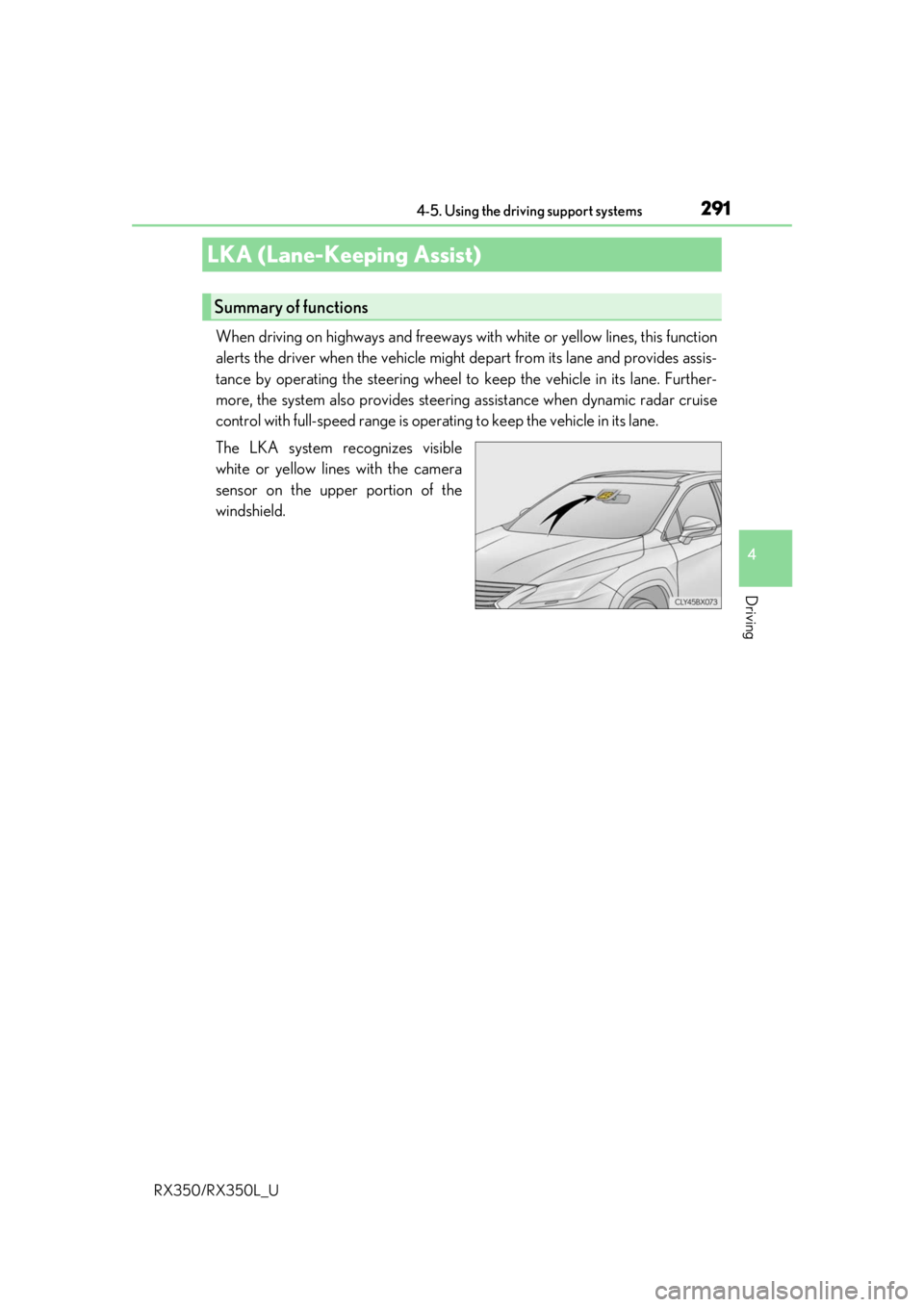
The LKA system recognizes visible
white or yellow lines with the camera
sensor on the upper portion of the
windshield.
LKA (Lane-Keeping Assist)
Summary of functions
Page 294 of 777
2934-5. Using the driving support systems
4
Driving
RX350/RX350L_U
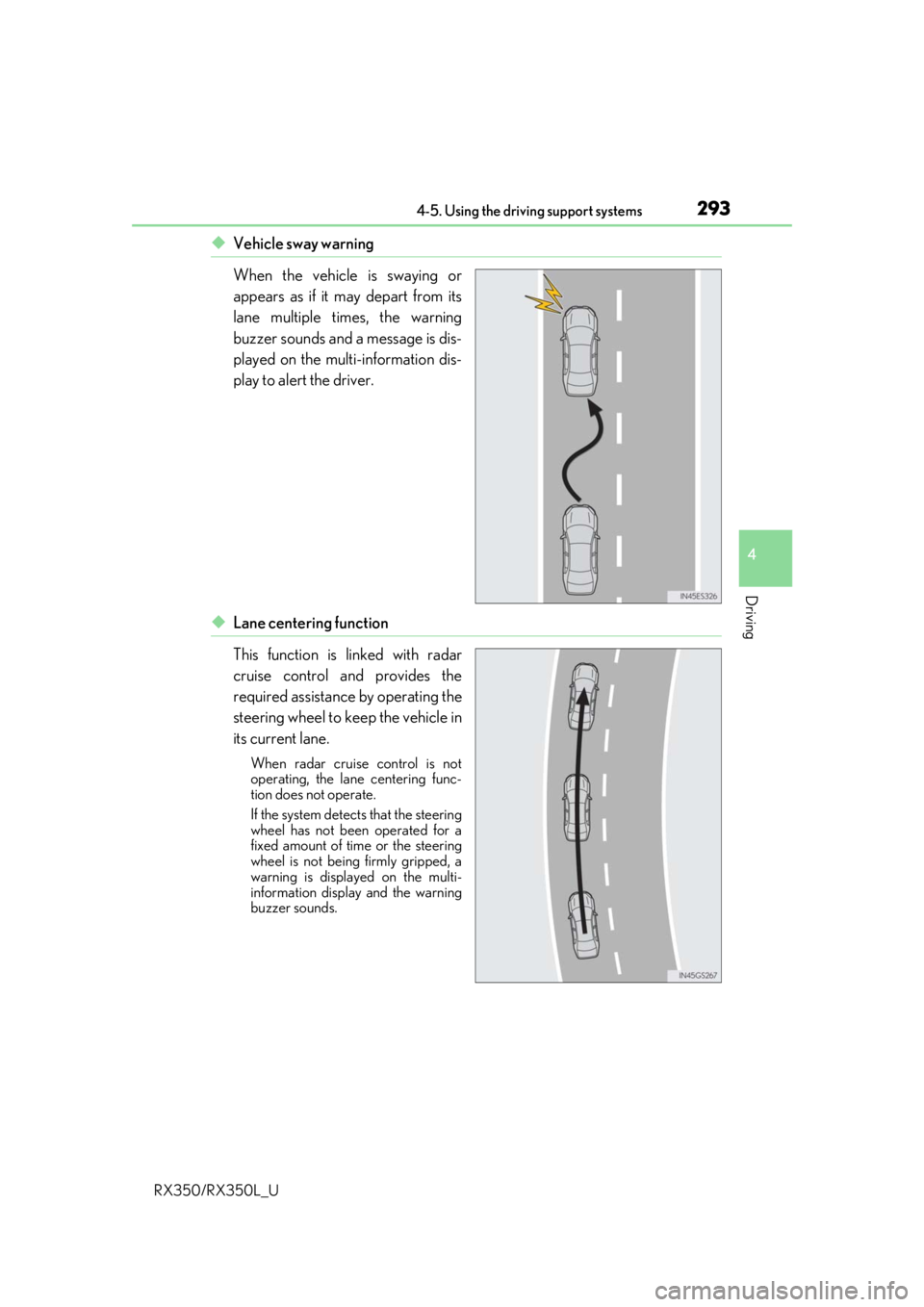
◆Vehicle sway warning
When the vehicle is swaying or
appears as if it may depart from its
lane multiple times, the warning
buzzer sounds and a message is dis-
played on the multi-information dis-
play to alert the driver.
◆Lane centering function
This function is linked with radar
cruise control and provides the
required assistance by operating the
steering wheel to keep the vehicle in
its current lane.
When radar cruise control is not
operating, the lane centering func-
tion does not operate.
If the system detects that the steering
wheel has not been operated for a
fixed amount of time or the steering
wheel is not being firmly gripped, a
warning is displayed on the multi-
information display and the warning
buzzer sounds.
Page 298 of 777
2974-5. Using the driving support systems
4
Driving
RX350/RX350L_U
■Operation conditions of each function
●Lane departure alert function
This function operates when all of the following conditions are met.
• LKA is turned on.
• Vehicle speed is approximatel y 32 mph (50 km/h) or more.
• System recognizes white (yellow) lines.
• Width of traffic lane is approx imately 9.8 ft. (3 m) or more.
• Turn signal lever is not operated.
• Vehicle is driven on a straight road or around a gentle curve with a radius of more
than approximately 492 ft. (150 m).
• No system malfunctions are detected. ( P. 654)
●Steering assist function
This function operates when all of the follo wing conditions are met in addition to the
operation conditions for the lane departure alert function.
• Setting for “Steering Assist” in of the multi-information display is set to “On”.
( P. 97)
• Vehicle is not accelerated or dece lerated by a fixed amount or more.
• Steering wheel is not operated with a steering force level suitable for changing
lanes.
• ABS, VSC, TRAC and PCS are not operating.
• TRAC or VSC is not turned off.
●Vehicle sway warning
This function operates when all of the following conditions are met.
• Setting for “Sway Warning” in of the multi-information display is set to “On”.
( P. 97)
• Vehicle speed is approximatel y 32 mph (50 km/h) or more.
• Width of traffic lane is approx imately 9.8 ft. (3 m) or more.
• No system malfunctions are detected. ( P. 654)
●Lane centering function
This function operates when all of the following conditions are met.
• LKA is turned on.
• Setting for “Lane Center” in of the mu lti-information display are set to “On”.
( P. 97)
• System recognizes white (yellow) lines.
• Dynamic radar cruise control with full-speed range is operating.
• Width of traffic lane is approximately 8.2 to 13.5 ft. (2.5 to 4.1 m).
• Turn signal lever is not operated.
• Vehicle is driven on a straight road or around a gentle curve with a radius of more
than approximately 656 ft. (200 m).
• No system malfunctions are detected. ( P. 654)
• Vehicle does not accele rate or decelerate by a fixed amount or more.
• Steering wheel is not operated with a steering force level suitable for changing lanes.
• ABS, VSC, TRAC and PCS are not operating.
• TRAC or VSC is not turned off.
• Steering assist function is not operating.
Page 301 of 777

3004-5. Using the driving support systems
RX350/RX350L_U
In vehicle-to-vehicle distance control mode, the vehicle automatically a\
cceler-
ates, decelerates and stops to match the speed changes of the preceding vehicle
even if the accelerator pedal is not depr essed. In constant speed control mode,
the vehicle runs at a fixed speed.
Use the dynamic radar cruise control with full-speed range on freeways and
highways.
●Vehicle-to-vehicle distance control mode ( P. 303)
●Constant speed control mode ( P. 309)
Vehicle-to-vehicle distance switch
Display
Set speed
Indicators
Cruise control switch
Dynamic radar cruise control with full-speed range
Summary of functions
1
2
3
4
5
Page 302 of 777
3014-5. Using the driving support systems
4
Driving
RX350/RX350L_U
WARNING
■Before using dynamic radar cruise control with full-speed range
●Driving safely is the sole responsibility of the driver. Do not rely solely on the system,
and drive safely by always paying ca reful attention to your surroundings.
●The dynamic radar cruise control with full- speed range provides driving assistance to
reduce the driver's burden. However, there are limitations to the assistance provided.
Read the following conditions carefully. Do not overly rely on this system and always
drive carefully.
• When the sensor may not be correctly detecting the vehicle ahead: P. 311
• Conditions under which the vehicle-to-vehicle distance control mode may not function correctly: P. 312
●Set the speed appropriately depending on the speed limit, traffic flow, road condi-
tions, weather conditions, etc. The driver is responsible for checking the set speed.
●Even when the system is functioning norma lly, the condition of the preceding vehicle
as detected by the system may differ from the condition observed by the driver.
Therefore, the driver must always remain alert, assess the danger of each situation
and drive safely. Relying on this system or assuming the system ensures safety while
driving can lead to an accident, resulting in death or serious injury.
●Switch the dynamic radar cruise control with full-speed range off using the “ON/
OFF” button when not in use.
■Cautions regarding the driving assist systems
Observe the following precautions, as there are limitations to the assistance provided
by the system.
Failure to do so may cause an accident resulting in death or serious injury.
●Assisting the driver to measure following distance
The dynamic radar cruise control with full-speed range is only intended to help the
driver in determining the following distan ce between the driver’s own vehicle and a
designated vehicle traveling ahead. It is no t a mechanism that allows careless or inat-
tentive driving, and it is not a system that can assist the driver in low-visibility condi-
tions. It is still necessary for driver to pa y close attention to the vehicle’s surroundings.
●Assisting the driver to judge proper following distance
The dynamic radar cruise control with full-speed range determines whether the fol-
lowing distance between the driver’s own vehicle and a designated vehicle traveling
ahead is within a set range. It is not capable of making any other type of judgement.
Therefore, it is absolutely necessary for the driver to remain vigilant and to determine
whether or not there is a possibility of danger in any given situation.
●Assisting the driver to operate the vehicle
The dynamic radar cruise control with full-speed range has limited capability to pre-
vent or avoid a collision with a vehicle trave ling ahead. Therefore, if there is ever any
danger, the driver must take immediate and direct control of the vehicle and act
appropriately in order to ensure the safety of all involved.
Page 303 of 777
3024-5. Using the driving support systems
RX350/RX350L_U
WARNING
■Situations unsuitable for dynamic rada r cruise control with full-speed range
Do not use dynamic radar cruise control with full-speed range in any of the following
situations.
Doing so may result in inappropriate speed control and could cause an accident result-
ing in death or serious injury.
●Roads where there are pedestrians, cyclers, etc.
●In heavy traffic
●On roads with sharp bends
●On winding roads
●On slippery roads, such as thos e covered with rain, ice or snow
●On steep downhills, or where there are sudden changes between sharp up and down
gradients
Vehicle speed may exceed the set speed when driving down a steep hill.
●At entrances to freeways and highways
●When weather conditions are bad enough that they may prevent the sensors from
detecting correctly (fog, snow, sandstorm, heavy rain, etc.)
●When there is rain, snow, etc. on the fron t surface of the radar sensor or camera sen-
sor
●In traffic conditions that require frequent repeated a cceleration and deceleration
●When your vehicle is towing a trailer or during emergency towing
●When an approach warning buzzer is heard often
Page 304 of 777
3034-5. Using the driving support systems
4
Driving
RX350/RX350L_U
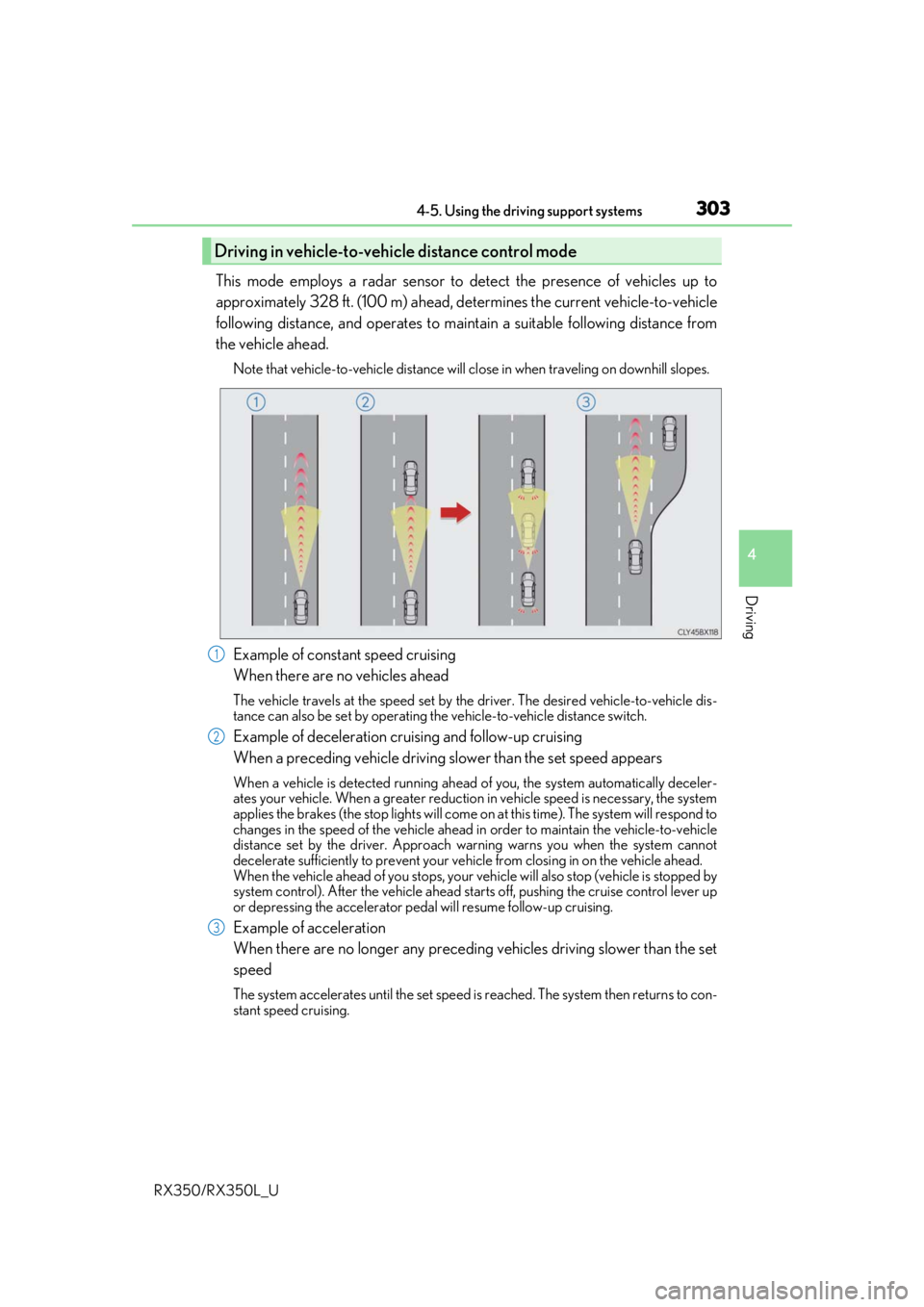
This mode employs a radar sensor to detect the presence of vehicles up to
approximately 328 ft. (100 m) ahead, determines the current vehicle-to-vehicle
following distance, and operates to main tain a suitable following distance from
the vehicle ahead.
Note that vehicle-to-vehicle distance will cl ose in when traveling on downhill slopes.
Example of constant speed cruising
When there are no vehicles ahead
The vehicle travels at the speed set by the driver. The desired vehicle-to-vehicle dis-
tance can also be set by operating the vehicle-to-vehicle distance switch.
Example of deceleration cruising and follow-up cruising
When a preceding vehicle driving slower than the set speed appears
When a vehicle is detected running ahead of you, the system automatically deceler-
ates your vehicle. When a greater reduction in vehicle speed is necessary, the system
applies the brakes (the stop lights will come on at this time). The system will respond to
changes in the speed of the vehicle ahead in order to maintain the vehicle-to-vehicle
distance set by the driver. Approach warning warns you when the system cannot
decelerate sufficie ntly to prevent your vehicle from closing in on the vehicle ahead.
When the vehicle ahead of you stops, your vehicle will also stop (vehicle is stopped by
system control). After the vehicle ahead starts off, pushing the cruise control lever up
or depressing the accelerator pedal will resume follow-up cruising.
Example of acceleration
When there are no longer any preceding vehicles driving slower than the set
speed
The system accelerates until the set speed is reached. The system then returns to con-
stant speed cruising.
Driving in vehicle-to-vehicle distance control mode
1
2
3
Page 305 of 777
3044-5. Using the driving support systems
RX350/RX350L_U
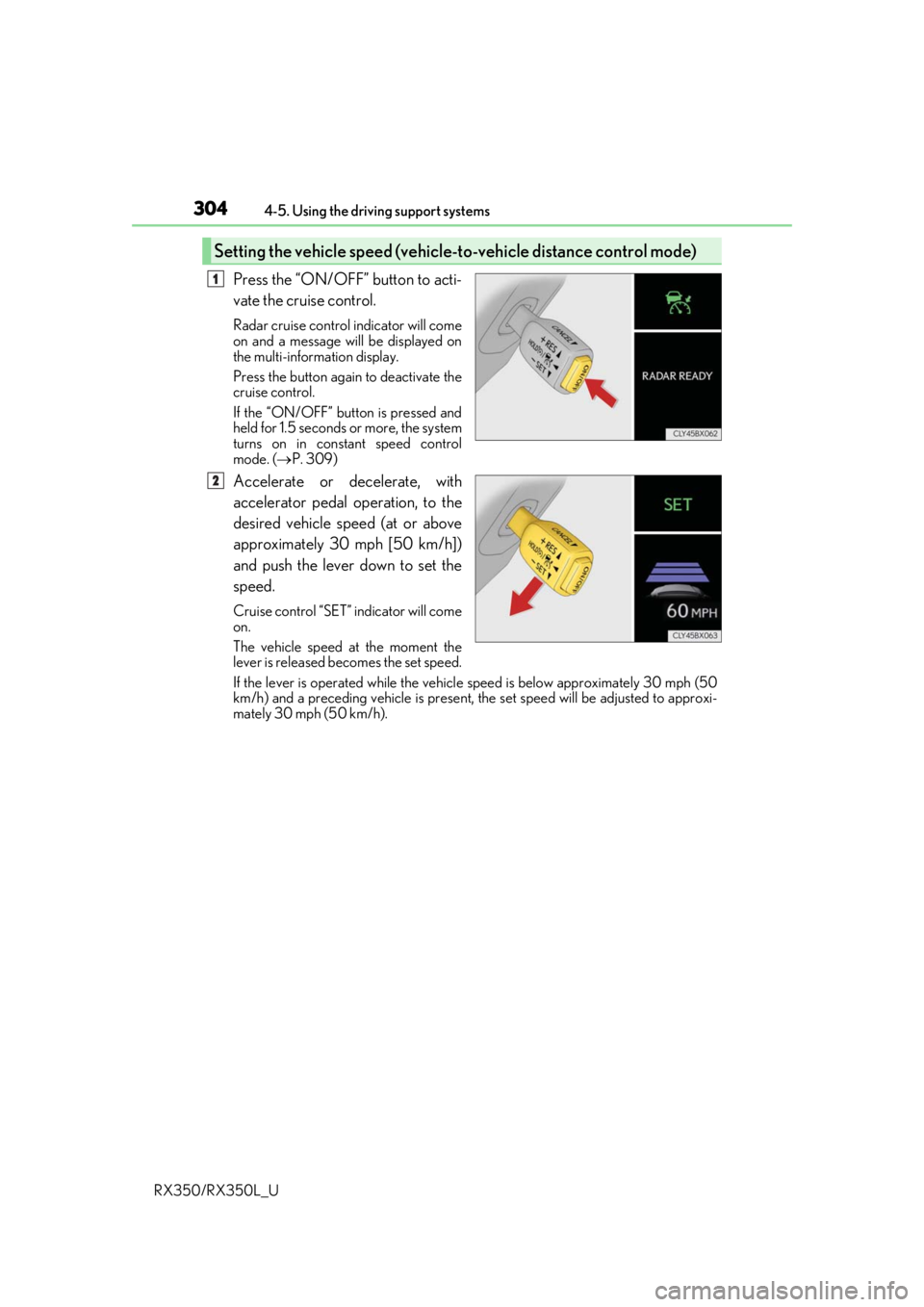
Press the “ON/OFF” button to acti-
vate the cruise control.
Radar cruise control indicator will come
on and a message will be displayed on
the multi-information display.
Press the button again to deactivate the
cruise control.
If the “ON/OFF” button is pressed and
held for 1.5 seconds or more, the system
turns on in constant speed control
mode. ( P. 309)
Accelerate or decelerate, with
accelerator pedal operation, to the
desired vehicle speed (at or above
approximately 30 mph [50 km/h])
and push the lever down to set the
speed.
Cruise control “SET” indicator will come
on.
The vehicle speed at the moment the
lever is released becomes the set speed.
If the lever is operated while the vehicl e speed is below approximately 30 mph (50
km/h) and a preceding vehicle is present, the set speed will be adjusted to approxi-
mately 30 mph (50 km/h).
Setting the vehicle speed (vehicle-to-vehicle distance control mode)
1
2
Page 308 of 777
3074-5. Using the driving support systems
4
Driving
RX350/RX350L_U
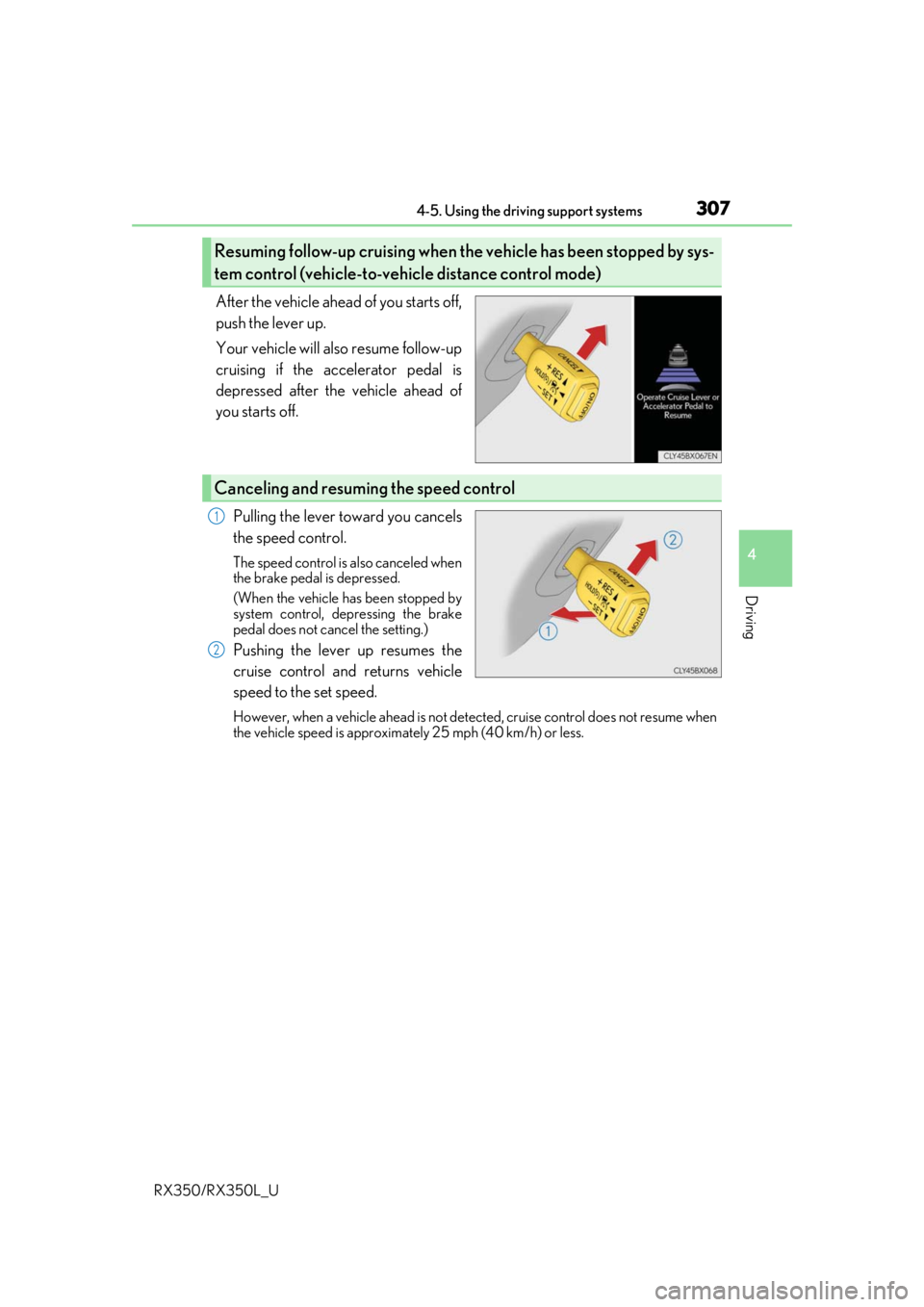
After the vehicle ahead of you starts off,
push the lever up.
Your vehicle will also resume follow-up
cruising if the accelerator pedal is
depressed after the vehicle ahead of
you starts off.Pulling the lever toward you cancels
the speed control.
The speed control is also canceled when
the brake pedal is depressed.
(When the vehicle has been stopped by
system control, depressing the brake
pedal does not cancel the setting.)
Pushing the lever up resumes the
cruise control and returns vehicle
speed to the set speed.
However, when a vehicle ahead is not detected, cruise control does not resume when
the vehicle speed is approximately 25 mph (40 km/h) or less.
Resuming follow-up cruising when the vehicle has been stopped by sys-
tem control (vehicle-to-vehicle distance control mode)
Canceling and resuming the speed control
1
2