brake LEXUS RX450H 2020 Service Manual
[x] Cancel search | Manufacturer: LEXUS, Model Year: 2020, Model line: RX450H, Model: LEXUS RX450H 2020Pages: 777, PDF Size: 13.14 MB
Page 248 of 777
2474-2. Driving procedures
4
Driving
RX350/RX350L_U
The parking brake is set or released automatically according to the shift lever
operation.
Even when in automatic mode, the parkin g brake can be set and released manu-
ally. ( P. 248)
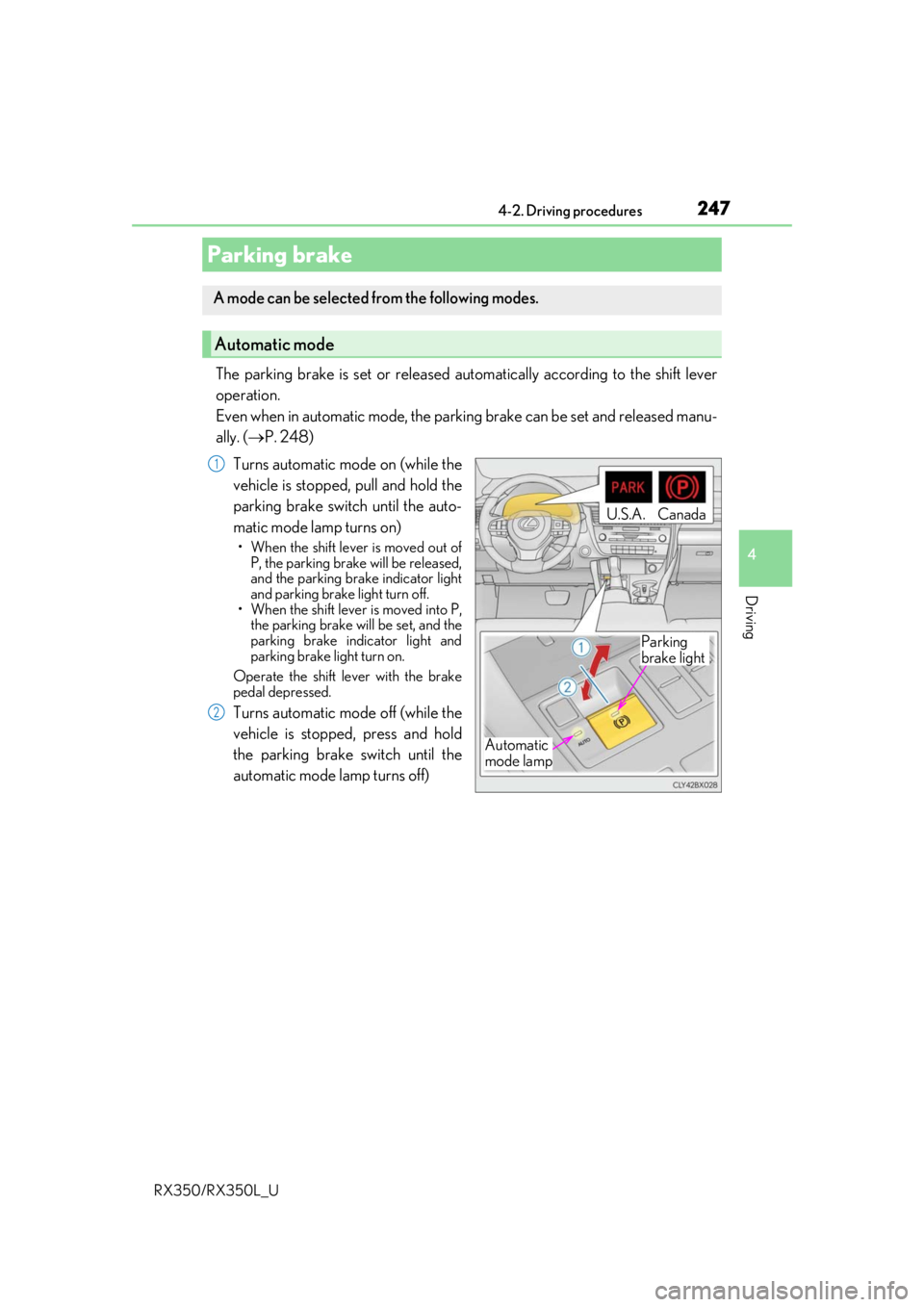
Turns automatic mode on (while the
vehicle is stopped, pull and hold the
parking brake switch until the auto-
matic mode lamp turns on)
• When the shift lever is moved out of P, the parking brake will be released,
and the parking brake indicator light
and parking brake light turn off.
• When the shift lever is moved into P,
the parking brake will be set, and the
parking brake indicator light and
parking brake light turn on.
Operate the shift lever with the brake
pedal depressed.
Turns automatic mode off (while the
vehicle is stopped, press and hold
the parking brake switch until the
automatic mode lamp turns off)
Parking brake
A mode can be selected from the following modes.
Automatic mode
Automatic
mode lamp
U.S.A.Canada
Parking
brake light
1
2
Page 249 of 777
2484-2. Driving procedures
RX350/RX350L_U
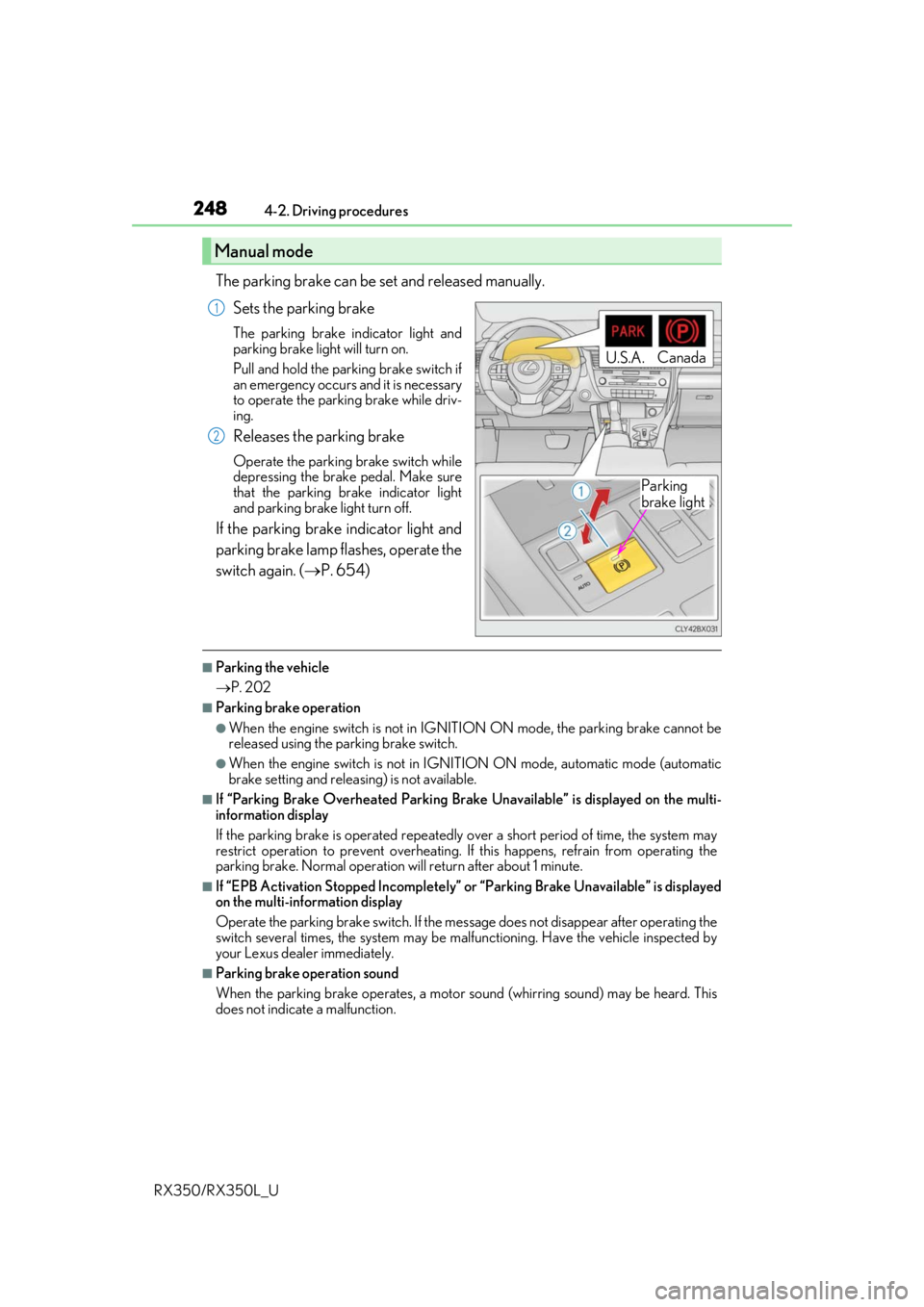
The parking brake can be set and released manually. Sets the parking brake
The parking brake indicator light and
parking brake light will turn on.
Pull and hold the parking brake switch if
an emergency occurs and it is necessary
to operate the parking brake while driv-
ing.
Releases the parking brake
Operate the parking brake switch while
depressing the brake pedal. Make sure
that the parking brake indicator light
and parking brake light turn off.
If the parking brake indicator light and
parking brake lamp flashes, operate the
switch again. ( P. 654)
■Parking the vehicle
P. 202
■Parking brake operation
●When the engine switch is not in IGNITION ON mode, the parking brake cannot be
released using the parking brake switch.
●When the engine switch is not in IGNITION ON mode, automatic mode (automatic
brake setting and releasing) is not available.
■If “Parking Brake Overheated Parking Brak e Unavailable” is displayed on the multi-
information display
If the parking brake is operated repeatedly over a short period of time, the system may
restrict operation to prevent overheating. If this happens, refrain from operating the
parking brake. Normal operation wi ll return after about 1 minute.
■If “EPB Activation Stopped Incompletely” or “Parking Brake Unavailable” is displayed
on the multi-information display
Operate the parking brake switch. If the message does not disappear after operating the
switch several times, the system may be ma lfunctioning. Have the vehicle inspected by
your Lexus dealer immediately.
■Parking brake operation sound
When the parking brake operates, a motor so und (whirring sound) may be heard. This
does not indicate a malfunction.
Manual mode
U.S.A. Canada
Parking
brake light
1
2
Page 250 of 777
2494-2. Driving procedures
4
Driving
RX350/RX350L_U
■Parking brake indicator light and parking brake light
●Depending on the engine switch mode, the parking brake indicator light and parking
brake light will turn on and stay on as described below:
IGNITION ON mode: Comes on until the parking brake is released.
Not in IGNITION ON mode: Stays on for approximately 15 seconds.
●When the engine switch is turned off with the parking brake set, the parking brake indi-
cator light and parking brake light will stay on for about 15 seconds. This does not indi-
cate a malfunction.
■Changing the mode
When changing the automatic mode on/off , the message will be shown on the multi-
information display and the buzzer sounds.
■Parking brake engaged warning buzzer
A buzzer will sound if the vehicle is driv en with the parking brake engaged. “Release
Parking Brake” is displayed on the multi-information display.
■Warning messages and buzzers
Warning messages and buzzers are used to indicate a system malfunction or to inform
the driver of the need for caution. If a warn ing message is shown on the multi-information
display, read the message and follow the instructions.
■If the brake system warning light comes on
P. 654
■Usage in winter time
P. 385
WARNING
■When parking the vehicle
Do not leave a child in the vehicle alone. The parking brake may be released uninten-
tionally and there is the danger of the ve hicle moving that may lead to an accident
resulting in death or serious injury.
■Parking brake switch
Do not set any objects near the parking br ake switch. Objects may interfere with the
switch and may lead the parking brake to unexpectedly operate.
NOTICE
■When parking the vehicle
Before you leave the vehicle, shift the shif t lever to P, set the parking brake and make
sure that the vehicle does not move.
■When the system malfunctions
Stop the vehicle in a safe place and check the warning messages.
■When the parking brake cannot be released due to a malfunction
Driving the vehicle with the parking brake se t will lead to brake components overheat-
ing, which may affect bra king performance and increase brake wear. Contact your
Lexus dealer immediately if this occurs.
Page 251 of 777
2504-2. Driving procedures
RX350/RX350L_U
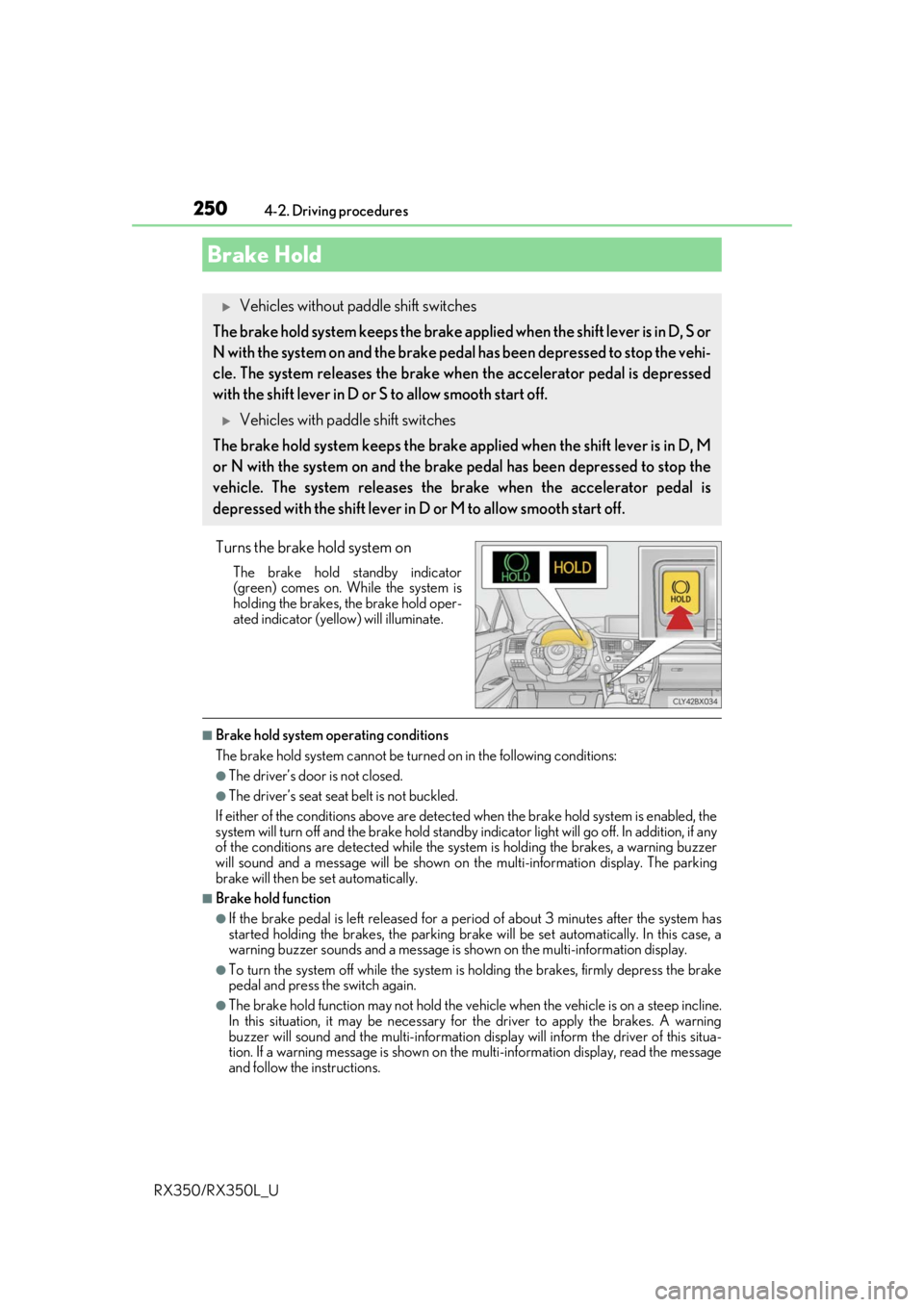
Turns the brake hold system on
The brake hold standby indicator
(green) comes on. Wh ile the system is
holding the brakes, the brake hold oper-
ated indicator (yellow) will illuminate.
■Brake hold system operating conditions
The brake hold system cannot be turn ed on in the following conditions:
●The driver’s door is not closed.
●The driver’s seat seat belt is not buckled.
If either of the conditions above are detected when the brake hold system is enabled, the
system will turn off and the brake hold standby in dicator light will go off. In addition, if any
of the conditions are detected while the sy stem is holding the brakes, a warning buzzer
will sound and a message will be shown on th e multi-information display. The parking
brake will then be set automatically.
■Brake hold function
●If the brake pedal is left released for a pe riod of about 3 minutes after the system has
started holding the brakes, the parking brake will be set automatically. In this case, a
warning buzzer sounds and a message is shown on the multi-information display.
●To turn the system off while the system is holding the brakes, firmly depress the brake
pedal and press the switch again.
●The brake hold function may not hold the vehicle when the vehicle is on a steep incline.
In this situation, it may be necessary for the driver to apply the brakes. A warning
buzzer will sound and the mult i-information display will inform the driver of this situa-
tion. If a warning message is shown on the multi-information display, read the message
and follow the instructions.
Brake Hold
Vehicles without paddle shift switches
The brake hold system keeps the brake appl ied when the shift lever is in D, S or
N with the system on and the brake peda l has been depressed to stop the vehi-
cle. The system releases the brake wh en the accelerator pedal is depressed
with the shift lever in D or S to allow smooth start off.
Vehicles with paddle shift switches
The brake hold system keeps the brake a pplied when the shift lever is in D, M
or N with the system on and the brake pedal has been depressed to stop the
vehicle. The system releases the brake when the accelerator pedal is
depressed with the shif t lever in D or M to allow smooth start off.
Page 252 of 777
2514-2. Driving procedures
4
Driving
RX350/RX350L_U
■When the parking brake is set automatically while the system is holding the brakes
Perform any of the following operat ions to release the parking brake.
●Depress the accelerator pedal. (The parking brake will not be released automatically if
the seat belt is not fastened.)
●Operate the parking brake switch with the brake pedal depressed.
Make sure that the parking brake indicator light goes off. ( P. 247)
■When an inspection at your Lexus dealer is necessary
When the brake hold standby indicator (green) does not illuminate even when the brake
hold switch is pressed with the brake hold system operating conditions met, the system
may be malfunctioning. Ha ve the vehicle inspected at your Lexus dealer.
■If “Brake Hold Fault Depress Brake to Deacti vate Visit Your Dealer” is displayed on the
multi-information display
The system may be malfunctioning. Have the vehicle inspected by your Lexus dealer.
■Warning messages and buzzers
Warning messages and buzzers are used to indicate a system malfunction or to inform
the driver of the need for caution. If a warn ing message is shown on the multi-information
display, read the message and follow the instructions.
■If the brake hold operated indicator flashes
P. 654
WARNING
■When the vehicle is on a steep incline
When using the brake hold system on a steep incline exercise caution. The brake hold
function may not hold the vehicle in such a situation.
■When stopped on a slippery road
The system cannot stop the vehicle when the gripping ability of the tires has been
exceeded. Do not use the system when stopped on a slippery road.
NOTICE
■When parking the vehicle
The brake hold system is not designed for use when parking the vehicle for a long
period of time. Turning the engine switch off while the system is holding the brakes may
release the brakes, which would cause the ve hicle to move. When operating the engine
switch, depress the brake pedal, shift the shift lever to P and set the parking brake.
Page 255 of 777
2544-3. Operating the lights and wipers
RX350/RX350L_U
■Daytime running light system
●The daytime running lights illuminate using th e same lights as the parking lights and illu-
minate brighter than the parking lights.
●To make your vehicle more visible to other drivers during daytime driving, the daytime
running lights turn on automatically when a ll of the following conditions are met. (The
daytime running lights are not designed for use at night.)
• The engine is running
• The parking brake is released
• The headlight switch is in the (Canada only), or
* position
*: When the surroundings are bright
The daytime running lights remain on after they illuminate, even if the parking brake is set
again.
●For the U.S.A.: Daytime running lights can be turned off by operating the switch.
●Compared to turning on the headlights, the daytime running light system offers greater
durability and consumes less electricity, so it can help improve fuel economy.
■Cornering lights (if equipped)
When the cornering lights are on for more than 30 minutes, they will turn off automati-
cally.
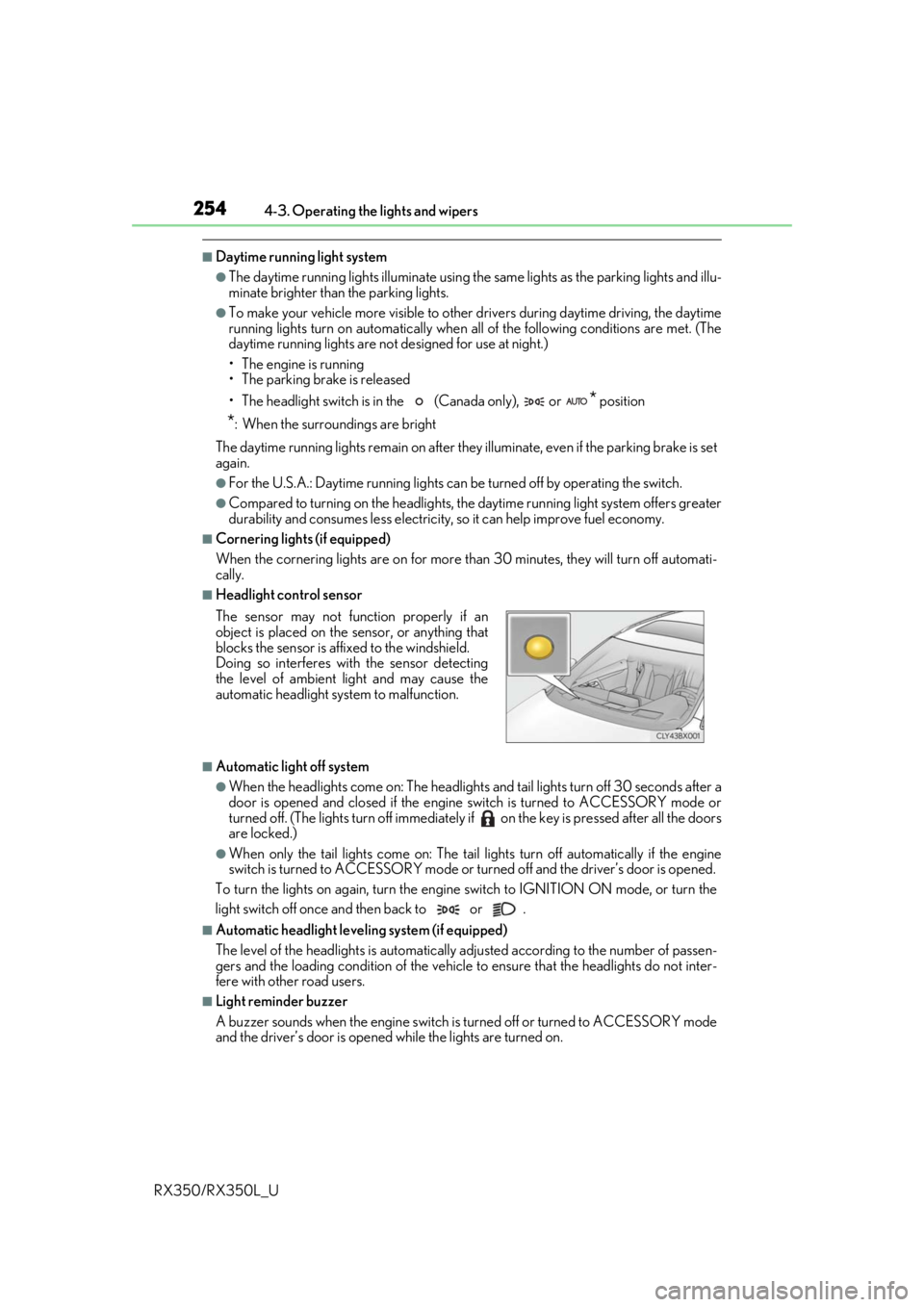
■Headlight control sensor
■Automatic light off system
●When the headlights come on: The headlights and tail lights turn off 30 seconds after a
door is opened and closed if the engine switch is turned to ACCESSORY mode or
turned off. (The lights turn off immediately if on the key is pre ssed after all the doors
are locked.)
●When only the tail lights come on: The tail lights turn off automatically if the engine
switch is turned to ACCESSORY mode or tu rned off and the driver’s door is opened.
To turn the lights on again, turn the engine switch to IGNITION ON mode, or turn the
light switch off once and then back to or .
■Automatic headlight leve ling system (if equipped)
The level of the headlights is automatically adjusted accordi ng to the number of passen-
gers and the loading condition of the vehicle to ensure that the headlights do not inter-
fere with other road users.
■Light reminder buzzer
A buzzer sounds when the engine switch is turned off or turned to ACCESSORY mode
and the driver’s door is opened while the lights are turned on. The sensor may not function properly if an
object is placed on the sensor, or anything that
blocks the sensor is affixed to the windshield.
Doing so interferes with the sensor detecting
the level of ambient light and may cause the
automatic headlight system to malfunction.
Page 265 of 777
2644-3. Operating the lights and wipers
RX350/RX350L_U
■Front door opening linked windshield wiper stop function (vehicles with rain-sensing
windshield wipers)
When “AUTO” is selected and the windshield wipers are operating, if a front door is
opened, the operation of the windshield wipers will be stopped to prevent anyone near
the vehicle from being sprayed by water from the wipers, provided the vehicle is stopped
with the parking brake applied or the shift lever in P. When the front door is closed, wiper
operation will resume.
■Customization
Some functions can be customized. ( P. 722)
WARNING
■Caution regarding the use of windshield wi pers in AUTO mode (vehicles with rain-
sensing windshield wipers)
The windshield wipers may operate unexpectedly if the sensor is touched or the wind-
shield is subject to vibration in AUTO mode. Take care that your fingers, etc. do not
become caught in the windshield wipers.
■Caution regarding the use of washer fluid
When it is cold, do not use the washer fl uid until the windshield becomes warm. The
fluid may freeze on the windshield and cause lo w visibility. This may lead to an accident,
resulting in death or serious injury.
NOTICE
■When the windshield is dry
Do not use the wipers, as they may damage the windshield.
■When the washer fluid tank is empty
Do not operate the switch continually as the washer fluid pump may overheat.
■When a nozzle becomes blocked
In this case, contact your Lexus dealer.
Do not try to clear it with a pin or other object. The nozzle will be damaged.
Page 276 of 777

2754-5. Using the driving support systems
4
Driving
RX350/RX350L_U
The pre-collision system is equipped with a sophisticated computer that will
record certain data, such as:• Accelerator status
•Brake status
• Vehicle speed
• Operation status of the pre-collision system functions
• Information (such as the distance an d relative speed between your vehicle
and the vehicle ahead or other objects)
• Images from the camera sensor (available only when the pre-collision braking function or the pre-collision brake assist function was operating)
The pre-collision system does not record co nversations, sounds or images of the
inside of the vehicle.
●Data usage
Lexus may use the data recorded in this computer to diagnose malfunctions,
conduct research and develo pment, and improve quality.
Lexus will not disclose the recorded data to a third party except:
• With the consent of the vehicle owner or with the consent of the lessee if the vehicle is leased
• In response to an official request by the police, a court of law or a govern- ment agency
• For use by Lexus in a lawsuit
• For research purposes where the data is not tied to a specific vehicle or
vehicle owner
●Recorded images can be erased using a specialized device.
The image recording function can be disa bled. However, if the function is dis-
abled, data from when the pre-collision system operates will not be available.
Vehicle data recording
Page 282 of 777
2814-5. Using the driving support systems
4
Driving
RX350/RX350L_U
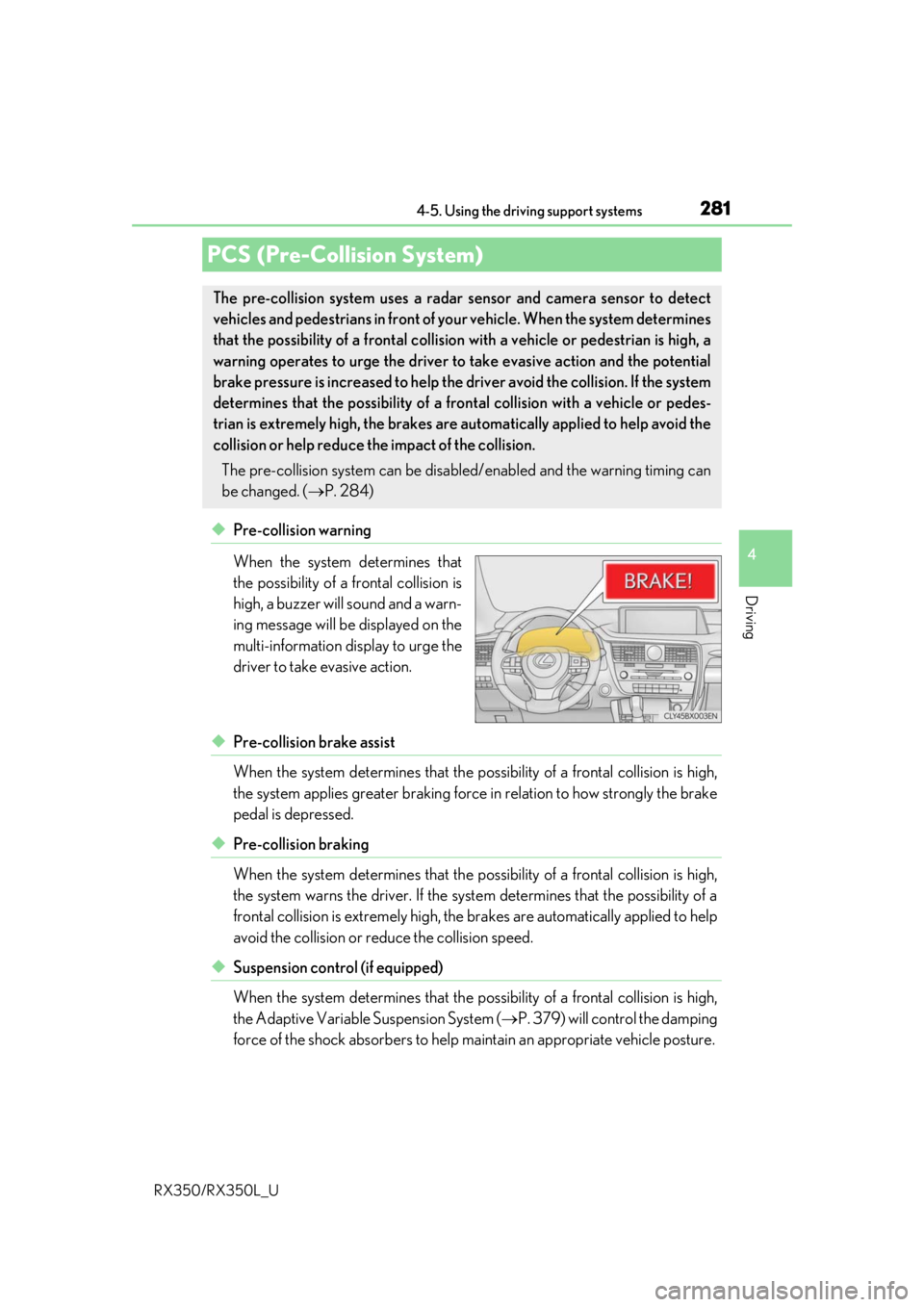
◆Pre-collision warning
When the system determines that
the possibility of a frontal collision is
high, a buzzer will sound and a warn-
ing message will be displayed on the
multi-information display to urge the
driver to take evasive action.
◆Pre-collision brake assist
When the system determines that the possibility of a frontal collision is high,
the system applies greater braking force in relation to how strongly the brake
pedal is depressed.
◆Pre-collision braking
When the system determines that the po ssibility of a frontal collision is high,
the system warns the driver. If the syst em determines that the possibility of a
frontal collision is extremely high, the br akes are automatically applied to help
avoid the collision or reduce the collision speed.
◆Suspension control (if equipped)
When the system determines that the po ssibility of a frontal collision is high,
the Adaptive Variable Suspension System ( P. 379) will control the damping
force of the shock absorbers to help ma intain an appropriate vehicle posture.
PCS (Pre-Collision System)
The pre-collision system uses a radar sensor and camera sensor to detect
vehicles and pedestrians in front of your vehicle. When the system determines
that the possibility of a frontal collision with a vehicle or pedestrian is high, a
warning operates to urge the driver to take evasive action and the potential
brake pressure is increased to help the driver avoid the collision. If the system
determines that the possibility of a fr ontal collision with a vehicle or pedes-
trian is extremely high, the brakes are automatically applied to help avoid the
collision or help reduce the impact of the collision.
The pre-collision system can be disabled/enabled and the warning timing can
be changed. ( P. 284)
Page 283 of 777
2824-5. Using the driving support systems
RX350/RX350L_U
WARNING
■Limitations of the pre-collision system
●The driver is solely responsible for safe driving. Always drive safely, taking care to
observe your surroundings.
Do not use the pre-collision sy stem instead of normal braking operations under any
circumstances. This system will not preven t collisions or lessen collision damage or
injury in every situation. Do not overly rely on this system. Failure to do so may lead to
an accident, resulting in death or serious injury.
●Although this system is designed to help avoid a collision or help reduce the impact of
the collision, its effectivenes s may change according to various conditions, therefore
the system may not always be able to achieve the same level of performance.
Read the following conditions carefully. Do not overly rely on this system and always
drive carefully.
• Conditions under which the system may oper ate even if there is no possibility of a
collision: P. 286
• Conditions under which the system may not operate properly: P. 288
●Do not attempt to test the operation of the pre-collision system yourself, as the system
may not operate properly, possib ly leading to an accident.
■Pre-collision braking
●When the pre-collision braking function is operating, a large amount of braking force
will be applied.
●If the vehicle is stopped by the operation of the pre-collision braking function, the pre-
collision braking function operation will be canceled after approximately 2 seconds.
Depress the brake pedal as necessary.
●The pre-collision braking fu nction may not operate if certain operations are per-
formed by the driver. If the accelerator pedal is being depressed strongly or the steer-
ing wheel is being turned, the system may de termine that the driver is taking evasive
action and possibly prevent the pre-coll ision braking function from operating.
●In some situations, while the pre-collision braking function is operating, operation of
the function may be canceled if the accele rator pedal is depressed strongly or the
steering wheel is turned and the system de termines that the driver is taking evasive
action.
●If the brake pedal is being depressed, the sy stem may determine that the driver is tak-
ing evasive action and possibly delay the op eration timing of the pre-collision braking
function.