light LEXUS RX450H 2020 Service Manual
[x] Cancel search | Manufacturer: LEXUS, Model Year: 2020, Model line: RX450H, Model: LEXUS RX450H 2020Pages: 777, PDF Size: 13.14 MB
Page 107 of 777

1062. Instrument cluster
RX350/RX350L_U
■Background color of the indicator/shift posi tion display area (except F SPORT models)
The background color of the indicator/shift position display area is changed according to
the driving mode as follows ( P. 373):
●Eco drive mode: Blue
●Sport mode: Red
■G-force display (if equipped)
●The G-force values may not be zero even when the vehicle is parked, such as when it is
parked on an incline.
●Depending on the vehicle usage conditions, the brake fluid pressure display may not
reach its maximum reading even though the brake pedal is fully depressed.
●If a battery terminal is disconnected and reconnected, the steering amount display may
be disabled temporarily. Afte r driving the vehicle for a while , the display will be enabled.
■Suspension of the settings display
●Some settings cannot be changed while driv ing. When changing settings, park the
vehicle in a safe place.
●If a warning message is displa yed, operation of the settings display will be suspended.
■Tire pressure
●It may take a few minutes to display the tire inflation pressure after the engine switch is
turned to IGNITION ON mode. It may also take a few minutes to display the tire infla-
tion pressure after inflation pressure has been adjusted.
●“---” may be displayed if the tire position information cannot be determined due to
unfavorable radio wave conditions.
●Tire inflation pressure changes with temperat ure. The displayed values may also be dif-
ferent from the values measured using a tire pressure gauge.
■Liquid crystal display
Small spots or light spots may appear on the display. This phenomenon is characteristic
of liquid crystal displays, and there is no problem continuing to use the display.
■Customization
Some functions can be customized. ( P. 97, 722)
Page 119 of 777
1182. Instrument cluster
RX350/RX350L_U
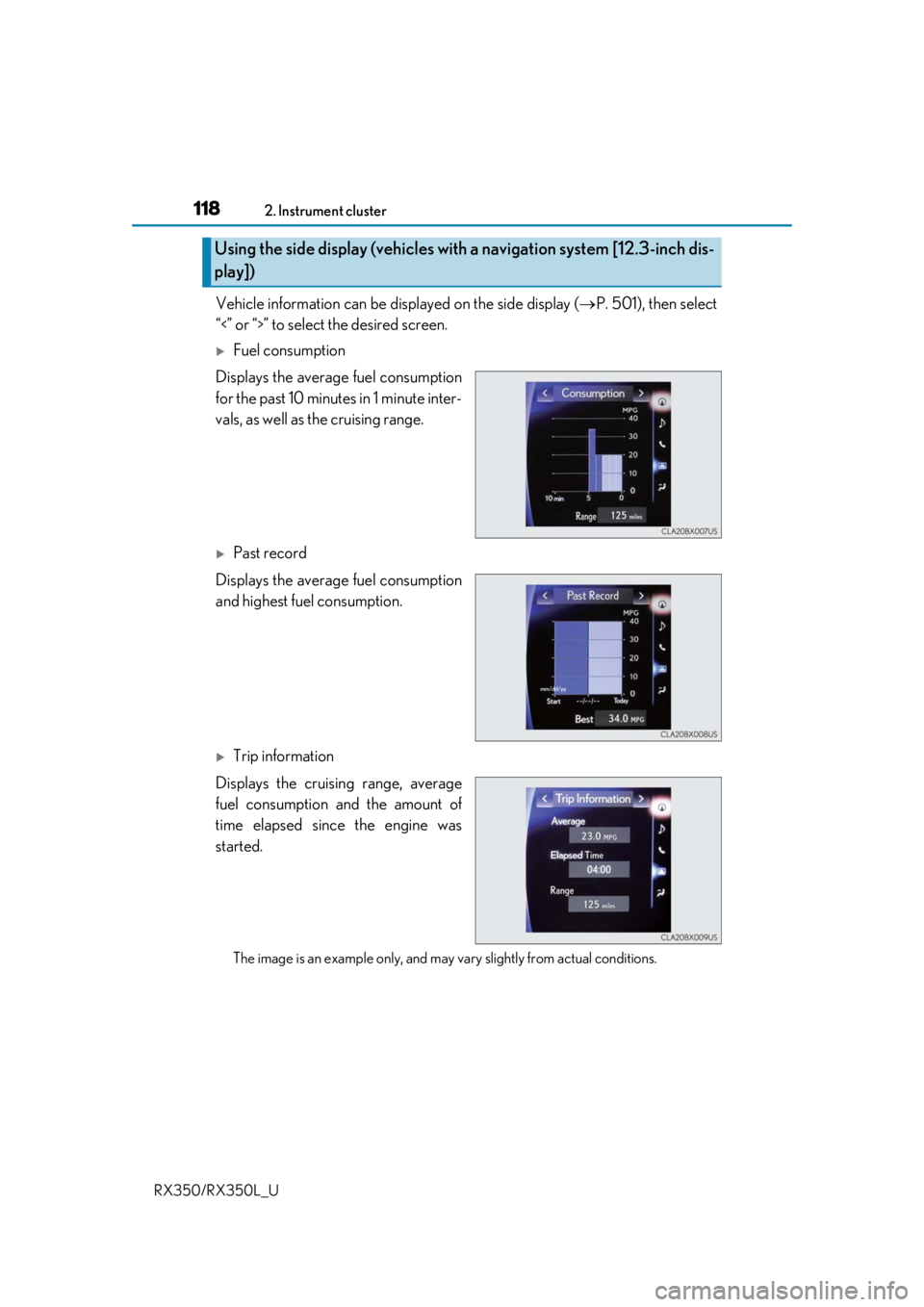
Vehicle information can be displayed on the side display ( P. 501), then select
“<” or “>” to select the desired screen.
Fuel consumption
Displays the average fuel consumption
for the past 10 minutes in 1 minute inter-
vals, as well as the cruising range.
Past record
Displays the average fuel consumption
and highest fuel consumption.
Trip information
Displays the cruising range, average
fuel consumption and the amount of
time elapsed since the engine was
started.
The image is an example only, and may va ry slightly from actual conditions.
Using the side display (vehicles with a navigation system [12.3-inch dis-
play])
Page 122 of 777
1213-1. Key information
3
Operation of each component
RX350/RX350L_U
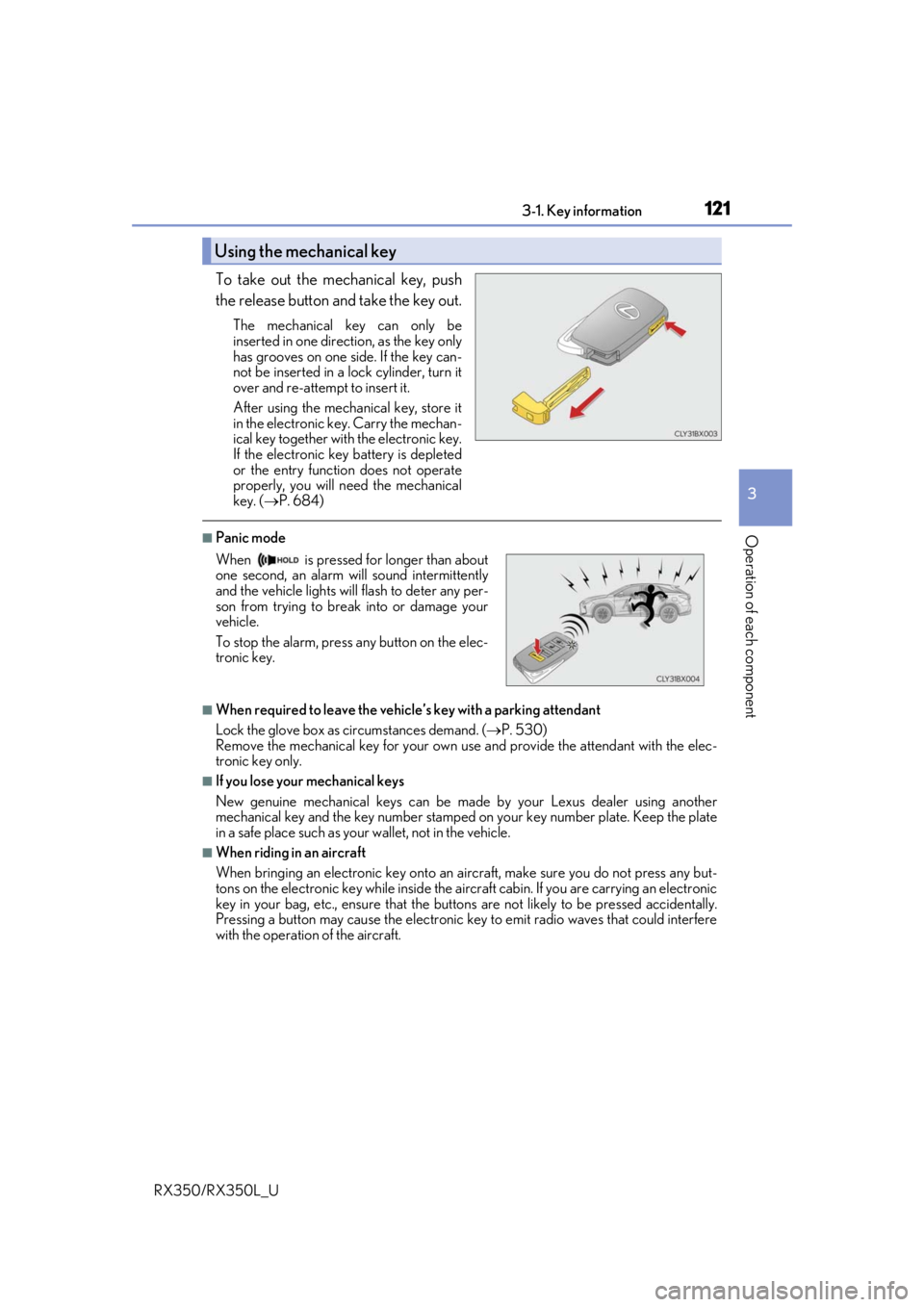
To take out the mechanical key, push
the release button and take the key out.
The mechanical key can only be
inserted in one direction, as the key only
has grooves on one side. If the key can-
not be inserted in a lock cylinder, turn it
over and re-attempt to insert it.
After using the mechanical key, store it
in the electronic key. Carry the mechan-
ical key together with the electronic key.
If the electronic key battery is depleted
or the entry function does not operate
properly, you will need the mechanical
key. ( P. 684)
■Panic mode
■When required to leave the vehicle’s key with a parking attendant
Lock the glove box as circumstances demand. ( P. 530)
Remove the mechanical key for your own use and provide the attendant with the elec-
tronic key only.
■If you lose your mechanical keys
New genuine mechanical keys can be made by your Lexus dealer using another
mechanical key and the key number stamped on your key number plate. Keep the plate
in a safe place such as your wallet, not in the vehicle.
■When riding in an aircraft
When bringing an electronic key onto an aircraft, make sure you do not press any but-
tons on the electronic key while inside the airc raft cabin. If you are carrying an electronic
key in your bag, etc., ensure that the butt ons are not likely to be pressed accidentally.
Pressing a button may cause the electronic key to emit radio waves that could interfere
with the operation of the aircraft.
Using the mechanical key
When is pressed for longer than about
one second, an alarm will sound intermittently
and the vehicle lights will flash to deter any per-
son from trying to break into or damage your
vehicle.
To stop the alarm, press any button on the elec-
tronic key.
Page 129 of 777
1283-2. Opening, closing and locking the doors
RX350/RX350L_U
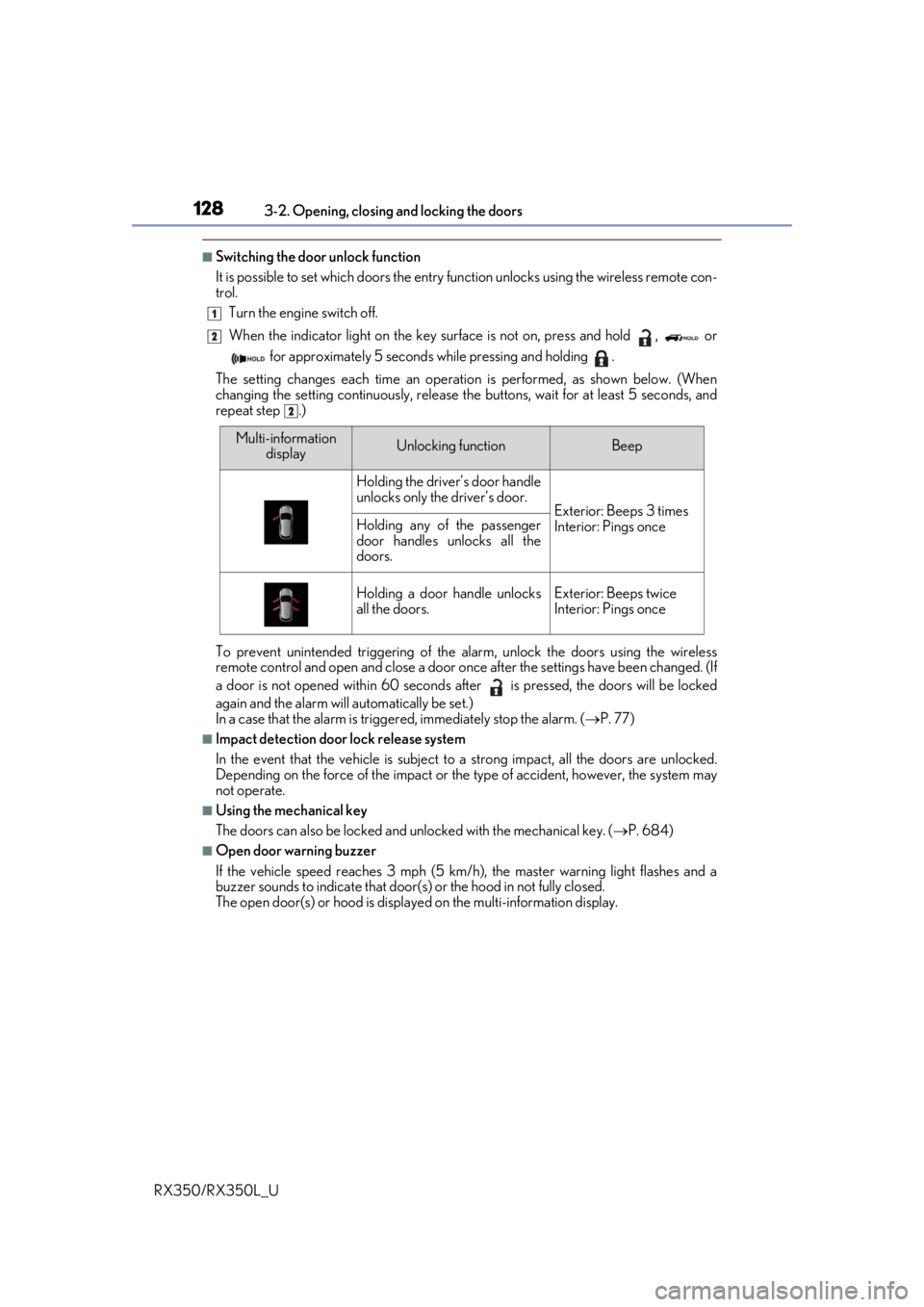
■Switching the door unlock function
It is possible to set which doors the entry function unlock s using the wireless remote con-
trol.
Turn the engine switch off.
When the indicator light on the key su rface is not on, press and hold , or
for approximately 5 seconds while pressing and holding .
The setting changes each time an operation is performed, as shown below. (When
changing the setting continuously, release the buttons, wait for at least 5 seconds, and
repeat step .)
To prevent unintended triggering of the alarm, unlock the doors using the wireless
remote control and open and close a door once after the settings have been changed. (If
a door is not opened within 60 seconds af ter is pressed, the doors will be locked
again and the alarm will automatically be set.)
In a case that the alarm is triggered, immediately stop the alarm. ( P. 77)
■Impact detection door lock release system
In the event that the vehicle is subject to a strong impact, all the doors are unlocked.
Depending on the force of the impact or the type of accident, however, the system may
not operate.
■Using the mechanical key
The doors can also be locked and unlocked with the mechanical key. ( P. 684)
■Open door warning buzzer
If the vehicle speed reaches 3 mph (5 km/h), the master warning light flashes and a
buzzer sounds to indicate that door (s) or the hood in not fully closed.
The open door(s) or hood is displa yed on the multi-information display.
1
2
2
Multi-information
displayUnlocking functionBeep
Holding the driver’s door handle
unlocks only the driver’s door.
Exterior: Beeps 3 times
Interior: Pings onceHolding any of the passenger
door handles unlocks all the
doors.
Holding a door handle unlocks
all the doors.Exterior: Beeps twice
Interior: Pings once
Page 137 of 777

1363-2. Opening, closing and locking the doors
RX350/RX350L_U
■Luggage compartment lights
●RX350L: The luggage compartment lights turn on when the back door is opened.
●When the engine switch is turned off, the lights will go off automatically after 20 min-
utes.
■If the power back door opener is inoperative
The power back door can be unlocked from the inside.
●RX350: The luggage compartment lights turn
on when the power back door is opened with
the respective luggage compartment light
switch on.
Remove the cover.
To protect the cover, place a rag between the
flathead screwdriver and cover as shown in
the illustration.
Move the lever.
1
2
Page 138 of 777

1373-2. Opening, closing and locking the doors
3
Operation of each component
RX350/RX350L_U
■Back door closer
In the event that the power back door is left slightly open, the back door closer will auto-
matically close it to the fully closed position.
●The back door closer can function when the engine switch is in any mode.
●The power back door can be opened using the back door opener switch even if the
back door closer is operating.
■Operation of the power back door
●When the power back door begins to operate, the emergency flashers will flash twice
and a buzzer will sound.
●When the power back door is disabled (P. 101), the power back door will not operate
but can be opened and closed manually.
●The power back door turns to manual operat ion when the back door opener switch is
pressed while the power back door is in an automatic opening/closing operation.
●If anything obstructs the power back door while opening, a buzzer will sound and the
power back door will stop immediately. If anything obstructs the power back door while
closing, a buzzer will sound and the power back door will automatically move slightly in
the opposite direction and then stop.
■Back door reserve lock function
This function reserves the locking of the power back door when the power back door is
open. If the following operations are perfor med, all of the doors except the power back
door will lock and then the power back door will lock when it is completely closed.
Close all of the doors, ex cept the power back door.
Perform an automatic closing operation of the power back door and lock the doors
using the wireless remote control ( P. 124) or smart access system with push-button
start ( P. 124, 130) while the power back door is closing.
Also, if the back door does not fully clos e due to the operation of the jam protection
function, etc., while the back door is automatically closing after a reserve lock opera-
tion is performed, the reserv e lock function is canceled and all the doors will unlock.
1
2
Page 142 of 777
1413-2. Opening, closing and locking the doors
3
Operation of each component
RX350/RX350L_U
WARNING
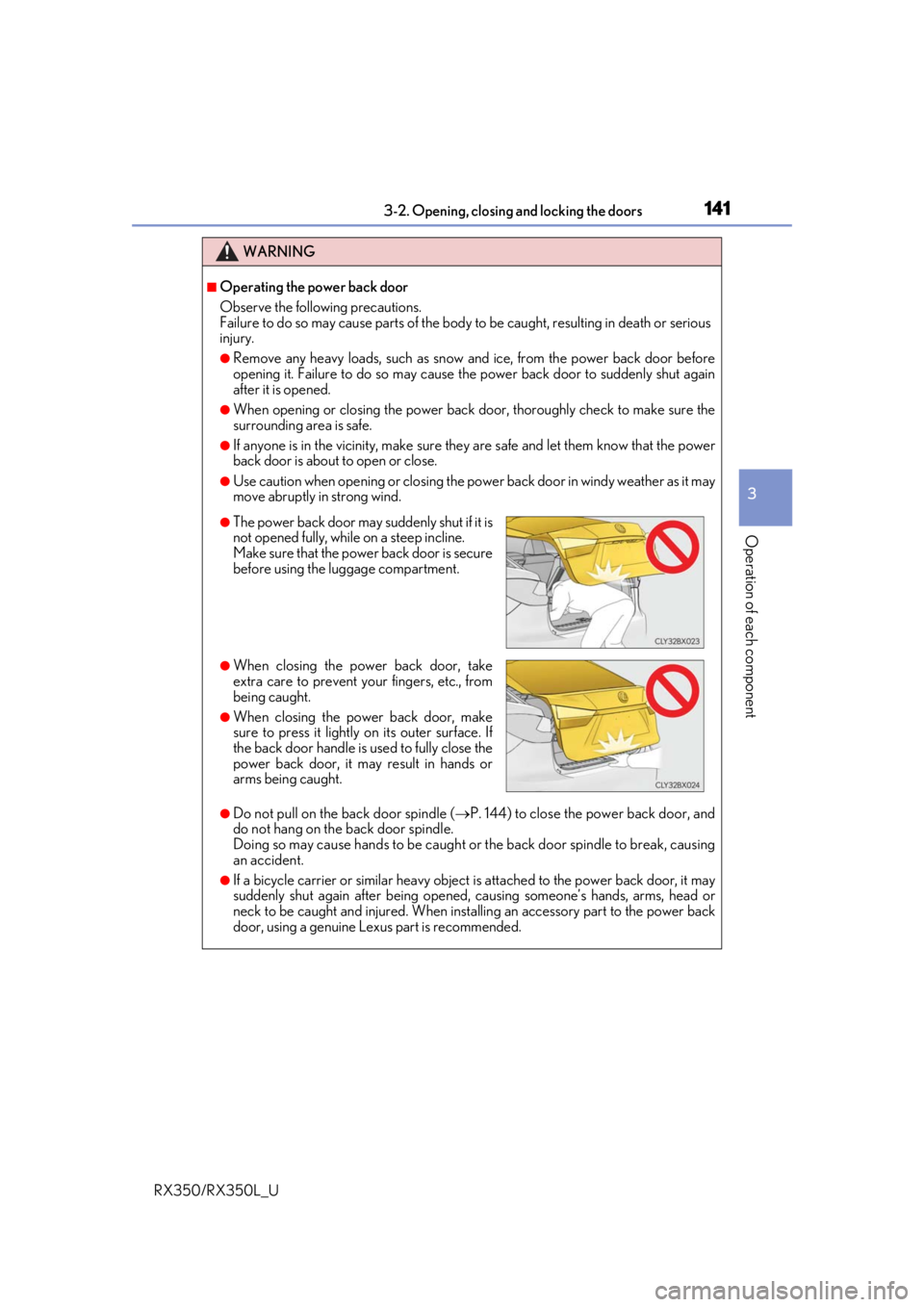
■Operating the power back door
Observe the following precautions.
Failure to do so may cause parts of the body to be caught, resulting in death or serious
injury.
●Remove any heavy loads, such as snow an d ice, from the power back door before
opening it. Failure to do so may cause the power back door to suddenly shut again
after it is opened.
●When opening or closing the power back d oor, thoroughly check to make sure the
surrounding area is safe.
●If anyone is in the vicinity, make sure they are safe and let them know that the power
back door is about to open or close.
●Use caution when opening or closing the power back door in windy weather as it may
move abruptly in strong wind.
●Do not pull on the back door spindle ( P. 144) to close the power back door, and
do not hang on the back door spindle.
Doing so may cause hands to be caught or the back door spindle to break, causing
an accident.
●If a bicycle carrier or similar heavy object is attached to the power back door, it may
suddenly shut again after being opened, causing someone’s hands, arms, head or
neck to be caught and injured. When inst alling an accessory part to the power back
door, using a genuine Lexus part is recommended.
●The power back door may suddenly shut if it is
not opened fully, while on a steep incline.
Make sure that the power back door is secure
before using the luggage compartment.
●When closing the power back door, take
extra care to prevent your fingers, etc., from
being caught.
●When closing the power back door, make
sure to press it lightly on its outer surface. If
the back door handle is used to fully close the
power back door, it may result in hands or
arms being caught.
Page 143 of 777

1423-2. Opening, closing and locking the doors
RX350/RX350L_U
WARNING
■Back door closer
●Use caution when using the back door closer as it still operates when the power back
door system is disabled.
■Power back door
Observe the following precautions wh en operating the power back door.
Failure to do so may cause death or serious injury.
●Check the safety of the surrounding area to make sure there are no obstacles or any-
thing that could cause any of yo ur belongings to get caught.
●If anyone is in the vicinity, make sure they are safe and let them know that the power
back door is about to open or close.
●If the power back door system is disabled ( P. 101) while the power back door is
operating, the power back door will stop operating. The power back door must then
be operated manually. Take extra care in th is situation, as the power back door may
open or close suddenly.
●If the operating conditions of the power back door ( P. 135) are no longer met, a
buzzer may sound and the power back door may stop opening or closing. The power
back door must then be operated manually. Ta ke extra care on an incline in this situa-
tion, as the power back door may move suddenly.
●On an incline, the power back door may su ddenly shut after it opens. Make sure the
power back door is fully open and secure.
●In the following situations, the power back door may detect an abnormality and auto-
matic operation may be stopped. In this case, the power back door must then be
operated manually. Take extra care in this situation, as the stopped power back door
may suddenly open or close, causing an accident.
• When the power back door contacts an obstacle
• When the battery voltage suddenly drops, such as when the engine switch is turned to IGNITION ON mode or the engine is started during automatic opera-
tion
●In the event that the power back door is left
slightly open, the back door closer will auto-
matically close it to the fully closed position. It
takes several seconds before the back door
closer begins to operate. Be careful not to get
fingers caught or anything else in the power
back door, as this may cause bone fractures
or other serious injuries.
Page 150 of 777

1493-2. Opening, closing and locking the doors
3
Operation of each component
RX350/RX350L_U
■Note for the entry function
●Even when the electronic key is within the effective range (detection areas), the system
may not operate properly in the following cases:
• The electronic key is too close to the window or outside door handle, near the ground, or in a high place when the doors are locked or unlocked.
• The electronic key is near the ground or in a high place, or too close to the rear
bumper center when the back door is opened.
• The electronic key is on th e instrument panel, luggage co mpartment, floor, or in the
door pockets or glove box when the engine is started or engine switch modes are
changed.
●Do not leave the electronic key on top of th e instrument panel or near the door pockets
when exiting the vehicle. Depending on the radio wave reception conditions, it may be
detected by the antenna outs ide the cabin and the door will become lockable from the
outside, possibly trapping the electronic key inside the vehicle.
●As long as the electronic key is within th e effective range, the doors may be locked or
unlocked by anyone.
●Even if the electronic key is not inside the vehicle, it may be possible to start the engine
if the electronic key is near the window.
●The doors may unlock if a large amount of wa ter splashes on the door handle, such as in
the rain or in a car wash when the electronic key is within the effective range. (The door
will automatically be locked after approx imately 60 seconds if the doors are not
opened and closed.)
●If the wireless remote control is used to lo ck the doors when the electronic key is near
the vehicle, there is a possibility that the d oor may not be unlocked by the entry func-
tion. (Use the wireless remote control to unlock the doors.)
●Touching the door lock sensor while wearin g gloves may delay or prevent lock opera-
tion. Remove the gloves and touch the lock sensor again.
●When the lock operation is performed using the lock sensor, recognition signals will be
shown up to two consecutive times. After this, no recognition signals will be given.
*
●If the door handle becomes wet while the el ectronic key is within the effective range,
the door may lock and unlock repeatedly. In that case, follow the following correction
procedures to wash the vehicle:
• Place the electronic key in a location 6 ft. (2 m) or more away from the vehicle. (Take care to ensure that the key is not stolen.)
• Set the electronic key to battery-saving mode to disable the smart access system with push-button start. ( P. 148)
●If the electronic key is inside the vehicle and a door handle becomes wet during a car
wash, a message may be shown on the mult i-information display and a buzzer will
sound outside the vehicle. To turn off the alarm, lock all the doors.
●The lock sensor may not work properly if it comes into contact with ice, snow, mud, etc.
Clean the lock sensor and attempt to operate it again.
●A sudden approach to the effective range or door handle may prevent the doors from
being unlocked. In this case, return the door handle to the original position and check
that the doors unlock before pulling the door handle again.
●If there is another electronic key in the de tection area, it may take slightly longer to
unlock the doors after the door handle is gripped.
Page 169 of 777
1683-3. Adjusting the seats
RX350/RX350L_U
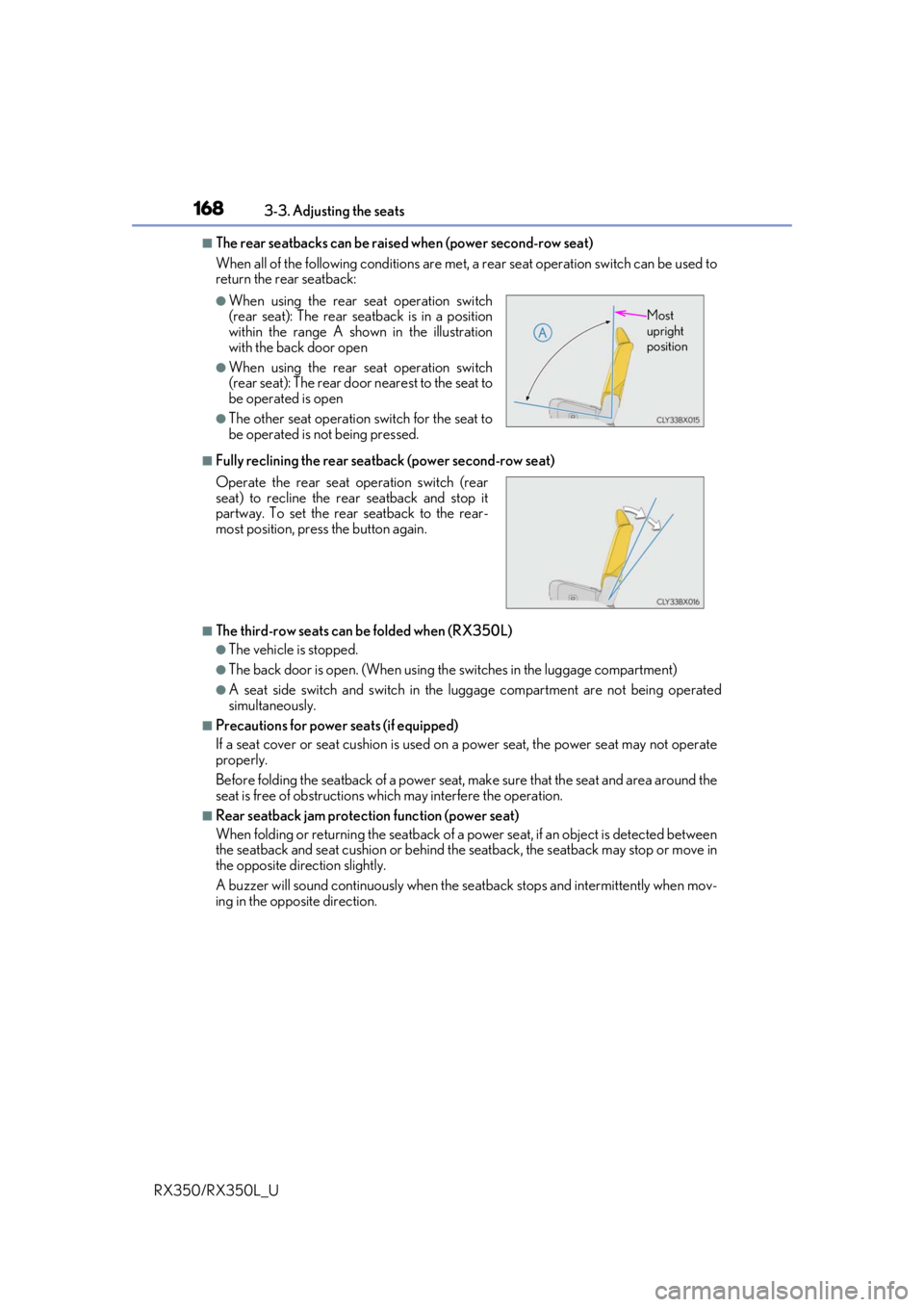
■The rear seatbacks can be raised when (power second-row seat)
When all of the following conditions are met, a rear seat operation switch can be used to
return the rear seatback:
■Fully reclining the rear seatback (power second-row seat)
■The third-row seats can be folded when (RX350L)
●The vehicle is stopped.
●The back door is open. (When using th e switches in the luggage compartment)
●A seat side switch and switch in the luggage compartment are not being operated
simultaneously.
■Precautions for power seats (if equipped)
If a seat cover or seat cushion is used on a power seat, the power seat may not operate
properly.
Before folding the seatback of a power seat, make sure that the seat and area around the
seat is free of obstructions which may interfere the operation.
■Rear seatback jam protection function (power seat)
When folding or returning the seatback of a power seat, if an object is detected between
the seatback and seat cushion or behind the seatback, the seatback may stop or move in
the opposite direction slightly.
A buzzer will sound continuously when the se atback stops and intermittently when mov-
ing in the opposite direction.
●When using the rear seat operation switch
(rear seat): The rear seatback is in a position
within the range A shown in the illustration
with the back door open
●When using the rear seat operation switch
(rear seat): The rear door nearest to the seat to
be operated is open
●The other seat operation switch for the seat to
be operated is not being pressed.
Operate the rear seat operation switch (rear
seat) to recline the rear seatback and stop it
partway. To set the rear seatback to the rear-
most position, press the button again.
Most
upright
position