change time LEXUS RX450h 2021 User Guide
[x] Cancel search | Manufacturer: LEXUS, Model Year: 2021, Model line: RX450h, Model: LEXUS RX450h 2021Pages: 528, PDF Size: 10.73 MB
Page 127 of 528

1273-2. Opening, closing and locking the doors
3
Before driving
devices
• Another vehicle’s electronic key, another electronic key of your vehicle, or a wire-
less key that emits radio waves
• Personal computers or personal digital assistants (PDAs)
• Digital audio players
• Portable game systems
●If window tint with a metallic content or
metallic objects are attached to the rear
window
●When the electronic key is placed near a
battery charger or electronic devices
●When the vehicle is parked in a pay park-
ing spot where radio waves are emitted
■Note for the entry function
●Even when the electronic key is within the
effective range (detection areas), the sys-
tem may not operate properly in the fol-
lowing cases:
• The electronic key is too close to the win-
dow or outside door handle, near the
ground, or in a high place when the doors
are locked or unlocked.
• The electronic key is near the ground or in a high place, or too close to the rear
bumper center when the back door is
opened.
• The electronic key is on the instrument panel, luggage compar tment, floor, or in
the door pockets or glove box when the
hybrid system is star ted or power switch
modes are changed.
●Do not leave the electronic key on top of
the instrument panel or near the door
pockets when exiting the vehicle.
Depending on the radio wave reception
conditions, it may be detected by the
antenna outside the cabin and the door
will become lockable from the outside,
possibly trapping the electronic key
inside the vehicle.
●As long as the electron ic key is within the
effective range, the doors may be locked
or unlocked by anyone.
●Even if the electronic key is not inside the
vehicle, it may be possible to start the
hybrid system if the electronic key is near
the window.
●The doors may unlock if a large amount of water splashes on the door handle,
such as in the rain or in a car wash when
the electronic key is
within the effective
range. (The door will automatically be
locked after approximately 60 seconds if
the doors are not opened and closed.)
●If the wireless remote control is used to
lock the doors when the electronic key is
near the vehicle, there is a possibility that
the door may not be unlocked by the
entry function. (Use the wireless remote
control to unlock the doors.)
●Touching the door lock sensor while
wearing gloves may delay or prevent lock
operation. Remove the gloves and touch
the lock sensor again.
●When the lock operation is performed
using the lock sensor, recognition signals
will be shown up to two consecutive
times. After this, no recognition signals
will be given.
●If the door handle becomes wet while the
electronic key is within the effective
range, the door may lock and unlock
repeatedly. In that case, follow the follow-
ing correction procedures to wash the
vehicle:
• Place the electronic key in a location 6 ft. (2 m) or more away from the vehicle.
(Take care to ensure that the key is not
stolen.)
• Set the electronic key to battery-saving
mode to disable the smart access system
with push-button start. ( P.126)
●If the electronic key is inside the vehicle
and a door handle becomes wet during a
car wash, a message may be shown on
the multi-information display and a
buzzer will sound outside the vehicle. To
turn off the alarm, lock all the doors.
●The lock sensor may not work properly if
it comes into contact with ice, snow, mud,
etc. Clean the lock sensor and attempt to
operate it again.
●A sudden approach to the effective
range or door handle may prevent the
doors from being unlocked. In this case,
return the door handle to the original
position and check that the doors unlock
before pulling the door handle again.
●If there is another electronic key in the
Page 151 of 528
1513-4. Adjusting the steering wheel and mirrors
3
Before driving
nor “R”.
To set the mirror angle used when the vehi-
cle is reversing, adjust the mirror angle at a
desired position with the shift lever in R.
The adjusted angle will be memorized and
the mirror will automatically tilt to the mem-
orized angle whenever the shift lever is
shifted to R from next time.
The memorized downward tilt position of
the mirror is linked to the normal position
(angle adjusted with the shift lever in other
than R). Therefore, if the normal position is
changed after adjustment, the tilt position
will also change.
When the normal position is changed, read-
just the angle in reversing.
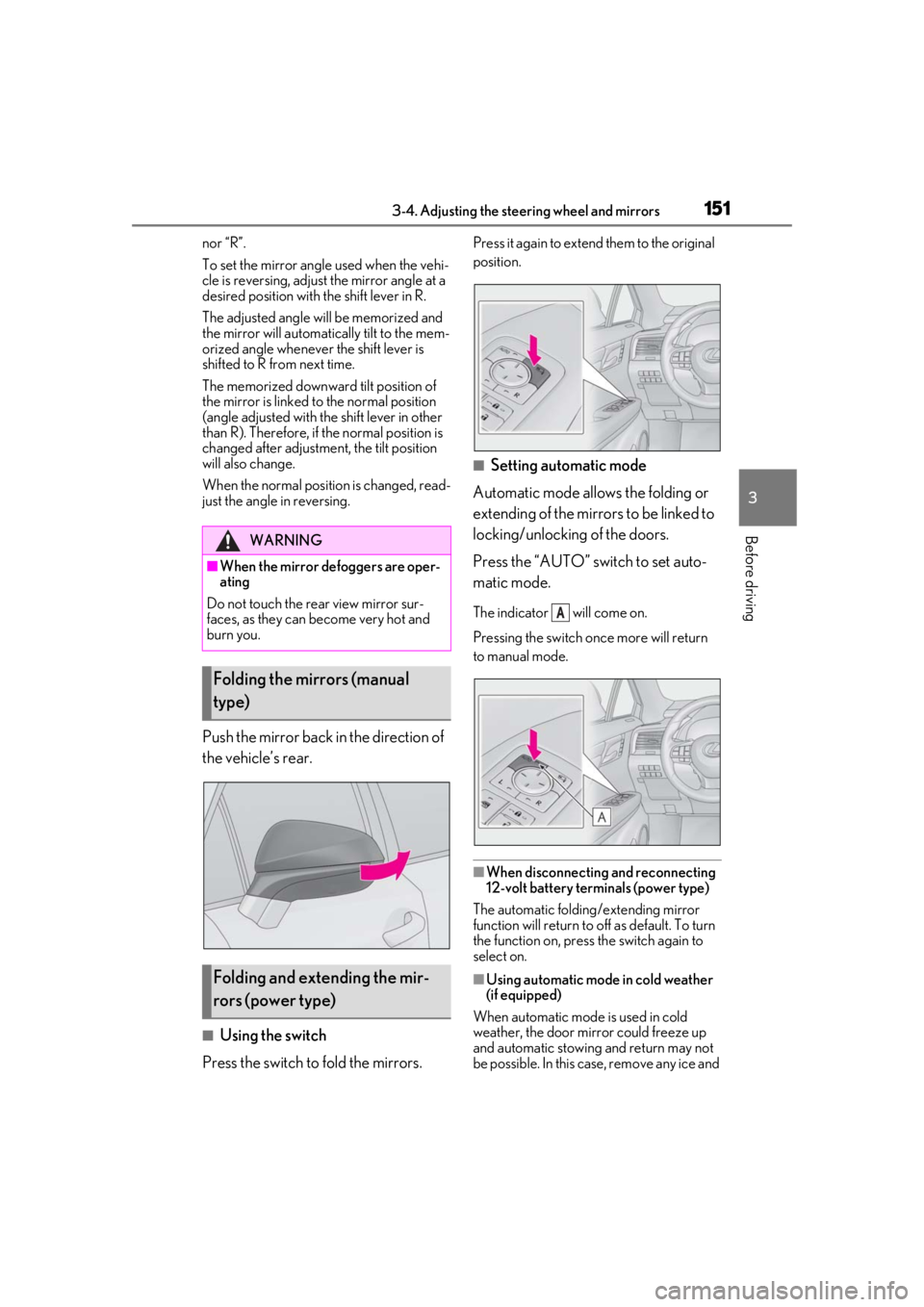
Push the mirror back in the direction of
the vehicle’s rear.
■Using the switch
Press the switch to fold the mirrors.
Press it again to extend them to the original
position.
■Setting automatic mode
Automatic mode allows the folding or
extending of the mirrors to be linked to
locking/unlocking of the doors.
Press the “AUTO” switch to set auto-
matic mode.
The indicator will come on.
Pressing the switch on ce more will return
to manual mode.
■When disconnecting and reconnecting
12-volt battery terminals (power type)
The automatic folding/extending mirror
function will return to off as default. To turn
the function on, press the switch again to
select on.
■Using automatic mode in cold weather
(if equipped)
When automatic mode is used in cold
weather, the door mirror could freeze up
and automatic stowing and return may not
be possible. In this case, remove any ice and
WARNING
■When the mirror defoggers are oper-
ating
Do not touch the rear view mirror sur-
faces, as they can become very hot and
burn you.
Folding the mirrors (manual
type)
Folding and extending the mir-
rors (power type)
A
Page 184 of 528
1844-2. Driving procedures
4-2.Driving procedures
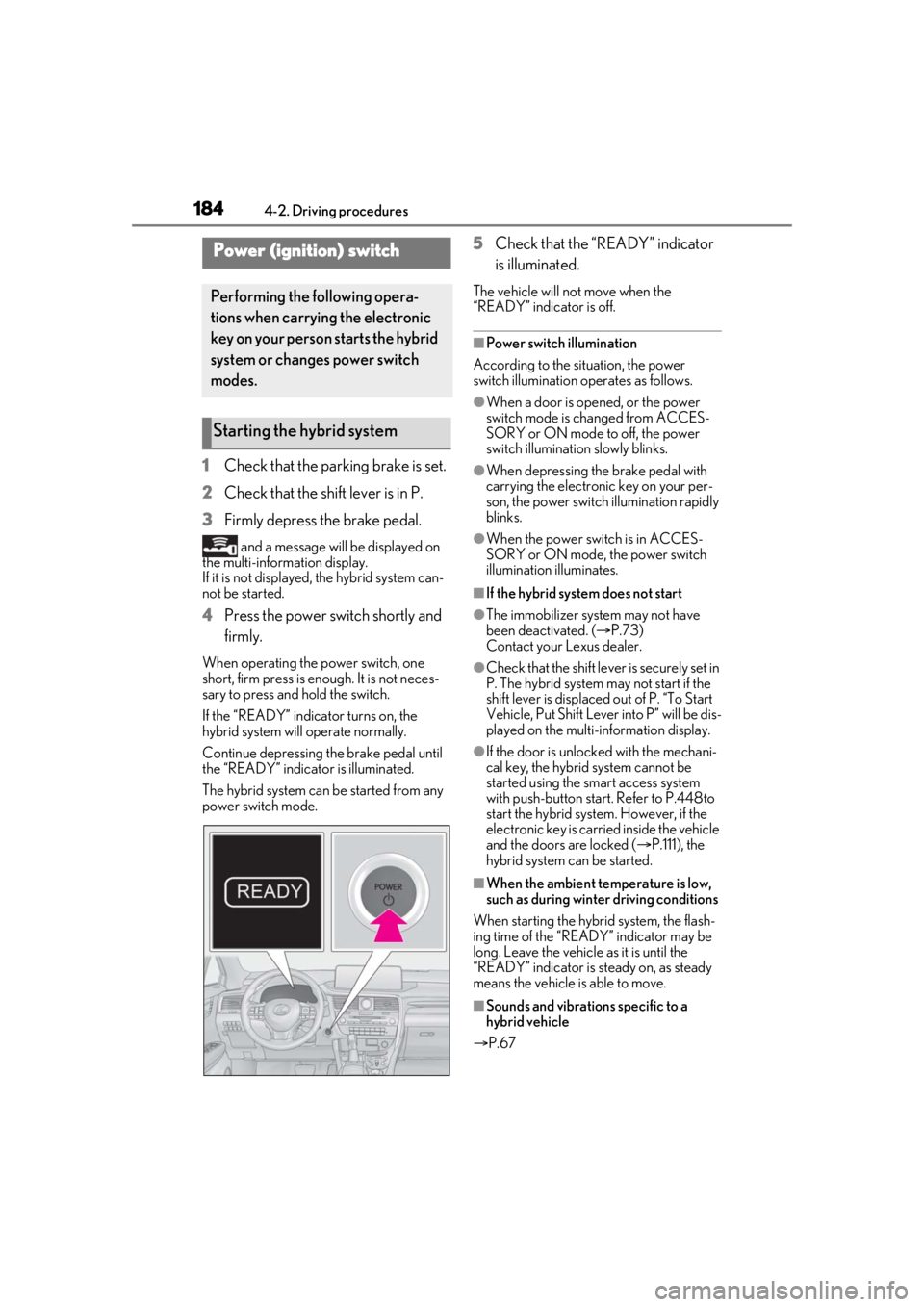
1Check that the parking brake is set.
2 Check that the shift lever is in P.
3 Firmly depress the brake pedal.
and a message will be displayed on
the multi-information display.
If it is not displayed, the hybrid system can-
not be started.
4 Press the power switch shortly and
firmly.
When operating the power switch, one
short, firm press is enough. It is not neces-
sary to press and hold the switch.
If the “READY” indicator turns on, the
hybrid system will operate normally.
Continue depressing the brake pedal until
the “READY” indicator is illuminated.
The hybrid system can be started from any
power switch mode.
5Check that the “READY” indicator
is illuminated.
The vehicle will not move when the
“READY” indicator is off.
■Power switch illumination
According to the situation, the power
switch illumination operates as follows.
●When a door is opened, or the power
switch mode is changed from ACCES-
SORY or ON mode to off, the power
switch illumination slowly blinks.
●When depressing the brake pedal with
carrying the electronic key on your per-
son, the power switch illumination rapidly
blinks.
●When the power switch is in ACCES-
SORY or ON mode, the power switch
illumination illuminates.
■If the hybrid system does not start
●The immobilizer system may not have
been deactivated. ( P.73)
Contact your Lexus dealer.
●Check that the shift leve r is securely set in
P. The hybrid system may not start if the
shift lever is displaced out of P. “To Start
Vehicle, Put Shift Lever into P” will be dis-
played on the multi-information display.
●If the door is unlock ed with the mechani-
cal key, the hybrid system cannot be
started using the sm art access system
with push-button start. Refer to P.448to
start the hybrid system. However, if the
electronic key is carried inside the vehicle
and the doors are locked ( P.111), the
hybrid system can be started.
■When the ambient temperature is low,
such as during winter driving conditions
When starting the hybrid system, the flash-
ing time of the “READY” indicator may be
long. Leave the vehicle as it is until the
“READY” indicator is steady on, as steady
means the vehicle is able to move.
■Sounds and vibrations specific to a
hybrid vehicle
P.67
Power (ignition) switch
Performing the following opera-
tions when carryin g the electronic
key on your person starts the hybrid
system or changes power switch
modes.
Starting the hybrid system
Page 185 of 528
1854-2. Driving procedures
4
Driving
■Electronic key battery depletion
P.106
■Conditions affe cting operation
P.126
■Note for the entry function
P.127
■Steering lock function
●After turning the power switch off and
opening and closing the doors, the steer-
ing wheel will be lock ed due to the steer-
ing lock function. Operating the power
switch again automatically cancels the
steering lock.
●When the steering lock cannot be
released, “Steering Wheel Lock Press
Power Switch while Turning Wheel” will
be displayed on the multi-information dis-
play.
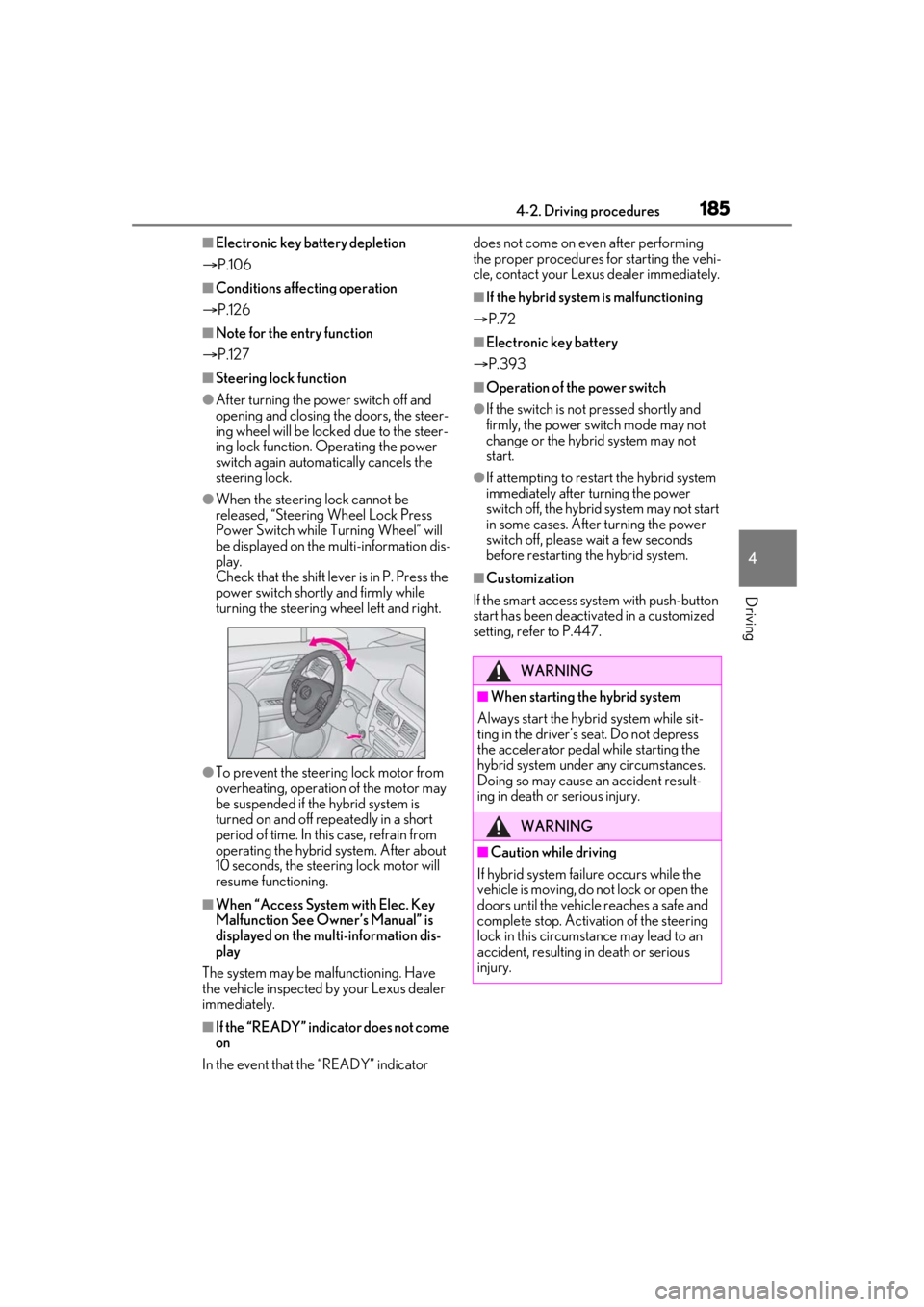
Check that the shift leve r is in P. Press the
power switch shortly and firmly while
turning the steering wheel left and right.
●To prevent the steering lock motor from
overheating, operation of the motor may
be suspended if the hybrid system is
turned on and off repeatedly in a short
period of time. In this case, refrain from
operating the hybrid system. After about
10 seconds, the stee ring lock motor will
resume functioning.
■When “Access System with Elec. Key
Malfunction See Owner’s Manual” is
displayed on the mu lti-information dis-
play
The system may be malfunctioning. Have
the vehicle inspected by your Lexus dealer
immediately.
■If the “READY” indicator does not come
on
In the event that the “READY” indicator does not come on even after performing
the proper procedures for starting the vehi-
cle, contact your Lexus dealer immediately.
■If the hybrid system
is malfunctioning
P.72
■Electronic key battery
P.393
■Operation of the power switch
●If the switch is no t pressed shortly and
firmly, the power switch mode may not
change or the hybrid system may not
start.
●If attempting to restart the hybrid system
immediately after turning the power
switch off, the hybrid system may not start
in some cases. After turning the power
switch off, please wait a few seconds
before restarting the hybrid system.
■Customization
If the smart access system with push-button
start has been deactivated in a customized
setting, refer to P.447.
WARNING
■When starting the hybrid system
Always start the hybrid system while sit-
ting in the driver’s seat. Do not depress
the accelerator pedal while starting the
hybrid system under any circumstances.
Doing so may cause an accident result-
ing in death or serious injury.
WARNING
■Caution while driving
If hybrid system failure occurs while the
vehicle is moving, do not lock or open the
doors until the vehicle reaches a safe and
complete stop. Activation of the steering
lock in this circumstance may lead to an
accident, resulting in death or serious
injury.
Page 187 of 528
1874-2. Driving procedures
4
Driving
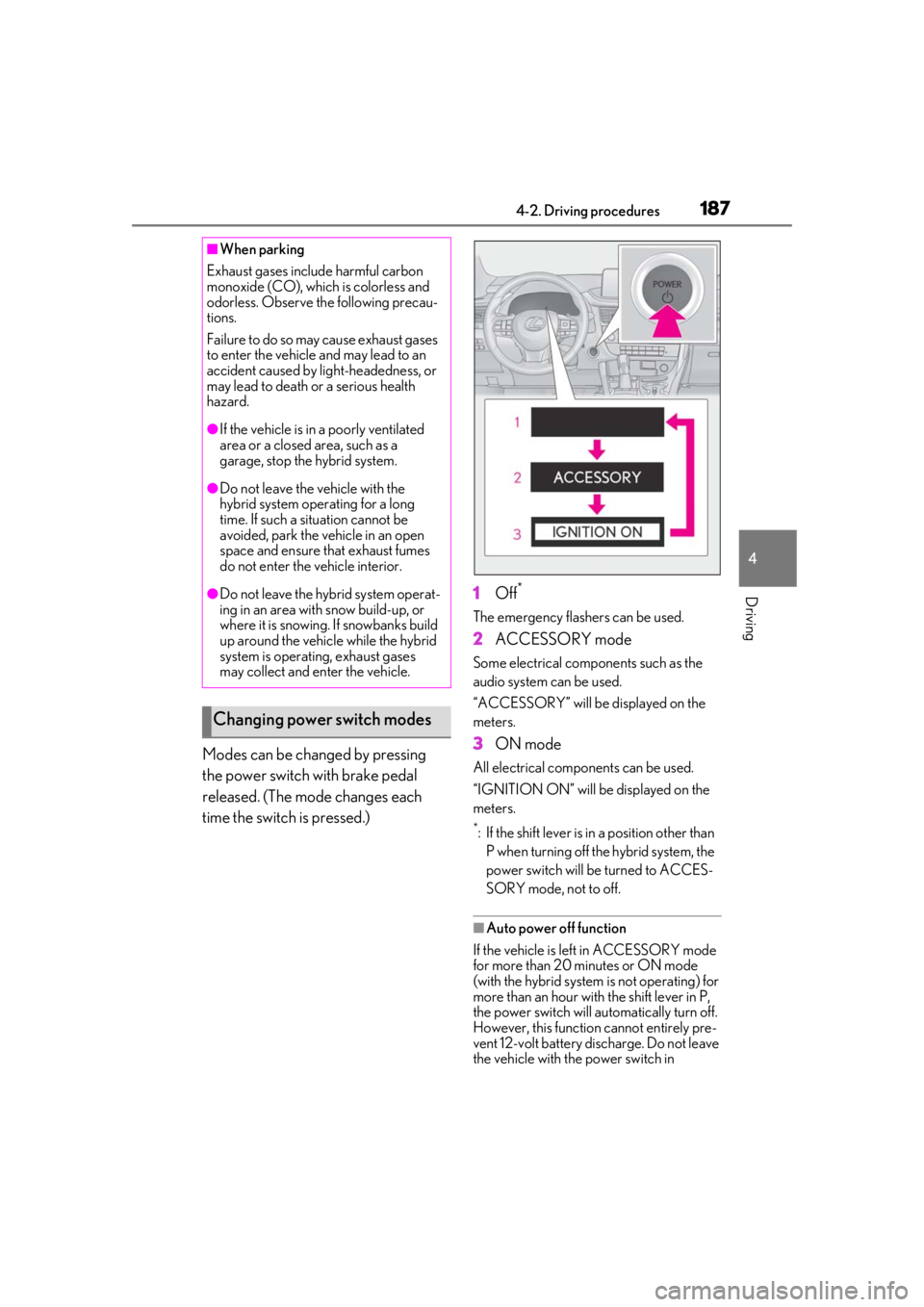
Modes can be changed by pressing
the power switch with brake pedal
released. (The mode changes each
time the switch is pressed.)1
Off
*
The emergency flashers can be used.
2ACCESSORY mode
Some electrical components such as the
audio system can be used.
“ACCESSORY” will be displayed on the
meters.
3ON mode
All electrical components can be used.
“IGNITION ON” will be displayed on the
meters.
*: If the shift lever is in a position other than
P when turning off the hybrid system, the
power switch will be turned to ACCES-
SORY mode, not to off.
■Auto power off function
If the vehicle is left in ACCESSORY mode
for more than 20 minutes or ON mode
(with the hybrid system is not operating) for
more than an hour with the shift lever in P,
the power switch will automatically turn off.
However, this function cannot entirely pre-
vent 12-volt battery discharge. Do not leave
the vehicle with the power switch in
■When parking
Exhaust gases include harmful carbon
monoxide (CO), which is colorless and
odorless. Observe the following precau-
tions.
Failure to do so may cause exhaust gases
to enter the vehicle and may lead to an
accident caused by light-headedness, or
may lead to death or a serious health
hazard.
●If the vehicle is in a poorly ventilated
area or a closed area, such as a
garage, stop the hybrid system.
●Do not leave the vehicle with the
hybrid system operating for a long
time. If such a situation cannot be
avoided, park the vehicle in an open
space and ensure that exhaust fumes
do not enter the vehicle interior.
●Do not leave the hybrid system operat-
ing in an area with snow build-up, or
where it is snowing. If snowbanks build
up around the vehicle while the hybrid
system is operating, exhaust gases
may collect and enter the vehicle.
Changing power switch modes
Page 194 of 528
1944-2. Driving procedures
ically set to S4 or S5 according to the vehi-
cle speed.
■Shift ranges and their functions
You can choose from 6 levels of
accelerating force and engine brak-
ing force.
A lower shift range will provide
greater accelerating force and
engine braking force than a higher
shift range, and the engine revolu-
tions will also increase.
If you accelerate while in ranges 1 to
4, the shift range may automatically
increase in accordance with the
vehicle speed.
■S mode
●When the shift range is S4 or lower, hold-
ing the shift lever towa rd “+” sets the shift
range to S6.
●Automatically selects a higher shift range
before the engine speed becomes too
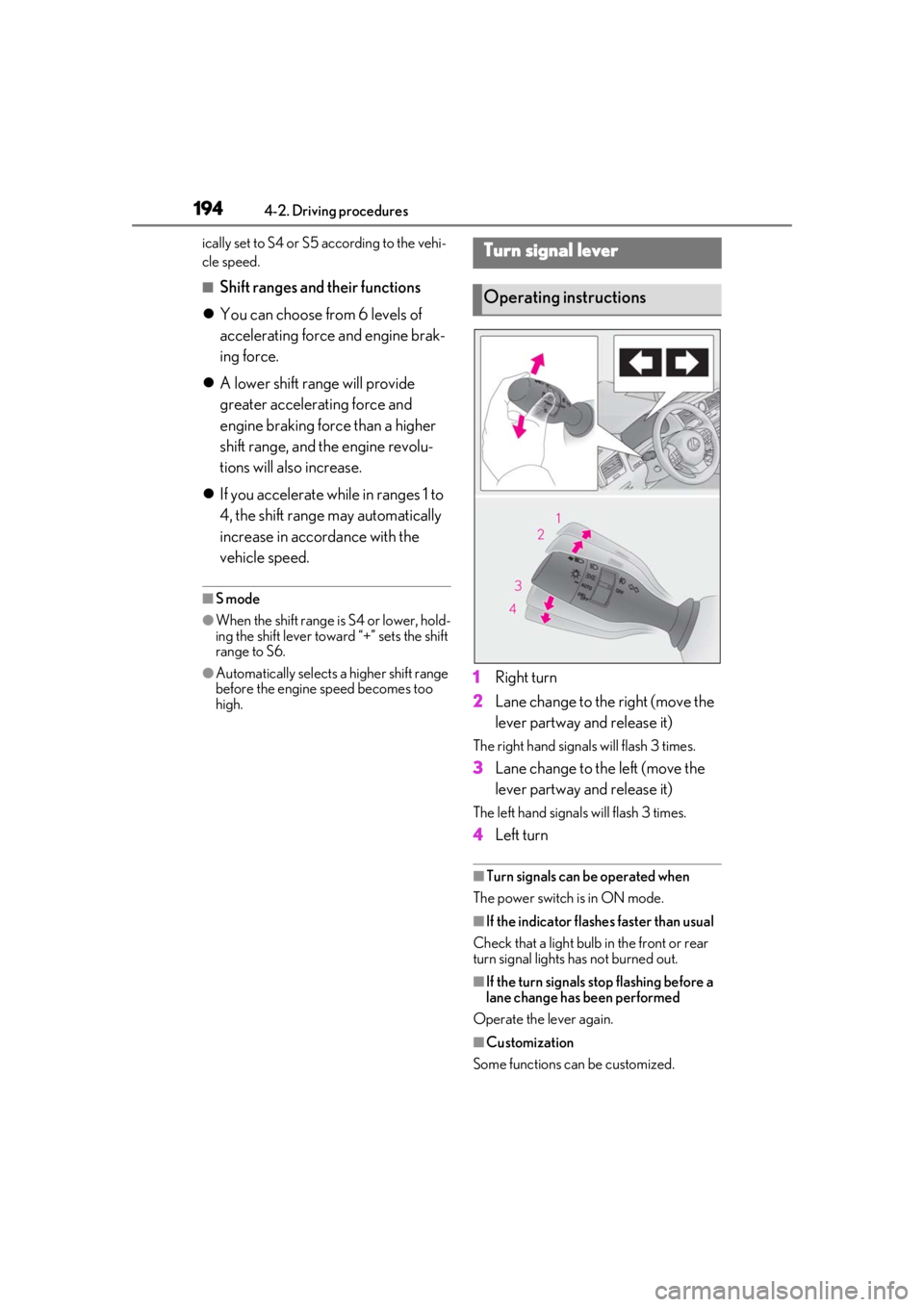
high.1 Right turn
2 Lane change to the right (move the
lever partway and release it)
The right hand signals will flash 3 times.
3Lane change to the left (move the
lever partway and release it)
The left hand signals will flash 3 times.
4Left turn
■Turn signals can be operated when
The power switch is in ON mode.
■If the indicator flashes faster than usual
Check that a light bulb in the front or rear
turn signal lights has not burned out.
■If the turn signals stop flashing before a
lane change has been performed
Operate the lever again.
■Customization
Some functions can be customized.
Turn signal lever
Operating instructions
Page 204 of 528

2044-3. Operating the lights and wipers
out its headlights turned on is detected.
●House lights, street lights, traffic signals,
and illuminated billboards or signs and
other reflective objects may cause the
high beams to change to the low beams,
or the low beams to remain on.
●The following factors may affect the
amount of time taken for the high beams
to turn on or off:
• The brightness of the headlights, fog
lights, and tail lights of vehicles ahead
• The movement and direction of vehicles ahead
• When a vehicle ahead only has opera- tional lights on one side
• When a vehicle ahead is a two-wheeled
vehicle
• The condition of the road (gradient, curve, condition of th e road surface, etc.)
• The number of passengers and amount of luggage in the vehicle
●The high beams may turn on or off unex-
pectedly.
●Bicycles or similar vehicles may not be
detected.
●In the following situations the system may
not be able to correctly detect the sur-
rounding brightness le vel. This may cause
the low beams to remain on or the high
beams to flash or dazzle pedestrians or
vehicles ahead. In such a case, it is neces-
sary to manually switch between the high
and low beams.
• When driving in inclement weather
(heavy rain, snow, fog, sandstorms, etc.)
• When the windshield is obscured by fog, mist, ice, dirt, etc.
• When the windshield is cracked or dam- aged
• When the camera sensor is deformed or
dirty
• When the temperature of the camera sensor is extremely high
• When the surrounding brightness level is equal to that of head lights, tail lights or
fog lights
• When headlights or tail lights of vehicles
ahead are turned off, dirty, changing
color, or not aimed properly
• When the vehicle is hit by water, snow,
dust, etc. from a preceding vehicle
• When driving through an area of inter-mittently changing brightness and dark-
ness
• When frequently and repeatedly driving
ascending/descending roads, or roads
with rough, bumpy or uneven surfaces
(such as stone-paved roads, gravel roads,
etc.)
• When frequently and repeatedly taking curves or driving on a winding road
• When there is a highly reflective object ahead of the vehicle, such as a sign or
mirror
• When the back of a preceding vehicle is highly reflective, such as a container on a
truck
• When the vehicle’s headlights are dam- aged or dirty, or are not aimed properly
• When the vehicle is listing or titling due to
a flat tire, a trailer being towed, etc.
• When the headlights are changed between the high beams and low beams
repeatedly in an abnormal manner
• When the driver believes that the high beams may be flashing or dazzling
pedestrians or other drivers
■Temporarily lowering sensor sensitivity
The sensitivity of the sensor can be tempo-
rarily lowered.
1 Turn the power switch off while the fol-
lowing conditions are met.
●The headlight switch is in or .
●The headlight switch lever is in high beam
position.
●Automatic High Beam switch is on.
2 Turn the power switch to ON mode.
3 Within 60 seconds after step 2 , repeat
pulling the headlight switch lever to the
original position then pushing it to the
high beam position quickly 10 times,
then leave the lever in high beam posi-
tion.
4 If the sensitivity is changed, the Auto-
matic High Beam indicator is turn on
and off 3 times.
Automatic High Beam (headlights) may
turn on even when the vehicle is stopped.
Page 219 of 528
2194-5. Using the driving support systems
4
Driving
●In the following situations, if the situation has changed (or the vehicle has been driven for
some time) and the normal operating conditions are detected, the message will disappear
and the system will become operational.
If the message does not disappear, contact your Lexus dealer.
• When the temperature around the radar sensor is outside of the operational range, such
as when the vehicle is in the sun or in an extremely cold environment
• When the front camera cannot detect objects in front of the vehicle, such as when driving
in the dark, snow, or fog, or when brig ht lights are shining into the front camera
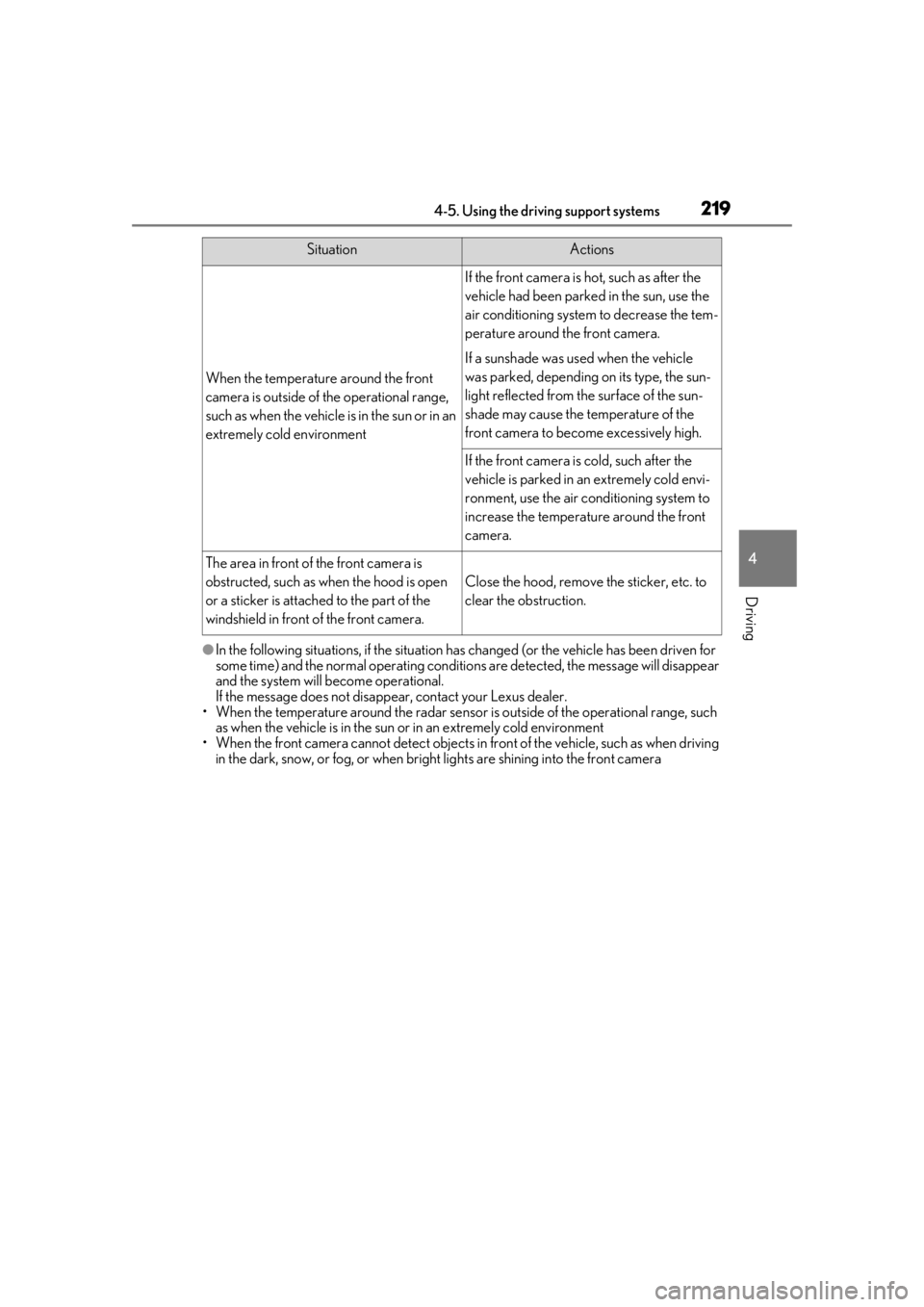
When the temperature around the front
camera is outside of the operational range,
such as when the vehicle is in the sun or in an
extremely cold environment
If the front camera is hot, such as after the
vehicle had been parked in the sun, use the
air conditioning system to decrease the tem-
perature around the front camera.
If a sunshade was used when the vehicle
was parked, depending on its type, the sun-
light reflected from the surface of the sun-
shade may cause the temperature of the
front camera to become excessively high.
If the front camera is cold, such after the
vehicle is parked in an extremely cold envi-
ronment, use the air conditioning system to
increase the temperature around the front
camera.
The area in front of the front camera is
obstructed, such as when the hood is open
or a sticker is attached to the part of the
windshield in front of the front camera.
Close the hood, remove the sticker, etc. to
clear the obstruction.
SituationActions
Page 222 of 528
2224-5. Using the driving support systems
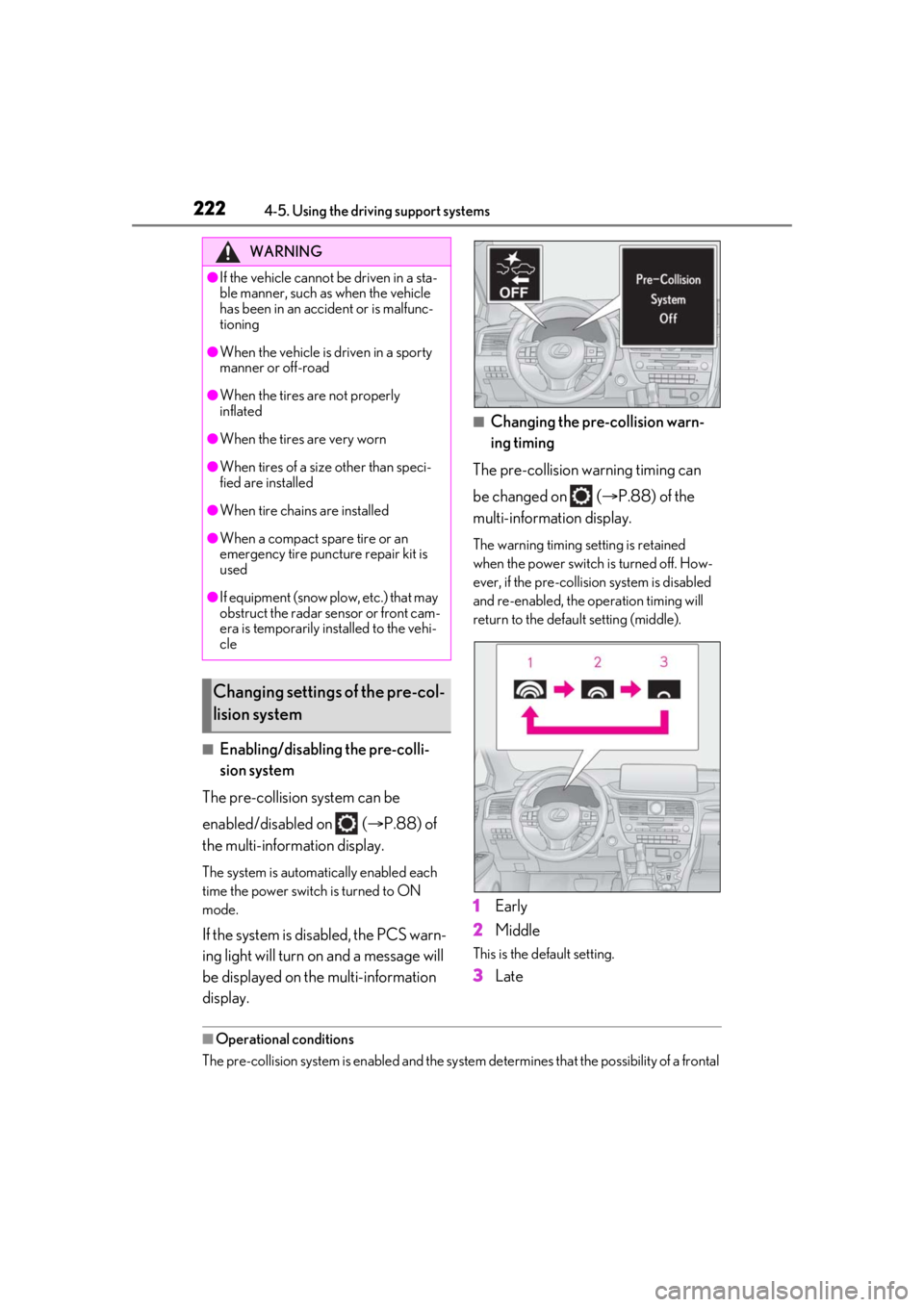
■Enabling/disabling the pre-colli-
sion system
The pre-collision system can be
enabled/disabled on ( P.88) of
the multi-information display.
The system is automatically enabled each
time the power switch is turned to ON
mode.
If the system is disabled, the PCS warn-
ing light will turn on and a message will
be displayed on the multi-information
display.
■Changing the pre-collision warn-
ing timing
The pre-collision warning timing can
be changed on ( P.88) of the
multi-information display.
The warning timing setting is retained
when the power switch is turned off. How-
ever, if the pre-collision system is disabled
and re-enabled, the operation timing will
return to the default setting (middle).
1 Early
2 Middle
This is the default setting.
3Late
■Operational conditions
The pre-collision system is enabled and the system determines that the possibility of a frontal
WARNING
●If the vehicle cannot be driven in a sta-
ble manner, such as when the vehicle
has been in an accident or is malfunc-
tioning
●When the vehicle is driven in a sporty
manner or off-road
●When the tires are not properly
inflated
●When the tires are very worn
●When tires of a size other than speci-
fied are installed
●When tire chains are installed
●When a compact spare tire or an
emergency tire puncture repair kit is
used
●If equipment (snow plow, etc.) that may
obstruct the radar sensor or front cam-
era is temporarily installed to the vehi-
cle
Changing settings of the pre-col-
lision system
Page 226 of 528

2264-5. Using the driving support systems
• If a vehicle ahead is a child sized bicycle, a bicycle that is carrying a large load, a
bicycle ridden by more than one person,
or a uniquely shaped bicycle (bicycle with
a child seat, tandem bicycle, etc.)
• If a pedestrian/or the riding height of a
bicyclist ahead is shorter than approxi-
mately 3.2 ft. (1 m) or taller than approxi-
mately 6.5 ft. (2 m)
• If a pedestrian/bicyclist is wearing over- sized clothing (a rain coat, long skirt,
etc.), making their silhouette obscure
• If a pedestrian is bending forward or squatting or bicyclist is bending forward
• If a pedestrian/bicyclist is moving fast
• If a pedestrian is pushing a stroller, wheel-
chair, bicycle or other vehicle
• When driving in incl ement weather such
as heavy rain, fog, snow or a sandstorm
• When driving through steam or smoke
• When the surrounding area is dim, such as at dawn or dusk, or while at night or in
a tunnel, making a detectable object
appear to be nearly the same color as its
surroundings
• When driving in a place where the sur- rounding brightness changes suddenly,
such as at the entrance or exit of a tunnel
• After the hybrid system has started the vehicle has not been driven for a certain
amount of time
• While making a left/right turn and for a few seconds after makin g a left/right turn
• While driving on a curve and for a few seconds after driving on a curve
• If your vehicle is skidding
• If the front of the vehicle is raised or low-
ered
• If the wheels are misaligned
• If a wiper blade is blocking the front cam- era
• The vehicle is being driven at extremely
high speeds
• When driving on a hill • If the radar sensor or front camera is mis-
aligned
●In some situations su ch as the following,
sufficient braking force may not be
obtained, preventing the system from
performing properly:
• If the braking functions cannot operate to their full extent, such as when the brake
parts are extremely cold, extremely hot,
or wet
• If the vehicle is not properly maintained
(brakes or tires are excessively worn,
improper tire inflation pressure, etc.)
• When the vehicle is being driven on a
gravel road or other slippery surface
■If VSC is disabled
●If VSC is disabled ( P.285), the
pre-collision brake assist and pre-colli-
sion braking functions are also disabled.
●The PCS warning light will turn on and
“VSC Turned Off Pre-Collision Brake
System Unavailable” will be displayed on
the multi-information display.