ECO mode LEXUS RX450h 2021 Owner's Manual
[x] Cancel search | Manufacturer: LEXUS, Model Year: 2021, Model line: RX450h, Model: LEXUS RX450h 2021Pages: 528, PDF Size: 10.73 MB
Page 153 of 528
1533-5. Opening, closing the windows and moon roof
3
Before driving
3-5.Opening, closing the windows and moon roof
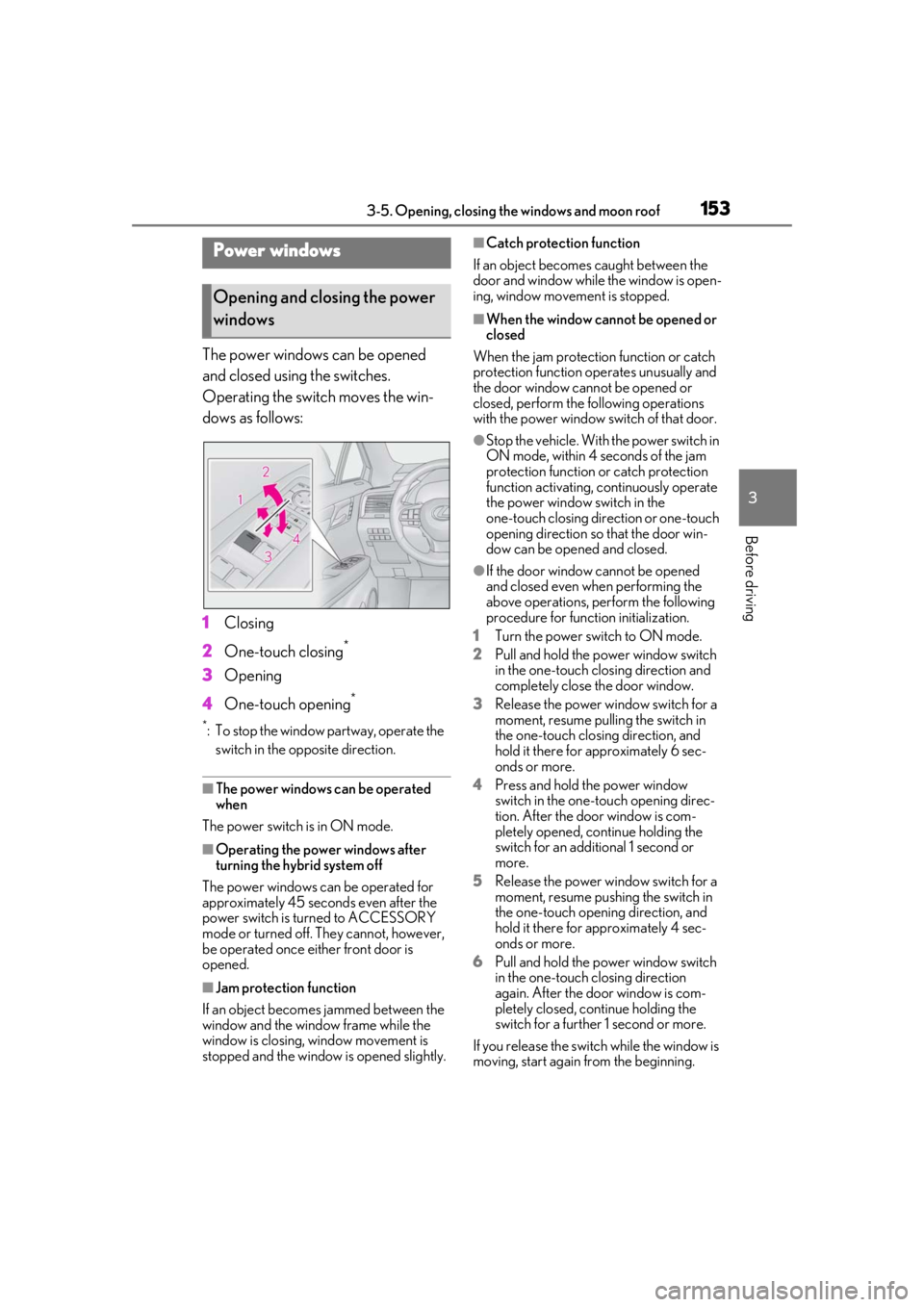
The power windows can be opened
and closed using the switches.
Operating the switch moves the win-
dows as follows:
1Closing
2 One-touch closing
*
3Opening
4 One-touch opening
*
*: To stop the window partway, operate the
switch in the op posite direction.
■The power windows can be operated
when
The power switch is in ON mode.
■Operating the power windows after
turning the hybrid system off
The power windows can be operated for
approximately 45 seconds even after the
power switch is turned to ACCESSORY
mode or turned off. They cannot, however,
be operated once either front door is
opened.
■Jam protection function
If an object becomes jammed between the
window and the window frame while the
window is closing, window movement is
stopped and the window is opened slightly.
■Catch protection function
If an object becomes caught between the
door and window while the window is open-
ing, window movement is stopped.
■When the window cannot be opened or
closed
When the jam protection function or catch
protection function operates unusually and
the door window cannot be opened or
closed, perform the following operations
with the power window switch of that door.
●Stop the vehicle. With the power switch in
ON mode, within 4 seconds of the jam
protection function or catch protection
function activating, continuously operate
the power window switch in the
one-touch closing direction or one-touch
opening direction so that the door win-
dow can be opened and closed.
●If the door window cannot be opened
and closed even when performing the
above operations, perform the following
procedure for function initialization.
1 Turn the power switch to ON mode.
2 Pull and hold the power window switch
in the one-touch closing direction and
completely close the door window.
3 Release the power window switch for a
moment, resume pulling the switch in
the one-touch closing direction, and
hold it there for approximately 6 sec-
onds or more.
4 Press and hold the power window
switch in the one-touch opening direc-
tion. After the door window is com-
pletely opened, continue holding the
switch for an additional 1 second or
more.
5 Release the power window switch for a
moment, resume pushing the switch in
the one-touch opening direction, and
hold it there for approximately 4 sec-
onds or more.
6 Pull and hold the power window switch
in the one-touch closing direction
again. After the door window is com-
pletely closed, continue holding the
switch for a further 1 second or more.
If you release the switch while the window is
moving, start again from the beginning.
Power windows
Opening and closing the power
windows
Page 155 of 528
1553-5. Opening, closing the windows and moon roof
3
Before driving
This function can be used to prevent
children from accidentally opening or
closing a passenger window.
Press the switch.
The indicator will come on and the pas-
senger windows will be locked.
The passenger windows can still be
opened and closed using the driver’s
switch even if the lock switch is on.
■The power windows can be operated
when
The power switch is in ON mode.
■When the 12-volt battery is discon-
nected
The window lock switch is disabled. If nec-
essary, press the window lock switch after
reconnecting the 12-volt battery.
*: If equipped
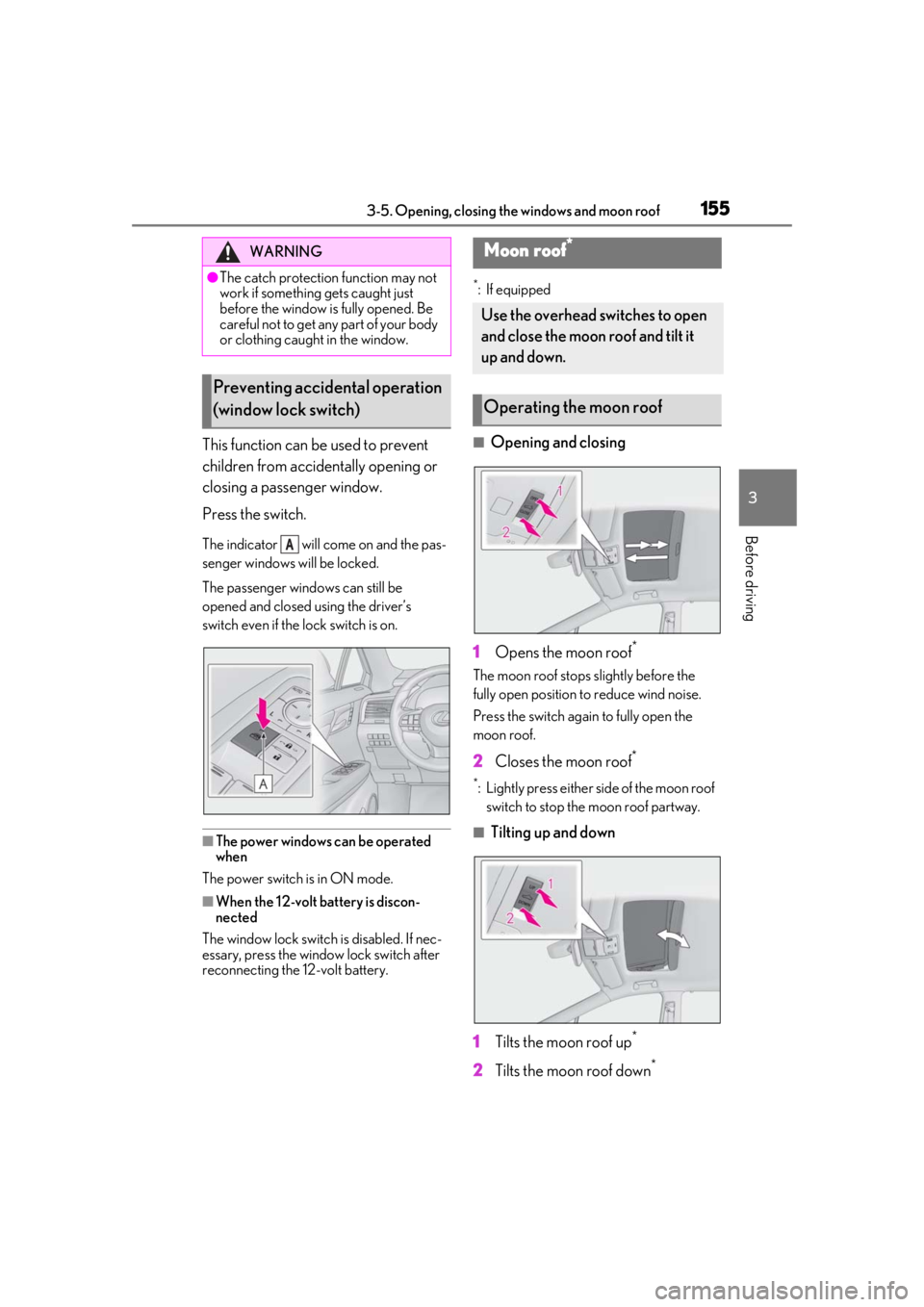
■Opening and closing
1 Opens the moon roof
*
The moon roof stops slightly before the
fully open position to reduce wind noise.
Press the switch again to fully open the
moon roof.
2 Closes the moon roof*
*: Lightly press either side of the moon roof
switch to stop the moon roof partway.
■Tilting up and down
1 Tilts the moon roof up
*
2Tilts the moon roof down*
WARNING
●The catch protection function may not
work if something gets caught just
before the window is fully opened. Be
careful not to get any part of your body
or clothing caught in the window.
Preventing accidental operation
(window lock switch)
A
Moon roof*
Use the overhead switches to open
and close the moon roof and tilt it
up and down.
Operating the moon roof
Page 156 of 528

1563-5. Opening, closing the windows and moon roof
*: Lightly press either side of the moon roof switch to stop the moon roof partway.
■The moon roof can be operated when
The power switch is in ON mode.
■Operating the moon roof after turning
the hybrid system off
The moon roof can be operated for approx-
imately 45 seconds after the power switch
is turned to ACCESSORY mode or turned
off. It cannot, however, be operated once
the driver’s door is opened.
■Jam protection function
If an object is detected between the moon
roof and the frame while the moon roof is
closing or tilting down, travel is stopped and
the moon roof opens slightly.
■Sunshade
The sunshade can be opened and closed
manually. However, the sunshade will open
automatically when the moon roof is
opened.
■Door lock linked moon roof operation
●The moon roof can be opened and
closed using the mechanical key.*
( P.448)
●The moon roof can be opened using the
wireless remote control.* ( P.109)
●The alarm may be triggered if the alarm is
set and the moon roof is closed using the
door lock linked moon roof operation
function. ( P.75)
*: These settings must be customized at
your Lexus dealer.
■When the moon roof does not close nor-
mally
Perform the following procedure:
If the moon roof closes but then re-opens
slightly
1 Stop the vehicle.
2 Press and hold the “CLOSE” switch.
*1
The moon roof will close, reopen and pause
for approximately 10 seconds.*2 Then it will
close again, tilt up and pause for approxi- mately 1 second. Finally, it will tilt down,
open and close.
3
Check to make sure that the moon roof
is completely closed and then release
the switch.
If the moon roof tilts down but then tilts
back up
1 Stop the vehicle.
2 Press and hold the “UP” switch
*1 until
the moon roof moves into the tilt up
position and stops.
3 Release the “UP” switch once and then
press and hold the “UP” switch
again.
*1The moon roof will pause for
approximately 10 seco nds in the tilt up
position.
*2 Then it will adjust slightly and
pause for approximately 1 second.
Finally, it will tilt down, open and close.
4 Check to make sure that the moon roof
is completely closed and then release
the switch.
*1: If the switch is rele ased at the incorrect
time, the procedure will have to be per-
formed again from the beginning.
*2: If the switch is released after the above mentioned 10 second pause, automatic
operation will be disabled. In that case,
press and hold the “CLOSE” or “UP”
switch, and the moon roof will tilt up and
pause for approximately 1 second. Then
it will tilt down, open and close. Check
to make sure that the moon roof is com-
pletely closed and then release the
switch.
If the moon roof does not fully close even
after performing the above procedure cor-
rectly, have the vehicle inspected by your
Lexus dealer.
■Moon roof open warning buzzer
A buzzer sounds and a message is shown
on the multi-informat ion display in the
instrument cluster when the power switch is
turned off and the driver’s door is opened
with the moon roof open.
■Customization
Some functions can be customized.
Page 159 of 528
1593-5. Opening, closing the windows and moon roof
3
Before driving
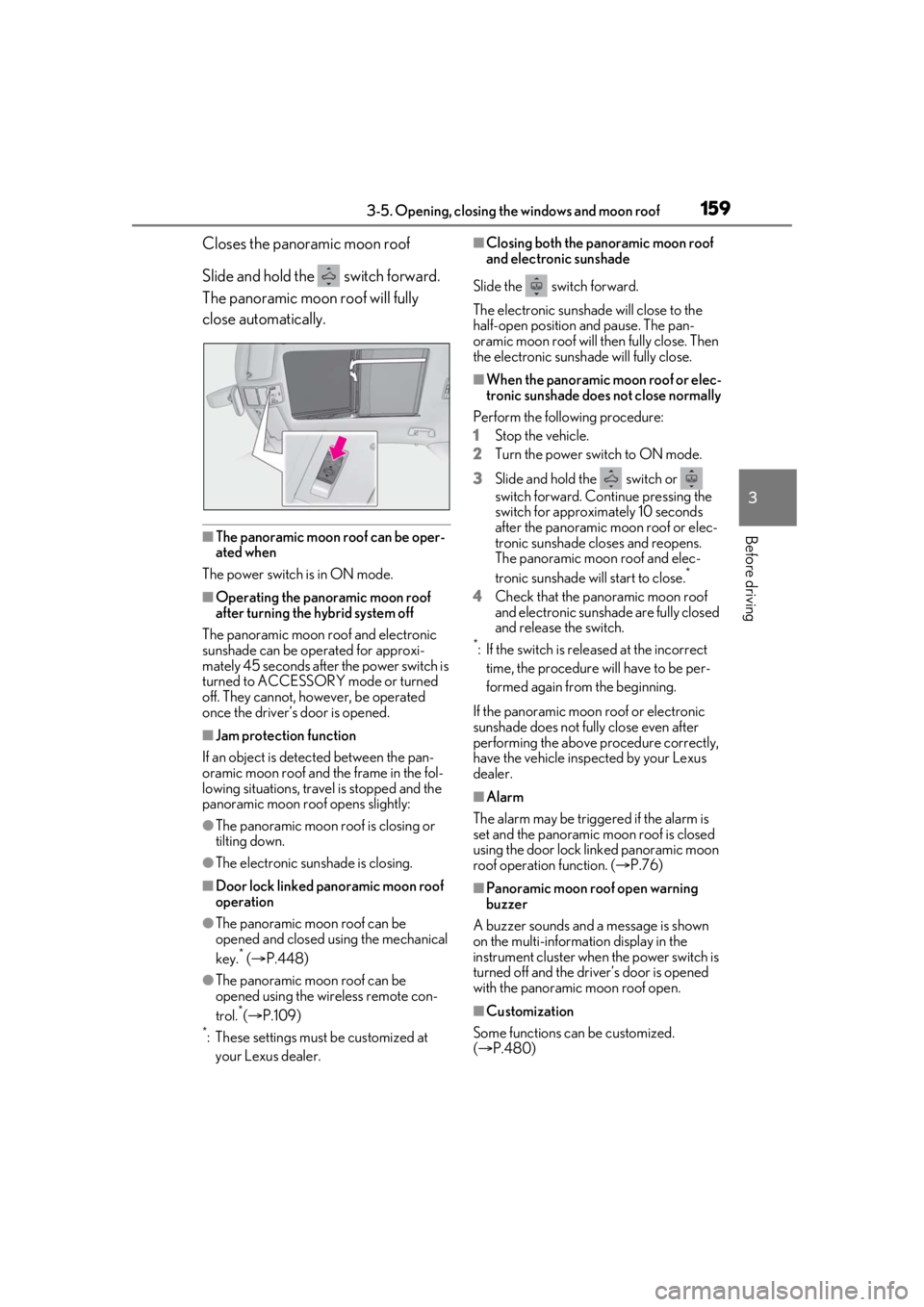
Closes the panoramic moon roof
Slide and hold the switch forward.
The panoramic moon roof will fully
close automatically.
■The panoramic moon roof can be oper-
ated when
The power switch is in ON mode.
■Operating the panoramic moon roof
after turning the hybrid system off
The panoramic moon roof and electronic
sunshade can be operated for approxi-
mately 45 seconds after the power switch is
turned to ACCESSORY mode or turned
off. They cannot, ho wever, be operated
once the driver’s door is opened.
■Jam protection function
If an object is detected between the pan-
oramic moon roof and the frame in the fol-
lowing situations, travel is stopped and the
panoramic moon roof opens slightly:
●The panoramic moon roof is closing or
tilting down.
●The electronic sunshade is closing.
■Door lock linked panoramic moon roof
operation
●The panoramic moon roof can be
opened and closed using the mechanical
key.
* ( P.448)
●The panoramic moon roof can be
opened using the wireless remote con-
trol.
*( P.109)*: These settings must be customized at
your Lexus dealer.
■Closing both the panoramic moon roof
and electronic sunshade
Slide the switch forward.
The electronic sunshade will close to the
half-open position and pause. The pan-
oramic moon roof will then fully close. Then
the electronic sunshade will fully close.
■When the panoramic moon roof or elec-
tronic sunshade does not close normally
Perform the following procedure:
1 Stop the vehicle.
2 Turn the power switch to ON mode.
3 Slide and hold the switch or
switch forward. Continue pressing the
switch for approximately 10 seconds
after the panoramic moon roof or elec-
tronic sunshade closes and reopens.
The panoramic moon roof and elec-
tronic sunshade will start to close.
*
4Check that the panoramic moon roof
and electronic sunshade are fully closed
and release the switch.
*: If the switch is released at the incorrect
time, the procedure will have to be per-
formed again from the beginning.
If the panoramic moon roof or electronic
sunshade does not fully close even after
performing the above procedure correctly,
have the vehicle inspected by your Lexus
dealer.
■Alarm
The alarm may be triggered if the alarm is
set and the panoramic moon roof is closed
using the door lock linked panoramic moon
roof operation function. ( P.76)
■Panoramic moon roof open warning
buzzer
A buzzer sounds and a message is shown
on the multi-informat ion display in the
instrument cluster when the power switch is
turned off and the driver’s door is opened
with the panoramic moon roof open.
■Customization
Some functions can be customized.
( P.480)
Page 164 of 528
1644-1. Before driving
4-1.Before driving
■Starting the hybrid system
P.184
■Driving
1 With the brake pedal depressed,
shift the shift lever to D. ( P.191)
2 Release the parking brake.
(P.195)
If the parking brake is in automatic mode,
the parking brake is released automatically
when shifting the shift lever to any position
other than P. ( P.196)
3 Gradually release the brake pedal
and gently depress the accelerator
pedal to accelerate the vehicle.
■Stopping
1 With the shift lever in D, depress the
brake pedal.
2 If necessary, set the parking brake.
(P.195)
If the vehicle is to be stopped for an
extended period of time, shift the shift lever
to P or N. ( P.191)
■Parking the vehicle
1 With the shift lever in D, depress the
brake pedal.
2 Set the parking brake ( P.195),
and shift the shift lever to P
( P.191).
3 Press the power switch to stop the
hybrid system. 4
Lock the door, making sure that you
have the electronic key on your
person.
If parking on a hill, block the wheels as
needed.
■Starting off on a steep uphill
1 With the brake pedal depressed,
shift the shift lever to D. ( P.191)
2 Pull the parking brake switch and
parking brake is set manually.
(P.195)
3 Release the brake pedal and gently
depress the accelerator pedal to
accelerate the vehicle.
4 Press the parking brake switch and
parking brake is released manually.
■When starting off on a uphill
The hill-start assist control will activate.
( P.284)
■For fuel-efficient driving
Keep in mind that hybr id vehicles are similar
to conventional vehicles, and it is necessary
to refrain from activi ties such as sudden
acceleration. ( P.289)
■Driving in the rain
●Drive carefully when it is raining, because
visibility will be reduced, the windows
may become fogged-up, and the road
will be slippery.
●Drive carefully when it starts to rain,
because the road surface will be espe-
cially slippery.
●Refrain from high speeds when driving on
an expressway in the rain, because there
may be a layer of wa ter between the tires
and the road surface, preventing the
steering and brakes from operating prop-
erly.
■Restraining the hybrid system output
(Brake Override System)
●When the accelerato r and brake pedals
are depressed at the same time, the
Driving the vehicle
The following procedures should be
observed to ensure safe driving:
Driving procedure
Page 178 of 528
1784-1. Before driving
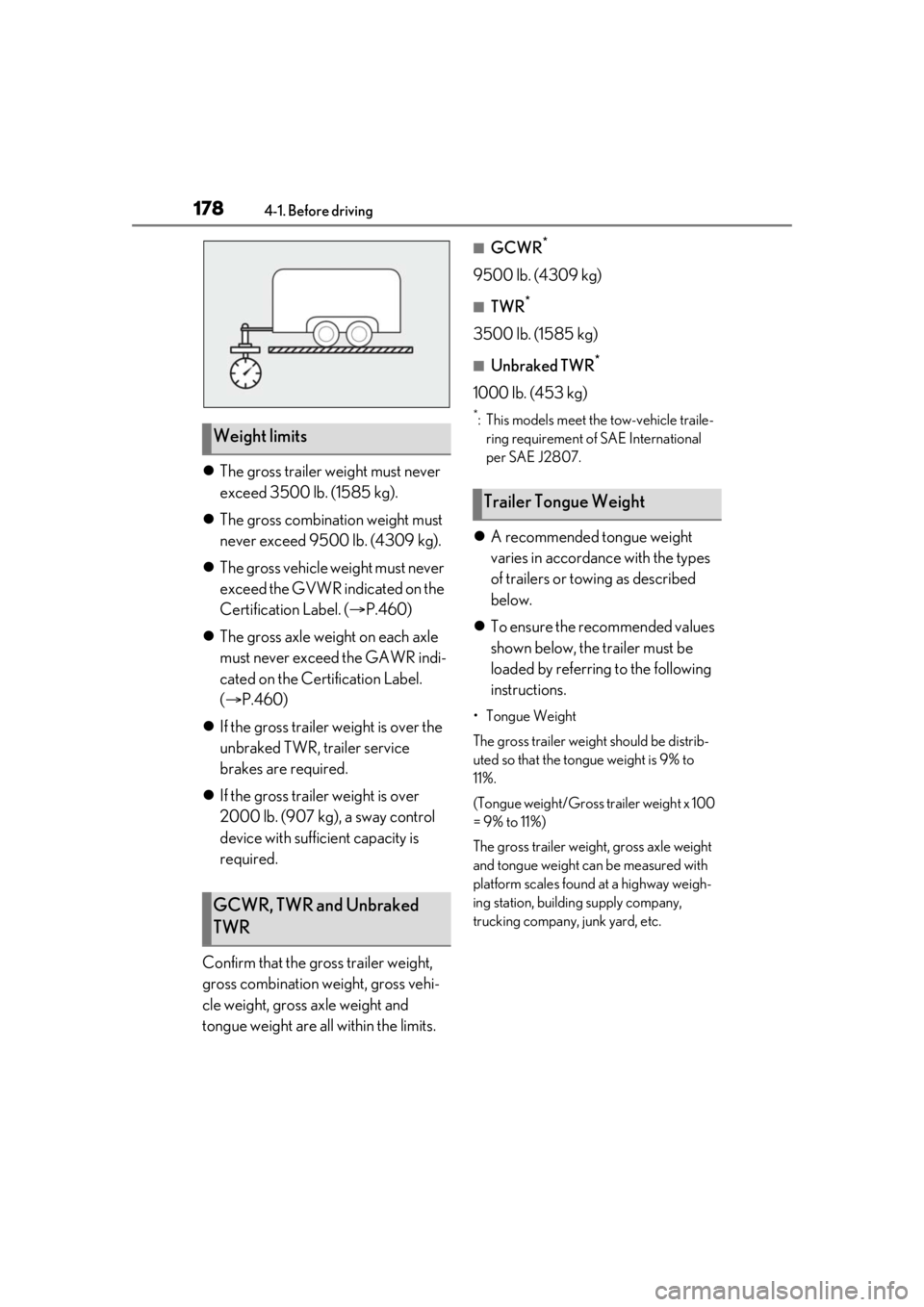
The gross trailer weight must never
exceed 3500 lb. (1585 kg).
The gross combinat ion weight must
never exceed 9500 lb. (4309 kg).
The gross vehicle weight must never
exceed the GVWR indicated on the
Certification Label. ( P.460)
The gross axle weight on each axle
must never exceed the GAWR indi-
cated on the Certification Label.
( P.460)
If the gross trailer weight is over the
unbraked TWR, trailer service
brakes are required.
If the gross trailer weight is over
2000 lb. (907 kg), a sway control
device with sufficient capacity is
required.
Confirm that the gross trailer weight,
gross combination weight, gross vehi-
cle weight, gross axle weight and
tongue weight are all within the limits.
■GCWR*
9500 lb. (4309 kg)
■TWR*
3500 lb. (1585 kg)
■Unbraked TWR*
1000 lb. (453 kg)
*: This models meet the tow-vehicle traile- ring requirement of SAE International
per SAE J2807.
A recommended tongue weight
varies in accordance with the types
of trailers or towing as described
below.
To ensure the recommended values
shown below, the trailer must be
loaded by referring to the following
instructions.
•Tongue Weight
The gross trailer weight should be distrib-
uted so that the tongue weight is 9% to
11%.
(Tongue weight/Gross trailer weight x 100
= 9% to 11%)
The gross trailer weight , gross axle weight
and tongue weight can be measured with
platform scales found at a highway weigh-
ing station, building supply company,
trucking company, junk yard, etc.
Weight limits
GCWR, TWR and Unbraked
TWR
Trailer Tongue Weight
Page 185 of 528
1854-2. Driving procedures
4
Driving
■Electronic key battery depletion
P.106
■Conditions affe cting operation
P.126
■Note for the entry function
P.127
■Steering lock function
●After turning the power switch off and
opening and closing the doors, the steer-
ing wheel will be lock ed due to the steer-
ing lock function. Operating the power
switch again automatically cancels the
steering lock.
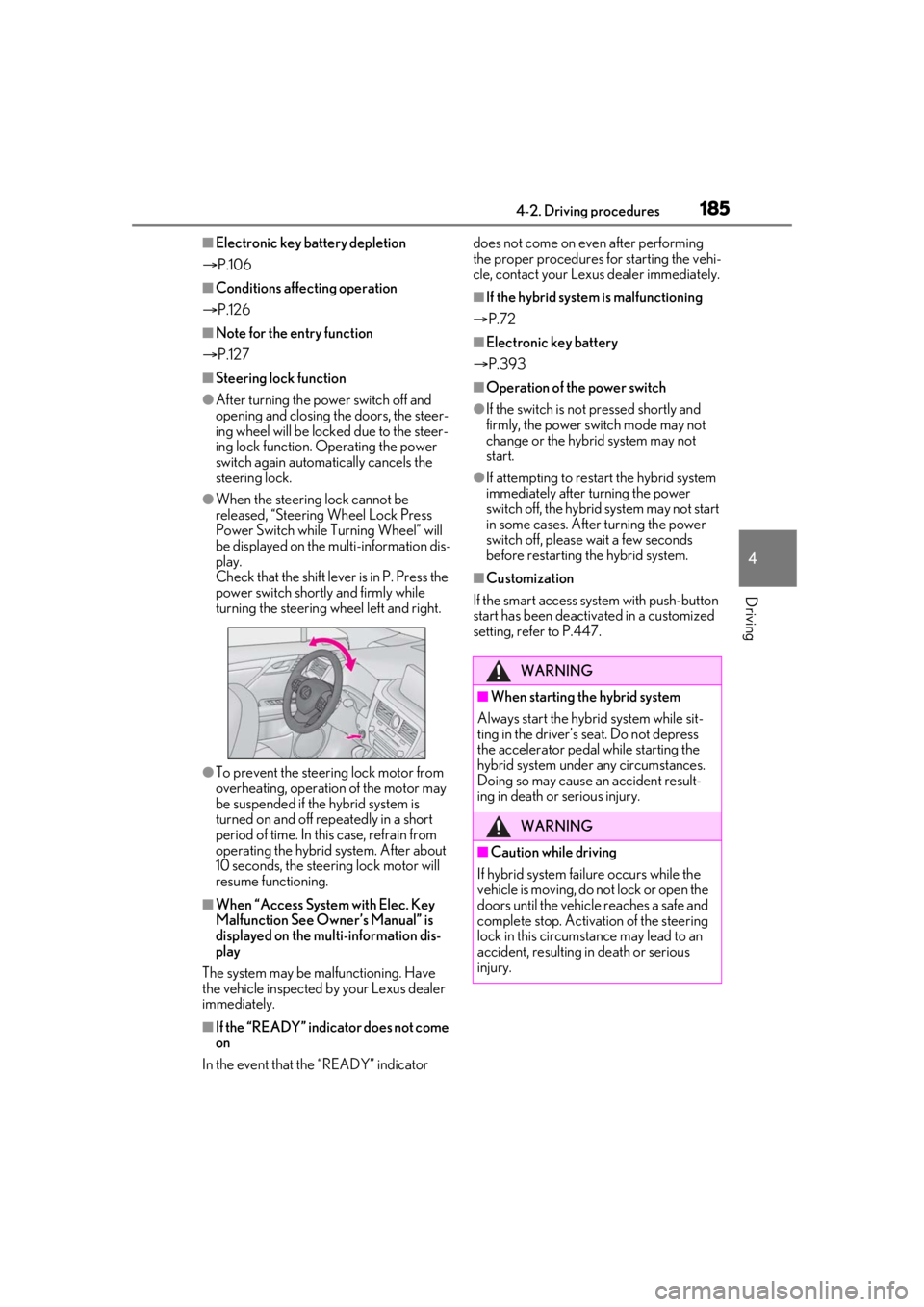
●When the steering lock cannot be
released, “Steering Wheel Lock Press
Power Switch while Turning Wheel” will
be displayed on the multi-information dis-
play.
Check that the shift leve r is in P. Press the
power switch shortly and firmly while
turning the steering wheel left and right.
●To prevent the steering lock motor from
overheating, operation of the motor may
be suspended if the hybrid system is
turned on and off repeatedly in a short
period of time. In this case, refrain from
operating the hybrid system. After about
10 seconds, the stee ring lock motor will
resume functioning.
■When “Access System with Elec. Key
Malfunction See Owner’s Manual” is
displayed on the mu lti-information dis-
play
The system may be malfunctioning. Have
the vehicle inspected by your Lexus dealer
immediately.
■If the “READY” indicator does not come
on
In the event that the “READY” indicator does not come on even after performing
the proper procedures for starting the vehi-
cle, contact your Lexus dealer immediately.
■If the hybrid system
is malfunctioning
P.72
■Electronic key battery
P.393
■Operation of the power switch
●If the switch is no t pressed shortly and
firmly, the power switch mode may not
change or the hybrid system may not
start.
●If attempting to restart the hybrid system
immediately after turning the power
switch off, the hybrid system may not start
in some cases. After turning the power
switch off, please wait a few seconds
before restarting the hybrid system.
■Customization
If the smart access system with push-button
start has been deactivated in a customized
setting, refer to P.447.
WARNING
■When starting the hybrid system
Always start the hybrid system while sit-
ting in the driver’s seat. Do not depress
the accelerator pedal while starting the
hybrid system under any circumstances.
Doing so may cause an accident result-
ing in death or serious injury.
WARNING
■Caution while driving
If hybrid system failure occurs while the
vehicle is moving, do not lock or open the
doors until the vehicle reaches a safe and
complete stop. Activation of the steering
lock in this circumstance may lead to an
accident, resulting in death or serious
injury.
Page 189 of 528
1894-2. Driving procedures
4
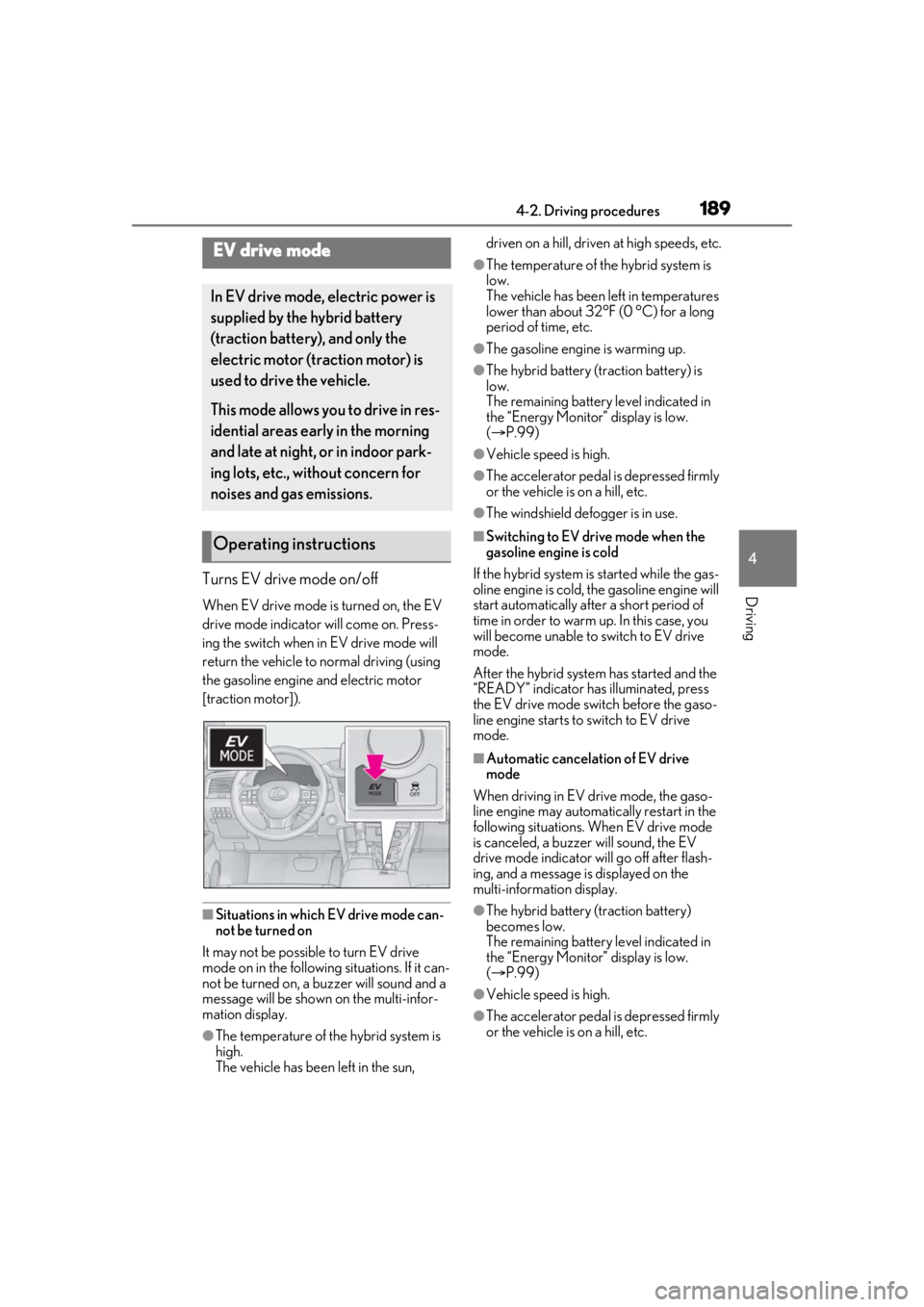
DrivingTurns EV drive mode on/off
When EV drive mode is turned on, the EV
drive mode indicator will come on. Press-
ing the switch when in EV drive mode will
return the vehicle to normal driving (using
the gasoline engine and electric motor
[traction motor]).
■Situations in which EV drive mode can-
not be turned on
It may not be possible to turn EV drive
mode on in the following situations. If it can-
not be turned on, a buzzer will sound and a
message will be shown on the multi-infor-
mation display.
●The temperature of the hybrid system is
high.
The vehicle has been left in the sun, driven on a hill, driven at high speeds, etc.
●The temperature of the hybrid system is
low.
The vehicle has been left in temperatures
lower than about 32°F (0 °C) for a long
period of time, etc.
●The gasoline engine is warming up.
●The hybrid battery (traction battery) is
low.
The remaining battery level indicated in
the “Energy Monitor” display is low.
(
P.99)
●Vehicle speed is high.
●The accelerator pedal is depressed firmly
or the vehicle is on a hill, etc.
●The windshield defogger is in use.
■Switching to EV drive mode when the
gasoline engine is cold
If the hybrid system is started while the gas-
oline engine is cold, the gasoline engine will
start automatically after a short period of
time in order to warm up. In this case, you
will become unable to switch to EV drive
mode.
After the hybrid system has started and the
“READY” indicator has illuminated, press
the EV drive mode switch before the gaso-
line engine starts to switch to EV drive
mode.
■Automatic cancelation of EV drive
mode
When driving in EV drive mode, the gaso-
line engine may automatically restart in the
following situations. When EV drive mode
is canceled, a buzzer will sound, the EV
drive mode indicator will go off after flash-
ing, and a message is displayed on the
multi-information display.
●The hybrid battery (traction battery)
becomes low.
The remaining battery level indicated in
the “Energy Monitor” display is low.
( P.99)
●Vehicle speed is high.
●The accelerator pedal is depressed firmly
or the vehicle is on a hill, etc.
EV drive mode
In EV drive mode, electric power is
supplied by the hybrid battery
(traction battery), and only the
electric motor (traction motor) is
used to drive the vehicle.
This mode allows you to drive in res-
idential areas early in the morning
and late at night, or in indoor park-
ing lots, etc., without concern for
noises and gas emissions.
Operating instructions
Page 190 of 528

1904-2. Driving procedures
■Possible driving distance when driving in
EV drive mode
EV drive mode’s possible driving distance
ranges from a few hundred meters to
approximately 0.6 mile (1 km). However,
depending on vehicle conditions, there are
situations when EV drive mode cannot be
used.
(The distance that is possible depends on
the hybrid battery [traction battery] level
and driving conditions.)
■Fuel economy
The hybrid system is designed to achieve
the best possible fuel economy during nor-
mal driving (using the gasoline engine and
electric motor [traction motor]). Driving in
EV drive mode more than necessary may
lower fuel economy.
■If “EV Mode Unavailable” is shown on
the multi-inform ation display
The EV drive mode is not available. The rea-
son the EV drive mode is not available (the
vehicle is idling, batter y charge is low, vehi-
cle speed is higher than the EV drive mode
operating speed range or accelerator pedal
is depressed too much) may be displayed.
Use the EV drive mode when it becomes
available.
■If “EV Mode Deactivated” is shown on
the multi-inform ation display
The EV drive mode has been automatically
canceled. The reason the EV drive mode is
not available (the battery charge is low,
vehicle speed is higher than the EV drive
mode operating speed range or accelera-
tor pedal is depressed too much) may be
displayed. Drive the vehicle for a while
before attempting to turn on the EV drive
mode again.
WARNING
■Caution while driving
When driving in EV drive mode no
engine noise is made. As such, pedestri-
ans, people riding bicycles or other peo-
ple and vehicles in the surrounding area
may not be aware of the vehicle starting
off or approaching them. Therefore, take
extra care while driving even if the
Acoustic Vehicle Alerting System is
active.
Page 194 of 528
1944-2. Driving procedures
ically set to S4 or S5 according to the vehi-
cle speed.
■Shift ranges and their functions
You can choose from 6 levels of
accelerating force and engine brak-
ing force.
A lower shift range will provide
greater accelerating force and
engine braking force than a higher
shift range, and the engine revolu-
tions will also increase.
If you accelerate while in ranges 1 to
4, the shift range may automatically
increase in accordance with the
vehicle speed.
■S mode
●When the shift range is S4 or lower, hold-
ing the shift lever towa rd “+” sets the shift
range to S6.
●Automatically selects a higher shift range
before the engine speed becomes too
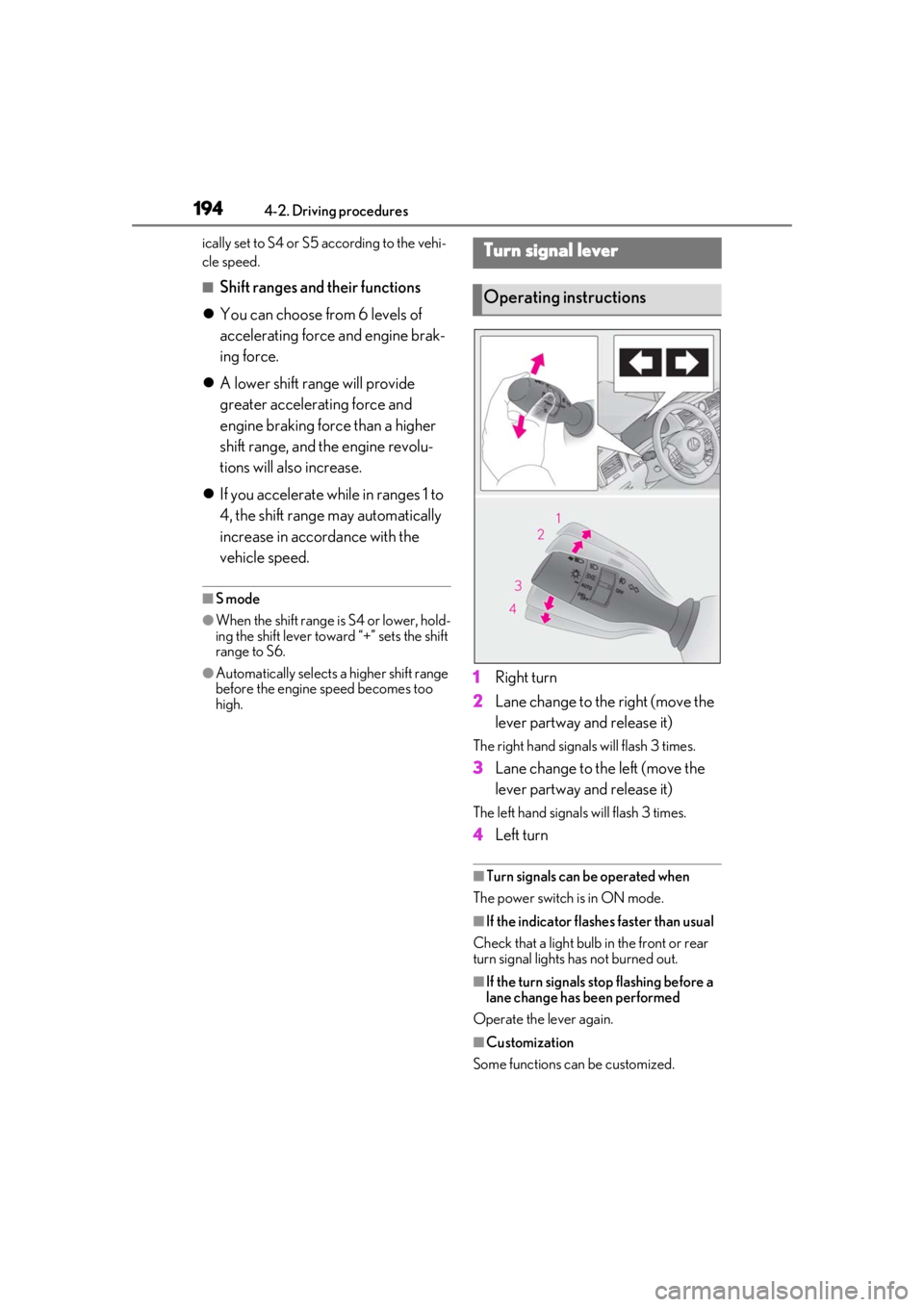
high.1 Right turn
2 Lane change to the right (move the
lever partway and release it)
The right hand signals will flash 3 times.
3Lane change to the left (move the
lever partway and release it)
The left hand signals will flash 3 times.
4Left turn
■Turn signals can be operated when
The power switch is in ON mode.
■If the indicator flashes faster than usual
Check that a light bulb in the front or rear
turn signal lights has not burned out.
■If the turn signals stop flashing before a
lane change has been performed
Operate the lever again.
■Customization
Some functions can be customized.
Turn signal lever
Operating instructions