ECO mode LEXUS RX450h 2021 Service Manual
[x] Cancel search | Manufacturer: LEXUS, Model Year: 2021, Model line: RX450h, Model: LEXUS RX450h 2021Pages: 528, PDF Size: 10.73 MB
Page 245 of 528
2454-5. Using the driving support systems
4
Driving
pedal
When constant speed control mode is
selected, your vehicle will maintain a
set speed without controlling the vehi-
cle-to-vehicle distance. Select this
mode only when vehicle-to-vehicle dis-
tance control mode does not function
correctly due to a dirty radar, etc.
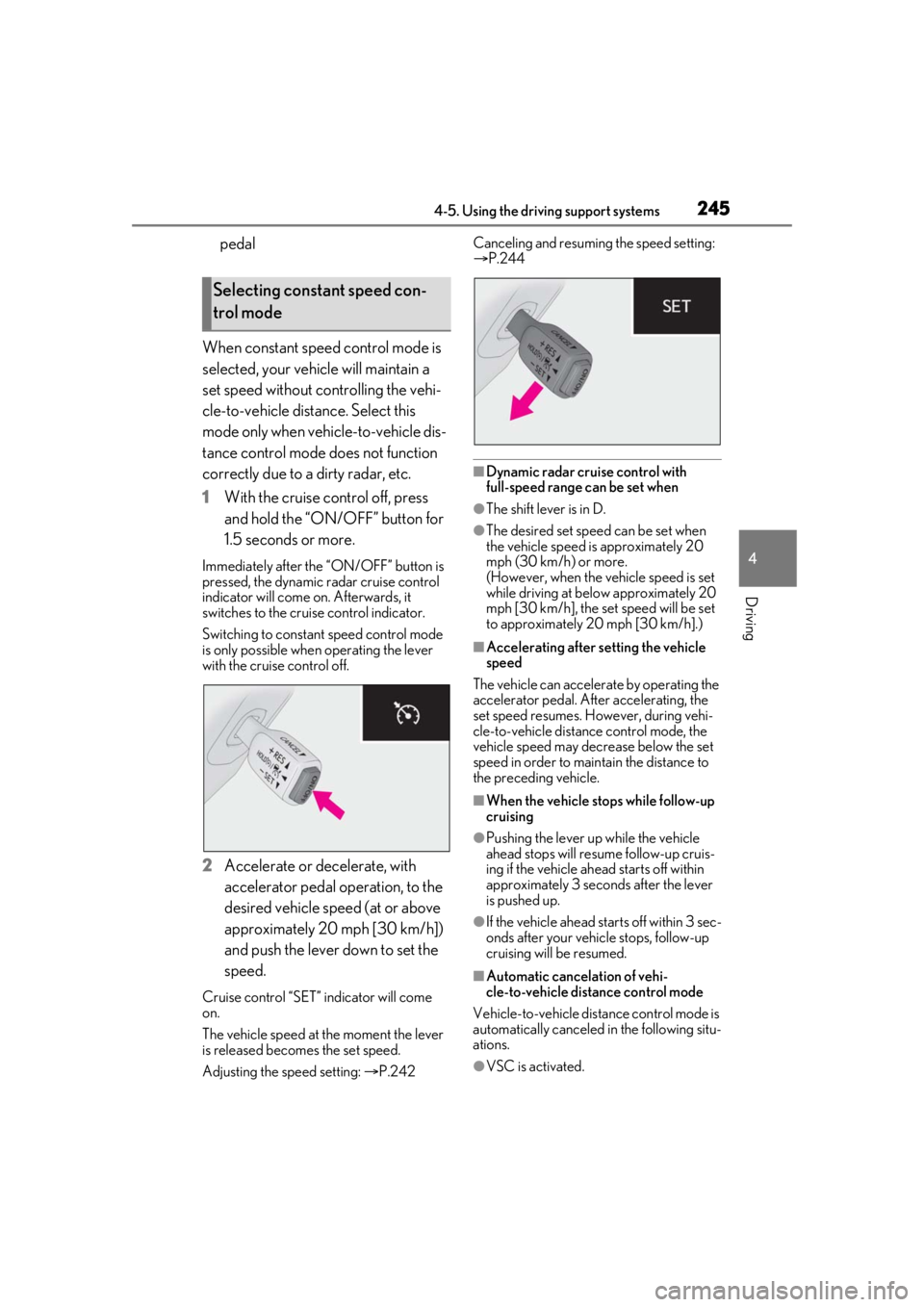
1 With the cruise control off, press
and hold the “ON/ OFF” button for
1.5 seconds or more.
Immediately after the “ON/OFF” button is
pressed, the dynamic radar cruise control
indicator will come on. Afterwards, it
switches to the cruise control indicator.
Switching to constant speed control mode
is only possible when operating the lever
with the cruise control off.
2 Accelerate or decelerate, with
accelerator pedal operation, to the
desired vehicle speed (at or above
approximately 20 mph [30 km/h])
and push the lever down to set the
speed.
Cruise control “SET” indicator will come
on.
The vehicle speed at the moment the lever
is released becomes the set speed.
Adjusting the sp eed setting: P.242 Canceling and resuming the speed setting:
P.244
■Dynamic radar cruise control with
full-speed range can be set when
●The shift lever is in D.
●The desired set spee d can be set when
the vehicle speed is approximately 20
mph (30 km/h) or more.
(However, when the vehicle speed is set
while driving at belo w approximately 20
mph [30 km/h], the se t speed will be set
to approximately 20 mph [30 km/h].)
■Accelerating after setting the vehicle
speed
The vehicle can accelerate by operating the
accelerator pedal. After accelerating, the
set speed resumes. Ho wever, during vehi-
cle-to-vehicle distance control mode, the
vehicle speed may decrease below the set
speed in order to main tain the distance to
the preceding vehicle.
■When the vehicle stops while follow-up
cruising
●Pushing the lever up while the vehicle
ahead stops will resu me follow-up cruis-
ing if the vehicle ahead starts off within
approximately 3 seconds after the lever
is pushed up.
●If the vehicle ahead starts off within 3 sec-
onds after your vehicle stops, follow-up
cruising will be resumed.
■Automatic cancelation of vehi-
cle-to-vehicle dist ance control mode
Vehicle-to-vehicle distance control mode is
automatically canceled in the following situ-
ations.
●VSC is activated.
Selecting constant speed con-
trol mode
Page 257 of 528

2574-5. Using the driving support systems
4
Driving
■The system can be operated when
●The power switch is in ON mode.
●Intuitive parking assist function is on.
●The vehicle speed is less than about 6
mph (10 km/h).
●A shift lever other than P.
■Setting the buzzer volume
The buzzer volume can be adjusted on the
multi-information display. ( P.253)
■If “Parking Assist Unavailable” is dis-
played on the multi-information display
●Water may be continuously flowing over
the sensor surface, such as in a heavy
rain. When the system determines that it
is normal, the system will return to nor-
mal.
●Initialization may not have been per-
formed after a battery terminal was dis-
connected and reconnected. Initialize the
system. ( P.257) If this message contin-
ues to be displayed even after initializa-
tion, have the vehicle inspected by your
Lexus dealer.
■If “Parking Assist Unavailable Clean
Parking Assist Sensor” is displayed on
the multi-information display
A sensor may be covered with ice, snow,
dirt, etc. Remove the ice, snow, dirt, etc.,
from the sensor to return the system to nor-
mal.
Also, due to ice forming on a sensor at low
temperatures, a warn ing message may be
displayed or the sensor may not be able to
detect an object. Once the ice melts, the
system will return to normal.
■If a 12-volt battery terminal has been
disconnected and reconnected
The system needs to be initialized. To initial-
ize the system, drive the vehicle straight
ahead for 5 seconds or more at a speed of
approximately 22 mph (35 km/h) or more.
■Sensor detection information
●The following situations may occur
during use.
• The sensor's detection areas are limited to the areas around the vehicle front and
rear bumpers.
• Depending on the shape of the object and other factors, the detection distance
may shorten, or detection may be impos-
WARNING
●Towing eyelets are installed.
●A backlit licence pl ate is installed.
■When using intuitive parking assist
In the following situations, the system
may not function correctly due to a sen-
sor malfunction, etc. Have the vehicle
checked by your Lexus dealer.
●The intuitive parking assist operation
display flashes or shows continuously,
and a buzzer sounds when no objects
are detected.
●If the area around a sensor collides
with something, or is subjected to
strong impact.
●If the bumper or grille collides with
something.
●If the display flashes or is displayed
continuously and a buzzer does not
sound, except when the mute function
has been turned on.
●If a display error occurs, first check the
sensor.
If the error occurs even when there is
no ice, snow or mud on the sensor, it is
likely that the sensor is malfunctioning.
■Notes when washing the vehicle
Do not apply intensive bursts of water or
steam to the sensor area.
Doing so may result in the sensor mal-
functioning.
●When using a high pressure washer to
wash the vehicle, do not spray the sen-
sors directly, as doing so may cause a
sensor to malfunction.
●When using steam to clean the vehicle,
do not direct steam too close to the
sensors as doing so may cause a sen-
sor to malfunction.
Page 266 of 528
2664-5. Using the driving support systems
The Parking Support Brake can be
enabled/disabled on the multi-informa-
tion display. All of the Parking Support
Brake functions (static objects and
rear-crossing vehicles) are
enabled/disabled simultaneously.Use the meter control switches to
enable/disable the parking support
brake. (
P.89)
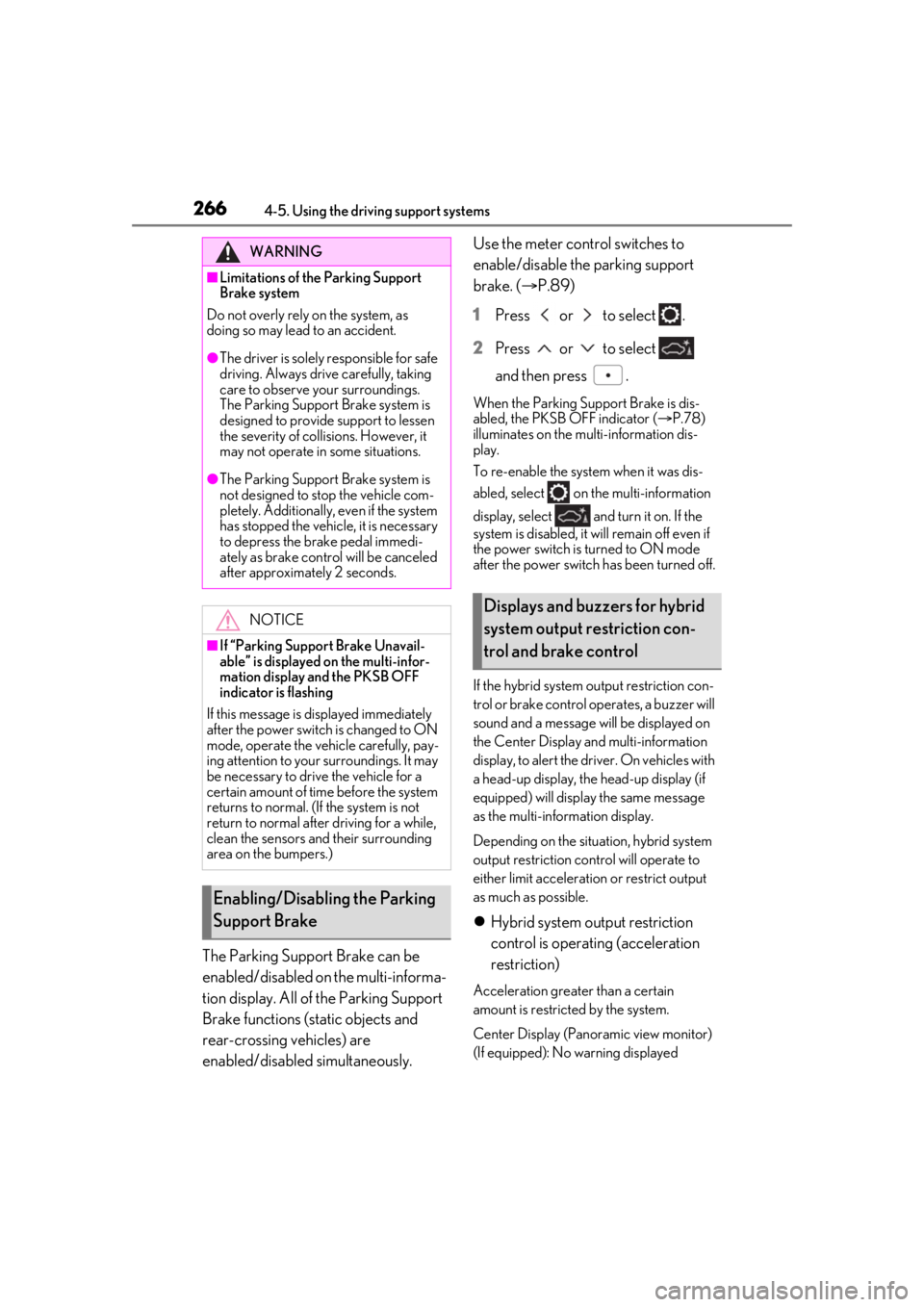
1 Press or to select .
2 Press or to select
and then press .
When the Parking Support Brake is dis-
abled, the PKSB OFF indicator ( P.78)
illuminates on the multi-information dis-
play.
To re-enable the system when it was dis-
abled, select on the multi-information
display, select and turn it on. If the
system is disabled, it wi ll remain off even if
the power switch is turned to ON mode
after the power switch has been turned off.
If the hybrid system output restriction con-
trol or brake control operates, a buzzer will
sound and a message wi ll be displayed on
the Center Display and multi-information
display, to alert the driver. On vehicles with
a head-up display, the head-up display (if
equipped) will display the same message
as the multi-information display.
Depending on the situat ion, hybrid system
output restriction control will operate to
either limit acceleration or restrict output
as much as possible.
Hybrid system output restriction
control is operating (acceleration
restriction)
Acceleration greater than a certain
amount is restricted by the system.
Center Display (Panoramic view monitor)
(If equipped): No warning displayed
WARNING
■Limitations of the Parking Support
Brake system
Do not overly rely on the system, as
doing so may lead to an accident.
●The driver is solely responsible for safe
driving. Always drive carefully, taking
care to observe your surroundings.
The Parking Support Brake system is
designed to provide support to lessen
the severity of collis ions. However, it
may not operate in some situations.
●The Parking Support Brake system is
not designed to stop the vehicle com-
pletely. Additionally, even if the system
has stopped the vehicl e, it is necessary
to depress the brake pedal immedi-
ately as brake control will be canceled
after approximately 2 seconds.
NOTICE
■If “Parking Support Brake Unavail-
able” is displayed on the multi-infor-
mation display and the PKSB OFF
indicator is flashing
If this message is displayed immediately
after the power switch is changed to ON
mode, operate the vehicle carefully, pay-
ing attention to your surroundings. It may
be necessary to drive the vehicle for a
certain amount of time before the system
returns to normal. (If the system is not
return to normal after driving for a while,
clean the sensors and their surrounding
area on the bumpers.)
Enabling/Disabling the Parking
Support Brake
Displays and buzzers for hybrid
system output restriction con-
trol and brake control
Page 281 of 528
2814-5. Using the driving support systems
4
Driving
Except F SPORT models
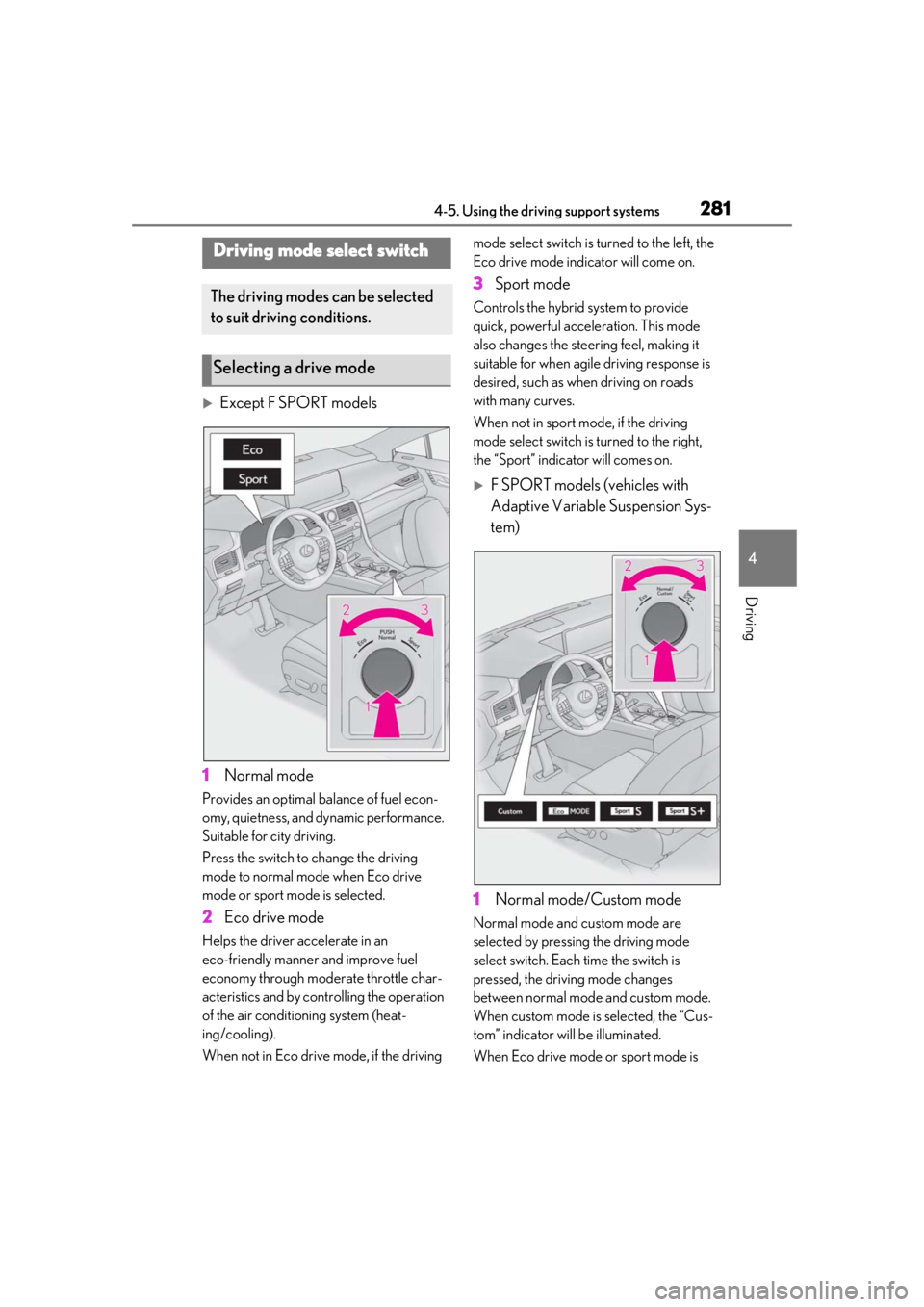
1 Normal mode
Provides an optimal ba lance of fuel econ-
omy, quietness, and dynamic performance.
Suitable for city driving.
Press the switch to change the driving
mode to normal mode when Eco drive
mode or sport mode is selected.
2 Eco drive mode
Helps the driver accelerate in an
eco-friendly manner and improve fuel
economy through moderate throttle char-
acteristics and by controlling the operation
of the air conditioning system (heat-
ing/cooling).
When not in Eco drive mode, if the driving mode select switch is
turned to the left, the
Eco drive mode indicator will come on.
3 Sport mode
Controls the hybrid system to provide
quick, powerful acceleration. This mode
also changes the steering feel, making it
suitable for when agile driving response is
desired, such as when driving on roads
with many curves.
When not in sport mode, if the driving
mode select switch is turned to the right,
the “Sport” indicator will comes on.
F SPORT models (vehicles with
Adaptive Variable Suspension Sys-
tem)
1 Normal mode/Custom mode
Normal mode and custom mode are
selected by pressing the driving mode
select switch. Each time the switch is
pressed, the driving mode changes
between normal mode and custom mode.
When custom mode is selected, the “Cus-
tom” indicator will be illuminated.
When Eco drive mode or sport mode is
Driving mode select switch
The driving modes can be selected
to suit driving conditions.
Selecting a drive mode
Page 282 of 528
2824-5. Using the driving support systems
selected, pressing the switch changes the
driving mode to normal mode.
•Normal mode
Provides an optimal ba lance of fuel econ-
omy, quietness, and dynamic performance.
Suitable for city driving.
•Custom mode
Allows you to drive with the following func-
tions set to your preferred settings. Cus-
tom mode settings can only be changed on
the drive mode customization display of
the Center Display. ( P.300)
2 Eco drive mode
Helps the driver accelerate in an
eco-friendly manner and improve fuel
economy through moderate throttle char-
acteristics and by controlling the operation
of the air conditioning system (heat-
ing/cooling).
When not in Eco drive mode, if the driving
mode select switch is turned to the left, the
Eco drive mode indicator will come on.
3Sport mode
•Sport S mode
Controls the hybrid system to provide
quick, powerful accele ration. This mode is
suitable for when agil e driving response is
desired, such as when driving on roads
with many curves.
When not in Sport S mode, if the driving mode select switch is turned to the right,
the “Sport S” indicator will come on.
•Sport S+ mode
Helps to ensure stee
ring performance and
driving stability by simultaneously con-
trolling the steering and suspension in
addition to the hybrid system. Suitable for
sportier driving.
When in Sport S mode, if the driving mode
select switch is turned to the right, the
“Sport S+” indicator will come on.
F SPORT models (vehicles without
Adaptive Variable Suspension Sys-
tem)
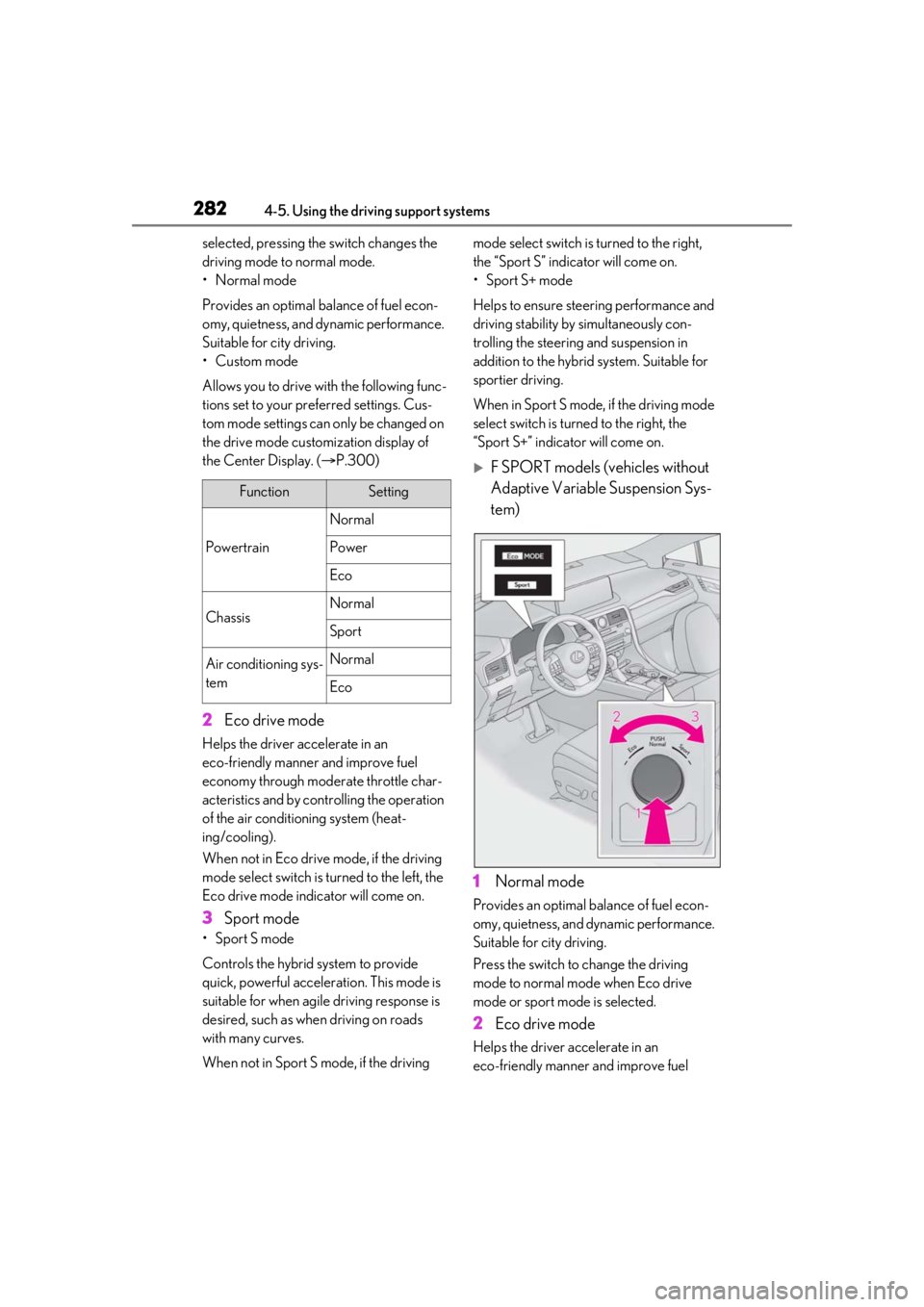
1 Normal mode
Provides an optimal ba lance of fuel econ-
omy, quietness, and dynamic performance.
Suitable for city driving.
Press the switch to change the driving
mode to normal mode when Eco drive
mode or sport mode is selected.
2 Eco drive mode
Helps the driver ac celerate in an
eco-friendly manner and improve fuel
FunctionSetting
Powertrain
Normal
Power
Eco
ChassisNormal
Sport
Air conditioning sys-
temNormal
Eco
Page 283 of 528

2834-5. Using the driving support systems
4
Driving
economy through moderate throttle char-
acteristics and by controlling the operation
of the air conditioning system (heat-
ing/cooling).
When not in Eco drive mode, if the driving
mode select switch is turned to the left, the
Eco drive mode indicator will come on.
3Sport mode
Controls the hybrid system to provide
quick, powerful acceleration. This mode
also changes the steering feel, making it
suitable for when agil e driving response is
desired, such as when driving on roads
with many curves.
When not in sport mode, if the driving
mode select switch is turned to the right,
the “Sport” indicator will comes on.
■Operation of the air conditioning sys-
tem in Eco drive mode
Eco drive mode controls the heating/cool-
ing operations and fan speed of the air con-
ditioning system to enhance fuel efficiency.
To improve air condit ioning performance,
adjust the fan speed or turn off Eco drive
mode.
■Automatic deactivation of sport mode
and custom mode
If the power switch is turned off after driving
in sport mode or custom mode, the drive
mode will be changed to normal mode.
■Driving mode pop-up display (12.3-inch
display only)
When the driving mode is changed, the
selected driving mode will be temporarily
displayed on the side display. ( P.300)
■ECB (Electronically Controlled
Brake System)
The electronically controlled system
generates braking force correspond-
ing to the brake operation
■ABS (Anti-lock Brake System)
Helps to prevent wheel lock when the
brakes are applied suddenly, or if the
brakes are applied while driving on a
slippery road surface
■Brake assist
Generates an increased level of brak-
ing force after the brake pedal is
depressed when the system detects a
panic stop situation
■VSC (Vehicle Stability Control)
Helps the driver to control skidding
when swerving sudden ly or turning on
slippery road surfaces
■Enhanced VSC (Enhanced Vehi-
cle Stability Control)
Provides cooperative control of the
ABS, TRAC, VSC and EPS.
Driving assist systems
To keep driving safety and perfor-
mance, the following systems oper-
ate automatically in response to
various driving situations. Be aware,
however, that these systems are
supplementary and should not be
relied upon too heavily when oper-
ating the vehicle.
Summary of the driving assist
systems
Page 284 of 528

2844-5. Using the driving support systems
Helps to maintain directional stability
when swerving on slippery road sur-
faces by controlling steering perfor-
mance.
■Trailer Sway Control (if equipped)
Helps the driver to control trailer sway
by selectively applying brake pressure
for individual wheels and reducing
driving torque when trailer sway is
detected.
■TRAC (Traction Control)
Helps to maintain drive power and pre-
vent the drive wheels from spinning
when starting the vehicle or accelerat-
ing on slippery roads
■Active Cornering Assist (ACA)
Helps to prevent the vehicle from drift-
ing to the outer side by performing
inner wheel brake control when
attempting to accelerate while turning
■Hill-start assist control
Helps to reduce the backward move-
ment of the vehicle when starting on an
uphill
■EPS (Electric Power Steering)
Employs an electric motor to reduce
the amount of effort needed to turn the
steering wheel
■E-Four
Electronic On-Demand AWD system.
Automatically switches from
front-wheel drive to all-wheel drive
(AWD) according to the driving condi-
tions, helping to ensure reliable han-
dling and stability. Examples of
conditions where the system will switch to AWD are when cornering, going
uphill, starting off or accelerating, and
when the road surface is slippery due
to snow, rain, etc.
■Adaptive Variable Suspension Sys-
tem (if equipped)
Controls the damping force of the
shock absorber of each wheel accord-
ing to the road and driving conditions,
helping achieve a comfortable ride,
excellent driveability and a high level of
stability.
If Sport S+ mode is selected using the
driving mode select switch, the damp-
ing force will become more suitable for
sporty driving. ( P.281)
■VDIM (Vehicle Dynamics Inte-
grated Management)
Provides integrated control of the
ABS, brake assist, TRAC, VSC,
hill-start assist control and EPS systems
Helps to maintain vehicle stability when
swerving on slippery road surfaces by
controlling the brakes, hybrid system
output and steering assist.
■The Secondary Collision Brake
When the SRS airbag sensor detects a
collision and the system operates, the
brakes and brake lights are automati-
cally controlled to reduce the vehicle
speed and help reduce the possibility
of further damage due to a secondary
collision.
■When the TRAC/VSC/ABS/Trailer
Sway Control systems are operating
The slip indicator light will flash while the
TRAC/VSC/ABS/Trailer Sway Control
systems are operating.
Page 289 of 528
2894-6. Driving tips
4
Driving
4-6.Driving tips
When using Eco drive mode, the
torque corresponding to the accelera-
tor pedal depression amount can be
generated more smoothly than it is in
normal conditions. In addition, the
operation of the air conditioning sys-
tem (heating/cooling) will be mini-
mized, improving the fuel economy.
( P.281)
The Eco-friendly driving is possible by
keeping the indicator needle (except F
SPORT models) or bar display (F
SPORT models) of Hybrid System
Indicator within Eco area. ( P.85)
Shift the shift lever to D when stopped
at a traffic light, or driving in heavy traf-
fic, etc. Shift the shift lever to P when
parking. When using the N, there is no
positive effect on fuel consumption. In
the N, the gasoline engine operates
but electricity cannot be generated.
Also, when using the air conditioning
system, etc., the hybrid battery (trac-
tion battery) power is consumed.
Drive your vehicle smoothly. Avoid
abrupt acceleration and decelera-
tion. Gradual acceleration and
deceleration will make more effec-
tive use of the electric motor (trac-
tion motor) without having to use
gasoline engine power.
Avoid repeated acceleration.
Repeated acceleration consumes
hybrid battery (traction battery)
power, resulting in poor fuel con-
sumption. Battery power can be
restored by driving with the acceler-
ator pedal slightly released.
Make sure to operate the brakes gently
and in a timely manner. A greater
amount of electrical energy can be
regenerated when slowing down.
Repeated acceleration and decelera-
tion, as well as long waits at traffic
lights, will lead to bad fuel economy.
Check traffic reports before leaving
and avoid delays as much as possible.
When driving in a traffic jam, gently
release the brake pedal to allow the
vehicle to move forward slightly while
avoiding overuse of the accelerator
pedal. Doing so can help control
excessive gasoline consumption.
Hybrid vehicle driving tips
For economical and ecological
driving, pay attention to the follow-
ing points:
Using Eco drive mode
Use of Hybrid System Indicator
Shift lever operation
Accelerator pedal/brake pedal
operation
When braking
Delays
Page 290 of 528

2904-6. Driving tips
Control and maintain the vehicle at a
constant speed. Before stopping at a
toll booth or similar, allow plenty of
time to release the accelerator and
gently apply the brakes. A greater
amount of electrical energy can be
regenerated when slowing down.
Use the air conditioning only when
necessary. Doing so can help reduce
excessive gasoline consumption.
In summer: When the ambient tem-
perature is high, use the recirculated
air mode. Doing so will help to reduce
the burden on the air conditioning sys-
tem and reduce fuel consumption as
well.
In winter: Because the gasoline engine
will not automatically cut out until it and
the interior of the vehicle are warm, it
will consume fuel. Also, fuel consump-
tion can be improved by avoiding over-
use of the heater.
Make sure to check the tire inflation
pressure frequently. Improper tire infla-
tion pressure can cause poor fuel
economy.
Also, as snow tires can cause large
amounts of friction, their use on dry
roads can lead to poor fuel economy.
Use tires that are appropriate for the
season. Carrying heavy luggage will lead to
poor fuel economy. Avoid carrying
unnecessary luggage.
Installing a large
roof rack will also cause poor fuel
economy.
Since the gasoline engine starts up and
cuts out automatically when cold,
warming up the engine is unnecessary.
Moreover, frequently driving short dis-
tances will cause the engine to repeat-
edly warm up, which can lead to excess
fuel consumption.
Highway driving
Air conditioning
Checking tire inflation pressure
Luggage
Warming up before driving
Page 306 of 528

3065-3. Using the air conditioning system and defogger
(outside air mode) modes each
time the button is pressed.
When the system is switched to automatic
mode, the air conditioning system operates
automatically.
■Defogging the windshield
Defoggers are used to defog the wind-
shield and front side windows.
Press the windshield defogger switch.
Set the outside/recirc ulated air mode but-
ton to outside air mode if the recirculated
air mode is used. (It may switch automati-
cally.)
To defog the windshield and the side win-
dows early, turn the air flow and tempera-
ture up.
To return to the previous mode, press the
windshield defogger switch again when the
windshield is defogged.
■Defogging the rear window and
outside rear view mirrors
Defoggers are used to defog the rear
window, and to remove raindrops, dew
and frost from the outside rear view
mirrors.
Press the rear window and outside rear
view mirror defoggers switch.
The defoggers will automatically turn off
after a period of time.
■Windshield wiper de-icer (if
equipped)
P.311
■When the outside temperature exceeds
75°F (24°C) and the air conditioning
system is on
●In order to reduce the air conditioning
power consumption, the air conditioning
system may switch to recirculated air mode automatically. This may also
reduce fuel consumption.
●Recirculated air mode is selected as a
default mode when the power switch is
turned to ON mode.
●It is possible to switch to outside air mode
at any time by pressing the outside/recir-
culated air mode switch.
■Fogging up of the windows
The windows will easily fog up when the
humidity in the vehicle is high. Selecting
“A/C” on will dehumidify the air from the
outlets and defog the windshield effectively.
●If you turn “A/C” off, the windows may fog
up more easily.
●The windows may fog up if the recircu-
lated air mode is used.
■When driving on dusty roads
Close all windows. If dust thrown up by the
vehicle is still drawn into the vehicle after
closing the windows, it is recommended
that the air intake mode be set to outside air
mode and the fan speed to any setting
except off.
■Outside/recirculated air mode
●Setting to the recirculated air mode tem-
porarily is recommended in preventing
dirty air from entering the vehicle interior
and helping to cool the vehicle when the
outside air temperature is high.
●Outside/recirculated air mode may auto-
matically switch depending on the tem-
perature setting or the inside
temperature.
■Registering air conditioning settings to
electronic keys (vehicles with driving
position memory)
●Unlocking the vehicle using an electronic
key and turning the power switch to ON
mode will recall that key’s registered air
conditioning settings.
●When the power switch is turned off, the
current air conditioning settings will auto-
matically be registered to the electronic
key that was used to unlock the vehicle.
●The system may not operate correctly if
more than one electr onic key is in the
vicinity or if the smart access system with