seats LEXUS RX450h 2021 Service Manual
[x] Cancel search | Manufacturer: LEXUS, Model Year: 2021, Model line: RX450h, Model: LEXUS RX450h 2021Pages: 528, PDF Size: 10.73 MB
Page 145 of 528
1453-3. Adjusting the seats
3
Before driving
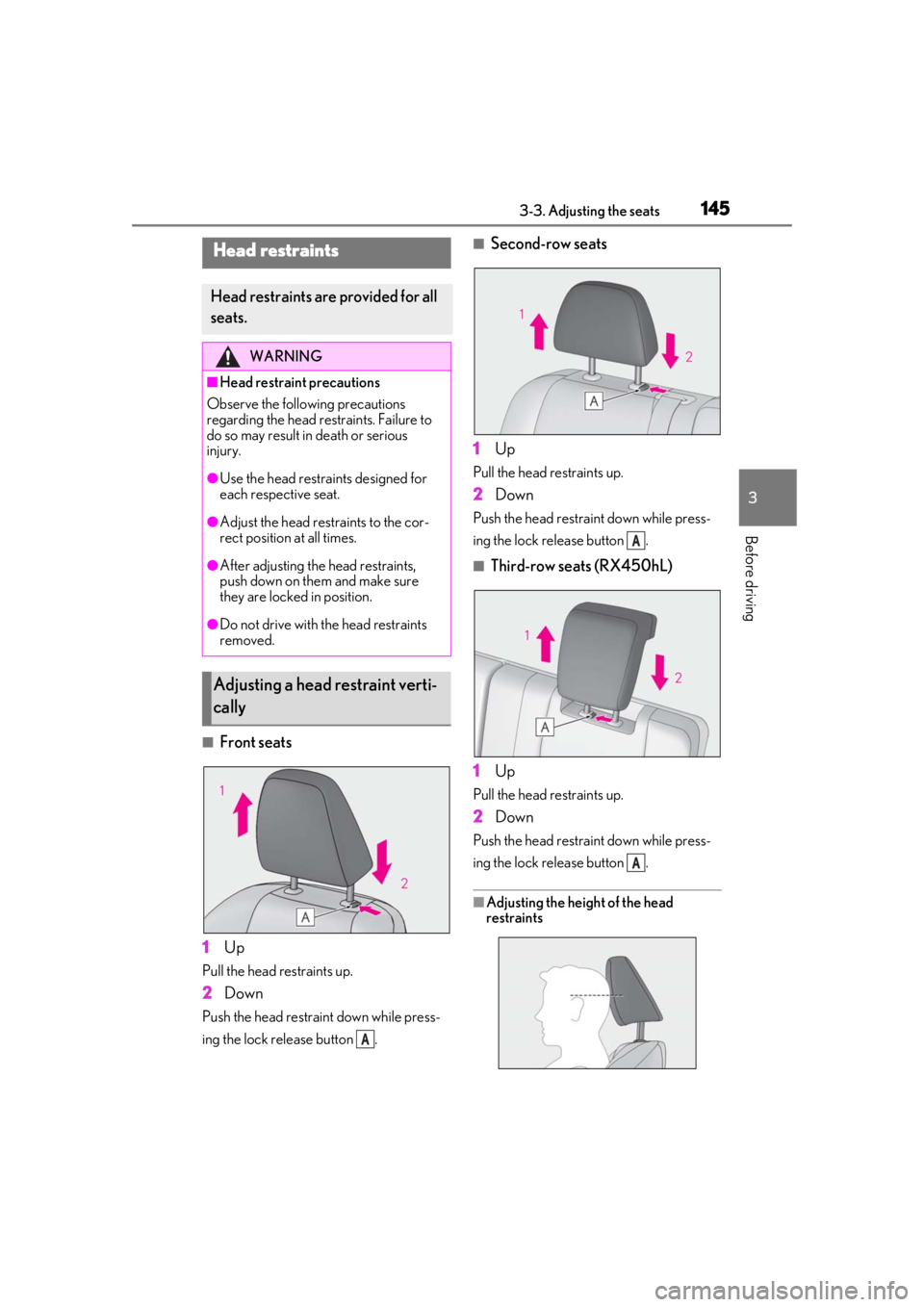
■Front seats
1 Up
Pull the head restraints up.
2Down
Push the head restraint down while press-
ing the lock release button .
■Second-row seats
1 Up
Pull the head restraints up.
2Down
Push the head restra int down while press-
ing the lock release button .
■Third-row seats (RX450hL)
1 Up
Pull the head restraints up.
2Down
Push the head restra int down while press-
ing the lock release button .
■Adjusting the heig ht of the head
restraints
Head restraints
Head restraints are provided for all
seats.
WARNING
■Head restraint precautions
Observe the following precautions
regarding the head re straints. Failure to
do so may result in death or serious
injury.
●Use the head restraints designed for
each respective seat.
●Adjust the head restraints to the cor-
rect position at all times.
●After adjusting the head restraints,
push down on them and make sure
they are locked in position.
●Do not drive with the head restraints
removed.
Adjusting a head restraint verti-
cally
A
A
A
Page 146 of 528
1463-3. Adjusting the seats
Make sure that the head restraints are
adjusted so that the center of the head
restraint is closest to the top of your ears.
■Adjusting the second-row center and
third-row seat head restraints
Always raise the head restraint one level
from the stowed position when using.
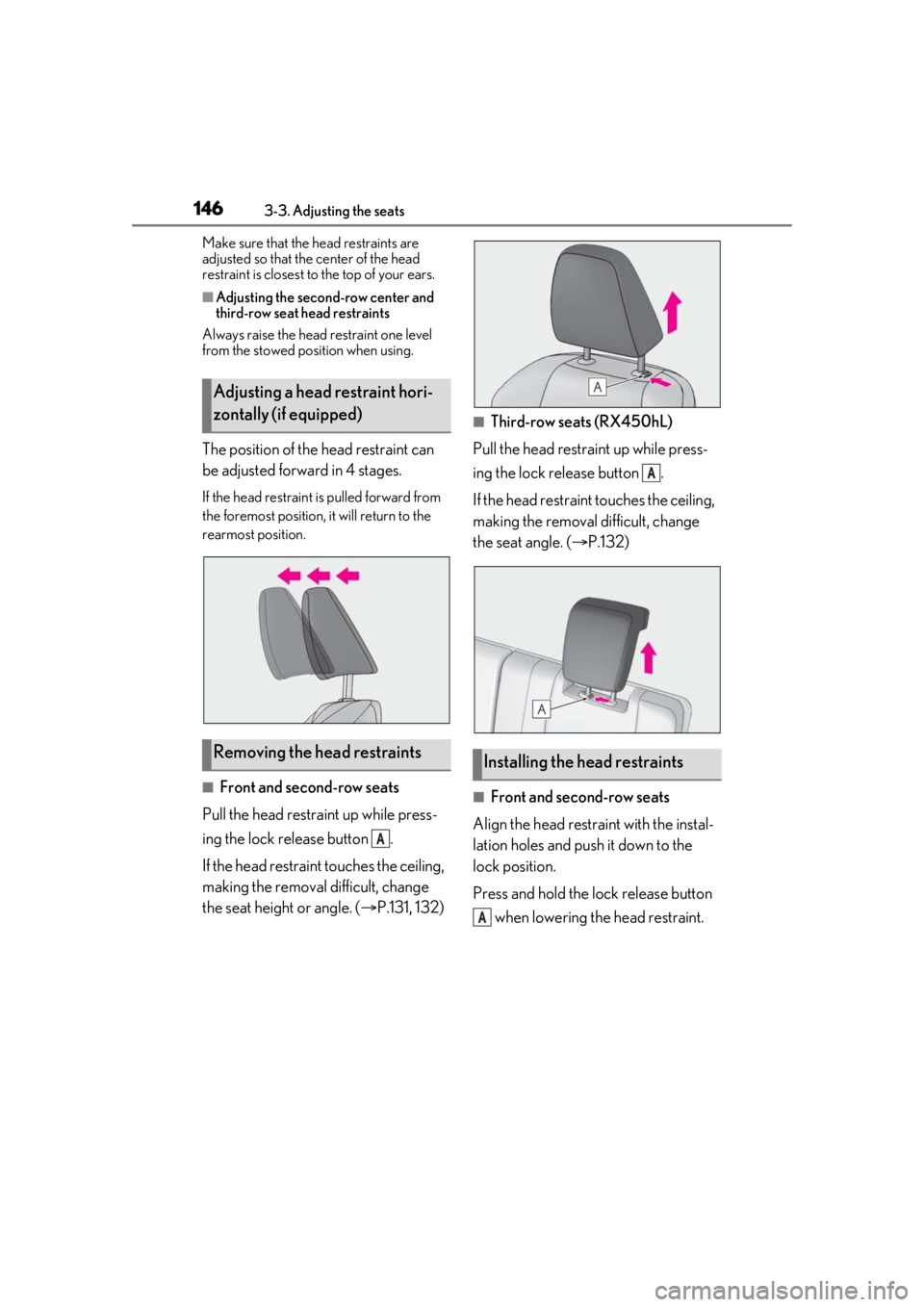
The position of the head restraint can
be adjusted forward in 4 stages.
If the head restraint is pulled forward from
the foremost position, it will return to the
rearmost position.
■Front and second-row seats
Pull the head restraint up while press-
ing the lock release button .
If the head restrain t touches the ceiling,
making the removal difficult, change
the seat height or angle. ( P.131, 132)
■Third-row seats (RX450hL)
Pull the head restraint up while press-
ing the lock release button .
If the head restraint touches the ceiling,
making the removal difficult, change
the seat angle. ( P.132)
■Front and second-row seats
Align the head restraint with the instal-
lation holes and push it down to the
lock position.
Press and hold the lock release button when lowering the head restraint.
Adjusting a head restraint hori-
zontally (if equipped)
Removing the head restraints
A
Installing the head restraints
A
A
Page 147 of 528
1473-3. Adjusting the seats
3
Before driving
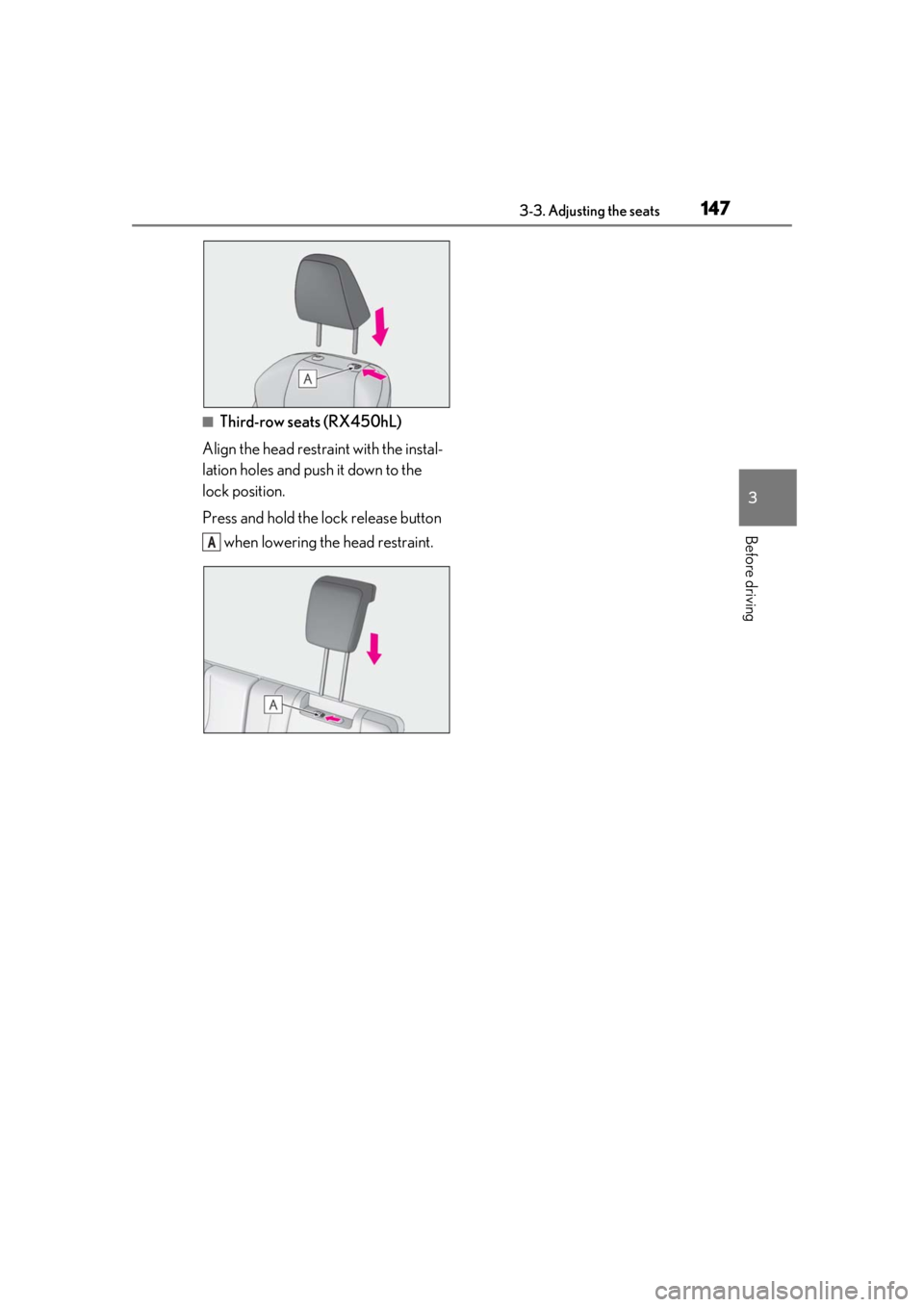
■Third-row seats (RX450hL)
Align the head restraint with the instal-
lation holes and push it down to the
lock position.
Press and hold the lock release button when lowering the head restraint.
A
Page 171 of 528
1714-1. Before driving
4
Driving
WARNING
●Do not stack cargo and luggage in the
luggage compartment higher than the
seatbacks.
●When you fold down the rear seats,
long items should not be placed
directly behind the front seats.
●Never allow anyone to ride in the lug-
gage compartment. It is not designed
for passengers. They should ride in
their seats with their seat belts prop-
erly fastened.
●Do not place cargo or luggage in or on
the following locations.
• At the feet of the driver
• On the front passenger or rear seats (when stacking items)
• On the luggage cover
• On the instrument panel
•On the dashboard
●Secure all items in the occupant com-
partment.
■Capacity and distribution
●Do not exceed the maximum axle
weight rating or the total vehicle
weight rating.
●Even if the total load of occupant’s
weight and the cargo load is less than
the total load capacity, do not apply the
load unevenly. Improper loading may
cause deterioration of steering or
braking control which may cause
death or serious injury.
■Roof luggage carrier precautions
Observe the following precautions:
●Place the cargo so that its weight is dis-
tributed evenly between the front and
rear axles.
●If loading long or wide cargo, never
exceed the vehicle overall length or
width. (
P.460)
●Before driving, make sure the cargo is
securely fastened on the roof luggage
carrier.
●Loading cargo on the roof luggage
carrier will make the center of gravity
of the vehicle higher. Avoid high
speeds, sudden starts, sharp turns,
sudden braking or abrupt maneuvers,
otherwise it may result in loss of con-
trol or vehicle rollover due to failure to
operate this vehicle correctly and
result in death or serious injury.
●If driving for a long distance, on rough
roads, or at high sp eeds, stop the vehi-
cle now and then during the trip to
make sure the cargo remains in its
place.
●Do not exceed 165 lb. (75 kg) cargo
weight on the roof luggage carrier.
NOTICE
■When loading cargo (vehicles with a
moon roof or panoramic moon roof)
Be careful not to scratch the surface of
the moon roof or panoramic moon roof.
Page 295 of 528
2954-6. Driving tips
4
Driving
WARNING
●Do not grip the steering wheel spokes
when driving off-road. A bad bump
could jerk the wheel and injure your
hands. Keep both hands and especially
your thumbs on the outside of the rim.
●Always check your brakes for effec-
tiveness immediately after driving in
sand, mud, water or snow.
●After driving through tall grass, mud,
rock, sand, rivers, etc., check that there
is no grass, bush, paper, rags, stone,
sand, etc. adhering or trapped on the
underbody. Clear off any such matter
from the underbody. If the vehicle is
used with these materials trapped or
adhering to the underbody, a break-
down or fire could occur.
●When driving off-road or in rugged
terrain, do not drive at excessive
speeds, jump, make sharp turns, strike
objects, etc. This may cause loss of
control or vehicle rollover causing
death or serious injury. You are also
risking expensive damage to your
vehicle’s suspension and chassis.
NOTICE
■To prevent water damage
Take all necessary sa fety measures to
ensure that water da mage to the hybrid
battery (traction battery), hybrid system
or other components does not occur.
●Water entering the engine compart-
ment may cause severe damage to the
hybrid system. Water entering the inte-
rior may cause the hybrid battery
(traction battery) stowed under the
rear seats to short circuit.
●Water entering the hybrid transmis-
sion and rear electr ic motor (traction
motor) will cause deterioration in
transmission quality. The malfunction
indicator may come on, and the vehi-
cle may not be drivable.
●Water can wash the grease from wheel
bearings, causing rusting and prema-
ture failure, and may also enter the
hybrid transmission case, reducing the
gear oil’s lubricating qualities.
■When you drive through water
If driving through water, such as when
crossing shallow streams, first check the
depth of the water and the bottom of the
riverbed for firmness. Drive slowly and
avoid deep water.
■Inspection after off-road driving
●Sand and mud that has accumulated
around brake discs may affect braking
efficiency and may damage brake sys-
tem components.
●Always perform a maintenance
inspection after each day of off-road
driving that has taken you through
rough terrain, sand, mud, or water. For
scheduled maintena nce information,
refer to the “Warranty and Services
Guide/Owner’s Manual Supple-
ment/Scheduled Maintenance”.
Page 303 of 528
3035-2. Lexus Climate Concierge
5
Interior features
5-2.Lexus Climate Concierge
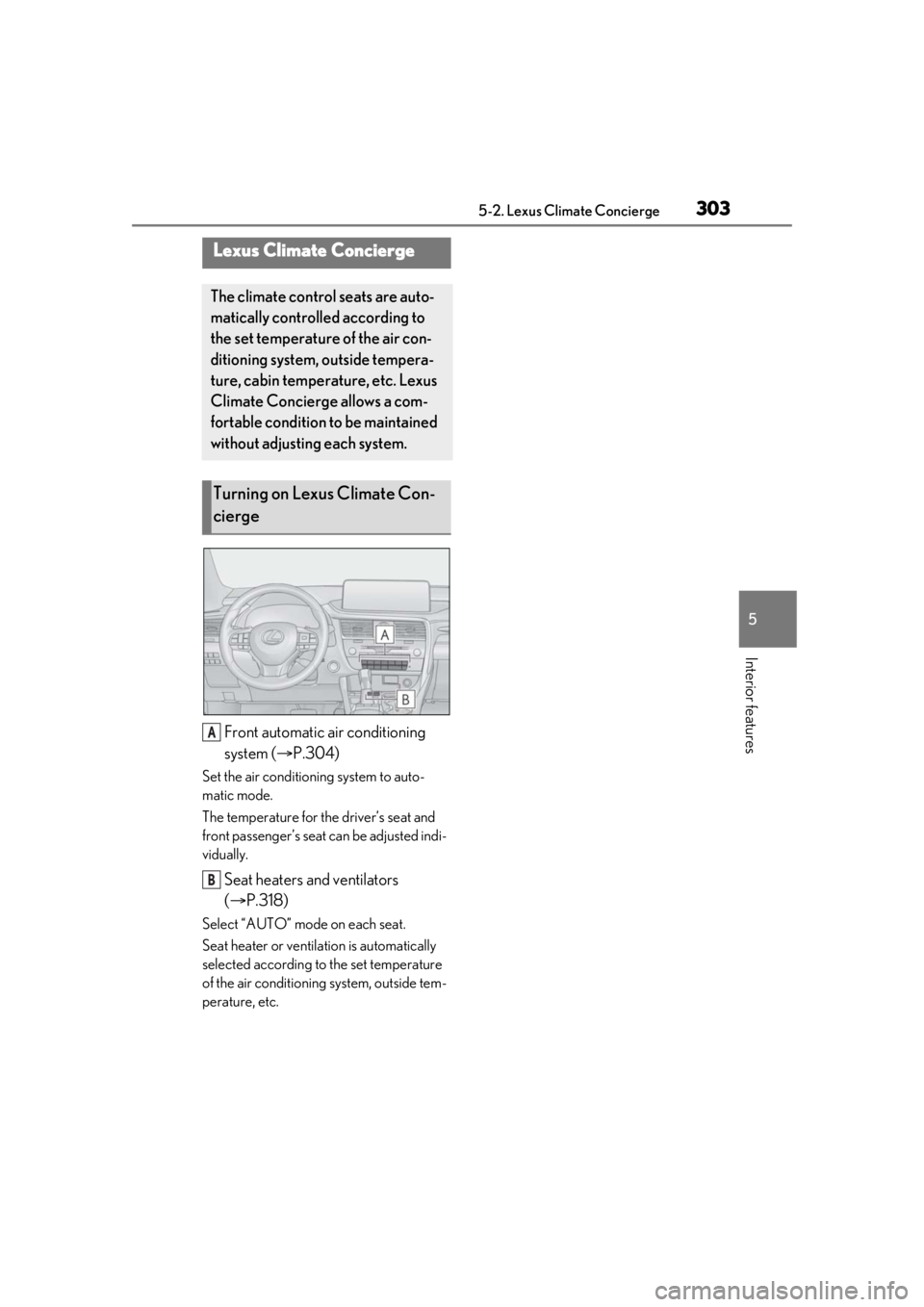
Front automatic air conditioning
system (P.304)
Set the air conditioning system to auto-
matic mode.
The temperature for the driver’s seat and
front passenger’s seat can be adjusted indi-
vidually.
Seat heaters and ventilators
( P.318)
Select “AUTO” mode on each seat.
Seat heater or ventilation is automatically
selected according to the set temperature
of the air conditioning system, outside tem-
perature, etc.
Lexus Climate Concierge
The climate control seats are auto-
matically controlled according to
the set temperature of the air con-
ditioning system, outside tempera-
ture, cabin temperature, etc. Lexus
Climate Concierge allows a com-
fortable condition to be maintained
without adjusting each system.
Turning on Lexus Climate Con-
cierge
A
B
Page 309 of 528
3095-3. Using the air conditioning system and defogger
5
Interior features
Remote Touch is pressed, the following
functions can be switched on and off.
“AUTO”: Set automatic mode on/off
( P.312)
“OFF”: Turn the fan off
“A/C”: Set cooling and dehumidification
function
If the “A/C” display is turned off, the system
will blow ambient temperature air or
heated air.
“DUAL”: Adjust the temperature for driver
and passenger seats separately (“DUAL”
mode) ( P.313)
: Set eco air conditioning mode
Vehicles with 3-ZONE climate con-
trol
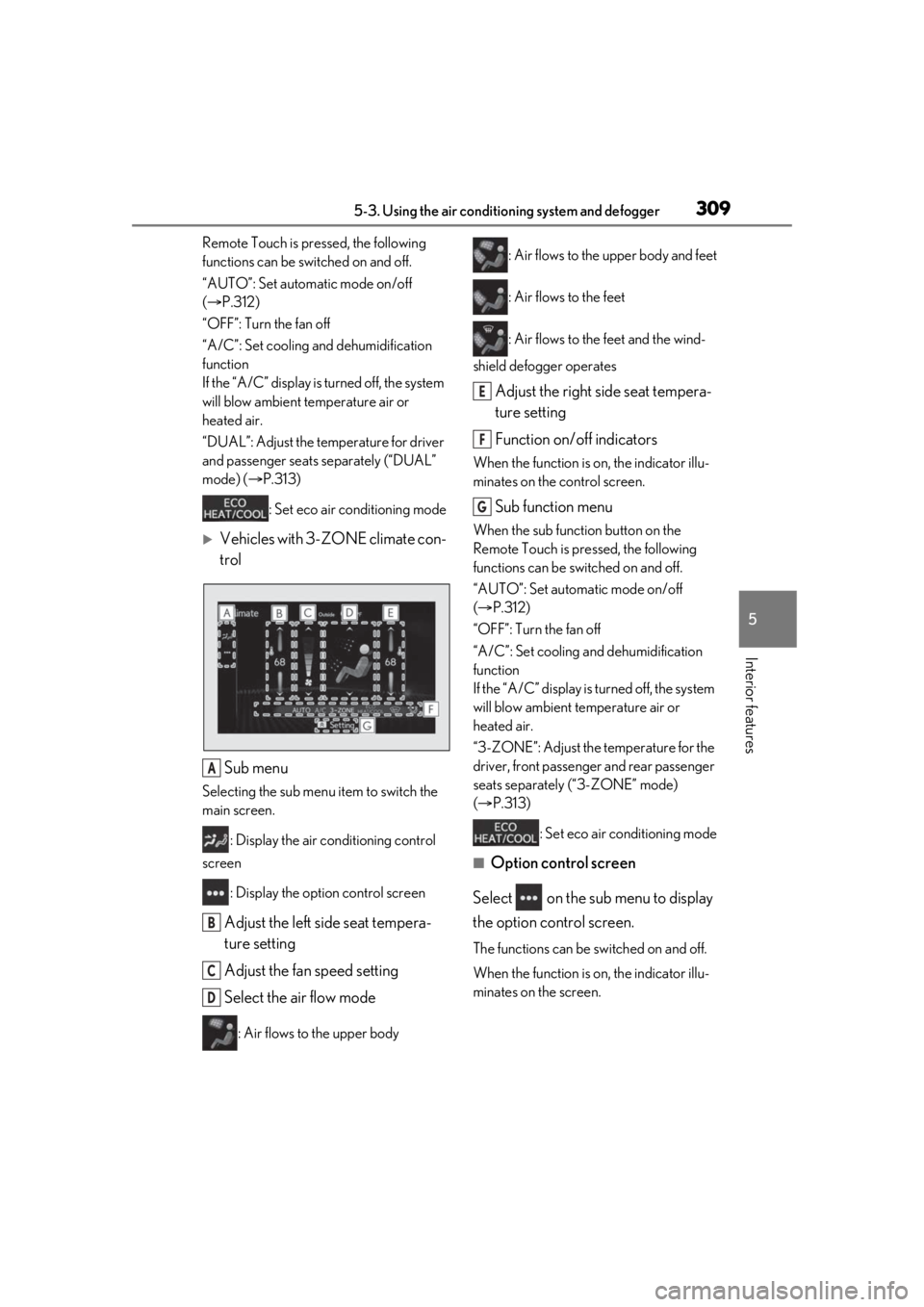
Sub menu
Selecting the sub menu item to switch the
main screen. : Display the air conditioning control
screen
: Display the option control screen
Adjust the left side seat tempera-
ture setting
Adjust the fan speed setting
Select the air flow mode
: Air flows to the upper body : Air flows to the upper body and feet
: Air flows to the feet
: Air flows to the feet and the wind-
shield defogger operates
Adjust the right side seat tempera-
ture setting
Function on/off indicators
When the function is on, the indicator illu-
minates on the control screen.
Sub function menu
When the sub function button on the
Remote Touch is pressed, the following
functions can be switched on and off.
“AUTO”: Set automatic mode on/off
( P.312)
“OFF”: Turn the fan off
“A/C”: Set cooling and dehumidification
function
If the “A/C” display is turned off, the system
will blow ambient temperature air or
heated air.
“3-ZONE”: Adjust the temperature for the
driver, front passenger and rear passenger
seats separately (“3-ZONE” mode)
( P.313)
: Set eco air conditioning mode
■Option control screen
Select on the sub menu to display
the option control screen.
The functions can be switched on and off.
When the function is on, the indicator illu-
minates on the screen.
A
B
C
D
E
F
G
Page 310 of 528
3105-3. Using the air conditioning system and defogger
Vehicles with DUAL-ZONE climate
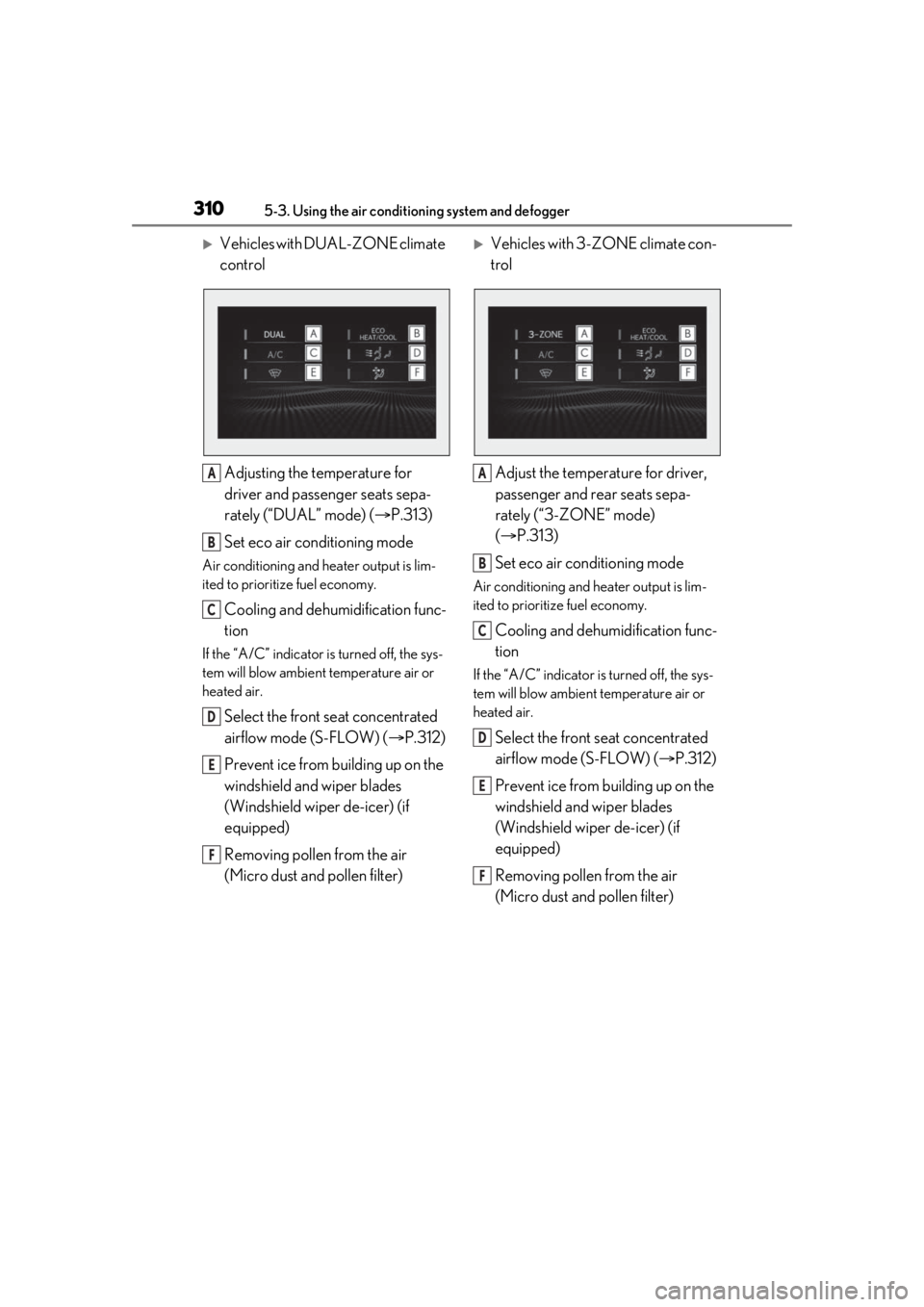
controlAdjusting the temperature for
driver and passenger seats sepa-
rately (“DUAL” mode) ( P.313)
Set eco air conditioning mode
Air conditioning and heater output is lim-
ited to prioritize fuel economy.
Cooling and dehumidification func-
tion
If the “A/C” indicator is turned off, the sys-
tem will blow ambient temperature air or
heated air.
Select the front seat concentrated
airflow mode (S-FLOW) ( P.312)
Prevent ice from building up on the
windshield and wiper blades
(Windshield wiper de-icer) (if
equipped)
Removing pollen from the air
(Micro dust and pollen filter)
Vehicles with 3-ZONE climate con-
trol
Adjust the temperature for driver,
passenger and rear seats sepa-
rately (“3-ZONE” mode)
( P.313)
Set eco air conditioning mode
Air conditioning and heater output is lim-
ited to prioritize fuel economy.
Cooling and dehumidification func-
tion
If the “A/C” indicator is turned off, the sys-
tem will blow ambient temperature air or
heated air.
Select the front seat concentrated
airflow mode (S-FLOW) ( P.312)
Prevent ice from building up on the
windshield and wiper blades
(Windshield wiper de-icer) (if
equipped)
Removing pollen from the air
(Micro dust and pollen filter)
A
B
C
D
E
F
A
B
C
D
E
F
Page 311 of 528
3115-3. Using the air conditioning system and defogger
5
Interior features
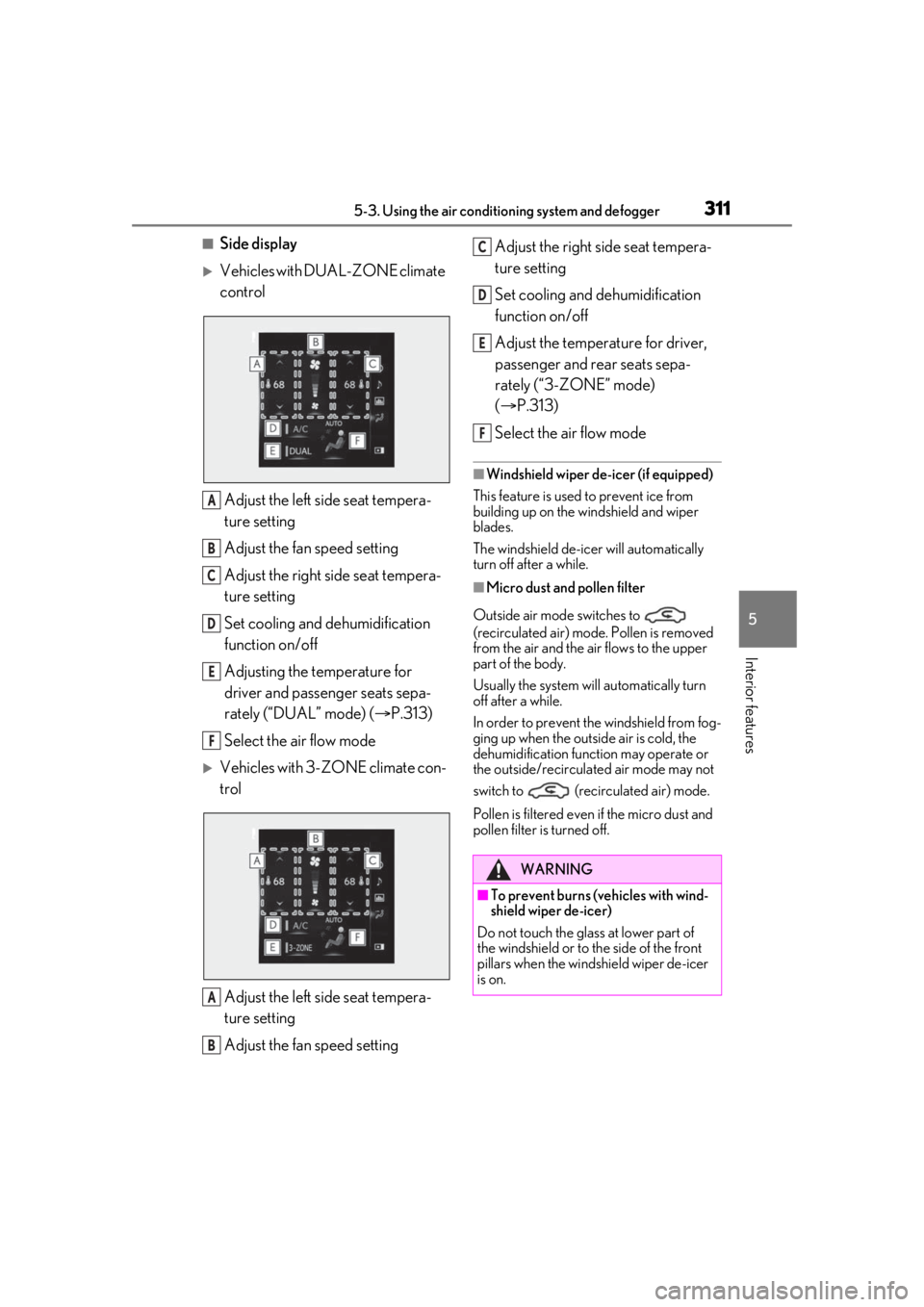
■Side display
Vehicles with DUAL-ZONE climate
control
Adjust the left side seat tempera-
ture setting
Adjust the fan speed setting
Adjust the right side seat tempera-
ture setting
Set cooling and dehumidification
function on/off
Adjusting the temperature for
driver and passenger seats sepa-
rately (“DUAL” mode) ( P.313)
Select the air flow mode
Vehicles with 3-ZONE climate con-
trol
Adjust the left side seat tempera-
ture setting
Adjust the fan speed setting Adjust the right side seat tempera-
ture setting
Set cooling and dehumidification
function on/off
Adjust the temperature for driver,
passenger and rear seats sepa-
rately (“3-ZONE” mode)
(
P.313)
Select the air flow mode
■Windshield wiper de-icer (if equipped)
This feature is used to prevent ice from
building up on the windshield and wiper
blades.
The windshield de-icer will automatically
turn off after a while.
■Micro dust and pollen filter
Outside air mode switches to
(recirculated air) mode. Pollen is removed
from the air and the air flows to the upper
part of the body.
Usually the system will automatically turn
off after a while.
In order to prevent the windshield from fog-
ging up when the outside air is cold, the
dehumidification function may operate or
the outside/recirculated air mode may not
switch to (recirculated air) mode.
Pollen is filtered even if the micro dust and
pollen filter is turned off.
A
B
C
D
E
F
A
B
WARNING
■To prevent burns (vehicles with wind-
shield wiper de-icer)
Do not touch the glass at lower part of
the windshield or to the side of the front
pillars when the windshield wiper de-icer
is on.
C
D
E
F
Page 312 of 528
3125-3. Using the air conditioning system and defogger
1Press the automatic mode switch or
select “AUTO” on the sub function
menu. ( P.308)
2 Press the outside/recirculated air
mode switch to switch to automatic
air intake mode. (if equipped)
The air conditioning system automatically
switches between outside air and recircu-
lated air modes.
3Adjust the temperature setting.
4 To stop the operation, press the off
switch or select “OFF” on the sub
function menu. ( P.308)
If the fan speed settin g or air flow modes
are operated, the automatic mode indica-
tor goes off. However, automatic mode for
functions other than th at operated is main-
tained.
■Using automatic mode
Fan speed is adjusted automatically accord-
ing to the temperature setting and the
ambient conditions.
Therefore, the fan may stop for a while until
warm or cool air is ready to flow immedi-
ately after the automatic mode switch is
pressed or “AUTO” is selected.
Cool air may blow around the upper body
even when the heater is on due to sunlight.
■Automatic mode for air intake control (if
equipped)
In automatic mode, the system detects
exhaust gas and other pollutants and auto-
matically switches between outside air and
recirculated air modes.
When the dehumidification function is off,
and the fan is operating, turning automatic
mode on will activate the dehumidification
function.
This function automatically controls the
air conditioning airflo w so that priority
is given to the front seats. When the
front passenger seat is not occupied,
airflow may switch to only the driver's
seat. Unnecessary air conditioning is
suppressed, contributing to increased
fuel efficiency.
Front seat concentrated airflow mode
operates in the following situations.
No passengers are detected in the
rear seats
The windshield defogger is not
operating
Pollen removal mode is not operat-
ing
Using automatic modeNOTICE
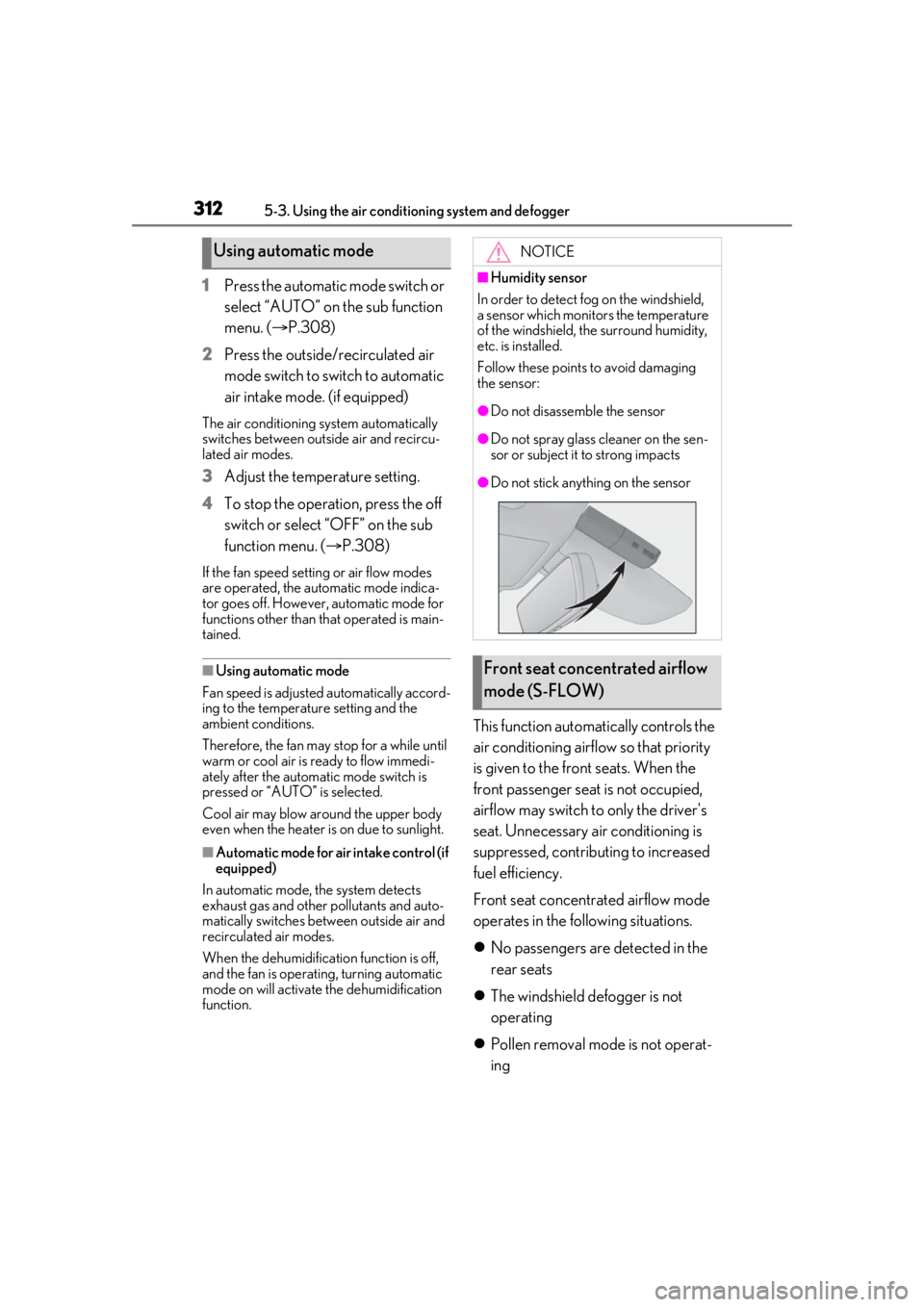
■Humidity sensor
In order to detect fog on the windshield,
a sensor which monitors the temperature
of the windshield, the surround humidity,
etc. is installed.
Follow these points to avoid damaging
the sensor:
●Do not disassemble the sensor
●Do not spray glass cleaner on the sen-
sor or subject it to strong impacts
●Do not stick anything on the sensor
Front seat concentrated airflow
mode (S-FLOW)