charging LEXUS RX450h 2021 Owners Manual
[x] Cancel search | Manufacturer: LEXUS, Model Year: 2021, Model line: RX450h, Model: LEXUS RX450h 2021Pages: 528, PDF Size: 10.73 MB
Page 66 of 528
661-4. Hybrid system
1-4.Hybrid system
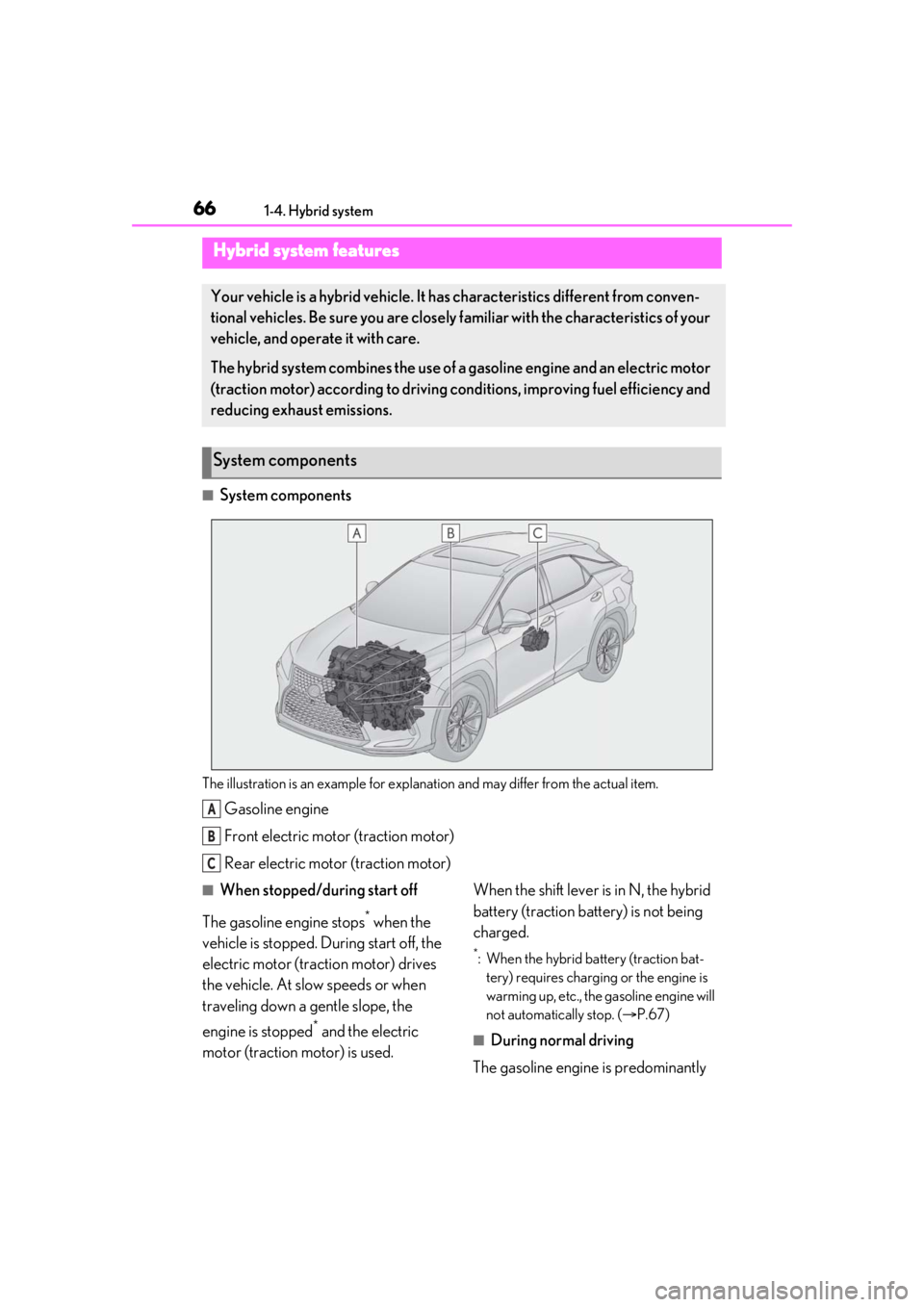
■System components
The illustration is an example for explanation and may differ from the actual item.
Gasoline engine
Front electric motor (traction motor)
Rear electric motor (traction motor)
■When stopped/during start off
The gasoline engine stops
* when the
vehicle is stopped. During start off, the
electric motor (traction motor) drives
the vehicle. At slow speeds or when
traveling down a gentle slope, the
engine is stopped
* and the electric
motor (traction motor) is used. When the shift lever is in N, the hybrid
battery (traction battery) is not being
charged.
*: When the hybrid battery (traction bat-
tery) requires charging or the engine is
warming up, etc., the gasoline engine will
not automatically stop. ( P.67)
■During normal driving
The gasoline engine is predominantly
Hybrid system features
Your vehicle is a hybrid vehicle. It has characteristics different from conven-
tional vehicles. Be sure you are closely familiar with the characteristics of your
vehicle, and operate it with care.
The hybrid system combines the use of a gasoline engine and an electric motor
(traction motor) according to driving conditions, improving fuel efficiency and
reducing exhaust emissions.
System components
A
B
C
Page 67 of 528
671-4. Hybrid system
1
For safety and security
used. The electric motor (traction
motor) charges the hybrid battery
(traction battery) as necessary.
■When accelerating sharply
When the accelerator pedal is
depressed heavily, the power of the
hybrid battery (traction battery) is
added to that of the gasoline engine via
the electric motor (traction motor).
■When braking (regenerative brak-
ing)
The wheels operate the electric motor
(traction motor) as a power generator,
and the hybrid battery (traction bat-
tery) is charged.
■Regenerative braking
In the following situations, kinetic energy is
converted to electric energy and decelera-
tion force can be obta ined in conjunction
with the recharging of the hybrid battery
(traction battery).
●The accelerator pedal is released while
driving with the shift lever in D or S.
●The brake pedal is depressed while driv-
ing with the shift lever in D or S.
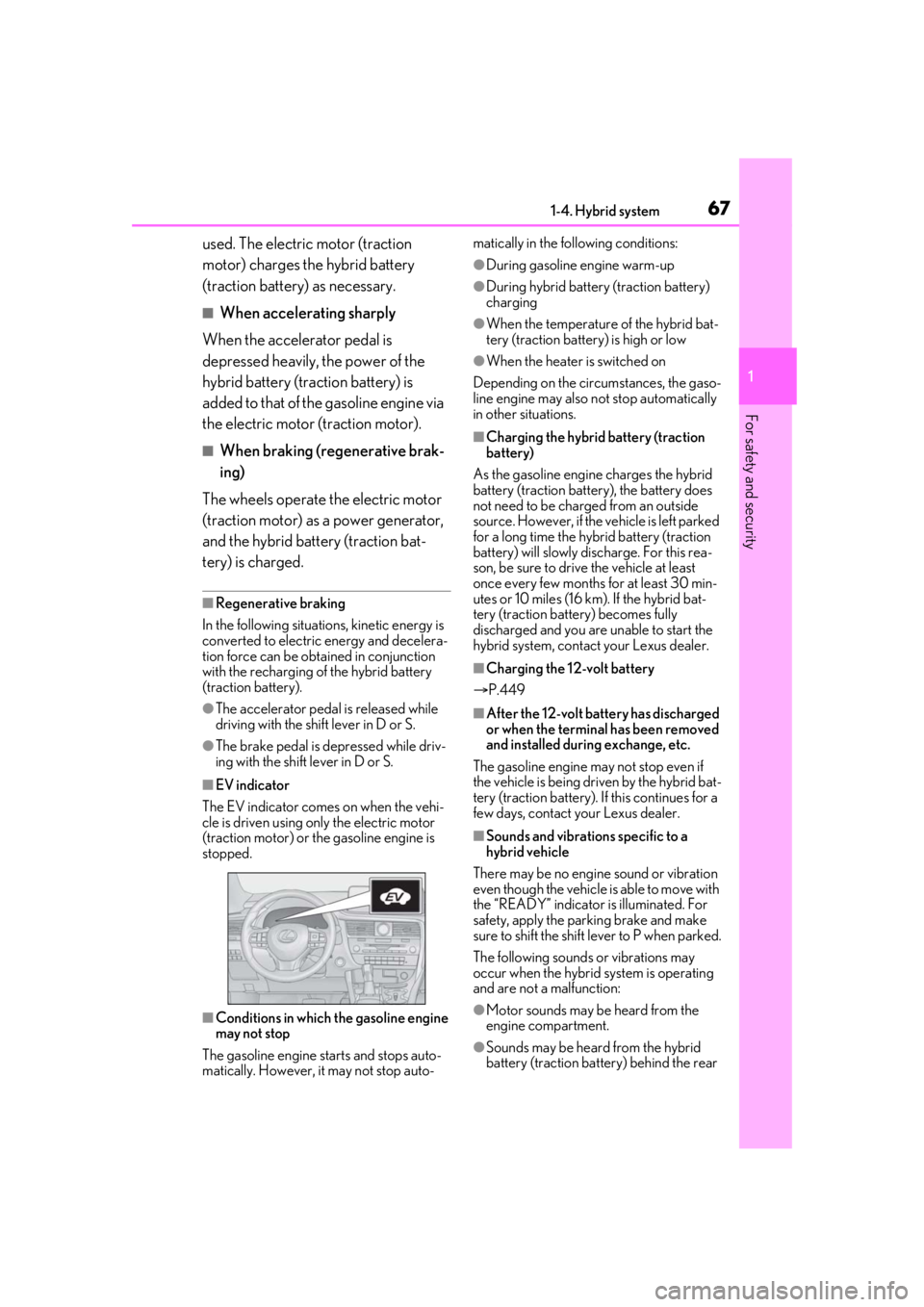
■EV indicator
The EV indicator comes on when the vehi-
cle is driven using only the electric motor
(traction motor) or th e gasoline engine is
stopped.
■Conditions in which the gasoline engine
may not stop
The gasoline engine starts and stops auto-
matically. However, it may not stop auto- matically in the following conditions:
●During gasoline engine warm-up
●During hybrid battery (traction battery)
charging
●When the temperature of the hybrid bat-
tery (traction battery) is high or low
●When the heater is switched on
Depending on the circumstances, the gaso-
line engine may also not stop automatically
in other situations.
■Charging the hybrid battery (traction
battery)
As the gasoline engine charges the hybrid
battery (traction battery), the battery does
not need to be charged from an outside
source. However, if the vehicle is left parked
for a long time the hybrid battery (traction
battery) will slowly discharge. For this rea-
son, be sure to drive the vehicle at least
once every few months for at least 30 min-
utes or 10 miles (16 km ). If the hybrid bat-
tery (traction battery) becomes fully
discharged and you are unable to start the
hybrid system, contact your Lexus dealer.
■Charging the 12-volt battery
P.449
■After the 12-volt battery has discharged
or when the terminal has been removed
and installed during exchange, etc.
The gasoline engine may not stop even if
the vehicle is being driven by the hybrid bat-
tery (traction battery). If this continues for a
few days, contact your Lexus dealer.
■Sounds and vibrations specific to a
hybrid vehicle
There may be no engine sound or vibration
even though the vehicle is able to move with
the “READY” indicator is illuminated. For
safety, apply the parking brake and make
sure to shift the shift lever to P when parked.
The following sounds or vibrations may
occur when the hybrid system is operating
and are not a malfunction:
●Motor sounds may be heard from the
engine compartment.
●Sounds may be heard from the hybrid
battery (traction battery) behind the rear
Page 76 of 528
761-5. Theft deterrent system
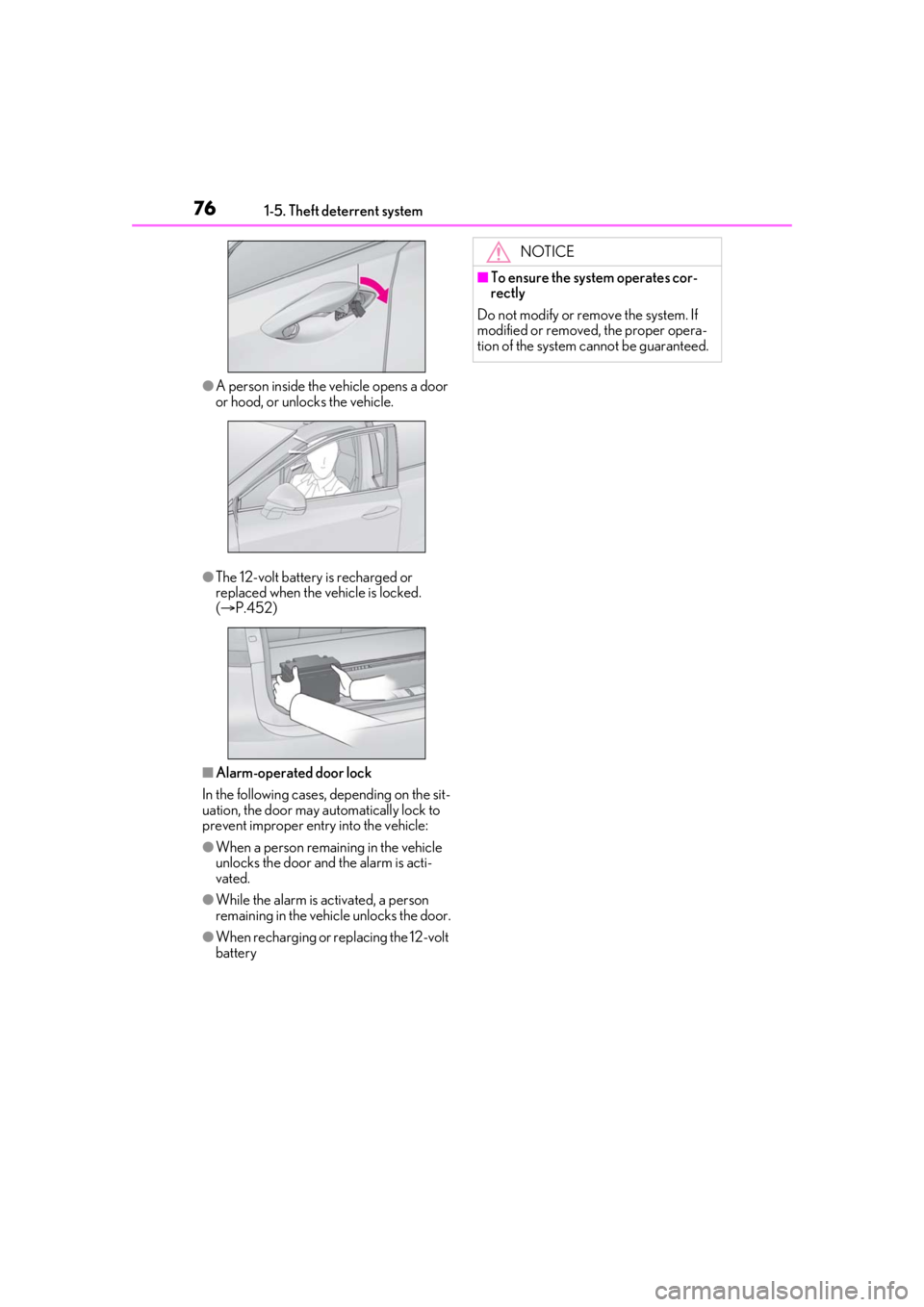
●A person inside the vehicle opens a door
or hood, or unlocks the vehicle.
●The 12-volt battery is recharged or
replaced when the vehicle is locked.
( P.452)
■Alarm-operated door lock
In the following cases, depending on the sit-
uation, the door may automatically lock to
prevent improper entry into the vehicle:
●When a person remaining in the vehicle
unlocks the door and the alarm is acti-
vated.
●While the alarm is activated, a person
remaining in the vehicle unlocks the door.
●When recharging or replacing the 12-volt
battery
NOTICE
■To ensure the system operates cor-
rectly
Do not modify or remove the system. If
modified or removed, the proper opera-
tion of the system cannot be guaranteed.
Page 79 of 528
792-1. Instrument cluster
2
Vehicle status information and indicators
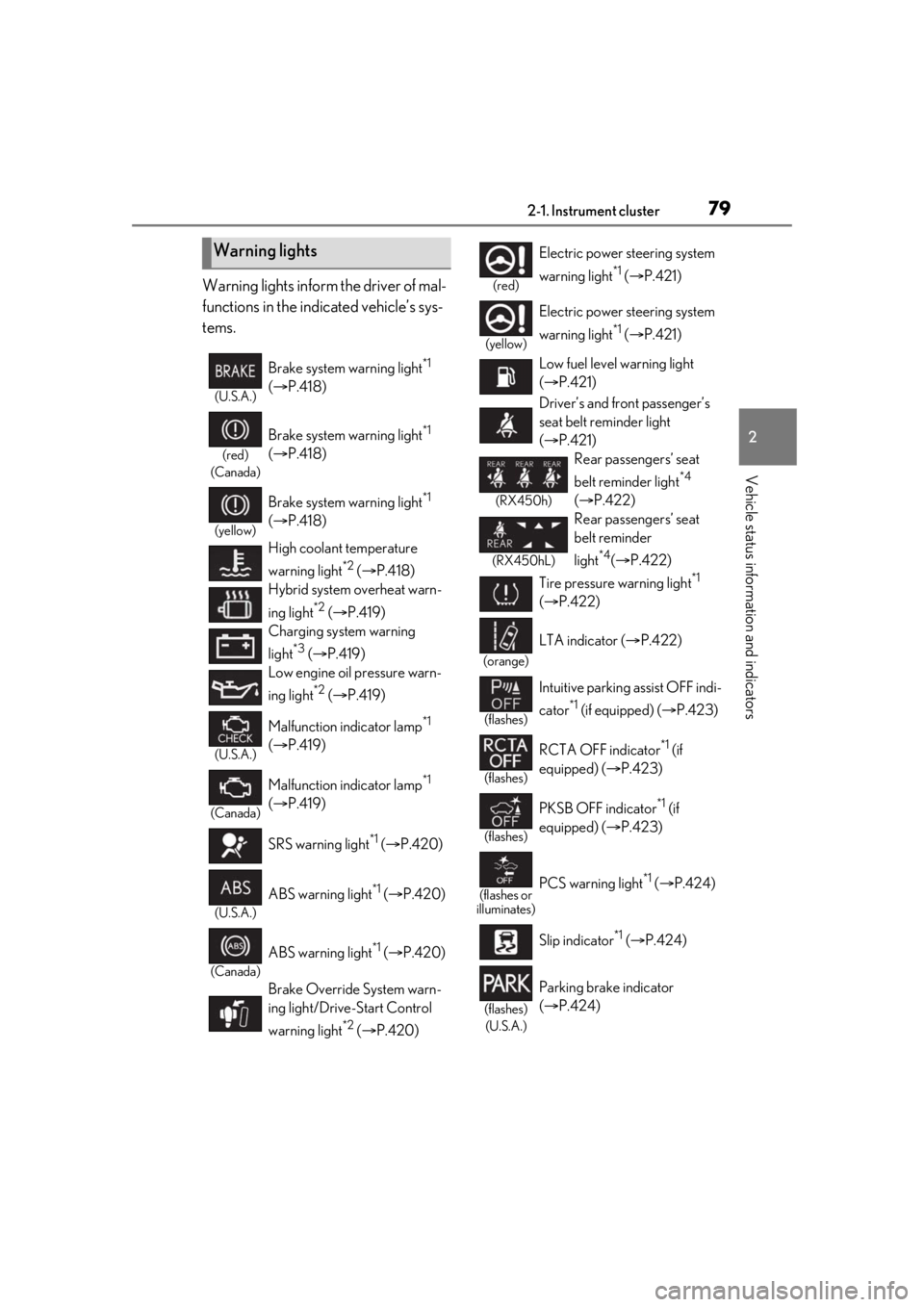
Warning lights inform the driver of mal-
functions in the indicated vehicle’s sys-
tems.
Warning lights
(U.S.A.)
Brake system warning light*1
( P.418)
(red)
(Canada)
Brake system warning light*1
( P.418)
(yellow)
Brake system warning light*1
( P.418)
High coolant temperature
warning light
*2 ( P.418)
Hybrid system overheat warn-
ing light
*2 ( P.419)
Charging system warning
light
*3 ( P.419)
Low engine oil pressure warn-
ing light
*2 ( P.419)
(U.S.A.)
Malfunction indicator lamp*1
( P.419)
(Canada)
Malfunction indicator lamp*1
( P.419)
SRS warning light
*1 ( P.420)
(U.S.A.)
ABS warning light*1 ( P.420)
(Canada)
ABS warning light*1 ( P.420)
Brake Override System warn-
ing light/Drive-Start Control
warning light
*2 ( P.420)
(red)
Electric power steering system
warning light
*1 ( P.421)
(yellow)
Electric power steering system
warning light
*1 ( P.421)
Low fuel level warning light
( P.421)
Driver’s and front passenger’s
seat belt reminder light
( P.421)
(RX450h)
Rear passengers’ seat
belt reminder light
*4
( P.422)
(RX450hL)
Rear passengers’ seat
belt reminder
light
*4( P.422)
Tire pressure warning light
*1
( P.422)
(orange)
LTA indicator ( P.422)
(flashes)
Intuitive parking assist OFF indi-
cator
*1 (if equipped) ( P.423)
(flashes)
RCTA OFF indicator*1 (if
equipped) ( P.423)
(flashes)
PKSB OFF indicator*1 (if
equipped) ( P.423)
(flashes or
illuminates)PCS warning light*1 ( P.424)
Slip indicator
*1 ( P.424)
(flashes)
(U.S.A.)
Parking brake indicator
( P.424)
Page 85 of 528
852-1. Instrument cluster
2
Vehicle status information and indicators
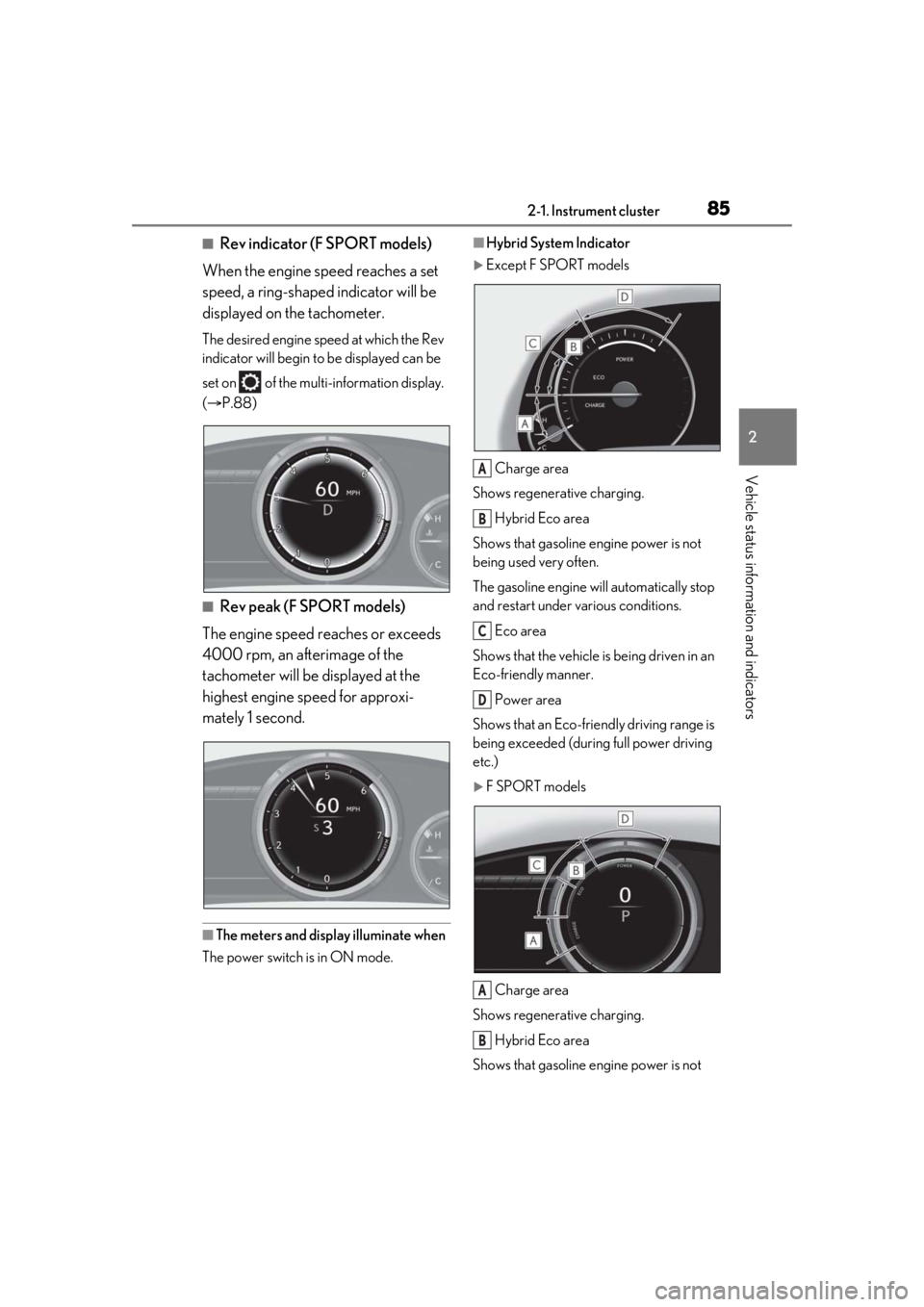
■Rev indicator (F SPORT models)
When the engine speed reaches a set
speed, a ring-shaped indicator will be
displayed on the tachometer.
The desired engine speed at which the Rev
indicator will begin to be displayed can be
set on of the multi-information display.
( P.88)
■Rev peak (F SPORT models)
The engine speed reaches or exceeds
4000 rpm, an afterimage of the
tachometer will be displayed at the
highest engine speed for approxi-
mately 1 second.
■The meters and display illuminate when
The power switch is in ON mode.
■Hybrid System Indicator
Except F SPORT models
Charge area
Shows regenerative charging.
Hybrid Eco area
Shows that gasoline en gine power is not
being used very often.
The gasoline engine will automatically stop
and restart under various conditions.
Eco area
Shows that the vehicle is being driven in an
Eco-friendly manner.
Power area
Shows that an Eco-frie ndly driving range is
being exceeded (during full power driving
etc.)
F SPORT models
Charge area
Shows regenerative charging.
Hybrid Eco area
Shows that gasoline en gine power is not
A
B
C
D
A
B
Page 101 of 528
1012-1. Instrument cluster
2
Vehicle status information and indicators
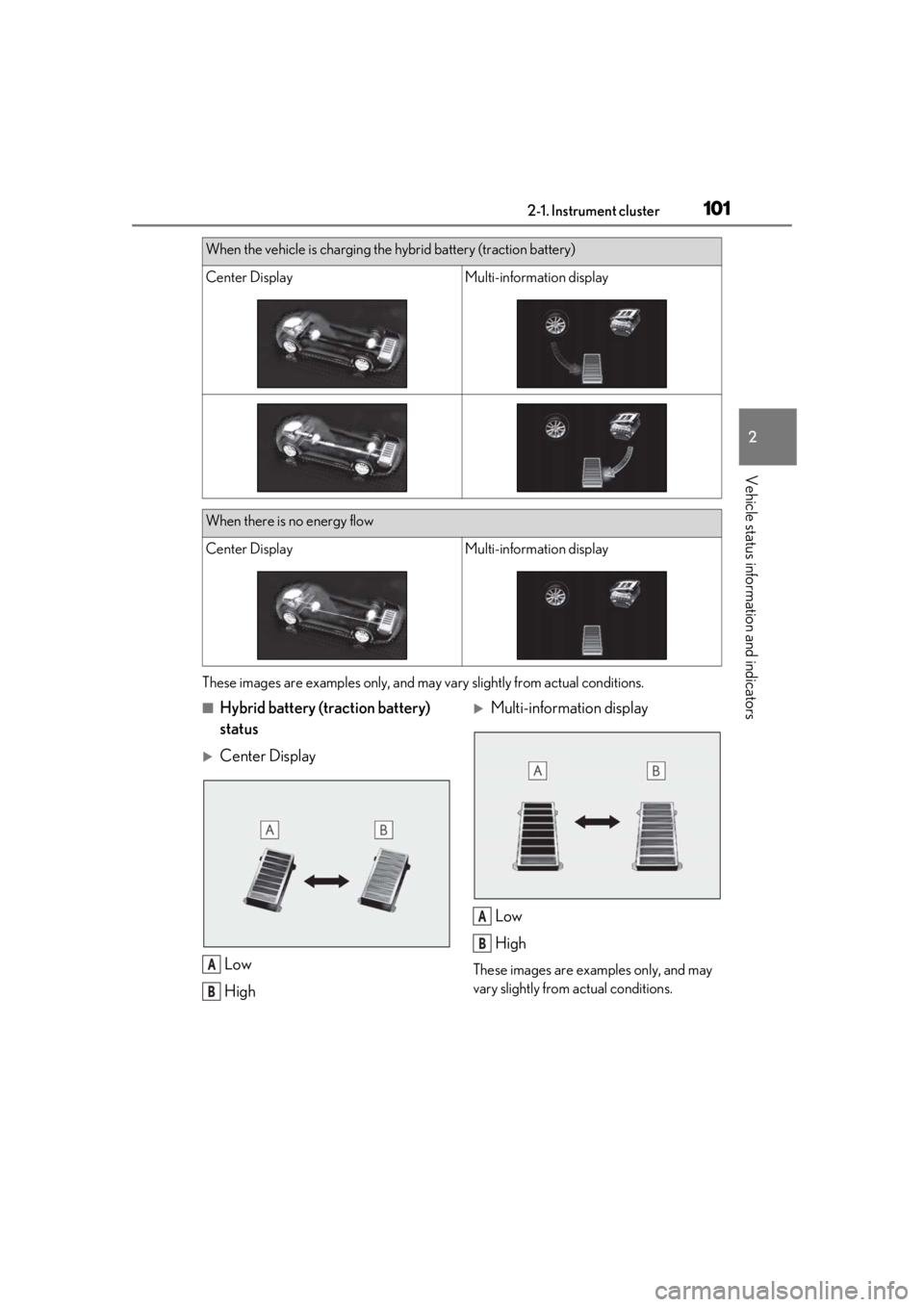
These images are examples only, and may vary slightly from actual conditions.
■Hybrid battery (traction battery)
status
Center Display
Low
High
Multi-information displayLow
High
These images are examples only, and may
vary slightly from actual conditions.
When the vehicle is charging the hybrid battery (traction battery)
Center DisplayMulti-information display
When there is no energy flow
Center DisplayMulti-information display
A
B
A
B
Page 106 of 528
1063-1. Key information
3-1.Key information
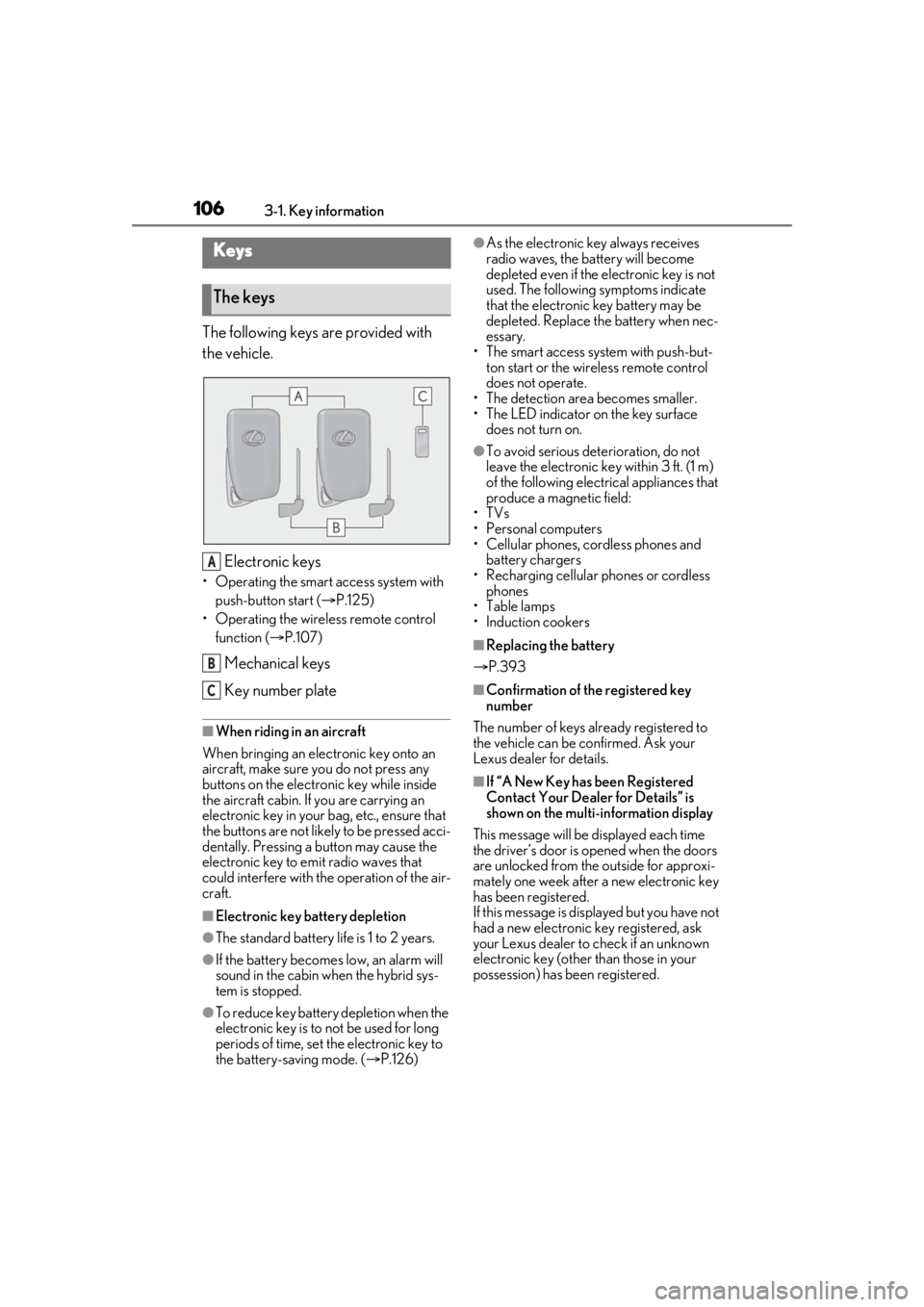
The following keys are provided with
the vehicle.
Electronic keys
• Operating the smart access system with push-button start ( P.125)
• Operating the wireless remote control function ( P.107)
Mechanical keys
Key number plate
■When riding in an aircraft
When bringing an elec tronic key onto an
aircraft, make sure you do not press any
buttons on the electronic key while inside
the aircraft cabin. If you are carrying an
electronic key in your bag, etc., ensure that
the buttons are not likely to be pressed acci-
dentally. Pressing a button may cause the
electronic key to em it radio waves that
could interfere with the operation of the air-
craft.
■Electronic key battery depletion
●The standard battery life is 1 to 2 years.
●If the battery becomes low, an alarm will
sound in the cabin when the hybrid sys-
tem is stopped.
●To reduce key battery depletion when the
electronic key is to not be used for long
periods of time, set the electronic key to
the battery-saving mode. ( P.126)
●As the electronic key always receives
radio waves, the battery will become
depleted even if the electronic key is not
used. The following symptoms indicate
that the electronic key battery may be
depleted. Replace the battery when nec-
essary.
• The smart access system with push-but- ton start or the wireless remote control
does not operate.
• The detection area becomes smaller.
• The LED indicator on the key surface does not turn on.
●To avoid serious dete rioration, do not
leave the electronic key within 3 ft. (1 m)
of the following electrical appliances that
produce a magnetic field:
•TVs
• Personal computers
• Cellular phones, cordless phones and battery chargers
• Recharging cellular phones or cordless
phones
•Table lamps
• Induction cookers
■Replacing the battery
P.393
■Confirmation of the registered key
number
The number of keys already registered to
the vehicle can be confirmed. Ask your
Lexus dealer for details.
■If “A New Key has been Registered
Contact Your Dealer for Details” is
shown on the multi-information display
This message will be displayed each time
the driver’s door is opened when the doors
are unlocked from the outside for approxi-
mately one week after a new electronic key
has been registered.
If this message is disp layed but you have not
had a new electronic key registered, ask
your Lexus dealer to check if an unknown
electronic key (other than those in your
possession) has be en registered.
Keys
The keys
A
B
C
Page 140 of 528
1403-3. Adjusting the seats
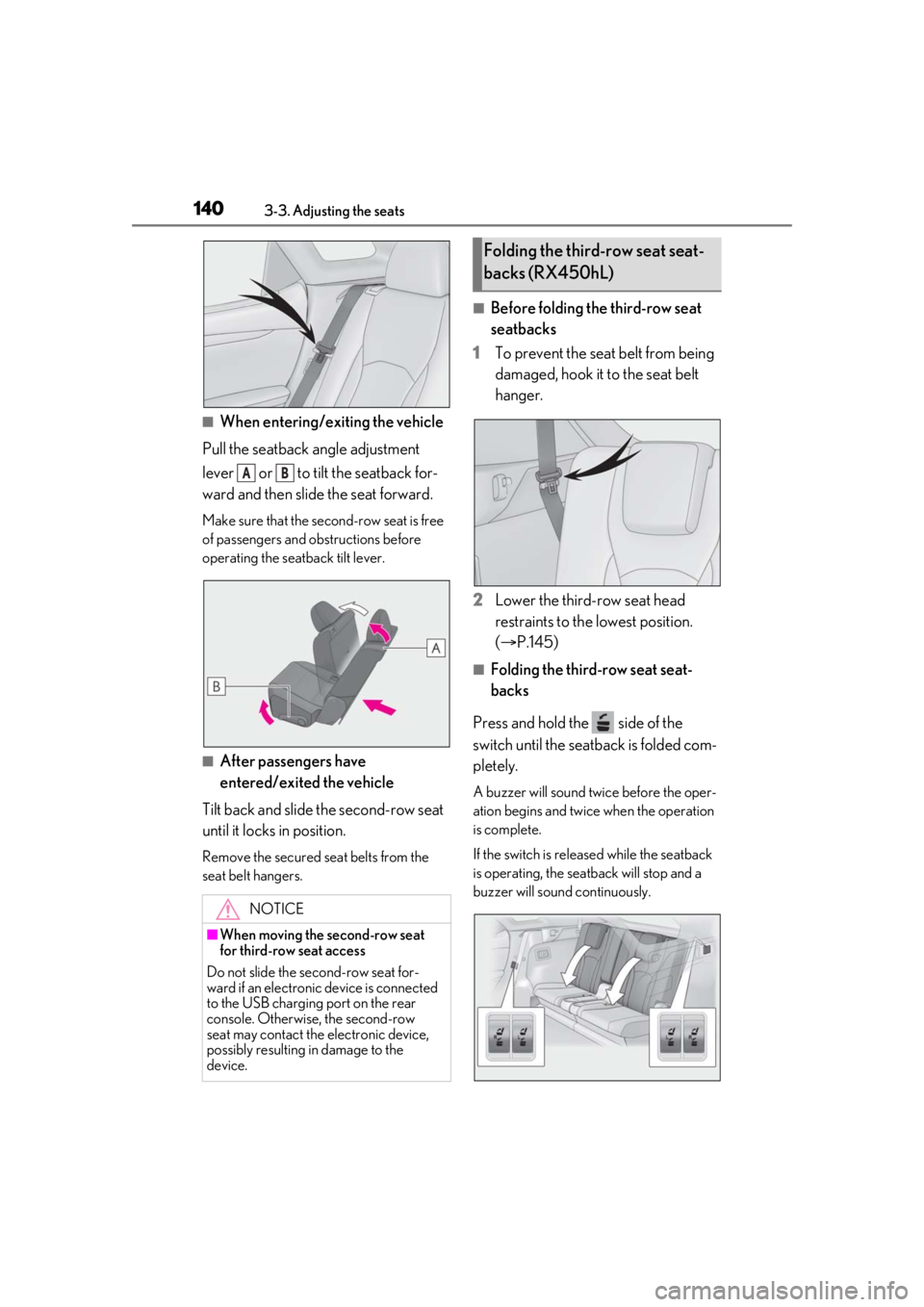
■When entering/exiting the vehicle
Pull the seatback angle adjustment
lever or to tilt the seatback for-
ward and then slid e the seat forward.
Make sure that the seco nd-row seat is free
of passengers and ob structions before
operating the seatback tilt lever.
■After passengers have
entered/exited the vehicle
Tilt back and slide the second-row seat
until it locks in position.
Remove the secured seat belts from the
seat belt hangers.
■Before folding the third-row seat
seatbacks
1 To prevent the seat belt from being
damaged, hook it to the seat belt
hanger.
2 Lower the third-row seat head
restraints to the lowest position.
(P.145)
■Folding the third-row seat seat-
backs
Press and hold the side of the
switch until the seatback is folded com-
pletely.
A buzzer will sound twice before the oper-
ation begins and twice when the operation
is complete.
If the switch is releas ed while the seatback
is operating, the seatback will stop and a
buzzer will sound continuously.
NOTICE
■When moving the second-row seat
for third-row seat access
Do not slide the se cond-row seat for-
ward if an electronic device is connected
to the USB charging port on the rear
console. Otherwise, the second-row
seat may contact the electronic device,
possibly resulting in damage to the
device.
AB
Folding the third-row seat seat-
backs (RX450hL)
Page 181 of 528

1814-1. Before driving
4
Driving
cle-trailer speed limit is 65 mph
(104 km/h) on a flat, straight, dry
road. Do not exceed this limit, the
posted towing speed limit or the
speed limit for your trailer as set
forth in your trailer owner’s manual,
whichever is lowest. Instability of the
towing vehicle-trailer combination
(trailer sway) increases as speed
increases. Exceeding speed limits
may cause loss of control.
Before starting out, check the trailer
lights, tires and the vehicle-trailer
connections. Recheck after driving
a short distance.
Practice turning, stopping and
reversing with the trailer attached in
an area away from traffic until you
become accustomed to the feel of
the vehicle-trailer combination.
Reversing with a tr ailer attached is
difficult and requires practice. Grip
the bottom of the steering wheel
and move your hand to the left to
move the trailer to the left. Move
your hand to the right to move the
trailer to right. (This is generally
opposite to reversing without a
trailer attached.) Avoid sharp or
prolonged turning. Have someone
guide you when reversing to reduce
the risk of an accident.
As stopping distance is increased
when towing a trailer, vehicle-to
vehicle distance should be
increased. For each 10 mph (16
km/h) of speed, allow at least one
vehicle and trailer length.
Avoid sudden braking as you may skid, resulting in the trailer jackknif-
ing and a loss of vehicle control. This
is especially true on wet or slippery
surfaces.
Avoid jerky starts or sudden accel-
eration.
Avoid jerky steering and sharp
turns, and slow down before making
turn.
Note that when making a turn, the
trailer wheels will be closer than the
vehicle wheels to the inside of the
turn. Compensate by making a
wider than normal turning radius.
Slow down before making a turn, in
cross winds, on wet or slippery sur-
faces, etc. Increasing vehicle speed
can destabilize the trailer.
Take care when passing other vehi-
cles. Passing requires considerable
distance. After pass ing a vehicle, do
not forget the length of your trailer,
and be sure you have plenty of room
before changing lanes.
To maintain engine braking effi-
ciency and charging system perfor-
mance when using engine braking,
do not put the transmission in D.
( P.191)
Instability happens more frequently
when descending steep or long
downhill grades. Before descend-
ing, slow down and downshift. Do
not make sudden downshifts while
descending steep or long downhill
grades.
Avoid holding the brake pedal down
too long or applying the brakes too
Page 201 of 528
2014-3. Operating the lights and wipers
4
Driving
Doing so interferes with the sensor detect-
ing the level of ambient light and may cause
the automatic headlight system to malfunc-
tion.
■Automatic light off system
●When the headlights are on: The head-
lights and tail lights turn off 30 seconds
after the driver’s door is opened and
closed if the power switch is turned to
ACCESSORY mode or turned off. (The
lights turn off immediately if on the
key is pressed after all the doors are
closed.)
●When only the tail lights are on: The tail
lights turn off automatically if the power
switch is turned to ACCESSORY mode
or turned off and the driver’s door is
opened.
■Automatic headlight leveling system (if
equipped)
The level of the headlights is automatically
adjusted according to the number of pas-
sengers and the loading condition of the
vehicle to ensure that the headlights do not
interfere with other road users.
■Light reminder buzzer
A buzzer sounds when the power switch is
turned off or turned to ACCESSORY
mode and the driver’s door is opened while
the lights are turned on.
■Welcome lighting
If the headlight switch is turned to and
the surrounding area is dark, unlocking the
doors using the smart access system with
push-button start or wireless remote con-
trol will turn the parking lights and tail lights
on automatically.
■Windshield wiper linked headlight illu-
mination
When driving during daytime with the
headlight switch turned to , if the wind-
shield wipers are used, the headlights will
turn on automatically after several seconds
to help enhance the visibility of your vehicle.
■12-volt battery-saving function
In order to prevent the 12-volt battery of the vehicle from discharging, if the headlights
and/or tail lights are on when the power
switch is turned off the 12-volt battery sav-
ing function will operate and automatically
turn off all the lights
after approximately 20
minutes. When the power switch is turned
to ON mode, the 12-volt battery-saving
function will be disabled.
When any of the following are performed,
the 12-volt battery-saving function is can-
celed once and then reactivated. All the
lights will turn off automatically 20 minutes
after the 12-volt battery-saving function has
been reactivated:
●When the headlight switch is operated
●When a door is opened or closed
■Customization
Some functions can be customized.
( P.480)
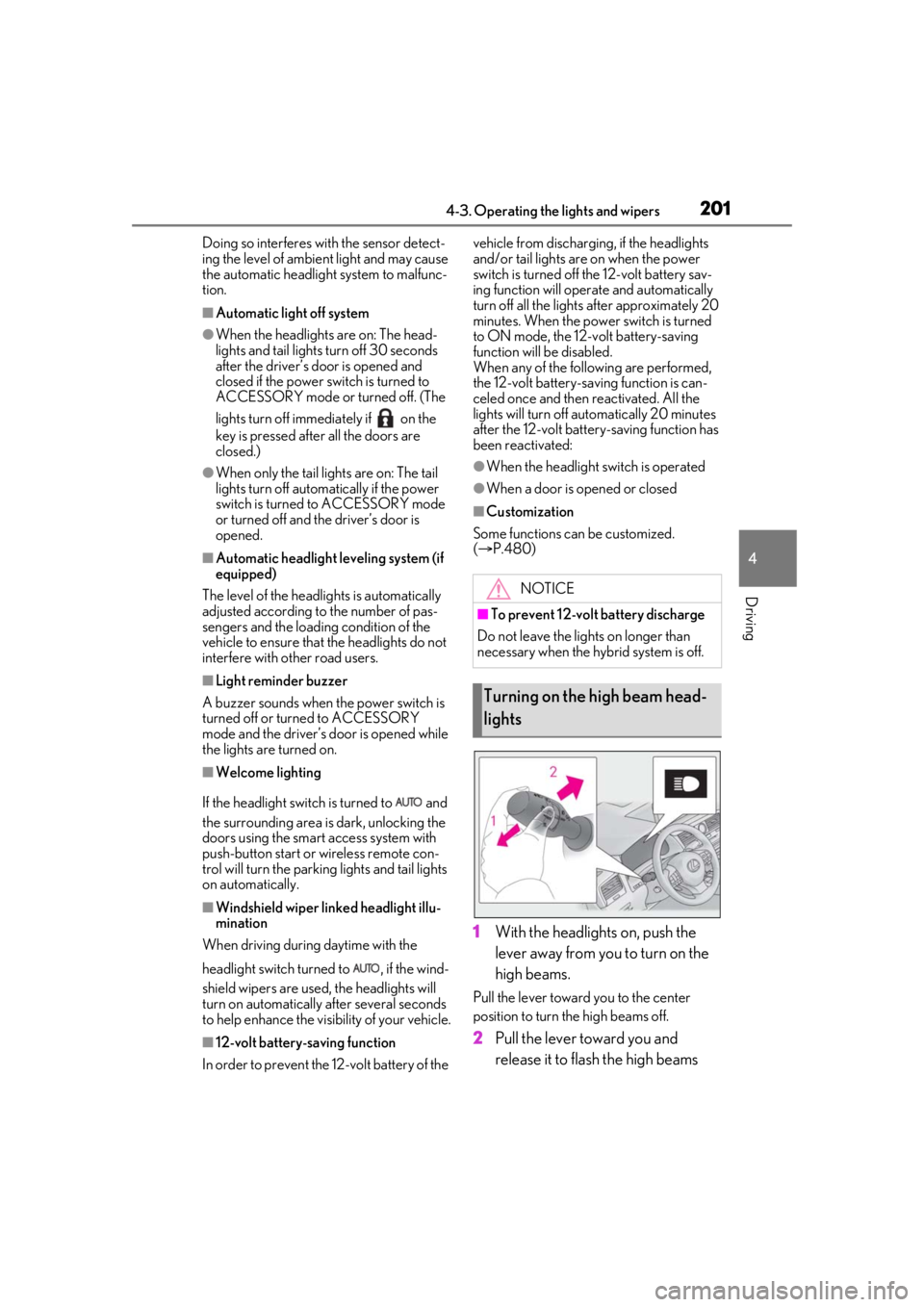
1 With the headlights on, push the
lever away from you to turn on the
high beams.
Pull the lever toward you to the center
position to turn the high beams off.
2Pull the lever toward you and
release it to flash the high beams
NOTICE
■To prevent 12-volt battery discharge
Do not leave the lights on longer than
necessary when the hy brid system is off.
Turning on the high beam head-
lights