lights LEXUS RX450h 2022 Owner's Manual
[x] Cancel search | Manufacturer: LEXUS, Model Year: 2022, Model line: RX450h, Model: LEXUS RX450h 2022Pages: 532, PDF Size: 27.62 MB
Page 119 of 532

1173-2. Opening, closing and locking the doors
3
Before driving
for the operation to occur.
Kick sensor
Hands Free Power Back Door
operation detection area
3 When the kick sensor detects that
your foot is pulled back, a buzzer
will sound and the power back door
will automatically fully open/close.
If kick operation is performed again in the
middle of back door operating, the opera-
tion will stop.
■Hands free close & lock function*
(vehicles with Hands Free Power
Back Door)
*: This setting can be customized by your
Lexus dealer.
If the power back door is closed using a
Hands Free Power Back Door close
operation, all of the doors will be
locked at the same time.
A different buzzer than the normal one will
sound before the power back door begins
to close. The door lock operation signals
will operate to indicate that the power back
door has closed and al l of the doors have
locked simultaneously.
If a Hands Free Power Back Door opera-
tion is performed while the power back
door is operating, the power back door will
stop.
If a Hands Free Power Back Door opera- tion is performed again, the power back
door will open.
■Luggage compartment lights
●The luggage compartment lights turn on
when the back door is opened.
●When the power switch is turned off, the
lights will go off automatically after 20
minutes.
■Power back door operating conditions
If the following conditions are met with the
power back door oper ation enabled, the
power back door can be opened and
closed automatically.
●When an electronic key is being carried
and the back door opener switch is
pressed
*
●When the wireless remote control is
used*
●When the power switch is in ON mode,
the vehicle speed must be lower than 2
mph (3 km/h) and one of the following
conditions must be me t in addition to the
above conditions:
• The parking brake is engaged.
• The brake pedal is depressed.
• The shift lever is in P.
*: When the operation of the power back
door when it is locked has been disabled
by a customized setting, operate the
power back door after it has been
unlocked.
■Close & lock function operating condi-
tions
This function can be operated when all of
the following conditions are met:
• An electronic key is not detected within the vehicle.
• All of the doors other than the power back door are closed.
• The power switch is off.
■Hands Free Power Back Door operating
conditions (if equipped)
●The Hands Free Power Back Door (kick
sensor) setting is on.
A
B
Page 149 of 532

1473-4. Adjusting the steering wheel and mirrors
3
Before driving
The height of the rear view mirror can
be adjusted to suit your driving pos-
ture.
Adjust the height of the rear view mir-
ror by moving it up and down.
Responding to the level of brightness
of the headlights of vehicles behind, the
reflected light is automatically
reduced.
Turn the automatic anti-glare function
mode on/off
When the automatic anti-glare function is
in ON mode, the indicator illuminates.
The function will set to ON mode each
time the power switch is turned to ON
mode.
Pressing the button turns the function to
OFF mode. (The indicator also turns
off.)
■To prevent sensor error
To ensure that the sensors operate properly,
do not touch or cover them.
Inside rear view mirror
The rear view mirror’s position can
be adjusted to enable sufficient
confirmation of the rear view.
Adjusting the height of rear view
mirror
WARNING
■Caution while driving
Do not adjust the position of the mirror
while driving.
Doing so may lead to mishandling of the
vehicle and cause an accident, resulting
in death or serious injury.
Anti-glare function
A
A
Page 163 of 532
161
4
4
Driving
Driving
.4-1. Before drivingDriving the vehicle ..................... 162
Cargo and luggage ................... 167
Vehicle load limits ...................... 170
Trailer towing (vehicles without towing package) ....................... 171
Trailer towing (vehicles with tow- ing package)............................... 171
Dinghy towing .............................. 181
4-2. Driving procedures Power (ignition) switch ............ 182
EV drive mode ............................ 187
Hybrid transmission .................. 189
Turn signal lever.......................... 192
Parking brake .............................. 193
Brake Hold.................................... 196
4-3. Operating the lights and wipers Headlight switch ......................... 198
AHB (Automatic High Beam) ......................................................... 201
Fog light switch .......................... 204
Windshield wipers and washer ........................................................ 204
Rear window wiper and washer ........................................................ 208
4-4. Refueling Opening the fuel tank cap..... 209
4-5. Using the driving support sys- tems
Lexus Safety System + 2.0 ..... 212PCS (Pre-Collision System)
........................................................ 218
LTA (Lane Tracing Assist) .... 225
RSA (Road Sign Assist).......... 234
Dynamic radar cruise control with full-speed range...................... 236
BSM (Blind Spot Monitor) .... 246
PKSA (Parking Support Alert) ....................................................... 250
Intuitive parking assist ............. 252
RCTA (Rear cross traffic alert) function....................................... 259
PKSB (Parking Support Brake) ....................................................... 265
Parking Support Brake function (static objects) ........................... 271
Parking Support Brake function (rear-crossing vehicles) ...... 274
Driving mode select switch .. 276
Driving assist systems.............. 278
4-6. Driving tips Hybrid vehicle driving tips .... 284
Winter driving tips .................... 286
Utility vehicle precautions..... 288
Page 174 of 532
1724-1. Before driving
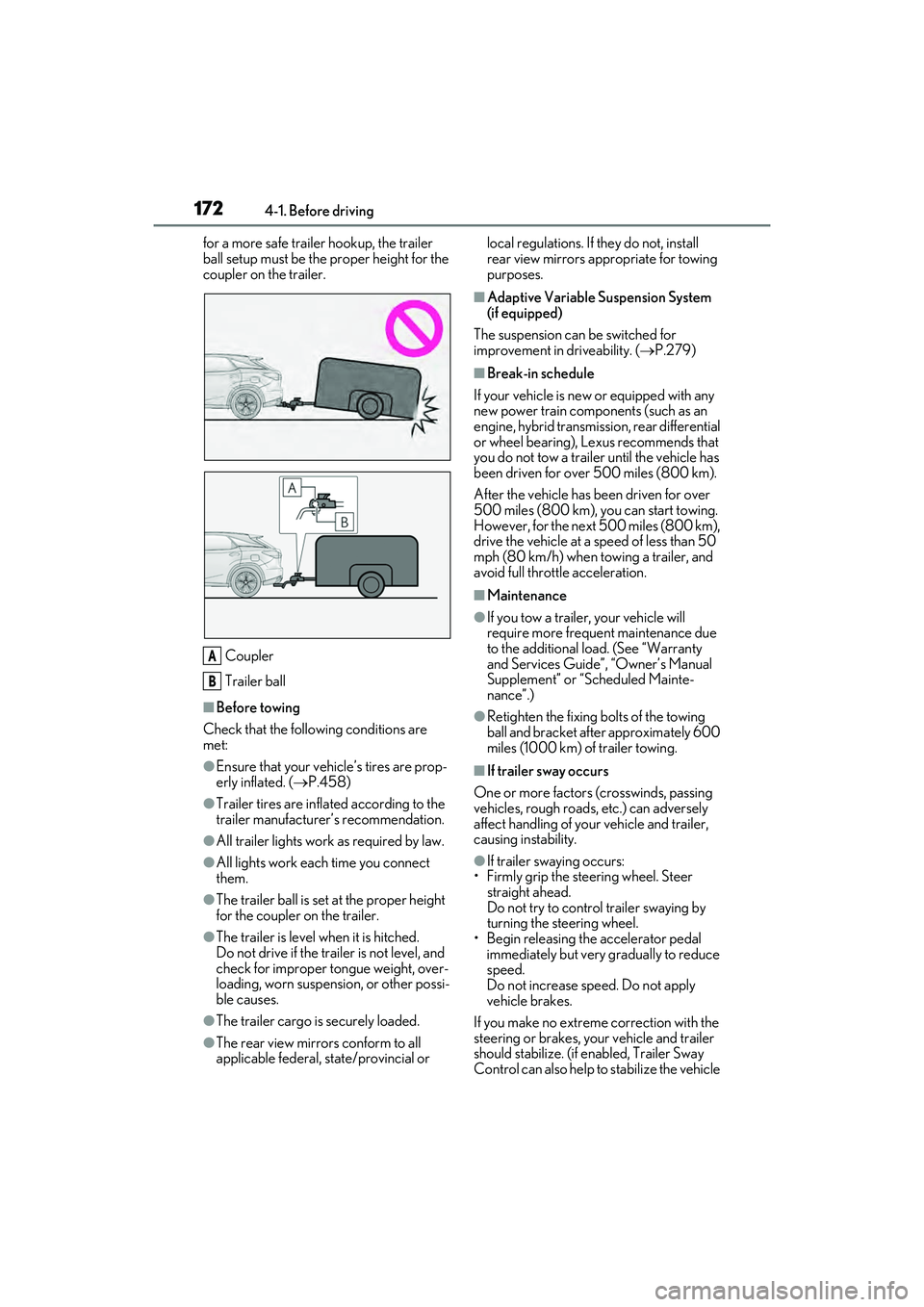
for a more safe trailer hookup, the trailer
ball setup must be the proper height for the
coupler on the trailer.
Coupler
Trailer ball
■Before towing
Check that the following conditions are
met:
●Ensure that your vehicle’s tires are prop-
erly inflated. ( P.458)
●Trailer tires are inflated according to the
trailer manufacturer’s recommendation.
●All trailer lights work as required by law.
●All lights work each time you connect
them.
●The trailer ball is set at the proper height
for the coupler on the trailer.
●The trailer is level when it is hitched.
Do not drive if the trailer is not level, and
check for improper tongue weight, over-
loading, worn suspension, or other possi-
ble causes.
●The trailer cargo is securely loaded.
●The rear view mirrors conform to all
applicable federal, state/provincial or local regulations. If
they do not, install
rear view mirrors appropriate for towing
purposes.
■Adaptive Variable Suspension System
(if equipped)
The suspension can be switched for
improvement in driveability. ( P.279)
■Break-in schedule
If your vehicle is new or equipped with any
new power train components (such as an
engine, hybrid transmission, rear differential
or wheel bearing), Le xus recommends that
you do not tow a trailer until the vehicle has
been driven for over 500 miles (800 km).
After the vehicle has been driven for over
500 miles (800 km), you can start towing.
However, for the next 500 miles (800 km),
drive the vehicle at a speed of less than 50
mph (80 km/h) when towing a trailer, and
avoid full throttle acceleration.
■Maintenance
●If you tow a trailer, your vehicle will
require more frequent maintenance due
to the additional load. (See “Warranty
and Services Guide”, “Owner’s Manual
Supplement” or “Scheduled Mainte-
nance”.)
●Retighten the fixing bolts of the towing
ball and bracket after approximately 600
miles (1000 km) of trailer towing.
■If trailer sway occurs
One or more factors (crosswinds, passing
vehicles, rough roads, etc.) can adversely
affect handling of your vehicle and trailer,
causing instability.
●If trailer swaying occurs:
• Firmly grip the steering wheel. Steer straight ahead.
Do not try to control trailer swaying by
turning the steering wheel.
• Begin releasing th e accelerator pedal
immediately but very gradually to reduce
speed.
Do not increase speed. Do not apply
vehicle brakes.
If you make no extreme correction with the
steering or brakes, your vehicle and trailer
should stabilize. (if enabled, Trailer Sway
Control can also help to stabilize the vehicle
A
B
Page 176 of 532
1744-1. Before driving
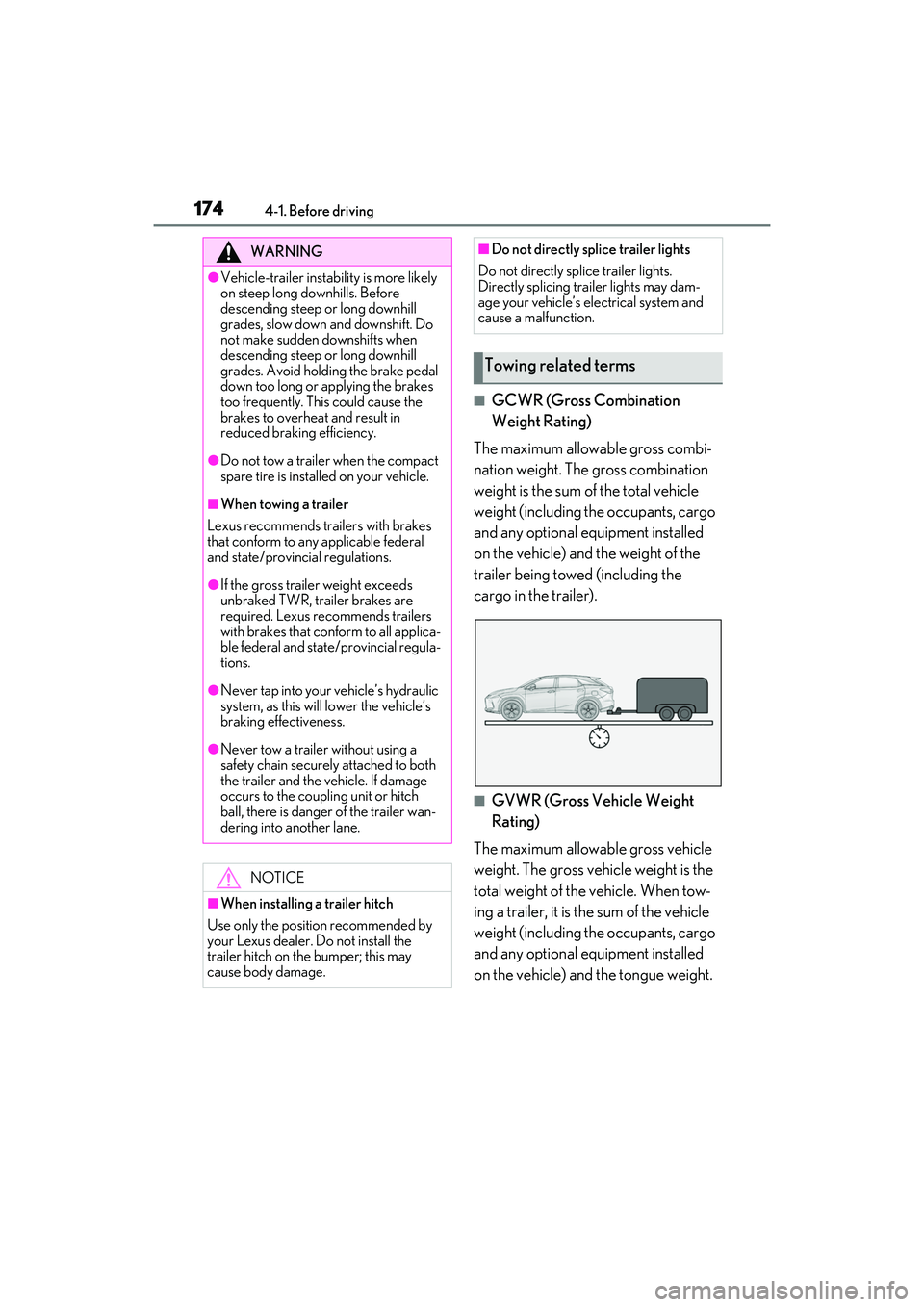
■GCWR (Gross Combination
Weight Rating)
The maximum allowable gross combi-
nation weight. The gross combination
weight is the sum of the total vehicle
weight (including the occupants, cargo
and any optional equipment installed
on the vehicle) and the weight of the
trailer being towed (including the
cargo in the trailer).
■GVWR (Gross Vehicle Weight
Rating)
The maximum allowable gross vehicle
weight. The gross vehicle weight is the
total weight of the vehicle. When tow-
ing a trailer, it is the sum of the vehicle
weight (including the occupants, cargo
and any optional equipment installed
on the vehicle) and the tongue weight.
WARNING
●Vehicle-trailer instabil ity is more likely
on steep long downhills. Before
descending steep or long downhill
grades, slow down and downshift. Do
not make sudden downshifts when
descending steep or long downhill
grades. Avoid holding the brake pedal
down too long or applying the brakes
too frequently. This could cause the
brakes to overheat and result in
reduced braking efficiency.
●Do not tow a trailer when the compact
spare tire is installed on your vehicle.
■When towing a trailer
Lexus recommends trailers with brakes
that conform to any applicable federal
and state/provincial regulations.
●If the gross trailer weight exceeds
unbraked TWR, trailer brakes are
required. Lexus recommends trailers
with brakes that conform to all applica-
ble federal and state/provincial regula-
tions.
●Never tap into your vehicle’s hydraulic
system, as this will lower the vehicle’s
braking effectiveness.
●Never tow a trailer without using a
safety chain securely attached to both
the trailer and the vehicle. If damage
occurs to the coupling unit or hitch
ball, there is danger of the trailer wan-
dering into another lane.
NOTICE
■When installing a trailer hitch
Use only the position recommended by
your Lexus dealer. Do not install the
trailer hitch on the bumper; this may
cause body damage.
■Do not directly splice trailer lights
Do not directly splice trailer lights.
Directly splicing trailer lights may dam-
age your vehicle’s electrical system and
cause a malfunction.
Towing related terms
Page 180 of 532
1784-1. Before driving
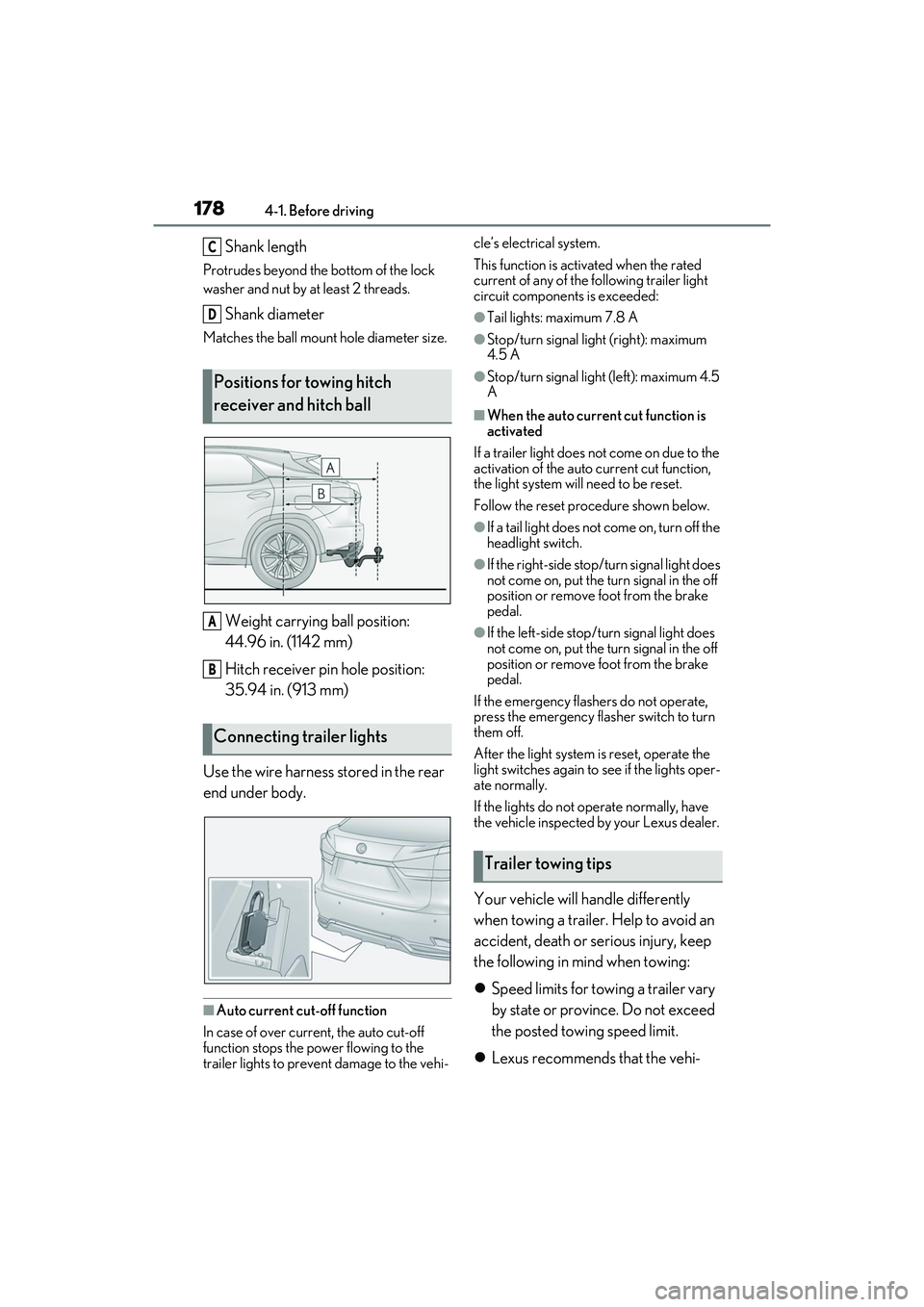
Shank length
Protrudes beyond the bottom of the lock
washer and nut by at least 2 threads.
Shank diameter
Matches the ball mount hole diameter size.
Weight carrying ball position:
44.96 in. (1142 mm)
Hitch receiver pin hole position:
35.94 in. (913 mm)
Use the wire harness stored in the rear
end under body.
■Auto current cut-off function
In case of over current, the auto cut-off
function stops the power flowing to the
trailer lights to prevent damage to the vehi- cle’s electrical system.
This function is activ
ated when the rated
current of any of the following trailer light
circuit components is exceeded:
●Tail lights: maximum 7.8 A
●Stop/turn signal light (right): maximum
4.5 A
●Stop/turn signal light (left): maximum 4.5
A
■When the auto current cut function is
activated
If a trailer light does not come on due to the
activation of the auto current cut function,
the light system will need to be reset.
Follow the reset procedure shown below.
●If a tail light does not come on, turn off the
headlight switch.
●If the right-side stop/turn signal light does
not come on, put the turn signal in the off
position or remove foot from the brake
pedal.
●If the left-side stop/t urn signal light does
not come on, put the turn signal in the off
position or remove foot from the brake
pedal.
If the emergency flashers do not operate,
press the emergency flasher switch to turn
them off.
After the light system is reset, operate the
light switches again to see if the lights oper-
ate normally.
If the lights do not operate normally, have
the vehicle inspected by your Lexus dealer.
Your vehicle will handle differently
when towing a trailer. Help to avoid an
accident, death or se rious injury, keep
the following in mind when towing:
Speed limits for towing a trailer vary
by state or province. Do not exceed
the posted towing speed limit.
Lexus recommends that the vehi-
Positions for towing hitch
receiver and hitch ball
Connecting trailer lights
C
D
A
B
Trailer towing tips
Page 181 of 532

1794-1. Before driving
4
Driving
cle-trailer speed limit is 65 mph
(104 km/h) on a flat, straight, dry
road. Do not exceed this limit, the
posted towing speed limit or the
speed limit for your trailer as set
forth in your trailer owner’s manual,
whichever is lowest. Instability of the
towing vehicle-trailer combination
(trailer sway) increases as speed
increases. Exceeding speed limits
may cause loss of control.
Before starting out, check the trailer
lights, tires and the vehicle-trailer
connections. Recheck after driving
a short distance.
Practice turning, stopping and
reversing with the trailer attached in
an area away from traffic until you
become accustomed to the feel of
the vehicle-trailer combination.
Reversing with a tr ailer attached is
difficult and requires practice. Grip
the bottom of the steering wheel
and move your hand to the left to
move the trailer to the left. Move
your hand to the right to move the
trailer to right. (This is generally
opposite to reversing without a
trailer attached.) Avoid sharp or
prolonged turning. Have someone
guide you when reversing to reduce
the risk of an accident.
As stopping distance is increased
when towing a trailer, vehicle-to
vehicle distance should be
increased. For each 10 mph (16
km/h) of speed, allow at least one
vehicle and trailer length.
Avoid sudden braking as you may skid, resulting in the trailer jackknif-
ing and a loss of vehicle control. This
is especially true on wet or slippery
surfaces.
Avoid jerky starts or sudden accel-
eration.
Avoid jerky steering and sharp
turns, and slow down before making
turn.
Note that when making a turn, the
trailer wheels will be closer than the
vehicle wheels to the inside of the
turn. Compensate by making a
wider than normal turning radius.
Slow down before making a turn, in
cross winds, on wet or slippery sur-
faces, etc. Increasing vehicle speed
can destabilize the trailer.
Take care when passing other vehi-
cles. Passing requires considerable
distance. After pass ing a vehicle, do
not forget the length of your trailer,
and be sure you have plenty of room
before changing lanes.
To maintain engine braking effi-
ciency and charging system perfor-
mance when using engine braking,
do not put the transmission in D.
( P.189)
Instability happens more frequently
when descending steep or long
downhill grades. Before descend-
ing, slow down and downshift. Do
not make sudden downshifts while
descending steep or long downhill
grades.
Avoid holding the brake pedal down
too long or applying the brakes too
Page 194 of 532
1924-2. Driving procedures
ically set to S4 or S5 according to the vehi-
cle speed.
■Shift ranges and their functions
You can choose from 6 levels of
accelerating force and engine brak-
ing force.
A lower shift range will provide
greater accelerating force and
engine braking force than a higher
shift range, and the engine revolu-
tions will also increase.
If you accelerate while in ranges 1 to
4, the shift range may automatically
increase in accordance with the
vehicle speed.
■S mode
●When the shift range is S4 or lower, hold-
ing the shift lever towa rd “+” sets the shift
range to S6.
●Automatically selects a higher shift range
before the engine speed becomes too
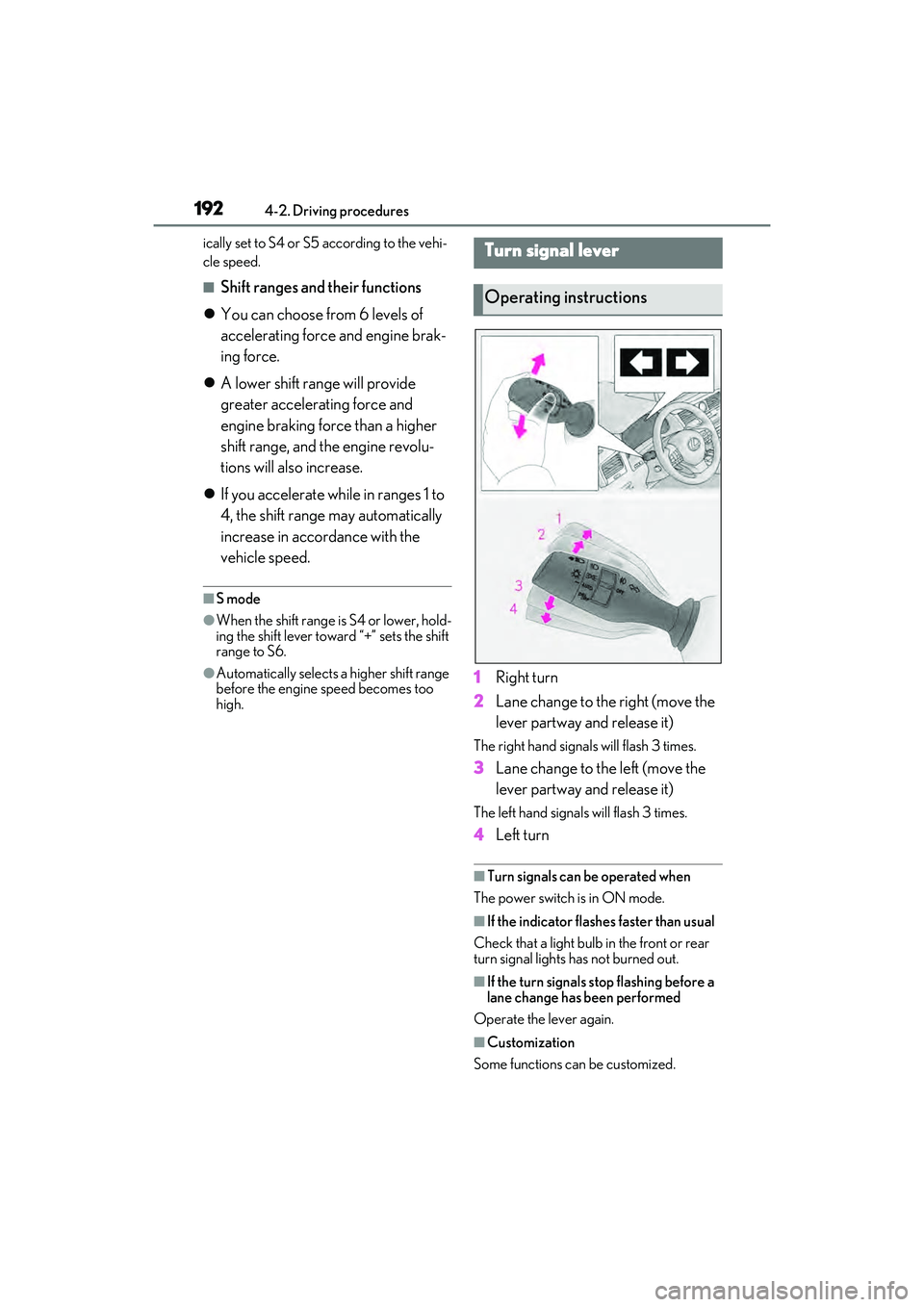
high.1 Right turn
2 Lane change to the right (move the
lever partway and release it)
The right hand signals will flash 3 times.
3Lane change to the left (move the
lever partway and release it)
The left hand signals will flash 3 times.
4Left turn
■Turn signals can be operated when
The power switch is in ON mode.
■If the indicator flashes faster than usual
Check that a light bulb in the front or rear
turn signal lights has not burned out.
■If the turn signals stop flashing before a
lane change has been performed
Operate the lever again.
■Customization
Some functions can be customized.
Turn signal lever
Operating instructions
Page 200 of 532

1984-3. Operating the lights and wipers
4-3.Operating the lights and wipers
Operating the switch turns on
the lights as follows:U.S.A.
Canada
1 The side marker, parking, tail,
license plate, instrument panel
lights, and daytime running lights
( P.198) turn on.
2 The headlights and all lights
listed above (except daytime run-
ning lights) turn on.
3 The headlights, daytime run-
ning lights ( P.198) and all the lights listed above turn on and off
automatically.
(When the power switch is in ON
mode.)
4 (U.S.A.) Off
■Daytime running light system
●The daytime running lights illuminate
using the same lights as the parking lights
and illuminate brighter than the parking
lights.
●To make your vehicle more visible to
other drivers during daytime driving, the
daytime running lights turn on automati-
cally when all of the following conditions
are met. (The daytime running lights are
not designed for use at night.)
• The hybrid system is started
• The parking brake is released
• The headlight switch is in the or
* position
*: When the surroundings are bright
The daytime running lights remain on after
they illuminate, even if the parking brake is
set again.
●For the U.S.A.: Daytime running lights
can be turned off by operating the switch.
●Compared to turning on the headlights,
the daytime running light system offers
greater durability and consumes less
electricity, so it can help improve fuel
economy.
■Headlight control sensor
The sensor may not function properly if an
object is placed on the sensor, or anything
that blocks the sensor is affixed to the wind-
shield.
Headlight switch
The headlights can be operated
manually or automatically.
Operating instructions
A
B
Page 201 of 532

1994-3. Operating the lights and wipers
4
Driving
Doing so interferes with the sensor detect-
ing the level of ambient light and may cause
the automatic headlight system to malfunc-
tion.
■Automatic light off system
●When the headlights are on: The head-
lights and tail lights turn off 30 seconds
after the driver’s door is opened and
closed if the power switch is turned to
ACCESSORY mode or turned off. (The
lights turn off immediately if on the
key is pressed after all the doors are
closed.)
●When only the tail lights are on: The tail
lights turn off automatically if the power
switch is turned to ACCESSORY mode
or turned off and the driver’s door is
opened.
■Automatic headlight leveling system (if
equipped)
The level of the headlights is automatically
adjusted according to the number of pas-
sengers and the loading condition of the
vehicle to ensure that the headlights do not
interfere with other road users.
■Light reminder buzzer
A buzzer sounds when the power switch is
turned off or turned to ACCESSORY
mode and the driver’s door is opened while
the lights are turned on.
■Welcome lighting
If the headlight switch is turned to and
the surrounding area is dark, unlocking the
doors using the smart access system with
push-button start or wireless remote con-
trol will turn the parking lights and tail lights
on automatically.
■Windshield wiper linked headlight illu-
mination
When driving during daytime with the
headlight switch turned to , if the wind-
shield wipers are used, the headlights will
turn on automatically after several seconds
to help enhance the visibility of your vehicle.
■12-volt battery-saving function
In order to prevent the 12-volt battery of the vehicle from discharging, if the headlights
and/or tail lights are on when the power
switch is turned off
the 12-volt battery sav-
ing function will operate and automatically
turn off all the lights after approximately 20
minutes. When the power switch is turned
to ON mode, the 12-volt battery-saving
function will be disabled.
When any of the following are performed,
the 12-volt battery-saving function is
canceled once and then reactivated. All the
lights will turn off automatically 20 minutes
after the 12-volt battery-saving function has
been reactivated:
●When the headlight switch is operated
●When a door is opened or closed
■Customization
Some functions can be customized.
( P.472)
1 With the headlights on, push the
lever away from you to turn on the
high beams.
Pull the lever toward you to the center
position to turn the high beams off.
2Pull the lever toward you and
release it to flash the high beams
NOTICE
■To prevent 12-volt battery discharge
Do not leave the lights on longer than
necessary when the hy brid system is off.
Turning on the high beam head-
lights