light LEXUS RX450h 2022 Workshop Manual
[x] Cancel search | Manufacturer: LEXUS, Model Year: 2022, Model line: RX450h, Model: LEXUS RX450h 2022Pages: 532, PDF Size: 27.62 MB
Page 121 of 532

1193-2. Opening, closing and locking the doors
3
Before driving
If the rear bumper has been touched for a
while, wait for a short time before
attempting to operate the Hands Free
Power Back Door again.
●When standing excessively close to the
rear bumper
●When an external radio wave source
interferes with the communication
between the electronic key and the vehi-
cle (P.126)
●When the vehicle is parked near metal, or
an external radio wave or electrical noise
source which affects the sensitivity of the
Hands Free Power Back Door, such as a
pay parking spot, gas station, electrically
heated road, fluorescent light, or metal
plate
●When the vehicle is near a TV tower,
electric power plant, radio station, large
display, airport or ot her facility that gen-
erates strong radio waves or electrical
noise
●When a large amount of water is applied
to the rear bumper, such as when the
vehicle is being washed or in heavy rain
●When mud, snow, ice, etc. is attached to
the rear bumper
●When the vehicle has been parked for a
while near objects that may move and
contact the rear bumper, such as plants
●When an accessory is installed to the rear
bumper
If an accessory has been installed, turn the
Hands Free Power Back Door (kick sen-
sor) operation setting off.
●RX450hL: When a ti re other than the
spare tire is stored in the spare tire stor-
age area
■Preventing unintentional operation of
the Hands Free Power Back Door (if
equipped)
When an electronic key is in the operation
detection area, the Ha nds Free Power Back
Door may operate unintentionally, so be
careful in the following situations:
●When a large amount of water is applied
to the rear bumper, such as when the
vehicle is being washed or in heavy rain
●When dirt is wiped off the rear bumper
●When a small animal or small object, such
as a ball, moves under the rear bumper
●When an object is moved from under the
rear bumper
●If someone is swinging their legs while sit-
ting on the rear bumper
●If the legs or another part of someone’s
body contacts the rear bumper while
passing by the vehicle
●When the vehicle is parked near an elec-
trical noise source which affects the sen-
sitivity of the Hands Free Power Back
Door, such as a pay parking spot, gas sta-
tion, electrically heated road, or fluores-
cent light
●When the vehicle is near a TV tower,
electric power plant, radio station, large
display, airport or ot her facility that gen-
erates strong radio waves or electrical
noise
●When the vehicle is parked in a place
where objects such as plants are near the
rear bumper
●If luggage, etc. is set near the rear
bumper
●If accessories or a vehicle cover is
installed/removed ne ar the rear bumper
●When the vehicle is being towed
To prevent unintentiona l operation, turn the
Hands Free Power Back Door (kick sensor)
operation setting off.
■When reconnecting the 12-volt battery
To enable the power back door to operate
properly, close the power back door manu-
ally.
■Jam protection function
Sensors are installed in the right and left
sides of the power back door. When the
door is automatically closing and the sen-
sors are pushed due to an object being
caught, etc., the jam protection function will
operate.
From that position the door will automati-
cally move a little in the opposite direction
and then the function will stop.
Page 122 of 532
1203-2. Opening, closing and locking the doors
■If the power back door opener is inoper-
ative
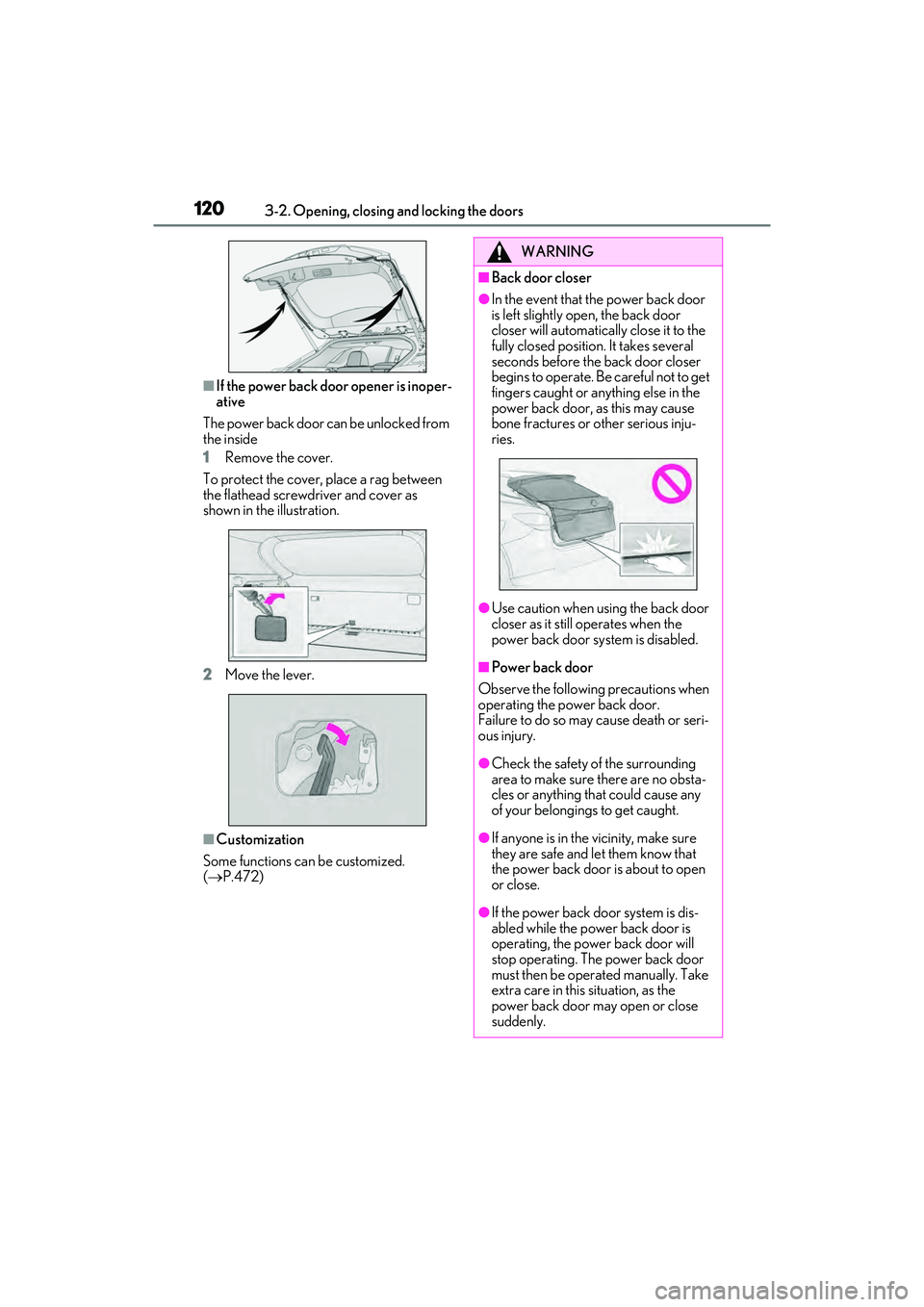
The power back door can be unlocked from
the inside
1 Remove the cover.
To protect the cover, place a rag between
the flathead screwdriver and cover as
shown in the illustration.
2 Move the lever.
■Customization
Some functions can be customized.
( P.472)
WARNING
■Back door closer
●In the event that the power back door
is left slightly open, the back door
closer will automatically close it to the
fully closed position. It takes several
seconds before the back door closer
begins to operate. Be careful not to get
fingers caught or anything else in the
power back door, as this may cause
bone fractures or other serious inju-
ries.
●Use caution when using the back door
closer as it still operates when the
power back door system is disabled.
■Power back door
Observe the following precautions when
operating the power back door.
Failure to do so may cause death or seri-
ous injury.
●Check the safety of the surrounding
area to make sure there are no obsta-
cles or anything that could cause any
of your belongings to get caught.
●If anyone is in the vicinity, make sure
they are safe and let them know that
the power back door is about to open
or close.
●If the power back door system is dis-
abled while the powe r back door is
operating, the power back door will
stop operating. The power back door
must then be operated manually. Take
extra care in this situation, as the
power back door may open or close
suddenly.
Page 130 of 532

1283-2. Opening, closing and locking the doors
detection area, it may take slightly longer
to unlock the doors af ter the door handle
is gripped.
●Fingernails may scrape against the door
during operation of the door handle. Be
careful not to injure fingernails or dam-
age the surface of the door.
■When the vehicle is not driven for
extended periods
●To prevent theft of the vehicle, do not
leave the electronic key within 6 ft. (2 m)
of the vehicle.
●The smart access syst em with push-but-
ton start can be deactivated in advance.
●Setting the electronic key to battery-sav-
ing mode helps to reduce key battery
depletion. ( P.126)
■To operate the system properly
Make sure to carry the electronic key when
operating the system. Do not get the elec-
tronic key too close to the vehicle when
operating the system from the outside of the
vehicle.
Depending on the position and holding
condition of the electronic key, the key may
not be detected correctly and the system
may not operate properly. (The alarm may
go off accidentally, or the door lock preven-
tion may not operate.)
■If the smart access system with
push-button start does not operate
properly
●If the doors cannot be locked or unlocked
and the back door cannot be opened,
perform the following.
• Bring the electronic key close to the door handle and perform a lock or unlock
operation.
• Bring the electronic key close to the but- ton on the back door ( P.114) and press
the button.
• Use the wireless remote control.
If the doors cannot be locked or unlocked
by perform the above, use the mechanical
key. ( P.439) However, if the mechanical
key is used while the alarm system is set, the
warning will sound. ( P.74)
●If the hybrid system cannot be started,
refer to P.440
■Customization
Some functions can be customized.
( P.472)
■If the smart access system with
push-button start has been deactivated
in a customized setting
●Locking and unlocking the doors: Use
the wireless remote control or mechani-
cal key. ( P.109, 114, 439)
●Starting the hybrid system and changing
power switch modes: P.440
●Stopping the hybrid system: P.184
WARNING
■Caution regarding interference with
electronic devices
●People with implantable cardiac pace-
makers, cardiac resynchronization
therapy-pacemakers or implantable
cardioverter defibrillators should keep
away from the smart access system
with push-button start antennas.
(P.125)
The radio waves may affect the opera-
tion of such device s. If necessary, the
entry function can be disabled. Ask
your Lexus dealer for details, such as
the frequency of radio waves and tim-
ing of the emitted radio waves. Then,
consult your doctor to see if you
should disable the entry function.
●Users of any electrical medical device
other than implantable cardiac pace-
makers, cardiac resynchronization
therapy-pacemakers or implantable
cardioverter defibril lators should con-
sult the manufacturer of the device for
information about it s operation under
the influence of radio waves.
Radio waves could have unexpected
effects on the operation of such medi-
cal devices.
Ask your Lexus dealer for details on
disabling the entry function.
Page 132 of 532
1303-3. Adjusting the seats
Rear seats
WARNING
■When a rear seatback is folded
Observe the following precautions.
Failure to do so may result in death or
serious injury.
●Do not fold down the rear seatbacks
while driving.
●Stop the vehicle on level ground, apply
the parking brake and shift the shift
lever to P.
●Do not allow anyone to sit on a folded
rear seatback or in the luggage com-
partment while driving.
●Do not allow children to enter the lug-
gage compartment.
■When operating the rear seatback
Observe the following precautions.
Failure to do so may result in death or
serious injury.
●Make sure that passengers are clear of
the rear seatback before operating it.
●To prevent hands and other body parts
from being caught, keep them away
from the gaps in the seats and the mov-
ing parts of the seat s when operating a
rear seatback.
●Power seat: Do not let children oper-
ate the rear seatback. Other passen-
gers may get caught in the seat.
●Power seat: Make su re that all passen-
gers are clear of a seat before folding
it. Do not let passeng ers sit in the seat
while it is being folded.
■Seat adjustment
Second-row seats: To reduce the risk of
sliding under the lap belt during a colli-
sion, do not recline the seat more than
necessary.
If the seat is reclin ed excessively, the lap
belt may slide past the hips and apply
restraint forces direct ly to the abdomen,
or your neck may contact the shoulder
belt, increasing the risk of death or seri-
ous injury in the event of an accident.
■After adjusting the rear seats
Observe the following precautions.
Failure to do so may result in death or
serious injury.
●Make sure that the rear seatback is
securely locked in position by lightly
pushing it back and forth.
●Check that the seat belts are not
twisted or caught between or behind
in the rear seatback.
●Arrange the seat belts in the proper
positions for ready use.
■Jam protection function (power seat)
Observe the following precautions.
Failure to do so may result in death or
serious injury.
●Never use any part of your body to
intentionally activate the jam protec-
tion function.
●The jam protection function may not
operate if somethin g is caught just
before the fully folded position. Be
careful so that finger s, etc. do not get
caught.
●The jam protection function may not
operate depending on the shape or
position of the obstruction. Be careful
so that fingers, etc. do not get caught.
Page 138 of 532
1363-3. Adjusting the seats
tion.
■Power switch mode conditions under
which the rear seatbacks can be folded
down or raised (power seat)
The rear seatbacks can be folded down or
raised when the power switch is in either of
the following modes:
●When the power switch is turned off or in
ACCESSORY mode
●When the power switch is in ON mode
and any of the following conditions are
met:
• The parking brake is engaged.
• The brake pedal is depressed.
• The shift lever is in P.
■The rear seatbacks can be folded down
when (power seat)
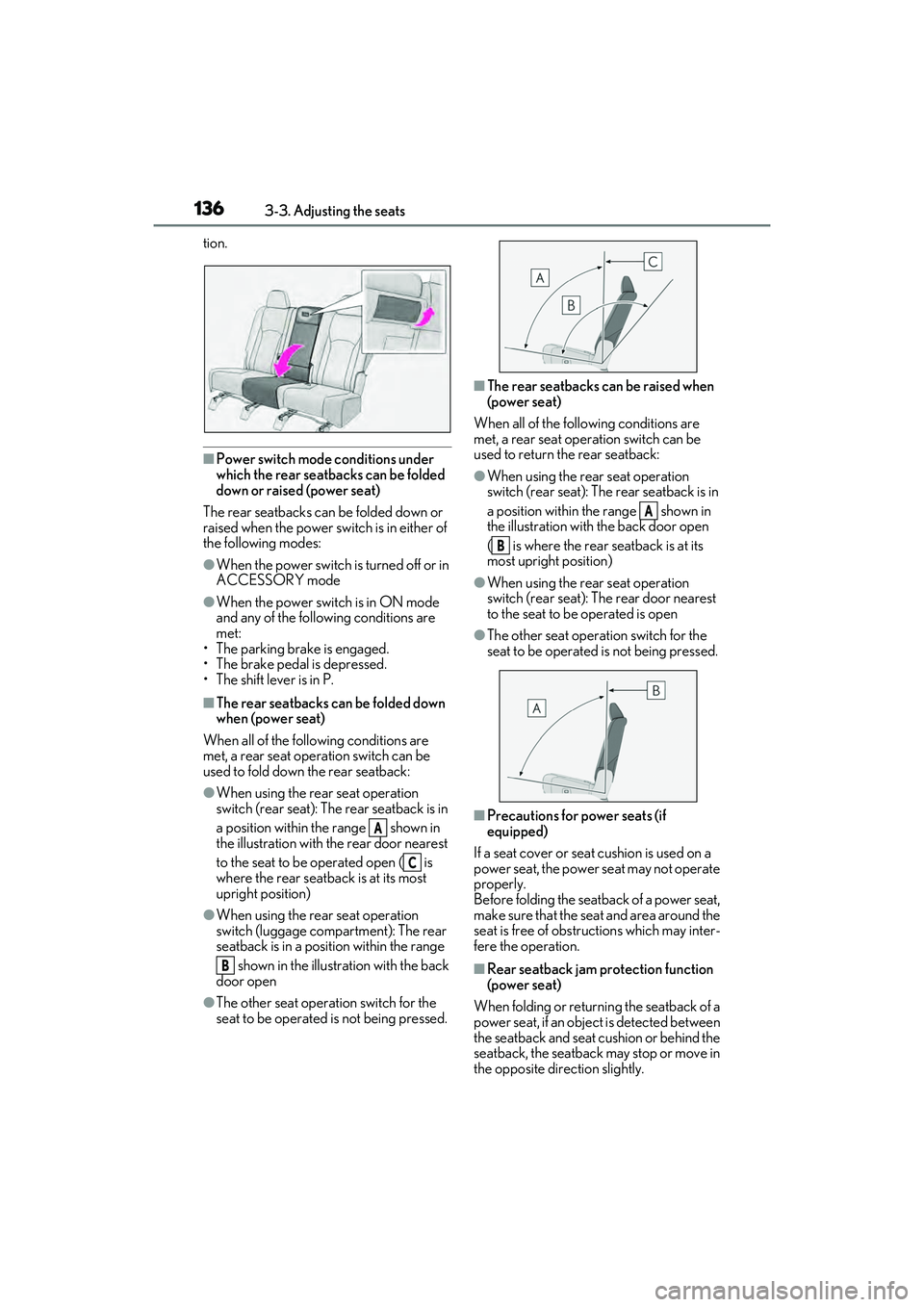
When all of the following conditions are
met, a rear seat operation switch can be
used to fold down the rear seatback:
●When using the rear seat operation
switch (rear seat): The rear seatback is in
a position within the range shown in
the illustration with the rear door nearest
to the seat to be operated open ( is
where the rear seatback is at its most
upright position)
●When using the rear seat operation
switch (luggage compartment): The rear
seatback is in a position within the range
shown in the illustration with the back
door open
●The other seat operation switch for the
seat to be operated is not being pressed.
■The rear seatbacks can be raised when
(power seat)
When all of the following conditions are
met, a rear seat operation switch can be
used to return the rear seatback:
●When using the rear seat operation
switch (rear seat): The rear seatback is in
a position within the range shown in
the illustration with the back door open
( is where the rear seatback is at its
most upright position)
●When using the rear seat operation
switch (rear seat): Th e rear door nearest
to the seat to be operated is open
●The other seat operat ion switch for the
seat to be operated is not being pressed.
■Precautions for power seats (if
equipped)
If a seat cover or seat cushion is used on a
power seat, the power seat may not operate
properly.
Before folding the seatback of a power seat,
make sure that the seat and area around the
seat is free of obstructions which may inter-
fere the operation.
■Rear seatback jam protection function
(power seat)
When folding or return ing the seatback of a
power seat, if an object is detected between
the seatback and seat cushion or behind the
seatback, the seatback may stop or move in
the opposite direction slightly.
A
C
B
A
B
Page 143 of 532
1413-3. Adjusting the seats
3
Before driving
will be overwritten.
■Seat positions that can be memorized
( P.129)
The adjusted positions other than the posi-
tion adjusted by lumbar support switch can
be recorded.
■In order to correctly use the driving
position memory function
If a seat position is already in the furthest
possible position and the seat is operated in
the same direction, the recorded position
may be slightly different when it is recalled.
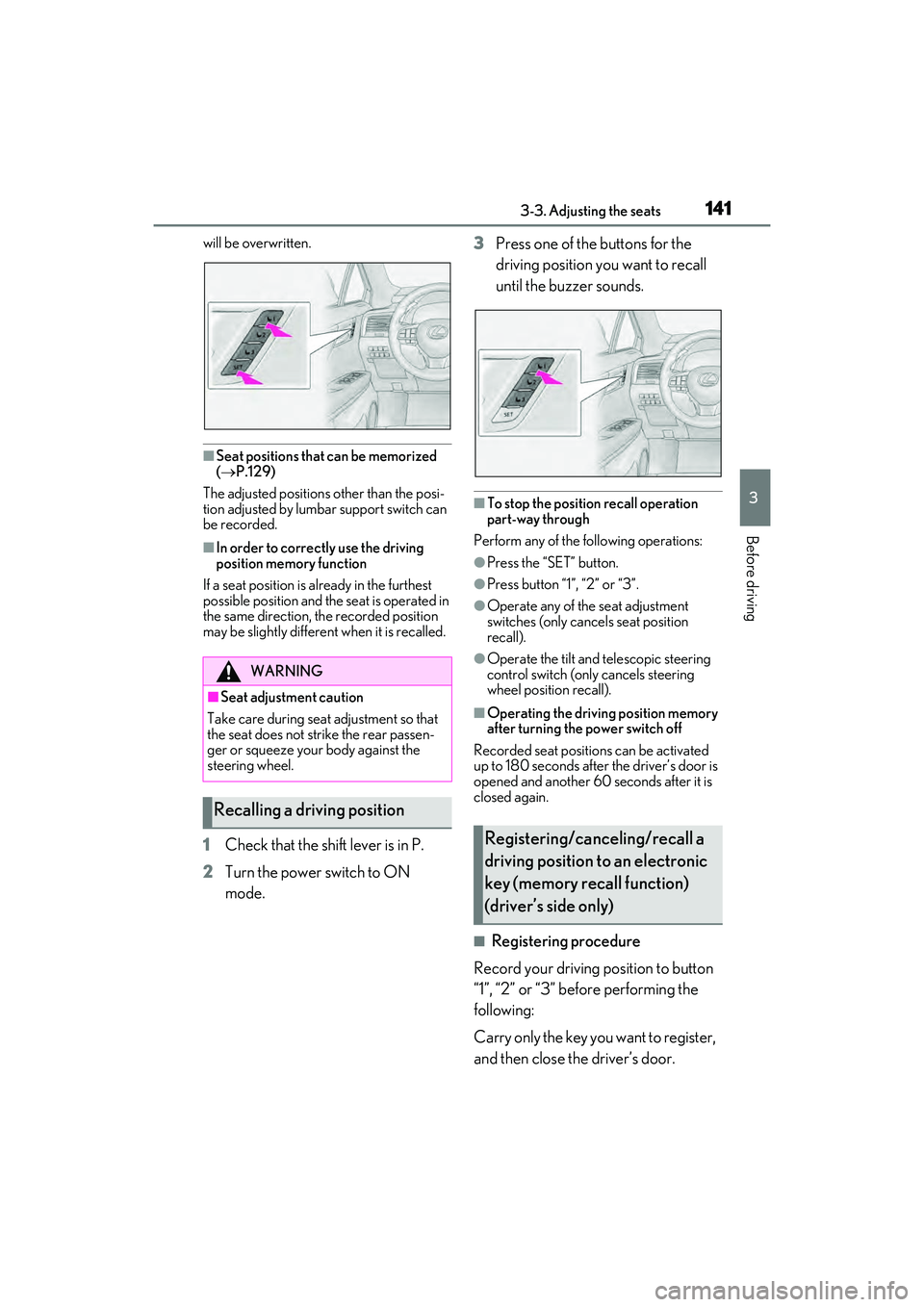
1 Check that the shift lever is in P.
2 Turn the power switch to ON
mode. 3
Press one of the buttons for the
driving position you want to recall
until the buzzer sounds.
■To stop the position recall operation
part-way through
Perform any of the following operations:
●Press the “SET” button.
●Press button “1”, “2” or “3”.
●Operate any of the seat adjustment
switches (only cancels seat position
recall).
●Operate the tilt and telescopic steering
control switch (onl y cancels steering
wheel position recall).
■Operating the driving position memory
after turning the power switch off
Recorded seat positions can be activated
up to 180 seconds after the driver’s door is
opened and another 60 seconds after it is
closed again.
■Registering procedure
Record your driving position to button
“1”, “2” or “3” before performing the
following:
Carry only the key yo u want to register,
and then close the driver’s door.
WARNING
■Seat adjustment caution
Take care during seat adjustment so that
the seat does not strike the rear passen-
ger or squeeze your body against the
steering wheel.
Recalling a driving position
Registering/canceling/recall a
driving position to an electronic
key (memory recall function)
(driver’s side only)
Page 144 of 532

1423-3. Adjusting the seats
If 2 or more keys are in the vehicle, the
driving position cannot be recorded
properly.
1Check that the shift lever is in P.
2 Turn the power switch to ON
mode.
3 Recall the driving position that you
want to record.
4 While pressing the recalled button,
press and hold the door lock switch
(either lock or unlock) until the
buzzer sounds.
If the button could not be registered, the
buzzer sounds continuously for approxi-
mately 3 seconds.
■Cancelation procedure
Carry only the key you want to cancel
and then close the driver’s door.
If 2 or more keys are in the vehicle, the
driving position cannot be canceled
properly.
1 Turn the power switch to ON
mode.
2 While pressing the “SET” button,
press and hold the door lock switch
(either lock or unlock) until the
buzzer sounds twice.
If it button could not be canceled, the
buzzer sounds continuously for approxi-
mately 3 seconds.
■Recall procedure
1 Make sure that the doors are
locked before recalling the driving
position. Carry the electronic key
that has been registered to the driv-
ing position, and then unlock and
open the driver’s door using the
smart access system with push-but-
ton start or wireless remote control.
The driving position will move to the
recorded position (not including the steer-
ing wheel and head-up display [if
equipped]). However, the seat will move to
a position slightly behind the recorded
position in order to make entering the vehi-
cle easier.
If the driving position is in a position that
has already been reco rded, the seat and
outside rear view mirrors will not move.
2 Turn the power switch to ACCES-
SORY mode or ON mode, or fas-
ten a seat belt.
The seat, steering wheel and head-up dis-
play (if equipped) will move to the
recorded position.
■Recalling the driving position using the
memory recall function
●Different driving positions can be regis-
tered for each electronic key. Therefore,
the driving position that is recalled may
be different depending on the key being
carried.
●If a door other than the driver’s door is
unlocked with the smart access system
with push-button start, the driving posi-
tion cannot be recalled. In this case, press
the driving position button which has
been set.
■Customization
Some functions can be customized.
( P.472)
Page 149 of 532

1473-4. Adjusting the steering wheel and mirrors
3
Before driving
The height of the rear view mirror can
be adjusted to suit your driving pos-
ture.
Adjust the height of the rear view mir-
ror by moving it up and down.
Responding to the level of brightness
of the headlights of vehicles behind, the
reflected light is automatically
reduced.
Turn the automatic anti-glare function
mode on/off
When the automatic anti-glare function is
in ON mode, the indicator illuminates.
The function will set to ON mode each
time the power switch is turned to ON
mode.
Pressing the button turns the function to
OFF mode. (The indicator also turns
off.)
■To prevent sensor error
To ensure that the sensors operate properly,
do not touch or cover them.
Inside rear view mirror
The rear view mirror’s position can
be adjusted to enable sufficient
confirmation of the rear view.
Adjusting the height of rear view
mirror
WARNING
■Caution while driving
Do not adjust the position of the mirror
while driving.
Doing so may lead to mishandling of the
vehicle and cause an accident, resulting
in death or serious injury.
Anti-glare function
A
A
Page 150 of 532
1483-4. Adjusting the steering wheel and mirrors
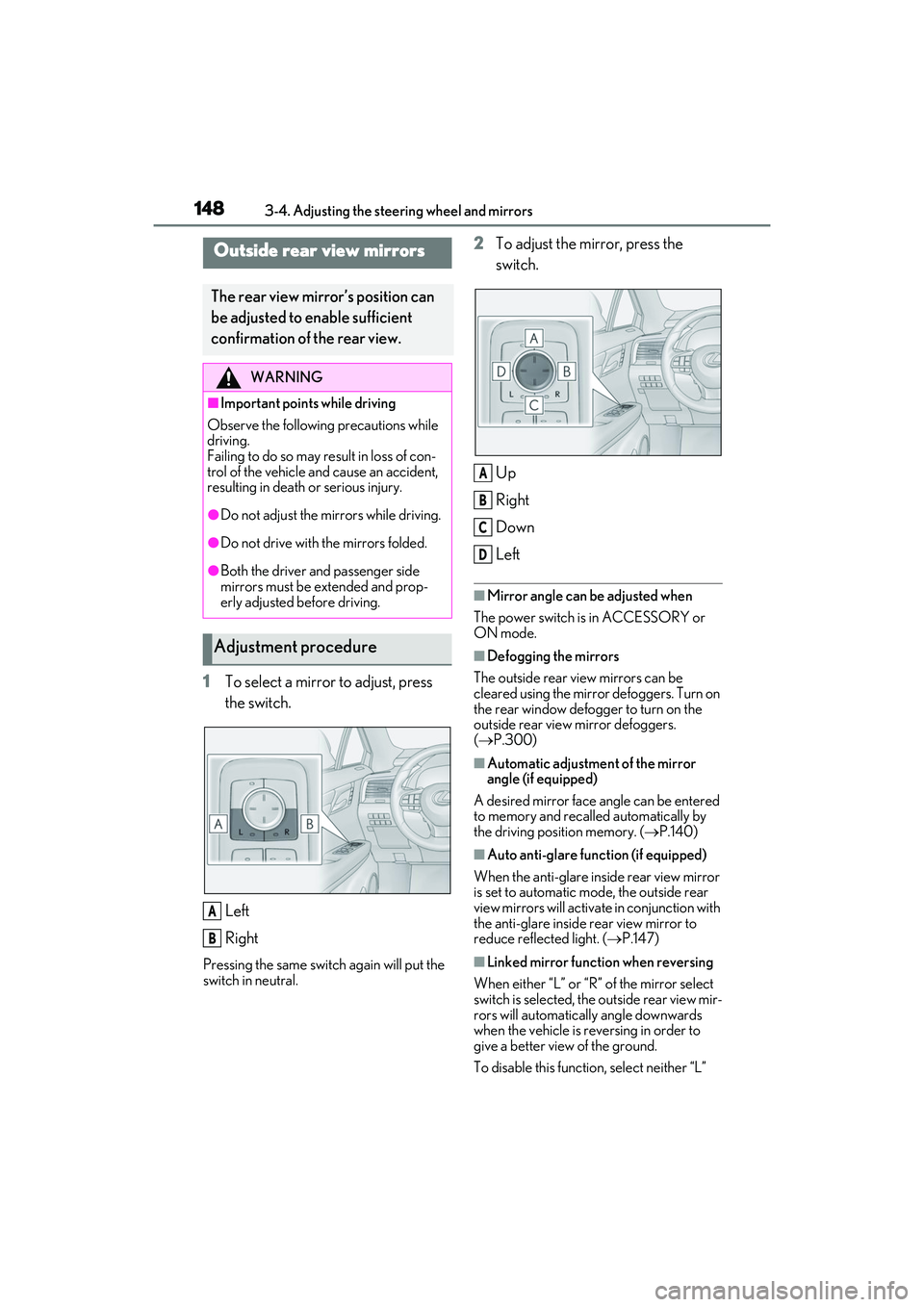
1To select a mirror to adjust, press
the switch.
Left
Right
Pressing the same switch again will put the
switch in neutral.
2To adjust the mirror, press the
switch.
Up
Right
Down
Left
■Mirror angle can be adjusted when
The power switch is in ACCESSORY or
ON mode.
■Defogging the mirrors
The outside rear view mirrors can be
cleared using the mirror defoggers. Turn on
the rear window defogger to turn on the
outside rear view mirror defoggers.
( P.300)
■Automatic adjustment of the mirror
angle (if equipped)
A desired mirror face angle can be entered
to memory and recalled automatically by
the driving position memory. ( P.140)
■Auto anti-glare function (if equipped)
When the anti-glare inside rear view mirror
is set to automatic mode, the outside rear
view mirrors will activate in conjunction with
the anti-glare inside rear view mirror to
reduce reflec ted light. (P.147)
■Linked mirror function when reversing
When either “L” or “R ” of the mirror select
switch is selected, the outside rear view mir-
rors will automatically angle downwards
when the vehicle is reversing in order to
give a better view of the ground.
To disable this functi on, select neither “L”
Outside rear view mirrors
The rear view mirror’s position can
be adjusted to enable sufficient
confirmation of the rear view.
WARNING
■Important points while driving
Observe the following precautions while
driving.
Failing to do so may result in loss of con-
trol of the vehicle and cause an accident,
resulting in death or serious injury.
●Do not adjust the mirrors while driving.
●Do not drive with the mirrors folded.
●Both the driver and passenger side
mirrors must be extended and prop-
erly adjusted before driving.
Adjustment procedure
A
B
A
B
C
D
Page 153 of 532
1513-5. Opening, closing the windows and moon roof
3
Before driving
3-5.Opening, closing the windows and moon roof
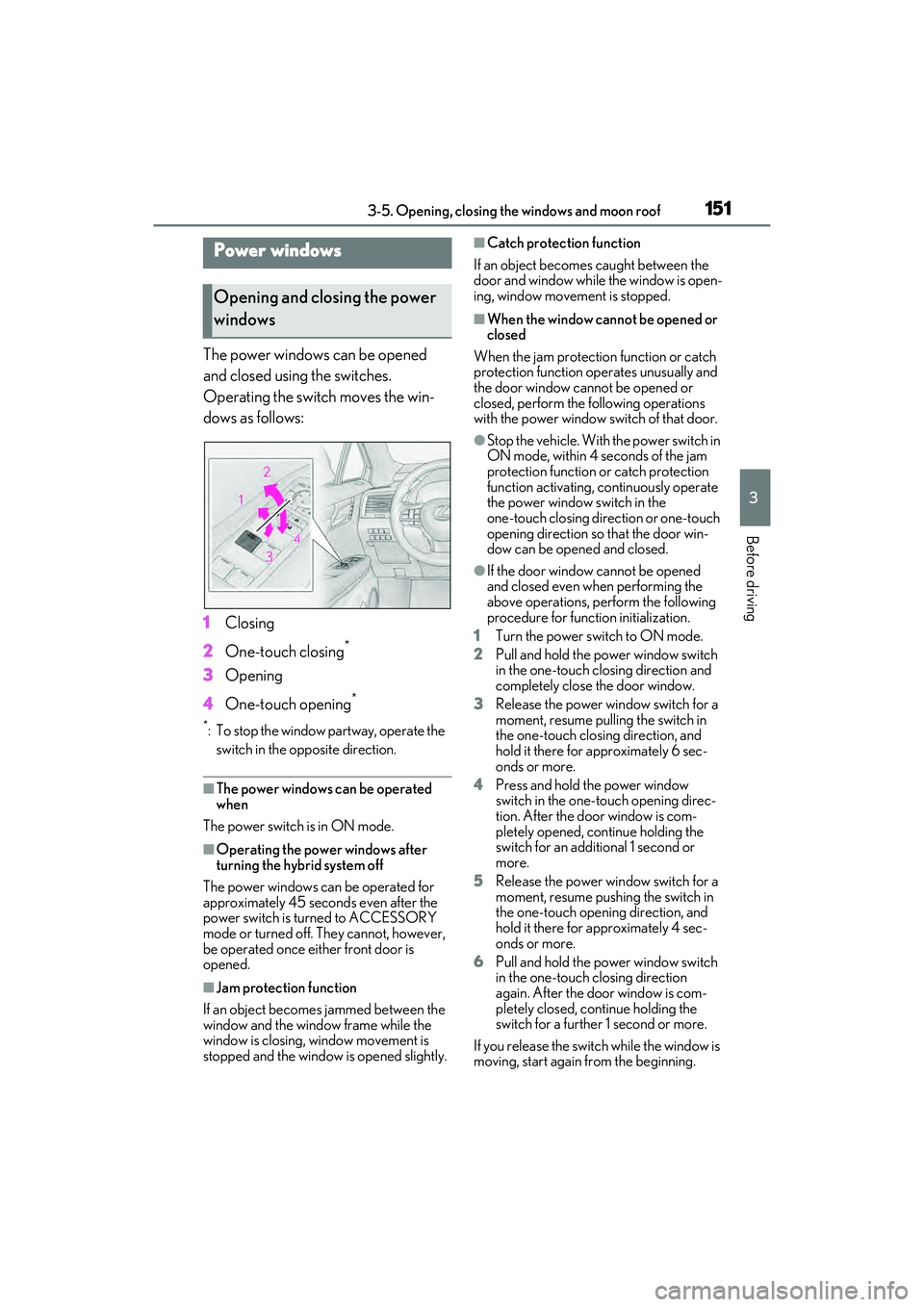
The power windows can be opened
and closed using the switches.
Operating the switch moves the win-
dows as follows:
1Closing
2 One-touch closing
*
3Opening
4 One-touch opening
*
*: To stop the window partway, operate the
switch in the op posite direction.
■The power windows can be operated
when
The power switch is in ON mode.
■Operating the power windows after
turning the hybrid system off
The power windows can be operated for
approximately 45 seconds even after the
power switch is turned to ACCESSORY
mode or turned off. They cannot, however,
be operated once either front door is
opened.
■Jam protection function
If an object becomes jammed between the
window and the window frame while the
window is closing, window movement is
stopped and the window is opened slightly.
■Catch protection function
If an object becomes caught between the
door and window while the window is open-
ing, window movement is stopped.
■When the window cannot be opened or
closed
When the jam protection function or catch
protection function operates unusually and
the door window cannot be opened or
closed, perform the following operations
with the power window switch of that door.
●Stop the vehicle. With the power switch in
ON mode, within 4 seconds of the jam
protection function or catch protection
function activating, continuously operate
the power window switch in the
one-touch closing direction or one-touch
opening direction so that the door win-
dow can be opened and closed.
●If the door window cannot be opened
and closed even when performing the
above operations, perform the following
procedure for function initialization.
1 Turn the power switch to ON mode.
2 Pull and hold the power window switch
in the one-touch closing direction and
completely close the door window.
3 Release the power window switch for a
moment, resume pulling the switch in
the one-touch closing direction, and
hold it there for approximately 6 sec-
onds or more.
4 Press and hold the power window
switch in the one-touch opening direc-
tion. After the door window is com-
pletely opened, continue holding the
switch for an additi onal 1 second or
more.
5 Release the power window switch for a
moment, resume pushing the switch in
the one-touch opening direction, and
hold it there for approximately 4 sec-
onds or more.
6 Pull and hold the power window switch
in the one-touch closing direction
again. After the door window is com-
pletely closed, continue holding the
switch for a further 1 second or more.
If you release the switch while the window is
moving, start again from the beginning.
Power windows
Opening and closing the power
windows