Under COver LEXUS SC300 1991 Service Owner's Manual
[x] Cancel search | Manufacturer: LEXUS, Model Year: 1991, Model line: SC300, Model: LEXUS SC300 1991Pages: 4087, PDF Size: 75.75 MB
Page 822 of 4087

Parts Inspection
(Ignition Switch and Key Unlock
Warning Switch)
REMOVAL AND INSTALLATION OF
IGNITION SWITCH AND KEY UNLOCK
WARNING SWITCH
1. DISCONNECT BATTERY TERMINALSCAUTION: Work must be started after approx. 20 se-
conds or longer from the time the ignition switch is
turned to the ºLOCKº position and negative (±) terminal
cable is disconnected from the battery.
2. REMOVE FOLLOWING PARTS: (See page BO±112)
w No. 1 under cover
w No. 1 lower finish panel
w Console box assembly
w Instrument panel lower center
3. REMOVE IGNITION SWITCH (a) Disconnect connector.
(b) Remove three screws and the switch from the keycylinder and wire harness clamp.
4. INSTALL IGNITION SWITCH For installation, follow the removal procedure in reverse.
INSPECTION OF IGNITION SWITCH AND
KEY UNLOCK WARNING SWITCH
1. INSPECT IGNITION SWITCH(Switch continuity)
Inspect the switch continuity between terminals.
Terminal
Switch position LOCKACC
ON
START
If continuity is not as specified, replace the switch.
BE±26
±
BODY ELECTRICAL SYSTEM Ignition Switch
WhereEverybodyKnowsYourName
Page 835 of 4087
Parts Inspection ± Headlight System
(Combination Switch Assembly)
REMOVAL OF COMBINATION SWITCH
ASSEMBLY
1. REMOVAL FOLLOWING PARTS:(See page BO±112)
w No. 1 under cover
w No. 1 lower finish Panel
NOTICE:
w Turn the steering wheel and front wheels to the straight
ahead position.
w Turn the ignition switch to the OFF position, then remove
the battery negative terminal.
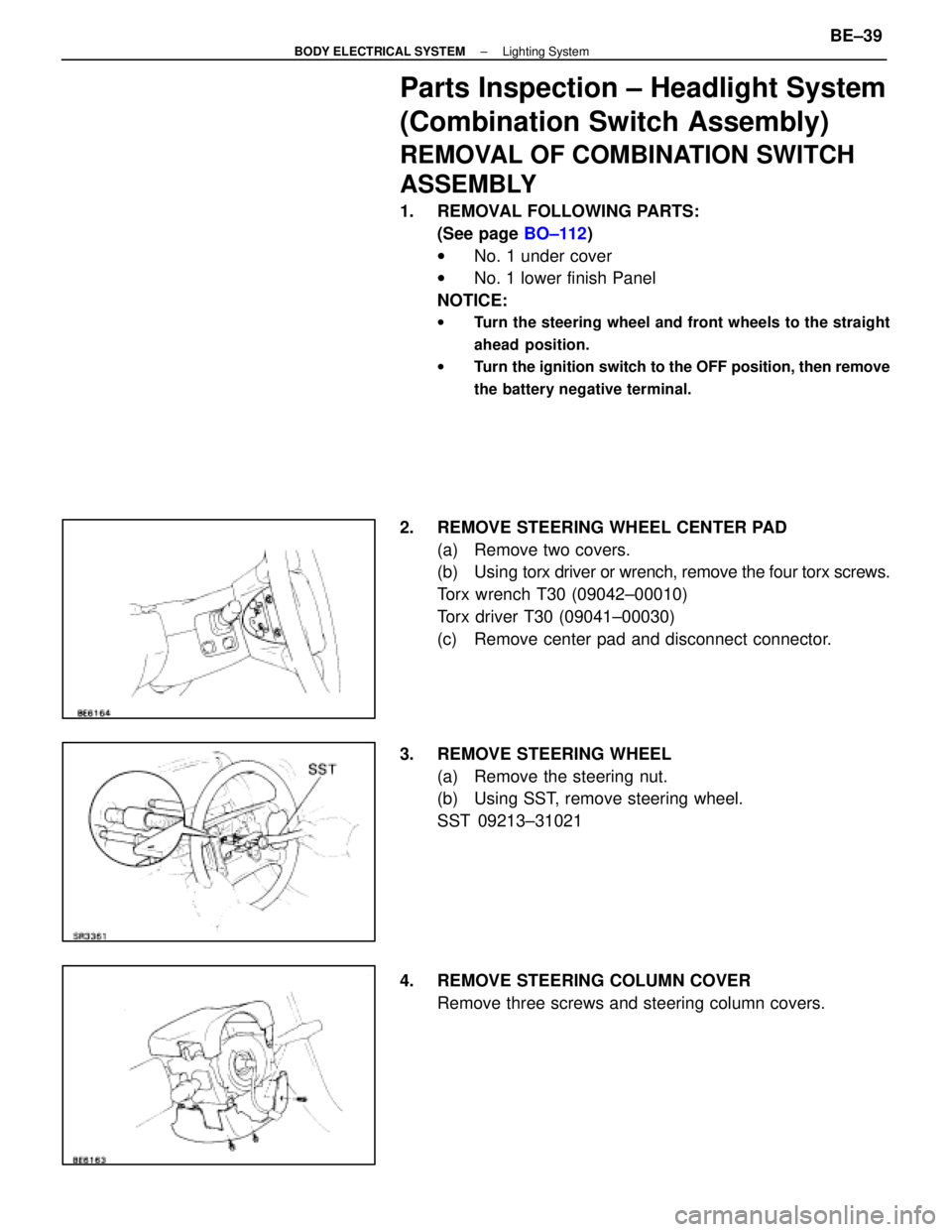
2. REMOVE STEERING WHEEL CENTER PAD
(a) Remove two covers.
(b) Using torx driver or wrench, remove the four torx screws.
Torx wrench T30 (09042±00010)
Torx driver T30 (09041±00030)
(c) Remove center pad and disconnect connector.
3. REMOVE STEERING WHEEL (a) Remove the steering nut.
(b) Using SST, remove steering wheel.
SST 09213±31021
4. REMOVE STEERING COLUMN COVER Remove three screws and steering column covers.
±
BODY ELECTRICAL SYSTEM Lighting SystemBE±39
WhereEverybodyKnowsYourName
Page 860 of 4087
Parts Replacement ± Stoplights
(Rear Combination Light)
(See page BE±56 )
(High Mount Stop Light)
REPLACEMENT OF HIGH MOUNT STOP
LIGHT
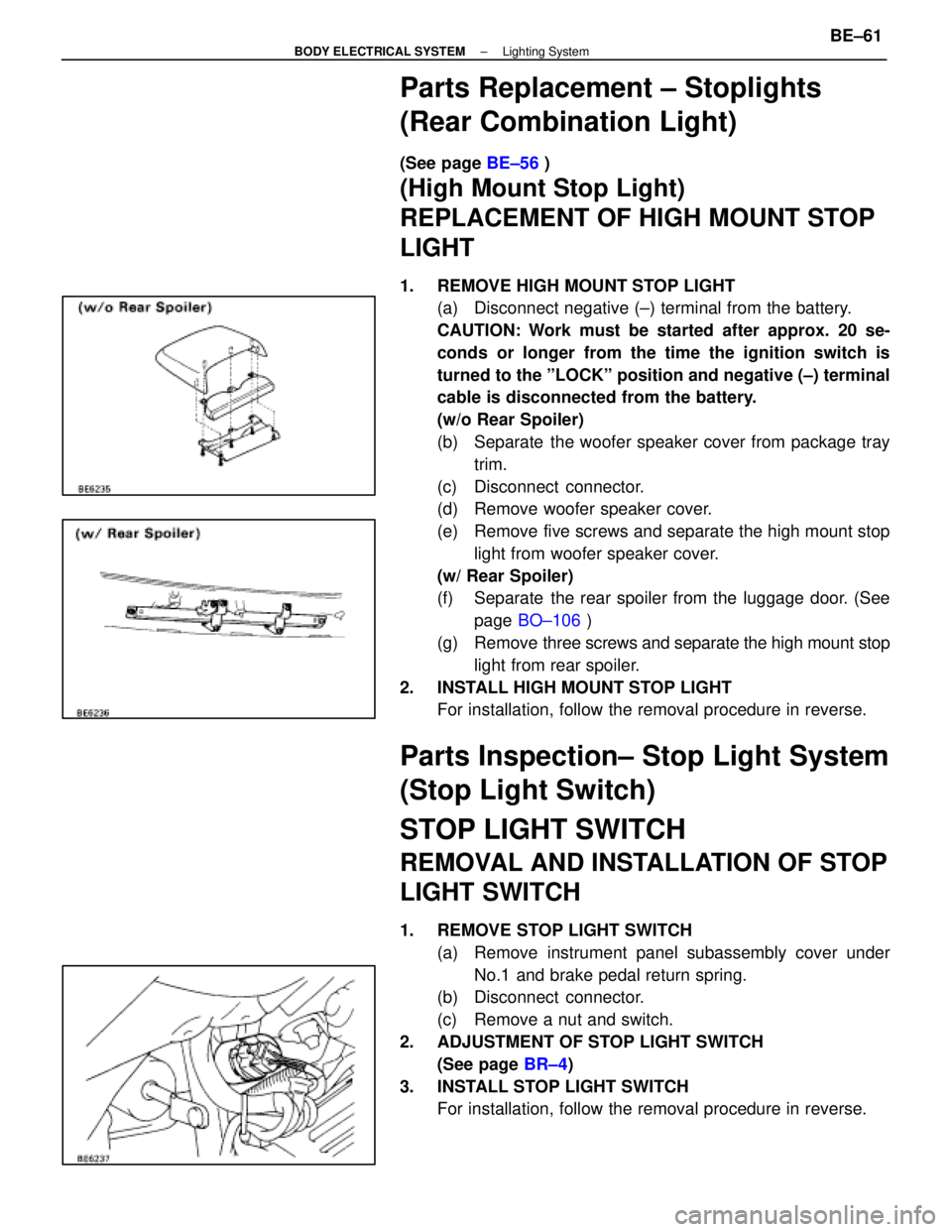
1. REMOVE HIGH MOUNT STOP LIGHT
(a) Disconnect negative (±) terminal from the battery.
CAUTION: Work must be started after approx. 20 se-
conds or longer from the time the ignition switch is
turned to the ºLOCKº position and negative (±) terminal
cable is disconnected from the battery.
(w/o Rear Spoiler)
(b) Separate the woofer speaker cover from package tray
trim.
(c) Disconnect connector.
(d) Remove woofer speaker cover.
(e) Remove five screws and separate the high mount stop light from woofer speaker cover.
(w/ Rear Spoiler)
(f) Separate the rear spoiler from the luggage door. (See page BO±106 )
(g) Remove three screws and separate the high mount stop
light from rear spoiler.
2. INSTALL HIGH MOUNT STOP LIGHT For installation, follow the removal procedure in reverse.
Parts Inspection± Stop Light System
(Stop Light Switch)
STOP LIGHT SWITCH
REMOVAL AND INSTALLATION OF STOP
LIGHT SWITCH
1. REMOVE STOP LIGHT SWITCH
(a) Remove instrument panel subassembly cover underNo.1 and brake pedal return spring.
(b) Disconnect connector.
(c) Remove a nut and switch.
2. ADJUSTMENT OF STOP LIGHT SWITCH (See page BR±4)
3. INSTALL STOP LIGHT SWITCH For installation, follow the removal procedure in reverse.
±
BODY ELECTRICAL SYSTEM Lighting SystemBE±61
WhereEverybodyKnowsYourName
Page 866 of 4087
Parts Replacement (Turn Signals)
(Cornering Light)
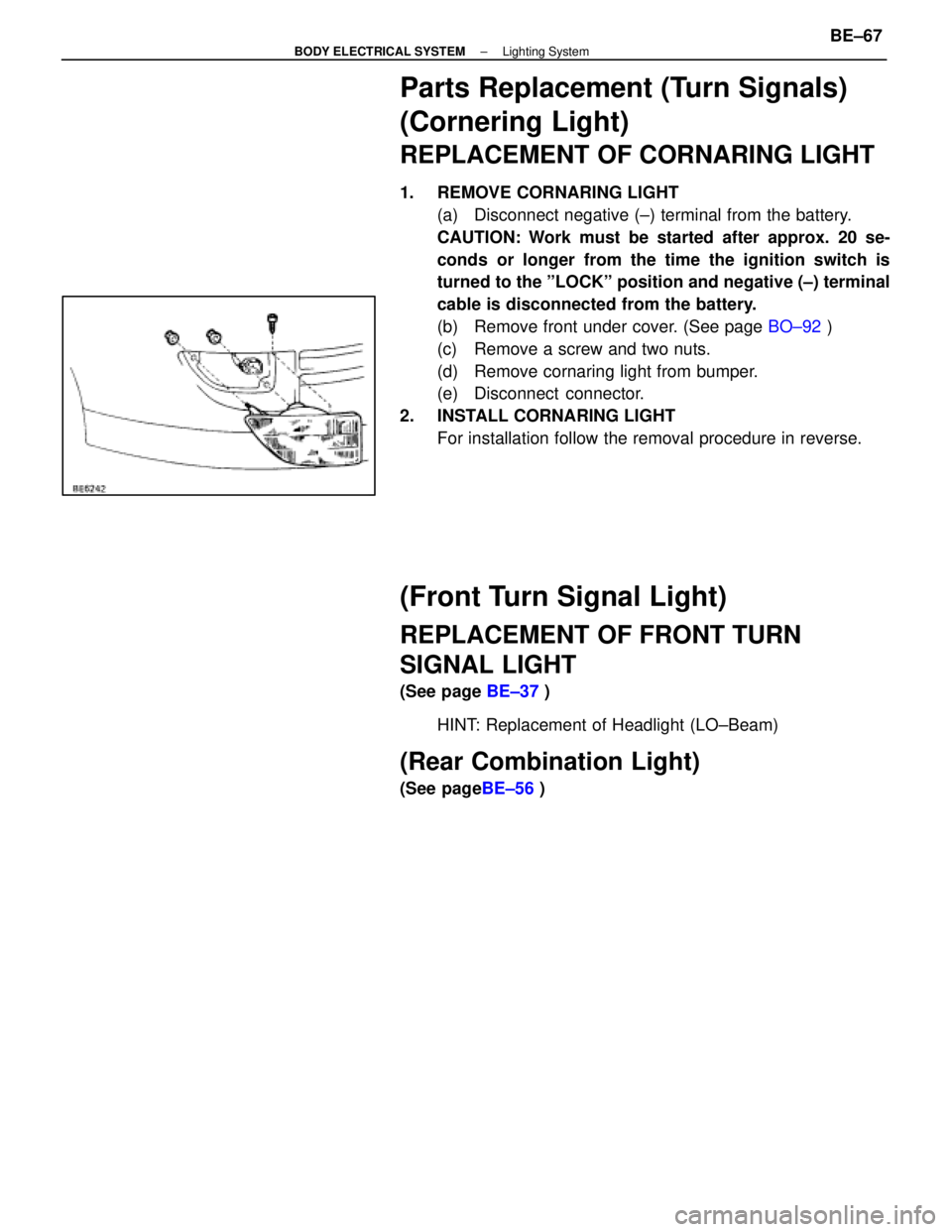
REPLACEMENT OF CORNARING LIGHT
1. REMOVE CORNARING LIGHT(a) Disconnect negative (±) terminal from the battery.
CAUTION: Work must be started after approx. 20 se-
conds or longer from the time the ignition switch is
turned to the ºLOCKº position and negative (±) terminal
cable is disconnected from the battery.
(b) Remove front under cover. (See page BO±92 )
(c) Remove a screw and two nuts.
(d) Remove cornaring light from bumper.
(e) Disconnect connector.
2. INSTALL CORNARING LIGHT For installation follow the removal procedure in reverse.
(Front Turn Signal Light)
REPLACEMENT OF FRONT TURN
SIGNAL LIGHT
(See page BE±37 )
HINT: Replacement of Headlight (LO±Beam)
(Rear Combination Light)
(See page BE±56 )
±
BODY ELECTRICAL SYSTEM Lighting SystemBE±67
WhereEverybodyKnowsYourName
Page 999 of 4087
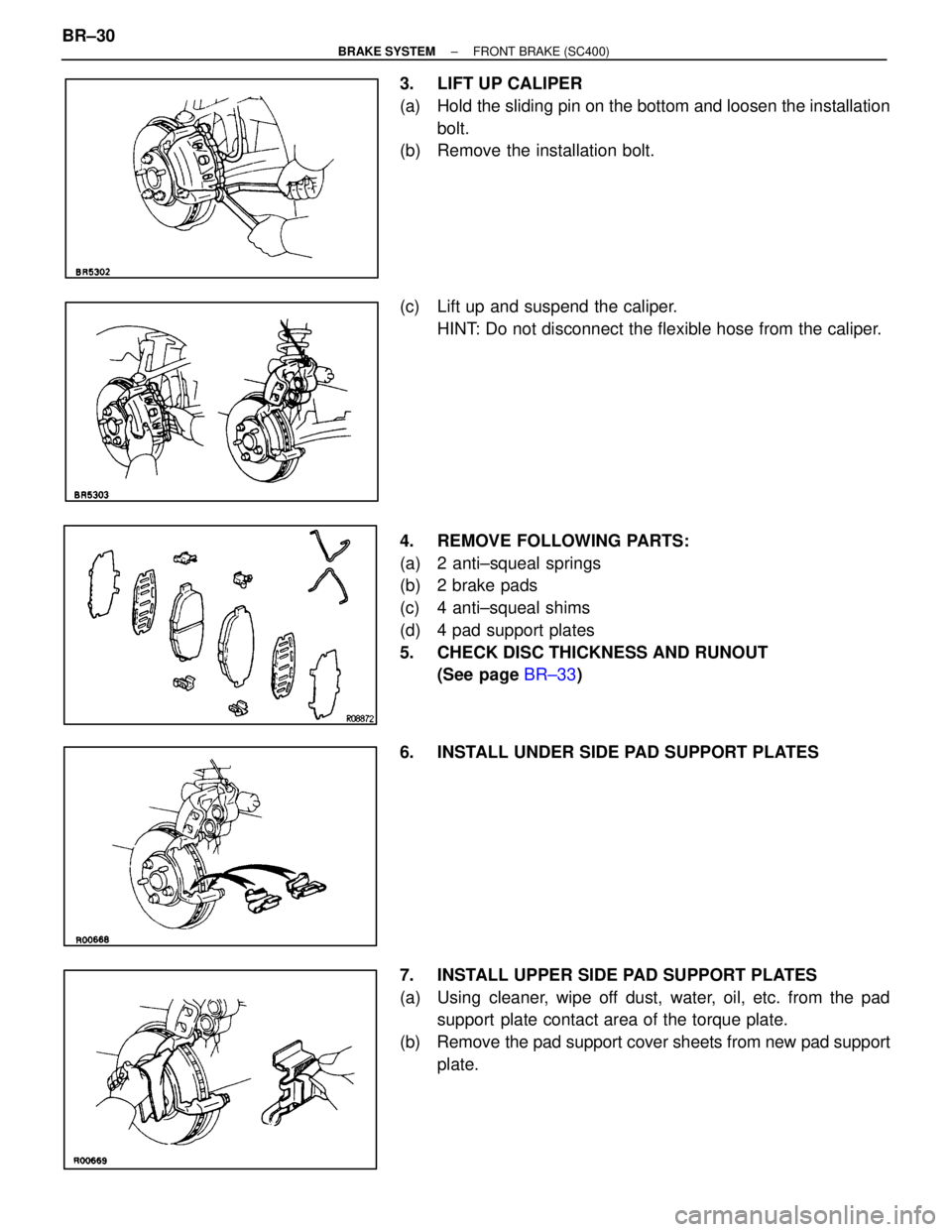
3. LIFT UP CALIPER
(a) Hold the sliding pin on the bottom and loosen the installationbolt.
(b) Remove the installation bolt.
(c) Lift up and suspend the caliper.
HINT: Do not disconnect the flexible hose from the caliper.
4. REMOVE FOLLOWING PARTS:
(a) 2 anti±squeal springs
(b) 2 brake pads
(c) 4 anti±squeal shims
(d) 4 pad support plates
5. CHECK DISC THICKNESS AND RUNOUT (See page BR±33 )
6. INSTALL UNDER SIDE PAD SUPPORT PLATES
7. INSTALL UPPER SIDE PAD SUPPORT PLATES
(a) Using cleaner, wipe off dust, water, oil, etc. from the pad support plate contact area of the torque plate.
(b) Remove the pad support cover sheets from new pad support plate.
BR±30
±
BRAKE SYSTEM FRONT BRAKE (SC400)
WhereEverybodyKnowsYourName
Page 1138 of 4087
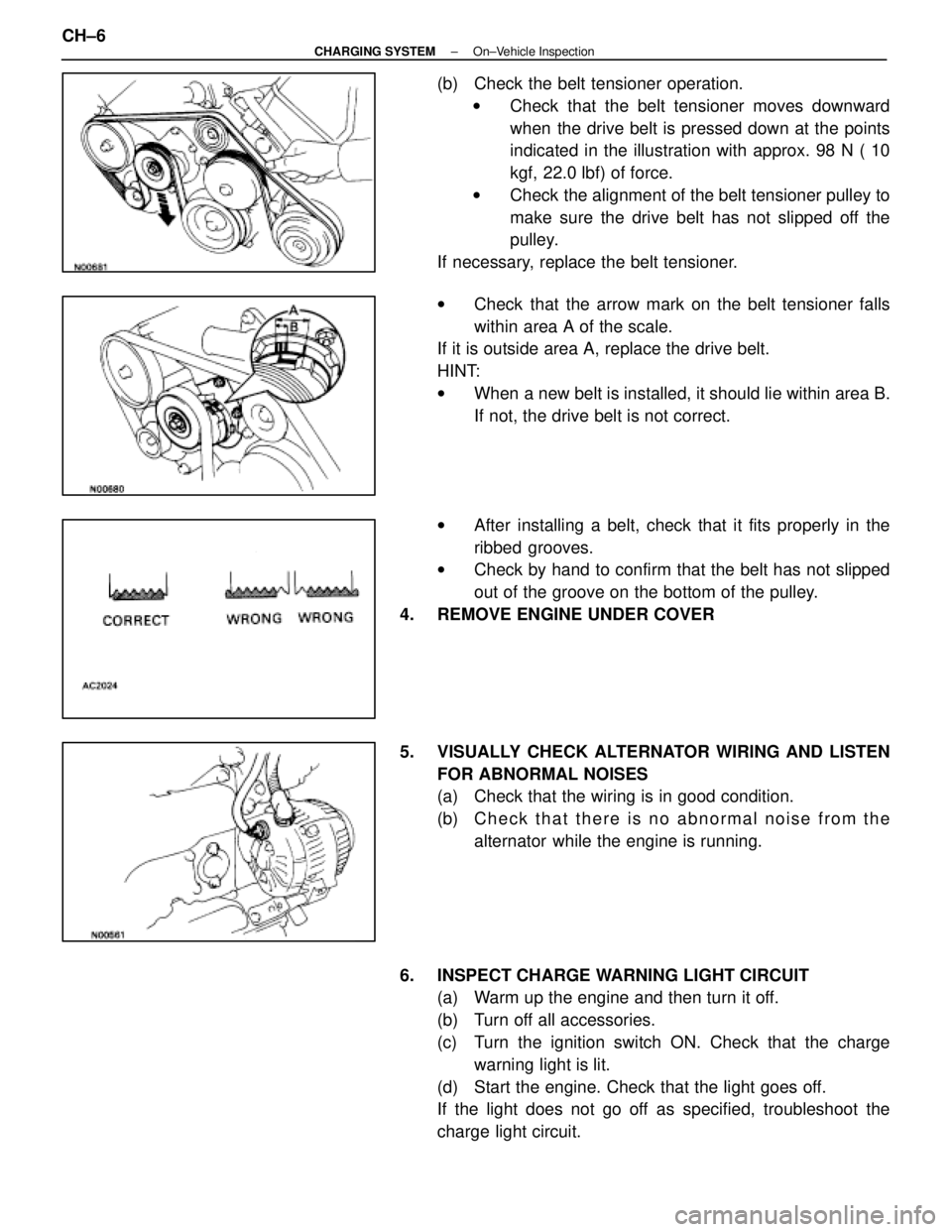
(b) Check the belt tensioner operation.w Check that the belt tensioner moves downward
when the drive belt is pressed down at the points
indicated in the illustration with approx. 98 N ( 10
kgf, 22.0 lbf) of force.
w Check the alignment of the belt tensioner pulley to
make sure the drive belt has not slipped off the
pulley.
If necessary, replace the belt tensioner.
w Check that the arrow mark on the belt tensioner falls
within area A of the scale.
If it is outside area A, replace the drive belt.
HINT:
w When a new belt is installed, it should lie within area B.
If not, the drive belt is not correct.
w After installing a belt, check that it fits properly in the
ribbed grooves.
w Check by hand to confirm that the belt has not slipped
out of the groove on the bottom of the pulley.
4. REMOVE ENGINE UNDER COVER
5. VISUALLY CHECK ALTERNATOR WIRING AND LISTEN FOR ABNORMAL NOISES
(a) Check that the wiring is in good condition.
(b) C h e c k t h a t t h e r e i s n o a bnormal noise from the
alternator while the engine is running.
6. INSPECT CHARGE WARNING LIGHT CIRCUIT (a) Warm up the engine and then turn it off.
(b) Turn off all accessories.
(c) Turn the ignition switch ON. Check that the charge
warning light is lit.
(d) Start the engine. Check that the light goes off.
If the light does not go off as specified, troubleshoot the
charge light circuit.
CH±6
±
CHARGING SYSTEM On±Vehicle Inspection
WhereEverybodyKnowsYourName
Page 1139 of 4087
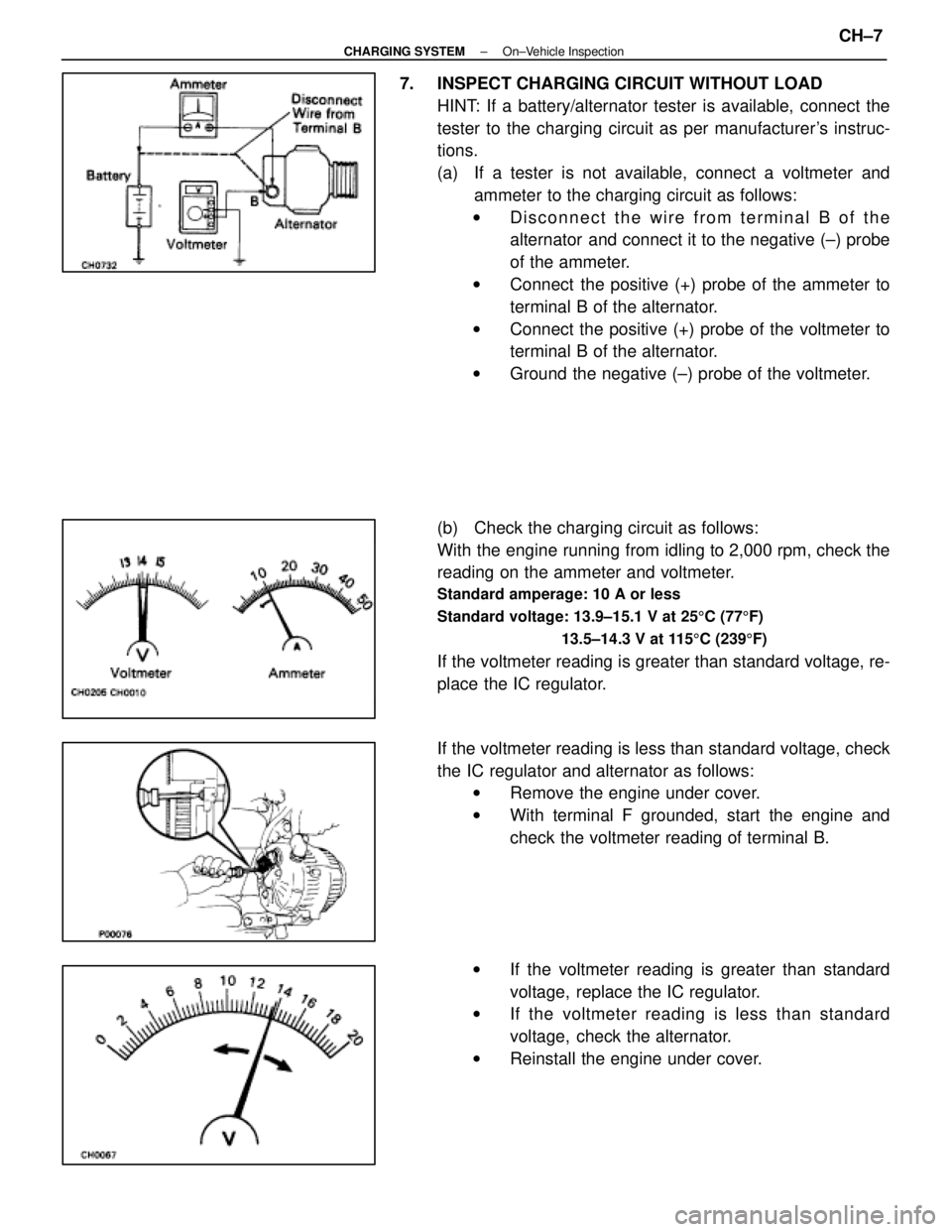
7. INSPECT CHARGING CIRCUIT WITHOUT LOADHINT: If a battery/alternator tester is available, connect the
tester to the charging circuit as per manufacturer's instruc-
tions.
(a) If a tester is not available, connect a voltmeter andammeter to the charging circuit as follows:
w Disconnect the wire from terminal B of the
alternator and connect it to the negative (±) probe
of the ammeter.
w Connect the positive (+) probe of the ammeter to
terminal B of the alternator.
w Connect the positive (+) probe of the voltmeter to
terminal B of the alternator.
w Ground the negative (±) probe of the voltmeter.
(b) Check the charging circuit as follows:
With the engine running from idling to 2,000 rpm, check the
reading on the ammeter and voltmeter.
Standard amperage: 10 A or less
Standard voltage: 13.9±15.1 V at 25 5C (77 5F)
13.5±14.3 V at 115 5C (239 5F)
If the voltmeter reading is greater than standard voltage, re-
place the IC regulator.
If the voltmeter reading is less than standard voltage, check
the IC regulator and alternator as follows:
w Remove the engine under cover.
w With terminal F grounded, start the engine and
check the voltmeter reading of terminal B.
w If the voltmeter reading is greater than standard
voltage, replace the IC regulator.
w If the voltmeter reading is less than standard
voltage, check the alternator.
w Reinstall the engine under cover.
±
CHARGING SYSTEM On±Vehicle InspectionCH±7
WhereEverybodyKnowsYourName
Page 1140 of 4087
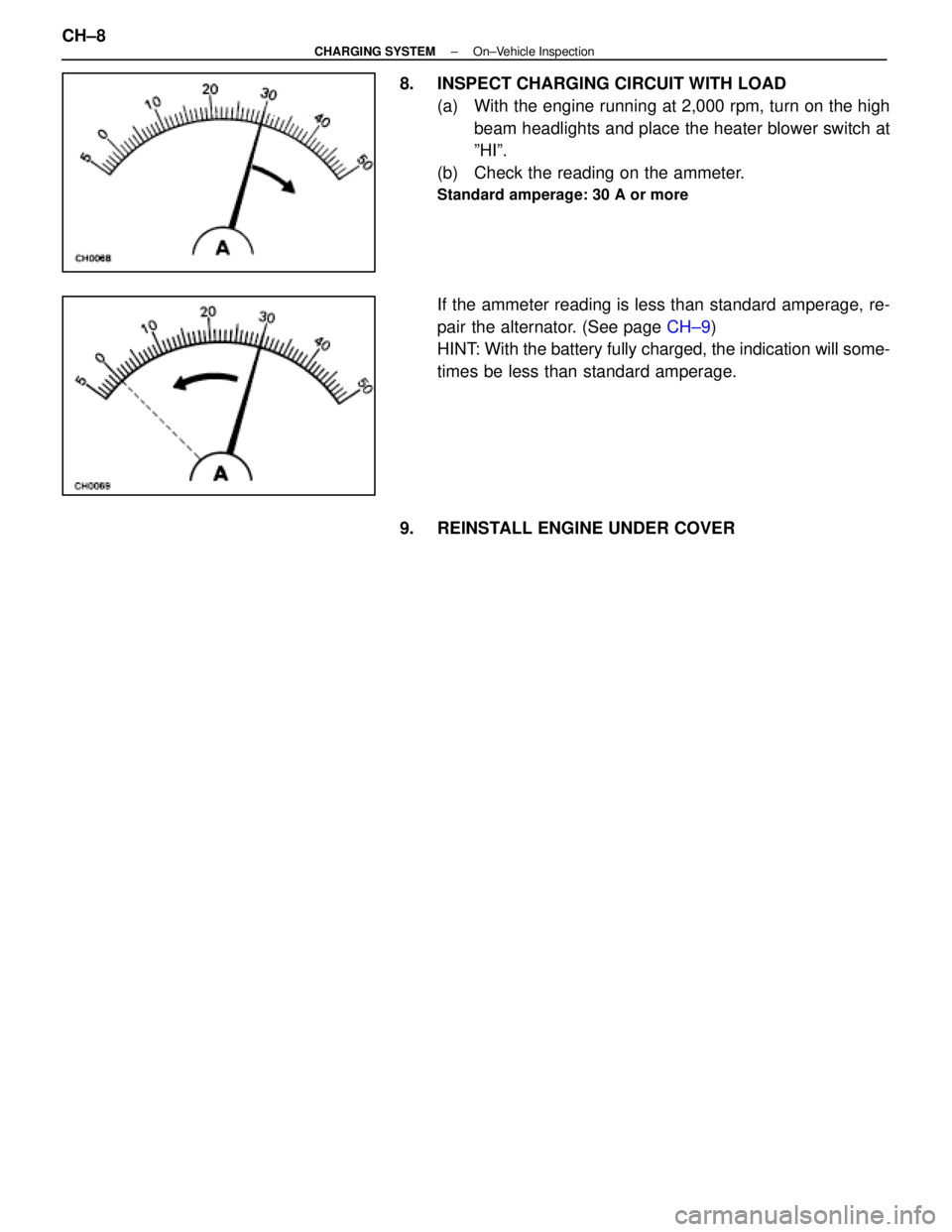
8. INSPECT CHARGING CIRCUIT WITH LOAD(a) With the engine running at 2,000 rpm, turn on the highbeam headlights and place the heater blower switch at
ºHIº.
(b) Check the reading on the ammeter.
Standard amperage: 30 A or more
If the ammeter reading is less than standard amperage, re-
pair the alternator. (See page CH±9)
HINT: With the battery fully charged, the indication will some-
times be less than standard amperage.
9. REINSTALL ENGINE UNDER COVER
CH±8
±
CHARGING SYSTEM On±Vehicle Inspection
WhereEverybodyKnowsYourName
Page 1141 of 4087
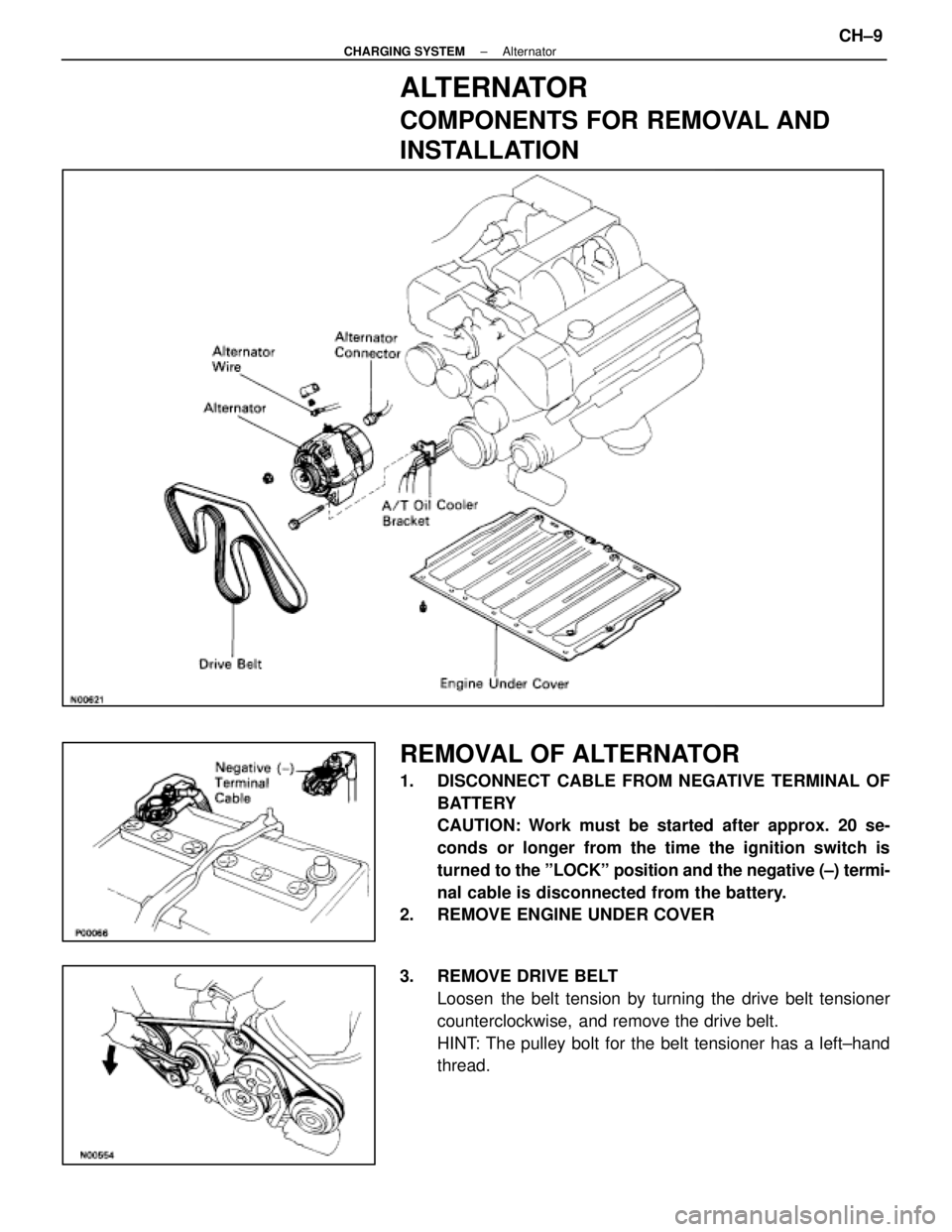
ALTERNATOR
COMPONENTS FOR REMOVAL AND
INSTALLATION
REMOVAL OF ALTERNATOR
1. DISCONNECT CABLE FROM NEGATIVE TERMINAL OFBATTERY
CAUTION: Work must be started after approx. 20 se-
conds or longer from the time the ignition switch is
turned to the ºLOCKº position and the negative (±) termi-
nal cable is disconnected from the battery.
2. REMOVE ENGINE UNDER COVER
3. REMOVE DRIVE BELT
Loosen the belt tension by turning the drive belt tensioner
counterclockwise, and remove the drive belt.
HINT: The pulley bolt for the belt tensioner has a left±hand
thread.
±
CHARGING SYSTEM AlternatorCH±9
WhereEverybodyKnowsYourName
Page 1152 of 4087
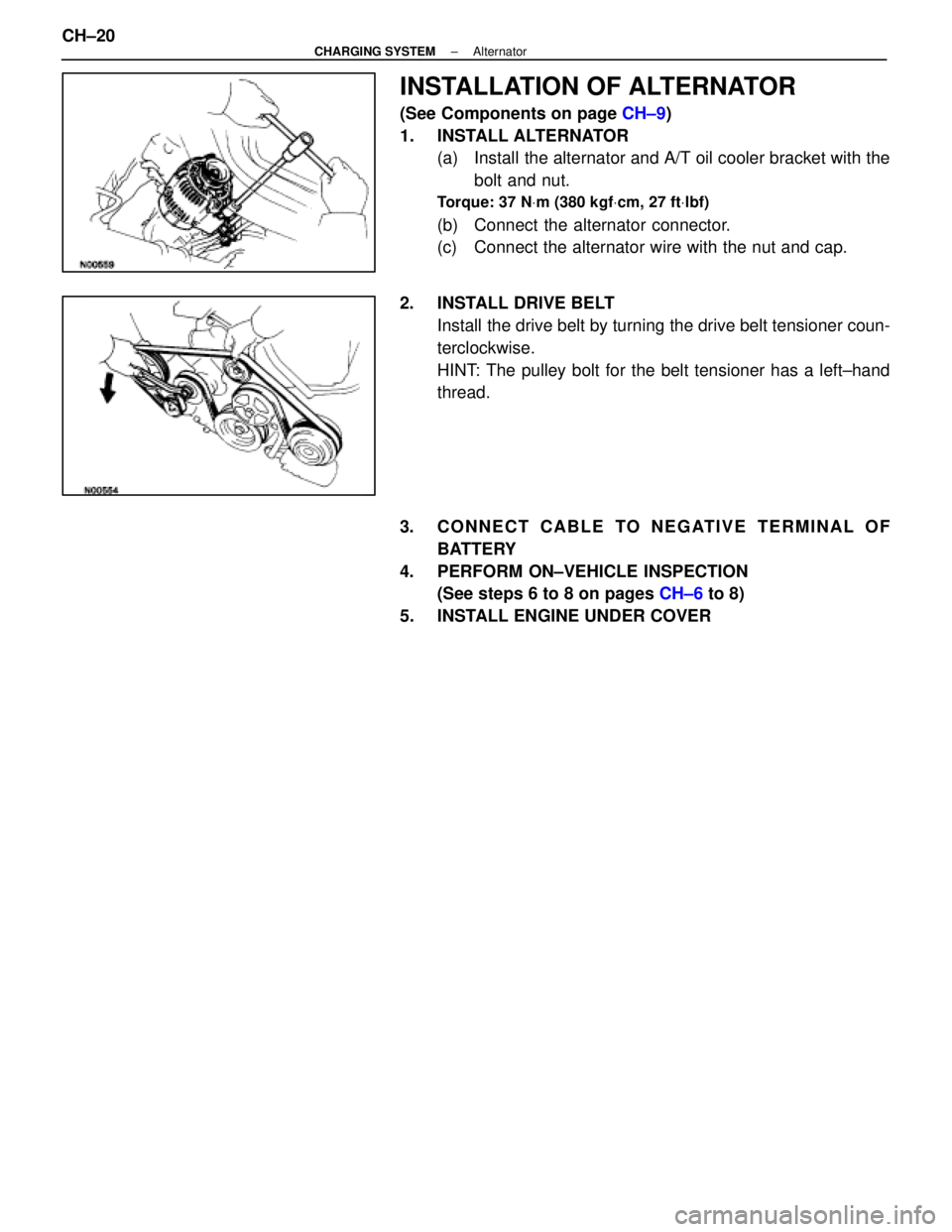
INSTALLATION OF ALTERNATOR
(See Components on page CH±9)
1. INSTALL ALTERNATOR (a) Install the alternator and A/T oil cooler bracket with the
bolt and nut.
Torque: 37 N Vm (380 kgf Vcm, 27 ft Vlbf)
(b) Connect the alternator connector.
(c) Connect the alternator wire with the nut and cap.
2. INSTALL DRIVE BELT Install the drive belt by turning the drive belt tensioner coun-
terclockwise.
HINT: The pulley bolt for the belt tensioner has a left±hand
thread.
3. CONNECT CABLE TO NEGATIVE TERMINAL OF BATTERY
4. PERFORM ON±VEHICLE INSPECTION (See steps 6 to 8 on pages CH±6 to 8)
5. INSTALL ENGINE UNDER COVER
CH±20
±
CHARGING SYSTEM Alternator
WhereEverybodyKnowsYourName