ect LEXUS SC300 1991 Service Repair Manual
[x] Cancel search | Manufacturer: LEXUS, Model Year: 1991, Model line: SC300, Model: LEXUS SC300 1991Pages: 4087, PDF Size: 75.75 MB
Page 833 of 4087
Parts Replacement ± Headlight
(Headlight)
REPLACEMENT OF HEADLIGHT
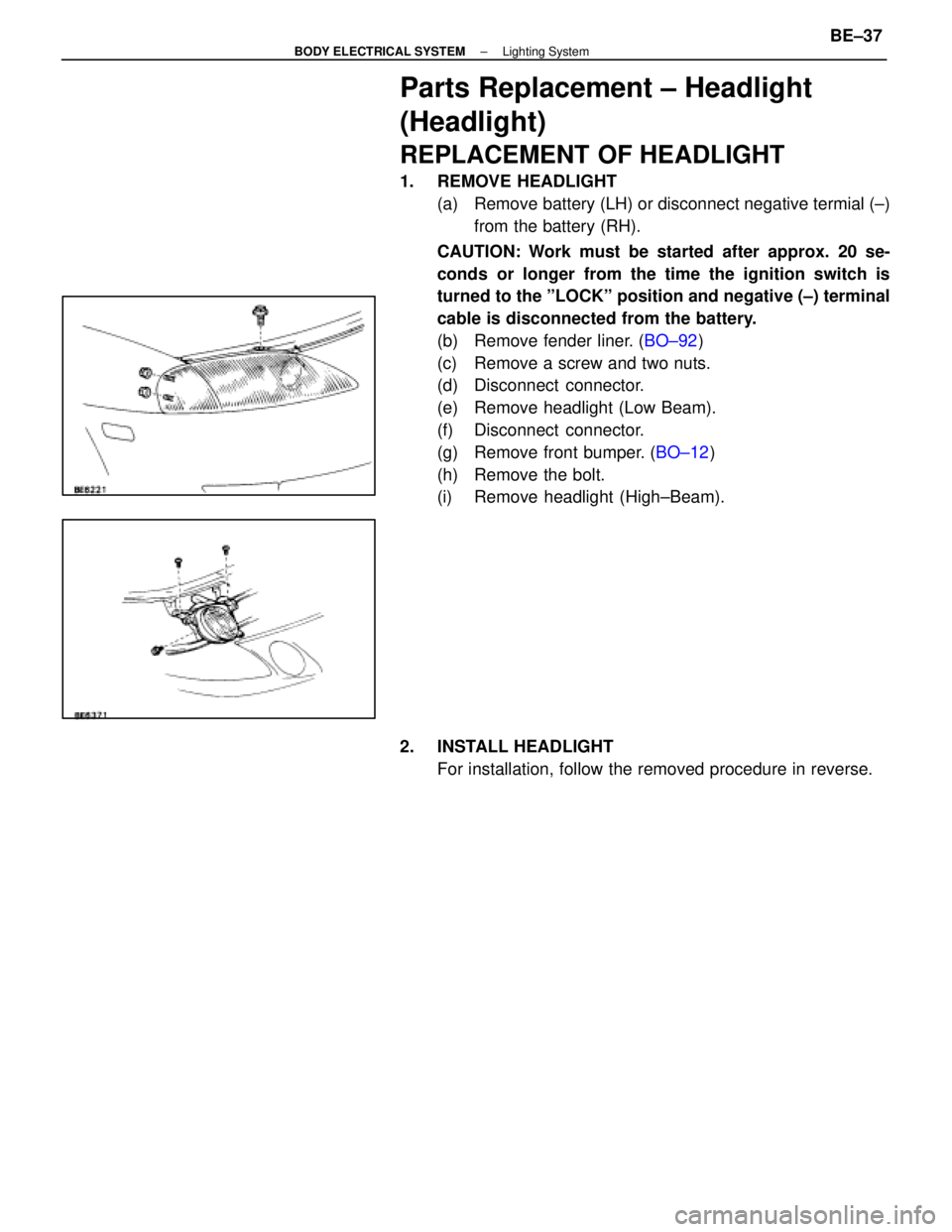
1. REMOVE HEADLIGHT(a) Remove battery (LH) or disconnect negative termial (±)from the battery (RH).
CAUTION: Work must be started after approx. 20 se-
conds or longer from the time the ignition switch is
turned to the ºLOCKº position and negative (±) terminal
cable is disconnected from the battery.
(b) Remove fender liner. ( BO±92)
(c) Remove a screw and two nuts.
(d) Disconnect connector.
(e) Remove headlight (Low Beam).
(f) Disconnect connector.
(g) Remove front bumper. ( BO±12)
(h) Remove the bolt.
(i) Remove headlight (High±Beam).
2. INSTALL HEADLIGHT For installation, follow the removed procedure in reverse.
±
BODY ELECTRICAL SYSTEM Lighting SystemBE±37
WhereEverybodyKnowsYourName
Page 834 of 4087
Parts Adjustment
Adjustment of Headlight Aim
1. INSPECT HEADLIGHT AIM Check the following items before inspection.
wBe sure that the body around the headlight is not
deformed.
w Park the vehicle on a level spot.
w The driver gets into the driver's seat and puts the vehicle
in state ready for driving (with a full tank).
w Bounce the vehicle several times.
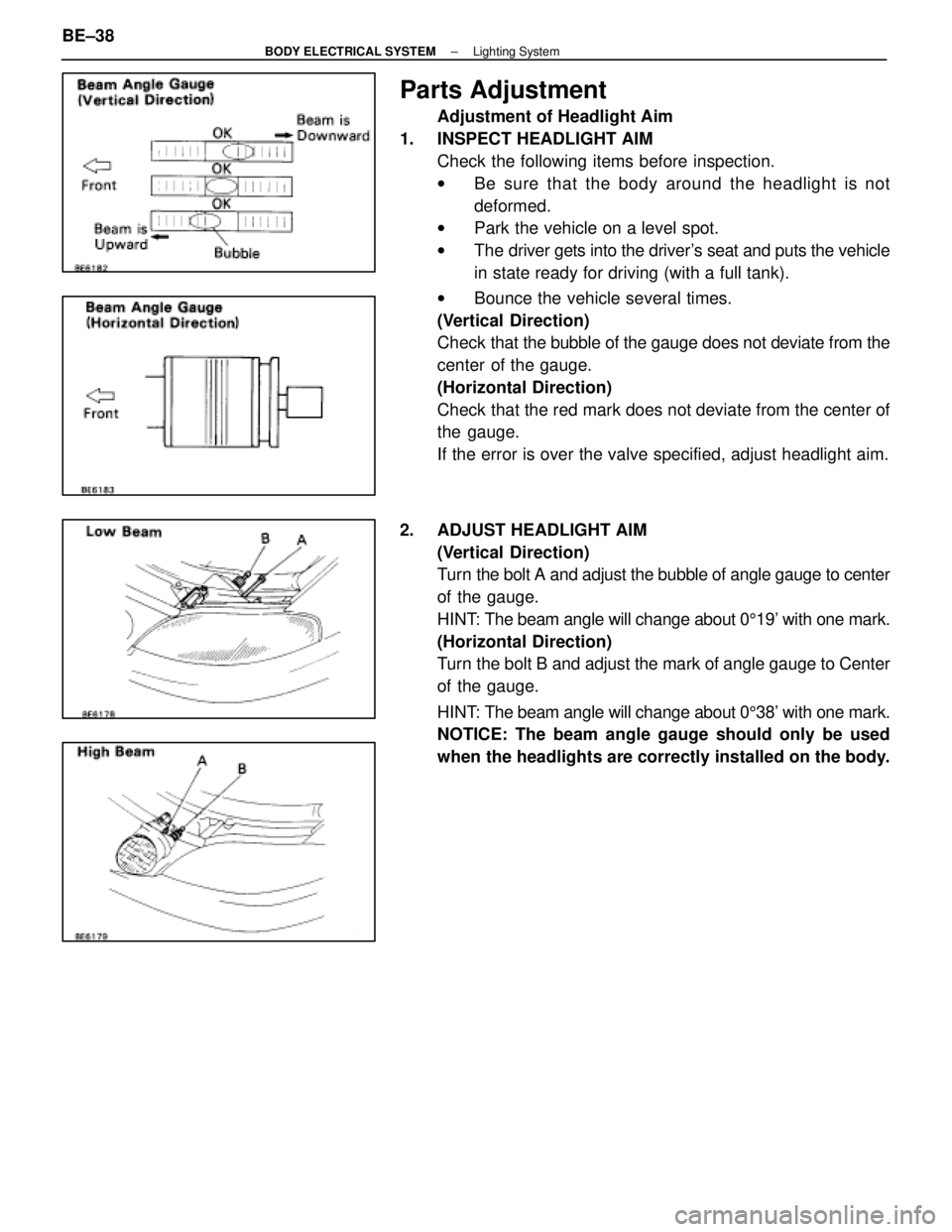
(Vertical Direction)
Check that the bubble of the gauge does not deviate from the
center of the gauge.
(Horizontal Direction)
Check that the red mark does not deviate from the center of
the gauge.
If the error is over the valve specified, adjust headlight aim.
2. ADJUST HEADLIGHT AIM (Vertical Direction)
Turn the bolt A and adjust the bubble of angle gauge to center
of the gauge.
HINT: The beam angle will change about 0 519' with one mark.
(Horizontal Direction)
Turn the bolt B and adjust the mark of angle gauge to Center
of the gauge.
HINT: The beam angle will change about 0 538' with one mark.
NOTICE: The beam angle gauge should only be used
when the headlights are correctly installed on the body.
BE±38
±
BODY ELECTRICAL SYSTEM Lighting System
WhereEverybodyKnowsYourName
Page 835 of 4087
Parts Inspection ± Headlight System
(Combination Switch Assembly)
REMOVAL OF COMBINATION SWITCH
ASSEMBLY
1. REMOVAL FOLLOWING PARTS:(See page BO±112)
w No. 1 under cover
w No. 1 lower finish Panel
NOTICE:
w Turn the steering wheel and front wheels to the straight
ahead position.
w Turn the ignition switch to the OFF position, then remove
the battery negative terminal.
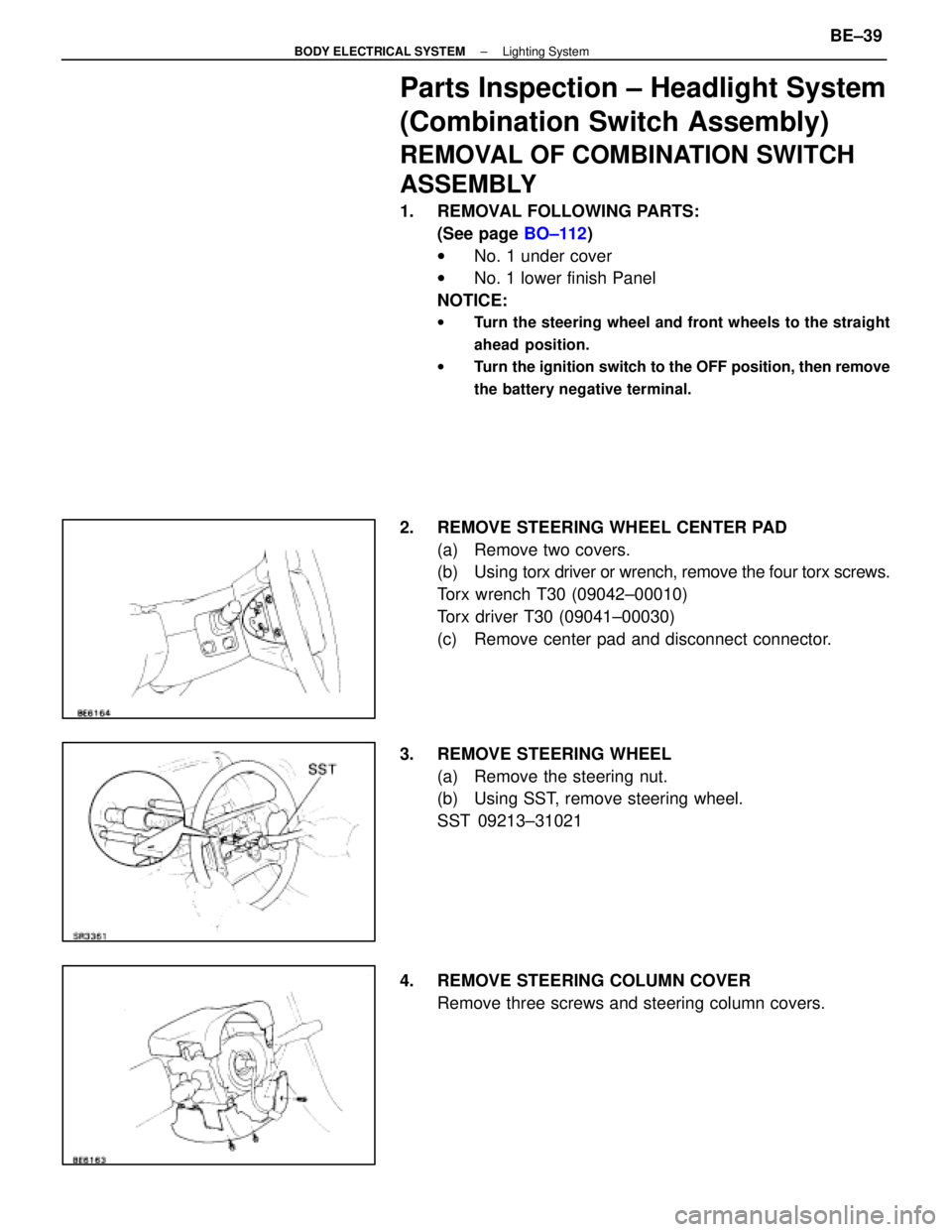
2. REMOVE STEERING WHEEL CENTER PAD
(a) Remove two covers.
(b) Using torx driver or wrench, remove the four torx screws.
Torx wrench T30 (09042±00010)
Torx driver T30 (09041±00030)
(c) Remove center pad and disconnect connector.
3. REMOVE STEERING WHEEL (a) Remove the steering nut.
(b) Using SST, remove steering wheel.
SST 09213±31021
4. REMOVE STEERING COLUMN COVER Remove three screws and steering column covers.
±
BODY ELECTRICAL SYSTEM Lighting SystemBE±39
WhereEverybodyKnowsYourName
Page 836 of 4087
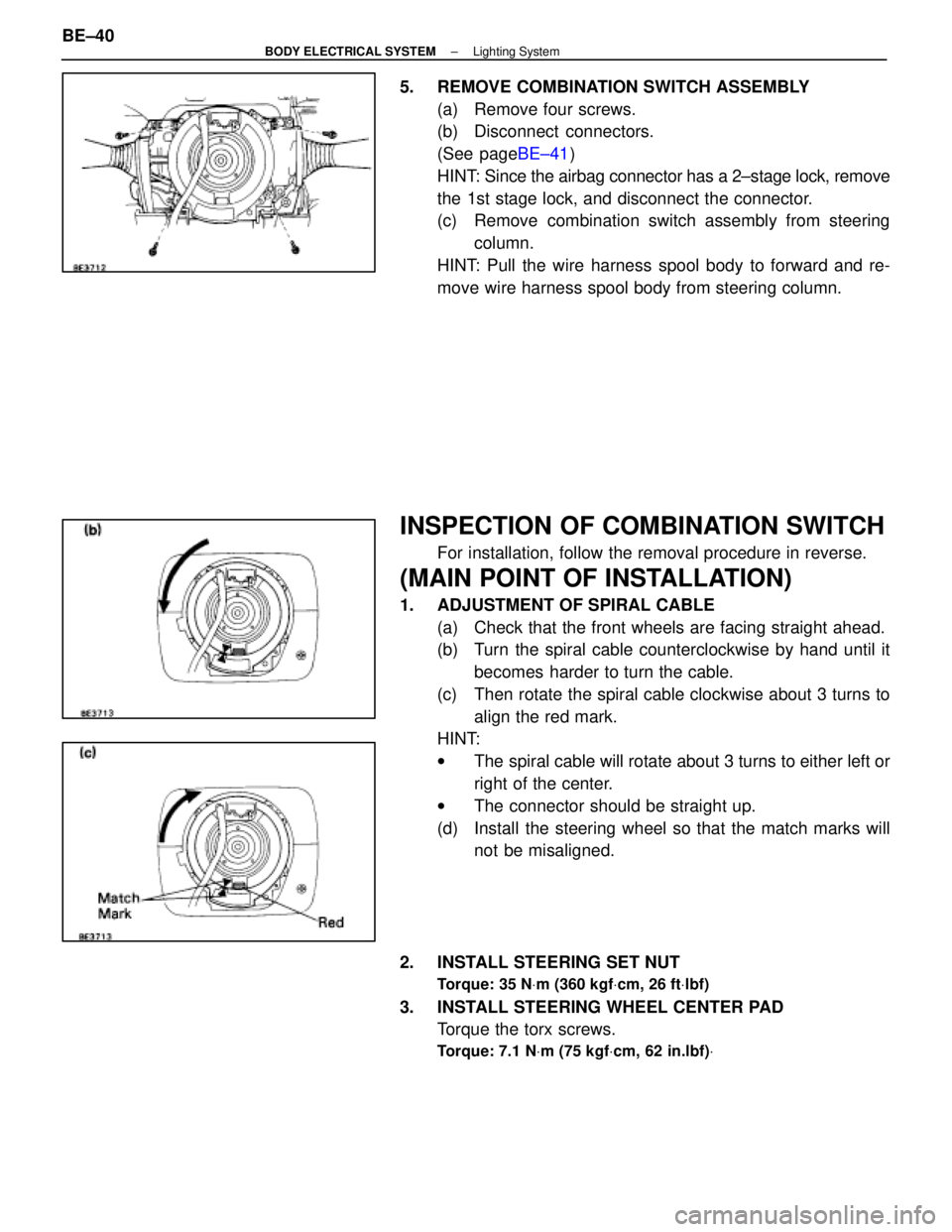
5. REMOVE COMBINATION SWITCH ASSEMBLY(a) Remove four screws.
(b) Disconnect connectors.
(See page BE±41)
HINT: Since the airbag connector has a 2±stage lock, remove
the 1st stage lock, and disconnect the connector.
(c) Remove combination switch assembly from steering column.
HINT: Pull the wire harness spool body to forward and re-
move wire harness spool body from steering column.
INSPECTION OF COMBINATION SWITCH
For installation, follow the removal procedure in reverse.
(MAIN POINT OF INSTALLATION)
1. ADJUSTMENT OF SPIRAL CABLE (a) Check that the front wheels are facing straight ahead.
(b) Turn the spiral cable counterclockwise by hand until itbecomes harder to turn the cable.
(c) Then rotate the spiral cable clockwise about 3 turns to align the red mark.
HINT:
w The spiral cable will rotate about 3 turns to either left or
right of the center.
w The connector should be straight up.
(d) Install the steering wheel so that the match marks will not be misaligned.
2. INSTALL STEERING SET NUT
Torque: 35 N Vm (360 kgf Vcm, 26 ft Vlbf)
3. INSTALL STEERING WHEEL CENTER PAD
Torque the torx screws.
Torque: 7.1 N Vm (75 kgf Vcm, 62 in.lbf) V
BE±40±
BODY ELECTRICAL SYSTEM Lighting System
WhereEverybodyKnowsYourName
Page 837 of 4087
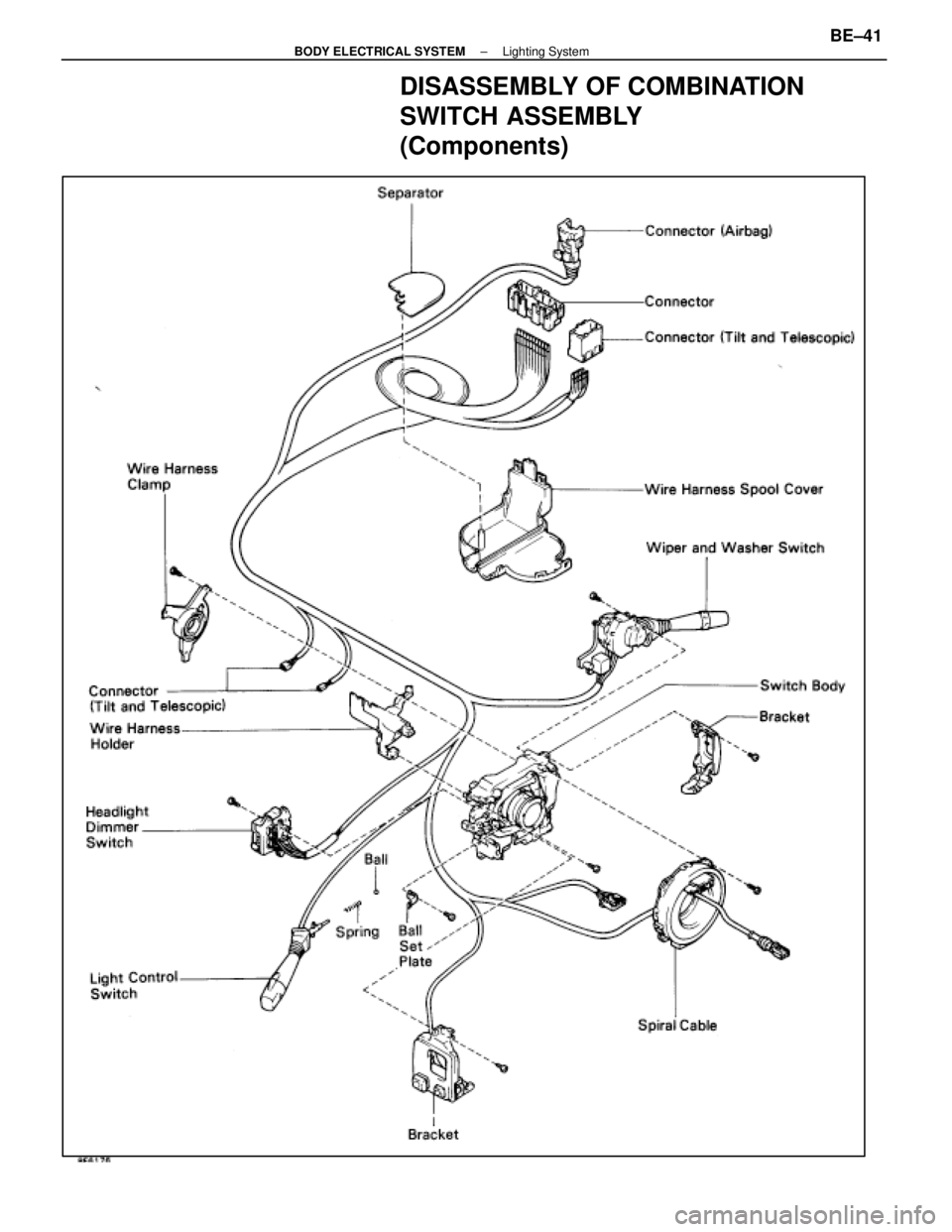
DISASSEMBLY OF COMBINATION
SWITCH ASSEMBLY
(Components)
±
BODY ELECTRICAL SYSTEM Lighting SystemBE±41
WhereEverybodyKnowsYourName
Page 838 of 4087
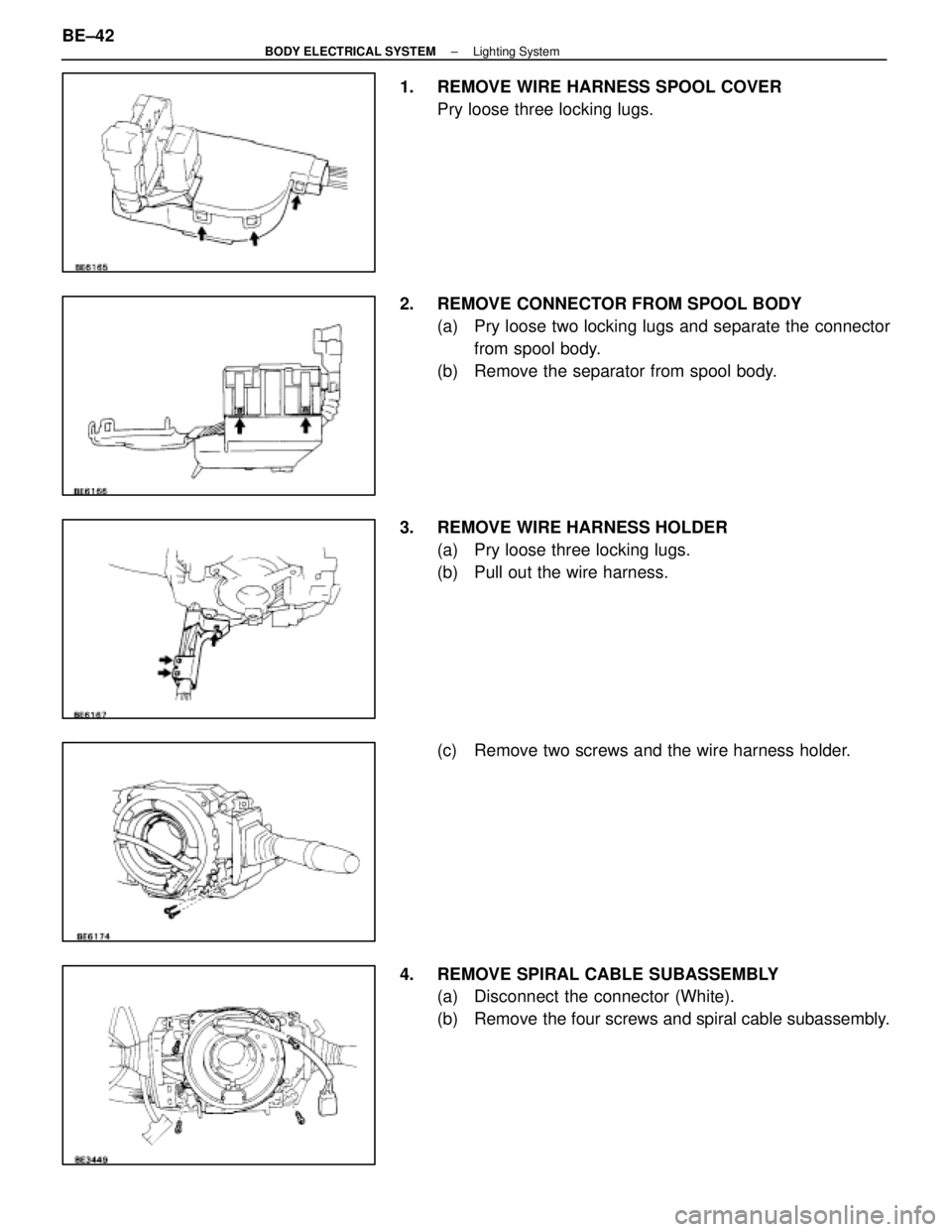
1. REMOVE WIRE HARNESS SPOOL COVERPry loose three locking lugs.
2. REMOVE CONNECTOR FROM SPOOL BODY (a) Pry loose two locking lugs and separate the connectorfrom spool body.
(b) Remove the separator from spool body.
3. REMOVE WIRE HARNESS HOLDER (a) Pry loose three locking lugs.
(b) Pull out the wire harness.
(c) Remove two screws and the wire harness holder.
4. REMOVE SPIRAL CABLE SUBASSEMBLY (a) Disconnect the connector (White).
(b) Remove the four screws and spiral cable subassembly.
BE±42
±
BODY ELECTRICAL SYSTEM Lighting System
WhereEverybodyKnowsYourName
Page 839 of 4087
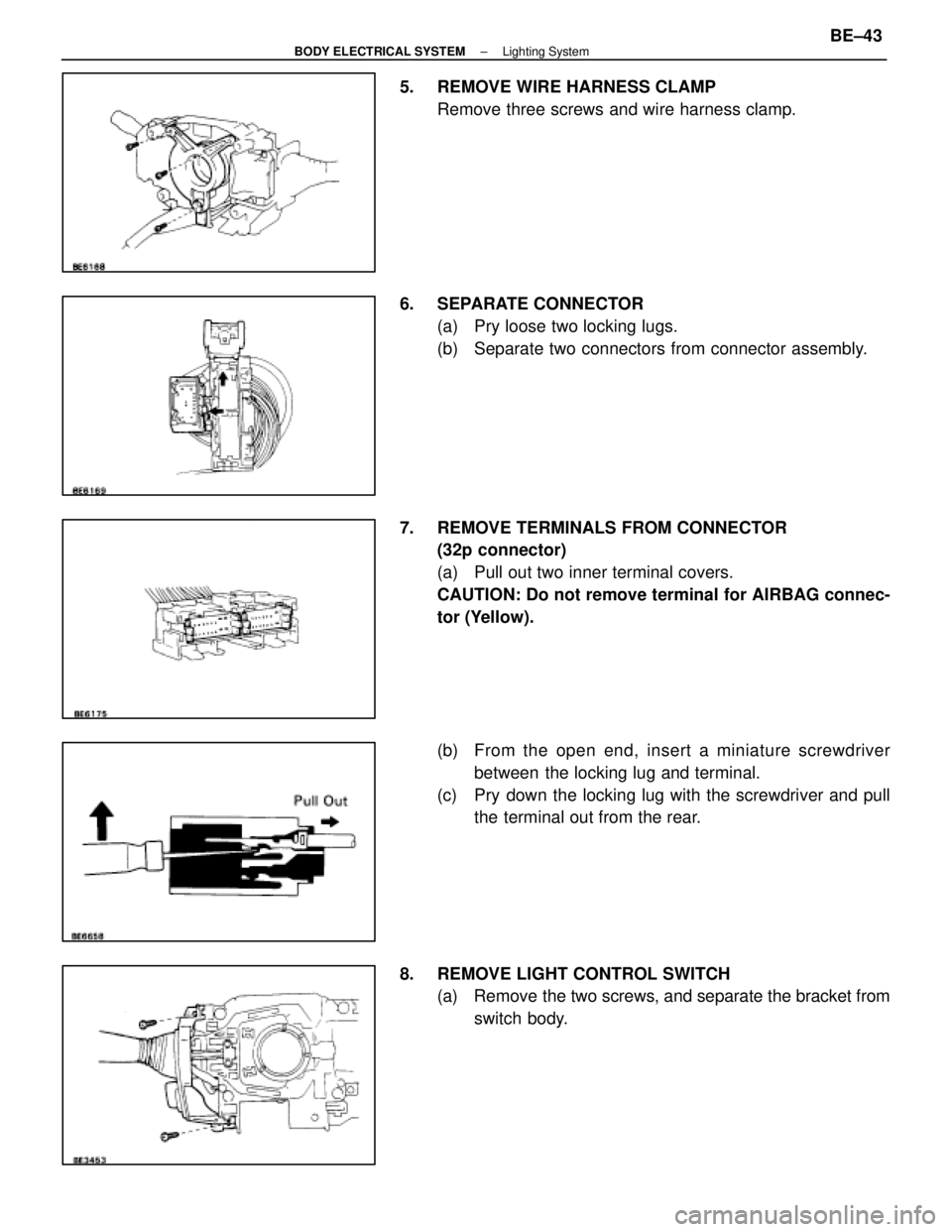
5. REMOVE WIRE HARNESS CLAMPRemove three screws and wire harness clamp.
6. SEPARATE CONNECTOR (a) Pry loose two locking lugs.
(b) Separate two connectors from connector assembly.
7. REMOVE TERMINALS FROM CONNECTOR (32p connector)
(a) Pull out two inner terminal covers.
CAUTION: Do not remove terminal for AIRBAG connec-
tor (Yellow).
(b) From the open end, insert a miniature screwdriver
between the locking lug and terminal.
(c) Pry down the locking lug with the screwdriver and pull the terminal out from the rear.
8. REMOVE LIGHT CONTROL SWITCH (a) Remove the two screws, and separate the bracket from
switch body.
±
BODY ELECTRICAL SYSTEM Lighting SystemBE±43
WhereEverybodyKnowsYourName
Page 840 of 4087
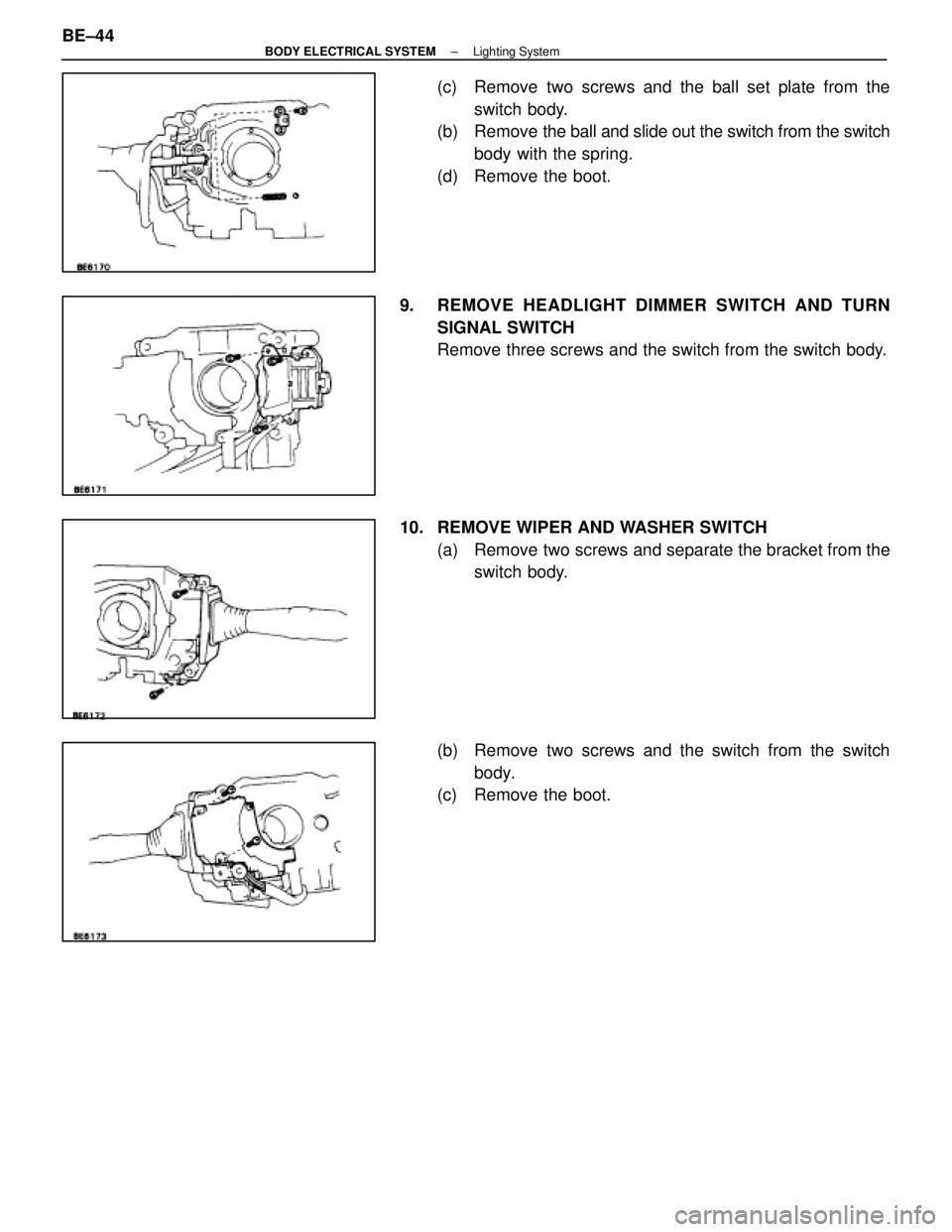
(c) Remove two screws and the ball set plate from theswitch body.
(b) Remove the ball and slide out the switch from the switch
body with the spring.
(d) Remove the boot.
9. REMOVE HEADLIGHT DIMMER SWITCH AND TURN SIGNAL SWITCH
Remove three screws and the switch from the switch body.
10. REMOVE WIPER AND WASHER SWITCH (a) Remove two screws and separate the bracket from theswitch body.
(b) Remove two screws and the switch from the switch body.
(c) Remove the boot.
BE±44
±
BODY ELECTRICAL SYSTEM Lighting System
WhereEverybodyKnowsYourName
Page 841 of 4087
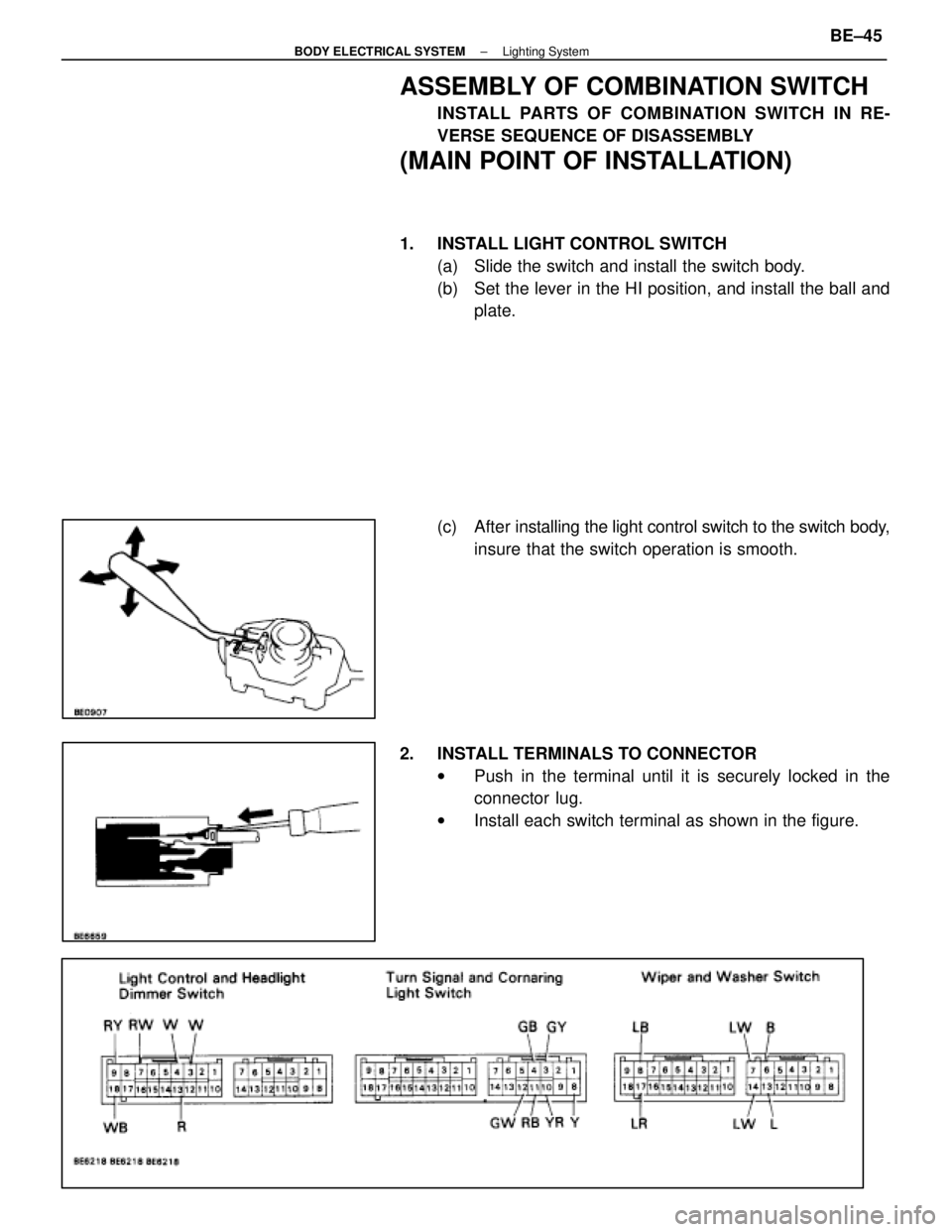
ASSEMBLY OF COMBINATION SWITCH
INSTALL PARTS OF COMBINATION SWITCH IN RE-
VERSE SEQUENCE OF DISASSEMBLY
(MAIN POINT OF INSTALLATION)
1. INSTALL LIGHT CONTROL SWITCH(a) Slide the switch and install the switch body.
(b) Set the lever in the HI position, and install the ball andplate.
(c) After installing the light control switch to the switch body,
insure that the switch operation is smooth.
2. INSTALL TERMINALS TO CONNECTOR wPush in the terminal until it is securely locked in the
connector lug.
w Install each switch terminal as shown in the figure.
±
BODY ELECTRICAL SYSTEM Lighting SystemBE±45
WhereEverybodyKnowsYourName
Page 842 of 4087
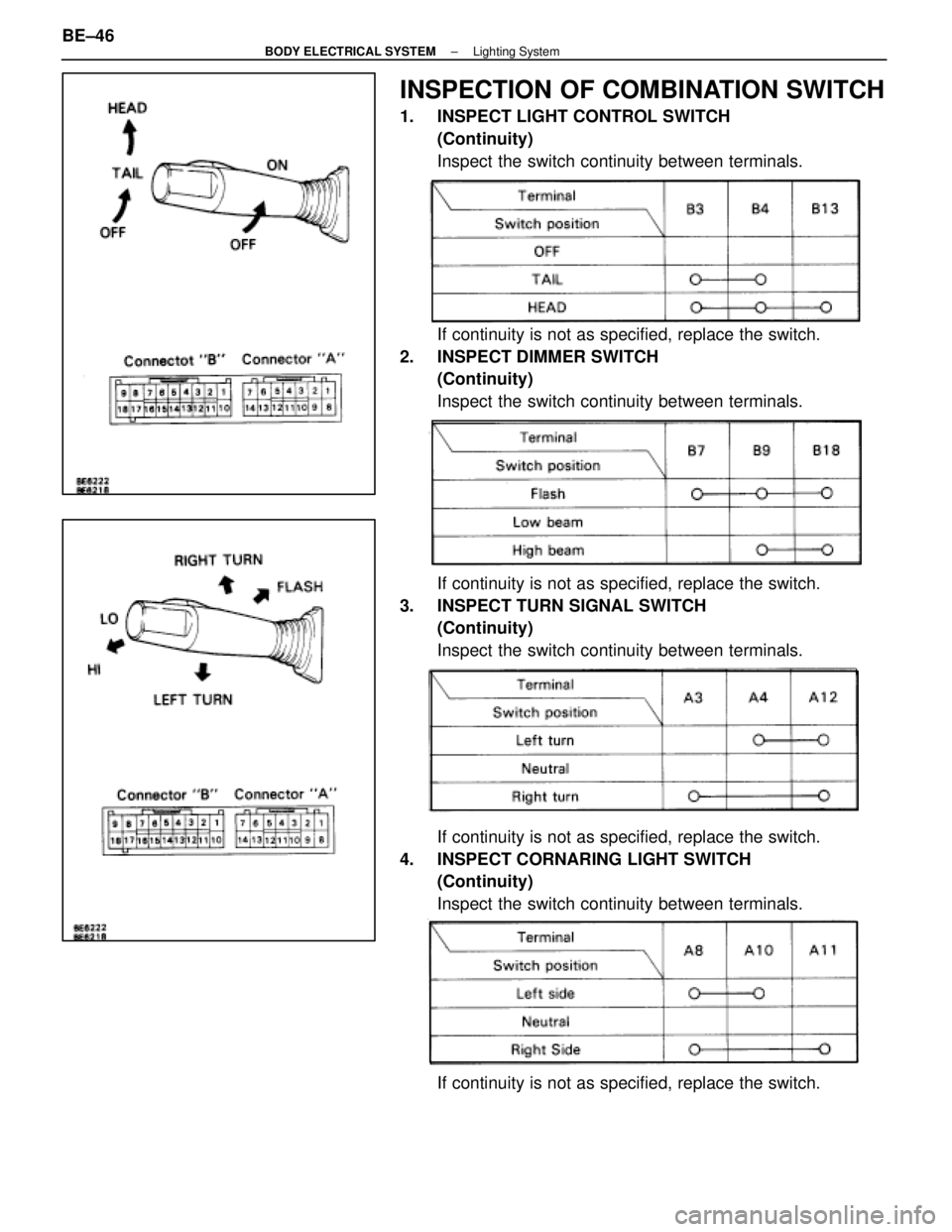
INSPECTION OF COMBINATION SWITCH
1. INSPECT LIGHT CONTROL SWITCH(Continuity)
Inspect the switch continuity between terminals.
If continuity is not as specified, replace the switch.
2. INSPECT DIMMER SWITCH (Continuity)
Inspect the switch continuity between terminals.
If continuity is not as specified, replace the switch.
3. INSPECT TURN SIGNAL SWITCH (Continuity)
Inspect the switch continuity between terminals.
If continuity is not as specified, replace the switch.
4. INSPECT CORNARING LIGHT SWITCH (Continuity)
Inspect the switch continuity between terminals.
If continuity is not as specified, replace the switch.
BE±46
±
BODY ELECTRICAL SYSTEM Lighting System
WhereEverybodyKnowsYourName