fuel LEXUS UX 2022 Owners Manual
[x] Cancel search | Manufacturer: LEXUS, Model Year: 2022, Model line: UX, Model: LEXUS UX 2022Pages: 100, PDF Size: 6.15 MB
Page 3 of 100
2
UX250h_QG_OM76572U_(U)
Driving ComfortRemote Touch ................................................................................................................... ............. 43
Energy Monitor/Consumption Screen ............................................................................... 48
Navigation System
*.......................................................................................................................51
Hands-free System For Cellular Phone
*........................................................................... 53
Audio System
*................................................................................................................................57
Lexus Climate Concierge .........................................................................................................64
Air Conditioning System
*......................................................................................................... 65
Interior features
Voice Command System
*........................................................................................................ 68
USB/AUX Ports .................................................................................................................. ..........76
Garage Door Opener ............................................................................................................. .... 77
Lexus Enform Lexus Enform Safety Connect...................................................................................................8 1
Lexus Enform Remote ............................................................................................................ .... 83
Lexus Enform Service Connect.............................................................................................. 84
Audio SiriusXM Satellite Radio ....................................................................................................... ..... 85
Opening and Closing Door Locks ..................................................................................................................... ................. 86
Back Door ...................................................................................................................... .................. 87
Fuel Tank Cap .................................................................................................................. .............. 90
What to do if... List of Warning/Indicator Lights............................................................................................... 91
If the electronic key does not oper ate properly ............................................................... 95
If the hybrid system will not star t ..............................................................................................97
*: These features may be operated by Voice Command (See P.68)
Depending on specifications, the vehicle shown in the illustration may
differ from your vehicle in terms of equipment.
Page 6 of 100

5
UX250h_QG_OM76572U_(U)
■Switches
VSC off switch*1
Driving mode select switch*1
Power back door switch*2.................................................................................... P.87
Fuel filler door opener switch ............................................................................... P.90
Instrument panel light control switches
*1
Odometer/trip meter and trip meter reset button*1
Head-up display switch*2...................................................................................... P.33
ASC switch
*1, 2
Seat ventilator switches*1, 2
Seat heater switches*1, 2
Heated steering wheel switch*1, 2
*1: Refer to the “OWNER’S MANUAL”.
*2: If equipped
A
B
C
D
E
F
G
H
I
J
K
Page 12 of 100

11
UX250h_QG_OM76572U_(U)
Charge area
Shows regeneration
* status. Regenerated energy will be used to charge the hybrid
battery (traction battery).
*: When used in this manual, regeneration refers to the conversion of energy created by
the movement of the vehicle into electrical energy.
Hybrid Eco area
Shows that gasoline engine power is not being used very often.
The gasoline engine will automatically stop and restart under various conditions.
Eco area
Shows that the vehicle is being driven in an Eco-friendly manner.
By keeping the bar display within Eco area, more Eco-friendly driving can be achieved.
Power area
Shows that an Eco-friendly driving range is being exceeded (during full power driving
etc.)
Hybrid System
Your vehicle is a hybrid vehicle. It has characteristics different from conventional vehicles.
Be sure you are closely familiar with the charact eristics of your vehicle, and operate it with
care.
The hybrid system combines the use of a gaso line engine and an electric motor (traction
motor) according to driving conditions, improv ing fuel efficiency and reducing exhaust
emissions.
For details, refer to the “OWNER’S MANUAL”.
Hybrid System Indicator
Except F SPORT models F SPORT models
A
B
C
D
Page 14 of 100

13
UX250h_QG_OM76572U_(U)
When the vehicle has run out of fuel and the hybrid system cannot be started, refuel the
vehicle with at least enough gasoline to make the low fuel level warning light go off. If there is
only a small amount of fuel, the hybrid system may not be able to start. (The standard amount
of fuel is about 1.8 gal. [7.0 L, 1.5 Imp.gal.], when the vehicle is on a level surface. This value
may vary when the vehicle is on a slope. Add extra fuel when the vehicle is inclined.)
A message is automatically displayed when a ma lfunction occurs in the hybrid system or an
improper operation is attempted.
If a warning message is shown on the multi-
information display, read the message and
follow the instructions.
Running out of fuel
Hybrid warning message
Page 25 of 100

24
UX250h_QG_OM76572U_(U)
*1: To improve fuel efficiency and reduce noise, shift the shift lever to D for normal driving.
*2: By selecting shift ranges using S mode, you can control accelerating force and enginebraking force.
To drive using temporary shift range selection, operate the “-” or “+” paddle shift switch
when driving with the shift lever in D.
When the “-” paddle shift switch is operated, th e shift range switches to a range that enables
engine braking force that is su itable to driving conditions. Wh en the “+” paddle shift switch is
operated, the shift range switches to a range that is one range higher than the current range.
1Upshifting
2Downshifting
The selected shift range, from D1 to D6, will
be displayed in the meter.
To return to normal D position driving, the
“+” paddle shift switch must be held down
for a period of time.
Shift position purpose and functions
Shift positionObjective or function
PParking the vehicle/starting the hybrid system
RReversing
NNeutral (Condition in which the power is not transmitted)
DNormal driving*1
SS mode driving*2 ( P.25)
Selecting shift ranges in the D position (vehicles with paddle shift
switches)
Meter displayFunction
D2 - D6
A gear in the range between D1 and the selected shift range is
automatically chosen depending on vehicle speed and driving
conditions
D1Setting the shift range at D1
Page 47 of 100
46
UX250h_QG_OM76572U_(U)
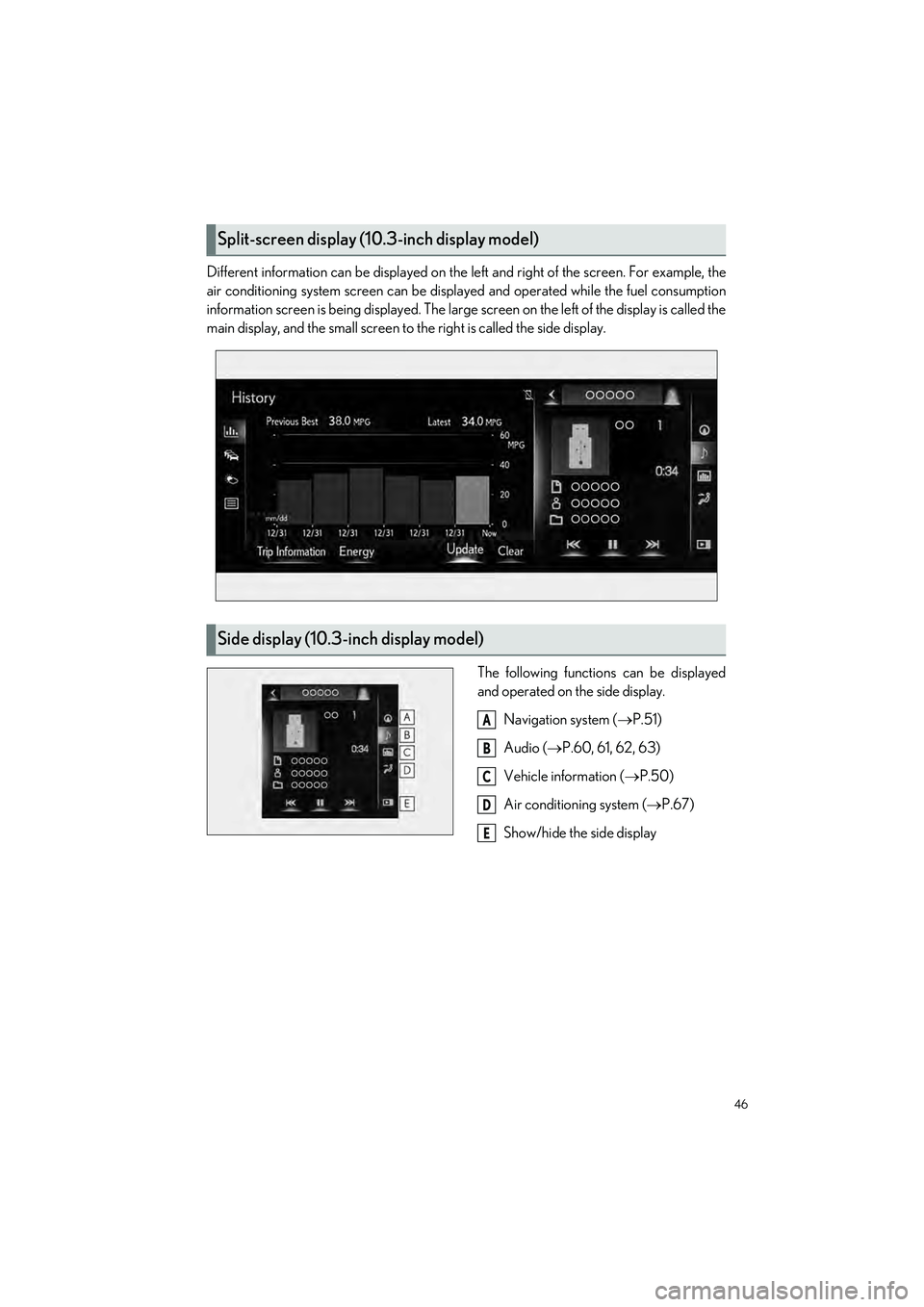
Different information can be displayed on the left and right of the screen. For example, the
air conditioning system screen can be displa yed and operated while the fuel consumption
information screen is being displa yed. The large screen on the left of the display is called the
main display, and the small screen to the right is called the side display.
The following functions can be displayed
and operated on the side display.Navigation system ( P.51)
Audio ( P.60, 61, 62, 63)
Vehicle information ( P.50)
Air conditioning system ( P.67)
Show/hide the side display
Split-screen display (1 0.3-inch display model)
Side display (10.3-inch display model)
A
B
C
D
E
Page 49 of 100
48
UX250h_QG_OM76572U_(U)
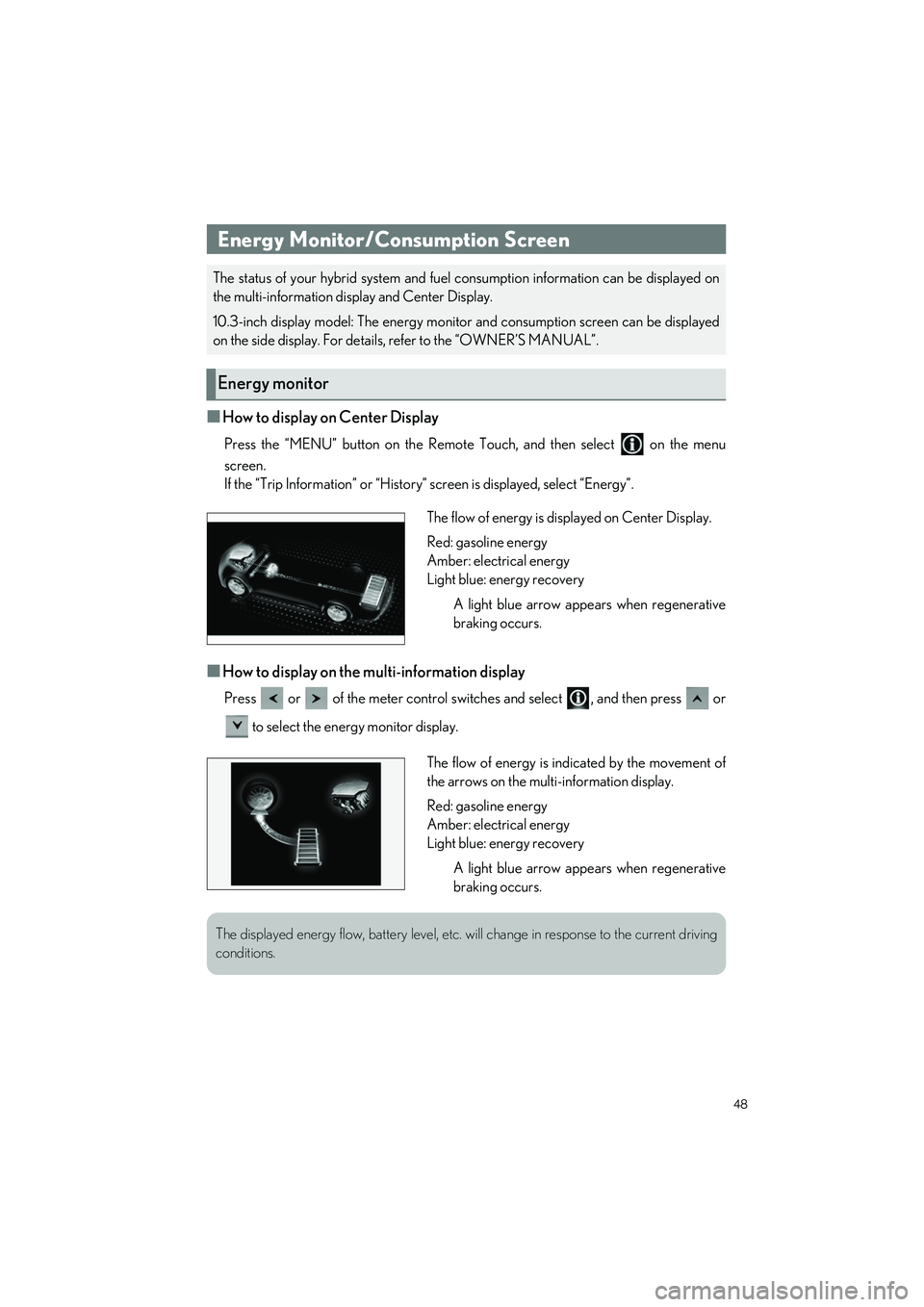
■How to display on Center Display
Press the “MENU” button on the Remote Touch, and then select on the menu
screen.
If the “Trip Information” or “History” screen is displayed, select “Energy”.
■How to display on the multi-information display
Press or of the meter control switches and select , and then press or
to select the energy monitor display.
Energy Monitor/Consumption Screen
The status of your hybrid system and fuel consumption information can be displayed on
the multi-information display and Center Display.
10.3-inch display model: The energy monito r and consumption screen can be displayed
on the side display. For details, refer to the “OWNER’S MANUAL”.
Energy monitor
The flow of energy is displayed on Center Display.
Red: gasoline energy
Amber: electrical energy
Light blue: energy recovery
A light blue arrow appears when regenerative
braking occurs.
The flow of energy is indicated by the movement of
the arrows on the multi-information display.
Red: gasoline energy
Amber: electrical energy
Light blue: energy recoveryA light blue arrow appears when regenerative
braking occurs.
The displayed energy flow, battery level, etc. will change in response to the current driving
conditions.
Page 50 of 100
49
UX250h_QG_OM76572U_(U)
Press the “MENU” button on the Remote Touch, and then select on the menu screen.
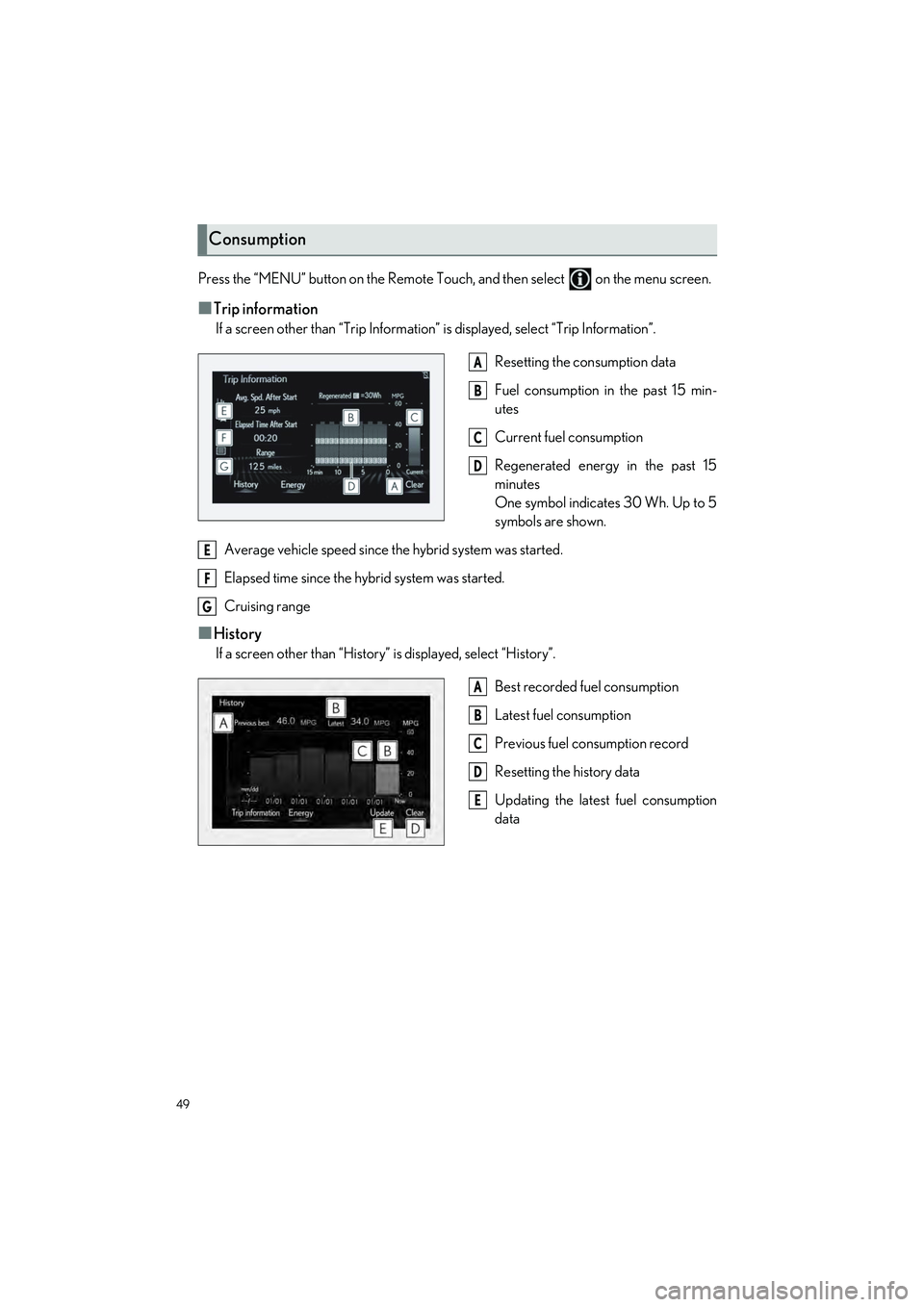
■Trip information
If a screen other than “Trip Information” is displayed, select “Trip Information”.
Resetting the consumption data
Fuel consumption in the past 15 min-
utes
Current fuel consumption
Regenerated energy in the past 15
minutes
One symbol indicates 30 Wh. Up to 5
symbols are shown.
Average vehicle speed since the hybrid system was started.
Elapsed time since the hybrid system was started.
Cruising range
■History
If a screen other than “History” is displayed, select “History”.
Best recorded fuel consumption
Latest fuel consumption
Previous fuel consumption record
Resetting the history data
Updating the latest fuel consumption
data
Consumption
A
B
C
D
E
F
G
A
B
C
D
E
Page 67 of 100

66
UX250h_QG_OM76572U_(U)
■Main control screen
Using the touchpad of the Remote Touch, select the button on the screen.Sub menu
Adjust the left-hand side temperature
setting
Adjust the fan speed setting
Select the air flow mode
Adjust the right-hand side temperature
setting
Function on/off indicators
Sub function menu
■Option control screen
Select on the sub menu to display the option control screen.
The functions can be switched on and off.
When the function is on, the in dicator illuminates on the screen.
Set Lexus Climate Concierge ( P.64)
Adjusting the temp erature for driver
and front passenger seats separately
(“DUAL” mode)
Set eco air conditioning mode
Air conditioning and heater output is
limited to prioritize fuel economy.
Cooling and dehumidification function
Prevent ice from building up on the windshield and wiper blades (Windshield wiper
de-icer) (if equipped)
Select front seat concentrated airflow mode (S-FLOW)
Air conditioning control screen
A
B
C
D
E
F
G
A
B
C
D
E
F
Page 83 of 100

82
UX250h_QG_OM76572U_(U)
●Stolen Vehicle Location
If your vehicle is stolen, Safety Connect can work with local authorities to assist them in
locating and recovering the vehicle. After filing a police report, call the Safety Connect
response center at 1-800-25-LEXUS (1-800-255-3987) in the United States, 1-877-
539-8777 in Puerto Rico or 1-800-265-39 87 in Canada, and follow the prompts for
Safety Connect to initiate this service.
In addition to assisting law enforcement with recovery of a stolen vehicle, Safety-Con-
nect-equipped vehicle location data may, under certain circumstances, be shared with
third parties to locate your vehicle. Furth er information is available at Lexus.com.
● Emergency Assistance Button (“SOS”)
In the event of an emergency on the road, push the “SOS” button to reach the Safety
Connect response center. The answering agent will determine your vehicle’s location,
assess the emergency, and dispatch the necessary assistance required.
If you accidentally press the “SOS” button, tell the response-center agent that you are
not experiencing an emergency.
● Enhanced Roadside Assistance
Enhanced Roadside Assistance adds GPS da ta to the already included warranty-based
Lexus roadside service.
Subscribers can press the “SOS” button to reach a Safety Connect response-center
agent, who can help with a wide range of needs, such as: towing, flat tire, fuel delivery, etc.
For a description of the Roadside Assistance services and their limitations, please see the
Safety Connect Terms and Conditions, which are available at Lexus.com.
After you have signed the Telematics Subscr iption Service Agreement and are enrolled,
you can begin receiving services.
A variety of subscription terms is available for purchase. Contact your Lexus dealer, call the
following or push the “SOS” button in your vehicle for further subscription details.
● The United States
1-800-25-LEXUS (1-800-255-3987)
● Canada
1-800-26-LEXUS (1-800-265-3987)
● Puerto Rico
1-877-539-8777
Subscription