set LEXUS UX200 2019 Owners Manual
[x] Cancel search | Manufacturer: LEXUS, Model Year: 2019, Model line: UX200, Model: LEXUS UX200 2019Pages: 452, PDF Size: 10.06 MB
Page 375 of 452
3757-2. Steps to take in an emergency
7
When trouble arises
come off.
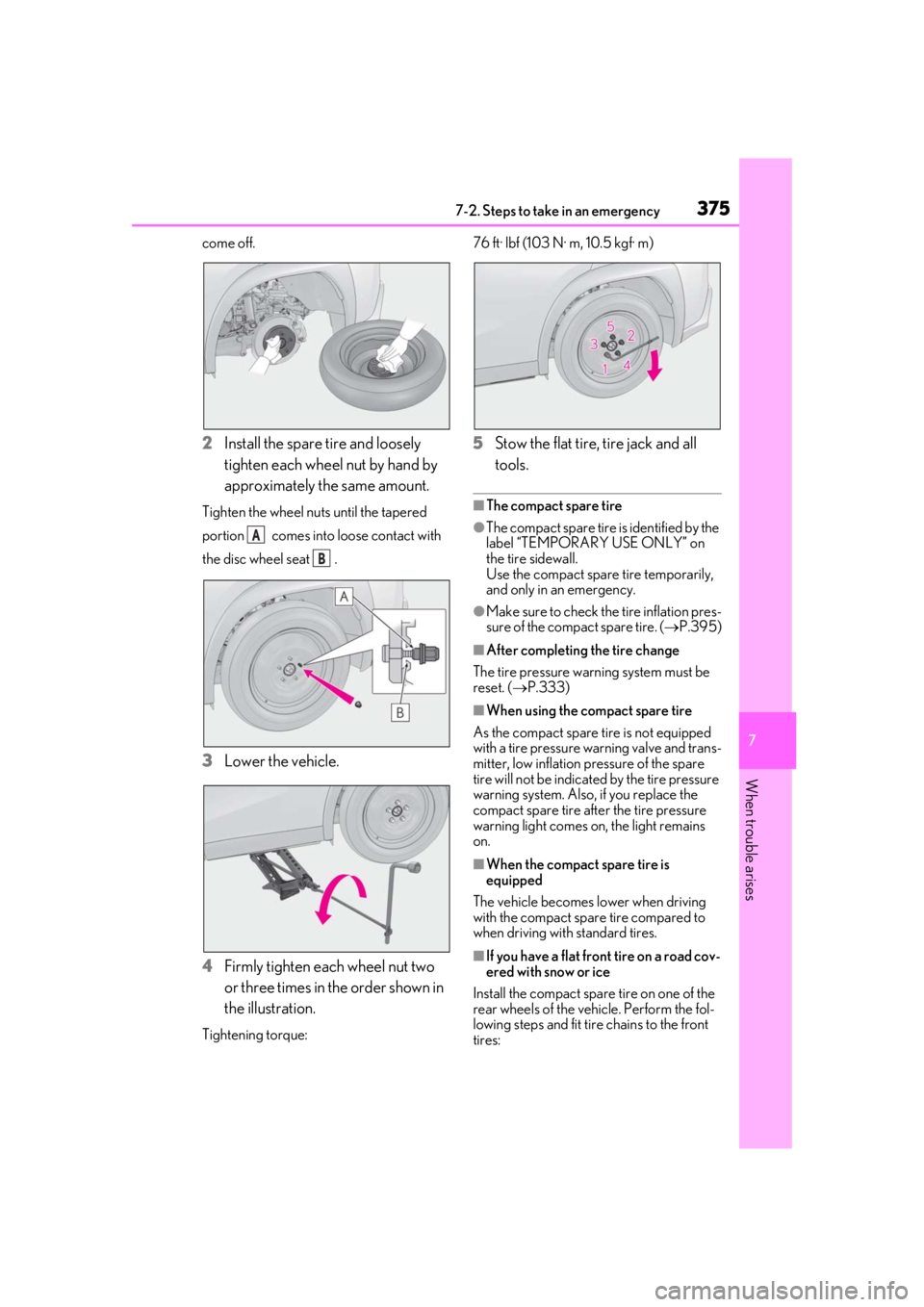
2Install the spare tire and loosely
tighten each wheel nut by hand by
approximately the same amount.
Tighten the wheel nuts until the tapered
portion comes into loose contact with
the disc wheel seat .
3Lower the vehicle.
4 Firmly tighten each wheel nut two
or three times in the order shown in
the illustration.
Tightening torque: 76 ft· lbf (103 N· m, 10.5 kgf· m)
5
Stow the flat tire, tire jack and all
tools.
■The compact spare tire
●The compact spare tire is identified by the
label “TEMPORARY USE ONLY” on
the tire sidewall.
Use the compact spar e tire temporarily,
and only in an emergency.
●Make sure to check the tire inflation pres-
sure of the compact spare tire. ( P.395)
■After completing the tire change
The tire pressure warn ing system must be
reset. ( P.333)
■When using the compact spare tire
As the compact spare tire is not equipped
with a tire pressure warning valve and trans-
mitter, low inflation pressure of the spare
tire will not be indicated by the tire pressure
warning system. Also, if you replace the
compact spare tire afte r the tire pressure
warning light comes on, the light remains
on.
■When the compact spare tire is
equipped
The vehicle becomes lower when driving
with the compact spare tire compared to
when driving with standard tires.
■If you have a flat front tire on a road cov-
ered with snow or ice
Install the compact spare tire on one of the
rear wheels of the vehicle. Perform the fol-
lowing steps and fit tire chains to the front
tires:
A
B
Page 378 of 452
3787-2. Steps to take in an emergency
One of the following may be the cause
of the problem:
There may not be sufficient fuel in
the vehicle’s tank.
Refuel the vehicle.
The engine may be flooded.
Try to restart the engine again fol-
lowing correct starting proce-
dures.( P.152)
There may be a malfunction in the
engine immobilizer system.
( P.62)
One of the following may be the cause
of the problem:
The battery terminal connections
may be loose or corroded.
The battery may be discharged.
( P.382) The engine starting system may be
malfunctioning due to an electrical
problem such as electronic key battery
depletion or a blown fuse. However, an
interim measure is available to start the
engine. (
P.378)
One of the following may be the cause
of the problem:
One or both of the battery terminals
may be disconnected.
The battery may be discharged.
( P.382)
There may be a malfunction in the
steering lock system.
Contact your Lexus dealer if the problem
cannot be repaired, or if repair procedures
are unknown.
When the engine does not start, the
following steps can be used as an
interim measure to start the engine if
the engine switch is functioning nor-
mally:
1 Press the parking brake switch to
check that the parking brake is set.
(P.160)
Parking brake indicator will come on.
If the engine will not start
If the engine will not start even
though correct starting procedures
are being followed ( P.152), con-
sider each of the following points:
The engine will not start even
though the starter motor oper-
ates normally.
The starter motor turns over
slowly, the interior lights and
headlights are dim, or the horn
does not sound or sounds at a low
volume.
The starter motor does not turn
over
The starter motor does not turn
over, the interior lights and head-
lights do not turn on, or the horn
does not sound.
Starting the engine in an emer-
gency
Page 380 of 452
3807-2. Steps to take in an emergency
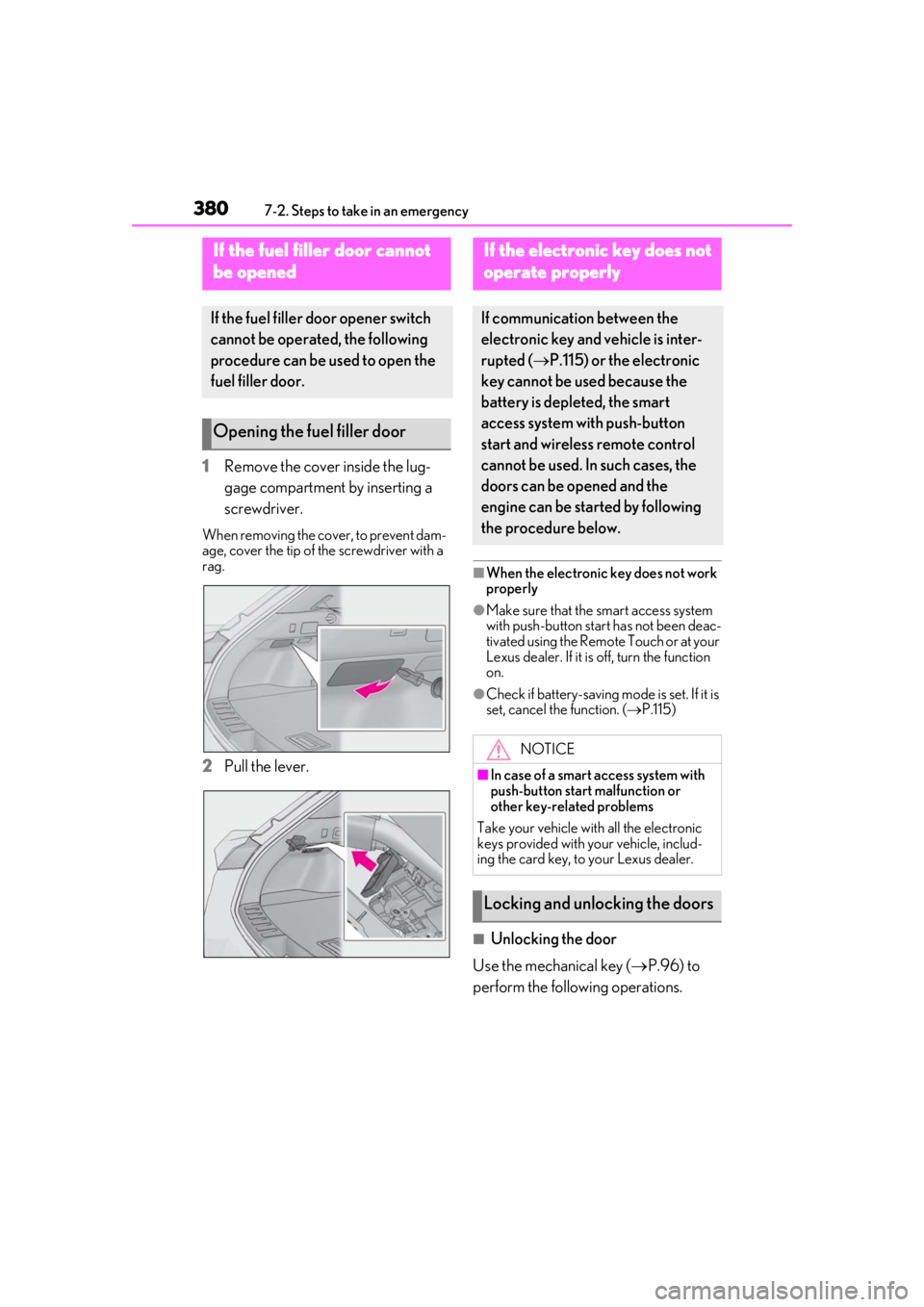
1Remove the cover inside the lug-
gage compartment by inserting a
screwdriver.
When removing the cover, to prevent dam-
age, cover the tip of the screwdriver with a
rag.
2Pull the lever.
■When the electronic key does not work
properly
●Make sure that the smart access system
with push-button start has not been deac-
tivated using the Remote Touch or at your
Lexus dealer. If it is off, turn the function
on.
●Check if battery-saving mode is set. If it is
set, cancel the function. (P.115)
■Unlocking the door
Use the mechanical key ( P.96) to
perform the following operations.
If the fuel filler door cannot
b
e opened
If the fuel filler door opener switch
cannot be operated, the following
procedure can be used to open the
fuel filler door.
Opening the fuel filler door
If the electronic key does not
o
perate properly
If communication between the
electronic key and vehicle is inter-
rupted ( P.115) or the electronic
key cannot be used because the
battery is depleted, the smart
access system with push-button
start and wireless remote control
cannot be used. In such cases, the
doors can be opened and the
engine can be started by following
the procedure below.
NOTICE
■In case of a smart access system with
push-button start malfunction or
other key-related problems
Take your vehicle with all the electronic
keys provided with your vehicle, includ-
ing the card key, to your Lexus dealer.
Locking and unlocking the doors
Page 381 of 452
3817-2. Steps to take in an emergency
7
When trouble arises
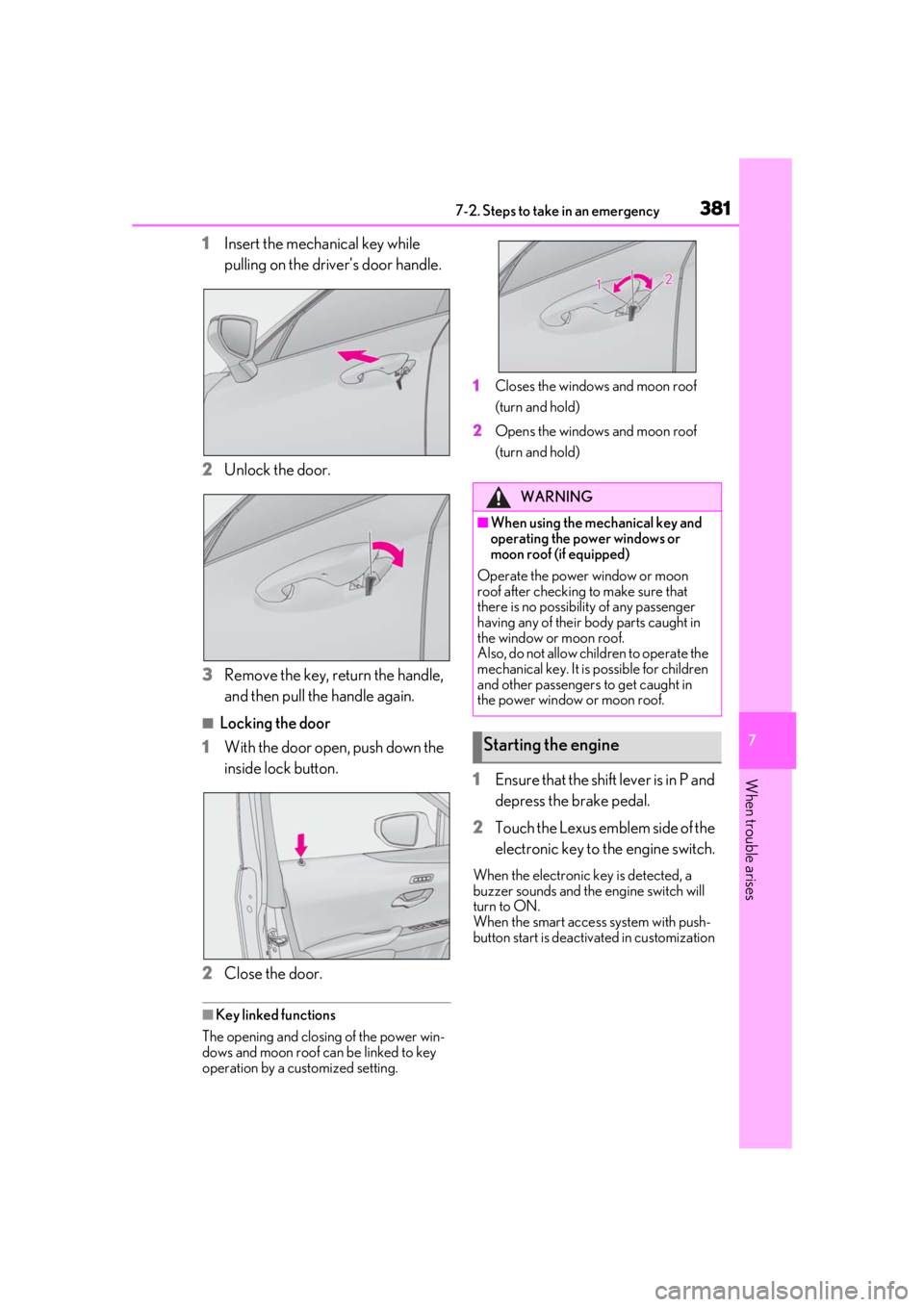
1Insert the mechanical key while
pulling on the driver’s door handle.
2
Unlock the door.
3
Remove the key, return the handle,
and then pull the handle again.
■Locking the door
1
With the door open, push down the
inside lock button.
2
Close the door.
■Key linked functions
The opening and closing of the power win-
dows and moon roof can be linked to key
operation by a customized setting. 1
Closes the windows and moon roof
(turn and hold)
2
Opens the windows and moon roof
(turn and hold)
1Ensure that the shift lever is in P and
depress the brake pedal.
2
Touch the Lexus emblem side of the
electronic key to the engine switch.
When the electronic key is detected, a
buzzer sounds and the engine switch will
turn to ON.
When the smart access system with push-
button start is deactivated in customization
WARNING
■When using the mechanical key and
operating the power windows or
moon roof (if equipped)
Operate the power window or moon
roof after checking to make sure that
there is no possibility of any passenger
having any of their body parts caught in
the window or moon roof.
Also, do not allow children to operate the
mechanical key. It is possible for children
and other passengers to get caught in
the power window or moon roof.
Starting the engine
Page 382 of 452
3827-2. Steps to take in an emergency
setting, the engine switch will turn to ACC.
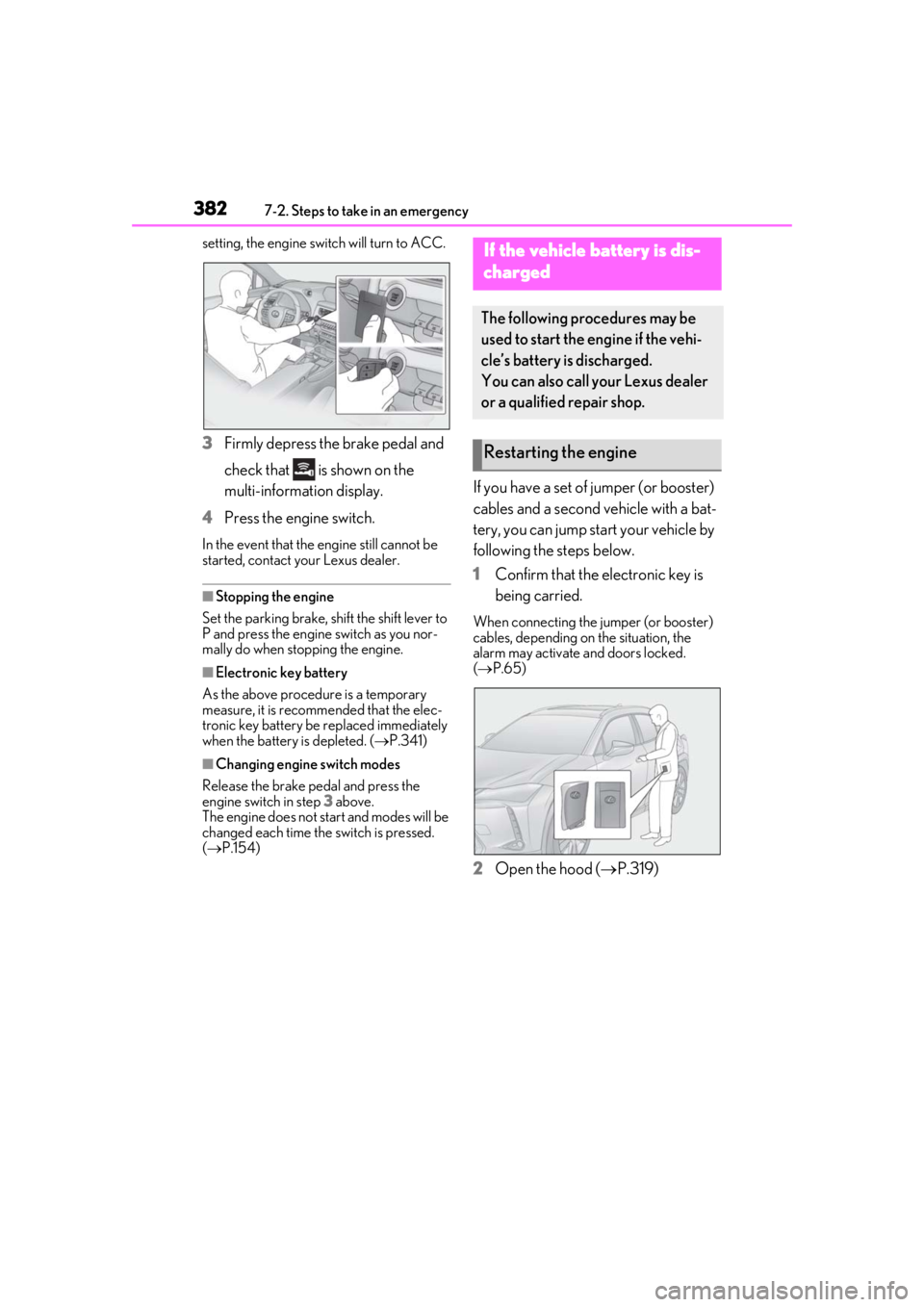
3Firmly depress the brake pedal and
check that is shown on the
multi-information display.
4 Press the engine switch.
In the event that the engine still cannot be
started, contact your Lexus dealer.
■Stopping the engine
Set the parking brake, shift the shift lever to
P and press the engine switch as you nor-
mally do when stopping the engine.
■Electronic key battery
As the above procedure is a temporary
measure, it is recomme nded that the elec-
tronic key battery be replaced immediately
when the battery is depleted. ( P.341)
■Changing engine switch modes
Release the brake pedal and press the
engine switch in step 3 above.
The engine does not start and modes will be
changed each time the switch is pressed.
( P.154)
If you have a set of jumper (or booster)
cables and a second vehicle with a bat-
tery, you can jump start your vehicle by
following the steps below.
1 Confirm that the electronic key is
being carried.
When connecting the jumper (or booster)
cables, depending on the situation, the
alarm may activate and doors locked.
( P.65)
2 Open the hood ( P.319)
If the vehicle battery is dis-
charged
The following procedures may be
used to start the engine if the vehi-
cle’s battery is discharged.
You can also call your Lexus dealer
or a qualified repair shop.
Restarting the engine
Page 388 of 452
3887-2. Steps to take in an emergency
1Stop the engine. Shift the shift lever
to P and set the parking brake.
2
Remove the mud, snow or sand
from around the front wheels.
3
Place wood, stones or some other
material under the front wheels to
help provide traction.
4
Restart the engine.
5
Shift the shift lever to D or R and
release the parking brake. Then,
while exercising caution, depress
the accelerator pedal.
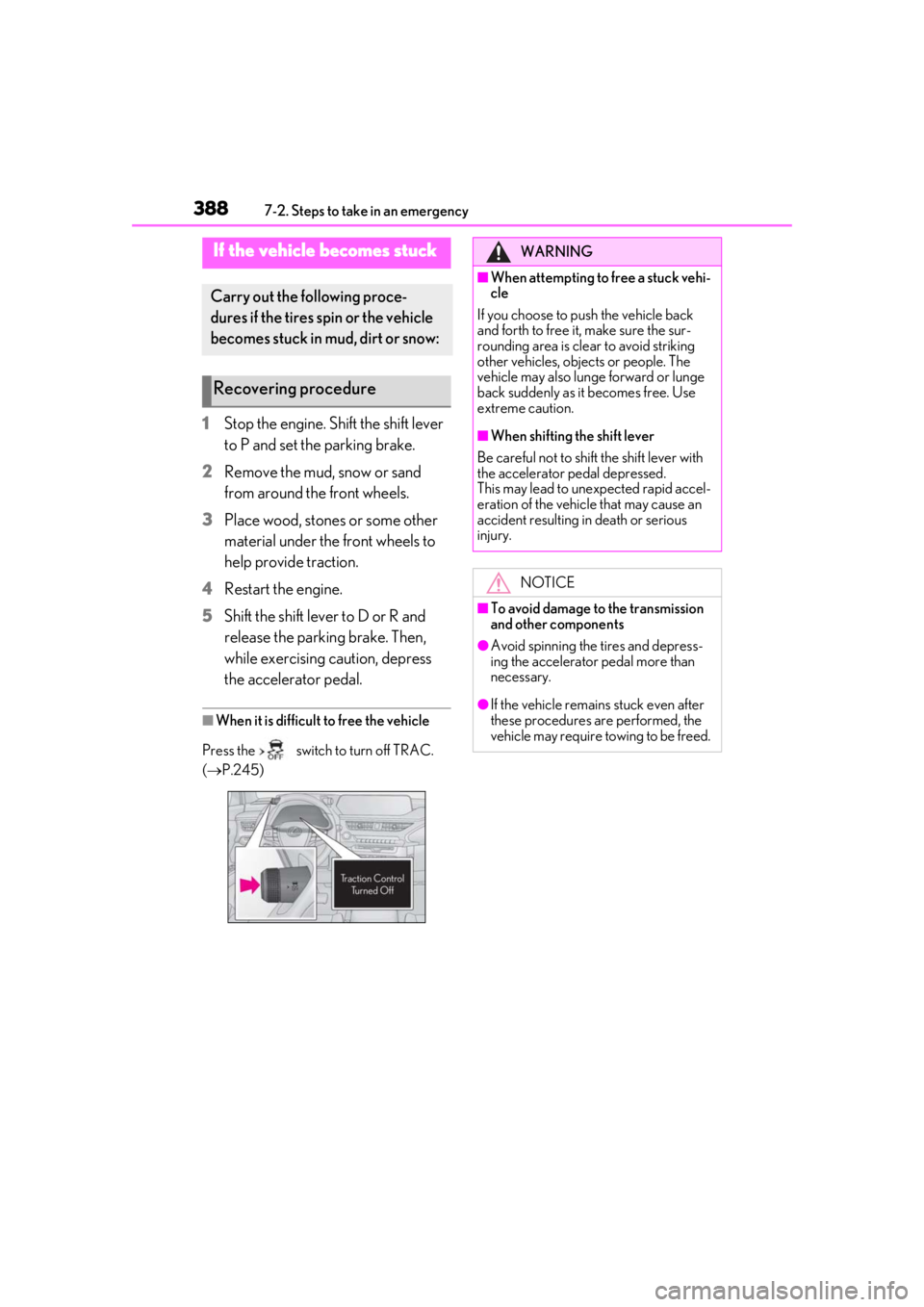
■When it is difficult to free the vehicle
Press the switch to turn off TRAC.
( P.245)
If the vehicle becomes stuck
Carry out the following proce-
dures if the tires spin or the vehicle
becomes stuck in mud, dirt or snow:
Recovering procedure
WARNING
■When attempting to free a stuck vehi-
cle
If you choose to push the vehicle back
and forth to free it, make sure the sur-
rounding area is clear to avoid striking
other vehicles, objects or people. The
vehicle may also lunge forward or lunge
back suddenly as it becomes free. Use
extreme caution.
■When shifting the shift lever
Be careful not to shif t the shift lever with
the accelerator pedal depressed.
This may lead to un expected rapid accel-
eration of the vehicle that may cause an
accident resulting in death or serious
injury.
NOTICE
■To avoid damage to the transmission
and other components
●Avoid spinning the tires and depress-
ing the accelerator pedal more than
necessary.
●If the vehicle remains stuck even after
these procedures are performed, the
vehicle may require towing to be freed.
Page 408 of 452
4088-2. Customization
8-2.Customization
■Changing using the meter control
switches
1
Press or of the meter con-
trol switches, and select .
2
Press or of the meter con-
trol switches, select the item, and
press “OK”.
3
Press or of the meter con-
trol switches, select the desired set-
ting, and press “OK”.
To go back to the previous screen or
exit the customize mode, press .
■Changing using the Remote Touch
1
Press the “MENU” button on the
Remote Touch. 2
Select “Setup” on the menu screen
and select “Vehicle”.
3
Select “Vehicle Customization”.
Various setting can be changed. Refer to
the list of settings th at can be changed for
details.
For details on the Remote Touch, refer
to the “NAVIGATION AND MULTI-
MEDIA SYSTEM OWNER’S MAN-
UAL”.
■When customizing using the Remote
Touch
Stop the vehicle in a safe place, apply the
parking brake, and shift the shift lever to P.
Also, to prevent battery discharge, leave
the engine running while customizing the
features.
Some function settings are changed simultaneously with other functions being cus-
tomized. Contact your Lexus dealer for further details.
Settings that can be changed using the Remote Touch
Settings that can be changed using the meter control switches
Customizable features
Your vehicle includes a variety of
electronic features that can be per-
sonalized to your preferences. The
settings of these features can be
changed by using the meter control
switches, the Remote Touch or at
your Lexus dealer.
Customizing vehicle features
WARNING
■Cautions during customization
As the engine needs to be running
during customization, ensure that the
vehicle is parked in a place with ade-
quate ventilation. In a closed area such as
a garage, exhaust gases including harm-
ful carbon monoxide (CO) may collect
and enter the vehicle. This may lead to
death or a serious health hazard.
NOTICE
■During customization
To prevent battery discharge, ensure that
the engine is running while customizing
features.
Customizable features
A
B
Page 409 of 452
4098-2. Customization
8
Vehicle specifications
Settings that can be changed by your Lexus dealer
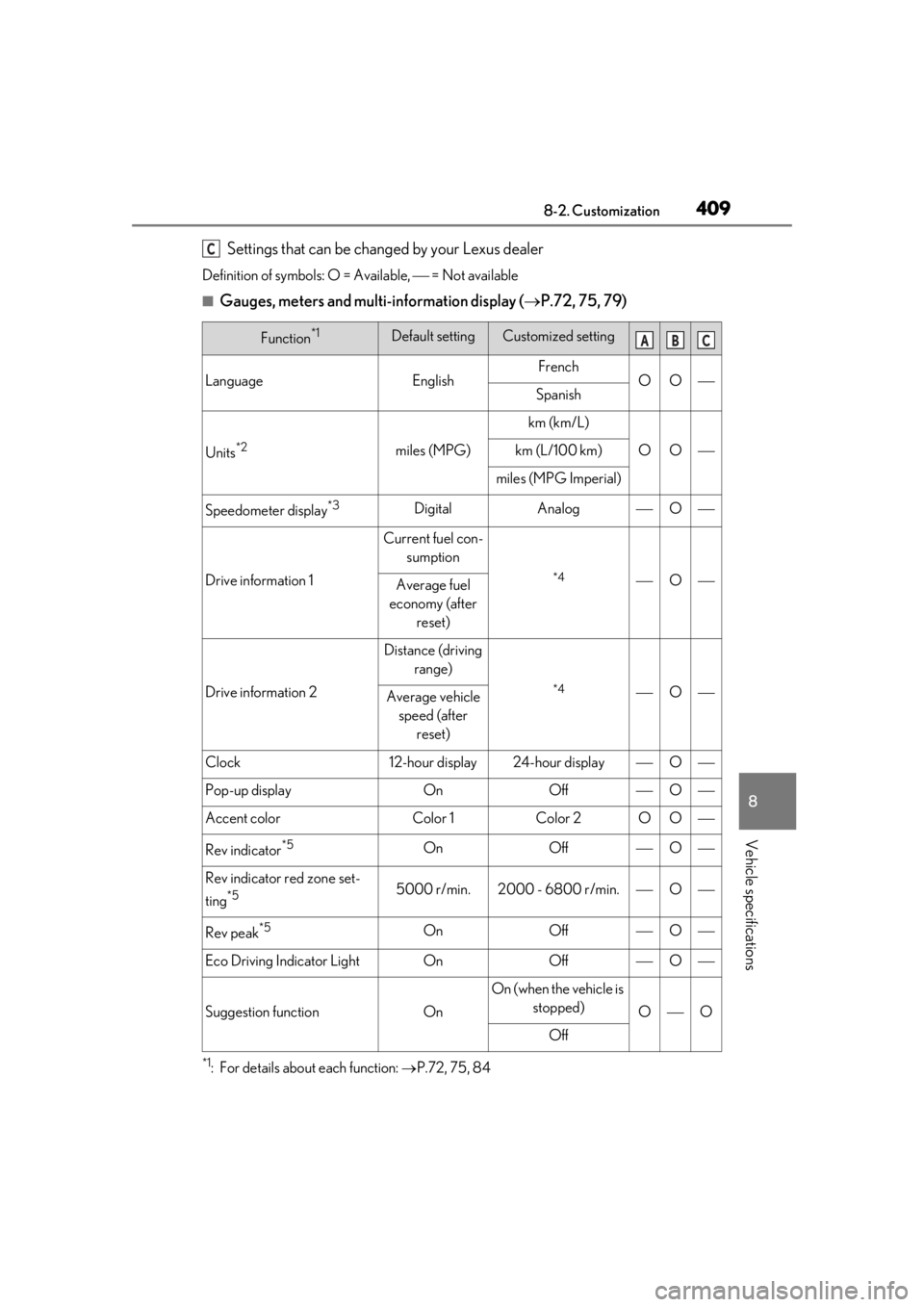
Definition of symbols: O = Available, = Not available
■Gauges, meters and multi-information display (P.72, 75, 79)
*1: For details about each function: P.72, 75, 84
Function*1Default settingCustomized setting
LanguageEnglishFrenchOOSpanish
Units*2miles (MPG)
km (km/L)
OOkm (L/100 km)
miles (MPG Imperial)
Speedometer display*3DigitalAnalogO
Drive information 1
Current fuel con-
sumption
*4OAverage fuel
economy (after reset)
Drive information 2
Distance (driving range)
*4OAverage vehicle speed (after reset)
Clock12-hour display24-hour displayO
Pop-up displayOnOffO
Accent colorColor 1Color 2OO
Rev indicator*5OnOffO
Rev indicator red zone set-
ting
*55000 r/min.2000 - 6800 r/min.O
Rev peak*5OnOffO
Eco Driving Indicator LightOnOffO
Suggestion functionOn
On (when the vehicle is stopped)
OO
Off
C
ABC
Page 410 of 452
4108-2. Customization
*2: The default setting varies according to country.
*3:Except F SPORT models
*4: 2 of the following items: current fuel consumption, average fuel economy (after reset),
average fuel economy (after start), average fuel economy (after refuel), average vehicle
speed (after reset), average vehicle speed (after start), elapsed time (after reset),
elapsed time (after start), distance (driving range), distance (after start), blank.
*5:F SPORT models
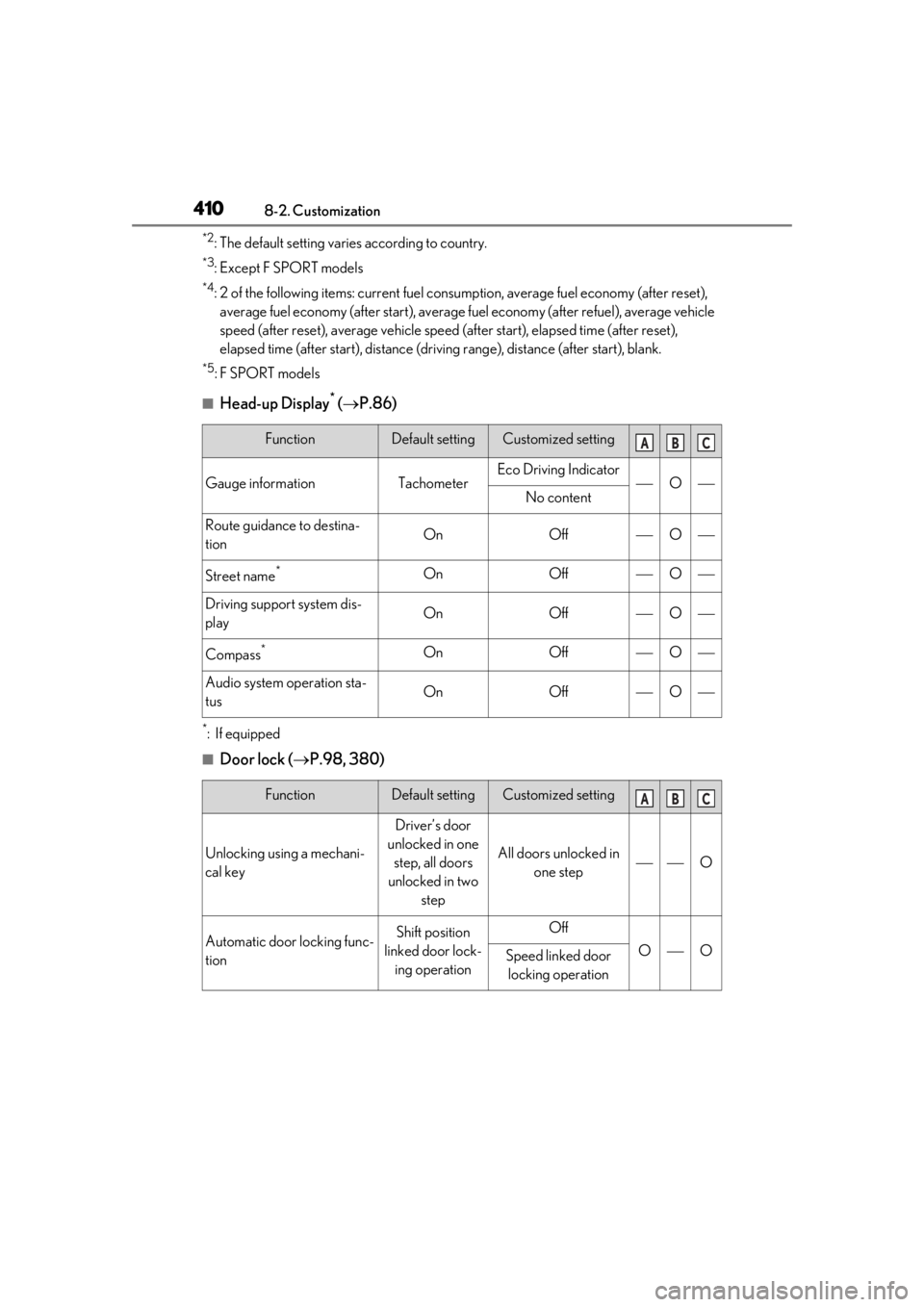
■Head-up Display* ( P.86)
*:If equipped
■Door lock ( P.98, 380)
FunctionDefault settingCustomized setting
Gauge informationTachometerEco Driving IndicatorONo content
Route guidance to destina-
tionOnOffO
Street name*OnOffO
Driving support system dis-
playOnOffO
Compass*OnOffO
Audio system operation sta-
tusOnOffO
FunctionDefault settingCustomized setting
Unlocking using a mechani-
cal key
Driver’s door
unlocked in one step, all doors
unlocked in two step
All doors unlocked in one stepO
Automatic door locking func-
tionShift position
linked door lock- ing operationOff
OOSpeed linked door locking operation
ABC
ABC
Page 411 of 452
4118-2. Customization
8
Vehicle specifications
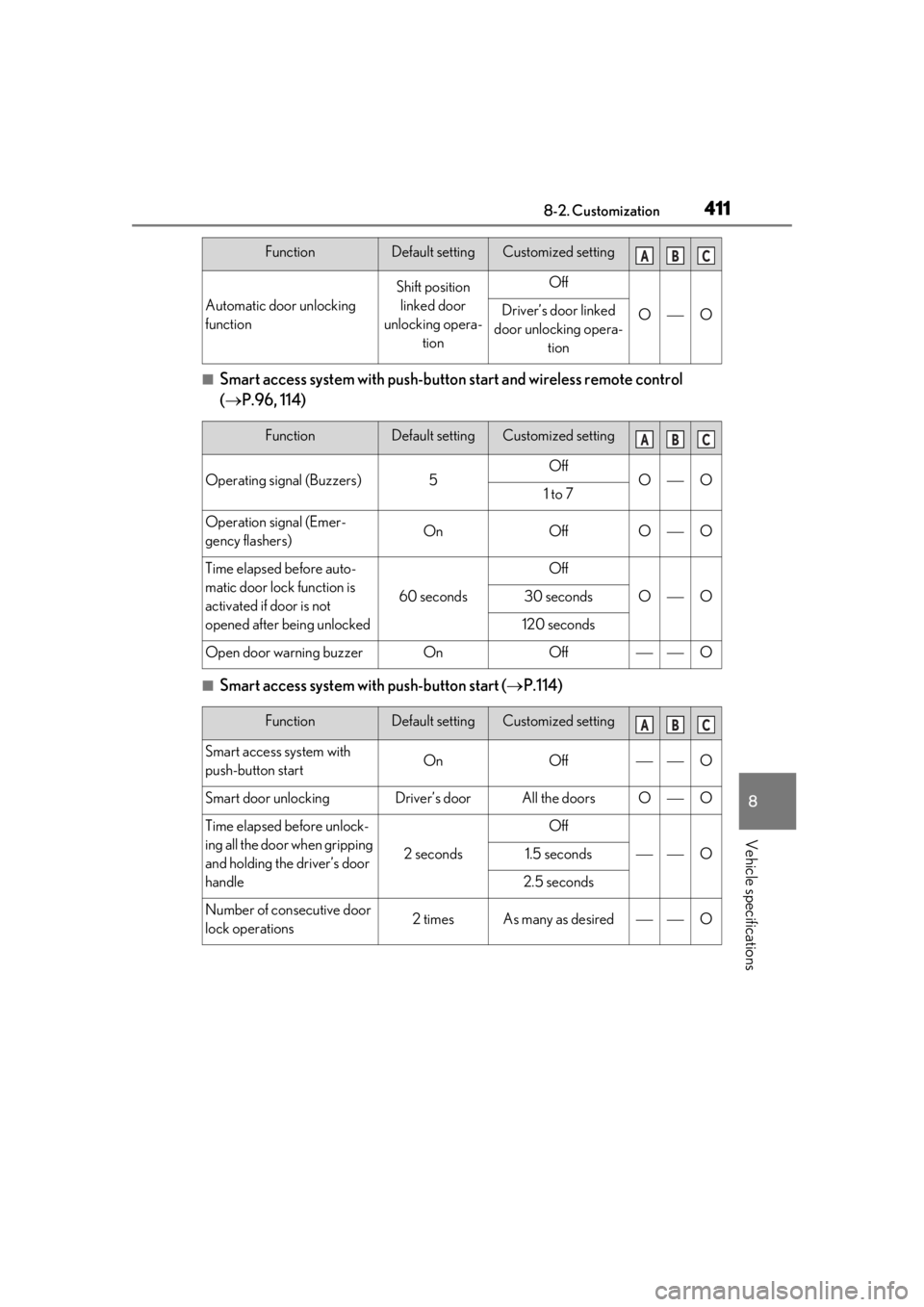
■Smart access system with push-button start and wireless remote control
( P.96, 114)
■Smart access system with push-button start ( P.114)
Automatic door unlocking
function
Shift position
linked door
unlocking opera- tionOff
OODriver’s door linked
door unlocking opera- tion
FunctionDefault settingCustomized setting
Operating signal (Buzzers)5OffOO1 to 7
Operation signal (Emer-
gency flashers)OnOffOO
Time elapsed before auto-
matic door lock function is
activated if door is not
opened after being unlocked
60 seconds
Off
OO30 seconds
120 seconds
Open door warning buzzerOnOffO
FunctionDefault settingCustomized setting
Smart access system with
push-button startOnOffO
Smart door unlockingDriver’s doorAll the doorsOO
Time elapsed before unlock-
ing all the door when gripping
and holding the driver’s door
handle
2 seconds
Off
O1.5 seconds
2.5 seconds
Number of consecutive door
lock operations2 timesAs many as desiredO
FunctionDefault settingCustomized settingABC
ABC
ABC